

12 Key Project Management Techniques in 2026


Project management techniques are the tools, processes, and methodologies used to plan, organize, and deliver projects throughout the project life cycle. They help you manage timelines, clarify responsibilities, track progress, and keep your team aligned as priorities change.
Think of project management techniques as your own personal toolkit.
You wouldn't fix a leaky faucet without a wrench or assemble furniture without a screwdriver, would you? Similarly, Gantt charts and RACI matrices help you organize work, while Agile and Waterfall offer broader approaches to managing projects. Project management software can help you put these techniques into practice.

The key to success is finding the right mix of project strategies that work best for your team and project goals. Below, we'll explore 12 project management techniques you can mix and match to suit your project's needs.
12 Important Project Management Techniques
These 12 project management techniques cover different needs, from planning schedules and assigning responsibilities to managing changing requirements. You can use them individually or combine them to suit your project's goals and workflow.
1. Gantt chart
A Gantt chart is a visual representation of a project schedule that shows all the tasks, the amount of time each will take, and task dependencies in a horizontal bar chart. It helps project managers and team members understand the timeline of the project and identify critical tasks (as do PERT charts, although PERT charts differ from Gantt charts in other ways; more on this below).

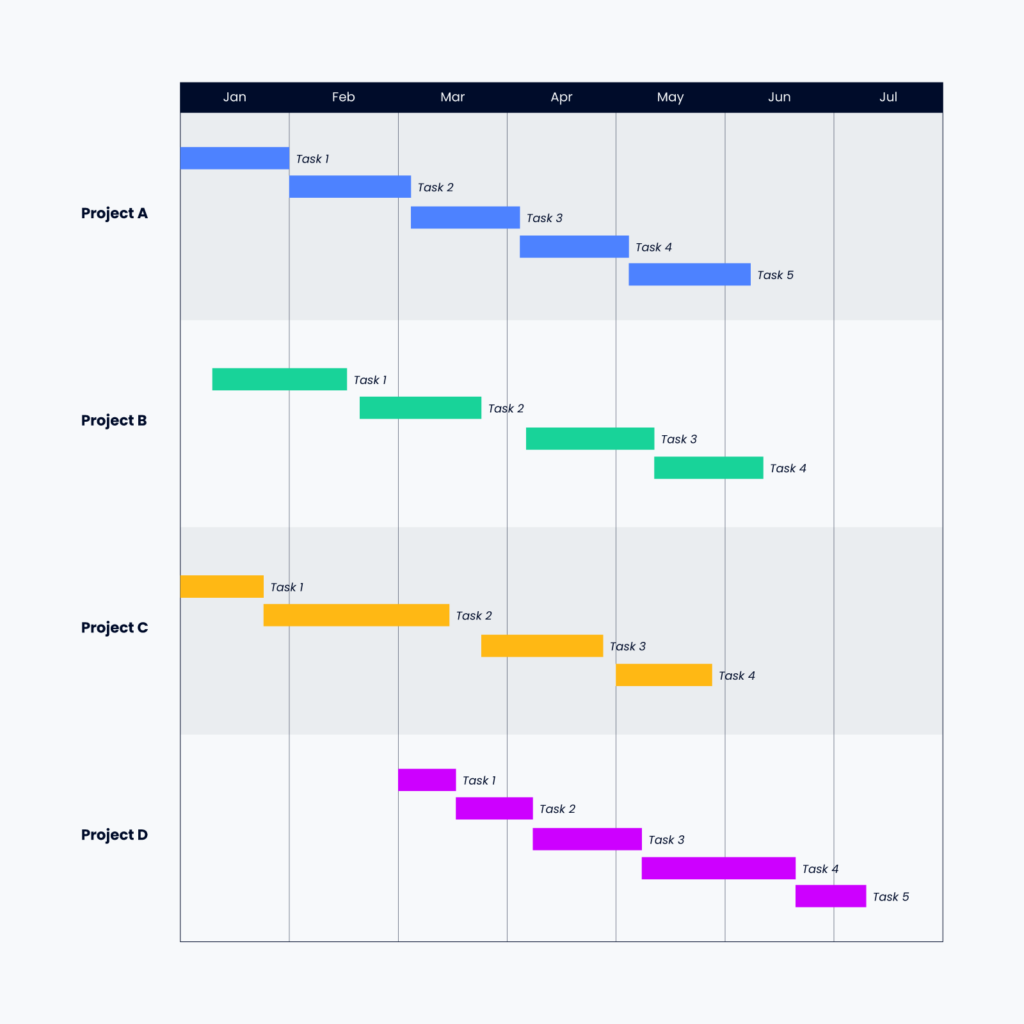
How to use a Gantt chart: You'll use Gantt charts for planning tasks and their due dates, overall deadlines and timelines, and often, who's working on each task. Most of the time, your Gantt chart will be created and maintained in dedicated Gantt chart software (although there are workarounds for Gantt charts in tools like Jira), and you'll keep referring to it as tasks are completed or delayed, making adjustments as needed.
Here's a quick summary of the benefits of Gantt chart software:
- Better manage your time and the team's time
- Increase productivity
- Visualize project progress and what's left to do at glance
- Acts as a single source of truth all team members can refer to
2. PERT chart
PERT stands for program evaluation and review technique, and PERT charts help in planning and scheduling tasks in a project. These charts show dependencies between tasks and provide a time estimate of the project's timeline.
How to use a PERT chart: Each task is plotted with a estimate of how much time it will take. The arrows represent dependencies (ex. Task 1 must be completed before Task 4), so you can easily see which tasks can run concurrently and which cannot in order to inform task prioritization.
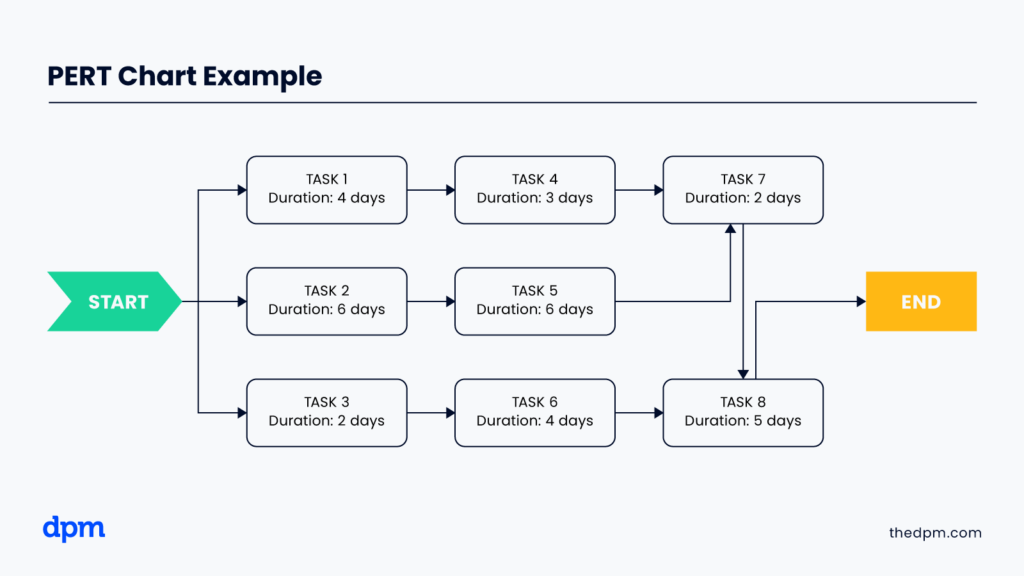
Here's a quick summary of the benefits of using a PERT chart:
- Helps users identify task sequencing and dependencies.
- Highlights the critical path, or the sequence of tasks that directly impact the project's completion time.
- Facilitates collaboration and communication among project stakeholders.
3. Kanban board
A Kanban board is a visual representation of a project's workflow that helps in managing and tracking work. It involves creating columns for different stages of a project, such as "Backlog", "To Do," "In Progress," and "Done", so you can track your project step-by-step as it is completed.
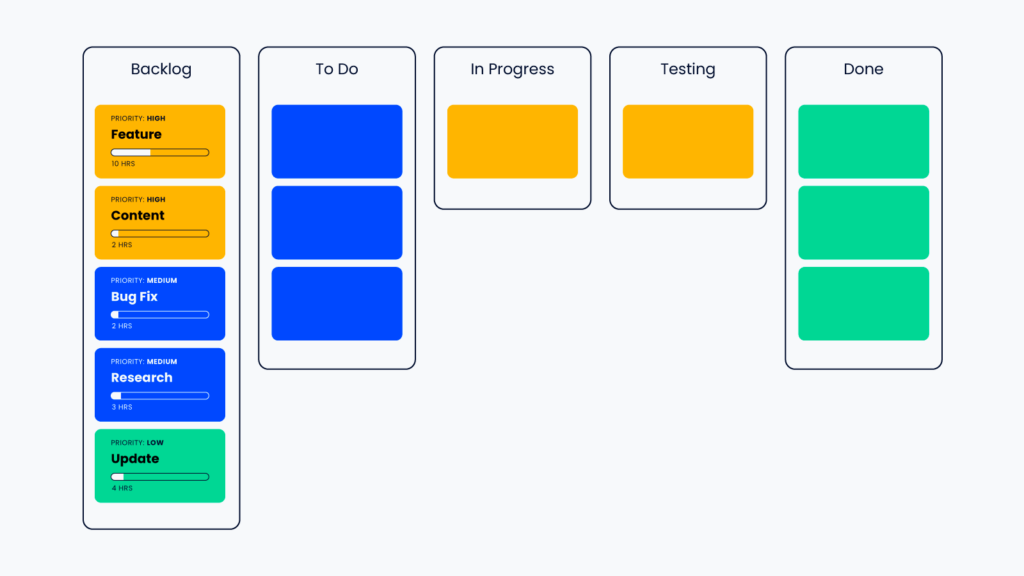
How to use a Kanban board: Kanban board are best used for projects with ongoing work, such as the post-live maintenance phase or bug tracking and fixing. They're also great for ongoing operations and customer support tasks. You can even customize the names of columns to make your stages more project-specific, such as a ‘Stakeholder Review'.
Here's a quick summary of the benefits of using a Kanban board:
- Allows entire team to see workflow and progress at a glance
- Quickly identify blockers and bottlenecks
- Ability to measure metrics, such as lead time expected to complete a task
4. Work breakdown structure
A work breakdown structure (WBS) is a hierarchical decomposition of a project into smaller, more manageable components. Using work breakdown structure tools will help you organize and define the project scope and break the project down into smaller tasks and more manageable project activities.
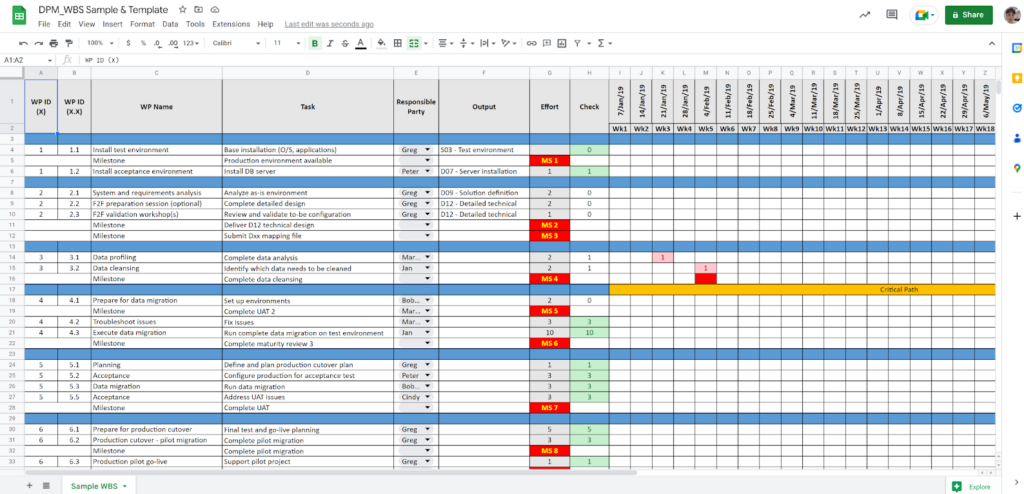
How to use a WBS: The WBS helps stakeholders to understand what work is part of project delivery. Work that isn’t in the WBS isn’t in the project. You can easily create a WBS spreadsheet in Microsoft Excel or another platform and use it to keep projects in scope and quickly settle debates with team members and stakeholders about what's in and out of scope.
Here's a quick summary of the benefits of using a WBS:
- Increases clarity around roles and responsibilities
- Ensures tasks are completed properly and on time
- Enables activity tracking against the baseline
Find more WBS examples here.
5. Project plan/timeline
A project plan or timeline is a document that outlines the project's objectives, scope, timeline, and resources required to complete it. It helps in identifying and scheduling the tasks required to complete the project on time and track project progress against various project team members.
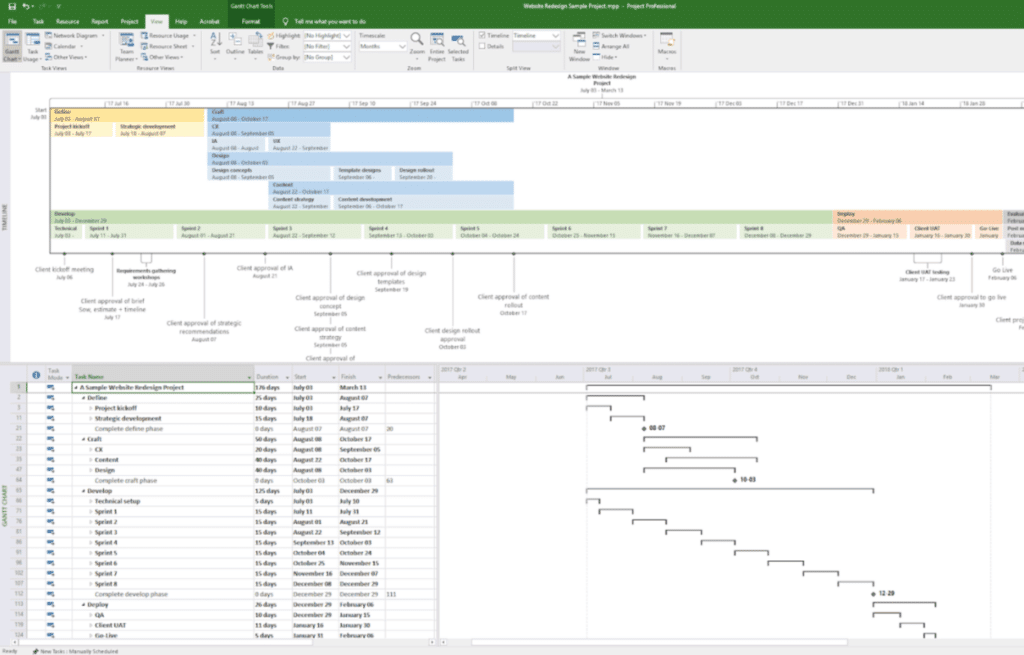
How to use a project plan: A good project plan will provide clarity on what needs to be done, when it needs to be done by, and who is responsible for each project task. The project plan should be regularly reviewed and updated throughout the project to ensure it is still relevant to the team's objectives.
Here's a quick summary of the benefits of a project plan:
- Clarifies process and activities that will lead to project outputs and deliverables
- Gives you the right information to estimate properly
- Visualize the entire project and see the interdependencies between tasks
- Helps with resource management, shows who does what task when, and helps forecast your resource requirements
- Provides milestones to track progress against (and timeframes and dates for client approvals)
- Enables you to baseline and track your project progress properly
- Enables agreement on the all-important live date
Find more project planning techniques.
6. RACI
RACI stands for responsible, accountable, consulted, and informed. It is a project management tool that helps in defining and clarifying roles and responsibilities for each team member and task in a project.
It's easy to set up and continue to refer to throughout the project. Set up a simple table in Notion or whatever other software you're using. It goes a long way in ensuring everyone, including stakeholders, knows what they need to contribute and what they are accountable for.
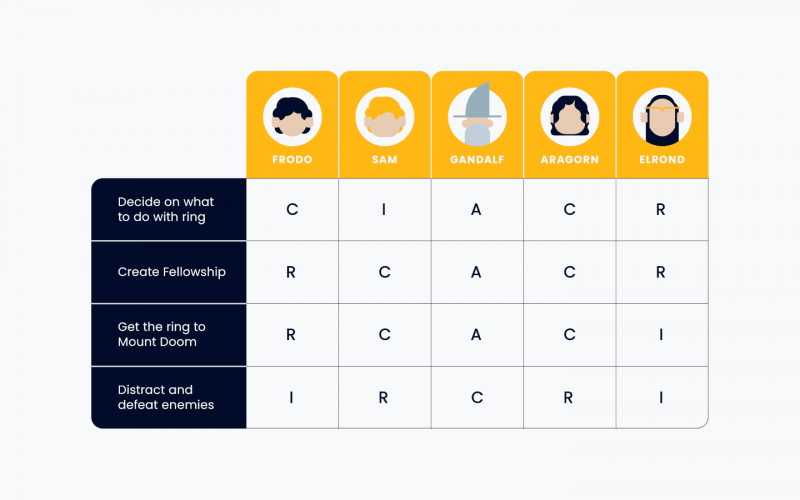
How to use a RACI chart: RACI charts are most useful for large projects with multiple stakeholders. Not using a RACI can lead to difficulties further down the line, when people ask why they weren’t involved, or you find out there’s another layer of approval needed.
Here's a quick summary of the benefits of a RACI chart (as well as its cousin, the RASCI chart):
- Sets clear expectations
- Streamlines communication
- Avoids people overload
- Helps balance workloads and avoid silos

7. Project management software
A digital tool that helps in planning, organizing, and tracking tasks, deliverables and resources in a project.
It typically includes features such as project task management, resource management, collaboration, and reporting. Examples of project management software include Trello, Asana, Microsoft Project, and monday.com.
Here's a quick summary of why you should use project management software:
- Better scheduling
- Faster communication
- Improved organization
- Reduced risk of scope creep
- Simplified status report
- Fewer redundancies
- Less training
- Easier resource planning
8. Agile
Agile project management delivers value to customers through an iterative approach which involves a collaborative and flexible working framework. It involves breaking down projects into smaller, more manageable chunks called sprints, which are completed in short iterations.
The agile methodology prioritizes customer satisfaction and responsiveness to change and is often used in software development projects and other complex projects.
9. Waterfall
Waterfall is a linear project management methodology that follows a sequential approach, with each phase of the project being completed before moving on to the next.
It involves a structured planning process, with a clear set of project requirements and milestones that must be met before moving on to the next phase of the project management process.
Waterfall is commonly used in construction and engineering projects, where a well-defined scope and plan are essential for project completion.
10. Scrum
Scrum is one of many agile methodologies that is designed to be used in complex and rapidly changing projects. It's based on the principles of iterative and incremental development, with a focus on delivering a usable product at the end of each sprint.
Scrum involves a collaborative team approach, with a dedicated Scrum master to facilitate communication and remove any obstacles that may arise during the sprint cycles for the team members.
11. Critical path method (CPM)
The critical path method is a project management methodology that focuses on identifying the critical path of a project, which is the sequence of project tasks that must be prioritized and completed on time in order to meet the project deadline. It involves creating a detailed timeline schedule that maps out all the tasks.
12. Critical chain method (CCPM)
The critical chain method focuses on identifying and managing project uncertainties and risks.
It is based on the theory of constraints, which suggests that in any project, there are one or more constraints that limit the project's overall performance. The methodology seeks to identify these constraints and allocate resources to them accordingly.
The CCPM also involves creating a buffer, called the critical chain, to account for uncertainties or delays that might occur during the project. This buffer helps ensure the project is completed on time, even if something unexpected happens.
The critical chain method emphasizes the importance of communication and collaboration among team members to ensure that the project is executed efficiently and effectively.
Benefits of Project Techniques
Project management techniques may not be the most exciting topic in the world, but they are versatile, reliable, and can help you get out of a bind when you need it the most. Here are a few of the benefits:
- They provide the structure and organization needed to plan, execute, and control projects from start to finish.
- They can help you save time, reduce costs, and increase efficiency.
- They enable better risk management, helping you to identify potential risks and challenges in advance so you can proactively manage them before they become bigger problems.
- They help you communicate more effectively with your project team and stakeholders, ensuring everyone is on the same page and working towards a common goal.
- They incorporate project controls to track progress, manage resources, and ensure that project scope, budget, and timelines remain in check.
Sometimes, you can even get a bigger benefit from mixing techniques. For example, you can mix PERT or CPM with the Delphi technique to considerably improve your risk management.
So, whether you're a seasoned project manager or new to the field, incorporating project management techniques into your workflow will undoubtedly boost your project's success.
What's Next?
Want to connect with other digital project managers to share resources and best practices? Join our membership community and get access to 100+ templates, samples, and examples and connect with 100s of other digital project managers in Slack.



