

How To Create A Project Management Workflow: 6 Steps


If your projects are overshooting the deadline, budget, or defined scope, the culprit might be inefficient project management workflows.
Workflows organize and outline the tasks that are required to complete a given project, and workflow management software can help you improve them. Learn how to create an effective workflow so your team can focus on shipping deliverables and avoid task paralysis.
What is a Project Management Workflow?
A project management workflow consists of interconnected steps that outline how work should be accomplished. A workflow should:

- Define the sequence of tasks and their dependencies
- Assign responsibility to individuals or departments for each step in the workflow
Well-designed workflow processes bring clarity, minimize confusion, and ensure systematic completion of work. It provides a visual representation of the overall process that allows you to identify potential obstacles and map task dependencies.
Project Management Workflow Example
Here's an example of one type of workflow you'll likely encounter in your projects: approval for project deliverables.
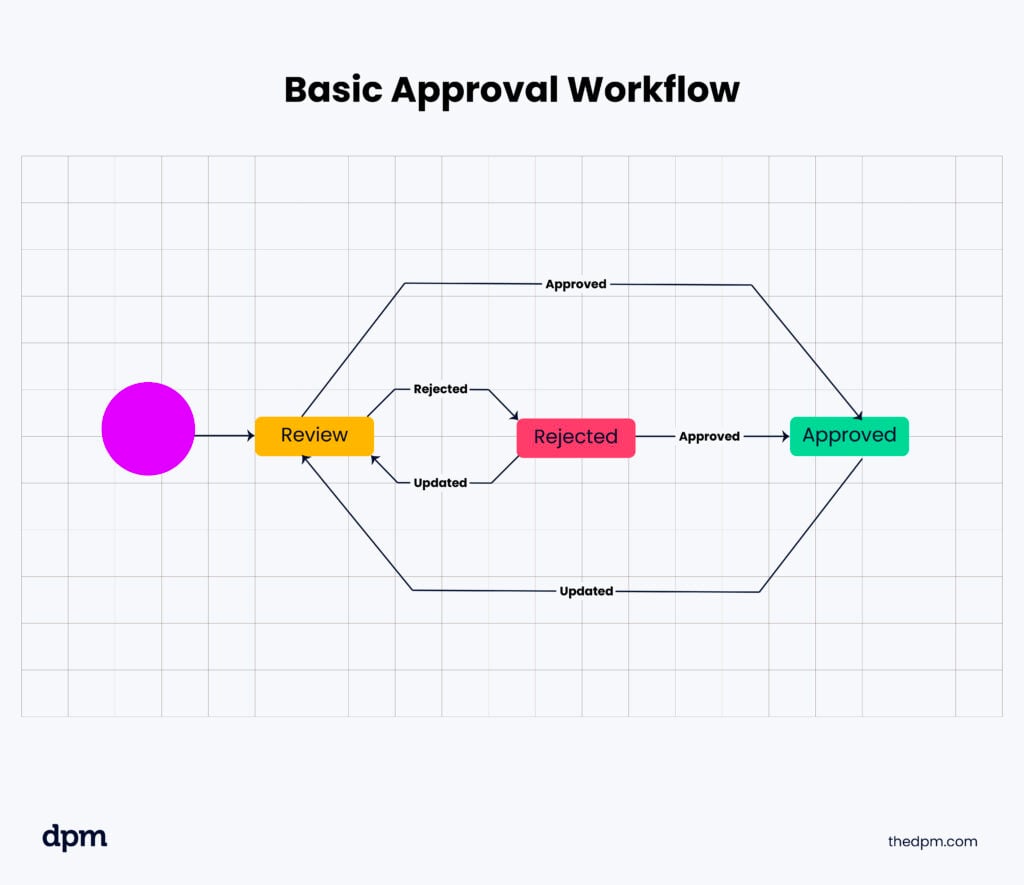
- The project team creates the deliverable, using guidance from the brief and the project manager.
- The project manager reviews the deliverable to ensure it will meet the expectations and standards of the project stakeholders and/or client.
- The project manager provides any feedback to the team, who then update it to address this feedback.
- The project manager reviews the deliverable again before sending it to the client or stakeholders.
- The client/stakeholders review the deliverable and approve it (or provide feedback, if any).
- The project team makes any final updates and prepares the final files.
Types of Workflows
Different project management workflows organize tasks, approvals, and dependencies in different ways. The right approach depends on how your team works and whether tasks need to happen in a specific order.
- Sequential workflows: Tasks follow a fixed order, with each step completed before the next begins. For example, a deliverable moves from drafting to editing, approval, and publication.
- State-based or status-based workflows: Tasks move between defined statuses, such as To Do, In Progress, In Review, and Done. They can move backward when revisions are needed, making this approach useful for iterative projects.
- Rules-based or automated workflows: Tasks follow predefined conditions that determine what happens next. For example, a budget request exceeding a certain amount might automatically trigger an additional approval.
- Parallel workflows: Multiple tasks happen simultaneously instead of waiting for one another. For example, designers and copywriters can work on separate components of a campaign before combining their deliverables.
- Multiple workflows: Several connected workflows operate within the same project, each with its own tasks and responsibilities. For example, a website launch might involve separate content, design, and development workflows that coordinate around shared milestones.
Projects often combine these approaches to accommodate different tasks, teams, and approval requirements.
How To Create Project Workflows In 7 Steps
Here are 7 steps to create a project workflow.
1. Define the objectives
When you define the objectives for your project, be specific and measurable. This will let you track progress and determine whether the project is on the path to success. Your objectives may encompass tangible outcomes, like a fully developed website or a finalized marketing strategy.
2. Identify the tasks
Break your project down into smaller tasks. This allows you to concentrate on individual components and keep track of key details. Each task should have a defined starting point and due date, as well as with specific completion criteria. This helps prevent scope creep and keep the project on track.

3. Assign responsibilities
By assigning responsibilities and clearly communicating roles and expectations, you can make sure that everyone understands their tasks.
This promotes accountability and prevents tasks from being overlooked or neglected. Don't forget to consider the skills and expertise of project team members when assigning specific responsibilities.
4. Sequence tasks
A great way to sequence tasks is via flowchart tools or workflow diagrams, like Gantt charts or Kanban boards. By visualizing the flow of work and executing tasks in the right sequence, you'll help the team maintain the flow of work throughout the project life cycle.
5. Consider complexity and dependencies
As you're assigning timelines for each task, consider their complexity and dependencies, and make adjustments as needed. This can help prevent delays and encourage timely delivery of the project milestones.
Clear deadlines help team members prioritize their work and effectively manage their time. Process workflow software, like ProcessMaker or one of its alternatives, can assist by automating task assignments, tracking progress, and providing visual timelines that make it easier to identify potential bottlenecks and adjust schedules proactively.
6. Continuously monitor progress
Track and monitor progress throughout the project. This will help you identify potential obstacles and promptly address any issues or roadblocks that may arise. You'll keep the project on schedule, and you'll be able to react quickly and notify stakeholders if things are getting off track. Using project workflow software can streamline this process by providing real-time updates, task tracking, and centralized communication.
7. Generate learnings
Once the project is finished, allocate time to review the workflow and pinpoint areas for enhancement. Reflecting on both triumphs and difficulties during the project allows you to identify and implement necessary adjustments for future projects.
Project Management vs Workflow Management
Project management involves comprehensive planning, execution, and delivery of a project, and workflow management deals specifically with the processes and tasks within a project.
In other words, project management encompasses the "who, what, when, where, and why" of a project, and workflow management is about the "how" of a project—the processes that will guide the team to execute on the project plan.
| Aspect | Project Management | Workflow Management |
|---|---|---|
| Scope | Oversees the entire project, from planning to delivery. | Focuses on how individual tasks and processes move toward completion. |
| Main focus | Managing goals, budgets, timelines, resources, and stakeholders. | Organizing task sequences, assignments, approvals, and dependencies. |
| Time frame | Typically has a defined start and end date. | Can be repeated or reused across projects. |
| Success measures | Meeting project objectives within agreed constraints. | Reducing bottlenecks, errors, and unnecessary steps. |
| Example | Managing a website redesign project. | Coordinating content reviews, design approvals, and publishing tasks. |
There's also a distinction between workflows vs processes. Workflows define how tasks move through broader business processes, whether sequentially, in parallel, or according to specific rules.
How To Manage Workflows
Here are some helpful tips for effective workflow management:
1. Clear communication
To effectively manage digital workflows, prioritize clear communication. Share regular updates with team members and stakeholders to keep everyone informed and minimize the risk of misunderstandings. Promptly address any concerns or issues to mitigate them and foster a positive working environment.
2. Delegate
Delegate tasks that others can do so you stay focused on higher-level project management activities like strategic planning and resource allocation. Plus, this provides team members with opportunities to cultivate new skills and take ownership, resulting in increased productivity and job satisfaction.
3. Automate repetitive tasks
Automation frees up time for more important or complex assignments, reduces the risk of errors, and boosts overall workflow efficiency. There are myriad tech-based solutions for workflow automation—read more about the benefits of workflow automation here.
4. Embrace technology
Workflow management software is designed to improve your daily business operations by automating tasks and optimizing processes (and optimize via AI as well). Software solutions are ideal for streamlining repeatable processes (e.g. employee onboarding or approval workflows), which helps you make sure tasks are completed on time and efficiently.
These tools can be used in tandem with your project management software, and other tools in your tech stack may have existing functionality for managing workflows.
5. Monitor progress
To make sure your workflow is on track and aligned with the project's goals, assess progress regularly. Continuously monitoring tasks allows you to catch potential issues or bottlenecks and take corrective action. Incorporating workflow analysis into this process can also help you evaluate how well each stage is functioning and whether the overall flow supports project objectives.
Have frequent check-ins with your team members and use the time to address challenges, brainstorm solutions, and make adjustments as needed. This proactive approach helps prevent problems from escalating.
How Do Effective Workflows Help You Manage Projects?
Effective workflows make it easier to manage projects by clarifying responsibilities, improving coordination, and keeping tasks moving toward completion. Here's how they support your day-to-day project management:
- Improve project quality: Built-in review and approval stages help you catch errors early and ensure deliverables meet stakeholder expectations before moving forward.
- Increase accountability: Clearly assigned tasks and responsibilities help you track ownership, follow up on outstanding work, and prevent important deliverables from being overlooked.
- Reduce bottlenecks: Mapping task dependencies and approval steps helps you spot potential delays, redistribute workloads, and keep projects on schedule.
- Improve team productivity: Removing unnecessary steps and repetitive tasks gives team members more time to focus on completing deliverables and meeting project goals.
Together, these benefits give you greater visibility into project progress and help you address problems before they affect deadlines or deliverable quality.
5 Project Workflow Management Best Practices
Here are 5 best practices for project management workflows.
- Create a well-defined plan. Clearly outline the scope, objectives, project phases, and resources of the project (you might find it helpful to start with a project management template). With solid workflow planning in place, the team will have an overview of the workflow and what needs to be worked on when.
- Regularly communicate with stakeholders. Keep stakeholders informed about where they are needed in the workflow (e.g. for approvals) and the project status, and involve them in decision-making when necessary. This helps you build trust and manage expectations.
- Foster a work environment that encourages collaboration by promoting open communication, idea-sharing, and teamwork. Cross-functional collaboration helps the team tap into diverse expertise and perspectives. This is especially important when it comes to workflows for creative teams.
- Continuously assess your workflow. Identify areas for improvement and embrace feedback from team members and stakeholders. Make necessary adjustments to help teammates complete tasks more efficiently. This cycle of continuous feedback contributes to more agile workflows.
- Celebrate milestones! Recognize and celebrate milestones and achievements within your team. This boosts morale and keeps team members motivated through grueling sprints.
FAQ
What is the difference between a project workflow and a project plan?
A project plan outlines the project's goals, scope, timeline, resources, and deliverables. A project workflow defines how individual tasks move from one stage to another, including responsibilities, dependencies, and approvals. The plan establishes what needs to happen, while workflows help teams carry out the work.
How do you measure the effectiveness of a project workflow?
Track metrics such as task completion time, approval delays, missed deadlines, and the number of revisions required. Compare these results over time to identify bottlenecks and determine whether changes to the workflow are improving efficiency.
Do you need software to manage project workflows?
Not necessarily. Small teams can manage simple workflows using shared documents, spreadsheets, or Kanban boards. However, workflow management software becomes more useful as projects grow in complexity, especially when teams need automated reminders, task dependencies, approval tracking, and real-time progress updates.
How often should you review and update project workflows?
Review workflows after major milestones, at project completion, or whenever recurring delays and bottlenecks appear. Gather feedback from team members and adjust unnecessary steps, responsibilities, or approval processes to keep workflows aligned with project needs.
What's Next?
A well-defined workflow can optimize business processes, minimize errors, and improve resource management and efficiency. Learn how to master workflow management with these expert-led workflow courses.
Want to connect with other digital project managers to share resources and best practices? Join our membership community and get access to 100+ templates, samples, and examples and connect with 100s of other digital project managers in Slack.


