

De 10 beste prosjektstyringsprogramvarene med CRM for 2026

Beste prosjektstyringsprogramvare med CRM – kortliste


Å bruke prosjektstyringsprogramvare med innebygde funksjoner for styring av kunderelasjoner (CRM) er den beste måten å fremme samarbeid mellom prosjekt- og salgsteam på, samtidig som kundenes behov holdes i sentrum.
Det finnes mange alternativer på markedet, så jeg prøvde og vurderte et bredt utvalg. Med min omfattende erfaring innen digital prosjektstyring fant jeg den beste prosjektstyringsprogramvaren med CRM-funksjoner for små og store bedrifter, slik at du kan finne det som passer best for dine behov.
Hvorfor du kan stole på våre programvareanbefalinger
Teamet vårt har testet og anmeldt programvare siden 2012. Vi er selv prosjektledere, så vi vet hvor vanskelig og hvor viktig det er å velge riktig programvare.
I denne guiden har vi vurdert verktøyene gjennom praktisk testing og uavhengig research og gitt dem poeng ut fra våre utvelgelseskriterier. Vi bygger også på innsikt fra ledende eksperter i bransjen og erfarne prosjektledere.
Anmeldelsene våre bygger på vår egen redaksjonelle vurdering. De er ikke et salgsargument.
Ekspertanmeldere:
Sammenligningstabell for prosjektstyringsprogramvare
Sammenlign prisdetaljer og andre spesifikasjoner for hver prosjektstyringsprogramvare med et CRM-verktøy i tabellen nedenfor
| Tool | Best For | Trial Info | Price | ||
|---|---|---|---|---|---|
| 1 | Best for agencies | 14-day free trial | From $10/user/month (billed annually) | Website | |
| 2 | Best for CRM-native deal-to-project workflows | Free plan available | From $45/user/month (billed annually) | Website | |
| 3 | Best for client-facing project visibility | 7-day free trial | From $9/user/month (billed annually) | Website | |
| 4 | Best for linking contacts across deals and projects | 14-day free trial | From $29/user/month (billed annually) | Website | |
| 5 | Best for creative agency project and revenue tracking | Free demo available | From $49/user/month | Website | |
| 6 | Best for custom fields tailored to CRM needs | Free plan + demo available | From $7/user/month (billed annually) | Website | |
| 7 | Best for small teams linking deals to delivery | Free plan + 14-day trial available | From $22/user/month | Website | |
| 8 | Best for tracking deals into deliverables | 14-day free trial | From $17/user/month | Website | |
| 9 | Best for professional services ops automation | Free demo available | Pricing upon request | Website | |
| 10 | Best for won-deal-to-project handoff | 14-day free trial + free demo available | From $14/seat/month (billed annually) | Website |


Anmeldelser av den beste prosjektstyringsprogramvaren med CRM
Her er mine anmeldelser av den beste prosjektstyringsprogramvaren med CRM-funksjoner. Jeg går gjennom fordelene og ulempene, funksjonssettene og de viktigste bruksområdene for hvert verktøy, slik at du kan finne ut hvilken programvare som passer best for dine behov.

Best for agencies

Productive is an all-in-one project management platform with a built-in Sales CRM, covering deal pipelines, project planning, time tracking, resource management, and invoicing in a single workspace.
Who Is Productive Best For?
Productive is a strong fit for digital and creative agencies that need to manage client relationships, project delivery, and financial performance without juggling multiple tools.
Why I Picked Productive
I've included Productive in my top picks because it's the only tool on this list built specifically around how agencies operate—from pitching new clients to delivering and billing for the work. What I like most is the Scenario Builder, which lets you model different pricing and resourcing combinations before you commit to a proposal, so you're not just winning deals, you're winning profitable ones. Once a deal closes, converting it directly into a project with the context already in place means there's no manual handoff between sales and delivery.
Productive Key Features
- Sales CRM pipeline: Track leads, contacts, and deals through customizable pipeline stages before any project work begins.
- Resource planning: Schedule your team's capacity across active projects using a visual workload overview to avoid over-allocation.
- Budget tracking: Monitor project budgets in real time against tracked hours and expenses to catch overruns early.
- Custom dashboards: Build reports across sales, project, and financial data using filters and metrics you define.
Pros and Cons
Pros:
- Sales CRM feature for tracking opportunities
- Comprehensive features for financial management and reporting
- Robust resource planning and tracking capabilities
Cons:
- Could have more integrations
- Initial setup can be time-consuming
New Product Updates from Productive
Productive Adds Voice Dictation, Slack Connector, Proposals, and Overtime
Productive adds voice dictation, a Slack Connector, proposal controls, and overtime tracking. These updates support faster AI interactions, client proposals, and time management. For more information, visit Productive’s official site.

HubSpot
Best for CRM-native deal-to-project workflows
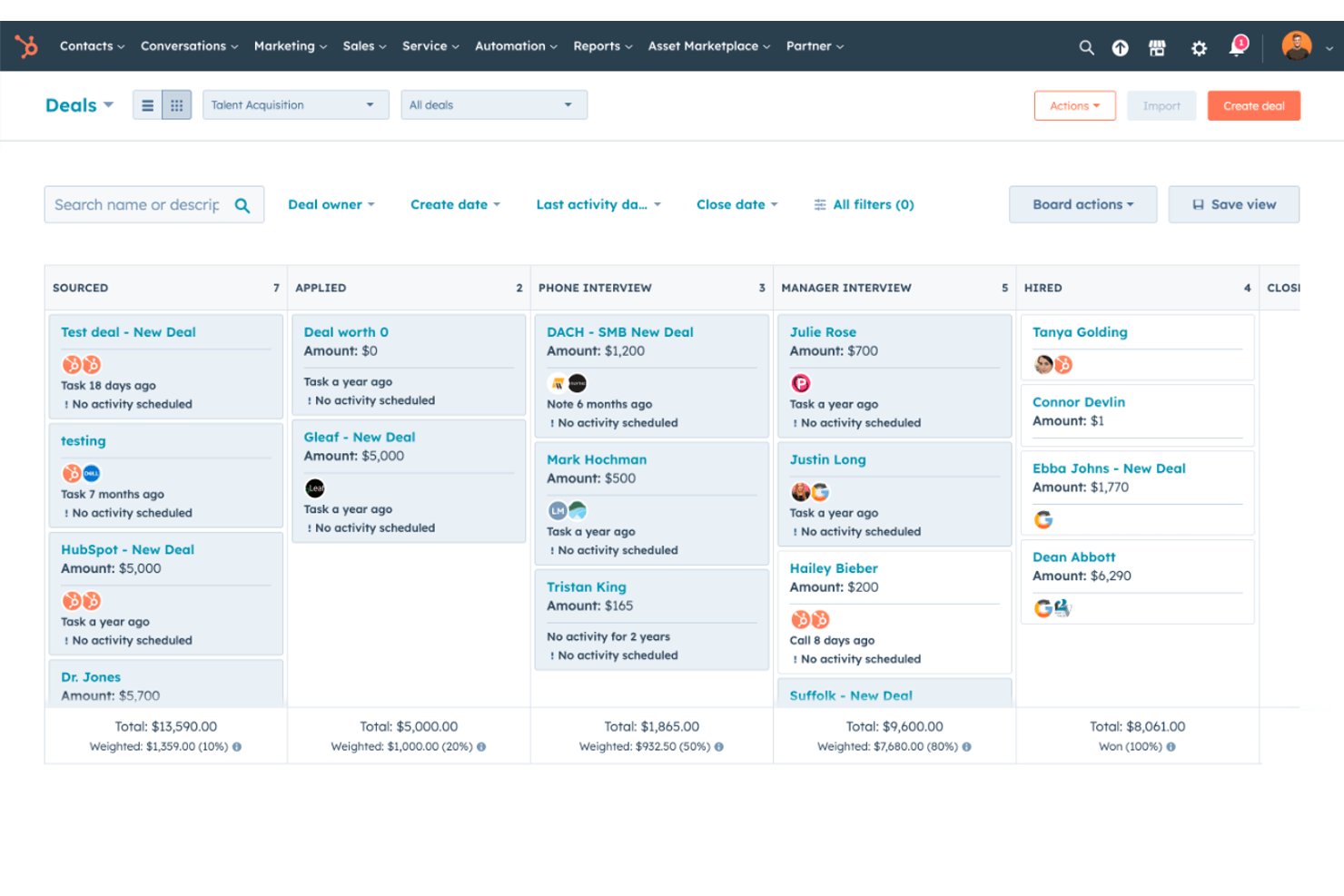
HubSpot Smart CRM is a CRM platform that combines contact, deal, and pipeline management with a built-in Projects object for task tracking, Gantt and board views, workflow automation, and deal-to-project conversion.
Who Is HubSpot Best For?
HubSpot Smart CRM is a strong fit for sales-led teams that want to manage deals and coordinate post-sale delivery work inside a single CRM platform.
Why I Picked HubSpot
I've included HubSpot in my top picks because its native Projects object lives inside the same CRM where your deals close, which means you're not copying data across tools when a sale converts to delivery work. I particularly like how you can build a workflow that triggers the moment a deal hits Closed Won and automatically creates a linked project record, complete with a dedicated delivery pipeline staged from kickoff through final sign-off. The Gantt view then lets me track that project's tasks on a timeline alongside the associated contact and deal data, all without leaving HubSpot.
HubSpot Key Features
- Contact and deal pipeline management: Create, customize, and clone pipelines and stages to track deals from first contact through close.
- Workflow automation: Trigger automated task creation, status updates, and notifications based on deal stage changes or CRM record activity.
- Custom reporting dashboards: Build role-specific dashboards that pull data across contacts, deals, and project records.
- Data enrichment: Automatically updates contact and company records to keep CRM data current without manual entry.
HubSpot Integrations
HubSpot supports over 2,000 integrations, including native Salesforce, Google Workspace, Microsoft 365, Slack, and Shopify connections. Marketplace integrations include Gmail, Google Calendar, Outlook, Jira, and Zapier; APIs, webhooks, and UI extensions support custom connections.
Pros and Cons
Pros:
- Reviewers praise centralized contact and deal histories
- Gantt timelines connect project tasks to CRM
- Won deals can trigger linked project creation
Cons:
- Client portal doesn’t expose project records
- Deal workflows require manual property mapping
Best for client-facing project visibility
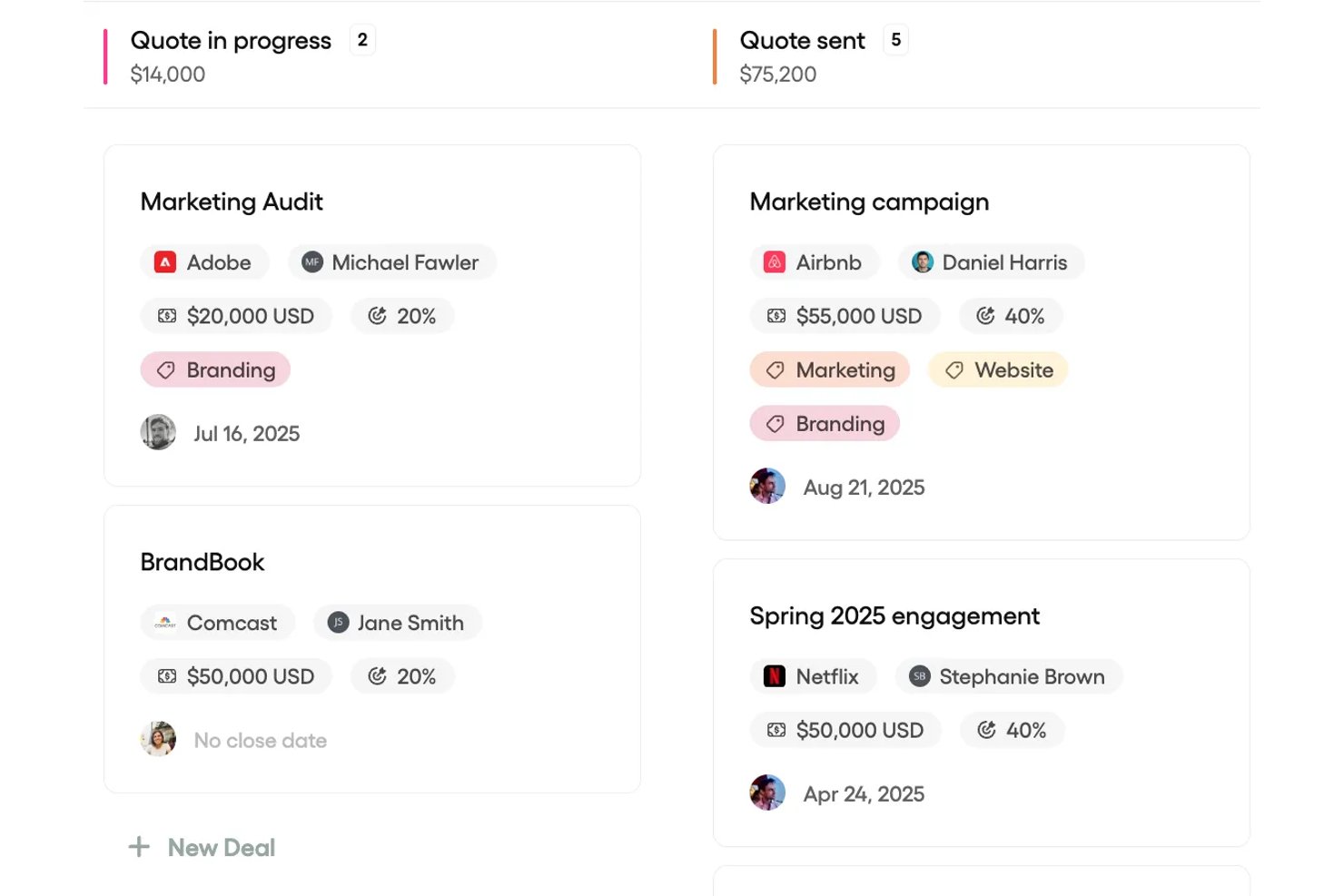
Bonsai Agency Software is an all-in-one platform for agencies and service businesses that combines CRM, deal pipeline management, project tracking, time tracking, and client invoicing in a single workspace.
Who Is Bonsai Agency Software Best For?
Bonsai is a strong fit for small agencies and client services teams that need to manage projects, client relationships, and billing without juggling multiple tools.
Why I Picked Bonsai Agency Software
I picked Bonsai Agency Software because it genuinely centralizes client-facing project visibility in a way most project tools don't. The client portal lets you share live project status, invoices, files, and task progress with clients directly, with per-client controls over exactly what they see. I also love that the contact activity feed logs proposals, contracts, emails, and portal messages in one timeline, so nothing slips through the cracks between sales and delivery.
Bonsai Agency Software Key Features
- Deal pipeline management: Track opportunities through customizable stages with win probabilities, deal values, and close dates on a Kanban board.
- Resourcing schedule: View team members' project allocations, spot over-allocation, and reassign or reschedule work across your roster.
- Task dependencies: Set "Waiting On," "Blocking," or "Related To" relationships between tasks, with dependent due dates that shift automatically.
- Time tracking with billable status: Log hours via timer or manual entry, mark time as billable or non-billable, and connect tracked hours directly to invoices.
Bonsai Agency Software Integrations
Bonsai lists integrations with QuickBooks, Xero, Calendly, Google, and Zapier. Its REST API supports API-key and OAuth 2.1 authentication for custom connections.
Pros and Cons
Pros:
- Contact timelines unite deals and correspondence
- Tracked hours connect delivery to billing
- Client portal keeps project updates visible
Cons:
- Task controls trail dedicated project platforms
- Won deals require manual project setup

Best for linking contacts across deals and projects
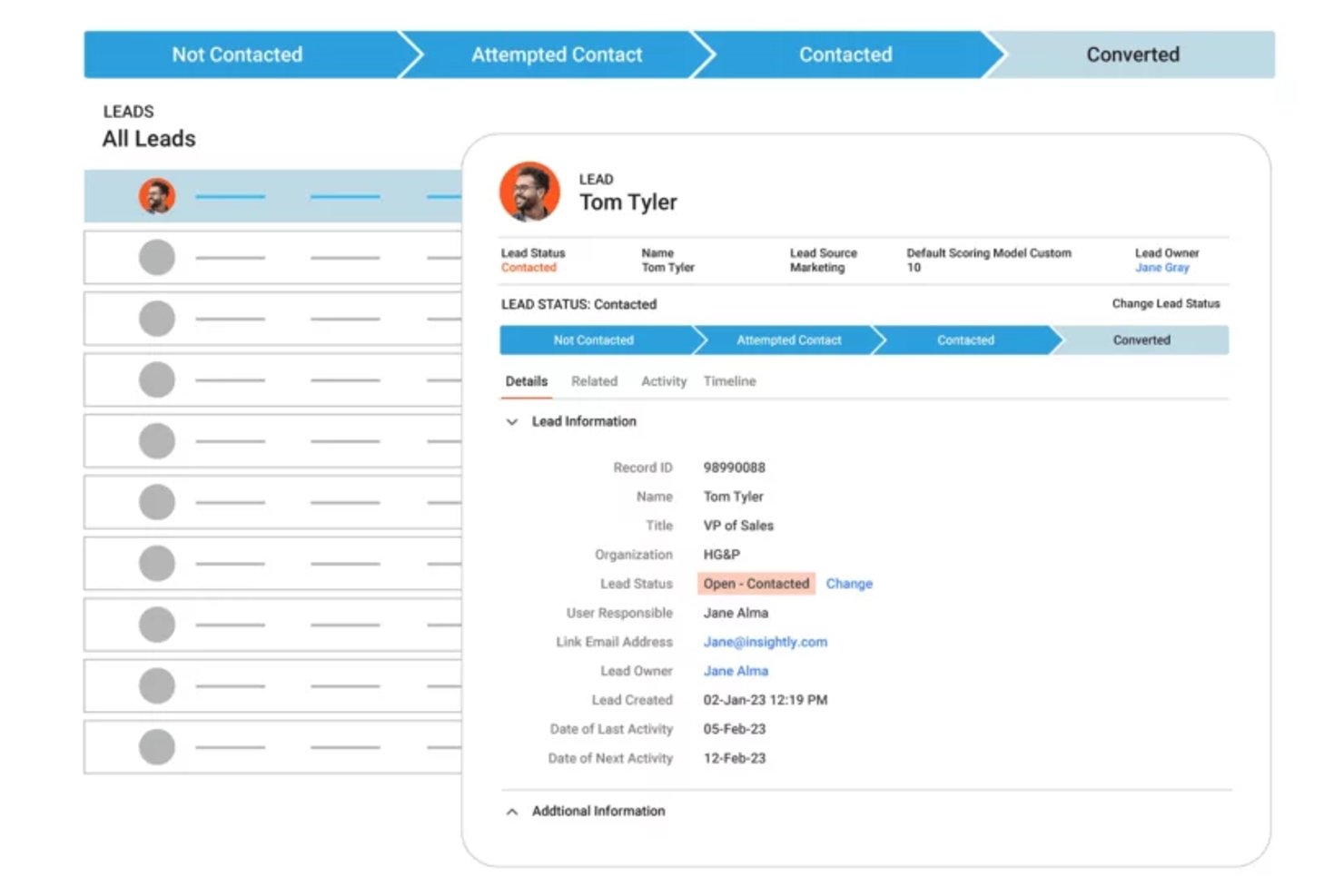
Insightly is a CRM and project management platform that combines sales pipeline tracking, contact and organization management, opportunity-to-project conversion, task management, and milestone tracking in a single system.
Who Is Insightly Best For?
Insightly fits small businesses and client services teams that need to manage contacts, deals, and project delivery without switching between separate tools.
Why I Picked Insightly
I picked Insightly as one of the best because of how tightly it links contacts across both deals and projects. When a deal closes, I can convert the opportunity into a project in a single action, and all the associated contacts, organizations, and links carry over automatically. From there, Insight Cards surface open deal details directly on linked contact records, so my team always sees where a client stands across the full relationship, not just the current project.
Insightly Key Features
- Activity sets: Group tasks and events into reusable sets that trigger automatically when a project or opportunity reaches a defined pipeline stage.
- Workflow automation: Automatically create tasks, update records, and send emails based on rules you configure across opportunities and projects.
- Time tracking timesheets: Log time against tasks across multiple projects using daily or weekly timesheets, with submission and approval states built in.
- AI email replies and summaries: Generate context-aware email responses and summarize prior communications directly from CRM records.
Insightly Integrations
Insightly offers marketplace integrations with over 2,000 business tools, including Slack, Jira, QuickBooks Online, Xero, DocuSign, Google, Microsoft 365, Shopify, and Asana. Its REST API and webhooks support custom integrations.
Pros and Cons
Pros:
- Reviewers value tracking tasks beside sales
- Won deals convert into linked projects
- Client records connect deals and project work
Cons:
- No documented Gantt charts or dependencies
- Sales and project dashboards remain separate

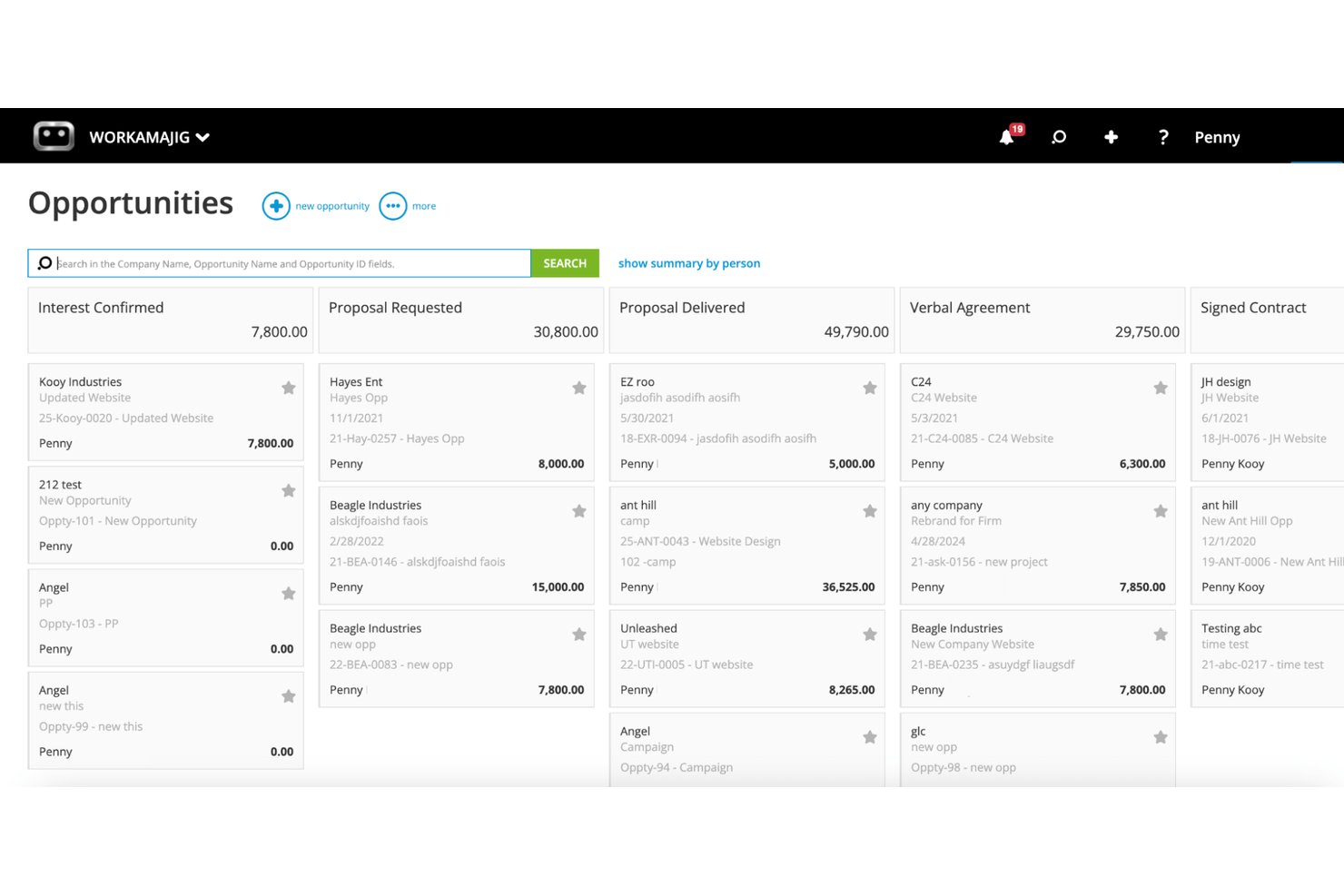
Workamajig is an agency management platform that combines project management, sales CRM, resource scheduling, time tracking, and financial management tools built specifically for creative and marketing agencies.
Who Is Workamajig Best For?
Workamajig is purpose-built for creative and marketing agencies that need to manage client projects, track billable time, and monitor revenue all in one place.
Why I Picked Workamajig
I picked Workamajig as one of the best because it's purpose-built for creative and marketing agencies that need project delivery and revenue tracking to live in the same system. When an opportunity is won, you can convert it directly into a project, carrying over estimates, schedules, and client conversations without re-entering anything. I also like that time logged against projects flows straight into billing worksheets, so invoicing reflects actual work rather than guesswork.
Workamajig Key Features
- Resource scheduling: View team availability, workload, and capacity, then assign or rebalance work using drag-and-drop scheduling.
- Digital proofing and approvals: Annotate images, videos, and live web pages directly in the platform and route them through approval workflows.
- Client portal: Give clients free logins to submit project requests, track status, review deliverables, and approve work.
- Revenue forecasting: Track projected revenue, pipeline stage totals, and sales performance against team targets from the CRM dashboard.
Workamajig Integrations
Workamajig offers native integrations with Google Calendar, iCal, Outlook/Exchange, and Slack. It also supports a REST API, JSON data feeds, CSV import/export, and Zapier.
Pros and Cons
Pros:
- Logged project time feeds client invoicing
- Client portal supports requests and approvals
- Agency workflows connect CRM, projects, and billing
Cons:
- Sales and project reporting can feel constrained
- Routine project updates require extra navigation
ClickUp
Best for custom fields tailored to CRM needs
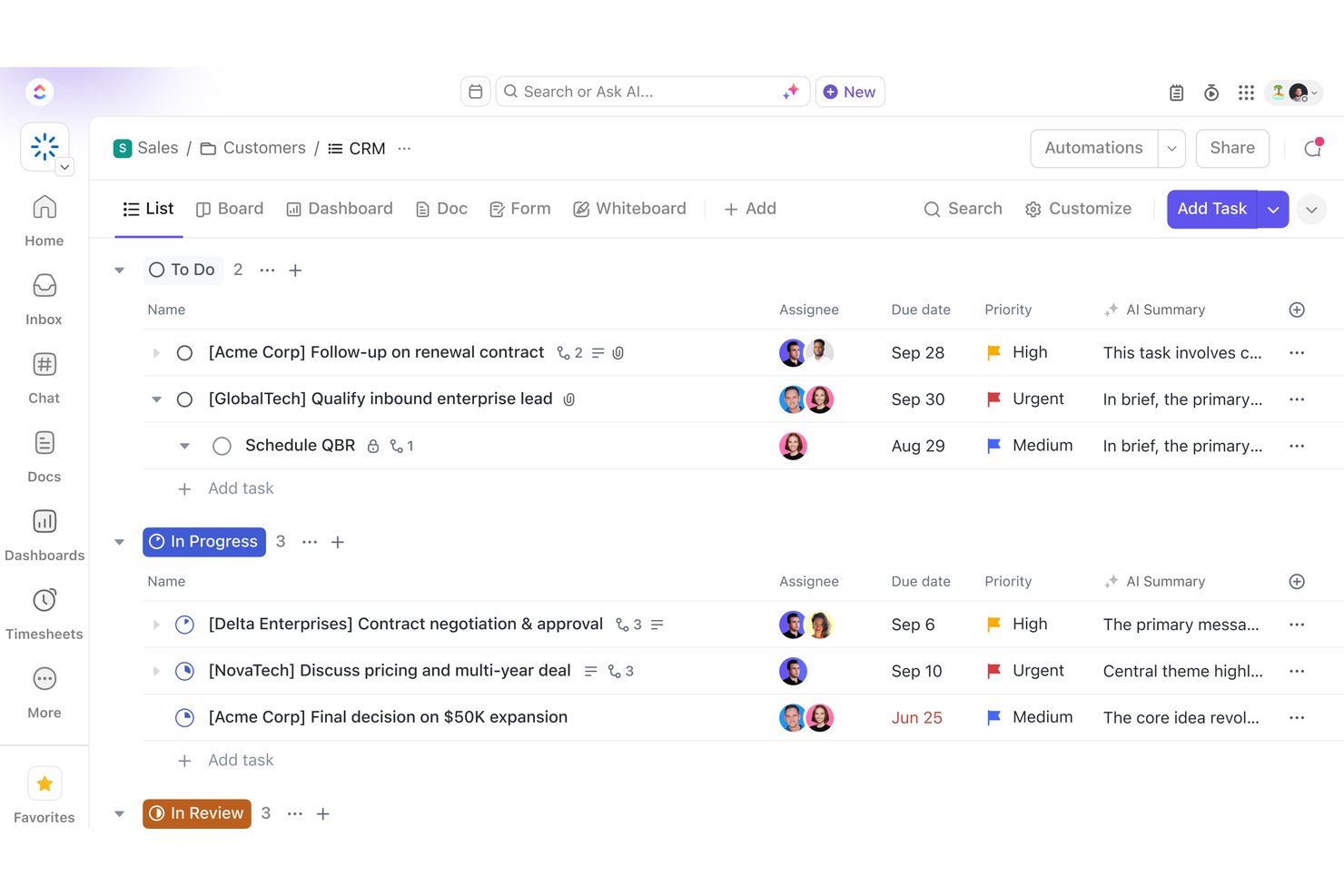
ClickUp is a work management platform that combines project tracking, task management, CRM pipelines, custom fields, dashboards, and team collaboration tools in a single workspace.
Who Is ClickUp Best For?
ClickUp is a strong fit for project managers and client services teams that need to build a customized CRM pipeline alongside their delivery workflows in one workspace.
Why I Picked ClickUp
ClickUp earns its spot on my shortlist because of how far you can push its custom fields to mirror your actual CRM process, not a generic one. I like that you can build deal records with fields for contract value, stage, owner, and region, then filter those fields directly into project views and dashboards. That means a services team tracking a B2B deal can surface the same client data across their pipeline board and their delivery workspace without duplicating it.
ClickUp Key Features
- CRM pipeline views: Display deal records in List, Board, or Table views to track leads, contacts, and deals by stage.
- Automated workflow triggers: Set rules that move leads between stages, create deal tasks, or kick off delivery work based on field changes or checkboxes.
- Native time tracking: Log billable hours directly on tasks with hourly rates set by member, task, or project and export reports by date range or billable status.
- Guest access controls: Share client-facing dashboards or list views with external stakeholders using view-only or comment-only permissions.
ClickUp Integrations
ClickUp offers 50+ native integrations, including HubSpot, Slack, GitHub, Google Drive, Microsoft Teams, Zoom, and Figma. It also supports API connections, webhooks, OAuth, an MCP Server, and Zapier.
Pros and Cons
Pros:
- Tasks connect client context with execution
- Dashboards surface pipeline and delivery status
- Custom fields map directly to deal workflows
Cons:
- Client records lack an automatic unified hub
- Won deals need manual project setup
New Product Updates from ClickUp
ClickUp Adds Meetings Hub, Super Agent Templates, and ZoomInfo Integration
ClickUp adds a searchable Meetings Hub, new ways to clone and template Super Agents, and a ZoomInfo integration through the App Center. These updates improve meeting retrieval, agent reuse, and access to sales intelligence. For more information, visit ClickUp’s official site.

Capsule
Best for small teams linking deals to delivery
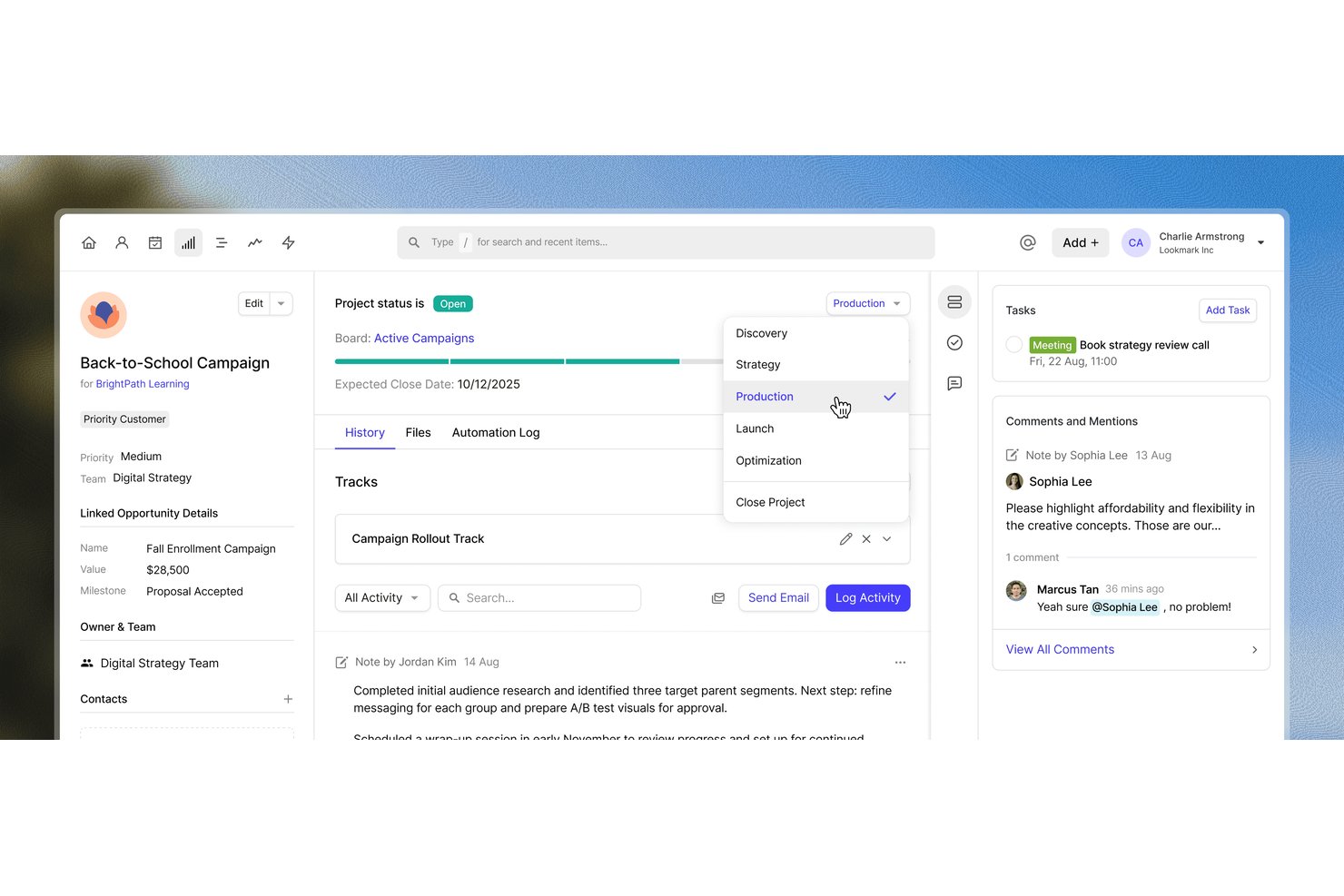
Capsule CRM is a contact and deal management platform that pairs a visual sales pipeline with project boards, task tracking, and workflow automation to manage client relationships and delivery work in one place.
Who Is Capsule Best For?
Capsule fits small teams that need to manage client relationships and deliver project work without juggling two separate tools.
Why I Picked Capsule
I picked Capsule as one of the best because it's one of the few tools that genuinely closes the loop between winning a deal and delivering on it. When an opportunity moves to Won, Capsule can automatically create a linked project, assign it to the right person, and apply a reusable Track, so your delivery team picks up exactly where sales left off. I also like how project dashboards surface Opportunity value by board, giving you a real view of revenue tied to active delivery work.
Capsule Key Features
- AI contact enrichment: Automatically populates contact records with job title, seniority, LinkedIn profile, and missing contact details.
- Custom reporting dashboards: Lets you combine sales, task, project, and activity reports into a single shareable dashboard.
- Mail Drop Box: A unique email address per project that logs forwarded or BCC'd emails directly to that project's record.
- Reusable Tracks: Pre-built task sequences that can be applied to any project, assigning due dates automatically based on an end date.
Capsule Integrations
Capsule lists 60+ integrations in its pricing FAQ, including marketplace integrations with Slack, Microsoft Teams, DocuSign, Clockify, Tidy Work, Xero, and QuickBooks Online. It also supports Zapier and REST API access for custom integrations.
Pros and Cons
Pros:
- Task reminders and calendars keep deadlines visible
- Dashboards connect opportunity value with project boards
- Won deals can launch linked delivery Tracks
Cons:
- Users report limited flexibility in project reporting
- No Gantt view or task dependencies
New Product Updates from Capsule
Capsule Adds AI-Powered Marketing Assistance in Transpond
Capsule’s Transpond has opened early access to AI-powered marketing assistance, letting users connect an AI tool to query campaign data and get help building automations. For more information, visit Capsule's official site.
 .

Scoro
Best for tracking deals into deliverables
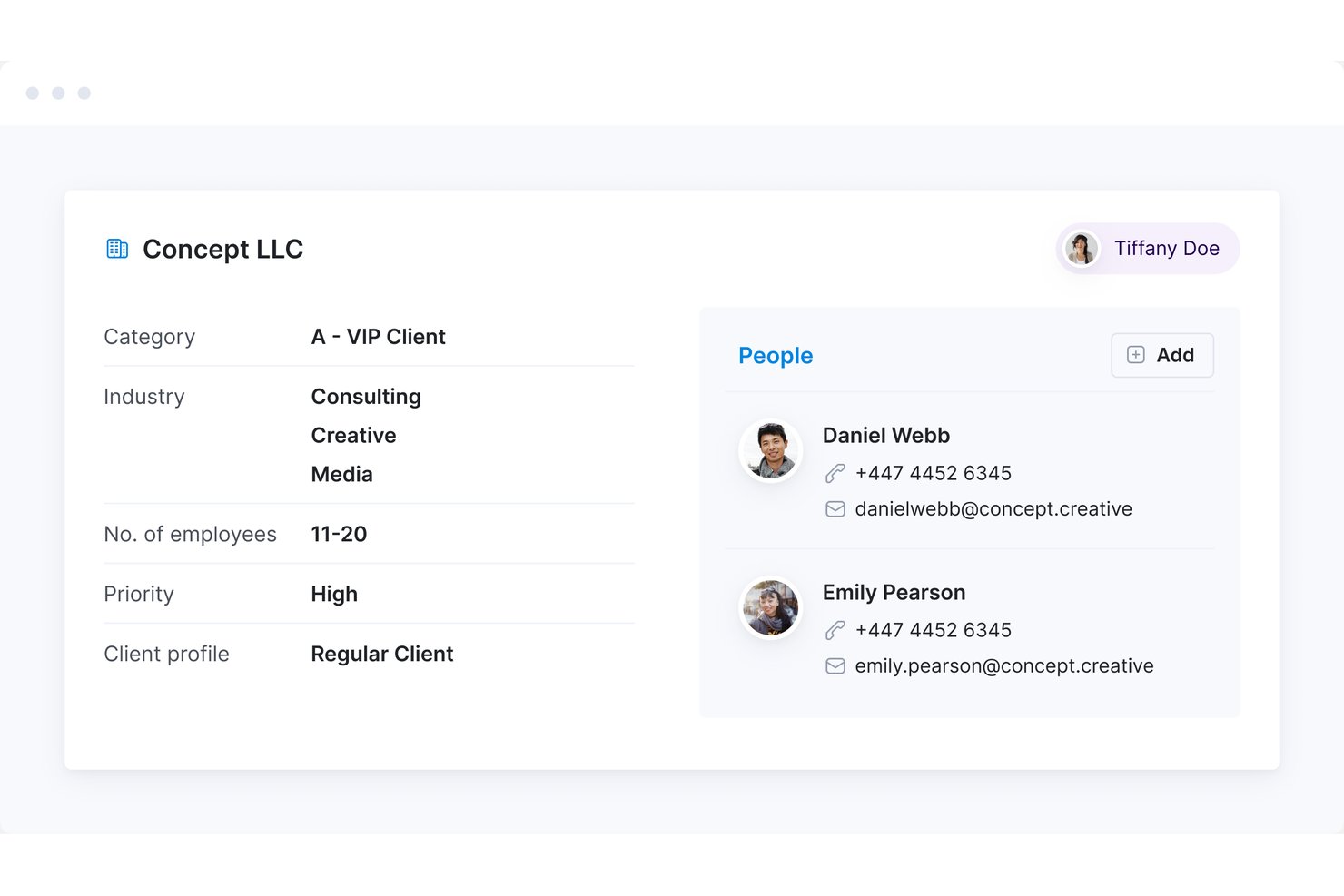
Scoro is a professional services automation platform that brings CRM and pipeline management, project delivery, time tracking, resource planning, and invoicing into a single modular system.
Who Is Scoro Best For?
Scoro fits professional services teams—agencies, consultancies, and engineering firms—that need to manage the full arc from client pipeline to project delivery and invoicing in one place.
Why I Picked Scoro
Scoro earns its spot on my shortlist because it's genuinely built around the full arc from pipeline to payment—not just bolted-together CRM and project tools. I love how a won quote converts directly into a project, with budget fields prefilled and tasks created from the quote line items, which means delivery teams start with real scope instead of a blank canvas. The pipeline report also does something I find valuable: it weights deal values by close probability and stage, so you're not flying blind when planning capacity for upcoming projects.
Scoro Key Features
- Customer portal: Give clients controlled access to selected projects, tasks, files, invoices, and comments through a dedicated external portal.
- Utilization report: View scheduled, available, and used team time across upcoming periods, with skills filters to assess capacity before taking on new work.
- Time-billing: Generate invoices directly from logged billable project activities, consolidating time across multiple projects into a single client invoice.
- Gmail add-on: Create or link Scoro tasks from emails, attach email content to task descriptions, and log time entries without leaving your inbox.
Scoro Integrations
Scoro offers integrations with 40+ tools, including native integrations with Salesforce, Xero, QuickBooks, Jira, Slack, Google Calendar, and Stripe, plus marketplace integrations with HubSpot and Asana. It also provides a REST API, webhooks, Scoro MCP, and Zapier.
Pros and Cons
Pros:
- Logged billable time feeds client invoices
- Weighted pipeline forecasts inform capacity planning
- Quotes carry scope into project setup
Cons:
- Custom reporting questions require workarounds
- Task edits can take extra clicks
New Product Updates from Scoro

Scoro Adds Time Mobile App and ELI Improvements
Scoro adds the Scoro Time mobile app for iOS/Android to track time anywhere and expands ELI with attachments, smarter filtering, and trigger-based actions. For more information, visit Scoro's official site.

Accelo
Best for professional services ops automation
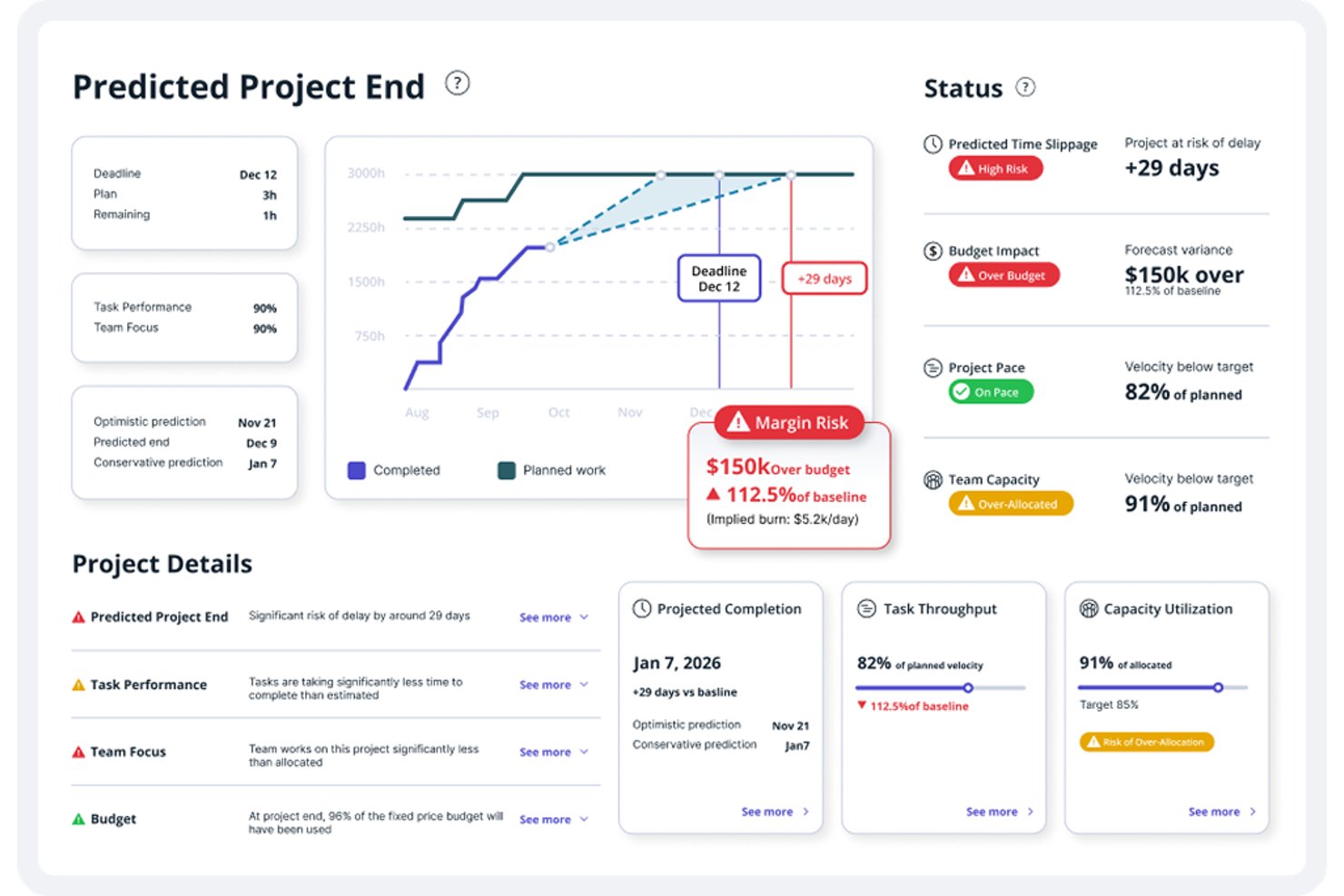
Accelo is a professional services automation platform that combines CRM, project management, time tracking, resource planning, and billing in one connected system.
Who Is Accelo Best For?
Accelo is a strong fit for client services teams at professional services firms that need to manage the full client lifecycle—from sales and quoting through project delivery and billing—in one connected system.
Why I Picked Accelo
I picked Accelo as one of the best because it's purpose-built for professional services ops automation in a way that few tools match. I love that accepted quotes convert directly into projects, carrying over milestones, tasks, budgets, and assignees, so delivery teams aren't rebuilding context from scratch. Accelo's Margin Guard and AI-powered profitability forecasting also surface financial risk before it becomes a problem, which is exactly what client services teams need when managing multiple engagements at once.
Accelo Key Features
- Client portal: Gives clients on-demand access to quotes, projects, invoices, tickets, and retainers, with the ability to view and pay invoices directly.
- Dynamic scheduling: Automatically updates task start and due dates as your team logs time, reschedules work, or approaches a deadline.
- Resource capacity planning: Forecasts future demand using pipeline opportunities and role-based placeholders to model tentative workloads before projects begin.
- Configurable triggers: Lets you set up automated condition-based actions—like creating a follow-up task after an unanswered quote—to keep deals and projects moving.
Accelo Integrations
Accelo lists integrations with Jira, Azure DevOps, GitHub, Slack, Microsoft 365, Google Workspace, Salesforce, HubSpot, QuickBooks, and Xero. It also provides RESTful and Forms APIs for custom integrations and supports Zapier.
Pros and Cons
Pros:
- Time entries link billable work to margins
- Client records keep correspondence beside related projects
- Accepted quotes carry tasks and budgets forward
Cons:
- Workflow setup takes time and configuration
- No combined pipeline-to-project outcome reports
New Product Updates from Accelo

Accelo Rebuilds Mobile App for Project and Time Management
Accelo rebuilds its mobile app with task management, new work creation, and mobile timesheets for Forecast customers. This helps teams keep project and time data current while working away from a desktop. For more information, visit Accelo’s official site.
Pipedrive
Best for won-deal-to-project handoff
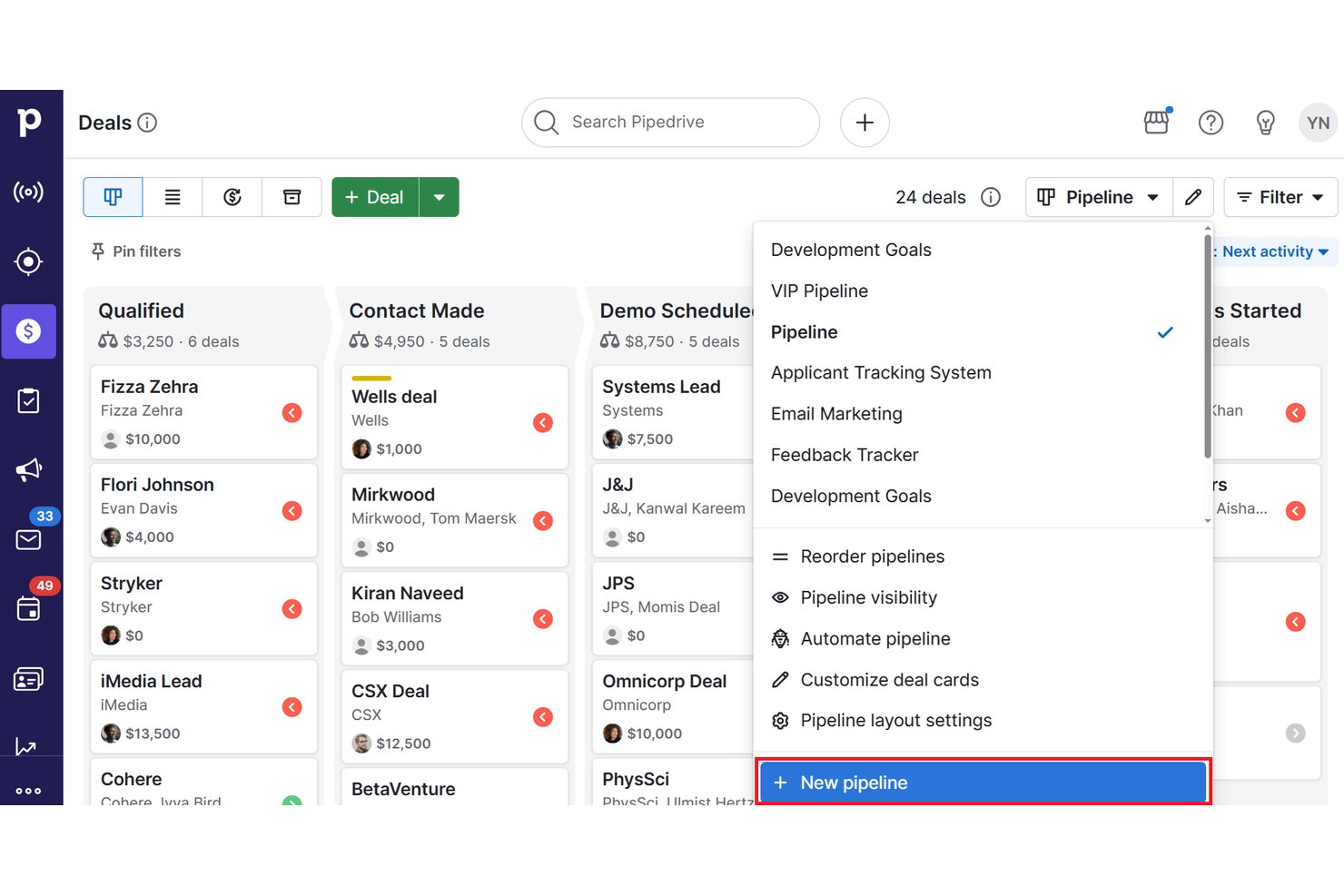
Pipedrive is a sales CRM with a built-in project management add-on that combines pipeline management, deal tracking, contact management, and post-sale project delivery in one workspace.
Who Is Pipedrive Best For?
Pipedrive suits small business owners and client services teams that need to take a won deal and hand it off to a delivery team without switching tools.
Why I Picked Pipedrive
I picked Pipedrive as one of the best because it handles the won-deal-to-project handoff better than any other CRM I've seen. When a deal closes, you can trigger a project automation that instantly builds a project from a template, complete with phased tasks, assignees, and relative due dates, all pre-loaded with the deal's notes, files, and email history. I also love that the deal detail view stays live-linked to the project, so your sales and delivery teams can see progress on both sides without duplicating a single record.
Pipedrive Key Features
- Gantt timeline view: Visualize project tasks and milestones on adjustable day, week, month, or year timelines with drag-and-drop rescheduling and task dependencies.
- Reusable project templates: Build templates with phased tasks, relative due dates, and dependencies that can be applied to new projects or triggered through automations.
- Insights combined-data reporting: Filter project performance reports using linked deal, contact, or organization data to connect sales and delivery in one report.
- Smart Docs with e-signatures: Create, send, and track quotes, proposals, and contracts with built-in e-signature support directly within Pipedrive.
Pipedrive Integrations
Pipedrive lists 500+ integrations, including native Asana, Microsoft Teams, DocuSign, QuickBooks, and WhatsApp Business integrations, plus marketplace options such as Slack, Trello, Xero, Zoom Meetings, and Zapier. Its RESTful API and webhooks support custom integrations.
Pros and Cons
Pros:
- Linked emails and files preserve handoff context
- Reviewers praise clear pipeline visibility
- Won deals trigger templated delivery projects
Cons:
- No native time tracking or capacity planning
- Sales and project reporting remain separate
Annen prosjektstyringsprogramvare med CRM
Her er noen flere prosjektstyringsverktøy som tilbyr CRM-funksjoner, i tilfelle du ikke fant det du lette etter ovenfor.
- Zoho CRM
For deal-driven project creation
- monday.com
For customizable deal-to-delivery workflows
- Asana
For AI-driven client delivery handoffs
- Zoho Projects
For Zoho-ecosystem project delivery
- Ravetree
For pipeline stages tied to project delivery
- Bitrix24
For all-in-one CRM and project suites
- Odoo
For modular ERP-linked project delivery


Relaterte anmeldelser av prosjektstyringsprogramvare
Hvis du fortsatt ikke har funnet det du leter etter her, kan du se på disse andre relaterte verktøyene som vi har testet og vurdert:
- Prosjektstyringsprogramvare
- Gratis verktøy for klientstyring
- Prosjektstyringsprogramvare for PR
- Programvare for ressursstyring
- Programvare for arbeidsflytautomatisering
- Programvare for tidsregistrering
- Programvare for oppgavestyring
- Samarbeidsverktøy
- Gantt-diagramverktøy
- Produktivitetsverktøy
- Programvare for prosjektsporing
- Programvare for prosjektplanlegging
How I Evaluate Project Management Software With CRM
I split my evaluation into three parts, giving the most weight to core functionality: connect contacts and won deals to projects, assign tasks, and track deadlines. Next, I consider standout features such as closed-won project triggers. Finally, I weigh beyond-feature factors like onboarding support and pricing value.
Core Functionality (Table Stakes For This List)
When I'm selecting tools for my list, I score each one on a scale from 0 (does not offer the functionality) to 5 (excels in this area) for each core functionality listed below. I then convert the total into a percentage to help assess each tool's overall fit, with extra weight on any functionalities I’ve deemed essential.
- Task & Project Tracking (Essential): I look for multiple projects with assignable tasks, clear statuses, and progress tracking from kickoff through delivery.
- Contact & Deal Management (Essential): I check whether teams can track contacts, companies, deal stages, and client history in a usable pipeline.
- Deal-to-Project Conversion: I evaluate how a won deal becomes a project, including whether client details, tasks, and files carry over.
- Shared Client Visibility: I look for client profiles that connect active projects and deals, so teams can see delivery context alongside relationship history.
- Scheduling & Timeline Views: I assess how teams plan and adjust work across calendar, board, or Gantt views when deadlines and dependencies shift.
- Sales and Project Reporting: I check whether dashboards connect pipeline activity with project progress, helping teams compare booked work with delivery status.
Once I have a list of tools that meet the criteria, I consider what sets each platform apart.
Differentiating Factors (What Sets Vendors Apart)
Here's how I compare and contrast different vendors:
Standout Features
I check whether a tool can auto-generate a project the moment a deal closes. That single trigger—spinning up folders, tasks, and timelines from a template—eliminates the manual handoff that causes dropped details between sales and delivery. I also evaluate client portal access, because giving clients a branded view of milestones and approvals keeps status updates out of your inbox and reduces internal interruptions.
Beyond Features
I evaluate whether CRM and project management features are bundled or split across paid tiers, since per-seat costs add up fast when both sales and delivery teams need access. Onboarding support matters just as much—vendors that offer dedicated migration assistance help teams recreate pipeline-to-project workflows without weeks of trial and error. I also check for role-based permissions and audit logs, especially for agencies handling confidential client contracts alongside open project boards.
Slik velger du prosjektstyringsprogramvare med CRM
Det er lett å gå seg vill i lange funksjonslister og kompliserte prismodeller. For å hjelpe deg med å holde fokus mens du går gjennom den unike prosessen din for valg av programvare, har vi laget en sjekkliste over faktorer du bør ha i bakhodet:
| Faktor | Hva du bør vurdere |
|---|---|
| Skalerbarhet | Sørg for at programvaren kan vokse sammen med virksomheten din. Se etter fleksible priser, ubegrenset antall brukere og avanserte funksjoner som automatisering og rapportering, som støtter langsiktig vekst. |
| Integrasjoner | Programvaren bør kunne kobles til de eksisterende verktøyene dine – e-post, regnskap, markedsføringsautomatisering og dokumentlagring. Innebygde integrasjoner og åpne API-er gjør arbeidsflytene smidigere og reduserer manuelt arbeid. |
| Tilpasningsmuligheter | Arbeidsflytene i teamet ditt er unike. Velg en plattform som lar deg tilpasse salgspipelines, dashbord, automatiseringsregler og brukerroller slik at de samsvarer med hvordan dere faktisk jobber. |
| Brukervennlighet | Et verktøy som er for komplisert, vil bremse teamet ditt. Se etter et ryddig og intuitivt grensesnitt, dra-og-slipp-funksjonalitet og en kort opplæringskurve for å få raskere innføring. |
| Budsjett | Vurder de totale kostnadene, inkludert priser per bruker, tillegg og implementeringsgebyrer. Gratis prøveperioder eller freemium-abonnementer gjør det mulig å teste programvaren før du bestemmer deg. |
| Sikkerhetstiltak | Klient- og prosjektdataene dine må beskyttes. Se etter kryptering, rollebaserte tillatelser, flerfaktorautentisering og samsvar med bransjestandarder som GDPR eller SOC 2. |
| Samarbeidsfunksjoner | Team trenger kommunikasjon i sanntid, fildeling og oppgavetildeling. Sjekk om plattformen inkluderer innebygd chat, delte arbeidsområder og tilgang for eksterne klienter. |
| Automatiseringsmuligheter | Spar tid ved å automatisere sporing av potensielle kunder, oppgavetildeling, oppfølging og fakturering. KI-baserte forslag og utløsere for arbeidsflyter kan forbedre effektiviteten ytterligere. |
Trender innen prosjektstyringsprogramvare med CRM
Her er noen av de viktigste trendene innen prosjektstyringsprogramvare med CRM-funksjoner som vil ta form i årene som kommer:
- Integrasjon av KI og maskinlæring: Kunstig intelligens og maskinlæring begynner å revolusjonere både CRM-verktøy og prosjektstyringsverktøy. Disse funksjonene kan hjelpe deg med å automatisere oppgaver, gi innsiktsfulle analyser og forbedre kundeservicen.
- Større vekt på kundeopplevelser i flere kanaler: CRM-systemer fokuserer i økende grad på å levere en helhetlig kundeopplevelse på tvers av ulike kanaler. Dette gjør det mulig å tilby konsekvent kundeservice og markedsføring på alle kontaktpunkter med kundene.
- Styrking av datasikkerhetstiltak: Datasikkerhet er en topprioritet for CRM-systemer. Leverandører tilbyr sterkere tiltak for å beskytte kundeinformasjon og overholde personvernforordninger.
- Fremvekst av bransjespesifikke løsninger: Tilpassede CRM-løsninger som er skreddersydd for bestemte bransjer, blir stadig mer utbredt. Disse spesialiserte systemene er utviklet for å møte unike bransjebehov og krav til etterlevelse.
- Mer CRM-automatisering: CRM-automatisering bidrar til å forbedre salgsprosesser, redusere manuelt arbeid og gjøre det mulig for salgsteam å konsentrere seg om å bygge kunderelasjoner og forbedre salgsresultatene.
- Innføring av lavkode- og nullkodeplattformer: Lavkode- og nullkodebaserte CRM-plattformer lar deg administrere systemene dine med minimal teknisk kompetanse. Dette er spesielt nyttig for mindre team eller oppstartsbedrifter, der teammedlemmene har mange ulike roller. Finn mer spesifikk prosjektstyringsprogramvare for oppstartsbedrifter her.
- Flere integrasjoner med tredjepartsapplikasjoner: CRM-plattformer tilbyr integrasjoner med et bredere utvalg av tredjepartsapplikasjoner. Dette hjelper deg med å sentralisere salgsprosessene og forbedre den generelle driften av virksomheten.
- Vekst innen sosial CRM: Integrasjonen av sosiale medier med CRM-systemer øker. Med denne funksjonen kan du få bedre forståelse av og kontakt med kunder gjennom sosiale medier, samt øke merkevaresynligheten og den generelle kundetilfredsheten.
- Inkorporering av datastrømmer fra IoT: Leverandører integrerer tingenes internett i CRM-systemene sine. Dette gir verdifulle kundedata, slik at du kan tilby mer personlig markedsføring og produktutvikling.
- Prioritering av kundeopplevelsen: Leverandører tilbyr flere funksjoner knyttet til håndtering av kundeopplevelsen. Du kan bruke disse funksjonene til å levere personlige opplevelser og forbedre kundeengasjement og kundelojalitet.
Les mer: Ønsker du også å inkludere fakturering av kunder i prosjektstyringsprogramvaren din? Her er listen vår over den beste prosjektstyringsprogramvaren med fakturering.
Hva er prosjektstyringsprogramvare med CRM?
Prosjektstyringsprogramvare er et verktøy som er utviklet for å hjelpe enkeltpersoner, team og organisasjoner med å administrere og effektivisere prosjektene sine.
Et eksempel på slike verktøy kan være prosjektstyringsprogramvare som integreres med Salesforce. Når den integreres med Salesforce eller andre CRM-systemer, kan du bruke den til å effektivisere teamprosjekter og øke kundetilfredsheten ved hjelp av strategisk datainnsikt.
Funksjoner i prosjektstyringsprogramvare med CRM
Når du ser etter prosjektstyringsprogramvare med CRM, er det noen viktige funksjoner du bør ha i bakhodet, blant annet:
- Kontaktadministrasjon: Denne funksjonen gir enkel tilgang til kundedetaljer, noe som forbedrer kommunikasjonen og personaliseringen av tjenestene.
- Oppgavehåndtering: Dette lar deg sørge for at alle prosjektaktiviteter fullføres i tide, og at ressursene fordeles effektivt.
- Prosjektsporing: Med prosjektsporing holder teamene seg informert om milepæler og tidsfrister, noe som er viktig for å levere prosjekter i tide.
- Salgsautomatisering: Dette reduserer tiden som brukes på administrativt arbeid, slik at salgsteamene kan fokusere på å bygge relasjoner og avslutte avtaler.
- Håndtering av potensielle kunder: Dette hjelper teamet ditt med å identifisere og følge opp potensielle kunder, noe som bidrar til økte inntekter.
- E-postintegrasjon: Denne funksjonen forenkler korrespondansen ved at du kan loggføre all kommunikasjon og gjøre den lett tilgjengelig.
- Dokumentdeling: Dokumentdeling er avgjørende for samarbeid, ettersom det sikrer at alle teammedlemmer har tilgang til de nyeste versjonene av prosjektfilene.
- Rapportering og analyse: Rapportering og analyse lar deg ta datadrevne beslutninger og kontinuerlig forbedre prosessene dine.
- Tilpasning: Dette lar deg tilpasse programvaren til dine unike arbeidsflyter og forretningskrav.
- Integrasjonsmuligheter: Dette lar deg skape et teknologisk økosystem som maksimerer effektiviteten og datakonsistensen.
Fordeler med prosjektstyringsprogramvare med CRM
Her er de viktigste fordelene du får når du implementerer prosjektstyringsprogramvare med CRM-funksjoner:
- Bedre kommunikasjon og samarbeid: Prosjektstyringsprogramvare med CRM-funksjoner sentraliserer kommunikasjonskanaler og kundedata, slik at teammedlemmer får tilgang til informasjonen de trenger for å samarbeide effektivt og opprettholde et konsekvent budskap overfor kundene.
- Forbedrede kunderelasjoner: Integreringen av CRM-funksjoner gjør det mulig å følge bedre med på kundeinteraksjoner og historikk. Dette fører til mer personlig tilpasset service og en dypere forståelse av kundenes behov, noe som kan resultere i økt kundetilfredshet og lojalitet.
- Effektiviserte prosesser og økt effektivitet: Ved å kombinere prosjektstyrings- og CRM-verktøy kan du automatisere rutineoppgaver og håndtere arbeidsflytene dine mer effektivt. Dette reduserer behovet for flere systemer og risikoen for feil, noe som kan spare tid og øke produktiviteten.
- Bedre prosjektoversikt og analyse: Med en kundedatabase integrert i prosjektstyringsprogramvaren får du verdifull innsikt i kunderelaterte aspekter ved prosjektene dine. Dette kan hjelpe deg med å ta datadrevne beslutninger, følge med på prosjektresultater og tilpasse prosjektutfallene til kundenes forventninger.
- Flere salgs- og inntektsmuligheter: Med en samlet oversikt over prosjektplaner og kundedata kan du identifisere muligheter for kryssalg og mersalg mer effektivt. Dette betyr økt salg og flere muligheter til å tilby kundene tidsriktige og relevante tjenester.
Kostnader & priser for prosjektstyringsprogramvare med CRM
Nedenfor finner du en tabell som viser de ulike plantypene og gjennomsnittsprisene hos flere forskjellige leverandører av prosjektstyringsprogramvare med CRM-funksjoner:
| Plantype | Gjennomsnittspris | Vanlige funksjoner |
|---|---|---|
| Gratis | $0 | Grunnleggende oppgavehåndtering og begrensede CRM-funksjoner for opptil 1 prosjekt |
| Grunnleggende | $10-$20/user/month | Bedre oppgavehåndtering og grunnleggende CRM-verktøy for opptil 10 prosjekter |
| Profesjonell | $20-$50/user/month | Komplett prosjektstyringspakke, avanserte CRM-funksjoner, ubegrenset antall prosjekter og rapporteringsverktøy |
| Foretak | Tilpasset pris | Tilpassede integrasjoner, dedikert brukerstøtte, avanserte sikkerhetsalternativer og ubegrenset tilgang til alt |
Vanlige spørsmål om prosjektstyringsprogramvare med CRM
Her er noen vanlige spørsmål jeg har fått om prosjektstyringsprogramvare med CRM-funksjoner:
Passer prosjektstyringsprogramvare med CRM for bedrifter av alle størrelser?
Verktøy for prosjektstyringsprogramvare med CRM og andre funksjoner for administrasjon av kundedatabaser passer for bedrifter av alle størrelser. Små bedrifter kan dra nytte av forbedrede prosesser og sentralisert informasjon, mens større virksomheter kan dra nytte av skalerbarheten og de avanserte funksjonene for å håndtere komplekse prosjekter og store kundedatabaser. Selv enkeltpersonforetakere, for eksempel frilanskonsulenter, kan bruke prosjektstyringsprogramvare for konsulenter til å organisere kundedata, oppgaver og kommunikasjon effektivt på ett sted.
Kan prosjektstyringsprogramvare med CRM tilpasses bransjespesifikke behov?
Mange løsninger for prosjektstyringsprogramvare med CRM tilbyr tilpasningsmuligheter for å dekke bransjespesifikke behov. Dette kan omfatte tilpassede arbeidsflyter, spesialiserte rapporter og integrasjoner med bransjespesifikke verktøy. Velg programvare som kan tilpasses virksomhetens unike krav.
Hvilke utfordringer kan prosjektstyringsprogramvare med CRM bidra til å løse?
Prosjektstyringsprogramvare med CRM håndterer flere utfordringer, blant annet ineffektiv oppgavehåndtering, dårlig kundekommunikasjon, problemer med å følge prosjektfremdriften og usammenhengende arbeidsflyter. Ved å sentralisere prosjektinformasjon og kundedata kan du administrere ressurser mer effektivt, opprettholde konsekvent kommunikasjon med kundene og forbedre prosessene dine, noe som reduserer feil og øker produktiviteten.
Hvordan håndterer prosjektstyringsprogramvare med CRM datasikkerhet og personvern?
Prosjektstyringsprogramvare med CRM inkluderer vanligvis robuste sikkerhetsfunksjoner som datakryptering, sikre tilgangskontroller og samsvar med internasjonale personvernregler som GDPR. Disse funksjonene sørger for at sensitive kunde- og prosjektdata beskyttes mot uautorisert tilgang og datainnbrudd. Dette gir et sikkert miljø for håndtering av forretningsdrift.