

De 10 beste programvarene for automatisering av virksomhetsprosesser i 2026

10 Beste programvare for prosessautomatisering i store virksomheter


Programvare for prosessautomatisering i store virksomheter er en verdifull ressurs for større selskaper som ønsker å effektivisere driften. Med riktig programvare kan du sette opp og standardisere viktige forretningsprosesser for å sikre at alt fungerer smidig og effektivt. Men det kan være utfordrende å finne riktig verktøy for intelligent prosessautomatisering, særlig med så mange tilgjengelige alternativer.
Med utgangspunkt i min erfaring med prosjektstyringsprogramvare testet og sammenlignet jeg flere av de beste tilgjengelige programvarene for prosessautomatisering i store virksomheter. Deretter samlet jeg resultatene i grundige anmeldelser for å hjelpe bedrifter med å finne den beste programvaren for deres unike behov. Enten du er ny innen automatisering eller godt kjent med alle detaljer, er jeg trygg på at du finner riktig programvare for prosessautomatisering i store virksomheter for bedriften din i listen nedenfor.
Hvorfor du kan stole på våre programvareanbefalinger
Teamet vårt har testet og anmeldt programvare siden 2012. Vi er selv prosjektledere, så vi vet hvor vanskelig og hvor viktig det er å velge riktig programvare.
I denne guiden har vi vurdert verktøyene gjennom praktisk testing og uavhengig research og gitt dem poeng ut fra våre utvelgelseskriterier. Vi bygger også på innsikt fra ledende eksperter i bransjen og erfarne prosjektledere.
Anmeldelsene våre bygger på vår egen redaksjonelle vurdering. De er ikke et salgsargument.
Ekspertanmeldere:
Sammenligningstabell for programvare for prosessautomatisering i store virksomheter
Denne sammenligningstabellen oppsummerer prisdetaljene for mine beste utvalg av programvare for prosessautomatisering i store virksomheter:
| Tool | Best For | Trial Info | Price | ||
|---|---|---|---|---|---|
| 1 | Best for managing dynamic workloads | 14-day free trial | Pricing upon request | Website | |
| 2 | Best for highly customizable process automation | Free demo available | $40/user/month | Website | |
| 3 | Best for SAP process automation | Free demo available | Pricing upon request | Website | |
| 4 | Best for handling complex automation tasks | Free trial available | From $10,000 (one-time license) | Website | |
| 5 | Best for native Salesforce document automation | Free demo available | From $399/month (billed annually) | Website | |
| 6 | Best for cross-departmental workflows | Free plan + 14-day trial available | From $9/user/month (billed annually) | Website | |
| 7 | Best for customizable app building | Free demo | Pricing upon request | Website | |
| 8 | Best with 1,000+ prebuilt app connectors | 30-day free trial available | Pricing upon request | Website | |
| 9 | Best for AI-powered document automation | Free trial available + free demo | Pricing upon request | Website | |
| 10 | Best for building no-code app integrations | Free plan available; 14-day free trial | From $19.99/month (billed annually) | Website |


Anmeldelser av den beste programvaren for prosessautomatisering i store virksomheter
Her er mine grundige analyser og oversikter over hver programvare for prosessautomatisering i store virksomheter. Jeg går gjennom fordeler og ulemper ved hvert verktøy, funksjonene deres og de beste bruksområdene.

Wrike
Best for managing dynamic workloads

Wrike is a robust enterprise process automation platform that helps teams reduce manual work by automating recurring tasks and coordinating complex workflows across departments. It’s designed to support large organizations with dynamic workloads, giving you full visibility into projects, goals, and performance—all in one place.
Why I picked Wrike: I picked Wrike because of its AI-powered planning features. You can identify risks early and allocate resources intelligently, which helps prevent delays. I also like how it centralizes information from across departments, making it easier for you to spot dependencies and align teams without wasting time on status checks. Plus, its flexibility means you can manage creative, operational, or technical work all in the same platform.
Standout Features & Integrations:
Features include customizable request forms to collect project intake info up front, real-time dashboards to track performance metrics, and full-featured mobile apps for managing work on the go. Wrike also offers enterprise-grade security features like access controls and encrypted storage to keep your data safe.
Integrations include Salesforce, Adobe Creative Cloud, Microsoft Teams, Tableau, Power BI, Zoom, Google Drive, Microsoft SharePoint, Klaxoon, QuickBooks, Google Sheets, and more through Wrike Integrate and API access.
Pros and Cons
Pros:
- Built-in mobile and desktop access
- Smart AI risk detection
- Flexible workflows for any team
Cons:
- Advanced features take time to learn
- Complex automations require setup
New Product Updates from Wrike

Wrike Redesigns AI Agent Builder
Wrike redesigns its AI Agent Builder with a side-by-side setup, Scopes, sentence-style triggers and actions, and clearer filters. These changes make it easier to configure, test, and manage agent behavior. For more information, visit Wrike’s official site.

Best for highly customizable process automation

Studio Creatio is a no-code platform designed to automate workflows and build applications without requiring technical expertise. It empowers users to create customized business solutions using pre-built components.
Why I picked Studio Creatio: I like its robust no-code platform, which allows users to create and customize applications and workflows without the need for coding. This feature is particularly beneficial for organizations looking to empower non-technical users to develop tailored business solutions efficiently. The ability to design, execute, and monitor complex business processes is possible through the platform's intuitive no-code designer and BPMN 2.0-driven Process Designer.
Standout Features & Integrations:
Features include composable architecture, built-in validation tools for easier debugging, a marketplace for ready-to-use apps, multi-level architecture scalability, AI automation, an integrated development environment (IDE) for developers, and a mobile app.
Integrations include Microsoft Excel, Gmail, Mailchimp, Google Calendar, Microsoft Word, Tableau, Microsoft Outlook, Meta for Business, Twitter/X, Google Contacts, Brandwatch, and Asterisk.
Pros and Cons
Pros:
- Versatile for a wide range of business functions
- No-code platform for non-technical users
- Highly customizable to meet specific organizational needs
Cons:
- Initial learning curve for those unfamiliar with no-code platforms
- Customization can be time-consuming
New Product Updates from Creatio AI Studio
Creatio Studio Expands AI App-Building Capabilities
Creatio Studio adds expanded AI coding agents, AI-generated pivot tables, and built-in analytics for generated apps. These updates let users build more UI, logic, and reporting components from natural-language prompts. For more information, visit Creatio Studio’s official site.

Best for SAP process automation
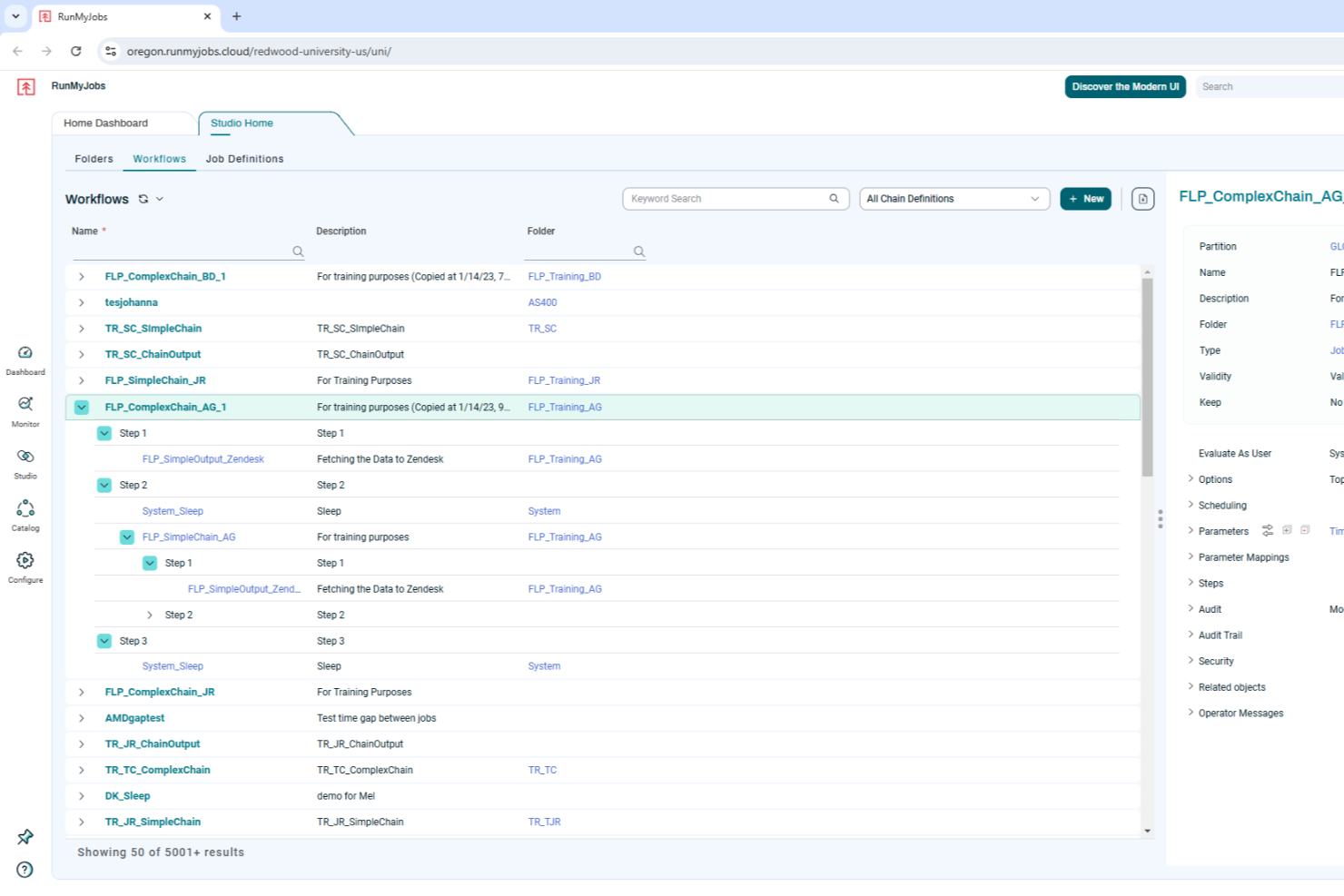
RunMyJobs by Redwood is designed for businesses seeking to optimize their operational workflows through enterprise process automation. It offers tailored solutions for industries reliant on SAP systems, addressing the complexities of integrating and automating critical business processes. By leveraging its cloud-native architecture and low-code interface, RunMyJobs can transform how your team manages workload automation, making it a compelling choice for businesses aiming to enhance efficiency and reliability in their operations.
Why I Picked RunMyJobs by Redwood
I picked RunMyJobs by Redwood for its unique ability to seamlessly integrate with SAP systems, a crucial feature for enterprises heavily reliant on these applications. Its cloud-native architecture supports hybrid environments, ensuring your team can automate processes across both on-premise and cloud systems. Additionally, the low-code interface allows users to design and implement automation workflows without extensive technical expertise, making it accessible for various team members.
RunMyJobs by Redwood Key Features
In addition to its SAP integration capabilities, I also found several other features worth highlighting:
- Job Scheduling: Automates the scheduling of complex workflows, ensuring tasks are executed at the right time without manual intervention.
- Real-Time Monitoring: Provides live insights into ongoing processes, helping your team to quickly identify and resolve issues.
- Resource Management: Efficiently allocates resources to various tasks, optimizing performance and reducing downtime.
- Task Monitoring: Keeps track of task progress and completion, offering a comprehensive view of workflow efficiency.
RunMyJobs by Redwood Integrations
Integrations include SAP ERP, Oracle, ServiceNow, AWS services, Microsoft Azure, Google Cloud, Salesforce, IBM z/OS, Kubernetes, and Apache Kafka.
Pros and Cons
Pros:
- Real-time workflow visibility
- Strong hybrid environment support
- Deep native SAP automation
Cons:
- Limited non ERP focus
- Setup can be complex

Best for handling complex automation tasks
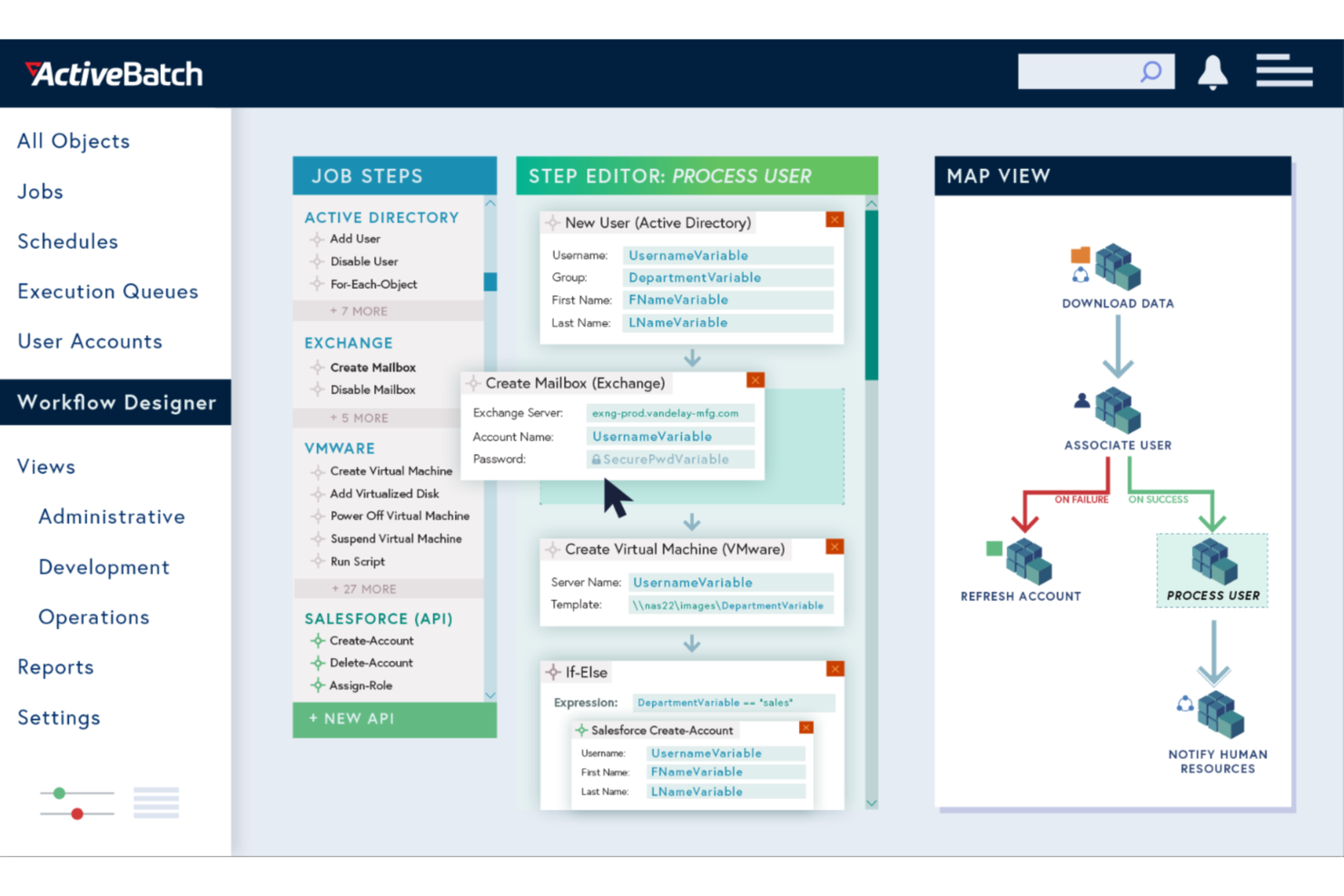
ActiveBatch empowers your business to automate and orchestrate complex IT and business processes with ease. This enterprise process automation software is ideal for industries looking to eliminate mundane tasks and improve operational efficiency. By seamlessly integrating with a wide range of platforms, ActiveBatch helps you focus on strategic initiatives rather than time-consuming manual processes.
Why I Picked ActiveBatch
I picked ActiveBatch for its exceptional ability to handle intricate process automation tasks through features like its Job Step Library and Event-Driven Scheduling. These features enable your team to automate workflows without extensive coding, which is crucial for businesses aiming to optimize operations. The platform's real-time monitoring and customizable alerts ensure that processes run smoothly, reducing the risk of errors and downtime. ActiveBatch's robust security measures further protect your data, making it a reliable choice for enterprise environments.
ActiveBatch Key Features
In addition to its automation capabilities, I also found several other features that make ActiveBatch stand out:
- User-Friendly Interfaces: Provides intuitive access through a web-based console and self-service portal for remote management.
- SLA Management: Automates monitoring and management of service level agreements to ensure optimal performance.
- Reporting and Monitoring: Features customizable alerts and comprehensive monitoring to prevent job failures.
- High Availability: Offers dynamic or manual failover to combat outages.
ActiveBatch Integrations
Integrations include Microsoft SQL Server, ServiceNow, SharePoint, Microsoft Azure, VMware, Oracle, Amazon Web Services (AWS), Google Cloud Platform (GCP), SAP, and IBM i.
Pros and Cons
Pros:
- Broad enterprise system integrations
- Event-driven scheduling flexibility
- Low-code workflow automation design
Cons:
- Complex setup for small teams
- Steep learning curve initially
altaFlow
Best for native Salesforce document automation

altaFlow is an enterprise process automation platform built for organizations that rely on Salesforce and need secure, compliant workflow management. It’s designed for teams in regulated industries who want to automate document handling, approvals, and audit trails without custom code.
Who Is altaFlow Best For?
Large enterprises in regulated industries that need to automate complex document workflows and maintain strict compliance within Salesforce environments.
Why I Picked altaFlow
I picked altaFlow because it offers native Salesforce document automation that goes beyond basic workflow triggers. My team uses altaFlow to generate, route, and store documents directly within Salesforce, eliminating the need for external tools or manual uploads. I appreciate how it supports complex approval chains and ensures every document is audit-ready. In practice, that means we can automate contract creation and compliance documentation without leaving our CRM.
altaFlow Key Features
- No-code workflow builder: Design and deploy automated workflows using a drag-and-drop interface without writing code.
- Role-based access controls: Set granular permissions for users and teams to manage sensitive process steps.
- Automated audit trails: Track every action and document change for compliance and reporting.
- E-signature integration: Collect legally binding signatures within automated workflows directly from Salesforce.
altaFlow Integrations
Integrations include Salesforce, NetSuite, SharePoint, and more.
Pros and Cons
Pros:
- Supports granular, role-based access controls
- Built-in e-signature collection in workflows
- No-code workflow builder for rapid deployment
Cons:
- Primarily focused on Salesforce-centric environments
- Fewer prebuilt workflow templates than competitors

Best for cross-departmental workflows
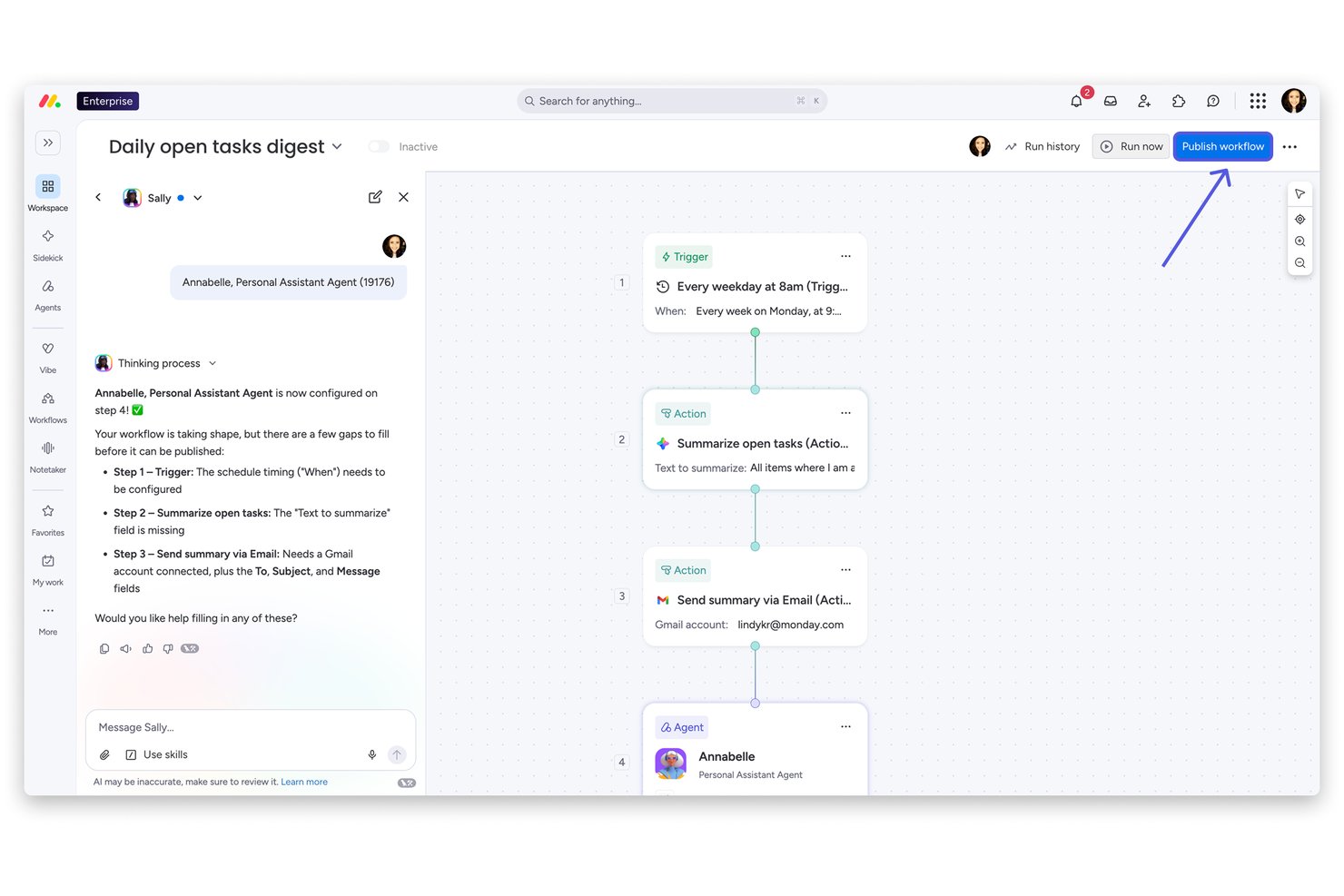
monday AI Workspace is an AI-native work management platform that combines visual workflow automation, cross-departmental process orchestration, and no-code app building across project management, service, CRM, and dev workflows.
Who Is monday AI Workspace Best For?
It's a strong fit for enterprise PMO teams and operations leads managing complex, multi-department workflows across product, IT, HR, finance, and marketing functions.
Why I Picked monday AI Workspace
I picked monday AI Workspace as one of the best because it's built from the ground up to connect work across departments that typically operate in silos. The AI workflow builder orchestrates agents, triggers, and actions spanning marketing, IT, finance, and PMO on a single platform. I also lean on the native app builder, which lets my team create approval workflows and project intake portals without any engineering support.
monday AI Workspace Key Features
- AI agent workforce: Deploy specialized AI agents to execute and automate project tasks directly within workflows.
- AI-powered dashboards: Build custom dashboards for real-time project tracking, SLA measurement, and performance analytics.
- Role-based permissions: Set granular user and admin controls with audit logs and SCIM provisioning for enterprise governance.
- No-code API and integration hub: Connect with Jira, Slack, Google Workspace, and over 200 enterprise apps using built-in connectors and open APIs.
monday AI Workspace Integrations
monday AI Workspace offers hundreds of native integrations through its built-in integrations and marketplace, including Slack, Jira, GitHub, Google Workspace, Outlook, and HubSpot. It also supports Zapier and provides an API for custom integrations.
Pros and Cons
Pros:
- Unifies PMO, IT, HR, and marketing workflows
- No-code builder requires no developer involvement
- Automates multi-step cross-department workflows
Cons:
- Complex workflows require initial configuration time
- Automation depth lags dedicated iPaaS platforms
New Product Updates from monday AI Workspace
monday AI Workspace Adds Human Approval Routing
monday AI Workspace adds a human-in-the-loop approval block to AI Workflows, sending approval requests and routing workflow paths based on responses. For more information, visit monday AI Workspace's official site.
Kissflow
Best for customizable app building

Kissflow is a low-code/no-code enterprise process automation platform that enables teams to build internal applications, automate workflows, and manage operations from a single workspace. Designed to empower both technical and non-technical users, it helps organizations streamline processes and enhance productivity at scale.
Why I picked Kissflow: I picked Kissflow for its balance of simplicity and enterprise functionality. It allows you to create customized applications and workflows without relying heavily on IT resources, which is ideal for automating complex internal processes. I also like its built-in governance tools that maintain compliance and visibility across large-scale automation projects.
Standout Features & Integrations:
Features include AI-assisted app development for faster solution building, workflow orchestration for cross-department automation, and over 100 pre-built templates to accelerate deployment.
Integrations include Salesforce, HubSpot, Slack, Microsoft Dynamics CRM, Microsoft Teams, Zendesk, Jira Software Cloud, Dropbox, Smartsheet, Google Forms, Twilio, and Mailchimp.
Pros and Cons
Pros:
- AI tools support intelligent development
- Extensive integrations enhance workflow connectivity
- Low-code platform enables rapid automation
Cons:
- Reporting features remain fairly basic
- Mobile app lacks full functionality
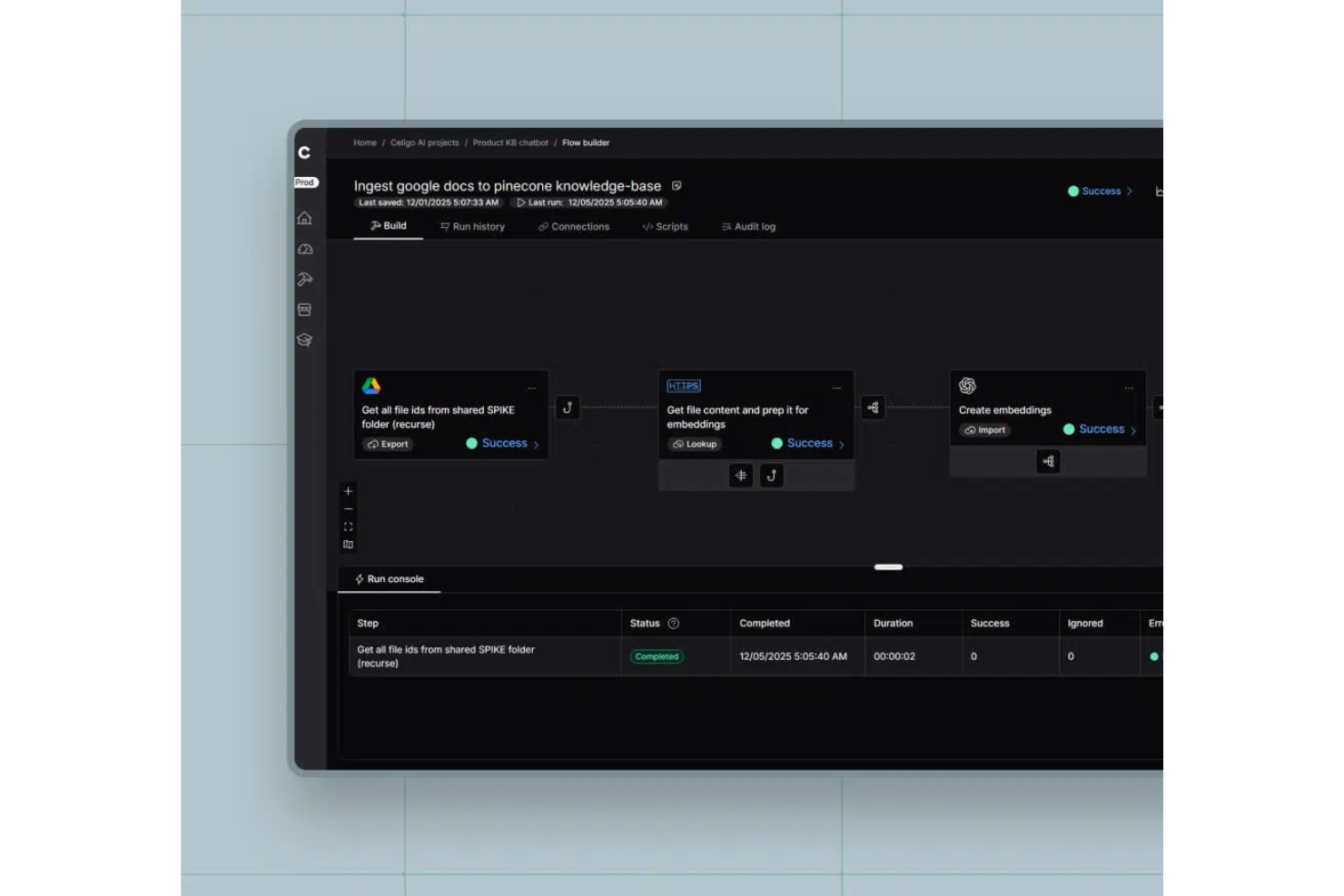
Celigo is an enterprise process automation platform that connects cloud apps, automates workflows, manages data integrations, and provides centralized monitoring for complex business processes.
Who Is Celigo Best For?
Large enterprises and IT teams that need to automate and manage integrations across multiple cloud applications and business systems.
Why I Picked Celigo
I picked Celigo as one of the best because its library of 1,000+ prebuilt app connectors lets my team automate processes across nearly any SaaS platform we use. I can quickly connect Salesforce, NetSuite, Shopify, and dozens of other systems without custom development. This scale of ready-made connectors means we can orchestrate complex, multi-app workflows and adapt as our tech stack evolves.
Celigo Key Features
- Workflow designer: Build, visualize, and manage automated workflows using a drag-and-drop interface.
- Error management dashboard: Monitor, troubleshoot, and resolve integration errors from a centralized dashboard.
- Role-based access control: Assign permissions and manage user roles for secure process automation.
- Audit logging: Track changes and user actions across integrations for compliance and transparency.
Celigo Integrations
Celigo offers 1,000+ native prebuilt connectors, including Salesforce, NetSuite, Shopify, Microsoft Dynamics 365, SAP, QuickBooks, Amazon, HubSpot, Snowflake, Jira, and Slack. An API is available for custom integrations.
Pros and Cons
Pros:
- Provides detailed audit logs for compliance
- Supports granular role-based access control
- Offers 1,000+ prebuilt app connectors
Cons:
- Initial setup can be time-consuming
- Advanced features require higher-tier plans
New Product Updates from Celigo
Celigo Adds Agent Groups, Redshift, and Network Policies
Celigo adds on-premise agent groups, Amazon Redshift data ingestion, and network policies for webhooks and APIs. These updates improve availability, data syncing, and access control. For more information, visit Celigo’s official site.
 .

TrailHQ
Best for AI-powered document automation

Nanonets is an AI-powered platform focused on automating document processing and data extraction workflows, aiding industries like finance, healthcare, and logistics.
Why I picked Nanonets: Nanonets excels in enterprise automation through its advanced AI capabilities, enabling businesses to automate intricate workflows that involve multiple applications and data sources. By leveraging custom Language Learning Models (LLMs), the platform supports highly tailored automation that adapts to the specific requirements of various enterprise-level workflows, making it ideal for complex and dynamic operational settings. For example, it can handle process automation for data extraction, invoice processing, and document approval.
Standout Features & Integrations:
Features include AI-powered insights from unstructured data, GDPR, SOC 2, and HIPAA compliance, a no-code platform for more user accessibility, and a human-in-the-loop feature, adding a level of oversight for processes that require manual verification.
Integrations include Salesforce, SAP, Quickbooks, Google Sheets, Dropbox, and Zapier.
Pros and Cons
Pros:
- Automated data extraction features
- Compatible with multiple programming languages
- Simple API for easy integration
Cons:
- Compared to more advanced tools, Nanonets offers fewer customization options
- May not be suitable for more extensive machine learning projects with very large datasets

Zapier
Best for building no-code app integrations

Zapier is a popular AI orchestration platform that helps organizations coordinate workflows across thousands of apps and AI tools. It streamlines processes by automating repetitive work and coordinating actions between systems, enabling teams to build scalable workflows without relying on custom development.
Why I picked Zapier: I chose Zapier for this list because of its ability to orchestrate workflows across a vast ecosystem of applications and AI tools without requiring coding skills. Zapier supports multi-step workflows that combine business logic, app integrations, and AI-driven actions, making it easier to manage complex processes across teams. Its no-code approach keeps automation accessible across business teams, while its scale and flexibility make it well-suited for organizations operating across large, interconnected toolsets.
Standout Features & Integrations:
Features include multi-step workflows with conditional logic, AI-assisted workflow creation with Zapier Copilot, support for AI actions, Agents, and Chatbots, and built-in tools like Zapier Tables and Forms for managing workflow data. Governance features such as permissions, audit logs, and security controls support deploying automations across teams.
Integrations include Salesforce, HubSpot, Slack, OpenAI, Microsoft Dynamics CRM, Microsoft Teams, Zendesk, Jira Software Cloud, and Mailchimp.
Pros and Cons
Pros:
- User-friendly interface with a visual canvas for mapping workflows
- Integrates with a multitude of apps and AI tools
- No-code workflows accessible to non-technical users
Cons:
- Free plan limited to two-step workflows
- No mobile app
Annen programvare for prosessautomatisering i store virksomheter
Nedenfor finner du en liste over ytterligere programvare for prosessautomatisering i store virksomheter som jeg tok med på kortlisten. Selv om de ikke kom med blant de 10 beste, er de fortsatt nyttige og verdt å undersøke nærmere.
- UiPath
For driving digital transformation
- Nintex
For robotic process automation (RPA)
- IBM Cloud Pak for Business Automation
For AI analytics and insights
- Pega
For AI-powered decisioning
- Automation Anywhere
For building custom AI agents
- Process Runner
For SAP data automation
- Camunda
For end-to-end process orchestration
- Tungsten Automation
For automated invoicing
- SAP Signavio
For business process transformation
- Bizagi
For low-code process automation


Relaterte anmeldelser av prosjektstyringsprogramvare
Hvis du fortsatt ikke har funnet det du leter etter her, kan du se nærmere på disse andre relaterte verktøyene som vi har testet og evaluert:
- Prosjektstyringsprogramvare
- Ressursstyringsprogramvare
- Programvare for arbeidsflytautomatisering
- Programvare for tidsregistrering
- Programvare for oppgavestyring
- Samarbeidsverktøy
- Verktøy for å lage Gantt-diagrammer
- Produktivitetsverktøy
- Programvare for prosjektoppfølging
- Programvare for prosjektplanlegging
- Prosjektstyringsprogramvare for utviklere
How I Evaluate Enterprise Process Automation Software
I look at these tools in two layers—whether they can actually orchestrate process management intake, approvals, and cross-system hand-offs, and what separates the leaders from the rest.
Core Functionality (Table Stakes For This List)
When I'm selecting tools for my list, I rank each one on a scale from 0 (does not offer the functionality) to 5 (excels in this area) for each core functionality listed below. Then, I calculate the tool's total score into a percentage. Each tool needs to achieve a minimum total score of 65% to be considered for inclusion.
- Visual Workflow Builder: I evaluate whether you can map out multi-step processes—like a project intake-to-kickoff sequence—using drag-and-drop steps rather than writing code from scratch.
- Enterprise System Integrations: The tool should connect to the systems your teams already use, so I check for prebuilt connectors to PM, ITSM, ERP, and CRM platforms alongside open API access.
- Conditional Logic & Rules Engine: Real project workflows branch constantly, so I look for support for triggers, decision points, and loops—like auto-escalating a blocked task when an SLA threshold is missed.
- Approval & Task Routing: I check how the platform handles multi-tier approvals and dynamic assignment, such as routing a change request through a review chain based on budget impact or risk level.
- Process Analytics & Monitoring: Dashboards that surface where work stalls matter here—I evaluate whether you can track SLAs, spot bottleneck patterns, and filter by team, portfolio, or process type.
- Governance & Audit Controls: Enterprise deployments need role-based access, version history, and audit logs, so I look at how granularly the platform lets you control who can edit, publish, or view each workflow.
Once I have a list of tools that meet the criteria, I consider what sets each platform apart.
Differentiating Factors (What Sets Vendors Apart)
Here's how I compare and contrast different vendors:
Standout Features
I look for AI capabilities that go beyond basic triggers—like auto-classifying incoming project requests or flagging at-risk workflows before delays cascade. Process mining is another differentiator, especially when a platform can analyze execution logs to surface where handoffs stall between teams. I also evaluate citizen developer support, since PMO teams benefit when business users can build their own automations inside governed sandboxes rather than waiting on IT backlogs.
Beyond Features
Total cost of ownership matters here because licensing models vary widely—some vendors charge per workflow run, others per user, and the difference compounds fast when you're automating across a 200-person PMO. I also evaluate implementation complexity, since enterprise rollouts often require certified partners and phased onboarding that can stretch timelines. Security and compliance certifications like SOC 2 Type II and ISO 27001 are worth checking early, especially if your automations touch sensitive project financials or regulated client data.
Slik velger du programvare for prosessautomatisering i store virksomheter
Mens du går gjennom din egen unike prosess for valg av programvare, bør du ha følgende punkter i bakhodet:
- Forstå virksomhetens behov: Før du velger et automatiseringsverktøy, bør du tydelig definere virksomhetens mål og ambisjoner knyttet til styring av forretningsprosesser. Identifiser de spesifikke manuelle prosessene du ønsker å automatisere, og resultatene du vil oppnå. Hvis generering av tilbakevendende kontrakter eller kunderapporter for eksempel er en del av arbeidsflyten din, bør du prioritere plattformer som inkluderer eller kan integreres med programvare for dokumentgenerering for å effektivisere disse oppgavene.
- Brukervennlighet: Vurder hvor mange i virksomheten som skal bruke plattformen, og hvor tilgjengelig den vil være for ulike brukere. Det kan være lurt å se etter et kodefritt automatiseringsverktøy med et brukervennlig dra-og-slipp-grensesnitt hvis du ikke har et utviklerteam som skal sette opp og administrere automatiseringen av forretningsprosessene dine.
- Integrasjoner: Se på hvilke innebygde integrasjoner programvaren tilbyr, og om den kan kobles til det eksisterende teknologiske økosystemet ditt. Mange automatiseringsløsninger for virksomheter har flere integrasjoner med populære CRM-, ERP- og kommunikasjonsplattformer samt andre sentrale verktøy. Mange har imidlertid også et API som krever et tilpasset oppsett, så vurder om dette vil fungere, eller om du trenger en løsning som fungerer direkte uten omfattende konfigurering.
- Skalerbarhet: Alle automatiseringsplattformer for virksomheter bør kunne håndtere komplekse prosesser, store arbeidsmengder, mange brukere og økende datamengder. Når det er sagt, kan du som fortsatt er i vekst, være på utkikk etter en løsning som dekker behovene til teammedlemmene dine nå, og som fortsatt kan skaleres i takt med virksomhetens vekst.
- Sikkerhet og samsvar: Automatisering innebærer ofte håndtering av sensitive data og kritiske forretningsprosesser. Prioriter sikkerhet når du velger en løsning, ved å se etter funksjoner som datakryptering, tilgangskontroller for brukere og revisjonsspor. Sørg for at automatiseringsløsningen overholder bransjeregler og standarder for databeskyttelse, som HIPAA eller GDPR.
Trender innen programvare for automatisering av virksomhetsprosesser
Her er noen trender jeg har lagt merke til innen teknologi for automatisering av virksomhetsprosesser, samt hva de kan bety for fremtiden. Jeg har gått gjennom utallige produktoppdateringer, pressemeldinger og lanseringslogger for å trekke frem de viktigste innsiktene.
- KI-drevet automatisering: KI-drevet automatisering får stadig større utbredelse. Den muliggjør mer intelligente beslutninger og prediktiv analyse. Denne trenden er viktig fordi den reduserer menneskelige feil og øker effektiviteten.
- Plattformer med lite kode: Plattformer med lite kode har blitt mer populære. De gjør det mulig for brukere å opprette applikasjoner med minimale kunnskaper om programmering. Dette demokratiserer programvareutvikling og fremskynder utrulling.
- Hyperautomatisering: Dette innebærer bruk av flere teknologier for å automatisere komplekse forretningsprosesser. Det integrerer KI, maskinlæring og robotstyrt prosessautomatisering. Denne trenden er betydningsfull fordi målet er å automatisere alle oppgaver i en organisasjon som lar seg automatisere.
Hva er programvare for automatisering av virksomhetsprosesser?
Programvare for automatisering av virksomhetsprosesser automatiserer komplekse forretningsprosesser på tvers av en organisasjon, effektiviserer driften, reduserer manuelt arbeid og forbedrer effektiviteten. Den brukes ofte av driftsledere, IT-avdelinger og forretningsanalytikere til å automatisere repetitive oppgaver og integrere ulike forretningssystemer.
Viktige komponenter omfatter arbeidsflytautomatisering, dataintegrasjon og analyse. Arbeidsflytautomatisering definerer og administrerer forretningsprosesser, dataintegrasjon sikrer sømløs dataflyt mellom systemer, og analyse gir innsikt i prosessytelse og områder som kan forbedres.
Funksjoner i programvare for automatisering av virksomhetsprosesser
Når du velger programvare for automatisering av virksomhetsprosesser, bør du vurdere flere viktige funksjoner som kan ha stor betydning for virksomhetens suksess, for eksempel:
- Kodefri- og lavkodeutvikling: Denne funksjonen lar brukere med begrensede programmeringsferdigheter opprette og tilpasse prosesser gjennom dra-og-slipp-basert, regelstyrt modellering. Den gjør det mulig for ikke-teknisk personale å automatisere arbeidsflyter uten omfattende kunnskap om koding.
- Arbeidsflytstyring: Omfattende funksjoner for arbeidsflytstyring gjør det mulig å opprette digitale skjemaer, omfattende rapportering og analyse, kobling av data og IT-systemer samt dynamisk oppgavefordeling. Dette sikrer at alle forretningsprosesser effektiviseres og administreres på en god måte, samtidig som manuelle oppgaver reduseres.
- Dokumentbehandling: Programvaren bør gjøre det mulig å koble dokumenter til prosessene dine, automatisere dokumentruting, fremskynde godkjenninger med elektroniske signaturer samt tilby versjonskontroll og arkivering. Denne funksjonen er viktig for å opprettholde en organisert og lett tilgjengelig dokumentasjon. Finn spesifikk programvare for intelligent dokumentbehandling her.
- Helhetlig automatisering og orkestrering: Omfattende automatisering og orkestrering av prosesser fra start til slutt, inkludert sømløs integrasjon av både menneske- og systembaserte oppgaver, er avgjørende for å maksimere driftseffektiviteten.
- API-integrasjon: Programmeringsgrensesnitt (API-er) muliggjør sømløs samhandling med eksterne applikasjoner og systemer, samler data på ett sted og konsoliderer prosesser. Denne funksjonen er avgjørende for å sikre at programvaren kan integreres med eksisterende systemer.
- Robotic Process Automation (RPA): Robotic Process Automation (RPA) er avgjørende for effektiv automatisering av repetitive oppgaver. Denne funksjonen gjør det mulig for programvaren å integrere RPA-roboter i automatiseringsmiljøet, noe som øker produktiviteten.
- Sikkerhetsfunksjoner: Robuste sikkerhetstiltak, inkludert datakryptering, tilgangskontroller og samsvarssertifiseringer, er avgjørende for å beskytte sensitiv informasjon og sikre overholdelse av regelverket.
- Sanntidsanalyse: Muligheten til å tilby sanntidsanalyse og rapporteringsfunksjoner bidrar til å overvåke prosessytelsen, identifisere flaskehalser og ta datadrevne beslutninger. Denne funksjonen er avgjørende for kontinuerlig forbedring og strategisk planlegging.
- Tilpassbare automatiserte arbeidsflyter: Programvaren bør tilby tilpassbare automatiserte arbeidsflyter med utløsere, handlinger og betinget logikk for å automatisere komplekse forretningsprosesser. Denne fleksibiliteten gjør det mulig for virksomheter å tilpasse programvaren til sine spesifikke behov.
- Integrasjon med tredjepartsapplikasjoner: Problemfri integrasjon med tredjepartsapplikasjoner og -tjenester, som CRM, ERP og andre virksomhetssystemer, er viktig for å skape en enhetlig og effektiv arbeidsflyt på tvers av organisasjonen.
Fordeler med programvare for automatisering av virksomhetsprosesser
Her er noen av fordelene du kan forvente ved å implementere et prosessautomatiseringssystem på virksomhetsnivå:
- Økt effektivitet: Automatisering av rutineoppgaver reduserer tiden og innsatsen som kreves for å fullføre dem, slik at ansatte kan fokusere på mer strategiske aktiviteter.
- Kostnadsbesparelser: Ved å minimere manuelt arbeid og redusere feil hjelper automatiseringsprogramvare organisasjoner med å spare driftskostnader og forbedre resultatene.
- Forbedret nøyaktighet: Automatisering sikrer at oppgaver utføres konsekvent og nøyaktig, noe som reduserer risikoen for menneskelige feil og styrker dataintegriteten.
- Bedre samsvar: Programvaren kan programmeres til å følge regulatoriske krav, slik at alle prosesser overholder bransjestandarder og lovpålagte krav.
- Skalerbarhet: Etter hvert som virksomheter vokser, kan automatiseringsprogramvare enkelt skaleres for å håndtere økte arbeidsmengder uten behov for betydelige ekstra ressurser.
Kostnader og priser for programvare for automatisering av virksomhetsprosesser
Tabellen nedenfor oppsummerer vanlige abonnementer, gjennomsnittsprisene deres og typiske funksjoner.
Sammenligningstabell for abonnementer for programvare for automatisering av virksomhetsprosesser
| Abonnementstype | Gjennomsnittspris | Vanlige funksjoner |
|---|---|---|
| Gratisabonnement | $0 | Grunnleggende automatiseringsverktøy, begrensede integrasjoner, brukerstøtte fra fellesskapet |
| Personlig abonnement | $25 - $50/måned | Ubegrenset antall automatiseringskjøringer for enkeltbrukere, forhåndsbygde integrasjoner, grunnleggende analyse |
| Forretningsabonnement | $100 - $500/måned | Avanserte automatiseringsverktøy, støtte for flere brukere, forbedret sikkerhet, prioritert brukerstøtte |
| Virksomhetsabonnement | $1,000+/måned | Tilpassede integrasjoner, dedikert brukerstøtte, avansert analyse, sikkerhet på virksomhetsnivå |
Vanlige spørsmål om programvare for automatisering av virksomhetsprosesser
Her er noen av de vanligste spørsmålene om automatisering av virksomhetsprosesser: