

De 10 beste alternativene til Productive, gjennomgått i 2026

Beste alternativer til Productive – kortliste


Hvis du opplever at Productive ikke er det riktige verktøyet for byrå- og prosjektstyring for teamet ditt, finnes det mange alternativer til Productive som kan dekke virksomhetens unike behov og teamets krav.
Productive mangler kanskje rapporteringsfunksjoner eller et mer brukervennlig grensesnitt, så jeg har testet og vurdert dusinvis av alternativer til Productive for å hjelpe deg med å finne en erstatning. Her er mine anbefalinger av de beste alternativene til Productive.
Hva er Productive?
Productive er en programvare for byråstyring som er utviklet for å hjelpe deg med å effektivisere driften og øke lønnsomheten. Den samler ulike verktøy i én plattform og tilbyr funksjoner som prosjektstyring, tidsregistrering, ressursplanlegging, budsjettering, fakturering og rapportering.
Hvorfor du kan stole på våre programvareanbefalinger
Teamet vårt har testet og anmeldt programvare siden 2012. Vi er selv prosjektledere, så vi vet hvor vanskelig og hvor viktig det er å velge riktig programvare.
I denne guiden har vi vurdert verktøyene gjennom praktisk testing og uavhengig research og gitt dem poeng ut fra våre utvelgelseskriterier. Vi bygger også på innsikt fra ledende eksperter i bransjen og erfarne prosjektledere.
Anmeldelsene våre bygger på vår egen redaksjonelle vurdering. De er ikke et salgsargument.
Ekspertanmeldere:
Sammenligningstabell for alternativer til Productive
Sammenlign priser og spesifikasjoner for hvert av verktøyene på listen min over de beste alternativene til Productive nedenfor.
| Tool | Best For | Trial Info | Price | ||
|---|---|---|---|---|---|
| 1 | Best for project management | 14-day free trial | From $17/user/month | Website | |
| 2 | Best for client service automation | Free demo available | Pricing upon request | Website | |
| 3 | Best for flexible project views | Free plan + 14-day trial + demo available | From $10/user/month (billed annually) | Website | |
| 4 | Best for AI-driven task management | Free demo available | Pricing upon request | Website | |
| 5 | Best for client onboarding workflows | 14-day free trial | From $49/user/month (billed annually) | Website | |
| 6 | Best for agency capacity and profit tracking | Free demo available | Pricing upon request | Website | |
| 7 | Best for agency delivery and billing in one place | Free plan + 14-day free trial + free demo available | From $9.99/user/month (billed annually) | Website | |
| 8 | Best for project flexibility | Free plan + free trial + free demo available | From $39/user/month | Website | |
| 9 | Best for agency accounting and project billing | Free demo available | From $49/user/month | Website | |
| 10 | Best for complex project portfolios | 14-day free trial | From $10/user/month (billed annually) | Website |


Vurderinger av de beste alternativene til Productive
Her er mine oversikter over hvert alternativ til Productive. Jeg tar for meg fordeler og ulemper, viktige funksjoner og ideelle bruksområder.

Scoro
Best for project management
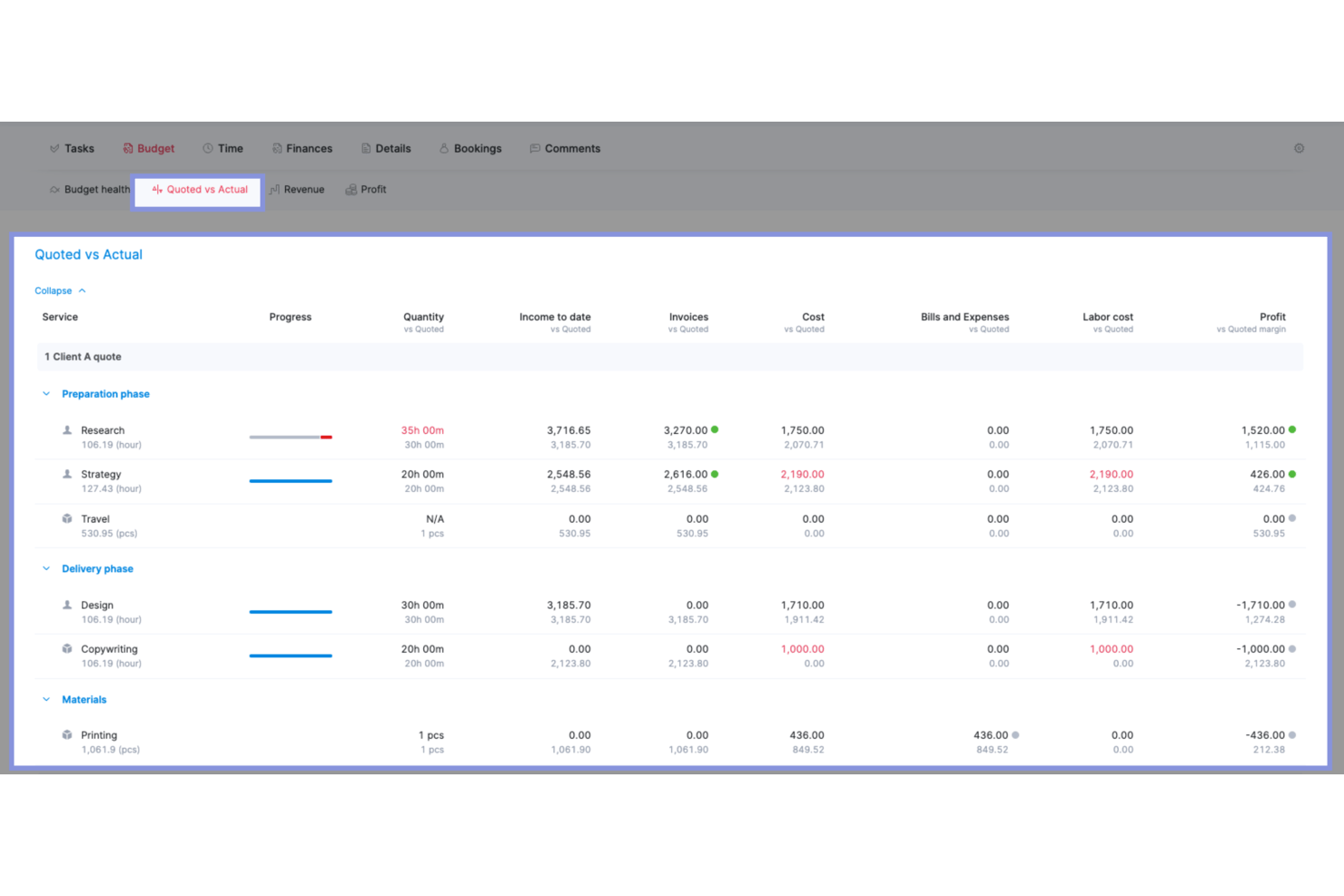
For professional services teams juggling delivery and profitability, Scoro brings project planning, task and time tracking, and financial oversight into one work management platform.
Who Is Scoro Best For?
Scoro suits project managers at consultancies and creative agencies who need to coordinate client work, team capacity, and project finances in one place.
Why I Picked Scoro
Scoro earns my pick for Best for project management by linking delivery plans to project finances. I like its project templates and Gantt charts for mapping milestones, assigning owners, and replanning shifted deliverables. Its budget view compares estimates with logged time, costs, and invoices, helping me spot overservicing before scope or margins slip.
Scoro Key Features
- Resource heatmaps: View team workload, availability, and utilization by person or role.
- Tentative bookings: Test staffing and timeline scenarios before confirming resource allocations.
- Sales pipeline: Track prospective deals and connect won opportunities to project delivery.
- ELI AI assistant: Ask questions in natural language and take action using Scoro business data.
Scoro Integrations
Scoro’s app directory lists integrations with Xero, QuickBooks, Sage Intacct, Exact Online, Salesforce, HubSpot, Google Calendar, Jira, and Dropbox. It also supports Zapier and offers an open API for custom integrations.
Pros and Cons
Pros:
- Carries won sales into project delivery
- Shows team capacity through workload heatmaps
- Connects project plans with budgets and margins
Cons:
- Task creation takes too many steps
- Dense screens can bury project details
New Product Updates from Scoro

Scoro Adds Time Mobile App and ELI Improvements
Scoro adds the Scoro Time mobile app for iOS/Android to track time anywhere and expands ELI with attachments, smarter filtering, and trigger-based actions. For more information, visit Scoro's official site.

Accelo
Best for client service automation
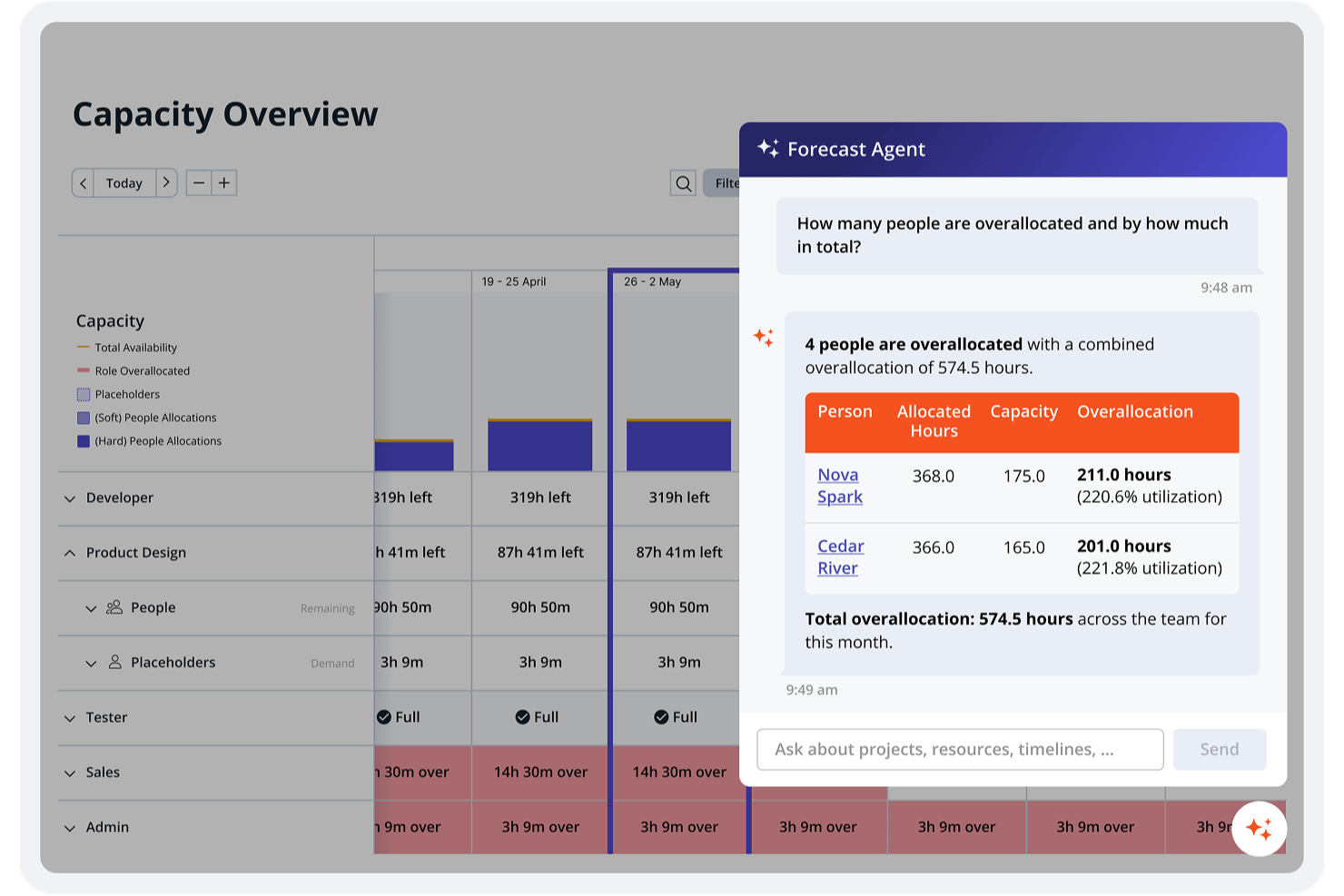
Accelo is a work management platform for professional services teams that connects client relationships with project delivery, time tracking, and billing to help agencies and consultancies coordinate work from proposal to completion.
Who Is Accelo Best For?
Accelo suits agencies and consultancies that need connected workflows for managing client relationships and service delivery.
Why I Picked Accelo
I picked Accelo as a Best Productive Alternative because its client service automation connects client relationships with project delivery. I like that teams can track time and manage billing alongside delivery, so when a client approves a proposal, the work and its billable hours stay connected.
Accelo Key Features
- Project plans: Set milestones, tasks, timelines, and dependencies in a project plan.
- Task dependencies: Link tasks and milestones so work follows its required sequence.
- Automatic progression: Configure milestones and tasks to start when dependencies are met.
- Project types: Create different project types to match your team’s processes.
Accelo Integrations
Accelo lists 25 integrations, including Salesforce, HubSpot, Xero, QuickBooks, Sage Intacct, Google Workspace, Microsoft 365, Jira, Slack, and Zapier. It also offers a RESTful API for custom applications and a Forms API for sending data into Accelo.
Pros and Cons
Pros:
- Centralizes client communication and delivery records
- Automates work from proposal through billing
- Links billable time with project budgets
Cons:
- Trigger testing can risk unintended workflow changes
- Reporting feels clunky for custom views
New Product Updates from Accelo

Accelo Rebuilds Mobile App for Project and Time Management
Accelo rebuilds its mobile app with task management, new work creation, and mobile timesheets for Forecast customers. This helps teams keep project and time data current while working away from a desktop. For more information, visit Accelo’s official site.

Wrike
Best for flexible project views
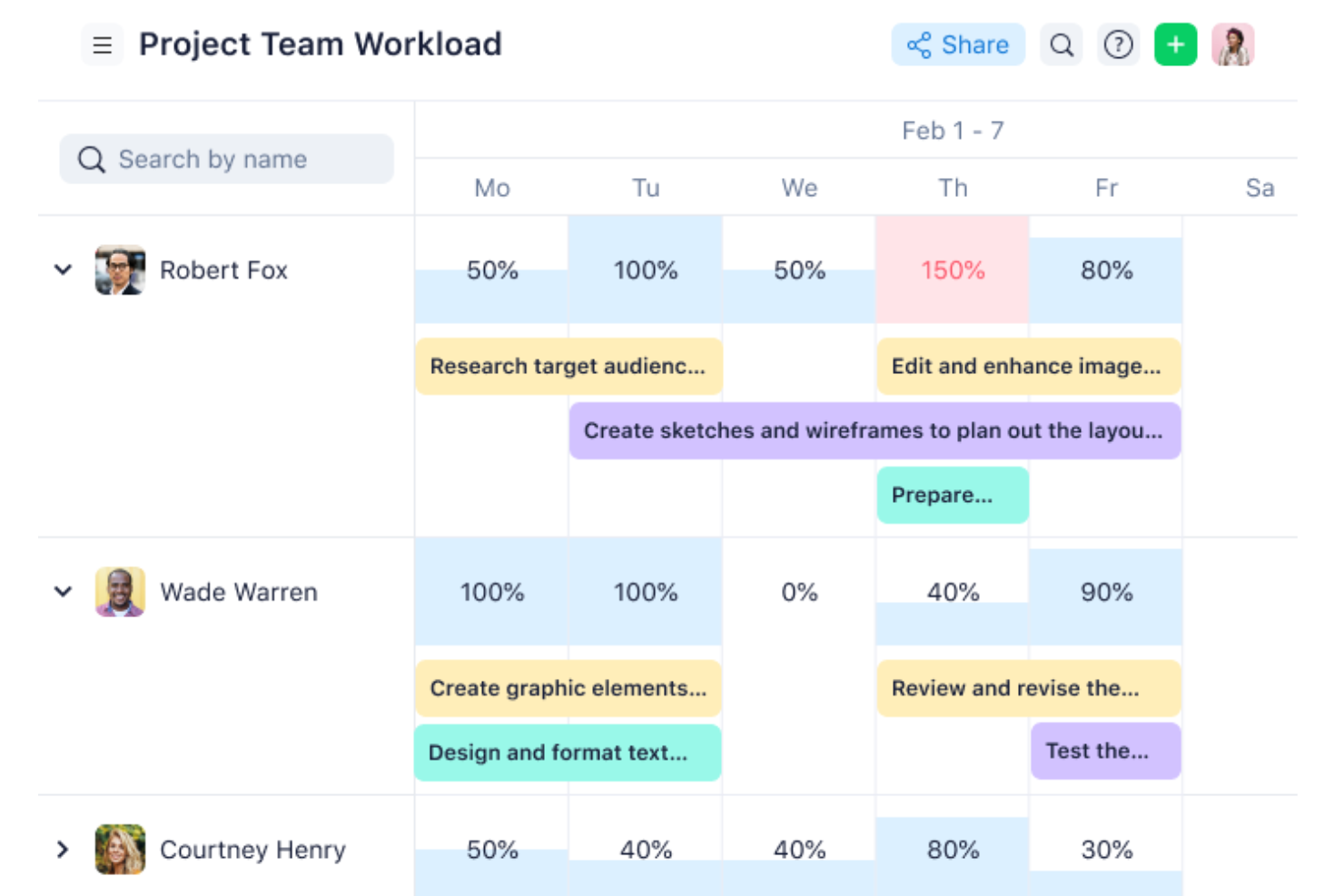
Wrike is a project management platform for cross-functional teams that need to coordinate tasks, timelines, and approvals across complex projects and tailor workflows to their delivery needs.
Who Is Wrike Best For?
Wrike suits project managers in growing or enterprise teams who need flexible views to track work across varied workflows.
Why I Picked Wrike
I picked Wrike as a productive alternative because its flexible project views let me match work tracking to the project at hand. I can use board views to follow task status and Gantt charts to map launch timelines and dependencies, then switch views as priorities shift.
Wrike Key Features
- Request forms: Collect project details through customizable forms for internal or external requests.
- Workflow automation: Set rules to assign work, update statuses, and send reminders.
- Proofing and approvals: Review files, compare versions, and collect feedback from internal or external approvers.
- Dashboards: Build dashboards with widgets to track project progress and workload.
Wrike Integrations
Wrike lists 400+ prebuilt connectors, including Slack, Salesforce, Jira, GitHub, Google Sheets, Microsoft Teams, Zoom, and Dropbox. It also supports Zapier and offers an API for custom integrations.
Pros and Cons
Pros:
- Proofing ties feedback to specific deliverables
- Custom request forms route cross-team work
- Flexible Gantt and board views support shifting plans
Cons:
- Calendar views can be hard to navigate
- Dense interface can slow new user onboarding
New Product Updates from Wrike
Wrike Expands Gantt Planning, Approvals, and AI Work Intake
Wrike adds cross-project Gantt dependencies, flexible approval routing, and AI work intake through Wrike MCP. These updates give teams more control over planning, decision-making, and incoming work. For more information, visit Wrike’s official site.

Best for AI-driven task management
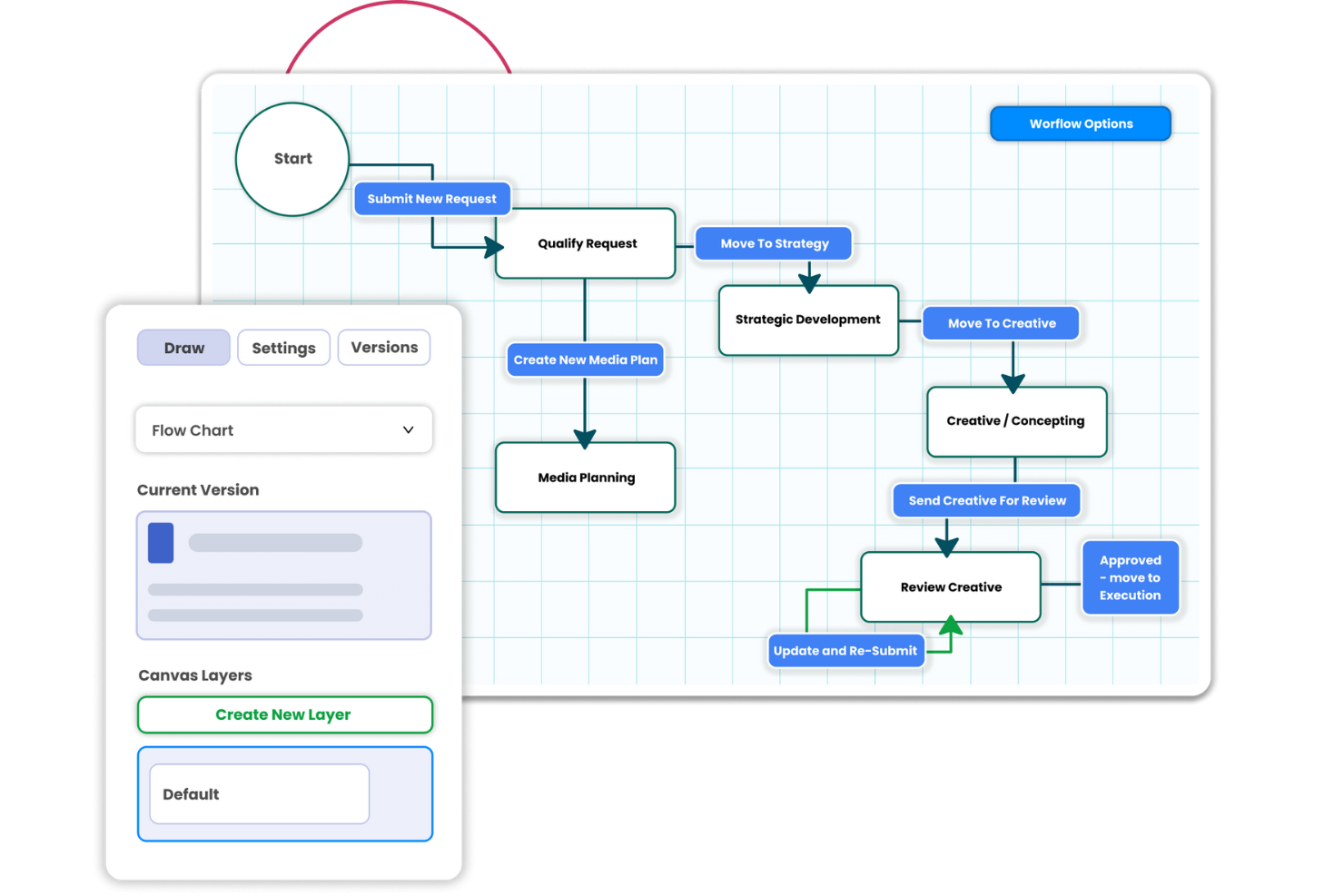
Screendragon is a workflow management platform for marketing and creative teams, bringing project planning, resource coordination, and approvals together to help teams manage complex work and shifting priorities.
Who Is Screendragon Best For?
Screendragon suits marketing operations and creative services teams coordinating campaign work, creative requests, and approvals across departments.
Why I Picked Screendragon
I picked Screendragon as Best for AI-driven task management because its AI resourcing matches tasks to people based on availability, expertise, experience, and department fit. Managers can adjust how those factors are weighted before assigning work from a project task list. I like this approach for turning a campaign brief into assignments without overlooking specialized skills.
Screendragon Key Features
- No-code workflow builder: Configure workflow steps, conditional routing, and approval sequences.
- Online proofing: Mark up documents, artwork, and video, then compare versions side by side.
- Project dashboards: Track project status, timelines, and milestones in real time.
- Budget tracking: Monitor campaign budgets and spend alongside project plans.
Screendragon Integrations
Screendragon offers out-of-the-box integrations with Aprimo, HubSpot, Microsoft Power BI, Amazon S3, Sitecore, Ziflow, Brandfolder, Smartsheet, and Zapier. It also provides a REST API and Connection Manager for custom connections.
Pros and Cons
Pros:
- Cross-project resource views reveal team availability
- Custom workflows automate creative approvals
- AI matches tasks to skills and availability
Cons:
- Complex workflows take time to configure
- Report creation can intimidate new users
New Product Updates from Screendragon
Screendragon Unveils New AI Hub
Screendragon introduced AI Hub, a new capability that lets teams build and manage AI agents directly within workflows. The update helps marketing teams automate tasks, maintain governance controls, and scale AI-driven operations more efficiently. For more information, visit Screendragon's official site.
Best for client onboarding workflows
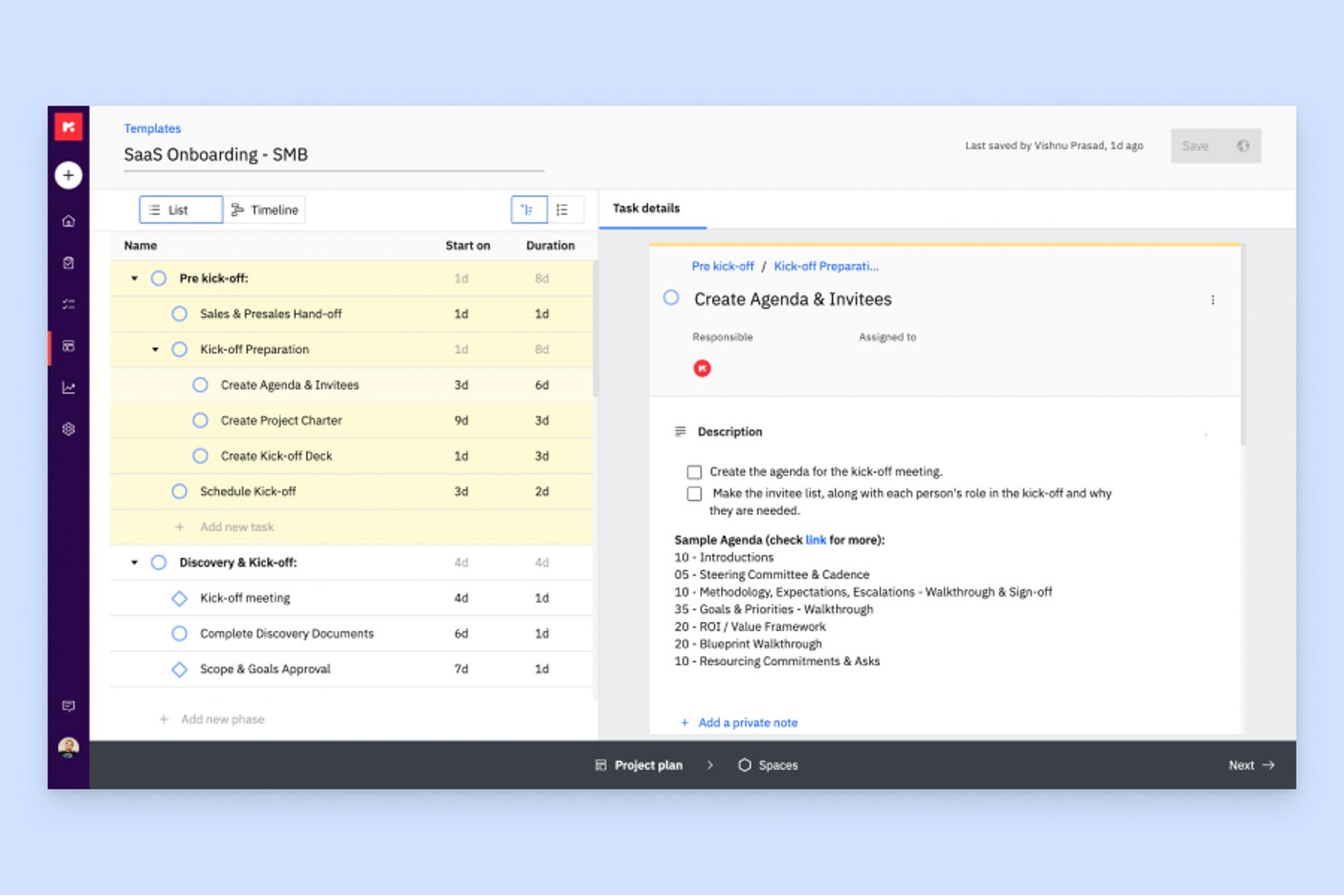
Rocketlane is a client-facing project management platform for implementation and services teams that helps coordinate delivery work, clarify ownership, and keep internal teams and customers aligned.
Who Is Rocketlane Best For?
Rocketlane suits implementation managers and customer success teams at B2B software companies coordinating onboarding across internal and client teams.
Why I Picked Rocketlane
I pick Rocketlane as a productive alternative because its client onboarding workflows put customer and internal tasks, owners, and milestones on a shared project plan. I like how onboarding templates and a client portal help teams track deliverables, so an implementation manager can spot a delayed data import before it pushes back training.
Rocketlane Key Features
- Time tracking: Log billable and non-billable hours against projects.
- Resource planning: Schedule team capacity and forecast resource needs.
- Expense tracking: Record project expenses alongside time entries.
- Financial management: Plan budgets and track revenue as projects progress.
Rocketlane Integrations
Rocketlane documents integrations with Slack, Salesforce, Jira, HubSpot, Google Calendar, and Outlook Calendar, plus Zapier and Workato connections. It also offers a REST API for custom integrations.
Pros and Cons
Pros:
- Time tracking reveals delivery capacity
- Reusable templates keep onboarding consistent
- Shared portals clarify customer ownership
Cons:
- Complex automations can trigger noisy updates
- Advanced reports need more configuration

Forecast
Best for agency capacity and profit tracking
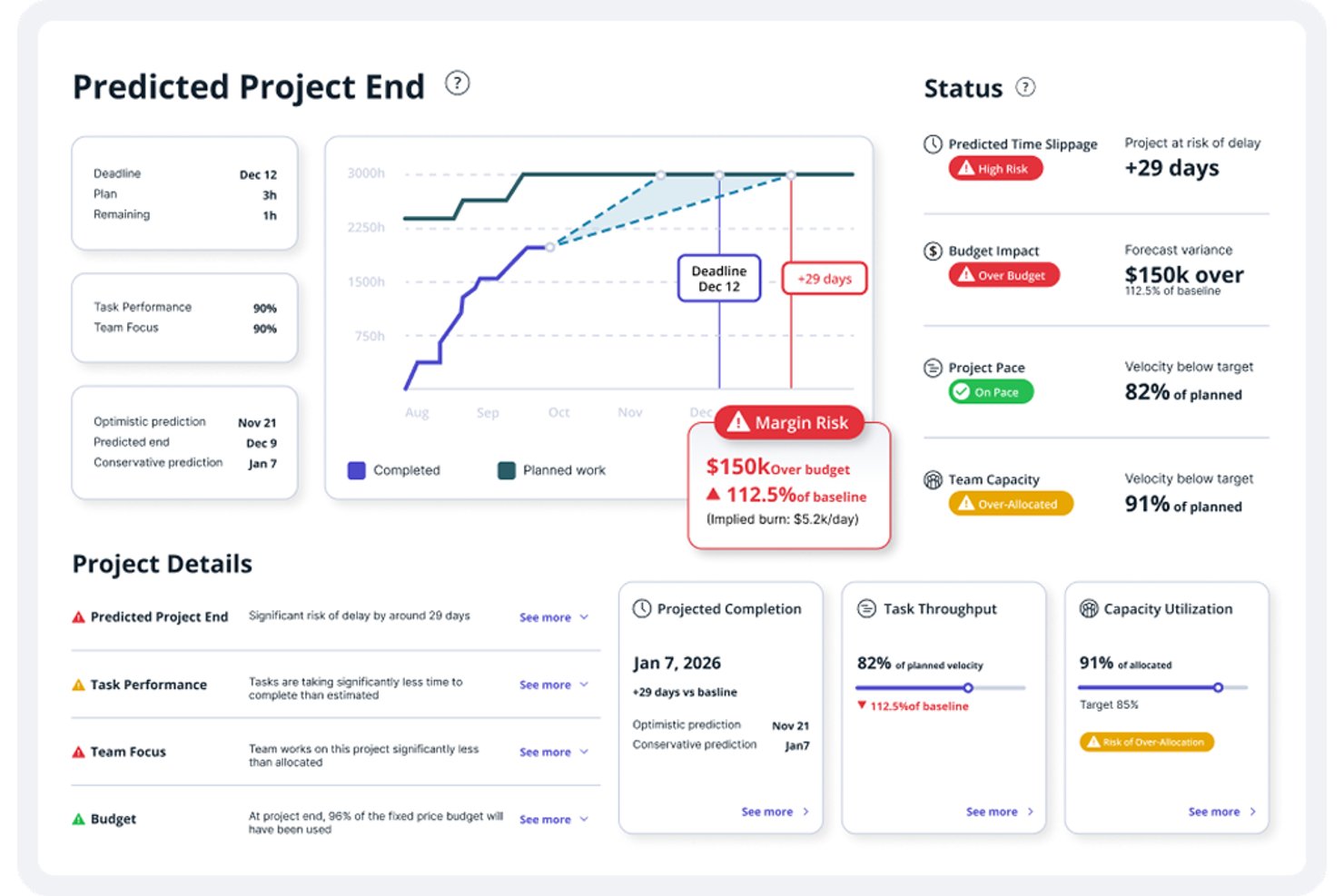
Forecast is a project management platform for agencies and professional services teams that brings project planning, collaboration, and financial visibility together to help coordinate delivery and keep work on track.
Who Is Forecast Best For?
Forecast suits agency project managers who need to match team capacity to client work and track project profitability.
Why I Picked Forecast
I picked Forecast for agency capacity and profit tracking because its resource planning shows team availability alongside project assignments, helping me spot overbooked designers before deadlines collide. I also value its project financial tracking, which lets managers compare budgets with actual costs and monitor margins as work progresses.
Forecast Key Features
- Gantt timeline: View project phases and tasks by day, week, or month.
- Task dependencies: Link tasks to show their required sequence.
- Sprint planning: Set sprint durations for projects with agile workflows.
- Subtasks: Break tasks into smaller, nested pieces of work.
Forecast Integrations
Forecast’s integration catalog includes Jira, Azure DevOps, Slack, Google Calendar, Outlook, iCloud, HubSpot, Salesforce, QuickBooks Online, and Xero. A REST API is available for custom integrations.
Pros and Cons
Pros:
- Task and time tracking improve deadline visibility
- Project financials track budgets against actual costs
- Capacity plans show availability across client work
Cons:
- Mobile app limits on-the-go project updates
- Filters and navigation confuse some new users

Best for agency delivery and billing in one place
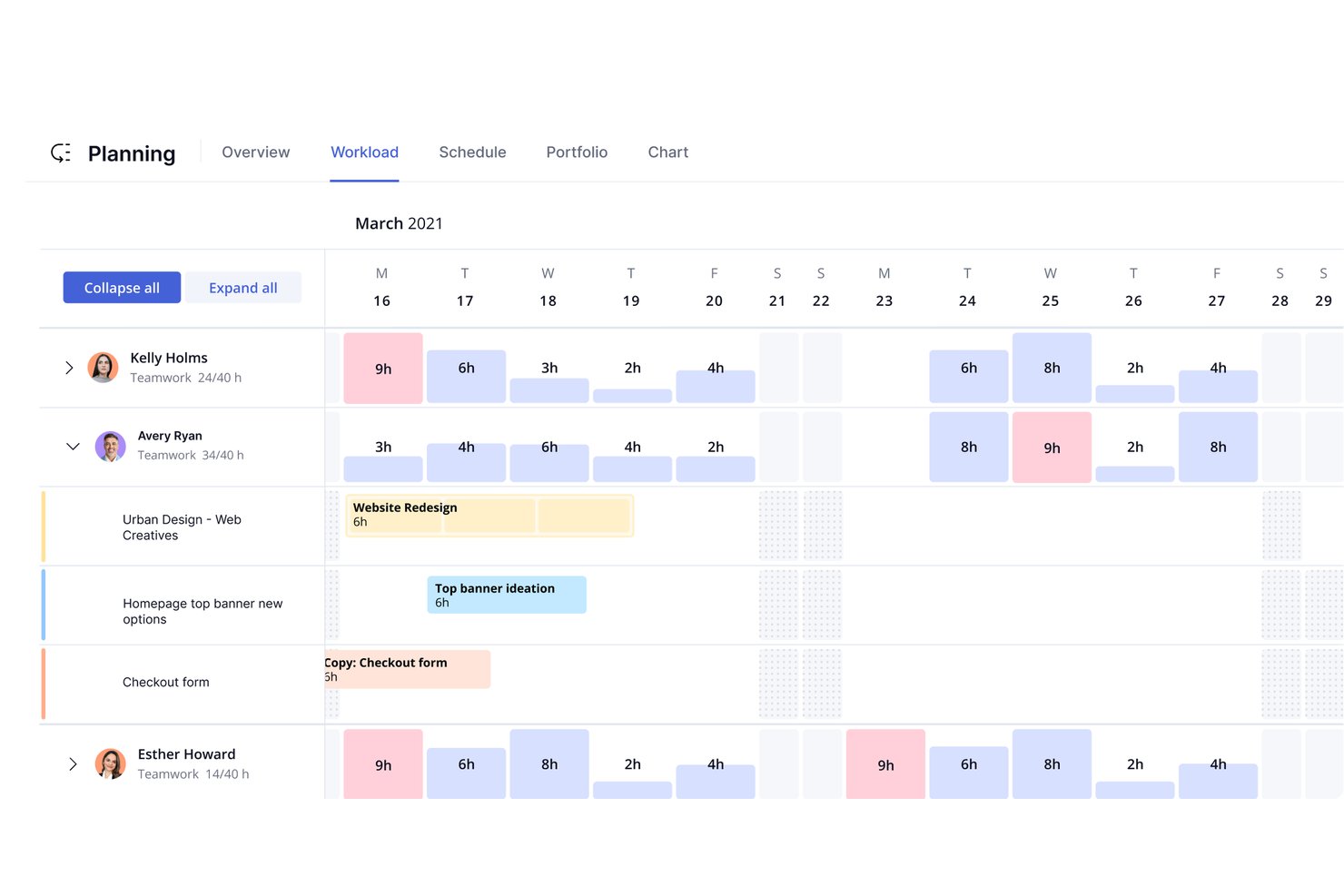
Teamwork.com is a project management platform for client-facing teams that need to coordinate project work, track deadlines, and keep delivery details visible as requirements change.
Who Is Teamwork.com Best For?
Teamwork.com suits agencies and client services teams that need to coordinate project delivery and billing across client work.
Why I Picked Teamwork.com
I picked Teamwork.com for “Best for agency delivery and billing in one place.” Its time tracking and project budgets connect delivery work with billable hours, while invoicing helps turn tracked client work into charges. I can check project costs and billing before wrapping up a client engagement.
Teamwork.com Key Features
- Gantt charts: Map tasks and milestones across a project timeline.
- Kanban boards: Move tasks through visual workflow stages.
- Project templates: Create projects from reusable setups.
- Proofs: Collect client feedback and approvals on project files.
Teamwork.com Integrations
Teamwork.com documents built-in integrations with Slack, HubSpot, QuickBooks, Xero, Google Drive, Microsoft OneDrive, and Microsoft Teams. It also connects with Zapier and provides an API for custom integrations.
Pros and Cons
Pros:
- Workload views expose resource constraints across projects
- Client portals tie approvals to project work
- Billable time connects delivery with client budgets
Cons:
- Busy project screens can feel cluttered
- Dashboards offer limited customization
- Large projects can load slowly

Ravetree
Best for project flexibility
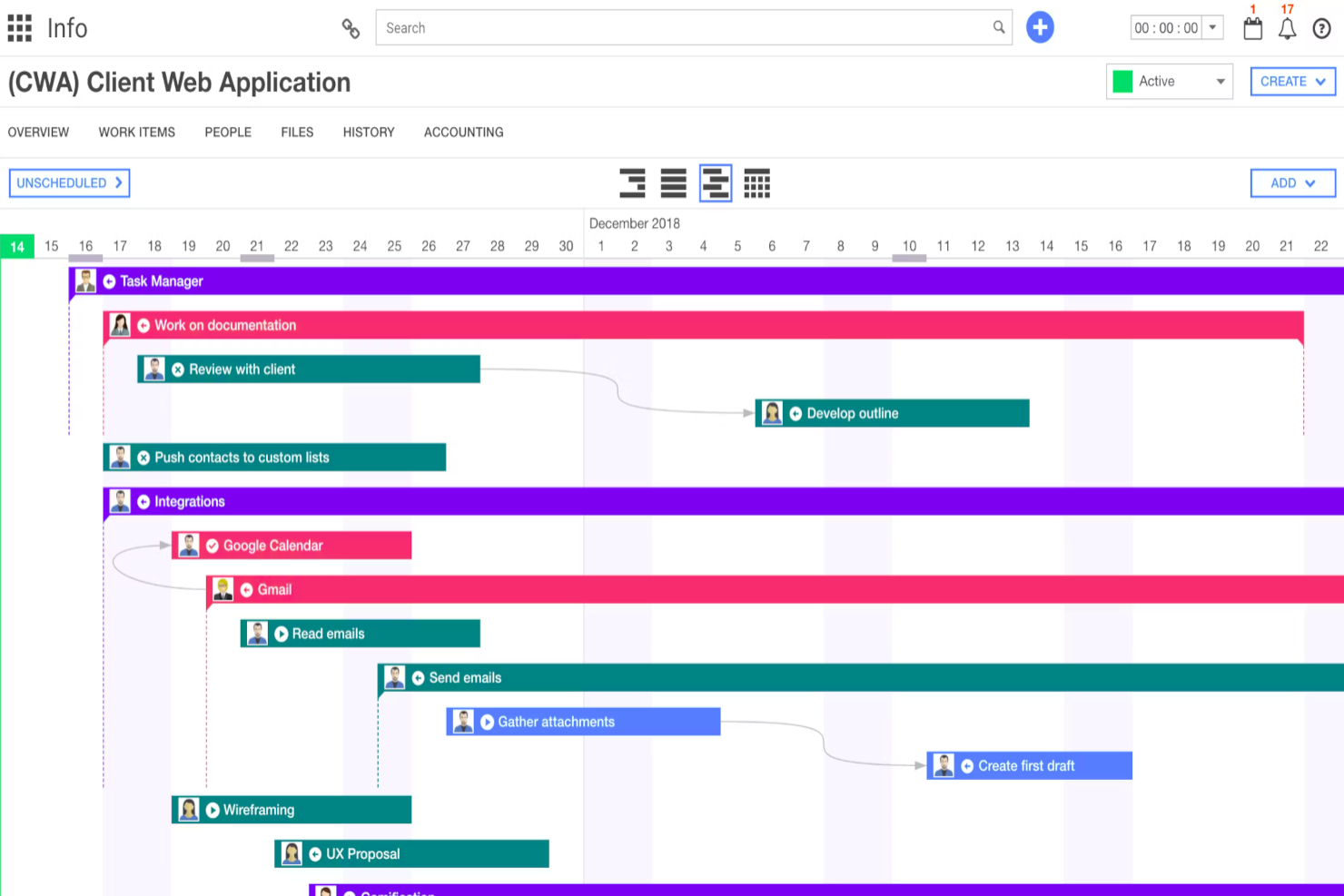
Ravetree is a work management platform for professional services teams that brings project planning, resource allocation, time tracking, and client work into one system.
Who Is Ravetree Best For?
Ravetree suits project managers at agencies and consultancies who need flexible workflows for varied client projects.
Why I Picked Ravetree
I picked Ravetree as a Best Productive Alternative for its project flexibility. Configurable workflows and custom fields let me adapt client projects to different delivery steps, while Gantt, Kanban, and list views help me match the project view to the work at hand.
Ravetree Key Features
- Time and expense tracking: Log project hours and expenses, then submit them for approval.
- Client portal: Give clients access to project updates and shared files.
- Resource planning: Review team capacity and assign people to project work.
- Project billing: Manage budgets, retainers, project financials, and invoices.
Ravetree Integrations
Ravetree’s integrations include QuickBooks, Xero, HubSpot, Google Drive, Dropbox, Box, Stripe, Google Calendar, Outlook Calendar, and GitHub. It also connects with Zapier and offers an Open API for custom integrations.
Pros and Cons
Pros:
- Project budgets connect with time and capacity planning
- Gantt, Kanban, and Agile work structures
- Custom workflows adapt to varied client projects
Cons:
- Work-item navigation takes adjustment
- Interface can feel dated

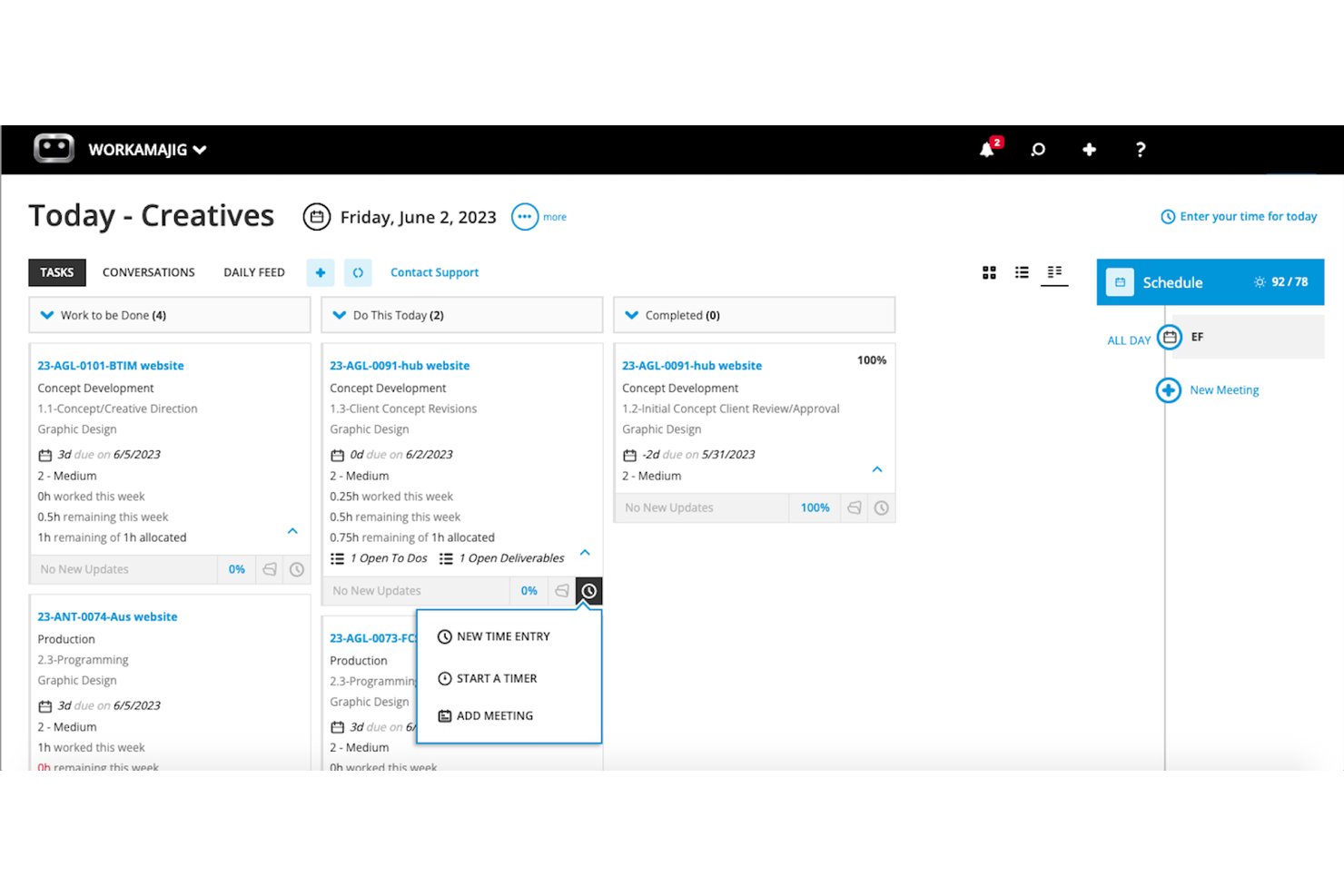
For creative agencies coordinating client work across teams, Workamajig brings project planning, resource coordination, and collaboration into one agency management platform.
Who Is Workamajig Best For?
Workamajig suits project managers at creative and marketing agencies who coordinate client work across multiple departments.
Why I Picked Workamajig
I picked Workamajig as a Best Productive Alternative because it’s Best for agency accounting and project billing. I like that project budgets and job costs connect with tracked time and expenses, helping me compare actuals with estimates. Those entries can also support client billing, reducing manual reconciliation between project delivery and invoices.
Workamajig Key Features
- Lead tracking : Manage prospects and follow-ups in the agency CRM.
- Resource scheduling : Assign staff to tasks and review availability.
- Digital proofing : Annotate creative files and route work for approval.
- Project schedules : Build task lists and organize work across project timelines.
Workamajig Integrations
Workamajig lists integrations with Avalara, AvidXchange, Edenred Pay, Strata, GaleForce, Mediaocean, Bionic, and Slack, and it connects with Zapier. It also offers REST and JSON APIs for custom integrations.
Pros and Cons
Pros:
- Shows project profitability against estimates
- Turns tracked work into client billing
- Connects budgets, time, and project costs
Cons:
- Project updates involve too many clicks
- Reporting comparisons can require extra work

Celoxis
Best for complex project portfolios

Celoxis is project management software for teams that need to coordinate schedules, resources, budgets, and dependencies across multiple initiatives.
Who Is Celoxis Best For?
Celoxis suits project management offices and portfolio managers coordinating interdependent projects, shared resources, and competing priorities.
Why I Picked Celoxis
I picked Celoxis as a Best Productive Alternative because it connects project schedules across a portfolio. Inter-project dependencies and interactive Gantt charts help me trace schedule impacts, while resource capacity planning reveals overloaded specialists before I commit to new work. I rate it Best for complex project portfolios.
Celoxis Key Features
- Project financial tracking: Set project and task budgets, track costs, and compare planned figures with actuals.
- Time and expense tracking: Record work with timers or timesheets, route entries for approval, and log project expenses.
- Risk and issue apps: Track risks, issues, change requests, and bugs with configurable workflows.
- Customizable dashboards: Build dashboards from report widgets, charts, and project data.
Celoxis Integrations
Celoxis offers 21 native integrations, including Microsoft Project, Microsoft Excel, Microsoft 365 and Outlook, Google Drive, Jira, Salesforce, QuickBooks Online, Slack, Trello, and Azure DevOps, and connects with Zapier. It also provides a REST API for custom integrations.
Pros and Cons
Pros:
- Portfolio dashboards connect schedules, budgets, resources
- Capacity views flag overloaded specialists early
- Cross-project dependencies expose schedule impacts
Cons:
- Custom reports and workflows take setup effort
- Dense navigation slows routine project updates
Andre alternativer til Productive
Nedenfor finner du en liste over flere alternativer til Productive som jeg har valgt ut. Se nærmere på disse hvis du ikke fant det du lette etter ovenfor.
- BigTime
For finance-led professional services firms
- Kantata
For mid-market resource and margin tracking
- Asana
For cross-project workflow customization
- Avaza
For quote-to-cash agency billing
- Function Point
For agency financials tied to projects
- Nifty
For milestone-driven team delivery
- Projectworks
For resourcing, billing, and margin in one view
- Harvest
For time tracking tied to client billing
- Bonsai
For freelance-to-agency billing workflows
- Ruddr
For billable-seat pricing and budget tracking


Relaterte vurderinger av prosjektstyringsprogramvare
Hvis du fortsatt ikke har funnet det du leter etter her, kan du se nærmere på disse andre relaterte verktøyene som vi har testet og vurdert:
- Prosjektstyringsprogramvare
- Ressursstyringsprogramvare
- Programvare for arbeidsflytautomatisering
- Programvare for tidsregistrering
- Programvare for oppgavestyring
- Samarbeidsverktøy
- Gantt-diagramverktøy
- Produktivitetsverktøy
- Programvare for prosjektsporing
- Programvare for prosjektplanlegging
How I Evaluate Productive Alternatives
I split my evaluation into three parts. Core functionality—managing projects and logging billable time—carries the most weight. Then I look for standout features like utilization heatmaps or pipeline-to-project conversion, and I consider onboarding support and pricing flexibility.
Core Functionality (Table Stakes For This List)
When I'm selecting tools for my list, I score each one on a scale from 0 (does not offer the functionality) to 5 (excels in this area) for each core functionality listed below. I then convert the total into a percentage to help assess each tool's overall fit, with extra weight on any functionalities I’ve deemed essential.
- Project & Task Management (Essential): I look for clear task ownership, status, and due dates across projects, plus views that help teams track dependencies and shifting client requests.
- Time Tracking (Essential): I check whether teams can log billable and non-billable hours against project work, then review or approve entries before billing.
- Resource Planning: I assess whether managers can compare team availability with project allocations and spot capacity conflicts before taking on new work.
- Budget & Profitability: I look for budgets tied to actual time or costs, so teams can monitor project spend and assess margins as delivery progresses.
- Invoicing & Billing: I evaluate whether tracked time or project costs can feed client invoices, including support for the team’s billing approach.
- Reporting & Dashboards: I check whether reports bring project status, utilization, time, and financial measures together for useful portfolio-level reviews.
Once I have a list of tools that meet the criteria, I consider what sets each platform apart.
Differentiating Factors (What Sets Vendors Apart)
Here's how I compare and contrast different vendors:
Standout Features
I look for pipeline-to-project conversion, where won deals automatically become scoped projects with budgets and resource assignments already in place. That handoff between sales and delivery is where agencies lose time and context. I also evaluate utilization heatmaps—color-coded views that show overbooking and bench time across weeks, helping managers rebalance before capacity issues hit deadlines. Client portals matter too, since letting clients review progress or approve hours without a full license keeps collaboration tight and licensing costs down.
Beyond Features
I evaluate onboarding support because agencies migrating years of client and timesheet history need guided data imports and billing-model configuration—not just a knowledge base. Pricing flexibility matters too, especially for shops with rotating freelancer pools where per-seat costs add up fast. I also check integration depth with accounting tools like QuickBooks or Xero, since two-way syncing between invoicing and your general ledger prevents the reconciliation headaches that come from managing finances across disconnected systems.
Hvorfor se etter et alternativ til Productive?
Selv om Productive er et godt valg for prosjektstyring, finnes det flere grunner til at du kan være på utkikk etter alternative løsninger. Det kan hende du ser etter et alternativ til Productive fordi:
- Du ser etter programvare med mer avanserte rapporteringsfunksjoner
- Teamet ditt trenger bedre integrasjon med andre verktøy
- Du ser etter rimeligere prisalternativer
- Du trenger et enklere brukergrensesnitt for teamet ditt
- Teamet ditt vokser raskt og trenger skalerbar programvare
- Du trenger en løsning med bedre kundestøtte i regionen din
Viktige funksjoner i Productive
Her er noen viktige funksjoner i Productive som den alternative programvaren din bør kunne gjenskape eller forbedre for å passe godt:
- Tilpassbare visninger: Tilpassbare visninger lar deg prioritere oppgaver og ressurser ved å organisere prosjekter på en måte som passer best til arbeidsflyten din. Dette bidrar til å opprettholde fokus, effektivisere prosjektstyringen og øke produktiviteten.
- Makrovisning av prosjekter: Ved å følge fremdriften gjennom makrovisninger kan du overvåke både individuelle bidrag og den samlede teamprestasjonen opp mot prosjektets tidslinje.
- Internt chatteverktøy: Et internt chatteverktøy støtter kommunikasjon i organisasjonen og bør tilby alternativer for private meldinger, gruppemeldinger eller meldinger til hele virksomheten. Dette forbedrer samarbeidet og holder alle informert og tilkoblet.
- Gjentakende oppgaver: Automatisering av gjentakende oppgaver eliminerer behovet for å opprette dem manuelt på nytt, sparer tid og reduserer risikoen for at noe blir oversett. Dette lar deg sørge for at viktige oppgaver konsekvent blir fullført i henhold til planen.
- Legg til oppgaver via e-post: Muligheten til raskt å konvertere e-poster til handlingspunkter effektiviserer oppgavehåndteringen.
- Angi påminnelser: Tilpassbare påminnelser bidrar til å holde tidsplanene på rett spor ved å sende varsler som er tilpasset individuelle behov eller prosjektbehov. Dette hjelper deg med å overholde frister og fullføre oppgaver i tide.
- Demp varsler: Muligheten til å dempe varsler lar deg stenge ute distraksjoner og opprettholde fokus på oppgaver med høy prioritet. Dette legger til rette for uavbrutte arbeidsperioder og forbedrer produktiviteten.
- Private prosjekter og oppgaver: Kontroll over synligheten gjennom tilgang som bare er tilgjengelig etter invitasjon, holder sensitive prosjekter og oppgaver sikre. Dette opprettholder konfidensialiteten og legger til rette for fokusert samarbeid innenfor bestemte team.
- Enkel pålogging: Enkel pålogging gir en sømløs innloggingsopplevelse ved bruk av Google- eller Microsoft-kontoer og reduserer ulempen med flere passord. Dette forbedrer sikkerheten og forenkler administrasjonen av brukertilgang.
- Sikker integrasjon for fildeling: Sikker integrasjon for fildeling muliggjør trygg og effektiv skybasert fildeling i applikasjonen. Dette holder filene lett tilgjengelige for autoriserte brukere og opprettholder datasikkerheten.