

10 enkleste verktøyene for prosjektstyring i 2026

10 Enkleste programvare for prosjektstyring – kortliste


Den enkleste programvaren for prosjektstyring lar deg planlegge, følge opp og fullføre prosjekter med minimal kompleksitet. Dette gjør det mulig for team å fokusere på å utføre det faktiske arbeidet i stedet for å slite med verktøyet.
Etter 13 år som programvareanmelder har jeg observert at brukere ofte møter utfordringer fordi funksjoner ligger gjemt i nestede menyer, oppsettprosessen er lang, eller arbeidsflytene er rigide. Disse problemene kan føre til overskredne tidsfrister, forvirring rundt hvem som eier oppgaver, og hyppige kontekstbytter. For å løse disse utfordringene har jeg viet meg til å finne intuitive verktøy som reduserer friksjon.
Jeg fokuserer på løsninger som tilbyr dra-og-slipp-tavler, smarte automatiseringer og visuelle tidslinjer som gjør det enkelt å prioritere, delegere og følge fremdriften uten anstrengelse. Etter å ha testet dusinvis av verktøy gjennom årene stoler jeg på at disse plattformene reduserer læringskurven, forbedrer brukeradopsjonen og sørger for at prosjektene beveger seg jevnt fremover.
Why Trust Our Software Recommendations
Our team has been testing and reviewing software since 2012. As project managers ourselves, we know how difficult—and important—it is to choose the right software.
For this guide, we evaluated tools using hands-on testing and independent research, scoring tools using our selection criteria. We also draw on insights from industry thought leaders and practicing project management experts.
Our reviews reflect our human editorial judgment, not a sales pitch.
Expert reviewers:
Sammenligningstabell for enkel programvare for prosjektstyring
| Tool | Best For | Trial Info | Price | ||
|---|---|---|---|---|---|
| 1 | Best for DPMs with multiple concurrent projects | 14-day free trial | Pricing upon request | Website | |
| 2 | Packed with features and best for experienced DPMs | Free plan available | From $9/user/month (billed annually) | Website | |
| 3 | Best for scalability & flexibility | Free plan + 15-day free trial + free demo available | From $4/user/month (billed annually) | Website | |
| 4 | Best complete project portfolio management software | 14-day free trial + free demo available | From $10/user/month (billed annually) | Website | |
| 5 | Best for no-code app development | 30-day free trial | From $35/user/month (billed annually) | Website | |
| 6 | Best for breaking down complex projects | Free plan + 30-day free trial available | From $7.65/user/month (billed annually) | Website | |
| 7 | Best for visual collaboration & innovation | Free plan + 14-day free trial available | From $8/user/month (billed annually) | Website | |
| 8 | Best for spreadsheet imports with multiple views | Free plan available; 14-day free trial | From $20/user/month (billed annually) | Website | |
| 9 | Best for AI-generated project setup from a prompt | Free plan + 14-day free trial + free demo available | From $79/user/month (billed annually) | Website | |
| 10 | Best for transforming complex management | Free plan available | From $10.99/user/month (billed annually) | Website |


Anmeldelser av den enkleste programvaren for prosjektstyring
Her er en kort beskrivelse av hvert prosjektstyringsverktøy, som forteller deg om min erfaring med å bruke det, noen bemerkelsesverdige funksjoner og skjermbilder som gir et innblikk i brukergrensesnittet.

Wrike
Best for DPMs with multiple concurrent projects
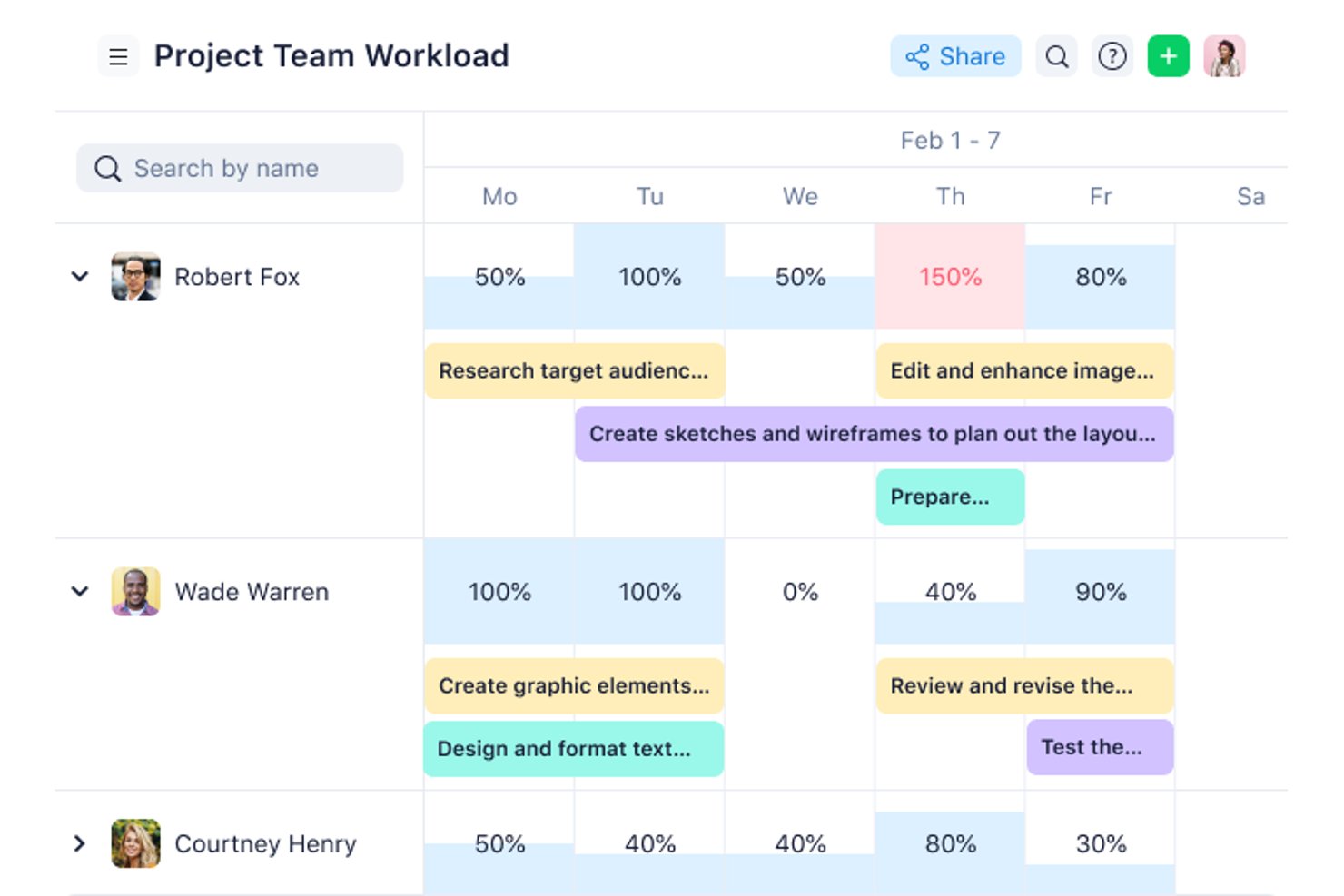
Wrike is a work management platform that brings task tracking, Gantt charts, workload visualization, automation, and cross-project reporting into a single configurable workspace.
Who Is Wrike Best For?
Wrike fits project managers and team leads who are running several concurrent projects and need cross-project visibility, workload tracking, and structured collaboration in one place.
Why I Picked Wrike
I picked Wrike as one of the best because it's built for the reality of running several projects at once without losing track of what's moving and what's stalled. I find the cross-project workload charts especially useful—they show each team member's allocated effort by day or week, so I can spot overload and shift assignments before something slips. Switching between Gantt, board, and table views on the same project data means I'm never locked into one way of seeing the work.
Wrike Key Features
- No-code automation builder: Create WHEN–IF–THEN automation rules for tasks and projects without writing any code.
- Interactive Gantt charts: Visualize task schedules, dependencies, and milestones on a draggable timeline view.
- Custom request forms: Collect incoming work requests and route them directly to the right space or project.
- Real-time dashboards: Build custom dashboards with widgets to monitor project status and team activity across workstreams.
Wrike Integrations
Wrike integrates with 400+ applications, including Slack, Microsoft Teams, Google Sheets, Jira, Google Drive, and Zoom. It offers a RESTful API for custom integrations and supports Zapier.
Pros and Cons
Pros:
- Keep files and approvals beside tasks
- Switch views without duplicating project data
- Clear task ownership, deadlines, and dependencies
Cons:
- Crowded menus can slow down new users
- Workspace setup takes planning before team rollout
New Product Updates from Wrike
Wrike Adds Klaxoon MCP Integration
Wrike’s Klaxoon MCP integration is now generally available, enabling AI agents to navigate between Wrike tasks and attached whiteboards, read task context, and manage whiteboard attachments via API. For more information, visit Wrike's official site.

Packed with features and best for experienced DPMs
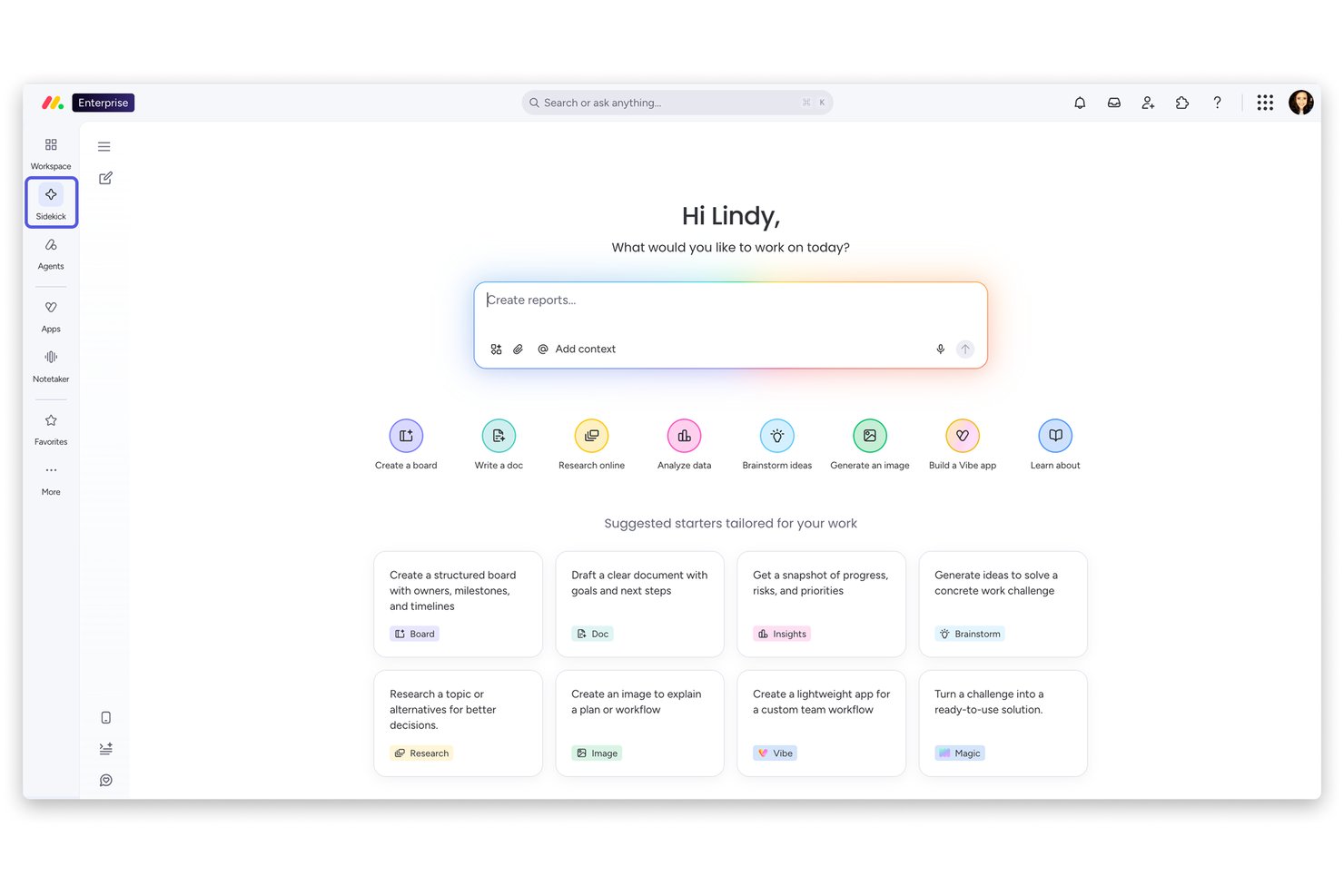
monday work management is a project management platform that brings together visual boards, Gantt charts, Kanban views, automations, and AI-powered planning tools across a highly customizable workspace.
Who Is monday AI Workspace Best For?
monday work management is a strong fit for team leads and managers at growing companies who need deep visibility across multiple projects and workstreams.
Why I Picked monday AI Workspace
I've included monday AI Workspace in my top picks because it's one of the most feature-dense project management platforms I've used, and experienced DPMs will find a lot to work with. I particularly like the AI-generated project plans that produce structured task lists, assigned owners, milestones, and dependency-linked Gantt views from a plain-language description. The Workload widget gives you a clear picture of how effort is distributed across your team, and the Portfolio Risk Insights tool actively scans timelines and dependencies to surface at-risk tasks before they become problems.
monday AI Workspace Key Features
- Kanban boards: Drag-and-drop boards let you move tasks between stages and reorder priorities in real time.
- Guest access: Invite external collaborators—clients, vendors, or freelancers—to specific boards without opening up your full account.
- Automation recipes: Set trigger-based rules to auto-assign tasks, update statuses, or send notifications without writing any code.
- Workdocs: Co-edit living documents directly inside monday.com, with live board data embedded and updating automatically.
monday AI Workspace Integrations
monday.com lists 850+ integrations and apps, including Slack, Google Calendar, Microsoft Teams, Google Drive, Jira, and Zoom. It also supports Zapier plus GraphQL and SDK APIs for custom integrations.
Pros and Cons
Pros:
- Task updates keep discussion beside work
- Templates give teams ready-made project structures
- Color-coded boards make status easy to scan
Cons:
- Mobile omits Gantt and workload views
- Complex automations require configuration and trial-and-error
New Product Updates from monday AI Workspace
monday AI Workspace Adds Human Approval Routing
monday AI Workspace adds a human-in-the-loop approval block to AI Workflows, sending approval requests and routing workflow paths based on responses. For more information, visit monday AI Workspace's official site.

Best for scalability & flexibility
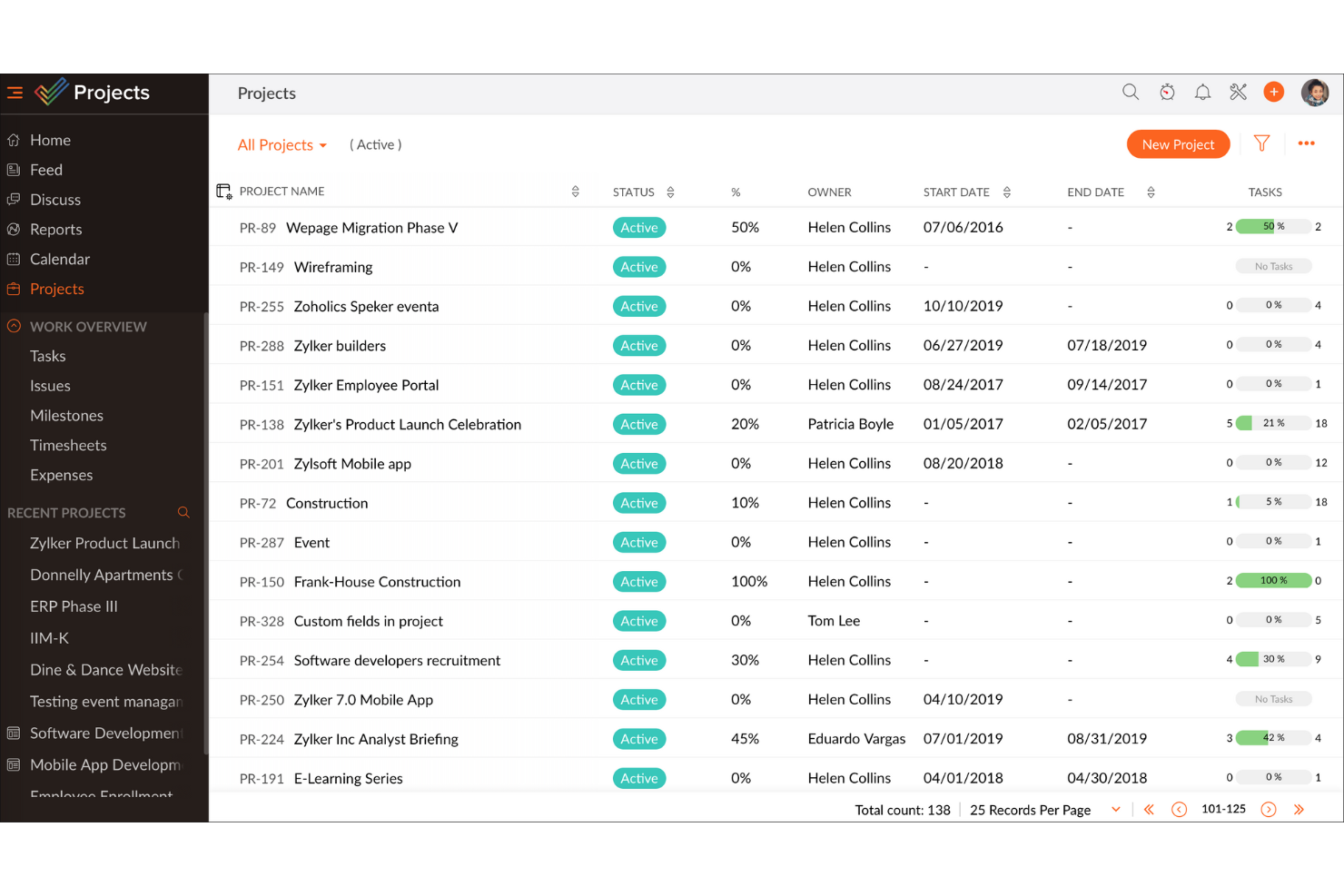
Zoho Projects is a cloud-based project management platform that combines task management, Gantt charts, time tracking, issue tracking, and team collaboration tools across unlimited projects.
Who Is Zoho Projects Best For?
Zoho Projects suits growing teams that need a project management tool that can scale from a small operation to an enterprise-level workflow without switching platforms.
Why I Picked Zoho Projects
Zoho Projects earns its spot on my shortlist because it scales with your team in ways most tools simply can't. I've watched it flex from a five-person startup setup to a multi-team enterprise workflow without a platform switch. Features like customizable workflows and role-based access let you reshape how work is structured as your team evolves, and the built-in Gantt chart keeps complex, shifting timelines visible across every project.
Zoho Projects Key Features
- Issue tracker: A built-in module lets you log, assign, and prioritize bugs or blockers directly within your project.
- Time tracking: Team members can log hours against specific tasks using timers or manual entries tied to project milestones.
- Resource utilization chart: A visual dashboard shows each team member's workload so you can spot over-allocation before it becomes a problem.
- Blueprint: An automated workflow tool that maps out your process steps and enforces transitions between task stages.
Zoho Projects Integrations
Zoho Projects offers native integrations with Zoho CRM, Zoho Desk, Google Calendar, Microsoft Teams, Slack, GitHub, GitLab, Jira Cloud, and Zendesk. It also supports workflow automation through Zapier.
Pros and Cons
Pros:
- Built-in issue tracking keeps blockers contextual
- Gantt charts clarify shifting timelines
- Workflow blueprints guide repeatable task handoffs
Cons:
- Extensive configuration adds setup decisions
- Dense screens can slow first-time setup
New Product Updates from Zoho Projects
Zoho Projects Adds CodeX Scripts for Custom Modules
Zoho Projects now supports CodeX Scripts for custom modules, enabling conditional logic and rules for creating, updating, and deleting records. For more information, visit Zoho Projects' official site.
 .
.
Celoxis
Best complete project portfolio management software
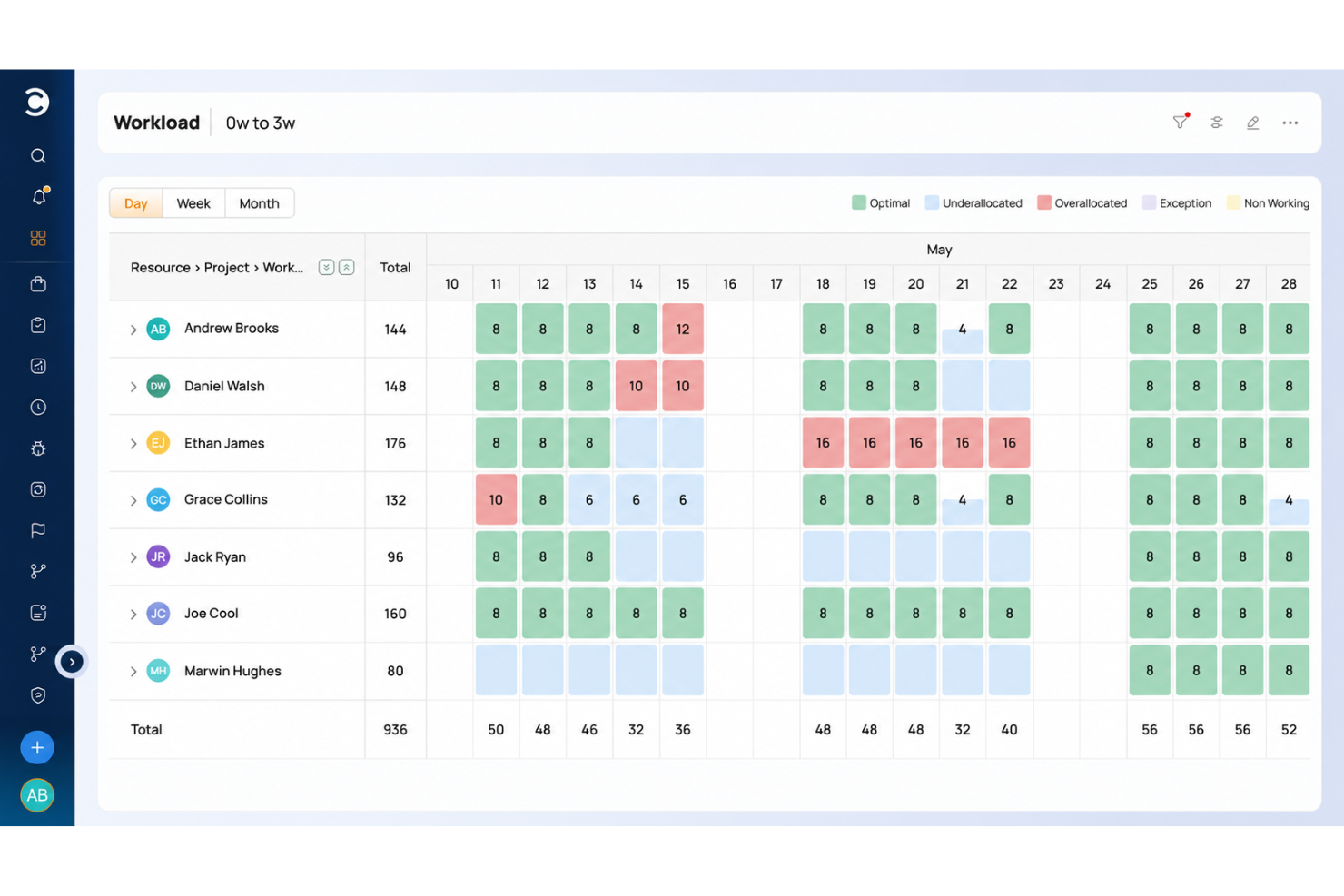
Celoxis is a project and portfolio management platform that covers project scheduling, resource capacity planning, workload visualization, financial tracking, and cross-project reporting in one place.
Who Is Celoxis Best For?
Celoxis is a strong fit for project managers and PMO teams who need to track multiple projects, resources, and budgets across a portfolio from a single platform.
Why I Picked Celoxis
I picked Celoxis as one of the best because it's the only tool on this list that covers the full project portfolio management lifecycle in a single platform. I'm particularly impressed by its cross-project resource capacity planning, which lets you see exactly where team members are overloaded before it becomes a delivery problem. The portfolio-wide Gantt and customizable dashboards also give you a live view of schedules, health indicators, and financials without stitching together separate reports.
Celoxis Key Features
- Built-in time tracking: Log time using in-app timers or a weekly timesheet grid, with approval flows and reminders for missing entries.
- Risk and issue tracking: Track project risks, issues, and change requests using built-in apps included from the Professional plan up.
- Client portal: Give clients a branded, permission-controlled space to view and collaborate on permitted projects and tasks.
- Workload and conflict alerts: Receive automatic alerts when a team member is overloaded or a schedule threshold is crossed.
Celoxis Integrations
Celoxis offers 21 native integrations, including Microsoft Excel, Google Drive, Jira, Microsoft 365, Outlook, and Google Sheets. It connects with 400+ apps through Zapier or its REST API, including Slack and Trello.
Pros and Cons
Pros:
- Centralized task updates reduce scattered tracking
- Gantt charts clarify dependencies and schedules
- Cross-project workload visibility prevents resource overloads
Cons:
- Mobile tools are weaker for project management
- Dense menus slow initial project setup

Best for no-code app development
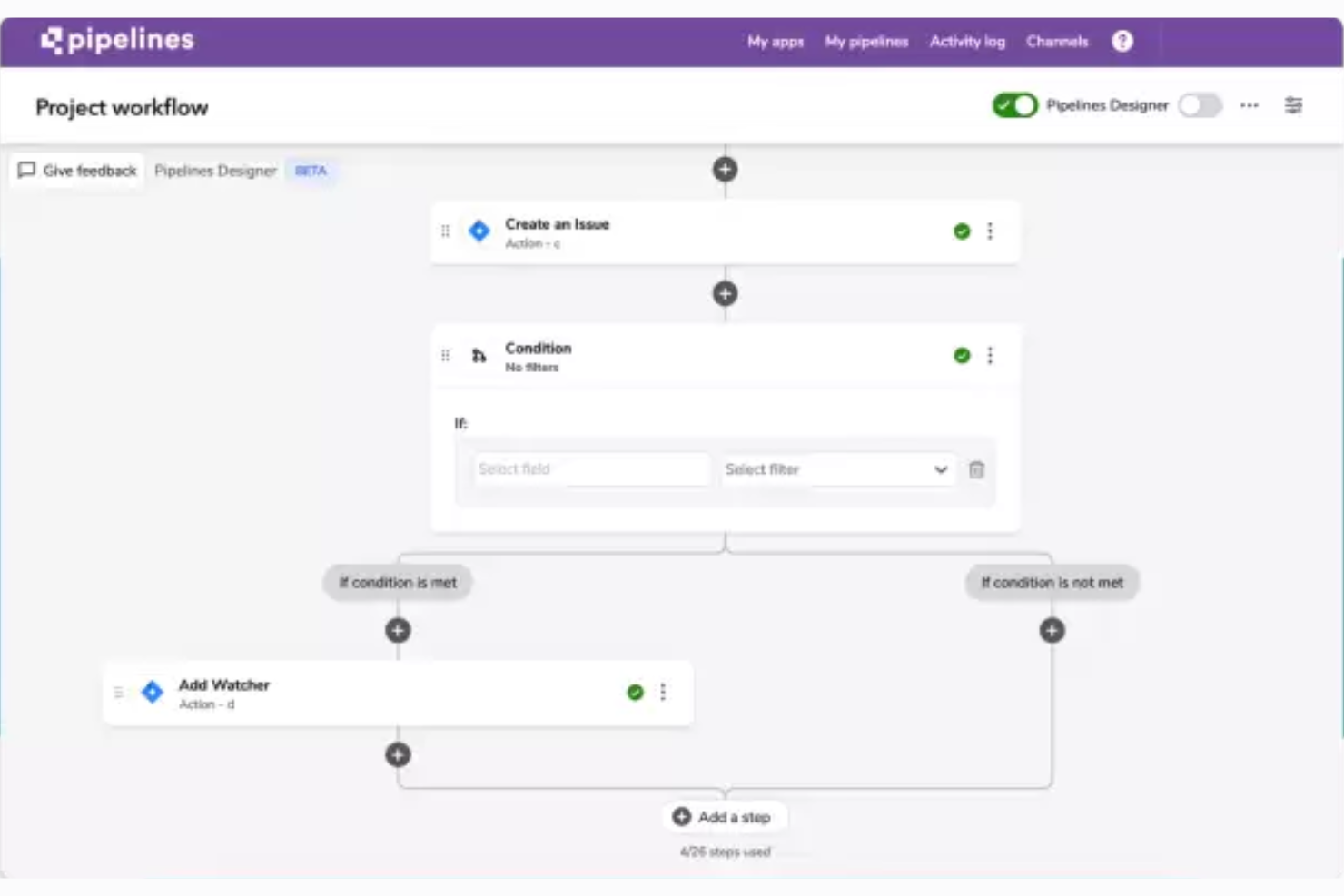
Quickbase is a no-code project management platform that lets teams build custom apps, automate workflows, track tasks and deadlines, and visualize project data across Kanban, Gantt, and calendar views.
Who Is Quickbase Best For?
Quickbase suits team leads and managers in operations-heavy environments who need to build custom tracking apps without writing code.
Why I Picked Quickbase
I picked Quickbase as one of the best because it's the strongest no-code app builder on this list. Instead of squeezing your work into a fixed template, you can describe your process and let Quickbase AI generate a custom project app, or import an existing spreadsheet and have it structure your data into a relational database automatically. The Gantt plugin template ships with tables for tasks, dependencies, baselines, and resource assignments already wired together, so you're building on top of real project logic from day one.
Quickbase Key Features
- Role-personalized dashboards: Each user sees a dashboard tailored to their role, pulling in the reports and project data most relevant to them.
- Quickbase Pipelines: A visual workflow builder that connects third-party tools and defines automated multi-step workflows across systems without writing code.
- Budget tracking with cost-variance alerts: Teams can monitor budget versus actuals and committed spend, with automated alerts when costs drift from plan.
- Spreadsheet import: Upload an Excel file and Quickbase structures your data into a relational database, letting you map field types and labels before the app is created.
Quickbase Integrations
Quickbase claims 40+ pre-built integrations, including native connections to Salesforce, SAP, Oracle, and Microsoft Teams, plus SharePoint and Google Drive. It also supports RESTful APIs and Zapier for custom connectivity.
Pros and Cons
Pros:
- Automations handle task handoffs and alerts
- Spreadsheet imports become structured project apps
- Dashboards consolidate project status and risks
Cons:
- Formula-based app building takes practice
- Advanced workflows need extra setup

Quire
Best for breaking down complex projects
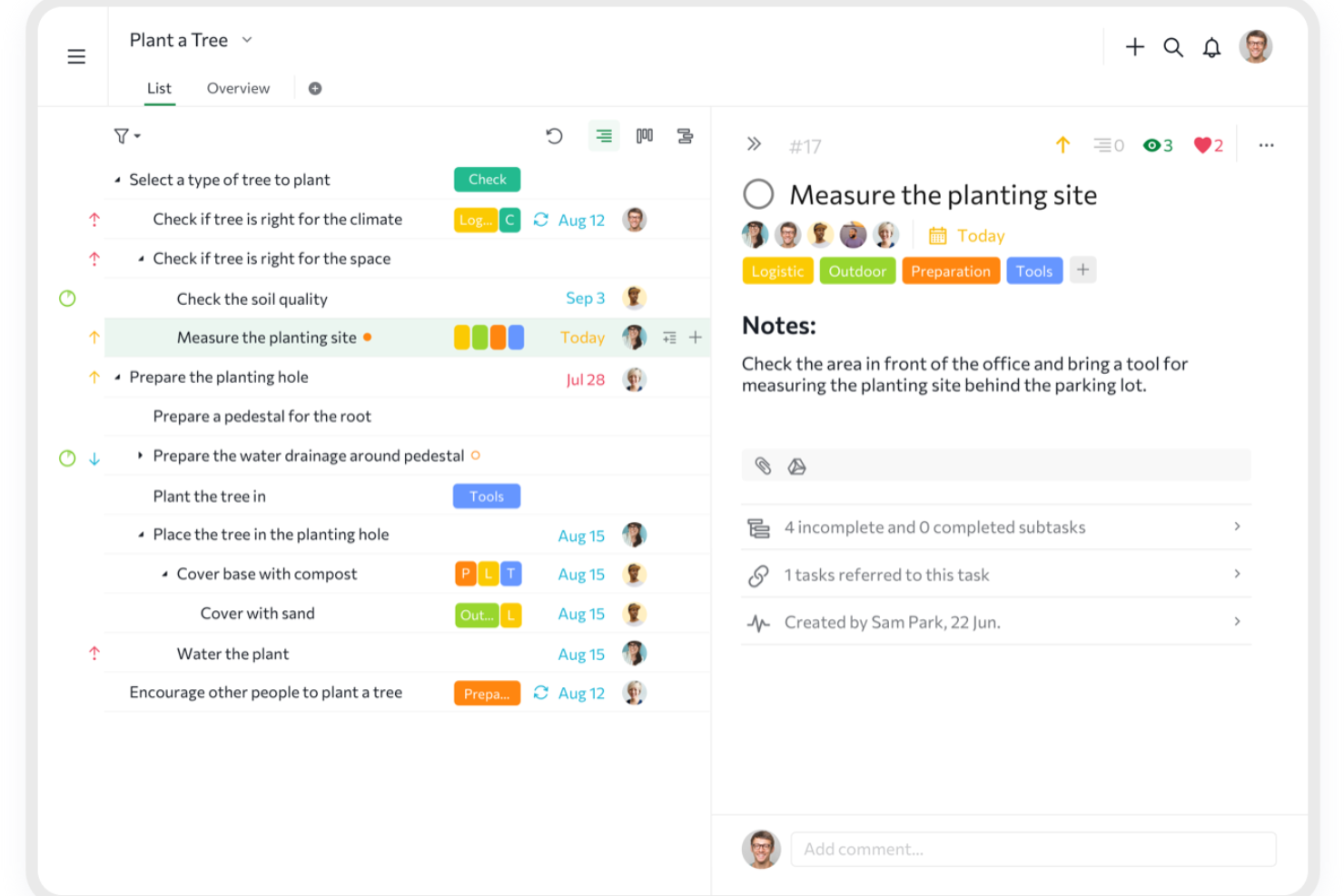
Quire is a project and task management tool built around a nested list structure, with Kanban boards, timeline, calendar, and table views alongside built-in time tracking and cross-project visibility.
Who Is Quire Best For?
Quire is a strong fit for team leads managing layered, multi-part projects who need to break complex work into subtasks without switching to a heavier tool.
Why I Picked Quire
I picked Quire as one of the best because it handles complex project breakdown better than almost any tool I've used. Its nested task structure lets you drill down into unlimited subtask levels, so a single deliverable can become a fully organized hierarchy without ever leaving the project view. I also rely on the Panorama view to track tasks across multiple projects at once, which keeps everything visible when work spans several workstreams.
Quire Key Features
- Kanban board: Arrange tasks visually across custom workflow statuses to track progress from start to completion.
- Built-in time tracking: Log time on tasks using a stopwatch or Pomodoro timer, with billable indicators and manager-facing reports.
- External teams access: Share specific tasks with clients or third-party collaborators without exposing the rest of your project.
- Dashboard view: Monitor task status, deadlines, workload, and project health from a single configurable dashboard.
Quire Integrations
Quire offers native integrations with Google Drive, Dropbox, Box, Slack, Microsoft Teams, GitHub, and Google Calendar. It also supports n8n marketplace integrations, REST API, webhooks, OAuth 2.0, MCP, and Zapier.
Pros and Cons
Pros:
- Kanban and timeline views clarify task progress
- Templates and simple setup help teams start
- Nested subtasks keep complex work legible
Cons:
- Nested lists take adjustment from flat workflows
- Mobile app omits some desktop capabilities
New Product Updates from Quire
Quire Adds Custom Field Locking and Comment Reaction API Support
Quire adds custom field locking and API support for reading and setting emoji reactions on comments. These updates give teams more control over field data and expand comment interaction options for developers. For more information, visit Quire’s official site.
 .
.
Miro
Best for visual collaboration & innovation
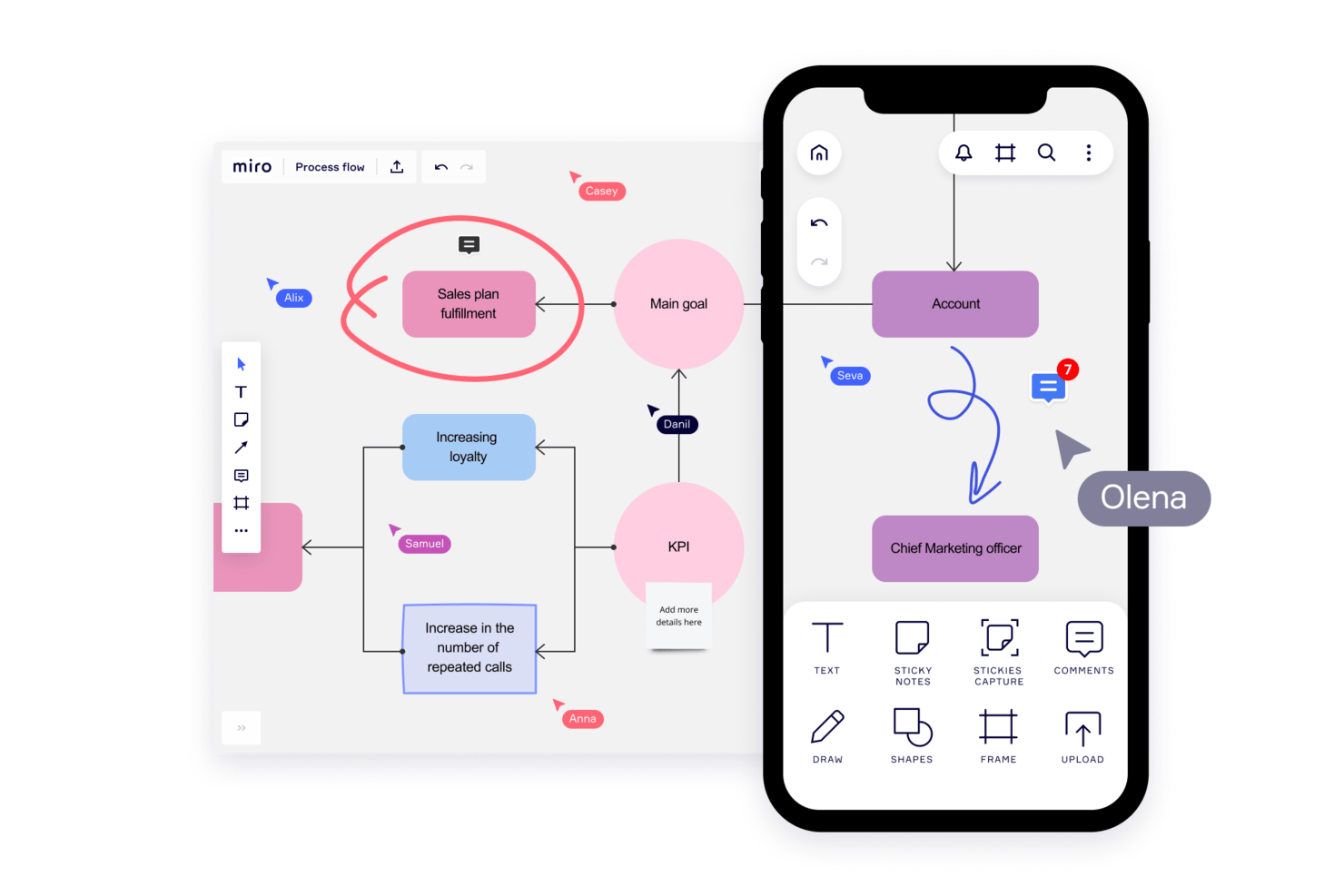
Miro is a visual collaboration platform that combines an infinite canvas with project tracking, Kanban boards, timelines, templates, and real-time team collaboration tools.
Who Is Miro Best For?
Miro works best for cross-functional teams that prioritize visual thinking—especially product, design, and innovation teams who need a shared space to brainstorm, plan, and align before moving into execution.
Why I Picked Miro
Miro earns its spot on my shortlist because it's the only tool here that treats the canvas itself as the project. I love how Blueprints let my team launch a fully structured workspace—complete with a roadmap, Kanban board, and dependencies—in minutes, without building anything from scratch. In practice, that means my team can run a sprint planning session and immediately convert sticky notes into tracked Table records with assignees and due dates on the same board.
Miro Key Features
- Real-time co-editing: Multiple team members can work on the same board simultaneously, with changes visible to everyone instantly.
- Excel import for tables: Teams can import
.xlsxfiles directly into Miro Tables to migrate existing spreadsheet data without manual re-entry. - Talktrack video walkthroughs: Users can record narrated, interactive video tours of a board so teammates can review updates asynchronously.
- AI-powered board summaries: Miro AI reviews board content and surfaces key themes, decisions, and suggested next steps in a digestible summary.
Miro Integrations
Miro supports 250+ integrations, including Microsoft 365, Google Workspace, Jira, Asana, Slack, Microsoft Teams, and Figma. It also offers REST APIs, Web SDKs, Enterprise APIs, an MCP server, and Zapier.
Pros and Cons
Pros:
- Sticky-note conversion creates trackable tasks
- Live edits keep distributed teams aligned
- Template boards launch projects quickly
Cons:
- Linear task allocation feels less natural
- Large boards become cluttered and sluggish
New Product Updates from Miro
Miro Adds Japan Data Residency for Enterprise Customers
Miro has introduced Japan data residency for enterprise customers, offering in-region storage for production data, backups, and metadata, plus in-region compute infrastructure. For more information, visit Miro's official site.
Airtable
Best for spreadsheet imports with multiple views
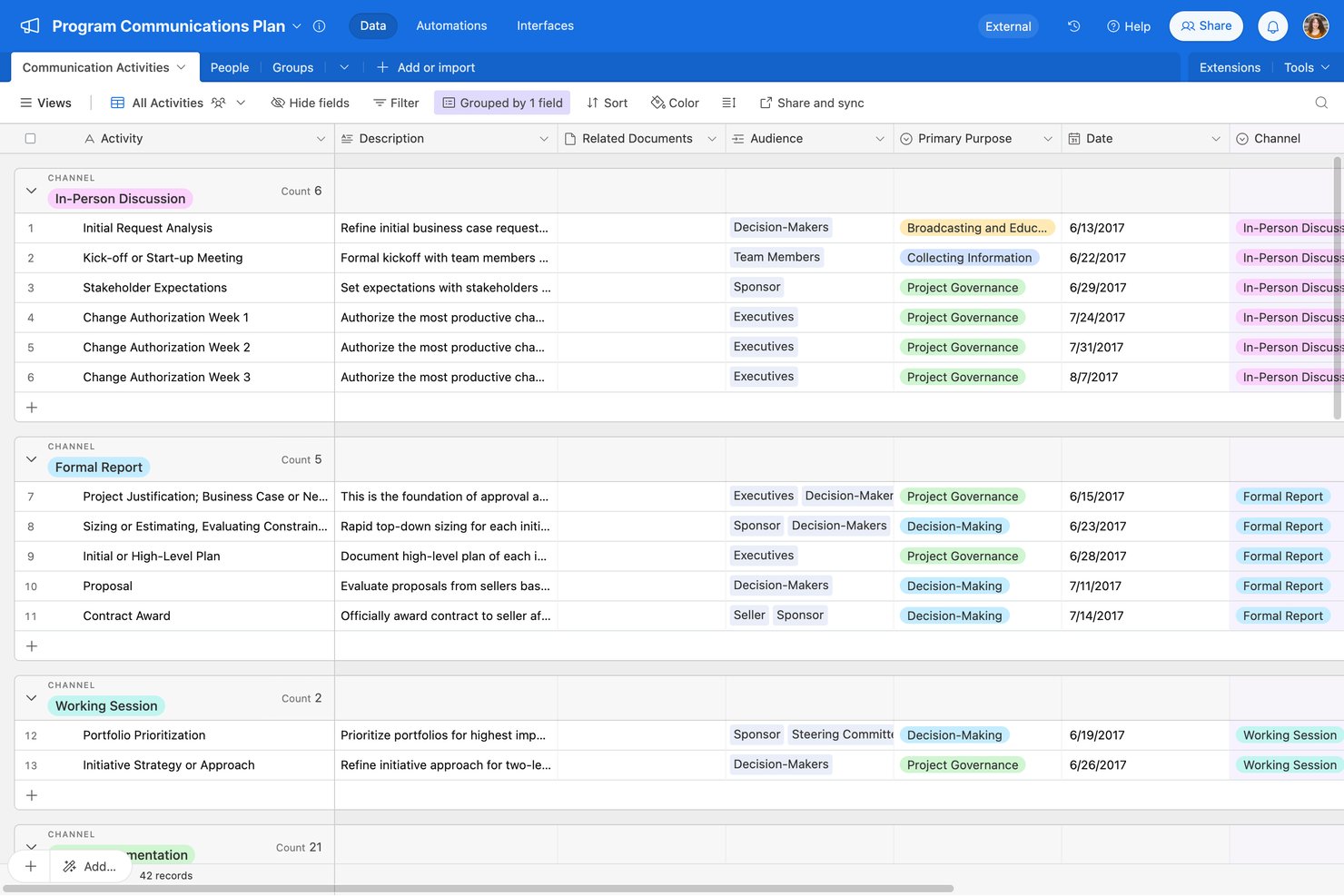
Airtable is a no-code project management platform that combines a relational database foundation with spreadsheet-style grids, multiple visual views, automation workflows, and AI-assisted app building.
Who Is Airtable Best For?
Airtable is a strong fit for small teams and team leads who want to move their spreadsheet-based project tracking into a more structured, multi-view workspace.
Why I Picked Airtable
I picked Airtable as one of the best because it's the cleanest path I've seen for moving spreadsheet data into a structured project workspace. You import from CSV, Excel, or Google Sheets and immediately get access to seven view types, including Kanban, Gantt, and timeline, all pulling from the same underlying data. I especially like the task-tracking template, which comes preloaded with assignees, date dependencies, subtasks, and a notify-assignee automation already wired up.
Airtable Key Features
- Capacity planning template: A prebuilt workload dashboard that tracks each team member's allocated hours, utilization percentage, and over-capacity status across projects.
- Trigger-and-action automations: A no-code automation builder that connects triggers and multi-step actions across Airtable and external tools like Slack, Gmail, and Salesforce.
- Interface Designer: A drag-and-drop tool for building custom, role-specific views of your base data without writing any code.
- Date dependency cascading: A scheduling feature that automatically updates dependent task dates when an upstream date changes, keeping timelines aligned across linked records.
Airtable Integrations
Airtable offers integrations with Google Sheets, Excel, Jira, Slack, Google Drive, Salesforce, and Box. It also provides an API for custom integrations and supports Zapier.
Pros and Cons
Pros:
- Shared dashboards keep project status visible
- Templates prebuild task assignments and notifications
- Spreadsheet imports populate multiple visual views
Cons:
- Mobile omits Gantt, timeline, and automation tools
- Advanced bases need deliberate design and upkeep
Nifty
Best for AI-generated project setup from a prompt
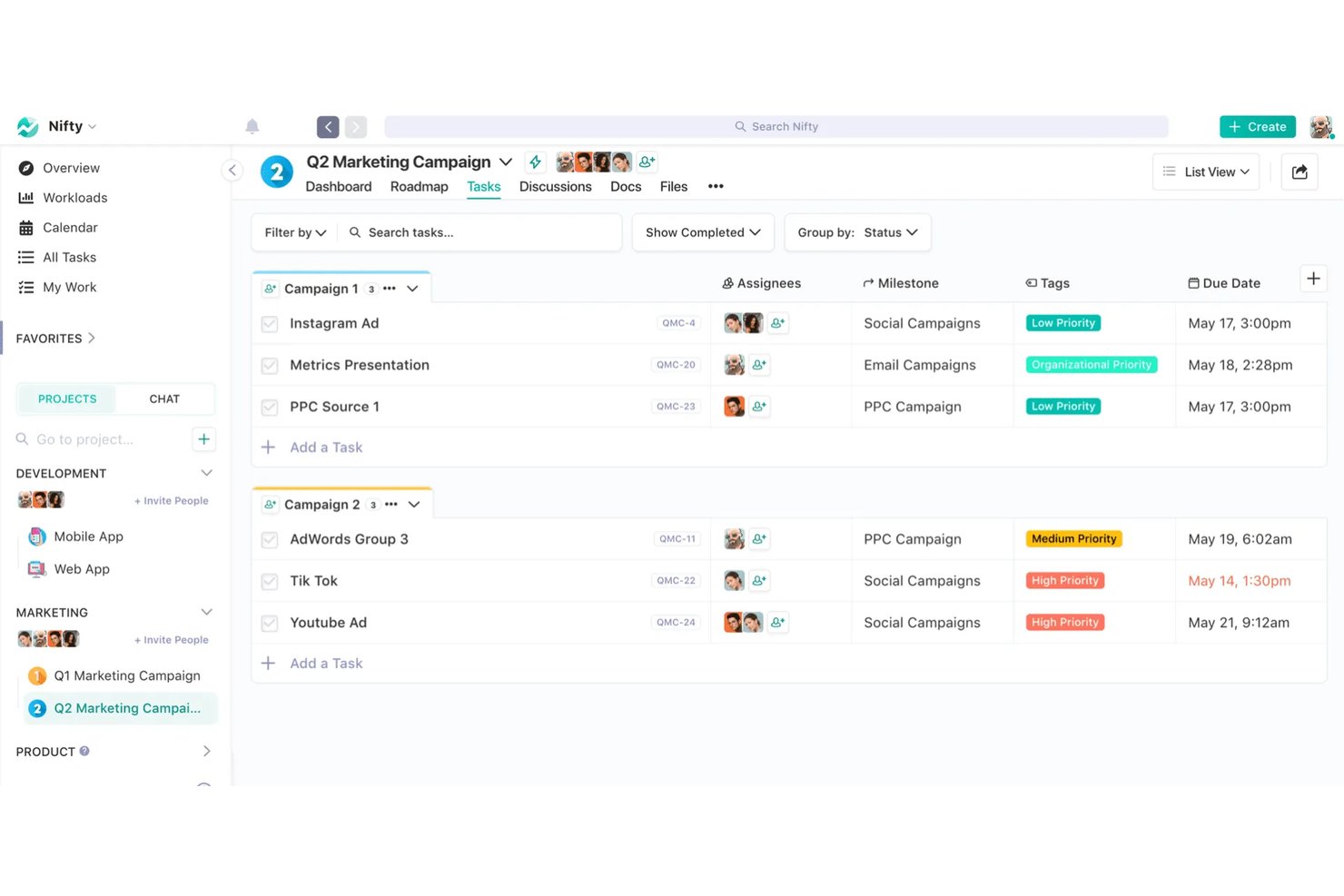
Nifty is a project management platform that combines task tracking, roadmaps, team discussions, docs, and time tracking in a single workspace.
Who Is Nifty Best For?
Nifty is a strong fit for small teams and freelancers who want tasks, docs, discussions, and time tracking in one place without juggling multiple tools.
Why I Picked Nifty
I've included Nifty in my top picks because its Orbit AI feature lets you generate a fully structured project, complete with lists, statuses, tasks, and subtasks, directly from a plain-text prompt or a specs doc. I also like that it can turn a Slack or discussion message into a task with assignees, due dates, and custom fields already populated. That combination gets a new project from idea to actionable in minutes, with almost no manual scaffolding.
Nifty Key Features
- Multiple task views: Switch between Kanban, List, Swimlane, Timeline, and Calendar views to see your work the way that makes sense for your team.
- Built-in time tracking: Start a timer directly from any task, My Work, or List View, and export time reports as CSV or PDF.
- Guest and client access: Invite clients to individual projects so they can view progress and communicate on tasks without accessing your full workspace.
- Custom workflow automations: Set if/then rules to automatically assign tasks, update statuses, add subtasks, or post messages based on trigger events.
Nifty Integrations
Nifty offers native integrations with Slack, GitHub, Microsoft Suite, Google Drive and Calendar, Miro, Typeform, Figma, Harvest, Webex, and Zoom. It also supports a REST API, webhooks, OAuth 2.1, and Zapier.
Pros and Cons
Pros:
- Clients can follow project progress
- Spreadsheet-style lists ease task organization
- AI builds task structures from prompts
Cons:
- Mobile app omits some desktop capabilities
- Notifications sometimes arrive only after reopening

Asana
Best for transforming complex management
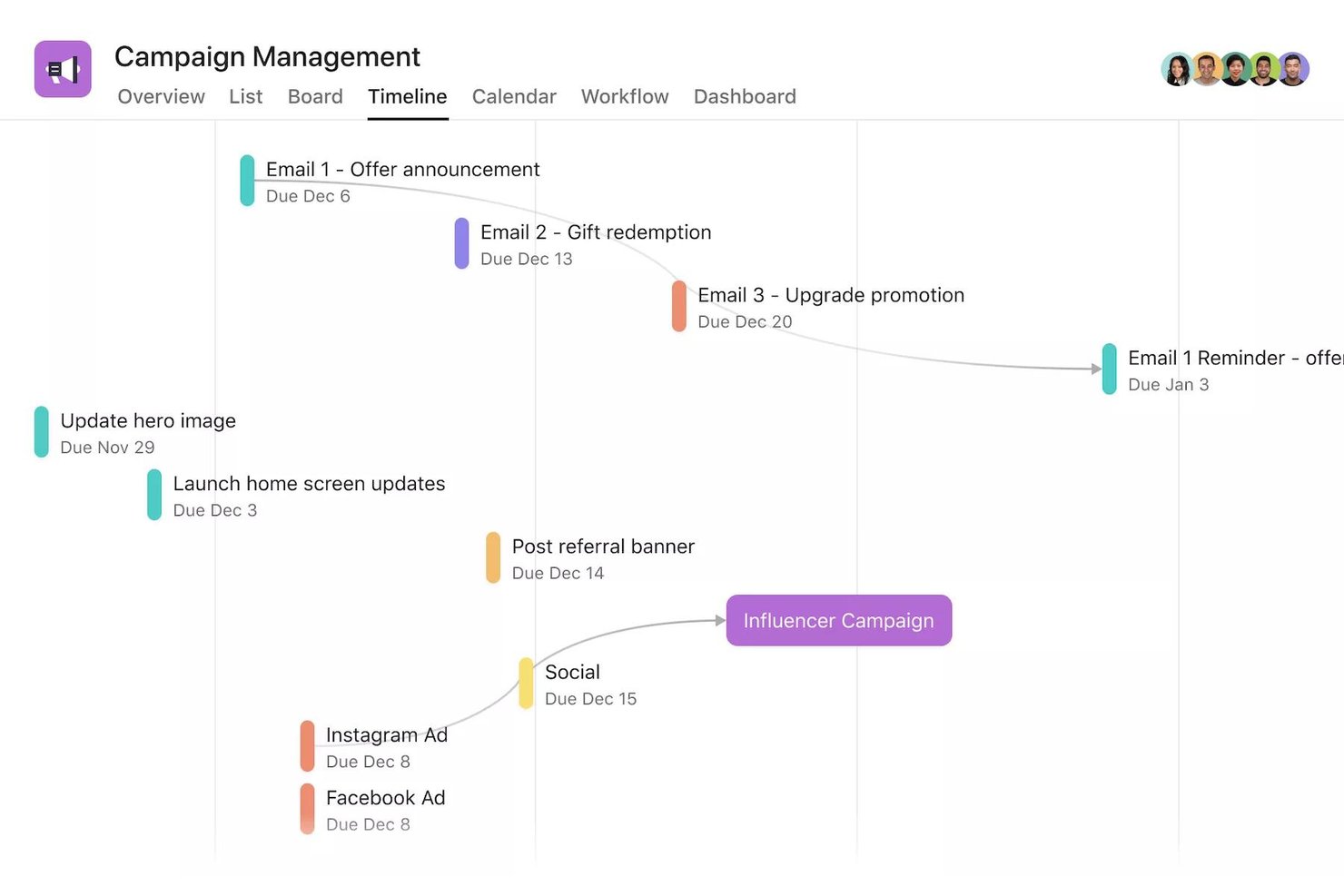
Asana is a work management platform that combines task tracking, project views, workflow automation, and AI-powered coordination across teams and projects.
Who Is Asana Best For?
Asana fits teams that need to manage layered, multi-step projects across functions without losing visibility into who owns what.
Why I Picked Asana
Asana is one of my top picks because I love how it handles complex, multi-layered work without forcing you to choose a single way of viewing it. I can switch between list, board, timeline, and Gantt views on the same project, and task dependencies automatically notify the right person when a blocker is resolved. AI Teammates can also triage and route incoming requests, which keeps structured workflows moving without constant manual intervention.
Asana Key Features
- Guest access: Invite external collaborators to specific tasks, projects, or teams without counting them toward your paid seat limit.
- CSV import: Bring existing spreadsheet data into Asana by importing a CSV file, with each row becoming a task.
- Automation rules: Set trigger-and-action rules to automatically reassign tasks, send notifications, or move work through workflow stages.
- Workload view: See each team member's assignments by task count or effort, and adjust capacity directly from the same view.
Asana Integrations
Asana offers 270+ app integrations, including marketplace connections with Google Drive, Google Sheets, Microsoft 365, Slack, Jira, GitHub, Figma, and Salesforce. It supports REST API, webhooks, and Zapier.
Pros and Cons
Pros:
- Task comments keep decisions beside assignments
- Boards expose stalled work at a glance
- Basic projects start in seconds
Cons:
- Busy projects crowd views and notifications
- Complex rules need setup conventions
Annen enkel programvare for prosjektstyring
Her er noen flere som ikke kom med på topplisten, men som er verdt å vurdere.
- ProofHub
For flat-rate team task and deadline tracking
- Paymo
For billing clients from tracked project time
- Resource Guru
For flexible drag-and-drop scheduling
- Smartsheet
For spreadsheet-style work with multiple views
- Trello
For projects with little to no dependencies
- ClickUp
For intuitive, easy to navigate, and interactive
- GanttPRO
For Gantt charts built in minutes
- awork
For AI-driven agency scheduling
- Productive
For all-in-one agency project and billing
- Notion
For all-in-one docs, tasks, and wikis


How I Evaluate Easiest Project Management Software
I split my evaluation into two layers: baseline criteria a tool must meet—like task creation and visual boards—and the differentiators that make one option a better fit for non-technical teams.
Core Functionality (Table Stakes For This List)
When I'm selecting tools for my list, I rank each one on a scale from 0 (does not offer the functionality) to 5 (excels in this area) for each core functionality listed below. Then, I calculate the tool's total score into a percentage. Each tool needs to achieve a minimum total score of 65% to be considered for inclusion.
- Task & Project Creation: I evaluate how quickly you can go from zero to an organized project with assigned tasks, due dates, and priorities without wading through complex setup screens.
- Visual Project Views: Tools should offer multiple views like Kanban boards, lists, and calendars. I check whether switching between views preserves your data and layout choices.
- Pre-Built Templates: I look for a template library that covers real use cases like product launches or sprint planning, so teams can start working instead of building from scratch.
- Team Collaboration Tools: Commenting, @mentions, and file sharing should live directly on tasks. I evaluate whether your team can have a full conversation in context without switching apps.
- Deadline & Progress Tracking: Due dates, reminders, and status indicators should give a clear picture of where a project stands. Tools like Asana and monday.com handle this differently, so I compare approaches.
- Drag-and-Drop Interface: Moving a task between columns or rescheduling it on a timeline should feel instant. I check whether drag-and-drop works consistently across all available views.
Once I have a list of tools that meet the criteria, I consider what sets each platform apart.
Differentiating Factors (What Sets Vendors Apart)
Here's how I compare and contrast different vendors:
Standout Features
No-code automation is a major differentiator. I look for tools that let you build simple rules—like auto-assigning a reviewer when a task moves to "Done"—without writing a single line of code. Guest and client access matters too, especially for freelancers sharing deliverables with external stakeholders without buying extra seats. I also evaluate AI-powered features. Tools like monday.com and ClickUp now offer AI that drafts task descriptions or summarizes project updates, which helps first-time project managers move faster.
Beyond Features
Onboarding experience is the first thing I evaluate. A tool marketed as "easy" should get you from signup to a working project in minutes—guided tours, tooltips, and setup wizards make a real difference for first-time project managers. I also check whether a genuinely usable free plan exists, since freelancers and small teams need room to evaluate a tool before committing. Integration support matters here too. I look for native connections to everyday tools like Google Workspace, Slack, and Microsoft 365 so non-technical users can plug the platform into their existing stack without workarounds.
Slik velger du den enkleste programvaren for prosjektstyring
Det er lett å bli overveldet av lange funksjonslister og kompliserte priser. For å hjelpe deg med å holde fokus under prosessen med å velge programvare, får du her en sjekkliste over viktige faktorer du bør ha i mente:
| Faktor | Hva du bør vurdere |
| Skalerbarhet | Sørg for at programvaren kan vokse med teamet ditt, med funksjoner som utvidet lagringsplass eller flere brukerplasser uten en bratt læringskurve. |
| Integrasjoner | Sørg for at programvaren kobles til verktøyene du allerede bruker, som Slack, Google Workspace eller CRM-systemer, for å forenkle arbeidsflyten i teamet. |
| Tilpasningsmuligheter | Se etter alternativer for å tilpasse arbeidsflyter, dashbord og oppgaveetiketter etter teamets behov uten at det kreves avanserte tekniske ferdigheter. |
| Brukervennlighet | Prioriter programvare med et intuitivt grensesnitt som er enkelt for alle teammedlemmer å navigere i, selv uten tidligere opplæring. |
| Budsjett | Velg et verktøy med tydelige priser som passer budsjettet ditt. Se etter rimelige abonnementer uten skjulte kostnader. |
| Sikkerhetstiltak | Sørg for databeskyttelse med kryptering, rollebasert tilgang og samsvar med standarder som GDPR eller ISO 27001. |
| Supportalternativer | Undersøk tilgjengeligheten av kundestøtte, inkludert direktechat, e-post og en kunnskapsbase, slik at problemer kan løses raskt. |
| Tilgjengelighet på mobil | Bekreft at programvaren har en god mobilapp, slik at teamet kan administrere oppgaver og samarbeide mens de er på farten. |
Husk likevel at den enkleste prosjektstyringsprogramvaren kan være den som passer best til bransjen din. I så fall kan prosjektstyringsprogramvare for utdanning, ingeniørfag, næringsliv eller andre områder være det beste valget for organisasjonen din.
Trender innen prosjektstyringsprogramvare
I undersøkelsen min hentet jeg inn utallige produktoppdateringer, pressemeldinger og versjonslogger fra ulike leverandører av enkel prosjektstyringsprogramvare. Her er de viktigste trendene jeg følger med på:
- Forenkling drevet av kunstig intelligens: Prosjektstyringsverktøy med kunstig intelligens oppretter oppgavelister fra korte beskrivelser, noe som sparer tid og gjør opplæringen enklere.
- Visuell kartlegging av arbeidsflyter: Dra-og-slipp-tavler, tidslinjer og fargekodede oppgaver gjør det enkelt å se fremdriften uten rapporter.
- Brukerstyrt innføring: Interaktive veiledninger og veivisere hjelper team med å komme raskt i gang uten ekstern opplæring.
- Verktøy for umiddelbare tilbakemeldinger: Innebygd kommentering og statusoppdateringer reduserer antallet e-poster og samler kommunikasjonen på ett sted.
- Enkel datadeling: Eksport med ett klikk og lenker som kan deles, holder interessenter informert uten behov for ekstra innlogginger.
Hva er enkel prosjektstyringsprogramvare?
Enkel prosjektstyringsprogramvare er et verktøy som er utviklet for å forenkle planlegging, organisering og oppfølging av oppgaver for team med begrenset teknisk erfaring.
Den hjelper brukere med å administrere prosjekter gjennom enkle funksjoner som oppgavelister, kalendere og grunnleggende samarbeidsverktøy. Prosjektledere, små team og ikke-tekniske brukere benytter ofte enkel prosjektstyringsprogramvare for å koordinere arbeid, følge med på fremdriften og overholde tidsfrister uten bryet med å navigere i komplekse systemer.
Funksjoner i enkel prosjektstyringsprogramvare
Når du velger enkel prosjektstyringsprogramvare, bør du se etter følgende viktige funksjoner:
- Intuitivt brukergrensesnitt: Et grensesnitt som er enkelt å navigere i, selv om du er ny innen prosjektstyring. Du kan gå rett i gang med å planlegge og følge opp prosjekter uten timevis med opplæring eller frustrasjon rundt oppsettet.
- Enkel oppgavehåndtering: En oversiktlig måte å opprette, tildele og prioritere oppgaver på. Dette gjør det tydelig hvem som har ansvar for hva, slik at du kan holde prosjektene på sporet uten endeløse e-postutvekslinger.
- Dra-og-slipp-funksjonalitet: Flytt enkelt oppgaver eller prosjekter med bare et museklikk. Denne funksjonen gjør det raskt å oppdatere tidslinjer eller ansvarsområder, slik at endrede prioriteringer føles mindre som et sirkusnummer.
- Innebygde maler: Velg blant ferdige prosjektmaler for å sette opp arbeidsflyten på få minutter. Maler gjør at du slipper å finne opp hjulet på nytt, og gjør det enkelt for alle å komme godt i gang.
- Samarbeidsverktøy: Funksjoner for kommentarer i sanntid, fildeling og teamchat. Disse gjør det enkelt for alle å holde seg oppdatert, reduserer misforståelser og hjelper teamet med å bevege seg fremover sammen.
- Tydelige rapporteringsdashbord: Visuelle dashbord viser prosjektfremdrift, tidsfrister og arbeidsbelastning med et øyekast. Dette holder deg informert og lar deg oppdage problemer før de utvikler seg til fullstendige katastrofer.
- Tilgjengelighet på mobil: Bruk programvaren på telefonen eller nettbrettet for å sjekke prosjektoppdateringer eller gjøre endringer mens du er på farten. Denne fleksibiliteten betyr at du sjelden er bundet til skrivebordet.
- Enkle integrasjonsmuligheter: Koble til favorittappene dine for kalender, e-post eller fillagring, slik at verktøyene fungerer sømløst sammen. Du slipper å kaste bort tid på å bytte mellom plattformer for å utføre små oppgaver.
- Automatiserte påminnelser: Programvaren sender vennlige påminnelser om kommende tidsfrister. Dette hjelper deg og teamet med å huske hva som skal leveres – ingen flere «Jeg glemte det!»-øyeblikk.
- Tilgangskontroller: Bestem hvem som kan se eller redigere prosjekter og sensitiv informasjon. Dette sikrer at de riktige personene har riktig tilgang, uten å skape forvirring eller sikkerhetsbekymringer.
KI-funksjoner i enkel prosjektstyringsprogramvare
Mange enkle alternativer for prosjektstyringsprogramvare har nå innebygde KI-funksjoner som gjør arbeidet enda smidigere. Vanlige funksjoner i KI-programvare for prosjektstyring omfatter:
- Smarte oppgaveforslag: KI kan anbefale neste steg eller hjelpe deg med å dele opp store prosjekter i håndterbare oppgaver, slik at du aldri blir stående fast og lure på hva du skal gjøre videre.
- Automatisert planlegging: KI analyserer arbeidsbelastning og tidsfrister for å foreslå de beste tidsplanene for prosjektene dine, slik at du kan balansere teamets kapasitet uten å overbelaste noen.
- Prediktiv analyse: Få tidlige varsler om mulige flaskehalser eller forsinkelser før de oppstår, takket være KI-drevet innsikt basert på prosjektdataene dine.
- KI-drevne chatboter: Trenger du rask hjelp eller vil du oppdatere en oppgave? Chatboter kan svare på spørsmål, hente informasjon eller gjøre endringer for deg, slik at du sparer tid og klikk.
- Intelligent dokumenthåndtering: KI kan automatisk organisere filer, merke dokumenter eller til og med oppsummere møtenotater, slik at du bruker mindre tid på å lete og mer tid på å utføre arbeidet.
Fordeler med enkel prosjektstyringsprogramvare
Implementering av enkel prosjektstyringsprogramvare kan gi flere fordeler for teamet og virksomheten din. Her er noen viktige fordeler:
- Raskere opplæring: Enkle grensesnitt hjelper nye medlemmer med å komme raskt i gang uten lange opplæringsøkter.
- Bedre oversikt over oppgaver: Dashbord og oppgavetavler viser hvem som gjør hva, og hva som står for tur.
- Bedre tidsstyring: Påminnelser og tidsfrister holder oppgavene i rute og forebygger forsinkelser.
- Forbedret samarbeid: Innebygde kommentarer og fildeling reduserer e-postutvekslinger og samler kommunikasjonen på ett sted.
- Enklere rapportering: Grunnleggende rapporteringsverktøy lar deg enkelt opprette og dele oppdateringer med interessenter.
- Mindre stress: Tydelige oppsett og arbeidsflyter reduserer forvirring, slik at teamene kan fokusere på arbeidet.
- Økt produktivitet: Enkle verktøy reduserer tiden det tar å sette opp arbeidet, slik at teamene kan fokusere på å fullføre prosjekter.
Kostnader og priser for enkel prosjektstyringsprogramvare
Når du velger enkel prosjektstyringsprogramvare, må du ha en forståelse av de ulike prismodellene og abonnementene som er tilgjengelige. Kostnadene varierer etter funksjoner, teamstørrelse og tillegg. Tabellen nedenfor viser vanlige abonnementer, gjennomsnittspriser og typiske funksjoner i enkel prosjektstyringsprogramvare:
Sammenligningstabell for enkel prosjektstyringsprogramvare
| Abonnementstype | Gjennomsnittlig pris | Vanlige funksjoner |
| Gratisabonnement | $0/user/month | Grunnleggende oppgavehåndtering, begrenset lagringsplass og samarbeid for små team. |
| Personlig abonnement | $5–$15/user/month | Oppgavesporing, fildeling, kalenderintegrasjon og begrensede rapporteringsverktøy. |
| Bedriftsabonnement | $20–$50/user/month | Avansert rapportering, samarbeidsverktøy for team, tilpasning av arbeidsflyt og økt lagringskapasitet. |
| Virksomhetsabonnement | $60–$100/user/month | Sikkerhet på virksomhetsnivå, prioritert brukerstøtte, ubegrenset antall brukere og tilpassbare alternativer for innføring. |
Vanlige spørsmål om enkel prosjektstyringsprogramvare
\u003cheader class=\u0022c-block__content-block c-block__header b-accordion__header c-content-block c-content-block–layout-left\u0022\u003e
\u003cdiv class=\u0022c-block__description b-accordion__description t-sink s-sink c-content-block__content\u0022\u003e
Her er noen svar på vanlige spørsmål om den enkleste prosjektstyringsprogramvaren:
\u003c/div\u003e
\u003c/header\u003e