

10 beste programvarer for arbeidsflyt i virksomheter – gjennomgått for 2026

10 Kortliste over den beste programvaren for arbeidsflyt i virksomheter


Etter hvert som organisasjonen vokser, kan det hende at forretningsprosessene dine sliter med å holde tritt. Programvare for arbeidsflyt i virksomheter kan hjelpe deg med å rydde opp i rotete og komplekse arbeidsflyter, forbedre kvaliteten og samarbeidet og hindre at oppgaver går tapt.
Det finnes et overveldende antall tilgjengelige verktøy for arbeidsflyt i virksomheter, og det kan hende at du allerede har eksisterende arbeidsflytverktøy som ikke lenger holder mål. Dette kan gjøre det vanskelig å velge riktig verktøy.
Her er mine anbefalinger av den beste programvaren for arbeidsflyt i virksomheter, hva de gjør, og hvem de passer best for, basert på min erfaring med denne typen verktøy.
Hvorfor du kan stole på våre programvareanbefalinger
Teamet vårt har testet og anmeldt programvare siden 2012. Vi er selv prosjektledere, så vi vet hvor vanskelig og hvor viktig det er å velge riktig programvare.
I denne guiden har vi vurdert verktøyene gjennom praktisk testing og uavhengig research og gitt dem poeng ut fra våre utvelgelseskriterier. Vi bygger også på innsikt fra ledende eksperter i bransjen og erfarne prosjektledere.
Anmeldelsene våre bygger på vår egen redaksjonelle vurdering. De er ikke et salgsargument.
Ekspertanmeldere:
Sammenligningstabell for programvare for arbeidsflyt i virksomheter
Denne sammenligningstabellen oppsummerer prisdetaljene for mine beste utvalgte programmer for arbeidsflyt i virksomheter:
| Tool | Best For | Trial Info | Price | ||
|---|---|---|---|---|---|
| 1 | Best for scaling organizations | Free plan + 14-day free trial + free demo available | From $10/user/month (billed annually) | Website | |
| 2 | Best for no-code document workflows | Free demo available | From $399/month (billed annually) | Website | |
| 3 | Best for enterprise AI-powered workflow automation | Free demo available | Pricing upon request | Website | |
| 4 | Best for customer-facing workflow portals | Free trial available | From $5,000/year (billed annually) | Website | |
| 5 | Best for customizable project management | Free plan + 14-day trial available | From $9/user/month (billed annually) | Website | |
| 6 | Best for co-creating on video conference | Free plan + 14-day free trial available | From $8/user/month (billed annually) | Website | |
| 7 | Best for real-time collaboration | Free plan + 7-day free trial available | From $9/month (billed annually) | Website | |
| 8 | Best for advanced BPM automation | 15-day free trial | From $19/user/month (billed annually) | Website | |
| 9 | Best with 1,000+ prebuilt app connectors | 30-day free trial available | Pricing upon request | Website | |
| 10 | Best for AI-driven workflow automation | Free trial available + free demo | Pricing upon request | Website |


Anmeldelser av den beste programvaren for arbeidsflyt i virksomheter
Her er en kort beskrivelse av hvert program for arbeidsflyt i virksomheter, sammen med de beste bruksområdene og fremtredende funksjonene. Du kan når som helst se hvordan jeg valgte denne programvaren.

Wrike
Best for scaling organizations

Wrike is an enterprise work management software that helps teams streamline workflows and improve team efficiency. It's a cloud-based solution that offers a range of features like task management, time tracking, document collaboration, automation, and more.
Why I picked Wrike: It's highly customizable, which allows you to tailor the platform to your specific needs. This flexibility is a big plus in an enterprise setting where different teams may have different workflow requirements. On top of that, the platform gives you the option to work on your workflows from scratch or get a headstart using pre-built templates. These can range from OKRs and goal management to request management that will help you collect approvals or feedback swiftly without disrupting your workflows.
Finally, you can look at all the information that comes out of your workflows using the dashboard view or pulling a report. These will give you full visibility of your projects and allow you to make decisions based on data that is up-to-date.
Wrike Standout Features & Integrations
Standout features include its no-code automation module and security features. The no-code automation builder will let you decide how information is routed within the organization depending on pre-defined triggers. You simply select from drop-down menus and connect boxes in a flowchart. The security features though... they're awesome! You can set permissions per role and relax knowing that your information is highly encrypted in a platform that complies with multiple ISO certifications and is CSA Star cloud security certified. SLA: 99.9% uptime.
Integrations include Salesforce, Zoom, Tableau, Jira, MediaValet, Hubspot, Dropbox, Okta, Slack, Adobe, and hundreds of additional pre-built integrations. However, it also has an API you can use to build custom integrations with your favorite tools.
New Product Updates from Wrike

Wrike Redesigns AI Agent Builder
Wrike redesigns its AI Agent Builder with a side-by-side setup, Scopes, sentence-style triggers and actions, and clearer filters. These changes make it easier to configure, test, and manage agent behavior. For more information, visit Wrike’s official site.
altaFlow
Best for no-code document workflows
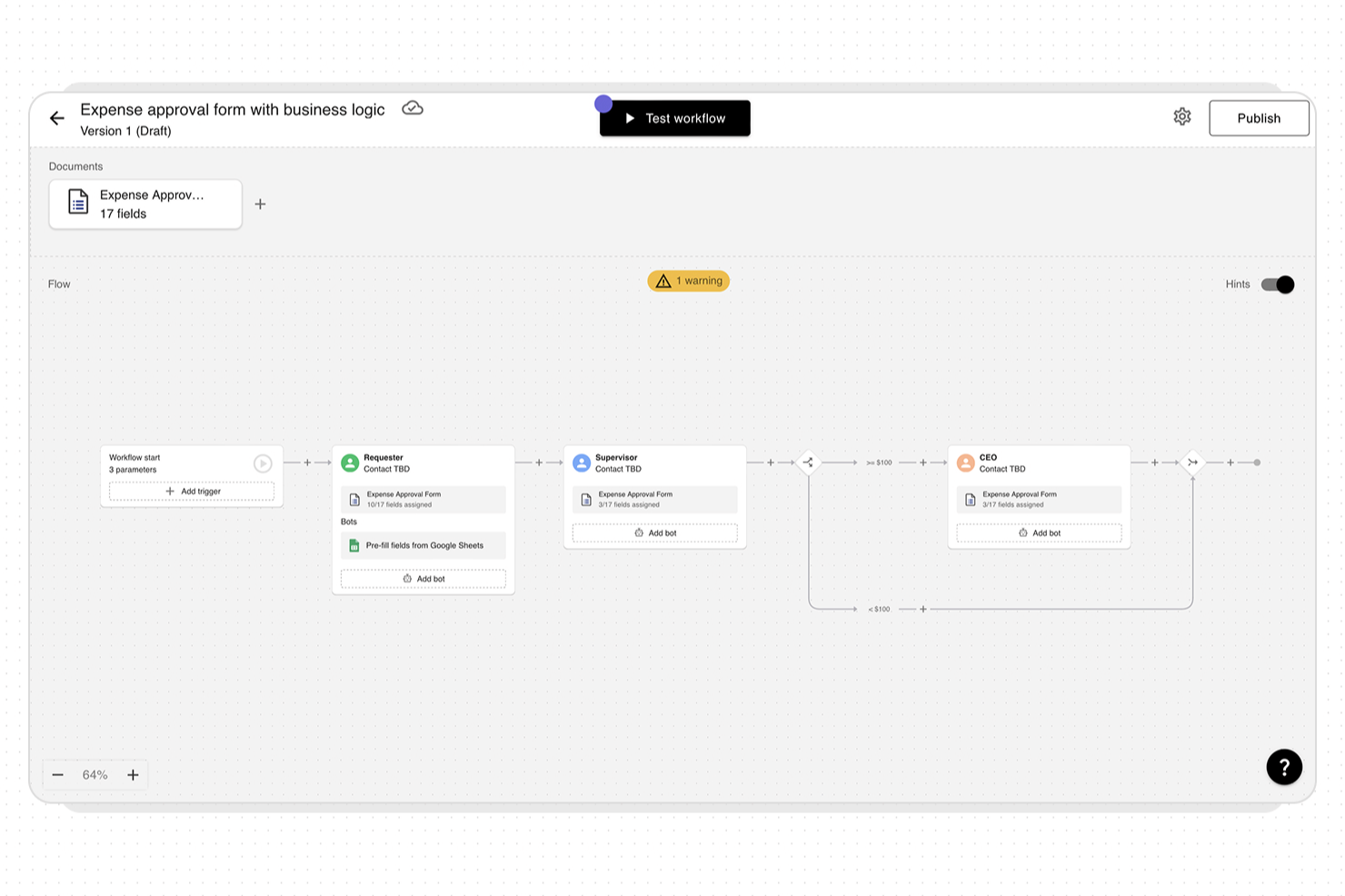
altaFlow is an enterprise workflow platform designed for organizations that need to automate and manage complex document processes. It’s especially relevant for teams in regulated industries or those with demanding integration needs. The platform helps businesses reduce manual work, improve compliance, and connect workflows across core business systems.
Who Is altaFlow Best For?
altaFlow is a strong choice for mid-sized to large organizations in regulated industries that need to automate and control document-centric workflows across multiple business systems.
Why I Picked altaFlow
For teams that need to automate document workflows without relying on IT resources, altaFlow’s no-code builder stands out. I picked it because its drag-and-drop interface lets users design, modify, and deploy document workflows visually, making it accessible to business users and process owners. The platform supports conditional logic and multi-step approvals, so you can create complex routing and automation rules without writing code. This approach helps organizations quickly adapt workflows as requirements change, which is essential in dynamic enterprise environments.
altaFlow Key Features
Some other features that make altaFlow useful for enterprise workflow management include:
- Document version control: Track changes and maintain a full audit trail for every document processed through your workflows.
- Role-based access controls: Assign permissions to users and groups to ensure sensitive information is only accessible to authorized personnel.
- Automated notifications: Set up alerts and reminders for workflow steps, approvals, or document status changes to keep processes moving.
- Custom form builder: Create and embed custom forms within workflows to capture structured data and trigger automated actions.
altaFlow Integrations
Integrations include Salesforce, NetSuite, SharePoint, Google Drive, OneDrive, HubSpot, Slack, and API access for custom integrations.
Pros and Cons
Pros:
- Detailed role-based access controls
- HIPAA-compliant security and audit trails
- Native Salesforce and NetSuite integration
Cons:
- Advanced features require higher-tier plans
- Limited reporting customization options

Best for enterprise AI-powered workflow automation

Screendragon is a workflow management platform built for enterprise marketing, creative, and operations teams. It provides a no-code environment that allows you to design and automate complex workflows without technical expertise. The platform helps large organizations manage approvals, resources, and budgets while maintaining visibility across departments and regions.
Why I picked Screendragon: I picked Screendragon because it gives enterprise teams complete control over how their workflows function — without relying on IT support. You can create tailored processes, automate repetitive tasks, and manage digital approvals in a single, secure platform that’s easy to customize for different departments or regions.
I also like how Screendragon builds governance into every step. Its advanced permission controls and data security features help you maintain compliance while managing projects at scale. For enterprise marketing and creative teams, that means you can protect sensitive information and ensure the right people are involved at the right time.
Screendragon Standout Features & Integrations
Standout features include a visual no-code workflow builder, dynamic custom forms, and AI-powered automation that handles routine tasks and routes approvals automatically. The software also provides advanced reporting dashboards for real-time insights into project progress and resource utilization.
Integrations include Microsoft Power BI, Slack, Microsoft Teams, HubSpot, Okta, Aprimo, Adobe, Google Drive, Salesforce, Zapier, Trello, and Jira.
New Product Updates from Screendragon
Screendragon Unveils New AI Hub
Screendragon introduced AI Hub, a new capability that lets teams build and manage AI agents directly within workflows. The update helps marketing teams automate tasks, maintain governance controls, and scale AI-driven operations more efficiently. For more information, visit Screendragon's official site.

Moxo
Best for customer-facing workflow portals

Moxo is a workflow orchestration platform that combines automated process design, conditional logic, role-based task routing, and client-facing portals to manage structured workflows across internal teams and external stakeholders.
Who Is Moxo Best For?
Moxo is a strong fit for mid-to-large professional services firms that run repeatable, client-facing processes across finance, legal, or consulting.
Why I Picked Moxo
Moxo is one of my top picks because I love how it puts structured workflows directly in front of clients through dedicated portals, complete with a flow catalog, resource pages, and branded layouts. In practice, my team can walk a client through a multi-step onboarding sequence where each participant sees only their assigned action, while we maintain full visibility across every step and status behind the scenes. Magic links remove the login friction entirely, so clients jump straight into their task without creating an account or navigating an unfamiliar interface.
Moxo Key Features
- Conditional branching: Route workflow steps dynamically based on form inputs, decisions, or participant responses within any process.
- Built-in eSignatures: Collect legally binding signatures directly inside a workflow step, without redirecting to a third-party tool.
- SLA timers and escalation: Set deadlines on individual workflow steps and trigger automatic escalations when a participant misses them.
- Role-based permissions: Control exactly what each internal or external participant can view, edit, or action within a workflow.
Moxo Integrations
Moxo offers integrations with Salesforce, HubSpot, Microsoft Dynamics 365, Jira, Slack, Stripe, DocuSign, QuickBooks, Google Drive, and Dropbox, among others. It also connects with Zapier and provides a REST API and webhooks for custom integrations.
Pros and Cons
Pros:
- SOC 2 Type II and GDPR compliant
- White-label portals for client-facing workflows
- Built-in eSignatures, forms, and document collection
Cons:
- Chat history limited to 90-day retention
- No built-in task time tracking

Best for customizable project management
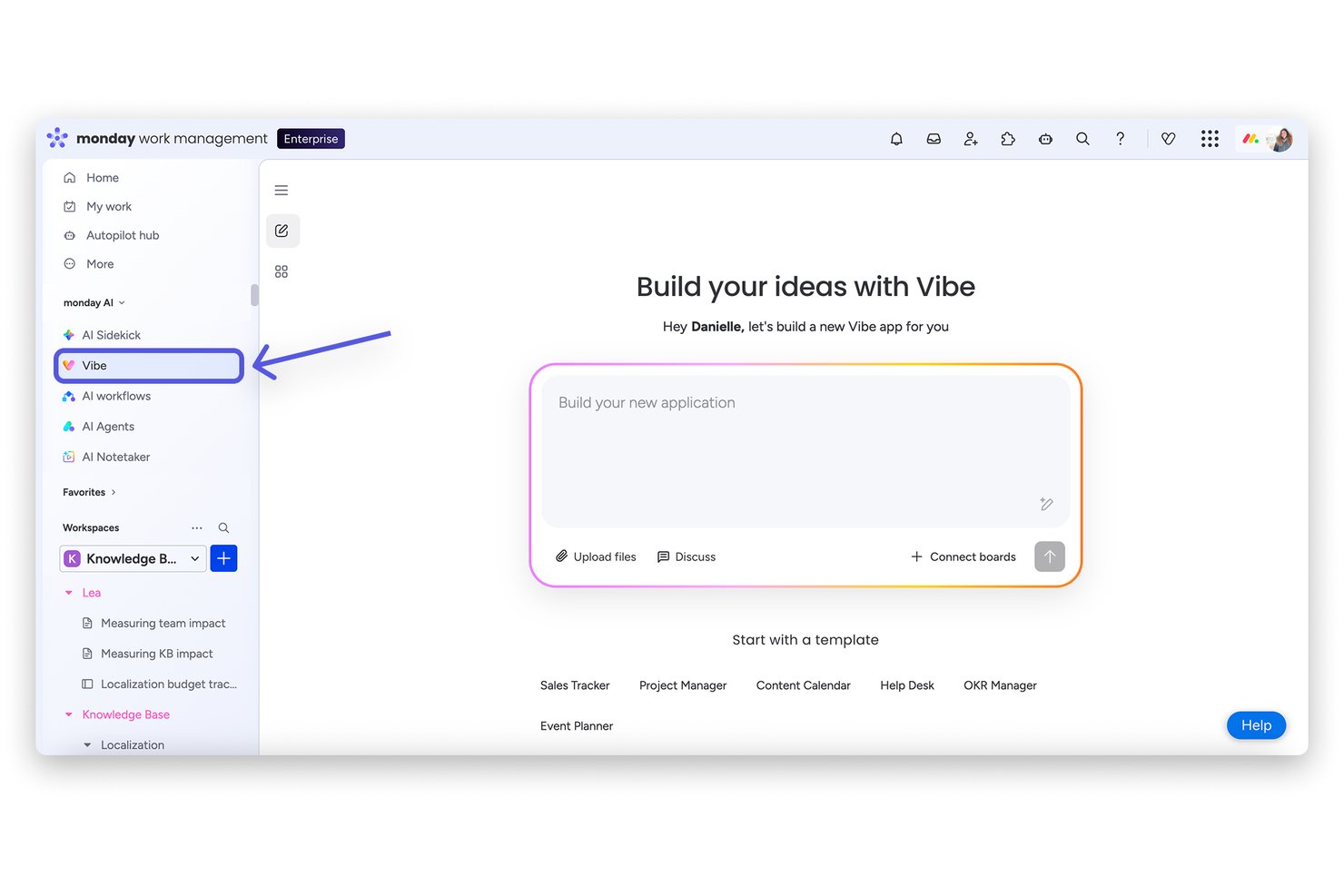
monday AI Workspace is an AI-powered work management platform that brings project planning, workflow automation, cross-team orchestration, and portfolio visibility together in one highly configurable environment built for enterprise teams.
Who Is monday AI Workspace Best For?
It's a strong fit for enterprise PMOs and cross-functional teams that need to manage multiple concurrent projects across departments without sacrificing flexibility.
Why I Picked monday AI Workspace
monday AI Workspace is one of my top picks because I love how far the customization actually goes. Beyond boards and column types, the Vibe app builder lets my team turn specific business processes into purpose-built apps without writing code. The AI workflow builder then layers conditional, multi-step automations on top, so our workflows reflect how the org actually operates, not a predefined template.
monday AI Workspace Key Features
- AI-powered risk detection: Instantly analyzes project data to flag dependencies, bottlenecks, and timeline risks.
- Real-time portfolio dashboards: Visualizes status, resources, and KPIs across multiple projects and teams.
- Multi-level permissions: Lets admins assign granular access rights by user, team, or project workspace.
- Open API and 200+ native integrations: Connects to existing ERP, CRM, ITSM, and collaboration platforms for unified workflows.
monday AI Workspace Integrations
monday AI Workspace offers 200+ native integrations, including Slack, Salesforce, HubSpot, GitHub, Google Workspace, Microsoft Teams, Zendesk, Jira, Dropbox, Box, and connects with Zapier. An API is available for custom integrations.
Pros and Cons
Pros:
- Vibe app builder creates custom project interfaces
- AI-generated automations reduce manual workflow setup time
- Highly configurable boards adapt to any workflow
Cons:
- Dashboards require manual configuration across every project
- Steep setup time for complex enterprise configurations
New Product Updates from monday AI Workspace
monday AI Workspace Adds Human Approval Routing
monday AI Workspace adds a human-in-the-loop approval block to AI Workflows, sending approval requests and routing workflow paths based on responses. For more information, visit monday AI Workspace's official site.

Miro
Best for co-creating on video conference

Miro is an enterprise-grade online collaborative platform that connects your company to increase alignment and spend less time in meetings.
Why I picked Miro: The platform is GDPR compliant, ISO & SOC3 certified, and has advanced user management. It lets you brainstorm, diagram, map, and come together under one roof. Among its collaborative highlights are the use of sticky notes, voting, live reactions and a plethora of shapes that go from basic to shape packs from specific companies.
Working with Miro lets your team have a visual shared language and easy access to templates that can help with flowcharts, BPMN, UML, and complex architecture diagrams. Users can also upload charts from other apps for further work, express ideas in varied forms including videos, and utilize TalkTrack to record video explanations of process maps. This broadens communication options within teams, especially useful during video conferences.
Miro Standout Features and Integrations
Features include Miro AI, which adds artificial intelligence to your boards to help with tasks like clustering sticky notes and fleshing out rough ideas. The tool also includes an extensive library of templates for common diagram types and specific use cases like org charts. Miro can handle large, complex org charts, and it's easy to update this as your org grows and changes.
Integrations include over 100 apps from the likes of InVision, Unsplash, Adobe Creative Cloud, Asana, Monday.com, Notion, Confluence, OneDrive, Slack, Box, and Zoom. Additionally, you can access thousands more through Zapier.
New Product Updates from Miro
Miro Adds Japan Data Residency for Enterprise Customers
Miro has introduced Japan data residency for enterprise customers, offering in-region storage for production data, backups, and metadata, plus in-region compute infrastructure. For more information, visit Miro's official site.

Best for real-time collaboration
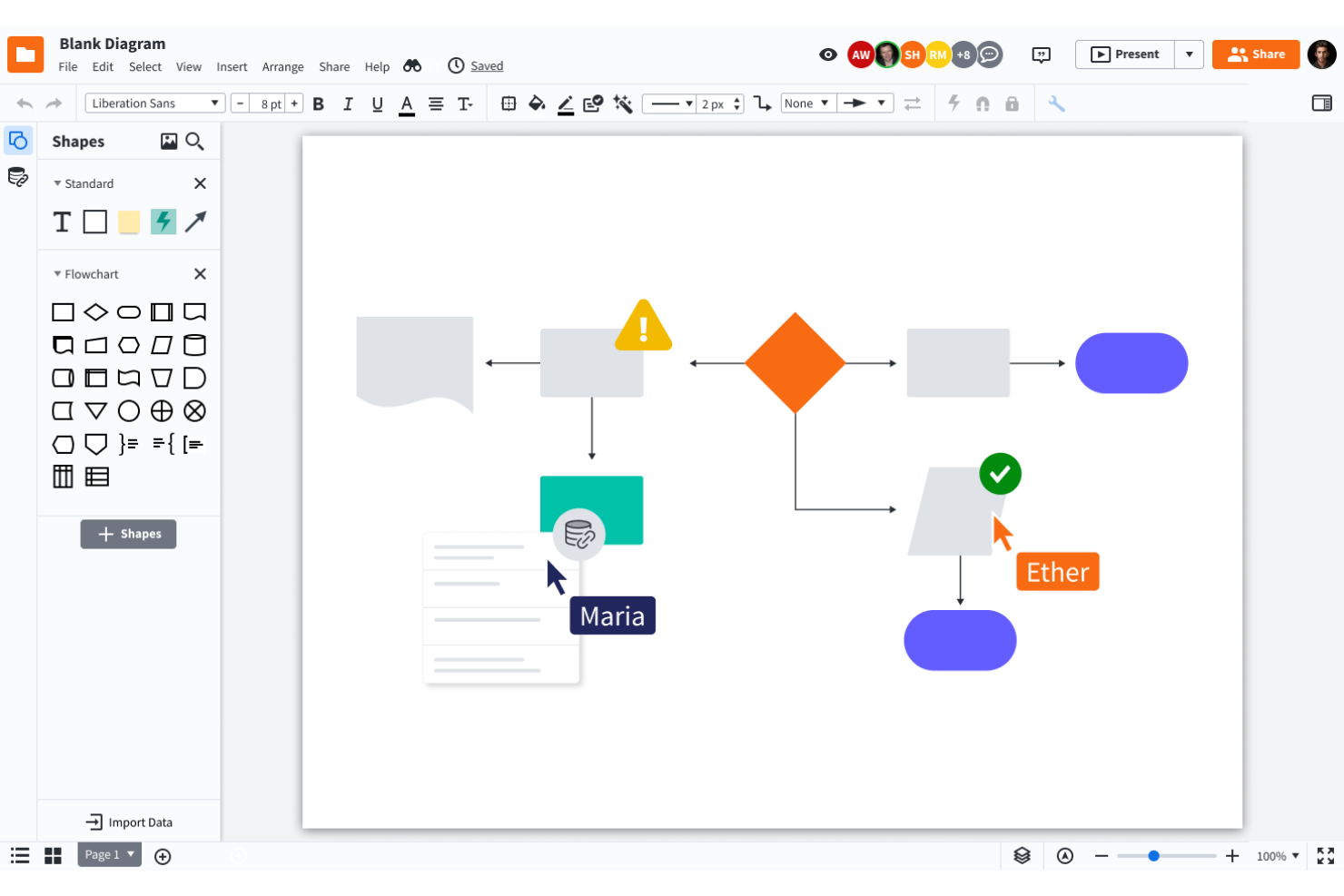
Lucidchart is an intelligent diagramming application that helps your team work together on building workflows.
Why I picked Lucidchart: This is a tool that offers great collaboration features. Mapping process workflows is a team effort in most cases. Lucidchart provides a canvas where everyone can co-create, leave comments, engage in conversations around a specific item, and share their work with as many stakeholders as they need.
Additionally, the platform is CCPA and GDPR compliant and keeps your information secure, using encryption on transfer and rest. The cryptographic keys are protected by Amazon’s Key Management Services.
Lucidchart Standout Features and Integrations
Features include the ability to set up value streams and sub-processes within your workflows so you can have multiple layers of a process running at once, as well as quick diagramming features that let you set up and edit a workflow diagram without starting completely from scratch. These include the ability to change shapes in the diagram without changing the text, automatic line adjustments when you move a shape, and shape suggestions based on what you've already added to your diagram.
Integrations include everything from Slack, Google Workspace, Asana, Atlassian, and Office365, to more industry-specific applications like Salesforce, AWS, Azure, and BambooHR. Lucidchart has a free plan available for individual users.
Qntrl
Best for advanced BPM automation
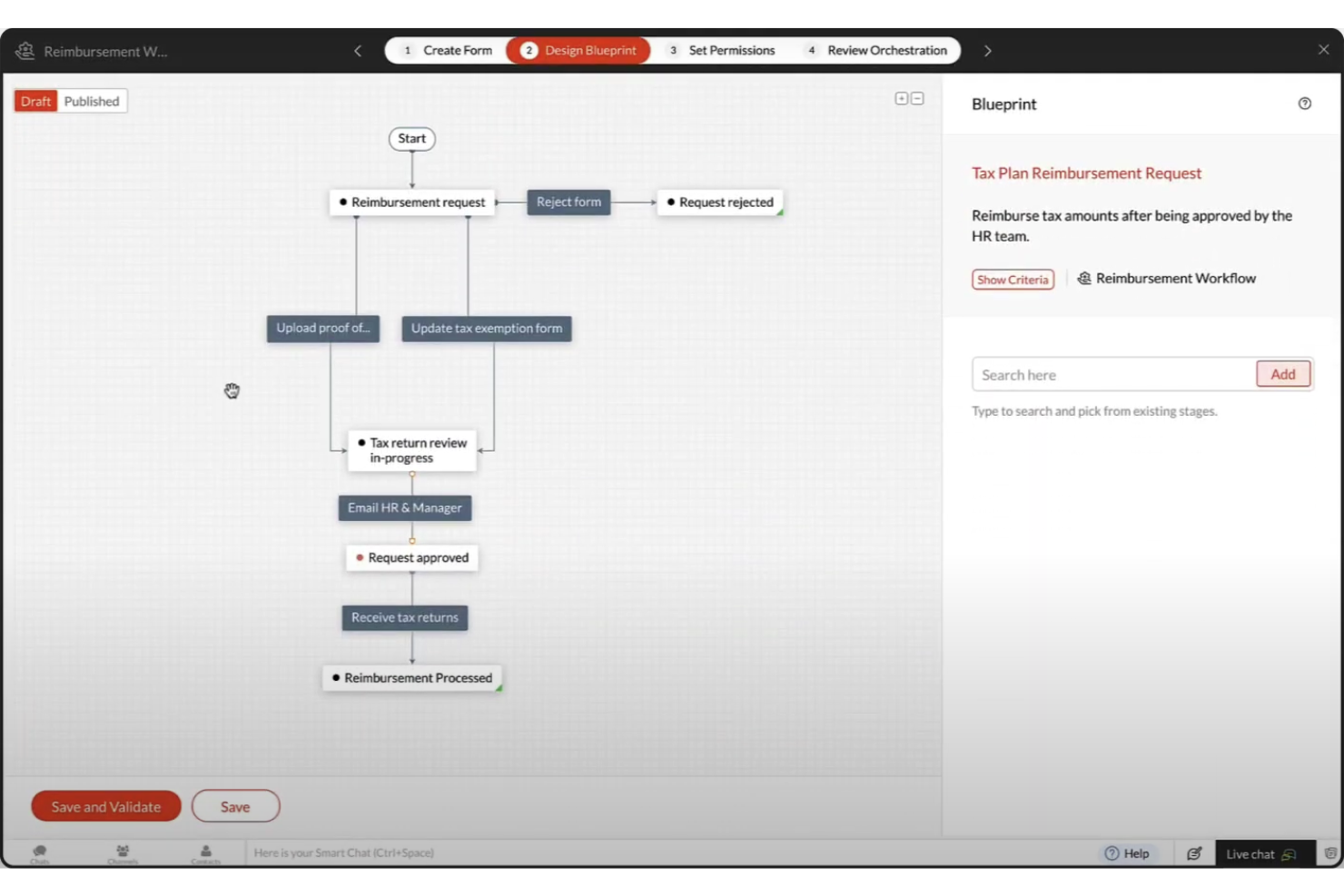
Qntrl is an advanced business process management (BPM) automation platform that helps you bring visibility, control, and automation to processes like purchasing, onboarding, and marketing.
Why I picked Qntrl: Qntrl gives you granular control over fields, forms, and permissions. It also lets you set business rules that apply across the board. This will let you set, for example, custom notifications every time a high-priority expense is submitted.
Qntrl Standout Features and Integrations
Features include a workflow designer that allows for parallel transitions (i.e. multiple steps need to occur at the same time, sometimes involving multiple teams). This will help you control processes that require multiple flows to happen in parallel. The system will automatically make sure that the next step is unlocked once all conditions are met.
Integrations are available in many ways, there are pre-built connections with popular apps like Slack, Dropbox, and Google Drive, webhooks, extensions that can sync information, and scripting that you can use to build custom functions.

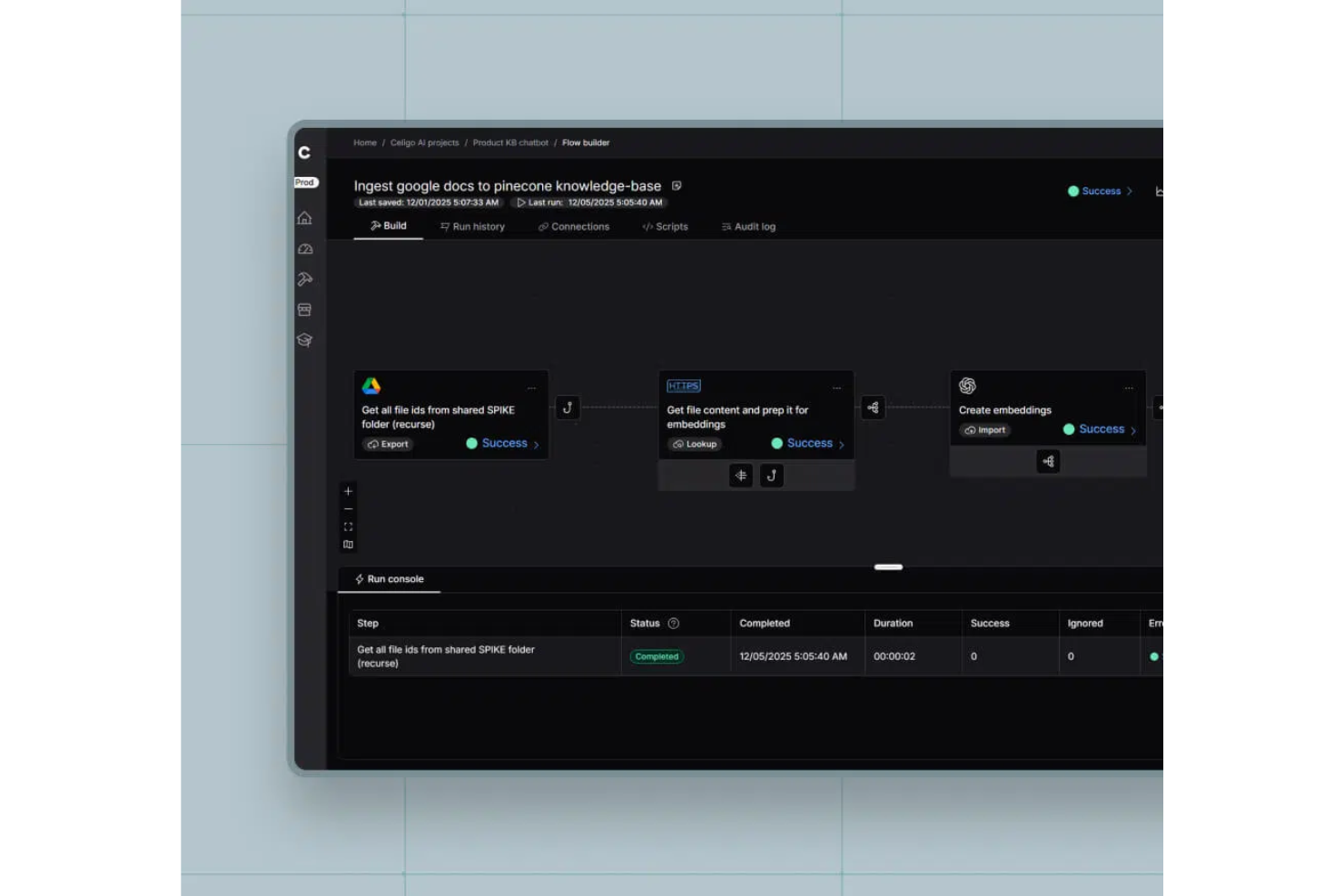
Celigo is an integration and automation platform for enterprises that connects business applications, orchestrates workflows, and manages data flows across cloud and on-premise systems.
Who Is Celigo Best For?
Large enterprises and IT teams that need to connect and automate workflows across a wide range of business applications and systems.
Why I Picked Celigo
I picked Celigo as one of the best because its library of 1,000+ prebuilt app connectors lets my team quickly integrate everything from ERP to CRM and ecommerce platforms. I can automate complex workflows across Salesforce, NetSuite, Shopify, and more without custom development. In practice, that means we can launch new integrations in days instead of weeks, even when connecting less common business apps.
Celigo Key Features
- Visual flow builder: Design, map, and automate workflows using a drag-and-drop interface.
- Error management dashboard: Monitor, troubleshoot, and resolve integration errors in real time.
- Role-based access controls: Set granular permissions for users and teams across integrations.
- Prebuilt workflow templates: Deploy ready-made automation templates for common enterprise processes.
Celigo Integrations
Celigo offers 1,000+ native integrations, including Salesforce, NetSuite, Shopify, Amazon, Zendesk, ServiceNow, Workday, Microsoft 365, Google Workspace, Jira, and Slack. An API is available for custom integrations.
Pros and Cons
Pros:
- Features dedicated training and certification programs
- Includes reusable integration templates for rapid deployment
- Provides advanced error handling and monitoring tools
Cons:
- Limited customization for some prebuilt connectors
- Complex integrations may require developer resources
New Product Updates from Celigo
Celigo Adds Shopify–Microsoft Business Central Integration Template
Celigo adds a pre-built Shopify–Microsoft Business Central integration template for D2C and B2B commerce. This helps merchants launch connected commerce workflows faster. For more information, visit Celigo’s official site.
 .
.
TrailHQ
Best for AI-driven workflow automation

Nanonets leverages AI to streamline enterprise workflows, handling complex document processing across industries such as finance, healthcare, and logistics. It excels at automating repetitive tasks, including data extraction, invoice handling, and accounts payable, significantly reducing manual intervention and accelerating processing times.
Why I picked Nanonets: Nanonets stands out for its AI-powered capabilities that can simplify intricate workflows, leveraging natural language processing to facilitate seamless integration with various apps and data sources. The platform’s support for custom Language Learning Models (LLMs) allows enterprises to tailor workflows that cater to their specific operational requirements, ensuring automation aligns closely with unique business demands.
Nanonets also includes a human-in-the-loop feature, adding an extra layer of verification for critical approvals in automated workflows. Its no-code interface empowers users to create these workflows without coding skills, making it accessible for teams focused on scaling efficient, AI-enhanced processes.
Nanonets Standout Features & Integrations
Standout features include AI-powered insights, enabling you to extract actionable information from unstructured data. Additionally, its data capture extracts information from various document types such as invoices, bills of lading, purchase orders, and ID cards. It also adheres to GDPR, SOC 2, and HIPAA standards for data protection.
Integrations include Quickbooks, Salesforce, Google Sheets, Dropbox, and Zapier.
Annen programvare for arbeidsflyt i virksomheter
Her er noen flere gode alternativer som ikke kom med på listen.
- Quixy
For its testing simulator
- MeisterTask
For secure team collaboration
- Process Street
For automating scheduled tasks
- Visio
Microsoft Power Automate integration
- Nintex
For change visibility
- beSlick
For monitoring process adherence
- Kissflow Workflow
For complex enterprise workflows
- Pneumatic Workflow
For automating business processes
- Decisions
For version change control
- Navvia
For automated process documentation
- Creatio CRM
For CRM and sales-related processes
- Acquia DAM (Widen)
For centralized digital asset management
- Kissflow
Visual enterprise workflow software
- Creately
For its extensive shape libraries and database management
- ProWorkflow
For project and business process dashboards
- Kintone
For building custom business processes


Relatert programvare for prosjektstyring
Hvis du fortsatt ikke har funnet det du leter etter her, kan du se på disse andre relaterte verktøyene som vi har testet og evaluert:
- Programvare for prosjektstyring
- Programvare for ressursstyring
- Programvare for automatisering av arbeidsflyt
- Programvare for oppgavestyring
- Verktøy for å lage Gantt-diagrammer
- Produktivitetsverktøy
- Programvare for ressursstyring i virksomheter
- Systemer for prosjektstyring i virksomheter
How I Evaluate Enterprise Workflow Software
I look at two layers: the must-haves a PMO-grade platform needs—automation, governance, and integrations—and the differentiators that show how a tool handles real enterprise scale.
Core Functionality (Table Stakes For This List)
When I'm selecting tools for my list, I rank each one on a scale from 0 (does not offer the functionality) to 5 (excels in this area) for each core functionality listed below. Then, I calculate the tool's total score into a percentage. Each tool needs to achieve a minimum total score of 75% to be considered for inclusion.
- Workflow Automation Engine: I evaluate whether the platform offers a visual, no-code/low-code builder with conditional branching—like auto-routing a change request through different approval paths based on budget impact.
- Enterprise Scalability: Large organizations need multi-entity hierarchies, SSO, and advanced RBAC, so I check how well a tool handles thousands of concurrent users across distributed teams.
- Cross-System Integrations: I look for native connectors to the systems enterprise PMOs actually rely on—ERP, CRM, ITSM, and HRIS platforms—plus open APIs and iPaaS compatibility.
- Project & Task Orchestration: The tool should connect workflow steps to real project structures with dependencies, milestones, and resource assignments—not just standalone task lists.
- Governance & Audit Controls: I evaluate approval chains, permission granularity, and audit logging, especially for teams managing regulated workflows that require full traceability of every action taken.
- Reporting & Analytics: Dashboards and reports should cover both individual workflow performance and portfolio-level views, so a PMO director can track cycle times alongside cross-project health metrics.
Once I have a list of tools that meet this criteria, I consider what sets each platform apart.
Differentiating Factors (What Sets Vendors Apart)
Here's how I compare and contrast different vendors:
Standout Features
AI-powered automation is a major differentiator—I look for platforms that can predict bottlenecks or suggest workflow optimizations before delays cascade across a portfolio. Resource capacity planning also carries real weight when a PMO is juggling dozens of concurrent projects and needs skills-based matching across teams. Scenario modeling rounds this out by letting program managers test timeline or budget shifts before committing to a plan.
Beyond Features
Security and compliance certifications matter when workflows touch regulated data—I check for SOC 2 Type II, ISO 27001, and region-specific standards like GDPR or HIPAA. Implementation support is equally important; rolling out an enterprise workflow tool across multiple departments often requires dedicated CSMs, certified partners, and structured onboarding programs. I also evaluate total cost of ownership, paying close attention to how licensing scales and whether hidden costs like premium connectors or API limits surface as adoption grows.
Slik velger du programvare for arbeidsflyt i virksomheter
Når du går gjennom din egen unike prosess for valg av programvare, bør du ha følgende punkter i tankene:
- Skalerbarhet og fleksibilitet: Virksomhetens behov vil utvikle seg over tid, og arbeidsflytprogramvaren for virksomheten må kunne vokse sammen med dere. Se derfor etter løsninger som kan håndtere økende mengder oppgaver, brukere og data uten at det går utover ytelsen. Et selskap i rask vekst vil for eksempel ha nytte av programvare som gjør det enkelt å legge til nye arbeidsflyter og brukere.
- Integrasjonsmuligheter: Arbeidsflytprogramvaren for virksomheten må integreres sømløst med de eksisterende verktøyene og systemene deres. Dette sikrer datakonsistens og reduserer risikoen for feil. Et produksjonsselskap kan for eksempel ha behov for arbeidsflytprogramvare som integreres med ERP- og CRM-systemene deres for å effektivisere ordrebehandling og kundehåndtering. Kontroller kompatibiliteten med viktig programvare som regnskapssystemer, HR-plattformer og kommunikasjonsverktøy.
- Brukervennlig grensesnitt: Programvaren bør være intuitiv og enkel å bruke for alle teammedlemmer, uavhengig av deres tekniske kompetanse. Et komplisert grensesnitt kan hindre utbredelse og redusere produktiviteten. I et helsemiljø bør for eksempel helsepersonell raskt kunne oppdatere pasientjournaler og administrere avtaler. Prioriter løsninger med tilpassbare oversikter og dra-og-slipp-funksjonalitet.
- Robuste sikkerhetsfunksjoner: Det er viktig å beskytte sensitive data, særlig for bransjer som håndterer konfidensiell informasjon, for eksempel finans og helse. Sørg for at programvaren tilbyr sterke sikkerhetstiltak, inkludert datakryptering, brukerautentisering og regelmessige sikkerhetsoppdateringer.
- Leverandørstøtte og opplæring: Velg en leverandør som tilbyr omfattende introduksjon, dokumentasjon og responsive støttetjenester. Et advokatfirma kan for eksempel ha behov for detaljerte opplæringsøkter for å sikre at alle medarbeidere er dyktige til å bruke programvaren til å håndtere saksmapper og frister effektivt.
Trender innen arbeidsflytprogramvare for virksomheter
Jeg har identifisert flere trender som jeg tror vil påvirke programvare for arbeidsflytstyring i virksomheter både nå og i fremtiden:
Automatisering og integrasjon av kunstig intelligens
- Avansert kunstig intelligens og maskinlæring: KI-drevet analyse og maskinlæring blir stadig oftere integrert i arbeidsflytprogramvare. Disse forbedringene omfatter prediktiv analyse, automatiserte beslutninger og intelligent oppgavefordeling, som alle er vanlige funksjoner i KI-drevet arbeidsflytprogramvare.
- Robotisert prosessautomatisering (RPA): Mange smarte automatiseringsverktøy tar i bruk RPA for å automatisere gjentakende oppgaver, redusere den manuelle arbeidsmengden og minimere feil. Denne trenden gjenspeiler den økende etterspørselen etter mer intelligent og autonom prosesshåndtering.
Forbedret samarbeid og kommunikasjon
- Integrerte kommunikasjonsverktøy: Arbeidsflytprogramvare tilbyr nå innebygde kommunikasjonsfunksjoner som chat, videokonferanser og samarbeid i sanntid. Disse oppdateringene bidrar til å fremme samarbeid og samhandling mellom teammedlemmer og forbedrer prosjektkoordineringen.
- Samarbeidsbasert dokumenthåndtering: Forbedrede dokumenthåndteringssystemer legger til rette for samtidig redigering i sanntid, versjonskontroll og sikker fildeling.
Avansert sikkerhet og samsvar
- Forbedrede sikkerhetsfunksjoner: Med økende bekymring for datainnbrudd blir avanserte sikkerhetstiltak som ende-til-ende-kryptering, enkel pålogging (SSO) og flerfaktorautentisering prioritert. Disse funksjonene bidrar til å sikre at sensitive virksomhetsdata er beskyttet.
- Sporing av samsvar: Arbeidsflytprogramvare utvikles for å inkludere omfattende funksjoner for sporing og rapportering av samsvar. Dette hjelper organisasjoner med å følge bransjeregler og standarder mer effektivt.
Hva er arbeidsflytprogramvare for virksomheter?
Arbeidsflytprogramvare for virksomheter er et verktøy som hjelper store bedrifter med å administrere og automatisere de vanlige prosessene og oppgavene sine. Den fungerer som et veikart for ulike oppgaver og aktiviteter og leder dem gjennom de forskjellige stadiene i en prosess, fra start til slutt. I motsetning til verktøy for arbeidsflytorkestrering, som håndterer komplekse automatiseringer på tvers av flere systemer, lar denne programvaren deg vanligvis opprette, gjennomføre og overvåke arbeidsflyter i prosjekter og sørge for at oppgavene fullføres effektivt.
Arbeidsflytverktøy for virksomheter forbedrer også driften, kommunikasjonen og den generelle produktiviteten. De hjelper deg med å sørge for at oppgavene tildeles de riktige personene, og at de er klar over ansvarsområdene og fristene sine. Dette fører til mer effektiv oppgavehåndtering, reduserer sannsynligheten for feil og bidrar til å opprettholde konsistens i forretningsprosessene.
Funksjoner i programvare for arbeidsflyt i virksomheter
Her er de viktigste funksjonene du bør se etter når du velger programvare for arbeidsflyt i virksomheter:
- Automatisering av oppgaver: Dette automatiserer rutinepregede oppgaver og frigjør tid til mer strategisk arbeid.
- Arbeidsflytdesigner: Dette gir et visuelt grensesnitt for å opprette og endre arbeidsflyter, slik at du kan sørge for at de oppfyller spesifikke forretningsbehov.
- Integrasjon: Dette lar deg koble programvaren til andre viktige verktøy og systemer, slik at data kan flyte sømløst. Det bidrar også til å unngå manuell dataregistrering.
- Sanntidsanalyse: Dette gir innsikt i arbeidsflytens ytelse, slik at du kan ta datadrevne beslutninger og gjennomføre kontinuerlige forbedringer.
- Varsler og meldinger: Dette holder teammedlemmene informert om oppgavestatus og tidsfrister, noe som reduserer risikoen for oversittede tidsfrister.
- Dokumentbehandling: Dette sentraliserer lagring og håndtering av dokumenter, slik at det blir enklere å få tilgang til og dele informasjon.
- Tilpassbare maler: Dette gir forhåndsbygde arbeidsflytmaler som kan tilpasses spesifikke forretningsprosesser, slik at du kan fremskynde implementeringen.
- Rollebasert tilgang: Dette styrer hvem som kan få tilgang til og endre arbeidsflyter, for å forbedre sikkerheten og sørge for at bare autorisert personell kan gjøre endringer.
- Mobil tilgang: Dette lar brukere få tilgang til arbeidsflyter fra alle enheter, slik at de kan være produktive også når de er på farten.
- Samsvarssporing: Dette hjelper deg med å sørge for at arbeidsflyter følger bransjeregler og standarder, og reduserer risikoen for problemer knyttet til manglende samsvar.
- Modellering av forretningsprosesser: Dette gjør det mulig å utforme, visualisere og optimalisere forretningsprosesser, slik at du kan identifisere ineffektivitet og forbedre operasjonelle arbeidsflyter.
Virksomhetsabonnementer inkluderer vanligvis mer avanserte funksjoner som:
- Avanserte sikkerhetstiltak, for eksempel enkel pålogging (SSO) og forbedret kryptering, for å beskytte sensitive data
- Større muligheter for tilpasning, slik at du kan tilpasse arbeidsflytene til dine unike behov
- Dedikerte kundeansvarlige og prioritert kundestøtte, slik at eventuelle problemer kan løses raskt og effektivt
- Integrerte funksjoner for elektronisk signering, slik at du kan sende, signere og håndtere dokumenter sikkert i stor skala uten å være avhengig av tredjeparts programvare for elektronisk signering.
Fordeler med programvare for arbeidsflyt i virksomheter
Her er fem viktigste fordeler som programvare for arbeidsflyt i virksomheter gir brukere og organisasjoner:
- Økt effektivitet: Programvare for arbeidsflyt i virksomheter automatiserer rutinepregede oppgaver og prosesser, slik at teammedlemmene får mer tid til å fokusere på aktiviteter med høyere verdi og strategiske initiativer.
- Forbedret samarbeid: Programvare for arbeidsflyt i virksomheter legger til rette for sømløs kommunikasjon og koordinering mellom teammedlemmer. Dette forbedrer produktiviteten og reduserer sannsynligheten for feil eller misforståelser.
- Bedre oversikt: Programvare for arbeidsflyt i virksomheter gir sanntidsinnsikt i fremdrift og ytelse for arbeidsflyter. Dette gjør det mulig å ta informerte beslutninger og raskt håndtere problemer eller flaskehalser.
- Skalerbarhet: Programvare for arbeidsflyt i virksomheter støtter vekst og utvidelse av virksomheten ved å tilpasse seg økende mengder oppgaver, brukere og data uten at det går på bekostning av ytelse eller funksjonalitet.
- Samsvar og sikkerhet: Programvare for arbeidsflyt i virksomheter sørger for at arbeidsflyter følger bransjeregler og standarder, og beskytter sensitive data gjennom robuste sikkerhetstiltak som kryptering og tilgangskontroller.
Kostnader og priser for programvare for arbeidsflyt i virksomheter
Her er en oversikt over de vanligste abonnementstypene, gjennomsnittsprisene og vanlige funksjonene, slik at det blir enklere å navigere blant alternativene:
Sammenligningstabell for abonnementer for programvare for arbeidsflyt i virksomheter
| Plantype | Gjennomsnittspris | Vanlige funksjoner |
|---|---|---|
| Gratisplan | $0 | Grunnleggende oppgavehåndtering, begrensede arbeidsflyter og integrasjoner, begrenset brukertilgang |
| Grunnplan | $10-$20 per bruker/måned | Forbedret oppgavehåndtering, grunnleggende automatisering, e-poststøtte, begrensede integrasjoner |
| Profesjonell plan | $30-$50 per bruker/måned | Avansert automatisering, tilpassede arbeidsflyter, avanserte integrasjoner, analyse, prioritert støtte |
| Virksomhetsplan | $70-$100 per bruker/måned | Ubegrensede arbeidsflyter, AI-drevet analyse, fullstendige integrasjoner, dedikert kundeansvarlig, avanserte sikkerhetsfunksjoner |
| Tilpasset/virksomhet pluss | Varierer (vanligvis tilpasset prising) | Skreddersydde funksjoner, full tilpasning, opplæring på stedet, støtte på virksomhetsnivå, samsvarssporing og regulatoriske funksjoner |
Hver plan tilbyr et ulikt nivå av funksjonalitet og støtte, tilpasset forskjellige virksomhetsbehov og størrelser. Når du vurderer en plan, enten den er på virksomhetsnivå eller ikke, bør du vurdere organisasjonens spesifikke krav og vekstpotensial.
Vanlige stadier der du kan ønske å oppgradere prisplanen din, inkluderer:
- Økt prosesskompleksitet: Når prosesser krever avansert automatisering og tilpassede arbeidsflyter, bør du oppgradere til en plan på et høyere nivå.
- Vekst i antall brukere: Når organisasjonen utvider seg og flere ansatte trenger tilgang til arbeidsflytprogramvaren, kan det være lurt å oppgradere for å gi plass til flere brukere.
- Integrasjon med andre systemer: Når det er behov for å integrere arbeidsflytprogramvaren med andre virksomhetssystemer som ERP, CRM, HRM eller annen spesialisert programvare, kan det hende du må oppgradere til et mer avansert prisnivå.
- Avansert rapportering og analyse: Når avansert rapportering og sanntidsanalyse blir nødvendig, kan det hende du må oppgradere til et abonnement på et høyere nivå.
- Forbedrede sikkerhets- og samsvarskrav: Når det er behov for høyere datasikkerhet og samsvar med bransjestandarder, er det en god idé å oppgradere til en premiumplan som tilbyr avanserte sikkerhetsfunksjoner og verktøy for samsvar.
Vanlige spørsmål om arbeidsflytprogramvare for virksomheter
Finn svar på de vanligste spørsmålene om dette emnet.