

10 beste alternativer til Workfront for prosjektteam i 2026

Kortliste over de beste alternativene til Workfront


De beste alternativene til Workfront gir deg effektive funksjoner for håndtering av oppgaver, prosjekter og arbeidsflyter. Hvis Workfront ikke passer helt for teamet ditt, vil det riktige alternativet hjelpe deg med å forbedre smidig prosjektsporing og samarbeid via et brukervennlig grensesnitt.
Jeg har brukt erfaringen min innen prosjektledelse og over 3 års testing av programvare til å vurdere dusinvis av verktøy og sette sammen listen min over de beste alternativene til Workfront. Hver av anbefalingene mine vil passe bedre til arbeidsflyten din, slik at du kan håndtere og spore oppgavene dine og levere arbeid som skaper resultater for kundene dine.
Hva er alternativer til Workfront?
Alternativer til Workfront er prosjektstyringsverktøy som hjelper team med å organisere arbeidet, følge fremdriften og fullføre prosjekter sammen. De tilbyr funksjoner som ligner på Workfront, men kan ha et mer brukervennlig grensesnitt, flere funksjoner enn Workfront eller større tilpasningsmuligheter for å dekke behovene dine.
Prosjektledere, teamledere og driftsansvarlige bruker disse alternativene til å planlegge oppgaver, følge med på prosjektfaser og holde alle samkjørte. Disse verktøyene hjelper deg med å se status for arbeidet, oppdage flaskehalser og holde kontakten, slik at prosjektene går fremover uten forvirring.
Hvorfor du kan stole på våre programvareanbefalinger
Teamet vårt har testet og anmeldt programvare siden 2012. Vi er selv prosjektledere, så vi vet hvor vanskelig og hvor viktig det er å velge riktig programvare.
I denne guiden har vi vurdert verktøyene gjennom praktisk testing og uavhengig research og gitt dem poeng ut fra våre utvelgelseskriterier. Vi bygger også på innsikt fra ledende eksperter i bransjen og erfarne prosjektledere.
Anmeldelsene våre bygger på vår egen redaksjonelle vurdering. De er ikke et salgsargument.
Ekspertanmeldere:
Sammenligningstabell for alternativer til Workfront
| Tool | Best For | Trial Info | Price | ||
|---|---|---|---|---|---|
| 1 | Best for workflow automation | Free demo available | Pricing upon request | Website | |
| 2 | Best for agile project management | 14-day free trial | Pricing upon request | Website | |
| 3 | Best for unified systems | Free plan available | From $10/user/month (billed annually) | Website | |
| 4 | Best for pre-built forms for project intake | 2-week free trial; free demo available | From $8/user/month (billed annually) | Website | |
| 5 | Best for centralized project control | 14-day free trial + free demo available | From $45/month (billed annually) | Website | |
| 6 | Best for client project tracking | Free plan + 14-day free trial + free demo available | From $9.99/user/month (billed annually) | Website | |
| 7 | Best for project dependencies | 14-day free trial | From $15/user/month | Website | |
| 8 | Best for customizable workspaces | 30-day free trial + free plan + free demo available | From $11.20/user/month (billed annually) | Website | |
| 9 | Best for flexible project management | Free plan available + 7-day free trial | From $3/user/month (billed annually) | Website | |
| 10 | Best for Agile and Scrum workflows | Free plan + trial + demo available | From $39/user/month | Website |


Anmeldelser av de beste alternativene til Workfront
Her er min detaljerte analyse og oversikt over hvert alternativ til Workfront. Jeg undersøker fordelene og begrensningene ved hvert verktøy og gir innsikt i funksjoner og scenarier der de fungerer aller best.

Best for workflow automation

Screendragon is a work management software tailored for marketing and agency teams. It centralizes project management tasks, resources, workflows, and budgets, enhancing productivity and collaboration.
Why it's a good Workfront alternative: I picked Screendragon because it offers advanced workflow automation capabilities. The platform allows you to create custom workflows that guide projects from start to finish, ensuring that tasks move through the necessary stages. I also like the platform's resource utilization forecasting, which helps in planning to ensure your team has the right resources at the right time.
Standout features & integrations:
Features include capacity planning tools that help you allocate resources effectively across different projects, ensuring timely delivery. The software also provides visibility across projects, allowing you to identify bottlenecks and improve planning.
Integrations include MS Power BI, Slack, MS Teams, Office 365, Google Drive, OneDrive, Salesforce, Jira, Trello, NetSuite, SAP, and PeopleSoft.
Pros and Cons
Pros:
- Ability to scale with growing project needs
- Resource management tools are helpful for aligning resources
- Flexibility to create customized workflows
Cons:
- Limited mobile application support
- Platform may be more complex to navigate for larger teams
New Product Updates from Screendragon
Screendragon Unveils New AI Hub
Screendragon introduced AI Hub, a new capability that lets teams build and manage AI agents directly within workflows. The update helps marketing teams automate tasks, maintain governance controls, and scale AI-driven operations more efficiently. For more information, visit Screendragon's official site.

Wrike
Best for agile project management

Wrike is a comprehensive project management software designed to enhance workflows and collaboration within teams. It offers a versatile platform that supports task management, project planning, and real-time collaboration, making it suitable for businesses of all sizes.
Why it's a good Workfront alternative: Wrike stands out with its ease of use, real-time collaboration features, and extensive customization options. While Workfront is known for its structured workflow automation, Wrike’s adaptability makes it particularly well-suited for teams employing agile project management methodologies. Wrike’s support for agile practices, such as dynamic request forms and scalable work breakdown structures, ensures that teams can swiftly respond to changes and maintain project momentum.
Standout features & integrations:
Features include dynamic request forms, real-time collaboration, scalable work breakdown structures (WBS), 360° dashboards, automated workflows, intelligent analytics, cross-tagging functionality, external user collaboration, and a high degree of customization.
Integrations include Google Drive, Dropbox, Microsoft OneDrive, Salesforce, HubSpot, Marketo, Slack, Microsoft Teams, Zoom, Google Calendar, Outlook, Jira, GitHub, Trello, Asana, Evernote, and Zendesk.
Pros and Cons
Pros:
- Resource and capacity management capabilities
- Good task management features with approval and review workflows
- Highly customizable platform
Cons:
- May take time to learn the platform
- Mobile app is not as robust as desktop version
New Product Updates from Wrike

Wrike Redesigns AI Agent Builder
Wrike redesigns its AI Agent Builder with a side-by-side setup, Scopes, sentence-style triggers and actions, and clearer filters. These changes make it easier to configure, test, and manage agent behavior. For more information, visit Wrike’s official site.
Notion
Best for unified systems

Notion is a versatile productivity and organization tool that combines multiple functionalities into a single platform. It's best for unified systems due to its ability to integrate note-taking, task management, databases, and document storage and embed them in various configurations.
Why it's a good Workfront alternative: I chose Notion for the list because it offers a unique combination of documentation, data management, and project tracking in one platform. This makes it a compelling alternative to Workfront, especially for teams looking for a more integrated approach to managing their work.
Standout features & integrations:
Features include customizable templates, real-time collaboration, rich media support, embedded spreadsheets and databases, Kanban boards, calendar views, markdown support, to-do lists, reminders, and a hierarchical organization system for pages and subpages.
Integrations include Slack, Google Drive, Figma, GitHub, Trello, Asana, Jira, and Evernote.
Pros and Cons
Pros:
- Free plan available for team members
- Extensive customization options
- Versatile all-in-one workspace
Cons:
- Limited offline functionality
- Can be overwhelming for new users

Workzone
Best for pre-built forms for project intake
Workzone offers a user-friendly project management solution that caters to teams in marketing, operations, IT, and beyond. You can find value in its real-time project visibility and organized request management, which can alleviate the common struggle of managing multiple stakeholders and time-sensitive tasks. By enhancing collaboration with efficient tools and integrating with platforms like Slack and Google Drive, Workzone stands out as a flexible alternative to Workfront.
Why I Picked Workzone
I picked Workzone because of its emphasis on real-time project visibility and organized request management, features that are crucial for teams transitioning from Workfront. You’ll appreciate how Workzone’s pre-built forms streamline project intake, reducing the clutter of excessive emails. Moreover, its centralized request management aligns with the needs of teams juggling multiple projects, ensuring that you can keep track of priorities without losing focus. These specific features make Workzone a fitting choice for those seeking an alternative to Workfront.
Workzone Key Features
In addition to its strong focus on project intake and request management, I also found several other features that enhance its appeal as a Workfront alternative.
- Pre-built Reports: Workzone offers pre-built reports for workload and budget management, providing your team with insights into project status and resource allocation.
- Industry-specific Templates: With over 1,000 templates, you can quickly launch projects tailored to specific industry needs, saving time on setup.
- Unlimited Training and Support: Workzone ensures seamless adoption with unlimited training and support, allowing your team to maximize the platform’s potential.
- Customizable Workflows: You can tailor workflows to suit your team’s unique processes, enhancing efficiency and collaboration.
Workzone Integrations
Integrations include Slack, Microsoft Teams, Google Drive, Dropbox, Box, Outlook, OneDrive, Salesforce, QuickBooks, and SharePoint.
Pros and Cons
Pros:
- Structured request and workload management
- Built-in document proofing and approvals
- Strong project visibility and tracking
Cons:
- Mobile experience weaker than desktop
- Smaller integration ecosystem than competitors
New Product Updates from Workzone

Workzone Enterprise Adds Multi-Stage Approval Workflows
Workzone Enterprise now includes Approval Workflows, enabling multi-stage document approvals to standardize complex processes and reduce manual effort. For more information, visit Workzone's official site.
 .
.
ProofHub
Best for centralized project control

ProofHub is a project management and team collaboration software that centralizes control over projects. It's best for centralized project control because it offers a single platform to plan, execute, track, and manage projects, ensuring everyone is aligned and informed.
Why it's a good Workfront alternative: I chose ProofHub for the list because it provides a wide-range of tools for centralized project management, which is essential for teams that need to maintain a high level of organization and real-time collaboration. Its ability to centralize project control makes it a standout alternative to Workfront, especially for teams that require a unified view of their projects and tasks.
Standout features & integrations:
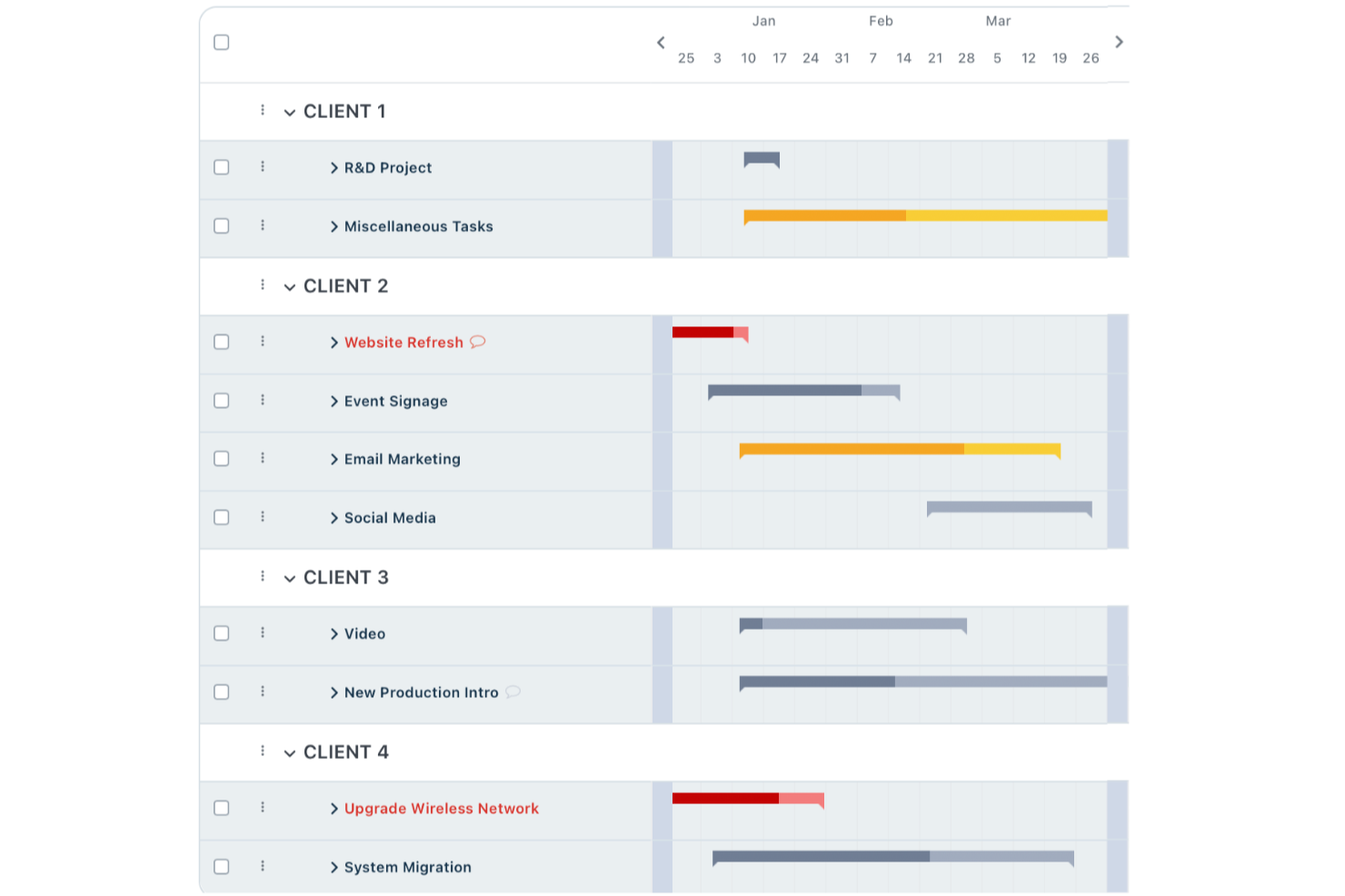
Features include task management with multiple views such as table, board, and Gantt chart, real-time collaboration, discussions and chat, file sharing and version control, custom roles and permissions, time tracking, calendar and scheduling, notes, announcements, reports, and proofing and feedback tools.
Integrations include Google Drive, Dropbox, Box, OneDrive, FreshBooks, QuickBooks, and Xero.
Pros and Cons
Pros:
- Flat-rate pricing that scales well
- Intuitive interface
- Unified view for projects and work management
Cons:
- Missing advanced project management features
- Limited options for customization

Best for client project tracking

Teamwork is a project management and collaboration software designed to help teams organize, track, and manage their work. It excels in tracking tasks, timelines, project status, and billable minutes, making it best for client project tracking.
Why it's a good Workfront alternative: I chose Teamwork for the list because it offers a specialized focus on client project tracking, which is essential for businesses that manage multiple client projects simultaneously. Its ability to provide detailed tracking and management of tasks, timelines, and billable minutes makes it a standout Workfront alternative.
Standout features & integrations:
Features include task management with subtasks and dependencies, time tracking, Gantt charts, milestones, real-time collaboration, document management, reporting tools, resource scheduling, Kanban boards, risk register, billing and invoicing, client portals, and customizable templates.
Integrations include HubSpot, QuickBooks, Xero, Dropbox, Google Drive, Box, and Microsoft Office.
Pros and Cons
Pros:
- Resource management capabilities
- Offers a 30-day free trial
- Specialized in client project tracking
Cons:
- Requires a minimum of 5 seats
- No mention of a free plan
Best for project dependencies

Taskworld is a project management tool designed to help teams organize tasks, communicate effectively, and monitor progress. It offers various features to assist in planning, tracking, and completing projects efficiently.
Why it's a good Workfront alternative: I picked Taskworld as a great Workfront alternative for its extensive task management capabilities, which allow you to easily break down projects into smaller, manageable tasks and assign them to specific team members. This structure supports collaboration and accountability, as each task can have its own details, deadlines, and discussions, keeping everything organized in one place. Taskworld’s task dependencies also let you set up a sequence for task completion, ensuring nothing is left incomplete and providing a clear roadmap for even the most complex projects.
Standout features & integrations:
Features include timeline view, project templates, task comments, drag-and-drop functionality, project history, activity feed, private task lists, file sharing, visual boards, subtask tracking, color-coded labels, and daily progress updates.
Integrations include Google Calendar, Google Meet, Google Drive, Box.com, Dropbox, GitHub, Slack, Microsoft Teams, Zapier, and DocuSign.
Pros and Cons
Pros:
- Task dependencies create clear workflows
- Customizable notifications prevent overload
- Easy task and project visualization
Cons:
- Mobile app could be more robust
- Limited customizability in some views
Podio
Best for customizable workspaces

Podio is a versatile project management tool that facilitates team collaboration and project tracking. It's best for customizable workspaces due to its flexible platform that can be tailored to fit any project or workflow.
Why it's a good Workfront alternative: I selected Podio as a Workfront alternative because of its highly customizable interface and affordable pricing structure, which make it accessible for small to medium-sized businesses while still robust enough for larger enterprises. It supports a wide range of workflows and processes with its app-based setup, allowing users to tailor the platform to their specific project needs.
Standout features & integrations:
Features include task management, app marketplace with pre-built and custom apps, workflow automation, data visualization through reports and views, real-time communication via chat and comments, file sharing, calendar integration, email integration, role-based access control, and external user collaboration,.
Integrations include Google Drive, Dropbox, Evernote, Zendesk, GoToMeeting, FreshBooks, Campaign Monitor, Excel, and Gmail.
Pros and Cons
Pros:
- Automated workflows
- Integrated task management
- Extensive customization options
Cons:
- May be costly for small businesses
- Steeper learning curve for new users
nTask
Best for flexible project management

nTask is an online project management platform designed to help you and your team manage tasks, projects, and collaborations efficiently.
Why it's a good Workfront alternative: nTask's project management capabilities allow you to create and manage multiple projects with ease. You can set start and end dates, define milestones, and allocate resources effectively. The platform provides various views, including list, grid, calendar, Gantt chart, and Kanban board, enabling you to visualize your projects in the way that best suits your workflow. This flexibility helps in tracking progress and ensuring timely completion of tasks.
Standout features & integrations:
Features include meeting management, task management, team collaboration, document sharing, to-do lists, project planning, resource allocation, timesheets, roles and permissions, workspace customizations, budget tracking, milestones, and sub-tasks.
Integrations include Google Calendar, Microsoft Teams, Outlook Calendar, Zapier, Asana, monday.com, ClickUp, and Microsoft Outlook.
Pros and Cons
Pros:
- Comprehensive task management capabilities
- Real-time collaboration features
- Intuitive Gantt charts
Cons:
- Lacks advanced automation features
- Mobile app is less robust than desktop version

Ravetree
Best for Agile and Scrum workflows

Ravetree is a project management platform designed to bring all your project management needs under one roof. With its suite of features, it supports teams in managing projects, resources, and client interactions.
Why it's a good Workfront alternative: I picked Ravetree as a Workfront alternative for its robust project management features, allowing teams to manage tasks, timelines, and resources while supporting Agile and Scrum workflows. It also offers client portals for better communication, resource planning tools to manage team capacity, and built-in time and expense tracking to keep budgets on target—all in one platform for a complete view of your projects.
Standout features & integrations:
Features include CRM integration, where you can manage your contacts, sales pipelines, and client interactions all in one place. Billing management is another key feature, allowing you to handle invoicing and payments without leaving the platform. Real-time financial insights give you a clear view of your project's financial health, helping you make data-driven decisions.
Integrations include Dropbox, Google Drive, One Drive, Outlook, Gmail, Box, Hubspot, Google Calendar, Quickbooks, Xero, Stripe, and Exchange.
Pros and Cons
Pros:
- Facilitates smoother communication and transparency with clients
- Supports Scrum and Kanban, catering to Agile teams
- Provides a holistic view of all projects and their statuses
Cons:
- Offers less flexibility in interface and workflow customization compared to competitors
- The robust interface can feel cluttered due to numerous functionalities
Andre alternativer til Workfront
Her er noen flere alternativer til Workfront som jeg har valgt ut. Tde nådde ikke topp 10, men de er verdt å se nærmere på hvis du ikke fant et godt alternativ ovenfor.
- Trello
For visual task organization
- Jira
For Agile software development
- Zoho Projects
For versatile project planning
- RoboHead
For in-app creative reviews and approvals
- Smartsheet
For spreadsheet-like project tracking
- Asana
For team workflow management
- Basecamp
For remote team collaboration
- Freedcamp
For budget-conscious teams
- Kantata
For creative and professional services
- monday AI Workspace
For intuitive workflow customization
- ProjectManager
For real-time project planning
- Microsoft Project
For robust project scheduling
- Airtable
For customizable workflow databases
- Bitrix24
For CRM integration
- ClickUp
For all-in-one productivity
- Businessmap
For Kanban board enthusiasts
- TeamGantt
For visual project planning
- Scoro
For detailed business management
- Clarizen
For enterprise-grade solutions


Finn flere alternativer på denne listen over alternativer til Coda.
Anmeldelser av relatert prosjektstyringsprogramvare
Hvis du fortsatt ikke har funnet det du leter etter her, kan du se nærmere på disse andre relaterte verktøyene som vi har testet og evaluert:
- Prosjektstyringsprogramvare
- Ressursstyringsprogramvare
- Programvare for automatisering av arbeidsflyt
- Programvare for tidsregistrering
- Programvare for oppgavehåndtering
- Samarbeidsverktøy
- Verktøy for å lage Gantt-diagrammer
- Produktivitetsverktøy
- Programvare for prosjektsporing
- Programvare for prosjektplanlegging
How I Evaluate Workfront Alternatives
I split my evaluation into baseline requirements—like portfolio reporting and resource planning—and differentiators that separate tools built for enterprise PMOs from tools that just look the part.
Core Functionality (Table Stakes For This List)
When I'm selecting tools for my list, I rank each one on a scale from 0 (does not offer the functionality) to 5 (excels in this area) for each core functionality listed below. Then, I calculate the tool's total score into a percentage. Each tool needs to achieve a minimum total score of 75% to be considered for inclusion.
- Enterprise Work Management: I look for platforms that let you organize work across multiple teams and departments—think managing a product launch where marketing, engineering, and design all need nested project structures under a single program.
- Resource & Capacity Planning: Each tool should offer workload views and allocation features so you can spot overbooked team members and rebalance assignments across concurrent projects before deadlines slip.
- Custom Workflows & Automation: I evaluate whether you can build intake forms, approval chains, and rule-based automations—like auto-routing a creative brief from requester to project manager to design lead based on project type.
- Portfolio Reporting & Dashboards: Cross-project roll-ups and configurable dashboards matter here. I check whether leadership can pull real-time status across an entire portfolio without chasing PMs for manual updates.
- Proofing & Asset Collaboration: For teams reviewing creative output, I look at native markup, version control, and approval workflows—the kind where a designer uploads a revised asset and reviewers compare it side by side with the prior version.
- Enterprise Integrations & Governance: The platform should connect to tools your teams already use (Jira, Salesforce, SSO providers) and offer role-based permissions, audit trails, and admin controls suited for large-scale rollouts.
Once I have a list of tools that meet this criteria, I consider what sets each platform apart.
Differentiating Factors (What Sets Vendors Apart)
Here's how I compare and contrast different vendors:
Standout Features
Strategic portfolio management is a big differentiator—I evaluate whether a tool lets you tie project work to OKRs or business objectives so leadership can prioritize investments, not just track tasks. For agency and professional services teams, I also look at native time tracking and billable rate management, since those teams need budget-to-actuals visibility without bolting on a separate tool. Client and guest collaboration matters too. When external stakeholders need to review deliverables or approve milestones, dedicated guest portals keep the workflow inside the platform.
Beyond Features
A major reason teams leave Workfront is Adobe ecosystem lock-in, so I evaluate whether each alternative integrates with marketing and creative tools independently—without forcing you into a single vendor's stack. Implementation timelines also weigh heavily. Workfront rollouts can stretch across quarters, so I check whether a platform offers prebuilt PMO and marketing templates that shorten time-to-value. Total cost of ownership matters too, especially transparent per-user pricing and predictable add-on costs that mid-market teams can actually budget for.
Hvorfor bruke et alternativ til Workfront?
Du ser kanskje etter et alternativ til Workfront hvis du:
- Trenger lavere kostnader: Workfront kan være for dyrt hvis du er en liten bedrift eller oppstartsbedrift med et stramt budsjett.
- Synes det er for komplekst: Du kan synes at Workfront er for komplekst eller har for mange funksjoner, og at du ønsker et enklere alternativ som er lettere å bruke og administrere.
- Trenger bestemte funksjoner: Du trenger bestemte funksjoner som Workfront ikke tilbyr, for eksempel avansert analyse, bedre verktøy for smidig prosjektstyring eller dypere CRM-integrasjoner.
- Foretrekker en bedre brukeropplevelse: Workfronts grensesnitt og brukeropplevelse blir overgått av andre verktøy, og du foretrekker kanskje et mer intuitivt verktøy.
- Trenger noe som kan skaleres med virksomheten din: Du trenger en løsning som kan skaleres med teamet og prosjektene dine, eller en som tilbyr bedre støtte og opplæring for større team.
- Trenger flere integrasjonsalternativer: Hvis Workfront ikke tilbyr integrasjoner med de andre verktøyene du bruker nå, er det bedre å se etter et alternativ som gjør det.
Viktige funksjoner i alternativer til Workfront
Her er noen viktige funksjoner som alternativet ditt til Workfront bør tilby eller forbedre for å passe godt:
- Automatisering av arbeidsflyt: Automatisering av oppgaver øker produktiviteten ved å redusere manuelt arbeid og forbedre prosessene dine. Dette gjør at teammedlemmene kan fokusere på mer strategiske aktiviteter.
- Samarbeidsverktøy: Sentralisert kommunikasjon forbedrer teamkoordinering, prosjektgjennomsiktighet og beslutningstaking.
- Kampanjeadministrasjon: Du bør kunne administrere og spore kampanjer på tvers av flere kanaler fra én enkelt plattform. Dette sikrer konsekvent kommunikasjon og gjør det enkelt å følge med på resultatene på tvers av ulike kanaler.
- Ressursstyring: Verktøy for ressursstyring lar deg balansere arbeidsmengder og fordele oppgaver effektivt. Du kan optimalisere teamets arbeidsinnsats og forhindre utbrenthet.
- Rapportering og analyse: Med riktig innsikt kan du ta mer strategiske beslutninger og identifisere trender, flaskehalser og muligheter. Dette hjelper deg med å bli en mer proaktiv leder og forbedre prosessene dine.
- Tilpassbare dashbord: Du kan tilpasse rapporter og presentasjoner etter bestemte prosjekt- eller organisasjonsbehov, samt gi interessenter relevant informasjon og forbedre forståelsen og kommunikasjonen.
- Tidsregistrering: Dette gir detaljert rapportering om hvor lang tid prosjekter og oppgaver tar, slik at du kan fakturere kunder nøyaktig og fordele ressurser, vurdere produktiviteten og sørge for at prosjektene holder seg innenfor budsjett og tidsplan.
- Dokumenthåndtering: Når prosjektdokumenter oppbevares på ett sentralt sted, sikres konsekvent tilgang for prosjektteamets medlemmer, noe som legger til rette for bedre samarbeid og kontinuitet.
- Integrasjonsmuligheter: Verktøyet du velger, bør kunne kobles til alle de andre verktøyene dine for å forbedre effektiviteten i arbeidsflyten og skape et teknologisk økosystem som støtter de operative behovene dine.
- Mobil tilgjengelighet: Dette sikrer at teammedlemmene kan holde seg oppdatert og bidra uavhengig av hvor de befinner seg. Det fremmer fleksibilitet og kontinuerlig tilkobling i arbeidsmiljøet ditt.