

10 beste alternativer til Notion i 2026

10 Utvalg over de beste Notion-alternativene


De beste Notion-alternativene gir deg prosjektstyringsverktøy som gjør planlegging, samarbeid og organisering enklere, særlig hvis Notion ikke fungerer for teamet ditt eller føles for komplekst. Med det riktige alternativet til Notion kan du gjennomføre prosjekter med funksjoner som er tilpasset arbeidsflytene dine, og et grensesnitt som dekker behovene dine.
Jeg har brukt erfaringen min fra å drive et byrå og over tre år med programvaretesting til å gjennomgå dusinvis av verktøy og sette sammen listen min over de beste Notion-alternativene. Hver av anbefalingene mine hjelper deg med å administrere og følge opp prosjektene dine bedre, nå viktige mål og levere verdifullt arbeid til kundene dine.
Hva er Notion-alternativer?
Notion-alternativer er verktøy som lar deg administrere notater, oppgaver, databaser og prosjekter på ett sted, på samme måte som Notion. I likhet med Notion tilbyr de et sentralt sted for planlegging, oppfølging og samarbeid, men kan ha et mer brukervennlig grensesnitt, flere funksjoner enn Basecamp eller flere tilpasningsmuligheter som passer behovene dine.
Alternativer til Notion er populære blant prosjektledere, bedriftseiere og fjernteam som ønsker enkle måter å organisere arbeidet på sin egen måte og holde alt synkronisert.
Hvorfor du kan stole på våre programvareanbefalinger
Teamet vårt har testet og anmeldt programvare siden 2012. Vi er selv prosjektledere, så vi vet hvor vanskelig og hvor viktig det er å velge riktig programvare.
I denne guiden har vi vurdert verktøyene gjennom praktisk testing og uavhengig research og gitt dem poeng ut fra våre utvelgelseskriterier. Vi bygger også på innsikt fra ledende eksperter i bransjen og erfarne prosjektledere.
Anmeldelsene våre bygger på vår egen redaksjonelle vurdering. De er ikke et salgsargument.
Ekspertanmeldere:
Sammenligningstabell for Notion-alternativer
Bruk denne sammenligningstabellen til å sammenligne priser og viktige spesifikasjoner for mine beste Notion-alternativer.
Score legend (out of 5)
- Excellent 4.5–5
- Good 4–4.4
- Average 3–3.9
- Below average 2–2.9
- Poor 1–1.9
| Tool | Starting Price | Website | |||||||
|---|---|---|---|---|---|---|---|---|---|
| Best for customizable task boards | 3.8 out of 5 | 4 | 5 | 4 | 2 | 4 | 4 | $9/user/month Free plan + 14-day free trial available | Book Demo |
| Best for tracking work time | 2.7 out of 5 | 3 | 2 | 2 | 3 | 3 | 3 | Pricing upon request Free plan + 15-day trial + demo available | Website |
| Best for breaking down complex projects | 2.2 out of 5 | 3 | 3 | 2 | 2 | 2 | 1 | $7.65/user/month Free plan + 30-day free trial available | Website |
| Best for automating repetitive tasks | 3.0 out of 5 | 2 | 4 | 3 | 3 | 2 | 4 | $10/user/month Free plan + 14-day trial available | Book Demo |
| Best for creating a customized marketing system | — | 1 | 2 | — | — | — | 2 | $29/month 14-day free trial | Website |
| Best for doc-centric projects | 4.2 out of 5 | 4 | 4 | 5 | 4 | 5 | 3 | $12/user/month Free plan + free trial available | Website |
| Best for AI-driven remote team workflows | 3.5 out of 5 | 3 | 4 | 4 | 3 | 3 | 4 | $20/month Free plan available | Website |
| Best for content collaboration | 4.0 out of 5 | 4 | 5 | 4 | 4 | 4 | 3 | $5.78/user/month Free plan + 7-day trial available | Website |
| Best for issue tracking | 4.0 out of 5 | 4 | 5 | 4 | 4 | 4 | 3 | $21.50/user/month Free plan + 14-day trial available | Website |
| Best for connecting work across relational databases | 4.3 out of 5 | 4 | 4 | 5 | 5 | 5 | 3 | $12/user/month Free plan available; 14-day free trial; free demo available | Website |


Anmeldelser av de beste Notion-alternativene
Her er min detaljerte analyse og oversikt over hvert Notion-alternativ. Jeg gjennomgår fordeler og ulemper, viktige funksjoner og de beste bruksområdene.

Best for customizable task boards
monday.com offers a flexible, visual workspace that can make project tracking, task assignment, and workflow organization easier for teams that want more structure than a free-form note app. If you manage a marketing squad, a development team, or just juggle multiple projects at once, monday.com gives you a clear board, timeline or Kanban-style view to see who’s doing what and when — without wrestling with complex settings.
Why I Picked monday.com
I picked monday.com because it delivers strong workflow automation and task-tracking features that match what many users look for in a Notion alternative. With its customizable boards and built-in automations, you can reduce repetitive work. For example, automatically change task statuses or notify teammates when deadlines approach. The platform also offers multiple ways (Kanban, timeline, list) to visualize work, which helps teams with different work styles stay aligned.
monday.com Key Features
In addition to its visual project management tools, monday.com offers several other features that enhance its utility as a Notion alternative.
- Templates for different workflows: Pre-built templates for marketing campaigns, product roadmaps, CRM pipelines, content calendars and more — so you don’t need to build everything from scratch.
- Time-tracking and work logs: Allows you to track how much time is spent on tasks directly within boards — useful if you bill by hour or want to analyze workload.
- File and update management on items: You can attach files, add comments or updates on tasks, and keep all related info — documents, notes, status history — in one place.
- Collaboration Tools: Use in-app chat and comment features to facilitate real-time communication among team members.
monday.com Integrations
Integrations include Slack, Gmail, Microsoft Teams, Zoom, Salesforce, Google Calendar, Trello, Dropbox, Outlook, and HubSpot. An open API is also available for custom integrations.
Pros and Cons
Pros:
- Easy to set up boards and drag-and-drop tasks for quick organization
- Visual project views (Kanban, timeline, charts) help track progress clearly
- High flexibility in structuring workflows across teams
Cons:
- Mobile app offers fewer capabilities (e.g., limited document collaboration) compared to desktop
- Some advanced features (like time tracking, automations) require paid plans
New Product Updates from monday AI Workspace
monday AI Workspace Adds Human Approval Routing
monday AI Workspace adds a human-in-the-loop approval block to AI Workflows, sending approval requests and routing workflow paths based on responses. For more information, visit monday AI Workspace's official site.

Best for tracking work time
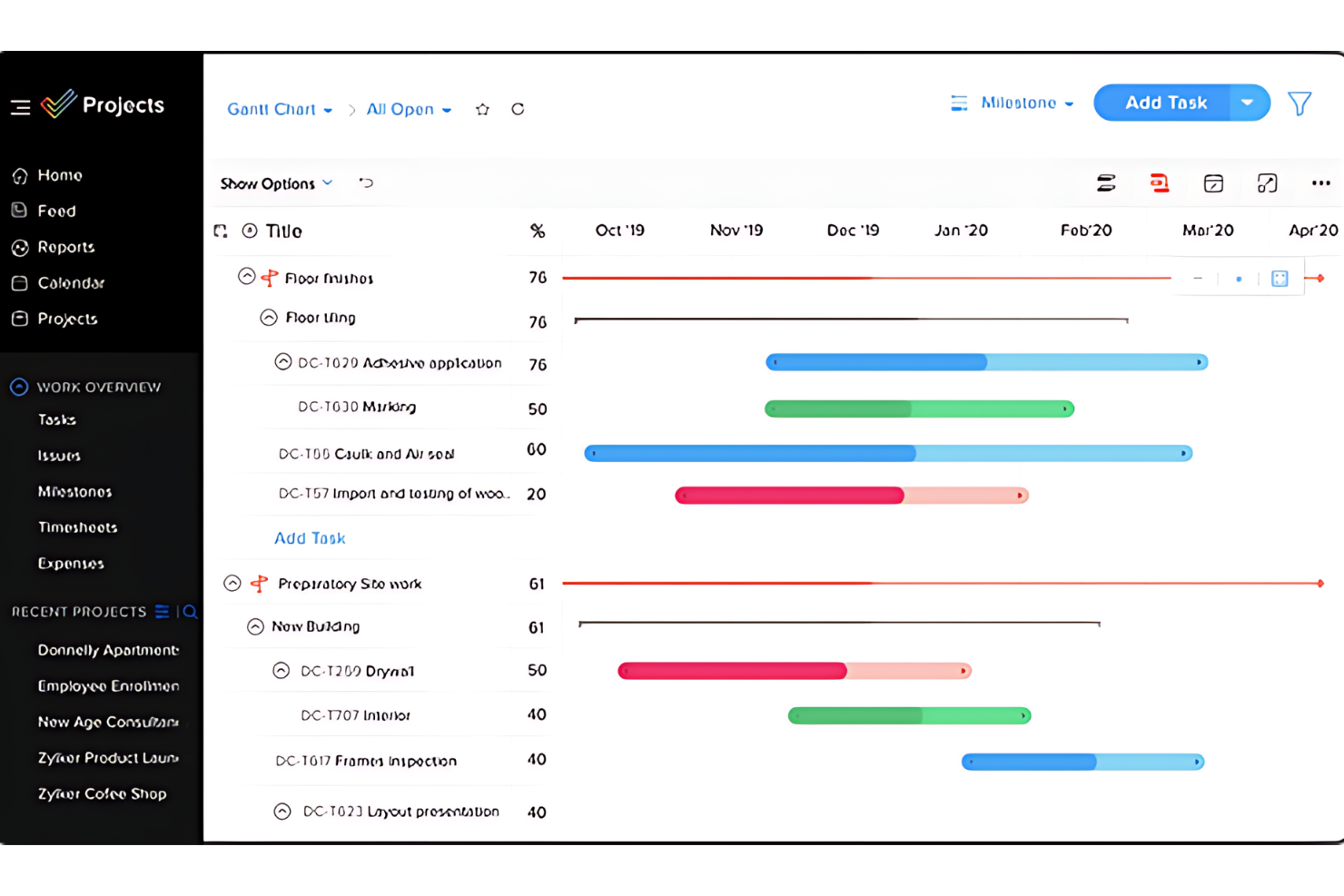
Zoho Projects is project management software that tracks and manages work time and tasks. It offers a suite of tools for planning, tracking, and collaborating on projects. This resource planning tool is ideal for teams that must carefully monitor work hours and progress.
Why it's a good Notion Alternative:
I chose Zoho Projects because it specializes in time tracking and project scheduling. Unlike general-purpose tools like Notion, Zoho Projects provides more detailed tracking capabilities and built-in time logging features, making it superior for precise work time management.
Standout Features & Integrations:
Features include time-tracking capabilities, which allow for detailed logging and reporting of work hours. The platform also includes interactive Gantt charts for visual project scheduling. Zoho Projects also include resource allocation, progress tracking, and task automation tools.
Integrations include various Zoho applications, such as Zoho CRM and Zoho Books. It also supports integrations with Google Workspace and Microsoft Office.
Pros and Cons
Pros:
- Integrations with Zoho suite and other popular tools
- User-friendly interface with project visualization tools
- Detailed time tracking and reporting features
Cons:
- The number of features can be overwhelming for some users
- Steeper learning curve for advanced features
New Product Updates from Zoho Projects

Zoho Projects Adds QuickBooks Online and Xero Integrations
Zoho Projects now connects with QuickBooks Online and Xero, bringing project work and accounting workflows closer together. Manage project-related billing and financial tasks with fewer app switches. For more information, visit Zoho Projects’ official site.
 .

Quire
Best for breaking down complex projects

Quire is a project management tool built around the idea of breaking down big goals into smaller, manageable tasks. It’s designed for teams that need a flexible way to visualize, track, and execute their work across different stages.
Why it's a good Notion alternative:
Quire stands out as an alternative to Notion because of its flexible task organization features. The nested list view lets you break down complex projects, providing a clear hierarchy that keeps your workflow organized. Additionally, the sublist feature allows you to create personalized views from your main task list, helping you focus on specific tasks or priorities without cluttering your workspace. You can also switch between Kanban boards, timelines, calendars, and table views to visualize your workflow in the way that suits you best. This flexibility makes it easier to plan ahead, track progress, and adjust schedules as needed.
Standout Features & Integrations:
Features include custom fields that let you add specific data points to tasks, such as budget estimates or priority levels, helping you tailor the tool to your project's needs. It also has collaborative documents that serve as a central space for all project-related information, notes, and updates. You can enrich these documents with task details, formulas, task references, and user mentions, keeping everything connected.
Integrations include Google Calendar, Gmail, Slack, Outlook, Zoho Flow, GitHub, Apple Calendar Sync, Box, Dropbox, Google Drive, and Microsoft Teams.
Pros and Cons
Pros:
- Easy to collaborate with team members
- Multiple project views, including lists, boards, and timelines
- Ability to create nested tasks and subtasks, allowing for detailed project breakdowns
Cons:
- The mobile version lacks some features available on the desktop
- Potential for notification overload, especially when working with large teams
New Product Updates from Quire
Quire Adds Read Receipts for Comments
Quire now supports read receipts for comments, helping teams see who has viewed discussion updates and reducing missed responses. For more information, visit Quire's official site.
 .

Wrike
Best for automating repetitive tasks

Wrike is a project management tool designed to boost team collaboration and efficiency. It offers a wide range of features that help automate routine tasks, allowing teams more time to focus on critical projects.
Why it's a good Notion Alternative:
I picked Wrike as a good alternative to Notion because of its ability to automate repetitive tasks, which helps streamline high-priority projects. Its customizable request forms implify project initiation by generating tasks and workflows automatically. Wrike also stands out for its centralized data access, which integrates information from various sources into a single, actionable hub. This feature enhances decision-making and collaboration across teams, making it easier to manage complex projects. Additionally, Wrike's mobile accessibility means you and your team can stay updated and manage tasks from anywhere, whether you're in the office or on the go.
Standout Features & Integrations:
Features include customizable request forms that automatically generate tasks and workflows, saving you time at the start of a project. The centralized data access feature integrates data from various sources, providing a single source of actionable information for all users. Wrike also offers mobile apps for Android and Apple devices, allowing your team to manage tasks effectively, no matter where they are.
Integrations include Klaxoon, Intuit/QuickBooks, Skyvia, Power BI, Google Sheets, Miro, Salesforce, Tableau, Wrike for Microsoft Teams, MediaValet, Zoom, and Adobe Creative Cloud.
Pros and Cons
Pros:
- Features and scalability cater well to medium to large enterprises
- Google Drive and Slack integrations facilitate in-task discussions and file sharing
- Excellent task and project management features
Cons:
- Can feel overwhelming due to the number of features and options available
- Can be complex to navigate initially
New Product Updates from Wrike

Wrike Adds Advanced Filters to Chart View
Wrike introduces new default filters in Chart view, including relative dates, exclusion conditions, multiple filters per field, and status group filtering. These updates help teams refine project data and reporting. For more information, visit Wrike’s official site.

Enji
Best for creating a customized marketing system

Enji is a marketing project management and planning platform that helps small business owners and solopreneurs manage marketing campaigns, content, scheduling, and performance tracking in one workspace.
Who Is Enji Best For?
Enji is a good fit for small business owners and solopreneurs who want structured marketing planning and execution without the complexity of a fully customizable workspace.
Why I Picked Enji
I've included Enji in my top picks because I love how it builds a marketing routine directly into its calendar. When you answer Enji's setup questionnaire, it asks which days you want to work on marketing, then populates your calendar with recurring marketing tasks on the right cadence. You're not deciding what to do daily; the plan is already there waiting for you. I also like that weekly tasks like scheduling social posts don't require leaving the platform, since the AI copywriter and social media scheduler are built directly into each task. The platform also centralizes marketing metrics and reporting, making it easier to track campaign performance in one place.
Enji Key Features
- Campaign templates: Pre-built campaign structures with tasks, timing, and targets already mapped out so you don't start from scratch.
- Brand management: A central space to store your brand voice, visuals, and key business details for consistent content across channels.
- Suggested KPIs: Enji recommends the metrics to track based on your goals, so you're not guessing what to measure.
- Analytics dashboard: Pulls social media and website analytics into one view so you can spot trends without switching between tabs.
Enji Integrations
Enji doesn't publicly list any integrations.
Pros and Cons
Pros:
- Goal tracking directly linked to planning routines
- Personalized insights based on campaign performance data
- Visual calendar tailored to marketing workflows
Cons:
- No native mobile app for on-the-go editing
- Collaboration features lack advanced permissions controls
Coda
Best for doc-centric projects

Coda blends the functionalities of documents, spreadsheets, and databases into a unified platform, making it ideal for managing doc-centric projects where detail and organization are important.
Why it's a good Notion Alternative:
I chose Coda because it offers a unique approach to integrating text, data, and workflow management in a single document. Unlike Notion, which is broader in its offerings but less focused on documents, Coda stands out with its ability to transform static documents into interactive tools, which is essential for document-based workflows.
Standout Features & Integrations:
Features include creating interactive docs that function like apps, automation capabilities, and customizable templates.
Integrations include Slack, Google Calendar, and Zapier.
Pros and Cons
Pros:
- Seamless integration with key productivity tools
- Strong automation and template options
- Highly customizable and interactive documents
Cons:
- May have some scalability issues
- May require a learning curve to leverage its features fully

Taskade
Best for AI-driven remote team workflows
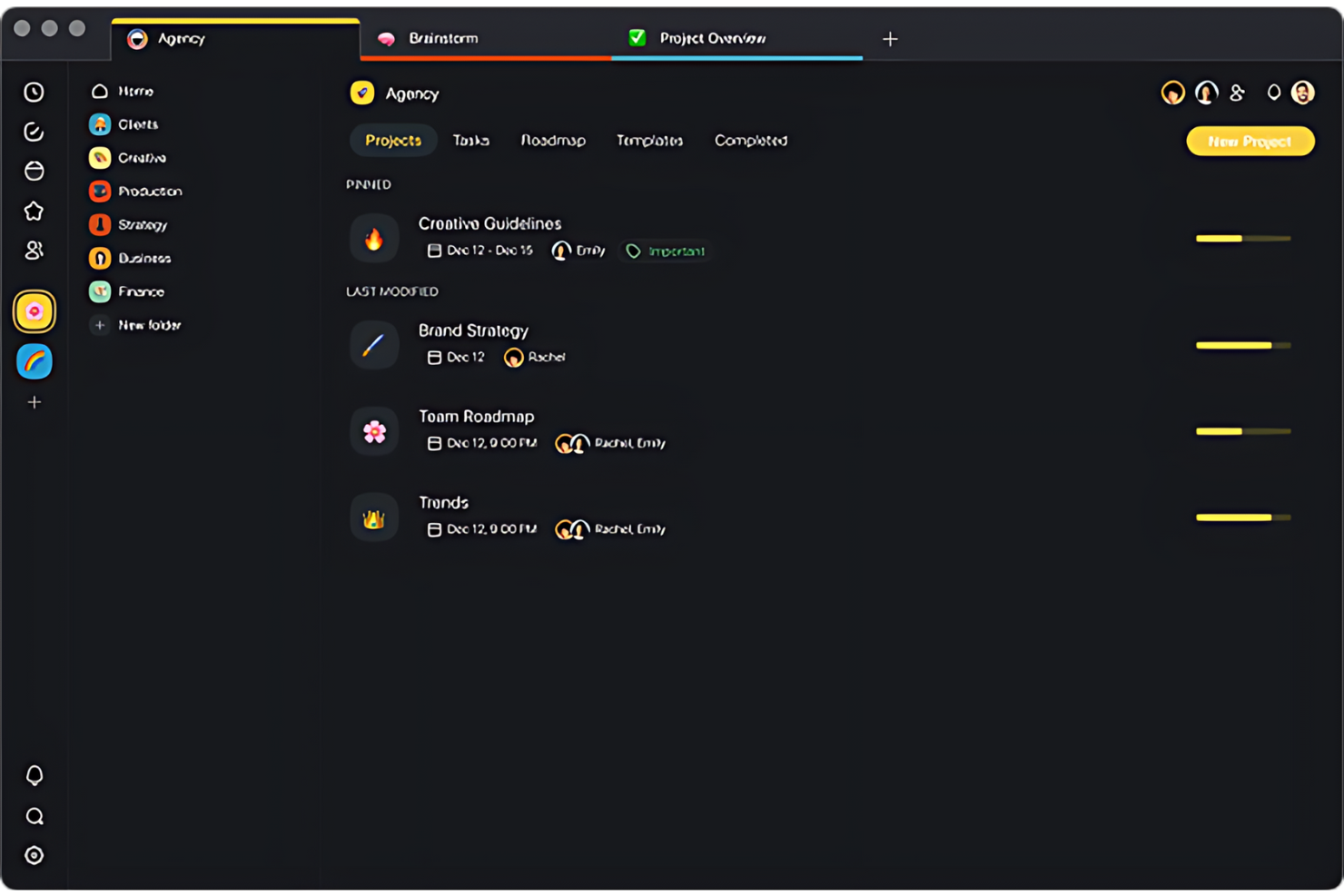
Taskade is a collaborative workspace that aims to improve the productivity and communication of remote teams. It combines task management, real-time collaboration, and video conferencing in one platform.
Why it's a good Notion alternative:
I chose Taskade because it focuses on the specific needs of remote teams, such as real-time synchronization and communication tools. While Notion is versatile for information storage and project planning, Taskade provides live collaboration and helps team members coordinate, regardless of location.
Standout Features & Integrations:
Features include built-in video conferencing, customizable workflow templates, and real-time editing and commenting.
Integrations include Google Calendar, Slack, and Dropbox.
Pros and Cons
Pros:
- Real-time editing and updates facilitate quick decision-making
- Customizable templates speed up workflow setup
- Integrated video conferencing enhances real-time collaboration
Cons:
- Advanced features locked behind higher pricing tiers
- May require a learning curve for new users
Best for content collaboration
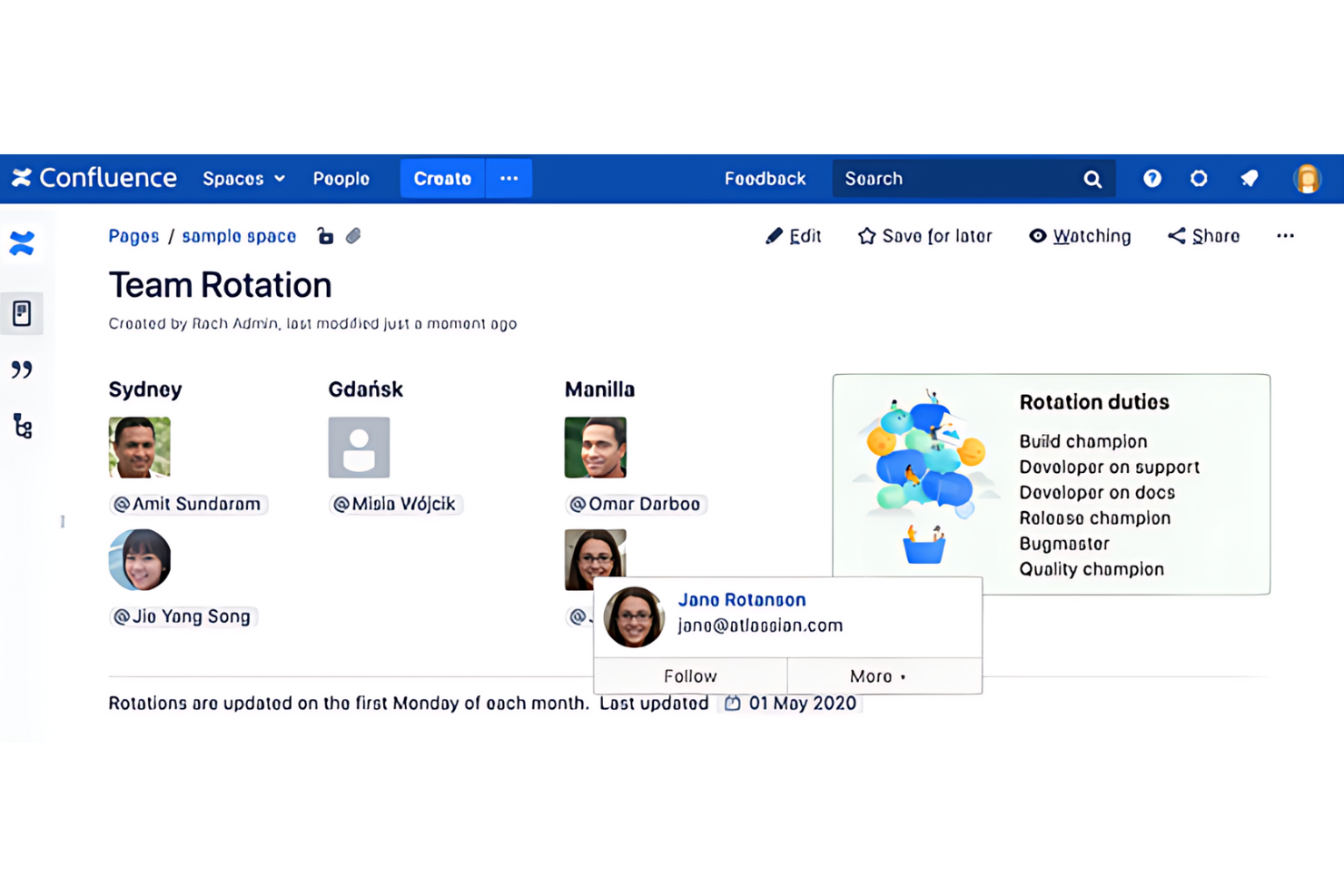
Confluence by Atlassian is a powerful tool designed to encourage content collaboration within teams and organizations. It enables users to create, share, and manage documents in a centralized space.
Why it's a good Notion Alternative:
I chose Confluence for its excellent content creation and collaboration features, which are essential for team organization. Its structured approach to creating spaces and pages offers a more formal way of managing information than other tools. This makes it particularly effective for larger teams or organizations that require more documentation and knowledge management capabilities.
Standout Features & Integrations:
Features include its page editor, collaboration tools, and an extensive template library.
Integrations include other Atlassian products, such as Jira and Bitbucket. This resource management software also integrates with Slack, Trello, and Microsoft Office.
Pros and Cons
Pros:
- Large selection of templates and macros to streamline content creation
- Strong integration with other Atlassian products and third-party tools
- Extensive support for various content types and rich text formatting
Cons:
- Limited integration with MS Office
- Weak search bar functionality
Best for issue tracking
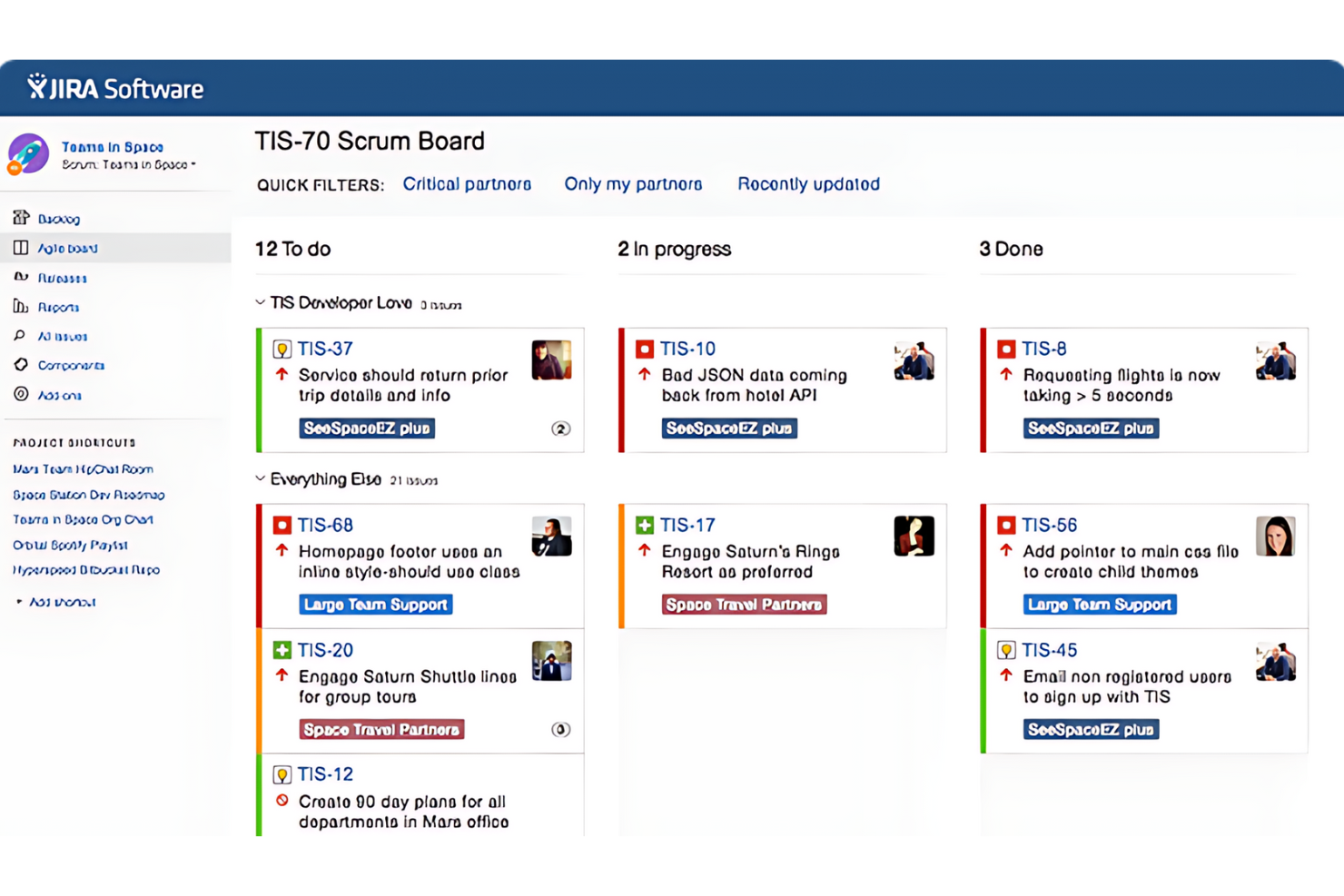
Jira is a project management tool developed by Atlassian. It's primarily designed for software development teams to track bugs, manage tasks, and oversee agile projects. Jira can adapt to various workflows, from simple task management to complex software development processes.
Why it's a good Notion Alternative:
I picked Jira because of its specialized focus on issues and bug tracking. While Notion provides a broad workspace, Jira provides detailed tracking, prioritization, and issues management. It is the go-to choice for teams that need precise control over the development cycle.
Standout Features & Integrations:
Features include customizable workflows that allow teams to tailor the tool to specific processes. It extends forecasting and reporting, providing insights into project progress and team performance. It also enables tracking user stories, bugs, and tasks.
Integrations include Confluence for documentation, Bitbucket and GitHub for source control, and Slack for team communication.
Pros and Cons
Pros:
- Strong integrations with other development and collaboration tools
- Highly customizable to fit different project needs
- Advanced issue tracking and management capabilities
Cons:
- Slow loading at times
- Can be complex and overwhelming for new users

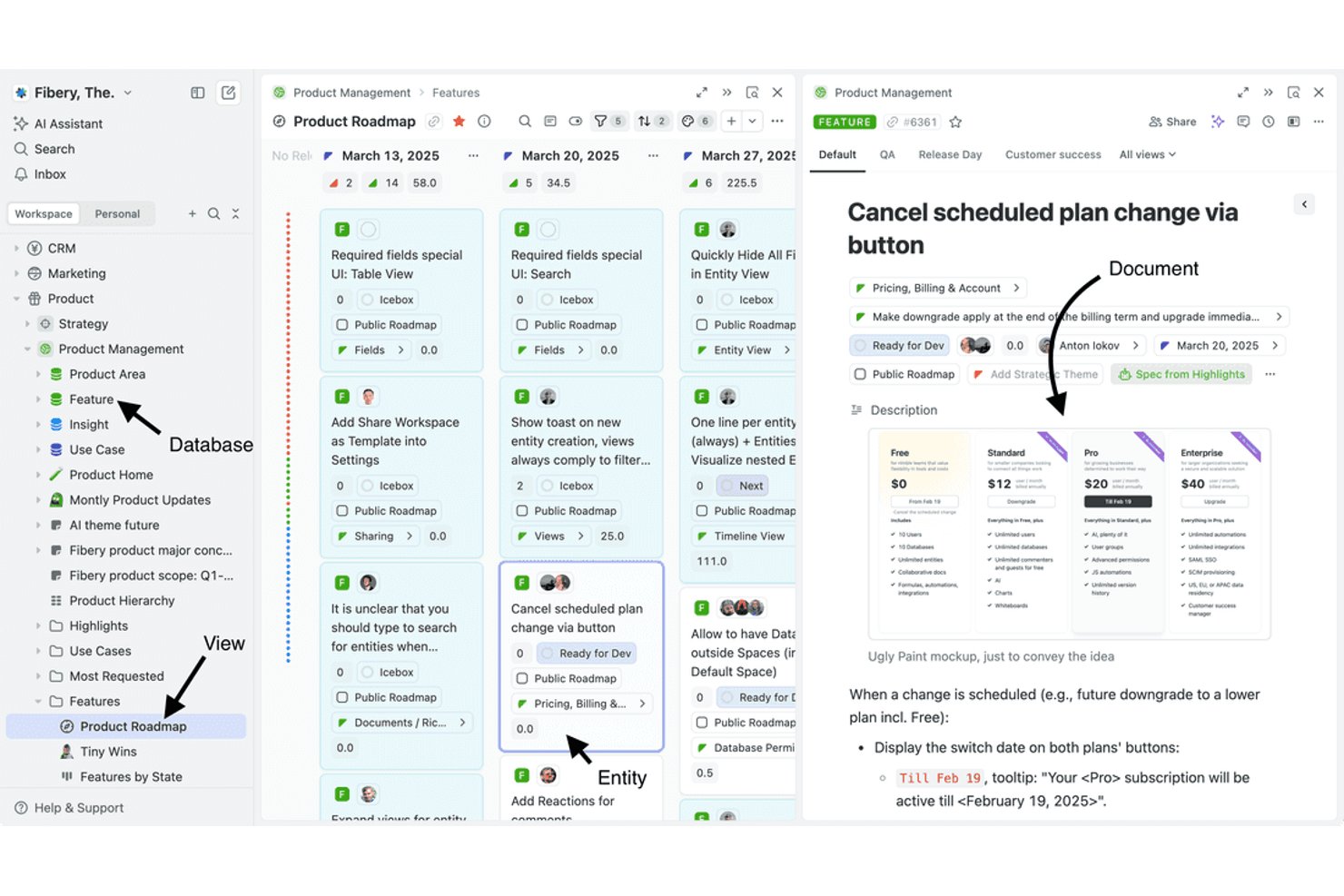
Fibery is a work management platform that combines relational databases, collaborative documents, multiple data views, and automation in a single connected workspace.
Who Is Fibery Best For?
Fibery is a strong fit for product and engineering teams that need to connect work across multiple relational databases in a single, customizable workspace.
Why I Picked Fibery
Fibery earns its spot on my shortlist because of how it handles relational data across a connected workspace. I love that you can link entities across databases with one-to-one, one-to-many, and many-to-many relations, then surface those connections through bi-directional links and lookup fields. In practice, that means my team can tie customer feedback directly to product features, map those features to roadmap items, and track everything from a shared Timeline view without duplicating a single record.
Fibery Key Features
- Collaborative documents: Create and edit rich-text documents in real time, with inline comments, mentions, and the ability to generate tasks directly from document text.
- Automation rules: Set up trigger-based automations to update fields, create entities, send notifications, and run custom action buttons for recurring processes.
- AI Text Assistant: Use AI directly in documents and rich-text fields to summarize, rewrite, draft, translate, and extract information from your content.
- Template library: Install and customize pre-built templates for product management, software development, sales, marketing, and more to speed up workspace setup.
Fibery Integrations
Fibery offers 20+ native integrations, including Notion, Jira, Linear, GitHub, Slack, Google Calendar, HubSpot, Airtable, Asana, and Trello. It also supports GraphQL, webhooks, SDKs, MCP, and Zapier for custom integrations.
Pros and Cons
Pros:
- Adapts database views to team workflows
- Connects documentation directly to project work
- Relates feedback, features, and roadmaps
Cons:
- Dashboards may need work for executive reporting
- Reusable fields and automations need repeated setup
Andre Notion-alternativer
Nedenfor finner du en liste over flere Notion-alternativer som ikke kom med på topplisten min, men som er verdt å se nærmere på hvis du ikke fant et passende alternativ ovenfor.
- Anytype
For privacy-first knowledge management
- ClickUp
For custom task statuses
- Slite
For AI-driven team knowledge bases
- Airtable
For database-driven team projects
- Nuclino
For wiki-first team knowledge bases
- Miro
For mapping and tracking work visually
- Guru
For governed AI search across company knowledge
- AppFlowy
For self-hosted, offline-first workspaces


Relaterte anmeldelser av prosjektstyringsprogramvare
Hvis du fortsatt ikke har funnet det du leter etter, kan du se nærmere på disse relaterte prosjektstyringsverktøyene som vi har testet og anmeldt.
- Prosjektstyringsprogramvare
- Ressursstyringsprogramvare
- Programvare for automatisering av arbeidsflyter
- Programvare for oppgavestyring
- Samarbeidsverktøy
- Verktøy for å lage Gantt-diagrammer
- KI-oppgaveadministratorer
How I Evaluate Notion Alternatives
I split my evaluation into three parts, with the most weight on core functionality: organize linked docs and project data, and show the same work in useful views. Next, I look for standout features such as native automation for recurring status changes. Finally, I consider beyond-feature factors like migration support, onboarding, and pricing as teams grow.
Core Functionality (Table Stakes For This List)
When I'm selecting tools for my list, I score each one on a scale from 0 (does not offer the functionality) to 5 (excels in this area) for each core functionality listed below. I then convert the total into a percentage to help assess each tool's overall fit, with extra weight on any functionalities I’ve deemed essential.
- Unified Docs & Notes (Essential): I look for rich-text pages that hold project briefs, meeting notes, and embedded files together, rather than scattering delivery context across separate tools.
- Flexible Database Views (Essential): I check whether one set of project data can appear as boards, tables, or calendars, with filters to track work by status or deadline.
- Nested Page Structure: For complex workspaces, I assess whether teams can nest and rearrange pages for portfolios, projects, and related reference material.
- Cross-Links & Relations: I look for links and database relations that connect a task to its project brief, decision log, or owner without duplicating details.
- Collaborative Editing: I consider whether teammates can edit, comment, and mention owners on shared plans, keeping decisions and handoffs visible around active work.
- Reusable Templates: I check for page or database templates for recurring kickoff plans, status updates, and retrospectives.
Once I have a list of tools that meet the criteria, I consider what sets each platform apart.
Differentiating Factors (What Sets Vendors Apart)
Here's how I compare and contrast different vendors:
Standout Features
I look for a native automation builder that handles recurring task creation and status changes without third-party tools—think auto-assigning a QA checklist every time a task moves to "In Review." I also evaluate guest and client permissions, since most delivery teams need external collaborators to view progress without accessing internal workspace data. Offline editing matters too, especially for distributed teams working across unreliable connections.
Beyond Features
I check whether a tool offers migration support that preserves nested pages and database relations—losing those links during a move from Notion can set a team back weeks. Pricing transparency matters too, especially how per-seat costs shift as you scale from a small squad to a full department. I also evaluate onboarding resources like guided templates and vendor-led training, since even the best workspace fails if half the team never adopts it.
Hvorfor se etter et Notion-alternativ?
Det kan være lurt å vurdere et alternativ til Notion hvis du trenger følgende.
- Utvidede funksjoner: Du kan ha behov for mer avansert funksjonalitet som Notion mangler for øyeblikket.
- Intuitivt brukergrensesnitt: Du foretrekker et mer brukervennlig grensesnitt for deg og teamet ditt.
- Bedre samarbeidsverktøy: Du trenger flere alternativer for teamkommunikasjon og samarbeid.
- Bedre sikkerhet: Du trenger sterkere tiltak for å beskytte sensitive data.
- Kostnadseffektivitet: Du trenger en rimeligere løsning som fortsatt tilbyr de viktigste funksjonene.
Viktige funksjoner i Notion-alternativer
Her er noen viktige funksjoner i Notion som den alternative programvaren bør gjenskape eller forbedre for å passe godt.
- Oppgavevisning: Visualiser arbeidsflyter med et Kanban-lignende tavleoppsett.
- Gantt- og tidslinjevisning: Planlegg og følg fremdriften med en tidslinjevisning.
- Rapportering og statistikk: Analyser data med rapporteringsverktøy og statistikk.
- KI-assistent: Bruk en KI-assistent til innholdsoppretting og produktivitet.
- Integrasjoner: Koble til andre verktøy, for eksempel Google Disk og Google Kalender, for å forenkle arbeidsflytene dine.
- Samarbeid: Jobb med andre teammedlemmer direkte og i sanntid.
- Omfattende tilpasning: Tilpass arbeidsområdet etter dine spesifikke behov, enten det gjelder personlig eller profesjonell bruk.
- Notatskriving: Skriv ned og organiser notatene dine (enda bedre hvis det gjenskaper Notions funksjonssett for KI for effektiv notatskriving)
- Automatisering: Bruk av teknologi til å utføre oppgaver uten menneskelig inngripen.
- Kunnskapsbase/wiki: Et informasjonslager som enkelt kan åpnes og søkes i.
- Maler: Forhåndsdesignede strukturer eller formater som kan brukes som utgangspunkt for nye dokumenter eller prosjekter.
- Arbeidsområde: Et digitalt samarbeidsmiljø der teammedlemmer kan jobbe med prosjekter og oppgaver.
- Kanban-tavler: Visuelle verktøy for å administrere arbeid i ulike prosessfaser ved hjelp av kort og kolonner.
- Kunnskapsforvaltning: Funksjoner som hjelper med å organisere, administrere og dele kunnskap. Du finner en liste over spesifikk programvare for kunnskapsforvaltning her.
- Oppgaveadministrasjon: Administrering av en oppgave gjennom hele livssyklusen, inkludert planlegging, testing, sporing og rapportering.
- Dashbord: Grensesnitt som viser viktige ytelsesindikatorer og måltall i en samlet visning.
- Programtillegg: Ekstra programvarekomponenter som tilfører spesifikke funksjoner til en større programvareapplikasjon.
- Oppgavelister: Lister over oppgaver som må fullføres, ofte brukt til personlig administrasjon eller prosjektstyring.
- Mobilapp: Programvare utviklet for mobile enheter som smarttelefoner og nettbrett.
- Tidsregistrering: Registrering av hvor mye tid som brukes på oppgaver eller prosjekter.
- Sjekklister: Verktøy for å lage lister over elementer som skal fullføres eller kontrolleres.
- Tilpassbare databaser: Opprett databaser med tilpassbare visninger som tabeller, lister, kalendere og Kanban-tavler.