

I 10 migliori strumenti software per la pianificazione delle risorse per il 2026

10 I migliori software per la pianificazione delle risorse


Il miglior software per la pianificazione delle risorse ti aiuta ad assegnare le persone giuste alle attività giuste, a gestire la disponibilità del team e a risolvere i conflitti prima che influiscano sulla consegna dei progetti. Senza questo strumento, devi bilanciare manualmente calendari, fogli di calcolo ed e-mail per mantenere i progetti in carreggiata, rendendo particolarmente difficile capire chi è sovraccarico di lavoro o non viene utilizzato a sufficienza.
Con oltre 20 anni di esperienza nella gestione di progetti complessi per marchi globali e 10 anni come recensore di software, ho esplorato a fondo il mercato dei software di gestione dei progetti. Dopo aver testato più di 30 strumenti per la pianificazione delle risorse, ho identificato quelli che riducono efficacemente gli attriti nella pianificazione, mostrano la disponibilità in tempo reale e si adattano alle esigenze mutevoli dei progetti.
In questa guida troverai software che migliorano la visibilità, bilanciano i carichi di lavoro e ti aiutano a prendere decisioni consapevoli sull'assegnazione delle risorse. Ogni consiglio include una panoramica completa delle funzionalità, dei prezzi e dei vantaggi esclusivi dello strumento, per aiutarti a trovare la soluzione più adatta alle tue esigenze e al tuo budget.
Perché fidarsi dei nostri consigli sui software
Il nostro team testa e recensisce software dal 2012. In quanto project manager noi stessi, sappiamo quanto sia difficile — e importante — scegliere il software giusto.
Per questa guida, abbiamo valutato gli strumenti attraverso test pratici e ricerche indipendenti, assegnando un punteggio agli strumenti in base ai nostri criteri di selezione. Ci basiamo inoltre sulle competenze di leader di pensiero del settore e di professionisti attivi nella gestione dei progetti.
Le nostre recensioni riflettono il nostro giudizio editoriale umano, non un discorso di vendita.
Revisori esperti:
Tabella comparativa dei software per la pianificazione delle risorse
Questa tabella riassume alcune delle funzionalità principali per aiutarti a prendere una decisione.
| Tool | Best For | Trial Info | Price | ||
|---|---|---|---|---|---|
| 1 | Ideale per agenzie e servizi professionali | 14 giorni di prova gratuita | From $12/user/month | Website | |
| 2 | Ideale per la visibilità in tempo reale sul carico di lavoro | Prova gratuita di 14 giorni + demo gratuita disponibile | Da $19,90/utente/mese (fatturato annualmente) | Website | |
| 3 | Ideale per organizzazioni complesse con più dipartimenti | Demo gratuita | Prezzi su richiesta | Website | |
| 4 | Ideale per la pianificazione redditizia delle risorse | 30 giorni di prova gratuita | Da $6/utente/mese | Website | |
| 5 | Ideale per la pianificazione in tempo reale | 14 giorni di prova gratuita | Da $10/utente/mese | Website | |
| 6 | Ideale per la gestione automatizzata e interattiva delle risorse | Demo gratuita disponibile | Prezzo su richiesta | Website | |
| 7 | Ideale per progetti complessi | 14 giorni di prova gratuita | Da $9.80/utente/mese | Website | |
| 8 | Ideale per la pianificazione delle risorse produttive | Prova gratuita disponibile | Da $49/utente/mese (fino a 10 utenti) | Website | |
| 9 | Ideale per la pianificazione delle risorse incentrata sulle persone | Non disponibile | Prezzo personalizzato/utente/mese | Website | |
| 10 | Ideale per la programmazione dei turni su più sedi | Prova gratuita di 14 giorni + demo gratuita disponibile | Da $29/mese (fatturazione annuale) | Website |


Recensioni dei migliori software per la pianificazione delle risorse
Ecco ogni strumento e le sue funzionalità principali, insieme alle informazioni su ciò che lo rende ideale per la pianificazione delle risorse.

Ideale per agenzie e servizi professionali

Productive è progettato appositamente per agenzie e team di servizi professionali che hanno bisogno di gestire persone, progetti e redditività in un unico posto. È particolarmente utile per responsabili operativi e risorse umane che desiderano bilanciare i carichi di lavoro, monitorare le ore fatturabili e prevedere la capacità su più clienti. L’attenzione della piattaforma ai flussi di lavoro delle agenzie e alla tracciabilità finanziaria integrata la distingue dagli strumenti di pianificazione delle risorse più generici.
Per chi è più indicato Productive?
Agenzie e società di servizi professionali che desiderano pianificazione delle risorse integrata, budgeting, rilevazione del tempo e visibilità finanziaria.
Perché ho scelto Productive
Le agenzie e i team di servizi professionali hanno esigenze uniche nella pianificazione delle risorse, e Productive è sviluppato proprio pensando a questi flussi di lavoro. Il modulo di pianificazione delle risorse della piattaforma ti consente di assegnare persone ai progetti in base a competenze, disponibilità e tariffe fatturabili, aspetto essenziale per gestire il lavoro dei clienti. Apprezzo come Productive colleghi la pianificazione con il rilevamento del tempo e i budget di progetto, così puoi vedere in tempo reale l’impatto dell’allocazione delle risorse sulla redditività. Questa attenzione alla gestione delle risorse specifica per agenzia lo rende una soluzione ideale per team che devono gestire più clienti e priorità in continuo cambiamento.
Caratteristiche principali di Productive
Altre funzionalità che rendono Productive utile per agenzie e servizi professionali includono:
- Template di progetto personalizzabili: consentono di creare e riutilizzare template per tipologie e flussi di lavoro ricorrenti.
- Report di utilizzo: monitora il carico di lavoro e i tassi di utilizzo dei membri del team sui diversi progetti.
- Gestione documentale integrata: archivia file e documenti di progetto direttamente sulla piattaforma.
- Portale clienti: offre ai clienti accesso agli aggiornamenti di progetto, deliverable e canali di comunicazione.
Integrazioni Productive
Le integrazioni includono Jira, Xero, Exact, Slack, QuickBooks, Microsoft Outlook, Fortnox, Personio e Zapier. Dispone inoltre di una API aperta per integrazioni personalizzate.
Pros and Cons
Pros:
- La gestione del tempo integrata può fatturare a più entità aziendali
- Ampia scelta di tag personalizzati
- Abbastanza semplice da impostare attività collaborative
Cons:
- Le funzionalità di fatturazione e preventivazione sono limitate
- Ruoli/permessi utente non sono molto granulari
New Product Updates from Productive
Productive Adds Voice Dictation, Slack Connector, Proposals, and Overtime
Productive adds voice dictation, a Slack Connector, proposal controls, and overtime tracking. These updates support faster AI interactions, client proposals, and time management. For more information, visit Productive’s official site.

Scoro
Ideale per la visibilità in tempo reale sul carico di lavoro

Scoro offre ai project manager e ai responsabili delle operazioni una visione in tempo reale dei carichi di lavoro del team e delle tempistiche dei progetti. Agenzie e società di consulenza utilizzano Scoro per individuare colli di bottiglia, bilanciare le assegnazioni e adattare i piani man mano che le priorità cambiano. I suoi cruscotti live e i pianificatori visivi aiutano a prendere decisioni rapide e informate sull'allocazione delle risorse.
Per chi è più adatto Scoro?
Per le aziende di servizi che necessitano di una visione in tempo reale dei carichi di lavoro, dell'utilizzo delle risorse e delle performance aziendali su progetti e team.
Perché ho scelto Scoro
Scoro si distingue per la sua capacità di offrire una visibilità immediata sui carichi di lavoro del team e sull'avanzamento dei progetti. I cruscotti in tempo reale e i diagrammi di Gantt interattivi permettono di vedere chi è sovraccarico, chi è disponibile e dove le scadenze potrebbero slittare. Apprezzo il fatto che il pianificatore di carico di lavoro di Scoro si aggiorni automaticamente mentre le attività cambiano, garantendo sempre una panoramica aggiornata dell'allocazione delle risorse. Questo livello di trasparenza è particolarmente utile per agenzie e società di consulenza che gestiscono più progetti contemporaneamente.
Caratteristiche principali di Scoro
Oltre alla visibilità in tempo reale del carico di lavoro, Scoro offre altre funzionalità che supportano la pianificazione delle risorse:
- Sincronizzazione del calendario: Si collega con Google Calendar e Outlook per una pianificazione unificata tra le piattaforme.
- Dipendenze delle attività: Consente di impostare e gestire le dipendenze tra attività per controllare il flusso di progetto.
- Monitoraggio del tempo fatturabile e non fatturabile: Tiene traccia sia delle ore fatturabili che di quelle interne per report precisi.
- Dashboard personalizzabili: Permette di personalizzare i widget della dashboard per visualizzare le metriche e i dati più rilevanti per il team.
Integrazioni di Scoro
Le integrazioni includono Google Calendar, Xero, QuickBooks, Sage Intacct, Exact Online, Expensify, Stripe, Jira, HubSpot, Salesforce, Google Drive, Dropbox, Okta, Azure AD e Zapier.
Pros and Cons
Pros:
- Ottime funzionalità di fatturazione e gestione finanziaria
- Report di utilizzo avanzati
- Monitoraggio dei progetti in tempo reale
Cons:
- Le numerose opzioni di personalizzazione possono risultare impegnative
- L'app mobile è meno completa della versione web
New Product Updates from Scoro

Scoro Adds Time Mobile App and ELI Improvements
Scoro adds the Scoro Time mobile app for iOS/Android to track time anywhere and expands ELI with attachments, smarter filtering, and trigger-based actions. For more information, visit Scoro's official site.

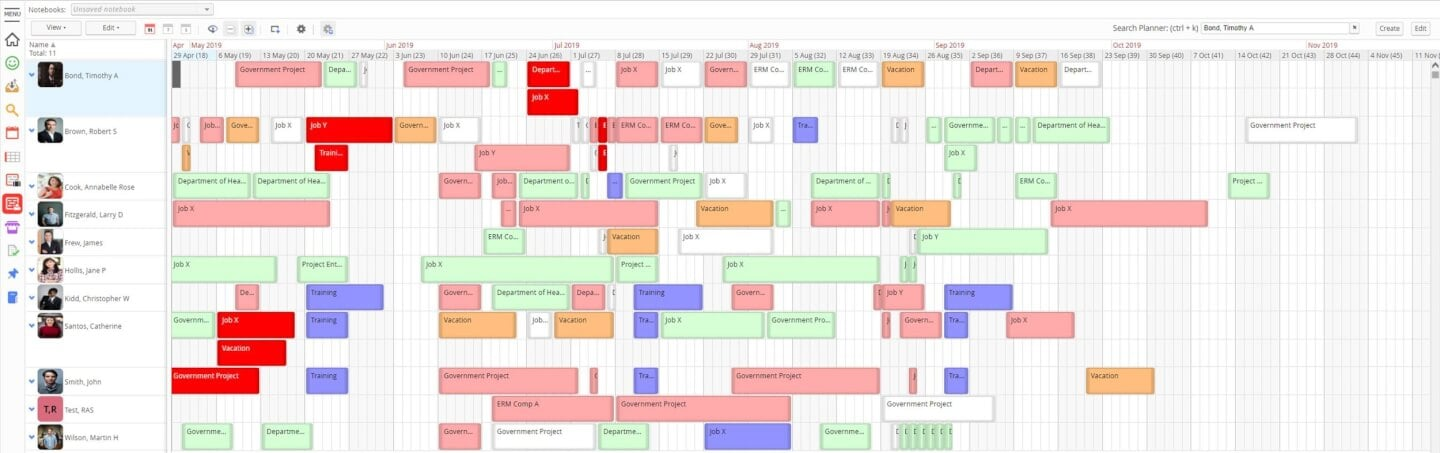
Se il tuo team ha bisogno di una pianificazione delle risorse incentrata sull'analisi, vale la pena prendere in considerazione Retain. È progettato per le organizzazioni che desiderano analizzare in profondità le tendenze relative all'utilizzo, alla domanda e all'allocazione nei vari progetti. Retain è particolarmente utile per i team di servizi professionali e per le aziende che si affidano a report dettagliati per orientare le decisioni di pianificazione delle risorse.
Per chi è più adatto Retain?
Aziende che necessitano di report dettagliati e analisi per gestire l'utilizzo delle risorse e le prestazioni aziendali.
Perché ho scelto Retain
Ciò che distingue Retain nella pianificazione delle risorse è la sua attenzione ai report e alle analisi complete. Ho scelto Retain perché offre una visibilità dettagliata sull'utilizzo delle risorse, sulla capacità e sulla domanda futura, elementi essenziali per i team che gestiscono progetti complessi. I pannelli personalizzabili e i report esportabili della piattaforma aiutano ad analizzare le tendenze e a prendere decisioni informate sull'allocazione. Per le organizzazioni che hanno bisogno di qualcosa di più della semplice pianificazione, la profondità dei report di Retain rappresenta un chiaro vantaggio.
Funzionalità principali di Retain
Oltre ai suoi punti di forza nella reportistica, Retain offre diverse funzionalità che supportano la pianificazione delle risorse:
- Assegnazione tramite trascinamento: Sposta rapidamente le risorse tra progetti o attività utilizzando un'interfaccia visiva.
- Calendario multi-progetto: Visualizza e gestisci le prenotazioni delle risorse per più progetti in un unico spazio
- Monitoraggio delle assenze e dei congedi: Monitora la disponibilità del team registrando ferie, giorni di malattia e altre assenze.
- Autorizzazioni basate sui ruoli: Controlla l'accesso ai dati sensibili della pianificazione assegnando ruoli e autorizzazioni agli utenti.
Integrazioni di Retain
Le integrazioni includono Microsoft Excel, Microsoft Power BI, Salesforce, SAP, Oracle, Workday e Microsoft Dynamics.
Pros and Cons
Pros:
- Facilità nel duplicare le prenotazioni
- Pannelli ricchi di dati
- Supporta più valute
- Organizzazione tramite trascinamento
Cons:
- La funzionalità di ricerca potrebbe essere migliorata
- Le schermate possono diventare piuttosto affollate

Ideale per la pianificazione redditizia delle risorse

Float.com offre un approccio su misura alla pianificazione delle risorse. Riunendo la programmazione delle risorse, la pianificazione della capacità, il monitoraggio del tempo e la reportistica di consegna, aiuta i team a prendere decisioni informate e a migliorare la realizzazione dei progetti. Con funzionalità come il monitoraggio in tempo reale dei ruoli e delle competenze, oltre a capacità finanziarie e di stima, Float fornisce una soluzione completa per le organizzazioni che desiderano prevedere i ricavi e aumentare l'efficienza operativa.
Per chi è pensato Float.com?
Per team creativi e di servizi professionali, agenzie e società di consulenza che necessitano di una visione in tempo reale della capacità del team, dell'utilizzo fatturabile e della redditività sui progetti.
Perché ho scelto Float.com
Float si guadagna un posto nella mia lista perché eccelle nella programmazione redditizia delle risorse, risultando una scelta solida per le organizzazioni che cercano di ottimizzare i margini di progetto e l'allocazione delle risorse. L'interfaccia visiva di programmazione del software offre una panoramica chiara dei carichi di lavoro del team, consentendo di allocare e regolare le risorse in modo efficiente in tempo reale. Gli strumenti di pianificazione della capacità aiutano a prevedere i ricavi e gestire i costi dei progetti, garantendo che il team lavori ai progetti più redditizi. Il monitoraggio del tempo deriva direttamente dalle allocazioni pianificate, aiutando a mantenere accurate le rilevazioni effettive e riducendo la gestione manuale delle schede orarie.
Caratteristiche principali di Float.com
Oltre alla pianificazione della capacità e agli approfondimenti finanziari, Float offre molte altre funzionalità che ne aumentano l'attrattiva come software di pianificazione delle risorse.
- Programmazione visiva delle risorse: Offre una vista attiva drag-and-drop dei carichi di lavoro del team con indicatori di capacità in tempo reale e segnalazione dei conflitti.
- Monitoraggio del tempo integrato: Registra le ore direttamente sulla piattaforma, con schede precompilate dalle allocazioni pianificate per aumentare l'accuratezza e ridurre l'inserimento manuale.
- Assegnazione basata sulle competenze: Abbina le attività ai membri del team in base alle competenze, ottimizzando l'utilizzo delle risorse e migliorando i risultati dei progetti.
Integrazioni di Float.com
Le integrazioni includono Asana, Basecamp, ClickUp, Jira, Google Calendar, Aprimo, Hubspot, Karbon, monday.com e Salesforce.
Pros and Cons
Pros:
- Dashboard flessibili aiutano a organizzare una gestione progetti complessa.
- Potenti strumenti di previsione migliorano le decisioni sull'allocazione delle risorse.
- Il monitoraggio integrato del tempo aumenta la precisione e le tempistiche dei progetti.
Cons:
- Le funzionalità di monitoraggio del tempo richiedono un piano superiore.
- La complessità dell'interfaccia può disorientare gli utenti con progetti semplici.
New Product Updates from Float.com

Float Adds Rate Cards and Multi-Currency Billing
Float introduced centralized rate cards to standardize bill rates across projects and added multi-currency support to bill clients consistently across regions. For more information, visit Float's official site.

Runn
Ideale per la pianificazione in tempo reale
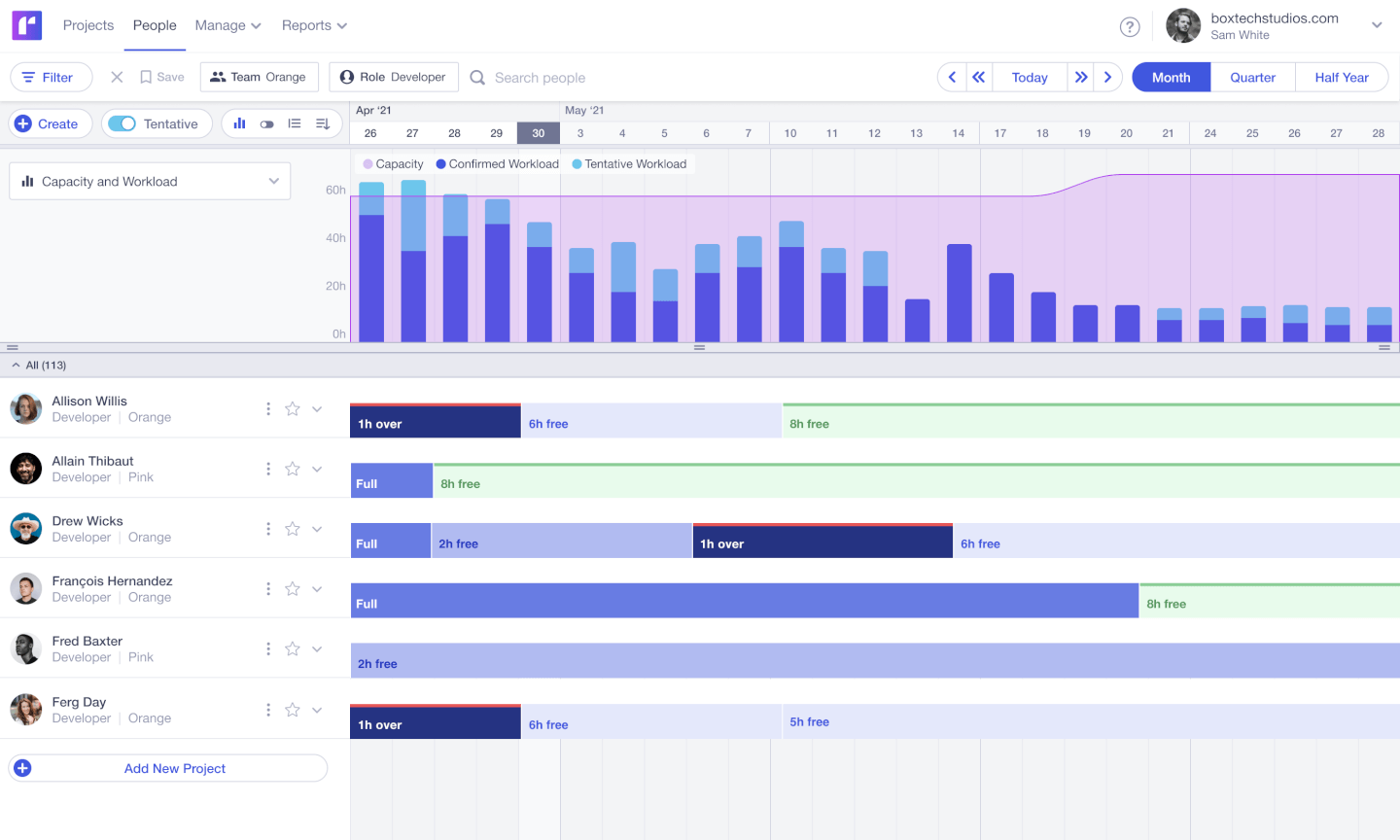
Se il tuo team ha bisogno di adattare rapidamente i piani di progetto, Runn ti offre una visibilità in tempo reale sulla disponibilità delle risorse e sul carico di lavoro. Questo strumento è pensato per agenzie, società di consulenza e team digitali che devono gestire priorità in continuo cambiamento e necessitano di aggiornamenti istantanei quando i programmi variano. Il suo planner live e gli strumenti di previsione ti aiutano a individuare i conflitti e a prendere decisioni rapide quando arrivano nuovi incarichi.
Per chi è ideale Runn?
Team che lavorano su progetti e hanno bisogno di previsioni in tempo reale, pianificazione di scenari alternativi e visibilità sulla capacità della squadra.
Perché ho scelto Runn
Ciò che distingue Runn è la sua attenzione alla pianificazione in tempo reale, essenziale per i team che devono rispondere velocemente alle mutevoli esigenze di progetto. Ho scelto Runn perché il suo planner live si aggiorna istantaneamente quando sposti prenotazioni o modifichi le allocazioni, così hai sempre una visione aggiornata delle risorse disponibili. Le funzionalità di previsione dinamica ti permettono di simulare scenari diversi e vedere subito l'impatto su capacità e carico di lavoro. Questo rende Runn particolarmente adatto ad agenzie e società di consulenza che devono stare al passo con le priorità e le richieste dei clienti in continuo cambiamento.
Funzionalità principali di Runn
Altre funzionalità di Runn che supportano la pianificazione delle risorse includono:
- Inserimento dei timesheet: I membri del team possono registrare le ore effettivamente lavorate direttamente sulla piattaforma per un monitoraggio accurato.
- Gestione delle festività pubbliche: Tiene automaticamente conto delle festività regionali nei calcoli di disponibilità delle risorse.
- Monitoraggio delle competenze: Ti consente di assegnare e filtrare le risorse in base a competenze o ruoli specifici.
- Accesso API: Ti permette di collegare Runn con altri strumenti e automatizzare i flussi di dati.
Integrazioni di Runn
Le integrazioni includono Harvest, WorkflowMax e Clockify per importare dati di progetti, clienti e persone, e per sincronizzare le registrazioni dei tempi. Con l’API di Runn puoi creare la tua integrazione personalizzata per inviare dati fra i tuoi strumenti preferiti.
Pros and Cons
Pros:
- Integrazioni native e API disponibili
- Versione gratuita disponibile fino a 5 utenti
- Interfaccia pulita, facile da usare e navigare
Cons:
- Il time tracking richiede un'estensione per Google Chrome
- I colori non sono personalizzabili

Ideale per la gestione automatizzata e interattiva delle risorse

Screendragon è una piattaforma di gestione del lavoro progettata per team di marketing, agenzie e servizi professionali. Combina gestione dei progetti, automazione dei flussi di lavoro, pianificazione delle risorse, monitoraggio finanziario e strumenti di revisione per aiutare i team a migliorare l'efficienza operativa e mantenere la visibilità su campagne complesse e lavori per i clienti.
Per chi è ideale Screendragon?
Team di operation marketing, dipartimenti creativi interni, agenzie e organizzazioni di servizi professionali che necessitano di una pianificazione strutturata delle risorse, controllo del budget e gestione dei flussi di lavoro su più progetti in contemporanea.
Perché ho scelto Screendragon
Uno dei principali motivi per cui Screendragon si distingue è la pianificazione delle risorse automatizzata e interattiva. La piattaforma può compilare automaticamente i programmi partendo direttamente dai piani del personale previsti, riducendo la configurazione manuale e allineando le risorse ai budget approvati fin dall'inizio. I team possono poi modificare le allocazioni tramite un'interfaccia drag-and-drop, con i cambiamenti visualizzati in tempo reale. Questo mantiene i budget aggiornati e offre al management una visione immediata della distribuzione delle risorse e delle prestazioni finanziarie.
Screendragon offre anche heatmap per la pianificazione della capacità che mostrano l'utilizzo sia a livello di ruolo sia individuale. Questi strumenti visivi aiutano i manager a individuare in anticipo situazioni di sovraccarico o sottoutilizzo, evitando colli di bottiglia prima che incidano sulle tempistiche di consegna. Mostrando chiaramente chi è assegnato a cosa e quando, i team possono fare previsioni più precise e pianificare con maggiore sicurezza i progetti futuri.
Funzionalità di Screendragon
Le funzionalità includono flussi di lavoro agentici basati su AI che automatizzano le attività ripetitive e supportano decisioni operative migliori. Moduli intelligenti con logica condizionale guidano gli utenti tra gli input richiesti e indirizzano automaticamente le informazioni agli stakeholder appropriati. La piattaforma offre anche strumenti di revisione online che supportano annotazioni su diversi tipi di media, controllo delle versioni e collaborazione in tempo reale tra team interni e clienti.
Integrazioni
Le integrazioni includono MS Power BI, Slack, MS Teams, Zapier, Google Drive, Trello, Microsoft 365, Box, Jira, Microsoft OneDrive e PeopleSoft.
Pros and Cons
Pros:
- Piattaforma personalizzabile sulle tue esigenze
- Ottime funzionalità per la pianificazione delle risorse
- Integra vari strumenti come gestione progetti e monitoraggio del budget
Cons:
- Impostazione iniziale dispendiosa in termini di tempo
- La complessità della piattaforma può risultare elevata
New Product Updates from Screendragon
Screendragon Unveils New AI Hub
Screendragon introduced AI Hub, a new capability that lets teams build and manage AI agents directly within workflows. The update helps marketing teams automate tasks, maintain governance controls, and scale AI-driven operations more efficiently. For more information, visit Screendragon's official site.

Wrike
Ideale per progetti complessi

Wrike offre una gestione avanzata delle risorse a team che gestiscono progetti complessi e multiphase con priorità in continuo cambiamento. I project manager nei settori IT, marketing e servizi professionali utilizzano Wrike per coordinare il lavoro trasversale tra i vari reparti, gestire le dipendenze e bilanciare i carichi di lavoro su team numerosi. I suoi flussi di lavoro personalizzabili e la visibilità in tempo reale aiutano a mantenere i progetti in linea, anche quando i requisiti cambiano.
Per chi è Wrike?
Organizzazioni che gestiscono progetti complessi e multifunzionali che richiedono flussi di lavoro strutturati, monitoraggio dettagliato e collaborazione a livello aziendale.
Perché ho scelto Wrike
Quando i progetti coinvolgono più team, scadenze mutevoli e dipendenze complesse, Wrike si distingue per la sua capacità di gestire tale livello di complessità. I suoi grafici di carico di lavoro e gli strumenti di allocazione delle risorse permettono di visualizzare la capacità del team e adeguare gli incarichi man mano che cambiano le priorità. Apprezzo come i diagrammi di Gantt dinamici e la gestione delle dipendenze di Wrike aiutino a gestire calendari sovrapposti e ad evitare colli di bottiglia. Queste funzionalità rendono Wrike una soluzione ideale per le organizzazioni che devono coordinare grandi progetti multifase con molte variabili in gioco.
Caratteristiche principali di Wrike
Altre funzionalità di Wrike aiutano i team a gestire risorse e progetti in modo più efficiente:
- Moduli di richiesta personalizzati: Raccogli richieste di progetto e risorse tramite moduli adattati che indirizzano il lavoro verso i team giusti.
- Monitoraggio del tempo: Registra le ore direttamente sulle attività per monitorare lo sforzo e confrontare il tempo pianificato con quello effettivamente impiegato.
- Condivisione e revisione documenti: Carica, condividi e revisiona i file all'interno delle attività, con strumenti integrati per l'annotazione e l'approvazione.
- Flussi di lavoro automatizzati: Imposta regole per automatizzare l'assegnazione dei compiti, aggiornamenti di stato e notifiche in base ai trigger di progetto.
Integrazioni di Wrike
Le integrazioni includono Salesforce, Microsoft Teams, Google Drive, QuickBooks, Tableau, Power BI, Miro, Adobe Creative Cloud, Google Sheets e Microsoft SharePoint.
Pros and Cons
Pros:
- La creazione di dashboard personalizzate è ottima per monitoraggi delle risorse molto specifici
- Ampia varietà di dashboard per soddisfare le diverse esigenze degli utenti
- Richieste e approvazioni delle risorse sono semplici e ben organizzate
Cons:
- Potrebbe essere necessaria una formazione aggiuntiva per comprendere tutte le funzionalità disponibili
- Le migliori funzionalità per la gestione delle risorse sono limitate ai piani a pagamento di livello superiore
New Product Updates from Wrike
Wrike Adds Klaxoon MCP Integration
Wrike’s Klaxoon MCP integration is now generally available, enabling AI agents to navigate between Wrike tasks and attached whiteboards, read task context, and manage whiteboard attachments via API. For more information, visit Wrike's official site.
MRPeasy
Ideale per la pianificazione delle risorse produttive

MRPeasy è un software di pianificazione delle risorse di produzione (MRP), specificamente pensato per il settore manifatturiero. Si integra con i processi industriali, offrendo una visibilità in tempo reale sulla programmazione della produzione, la gestione dell'inventario e l'efficienza operativa. È particolarmente utile per responsabili delle operazioni e pianificatori della produzione che desiderano automatizzare l'instradamento delle commesse, tracciare i materiali e gestire i carichi di lavoro dell'officina. L'attenzione della piattaforma alla pianificazione delle risorse produttive la distingue dagli strumenti generali di programmazione dei progetti.
Per chi è MRPeasy?
Piccole e medie aziende manifatturiere che necessitano di una programmazione produttiva e di una pianificazione delle risorse integrate con inventario e operatività.
Perché ho scelto MRPeasy
Per i produttori che necessitano di più della semplice programmazione, MRPeasy offre strumenti di pianificazione delle risorse specificamente realizzati per l'ambiente produttivo. Il calendario di produzione visuale della piattaforma e la programmazione delle commesse con trascinamento aiutano ad allocare macchinari, postazioni di lavoro e manodopera con precisione. Mi piace che MRPeasy tenga automaticamente conto della disponibilità dei materiali e dei tempi di consegna durante la generazione dei programmi di produzione. Questo livello di dettaglio specifico per la manifattura lo rende particolarmente adatto per i team che gestiscono operazioni complesse di officina.
Funzionalità principali di MRPeasy
Altre funzionalità che si distinguono per i produttori che utilizzano MRPeasy includono:
- Gestione della distinta base (BOM): consente di creare, modificare e tracciare distinte base multilivello per una pianificazione della produzione accurata.
- Reportistica di officina: fornisce aggiornamenti in tempo reale dallo shop floor sullo stato delle commesse e sull'attività dei lavoratori.
- Tracciamento dell'inventario: monitora materie prime e prodotti finiti su più sedi.
- Gestione degli ordini di acquisto: automatizza la creazione e il monitoraggio degli ordini di acquisto di materiali e componenti.
Integrazioni di MRPeasy
Le integrazioni includono Amazon, Xero, WooCommerce, BigCommerce, Crossfire, Dropbox, Google Drive, OneDrive, HubSpot, QuickBooks, ShipStation, Salesforce, Shopify, Zapier e altro.
Pros and Cons
Pros:
- Interfaccia semplice e intuitiva
- Pianificazione della produzione automatizzata
- Vista completa sulla programmazione delle risorse
Cons:
- Mancanza di funzionalità avanzate a causa della semplicità della piattaforma
- Personalizzazioni limitate
New Product Updates from MRPeasy
MRPeasy Adds Stocktake for Physical Inventory Counts
MRPeasy adds Stocktake for planning, conducting, and documenting physical inventory counts. This supports both full warehouse counts and cycle counts for selected items. For more information, visit MRPeasy’s official site.
 .
.
Kantata
Ideale per la pianificazione delle risorse incentrata sulle persone
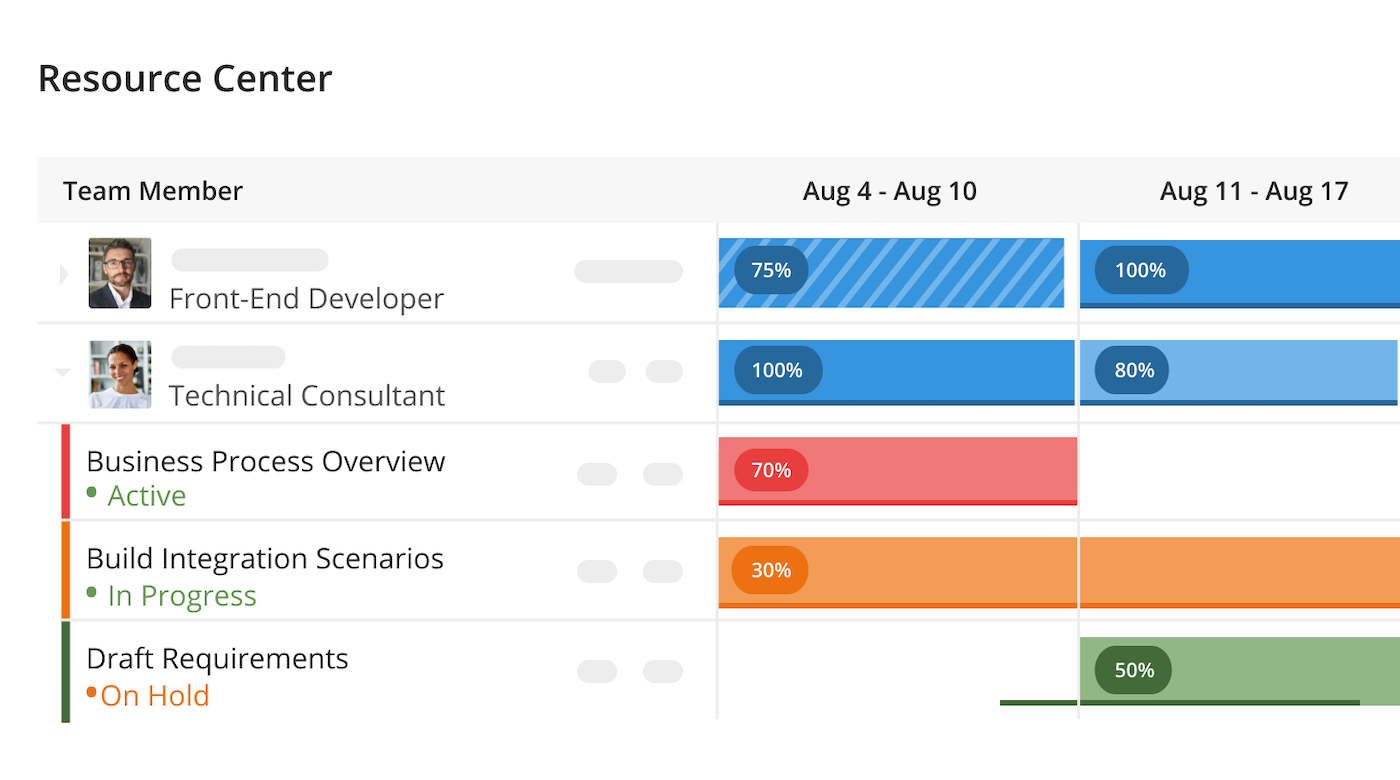
Kantata è progettato per le organizzazioni che necessitano di abbinare le persone giuste ai progetti giusti in base a competenze, disponibilità e preferenze. I team di servizi professionali e le società di consulenza utilizzano Kantata per gestire l'allocazione delle risorse con un'attenzione particolare ai punti di forza individuali e all'equilibrio dei carichi di lavoro. Il suo approccio incentrato sulle persone ti aiuta a ottimizzare i risultati dei progetti sostenendo al contempo la soddisfazione e la fidelizzazione dei dipendenti.
Per chi è più adatto Kantata?
Organizzazioni di servizi professionali incentrate sulle persone che hanno bisogno di bilanciare la pianificazione delle risorse con competenze, disponibilità e domanda di progetto.
Perché ho scelto Kantata
Ciò che distingue Kantata è il suo focus sull'allineamento tra competenze e interessi delle persone e le esigenze dei progetti. Il cruscotto di gestione delle risorse consente di visualizzare la disponibilità individuale, le competenze e i tassi di utilizzo, facilitando l'assegnazione della persona più adatta a ciascun compito. Mi piace come i profili dei talenti e gli strumenti di previsione di Kantata ti aiutano a pianificare le future richieste di progetto tenendo conto delle preferenze dei dipendenti. Questo approccio incentrato sulle persone supporta sia la realizzazione dei progetti sia la soddisfazione del team, risultando particolarmente prezioso per le organizzazioni di servizi professionali.
Funzionalità chiave di Kantata
Altre funzionalità di Kantata aiutano i team a gestire risorse e progetti in modo più efficace:
- Gestione del portafoglio progetti: Monitora più progetti e i relativi fabbisogni di risorse in una vista centralizzata.
- Permessi basati sui ruoli: Controlla l’accesso ai dati sensibili su risorse e progetti in base ai ruoli utente.
- Registrazione di ore e spese: Rileva le ore fatturabili e le spese direttamente all’interno della piattaforma.
- Pianificazione di scenari: Modella diversi scenari di allocazione delle risorse per valutare gli impatti potenziali prima di apportare modifiche.
Integrazioni di Kantata
Le integrazioni includono Salesforce, SAP, Jira, Xero, BambooHR, Slack, Worday, QuickBooks, HubSpot e NetSuite.
Pros and Cons
Pros:
- Gestione delle risorse completamente integrata con la pianificazione generale
- Ottima funzionalità di reportistica sui dati delle risorse
- Gestione della capacità semplice
- Distingue tra allocazione soft e ferma
Cons:
- La soluzione di proofing è un componente aggiuntivo
- La creazione di report personalizzati può essere difficile senza una formazione adeguata
New Product Updates from Kantata

Kantata Adds Access Group Change History
Kantata adds Access Groups History, letting account administrators track changes to group details, membership, and permissions in Recent History. The update also makes these events available through the Subscribed Events API for broader monitoring. For more information, visit Kantata’s official site.
 .
.
Connecteam
Ideale per la programmazione dei turni su più sedi
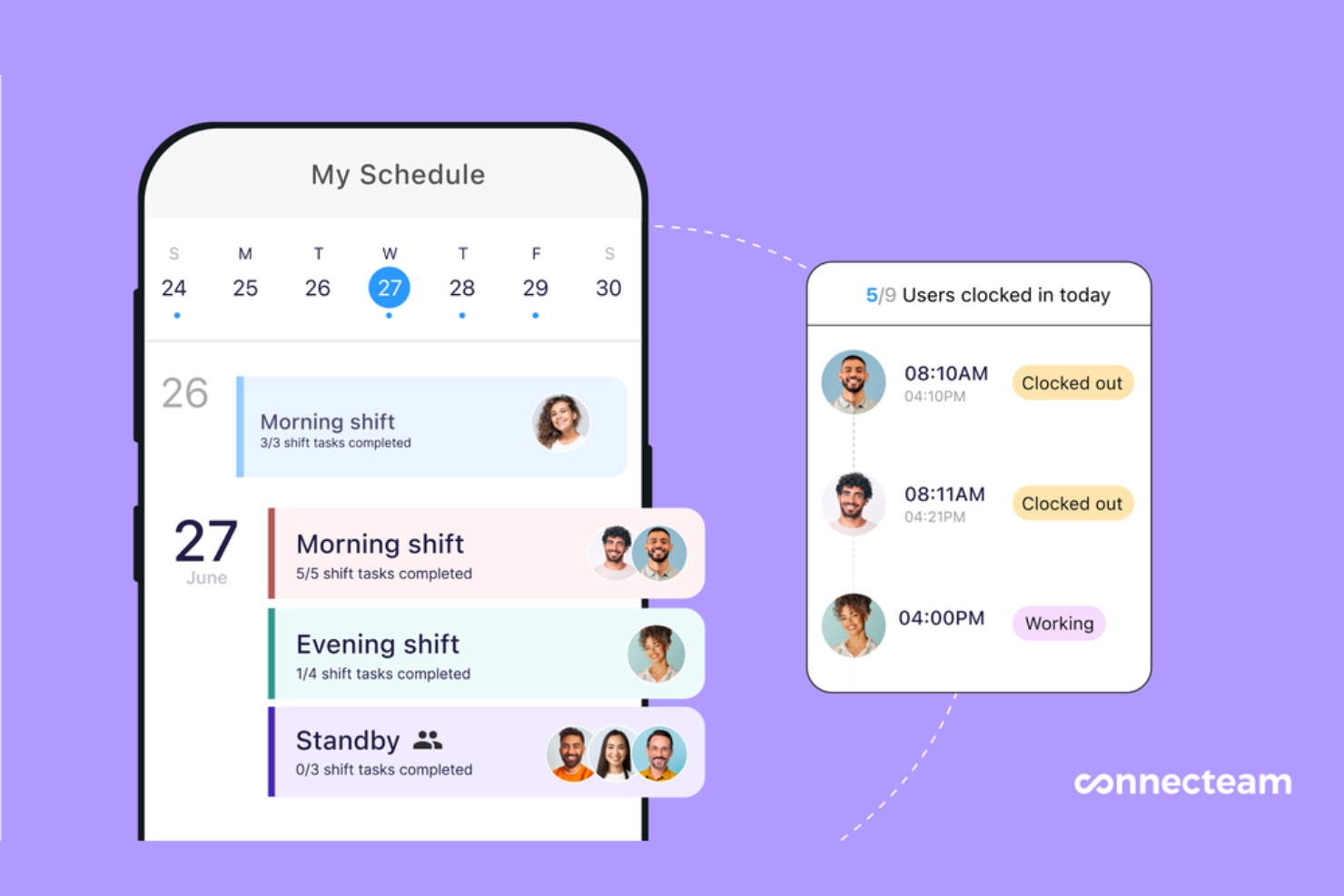
Connecteam è una piattaforma per la programmazione delle risorse e la gestione dei dipendenti pensata per i team senza postazione fissa. Combina pianificazione dei turni, rilevazione delle presenze e gestione delle attività in un unico sistema ottimizzato per dispositivi mobili, facilitando la gestione dei dipendenti su più sedi aziendali.
Per Chi è Ideale Connecteam?
Aziende multi-sede con dipendenti senza postazione o in prima linea che necessitano di pianificazione dei turni e coordinamento della forza lavoro.
Perché Ho Scelto Connecteam
Quando occorre gestire la pianificazione dei turni su diverse sedi, Connecteam si distingue per la sua programmazione basata sulla posizione e il design mobile-first. La piattaforma consente ai responsabili di assegnare i turni a specifiche sedi, monitorare le timbrature dei dipendenti tramite GPS e coprire rapidamente i turni scoperti con personale qualificato. Apprezzo la possibilità di impostare regole e notifiche specifiche per ogni posizione, il che aiuta a prevenire conflitti di pianificazione e assicura copertura dove più necessario. Queste caratteristiche rendono Connecteam particolarmente adatto ad aziende con team distribuiti e esigenze di turnistica complesse.
Caratteristiche Principali di Connecteam
Altre funzionalità utili di Connecteam per la pianificazione delle risorse includono:
- Modelli di Turno: Crea e riutilizza schemi di turno comuni per una programmazione più rapida.
- Promemoria di Turno Automatizzati: Invia notifiche push ai dipendenti prima dell'inizio del loro turno.
- Richieste di Permesso: Permette allo staff di inviare richieste di ferie o malattia direttamente dall'app.
- Esportazione Paghe: Esporta fogli presenze e dati di frequenza per l'elaborazione paghe.
Integrazioni di Connecteam
Le integrazioni includono Gusto, QuickBooks, Paychex, Xero, ADP, Zapier, Wix Bookings, Lightspeed POS e PrismHR.
Pros and Cons
Pros:
- La programmazione automatica riduce la pianificazione manuale dei turni
- Moduli personalizzabili e flussi di lavoro per le attività
- Tracciamento dettagliato delle presenze con timbratura GPS
Cons:
- L'interfaccia può risultare complessa per i nuovi utenti
- Gli strumenti di geolocalizzazione possono avere difficoltà in aree remote
New Product Updates from Connecteam

Connecteam Expands Break and Timesheet Controls
Connecteam adds flexible break thresholds, personalized policies, auto-end options, a centralized exceptions report, and improved timesheet issue visibility to help teams manage breaks and timesheets more effectively. For more information, visit Connecteam’s official site.
 .
.Altri software per la pianificazione delle risorse
Di seguito è riportato un elenco di strumenti aggiuntivi per la pianificazione delle risorse che non sono entrati nella lista principale:
- Hive
Ideale per visualizzare la disponibilità del team
- Microsoft Project
Ideale per integrazioni con Microsoft
- Rocketlane
Ideale per una collaborazione di onboarding senza interruzioni
- ClickUp
Ideale per visualizzazioni workload e box
- Ezo
Ideale per la gestione centralizzata delle richieste di asset
- ActiveCollab
Ideale per la fatturazione ai clienti
- Jira
Ideale per il monitoraggio dei ticket di progetto
- Bonsai Agency Software
Ideale per la pianificazione delle risorse e la previsione
- Birdview
Ideale per aziende di servizi professionali
- Schedule It
Ideale per la pianificazione dei collaboratori esterni
- Planview AdaptiveWork
Ideale per la gestione di progetti aziendali
- elapseit
Ideale per funzionalità finanziarie integrate
- Polaris PSA By Replicon
Ideale per PSA e PPM combinati
- Parallax
Ideale per aziende di sviluppo software
- Planview Vantage
Ideale per la gestione del portafoglio progetti
- Silverbucket
Ideale per il lavoro basato su progetti
- eResource Scheduler
Miglior modulo di pianificazione semplice e standalone
- Acuity PPM
Ideale per l'allineamento strategico delle risorse di portafoglio
- Primetric
Il migliore per le aziende di servizi IT
- monday AI Workspace
Ideale per flussi di lavoro AI personalizzabili
- Resource Guru
Ideale per la pianificazione della capacità con schede orarie
- Smartsheet
Ideale per automazioni personalizzate dei flussi di lavoro
- Celoxis
Ideale per l'allocazione avanzata delle risorse
- ClickTime
Ideale per l'analisi delle pianificazioni dei progetti
- Zoho Projects
Ideale per aziende in crescita
- Accelo
Ideale per la pianificazione dinamica
- VOGSY
Ideale per gli utenti di Google Workspace
- GoodDay
Ideale per spazi di lavoro personalizzabili
- Saviom
Ideale per la pianificazione multidimensionale delle risorse
- Hub Planner by Milient
Ideale per aziende di medie e grandi dimensioni


Recensioni correlate dei software per la pianificazione delle risorse
Se non hai ancora trovato quello che cerchi, dai un'occhiata a questi altri strumenti correlati che abbiamo testato e valutato:
- Software di gestione dei progetti
- Software per la pianificazione delle risorse basato sul Web
- Software di gestione delle risorse
- Software di automazione dei flussi di lavoro
- Software per il monitoraggio del tempo
- Strumenti per la produttività
- Software per la pianificazione dei progetti
- Software open source per la gestione delle risorse
Come valuto i software per la pianificazione delle risorse
Il software per la pianificazione delle risorse è ciò su cui un'agenzia digitale fa affidamento per evitare di assegnare due volte il team UX su cinque progetti clienti diversi, o ciò che un responsabile PMO utilizza per mappare la domanda di risorse future prima ancora che un nuovo progetto parta. Quando valuto gli strumenti in questo ambito, seguo due livelli: uno standard di base che ogni strumento in questa lista deve soddisfare, e un insieme di elementi differenzianti che determinano quali strumenti si distinguono davvero.
Funzionalità principali (Requisiti di base per questa lista)
Per il software di pianificazione delle risorse, le funzionalità principali che testo e valuto sono:
- Pianificazione visiva: Cerco visualizzazioni a timeline drag-and-drop o visuali Gantt che ti permettano di vedere ogni assegnazione a colpo d'occhio—ad esempio per individuare uno sviluppatore assegnato a tre sprint contemporaneamente.
- Allocazione delle risorse: Ogni strumento dovrebbe permetterti di assegnare persone, attrezzature o spazi ai compiti a piena o parziale capacità, come prenotare un designer al 50% su due progetti diversi.
- Tracciamento della capacità: Controllo se lo strumento mostra le ore disponibili rispetto alle ore già prenotate per ogni risorsa, così puoi sapere chi è già al limite prima dell'arrivo del prossimo progetto.
- Rilevamento dei conflitti: Le doppie prenotazioni possono rovinare i programmi. Valuto come ogni strumento segnala le assegnazioni sovrapposte e se suggerisce alternative o si limita ad avvisarti.
- Gestione del pool di risorse: Un database filtrabile e ricercabile di risorse con attributi come competenze, ruoli, luogo e tariffa è essenziale per abbinare le persone giuste ai lavori giusti.
- Report sull'utilizzo: Cerco report che confrontano l'utilizzo pianificato rispetto a quello effettivo, poiché è questo il parametro con cui la maggior parte dei team di servizi e dei PMO misura la qualità della pianificazione.
- Monitoraggio della disponibilità e delle assenze: Lo strumento deve tenere conto di ferie, giorni festivi e non lavorativi, così che la pianificazione rispecchi la disponibilità reale e non solo il numero di dipendenti.
Uno strumento deve offrire la maggior parte di queste funzionalità per meritare un posto nella lista. Da lì, considero ciò che distingue ogni soluzione.
Funzionalità distintive (Cosa differenzia le proposte)
Alcuni strumenti si distinguono offrendo una pianificazione degli scenari o previsioni approfondite, così puoi modellare la domanda futura e le esigenze di assunzione prima ancora che vengano fissate le date di inizio progetto. Cerco anche integrazioni già pronte con piattaforme di project management, HR e rilevazione delle ore, perché la sincronizzazione in tempo reale con Jira o BambooHR può essere determinante nei flussi di lavoro di pianificazione. Infine, l'accesso API e le funzionalità di automazione spesso consentono ai team più grandi di collegare la pianificazione delle risorse a processi interni o dashboard personalizzati.
Cosa considero oltre alle funzionalità
Valuto per chi è realmente costruito ogni strumento, poiché un'agenzia di 15 persone e una società di consulenza da 500 persone hanno esigenze di pianificazione molto diverse. Anche la struttura dei prezzi conta: la tariffazione per risorsa può diventare rapidamente onerosa se si gestiscono insieme freelance e dipendenti. Valuto inoltre la complessità dell'onboarding, dato che strumenti come Float possono essere operativi in una giornata mentre le piattaforme enterprise richiedono settimane di configurazione. Infine, verifico quanto bene ogni soluzione si integra con i principali stack tecnologici usati in organizzazioni orientate ai progetti.
Come scegliere il software per la pianificazione delle risorse
È facile perdersi in lunghi elenchi di funzionalità e strutture tariffarie complesse. Per aiutarti a rimanere concentrato mentre affronti il tuo processo di selezione del software, ecco un elenco di fattori da tenere a mente:
| Fattore | Cosa considerare |
| Scalabilità | Questo strumento sarà ancora adatto alle dimensioni del tuo team tra sei mesi? Cerca soluzioni in grado di gestire più utenti, progetti e risorse senza configurazioni aggiuntive. |
| Integrazioni | Lo strumento si sincronizza con i tuoi strumenti di gestione dei progetti o di monitoraggio del tempo? Assicurati che si integri con il flusso di lavoro attuale per evitare attività duplicate. |
| Personalizzazione | Puoi modificare visualizzazioni, autorizzazioni e tag per adattarli al processo del tuo team? Evita i sistemi rigidi che ti costringono a cambiare il tuo modo di lavorare. |
| Semplicità d'uso | I membri del team possono imparare a usare il software senza una formazione approfondita? Un'interfaccia intuitiva e la pianificazione tramite trascinamento aiutano a ridurre le richieste di assistenza. |
| Implementazione e onboarding | Quanto velocemente il tuo team può iniziare a usare concretamente lo strumento? Informati sulla disponibilità di modelli, guide interattive o assistenza dal vivo per l'onboarding, così da evitare lunghi ritardi nell'implementazione. |
| Costo | Il prezzo è adeguato al tuo caso d'uso? Fai attenzione ai limiti relativi a utenti, progetti o visualizzazioni della pianificazione, che potrebbero costringerti a passare troppo presto a un piano superiore. |
| Misure di sicurezza | Quali protezioni sono previste per i dati del tuo team? Informati sul controllo degli accessi basato sui ruoli, sulla crittografia dei dati e sul luogo in cui vengono ospitati i dati. |
| Risorse interne necessarie | Chi, nel tuo team, si occuperà della configurazione e della manutenzione? Se hai risorse limitate, scegli uno strumento che richieda poca manutenzione e offra un'assistenza affidabile da parte del fornitore. |
Tendenze dei software di pianificazione delle risorse per il 2025
Nella mia ricerca ho raccolto innumerevoli aggiornamenti di prodotto, comunicati stampa e registri delle versioni di diversi fornitori di software per la pianificazione delle risorse. Ecco alcune delle tendenze emergenti che sto monitorando:
- Previsione del carico di lavoro basata sull'IA: gli strumenti stanno iniziando a utilizzare l'IA per prevedere gli squilibri nel carico di lavoro e consigliare l'assegnazione delle risorse. Questo aiuta i responsabili a intervenire prima che si verifichino colli di bottiglia.
- Sincronizzazione della disponibilità in tempo reale: un numero crescente di strumenti sincronizza in tempo reale i calendari del team e i programmi dei permessi per mostrare la disponibilità aggiornata. Ciò riduce il rischio di sovrapposizioni e facilita la ripianificazione rapida, soprattutto se abbinato a un assistente di pianificazione basato sull'IA in grado di suggerire automaticamente gli adeguamenti ottimali.
- Pianificazione di scenari per l'assegnazione delle risorse: alcuni strumenti consentono ai team di creare scenari ipotetici sulle risorse per verificare in che modo i cambiamenti influiscano sulle tempistiche di consegna. Questo aiuta nella pianificazione delle contingenze e nelle decisioni sulle assunzioni.
- Etichettatura e abbinamento dettagliati delle competenze: invece di abbinare le persone alle attività soltanto in base al ruolo, gli strumenti più recenti consentono di applicare tag relativi al livello di competenza per assegnazioni precise. Questo migliora l'adeguatezza al progetto e favorisce la crescita del personale junior.
- Minore priorità all'assegnazione manuale del tempo: assegnare manualmente un numero di ore al giorno a ciascun membro del team sta diventando meno rilevante. Gli strumenti ora privilegiano la pianificazione basata sull'impegno o sui risultati, con meccanismi di protezione integrati per prevenire il sovraccarico.
Che cos'è un software per la pianificazione delle risorse?
Il software per la pianificazione delle risorse è uno strumento che aiuta le organizzazioni a pianificare, assegnare e gestire risorse come personale, attrezzature o tempo nell'ambito di diversi progetti.
Garantisce che le risorse giuste siano disponibili per le attività giuste al momento giusto, riducendo i conflitti e migliorando l'efficienza del team. Le funzionalità principali spesso includono visualizzazioni del calendario, gestione del carico di lavoro e monitoraggio della disponibilità in tempo reale per supportare una pianificazione efficace delle risorse e l'esecuzione dei progetti.
Funzionalità dei software per la pianificazione delle risorse
Quando scegli un software per la pianificazione delle risorse, presta attenzione alle seguenti funzionalità principali:
- Pianificazione tramite trascinamento: consente agli utenti di assegnare e spostare facilmente le attività su una sequenza temporale visiva per effettuare rapidamente aggiornamenti e modifiche.
- Monitoraggio della disponibilità in tempo reale: mostra la disponibilità aggiornata delle risorse sincronizzando i calendari dei dipendenti e i programmi delle assenze.
- Bilanciamento del carico di lavoro: aiuta a distribuire le attività in modo uniforme tra i membri del team per evitare sovraccarichi o risorse inutilizzate.
- Assegnazione basata sulle competenze: abbina le attività ai membri del team in base a competenze specifiche per migliorare i risultati del progetto.
- Previsione e pianificazione della capacità: prevede il fabbisogno futuro di risorse in base ai progetti attuali e futuri.
- Pianificazione di scenari: consente agli utenti di testare diversi risultati della pianificazione senza influire sui piani attivi.
- Monitoraggio integrato del tempo: registra le ore lavorate direttamente nello strumento per confrontare le stime con i dati effettivi.
- Controllo degli accessi basato sui ruoli: consente ai responsabili di limitare ciò che i diversi utenti possono vedere e fare in base ai loro ruoli.
- Report e analisi: fornisce dati sull'utilizzo delle risorse, sulle tempistiche dei progetti e sulle prestazioni del team.
- Accesso da dispositivi mobili: consente agli utenti di visualizzare e modificare le pianificazioni in movimento tramite un'app mobile o un browser.
Vantaggi del software per la pianificazione delle risorse
L'implementazione di un software per la pianificazione delle risorse può offrire diversi vantaggi al tuo team e alla tua azienda. Eccone alcuni:
- Meno conflitti di pianificazione: La disponibilità in tempo reale e la sincronizzazione dei calendari aiutano a evitare di prenotare la stessa persona per più attività o di non rispettare le scadenze.
- Migliore utilizzo della capacità del team: Il bilanciamento del carico di lavoro e le previsioni mostrano dove le persone sono sovraccariche o hanno spazio per altre attività.
- Pianificazione più rapida dei progetti: Le tempistiche con funzionalità di trascinamento e il confronto delle competenze velocizzano l'assegnazione delle attività e la pianificazione delle responsabilità.
- Previsioni più accurate: Gli strumenti di pianificazione della capacità e di reportistica facilitano la previsione delle esigenze relative alle risorse e delle tempistiche di consegna.
- Gestione più semplice dei cambiamenti: La pianificazione degli scenari consente di testare diverse opzioni prima di modificare i programmi attivi.
- Maggiore visibilità per i responsabili: Dashboard e report mostrano come vengono utilizzate le risorse e dove potrebbero verificarsi problemi.
- Meno lavoro manuale: Gli aggiornamenti automatizzati e il monitoraggio del tempo integrato riducono la necessità di effettuare controlli continui o aggiornare fogli di calcolo.
Costi e prezzi del software per la pianificazione delle risorse
La scelta di un software per la pianificazione delle risorse richiede la comprensione dei diversi modelli e piani tariffari disponibili. I costi variano in base alle funzionalità, alle dimensioni del team, ai componenti aggiuntivi e ad altri fattori. La tabella seguente riepiloga i piani più comuni, i relativi prezzi medi e le funzionalità tipicamente incluse nelle soluzioni software per la pianificazione delle risorse:
Tabella comparativa dei piani per il software di pianificazione delle risorse
| Tipo di piano | Prezzo medio | Funzionalità comuni |
|---|---|---|
| Gratuito | $0 | Pianificazione di base, risorse limitate, report standard, supporto della comunità |
| Base | $10-20/utente/mese | Funzionalità di pianificazione avanzate, risorse aggiuntive, integrazioni di base, supporto via e-mail |
| Professionale | $20-40/utente/mese | Opzioni di pianificazione avanzate, risorse illimitate, suite completa di report, supporto prioritario via e-mail |
| Aziendale | $40+/utente/mese | Integrazioni personalizzate, opzioni di sicurezza avanzate, supporto dedicato, servizi di inserimento e formazione |
Quando scegli un piano, valuta le esigenze attuali e considera la crescita futura. Un buon piano dovrebbe rientrare nel tuo budget e crescere insieme alla tua organizzazione, offrendo la flessibilità e gli strumenti necessari per una gestione efficiente delle risorse.
Alcune situazioni comuni in cui un'azienda potrebbe aggiornare il proprio piano tariffario includono:
- Crescita del team: Un numero maggiore di dipendenti o reparti potrebbe richiedere strumenti di pianificazione migliori per gestire una forza lavoro più ampia.
- Espansione dei progetti: Un numero maggiore di progetti o progetti più complessi richiede funzionalità di pianificazione più avanzate.
- Aumento dei clienti: Una base clienti più ampia necessita di una pianificazione migliore, di una maggiore personalizzazione e di più efficaci strumenti di gestione dei clienti.
- Necessità di funzionalità avanzate: Nel tempo, le aziende potrebbero desiderare funzionalità come la collaborazione in tempo reale, l'analisi dei dati, l'automazione e le integrazioni di sistema.
- Espansione geografica: La gestione delle risorse tra diverse aree geografiche o fusi orari richiede spesso strumenti che supportino la pianificazione su più sedi.
Domande frequenti sul software per la pianificazione delle risorse
Trova le risposte alle domande più comuni su questo argomento.
Come scelgo il software giusto per la pianificazione delle risorse per la mia squadra?
Inizia elencando le funzionalità indispensabili per la tua squadra, come le opzioni di integrazione, la reportistica o la facilità d’uso. Confronta gli strumenti in base a queste esigenze, leggi le recensioni degli utenti reali e approfitta delle prove gratuite. Prima di prendere una decisione, assicurati che il software sia adatto alle dimensioni del tuo progetto e al tuo flusso di lavoro.
Gli strumenti per la pianificazione delle risorse possono integrarsi con il mio attuale software di gestione dei progetti?
Sì, la maggior parte degli strumenti per la pianificazione delle risorse funziona con i software di gestione dei progetti più diffusi, come Asana, Jira o Trello. Controlla i dettagli sulle integrazioni sul sito web del software o nella documentazione di assistenza per verificare che sia compatibile con il tuo ecosistema tecnologico. Le integrazioni fanno risparmiare tempo mantenendo automaticamente sincronizzati dati e tempistiche.
In che modo questi strumenti aiutano a prevenire il sovraccarico delle risorse o l'esaurimento professionale?
Il software per la pianificazione delle risorse ti avvisa quando una persona ha troppi incarichi. Vedrai pannelli di controllo o grafici del carico di lavoro che rendono facile individuare i problemi. Alcuni strumenti inviano anche promemoria o avvisi, così puoi riassegnare le attività e mantenere carichi di lavoro realistici.
Qual è il modo migliore per passare dai fogli di calcolo a un software dedicato per la pianificazione?
Esporta i dati dal tuo foglio di calcolo, quindi utilizza gli strumenti di importazione o configurazione forniti dal nuovo software. Organizza una breve sessione di formazione per la tua squadra e inizia con un progetto di esempio per acquisire familiarità. Elimina gradualmente i vecchi fogli di calcolo man mano che tutti si adattano al nuovo sistema.
Ho bisogno di un responsabile delle risorse dedicato per utilizzare efficacemente il software di pianificazione delle risorse?
No, non hai bisogno di un responsabile delle risorse dedicato. I responsabili di progetto possono gestire autonomamente la pianificazione delle risorse, soprattutto con strumenti intuitivi. Alcune squadre più grandi aggiungono prima o poi un responsabile dedicato, ma la maggior parte dei software è progettata per essere semplice da utilizzare per chiunque.