

I 10 migliori software per diagrammi di Gantt recensiti per il 2026

10 Elenco dei migliori software per diagrammi di Gantt


Il miglior software per diagrammi di Gantt ti aiuta a creare e gestire diagrammi di Gantt, semplifica la pianificazione e il monitoraggio dei progetti e ti consente di tenere sotto controllo scadenze, risorse e avanzamento senza complicazioni. Senza lo strumento giusto per i diagrammi di Gantt, farai fatica a individuare i colli di bottiglia, raggiungere le milestone del progetto e riferire ai clienti sull’avanzamento del progetto.
Ho analizzato oltre 20 strumenti software per diagrammi di Gantt basandomi sui miei oltre 15 anni di esperienza nella gestione e nella pianificazione dei progetti. Posso aiutarti a trovare lo strumento giusto per creare un piano di progetto completo e mantenere visibilità sull’avanzamento, tenere conto delle dipendenze e mantenere il lavoro in linea con le scadenze. Leggi qui sotto la mia analisi di ogni software per diagrammi di Gantt, delle funzionalità principali e dei casi d’uso.
Perché fidarsi dei nostri consigli sui software
Il nostro team testa e recensisce software dal 2012. In quanto project manager noi stessi, sappiamo quanto sia difficile — e importante — scegliere il software giusto.
Per questa guida, abbiamo valutato gli strumenti attraverso test pratici e ricerche indipendenti, assegnando un punteggio agli strumenti in base ai nostri criteri di selezione. Ci basiamo inoltre sulle competenze di leader di pensiero del settore e di professionisti attivi nella gestione dei progetti.
Le nostre recensioni riflettono il nostro giudizio editoriale umano, non un discorso di vendita.
Revisori esperti:
Tabella comparativa dei software per diagrammi di Gantt
Confronta i prezzi e le specifiche principali dei miei migliori software per diagrammi di Gantt nella tabella qui sotto.
| Tool | Best For | Trial Info | Price | ||
|---|---|---|---|---|---|
| 1 | Ideale per la gestione delle attività e la collaborazione | Prova gratuita di 14 giorni + piano gratuito disponibile | Da $9/utente/mese (fatturazione annuale) | Website | |
| 2 | Ideale per la pianificazione con cronologia dinamica | Prova gratuita di 30 giorni + piano gratuito disponibile | A partire da $7.65/utente/mese (con fatturazione annuale) | Website | |
| 3 | Ideale per le dipendenze tra attività e il percorso critico | Prova gratuita di 15 giorni + piano gratuito + demo gratuita disponibile | Da $4/utente/mese (fatturato annualmente) | Website | |
| 4 | Il miglior software per diagrammi di Gantt con strumenti di comunicazione integrati | Piano gratuito disponibile | A partire da $8/utente/mese | Website | |
| 5 | Ideale per utenti Microsoft | Prova gratuita | Da $7/utente/mese | Website | |
| 6 | Ideale per piccoli team e aziende | Prova gratuita di 30 giorni | Da $12,49/mese | Website | |
| 7 | Ideale per la sua timeline facile e intuitiva con funzionalità drag-and-drop | Piano gratuito + demo gratuita disponibile | Da $7/utente/mese (fatturazione annuale) | Website | |
| 8 | Ideale per team di sviluppo software | Piano gratuito + prova gratuita di 30 giorni disponibile | Da $35/mese per un massimo di 30 utenti | Website | |
| 9 | Ideale per creare diagrammi di Gantt e timeline direttamente in PowerPoint | Piano gratuito disponibile | Prezzo su richiesta | Website | |
| 10 | Ideale per la gestione di progetti in agenzia | Prova gratuita di 7 giorni disponibile | A partire da $9/utente/mese (fatturazione annuale) | Website |


Recensioni dei migliori software per diagrammi di Gantt
Ecco una breve descrizione di ogni strumento per diagrammi di Gantt presente nella mia lista, compresi i suoi punti di forza e alcune delle sue funzionalità e integrazioni.

Ideale per la gestione delle attività e la collaborazione
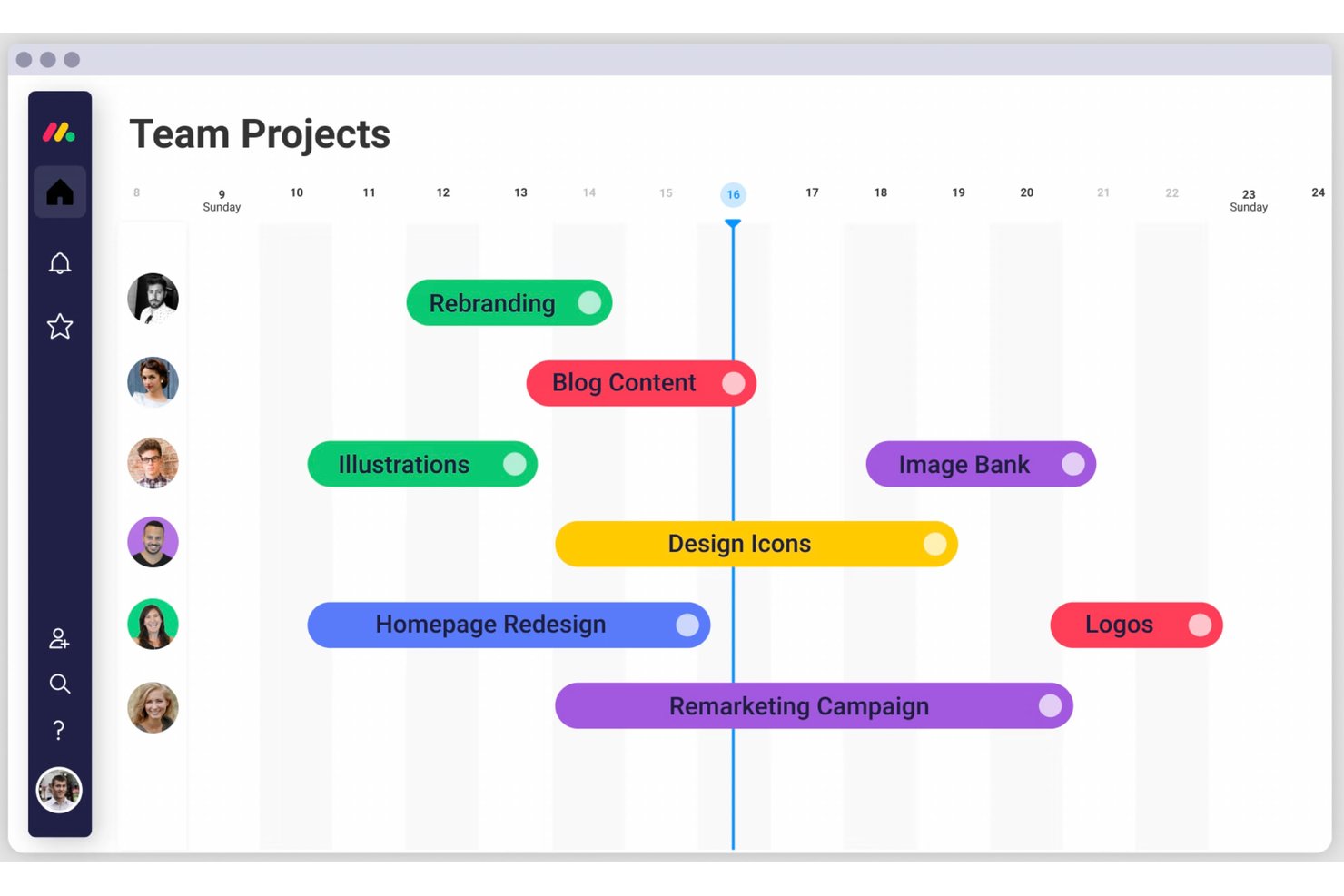
monday AI Workspace è una piattaforma di gestione del lavoro basata sull'intelligenza artificiale che combina cronologie a diagramma di Gantt, dipendenze tra attività, monitoraggio delle milestone e flussi di lavoro automatizzati all'interno di un ambiente di progetto personalizzabile e con visualizzazioni multiple.
Per chi è più adatto monday AI Workspace?
È molto indicato per team trasversali di medie e grandi aziende che necessitano di una pianificazione Gantt integrata in una piattaforma più ampia per collaborazione e automazione.
Perché ho scelto monday AI Workspace
monday AI Workspace merita un posto nella mia selezione perché integra la pianificazione Gantt direttamente in uno strato di gestione delle attività che la maggior parte degli strumenti Gantt dedicati non offre. Mi piace che si possano gestire dettagli delle attività, commenti, allegati e aggiornamenti di stato direttamente nella board, senza cambiare contesto. L'aspetto collaborativo è concreto: accesso ospite, dashboard condivisibili e aggiornamenti in tempo reale della board permettono a tutti gli stakeholder di restare aggiornati senza dover disporre di una licenza completa.
Funzionalità principali di monday AI Workspace
- Modalità di visualizzazione multiple: Passa da Gantt, Kanban, calendario e tabella per adattarsi alle esigenze di lavoro del tuo team.
- Portfolio roll-up: Aggrega le cronologie di più progetti in una singola visualizzazione Gantt principale per una visibilità trasversale dei progetti.
- Motore di pianificazione automatica: Aggiorna automaticamente le attività e le cronologie dipendenti quando cambiano le date o le dipendenze a monte.
- Revisione integrata nell'app: Allegare file direttamente alle attività e aggiungere feedback tramite annotazioni visive per una revisione degli asset più snella.
Integrazioni di monday AI Workspace
monday AI Workspace offre centinaia di integrazioni native tramite le integrazioni integrate e il marketplace, inclusi Slack, Google Workspace, Microsoft 365, Jira, Dropbox, Zoom, HubSpot, Salesforce, GitHub e Outlook. Supporta anche Zapier e fornisce un'API per integrazioni personalizzate.
Pros and Cons
Pros:
- La vista portfolio copre le cronologie di più progetti
- La pianificazione automatica aggiorna le attività quando le date cambiano
- Collaborazione in tempo reale direttamente nella timeline
Cons:
- Le funzionalità Gantt sono disponibili solo nei piani di fascia superiore
- La vista timeline è meno dettagliata rispetto agli strumenti dedicati
New Product Updates from monday AI Workspace
monday AI Workspace Adds Human Approval Routing
monday AI Workspace adds a human-in-the-loop approval block to AI Workflows, sending approval requests and routing workflow paths based on responses. For more information, visit monday AI Workspace's official site.

Quire
Ideale per la pianificazione con cronologia dinamica

Quire è uno strumento di gestione dei progetti basato sull'idea di suddividere gli obiettivi più ambiziosi in attività più piccole e gestibili. È progettato per i team che hanno bisogno di un modo flessibile per visualizzare, monitorare ed eseguire il proprio lavoro nelle diverse fasi.
Perché ho scelto Quire: La funzione di cronologia dinamica di Quire offre una visualizzazione simile a un diagramma di Gantt, che consente ai team di pianificare e monitorare le tappe fondamentali dei progetti. Questa visualizzazione permette agli utenti di disporre le attività nel tempo, modificare le tempistiche e individuare potenziali colli di bottiglia, favorendo una migliore pianificazione e allocazione delle risorse.
Inoltre, Quire supporta le dipendenze tra attività, consentendo agli utenti di definire le relazioni tra le attività e comprendere come i ritardi in un'area possano influire sulla tempistica complessiva del progetto. Questa funzione è fondamentale per i progetti complessi in cui le attività sono interconnesse, poiché aiuta a identificare il percorso critico e a garantire il completamento puntuale.
Funzionalità e integrazioni distintive di Quire
Le funzionalità includono una visualizzazione calendario che consente ai team di pianificare visivamente attività e scadenze, migliorando la gestione del tempo e il coordinamento. La funzione di documento collaborativo offre inoltre uno spazio centralizzato per archiviare informazioni, note e aggiornamenti relativi al progetto, garantendo che tutti i membri del team abbiano accesso ai dati più recenti.
Le integrazioni includono Google Calendar, Gmail, Slack, Outlook, Zoho Flow, GitHub, Apple Calendar Sync, Box, Dropbox, Google Drive e Microsoft Teams.
Pros and Cons
Pros:
- Facilità di collaborazione con i membri del team
- Diverse visualizzazioni dei progetti, tra cui elenchi, bacheche e cronologie
- Possibilità di creare attività e sottoattività annidate, consentendo una suddivisione dettagliata del progetto
Cons:
- La versione mobile non dispone di alcune funzionalità presenti su desktop
- Possibile sovraccarico di notifiche, soprattutto quando si lavora con team numerosi
New Product Updates from Quire
Quire Adds Custom Field Locking and Comment Reaction API Support
Quire adds custom field locking and API support for reading and setting emoji reactions on comments. These updates give teams more control over field data and expand comment interaction options for developers. For more information, visit Quire’s official site.
 .
.
Ideale per le dipendenze tra attività e il percorso critico

Quando cerchi una soluzione che unisca la gestione visiva dei progetti a una funzionalità robusta, Zoho Projects si distingue. È pensato per project manager, team leader e freelance che necessitano di uno strumento dinamico per organizzare le attività, monitorare l'avanzamento e gestire le tempistiche in modo efficace. Con le sue intuitive funzioni di diagramma di Gantt, Zoho Projects ti aiuta ad affrontare sfide come la programmazione dei progetti e l'allocazione delle risorse, permettendoti di concentrarti sulla realizzazione di risultati di successo.
Perché ho scelto Zoho Projects
Ho scelto Zoho Projects per il suo forte accento sulle funzionalità dei diagrammi di Gantt, che rispondono alle esigenze dei project manager in cerca di chiarezza visiva. La piattaforma offre dipendenze tra attività che permettono di mappare le relazioni e le influenze tra i compiti, assicurando così un flusso di progetto senza intoppi. Inoltre, l'analisi del percorso critico aiuta a identificare le attività più importanti che potrebbero impattare sulle tempistiche del progetto. Queste caratteristiche rendono Zoho Projects una scelta interessante per chi dà priorità a una pianificazione e schedulazione accurate.
Caratteristiche principali di Zoho Projects
Oltre alle sue funzionalità di diagramma di Gantt, Zoho Projects offre altre caratteristiche che migliorano la gestione dei progetti.
- Gestione delle attività: Questa funzione consente di creare, assegnare e gestire i compiti all'interno dei progetti, assicurando che tutti sappiano di cosa sono responsabili.
- Tracciamento del tempo: Puoi registrare le ore dedicate ai compiti, utile sia per la fatturazione che per capire come viene utilizzato il tempo del team.
- Gestione dei problemi: Questa funzionalità consente di identificare e risolvere rapidamente le problematiche, mantenendo qualità e progresso nei tuoi progetti.
- Collaborazione del team: Grazie agli strumenti di comunicazione e condivisione documenti, il tuo team può collaborare efficacemente, ovunque si trovi.
Integrazioni Zoho Projects
Le integrazioni comprendono Zoho CRM, Slack, GitHub, Microsoft Teams, Google Drive, Dropbox, Zapier, Zoho Books, Zoho Desk e Zoho People.
Pros and Cons
Pros:
- Strumenti avanzati di pianificazione con diagramma di Gantt
- Gestione avanzata delle dipendenze tra compiti
- Tracciamento integrato del tempo e dei problemi
Cons:
- Curva di apprendimento per i nuovi utenti
- Funzionalità Gantt limitate su mobile
New Product Updates from Zoho Projects
Zoho Projects Adds CodeX Scripts for Custom Modules
Zoho Projects now supports CodeX Scripts for custom modules, enabling conditional logic and rules for creating, updating, and deleting records. For more information, visit Zoho Projects' official site.
 .
.
Miro
Il miglior software per diagrammi di Gantt con strumenti di comunicazione integrati

Miro è una lavagna online collaborativa pensata per creare diagrammi di Gantt, oltre ad altri strumenti di pianificazione visiva. La sua tela infinita supporta un'ampia espressione delle idee, attraverso testo, immagini o video, facilitando visualizzazioni dettagliate e accessibili dei progetti.
Perché ho scelto Miro: Miro è progettato per la collaborazione in tempo reale e dispone di strumenti come votazioni, note adesive e commenti. Questo approccio consente ai team di modificare e discutere i piani direttamente nell'area di lavoro e incoraggia la partecipazione attiva e il feedback immediato tra i membri del team.
Inoltre, Miro si distingue perché consente agli utenti di caricare e sviluppare diagrammi esistenti provenienti da diverse piattaforme, garantendo che nessun lavoro precedente vada perso durante la transizione. Questo assicura un'integrazione fluida nello spazio interattivo di Miro, consentendo un ulteriore sviluppo e favorendo un flusso di lavoro e una collaborazione continui senza dover ricominciare da zero.
Funzionalità e integrazioni distintive di Miro
Le funzionalità includono oltre 1.000 modelli predefiniti per vari utilizzi, come diagrammi di Gantt, bacheche Kanban e mappe mentali, strumenti di comunicazione integrati, tra cui videoconferenze e TalkTrack per registrare video dei processi da visualizzare in modalità asincrona, oltre a strumenti rapidi per la creazione di diagrammi, uno strumento di pianificazione e un'app per le dipendenze.
Le integrazioni includono Zoom, Figma, Asana, Microsoft Teams, Monday.com, Confluence, Jira, Slack, Google Drive, Box, Airtable, Notion, Azure e Webex. Alcune integrazioni sono disponibili solo nei piani a pagamento.
Miro è gratuito per un numero illimitato di membri e consente di utilizzare fino a 3 bacheche modificabili. I piani a pagamento partono da $8/utente/mese (con fatturazione annuale).
Pros and Cons
Pros:
- Funzionalità di comunicazione integrate per una collaborazione più fluida
- Configurazione intuitiva e semplice
- Piano gratuito disponibile per sempre
Cons:
- La versione gratuita non consente l'esportazione in PDF ad alta qualità
- Lo zoom può risultare a scatti nei progetti più grandi
- Gli account di visitatori/ospiti sono disponibili solo nei piani a pagamento
New Product Updates from Miro
Miro Adds Japan Data Residency for Enterprise Customers
Miro has introduced Japan data residency for enterprise customers, offering in-region storage for production data, backups, and metadata, plus in-region compute infrastructure. For more information, visit Miro's official site.

Ideale per utenti Microsoft

Microsoft Project Online utilizza un'interfaccia utente software familiare che ti offre un modo intuitivo per visualizzare diversi aspetti del progetto. MS Project Online è un ottimo esempio di software per modelli di diagrammi di Gantt, offrendo numerosi modelli predefiniti e strumenti di pianificazione noti che rendono facile avviare e gestire ogni incarico. Il generatore di diagrammi di Gantt ti consente di selezionare elementi per gli indicatori di fase, le date di inizio e fine e lo stato di rischio RAG.
Perché ho scelto Microsoft Project Online: A differenza di alcuni altri software in questo elenco, MS Projects non dispone dello stesso numero di funzionalità e opzioni nonostante il costo di licenza più elevato per la suite completa di strumenti. Di conseguenza, risulta insufficiente secondo il nostro criterio di valutazione del rapporto qualità-prezzo, il che significa che non è ideale per piccole imprese o startup.
La collaborazione è limitata dal fatto che un file di progetto non può essere aperto da più membri del team contemporaneamente. Modificare le date di pianificazione non è così semplice come dovrebbe essere e spesso causa confusione nella pianificazione temporale. MS Projects è decisamente orientato verso progetti di grandi dimensioni e potrebbe non essere adatto per flussi di lavoro più piccoli.
Funzionalità e integrazioni principali di Microsoft Project Online
Le funzionalità includono gestione dei progetti, gestione delle risorse, gestione delle attività, pianificazione, gestione del portafoglio, pianificazione dinamica, business intelligence, diagrammi di Gantt, bacheche kanban, collaborazione, reportistica, roadmap, fogli ore e gestione della domanda.
Le integrazioni includono la suite MS Office, OneDrive, Outlook, Skype e OneNote.
Canva
Ideale per piccoli team e aziende

Canva è un programma per creare diagrammi di Gantt e progetti grafici che offre oltre 1 milione di forme e foto gratuite nella sua libreria di risorse e centinaia di migliaia di modelli di prodotto. Canva fa molto di più che semplici diagrammi di Gantt: troverai modelli per presentazioni, slideshow, infografiche, grafici, email e molto altro. Ha un'interfaccia semplice basata sul trascinamento, che permette anche ai non-designer di creare facilmente progetti visivamente piacevoli con minimo sforzo.
Perché ho scelto Canva: Offrono molto per il prezzo richiesto, secondo i nostri criteri di valutazione, ma gli utenti gratuiti non avranno accesso a tutto. Anche se Canva è gratis da provare, dovrai pagare per usare certi design, forme, motivi e modelli. Dovrai anche pagare per scaricare il tuo lavoro in un formato utilizzabile (oltre allo screenshot). Tuttavia, il prezzo è perfetto per le piccole imprese che cercano sia diagrammi di Gantt che altri materiali grafici di marketing ma non hanno budget per un designer interno.
Inoltre, se hai bisogno solo di diagrammi di Gantt, Canva non offre la stessa profondità di dettagli dei dati che altri programmi possono dare. Piuttosto, il suo punto di forza sta nella pulizia e semplicità dei suoi design. Se il tuo progetto richiede una pianificazione dettagliata e multifaccettata, probabilmente Canva non fa per te.
Caratteristiche e integrazioni principali di Canva
Le funzionalità includono modelli per diagrammi di Gantt, lavagne, presentazioni, integrazione social, video, prodotti stampati, marketing, editor drag-and-drop, libreria foto e grafiche, collaborazione, e integrazioni/plugin di terze parti.
Le integrazioni includono WordPress, eClincher, Rippling, Sendible, Post Planner e Viraltag. Come puoi intuire, il loro focus con le integrazioni è sui social media e/o sulla creazione di contenuti: se hai bisogno di accedere ad app di gestione progetti o workflow, non sono la soluzione giusta.

ClickUp
Ideale per la sua timeline facile e intuitiva con funzionalità drag-and-drop

ClickUp è un'applicazione cloud per la gestione dei progetti e la collaborazione altamente personalizzabile, che consente a te e ai tuoi team di gestire tutto da una piattaforma centrale, incluse attività relative ai progetti, comunicazioni di squadra, documenti e obiettivi.
Perché ho scelto ClickUp
ClickUp offre una visualizzazione Gantt intuitiva che permette di gestire le dipendenze, programmare e dare priorità agli elementi in una timeline di progetto ben definita. Questa visualizzazione offre una timeline dinamica drag-and-drop per programmare facilmente più attività, tenere traccia dell'avanzamento del progetto, gestire le scadenze e affrontare eventuali colli di bottiglia.
Inoltre, offre agli utenti una panoramica di tutti i progetti attivi, spazi, elenchi e attività. Utilizza un sistema di codifica a colori, così tu e i tuoi stakeholder potete sapere istantaneamente cosa sta accadendo, quando e dove. Infine, puoi utilizzare i filtri della timeline per organizzare le informazioni per assegnatario, data di scadenza, stato e altro ancora.
Funzionalità e integrazioni principali di ClickUp
Funzionalità includono programmazione e tracciamento delle attività, gestione progetti, gestione delle risorse, budgeting, gestione dei contatti, visualizzazione dei dati, database dipendenti, monitoraggio delle spese, condivisione di file, plugin di terze parti, supporto alla collaborazione, fogli presenze, roadmap, chat, gestione clienti, integrazione email, gestione dei feedback e reportistica dei processi.
Integrazioni includono integrazioni native con Slack, Google Workspace, Dropbox e molti altri strumenti, oltre a più di 1.000 integrazioni tramite Zapier (possono essere applicati costi aggiuntivi).
New Product Updates from ClickUp
ClickUp Adds Meetings Hub, Super Agent Templates, and ZoomInfo Integration
ClickUp adds a searchable Meetings Hub, new ways to clone and template Super Agents, and a ZoomInfo integration through the App Center. These updates improve meeting retrieval, agent reuse, and access to sales intelligence. For more information, visit ClickUp’s official site.
Backlog
Ideale per team di sviluppo software

Backlog è uno strumento di gestione progetti basato sul cloud, perfetto per gli sviluppatori e i team con cui collaborano. Backlog offre un'app mobile sia per iOS che per Android per collaborare ovunque tu sia.
Perché ho scelto Backlog: Backlog offre una gamma di utili funzionalità di collaborazione tra team, tra cui gestione delle attività (comprese sotto-attività, checklist e campi personalizzati), milestone, grafici burndown, gestione dei file, wiki e, soprattutto, un creatore di diagrammi di Gantt. Ma Backlog è più di uno strumento di collaborazione e diagrammi di Gantt. È anche uno strumento di tracciamento dei bug e un sistema di controllo delle versioni in un'unica soluzione.
Per collaborare sul codice, Backlog offre repository SVN e Git, un visualizzatore delle differenze e commenti in linea, oltre a pull request, merge request e branch. Dal punto di vista visivo, l'app fornisce grafici burndown, grafici Git e diagrammi di Gantt, così project manager e utenti possono valutare rapidamente lo stato dei progetti a colpo d'occhio.
Backlog ti consente di assegnare, monitorare e rilasciare il lavoro, tutto in un'unica app, garantendo trasparenza e responsabilità in tutto il team. Se stai cercando uno strumento per gestire progetti di sviluppo o lavori a stretto contatto con un team di sviluppatori, questa è l'app che fa per te.
Caratteristiche e integrazioni principali di Backlog
Le funzioni includono diagrammi di Gantt, bacheche, grafici burndown, tracciamento delle problematiche, campi personalizzati, milestone, versionamento, notifiche e avvisi, gestione del codice, gestione della documentazione, condivisione dei file e integrazioni/plugin di terze parti.
Le integrazioni includono Typetalk, Cacoo, Nulab Pass, Slack, Redmine, Jira Importer, Jenkins, iCal Sync, piattaforme email, Google Sheets e LambdaTest. Puoi anche sviluppare le tue integrazioni e add-on con l'API di Backlog.

Lucen
Ideale per creare diagrammi di Gantt e timeline direttamente in PowerPoint

Office Timeline è uno strumento di pianificazione dei progetti che consente agli utenti di creare timeline e diagrammi di Gantt visivamente accattivanti direttamente all'interno di Microsoft PowerPoint o tramite il suo strumento web-based. Permette inoltre di importare dati direttamente da Excel e di accedere a un'ampia varietà di modelli personalizzabili.
Perché ho scelto Office Timeline: Office Timeline si integra perfettamente con strumenti essenziali come MS Project, Excel e PowerPoint, rendendo le visualizzazioni dei dati non solo semplici ma anche efficienti. Si distingue anche per la sua doppia offerta: un componente aggiuntivo per PowerPoint e uno strumento online, rispondendo alle diverse preferenze e necessità di progetto degli utenti.
Apprezzerai il design intuitivo e i modelli personalizzabili che ti permettono di creare visualizzazioni di progetto professionali senza bisogno di essere un esperto di design. Questo strumento rende le attività di gestione dei progetti il più semplici possibile, permettendoti di concentrarti di più sul progetto e meno sul processo di reportistica.
Caratteristiche e integrazioni distintive di Office Timeline
Le funzionalità includono il componente aggiuntivo desktop che offre una varietà di modelli personalizzabili per timeline, diagrammi di Gantt e roadmap, mentre la versione online facilita la creazione e la condivisione rapida di visualizzazioni di progetto da qualsiasi dispositivo abilitato al web. L'ampia gamma di opzioni di design e modelli del software consente agli utenti di adattare le timeline di progetto alle esigenze del pubblico, sia per briefing esecutivi di alto livello che per aggiornamenti dettagliati del team.
Le integrazioni includono strumenti come Jira, Project, Excel e Smartsheet. Queste consentono di importare e manipolare i dati per ottenere le visualizzazioni PowerPoint necessarie per le presentazioni ai tuoi stakeholder.
Pros and Cons
Pros:
- Integrazione diretta con Microsoft PowerPoint
- Intuitivo e facile da usare
- Modelli gratuiti e personalizzabili
Cons:
- Opzioni di prezzo poco flessibili
- La dipendenza dall'ecosistema Microsoft può essere limitante

Ideale per la gestione di progetti in agenzia
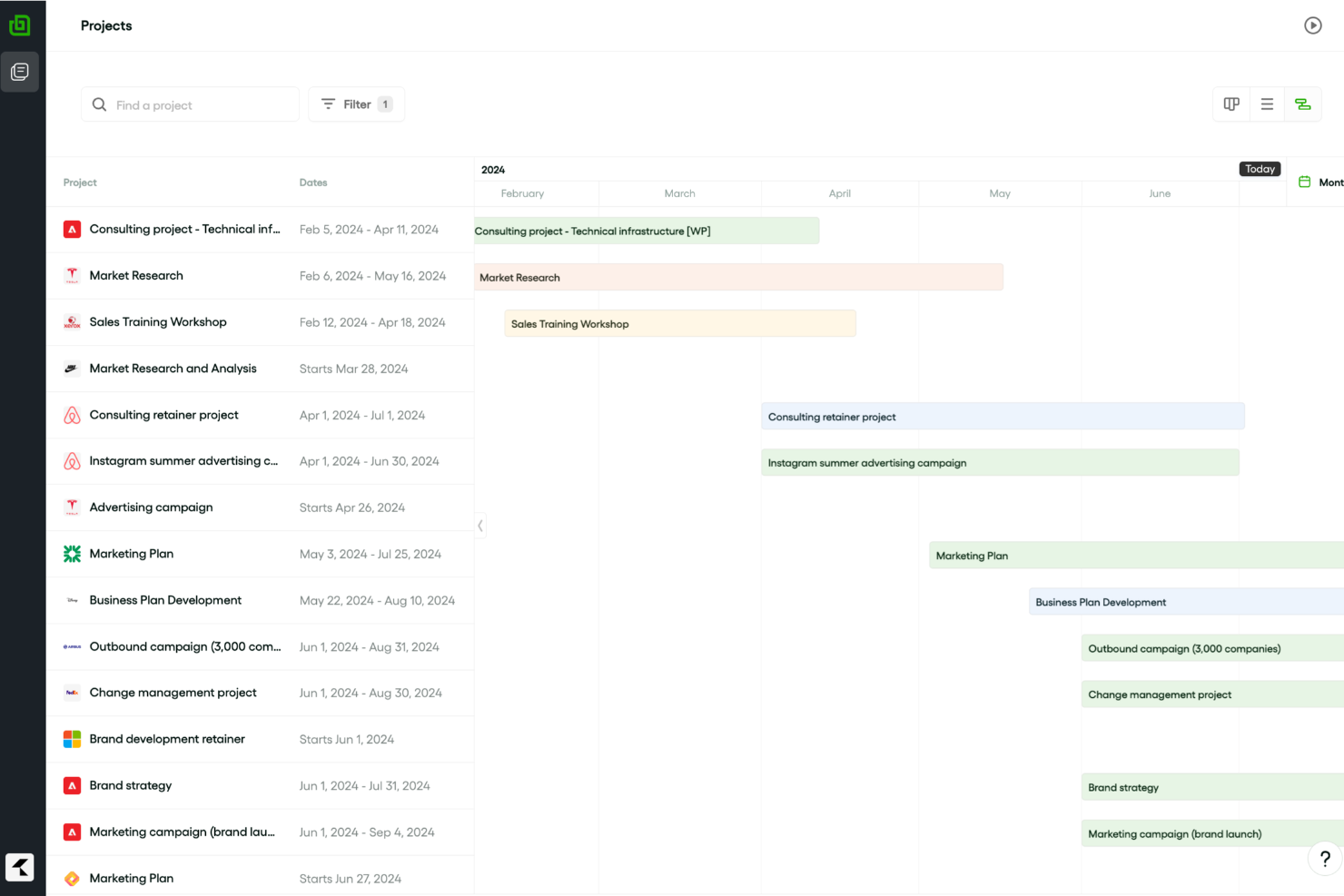
Bonsai è un software di gestione aziendale progettato per assistere agenzie e società di consulenza nella gestione di progetti e clienti. Include funzionalità per la gestione di proposte, contratti, pianificazione e fatturazione, aiutando a garantire che i progetti vengano consegnati puntualmente e rispettando il budget.
Perché ho scelto Bonsai: Bonsai ti aiuta a gestire più progetti all'interno del tuo portafoglio grazie ai suoi diagrammi di Gantt, che mostrano visualmente le tempistiche e i progressi dei progetti. Puoi suddividere i compiti in fasi specifiche e impostare scadenze chiare, rendendo facile monitorare a colpo d'occhio l'avanzamento del team. Inoltre, gli strumenti di assegnazione dei compiti di Bonsai semplificano la delega delle attività al tuo team, assicurando che i carichi di lavoro rimangano equilibrati e gestibili.
Bonsai offre anche funzionalità avanzate come il monitoraggio del tempo e la fatturazione, particolarmente utili per la gestione di progetti in agenzia. Puoi monitorare le ore fatturabili direttamente all'interno di ciascun progetto e generare fatture, aiutandoti a tenere sotto controllo sia i progressi che i pagamenti.
Funzionalità e integrazioni di spicco di Bonsai
Le funzionalità includono strumenti per la gestione dei clienti, come un portale dedicato, fatturazione, contratti e gestione dei documenti. Offre inoltre strumenti di budgeting per monitorare le spese di progetto e il tracciamento del tempo per registrare le ore dedicate a diversi progetti o compiti.
Le integrazioni includono QuickBooks Online, Zapier, Calendly, Xero, Google Sheets, Slack e HubSpot.
Pros and Cons
Pros:
- Buone funzionalità di gestione clienti
- Visibilità su tutti i tuoi progetti
- Gestione finanziaria dei progetti integrata
Cons:
- L'app mobile è limitata rispetto alla versione desktop
- Limitazioni nella scalabilità
Altri software per diagrammi di Gantt
Ecco alcune app aggiuntive che non sono entrate nella mia selezione, ma che vale la pena prendere in considerazione se vuoi ampliare la tua ricerca.
- GoodDay
Miglior strumento diagramma di Gantt per la personalizzazione
- Visor
Ideale per creare diagrammi di Gantt in modo collaborativo
- Vault ERP
Miglior software per diagrammi di Gantt per scalabilità aziendale
- GanttPRO
Il miglior software per diagrammi di Gantt per la visualizzazione del carico di lavoro
- Smartsheet
Ideale per modelli di diagramma di Gantt
- Productive
Ideale per la gestione e pianificazione completa di agenzie
- Wrike
Miglior software collaborativo per diagrammi di Gantt
- airfocus
Ideale per la prioritizzazione dei progetti
- Instagantt
Miglior componente aggiuntivo per utenti Asana
- GoodDay
Ideale per pianificazione automatica personalizzabile
- Hub Planner by Milient
Il miglior software di diagrammi di Gantt con monitoraggio e approvazione del tempo integrati


Come valuto i software per diagrammi di Gantt
Scompongo la mia valutazione in criteri di base—come timeline interattive, dipendenze tra le attività e percorso critico—e in fattori differenzianti che distinguono i buoni strumenti da quelli eccellenti per PMO e team di progetto.
Funzionalità di base (Requisiti fondamentali per questa lista)
Quando seleziono gli strumenti per la mia lista, valuto ciascuno su una scala da 0 (non offre la funzionalità) a 5 (eccelle in quest'area) per ogni funzionalità di base elencata qui sotto. Successivamente, calcolo il punteggio totale dello strumento in percentuale. Ogni strumento deve raggiungere un punteggio totale minimo del 75% per essere considerato per l'inclusione.
- Timeline Gantt Interattiva: Verifico se le barre delle attività consentono la ripianificazione tramite drag-and-drop su più scale temporali, poiché una timeline statica e solo visualizzabile crea attrito quando i piani cambiano a metà sprint.
- Dipendenze tra le Attività: Ogni strumento dovrebbe permettere di collegare le attività con tutti e quattro i tipi di relazioni e riprogrammare automaticamente le date a valle quando un predecessore subisce ritardi.
- Milestone & Fasi: Cerco la possibilità di contrassegnare le date di consegna chiave e di raggruppare le attività in gruppi riassuntivi, come separare il lancio di un prodotto in fasi di design, sviluppo e QA.
- Percorso Critico & Baseline: Gli strumenti che calcolano il percorso critico e permettono di salvare baseline facilitano l'individuazione degli scostamenti della pianificazione prima che incidano sulle scadenze.
- Assegnazione delle Risorse: Valuto come ogni strumento gestisce l'assegnazione delle persone alle attività e la visualizzazione del carico di lavoro, soprattutto quando i membri del team sono condivisi su più progetti.
- Monitoraggio Avanzamento: Indicatori di percentuale completata sulle barre delle attività e visualizzazioni pianificato vs effettivo mi aiutano a valutare se uno strumento offre reale visibilità sulla salute della pianificazione.
Dopo aver individuato gli strumenti che soddisfano questi criteri, considero ciò che differenzia ciascuna piattaforma.
Fattori differenzianti (Cosa distingue i fornitori)
Ecco come confronto e metto a paragone i diversi fornitori:
Funzionalità distintive
I riepiloghi di portafoglio sono importanti quando si gestiscono più progetti. Cerco strumenti che aggregano le timeline in una singola vista principale in modo che i responsabili PMO possano individuare conflitti tra i team. L'auto-programmazione è un altro elemento distintivo; quando un'attività subisce un ritardo, i migliori strumenti ripianificano automaticamente tutte le date a valle senza bisogno di modifiche manuali. Valuto inoltre come ogni strumento gestisce la condivisione con gli stakeholder, dato che molti project manager devono inviare timeline pulite e solo in visualizzazione a clienti o dirigenti che non necessitano di un accesso completo.
Oltre le funzionalità
Le integrazioni pesano molto nella mia valutazione. Un software Gantt che si sincronizza con Jira, Slack o MS Project si inserisce nei flussi di lavoro esistenti invece di sostituirli. Considero anche come ogni fornitore gestisce l'onboarding—specificatamente se offre importazione .mpp e CSV, poiché migrare pianificazioni attive in uno strumento nuovo può rallentare l'adozione. Anche la struttura dei prezzi è importante. Controllo se i fornitori offrono posti di sola visualizzazione gratuiti per gli stakeholder che devono solo consultare le timeline, mantenendo così i costi contenuti quando la visibilità sul progetto si estende in tutta l'organizzazione.
Come scegliere un software per diagrammi di Gantt
È facile perdersi in lunghi elenchi di funzionalità e strutture tariffarie complesse. Per aiutarti a rimanere concentrato mentre affronti il tuo particolare processo di selezione del software, ecco una lista di fattori da tenere a mente:
| Fattore | Cosa considerare |
|---|---|
| Scalabilità | Cerca un software in grado di crescere insieme ai tuoi progetti. Assicurati che lo strumento possa gestire senza difficoltà un aumento degli utenti, delle attività e della complessità dei progetti. |
| Integrazioni | Verifica se il software si connette agli strumenti che il tuo team utilizza già, come Asana, Slack o Microsoft Teams, per ottimizzare i flussi di lavoro. |
| Personalizzazione | Le esigenze del tuo team sono uniche. Dai priorità a un software che ti consenta di adattare i diagrammi di Gantt a flussi di lavoro o elementi di branding specifici del progetto. |
| Facilità d’uso | Evita curve di apprendimento ripide. Assicurati che il software offra un’interfaccia intuitiva e funzionalità come la modifica tramite trascinamento. |
| Budget | Verifica che il software rientri nel tuo budget, non solo oggi ma anche nel lungo periodo, includendo costi nascosti come le licenze utente o i componenti aggiuntivi. |
| Misure di sicurezza | I tuoi dati sono importanti. Cerca funzionalità come la crittografia, l’accesso basato sui ruoli e la conformità a standard come GDPR o SOC 2. |
| Strumenti di collaborazione | Assicurati che il software consenta la collaborazione in tempo reale, ad esempio condividendo i diagrammi con i clienti o assegnando attività direttamente all’interno del software. |
| Accessibilità da dispositivi mobili | Scegli un software compatibile con i dispositivi mobili, così il tuo team potrà monitorare l’avanzamento e apportare aggiornamenti anche in movimento. |
Tendenze nei software per diagrammi di Gantt
Durante la mia ricerca, ho raccolto innumerevoli aggiornamenti di prodotto, comunicati stampa e registri delle versioni di diversi fornitori di software per diagrammi di Gantt. Ecco alcune delle tendenze emergenti che sto tenendo d’occhio:
- Pianificazione basata sull’intelligenza artificiale: gli strumenti ora utilizzano l’intelligenza artificiale per prevedere i ritardi e suggerire modifiche alle tempistiche. Ad esempio, alcune piattaforme offrono la definizione automatica delle priorità delle attività in base alla disponibilità delle risorse e alle scadenze.
- Flussi di lavoro dinamici: i diagrammi di Gantt stanno diventando più interattivi, consentendo alle squadre di collegare direttamente le tempistiche alle bacheche delle attività o alle viste Kanban. Questo facilita il passaggio dalla pianificazione di alto livello alla gestione dettagliata delle attività.
- Personalizzazione visiva: sempre più strumenti consentono agli utenti di modificare elementi estetici dei grafici, come colori, etichette e disposizioni, per adattarli meglio al marchio o ai requisiti del progetto. Alcuni fornitori includono persino modelli di progettazione per settori specifici.
- Informazioni sulla collaborazione in tempo reale: le nuove funzionalità si concentrano sulla visualizzazione degli aggiornamenti in tempo reale riguardo a chi sta lavorando su cosa e sul monitoraggio in tempo reale dei carichi di lavoro della squadra. Questo aiuta le squadre distribuite a rimanere sincronizzate senza riunioni aggiuntive.
- Pianificazione degli scenari: i fornitori stanno aggiungendo strumenti per testare scenari ipotetici, così gli utenti possono simulare potenziali rischi o cambiamenti prima di impegnarsi su una pianificazione. Questo è particolarmente utile per i progetti complessi e a lungo termine.
Che cos’è un software per diagrammi di Gantt?
Un software per diagrammi di Gantt è uno strumento che consente di organizzare i progetti su una sequenza temporale, così da vedere come ogni attività si collega alle altre. I responsabili di progetto, i responsabili delle squadre e i professionisti di settori come edilizia, marketing, sviluppo software e organizzazione di eventi lo utilizzano per individuare le scadenze, assegnare le attività e monitorare l’avanzamento.
Se hai un progetto complesso con molte parti interdipendenti, un software per diagrammi di Gantt ti aiuta a mantenere tutto visibile e organizzato in un unico punto. È particolarmente utile quando devi gestire tempistiche variabili o coordinare squadre diverse; puoi anche cercare strumenti specializzati per il tuo settore, come un software per diagrammi di Gantt per l’edilizia.
Funzionalità dei software per diagrammi di Gantt
Quando scegli un software per diagrammi di Gantt, presta attenzione alle seguenti funzionalità chiave:
- Sequenze temporali interattive: consentono di trascinare e rilasciare le attività per modificare rapidamente le pianificazioni, facilitando l’adattamento ai cambiamenti in tempo reale.
- Gestione delle dipendenze: consente di collegare le attività per mostrarne le dipendenze, aiutando le squadre a visualizzare come i ritardi di un’attività influiscano sulle altre.
- Monitoraggio delle tappe fondamentali: mette in evidenza le principali tappe del progetto per garantire che le scadenze e gli obiettivi critici siano visibili e rispettati.
- Monitoraggio dell’avanzamento: aggiorna le attività con percentuali di completamento, offrendo alle squadre una visione chiara dell’avanzamento del progetto a colpo d’occhio.
- Allocazione delle risorse: consente di assegnare i membri della squadra alle attività e monitorare i carichi di lavoro per evitare sovraccarichi o un utilizzo insufficiente delle risorse.
- Confronto con la pianificazione di riferimento: acquisisce i piani iniziali, così le squadre possono confrontare l’avanzamento effettivo con la sequenza temporale originale.
- Viste multiple del progetto: offre viste alternative, come bacheche Kanban o elenchi di attività, accanto al diagramma di Gantt per soddisfare diverse esigenze di pianificazione.
- Strumenti di collaborazione: include funzionalità come commenti e condivisione di file direttamente all’interno delle attività, per mantenere centralizzata la comunicazione.
- Opzioni di esportazione/importazione: consente di salvare o condividere i diagrammi di Gantt come file PDF o Excel per facilitare relazioni e presentazioni, oltre a importare file da altri strumenti come Microsoft Project (a questo scopo puoi anche utilizzare un visualizzatore di Microsoft Project).
- Modellazione degli scenari: consente alle squadre di testare diverse ipotesi di pianificazione per valutarne i potenziali effetti prima di finalizzare i piani.
Vantaggi dei software per diagrammi di Gantt
L’implementazione di un software per diagrammi di Gantt può offrire diversi vantaggi alla tua squadra e alla tua azienda. Ecco alcuni dei benefici che puoi aspettarti:
- Tempistiche chiare del progetto: Aiuta il tuo team a comprendere scadenze e priorità visualizzando le attività in un semplice formato a sequenza temporale.
- Migliore coordinamento del team: Assegnare le attività e monitorare i progressi in un unico luogo permette a tutti di essere sempre aggiornati e riduce i problemi di comunicazione.
- Migliore gestione delle risorse: Ti consente di visualizzare i carichi di lavoro del team e modificare le assegnazioni per prevenire il sovraccarico o il sottoutilizzo.
- Monitoraggio più semplice dei progressi: Ti offre un quadro chiaro dello stato del progetto e ti aiuta a individuare tempestivamente i ritardi.
- Processo decisionale informato: Funzionalità come la simulazione di scenari ti consentono di testare le modifiche alle tempistiche o alle risorse prima di applicarle.
- Maggiore responsabilizzazione: L'assegnazione delle attività e gli aggiornamenti sullo stato rendono chiaro chi è responsabile di ogni parte del progetto.
- Comunicazione migliorata con i clienti: I grafici esportabili ti consentono di condividere facilmente i piani e gli aggiornamenti del progetto con le parti interessate o i clienti.
Costi e prezzi dei software per diagrammi di Gantt
La scelta di un software di gestione dei progetti con diagrammi di Gantt richiede la conoscenza dei vari modelli e piani tariffari disponibili. I costi variano in base alle funzionalità, alle dimensioni del team, ai componenti aggiuntivi e ad altri fattori. La tabella seguente riassume i piani più comuni, i relativi prezzi medi e le funzionalità tipicamente incluse nelle soluzioni software con diagrammi di Gantt:
| Tipo di piano | Prezzo medio | Funzionalità comuni |
|---|---|---|
| Piano gratuito | $0 | Creazione di diagrammi di Gantt di base, numero limitato di progetti, numero limitato di utenti e nessuna funzionalità avanzata di reportistica o integrazione |
| Piano personale | $5-$25/utente/mese | Attività illimitate, sequenze temporali con codifica a colori, opzioni di esportazione e semplici integrazioni come Google Calendar |
| Piano aziendale | $25-$50/utente/mese | Monitoraggio avanzato dei progetti, strumenti per la gestione delle risorse, collaborazione in tempo reale e report personalizzati |
| Piano per grandi aziende | $50-$100/utente/mese | Flussi di lavoro personalizzabili, assistenza dedicata per l'account, funzionalità di sicurezza avanzate e analisi avanzate |
Domande frequenti sul software per diagrammi di Gantt
Ecco le risposte ad alcune domande frequenti sul software per diagrammi di Gantt.
Cosa dovrebbe includere un diagramma di Gantt?
Il miglior software per diagrammi di Gantt include la possibilità di creare grafici a barre orizzontali che rappresentano la tempistica del programma di un progetto, la sovrapposizione di attività interdipendenti (ovvero l’attività B non può iniziare finché l’attività A non è terminata), le stime temporali, lo stato di avanzamento e le assegnazioni al team. La maggior parte dei programmi moderni per diagrammi di Gantt offre anche funzionalità di gestione delle attività e collaborazione.
A cosa serve un diagramma di Gantt?
Henry Gantt sviluppò il primo diagramma di Gantt come strumento per pianificare la produzione e il carico delle risorse di fabbrica intorno all’inizio del XIX secolo. Ancora oggi utilizziamo i diagrammi di Gantt per monitorare le risorse, pianificare le scadenze e comunicare sui progetti. Un buon diagramma di Gantt dovrebbe visualizzare la relazione tra il lavoro da svolgere e quello pianificato in un determinato periodo di tempo. Dovrebbe indicare la data di inizio prevista e la scadenza delle attività e delle sottoattività, le dipendenze tra le diverse parti del lavoro e chi è responsabile di ciascun elemento.
Esiste un diagramma di Gantt in Excel?
Non proprio, ma puoi crearne uno tu oppure cercare online un modello di diagramma di Gantt per Microsoft Excel. Tuttavia, non consiglio questo approccio, perché richiede una grande quantità di inserimenti manuali a fronte di benefici minimi. Se cambia un elemento del progetto, devi modificare manualmente ogni passaggio successivo oppure creare una formula che lo faccia al posto tuo.
Se utilizzi l’ecosistema Microsoft e ti trovi bene, dai un’occhiata a MS Projects. Avrai l’aspetto familiare di Excel e delle altre piattaforme Microsoft, insieme a un generatore di diagrammi di Gantt, strumenti di gestione dei progetti e altro ancora.
Usi un Mac? Scopri gli strumenti per diagrammi di Gantt progettati appositamente per macOS: molti offrono generatori con trascinamento, sincronizzazione in tempo reale e una migliore integrazione con gli strumenti di produttività nativi del Mac.
Qual è il miglior software gratuito per diagrammi di Gantt?
Il software gratuito per diagrammi di Gantt più comune è probabilmente Excel o Google Sheets. Cercando online troverai modelli per creare diagrammi di Gantt con questi programmi, anche se i modelli potrebbero costare qualche euro. È una soluzione utile in caso di necessità, ma non è l’ideale.
In alternativa, puoi provare uno strumento gratuito come ClickUp, che offre 100 diagrammi di Gantt gratuitamente nel piano base. Online sono disponibili molte altre opzioni di software gratuiti e open source per diagrammi di Gantt, tra cui RedBooth, GanttProject, Bitrix24, Agantty e Instagantt per Asana, oltre alle versioni gratuite di strumenti a pagamento come Wrike, Paymo e altri.
In che modo i diagrammi di Gantt possono supportare la gestione delle risorse?
I diagrammi di Gantt supportano la gestione delle risorse associando visivamente le attività alle risorse assegnate, garantendo un’allocazione efficiente ed evitando un’assegnazione eccessiva. Offrono chiarezza sulla disponibilità delle risorse, sulle tempistiche e sulle dipendenze, aiutando i team a gestire efficacemente i carichi di lavoro. Inoltre, gli aggiornamenti in tempo reale nei diagrammi di Gantt consentono ai team di apportare modifiche proattive alle risorse man mano che cambiano le esigenze del progetto.
Quali sono i vantaggi delle opzioni di visualizzazione multiple nel software per diagrammi di Gantt?
Le molteplici opzioni di visualizzazione nel software per diagrammi di Gantt consentono agli utenti di passare da una prospettiva all’altra, ad esempio tra sequenze temporali, calendari o elenchi di attività, adattandosi alle diverse esigenze e preferenze del team. Questa flessibilità migliora la collaborazione fornendo informazioni personalizzate per gli stakeholder, i responsabili di progetto e i membri del team. Inoltre, aumenta la produttività semplificando i dati complessi e garantendo che tutti rimangano allineati agli obiettivi del progetto.