

I 10 migliori software per la pianificazione strategica dei progetti nel 2026

10 Elenco ristretto dei software per roadmap di progetto


I migliori software per roadmap di progetto aiutano a comunicare le priorità di alto livello, monitorare i progressi verso gli obiettivi strategici e adattarsi alle tempistiche che cambiano tra più team. Questi strumenti consentono di visualizzare le dipendenze, allocare le risorse in modo efficace e prevenire il disallineamento tra gli stakeholder.
Con oltre 10 anni di esperienza nella gestione di progetti digitali, ho testato più di 40 strumenti per roadmap e pianificazione per aiutare i team a migliorare la visibilità interfunzionale e rimanere concentrati sui risultati. Ho lavorato con clienti nel settore pubblico, sanitario, dei trasporti e della vendita al dettaglio, dove una pianificazione chiara della roadmap è stata fondamentale per il successo.
Di seguito ho recensito i migliori software per roadmap di progetto che consiglierei sulla base dell'esperienza diretta. Ho evidenziato come ogni strumento supporta la pianificazione strategica, la comunicazione con gli stakeholder e l'esecuzione dei progetti su larga scala.
Perché fidarsi dei nostri consigli sui software
Il nostro team testa e recensisce software dal 2012. In quanto project manager noi stessi, sappiamo quanto sia difficile — e importante — scegliere il software giusto.
Per questa guida, abbiamo valutato gli strumenti attraverso test pratici e ricerche indipendenti, assegnando un punteggio agli strumenti in base ai nostri criteri di selezione. Ci basiamo inoltre sulle competenze di leader di pensiero del settore e di professionisti attivi nella gestione dei progetti.
Le nostre recensioni riflettono il nostro giudizio editoriale umano, non un discorso di vendita.
Confronta le specifiche dei software fianco a fianco
Confronta prezzi e specifiche dei software che ho scelto tra i migliori per roadmap di progetto, così potrai trovare quello più adatto al tuo budget e alle esigenze della tua azienda.
| Tool | Best For | Trial Info | Price | ||
|---|---|---|---|---|---|
| 1 | Ideale per il rilevamento dei rischi di progetto con assistenza AI | 14 giorni di prova gratuita | Da $8/utente/mese | Website | |
| 2 | Ideale per la collaborazione sui progetti | Prova gratuita di 14 giorni | Da $9,80/utente/mese | Website | |
| 3 | Ideale per la pianificazione delle tempistiche con diagrammi di Gantt | Prova gratuita di 15 giorni + piano gratuito + demo gratuita disponibile | A partire da $4/utente/mese (fatturato annualmente) | Website | |
| 4 | Ideale per la gestione agile dei progetti in modo dinamico | Prova gratuita di 15 giorni | Da $1/utente/mese (minimo 12 utenti) | Website | |
| 5 | Ideale per lavagna virtuale flessibile con libreria di modelli | Piano gratuito disponibile | Da $8/membro/mese (fatturazione annuale) | Website | |
| 6 | Ideale per l’assegnazione delle attività basata su AI | Piano gratuito + demo gratuita disponibile | Da $5/utente/mese | Website | |
| 7 | Ideale per la pianificazione degli sprint | Piano gratuito + prova gratuita disponibili | Da $8.50/utente/mese (fatturazione annuale) | Website | |
| 8 | Ideale per visualizzazioni rapide dei progetti | Piano gratuito disponibile | Prezzo su richiesta | Website | |
| 9 | Ideale per agenzie e società di consulenza | Prova gratuita di 7 giorni disponibile | Da $9/utente/mese (fatturazione annuale) | Website | |
| 10 | Ideale per cronologie visive dei progetti | 30 giorni di prova gratuita | From $11.50/user/month | Website |


Recensioni dei migliori software per roadmap di progetto
Ecco una breve descrizione di ciascun software per roadmap. Illustro il caso d’uso migliore di ogni strumento e le funzionalità più importanti.

Ideale per il rilevamento dei rischi di progetto con assistenza AI
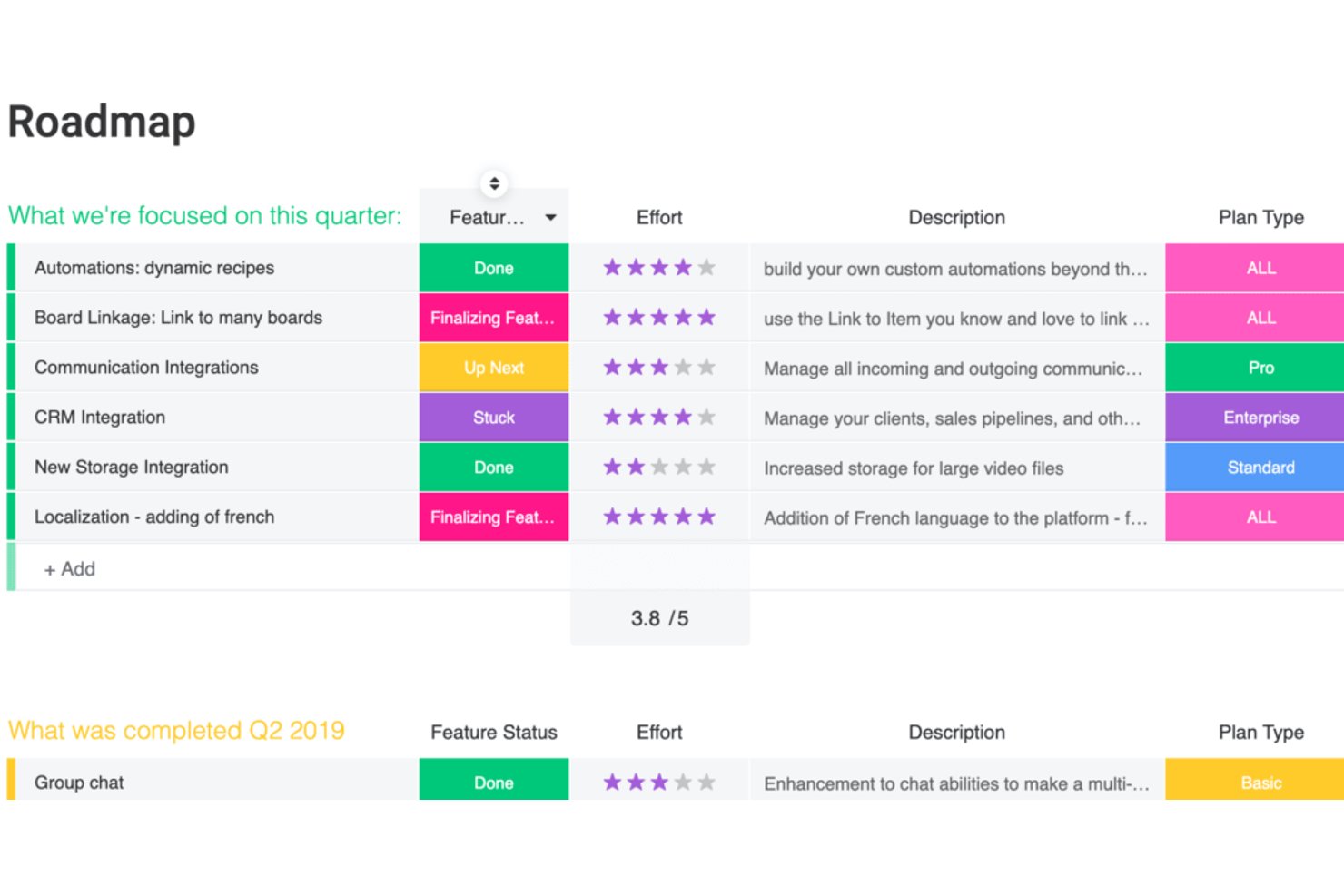
monday AI Workspace è una piattaforma di gestione del lavoro potenziata dall'intelligenza artificiale che combina pianificazione visiva della roadmap, gestione del portafoglio, mappatura delle dipendenze e viste cronologiche tra team in un unico spazio di lavoro connesso.
Per chi è ideale monday AI Workspace?
È particolarmente adatto a responsabili PMO e portfolio manager di organizzazioni di medie e grandi dimensioni che gestiscono più progetti contemporaneamente attraverso team interfunzionali.
Perché ho scelto monday AI Workspace
Ho inserito monday AI Workspace tra i miei preferiti grazie al modo in cui funziona la funzione Portfolio Risk Insights. Ogni giorno, l’IA analizza tutte le bacheche di progetto di un portafoglio e genera un elenco prioritarizzato dei rischi, così il mio team non deve aspettare una riunione di aggiornamento per scoprire che una scadenza sta sfuggendo di mano. L’agente Risk Analyzer va oltre, segnalando errori di dipendenza a cascata prima che si propaghino tra i progetti collegati.
Funzionalità principali di monday AI Workspace
- Costruttore visivo di roadmap: Visualizza facilmente progetti e traguardi grazie a viste Gantt, timeline e swimlane con trascinamento.
- Gestione portafoglio multi-progetto: Raggruppa il lavoro da più bacheche in roadmap di portafoglio consolidate e filtrabili con viste su risorse e stato.
- Integrazioni bidirezionali con Jira e GitHub: Sincronizza aggiornamenti e problemi di progetto con gli strumenti di sviluppo per un monitoraggio esecutivo unificato.
- Dashboard di reportistica esecutiva: Condividi dashboard in tempo reale con widget personalizzati per mettere in evidenza progressi, KPI e stato della roadmap a colpo d’occhio.
Integrazioni di monday AI Workspace
monday AI Workspace offre centinaia di integrazioni native, tra cui Jira, GitHub, GitLab, Slack, Microsoft Teams, Salesforce, HubSpot, Google Workspace, Zendesk e Trello. Supporta anche Zapier e mette a disposizione un’API per integrazioni personalizzate.
Pros and Cons
Pros:
- L’AI segnala i rischi di portafoglio prima che si aggravino
- Le viste Gantt e timeline sono altamente flessibili
- I riepiloghi di portafoglio coprono centinaia di progetti contemporanei
Cons:
- Le funzionalità AI avanzate sono disponibili solo nei piani superiori
- La logica delle dipendenze Gantt è meno matura rispetto agli strumenti dedicati
New Product Updates from monday AI Workspace
monday AI Workspace Adds Human Approval Routing
monday AI Workspace adds a human-in-the-loop approval block to AI Workflows, sending approval requests and routing workflow paths based on responses. For more information, visit monday AI Workspace's official site.

Wrike
Ideale per la collaborazione sui progetti
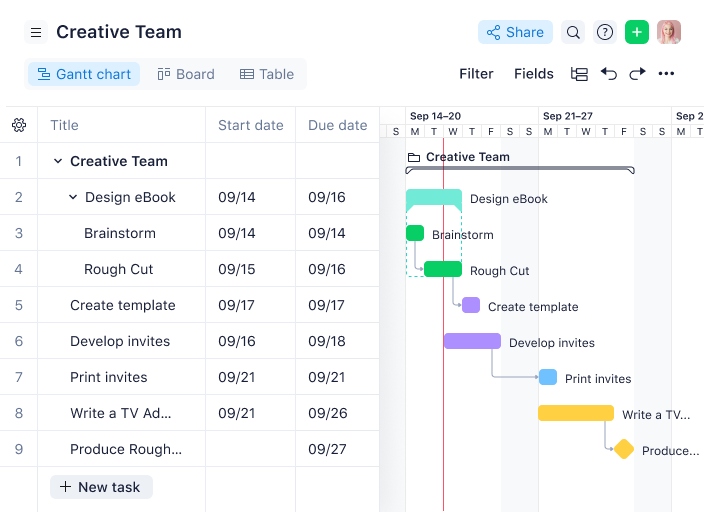
Wrike è una piattaforma di gestione dei progetti pensata per i team che cercano soluzioni complete per organizzare il lavoro e gestire i progetti. Offre una gamma di funzionalità progettate per migliorare la collaborazione e i flussi di lavoro, rendendola uno strumento prezioso per creare e gestire roadmap di progetto.
A chi è adatto Wrike?
Responsabili di programma e team trasversali in organizzazioni di media e grande dimensione nei settori marketing e tecnologia. È ideale per gruppi che necessitano di una collaborazione strutturata su roadmap condivise e deliverable di progetto.
Perché ho scelto Wrike
Ho scelto Wrike perché eccelle nella collaborazione sui progetti, un aspetto chiave per qualsiasi team che lavori su progetti. Le sue roadmap visive personalizzabili e i diagrammi di Gantt modificabili offrono un monitoraggio chiaro dell’avanzamento, così ogni membro del team resta allineato.
La funzione di sincronizzazione automatica del calendario è particolarmente utile per coordinarsi tra più team, mentre gli strumenti avanzati di gestione del portafoglio progetti forniscono una panoramica completa sulla salute dei progetti. Con processi di approvazione semplificati, Wrike aiuta ad accelerare le decisioni, rendendolo una scelta ideale per i team che vogliono aumentare la collaborazione e migliorare i propri processi di sviluppo prodotto.
Funzionalità principali di Wrike
Wrike offre anche molte altre funzionalità che lo rendono una scelta interessante come software per roadmap di progetto.
- Automazione AI: Puoi utilizzare questa funzionalità per automatizzare le attività di routine e permettere al tuo team di concentrarsi su iniziative strategiche.
- Strumenti di collaborazione visiva: La lavagna consente sessioni di brainstorming interattive con supporti visivi, aiutando la collaborazione tra i membri del team.
- Moduli di richiesta dinamici: Questi moduli automatizzano i processi di raccolta delle richieste di lavoro, assicurando che tutte le informazioni necessarie vengano raccolte già dall’inizio.
- Pianificazione delle risorse: Con strumenti come i diagrammi di Gantt e i grafici del carico di lavoro, puoi gestire efficacemente le tempistiche dei progetti e allocare le risorse in modo efficiente.
Integrazioni di Wrike
Le integrazioni includono Klaxoon, QuickBooks, Power BI, Google Sheets, Salesforce, Tableau, Microsoft Teams, Adobe Creative Cloud, Google Drive, Microsoft SharePoint, Slack e Dropbox.
Pros and Cons
Pros:
- Workflow e automazioni personalizzati aiutano a migliorare i processi di progetto
- Funzionalità di sicurezza di livello enterprise per proteggere i tuoi dati
- App web, desktop e mobile per la massima flessibilità
Cons:
- I limiti di spazio di archiviazione possono essere restrittivi
- Monitoraggio del tempo e pianificazione inferiori rispetto ad altri strumenti
New Product Updates from Wrike

Wrike Activity Reports Add Actor Type Details
Wrike’s Activity Report now displays actor type details, helping admins identify whether changes came from the UI, Automation, Wrike Agents, API, or AI via MCP. For more information, visit Wrike's official site.

Ideale per la pianificazione delle tempistiche con diagrammi di Gantt

Zoho Projects è una soluzione pratica per i team che necessitano di un software di roadmap di progetto con solidi strumenti di pianificazione e monitoraggio. Funziona bene in settori come IT e marketing, soprattutto per le squadre che si affidano all'automazione delle attività e al monitoraggio del tempo per mantenere l'organizzazione. I suoi diagrammi di Gantt rendono facile tracciare le tempistiche e le dipendenze, offrendo ai project manager una visione più chiara di ciò che sta procedendo, di ciò che è bloccato e di cosa richiede attenzione per mantenere i lavori nei tempi previsti.
Per Chi è Ideale Zoho Projects?
Coordinatori di progetto e team PMO in organizzazioni di piccole e medie dimensioni nei settori IT e servizi professionali. È adatto a gruppi che fanno affidamento sulla pianificazione delle tempistiche tramite Gantt per mappare le iniziative nel tempo.
Perché Ho Scelto Zoho Projects
Ho scelto Zoho Projects per i suoi potenti strumenti di diagramma di Gantt, che rendono più facile costruire e gestire una roadmap con tempistiche chiare e dipendenze tra attività. Questo è particolarmente utile quando le priorità cambiano e i team devono modificare i programmi senza perdere visibilità su cosa influisce sulle consegne. Zoho Projects include inoltre l'automazione delle attività per ridurre i solleciti manuali e mantenere il flusso di lavoro in ogni fase. La funzione di rilevazione dei tempi aggiunge un ulteriore livello di chiarezza mostrando come viene impiegato il tempo sulle attività, aspetto che può aiutare nella pianificazione, nelle decisioni sul carico di lavoro e nell'allocazione delle risorse.
Caratteristiche Principali di Zoho Projects
Oltre ai diagrammi di Gantt e all'automazione, Zoho Projects offre funzionalità che supportano la gestione quotidiana della roadmap:
- Tracciamento dei Problemi: Questa funzione aiuta il tuo team a identificare, monitorare e risolvere rapidamente i problemi di progetto, garantendo minime interruzioni nella roadmap.
- Gestione Documentale: Puoi archiviare, condividere e gestire documenti relativi al progetto, facilitando una collaborazione organizzata e senza intoppi.
- Zia Intelligence: Sfrutta insight alimentati dall'intelligenza artificiale per una gestione più intelligente, aiutando a prevedere gli esiti dei progetti e ottimizzare i flussi di lavoro.
- Dashboard Personalizzabili: Personalizza i cruscotti per visualizzare le metriche più rilevanti e offrire al team una panoramica chiara dell'avanzamento del progetto.
Integrazioni di Zoho Projects
Le integrazioni includono Zoho CRM, Zoho People, Zoho Desk, Zoho Invoice, Zoho Analytics, JIRA, Microsoft Teams, Google Calendar, Slack e Dropbox.
Pros and Cons
Pros:
- Elevata automazione e personalizzazione dei flussi di lavoro
- Monitoraggio del tempo e fatturazione integrati
- Prezzo accessibile per team in crescita
Cons:
- Interfaccia con curva di apprendimento più ripida
- Esperienza mobile meno completa
New Product Updates from Zoho Projects
Zoho Projects Adds CodeX Scripts for Custom Modules
Zoho Projects now supports CodeX Scripts for custom modules, enabling conditional logic and rules for creating, updating, and deleting records. For more information, visit Zoho Projects' official site.
 .
.
Ideale per la gestione agile dei progetti in modo dinamico
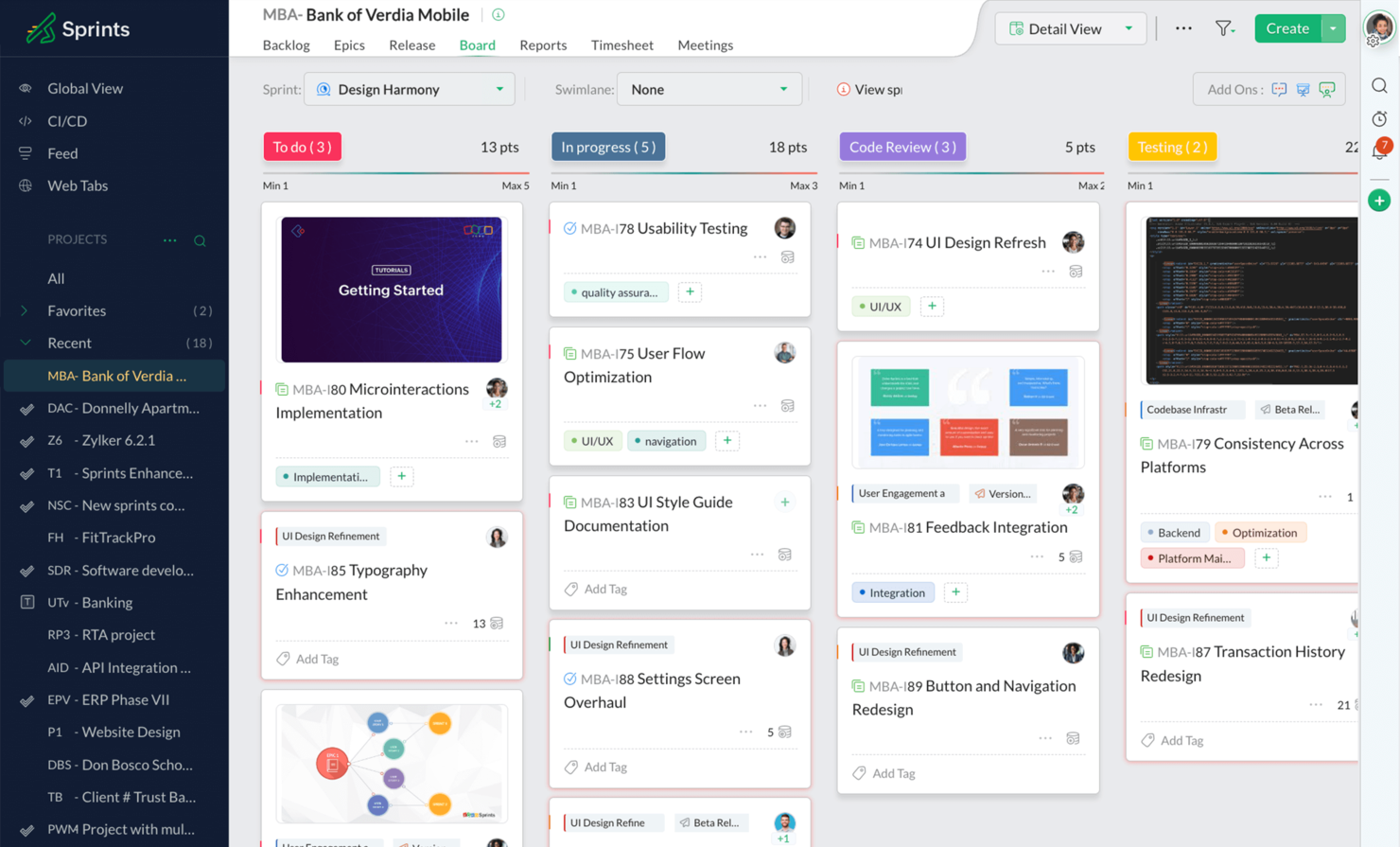
Zoho Sprints è uno strumento online di gestione progetti agile progettato per aiutare i team a pianificare, tracciare ed eseguire progetti in modo efficiente. Con funzionalità come la gestione del backlog e le bacheche Scrum, si adatta alle esigenze dinamiche dei team agili che desiderano mantenere una chiara roadmap di progetto.
Per chi è ideale Zoho Sprints?
Coach agili e product owner in startup e aziende software di medie dimensioni. Funziona bene per i team che gestiscono roadmap in evoluzione all'interno di cicli di consegna basati sugli sprint.
Perché ho scelto Zoho Sprints
Zoho Sprints offre una gestione completa del backlog così puoi dare priorità alle attività e mantenere il tuo team concentrato su ciò che conta davvero. Le bacheche Scrum e Kanban offrono chiarezza visiva e rendono facile per il team tracciare i progressi e adattarsi rapidamente ai cambiamenti. Queste funzionalità dinamiche per la gestione di progetti agili ti aiutano a mantenere una roadmap di progetto chiara e a garantire che tutti siano allineati sugli obiettivi.
Un altro motivo per cui ho scelto Zoho Sprints è la presenza di epiche e gestione dei rilasci. Queste funzionalità ti aiutano a suddividere progetti complessi in segmenti gestibili per una pianificazione e un'esecuzione migliori. Con report dettagliati puoi tracciare i progressi e le prestazioni e mantenere il team sulla giusta strada.
Caratteristiche principali di Zoho Sprints
Zoho Sprints offre una serie di altre funzionalità che lo rendono utile come software per le roadmap di progetto.
- Monitoraggio del tempo: Puoi utilizzare i timesheet e un timer globale per gestire le ore del team e ottenere dati utili a produrre stime e allocazioni delle risorse migliori nei progetti futuri.
- Personalizzazione: Questa funzione ti permette di personalizzare i progetti con modelli, campi personalizzati e regole di layout per soddisfare le esigenze specifiche del team e ottenere un'esperienza di gestione progetti su misura.
- Gantt interattivi: Questi diagrammi consentono al tuo team di visualizzare cronoprogrammi di progetto e dipendenze, facilitando la gestione delle tempistiche e assicurando consegne puntuali.
- Hub di collaborazione: Questa funzione include flussi di attività e co-authoring di documenti e facilita il lavoro di squadra e la comunicazione, soprattutto per team distribuiti in diverse sedi.
Integrazioni di Zoho Sprints
Le integrazioni includono Zoho Cliq, Zoho Projects, Zoho Desk, Microsoft Teams, Google Workspace, GitHub, Jenkins, Zapier, Zoho Flow, Zoho Meeting, Zoho Mail e Zoho Analytics.
Pros and Cons
Pros:
- Workflow personalizzabili per soddisfare le esigenze del progetto
- Strumenti efficaci per la pianificazione e il monitoraggio degli sprint
- Solide funzionalità di collaborazione per la comunicazione
Cons:
- Le opzioni di personalizzazione possono risultare complesse
- Funzionalità dell'app mobile limitate
New Product Updates from Zoho Sprints
Zoho Sprints Adds Dashboard View for Custom Modules
Zoho Sprints adds a Dashboard view for custom modules with charts and tables for visualizing module records. This gives teams a clearer way to review custom data. For more information, visit Zoho Sprints’ official site.
 .
.
Miro
Ideale per lavagna virtuale flessibile con libreria di modelli
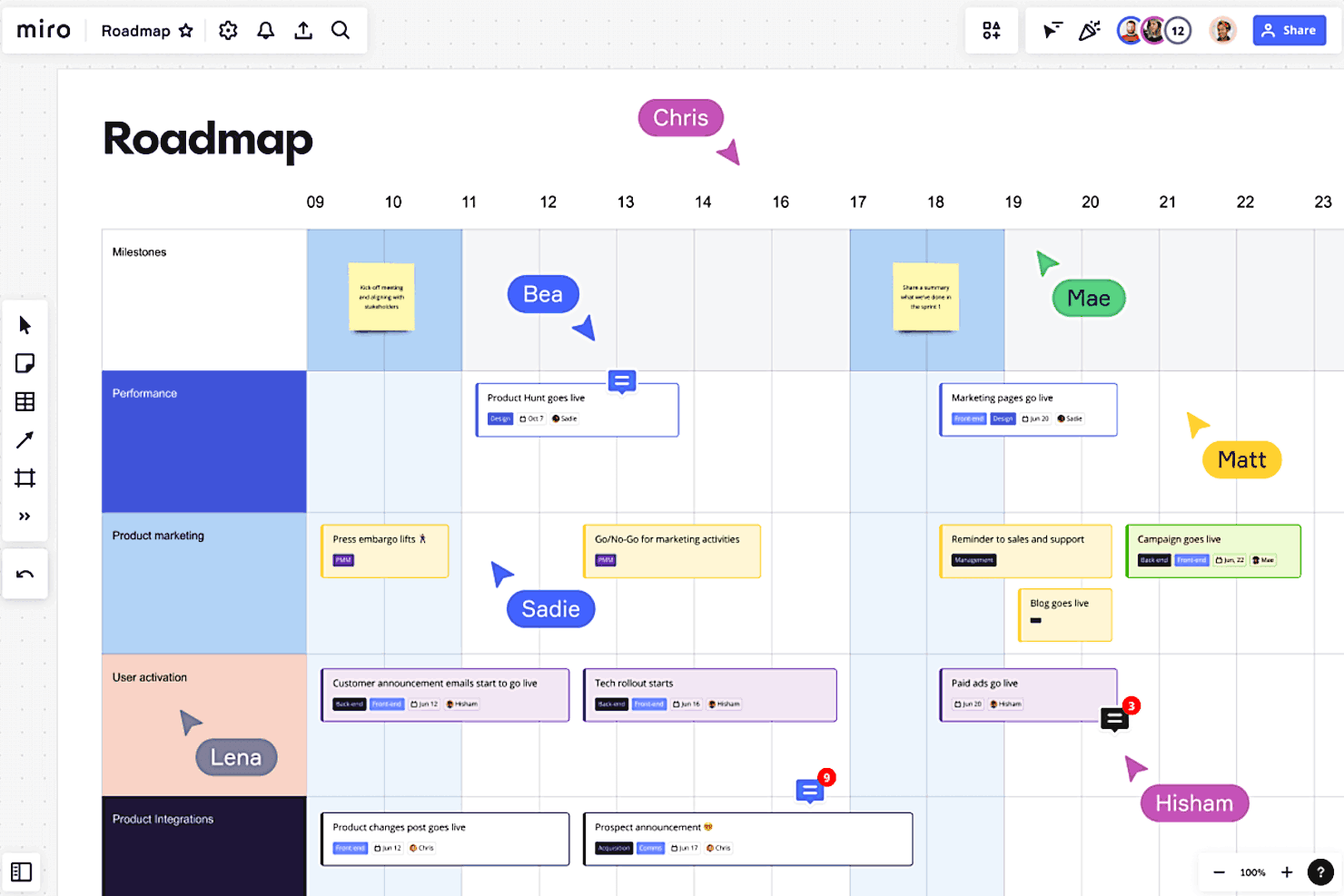
Miro è una piattaforma di collaborazione online che offre lavagne digitali per i team che devono fare brainstorming, pianificare e gestire progetti. Propone una gamma di strumenti pensati per migliorare la produttività e il lavoro di squadra quando il team si trova in sedi diverse.
Per chi è ideale Miro?
Miro è perfetto per strategist di prodotto e team di innovazione in organizzazioni distribuite nei settori della tecnologia e della consulenza. Si adatta a gruppi che utilizzano lavagne e modelli flessibili per visualizzare concetti di roadmap in modo collaborativo.
Perché ho scelto Miro
Ho scelto Miro per la sua lavagna virtuale flessibile, completata da una ricca libreria di modelli. Questa comprende template per roadmap di prodotto agile e roadmap di epic & feature, così da favorire la collaborazione e perfezionare i processi di pianificazione.
Le integrazioni di Miro con strumenti come Jira e Azure DevOps agevolano la gestione dei flussi di lavoro e aiutano il team a restare allineato su obiettivi e scadenze. La collaborazione in tempo reale è particolarmente utile per i team distribuiti e facilita una comunicazione efficace e un corretto allineamento dei progetti.
Funzionalità principali di Miro
Miro offre anche diverse altre funzionalità che lo rendono utile per la gestione di progetti e roadmap.
- Strumenti AI: Funzioni come flussi e assistenti forniscono insight sui tuoi progetti e consentono di automatizzare attività ripetitive.
- Opzioni di personalizzazione: È possibile adattare modelli e lavagne alle esigenze specifiche dei progetti e impostare task, milestone e scadenze personalizzate.
- Monitoraggio dei progressi: Tu e il tuo team potete aggiornare le roadmap mano a mano che i progetti avanzano, mantenendo così l’allineamento con gli obiettivi.
- Modalità presentazione: Permette di condividere e presentare chiaramente le roadmap agli stakeholder, migliorando comunicazione e trasparenza.
Integrazioni di Miro
Le integrazioni includono Microsoft Teams, Jira, Slack, Confluence, Azure, Asana, Google Drive e Dropbox.
Pros and Cons
Pros:
- Strumenti di collaborazione integrati come lavagne e template
- Adatto a team di progetto da remoto
- Efficace per discussioni di team e riunioni Scrum
Cons:
- Prestazioni occasionalmente lente su lavagne di grandi dimensioni
- Accesso offline limitato
New Product Updates from Miro
Miro Adds Japan Data Residency for Enterprise Customers
Miro has introduced Japan data residency for enterprise customers, offering in-region storage for production data, backups, and metadata, plus in-region compute infrastructure. For more information, visit Miro's official site.

ClickUp
Ideale per l’assegnazione delle attività basata su AI
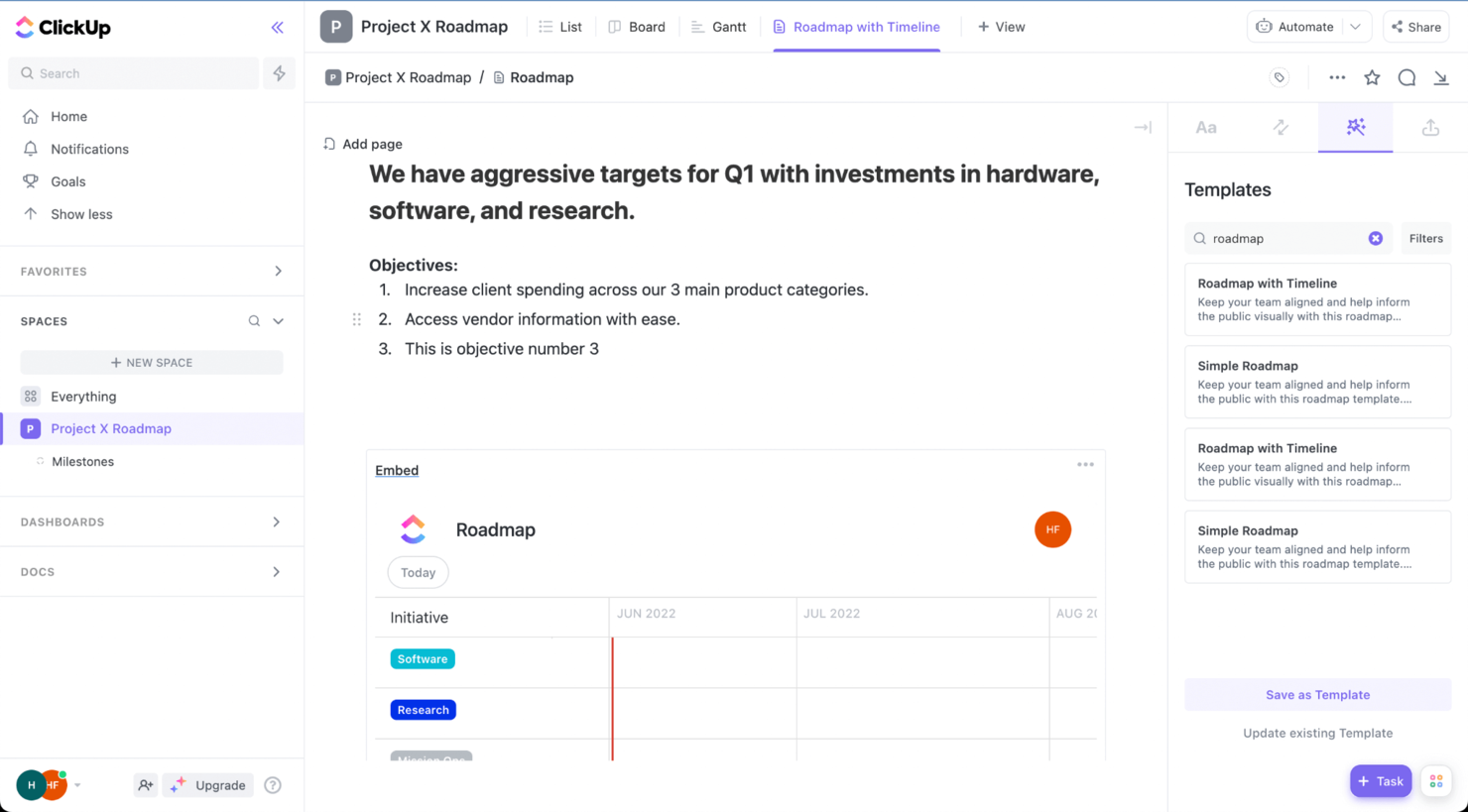
ClickUp è uno strumento di gestione progetti progettato per riunire tutto il tuo lavoro in un unico posto. Offre una vasta gamma di funzionalità che rispondono alle esigenze dei team che desiderano organizzare attività, gestire progetti e aumentare la produttività.
Per chi è ideale ClickUp?
Responsabili di team e Product Lead in startup in crescita e aziende di medie dimensioni. È adatto a organizzazioni che utilizzano l’assegnazione delle attività basata su AI per supportare l’esecuzione della roadmap tra reparti.
Perché ho scelto ClickUp
Ho scelto ClickUp perché offre strumenti come i diagrammi di Gantt e i dashboard che aiutano a visualizzare le tempistiche dei progetti e a monitorare i progressi. Queste funzionalità rendono più semplice per te e il tuo team pianificare, eseguire e monitorare i progetti dall’inizio alla fine. Gli spazi di lavoro personalizzabili ti permettono di adattare la piattaforma alle tue specifiche esigenze e preferenze progettuali. Questa adattabilità offre flessibilità nella gestione dei progetti nel modo che funziona meglio per te.
Un altro motivo per cui ho scelto ClickUp è l’enfasi sulla gestione delle attività tramite AI e automazione. La piattaforma consente di suddividere i progetti in attività gestibili e assegnarle al team con scadenze e priorità chiare. Le funzionalità di automazione aiutano a ridurre il lavoro manuale automatizzando le attività ripetitive, consentendo di risparmiare tempo e minimizzare gli errori. Questo ti permette di concentrarti maggiormente sulla pianificazione strategica e meno sulle attività amministrative.
Funzionalità principali di ClickUp
ClickUp offre una serie di altre funzionalità progettate per la gestione delle roadmap di progetto che possono contribuire ad aumentare la produttività.
- Viste personalizzabili: Puoi utilizzare viste elenco, carico di lavoro, calendario, Gantt e board per gestire efficacemente le tempistiche e le fasi di produzione.
- Campi e stati personalizzati predefiniti: Consentono al tuo team di inserire dettagli fondamentali e monitorare l’avanzamento delle attività in modo fluido.
- Definizione e monitoraggio degli obiettivi: Puoi impostare obiettivi chiari e monitorare i progressi, aiutando a mantenere il team allineato.
- Gestione dei rischi: Puoi documentare e monitorare potenziali rischi, preparare strategie di mitigazione in modo proattivo e migliorare la resilienza del progetto.
Integrazioni di ClickUp
Le integrazioni includono Slack, Microsoft Teams, Google Drive, Dropbox, Zoom, Google Calendar, Outlook, Jira, Trello, Asana, GitHub e Zapier.
Pros and Cons
Pros:
- Personalizza flussi di lavoro e gestione delle attività in base alle tue esigenze
- Strumenti di collaborazione per comunicazione interdipartimentale
- Diverse opzioni di visualizzazione delle attività come elenchi, board e diagrammi di Gantt
Cons:
- Può essere troppo complesso per la semplice gestione delle attività
- L’abbondanza di funzionalità può risultare travolgente
New Product Updates from ClickUp
ClickUp Adds Meetings Hub, Super Agent Templates, and ZoomInfo Integration
ClickUp adds a searchable Meetings Hub, new ways to clone and template Super Agents, and a ZoomInfo integration through the App Center. These updates improve meeting retrieval, agent reuse, and access to sales intelligence. For more information, visit ClickUp’s official site.

Shortcut
Ideale per la pianificazione degli sprint

Shortcut è uno strumento di gestione dei progetti progettato per aiutare te e il tuo team a organizzare e visualizzare i progetti in modo efficace. Offre una gamma di funzionalità come le bacheche Kanban e le roadmap, che facilitano l'allineamento del lavoro del team con gli obiettivi aziendali.
Per chi è ideale Shortcut?
Responsabili ingegneria e team di prodotto in startup e aziende di software di medie dimensioni. Supporta la pianificazione di roadmap basate su sprint strettamente legate ai backlog di sviluppo.
Perché ho scelto Shortcut
Ho scelto Shortcut perché offre strumenti per le roadmap di progetto che ti permettono di pianificare, visualizzare e organizzare i tuoi sprint. Con questa funzionalità, puoi allineare il lavoro del team con gli obiettivi dell'azienda per assicurarti che tutti siano sulla stessa linea. La possibilità di personalizzare i flussi di lavoro e monitorare i progressi rende più semplice gestire più progetti contemporaneamente.
Un altro motivo per cui ho scelto Shortcut è la sua attenzione alla collaborazione. Integrandosi con piattaforme come GitHub e Slack, consente al tuo team di comunicare efficacemente e di rimanere aggiornato con informazioni in tempo reale. Questo aiuta anche a mantenere la visibilità sui progetti e ad informare gli stakeholder senza la necessità di riunioni costanti.
Funzionalità principali di Shortcut
Shortcut offre una suite di altre funzionalità che lo rendono una scelta interessante per il software di roadmap dei progetti.
- Bacheche Kanban: Tu e il tuo team potete visualizzare e monitorare l'avanzamento del lavoro in modo chiaro e organizzato.
- Backlog: Ti consente di organizzare e dare priorità alle attività future, così il team sa sempre cosa c'è in agenda.
- Reportistica: Puoi ottenere informazioni sulle performance e sui progressi del team, il che ti aiuta a misurare il successo e identificare aree di miglioramento.
- Obiettivi: Facilita l'allineamento delle attività con gli obiettivi generali dell'azienda, così ogni attività contribuisce al quadro più ampio.
Integrazioni di Shortcut
Le integrazioni includono GitHub, Slack, GitLab, Figma, Dropbox, Google Drive, Google Sheets, Zendesk, Everhour e Miro.
Pros and Cons
Pros:
- Funzioni di reportistica complete
- Monitoraggio integrato dello sviluppo prodotto
- Facile da usare dopo averlo imparato
Cons:
- La prioritizzazione manuale nella vista Kanban è laboriosa
- Difficile gestire più storie in una colonna

Lucen
Ideale per visualizzazioni rapide dei progetti
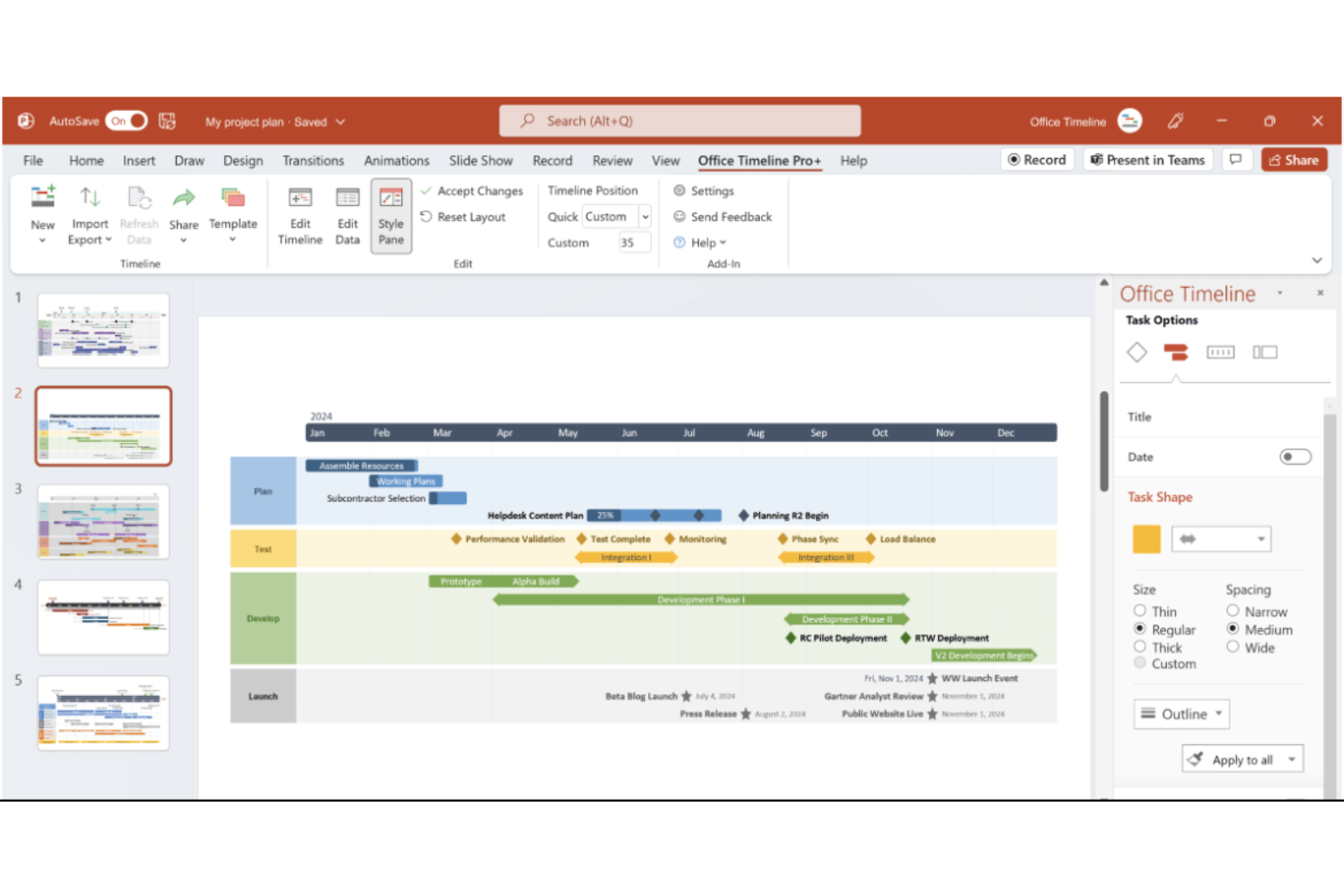
Office Timeline è uno strumento di project management progettato per creare cronologie e diagrammi di Gantt. Offre un modo efficiente per trasformare i dati di progetto in formati visivi chiari che migliorano la comunicazione con le parti interessate.
A chi è rivolto Office Timeline?
Sponsor di progetto e analisti PMO in contesti aziendali di piccole, medie e grandi dimensioni. Supporta i professionisti che necessitano di visualizzazioni della roadmap chiare e pronte per la presentazione, utili per comunicazioni rivolte ai dirigenti.
Perché ho scelto Office Timeline
Una delle caratteristiche più importanti di Office Timeline è la sua capacità di creare rapidamente cronologie dettagliate direttamente in PowerPoint. Il software offre anche ampie opzioni di personalizzazione, così puoi adattare le visualizzazioni di progetto alle esigenze specifiche del tuo team. Inoltre, Office Timeline mette a disposizione uno strumento web che consente di progettare cronologie ovunque, offrendo flessibilità e collaborazione a distanza.
Un altro motivo per cui ho scelto Office Timeline è l'enfasi sullo storytelling visivo, fondamentale per una gestione efficace dei progetti. Il software aiuta a convertire dettagli complessi in rappresentazioni sintetiche, permettendo una comunicazione chiara dei piani a dirigenti e clienti. Questo focus sulla comunicazione visiva non solo migliora la comprensione, ma mantiene anche il team coinvolto e informato.
Caratteristiche principali di Office Timeline
Office Timeline offre diverse altre funzionalità che lo rendono utile per creare roadmap di progetto.
- Swimlane: consente di organizzare attività, team e fasi in sezioni visive per gestire meglio i flussi di lavoro.
- Sotto-Swimlane: questa funzione offre una struttura gerarchica che permette una gestione del progetto dettagliata e chiara.
- Pianificato vs. Avanzamento reale: puoi visualizzare e confrontare l’avanzamento reale del progetto rispetto ai piani originali, facilitando l’allineamento e l’approvazione delle parti interessate.
- Importazione dati: consente di integrare senza problemi i dati di progetto da Excel, Microsoft Project e altri strumenti per visualizzazioni curate e professionali.
Integrazioni di Office Timeline
Le integrazioni includono Microsoft Project, Excel, Smartsheet, Jira, Wrike, PowerPoint, Google Documenti, Google Presentazioni e Google Fogli.
Pros and Cons
Pros:
- Fornisce un’interfaccia drag-and-drop per una creazione intuitiva delle cronologie
- Ideale per cronologie di progetti piccoli e medi
- Offre modelli personalizzabili che fanno risparmiare tempo
Cons:
- Mancano funzionalità di collaborazione in tempo reale
- Flessibilità limitata per flussi di lavoro progettuali unici

Ideale per agenzie e società di consulenza

Bonsai è una piattaforma di gestione aziendale progettata per aiutare agenzie, società di consulenza e altri fornitori di servizi professionali a semplificare i flussi di lavoro e migliorare le operazioni. È uno strumento completo che integra la gestione dei progetti con le esigenze specifiche dei flussi di lavoro delle agenzie.
Per chi è più indicato il software Bonsai Agency?
Titolari di agenzie e responsabili di progetto in piccole società di consulenza e studi creativi. Funziona bene per i team che gestiscono le roadmap dei clienti insieme a contratti e flussi di lavoro di fatturazione.
Perché ho scelto Bonsai
Ho scelto Bonsai per le sue funzionalità di project management che semplificano i flussi di lavoro, il che è utile per agenzie e consulenze. Questa caratteristica mantiene il team allineato e organizzato dal primo contatto fino al completamento del progetto. Le funzionalità di pianificazione in tempo reale consentono di effettuare aggiustamenti immediati in base al carico di lavoro e allo stato delle attività, aspetto fondamentale per mantenere i progetti in linea con le scadenze.
Inoltre, il monitoraggio del budget di Bonsai fornisce aggiornamenti in tempo reale sui budget di progetto, sulle attività e sulle prestazioni del team, così hai sempre una visione chiara della salute finanziaria del progetto. Il rilevamento delle ore facilita una gestione efficiente del tempo e l'organizzazione dei fogli di presenza per il tuo team.
Caratteristiche principali di Bonsai
Bonsai offre una serie di altre funzionalità per la gestione di progetti e roadmap in agenzie e società di consulenza.
- Diagrammi di Gantt: Consente di visualizzare le tempistiche e le dipendenze dei progetti, facilitando la pianificazione e l'aggiustamento delle scadenze ove necessario.
- Monitoraggio delle Milestone: Puoi impostare e monitorare le tappe fondamentali del progetto per assicurarti che il team rimanga sulla giusta strada e rispetti le scadenze critiche.
- Collaborazione in tempo reale: Agevola la comunicazione e il coordinamento senza soluzione di continuità tra i membri del team, aiutando tutti a rimanere informati e allineati.
- Bacheche Kanban: Permette di organizzare le attività visivamente per migliorare la gestione del flusso di lavoro e una migliore priorità delle attività.
Integrazioni di Bonsai
Le integrazioni includono QuickBooks, Zapier, Calendly, Xero e HiBob.
Pros and Cons
Pros:
- Ideale per piccole aziende e agenzie
- Facile da utilizzare
- Fatturazione, rilevamento ore e gestione dei contratti in un unico strumento
Cons:
- La funzione di gestione dei contratti richiede un periodo di apprendimento
- Personalizzazione limitata per documenti e portale clienti

Ideale per cronologie visive dei progetti

ProjectManager è un software di project management progettato per migliorare la produttività e l'efficienza del tuo team. Offre una gamma di strumenti che coprono diversi aspetti della gestione dei progetti, dalla pianificazione e schedulazione all'esecuzione e al monitoraggio.
Per chi è ideale ProjectManager?
Per direttori di progetto e responsabili operativi in organizzazioni di medie dimensioni nei settori dell'edilizia, dell'IT e dell'ingegneria. È adatto a team che necessitano di cronologie visive per collegare la pianificazione strategica con il monitoraggio dell'esecuzione.
Perché ho scelto ProjectManager
Ho scelto ProjectManager per i suoi potenti diagrammi di Gantt e dashboard. Questi strumenti offrono una rappresentazione visiva delle tempistiche dei tuoi progetti e forniscono dati in tempo reale, così tu e il tuo team potete restare allineati con i vostri obiettivi.
Inoltre, la funzione dei portafogli progetti consente di gestire più progetti a livello generale e mantenere l'allineamento con gli obiettivi strategici dell'organizzazione. Gli approfondimenti AI di ProjectManager offrono riepiloghi istantanei dei dati di progetto, utili nei processi decisionali.
Funzionalità chiave di ProjectManager
ProjectManager offre numerose altre funzionalità per aiutarti a gestire le roadmap dei tuoi progetti.
- Monitoraggio del tempo: Consente a te e al tuo team di registrare le ore direttamente nel software e fornisce una panoramica chiara dell'allocazione del tempo su ciascun progetto.
- Automazione dei workflow: Puoi automatizzare le attività ripetitive per snellire i processi e aiutare il team a concentrarsi sulle attività critiche del progetto.
- Bacheche Kanban: Permette di gestire la priorità e l'esecuzione delle attività attraverso un'interfaccia visiva drag-and-drop, aumentando trasparenza e collaborazione.
- Gestione delle risorse: Puoi monitorare e allocare le risorse in modo efficace per mantenere equilibrio nei carichi di lavoro e ottimizzare la produttività del team.
Integrazioni ProjectManager
Le integrazioni includono Microsoft Teams, Slack, Jira, Microsoft Project, Power BI, Acumatica, Excel, Office 365 e Trello.
Pros and Cons
Pros:
- Strumenti di collaborazione facilitano la comunicazione efficace
- I diagrammi di Gantt aiutano a tracciare dipendenze e percorsi critici
- Il monitoraggio integrato del tempo aiuta a controllare la produttività
Cons:
- Meno opzioni di personalizzazione rispetto ad altri strumenti
- Le numerose funzionalità possono risultare inizialmente complesse
Altri software per roadmap di progetto
Ecco alcuni altri strumenti che non sono entrati nella mia lista principale, ma che vale la pena prendere in considerazione.
- Kantree
Ideale per viste di progetto personalizzabili
- Tempo Roadmapping Software
Ideale per la prioritizzazione delle attività
- Ravetree
Ideale per roadmap con Gantt chart
- Visor
Ideale per template di progetto guidati dall’IA
- Acuity PPM
Ideale per modelli di valutazione configurabili
- GanttPRO
Ideale per la visualizzazione interattiva dei diagrammi di Gantt
- Celoxis
Ideale per il monitoraggio dei progetti in tempo reale
- Scoro
Ideale per la pianificazione in tempo reale delle tappe
- Hive
Ideale per la definizione di obiettivi e il monitoraggio delle milestone
- airfocus
Ideale per centralizzare la gestione dei progetti
- GoodDay
Ideale per modelli di roadmap
- TaskRay
Ideale per la gestione dei progetti nativa su Salesforce
- PathPro
Ideale per la condivisione di roadmap pubbliche e private


Come valuto i software per la roadmap di progetto
Il software per la roadmap di progetto è ciò a cui i team ricorrono quando devono comunicare non solo cosa verrà realizzato, ma anche quando e perché—che si tratti di un PMO che presenta un piano trimestrale alla leadership o di un project manager che allinea ingegneria, design e prodotto attorno a una timeline di consegna condivisa. Quando valuto gli strumenti in questo settore, penso su due livelli: cosa deve saper fare bene ogni opzione per meritare un posto nell'elenco, e cosa invece distingue una scelta dall'altra per team e contesti specifici.
Funzionalità di base (Requisiti fondamentali per questa lista)
Per il software dedicato alle roadmap di progetto, le funzionalità di base che verifico e valuto sono:
- Visualizzazione della timeline: Controllo se lo strumento supporta visualizzazioni Gantt o swimlane drag-and-drop con scale temporali regolabili da settimane a trimestri fino ad anni.
- Visualizzazioni multiple: Le visualizzazioni bacheca, elenco, calendario e timeline devono essere tutte disponibili, così che stakeholder diversi possano consultare gli stessi dati nel modo che preferiscono.
- Milestone e dipendenze: Cerco indicatori chiari di milestone e la mappatura delle dipendenze—ad esempio, segnalare che il QA non può iniziare finché lo sviluppo non completa uno sprint.
- Collaborazione e condivisione: Link condivisibili, permessi basati sui ruoli e commenti in tempo reale sono essenziali se un PMO deve inviare una roadmap in sola lettura alla leadership.
- Campi personalizzati e filtri: I team etichettano il lavoro in modi diversi, quindi verifico se è possibile aggiungere stati, tag e swimlane personalizzati per adattarli al proprio flusso di lavoro.
- Visualizzazioni per stakeholder: Valuto se lo strumento permette di creare versioni filtrate e specifiche per il pubblico della stessa roadmap—un executive summary vs. un piano a livello di team.
- Esportazione e presentazione: Export puliti in PDF, PNG o PowerPoint sono imprescindibili quando la roadmap deve finire in una presentazione a consiglio o in una proposta al cliente.
Uno strumento deve offrire la maggior parte di queste capacità per meritare un posto nell'elenco. Da lì, considero cosa contraddistingue ogni strumento.
Caratteristiche distintive (Cosa distingue le opzioni)
Nel valutare quali software per roadmap di progetto includere, cerco funzionalità di allineamento strategico come collegamenti agli obiettivi, framework OKR o sistemi di prioritizzazione integrati che collegano gli elementi della roadmap agli obiettivi aziendali. Considero anche la profondità delle integrazioni—gli strumenti che offrono sincronizzazione live bidirezionale con Jira o Asana facilitano il mantenimento della roadmap aggiornata rispetto all'avanzamento reale del progetto. Report a livello di portfolio e dipendenze trasversali tra roadmap sono particolarmente preziosi per le organizzazioni che gestiscono più iniziative parallele.
Criteri che valuto oltre le funzionalità
Valuto quanto ogni strumento si adatti a team di dimensioni diverse e a diversi profili di acquirente—un team di cinque persone ha bisogno di una configurazione rapida e di un piano gratuito o economico, mentre un PMO che gestisce decine di progetti necessita di SSO, permessi granulari e tracciamenti di audit. Anche la trasparenza dei prezzi è importante, in particolare se i posti solo per visualizzazione sono gratuiti o a pagamento, visto che spesso le roadmap sono consultate da molti più utenti di quanti siano quelli che le modificano. Valuto inoltre la qualità dell'onboarding, come le librerie di template e le guide passo passo, perché uno strumento per le roadmap che richiede settimane per essere configurato vanifica lo scopo.
Come scegliere un software per roadmap di progetto
È facile perdersi in lunghi elenchi di funzionalità e strutture tariffarie complesse. Per aiutarti a rimanere concentrato mentre affronti il tuo processo di selezione del software, ecco una lista di controllo dei fattori da tenere a mente:
| Fattore | Cosa considerare |
|---|---|
| Scalabilità | Questo strumento crescerà insieme alle esigenze del tuo team? |
| Integrazioni | Lo strumento si integra perfettamente con le app che già utilizzi? |
| Personalizzazione | Puoi adattare il software al flusso di lavoro specifico del tuo team? |
| Semplicità d'uso | Il tuo team troverà il software facile da imparare e da utilizzare? |
| Budget | Il prezzo rientra nel tuo budget, sia ora sia quando il team crescerà? |
| Misure di sicurezza | Il software dispone di potenti misure di sicurezza per proteggere i tuoi dati? |
| Collaborazione | Lo strumento supporta una collaborazione efficace tra i membri del tuo team? |
| Strumenti di reportistica | Puoi generare informazioni utili e report che facilitino il processo decisionale? |
Tendenze nei software per roadmap di progetto
Durante la mia ricerca, ho raccolto innumerevoli aggiornamenti dei prodotti, comunicati stampa e registri delle versioni di diversi fornitori di software per roadmap di progetto. Ecco alcune delle tendenze emergenti che sto tenendo d'occhio:
- Approfondimenti basati sull'AI: l'AI viene utilizzata per analizzare i dati dei progetti e suggerire modi per ottimizzare le tempistiche o evidenziare potenziali ostacoli, aiutando gli utenti a creare una tabella di marcia più adattabile ai cambiamenti. Alcuni strumenti offrono anche analisi predittive per aiutare i team a prevenire i problemi futuri prima che si verifichino. Ad esempio, l'AI potrebbe analizzare i dati dei progetti passati per migliorare la creazione della tabella di marcia suggerendo modifiche alle attività in tempo reale.
- Pianificazione degli scenari: gli strumenti stanno aggiungendo funzionalità di pianificazione degli scenari che permettono ai team di visualizzare percorsi e risultati alternativi, facilitando la creazione di una tabella di marcia del progetto capace di adattarsi al cambiamento delle priorità. Questa funzione è utile quando si crea un modello di tabella di marcia del programma o si modifica un modello di tabella di marcia dell'applicazione nel corso del progetto.
- Elementi di ludicizzazione: la ludicizzazione nei software per progetti è sempre più popolare per aumentare il coinvolgimento del team. Aggiungendo distintivi e riconoscimenti per il completamento delle attività, questi strumenti mantengono i team motivati e concentrati sugli obiettivi del progetto. Alcuni strumenti offrono persino gratuitamente un creatore di tabelle di marcia con elementi di ludicizzazione, aiutando a premiare i progressi e a mantenere i team concentrati mentre attraversano le varie fasi del progetto.
- Elementi visivi interattivi della tabella di marcia: i fornitori stanno migliorando gli elementi visivi delle tabelle di marcia per rendere le tempistiche più intuitive e interattive, consentendo agli utenti di accedere a visualizzazioni dettagliate delle attività senza cambiare schermata. I team possono inoltre utilizzare strumenti di visualizzazione delle tabelle di marcia dei prodotti che permettono di passare dagli obiettivi di alto livello alle attività specifiche, una funzione particolarmente utile per chi sta cercando di capire come creare una tabella di marcia del progetto con tutti i dettagli in un unico luogo, facilmente accessibile.
- Monitoraggio della sostenibilità: un numero crescente di strumenti software sta aggiungendo funzionalità per monitorare l'impatto ambientale delle attività e delle risorse del progetto, rendendo il software per la pianificazione strategica un'opzione utile per le aziende impegnate in iniziative ecologiche. Le funzionalità di monitoraggio della sostenibilità consentono inoltre ai team di allineare le tappe fondamentali dei progetti agli obiettivi di tutela ambientale.
Che cos'è il software per le tabelle di marcia dei progetti?
Il software per le tabelle di marcia dei progetti è uno strumento di pianificazione visiva che definisce i principali risultati da consegnare, le tempistiche e le priorità di un progetto o programma. Aiuta i responsabili di progetto, i responsabili dei prodotti e i team interfunzionali ad allinearsi sulla strategia, monitorare le dipendenze e modificare i piani quando cambiano le priorità.
I migliori strumenti supportano sia una visibilità dall'alto verso il basso sia il coordinamento a livello di team, rendendoli essenziali per la gestione di iniziative complesse e articolate in più fasi.
Funzionalità del software per le tabelle di marcia dei progetti
Quando scegli il software per le tabelle di marcia dei progetti, presta attenzione alle seguenti funzionalità chiave:
- Pianificazione visiva delle tempistiche: puoi organizzare attività, tappe fondamentali e risultati da consegnare su una sequenza temporale chiara e interattiva, così tu e il tuo team sapete cosa deve essere completato e quando.
- Strumenti di collaborazione: puoi lavorare con i colleghi in tempo reale e condividere feedback, aggiornamenti e file direttamente nella tabella di marcia del progetto, rendendo il lavoro di squadra più fluido e coinvolgente.
- Monitoraggio delle tappe fondamentali: puoi impostare, monitorare e celebrare le tappe fondamentali, aiutando tutti a concentrarsi sia sui traguardi importanti sia sui piccoli successi che fanno avanzare il progetto.
- Gestione delle risorse: ti aiuta a tenere sotto controllo il carico di lavoro del team, assegnare le attività in modo efficiente, prevenire il burnout e assicurarti che nessuno sia sottoutilizzato.
- Modelli personalizzabili: ti aiutano a iniziare più rapidamente scegliendo tra una vasta gamma di modelli di tabelle di marcia, che puoi adattare agli obiettivi e allo stile specifici del tuo progetto.
- Monitoraggio e report dei progressi: puoi verificare l'andamento del progetto tramite pannelli di controllo e report integrati e ottenere informazioni aggiornate che ti consentono di individuare rischi e successi.
- Gestione delle dipendenze: ti consente di collegare le attività correlate, in modo che le modifiche o i ritardi vengano riflessi automaticamente nella sequenza temporale complessiva e le sorprese siano ridotte al minimo.
- Funzionalità di integrazione: dovresti poter effettuare la connessione a strumenti popolari come Slack, Jira o Trello, così i flussi di lavoro e le informazioni possono passare facilmente da un luogo all'altro.
- Controlli delle autorizzazioni: ti consentono di decidere chi può visualizzare, modificare o commentare la tabella di marcia, bilanciando trasparenza e controllo e mantenendo privati i piani sensibili quando necessario.
- Accessibilità da dispositivi mobili: puoi controllare e aggiornare la tabella di marcia ovunque tramite l'app mobile, così il lavoro può procedere anche quando sei in movimento.
Funzionalità comuni dell'AI nei software per le tabelle di marcia dei progetti
Oltre alle funzionalità standard dei software per le tabelle di marcia dei progetti, molte di queste soluzioni offrono funzionalità di AI come:
- Prioritizzazione automatizzata delle attività: Questo strumento di IA può analizzare i dettagli e le dipendenze del progetto per suggerire quali attività svolgere per prime e aiutarti a mantenere la concentrazione.
- Identificazione predittiva dei rischi: Il software individua possibili colli di bottiglia o ritardi prima che diventino problemi, consentendoti di risolvere le criticità in modo proattivo.
- Previsione intelligente delle scadenze: Questa funzionalità di IA può prevedere se riuscirai a raggiungere le tappe fondamentali in base al ritmo del team e ai dati storici, per offrirti una tempistica realistica.
- Suggerimenti per l'ottimizzazione delle risorse: Gli strumenti di IA possono valutare i carichi di lavoro del team e assegnare le attività per ottenere la massima efficienza, aiutando tutti a rimanere produttivi senza esaurirsi.
- Report e analisi intelligenti: Riceverai report generati automaticamente che evidenziano progressi, rischi e opportunità, senza dover analizzare personalmente i dati.
- Aggiornamenti in linguaggio naturale: Il software può trasformare i tuoi brevi appunti o le tue chat in aggiornamenti formali del piano di progetto, facendoti risparmiare tempo e rendendo meno gravosa la preparazione dei report sullo stato dei lavori.
Vantaggi del software per la pianificazione dei progetti
L'implementazione di un software per la pianificazione dei progetti offre diversi vantaggi al tuo team e alla tua azienda. Ecco alcuni dei benefici che puoi aspettarti:
- Pianificazione migliorata: Aiuta i team a definire le fasi del progetto, offrendo a tutti una visione chiara di ciò che deve essere fatto e quando.
- Collaborazione potenziata: Consente ai membri del team di lavorare insieme sulle attività in tempo reale, semplificando gli aggiornamenti e la comunicazione.
- Migliore assegnazione delle risorse: Aiuta i responsabili ad assegnare le risorse in modo più efficace visualizzando il carico di lavoro e le dipendenze tra le attività.
- Maggiore responsabilità: Tiene traccia dei progressi delle attività e delle tappe fondamentali, rendendo chiaro chi è responsabile di cosa.
- Maggiore chiarezza nell'allineamento agli obiettivi: Mantiene visibili gli obiettivi del progetto, assicurando che ogni membro del team comprenda come il proprio lavoro contribuisca agli obiettivi generali.
- Mitigazione dei rischi: Consente di pianificare diversi scenari, aiutando i team a prepararsi agli ostacoli potenziali e a ridurre al minimo i ritardi.
- Decisioni basate sui dati: Offre strumenti di reportistica che forniscono informazioni ricavate dai dati del progetto, supportando decisioni più consapevoli durante l'intero progetto.
Costi e prezzi del software per la pianificazione dei progetti
La scelta di un software per la pianificazione dei progetti richiede la conoscenza dei diversi modelli e piani tariffari disponibili. I costi variano in base alle funzionalità, alle dimensioni del team, ai componenti aggiuntivi e ad altri fattori. La tabella seguente riassume i piani più comuni, i relativi prezzi medi e le funzionalità generalmente incluse nelle soluzioni software per la pianificazione dei progetti:
Tabella comparativa dei piani per il software di pianificazione dei progetti
| Tipo di piano | Prezzo medio | Funzionalità comuni |
|---|---|---|
| Piano gratuito | $0/user/month | Creazione di base del piano di progetto, monitoraggio limitato delle attività, visualizzazione semplice della tempistica e supporto di base |
| Piano personale | $5–$25/user/month | Visualizzazione completa della tempistica, monitoraggio delle tappe fondamentali, dipendenze tra le attività, integrazioni e accesso al supporto |
| Piano aziendale | $25–$50/user/month | Reportistica avanzata, strumenti di collaborazione, modelli personalizzabili e pianificazione degli scenari |
| Piano aziendale avanzato | $50–$100/user/month | Accesso illimitato a tutte le funzionalità, impostazioni di sicurezza personalizzate, analisi avanzate e supporto dedicato |
Domande frequenti sul software per la roadmap di progetto
Trova le risposte alle domande più comuni che altre persone pongono su questo argomento.
Qual è la differenza tra una roadmap di progetto e un diagramma di Gantt?
La differenza principale è che una roadmap di progetto offre una panoramica di alto livello degli obiettivi del progetto, delle tappe fondamentali e degli orientamenti strategici, mentre un diagramma di Gantt si concentra sulla pianificazione dettagliata delle attività e sulle dipendenze.
\u003cul\u003e
\u003cli\u003e\u003cstrong\u003eRoadmap di progetto\u003c/strong\u003e: una roadmap è uno strumento strategico che mostra le principali fasi e gli obiettivi di un progetto, aiutando gli stakeholder a comprendere cosa li attende. Usa una roadmap per comunicare direzione e strategia agli stakeholder.\u003c/li\u003e
\u003cli\u003e\u003cstrong\u003eDiagramma di Gantt\u003c/strong\u003e: un diagramma di Gantt è più dettagliato e suddivide il progetto in attività specifiche, tempistiche e dipendenze. Affidati ai diagrammi di Gantt per monitorare l’avanzamento delle attività e l’allocazione delle risorse a livello granulare.\u003c/li\u003e
\u003c/ul\u003e
Le roadmap di progetto e i diagrammi di Gantt si completano a vicenda, offrendo sia una visione di alto livello sia una visione dettagliata del progetto, entrambe preziose per diverse fasi della gestione dei progetti. I project manager senior utilizzano in genere entrambi: la roadmap per gli aggiornamenti ai dirigenti e i diagrammi di Gantt per la pianificazione del team.
In che modo il software per la roadmap di progetto può favorire la condivisione delle conoscenze e la collaborazione?
Ecco come il software per la roadmap di progetto può supportare la collaborazione e la condivisione delle conoscenze:
\u003col\u003e
\u003cli\u003e\u003cstrong\u003eHub centralizzato delle conoscenze:</strong\u003e tutta la documentazione, gli aggiornamenti e le decisioni rilevanti del progetto risiedono in un'unica posizione accessibile, così ogni stakeholder dispone delle informazioni più recenti senza dover cercare tra conversazioni via email o chat.\u003c/li\u003e
\u003cli\u003e\u003cstrong\u003eVisibilità chiara delle tappe fondamentali:</strong\u003e le roadmap basate sulle tappe fondamentali mantengono obiettivi e scadenze in primo piano, aiutando i team a rimanere allineati sia sul “cosa” sia sul “quando”.\u003c/li\u003e
\u003cli\u003e\u003cstrong\u003eComunicazione in tempo reale:</strong\u003e gli aggiornamenti in tempo reale segnalano immediatamente cambiamenti, rischi o ritardi, consentendo ai team di affrontare rapidamente i problemi e prendere decisioni informate senza colli di bottiglia.\u003c/li\u003e
\u003cli\u003e\u003cstrong\u003eStruttura guidata con modelli:</strong\u003e i modelli integrati semplificano il processo di creazione di una roadmap, rendendo più facile per i nuovi utenti contribuire in modo efficace senza rallentare il team.\u003c/li\u003e
\u003cli\u003e\u003cstrong\u003eModifica collaborativa:</strong\u003e più utenti possono contribuire, commentare e modificare direttamente la roadmap, favorendo un ambiente inclusivo in cui i feedback possono essere messi immediatamente in pratica.\u003c/li\u003e
\u003c/ol\u003e
Quali tecniche di prioritizzazione posso utilizzare per creare una roadmap di progetto?
Quando si crea una roadmap di progetto, una prioritizzazione efficace è fondamentale per garantire che le risorse siano concentrate sulle attività che generano il maggior valore. Diverse tecniche collaudate possono aiutarti a decidere cosa dovrebbe venire prima nella roadmap:
\u003col\u003e
\u003cli\u003e\u003cstrong\u003eMetodo MoSCoW:</strong\u003e classifica le attività come “Indispensabili”, “Dovrebbero esserci”, “Potrebbero esserci” e “Non ci saranno” per definire ciò che è essenziale rispetto a ciò che è facoltativo. Questo metodo è ideale per creare una roadmap delle tappe fondamentali in linea con risorse limitate.\u003c/li\u003e
\u003cli\u003e\u003cstrong\u003eMatrice di Eisenhower:</strong\u003e usa questa matrice due per due per classificare le attività in base a urgenza e importanza. È uno strumento semplice per identificare le attività ad alta priorità che richiedono un'attenzione immediata nella roadmap.\u003c/li\u003e
\u003cli\u003e\u003cstrong\u003ePunteggio RICE:</strong\u003e RICE sta per Portata, Impatto, Fiducia e Sforzo. Attribuire un punteggio alle attività in base a questi fattori aiuta a determinare quelle più preziose, garantendo che ogni voce della roadmap massimizzi l'impatto.\u003c/li\u003e
\u003cli\u003e\u003cstrong\u003eMatrice valore rispetto allo sforzo:</strong\u003e rappresentando le attività su una scala valore-sforzo, i team possono individuare rapidamente le “vittorie rapide” e i progetti ad alto impatto che non richiedono uno sforzo sproporzionato, mantenendo la roadmap snella e realizzabile.\u003c/li\u003e
\u003cli\u003e\u003cstrong\u003eMappatura delle storie utente:</strong\u003e comunemente utilizzato negli ambienti agili, questo approccio organizza le attività intorno ai percorsi e alle esigenze degli utenti, garantendo che la roadmap rifletta le priorità del mondo reale e offra valore concreto agli utenti finali.\u003c/li\u003e
\u003c/ol\u003e
In che modo gli strumenti per la roadmap di progetto gestiscono l'allocazione delle risorse tra più progetti?
Gli strumenti per la roadmap di progetto gestiscono l’allocazione delle risorse tra più progetti includendo funzionalità per visualizzare e gestire la capacità del team su progetti paralleli. Di solito sono disponibili calendari delle risorse, mappe di calore dell’allocazione e assegnazioni tramite trascinamento, così puoi vedere chi sta lavorando a cosa, individuare le sovra-allocazioni e riassegnare il lavoro in pochi secondi.
Alcune piattaforme si integrano direttamente con strumenti di monitoraggio del tempo o delle risorse umane, offrendo viste aggiornate della disponibilità e delle competenze. In qualità di project manager senior, puoi usare le funzionalità di filtraggio e reportistica per analizzare in dettaglio le previsioni del carico di lavoro, confrontare le allocazioni pianificate con quelle effettive e risolvere rapidamente i colli di bottiglia relativi alle risorse prima che incidano sulla consegna.
Come posso assicurarmi che la mia roadmap rimanga allineata agli obiettivi aziendali in evoluzione?
Per mantenere la roadmap allineata agli obiettivi aziendali in evoluzione, programma revisioni periodiche con gli stakeholder per discutere il cambiamento delle priorità, gli aggiornamenti della strategia aziendale e gli insegnamenti tratti dal lavoro in corso.
Molti strumenti per roadmap consentono di creare viste personalizzate per dirigenti e team, così ognuno può visualizzare il livello di dettaglio più utile. Puoi impostare dipendenze e risultati chiave collegati agli obiettivi aziendali, quindi aggiornare progetti o iniziative man mano che gli obiettivi dell’azienda evolvono. Usa la cronologia delle versioni e i thread dei commenti per garantire la tracciabilità, documentare le motivazioni alla base delle decisioni e rendere l’allineamento una pratica continua, non un evento annuale.
Infine, concentrati sulla flessibilità: le roadmap migliori sono documenti dinamici, non piani statici.

Qual è il prossimo passo?
Se stai cercando un software per la roadmap di progetto, contatta gratuitamente un consulente di SoftwareSelect per ricevere consigli.
Compili un modulo e fai una breve conversazione durante la quale verranno approfondite le tue esigenze specifiche. Successivamente riceverai una selezione ristretta di software da valutare. Ti supporteranno anche durante l'intero processo di acquisto, comprese le negoziazioni sul prezzo.