

I 10 migliori software per diagrammi di Gantt per Mac recensiti nel 2026

10 Miglior software per diagrammi di Gantt per Mac: selezione


Il software per diagrammi di Gantt per Mac è una risorsa preziosa per qualsiasi azienda composta da utenti Mac. Con il software giusto, i team possono migliorare la visualizzazione delle tempistiche dei progetti e aumentare l'efficienza nella gestione delle attività. Tuttavia, trovare il software per diagrammi di Gantt per Mac più adatto può essere una sfida, soprattutto considerando le numerose opzioni disponibili.
Avvalendomi della mia esperienza con i software di gestione dei progetti, ho testato e confrontato diversi tra i migliori software per diagrammi di Gantt disponibili per Mac. Successivamente, ho raccolto i risultati in recensioni approfondite per aiutarti a trovare il software migliore per le tue esigenze specifiche. Sono certo che nell'elenco seguente troverai il tuo prossimo software per diagrammi di Gantt compatibile con Mac.
Perché fidarsi dei nostri consigli sui software
Il nostro team testa e recensisce software dal 2012. In quanto project manager noi stessi, sappiamo quanto sia difficile — e importante — scegliere il software giusto.
Per questa guida, abbiamo valutato gli strumenti attraverso test pratici e ricerche indipendenti, assegnando un punteggio agli strumenti in base ai nostri criteri di selezione. Ci basiamo inoltre sulle competenze di leader di pensiero del settore e di professionisti attivi nella gestione dei progetti.
Le nostre recensioni riflettono il nostro giudizio editoriale umano, non un discorso di vendita.
Revisori esperti:
Tabella di confronto: software per diagrammi di Gantt per Mac
| Tool | Best For | Trial Info | Price | ||
|---|---|---|---|---|---|
| 1 | Ideale per dashboard personalizzati | Prova gratuita di 14 giorni + piano gratuito disponibile | Da $9/utente/mese (fatturato annualmente) | Website | |
| 2 | Ideale per la pianificazione visiva delle tempistiche | Prova gratuita di 15 giorni + piano gratuito + demo gratuita disponibile | A partire da $4/utente/mese (fatturato annualmente) | Website | |
| 3 | Ideale per la collaborazione del team in tempo reale | Piano gratuito + demo gratuita disponibile | Da $7/utente/mese (fatturato annualmente) | Website | |
| 4 | Ideale per cronologie di progetto visuali | Piano gratuito + demo gratuita disponibile | Da $10.99/utente/mese (fatturato annualmente) | Website | |
| 5 | Ideale per aziende di servizi al cliente | Prova gratuita di 30 giorni + demo gratuita disponibile | Da $9.99/utente/mese (fatturazione annuale) | Website | |
| 6 | Ideale per la gestione delle attività basata su cloud | Prova gratuita di 30 giorni + demo gratuita disponibile | Da $15/utente/mese (fatturazione annuale) | Website | |
| 7 | Ideale per la gestione delle dipendenze tra le attività | Piano gratuito disponibile | Da $8/membro/mese (fatturato annualmente) | Website | |
| 8 | Ideale per una visione completa dei progetti | Prova gratuita di 14 giorni + piano gratuito disponibile | Da $10/utente/mese (fatturato annualmente) | Website | |
| 9 | Ideale per un'integrazione efficiente con Asana | Prova gratuita di 7 giorni disponibile | Da $120/anno | Website | |
| 10 | Ideale per la pianificazione e programmazione integrata delle risorse | Piano gratuito disponibile | A partire da $4/utente/mese (fatturazione annuale) | Website |


Recensioni dei migliori software per diagrammi di Gantt per Mac
Di seguito trovi i miei riepiloghi dettagliati dei migliori software per diagrammi di Gantt per Mac iOS inclusi nella mia selezione. Le mie recensioni offrono una panoramica dettagliata delle funzionalità principali, dei pro e dei contro, delle integrazioni e dei casi d’uso ideali di ogni strumento, per aiutarti a trovare quello più adatto a te.

Ideale per dashboard personalizzati
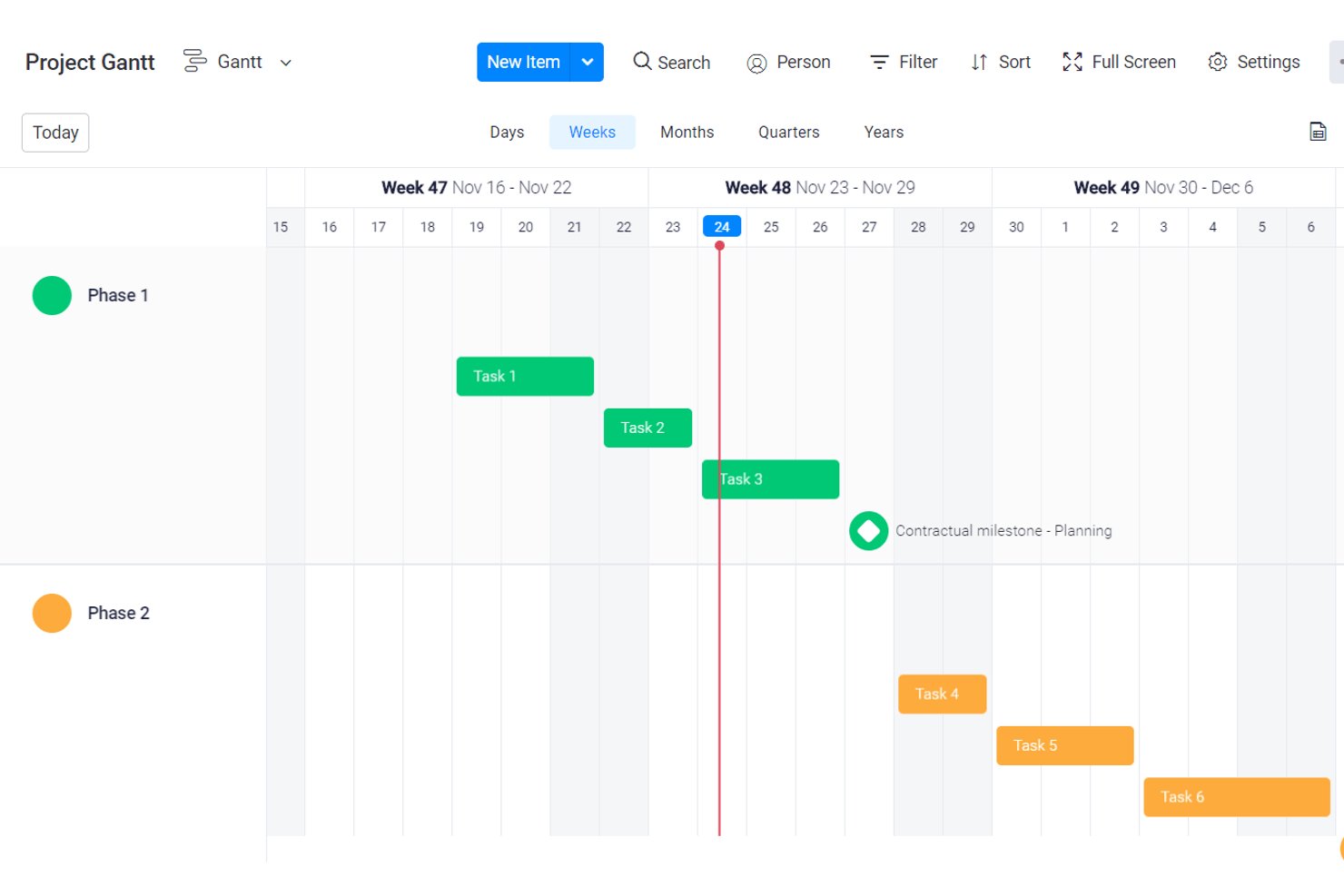
monday AI Workspace è una piattaforma di gestione dei progetti basata su browser che unisce cronologie a diagramma di Gantt, dipendenze tra attività, monitoraggio delle milestone, gestione dei carichi di lavoro e automazione dei flussi di lavoro potenziata dall'IA in un unico spazio di lavoro altamente configurabile.
Per chi è ideale monday AI Workspace?
È particolarmente adatto per team interfunzionali e project manager che necessitano di un monitoraggio flessibile e visuale dei progetti su più flussi di lavoro senza strumenti di pianificazione tradizionali e rigidi.
Perché ho scelto monday AI Workspace
Ho scelto monday AI Workspace perché la personalizzazione dei dashboard va ben oltre i colori e la disposizione degli elementi. Posso integrare nella stessa dashboard attiva cronologie Gantt, dati sul carico di lavoro e dipendenze delle singole attività, filtrando per team, fase di progetto o stato senza uscire mai dalla visualizzazione. Questo tipo di reportistica trasversale, con sintesi generate dall'IA, è ciò a cui ricorro quando devo tenere informati gli stakeholder su un rilascio multi-fase senza dover creare manualmente presentazioni ogni settimana.
Funzionalità chiave di monday AI Workspace
- Vista interattiva a diagramma di Gantt: Trascina e rilascia le attività lungo una cronologia, regola le scale e crea dipendenze direttamente nel browser su Mac.
- Monitoraggio di milestone e baseline: Segna le milestone di progetto e confronta i progressi pianificati con quelli effettivi per mantenere la precisione del programma.
- Dashboard di carico di lavoro e capacità: Visualizza gli incarichi dei membri del team, il carico di lavoro e la capacità per individuare colli di bottiglia o conflitti di risorse.
- Calcolo del percorso critico: Individua e evidenzia automaticamente il percorso critico affinché i project manager possano monitorare avanzamento e salute del programma.
Integrazioni di monday AI Workspace
monday AI Workspace offre centinaia di integrazioni native, tra cui Slack, Google Workspace, Microsoft 365, Salesforce, Jira, GitHub, Zoom, Dropbox, HubSpot e Zendesk. Supporta inoltre Zapier e mette a disposizione una API per integrazioni personalizzate.
Pros and Cons
Pros:
- Dashboard altamente personalizzabili su progetti multipli
- Le sintesi di progetto generate dall'IA fanno risparmiare tempo nella reportistica
- Le cronologie Gantt si aggiornano automaticamente quando cambiano le dipendenze
Cons:
- Nessuna app desktop nativa per macOS disponibile
- Funzionalità Gantt disponibili solo nei piani di livello superiore
New Product Updates from monday AI Workspace
monday AI Workspace Adds Human Approval Routing
monday AI Workspace adds a human-in-the-loop approval block to AI Workflows, sending approval requests and routing workflow paths based on responses. For more information, visit monday AI Workspace's official site.

Ideale per la pianificazione visiva delle tempistiche

Per i professionisti che cercano un software di diagrammi di Gantt pensato per Mac, Zoho Projects si distingue offrendo una suite completa di strumenti di gestione dei progetti. Che tu sia un project manager nel settore IT o un libero professionista che gestisce più scadenze, Zoho Projects ti aiuta a gestire le tempistiche e le dipendenze con precisione. Risponde all’esigenza di avere chiare visualizzazioni dell’avanzamento del progetto, assicurando che il tuo team resti allineato e sulla giusta strada.
Perché ho scelto Zoho Projects
Ho scelto Zoho Projects perché eccelle nell’offrire funzionalità dettagliate di diagrammi di Gantt, fondamentali per gli utenti Mac che necessitano di visualizzare le tempistiche dei progetti. L’interfaccia drag-and-drop semplifica il processo di modifica delle dipendenze tra le attività, consentendo di gestire i cambiamenti senza difficoltà. Inoltre, la funzione di monitoraggio in tempo reale garantisce di essere sempre aggiornati sull’andamento del progetto, fondamentale per mantenere responsabilità e rispettare le scadenze.
Caratteristiche principali di Zoho Projects
Oltre alle eccellenti funzionalità di diagrammi di Gantt, Zoho Projects offre diverse altre caratteristiche che migliorano la gestione dei progetti:
- Gestione delle attività: Consente di creare, assegnare e monitorare le attività in modo efficiente, assicurando che tutti conoscano le proprie responsabilità.
- Monitoraggio del tempo: Aiuta a controllare quanto tempo viene dedicato a ciascuna attività, utile per l’analisi della produttività e la fatturazione.
- Collaborazione di team: Facilita la comunicazione e la collaborazione all’interno del team tramite forum, chat e condivisione di documenti.
- Dashboard personalizzabili: Offre la possibilità di creare dashboard personalizzate per monitorare i parametri di progetto più rilevanti per il tuo team.
Integrazioni di Zoho Projects
Le integrazioni includono Zoho CRM, Zoho Analytics, Zoho Books, Google Calendar, Google Drive, Microsoft Teams, Microsoft Outlook, Dropbox, Slack e GitHub. Queste integrazioni ampliano le funzionalità di Zoho Projects, permettendo un flusso di dati senza interruzioni e una collaborazione potenziata su varie piattaforme.
Pros and Cons
Pros:
- Elevata automazione e personalizzazione dei flussi di lavoro
- Monitoraggio del tempo e fatturazione integrati
- Prezzi accessibili per team in crescita
Cons:
- L’interfaccia ha una curva di apprendimento più ripida
- Esperienza mobile meno completa
New Product Updates from Zoho Projects
Zoho Projects Adds CodeX Scripts for Custom Modules
Zoho Projects now supports CodeX Scripts for custom modules, enabling conditional logic and rules for creating, updating, and deleting records. For more information, visit Zoho Projects' official site.
 .
.
ClickUp
Ideale per la collaborazione del team in tempo reale
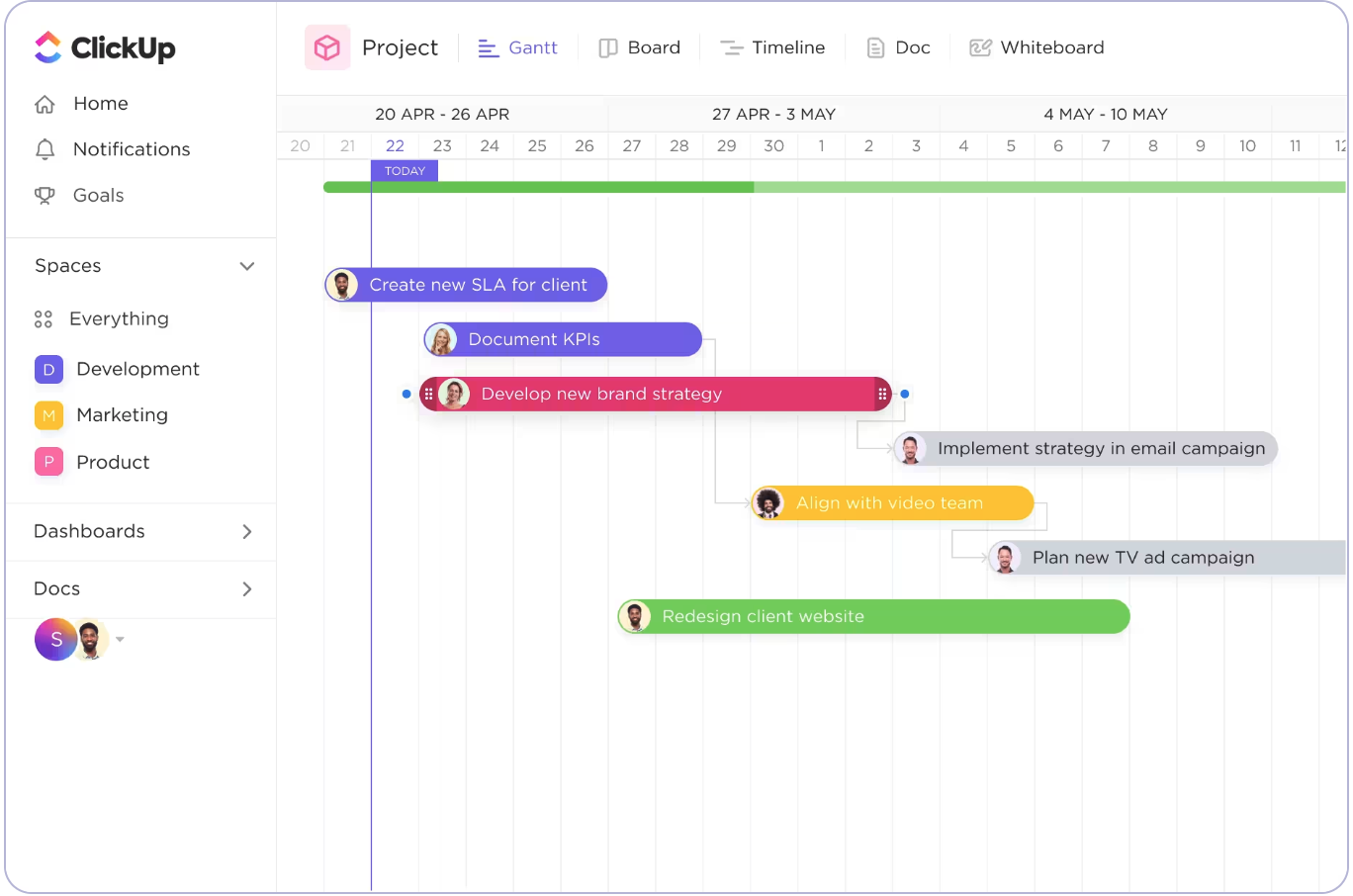
ClickUp è una piattaforma di gestione progetti versatile progettata per supportare un'ampia gamma di funzioni aziendali, tra cui la gestione delle attività, l'allocazione delle risorse e l'automazione dei flussi di lavoro. Si rivolge principalmente a project manager, team e organizzazioni che desiderano aumentare la produttività e la collaborazione.
Perché ho scelto ClickUp: ClickUp offre ampie opzioni di personalizzazione, consentendoti di adattare ogni aspetto del tuo spazio di lavoro alle tue specifiche esigenze. Funzionalità come lavagne, documenti condivisi e molteplici visualizzazioni delle attività assicurano flessibilità nella gestione dei progetti e facilitano la collaborazione in tempo reale del team. Il diagramma di Gantt ti permette di mappare visivamente le tempistiche, le dipendenze e le tappe chiave del progetto, offrendo aggiornamenti in tempo reale facilmente condivisibili con clienti o membri del team per una migliore collaborazione e monitoraggio.
Funzionalità e integrazioni di rilievo:
Funzionalità includono la gestione delle attività con molteplici opzioni di visualizzazione, ClickApps personalizzabili e strumenti di gestione delle risorse che ti permettono di monitorare il tempo, impostare dipendenze e modificare in massa le attività. Il team può anche beneficiare di lavagne per sessioni di brainstorming e documenti condivisi per la creazione collaborativa di contenuti.
Integrazioni includono Slack, Google Drive, Dropbox, Zoom, Microsoft Teams, Outlook, GitHub, Evernote, Jira e OneDrive.
Pros and Cons
Pros:
- ClickApps personalizzabili
- Molteplici visualizzazioni delle attività
- Modifica in massa semplice
Cons:
- Interfaccia complessa
- Curva di apprendimento ripida

Asana
Ideale per cronologie di progetto visuali

Asana è uno strumento di gestione dei progetti che aiuta i team a organizzare, monitorare e gestire il lavoro e i progetti in modo efficiente. È utilizzato principalmente da team che mirano a migliorare la collaborazione, assicurare responsabilità e aumentare la visibilità sui progetti.
Perché ho scelto Asana: Asana offre assegnazione dei compiti e visualizzazioni cronologiche, visualizzazione dei progetti tramite bacheche e calendari e aggiornamenti in tempo reale. Il tuo team può usare la vista Gantt per costruire progetti, creare sotto-attività e impostare dipendenze. L'interfaccia drag-and-drop rende anche semplice la modifica delle date e della durata dei compiti. Inoltre, Asana facilita la comunicazione grazie a bacheche dei messaggi e menzioni.
Funzionalità e integrazioni principali:
Funzionalità includono assegnazione dei compiti, visualizzazione dei progetti tramite bacheche e calendari e aggiornamenti in tempo reale. Puoi assegnare i compiti ai membri del team direttamente dalla vista Gantt, garantendo chiarezza sui ruoli. Inoltre, dipendenze tra compiti e percorsi critici permettono di anticipare i colli di bottiglia e adattare le risorse in modo efficiente.
Integrazioni includono Slack, Microsoft Teams, Google Drive, Dropbox, Salesforce, Okta, Evernote, Tableau, Power BI e GitHub.
Pros and Cons
Pros:
- Sotto-attività nella vista Gantt
- Interfaccia drag-and-drop
- Aggiornamenti in tempo reale
Cons:
- Piano di fascia intermedia limitato
- Automazioni dei flussi di lavoro complicate

Ideale per aziende di servizi al cliente
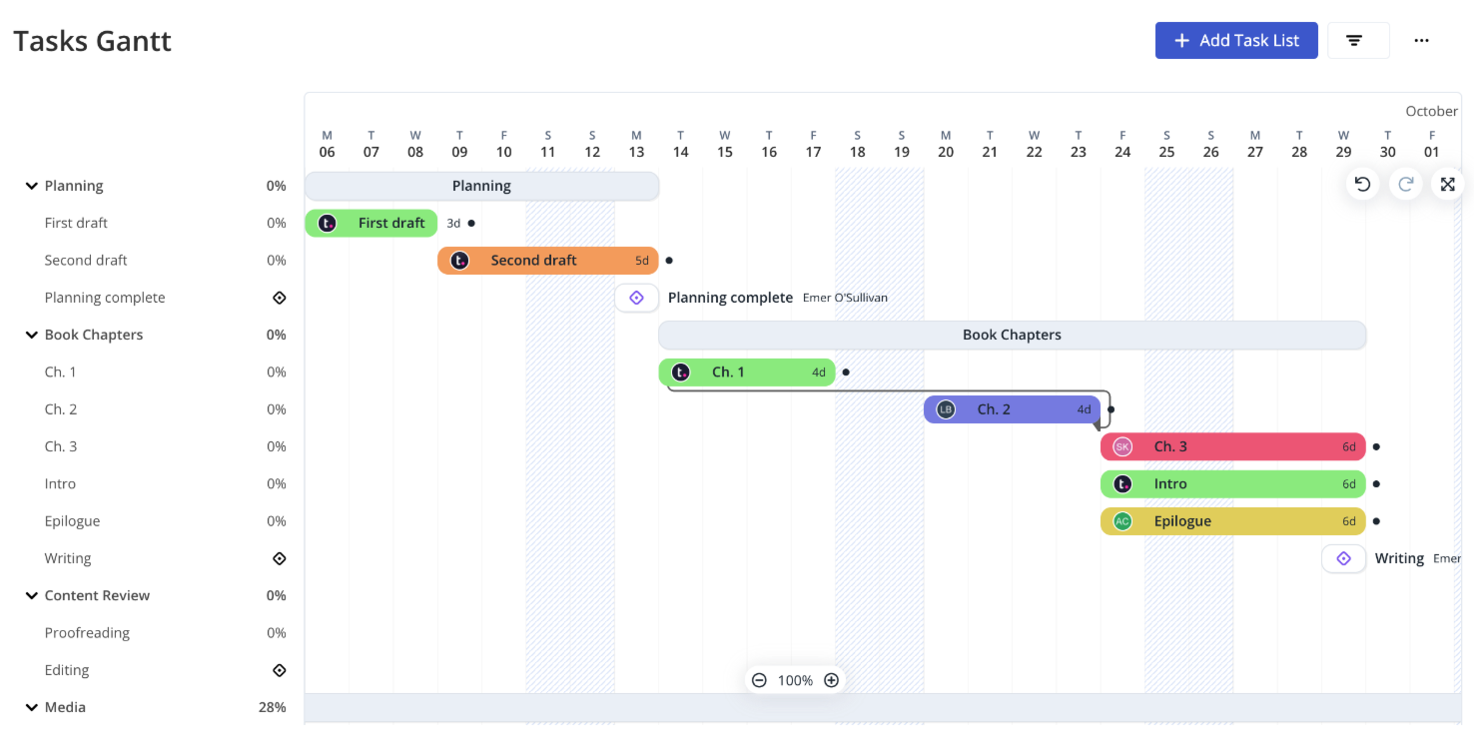
Teamwork.com è un software di gestione progetti pensato per aiutare i team a collaborare in modo più efficace e a gestire i progetti dall'inizio alla fine. Offre funzionalità come l'assegnazione di compiti, il monitoraggio delle milestone e viste a diagramma di Gantt che facilitano una pianificazione dettagliata dei progetti e il controllo costante dell'avanzamento.
Perché ho scelto Teamwork.com: La funzione di diagramma di Gantt di Teamwork.com consente di spostare facilmente le tempistiche di progetto trascinando e rilasciando le fasi, il che regola automaticamente le attività dipendenti. Le milestone possono essere configurate dal menu principale, sebbene non possano essere create direttamente dalla vista Gantt. Inoltre, il monitoraggio del tempo integrato e la reportistica specifica per i clienti permettono di seguire facilmente lo stato del progetto e di tenere aggiornati i clienti, rendendo questa soluzione ideale per le aziende orientate ai servizi al cliente.
Funzionalità e integrazioni principali:
Funzionalità includono la creazione di compiti nelle viste elenco, tabella e Gantt, la modifica delle tempistiche tramite trascinamento, l'editing di massa delle attività, aggiornamenti di avanzamento e riassegnazione degli utenti. Il team può anche utilizzare la chat integrata per comunicare e impostare approvazioni per i materiali nella sezione 'prove'.
Integrazioni includono Slack, HubSpot, Skyvia, Xero, Stripe, Microsoft Office, Atarim, TimeJam, Asinaria e Harvest.
Pros and Cons
Pros:
- Spostamento delle attività facilitato
- Modifica di massa delle attività
- Accesso gratuito per collaboratori
Cons:
- Richiede 3 licenze utente per Pro
- Modifica limitata del campo data

Ideale per la gestione delle attività basata su cloud

ProjectManager offre un creatore di diagrammi di Gantt online progettato per una pianificazione e schedulazione di progetto efficiente. I suoi principali utenti includono project manager e team di vari settori che hanno bisogno di organizzare le attività, gestire le risorse e rispettare le scadenze in modo efficace.
Perché ho scelto ProjectManager: ProjectManager offre una pianificazione di diagrammi di Gantt basata sul cloud con un'interfaccia intuitiva drag-and-drop, che permette di modificare facilmente attività e tempistiche. Il software include inoltre funzionalità di collaborazione in tempo reale, consentendo ai membri del team di aggiungere commenti e condividere file direttamente all'interno delle attività. Inoltre, ProjectManager supporta l'importazione e l'esportazione di vari formati di file, garantendo un'integrazione senza problemi con altri strumenti utilizzati dal vostro team.
Funzionalità principali & integrazioni:
Funzionalità incluse pianificazione drag-and-drop, monitoraggio del progetto in tempo reale e gestione delle risorse. Gli strumenti di gestione delle risorse sono integrati, aiutandovi ad assegnare membri del team e risorse in modo efficiente. È inoltre possibile impostare dipendenze tra attività con aggiornamenti automatici per garantire un flusso lineare del progetto.
Integrazioni includono Slack, Microsoft Project, Trello, Jira, Microsoft Teams, Power BI, Acumatica, Microsoft Office 365, Microsoft Exchange e Microsoft Excel.
Pros and Cons
Pros:
- Pianificazione drag-and-drop
- Aggiornamenti in tempo reale
- Supporta vari formati di file
Cons:
- Curva di apprendimento
- Personalizzazione limitata

Miro
Ideale per la gestione delle dipendenze tra le attività

Miro è una piattaforma di collaborazione online che offre una gamma di strumenti per aiutare i team a lavorare insieme in modo efficace. Tra le sue funzionalità c'è uno strumento di diagrammi di Gantt, che consente di pianificare e visualizzare la cronologia dei progetti.
Perché ho scelto Miro: Lo strumento di diagrammi di Gantt di Miro ti permette di impostare i tempi dei tuoi progetti mappando le fasi e le consegne, assegnando date di inizio e fine e aggiungendo scadenze. Questo aiuta il tuo team a rimanere organizzato e assicura che tutti siano consapevoli del programma del progetto. Inoltre, Miro permette di aggiungere dipendenze tra le attività, aiutandoti a identificare e gestire le relazioni tra le varie attività di progetto.
Funzionalità e integrazioni principali:
Funzionalità includono modifica collaborativa, aggiornamenti in tempo reale, modelli personalizzabili, funzionalità drag-and-drop, assegnazione dei compiti, monitoraggio dei progressi, commenti, allegati di file, cronologia delle versioni, modalità presentazione, opzioni di esportazione e accessibilità da mobile.
Integrazioni includono Microsoft 365, Google Workspace, Atlassian Jira, Atlassian Confluence, Microsoft Teams, Slack, AWS, GitHub, Azure DevOps, Asana, Trello e Zoom.
Pros and Cons
Pros:
- Funzionalità di modifica collaborativa
- Aggiornamenti in tempo reale
- Trasforma idee complesse in formati visivi
Cons:
- Personalizzare per progetti specifici può richiedere tempo
- Non ideale per i team che preferiscono documentazione dettagliata e ricca di testo
New Product Updates from Miro
Miro Adds Japan Data Residency for Enterprise Customers
Miro has introduced Japan data residency for enterprise customers, offering in-region storage for production data, backups, and metadata, plus in-region compute infrastructure. For more information, visit Miro's official site.

Wrike
Ideale per una visione completa dei progetti

Wrike è un software di gestione progetti versatile che supporta la collaborazione tra i team e il monitoraggio dei progetti. Si rivolge principalmente ai responsabili di progetto che desiderano ottimizzare l'allocazione delle risorse e le tempistiche dei progetti.
Perché ho scelto Wrike: Wrike offre dashboard personalizzabili, gestione delle revisioni e report dettagliati, tutti progettati per migliorare la trasparenza del progetto e supportare il processo decisionale. Le sue funzionalità di monitoraggio del tempo e gestione del carico di lavoro sono pensate per aiutare il team a rispettare scadenze e attività. Inoltre, la funzione del diagramma di Gantt di Wrike offre una timeline visiva del progetto, che facilita il monitoraggio dell'avanzamento, la gestione delle dipendenze e l'adattamento dei programmi in tempo reale.
Funzionalità principali & integrazioni:
Funzionalità includono dashboard personalizzabili, gestione delle revisioni e report dettagliati. Il software supporta anche varie metodologie come agile e waterfall e fornisce visibilità in tempo reale sull'avanzamento dei progetti con aggiornamenti automatici al completamento delle attività.
Integrazioni includono Slack, Google Drive, Microsoft Teams, Dropbox, Salesforce, Zendesk, Box, HubSpot, Okta e GitHub.
Pros and Cons
Pros:
- Dashboard personalizzabili
- Supporta agile e waterfall
- Strutture scalabili
Cons:
- Configurazione complessa del diagramma di Gantt
- Curva di apprendimento ripida
New Product Updates from Wrike

Wrike Adds Quick Search to Table View
Wrike adds Quick Search to Table View with full-table search across titles, descriptions, and fields, plus highlighted matches. This helps users find tasks faster in large tables. For more information, visit Wrike’s official site.

Ideale per un'integrazione efficiente con Asana

Instagantt è un software online di diagrammi di Gantt progettato per la gestione dei progetti. Il suo principale target di utenti comprende project manager e team di diversi settori, offrendo funzioni aziendali chiave come la gestione delle attività, l'organizzazione dei progetti e strumenti di collaborazione.
Perché ho scelto Instagantt: Instagantt permette di creare diagrammi di Gantt dettagliati con pianificazione tramite drag-and-drop e colori personalizzati. Le sue visualizzazioni di progetto includono diagrammi di Gantt, viste a tabella e bacheche Kanban, rendendo facile visualizzare attività e carichi di lavoro nel modo più adatto a te. Inoltre, l'integrazione con Asana consente di sincronizzare senza difficoltà attività e dati di progetto, permettendoti di gestire e aggiornare i tuoi diagrammi di Gantt direttamente in Asana per una collaborazione migliorata e aggiornamenti in tempo reale.
Funzionalità e integrazioni principali:
Funzionalità comprendono diverse visualizzazioni di progetto (diagrammi di Gantt, viste a tabella, bacheche Kanban), pianificazione drag-and-drop e campi e priorità personalizzabili. È possibile gestire le attività, impostare le priorità e utilizzare strumenti di collaborazione come l'assegnazione dei compiti e una casella di posta del team. Opzioni per risparmiare tempo includono modelli di diagrammi di Gantt e programmazione automatica delle attività.
Integrazioni disponibili con Asana.
Pros and Cons
Pros:
- Gestione delle attività personalizzabile
- Integrazione semplice con Asana
- Disponibilità di modelli
Cons:
- I progetti complessi richiedono l'impostazione su Asana
- Nessuna app desktop

GoodDay
Ideale per la pianificazione e programmazione integrata delle risorse

GoodDay è una piattaforma di gestione del lavoro versatile che può trasformare il modo in cui il tuo team gestisce la pianificazione dei progetti e la collaborazione, offrendo un valido supporto per la pianificazione integrata delle risorse e la programmazione. Progettato per diversi settori, dal marketing alle risorse umane, offre spazi di lavoro personalizzabili e oltre 20 opzioni di visualizzazione, inclusi i diagrammi di Gantt, per adattarsi ai tuoi flussi di lavoro specifici. Migliorando la collaborazione e la responsabilità del team, GoodDay mira a semplificare i processi e aumentare la produttività, rendendolo una soluzione ideale per i diagrammi di Gantt su Mac.
Perché ho scelto GoodDay
Ho scelto GoodDay per la sua efficacia nella pianificazione integrata delle risorse e nella programmazione, che si abbina perfettamente alle sue capacità adattabili di diagramma di Gantt. Questo strumento consente di visualizzare con facilità attività e dipendenze, offrendo colonne personalizzabili e opzioni di gestione avanzate, perfettamente allineate ai flussi di lavoro del tuo team. Inoltre, la piattaforma supporta diversi metodi di gestione dei progetti, come Waterfall e Agile, offrendo flessibilità nell'approccio ai progetti.
Funzionalità principali di GoodDay
Oltre a pianificazione e programmazione integrata delle risorse, GoodDay offre:
- Spazi di lavoro personalizzabili: Adatta il tuo spazio di lavoro alle esigenze specifiche del team, garantendo un'esperienza di gestione progetti su misura.
- Monitoraggio del tempo: Tieni traccia del tempo dedicato ad attività e progetti per ottenere dati utili sull'efficienza del team e sulle aree di miglioramento.
- Gestione degli obiettivi: Imposta e monitora gli obiettivi per mantenere il team focalizzato e allineato agli obiettivi complessivi del progetto.
Integrazioni di GoodDay
Le integrazioni includono Google Workspace, Slack, Microsoft Teams, Microsoft Outlook, GitHub, GitLab, Trello, Jira, Asana e Zapier. È disponibile anche un'API per integrazioni personalizzate.
Pros and Cons
Pros:
- La pianificazione drag-and-drop rende facili gli aggiornamenti delle tempistiche
- Le dipendenze delle attività visuali aiutano a chiarire il flusso del progetto
- Favorisce la collaborazione del team con strumenti di comunicazione integrati
Cons:
- Saltuariamente segnalati tempi di risposta lenti dagli utenti
- Mancano alcune funzionalità avanzate di programmazione aziendale
Altri software per diagrammi di Gantt per Mac
Ecco alcune opzioni aggiuntive di software per diagrammi di Gantt per Mac che non sono entrate nella mia selezione, ma che vale comunque la pena prendere in considerazione:
- Paymo
Ideale per la pianificazione automatica delle attività
- TeamGantt
Ideale per configurazione rapida e convenienza
- GanttProject
Ideale per la gestione progetti open-source


Come Valuto il Software di Diagrammi di Gantt per Mac
Il software di diagrammi di Gantt per Mac si trova ovunque, dal PM freelance che monitora le consegne dei clienti fino al team di prodotto che coordina un rilascio multiplo sprint—specialmente per chi ha bisogno di un'alternativa nativa o web senza compromessi sulla profondità della pianificazione. Quando valuto gli strumenti per questa lista, divido la mia analisi in due livelli: ciò che ogni strumento deve fare bene solo per qualificarsi, e ciò che distingue davvero le scelte migliori dal resto.
Funzionalità di Base (Requisiti Minimi per Questa Lista)
Per i software di diagrammi di Gantt per Mac, le funzionalità di base che valuto sono:
- Visualizzazione Gantt: Verifico che la vista della timeline supporti la pianificazione drag-and-drop e i controlli di zoom su scale giornaliere, settimanali, mensili e trimestrali.
- Dipendenze tra attività: Ogni strumento dovrebbe almeno gestire i collegamenti fine-inizio e cerco il supporto per relazioni SS, FF e SF per una sequenza complessa.
- Sottoattività e milestone: Raggruppare attività in gerarchie padre-figlio e segnare le principali consegne sulla timeline è il modo in cui i PM costruiscono una struttura del lavoro utilizzabile.
- Assegnazione delle risorse: Valuto se è possibile assegnare membri del team alle attività e avere almeno una visibilità di base su chi è sovraccarico o disponibile.
- Confronti con la baseline: Salvare un piano iniziale e confrontarlo con i progressi attuali è il modo per intercettare derive di pianificazione prima che diventino un problema.
- Compatibilità Mac: Lo strumento deve funzionare nativamente su macOS o offrire un'esperienza web senza funzionalità ridotte rispetto a Windows—niente lacune funzionali, niente interfacce rotte.
- Esportazione e condivisione: Cerco almeno esportazione in PDF e immagine, dato che gli stakeholder esterni allo strumento devono poter vedere il piano in una riunione con il cliente o durante una revisione dello stato.
Uno strumento deve offrire la maggior parte di queste funzionalità per meritare un posto nella lista. Da lì, considero cosa distingue ciascuno.
Funzionalità Distintive (Cosa Distingue le Scelte)
La collaborazione in tempo reale integrata e le dashboard multi-progetto fanno la differenza—i team che lavorano su più progetti hanno bisogno di aggiornamenti live e visualizzazione trasversale delle risorse per mantenere tutto sincronizzato. Cerco funzioni dell'ecosistema Apple come sincronizzazione iCloud e Handoff per chi alterna Mac, iPad e iPhone. Compatibilità avanzata con Microsoft Project è importante, soprattutto per team ibridi che devono importare file MPP o rispettare standard PM aziendali.
Cosa Considero Oltre le Funzionalità
Il modello di prezzo qui conta più che in altre categorie. Valuto se una licenza una tantum o un abbonamento mensile sia più adatto al budget e alla dimensione del team, dato che strumenti Mac-native come OmniPlan e Merlin Project hanno modelli molto diversi rispetto alle piattaforme cloud. Considero anche la profondità d'integrazione con strumenti come Slack, Jira e Google Workspace, perché un diagramma di Gantt isolato fuori dal flusso di lavoro quotidiano del team viene raramente adottato. La possibilità di lavorare offline è un altro fattore per i PM che lavorano presso cantieri o in viaggio.
Come scegliere un software per diagrammi di Gantt per Mac
È facile perdersi in lunghi elenchi di funzionalità e strutture tariffarie complesse. Per aiutarti a rimanere concentrato mentre affronti il tuo processo di selezione del software, unico per le tue esigenze, ecco un elenco di fattori da tenere a mente:
| Fattore | Cosa considerare |
| Scalabilità | Questo software crescerà insieme al tuo team? |
| Integrazioni | Si integra bene con i sistemi e gli strumenti già in uso? |
| Personalizzazione | Puoi adattare il software alle tue esigenze specifiche? |
| Semplicità d'uso | Il software è facile da usare per tutti i membri del team? |
| Budget | Rientra nei tuoi vincoli finanziari? |
| Misure di sicurezza | I tuoi dati e progetti sono al sicuro? |
| Assistenza | È disponibile un'assistenza clienti affidabile? |
| Funzionalità | Dispone delle funzionalità essenziali di cui hai bisogno? |
Tendenze dei software per diagrammi di Gantt per Mac
Durante la mia ricerca, ho raccolto numerosi aggiornamenti di prodotto, comunicati stampa e registri delle versioni di diversi fornitori di software per diagrammi di Gantt compatibili con Mac. Ecco alcune delle tendenze emergenti che sto tenendo d'occhio:
- Visualizzazione interattiva: I moderni strumenti per i diagrammi di Gantt integrano elementi sempre più interattivi, come interfacce con funzionalità di trascinamento e aggiornamenti in tempo reale. Queste funzionalità consentono agli utenti di modificare facilmente le tempistiche e le dipendenze direttamente nel diagramma. Ad esempio, gli utenti possono modificare le fasi del progetto e le dipendenze semplicemente trascinandole verso nuove date, semplificando gli adeguamenti del progetto.
- Pannelli personalizzabili: Gli utenti richiedono sempre più spesso visualizzazioni personalizzate. Molte piattaforme offrono ora pannelli personalizzabili in cui gli utenti possono integrare diagrammi, documenti collaborativi e widget per il monitoraggio delle attività, adattati alle loro esigenze specifiche. Questa flessibilità consente di creare uno spazio di lavoro più mirato e pertinente.
- Funzionalità di collaborazione avanzate: La collaborazione è diventata un elemento fondamentale dei software di gestione dei progetti. Gli strumenti includono spesso funzionalità come commenti in tempo reale, condivisione di file e canali di comunicazione integrati, rendendo il lavoro di squadra più fluido ed efficiente. Alcuni strumenti offrono persino modalità uniche per monitorare visivamente l'avanzamento del progetto, mettendo a disposizione spazi collaborativi per gli aggiornamenti del team.
- Gestione avanzata delle attività: Le funzionalità di gestione delle attività stanno evolvendo, con caratteristiche come sottoattività multilivello, modifica collettiva e schede dettagliate delle attività che stanno diventando comuni. Questi miglioramenti consentono agli utenti di aggiornare le attività, modificare l'avanzamento e riassegnare le responsabilità in modo efficiente, risparmiando tempo nella gestione dei carichi di lavoro.
- Monitoraggio e report dell'avanzamento: Si presta sempre maggiore attenzione alle funzionalità avanzate di monitoraggio e report dell'avanzamento. Molti strumenti offrono ora metriche più dettagliate e opzioni di visualizzazione, consentendo agli utenti di monitorare a colpo d'occhio le tappe fondamentali, le percentuali di completamento e lo stato generale del progetto, aiutando i team a rimanere allineati agli obiettivi del progetto.
Che cos'è il software per diagrammi di Gantt per Mac?
Il software per diagrammi di Gantt per Mac è un tipo di strumento di gestione dei progetti progettato per aiutare gli utenti a creare e gestire le tempistiche dei progetti, in particolare sui dispositivi Mac prodotti da Apple. I project manager, i responsabili dei team e i professionisti di settori come l'edilizia, lo sviluppo software e l'organizzazione di eventi utilizzano generalmente questi strumenti per mantenere i progetti in linea con i piani e rispettare le scadenze.
Questi strumenti sono utili perché consentono di organizzare visivamente le attività, impostare le dipendenze e monitorare l'avanzamento. Funzionalità come la modifica delle attività tramite trascinamento, l'allocazione delle risorse e il monitoraggio delle tappe fondamentali aiutano a gestire in modo efficiente i progetti complessi. Nel complesso, questi strumenti migliorano la visibilità dei progetti e il coordinamento tra i team.
Funzionalità del software per diagrammi di Gantt per Mac
Quando scegli un software per diagrammi di Gantt per Mac, presta attenzione alle seguenti funzionalità principali:
- Gestione delle attività: consente agli utenti di creare, assegnare e gestire attività e sottoattività direttamente nella vista Gantt.
- Gestione delle risorse: facilita il monitoraggio e l'allocazione delle risorse tra i progetti, contribuendo a garantire carichi di lavoro equilibrati.
- Monitoraggio delle tappe fondamentali: consente di creare e gestire le tappe fondamentali del progetto per garantire il rispetto delle scadenze critiche.
- Funzionalità di trascinamento: offre un modo intuitivo per modificare le date delle attività e le dipendenze, semplicemente trascinando le attività verso nuove posizioni nella sequenza temporale.
- Pannelli personalizzati: consente agli utenti di creare pannelli personalizzati con diagrammi, documenti collaborativi e altre informazioni relative al progetto.
- Monitoraggio dell'avanzamento: offre strumenti per monitorare lo stato delle attività, comprese le percentuali di avanzamento e gli indicatori visivi all'interno del diagramma di Gantt.
- Modifica collettiva: consente di aggiornare simultaneamente più attività, risparmiando tempo e garantendo coerenza tra i progetti.
- Gestione del portafoglio: include funzionalità per raggruppare e gestire più progetti, semplificando la supervisione di un portafoglio e il monitoraggio dell'avanzamento complessivo.
- Report interattivi: fornisce report visivi che offrono una panoramica dello stato del progetto, evidenziando le aree che richiedono attenzione.
- Strumenti di collaborazione: integra funzionalità che supportano la collaborazione tra i membri del team, come documenti condivisi e canali di comunicazione.
Vantaggi del software per diagrammi di Gantt per Mac
L'implementazione di un software per diagrammi di Gantt per Mac offre diversi vantaggi al tuo team e alla tua azienda. Eccone alcuni di cui potrai beneficiare:
- Gestione delle attività migliorata: organizza e assegna le attività con date di inizio e fine, semplificando il monitoraggio dei progressi e delle scadenze del progetto.
- Allocazione delle risorse ottimizzata: visualizza la distribuzione delle risorse e monitora il carico di lavoro del team per garantire assegnazioni equilibrate.
- Cronologie di progetto chiare: mantiene una panoramica visiva delle fasi del progetto, delle tappe fondamentali e delle dipendenze per una pianificazione e un'esecuzione migliori.
- Modifica efficiente delle attività: sposta facilmente le tempistiche del progetto trascinando e rilasciando le attività e aggiornando automaticamente le dipendenze.
- Informazioni centralizzate sul progetto: archivia tutti i dati relativi al progetto, inclusi file e commenti, in un unico luogo per facilitarne l'accesso e la collaborazione.
- Monitoraggio dei progressi in tempo reale: controlla lo stato delle attività e le percentuali di completamento del progetto per tenere sotto controllo gli sviluppi.
- Visualizzazioni personalizzabili: utilizza diverse visualizzazioni, come diagramma di Gantt, elenco o calendario, per adattarsi al tuo stile di gestione dei progetti preferito e migliorare la visibilità del flusso di lavoro.
Costi e prezzi dei software per diagrammi di Gantt per Mac
La scelta di un software per diagrammi di Gantt per Mac richiede la comprensione dei vari modelli di prezzo e dei piani disponibili. I costi variano in base alle funzionalità, alle dimensioni del team, ai componenti aggiuntivi e ad altri fattori. La tabella seguente riassume i piani più comuni, i relativi prezzi medi e le funzionalità tipicamente incluse nelle soluzioni software per diagrammi di Gantt compatibili con Mac:
Tabella comparativa dei piani per i software per diagrammi di Gantt per Mac
| Tipo di piano | Prezzo medio | Funzionalità comuni |
| Piano gratuito | $0 | Gestione di base delle attività, progetti limitati, utenti limitati e assistenza via e-mail. |
| Piano personale | $5-$10/utente/mese | Progetti illimitati, funzionalità di base dei diagrammi di Gantt, dipendenze tra attività e integrazioni limitate. |
| Piano aziendale | $15-$25/utente/mese | Funzionalità avanzate dei diagrammi di Gantt, collaborazione del team, monitoraggio del tempo, gestione delle risorse e report. |
| Piano aziendale | $30-$50/utente/mese | Funzionalità personalizzabili, assistenza dedicata, sicurezza avanzata, integrazioni complete e controlli amministrativi. |
Domande frequenti sui software per diagrammi di Gantt per Mac
Ecco alcune risposte alle domande comuni sui software per diagrammi di Gantt per Mac:
Quali sono gli svantaggi di un diagramma di Gantt?
I diagrammi di Gantt possono diventare molto complessi, soprattutto per i progetti di grandi dimensioni. Richiedono aggiornamenti costanti per rimanere accurati. La lunghezza di una barra nel diagramma non riflette necessariamente la quantità di lavoro. Inoltre, può essere difficile inserire tutto in un unico foglio di carta.
Quali sono i vantaggi e gli svantaggi di un diagramma di Gantt in Excel?
I diagrammi di Gantt in Excel offrono una panoramica realistica della complessità di un progetto e aiutano a gestire team e risorse in modo efficiente. Tuttavia, possono diventare difficili da interpretare man mano che aumentano di complessità. Non forniscono sempre una visualizzazione immediata del carico di lavoro.
Qual è l'errore più grande nella progettazione di un diagramma di Gantt?
Uno degli errori più grandi che si possono commettere nella progettazione di un diagramma di Gantt è non definire chiaramente le attività. Ciò può generare confusione e interpretazioni errate della pianificazione del progetto. Ogni attività dovrebbe avere una descrizione chiara e un risultato misurabile per garantire il completamento con successo.
Quali sono le alternative ai diagrammi di Gantt per la gestione dei progetti?
Tra le alternative ai diagrammi di Gantt figurano le schede Kanban, i diagrammi PERT e gli elenchi di attività. Questi strumenti possono offrire modalità diverse per visualizzare e gestire le attività e le tempistiche del progetto, risultando talvolta più adatti in base alle esigenze del progetto.
I diagrammi di Gantt possono gestire l'allocazione delle risorse e il carico di lavoro?
Sì, molte opzioni software per diagrammi di Gantt includono funzionalità per l’allocazione delle risorse e la gestione del carico di lavoro. È possibile assegnare risorse alle attività e vedere come vengono distribuite nel tempo, contribuendo così a bilanciare il carico di lavoro ed evitare un’allocazione eccessiva delle risorse.