I 10 migliori strumenti per la pianificazione temporale dei progetti per restare al passo nel 2026

10 Elenco dei migliori software per la gestione delle tempistiche dei progetti


Gestire efficacemente le tempistiche dei progetti è essenziale per mantenere i progetti in linea con i piani e il team allineato. Tuttavia, senza gli strumenti giusti, è facile perdere di vista scadenze, dipendenze e traguardi fondamentali. Ecco perché è importante disporre di un software affidabile per la gestione delle tempistiche dei progetti.
Gli strumenti per la gestione delle tempistiche dei progetti possono aiutarti a visualizzare le tempistiche, assegnare attività e monitorare i progressi, offrendoti la chiarezza e il controllo necessari per portare a termine con successo i progetti.
In questo articolo ho analizzato e testato le migliori opzioni disponibili sul mercato. Ti illustrerò le loro caratteristiche principali, a chi sono più adatte e perché potrebbero essere una buona scelta per il tuo team. Qui puoi valutare le diverse opzioni e trovare la soluzione migliore per aiutarti a mantenere l'organizzazione e la concentrazione.
Perché fidarsi dei nostri consigli sui software
Il nostro team testa e recensisce software dal 2012. In quanto project manager noi stessi, sappiamo quanto sia difficile — e importante — scegliere il software giusto.
Per questa guida, abbiamo valutato gli strumenti attraverso test pratici e ricerche indipendenti, assegnando un punteggio agli strumenti in base ai nostri criteri di selezione. Ci basiamo inoltre sulle competenze di leader di pensiero del settore e di professionisti attivi nella gestione dei progetti.
Le nostre recensioni riflettono il nostro giudizio editoriale umano, non un discorso di vendita.
Revisori esperti:
Tabella comparativa dei software per la gestione delle tempistiche dei progetti
Ecco una comoda tabella che puoi utilizzare per confrontare tutti gli strumenti appena illustrati.
| Tool | Best For | Trial Info | Price | ||
|---|---|---|---|---|---|
| 1 | I migliori template di flusso di lavoro personalizzabili | Prova gratuita di 14 giorni | Da $6/utente/mese | Website | |
| 2 | Ideale per tracciare progetti tra i team | Prova gratuita di 14 giorni | Da $9.80/utente/mese | Website | |
| 3 | Ideale per impostare e monitorare le dipendenze tra attività | Prova gratuita di 15 giorni + piano gratuito + demo gratuita disponibile | A partire da $4/utente/mese (fatturazione annuale) | Website | |
| 4 | Ideale per linee temporali di progetto strutturate | Demo gratuita disponibile | Prezzo su richiesta | Website | |
| 5 | Ideale per gerarchie di attività nidificate su una sequenza temporale | Prova gratuita di 30 giorni; piano gratuito disponibile | A partire da $10.95/utente/mese | Website | |
| 6 | Ideale per la gestione completa del ciclo di vita dei progetti | Non disponibile | Prezzo su richiesta | Website | |
| 7 | Ideale per una soluzione altamente flessibile | Piano gratuito disponibile | Da $8/membro/mese (fatturazione annuale) | Website | |
| 8 | Ideale per la pianificazione collaborativa in tempo reale | Piano gratuito disponibile | A partire da $3/editor/mese (fatturazione annuale) | Website | |
| 9 | Ideale per liberi professionisti | Piano gratuito + demo gratuita disponibile | A partire da $5/utente/mese | Website | |
| 10 | Ideale per team di sviluppo software | 30 giorni di prova gratuita | Da $35-30/utenti/mese | Website |


Recensioni dei migliori software per la gestione delle tempistiche dei progetti
Ecco una breve descrizione di ciascun software per la gestione delle tempistiche dei progetti, per evidenziare il caso d’uso migliore e le caratteristiche più rilevanti di ogni strumento.

I migliori template di flusso di lavoro personalizzabili
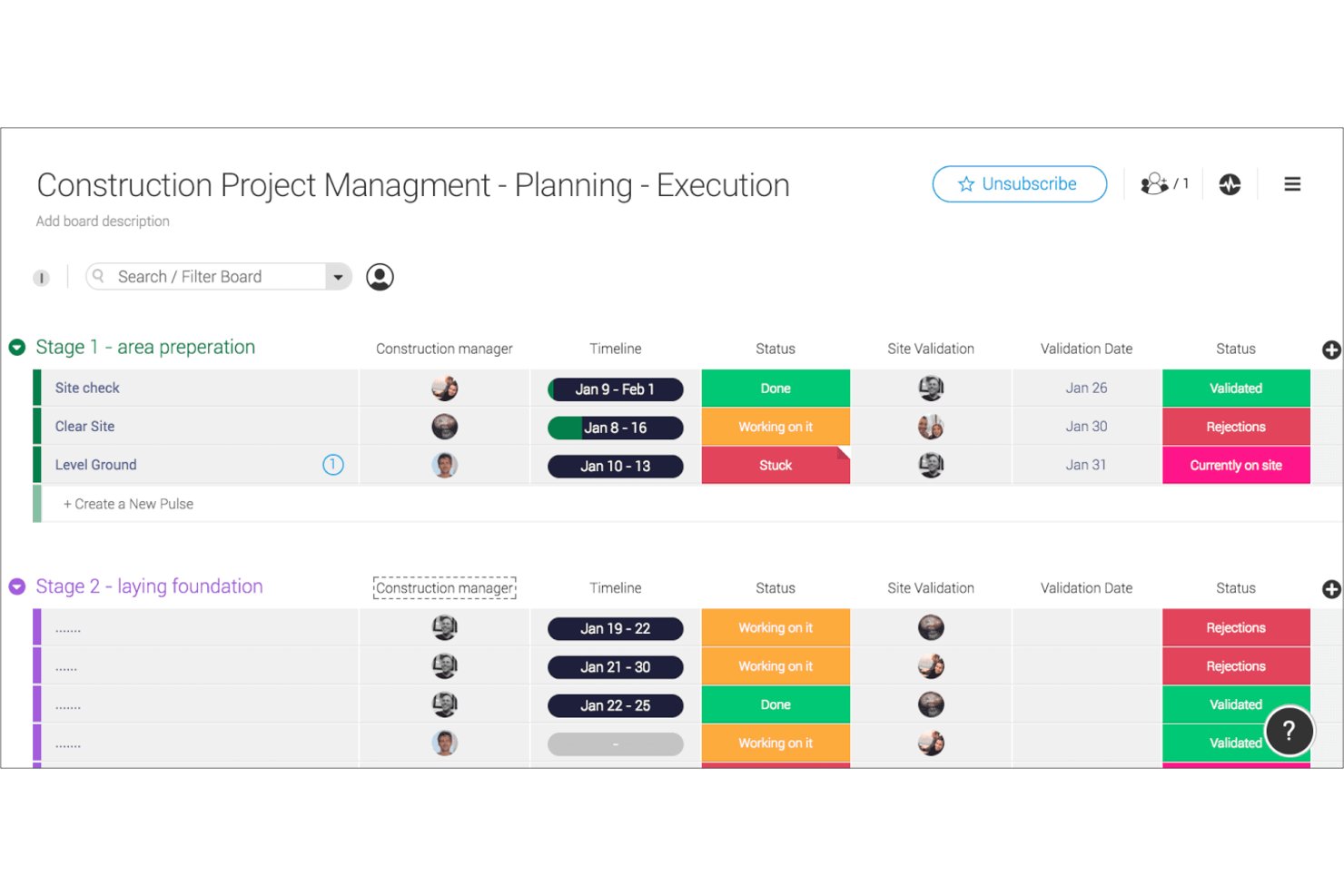
monday AI Workspace è una piattaforma di gestione del lavoro configurabile che combina viste Gantt e timeline interattive, pianificazione guidata dall’IA, dipendenze tra attività, tracciamento delle milestone e dashboard di portafoglio in un unico spazio di lavoro.
Per chi è ideale monday AI Workspace?
È particolarmente indicato per team interfunzionali e project manager che necessitano di un tracciamento visivo e flessibile dei progetti, senza vincolarsi a software di schedulazione troppo rigidi e specifici.
Perché ho scelto monday AI Workspace
Ho scelto monday AI Workspace tra i migliori perché la sua libreria di template va oltre le semplici bacheche di progetto standard. Ogni modello di timeline è fornito con viste Gantt preimpostate, colonne di dipendenza e regole di automazione già configurate, così il mio team non deve ricostruire da zero la struttura di pianificazione per ogni nuovo progetto. Mi piace particolarmente che ogni template sia completamente personalizzabile: posso aggiungere indicatori di milestone e notifiche di scadenza senza dover toccare codice.
Funzionalità principali di monday AI Workspace
- Assistente IA: Assistente integrato alimentato dall’IA che offre suggerimenti per le timeline, insight sui dati e raccomandazioni sui flussi di lavoro direttamente all’interno di ogni bacheca di progetto.
- Dashboard di portafoglio: Unisce più timeline e milestone di progetto in un’unica dashboard di alto livello per aggiornamenti rapidi a livello esecutivo.
- Modifica Gantt drag-and-drop: Riprogrammazione delle attività, aggiornamento delle fasi e modifica delle dipendenze in tempo reale su grafici Gantt interattivi con sincronizzazione istantanea con la bacheca.
- Oltre 200 integrazioni native: Si collega direttamente con strumenti come Slack, Google Drive, Jira e Zoom per centralizzare comunicazioni e aggiornamenti.
Integrazioni di monday AI Workspace
monday AI Workspace offre centinaia di integrazioni native tramite la sua funzione integrata e il marketplace, tra cui Slack, Google Drive, Jira, Salesforce, GitHub, Zoom, Microsoft 365, Trello, HubSpot e Asana. Supporta inoltre Zapier e offre un’API per integrazioni personalizzate.
Pros and Cons
Pros:
- Template di timeline Gantt altamente personalizzabili disponibili
- Suggerimenti di pianificazione assistiti dall’IA integrati nativamente
- Dashboard di portafoglio per più timeline di progetto
Cons:
- Il calcolo del percorso critico richiede configurazione manuale
- Le funzionalità di confronto baseline sono poco approfondite
New Product Updates from monday AI Workspace
monday AI Workspace Adds Human Approval Routing
monday AI Workspace adds a human-in-the-loop approval block to AI Workflows, sending approval requests and routing workflow paths based on responses. For more information, visit monday AI Workspace's official site.

Wrike
Ideale per tracciare progetti tra i team
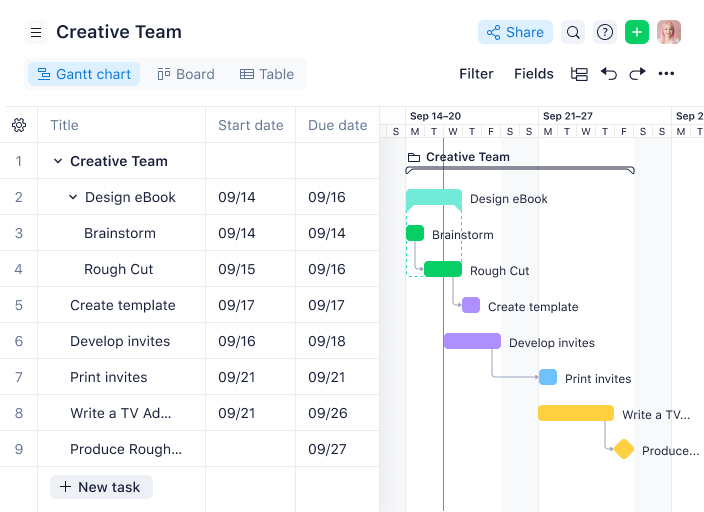
Wrike è una piattaforma di gestione delle tempistiche di progetto che riunisce grafici Gantt interattivi, dipendenze tra attività, collaborazione in tempo reale e dashboard personalizzabili per i team che gestiscono progetti complessi.
Per chi è ideale Wrike?
Wrike è particolarmente indicato per team di medie e grandi dimensioni in ambito tecnologico, marketing e servizi professionali che necessitano di visibilità trasversale sui progetti tra diversi reparti.
Perché ho scelto Wrike
Ho scelto Wrike tra i migliori perché gestisce in modo eccellente il monitoraggio dei progetti su più team contemporaneamente. Ciò che preferisco è la visualizzazione Gantt trasversale sui progetti: puoi unire attività di team diversi in un'unica timeline, impostare dipendenze e vedere esattamente dove il ritardo di un team può creare un collo di bottiglia per un altro. Se il reparto ingegneria attende l'approvazione del design prima di iniziare uno sprint, questa relazione è immediatamente visibile. Uso anche le dashboard trasversali per avere uno stato aggiornato in tempo reale dei flussi di lavoro, senza dover inseguire aggiornamenti dai responsabili di ogni team.
Caratteristiche principali di Wrike
- Prenotazione delle risorse: Prenota il tempo di un membro specifico del team o di un determinato ruolo e verifica se ha la disponibilità per occuparsi di un progetto prima di assegnargli il lavoro.
- Gestione dello sforzo: Assegna una stima di impegno a ciascuna attività per prevedere le date di consegna del progetto e scegliere gli assegnatari sulla base della reale capacità.
- Moduli di richiesta personalizzati: Crea moduli di richiesta dinamici che generano automaticamente attività, progetti e flussi di lavoro una volta inviati.
- Scrum board: Gestisci gli sprint Agile con Scrum board condivise, prioritizzazione del backlog e monitoraggio dei progressi in tempo reale.
Integrazioni Wrike
Wrike offre centinaia di integrazioni tramite il proprio marketplace e connettori integrati, inclusi Google Workspace, Microsoft 365, Salesforce e Slack. Supporta inoltre Zapier e fornisce un'API per integrazioni personalizzate.
New Product Updates from Wrike
Wrike Adds Klaxoon MCP Integration
Wrike’s Klaxoon MCP integration is now generally available, enabling AI agents to navigate between Wrike tasks and attached whiteboards, read task context, and manage whiteboard attachments via API. For more information, visit Wrike's official site.

Ideale per impostare e monitorare le dipendenze tra attività
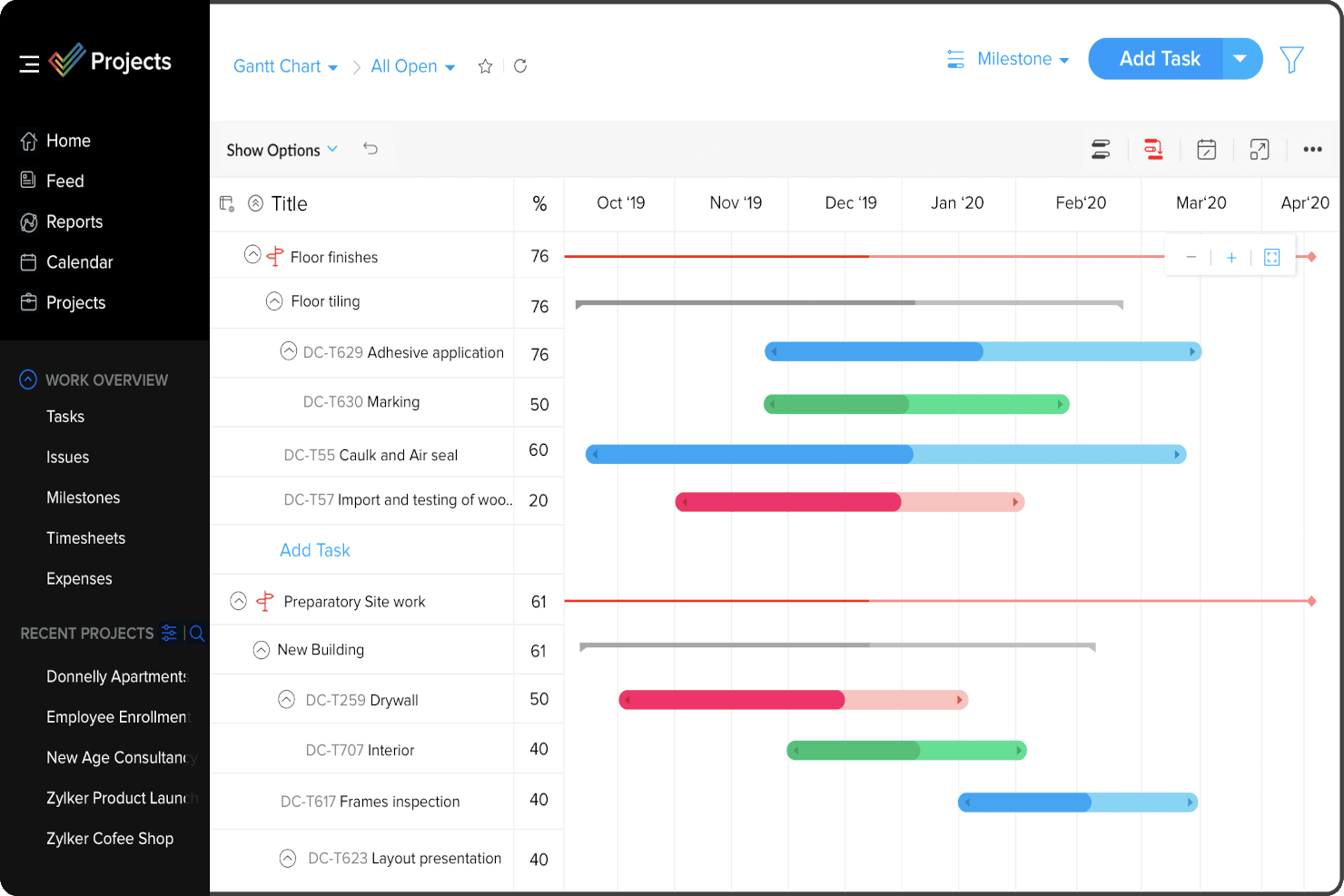
Zoho Projects è una piattaforma per la gestione delle tempistiche di progetto che offre diagrammi di Gantt, dipendenze tra attività, monitoraggio delle milestone e strumenti per l'allocazione delle risorse, utili per pianificare e monitorare i programmi di progetto.
Per chi è ideale Zoho Projects?
Zoho Projects è adatto a team di piccole e medie dimensioni che necessitano di una pianificazione strutturata dei progetti con controlli dettagliati della programmazione nei flussi di lavoro di prodotto, ingegneria o operazioni.
Perché ho scelto Zoho Projects
Ho scelto Zoho Projects come uno dei migliori per la sua completa gestione delle dipendenze tra attività all'interno della vista Gantt. Ciò che apprezzo di più è il supporto per tutti e quattro i tipi di dipendenza—Fine a Inizio, Inizio a Inizio, Inizio a Fine e Fine a Fine—che è essenziale quando il mio team gestisce progetti multiphase in cui le sequenze non sono sempre lineari. Si possono trascinare e rilasciare le barre delle attività direttamente nel Gantt per definire queste relazioni, e passando il mouse su qualsiasi attività viene mostrato l'elenco completo dei predecessori e dei successori. Mi piace anche che si possa introdurre un intervallo di ritardo tra le attività dipendenti, una funzione che ho utilizzato quando c'è un periodo di attesa obbligatorio tra due consegne sequenziali.
Funzionalità chiave di Zoho Projects
- Baseline di progetto: Imposta una baseline in qualsiasi momento del progetto per confrontare i progressi pianificati rispetto a quelli effettivi nel tempo, così da individuare tempestivamente eventuali deviazioni di programma.
- Monitoraggio del percorso critico: Identifica la sequenza di attività che influisce direttamente sulla data di fine del progetto, aiutandoti a stabilire cosa non può subire ritardi.
- Gestione delle risorse: Visualizza il carico di lavoro di ogni membro del team e riassegna le attività quando qualcuno ha un sovraccarico o un sotto-utilizzo sulle varie attività del progetto.
- Automazione del flusso di lavoro Blueprint: Progetta flussi di lavoro delle attività che aggiornano automaticamente i campi, assegnano gli utenti e inviano notifiche al cambiare degli stati delle attività.
Integrazioni di Zoho Projects
Zoho Projects offre integrazioni native con Slack, Google Drive, Microsoft 365, Dropbox, GitHub, Bitbucket e la suite di app Zoho, tra cui Zoho CRM e Zoho Desk. Permette inoltre la connessione con Zapier e dispone di un'API per integrazioni personalizzate.
New Product Updates from Zoho Projects
Zoho Projects Adds CodeX Scripts for Custom Modules
Zoho Projects now supports CodeX Scripts for custom modules, enabling conditional logic and rules for creating, updating, and deleting records. For more information, visit Zoho Projects' official site.
 .
.
Ideale per linee temporali di progetto strutturate

Screendragon è una piattaforma di gestione del lavoro pensata per team di marketing, agenzie e servizi professionali. Unisce gestione dei progetti, automazione dei workflow, gestione delle risorse e budgeting in un'unica soluzione.
Integra strumenti come i diagrammi di Gantt e le bacheche Kanban, che aiutano nell'assegnazione dei compiti e nella regolazione delle tempistiche, offrendo chiarezza e struttura alle linee temporali dei progetti. Il software consente anche il monitoraggio finanziario in tempo reale e la gestione delle risorse, permettendo di mantenere i budget in linea con la spesa effettiva e di anticipare efficacemente le esigenze future.
Apprezzo anche la presenza di workflow e template personalizzabili che aiutano a snellire la consegna dei progetti, e dashboard visive che forniscono aggiornamenti in tempo reale sullo stato dei progetti e sui principali indicatori. In generale, queste funzionalità offrono flessibilità nella gestione dei flussi di lavoro e contribuiscono a un'esperienza di project management più organizzata.
Alcune integrazioni includono MS Power BI, Slack, MS Teams e Zapier.
New Product Updates from Screendragon
Screendragon Unveils New AI Hub
Screendragon introduced AI Hub, a new capability that lets teams build and manage AI agents directly within workflows. The update helps marketing teams automate tasks, maintain governance controls, and scale AI-driven operations more efficiently. For more information, visit Screendragon's official site.

Quire
Ideale per gerarchie di attività nidificate su una sequenza temporale
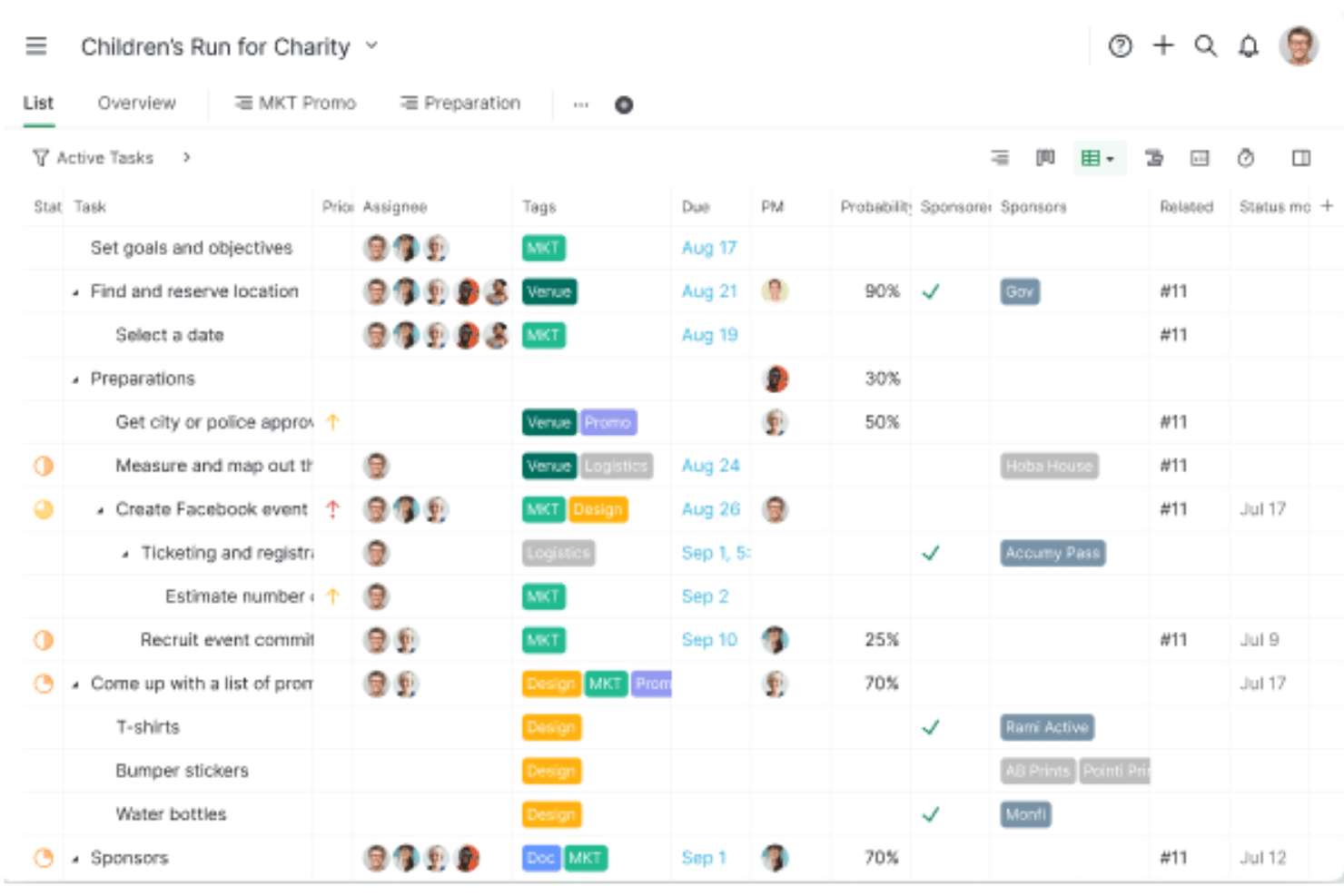
Quire è uno strumento di gestione dei progetti con pianificazione in più viste attraverso elenchi di attività nidificati, bacheche Kanban, una sequenza temporale dinamica in stile Gantt e riepiloghi Cartella intelligente tra più progetti.
Per chi è più adatto Quire?
Quire è adatto ai team di prodotto e ingegneria di piccole e medie dimensioni che hanno bisogno di suddivisioni dettagliate delle attività nidificate insieme a una sequenza temporale visiva, senza pagare per uno strumento di pianificazione aziendale.
Perché ho scelto Quire
Ho scelto Quire come uno dei migliori perché è l'unico strumento nella mia selezione che consente di creare gerarchie di attività profondamente nidificate e visualizzarle direttamente su una sequenza temporale in stile Gantt. Mi piace il fatto che sia possibile suddividere un progetto complesso in livelli illimitati di sottoattività nella vista Albero, quindi passare alla vista Sequenza temporale e vedere ogni livello come una barra orizzontale con riprogrammazione tramite trascinamento. Quando si sposta un'attività principale, le dipendenze successive si aggiornano automaticamente lungo l'intera catena.
Funzionalità principali di Quire
- Riepilogo Cartella intelligente tra più progetti: Aggrega le attività di più progetti in un'unica vista Albero, Bacheca o Sequenza temporale per una pianificazione leggera a livello di portafoglio.
- Barre di assegnazione: Raggruppa le barre della sequenza temporale per membro del team, così puoi individuare gli squilibri del carico di lavoro tra attività sovrapposte senza uscire dalla vista Gantt.
- Widget del pannello delle attività bloccate: Mostra le attività che non possono procedere perché un'attività precedente non è completa, fornendo un elenco aggiornato in tempo reale degli ostacoli alla pianificazione.
- Condivisione tramite link pubblico: Consente di condividere una vista del progetto aggiornata con clienti o parti interessate tramite un link, senza richiedere un account, nei piani Professionale e superiori.
Integrazioni di Quire
Quire offre integrazioni native con Google Drive, Microsoft OneDrive, Microsoft Teams, Slack, GitHub, Google Calendar, Dropbox e Box. Supporta inoltre integrazioni personalizzate tramite la sua API aperta e Zapier.
Pros and Cons
Pros:
- Gerarchia di attività infinitamente nidificata nella vista Sequenza temporale
- Sequenze temporali tra più progetti con riepiloghi Cartella intelligente
- Condivisione tramite link pubblico per pianificazioni aggiornate
Cons:
- Nessuna visualizzazione della linea di base o del percorso critico
- Supporta solo dipendenze da fine a inizio
New Product Updates from Quire
Quire Adds Custom Field Locking and Comment Reaction API Support
Quire adds custom field locking and API support for reading and setting emoji reactions on comments. These updates give teams more control over field data and expand comment interaction options for developers. For more information, visit Quire’s official site.
 .
.
Kantata
Ideale per la gestione completa del ciclo di vita dei progetti

Kantata è una piattaforma di gestione delle tempistiche di progetto progettata per i team di servizi professionali, che offre pianificazione dei progetti, gestione delle risorse, timeline Gantt e monitoraggio in tempo reale dei progetti in un unico sistema.
Per chi è più adatto Kantata?
Kantata è particolarmente indicato per aziende di servizi professionali—come società di consulenza, marketing e servizi IT—che devono gestire progetti complessi e suddivisi in più fasi dalla definizione fino alla consegna.
Perché ho scelto Kantata
Kantata si guadagna un posto tra i migliori della mia lista perché copre l’intero ciclo di consegna dei progetti in una singola piattaforma—dalla definizione e stima di nuovi lavori fino alla fatturazione e alla chiusura finanziaria. Collega vendite e servizi: il mio team può creare stime, collegarle ai piani delle risorse e passare direttamente all’esecuzione del progetto senza cambiare strumenti. Apprezzo anche l’ottimizzazione delle risorse guidata dall’IA, che valuta le possibili combinazioni di staff su tutto il portafoglio per segnalare carenze di competenze e conflitti di programmazione prima che impattino sulla timeline. Per i team che gestiscono progetti a più fasi rivolti ai clienti, dove budget, utilizzo e consegna devono essere sempre allineati, Kantata tiene tutti questi dati sotto controllo in un unico luogo.
Funzionalità chiave di Kantata
- Pianificazione dei progetti con diagramma di Gantt: Crea e gestisci le tempistiche di progetto con dipendenze tra attività, traguardi e pianificazione drag-and-drop in una visuale Gantt.
- Monitoraggio di tempi e spese: Registra ore fatturabili e spese direttamente sulle attività del progetto, con automazioni integrate per supportare i team finanziari nella chiusura dei periodi.
- Kantata Pulse (sentiment di clienti e dipendenti): Raccogli feedback in tempo reale da clienti e membri del team insieme ai dati sulla salute del progetto per individuare tempestivamente rischi nella consegna.
- Assistente AI generativo per i progetti: Redige automaticamente report di stato, aggiornamenti per la direzione e case study di progetto attingendo dati dai progetti attivi e dai controlli Pulse.
Integrazioni di Kantata
Kantata offre integrazioni native con Salesforce, Jira, Slack, HubSpot, QuickBooks, Xero, Expensify e Sage Intacct e si collega con Zapier. È disponibile un’API per integrazioni personalizzate.
New Product Updates from Kantata

Kantata Adds Access Group Change History
Kantata adds Access Groups History, letting account administrators track changes to group details, membership, and permissions in Recent History. The update also makes these events available through the Subscribed Events API for broader monitoring. For more information, visit Kantata’s official site.
 .
.
Miro
Ideale per una soluzione altamente flessibile
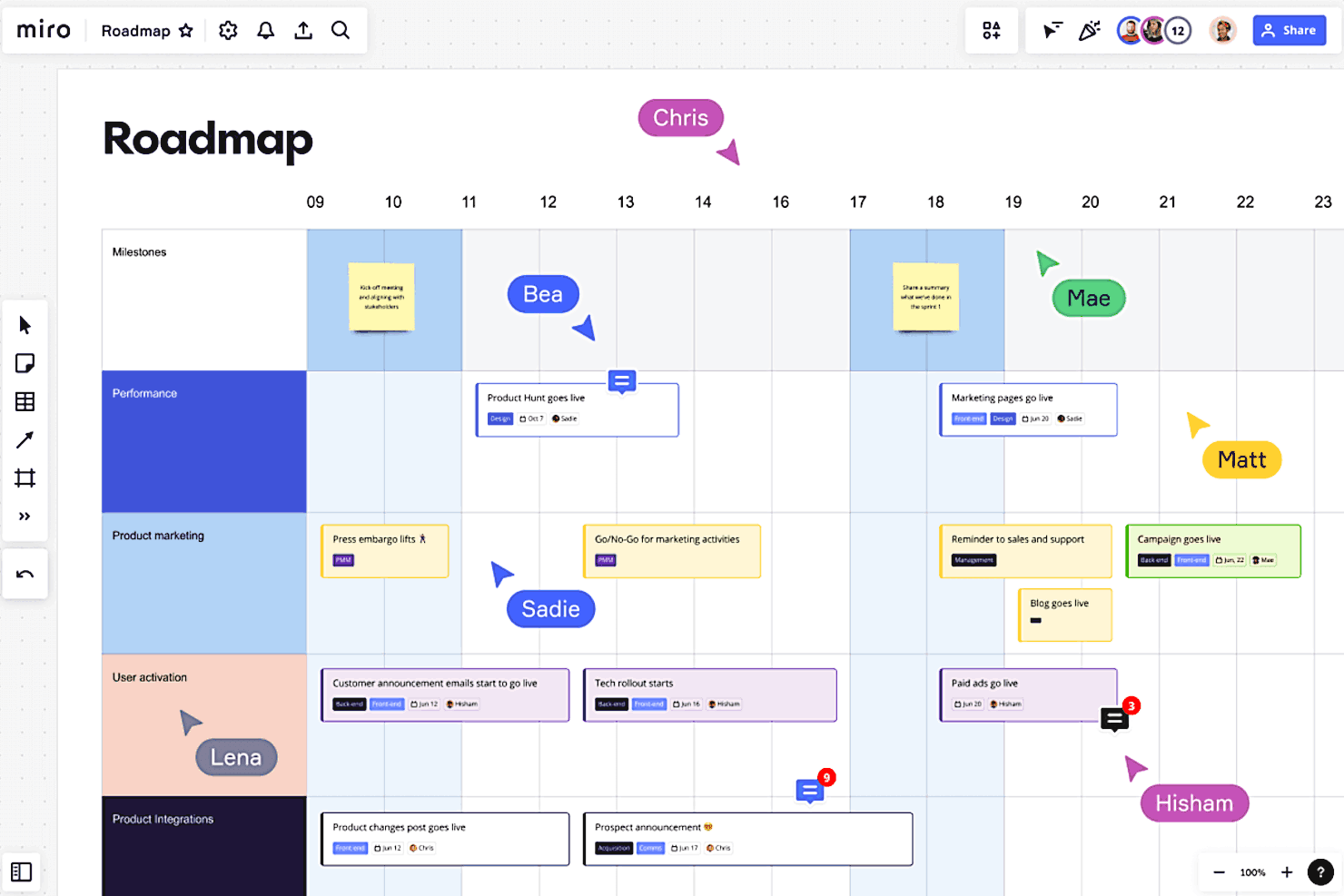
Miro è una piattaforma di collaborazione visiva per la gestione delle timeline di progetto che consente ai team di creare cronologie interattive, diagrammi di Gantt e bacheche di progetto utilizzando modelli personalizzabili e strumenti drag-and-drop.
Per chi è meglio Miro?
Miro è particolarmente indicato per team trasversali coinvolti in prodotto, design ed engineering che necessitano di uno spazio di lavoro visivo e flessibile per pianificare e monitorare insieme i progetti.
Perché ho scelto Miro
Miro si guadagna il suo posto nella mia shortlist perché nessun altro strumento di gestione delle timeline offre così tanta libertà di adattare lo spazio di lavoro a come il team realmente pensa e opera. Ciò che apprezzo di più è la possibilità di passare dalla vista tabellare a quella della timeline con un solo clic—così, quando una pianificazione sprint parte come una tabella strutturata, posso trasformarla in una timeline visiva e individuare subito eventuali conflitti di scadenze senza dover ricostruire nulla. La canvas infinita mi permette anche di tenere la timeline accanto al brainstorming, alla mappa degli stakeholder e alle schede attività sincronizzate con Jira che alimentano tutto il processo. La sincronizzazione bidirezionale con Jira e Azure DevOps è davvero utile—gli aggiornamenti fluiscono automaticamente così che la timeline rimane aggiornata senza che nessuno debba inseguirli manualmente.
Funzionalità principali di Miro
- Modelli di diagrammi di Gantt: Modelli Gantt preimpostati consentono di mappare attività, traguardi e dipendenze senza partire da zero.
- Collaborazione in tempo reale: Più membri del team possono modificare, commentare e reagire sulla stessa bacheca simultaneamente durante le sessioni di pianificazione.
- Mappatura delle dipendenze: Collega visivamente attività e traguardi con frecce per tracciare le relazioni e la sequenza sulla tua timeline.
- Strumenti di stima: Funzionalità integrate permettono ai team di assegnare effort e story point direttamente in bacheca durante la pianificazione degli sprint.
Integrazioni di Miro
Miro offre integrazioni native con Jira, Asana, monday.com, Trello, Microsoft Teams, Slack, Google Drive, Zoom e Confluence, e si connette anche con Zapier. È disponibile un'API per integrazioni personalizzate.
New Product Updates from Miro
Miro Adds Japan Data Residency for Enterprise Customers
Miro has introduced Japan data residency for enterprise customers, offering in-region storage for production data, backups, and metadata, plus in-region compute infrastructure. For more information, visit Miro's official site.

FigJam
Ideale per la pianificazione collaborativa in tempo reale
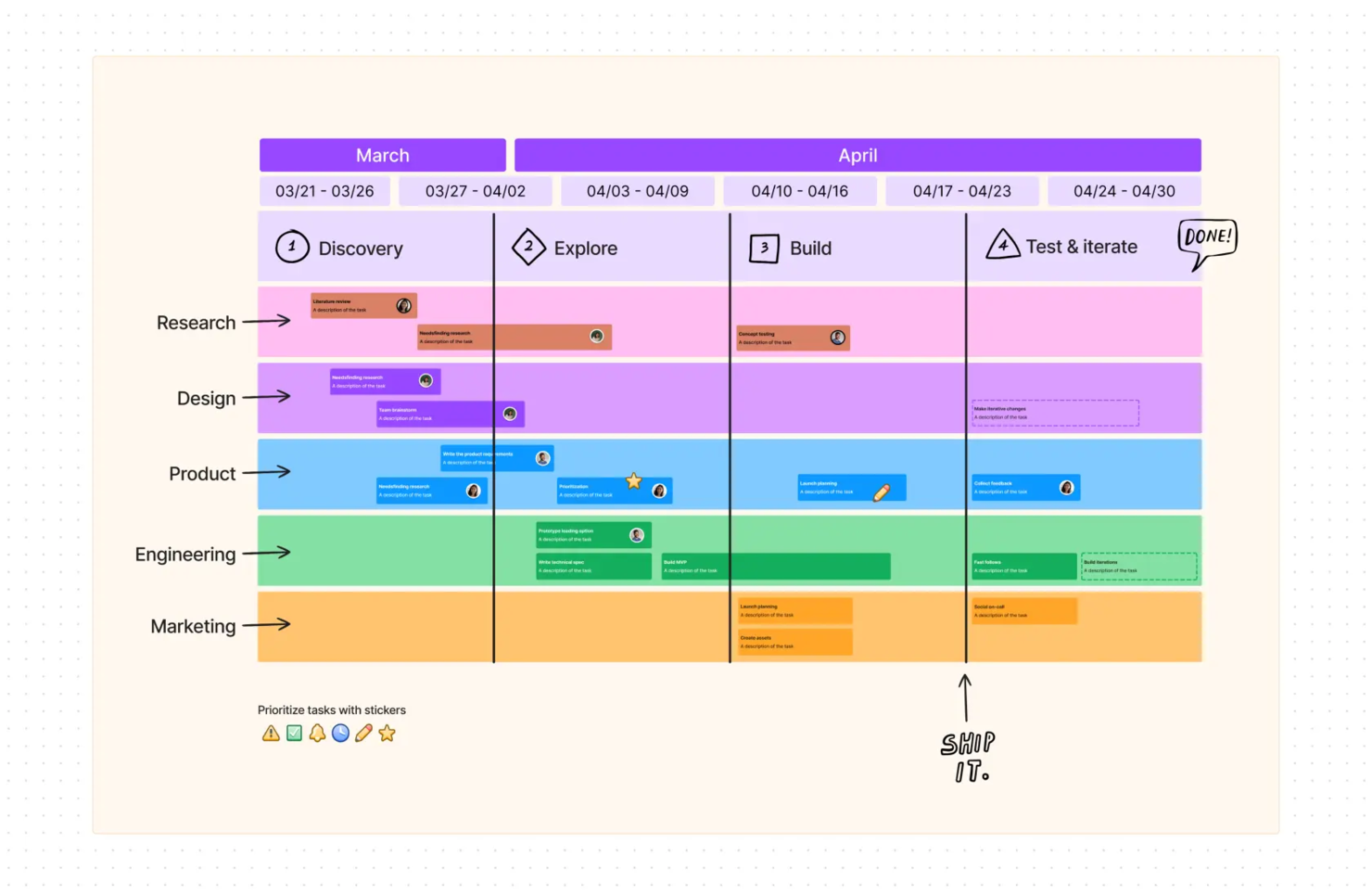
FigJam è uno strumento online per lavagne collaborative e pianificazione visiva che consente ai team di mappare le tempistiche dei progetti, organizzare le tappe fondamentali e collaborare alla pianificazione utilizzando bacheche e modelli interattivi.
Per chi è indicato FigJam?
FigJam è particolarmente adatto a team trasversali nei settori di prodotto, design ed engineering che pianificano e tracciano insieme le tempistiche dei progetti in tempo reale.
Perché ho scelto FigJam
FigJam è una delle mie scelte preferite perché trasforma la pianificazione delle tempistiche in un'attività realmente collaborativa, invece che un compito individuale. Il mio team utilizza i modelli di diagrammi di Gantt e cronoprogrammi di FigJam per abbozzare insieme i piani in tempo reale, con più cursori visibili contemporaneamente sulla bacheca. Inoltre, faccio affidamento sulla modalità Spotlight per guidare gli stakeholder attraverso le tempistiche durante le sessioni di pianificazione, mantenendo tutti concentrati sulla stessa sezione della bacheca. La funzione AI che genera e visualizza le tempistiche da un semplice prompt ci fa davvero risparmiare tempo quando dobbiamo avviare un nuovo progetto.
Funzionalità principali di FigJam
- Post-it e votazione: Aggiungi post-it su una bacheca condivisa e utilizza gli strumenti di votazione integrati per dare priorità a compiti e decisioni durante le sessioni di pianificazione.
- Forme e connettori: Crea diagrammi di flusso e mappe delle dipendenze usando forme che si allineano automaticamente alla griglia con linee di collegamento automatiche.
- Audio e chat in tempo reale: Parla con i colleghi delle decisioni sulle tempistiche utilizzando audio e chat integrati nella bacheca senza uscire dalla sessione.
- Accesso ospite: Invita stakeholder esterni a contribuire sulla bacheca per 24 ore senza necessità di registrazione.
Integrazioni di FigJam
FigJam si integra nativamente con Figma e include widget integrati per strumenti come Jira e Asana. Sfrutta inoltre le integrazioni dell'ecosistema Figma più ampio (ad esempio Slack, Microsoft Teams, Google Workspace) e supporta l'automazione tramite Zapier e l'API di Figma.

ClickUp
Ideale per liberi professionisti
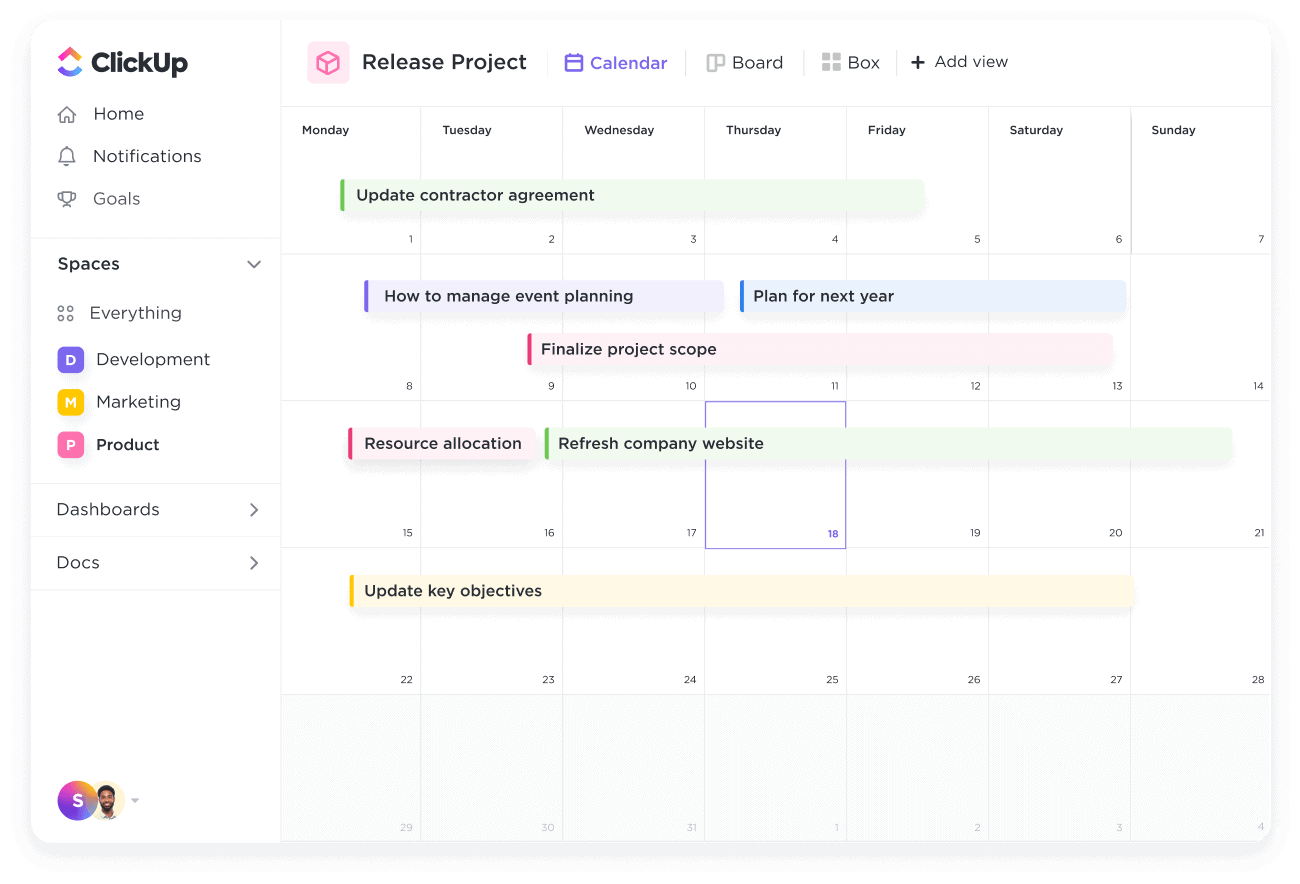
Click Up offre la maggior parte delle funzionalità che si desiderano in un software di gestione delle timeline, come la flessibilità, rendendolo adatto ai liberi professionisti che operano in settori diversi. Lo strumento è facile da usare e intuitivo, il che significa che non perderai tempo prezioso per imparare a utilizzarlo. Il software dispone anche di un'app per ogni dispositivo, risultando così ideale per singoli o team che lavorano su dispositivi diversi in momenti differenti.
Se c'è un elemento che fa sì che Click Up superi la concorrenza, è il servizio clienti dell'azienda. La società garantisce che qualcuno sarà sempre disponibile, 24 ore su 24, ogni giorno, anche durante le festività. Inoltre, utilizzando lo strumento, hai accesso a webinar giornalieri e coaching gratuito. Per questo motivo lo strumento è ottimo per i liberi professionisti che spesso necessitano di supporto al di fuori degli orari lavorativi tradizionali.
Click Up si integra con Slack, GitHub, GitLab, Webhooks, Everhour, Toggl, Harvest, Google Drive, One Drive, Dropbox, Outlook, Google Calendar, Figma, Vimeo, YouTube, Loom, Zoom, Bitbucket, Chrome, Amazon Alexa, Google Assistant, Google Hangouts Chat, Intercom, Box, Zendesk, Front, Clokify, Timely, PomoDone, TMetric, Timeneye, Promodone e una vasta gamma di altre app.
Click Up parte da $5/utente/mese e offre un piano gratuito per sempre per uso personale.
New Product Updates from ClickUp
ClickUp Adds Meetings Hub, Super Agent Templates, and ZoomInfo Integration
ClickUp adds a searchable Meetings Hub, new ways to clone and template Super Agents, and a ZoomInfo integration through the App Center. These updates improve meeting retrieval, agent reuse, and access to sales intelligence. For more information, visit ClickUp’s official site.
Backlog
Ideale per team di sviluppo software

Backlog è progettato per garantire che tutti i diversi segmenti di un progetto si colleghino facilmente tra loro. I Wiki dello strumento rendono i progetti accessibili a tutti i membri del team e consentono una facile modifica, rendendolo uno strumento ideale per i team di sviluppo software. Le bacheche Kanban facilitano la visualizzazione delle diverse fasi. I diagrammi di Gantt interattivi permettono agli utenti di visualizzare la tempistica dell'intero progetto.
Altre funzionalità che portano Backlog in questa top ten includono la possibilità per gli utenti di creare attività principali e secondarie per migliorare l’ordine e creare campi personalizzati rilevanti per uno specifico progetto. La funzione di condivisione dei file consente di mantenere tutti i file in un unico spazio di lavoro. La funzione di trascinamento rende facile modificare le tempistiche e le durate o cambiare lo stato di una attività.
Backlog si integra con Typetalk, Cacoo, Nulab Pass, Slack, Redmine, Jira Importer, iOS App, LombdaTest e Android App.
Backlog ha un costo a partire da $35/30 utenti/mese e offre un piano gratuito per sempre fino a 10 utenti e una prova gratuita di 30 giorni sui piani a pagamento.
Altri software per la gestione delle tempistiche dei progetti
Ecco alcune altre soluzioni che non sono entrate nell’elenco principale, ma che vale sicuramente la pena prendere in considerazione per ampliare la ricerca.
- Workzone
Ideale per moduli di richiesta predefiniti
- Lucen
Ideale per la pianificazione visiva dei progetti
- Bonsai Agency Software
Ideale per la gestione delle tempistiche delle agenzie con pianificazione delle risorse
- Polaris PSA By Replicon
Ideale per analisi di scenari what-if sofisticate
- ProjectManager
Ideale per team remoti
- GoodDay
Migliore gestione delle timeline per la sua personalizzazione
- Ravetree
Ideale per cronoprogrammi di progetto integrati
- GanttPRO
Ideale per professionisti e studenti
- Smartsheet
Ideale per lavorare con le formule
- Celoxis
Ideale per la gestione del portafoglio progetti
- Scoro
Ideale per la gestione completa del lavoro dall’inizio alla fine
- Hive
Ideale per progetti grandi e complessi
- GoodDay
Ideale per funzionalità di diagrammi di Gantt
- Hub Planner by Milient
Ideale per analytics di team e report dinamici
- TaskRay
Ideale per l'integrazione nativa con Salesforce
- PathPro
Ideale per roadmap pubbliche


Come Valuto il Software di Gestione delle Tempistiche di Progetto
Valuto questi strumenti su due livelli: le capacità di pianificazione di base che ogni strumento deve possedere e i fattori differenzianti che distinguono un semplice visualizzatore di Gantt da uno strumento su cui un responsabile PMO può fare affidamento.
Funzionalità di Base (Requisiti Fondamentali per Questa Lista)
Quando seleziono gli strumenti per la mia lista, valuto ciascuno di essi su una scala da 0 (non offre la funzionalità) a 5 (eccelle in quest'area) per ogni funzionalità di base elencata di seguito. Successivamente, calcolo il punteggio totale dello strumento in percentuale. Ogni strumento deve raggiungere un punteggio totale minimo del 65% per essere preso in considerazione.
- Visualizzazione Diagramma di Gantt: Ricerco viste Gantt interattive e ingrandibili in cui sia possibile raggruppare le attività per fase, team o campi personalizzati—non solo un semplice grafico statico che non permette azioni.
- Dipendenze e Sequenziamento delle Attività: Ogni strumento dovrebbe supportare tutti e quattro i tipi di dipendenza (FS, SS, FF, SF) con propagazione automatica, così che spostando una attività le date correlate vengano aggiornate di conseguenza.
- Monitoraggio di Milestone e Scadenze: Verifico che i milestone siano marcatori distinti con avvisi—come segnalare un go-live a rischio—invece di essere semplicemente attività normali etichettate in modo diverso.
- Identificazione del Percorso Critico: Lo strumento dovrebbe calcolare automaticamente il percorso critico e aggiornarlo man mano che il programma si modifica, offrendo una chiara visione di ciò che determina la data di fine.
- Baseline e Confronto delle Pianificazioni: Valuto se è possibile salvare una baseline e sovrapporla alla pianificazione attuale per individuare eventuali slittamenti, soprattutto a progetto in corso quando il perimetro cambia.
- Modifica della Timeline con Drag-and-Drop: La ripianificazione dovrebbe avvenire direttamente sulla timeline con aggiornamenti in tempo reale alle attività collegate, non tramite modali o schermi di modifica separati.
Una volta individuati gli strumenti che soddisfano questi criteri, prendo in considerazione ciò che distingue ogni piattaforma.
Fattori Differenzianti (Cosa Distingue i Fornitori)
Ecco come confronto e metto a paragone i vari fornitori:
Funzionalità di Spicco
I riepiloghi di portfolio sono importanti quando si gestiscono più progetti contemporaneamente. Cerco strumenti che permettano a un responsabile PMO di visualizzare le dipendenze tra progetti in un'unica schermata, senza dover passare da un piano all'altro. La pianificazione di scenari what-if è un altro fattore distintivo: poter simulare un ritardo di due settimane di un fornitore prima che si verifichi aiuta ad evitare problemi a valle. Inoltre, valuto se uno strumento offre visualizzazioni di timeline condivisibili e di sola lettura per soggetti esterni, così i clienti rimangono informati senza bisogno di una licenza completa.
Oltre le Funzionalità
La profondità delle integrazioni è una delle prime cose che valuto. Uno strumento di timeline che si sincronizza bidirezionalmente con Jira o GitHub permette ai dati del team di sviluppo di fluire direttamente nella pianificazione di progetto. Considero anche la rapidità con cui un team può iniziare a lavorare: il supporto all'importazione di file MS Project o Excel e modelli preimpostati fa davvero la differenza nella fase di onboarding. La reportistica completa il quadro. Verifico se lo strumento può generare dashboard esportabili sullo stato della pianificazione per i comitati direttivi, senza richiedere una composizione manuale ad ogni ciclo di avanzamento.
Come scegliere un software per la gestione delle tempistiche dei progetti
È facile lasciarsi sopraffare da lunghi elenchi di funzionalità e strutture tariffarie complesse. Per aiutarti a rimanere concentrato mentre affronti il tuo processo di selezione del software, ecco una lista di fattori da tenere presenti:
| Fattore | Cosa considerare |
| Scalabilità | Assicurati che il software cresca insieme al tuo team. Cerca strumenti in grado di gestire un numero crescente di progetti e utenti. |
| Integrazioni | Verifica l'integrazione con gli strumenti che il tuo team utilizza già, come CRM, piattaforme di collaborazione o software di contabilità. |
| Personalizzazione | Scegli un software che ti permetta di adattare modelli, flussi di lavoro e tempistiche alle esigenze specifiche del tuo progetto. |
| Facilità d'uso | Scegli una piattaforma intuitiva con un'interfaccia chiara, funzionalità di trascinamento e rilascio e una curva di apprendimento minima per il tuo team. |
| Budget | Confronta i piani tariffari per assicurarti che rientrino nel tuo budget. Cerca soluzioni ricche di funzionalità, con opzioni flessibili e senza costi nascosti. |
| Misure di sicurezza | Dai priorità agli strumenti con una solida protezione dei dati, certificazioni di conformità e controlli degli accessi degli utenti per mantenere al sicuro le tue informazioni. |
| Accesso da dispositivi mobili | Assicurati che il software includa un'app mobile, così il tuo team potrà visualizzare e aggiornare le tempistiche dei progetti anche in mobilità. |
| Strumenti di collaborazione | Cerca funzionalità come aggiornamenti in tempo reale, commenti sulle attività e condivisione dei file per mantenere il team allineato e produttivo. |
Tendenze nei software per la gestione delle tempistiche dei progetti
Nella mia ricerca, ho raccolto innumerevoli aggiornamenti sui prodotti, comunicati stampa e registri delle versioni da diversi fornitori di software per la gestione delle tempistiche dei progetti. Ecco le tendenze emergenti che sto tenendo d'occhio:
- Approfondimenti basati sull'IA: I fornitori stanno aggiungendo l'IA per prevedere i ritardi, suggerire modifiche alle tempistiche e consigliare la prioritizzazione delle attività. Ad esempio, alcuni strumenti analizzano ora i dati storici per ottimizzare automaticamente le tempistiche future.
- Lavagne digitali collaborative: Molti strumenti ora includono lavagne digitali condivise per aiutare i team a elaborare visivamente le tempistiche. Questo rende la generazione di idee e la pianificazione più interattive, soprattutto per i team che lavorano da remoto.
- Pianificazione degli scenari: Gli strumenti stanno introducendo funzionalità per simulare molteplici scenari ipotetici per le tempistiche dei progetti. Questo aiuta i team a prepararsi ai potenziali rischi e a vedere come le modifiche potrebbero influire su scadenze e risorse.
- Analisi dell'allocazione delle risorse: Le analisi avanzate ora si concentrano sul monitoraggio in tempo reale della disponibilità e della capacità delle risorse. I fornitori stanno creando cruscotti per evidenziare direttamente nelle viste delle tempistiche i membri del team sovraccarichi o sottoutilizzati.
- Modelli specifici per settore: Un numero sempre maggiore di fornitori offre modelli di tempistiche predefiniti e adattati a settori come l'edilizia, il marketing e l'IT. Questi fanno risparmiare tempo agli utenti, allineandosi ai flussi di lavoro comuni in campi specifici.
Che cos'è un software per la gestione delle tempistiche dei progetti?
Il software per la gestione delle tempistiche dei progetti è uno strumento che aiuta i team a creare, gestire e monitorare visivamente i programmi dei progetti. Questi strumenti sono comunemente utilizzati da responsabili di progetto, responsabili di team e professionisti di settori come il marketing, l'edilizia e l'IT per tenere sotto controllo le scadenze e mantenere i team organizzati. Funzionalità come la creazione di tempistiche, l'assegnazione delle attività e il monitoraggio delle tappe fondamentali aiutano i team a visualizzare i progressi, identificare i colli di bottiglia e modificare i piani secondo necessità. Nel complesso, questi strumenti semplificano la pianificazione dei progetti e garantiscono che tutti rimangano allineati rispetto agli obiettivi e alle scadenze principali.
Funzionalità dei software per la gestione delle tempistiche dei progetti
Quando selezioni un software per la gestione delle tempistiche dei progetti, presta attenzione alle seguenti funzionalità chiave:
- Visualizzazione delle tempistiche: Ti consente di creare tempistiche chiare e visive, come i diagrammi di Gantt o i calendari per la gestione dei progetti, per monitorare i progressi del progetto.
- Dipendenze tra attività: Ti consente di collegare le attività tra loro, in modo che una non possa iniziare finché un'altra non viene completata. Se questa è una funzionalità fondamentale per il tuo team, dai un'occhiata ad altri software per la gestione dei progetti con dipendenze qui.
- Monitoraggio delle tappe fondamentali: Ti aiuta a impostare e monitorare le scadenze o i risultati principali all'interno di un progetto.
- Gestione delle risorse: Ti consente di assegnare membri del team, attrezzature o budget ad attività specifiche per evitare sovraccarichi o carenze.
- Monitoraggio dei progressi: Fornisce aggiornamenti in tempo reale sul completamento delle attività e sulle variazioni delle tempistiche per mantenere il team informato.
- Modelli personalizzati: Offre formati di tempistiche predefiniti e adattati ai tipi di progetto più comuni, facendo risparmiare tempo durante la configurazione.
- Strumenti di collaborazione: Consentono ai team di commentare le attività, condividere aggiornamenti e lavorare insieme direttamente all'interno del software.
- Pianificazione degli scenari: Ti consente di testare diverse modifiche alle tempistiche per vedere come i cambiamenti potrebbero influire sul progetto complessivo.
- Notifiche automatiche: Invia avvisi per le scadenze imminenti, gli aggiornamenti delle attività o gli elementi in ritardo, per mantenere tutti sulla buona strada.
- Integrazioni: Si connette a strumenti come CRM, piattaforme di comunicazione o sistemi di monitoraggio del tempo per un flusso di lavoro più efficiente.
Vantaggi dei software per la gestione delle tempistiche dei progetti
L'implementazione di un software per la gestione delle tempistiche dei progetti può offrire diversi vantaggi al tuo team e alla tua azienda. Eccone alcuni che puoi aspettarti:
- Organizzazione migliorata: Ti aiuta a strutturare chiaramente attività e scadenze, così tutti sanno cosa fare e quando.
- Collaborazione migliore: Mantiene tutti aggiornati grazie a tempistiche condivise, aggiornamenti sulle attività e funzionalità per i commenti.
- Risparmio di tempo: Riduce il lavoro manuale automatizzando aggiornamenti, notifiche e modifiche alle tempistiche.
- Maggiore visibilità: Ti consente di avere una visione d'insieme dei progressi del progetto e di individuare tempestivamente potenziali ritardi.
- Pianificazione più accurata: Ti aiuta a tenere conto di dipendenze, risorse e scadenze per creare programmi di progetto realistici.
- Riduzione dei rischi: Identifica i colli di bottiglia o le risorse sovraccariche prima che causino problemi.
- Decisioni più consapevoli: Offre dati e approfondimenti per modificare i piani e dare priorità alle attività sulla base degli aggiornamenti in tempo reale.
Costi e prezzi del software per la gestione delle tempistiche dei progetti
La scelta di un software per la gestione delle tempistiche dei progetti richiede la comprensione dei vari modelli e piani tariffari disponibili. I costi variano in base alle funzionalità, alle dimensioni del team, ai componenti aggiuntivi e ad altri fattori. La tabella seguente riassume i piani più comuni, i relativi prezzi medi e le funzionalità generalmente incluse nelle soluzioni software per la gestione delle tempistiche dei progetti:
Tabella comparativa dei piani per il software di gestione delle tempistiche dei progetti
| Tipo di piano | Prezzo medio | Funzionalità comuni |
| Piano gratuito | $0 | Creazione di tempistiche di base, assegnazione limitata delle attività e strumenti di collaborazione di base. |
| Piano personale | $5-$25/utente/mese | Creazione di tempistiche, dipendenze tra attività, monitoraggio delle tappe fondamentali e integrazioni con alcuni strumenti esterni. |
| Piano aziendale | $30-$60/utente/mese | Report avanzati, gestione delle risorse, funzionalità di collaborazione del team e supporto prioritario. |
| Piano per grandi aziende | $70+/utente/mese | Flussi di lavoro personalizzati, pianificazione di scenari, gestione dedicata dell'account e sicurezza di livello aziendale. |
Domande frequenti sul software per la gestione della timeline di progetto
Che cos'è una timeline di progetto?
Una timeline di progetto è una rappresentazione visiva del lavoro da svolgere in un progetto. Puoi trovarla nei \u003ca href=\u0022https://thedigitalprojectmanager.com/tools/best-project-management-software/\u0022\u003emigliori software di gestione dei progetti\u003c/a\u003e come visualizzazione speciale e contiene informazioni sulle attività, oltre a dettagli su milestone, dipendenze e avanzamento delle attività.
Come si crea una timeline?
Creare una timeline è solitamente la parte più semplice. Dopo aver definito tutte le attività da svolgere, puoi accedere alla visualizzazione timeline. Quindi, utilizzi la funzionalità di trascinamento per iniziare a creare il tuo diagramma. Infine, una volta terminato, puoi collegare le barre per indicare le dipendenze tra le attività.
Perché i progetti subiscono ritardi?
Se il tuo team riesce a consegnare i progetti nei tempi previsti e rispettando il budget nella maggior parte dei casi, congratulazioni: la pianificazione dei progetti o il software per la gestione della timeline di progetto che utilizzi sono eccellenti. Meriti una pacca sulla spalla, perché un recente sondaggio ha concluso che solo il \u003ca href=\u0022https://wellingtone.co.uk/wp-content/uploads/2020/06/The-State-of-Project-Management-Report-2020-Wellingtone.pdf\u0022 rel=\u0022noreferrer noopener\u0022 target=\u0022_blank\u0022\u003e29%\u003c/a\u003e delle organizzazioni ha dichiarato di completare i progetti nei tempi previsti nella maggior parte dei casi o sempre.
\u003c!– /wp:paragraph –\u003e \u003c!– wp:paragraph –\u003e
Ai progetti che superano le tempistiche assegnate possono essere attribuite diverse ragioni, tra cui una scarsa collaborazione all’interno del team, la mancanza di automazione, processi di approvazione e autorizzazione complessi, una comunicazione generalmente insufficiente sulle scadenze, una gestione inadeguata delle risorse e l’incapacità di gestire efficacemente i team da remoto.
\u003c!– /wp:paragraph –\u003e \u003c!– wp:paragraph –\u003e
Indubbiamente, bilanciare tutti gli elementi associati al successo di un progetto può essere difficile, soprattutto per le piccole imprese che utilizzano soluzioni obsolete per la gestione dei progetti, come fogli di calcolo Excel ed elenchi di cose da fare scritti a mano e ormai superati. Tuttavia, la buona notizia è che il mercato è ricco di software progettati esplicitamente per gestire le timeline di progetto di team di ogni tipo.
\u003c!– /wp:paragraph –\u003e
Quali sono alcuni limiti dei diagrammi per la gestione dei progetti?
I diagrammi per la gestione dei progetti, come i diagrammi di Gantt, sono eccellenti per rappresentare visivamente le timeline, le dipendenze e l’avanzamento dei progetti. Tuttavia, presentano alcuni limiti, tra cui la difficoltà nel gestire progetti complessi con numerose attività e dipendenze, poiché il diagramma può diventare rapidamente disordinato e difficile da comprendere. Inoltre, hanno problemi di scalabilità, rendendo difficile adattarsi ai cambiamenti nei progetti di grandi dimensioni o dinamici. Spesso, infine, non offrono aggiornamenti in tempo reale se non vengono integrati con strumenti software, il che può comportare informazioni obsolete.
Quali sono alcune alternative ai diagrammi di Gantt?
I diagrammi di Gantt forniscono una rappresentazione visiva delle attività basata sulla timeline, mostrando date di inizio e fine, dipendenze e avanzamento del progetto. Sebbene siano ideali per i progetti lineari incentrati sulla pianificazione, presentano difficoltà nella gestione della complessità, della scalabilità e dell’adattabilità ai flussi di lavoro dinamici.
Le alternative ai diagrammi di Gantt includono:
\u003col\u003e
\u003cli\u003e\u003cstrong\u003eDiagrammi PERT\u003c/strong\u003e: si concentrano sulle dipendenze tra le attività e sui percorsi critici, risultando ideali per analizzare la sequenza delle attività e stimare le durate nei progetti complessi.\u003c/li\u003e
\u003cli\u003e\u003cstrong\u003eBacheche Kanban\u003c/strong\u003e: utilizzano un layout basato su colonne per visualizzare i flussi di lavoro, favorendo flessibilità, aggiornamenti in tempo reale e definizione delle priorità delle attività; sono ideali per i progetti agili e iterativi.\u003c/li\u003e
\u003cli\u003e\u003cstrong\u003eStrutture di scomposizione del lavoro (WBS)\u003c/strong\u003e: suddividono gerarchicamente i progetti in attività gestibili, risultando utili per definire l’ambito, ma senza indicare le tempistiche.\u003c/li\u003e
\u003cli\u003e\u003cstrong\u003eDiagrammi temporali\u003c/strong\u003e: forniscono una panoramica di alto livello delle milestone e delle scadenze, risultando ideali per presentazioni o aggiornamenti sullo stato senza mostrare le dipendenze.\u003c/li\u003e
\u003cli\u003e\u003cstrong\u003eBacheche Scrum\u003c/strong\u003e: dividono le attività nelle categorie “Da fare”, “In corso” e “Completato”, ponendo l’accento sulla collaborazione e sulle consegne frequenti nei flussi di lavoro iterativi.\u003c/li\u003e
\u003cli\u003e\u003cstrong\u003eMappe mentali\u003c/strong\u003e: visualizzazioni non lineari ideali per il brainstorming e per rappresentare l’evoluzione delle relazioni tra le attività nei progetti creativi.\u003c/li\u003e
\u003cli\u003e\u003cstrong\u003eDiagrammi di flusso\u003c/strong\u003e: evidenziano i processi e i percorsi decisionali, concentrandosi sui flussi di lavoro anziché sulle tempistiche.\u003c/li\u003e
\u003cli\u003e\u003cstrong\u003eMatrice RACI\u003c/strong\u003e: chiarisce i ruoli (Responsabile dell’esecuzione, Responsabile del risultato, Consultato, Informato), migliorando la collaborazione del team e l’assegnazione delle responsabilità sulle attività.\u003c/li\u003e
\u003c/ol\u003e
Ogni alternativa è adatta a esigenze specifiche, che si tratti di flessibilità, semplicità o analisi più approfondite, e consente di gestire situazioni in cui i diagrammi di Gantt possono risultare troppo rigidi o complessi.
Quali sono alcune funzionalità degli strumenti gratuiti per la gestione dei progetti?
Gli strumenti gratuiti per la gestione dei progetti includono spesso funzionalità essenziali per aiutare i team a rimanere organizzati e produttivi. Queste funzionalità includono generalmente:
\u003col\u003e
\u003cli\u003e\u003cstrong\u003eGestione delle attività\u003c/strong\u003e: strumenti per creare, assegnare e monitorare le attività in più progetti, con timeline di base o livelli di priorità.\u003c/li\u003e
\u003cli\u003e\u003cstrong\u003eOpzioni di collaborazione\u003c/strong\u003e: dashboard condivise, commenti e funzionalità di condivisione dei file per facilitare la comunicazione del team.\u003c/li\u003e
\u003cli\u003e\u003cstrong\u003eGestione di più progetti\u003c/strong\u003e: possibilità di gestire diversi progetti contemporaneamente, con opzioni per visualizzare le attività o l’avanzamento di tutti i progetti.\u003c/li\u003e
\u003cli\u003e\u003cstrong\u003eIntegrazioni\u003c/strong\u003e: integrazioni di base con strumenti diffusi come Google Workspace, Slack o applicazioni di calendario per semplificare i flussi di lavoro.\u003c/li\u003e
\u003cli\u003e\u003cstrong\u003eReportistica\u003c/strong\u003e: report semplici o monitoraggio dell’avanzamento per controllare le prestazioni del progetto.\u003c/li\u003e
\u003cli\u003e\u003cstrong\u003eUtenti e spazio di archiviazione limitati\u003c/strong\u003e: spesso adatti a piccoli team o singoli utenti, con limiti allo spazio di archiviazione o al numero di utenti.\u003c/li\u003e
\u003c/ol\u003e
Questi strumenti sono ideali per piccoli team o startup che desiderano gestire i progetti senza un impegno finanziario. Tuttavia, è importante ricordare che spesso presentano limitazioni come spazio di archiviazione ridotto, limiti sul numero di utenti, meno funzionalità avanzate e meno opzioni di personalizzazione.