

10 migliori strumenti alternativi a Zoho Projects per la gestione dei progetti nel 2026

Elenco delle migliori alternative a Zoho Projects


Capisco: trovare lo strumento giusto può fare la differenza per mantenere il tuo team organizzato ed efficiente. Fattori come casi d'uso specifici, budget e preferenze personali potrebbero averti portato a cercare alternative a Zoho Projects. Tuttavia, è difficile capire quali siano le migliori.
In questo articolo condividerò le mie migliori scelte tra le alternative a Zoho Projects. Ho testato e recensito ciascuna di esse per aiutarti a trovare quella più adatta al tuo team. Esploriamo le opzioni che potrebbero allinearsi meglio ai tuoi obiettivi aziendali e rendere più fluida la gestione dei progetti.
Che cos'è Zoho Projects?
Zoho Projects è un software di gestione dei progetti basato sul cloud, progettato per aziende di tutte le dimensioni. Facilita la pianificazione, il monitoraggio e la collaborazione sui progetti. Il software viene utilizzato da responsabili di progetto, team e parti interessate per gestire il lavoro e raggiungere in modo efficiente gli obiettivi dei progetti. Offre strumenti per la gestione delle attività, il monitoraggio del tempo e la condivisione dei documenti, oltre a integrarsi con altre applicazioni Zoho, soddisfacendo le esigenze di diversi settori.
Perché fidarsi dei nostri consigli sui software
Il nostro team testa e recensisce software dal 2012. In quanto project manager noi stessi, sappiamo quanto sia difficile — e importante — scegliere il software giusto.
Per questa guida, abbiamo valutato gli strumenti attraverso test pratici e ricerche indipendenti, assegnando un punteggio agli strumenti in base ai nostri criteri di selezione. Ci basiamo inoltre sulle competenze di leader di pensiero del settore e di professionisti attivi nella gestione dei progetti.
Le nostre recensioni riflettono il nostro giudizio editoriale umano, non un discorso di vendita.
Revisori esperti:
Tabella di confronto delle alternative a Zoho Projects
Questa tabella di confronto riassume i dettagli sui prezzi dei miei migliori software alternativi per la gestione dei progetti rispetto a Zoho Projects:
| Tool | Best For | Trial Info | Price | ||
|---|---|---|---|---|---|
| 1 | Ideale per l'automazione dei flussi di lavoro | Prova gratuita di 14 giorni + piano gratuito disponibile | Da $10/utente/mese (fatturazione annuale) | Website | |
| 2 | Ideale per la suddivisione gerarchica delle attività | Piano gratuito disponibile | A partire da $7.65/utente/mese (con fatturazione annuale) | Website | |
| 3 | Ideale per l'automazione dei progetti | Piano gratuito disponibile | A partire da $39/mese (fatturato annualmente) | Website | |
| 4 | Ideale per il controllo centralizzato dei progetti | Prova gratuita di 14 giorni + demo gratuita disponibile | A partire da $45/mese (fatturato annualmente) | Website | |
| 5 | Ideale per la visualizzazione dei processi di vendita | Prova gratuita di 14 giorni | Da $65/utente/mese (fatturato annualmente) | Website | |
| 6 | Ideale per la gestione del lavoro con i clienti | Prova gratuita di 30 giorni + demo gratuita disponibile | A partire da $9.99/utente/mese (fatturazione annuale) | Website | |
| 7 | Ideale per lo sviluppo software Agile | Prova gratuita di 7 giorni | Da $7.91/utente/mese | Website | |
| 8 | Ideale per metodologie di progetto flessibili | Prova gratuita + demo gratuita disponibile | Da $29/utente/mese | Website | |
| 9 | Ideale per la gestione delle note di team | Prova gratuita di 14 giorni | Da $8/utente/mese (fatturazione annuale) | Website | |
| 10 | Ideale per spazio di lavoro integrato | Piano gratuito + demo gratuita disponibile | Da $10/membro/mese (fatturato annualmente) | Website |

Recensioni delle migliori alternative a Zoho Projects
In questa sezione analizzerò i pro e i contro di ciascuna alternativa a Zoho Projects. Esaminerò le loro funzionalità e i casi d’uso migliori per aiutarti a prendere una decisione informata e trovare lo strumento giusto per le tue esigenze.

Wrike
Ideale per l'automazione dei flussi di lavoro
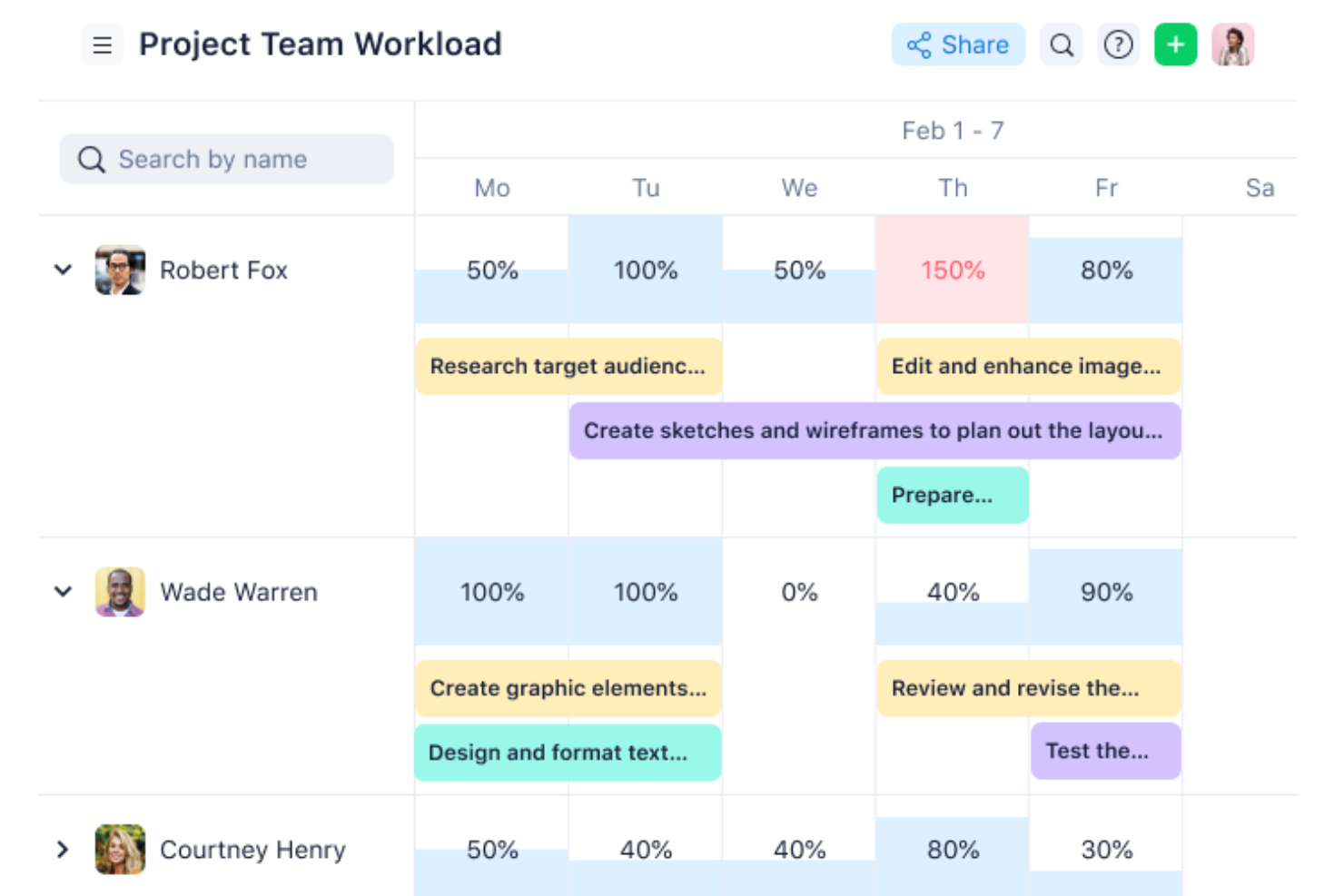
Wrike è una soluzione di project management progettata per aiutare i team a organizzare flussi di lavoro complessi e ridurre le attività ripetitive grazie a funzionalità integrate di automazione e intelligenza artificiale. È particolarmente utile per i team che gestiscono progetti trasversali e hanno bisogno di maggiore flessibilità rispetto a quella offerta tipicamente da Zoho Projects.
Perché Wrike è una buona alternativa a Zoho Projects:
Ho scelto Wrike per questa lista perché offre strumenti avanzati di automazione e funzionalità basate sull’IA che semplificano la gestione di progetti complessi. I suoi dashboard in tempo reale permettono una chiara visibilità su progressi e performance, aiutando i team a rimanere allineati. Wrike include anche uno strumento collaborativo di mind mapping, particolarmente utile per il brainstorming e l’organizzazione visiva delle idee. Queste capacità lo rendono una valida alternativa a Zoho Projects per i team che cercano maggiore personalizzazione e controllo sui loro flussi di lavoro.
Funzionalità e integrazioni di spicco di Wrike
Le sue funzionalità includono diagrammi di Gantt e bacheche Kanban personalizzabili, Wrike Datahub per centralizzare i dati di progetto, dashboard in tempo reale per monitorare l’avanzamento, moduli dinamici di richiesta per semplificare l’avvio dei progetti, e app mobili completamente funzionali per gestire le attività anche in movimento.
Le integrazioni includono Salesforce, Microsoft Teams, Google Sheets, Adobe Creative Cloud, Tableau, Zoom, Google Drive, Microsoft SharePoint, Klaxoon, Power BI, Intuit/QuickBooks e Miro.
Pros and Cons
Pros:
- Numerose integrazioni disponibili
- Dashboard altamente personalizzabili
- Robuste capacità di gestione delle attività
Cons:
- Le funzionalità avanzate di pianificazione delle risorse sono limitate ai piani di livello superiore
- Può essere complicato imparare a personalizzare la piattaforma
New Product Updates from Wrike

Wrike Adds Quick Search to Table View
Wrike adds Quick Search to Table View with full-table search across titles, descriptions, and fields, plus highlighted matches. This helps users find tasks faster in large tables. For more information, visit Wrike’s official site.

Quire
Ideale per la suddivisione gerarchica delle attività
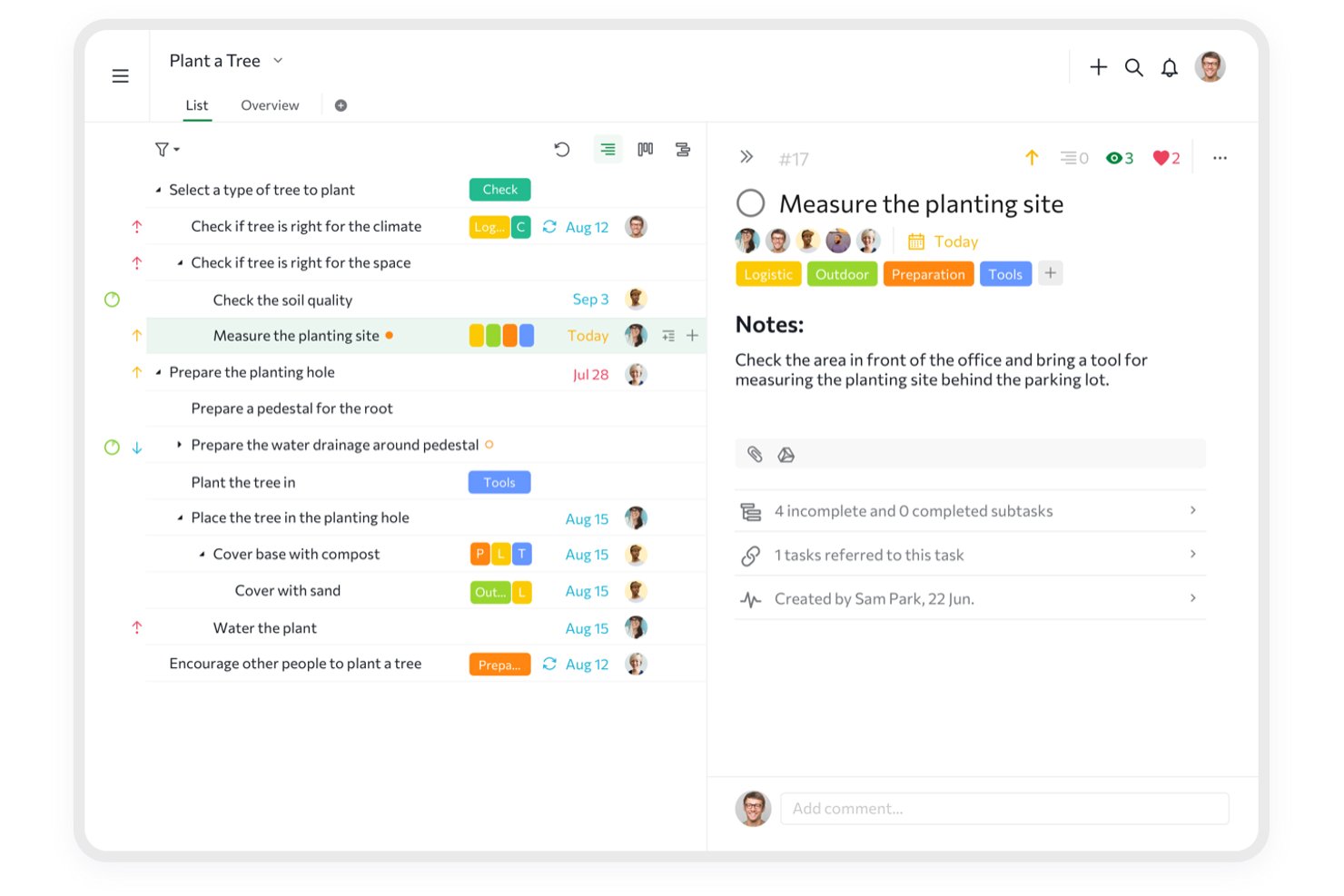
Quire è uno strumento di gestione dei progetti basato su una gerarchia di attività annidata all'infinito, che combina pianificazione a più viste, collaborazione del team e visibilità tra progetti attraverso le Cartelle intelligenti e la vista Panoramica.
Per chi è più adatto Quire?
Quire è adatto a team di piccole e medie dimensioni che devono suddividere progetti complessi in strutture di attività profondamente annidate senza una curva di apprendimento ripida.
Perché ho scelto Quire
Quire si è guadagnato un posto nella mia lista ristretta per il modo in cui gestisce la suddivisione gerarchica delle attività, un aspetto in cui Zoho Projects semplicemente non è all'altezza. Adoro la struttura ad albero delle attività annidata all'infinito: puoi creare epiche, suddividerle in storie e scomporre queste ultime in sottoattività dettagliate su un numero illimitato di livelli. La funzionalità Nascondi temporaneamente è qualcosa su cui faccio affidamento per togliere dalla vista le attività non urgenti, mantenendo concentrato il mio elenco attivo senza eliminare nulla. Le Cartelle intelligenti raccolgono le attività da più progetti in un'unica vista, una vera salvezza pratica quando tengo traccia di flussi di lavoro paralleli.
Funzionalità principali di Quire
- Riquadro Kanban: Una vista del flusso di lavoro con colonne e stati personalizzabili, basata sul trascinamento, per visualizzare il lavoro in corso del tuo team.
- Vista della sequenza temporale: Una vista di pianificazione in stile diagramma di Gantt per mappare traguardi, scadenze e dipendenze tra le attività del progetto.
- Documenti collaborativi: Documenti in stile wiki integrati direttamente nei progetti per archiviare brief, note e materiale di riferimento accanto alle attività.
- Vista panoramica: Una panoramica a livello organizzativo che mostra lo stato di tutti i progetti attivi in un'unica visualizzazione di alto livello.
Integrazioni di Quire
Quire offre integrazioni native con Slack, Microsoft Teams, Google Drive, Dropbox, Box, OneDrive, Google Calendar, GitHub e Power BI. Supporta inoltre un'API REST OAuth2, webhook, n8n e Zapier.
Pros and Cons
Pros:
- Gerarchia infinita di attività annidate per una pianificazione dettagliata
- L'elenco secondario intelligente consente di concentrarsi sulle attività personalizzate
- La funzionalità Nascondi temporaneamente nasconde le attività non urgenti
Cons:
- Nessun generatore nativo di automazioni del flusso di lavoro
- Nessun monitoraggio del budget o delle tariffe fatturabili
New Product Updates from Quire

Quire Adds Task and Standalone Reminders
Quire adds task reminders and standalone reminders with shared notifications, recurring schedules, and automatic date tracking. These updates help teams stay ahead of deadlines and manage reminders that do not need a task. For more information, visit Quire’s official site.
 .
.
Nifty
Ideale per l'automazione dei progetti
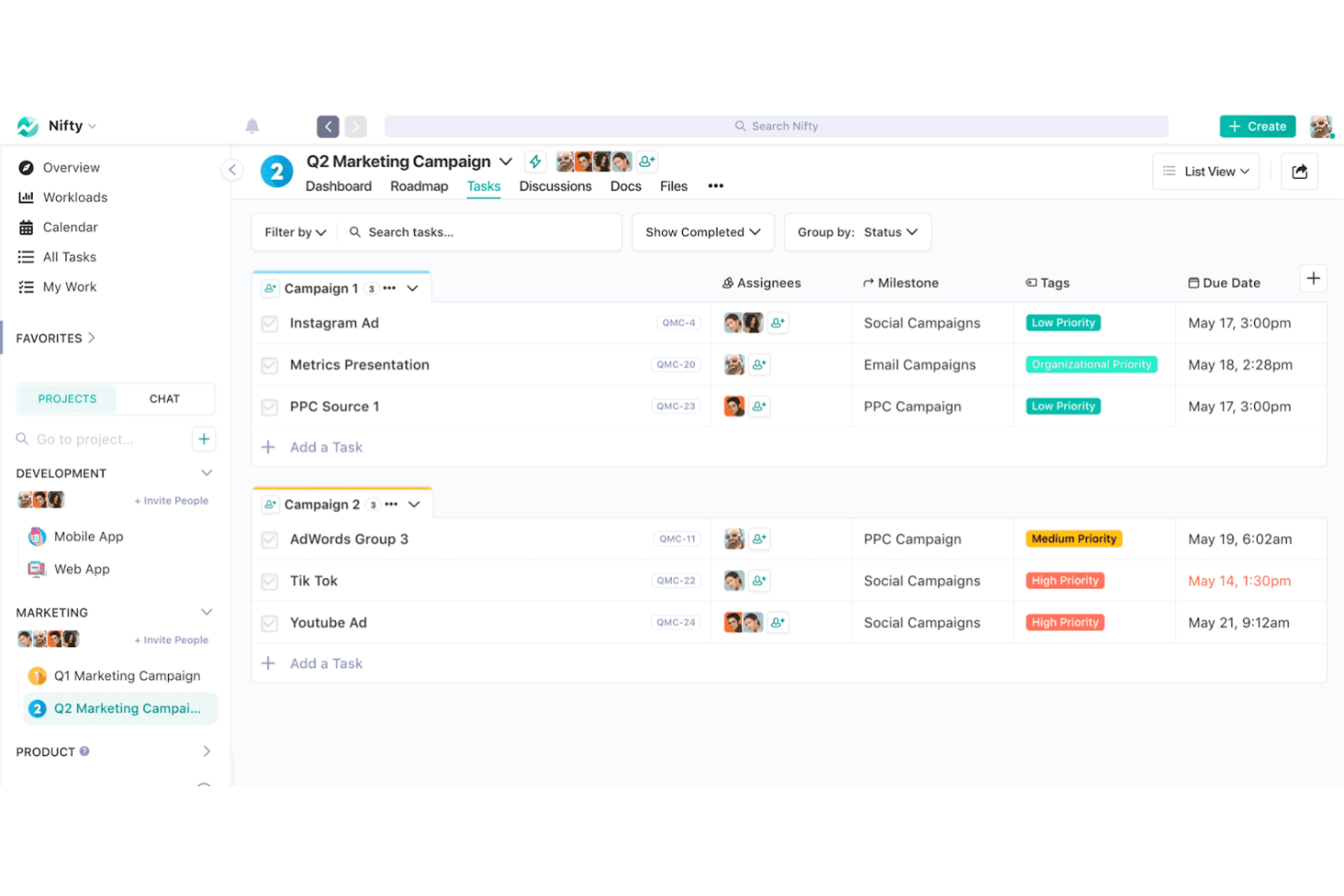
Nifty è una soluzione di project management che centralizza e automatizza i flussi di lavoro dei progetti. È ideale perché integra attività, scadenze e comunicazione, migliorando così l'efficienza e la chiarezza dei progetti.
Perché Nifty è una valida alternativa a Zoho Projects:
Ho scelto Nifty per questa lista perché offre una combinazione unica di funzionalità di automazione che semplificano i flussi di lavoro dei progetti. La sua attenzione alla centralizzazione di vari elementi del progetto in un'unica piattaforma lo rende un'alternativa interessante a Zoho Projects.
Caratteristiche principali e integrazioni di Nifty
Le funzionalità includono gestione delle attività, traguardi, discussioni, documenti e file, tutto progettato per favorire la collaborazione e l'efficienza. Le capacità di automazione della piattaforma aiutano a far progredire i progetti senza interventi manuali.
Le integrazioni includono Slack, Google Drive, Zoom, GitHub, Trello, Asana, Dropbox e altri.
Pros and Cons
Pros:
- Funzionalità avanzate di automazione per la gestione ottimizzata dei flussi di lavoro
- Monitoraggio dei traguardi integrativo che si aggiorna in tempo reale
- Interfaccia intuitiva con un design minimalista
Cons:
- Potrebbe essere necessario del tempo per ottimizzare completamente le funzionalità di automazione
- Opzioni di personalizzazione limitate per report e dashboard

ProofHub
Ideale per il controllo centralizzato dei progetti
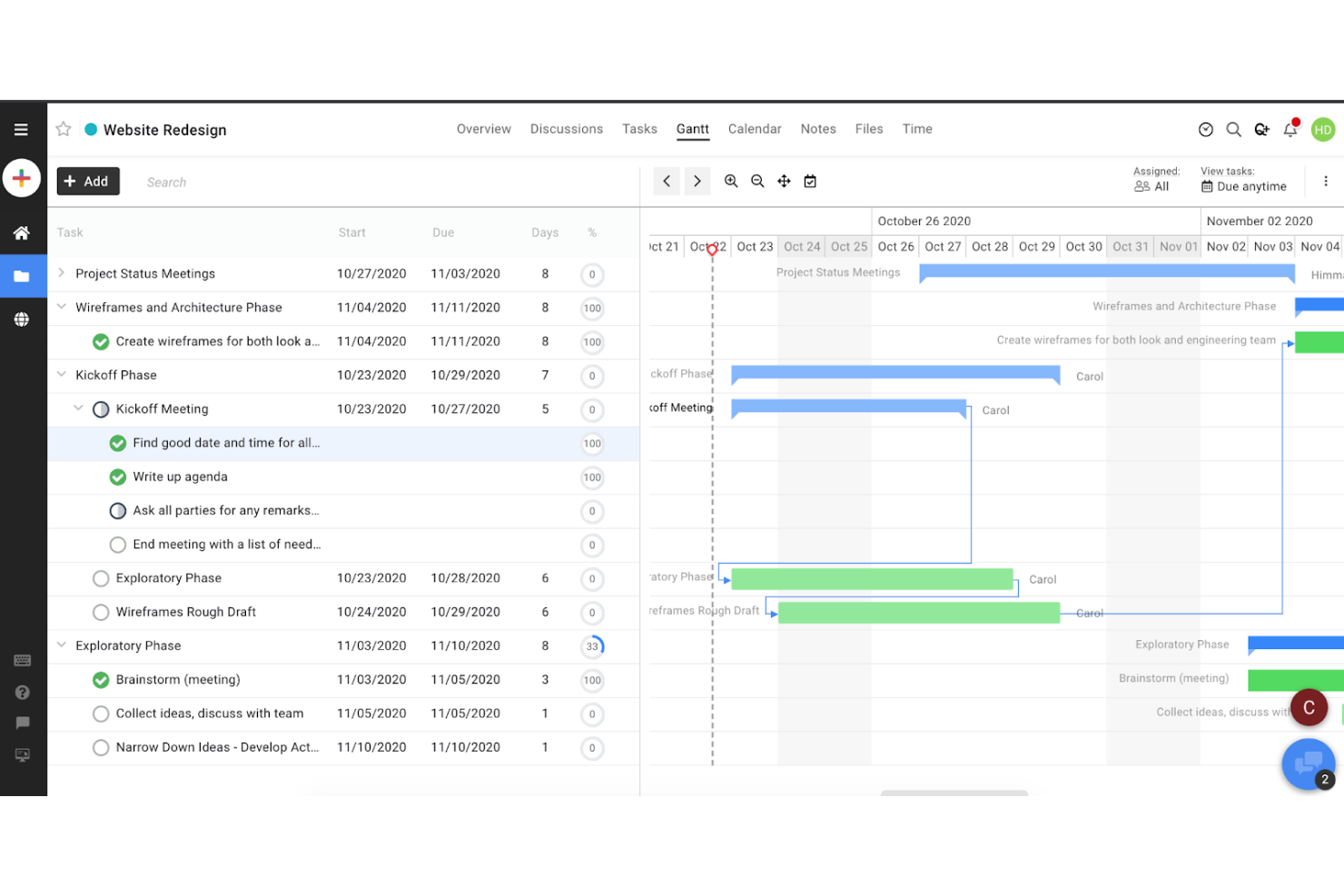
ProofHub è una piattaforma di gestione dei progetti che centralizza il controllo su progetti e risorse. Offre agli utenti illimitati la possibilità di gestire i progetti con ruoli personalizzati e reportistica avanzata.
Perché ProofHub è una valida alternativa a Zoho Projects:
Ho scelto ProofHub perché offre un modello di prezzo a tariffa fissa che risulta economico per team di qualsiasi dimensione, permettendo utenti illimitati senza costi aggiuntivi per singolo utente. Questo lo rende una scelta eccezionale rispetto a Zoho Projects, soprattutto per le aziende che desiderano ottimizzare i costi della gestione dei progetti.
Funzionalità e integrazioni distintive di ProofHub
Le funzionalità includono gestione delle attività con diverse visualizzazioni, monitoraggio del tempo e capacità di report dettagliati. Lo strumento include inoltre processi di revisione e approvazione dei file integrati direttamente all'interno dell'area di lavoro, incrementando l'efficienza dei cicli di revisione e delle tempistiche di consegna.
Le integrazioni includono Google Drive, OneDrive, Dropbox, Box, Google Calendar, iCal, Slack, FreshBooks, QuickBooks e Zapier.
Pros and Cons
Pros:
- Prezzo a tariffa fissa senza costi aggiuntivi per utente
- Utenti e progetti illimitati in tutti i piani
- Set completo di funzionalità di gestione progetti e collaborazione
Cons:
- Spazio di archiviazione limitato nel piano Essential
- Alcuni utenti possono richiedere funzionalità di analisi e reportistica più avanzate

Ideale per la visualizzazione dei processi di vendita
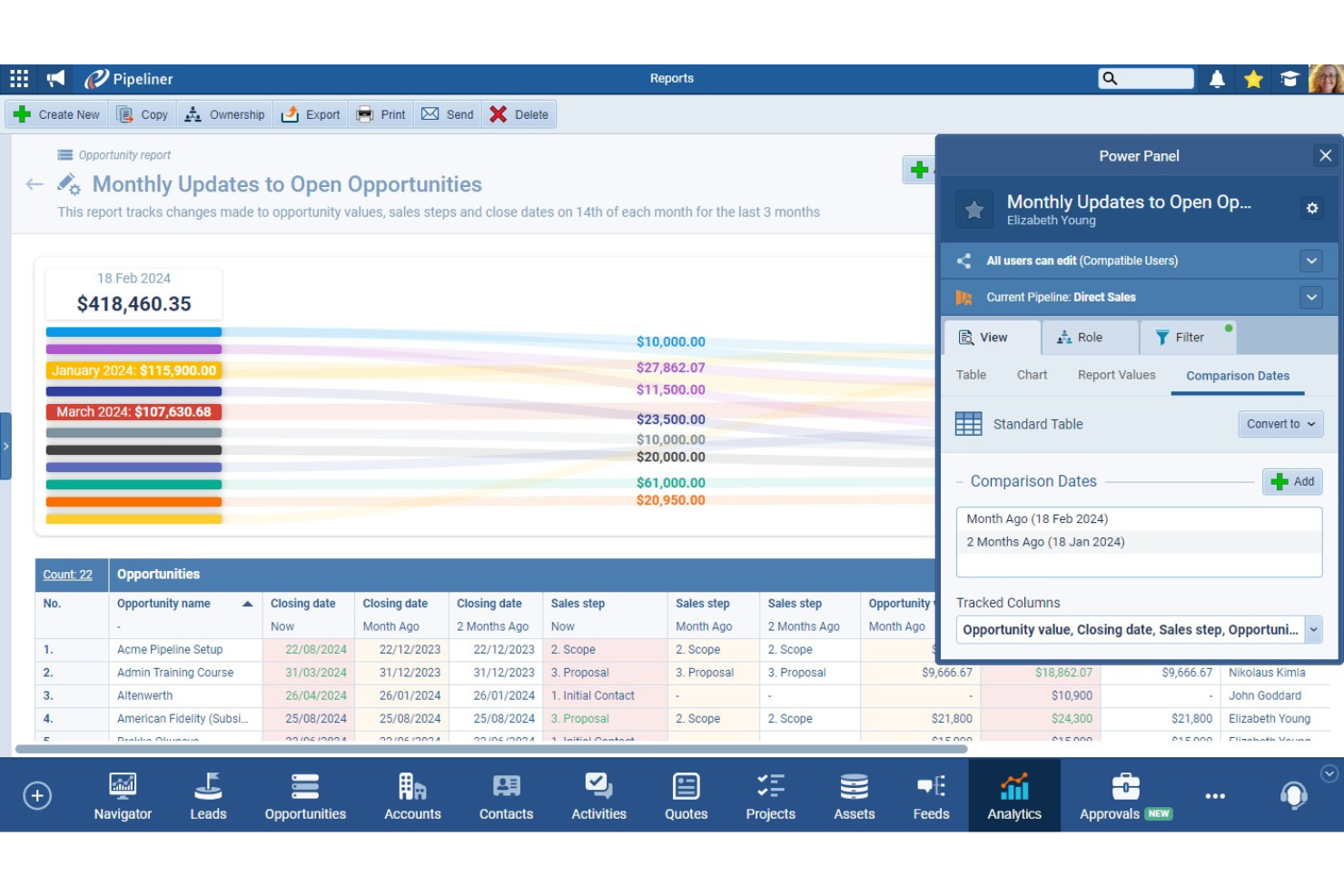
Pipeliner CRM è progettato per migliorare la visibilità e la gestione del processo di vendita grazie alla sua interfaccia dinamica e agli strumenti di visualizzazione. Si concentra sull’aumento dell’efficienza e dell’efficacia delle vendite offrendo viste chiare e grafiche delle pipeline e delle attività di vendita.
Perché Pipeliner è una buona alternativa a Zoho Projects:
Ho scelto Pipeliner CRM perché offre strumenti di visualizzazione superiori per la gestione dei processi di vendita, che mancano in Zoho Projects. La sua interfaccia intuitiva e ricca di elementi grafici aiuta i team di vendita a comprendere lo stato delle proprie pipeline a colpo d’occhio, rendendo più facile pianificare ed eseguire strategie di vendita in modo efficace.
Caratteristiche e integrazioni principali di Pipeliner
Le funzionalità includono il suo esclusivo sistema di gestione visiva delle pipeline, che consente ai team di vendita di trascinare e rilasciare facilmente le trattative tra le varie fasi. La piattaforma include anche workflow automatizzati, funzioni avanzate di reportistica e un’IA integrata che fornisce approfondimenti e previsioni per facilitare il processo decisionale.
Le integrazioni comprendono strumenti popolari come Microsoft Office 365, Google Workspace e Zapier.
Pros and Cons
Pros:
- Ottima rappresentazione visiva delle pipeline di vendita
- Cruscotti e report personalizzabili
- Potenti funzionalità di automazione per ridurre l’inserimento manuale
Cons:
- Costo per utente più elevato rispetto ad alcuni altri CRM
- Potrebbe essere necessario un training per sfruttare tutte le funzionalità

Ideale per la gestione del lavoro con i clienti
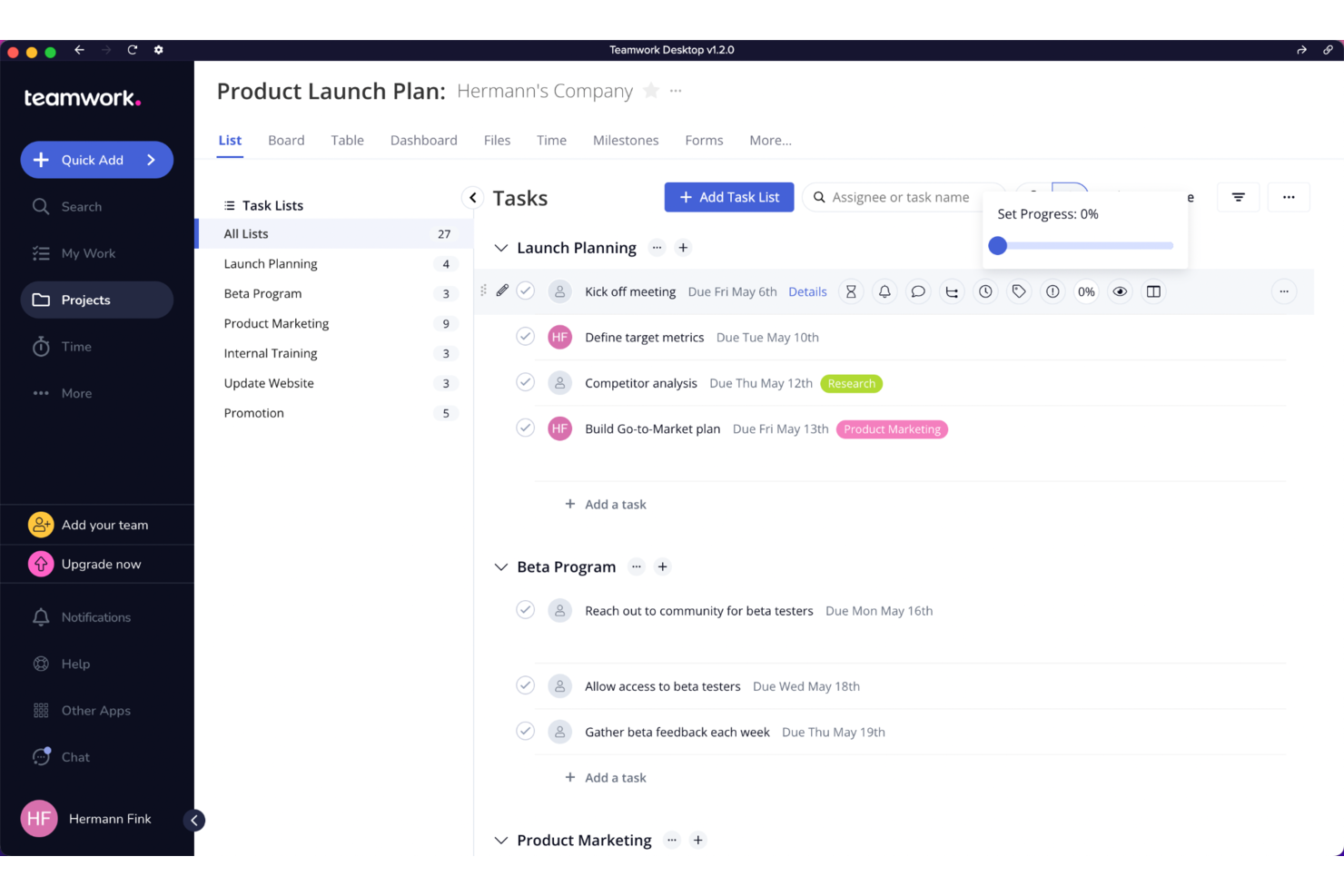
Teamwork è un software di project management progettato per semplificare la gestione del lavoro con i clienti grazie a strumenti per la pianificazione dei progetti, il monitoraggio delle attività e la collaborazione. Le sue funzionalità avanzate lo rendono ideale per agenzie e fornitori di servizi che gestiscono più progetti per diversi clienti.
Perché Teamwork è una valida alternativa a Zoho Projects:
Ho scelto Teamwork perché offre funzionalità specializzate per la gestione del lavoro con i clienti che mancano in Zoho Projects. I portali clienti di Teamwork, la rilevazione dei tempi e le capacità di fatturazione lo rendono una scelta superiore per i team che desiderano tenere informati i clienti e assicurarsi che i progetti vengano consegnati puntualmente e rispettando il budget.
Funzionalità e integrazioni di Teamwork
Le funzionalità comprendono un portale clienti che permette ai clienti di visualizzare l’avanzamento dei progetti, comunicare con il team e accedere ai file dei progetti. Inoltre, le sue funzioni di rilevazione tempi e fatturazione garantiscono una rendicontazione accurata e una gestione efficace del budget, mentre Gantt chart e strumenti di gestione delle attività aiutano a mantenere i progetti nei tempi previsti.
Le integrazioni includono Slack, Google Drive, Dropbox, Microsoft Office, HubSpot, Xero e QuickBooks.
Pros and Cons
Pros:
- Portali clienti completi per migliorare la comunicazione con i clienti
- Solide funzionalità di monitoraggio dei tempi e fatturazione
- Ampia gamma di integrazioni con altri strumenti aziendali
Cons:
- Prezzo iniziale più alto rispetto a qualche altro strumento
- Leggera curva di apprendimento a causa della vasta gamma di funzionalità

Jira
Ideale per lo sviluppo software Agile
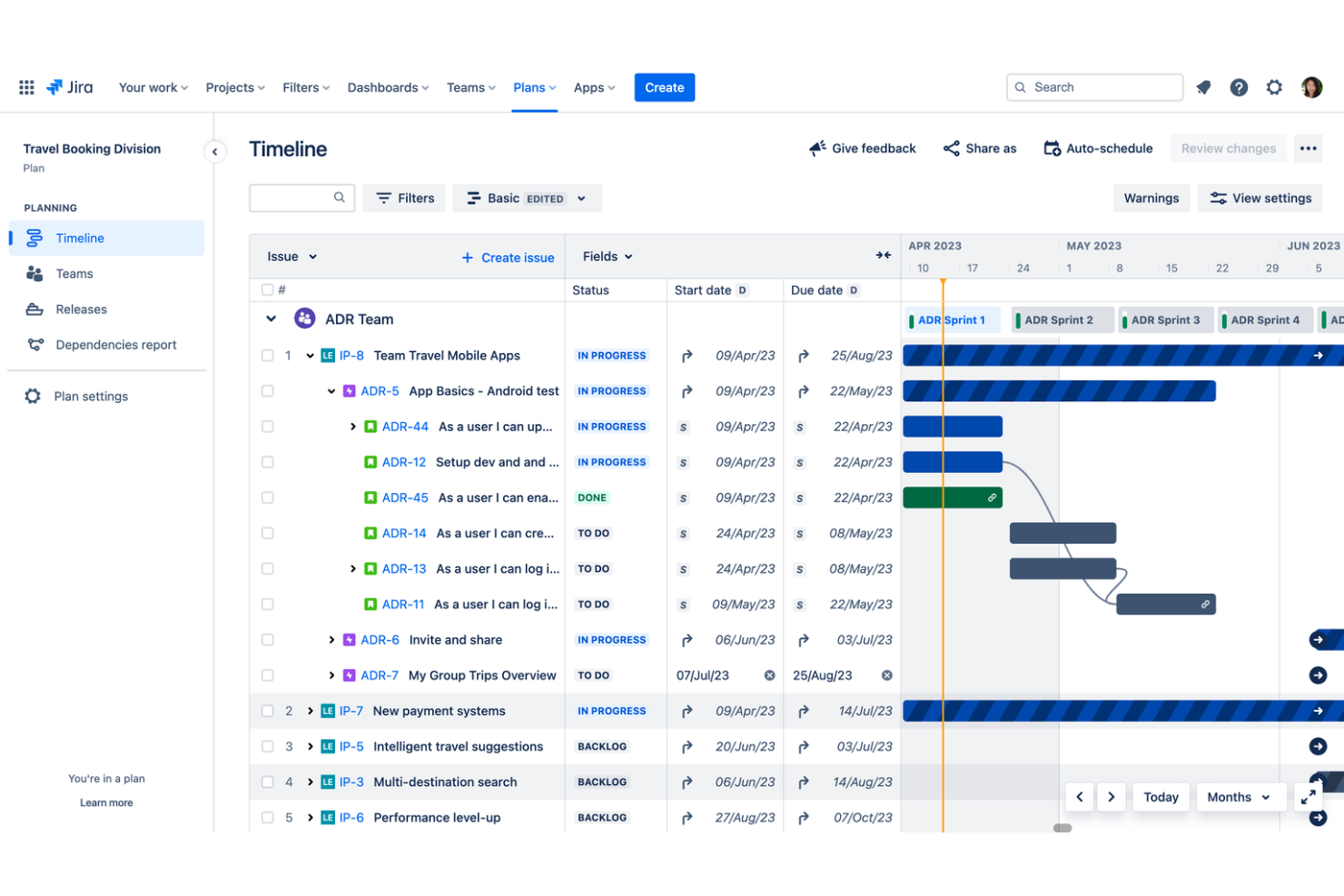
Jira è un potente strumento di gestione dei progetti sviluppato da Atlassian, progettato per supportare lo sviluppo software agile. Facilita la pianificazione, il monitoraggio e la gestione dei progetti di sviluppo software con bacheche scrum personalizzabili, bacheche kanban e report sulle prestazioni in tempo reale.
Perché Jira è una buona alternativa a Zoho Projects:
Ho scelto Jira perché è realizzato su misura per le metodologie di sviluppo agile, il che lo distingue da Zoho Projects. Le opzioni avanzate di personalizzazione dei flussi di lavoro agili di Jira, come sprint, backlog e gestione dei bug, lo rendono una scelta superiore per i team di sviluppo software orientati ai principi agili.
Caratteristiche distintive e integrazioni di Jira
Caratteristiche includono pianificazione dettagliata delle iterazioni, mappatura delle user story e monitoraggio dell'avanzamento del progetto tramite grafici burn-down. Inoltre, la sua funzionalità di tracciamento dei problemi è molto solida, offrendo strumenti completi per identificare, assegnare e risolvere bug e altri problemi.
Integrazioni includono quelle nativamente con Confluence, Bitbucket, Slack, GitHub, Trello, Google Sheets, Microsoft Teams, Zendesk, Salesforce e Figma.
Pros and Cons
Pros:
- Altamente personalizzabile per adattarsi a diverse metodologie agili
- Potenti capacità di gestione dei bug e dei problemi
- Ampio marketplace con add-on per estendere le funzionalità
Cons:
- Il prezzo può diventare elevato man mano che i team crescono
- Alcune funzionalità possono risultare complesse per team più piccoli o progetti semplici

Ravetree
Ideale per metodologie di progetto flessibili

Ravetree è una piattaforma di gestione del lavoro che riunisce la gestione dei progetti, la pianificazione delle risorse, il monitoraggio del tempo e la gestione delle relazioni con i clienti in un unico posto.
Perché Ravetree è una valida alternativa a Zoho Projects:
Apprezzo il fatto che Ravetree supporti sia le metodologie tradizionali che quelle agili, includendo funzionalità come epic, user story, bacheche Kanban e pianificazione degli sprint. Questa flessibilità consente al tuo team di scegliere l'approccio che meglio si adatta al flusso di lavoro. Inoltre, la piattaforma offre fasi delle attività personalizzabili e attività ricorrenti, permettendoti di adattare la gestione delle attività alle tue esigenze specifiche.
Funzionalità e integrazioni distintive di Ravetree
Le funzionalità includono portafogli, previsioni, calendari, milestone, team, file, fatturazione, notifiche, approvazioni, timesheet, timer, registri delle ore e spese.
Le integrazioni includono Dropbox, Google Drive, OneDrive, Outlook, Gmail, QuickBooks, Google Calendar, Stripe, Exchange, Facebook, Instagram e GitHub.
Pros and Cons
Pros:
- Raggruppa diverse funzioni operative
- Supporta sia metodologie tradizionali che Agile
- Gestione efficiente delle relazioni con i clienti
Cons:
- Le numerose funzionalità possono richiedere un periodo di apprendimento
- Potrebbe offrire più integrazioni


Evernote Teams migliora l'esperienza classica di Evernote offrendo uno spazio collaborativo pensato per consentire ai team di catturare, gestire e condividere note in modo efficiente. È progettato per facilitare l'accesso alle informazioni e semplificare la comunicazione all'interno dei team.
Perché Evernote è una valida alternativa a Zoho Projects:
Ho scelto Evernote Teams perché si concentra specificamente sulla gestione delle note, un aspetto in cui Zoho Projects è meno completo. Questa specializzazione rende Evernote Teams la scelta migliore per i team che necessitano di funzionalità avanzate di gestione delle note integrate nei processi di project management.
Caratteristiche e integrazioni distintive di Evernote
Le funzionalità includono la possibilità per gli utenti di creare, condividere e gestire note e documenti in uno spazio di lavoro condiviso. Presenta potenti funzionalità di ricerca che consentono di trovare testo all'interno di note, immagini e documenti allegati, facilitando il monitoraggio di grandi quantità di informazioni. Lo strumento supporta anche tag e taccuini, che aiutano a organizzare efficacemente i contenuti.
Le integrazioni includono strumenti di produttività popolari come Slack, Microsoft Teams e Google Drive.
Pros and Cons
Pros:
- Ricerca potenziata che trova testo anche in immagini e allegati
- Funzionalità avanzate di condivisione e collaborazione
- Strumenti di organizzazione efficaci come tag e taccuini
Cons:
- Prezzo più elevato rispetto alla versione base di Evernote o ad altre app semplici per le note
- Potrebbe avere troppe funzionalità per team che necessitano solo di una gestione base delle note

Notion funge da spazio di lavoro tutto-in-uno progettato per integrare note, task, database e calendari in un'unica piattaforma personalizzabile. Eccelle nel riunire vari aspetti della produttività personale e di team, rendendolo uno strumento prezioso sia per utenti individuali sia per team che desiderano centralizzare i propri flussi di lavoro.
Perché Notion è una buona alternativa a Zoho Projects:
Ho scelto Notion perché le sue capacità di flessibilità e personalizzazione superano di gran lunga quelle offerte da Zoho Projects. La capacità di Notion di adattarsi a diversi casi d'uso — che vanno dalla semplice presa di appunti alla gestione di progetti complessi — lo rende una scelta di rilievo per chi cerca un approccio integrato alla gestione del proprio spazio di lavoro.
Funzionalità e integrazioni principali di Notion
Funzionalità: Notion è rinomato per il suo approccio modulare, che consente agli utenti di creare pagine e database collegati perfettamente tra loro. Le opzioni avanzate di inserimento di testo e media migliorano la creazione dei contenuti, mentre le potenti funzioni di template permettono di replicare workflow di successo e mantenere la coerenza tra i progetti.
Integrazioni: include Slack, Google Calendar, Google Drive e integrazioni tramite API.
Pros and Cons
Pros:
- Interfaccia altamente personalizzabile e flessibile
- Supporta un'ampia gamma di tipi di contenuti
- Efficace sia per lavoro individuale sia collaborativo
Cons:
- Leggero apprendimento iniziale per nuovi utenti non familiari con i sistemi modulari
- Strumenti tradizionali di project management come i diagrammi di Gantt limitati
Altre alternative a Zoho Projects
Di seguito trovi un elenco di software aggiuntivi per la gestione dei progetti che non sono rientrati nella mia lista delle 10 migliori alternative a Zoho Projects, ma che vale comunque la pena prendere in considerazione:
- Scoro
Ideale per l'automazione dei servizi professionali
- KanbanFlow
Ideale per la gestione snella dei progetti
- Celoxis
Ideale per analisi avanzate dei progetti
- Quickbase
Ideale per la gestione dinamica del lavoro
- GoodDay
Ideale per la personalizzazione e i flussi di lavoro Agile


Recensioni correlate sulla gestione dei progetti
Se non hai ancora trovato quello che stai cercando, dai un'occhiata a queste altre recensioni di strumenti per la gestione dei progetti che abbiamo selezionato per te:
- Creatore di diagrammi di Gantt
- Strumenti per la produttività
- Software per il monitoraggio dei progetti
- Software per la pianificazione dei progetti
Come valuto le alternative a Zoho Projects
Valuto ogni alternativa a Zoho Projects su due livelli: le funzionalità fondamentali, come le viste Gantt e il monitoraggio del tempo, che ogni opzione valida deve offrire, e gli elementi distintivi importanti per il tuo team.
Funzionalità fondamentali (requisiti essenziali per questo elenco)
Quando seleziono gli strumenti per il mio elenco, assegno a ciascuno un punteggio su una scala da 0 (non offre la funzionalità) a 5 (eccelle in quest'area) per ogni funzionalità fondamentale elencata di seguito. Poi calcolo il punteggio totale dello strumento trasformandolo in una percentuale. Ogni strumento deve raggiungere un punteggio totale minimo del 75% per essere preso in considerazione.
- Gestione di attività e progetti: verifico se ogni strumento gestisce abbastanza bene gerarchie delle attività, dipendenze e strutture con più progetti da consentire di gestire situazioni come lanci di prodotti paralleli con risorse condivise.
- Viste multiple dei progetti: momenti diversi della pianificazione richiedono viste diverse, quindi cerco strumenti che offrano opzioni Gantt, Kanban, calendario ed elenco, tra cui i team possano scegliere per ogni progetto.
- Monitoraggio del tempo e schede attività: per i team che fatturano i clienti o monitorano l'utilizzo, valuto se lo strumento supporta timer nativi, invio delle schede attività e la possibilità di contrassegnare le ore come fatturabili o non fatturabili.
- Strumenti di collaborazione del team: analizzo come uno strumento gestisce la comunicazione contestuale—commenti sulle attività, @menzioni, condivisione di file—per consentire ai team distribuiti di rimanere allineati senza dover passare ad app esterne.
- Report e dashboard: un buon sistema di reportistica mi permette di creare una dashboard che mostri in un'unica vista la velocità dello sprint insieme al consumo del budget, quindi valuto il livello di personalizzazione e le opzioni di esportazione dei dati.
- Automazione dei flussi di lavoro: considero se lo strumento supporta attivatori basati su regole, come l'assegnazione automatica delle attività quando cambia uno stato o la notifica agli stakeholder quando cambia la scadenza di una milestone.
Una volta ottenuto un elenco di strumenti che soddisfano questi criteri, considero ciò che distingue ogni piattaforma.
Fattori distintivi (ciò che differenzia i fornitori)
Ecco come confronto i diversi fornitori:
Funzionalità distintive
La gestione delle risorse è un importante elemento distintivo. Cerco strumenti che mostrino mappe di calore del carico di lavoro tra i progetti, così da poter riequilibrare le assegnazioni prima che uno sprint sovraccarichi metà del team. Anche le dashboard del portafoglio sono importanti per i responsabili PMO che hanno bisogno di viste aggregate sullo stato del budget e sull'avanzamento delle milestone di un intero programma. Per agenzie e società di consulenza, valuto se uno strumento offre accesso per clienti o ospiti con autorizzazioni circoscritte, insieme al monitoraggio del budget che collega le ore registrate alla redditività del progetto.
Oltre le funzionalità
La profondità delle integrazioni è importante quando si migra da Zoho Projects, poiché è probabile che il tuo team utilizzi quotidianamente Slack, Google Drive o GitHub. Verifico se uno strumento si connette in modo nativo o richiede un connettore di terze parti tramite Zapier o Make. La trasparenza dei prezzi è altrettanto importante: valuto se i piani aumentano di costo in modo prevedibile con la crescita del team, senza bloccare le funzionalità fondamentali nei livelli Enterprise. Anche il supporto durante l'inserimento influisce sul passaggio. Cerco strumenti di migrazione, modelli preconfigurati e risorse formative che riducano i tempi di avviamento per i team distribuiti.
Perché cercare un'alternativa a Zoho Projects
Potresti cercare un'alternativa a Zoho Projects se temi:
- Costo: Sebbene siano complete, ritieni che le funzionalità vadano oltre le tue esigenze attuali e che la struttura dei prezzi di Zoho Projects superi il tuo budget.
- Set di funzionalità: L'ambito delle funzionalità offerte da Zoho Projects non soddisfa le esigenze specifiche del tuo team o progetto.
- Esperienza utente: Tu o il tuo team ritenete che l'interfaccia di Zoho Projects sia poco intuitiva o macchinosa.
- Capacità di integrazione: Hai bisogno di una migliore integrazione con strumenti specifici, flussi di lavoro esistenti e altri servizi che non sono adeguatamente supportati da Zoho Projects.
- Assistenza clienti: La curva di apprendimento è troppo ripida, hai bisogno di un livello maggiore di assistenza clienti oppure hai avuto un'esperienza negativa.
Indipendentemente dal fatto che i motivi sopra elencati corrispondano o meno alla tua esperienza specifica, non fa mai male dare un'occhiata alle alternative.
Le alternative software a Zoho Projects possono offrire funzionalità diverse, un rapporto qualità-prezzo migliore o semplicemente uno strumento complessivamente più adatto alle tue esigenze personalizzate di gestione dei progetti. Potresti trovare una soluzione che non solo soddisfi i tuoi requisiti specifici, ma che riduca anche le ore di tempo e di energia dedicate a interfacce utente rigide e poco flessibili, configurazioni complicate o flussi di lavoro inefficienti.
Funzionalità principali di Zoho Projects
Ecco alcune delle funzionalità principali di Zoho Projects, per aiutarti a confrontare ciò che offrono le soluzioni alternative:
- Gestione delle attività: Ti consente di creare, assegnare e monitorare le attività, assicurando che il tuo team rimanga organizzato e rispetti le scadenze.
- Monitoraggio del tempo: Ti aiuta a monitorare il tempo dedicato alle attività e ai progetti, migliorando la precisione della fatturazione e la produttività.
- Gestione dei documenti: Centralizza tutti i documenti e gli allegati relativi ai progetti, rendendo semplice per il tuo team accedere ai file e collaborare su di essi.
- Diagrammi di Gantt: Fornisce una sequenza temporale visiva per la pianificazione dei progetti, aiutandoti a pianificare e monitorare efficacemente l'avanzamento dei progetti.
- Bacheche Kanban: Offrono un modo visivo per gestire attività e flussi di lavoro, rendendo semplice visualizzare a colpo d'occhio lo stato di ogni attività.
- Traguardi: Ti consentono di impostare traguardi chiave del progetto per monitorare i progressi e garantire il completamento puntuale delle attività critiche.
- Flussi di lavoro personalizzati: Ti consentono di creare flussi di lavoro su misura, adatti ai processi e ai requisiti specifici del tuo team.
- Zoho Zia: Un assistente basato sull'intelligenza artificiale che aiuta ad automatizzare le attività e fornisce informazioni utili per migliorare la gestione dei progetti.
- Strumenti di collaborazione: Include bacheche di discussione e funzioni di chat per facilitare la comunicazione e la collaborazione del team.
- Gestione delle risorse: Ti aiuta ad allocare e gestire le risorse in modo efficiente, garantendo un utilizzo ottimale tra i progetti. Purtroppo, questa è una funzionalità non comune a tutti i software. Pertanto, potresti dover esplorare un software per la gestione delle risorse che possa integrare l'alternativa scelta.