

10 migliori strumenti alternativi a Teamwork per i progetti nel 2026

Selezione delle migliori alternative a Teamwork


Le migliori alternative a Teamwork offrono report e dashboard più flessibili per monitorare i progressi, metriche aggiuntive, opzioni per la modifica in blocco e maggiori funzionalità nell'app mobile. Con la giusta alternativa a Teamwork, puoi monitorare meglio i progetti, gestire le tempistiche e creare un ambiente collaborativo per il tuo team.
Ho utilizzato la mia esperienza nella gestione dei progetti e oltre 3 anni di test di software per esaminare decine di alternative a Teamwork, così puoi trovare lo strumento giusto per aiutare te e il tuo team a collaborare ai progetti tra i vari reparti, gestire carichi di lavoro e risorse e organizzare i portafogli di progetti all'interno della tua organizzazione. Di seguito analizzo i punti di forza e le differenze principali, i pro e i contro e i casi d'uso ideali per ogni strumento.
Cosa sono le alternative a Teamwork?
Le alternative a Teamwork sono software per la gestione dei progetti e strumenti di collaborazione che offrono funzionalità comparabili a Teamwork, ma possono includere anche più funzioni di reportistica e analisi, maggiore flessibilità e possibilità di personalizzazione e funzionalità per l'archiviazione dei file. Potrebbero inoltre offrire un'app mobile più completa o essere più adatte alle grandi organizzazioni con portafogli di progetti ampi.
Le alternative a Teamwork includono in genere anche le funzionalità standard per la gestione dei progetti e la collaborazione, come la gestione delle risorse, la gestione delle tempistiche e la pianificazione dei progetti.
Perché fidarsi dei nostri consigli sui software
Il nostro team testa e recensisce software dal 2012. In quanto project manager noi stessi, sappiamo quanto sia difficile — e importante — scegliere il software giusto.
Per questa guida, abbiamo valutato gli strumenti attraverso test pratici e ricerche indipendenti, assegnando un punteggio agli strumenti in base ai nostri criteri di selezione. Ci basiamo inoltre sulle competenze di leader di pensiero del settore e di professionisti attivi nella gestione dei progetti.
Le nostre recensioni riflettono il nostro giudizio editoriale umano, non un discorso di vendita.
Revisori esperti:
Tabella di confronto delle alternative a Teamwork
Questa tabella di confronto riassume i dettagli sui prezzi delle mie migliori alternative a Teamwork:
| Tool | Best For | Trial Info | Price | ||
|---|---|---|---|---|---|
| 1 | Ideale per la gestione completa dei progetti in agenzia | Prova gratuita di 14 giorni + demo gratuita disponibile | A partire da $10/mese (fatturazione annuale) | Website | |
| 2 | Ideale per gestire la fatturazione clienti all'interno dei progetti | Demo gratuita disponibile | Prezzo su richiesta | Website | |
| 3 | Ideale per suddividere grandi progetti | Prova gratuita di 15 giorni + piano gratuito + demo gratuita disponibile | A partire da $4/utente/mese (fatturazione annuale) | Website | |
| 4 | Ideale per la personalizzazione avanzata di flussi di lavoro e dashboard | Prova gratuita di 14 giorni + piano gratuito disponibile | Da $10/utente/mese (fatturazione annuale) | Website | |
| 5 | Ideale per il monitoraggio dei progetti dal preventivo all'incasso nelle agenzie | Prova gratuita di 14 giorni + demo gratuita disponibile | A partire da 24 $/utente/mese | Website | |
| 6 | Ideale per diagrammi di Gantt interattivi | Prova gratuita di 14 giorni | Da $7/utente/mese (fatturato annualmente) | Website | |
| 7 | Ideale per la gestione dell’onboarding dei clienti | Prova gratuita + demo gratuita disponibili | Da $19/utente/mese (fatturazione annuale) | Website | |
| 8 | Ideale per una gestione di progetto avanzata e personalizzabile | Piano gratuito + demo gratuita disponibile | Da $7/utente/mese (fatturazione annuale) | Website | |
| 9 | Ideale per unire team, obiettivi e processi | Piano gratuito disponibile | Da $39/mese (fatturato annualmente) | Website | |
| 10 | Ideale per spazio di archiviazione illimitato | Prova gratuita di 14 giorni | Da $1.49/utente/mese (con fatturazione annuale) | Website |


Recensioni delle migliori alternative a Teamwork
In questa sezione fornirò un’analisi e una panoramica approfondite di ciascuna delle alternative a Teamwork. Esaminerò i pro e i contro di ogni strumento, le sue funzionalità e i casi d’uso più adatti.

Ideale per la gestione completa dei progetti in agenzia
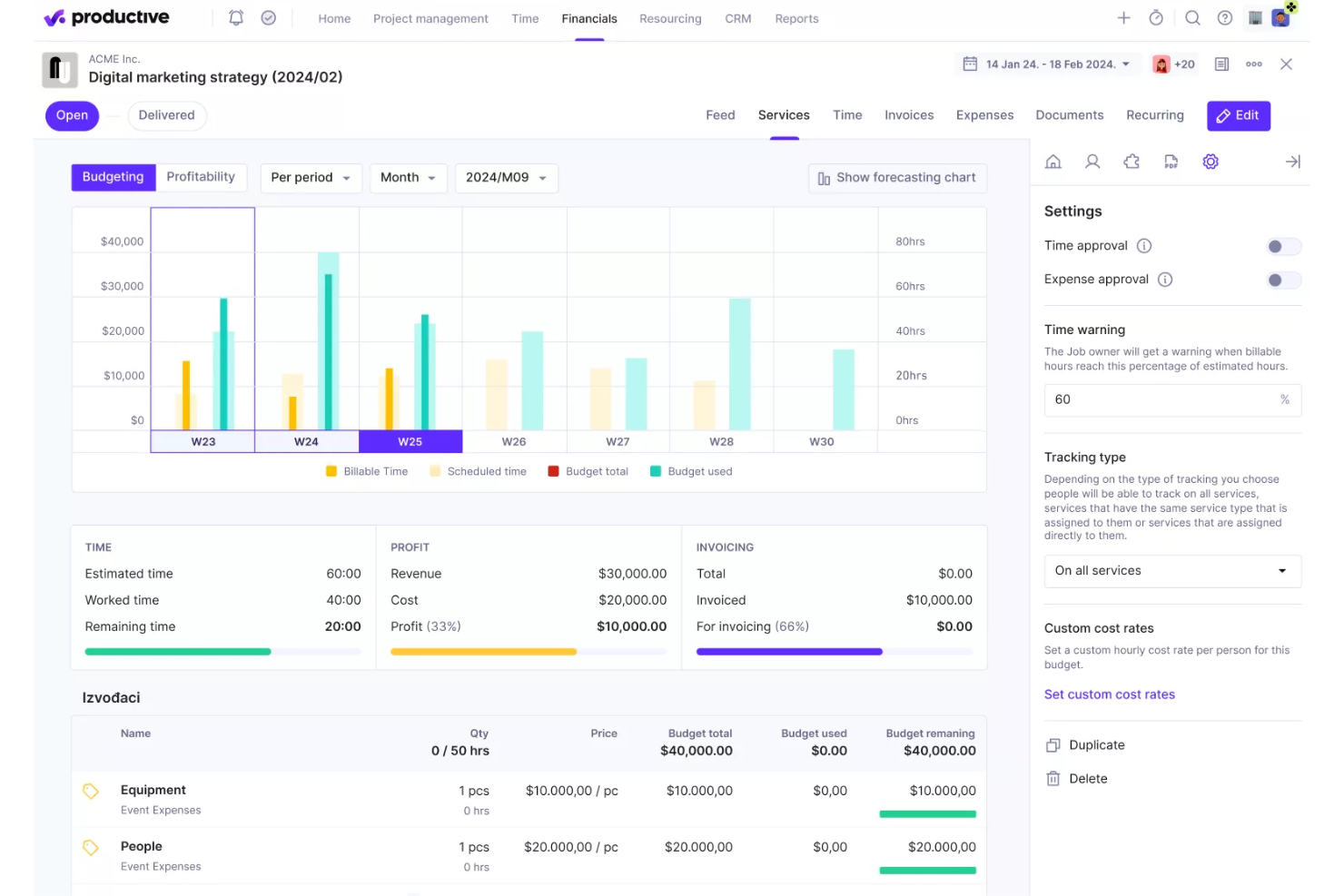
Productive è una piattaforma di gestione end-to-end progettata specificamente per le agenzie. Le sue funzionalità includono gestione dei progetti, CRM per le vendite, pianificazione delle risorse e monitoraggio finanziario. La piattaforma mira a fornire una panoramica in tempo reale delle operazioni aziendali, assicurando che le agenzie possano gestire i propri progetti e risorse in modo efficiente mantenendo la redditività.
Perché è una buona alternativa a Teamwork:
Sebbene entrambe le piattaforme offrano funzionalità simili nella gestione dei progetti, assegnazione dei compiti e monitoraggio del tempo, Productive va oltre grazie all’enfasi sulla gestione finanziaria e sulla redditività. Funzionalità chiave come i report sulla redditività in tempo reale, la gestione dettagliata dei budget e gli strumenti di contabilità integrati consentono alle agenzie di monitorare da vicino la salute finanziaria e prevedere i ricavi futuri. Inoltre, il CRM integrato di Productive aiuta a gestire il ciclo di vendita, monitorare i lead e prevedere le entrate, offrendo una soluzione più completa per la gestione sia dei progetti che delle vendite rispetto a Teamwork.
Funzionalità e integrazioni distintive:
Le funzionalità includono pianificazione delle risorse, diagrammi di Gantt, tariffe di costo dei dipendenti, monitoraggio dei costi generali dell’azienda, supporto per filiali e valute multiple, monitoraggio delle spese, approvazione di tempi e spese, modelli di progetto, monitoraggio dell’avanzamento delle attività, pipeline di vendita multiple, gestione dei carichi di lavoro e notifiche in tempo reale.
Le integrazioni includono Jira, Slack, QuickBooks, Xero, Trello, Zapier, Google Drive, Sage, BambooHR, Gusto e HubSpot.
Pros and Cons
Pros:
- Solide funzionalità di pianificazione delle risorse
- Ottime capacità di gestione finanziaria
- Interfaccia utente intuitiva
Cons:
- Potrebbe offrire più integrazioni
- La configurazione iniziale può richiedere tempo
New Product Updates from Productive
Productive Adds Voice Dictation, Slack Connector, Proposals, and Overtime
Productive adds voice dictation, a Slack Connector, proposal controls, and overtime tracking. These updates support faster AI interactions, client proposals, and time management. For more information, visit Productive’s official site.

Accelo
Ideale per gestire la fatturazione clienti all'interno dei progetti
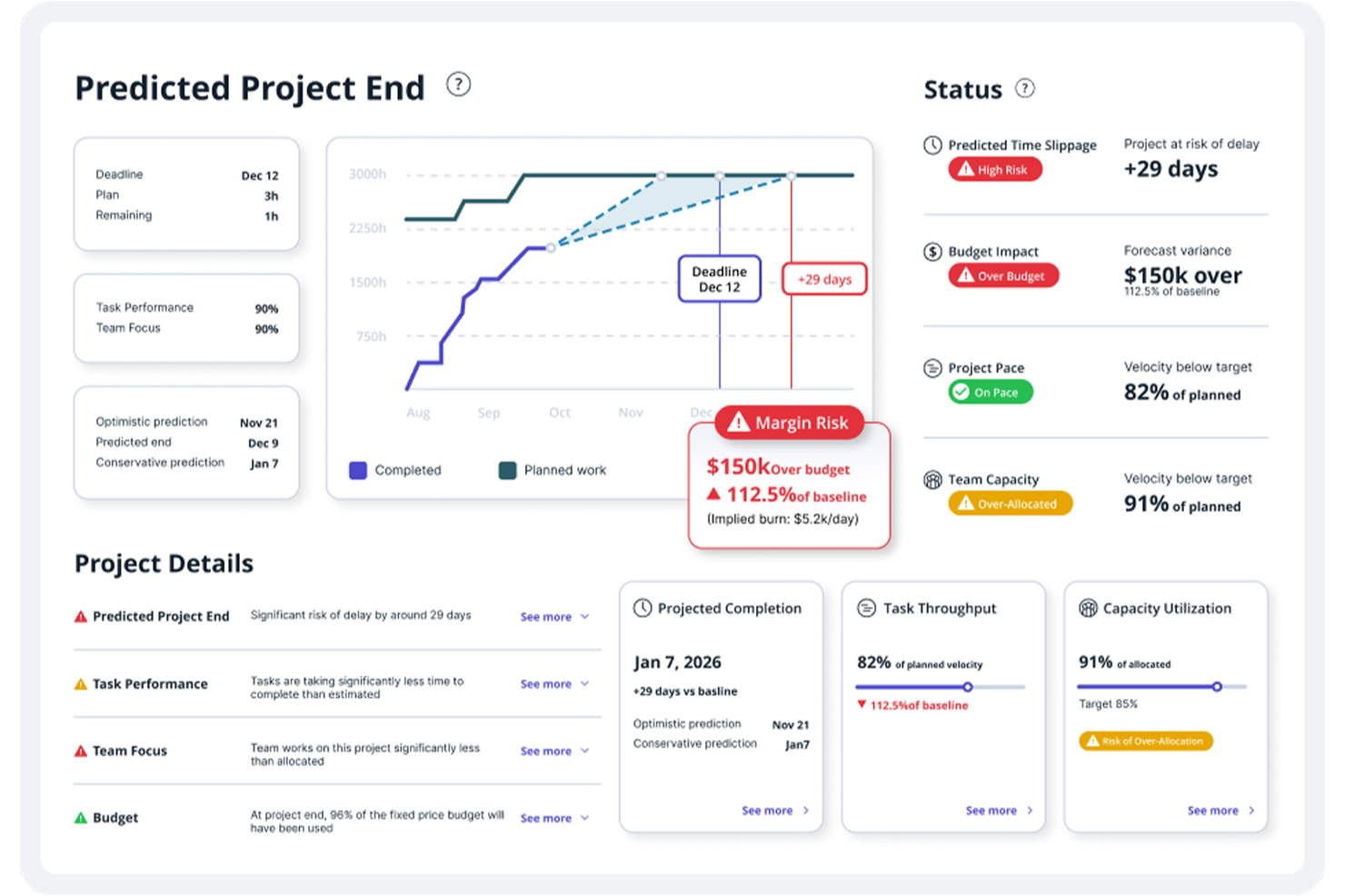
Accelo è una piattaforma di automazione per i servizi professionali che unisce gestione dei progetti, tracciamento automatico del tempo, pianificazione delle risorse, comunicazione con i clienti e fatturazione in un unico sistema.
Per chi è ideale Accelo?
Accelo è particolarmente adatto per agenzie, società di consulenza e fornitori di servizi IT che gestiscono molteplici incarichi per clienti e necessitano di una consegna dei progetti strettamente collegata alla fatturazione.
Perché ho scelto Accelo
Accelo è tra le mie scelte preferite perché adoro il modo in cui collega direttamente il lavoro sui progetti alle fatture dei clienti senza alcuna reinserimento manuale. Quando il mio team registra il tempo su un'attività, quei dati confluiscono direttamente nei dati finanziari del progetto, dove il monitoraggio del budget, la visibilità sui margini e la fatturazione vengono aggiornati in tempo reale. Mi affido anche alla fatturazione automatica e agli avvisi di stato pagamenti per intercettare eventuali saldi in sospeso prima che causino problemi di liquidità.
Funzionalità principali di Accelo
- Pianificazione delle risorse: Assegna i membri del team alle attività dei progetti in base a disponibilità e capacità nei vari incarichi attivi dei clienti.
- Portale clienti: Fornisci ai clienti uno spazio dedicato in cui visualizzare lo stato del progetto, approvare i lavori e accedere alle comunicazioni condivise.
- Gestione dello scope creep: Segnala e monitora lavori che eccedono l'ambito originale del progetto, registrando automaticamente l'impatto sui costi.
- Gestione dei contratti ricorrenti: Imposta e gestisci anticipi ricorrenti dei clienti insieme a progetti a tariffa fissa sulla stessa piattaforma.
Integrazioni di Accelo
Accelo offre oltre 30 integrazioni native, tra cui Salesforce, HubSpot, Jira, QuickBooks, Xero, Sage Intacct, Google Workspace, Slack, GitHub e GitLab, con integrazioni native nell'ecosistema Microsoft tra cui Microsoft 365, MS Teams e Microsoft Entra. Si collega inoltre con Zapier e mette a disposizione una RESTful API per integrazioni personalizzate.
Pros and Cons
Pros:
- I thread email vengono collegati ai singoli progetti cliente
- Supporta anticipi clienti, ticket e progetti a tariffa fissa
- Le date di completamento progetto previste dall'IA si aggiornano in tempo reale
Cons:
- Le schermate ricche di dati possono disorientare gli utenti meno esperti
- È difficile aggregare lo storico dei lavori svolti
New Product Updates from Accelo
Accelo Adds Quote Designer and Pipeline Management
Accelo adds Quote Designer, enhanced pipeline views, and quote tracking with version history. This helps teams create proposals and manage opportunities from scoped work. For more information, visit Accelo’s official site.

Ideale per suddividere grandi progetti
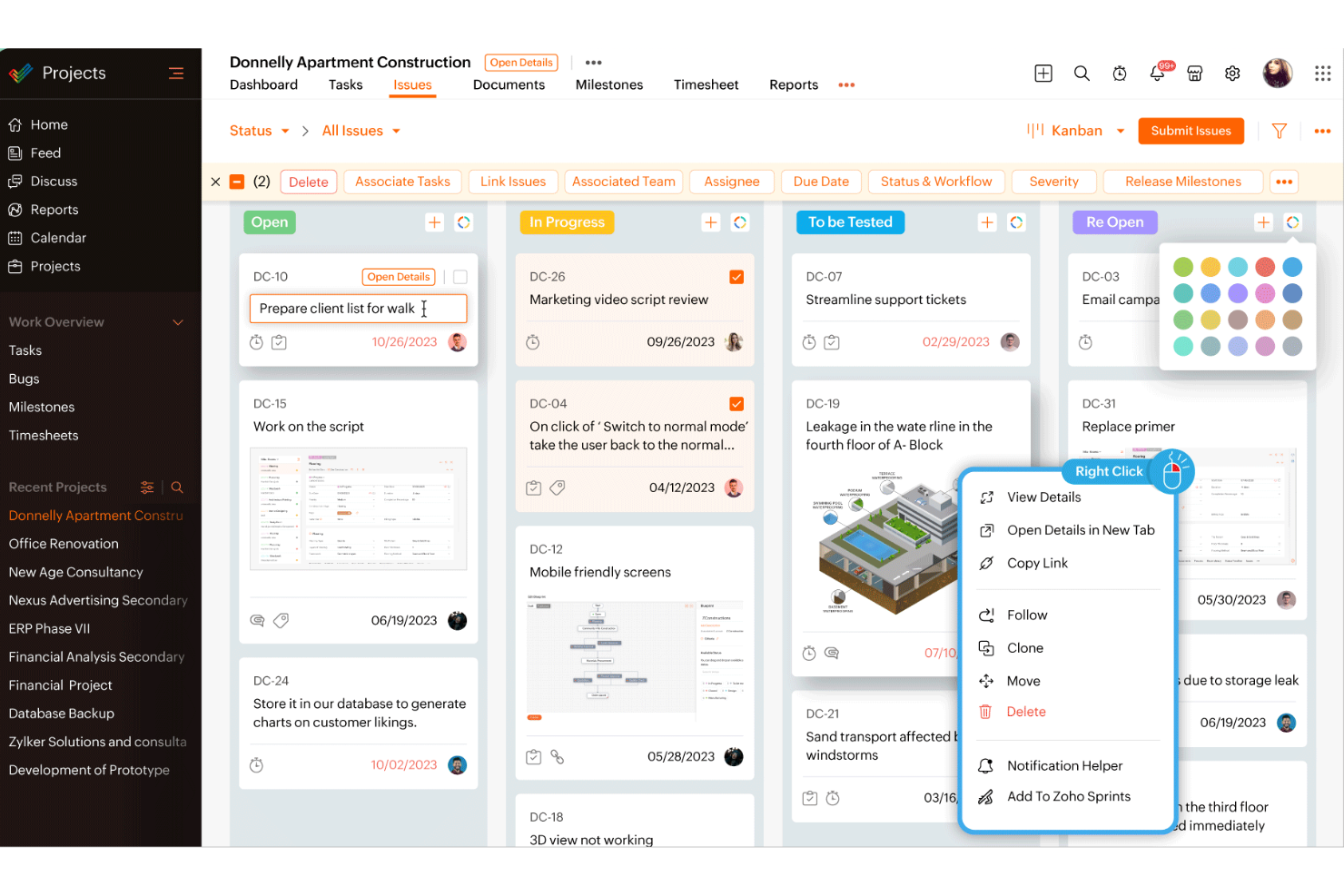
Zoho Projects è uno strumento di gestione dei progetti progettato per migliorare il lavoro di squadra e la collaborazione in diversi settori.
Perché è una buona alternativa a Teamwork:
Ho scelto Zoho Projects perché offre robuste funzionalità di gestione delle attività che permettono di suddividere grandi progetti in compiti più gestibili. Questo facilita la concentrazione del team su specifici risultati e il monitoraggio dei progressi. La piattaforma include anche funzionalità di monitoraggio del tempo, che aiutano a controllare quanto tempo viene impiegato su ciascuna attività, portando a una migliore pianificazione del progetto e allocazione delle risorse. Zoho Projects dispone inoltre di funzionalità di automazione che permettono di automatizzare le attività ricorrenti tramite un'interfaccia user-friendly drag-and-drop.
Funzionalità distintive & integrazioni:
Le funzionalità includono il tracciamento dei problemi, che aiuta a identificare e risolvere rapidamente i problemi legati al progetto, garantendo che il team rimanga sempre sulla giusta strada. La piattaforma offre anche strumenti di collaborazione come forum e chat per facilitare la comunicazione e la condivisione di idee tra i membri del team.
Le integrazioni includono Google Calendar, Microsoft Teams, Jira, Basecamp, Dropbox, GitHub, Zendesk e una gamma di app Zoho.
Pros and Cons
Pros:
- Set di funzionalità completo che include monitoraggio del tempo e fatturazione
- L'integrazione con altre app Zoho ne aumenta le funzionalità
- Flussi di lavoro e campi personalizzabili per adattarsi a diverse esigenze aziendali
Cons:
- La funzionalità dell'app mobile non è robusta quanto quella della versione desktop
- Limitate integrazioni native con terze parti al di fuori dell'ecosistema Zoho
New Product Updates from Zoho Projects
Zoho Projects Adds CodeX Scripts for Custom Modules
Zoho Projects now supports CodeX Scripts for custom modules, enabling conditional logic and rules for creating, updating, and deleting records. For more information, visit Zoho Projects' official site.
 .
.
Wrike
Ideale per la personalizzazione avanzata di flussi di lavoro e dashboard

Wrike è una piattaforma di gestione dei progetti e del lavoro progettata per aiutare i team a collaborare e gestire le attività in modo efficiente. Consente ai team di gestire i progetti dall'inizio alla fine, compresi pianificazione, esecuzione e reportistica. La piattaforma Wrike è pensata per adattarsi a diverse dimensioni di team e complessità di progetto.
Perché è una buona alternativa a Teamwork:
Wrike è una valida alternativa a Teamwork grazie alle sue ampie opzioni di personalizzazione e flessibilità, che rispondono a esigenze progettuali diverse e complesse. Sebbene entrambe le piattaforme offrano strumenti potenti per la gestione dei progetti e la collaborazione, Wrike si distingue per la capacità di personalizzare i flussi di lavoro, le dashboard e le funzionalità di reportistica in base alle esigenze specifiche del progetto. È possibile creare flussi di lavoro personalizzati che si allineano ai tuoi processi unici e visualizzare i piani di progetto tramite diagrammi di Gantt, bacheche Kanban o elenchi. Puoi anche progettare dashboard personalizzate per visualizzare metriche chiave e generare report dettagliati e su misura per analisi approfondite.
Funzionalità e integrazioni principali:
Le funzionalità includono reportistica in tempo reale, viste del carico di lavoro, flussi di approvazione, monitoraggio del tempo, prioritizzazione delle attività, monitoraggio del budget, dashboard personalizzabili, flussi di lavoro automatici, diagrammi di Gantt, bacheche Kanban, strumenti per l'allocazione delle risorse, modelli di progetto e strumenti collaborativi.
Le integrazioni comprendono Slack, Microsoft, Google, Adobe, Salesforce, Zoom, Tableau, MS Teams, OneDrive, GitHub, Gmail, Dropbox, Okta, OneLogin, HubSpot, Jira e NetSuite.
Pros and Cons
Pros:
- Piattaforma altamente personalizzabile
- Flussi di lavoro automatici, compresi i processi di approvazione
- Ottima reportistica e analisi per i progetti
Cons:
- Curva di apprendimento nell'imparare a personalizzare la piattaforma
- Campi e flussi di lavoro personalizzati non disponibili con il piano gratuito
New Product Updates from Wrike

Wrike Adds Quick Search to Table View
Wrike adds Quick Search to Table View with full-table search across titles, descriptions, and fields, plus highlighted matches. This helps users find tasks faster in large tables. For more information, visit Wrike’s official site.

Scoro
Ideale per il monitoraggio dei progetti dal preventivo all'incasso nelle agenzie
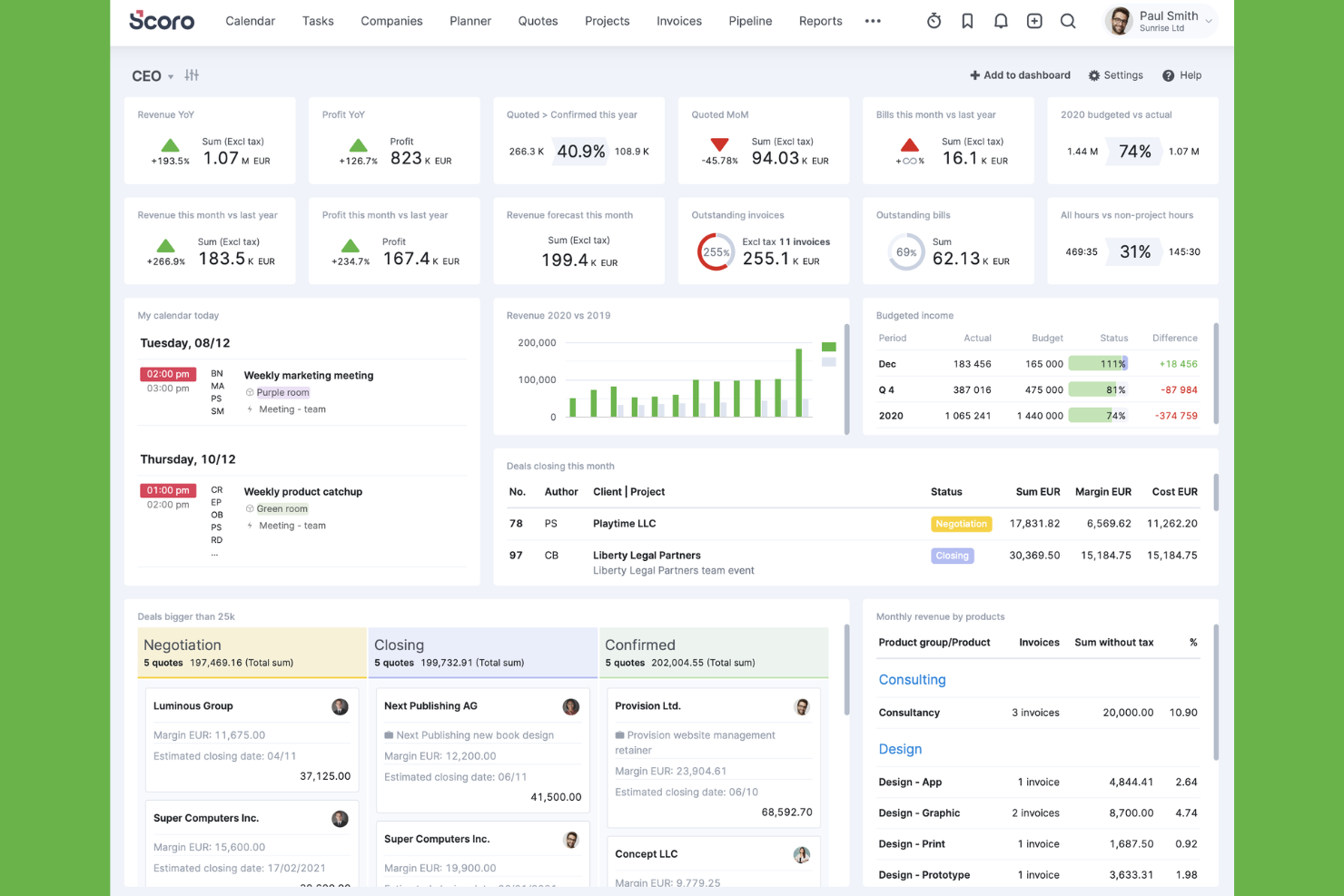
Scoro è una piattaforma di automazione dei servizi professionali (PSA) che combina gestione dei progetti, pianificazione delle risorse, monitoraggio del tempo, preventivi e fatturazione in un unico sistema completo progettato per agenzie e team che forniscono servizi ai clienti.
Per chi è più adatto Scoro?
Scoro è una soluzione ideale per agenzie e aziende di servizi professionali che devono gestire l'intero ciclo di vita del progetto, dalla preparazione del preventivo alla fatturazione, in un'unica piattaforma.
Perché ho scelto Scoro
Scoro si è guadagnato un posto nella mia lista ristretta perché copre l'intero ciclo di vita dal preventivo all'incasso in un'unica piattaforma, qualcosa che Teamwork semplicemente non riesce a fare. Mi piace molto il fatto che sia possibile generare attività direttamente da un preventivo approvato, monitorare in tempo reale il consumo del budget e attivare una fattura senza mai uscire dallo strumento. Il modello dei ricavi a tre livelli (guadagnati, riconosciuti e previsti) offre ai responsabili delle agenzie una visione finanziaria che la maggior parte degli strumenti di gestione dei progetti non si avvicina nemmeno a offrire.
Funzionalità principali di Scoro
- Mappe di calore dell'utilizzo in tempo reale: Visualizza in tempo reale la disponibilità e il carico di lavoro del team per ruoli e singoli membri, così da individuare immediatamente le assegnazioni eccessive o insufficienti.
- Automazioni basate su attivatori e azioni: Imposta automazioni basate su regole per gestire automaticamente l'assegnazione delle attività, gli aggiornamenti di stato e le notifiche di avviso nei piani di crescita e superiori.
- Portale clienti: Consenti ai clienti di accedere alle informazioni di progetto in tempo reale, alle approvazioni dei preventivi e ai commenti a livello di attività tramite un portale esterno con autorizzazioni controllate.
- Assistente IA ELI: Interroga i dati di progetto e finanziari, genera report e automatizza le attività utilizzando comandi in linguaggio naturale integrati direttamente nella piattaforma.
Integrazioni di Scoro
Scoro offre integrazioni native con QuickBooks, Xero, Sage Intacct, Stripe, Salesforce, Slack, Google Workspace, Microsoft 365, BambooHR, Dropbox e Google Drive. Fornisce inoltre un'API REST aperta, Scoro MCP e il supporto per Zapier.
Pros and Cons
Pros:
- Consolida i flussi di lavoro per preventivi, fornitura e fatturazione
- Monitora in tempo reale il consumo del budget e la redditività
- Le analisi del portafoglio evidenziano lo stato dei progetti e dei clienti
Cons:
- Il Portale clienti comporta un costo aggiuntivo per abilitare l'accesso dei clienti
- Nessuna chat integrata o funzione di revisione creativa
New Product Updates from Scoro

Scoro Adds Time Mobile App and ELI Improvements
Scoro adds the Scoro Time mobile app for iOS/Android to track time anywhere and expands ELI with attachments, smarter filtering, and trigger-based actions. For more information, visit Scoro's official site.

GanttPRO
Ideale per diagrammi di Gantt interattivi
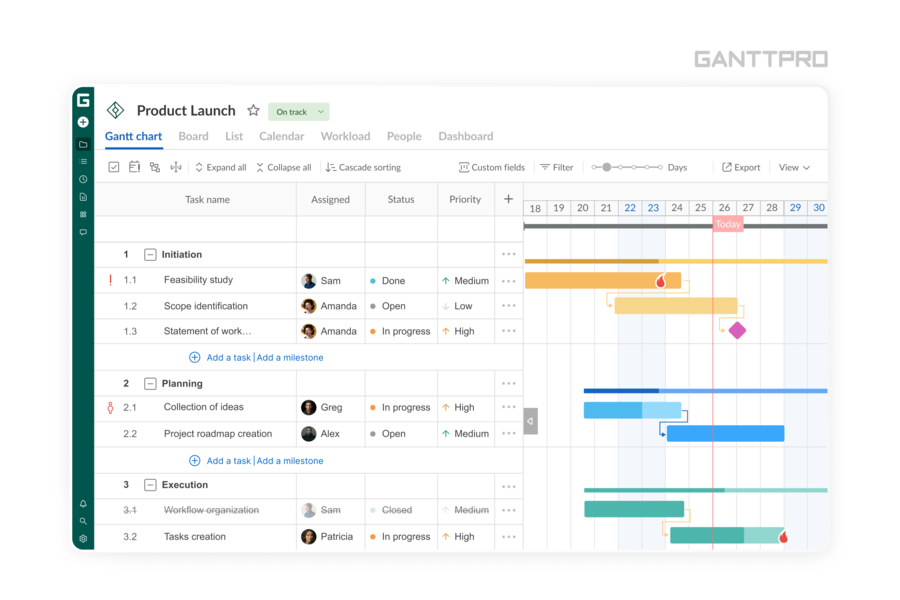
GanttPRO è uno strumento di gestione progetti online che si rivolge a settori come costruzioni, IT, marketing e consulenza. È particolarmente indicato per project manager e team che desiderano migliorare la collaborazione e la visibilità nei loro progetti.
Perché ho scelto GanttPRO
Ho scelto GanttPRO per il suo eccezionale utilizzo dei diagrammi di Gantt interattivi, che offrono una rappresentazione visiva chiara delle tempistiche e delle dipendenze del progetto. Questa funzione è fondamentale per i team che vogliono allinearsi sugli obiettivi di progetto senza confusione. Inoltre, la gestione del carico di lavoro di GanttPRO consente di allocare efficacemente le risorse, garantendo un equilibrio nei carichi di lavoro all’interno del team. Le relazioni tra attività, un’altra funzionalità utile, permettono di definire dipendenze e sequenze, rendendo più semplice monitorare i progressi e adattare i piani secondo necessità.
Caratteristiche principali di GanttPRO
Oltre alle sue funzioni di punta, GanttPRO offre numerose altre capacità che lo rendono una valida alternativa a Teamwork:
- Vista Board: Questa funzione permette al team di visualizzare le attività in una board stile Kanban, offrendo flessibilità nella gestione delle attività.
- Registri del tempo: È possibile monitorare il tempo trascorso su ogni attività, utile per controllare la produttività e gestire i costi di progetto.
- Notifiche: Rimani aggiornato con notifiche e avvisi in tempo reale, assicurando che il team sia sempre a conoscenza di cambiamenti o scadenze importanti.
- Funzionalità di reporting: Genera report dettagliati per ottenere informazioni sulle prestazioni del progetto e prendere decisioni basate sui dati.
Integrazioni di GanttPRO
Le integrazioni includono Jira, Google Drive, Slack e Microsoft Teams. È disponibile anche un'API per integrazioni personalizzate.
Pros and Cons
Pros:
- I diagrammi di Gantt interattivi migliorano la visualizzazione e la pianificazione del progetto.
- Le dipendenze tra attività consentono una chiara sequenza dei progetti.
- La vista board stile Kanban offre una gestione flessibile delle attività.
Cons:
- Gli strumenti di reporting sono presenti, ma mancano opzioni più avanzate per previsioni complesse.
- Integrazioni native limitate con altri software.

Ideale per la gestione dell’onboarding dei clienti
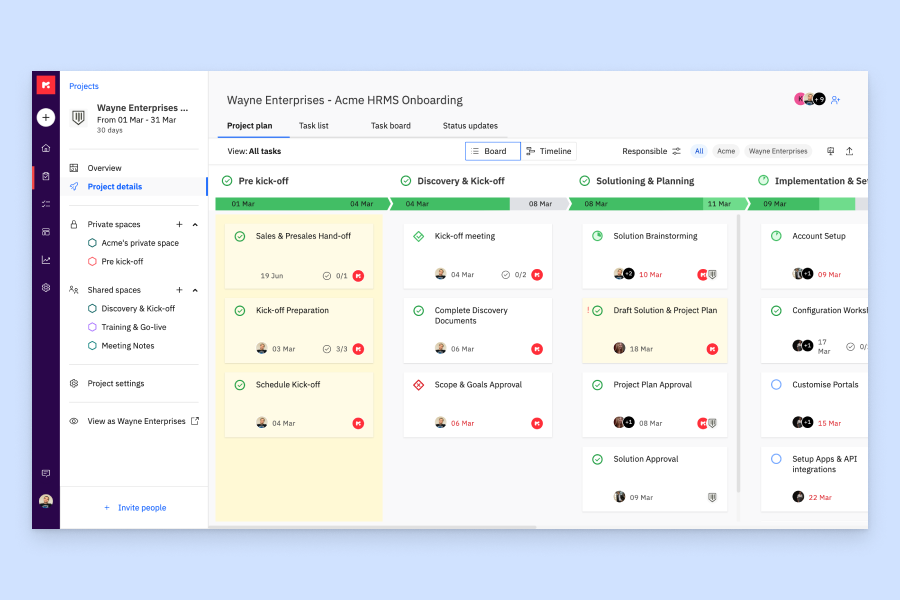
Rocketlane è una piattaforma di automazione per i servizi professionali che combina gestione dei progetti, collaborazione su documenti e portali rivolti ai clienti per supportare i team che si occupano di consegne esterne.
Per chi è ideale Rocketlane?
Rocketlane è particolarmente indicato per team di servizi professionali e customer success che gestiscono la consegna di progetti strutturati e rivolti ai clienti.
Perché ho scelto Rocketlane
Ho scelto Rocketlane come uno dei migliori per la sua attenzione specifica alla gestione dell'onboarding dei clienti. Mentre strumenti come Teamwork gestiscono il lavoro progettuale in generale, Rocketlane offre un portale clienti personalizzabile che guida i clienti attraverso le attività di onboarding senza richiedere l’accesso. Mi piacciono anche i modelli di onboarding riutilizzabili, che permettono di standardizzare l’esperienza per ogni nuovo cliente senza dover ricostruire tutto da zero ogni volta. Inoltre, i promemoria automatici delle attività responsabilizzano i clienti senza che il team debba inseguirli manualmente.
Funzionalità principali di Rocketlane
- Vista cronologia Gantt: Visualizza le pianificazioni dei progetti, le dipendenze tra attività e le milestone nell’intero ciclo di vita del progetto.
- Rilevazione delle ore lavorate: Registra le ore dedicate direttamente su attività e progetti, con visualizzazioni dei timesheet per monitorare l’impegno a livello di team.
- Gestione delle risorse: Monitora capacità e carico di lavoro del team su progetti attivi per individuare colli di bottiglia prima che si verifichino.
- Dashboard dello stato dei progetti: Ottieni una panoramica in tempo reale dello stato dei progetti, del budget utilizzato e del completamento delle attività sull’intero portafoglio.
Integrazioni di Rocketlane
Rocketlane offre integrazioni native con Slack, Salesforce, Jira, HubSpot, Google Calendar e Outlook Calendar. Si collega anche a Zapier e Workato per una maggiore automazione dei flussi di lavoro. È disponibile una API per integrazioni personalizzate.
Pros and Cons
Pros:
- Il portale clienti offre visibilità in tempo reale sul progetto
- Le note interne e rivolte ai clienti restano separate
- Il monitoraggio dell’utilizzo delle risorse orienta le decisioni sul personale
Cons:
- I report mancano di opzioni avanzate di filtro
- Il passaggio tra più progetti risulta lento
New Product Updates from Rocketlane

Rocketlane Introduces Governance and Workforce Agents
Rocketlane introduces Governance Agents and Workforce Agents to automate delivery processes and recurring tasks. These updates help teams enforce rules and streamline project execution. For more information, visit Rocketlane’s official site.
 .
.
ClickUp
Ideale per una gestione di progetto avanzata e personalizzabile
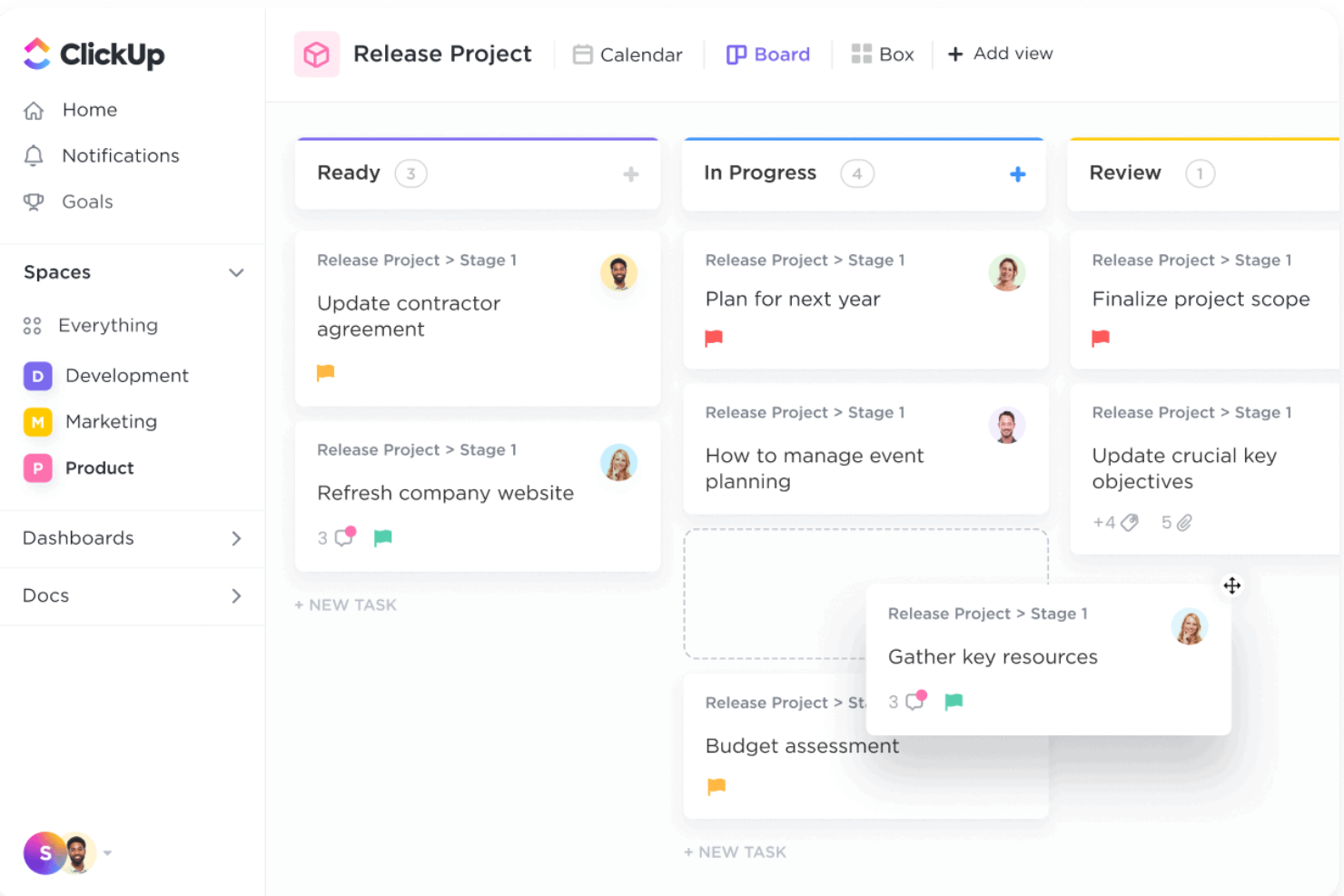
ClickUp offre una piattaforma completa in cui gli utenti possono gestire attività, progetti e flussi di lavoro, tutto in un unico posto. Con un'ampia gamma di funzionalità, ClickUp è pensato per supportare vari tipi di team, dalle piccole startup alle grandi aziende, fornendo strumenti per la gestione delle attività, la definizione degli obiettivi, la rilevazione dei tempi e molto altro.
Perché è una buona alternativa a Teamwork:
Come alternativa a Teamwork, ClickUp offre un alto grado di personalizzazione e funzionalità avanzate per la gestione dei progetti. Pur offrendo entrambi strumenti efficaci per la gestione delle attività e il monitoraggio dei tempi, ClickUp permette configurazioni dei flussi di lavoro più dettagliate e personalizzabili. Gli utenti possono creare campi personalizzati, stati e visualizzazioni su misura per le proprie esigenze specifiche, un passo oltre rispetto all'approccio più strutturato di Teamwork. Inoltre, le funzionalità avanzate di ClickUp come il monitoraggio degli OKR, le automazioni e le dashboard personalizzate offrono un set di strumenti più dinamico e adattabile per gestire progetti complessi.
Funzionalità e integrazioni principali:
Le funzionalità includono dipendenze tra attività, attività ricorrenti, stime di tempo, monitoraggio dei tempi, gestione del carico di lavoro, diagrammi di Gantt, mappe mentali, documenti e wiki, monitoraggio degli obiettivi, modelli personalizzati, gestione degli sprint e integrazione con la posta elettronica.
Le integrazioni comprendono Slack, Google Workspace, Microsoft Teams, Trello, Asana, Jira, Zapier, GitHub, Bitbucket, Dropbox, OneDrive, Zoom, Figma, InVision, Outlook e Salesforce.
Pros and Cons
Pros:
- Offre un piano gratuito con molte funzionalità
- Ottimo per gestire progetti complessi
- Interfaccia utente visivamente accattivante
Cons:
- La personalizzazione avanzata può essere complessa per alcuni utenti
- Struttura gerarchica può risultare confusa
New Product Updates from ClickUp
ClickUp Adds Meetings Hub, Super Agent Templates, and ZoomInfo Integration
ClickUp adds a searchable Meetings Hub, new ways to clone and template Super Agents, and a ZoomInfo integration through the App Center. These updates improve meeting retrieval, agent reuse, and access to sales intelligence. For more information, visit ClickUp’s official site.

Nifty
Ideale per unire team, obiettivi e processi
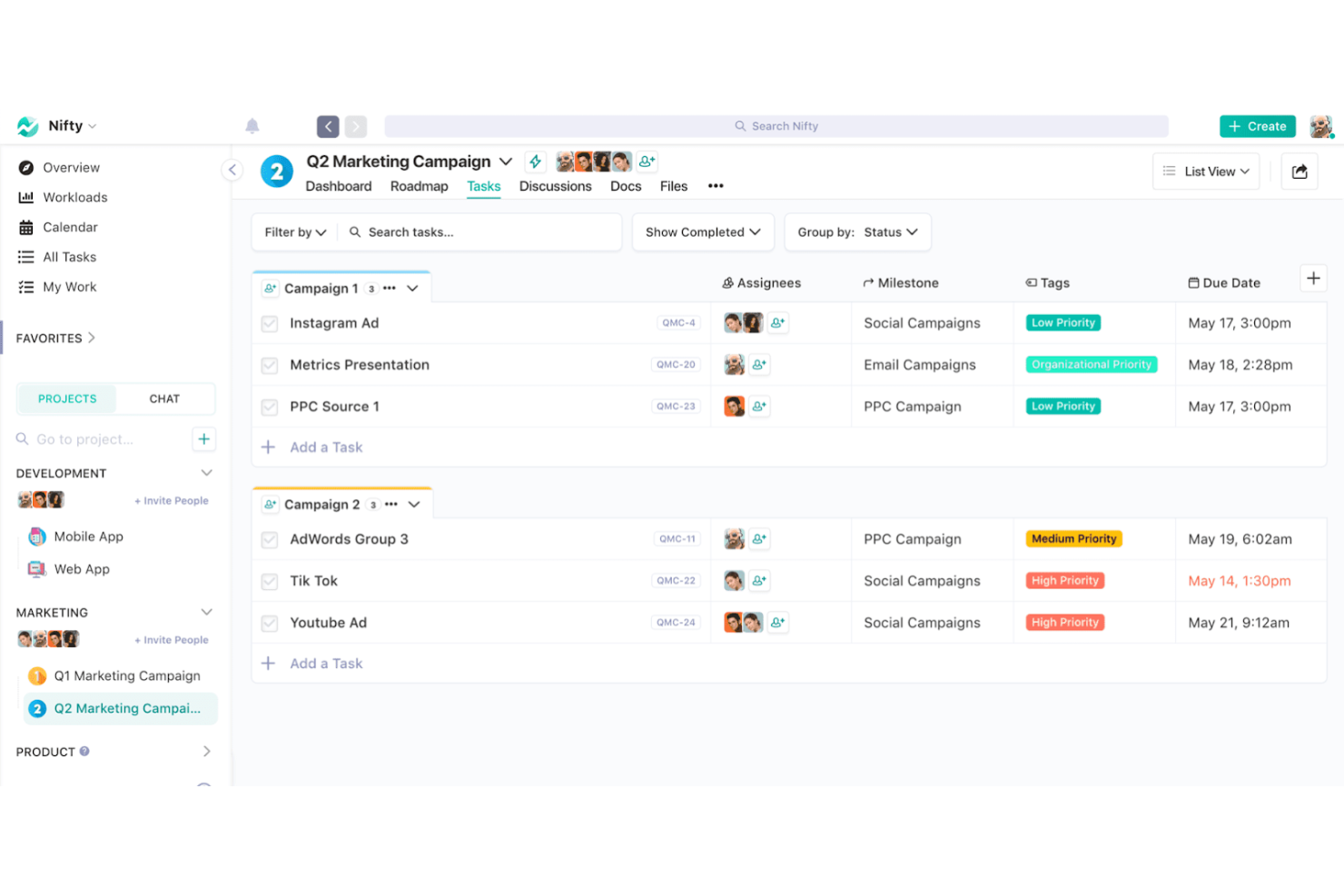
Nifty è uno strumento di project management progettato per semplificare la collaborazione del team integrando obiettivi di progetto, attività e comunicazione in un'unica piattaforma. Offre funzionalità come gestione delle attività, monitoraggio delle milestone e strumenti di collaborazione di squadra, rendendolo la scelta migliore per i team che desiderano centralizzare i propri flussi di lavoro.
Perché è una buona alternativa a Teamwork:
Nifty combina efficacemente diversi strumenti di gestione progetti e collaborazione in un'unica app coesa. La sua capacità di unire i team, allineare gli obiettivi e gestire i processi in modo efficiente lo rende una valida alternativa per i team che necessitano di una soluzione tutto-in-uno.
Caratteristiche principali:
Le funzionalità includono monitoraggio delle milestone, processi di gestione delle attività, viste Kanban, documenti collaborativi, monitoraggio del tempo e reportistica di progetto.
Le integrazioni includono Google Drive, Slack, Zoom e GitHub.
Pros and Cons
Pros:
- Funzionalità di project management complete
- Monitoraggio efficace di milestone e attività
- Solide opzioni di integrazione
Cons:
- Curva di apprendimento per i nuovi utenti
- Personalizzazione limitata per funzionalità avanzate

Freedcamp
Ideale per spazio di archiviazione illimitato
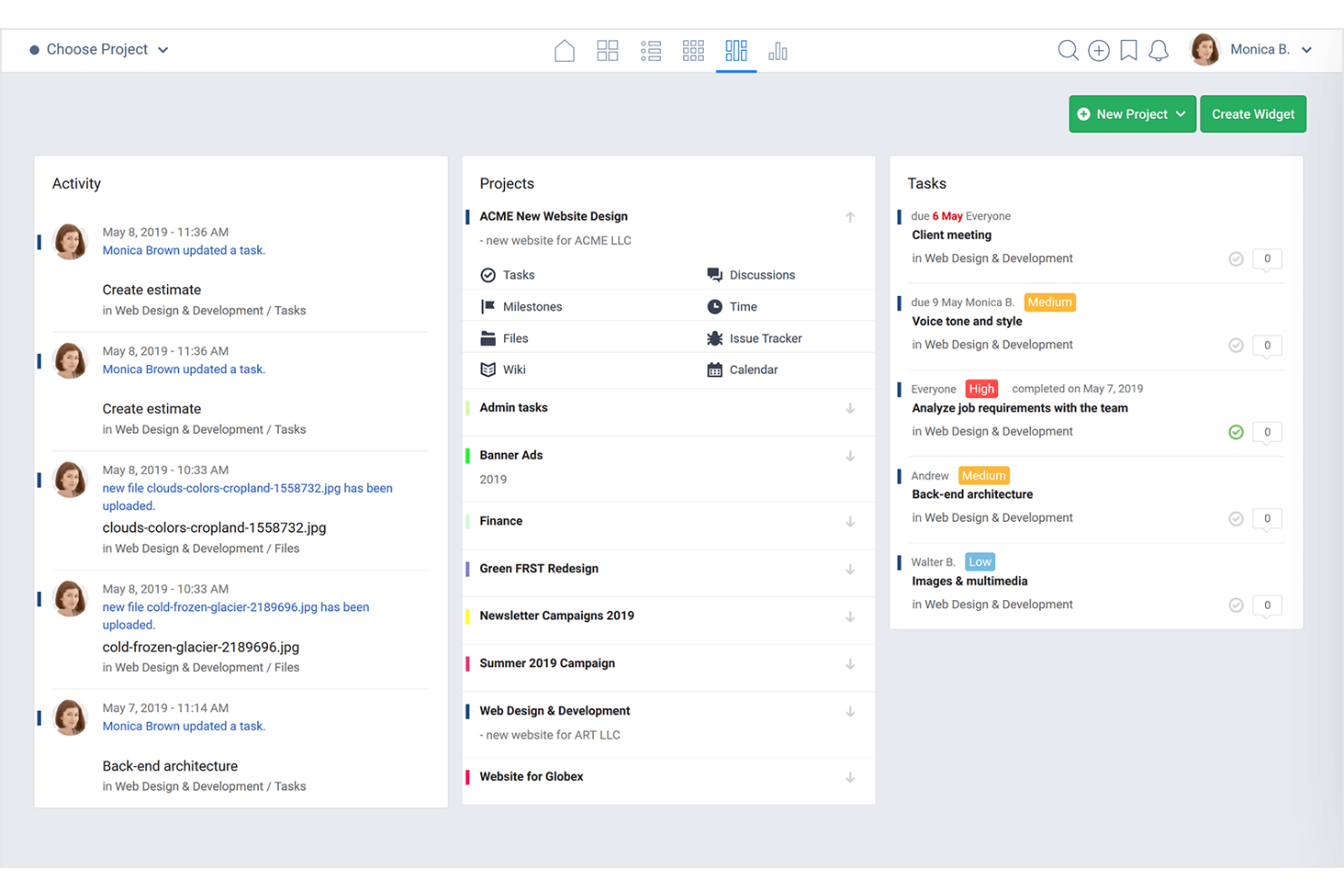
Freedcamp è uno strumento versatile per la gestione dei progetti e la collaborazione, progettato per aiutare i team a organizzarsi, gestire le attività e comunicare in modo efficace.
Perché è una buona alternativa a Teamwork:
Freedcamp offre solide funzionalità per la gestione dei progetti, con il notevole vantaggio di uno spazio di archiviazione illimitato e gratuito. A differenza di altri strumenti che impongono limiti di archiviazione o applicano costi aggiuntivi per lo spazio extra, Freedcamp si distingue per il rapporto costo-efficacia e l'ampia gamma di funzionalità. Inoltre, la sua interfaccia intuitiva e le numerose opzioni di integrazione lo rendono adatto a team di qualsiasi dimensione alla ricerca di una soluzione flessibile ed economica per la gestione dei progetti.
Funzionalità e integrazioni principali:
Le funzionalità includono la gestione delle attività, il monitoraggio del tempo, la condivisione dei file, strumenti di comunicazione per i team, modelli di progetto, visualizzazione del calendario, bacheche Kanban, diagrammi di Gantt, monitoraggio delle milestone, monitoraggio dei problemi, campi personalizzati, notifiche e accesso tramite app mobile.
Le integrazioni includono Google Drive, Zapier, Slack, Dropbox e Google Calendar.
Pros and Cons
Pros:
- Spazio di archiviazione illimitato
- Set completo di funzionalità per la gestione dei progetti
- Si integra con strumenti popolari come Google Drive e Dropbox
Cons:
- L'interfaccia utente può risultare complessa per i principianti
- Opzioni di personalizzazione limitate per le visualizzazioni delle attività
Altre alternative a Teamwork
Di seguito è riportato un elenco di ulteriori alternative a Teamwork che ho selezionato. Sebbene non siano rientrate nella top 10, sono comunque valide e meritano ulteriori approfondimenti.
- Workzone
Ideale per la visibilità in tempo reale sui progetti
- Process Street
Ideale per modelli di workflow di gestione progetti
- ProofHub
Ideale per la gestione progetti tutto-in-uno
- Microsoft Teams
Ideale per le integrazioni con Microsoft
- Bonsai Agency Software
Ideale per una gestione centralizzata di clienti e progetti
- Taskworld
Ideale per chat e analisi integrate
- Podio
Ideale per l'automazione dei flussi di lavoro
- Bitrix24
Ideale per la gestione aziendale e CRM
- Redmine
Ideale per la gestione dei progetti open source
- Ravetree
Ideale per metodologie di progetto flessibili


Recensioni correlate sui software per la gestione dei progetti
Se non hai ancora trovato quello che cerchi, dai un'occhiata a questi altri strumenti correlati che abbiamo testato e valutato:
- Software per la gestione dei progetti
- Software per la gestione delle risorse
- Software per l'automazione dei flussi di lavoro
- Software per il monitoraggio del tempo
- Software per la gestione delle attività
- Strumenti di collaborazione
- Strumento per la creazione di diagrammi di Gantt
- Strumenti per la produttività
- Software per il monitoraggio dei progetti
- Software per la pianificazione dei progetti
Come Valuto le Alternative a Teamwork
Valuto le alternative a Teamwork su due livelli: le funzionalità fondamentali che uno strumento deve avere—gestione delle attività, rilevamento del tempo, accesso per i clienti—e i fattori differenzianti che separano le opzioni migliori.
Funzionalità Fondamentali (Requisiti Minimi per Questa Lista)
Quando seleziono gli strumenti per la mia lista, assegno a ciascuno un punteggio da 0 (non offre la funzionalità) a 5 (eccelle in quest'area) per ogni funzionalità fondamentale elencata di seguito. Poi, calcolo il punteggio totale dello strumento in percentuale. Ogni strumento deve raggiungere un punteggio minimo totale del 75% per essere considerato nell'elenco.
- Gestione di Attività e Progetti: Cerco gerarchie di attività strutturate, dipendenze e traguardi—ad esempio la pianificazione della riprogettazione di un sito web suddivisa in fasi con sottoattività per ogni deliverable.
- Visualizzazioni Multiple di Progetto: Ogni strumento dovrebbe offrire almeno viste a elenco, bacheca, Gantt e calendario così che i team possano alternare la pianificazione di un backlog di sprint e la revisione della timeline mensile.
- Rilevamento del Tempo e Fatturazione: È importante la distinzione tra attività fatturabili e non fatturabili, insieme al monitoraggio del budget per progetto—essenziale quando il tuo team registra ore su vari contratti di clienti.
- Collaborazione con Clienti e Ospiti: Valuto se i soggetti esterni possono accedere ai progetti con controlli di permessi, come dare a un cliente l’accesso solo per commentare su una bacheca di deliverable.
- Gestione delle Risorse e dei Carichi di Lavoro: Gli strumenti dovrebbero mostrare chiaramente la capacità disponibile, così un PM può individuare un designer sovraccarico e redistribuire le attività prima che le scadenze vengano mancate.
- Strumenti di Collaborazione di Team: Verifico la presenza di funzionalità di comunicazione contestuale come commenti in thread, @menzioni, condivisione dei file e approvazione collegata direttamente alle attività, invece che dispersa in applicazioni separate.
Una volta ottenuta una lista di strumenti che rispondono a questi criteri, considero ciò che distingue ogni piattaforma.
Fattori Differenzianti (Cosa Distingue i Fornitori)
Ecco come confronto e metto a confronto i diversi fornitori:
Funzionalità Distintive
Le regole di automazione rappresentano un grande elemento differenziatore—cerco strumenti che permettano di assegnare automaticamente attività, modificare stati e inviare notifiche in base a condizioni, cosa che fa risparmiare ore nelle configurazioni ripetitive. Sono importanti anche il workflow di approvazione e revisione, soprattutto per i team creativi che gestiscono file di design attraverso vari cicli di revisione. Valuto i cruscotti di reportistica per il monitoraggio della redditività trasversale ai progetti, poiché i responsabili d'agenzia devono capire quali account riducono i margini senza dover esportare i dati su un foglio di calcolo.
Oltre le Funzionalità
Le integrazioni contano molto quando si cambia da Teamwork. Verifico se ogni strumento si collega nativamente a piattaforme contabili come QuickBooks o Xero, poiché i flussi di lavoro sulle ore fatturabili si interrompono senza quel collegamento. La trasparenza dei prezzi è un altro fattore chiave—valuto se i piani intermedi includono il monitoraggio del tempo e l’accesso clienti oppure li riservano solo alle tariffe enterprise. Prendo in considerazione anche il supporto all’onboarding, in particolare l’assistenza alla migrazione, perché spesso è proprio il trasferimento di progetti attivi con storici di attività e ore registrate su una nuova piattaforma a rappresentare l’ostacolo maggiore nei cambi.
Perché cercare un'alternativa a Teamwork
Teamwork è un prezioso software per la gestione dei progetti, dotato di funzionalità e integrazioni avanzate. Tuttavia, potrebbe non essere la soluzione più adatta per ogni team. In genere, potresti cercare un'alternativa a Teamwork se:
- Hai bisogno di un'opzione più economica: Teamwork offre piani a partire da $11/utente/mese, ma se gestisci una piccola impresa o hai bisogno di più posti, potresti trovarti meglio con una soluzione più economica.
- Desideri un'interfaccia più intuitiva: Sebbene Teamwork disponga di un'interfaccia piuttosto intuitiva, questa potrebbe diventare più complessa con i progetti di grandi dimensioni, spingendoti a cercare un'alternativa.
- Cerchi ulteriori opzioni di personalizzazione: Le visualizzazioni e i modelli personalizzati sono più importanti di quanto la maggior parte delle persone immagini per ottimizzare i processi, rendendo preziosa una soluzione che offra queste funzionalità.
- Hai bisogno di una migliore integrazione: Teamwork si integra con diversi strumenti, ma se non si connette bene al tuo attuale insieme di strumenti, potresti aver bisogno di una soluzione alternativa.
- Desideri un'assistenza clienti più completa: Nei momenti in cui non riesci proprio a trovare la risposta, desideri un software che offra un'assistenza clienti dedicata.
In definitiva, trovare lo strumento giusto può migliorare la produttività del team, semplificare l'esecuzione dei progetti e contribuire al successo complessivo dell'azienda. Esaminando le alternative, puoi assicurarti che il software scelto soddisfi i tuoi requisiti specifici, migliorando l'efficienza e la collaborazione complessive del team.
Caratteristiche principali delle alternative a Teamwork
Ecco alcune caratteristiche fondamentali di Teamwork che il software alternativo dovrebbe essere in grado di replicare o migliorare per adattarsi alle tue esigenze:
- Gestione delle attività: Il software scelto deve consentirti di creare, assegnare e monitorare facilmente le attività. Assicurati di impostare le scadenze, stabilire le priorità delle attività e monitorare i progressi per mantenere sotto controllo i vari progetti.
- Monitoraggio del tempo: Il software dovrebbe consentirti di monitorare le ore fatturabili e generare report per analizzare come viene impiegato il tempo nelle diverse attività.
- Diagrammi di Gantt: Con i diagrammi di Gantt puoi pianificare e programmare le attività, modificare le tempistiche e gestire i progressi del progetto con una panoramica chiara e dettagliata.
- Traguardi: La giusta alternativa a Teamwork ti consentirà di definire i punti importanti nel pannello di controllo del progetto e monitorarne il raggiungimento per rimanere allineato agli obiettivi complessivi.
- Condivisione dei file: Le migliori alternative a Teamwork aiutano i responsabili ad assicurarsi che tutti i membri del team abbiano a portata di mano i file e le informazioni necessarie.
- Collaborazione del team: Un buon software migliora il lavoro di squadra e semplifica la comunicazione, mantenendo tutti informati e coinvolti.
- Modelli di progetto: Con la tua alternativa a Teamwork dovresti poter personalizzare i modelli in base alle tue esigenze specifiche e avviare rapidamente nuovi progetti.
- Reportistica: Utilizzando il software alternativo giusto, puoi monitorare facilmente le metriche, analizzare i dati e presentare i risultati agli stakeholder.
- Integrazioni: Assicurati che la soluzione scelta possa connettersi ad altri strumenti come Slack, Google Drive e molto altro per semplificare i flussi di lavoro e migliorare la produttività.
- Applicazione mobile: Una valida alternativa software ti aiuterà a rimanere connesso, aggiornare le attività ricorrenti e collaborare con il tuo team ovunque ti trovi, garantendo continuità nei progressi del progetto.
Quando valuti le alternative a Teamwork, è essenziale confrontarne le caratteristiche principali per assicurarti che soddisfino le tue esigenze di gestione dei progetti. Che tu dia priorità alle interfacce intuitive, agli strumenti di collaborazione avanzati o alle funzionalità dettagliate di reportistica, esiste una soluzione adatta ai requisiti specifici del tuo team.