

Le 10 migliori alternative a LiquidPlanner per la pianificazione nel 2026

Le migliori alternative a LiquidPlanner in sintesi


La gestione dei progetti può diventare complessa, soprattutto quando gli strumenti attuali non sono in linea con le esigenze del tuo team. Ora che LiquidPlanner è entrato a far parte di Tempo e ha assunto il nuovo nome di Portfolio Manager, potresti scoprire che non soddisfa pienamente le tue necessità. Per questo ho analizzato le alternative a LiquidPlanner.
Ho testato e recensito in modo indipendente diverse opzioni per aiutarti a trovare quella più adatta alle tue esigenze. In questo articolo ti guiderò attraverso le migliori alternative a LiquidPlanner, concentrandomi sulle funzionalità che affrontano le sfide più comuni della gestione dei progetti. Grazie alle mie considerazioni, avrai gli strumenti per scegliere quello più adatto alle esigenze della tua azienda.
Che cos'è LiquidPlanner?
LiquidPlanner è un software per la gestione del portafoglio progetti progettato per aiutare i team a gestire l'incertezza e stabilire le priorità delle attività. Viene generalmente utilizzato da responsabili di progetto, capisquadra e professionisti di settori in cui è comune gestire più progetti e priorità mutevoli. LiquidPlanner offre funzionalità di pianificazione predittiva, gestione dinamica dei progetti e ottimizzazione delle risorse, che aiutano il tuo team ad adattarsi ai cambiamenti e a prendere decisioni informate. Nel complesso, LiquidPlanner offre valore aiutandoti a mantenere i progetti in linea con gli obiettivi e le risorse del tuo team.
Perché cercare un'alternativa a LiquidPlanner?
Sebbene LiquidPlanner sia una buona scelta di software per la gestione del portafoglio progetti, ci sono diversi motivi per cui alcuni utenti cercano soluzioni alternative. Potresti cercare un'alternativa a LiquidPlanner perché…
- Hai bisogno di un'interfaccia più intuitiva
- Il tuo team richiede una migliore scalabilità
- Desideri prezzi più convenienti (i prezzi di LiquidPlanner possono essere elevati per alcuni team)
- Hai bisogno di funzionalità specifiche per il settore
- Il tuo team necessita di migliori opzioni di integrazione
- Hai bisogno di un'assistenza clienti più efficace
Se ti riconosci in una di queste situazioni, sei nel posto giusto. Il mio elenco contiene diverse opzioni di software per la gestione del portafoglio progetti più adatte ai team che affrontano queste difficoltà con LiquidPlanner e cercano soluzioni alternative.
Tabella di confronto delle alternative a LiquidPlanner
Questa tabella di confronto riassume i dettagli dei prezzi delle mie migliori alternative a LiquidPlanner.
| Tool | Best For | Trial Info | Price | ||
|---|---|---|---|---|---|
| 1 | Ideale per la pianificazione di progetti aziendali | Prova gratuita di 30 giorni | Da $10/utente/mese (fatturato annualmente) | Website | |
| 2 | Ideale per la gestione visiva delle attività | Piano gratuito disponibile | Da $5/utente/mese (fatturazione annuale) | Website | |
| 3 | Ideale per l'organizzazione delle attività | Piano gratuito + demo gratuita disponibile | Da $10.99/utente/mese (fatturazione annuale) | Website | |
| 4 | Ideale per la gestione di progetti per clienti | Prova gratuita di 14 giorni + demo gratuita disponibile | A partire da $9.99/utente/mese (fatturato annualmente) | Website | |
| 5 | Ideale per la gestione strategica del portfolio | Piano gratuito disponibile (massimo un utente) | A partire da $10/mese (fatturato annualmente, 3 utenti) | Website | |
| 6 | Ideale per metodi agili e tradizionali | Prova gratuita + demo gratuita disponibili | Da $29/utente/mese | Website | |
| 7 | Ideale per i team di sviluppo software | Piano gratuito disponibile | Da $7.91/utente/mese | Website | |
| 8 | Ideale per la personalizzazione dei flussi di lavoro | Piano gratuito disponibile | A partire da $9/utente/mese (fatturazione annuale) | Website | |
| 9 | Ideale per la gestione di portafogli di progetti | Prova gratuita + demo gratuita disponibili | Da $10/utente/mese (fatturazione annuale) | Website | |
| 10 | Ideale per la collaborazione tra reparti | Prova gratuita di 14 giorni + piano gratuito disponibile | A partire da $10/utente/mese (fatturazione annuale) | Website |


Perché fidarsi dei nostri consigli sui software
Il nostro team testa e recensisce software dal 2012. In quanto project manager noi stessi, sappiamo quanto sia difficile — e importante — scegliere il software giusto.
Per questa guida, abbiamo valutato gli strumenti attraverso test pratici e ricerche indipendenti, assegnando un punteggio agli strumenti in base ai nostri criteri di selezione. Ci basiamo inoltre sulle competenze di leader di pensiero del settore e di professionisti attivi nella gestione dei progetti.
Le nostre recensioni riflettono il nostro giudizio editoriale umano, non un discorso di vendita.
Revisori esperti:
Recensioni delle migliori alternative a LiquidPlanner
Di seguito sono riportati i miei riepiloghi dettagliati delle migliori alternative a LiquidPlanner incluse nella mia selezione. Le mie recensioni offrono uno sguardo approfondito alle funzionalità principali, ai pro e contro, alle integrazioni e ai casi d’uso ideali di ogni strumento, per aiutarti a trovare quello più adatto a te.

Ideale per la pianificazione di progetti aziendali

Microsoft Project è un software di gestione progetti progettato per la pianificazione e la gestione di progetti a livello aziendale. Viene utilizzato principalmente da project manager e team all'interno di grandi organizzazioni per pianificare, eseguire e monitorare progetti complessi.
Perché è una buona alternativa a LiquidPlanner: Microsoft Project offre funzionalità di pianificazione progettuale a livello aziendale con strumenti come la programmazione dei progetti e la gestione delle risorse. I suoi diagrammi di Gantt e le viste cronologiche aiutano il team a visualizzare le tempistiche dei progetti e a gestire le attività in modo efficace. Grazie agli strumenti avanzati di reportistica, puoi analizzare le prestazioni del progetto e prendere decisioni informate. Queste caratteristiche rendono Microsoft Project ideale per le grandi organizzazioni che necessitano di una pianificazione e monitoraggio dettagliati dei progetti.
Caratteristiche principali e integrazioni
Le caratteristiche includono la gestione delle risorse, che ti permette di allocare e monitorare le risorse in modo efficiente. I modelli di progetto ti aiutano a iniziare rapidamente offrendo strutture predefinite per i tipi più comuni di progetti. I report personalizzabili ti consentono di adattare le analisi alle tue specifiche esigenze e condividerle con gli stakeholder.
Le integrazioni includono Microsoft Teams, Power BI, SharePoint, Excel, OneDrive, Outlook, Dynamics 365, Azure DevOps, Planner e Skype for Business.
Pros and Cons
Pros:
- Programmazione dettagliata dei progetti
- Solida gestione delle risorse
- Strumenti di reportistica avanzati
- Adatto a progetti di grandi dimensioni
- Integra l'ecosistema Microsoft
Cons:
- Curva di apprendimento ripida
- Configurazione e avvio complessi
- Richiede competenze tecniche
- Funzionalità agili limitate
- Requisiti di sistema elevati

Trello
Ideale per la gestione visiva delle attività
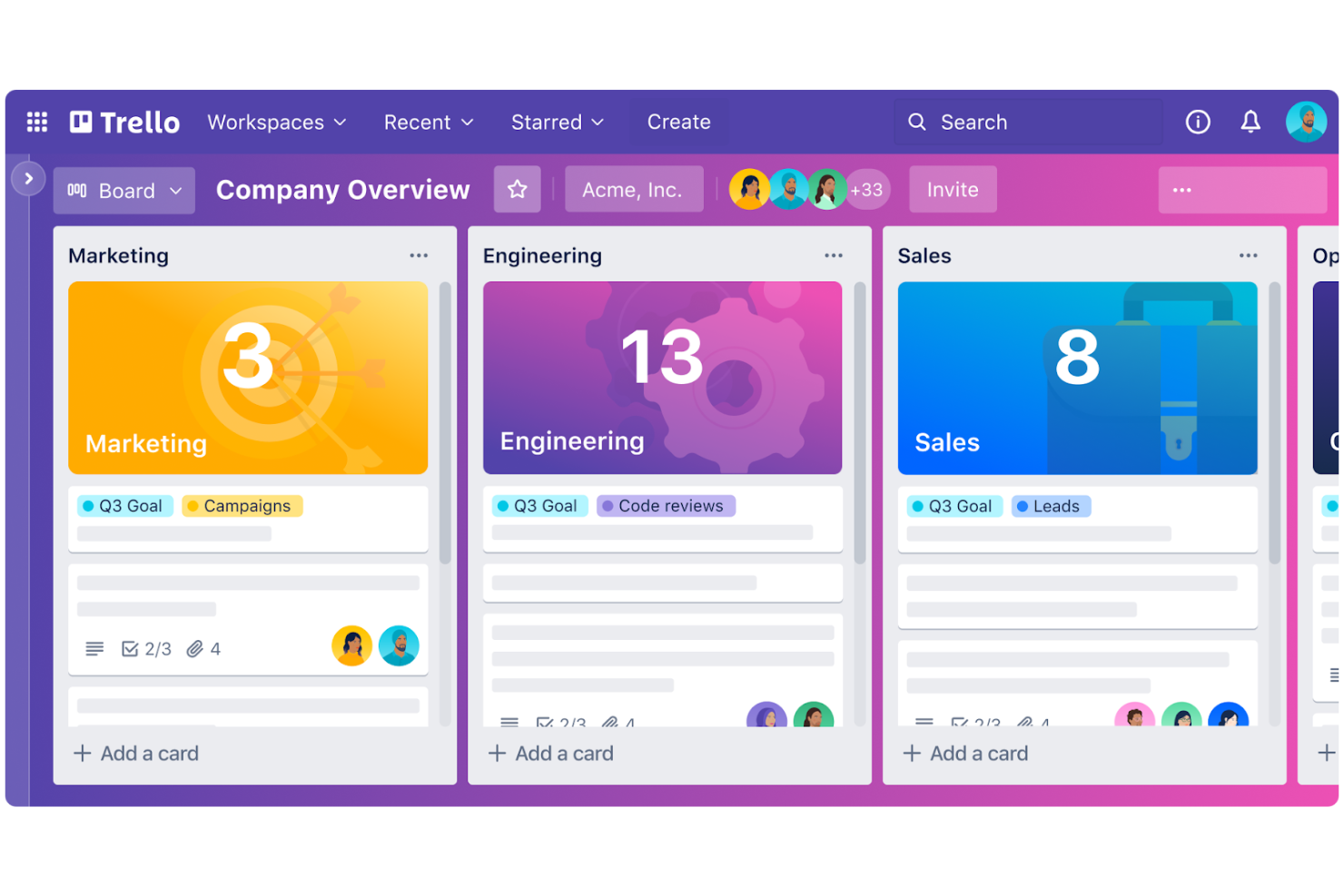
Trello è uno strumento di collaborazione visiva che aiuta i team a gestire progetti e attività utilizzando bacheche, elenchi e schede. È preferito dai team che cercano un modo semplice e intuitivo per organizzare le attività e monitorare i progressi.
Perché è una buona alternativa a LiquidPlanner: Le capacità di gestione visiva delle attività di Trello rendono facile per il tuo team vedere il quadro generale e concentrarsi su ciò che deve essere fatto. Con funzionalità come le schede trascinabili e le bacheche personalizzabili, puoi facilmente dare priorità alle attività e adattarti alle esigenze di progetto che cambiano. L'interfaccia semplice della piattaforma aiuta il team a rimanere organizzato senza essere sopraffatto dalla complessità. Trello è un'ottima opzione se stai cercando uno strumento diretto per tenere attività e progetti organizzati visivamente.
Funzionalità e integrazioni principali
Le funzionalità includono checklist all'interno delle schede, che aiutano a suddividere le attività in passaggi gestibili. La visualizzazione calendario permette al tuo team di vedere le scadenze e pianificare il lavoro di conseguenza. Con i promemoria delle scadenze, puoi assicurarti che le attività restino nei tempi previsti e rispettino le tempistiche del progetto.
Le integrazioni includono Slack, Google Drive, Dropbox, Microsoft Teams, Jira, Confluence, Salesforce, Evernote, GitHub e OneDrive.
Pros and Cons
Pros:
- Interfaccia semplice e intuitiva
- Prioritizzazione delle attività semplice
- Personalizzazione flessibile delle bacheche
- Adatto a team piccoli
- Configurazione e onboarding rapidi
Cons:
- Funzionalità avanzate limitate
- Non ideale per progetti complessi
- Capacità di reportistica limitate
- Può diventare caotico con molte schede
- Opzioni di automazione di base

Asana
Ideale per l'organizzazione delle attività

Asana è uno strumento di gestione dei progetti progettato per aiutare i team a organizzare, monitorare e gestire il proprio lavoro. È ampiamente utilizzato da squadre che desiderano migliorare la gestione delle attività e aumentare la produttività nelle varie funzioni aziendali.
Perché è una buona alternativa a LiquidPlanner: Le capacità di organizzazione delle attività di Asana sono di primo livello, permettendo di creare compiti, impostare priorità e assegnare scadenze con facilità. L'interfaccia intuitiva supporta elenchi di attività, bacheche e cronologie, che aiutano a visualizzare e gestire il lavoro in modo efficiente. Campi personalizzati e sezioni consentono di adattare i progetti alle esigenze specifiche del team. Queste funzionalità fanno di Asana un'ottima scelta se hai bisogno di uno strumento flessibile e intuitivo per l'organizzazione delle attività.
Caratteristiche principali & integrazioni
Caratteristiche comprendono modelli di progetto che aiutano a iniziare rapidamente e facilmente. Le dipendenze tra attività permettono di stabilire relazioni tra i compiti, garantendo che il lavoro proceda senza intoppi. Con la gestione del carico di lavoro, puoi bilanciare il lavoro della squadra, prevenendo il burnout e assicurando la produttività.
Integrazioni includono Slack, Microsoft Teams, Google Drive, Dropbox, Zoom, Salesforce, Adobe Creative Cloud, Jira, Tableau e Zendesk.
Pros and Cons
Pros:
- Gestione delle attività intuitiva
- Viste di progetto flessibili
- Configurazione e onboarding semplici
- Ottime opzioni di personalizzazione
- Gestione efficace del carico di lavoro
Cons:
- Accesso offline limitato
- Può risultare inizialmente complesso
- Capacità di reporting limitate
- Alcune funzionalità avanzate richiedono la versione premium
- Nessun sistema di rilevamento del tempo integrato

Teamwork
Ideale per la gestione di progetti per clienti

Teamwork è un software di gestione dei progetti progettato per aiutare i team ad aumentare la collaborazione, la responsabilità e il successo dei progetti. È utilizzato principalmente da project manager e team che hanno bisogno di gestire attività, traguardi e il monitoraggio del tempo per una pianificazione dettagliata dei progetti.
Perché è una valida alternativa a LiquidPlanner: Teamwork eccelle nella gestione di progetti per clienti grazie al suo focus sulla redditività e la collaborazione con i clienti. Funzionalità come l'assegnazione delle attività, il monitoraggio dei traguardi e la chat integrata migliorano la comunicazione e il raggiungimento degli obiettivi. La possibilità di creare pianificazioni dettagliate con diagrammi di Gantt e bacheche Kanban aiuta il tuo team a visualizzare i flussi di lavoro e a gestire le risorse in modo efficiente. Queste capacità rendono Teamwork una scelta eccellente se il tuo obiettivo è gestire in modo efficace i progetti dei clienti.
Caratteristiche e integrazioni principali
Le funzionalità comprendono la gestione delle attività con viste personalizzabili secondo le esigenze del progetto. La chat integrata migliora la comunicazione nel team, consentendo di discutere idee e fare annunci. Le capacità di gestione dei rischi e la reportistica completa aiutano a mantenere i progetti in linea con i tempi e il budget.
Le integrazioni includono Slack, Google Drive, Dropbox, Microsoft Teams, HubSpot, QuickBooks, Xero, OneDrive, Zapier e Trello.
Pros and Cons
Pros:
- Ottimi strumenti di collaborazione
- Solide funzionalità di monitoraggio del tempo
- Viste di progetto complete
- Gestione efficace dei clienti
- Strumenti di comunicazione integrati
Cons:
- Opzioni di personalizzazione limitate
- Complesso per i nuovi utenti
- Funzionalità limitate nel piano gratuito
- L'interfaccia può risultare affollata
- Alcune funzionalità sono componenti aggiuntivi

OnePlan
Ideale per la gestione strategica del portfolio
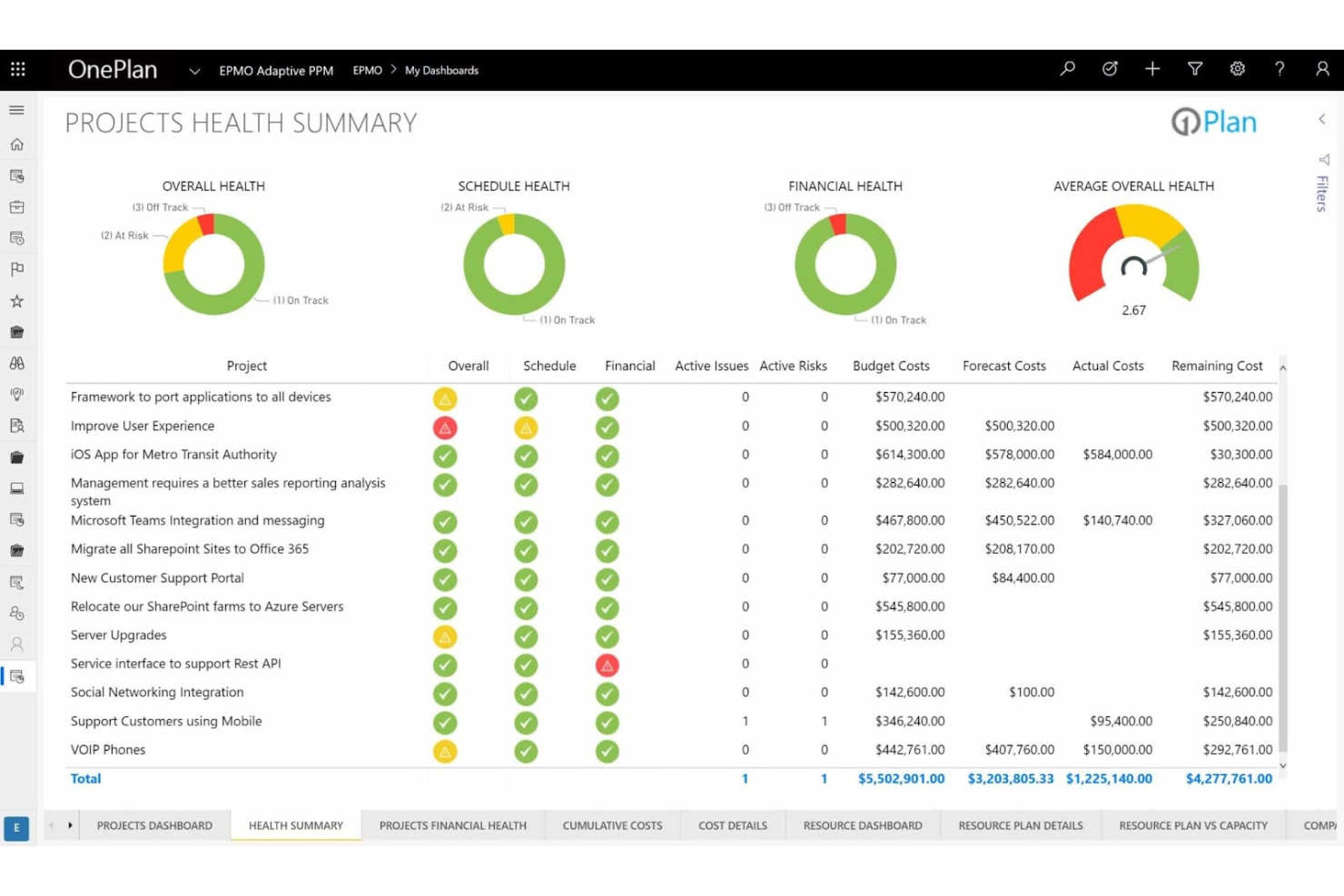
OnePlan è un software di gestione del portfolio e dei progetti progettato per le organizzazioni che desiderano allineare i progetti alla strategia aziendale. Viene utilizzato da team e manager per dare priorità, eseguire e monitorare i progetti su diversi portafogli.
Perché è una buona alternativa a LiquidPlanner: OnePlan offre funzionalità di gestione strategica del portfolio che aiutano ad allineare i progetti agli obiettivi aziendali. Grazie alle sue capacità di modellazione del portfolio, puoi valutare diversi scenari di progetto per prendere decisioni informate. Gli strumenti di gestione delle risorse del software assicurano un'allocazione ottimale delle risorse tra i vari progetti. Queste funzionalità consentono al tuo team di concentrarsi sulle iniziative strategiche e incrementare il valore aziendale.
Funzionalità principali e integrazioni
Le funzionalità includono la gestione finanziaria che ti aiuta a tracciare i budget e prevedere con precisione i costi. Gli strumenti di gestione della domanda del software permettono di raccogliere e dare priorità alle richieste di progetto in modo efficiente. Grazie alle sue capacità di gestione del rischio, puoi identificare tempestivamente potenziali problemi e mitigarli efficacemente.
Le integrazioni includono Microsoft Teams, SharePoint, Azure DevOps, Power BI, Project for the Web, Dynamics 365, Planner, Outlook, Excel e OneDrive.
Pros and Cons
Pros:
- Forte allineamento strategico
- Gestione efficace delle risorse
- Modellazione del portfolio completa
- Adatto a grandi organizzazioni
- Tracciamento finanziario dettagliato
Cons:
- Configurazione e setup complessi
- Richiede formazione per un uso efficace
- Curva di apprendimento elevata
- Capacità offline limitate
- Può risultare complesso per i piccoli team

Ravetree
Ideale per metodi agili e tradizionali
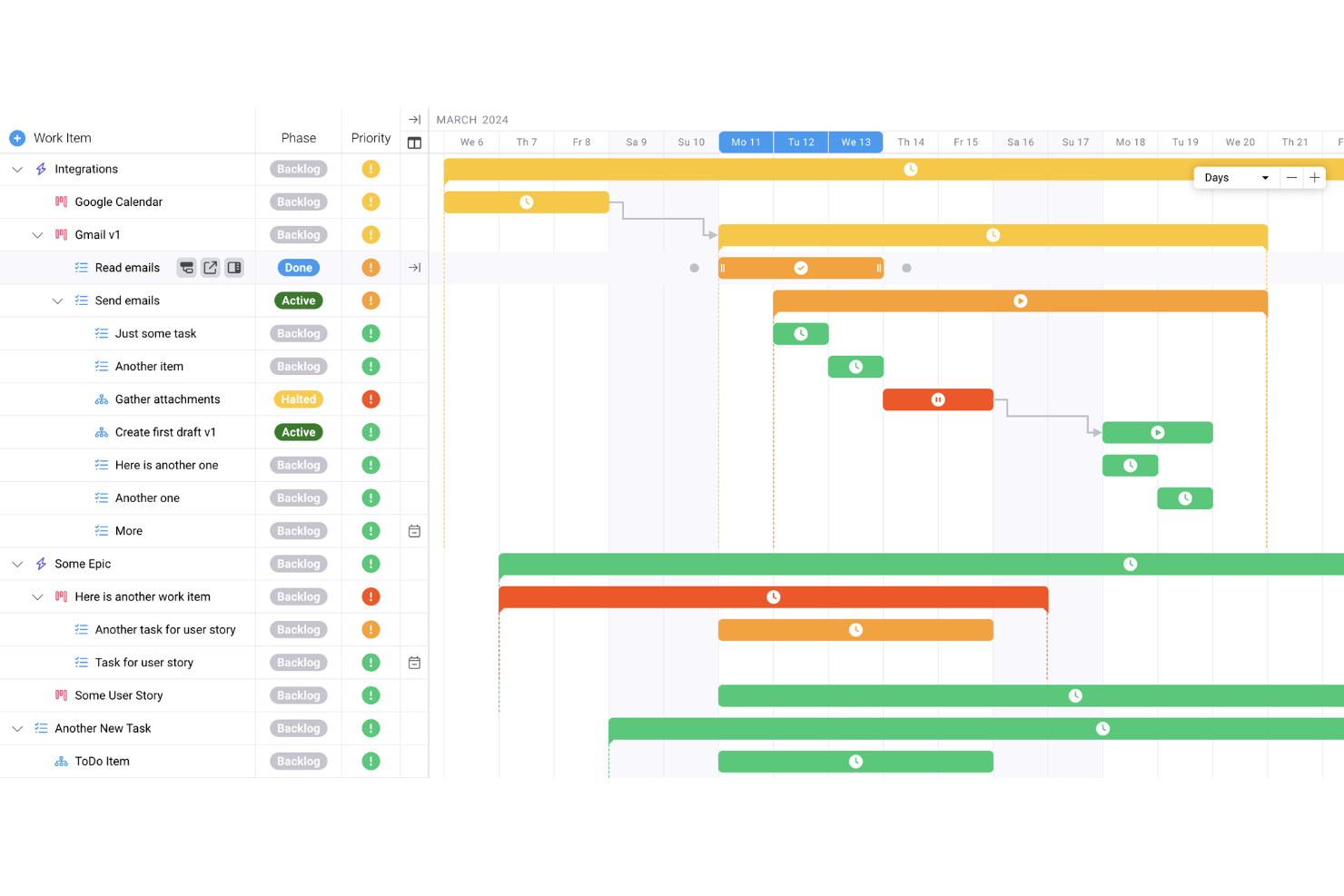
Ravetree è una piattaforma di gestione del lavoro versatile progettata per migliorare la collaborazione e semplificare i flussi di lavoro tra i team. Offre una suite di funzionalità che soddisfano le esigenze di gestione dei progetti, pianificazione delle risorse e interazione con i clienti.
Perché è una valida alternativa a LiquidPlanner: Uno dei motivi per cui ho scelto Ravetree sono i suoi solidi strumenti di gestione dei progetti che supportano sia metodologie tradizionali che Agile. Questa flessibilità consente al tuo team di gestire le attività utilizzando diagrammi di Gantt e bacheche Kanban, assicurando la possibilità di adattarsi a diverse esigenze progettuali. Inoltre, Ravetree offre informazioni finanziarie in tempo reale, aiutandoti a monitorare budget e spese durante l'avanzamento dei progetti.
Caratteristiche principali & integrazioni
Le caratteristiche includono flussi di lavoro di approvazione personalizzati che ti permettono di impostare processi specifici per diversi tipi di progetti. Ravetree supporta anche portali clienti, offrendo ai tuoi clienti accesso agli aggiornamenti sulle attività e migliorando la trasparenza. Inoltre, la piattaforma fornisce robuste funzionalità di monitoraggio di tempi e spese, consentendo al tuo team di registrare le ore lavorate e gestire efficacemente i costi di progetto.
Le integrazioni includono Harvest, Toggl, Todoist, Excel, Trello, Resource Guru, Monday.com, Favro e Asana.
Pros and Cons
Pros:
- Monitoraggio efficace di tempi e spese
- CRM integrato per la gestione dei clienti
- Monitoraggio finanziario dei progetti in tempo reale
Cons:
- Potrebbe offrire più integrazioni native
- Potrebbe offrire funzionalità di automazione più avanzate


Jira è uno strumento di gestione dei progetti utilizzato principalmente dai team di sviluppo software per pianificare, monitorare e rilasciare software. Aiuta i team a gestire progetti agili, tenere traccia dei bug e consegnare prodotti in modo efficiente.
Perché è una buona alternativa a LiquidPlanner: Jira è progettato per lo sviluppo software agile, offrendo funzionalità come board scrum e kanban per aiutare il tuo team a visualizzare il lavoro in corso. La gestione del backlog ti consente di dare priorità alle attività e concentrarti sulla creazione di valore. Con la pianificazione degli sprint e la reportistica, puoi migliorare le prestazioni del team e prevedere le tempistiche dei progetti. Queste capacità rendono Jira ideale per i team di sviluppo software che necessitano di un approccio strutturato alla gestione dei progetti.
Funzionalità e integrazioni principali
Funzionalità includono flussi di lavoro personalizzabili che permettono di adattare i processi alle esigenze specifiche del tuo team. Gli strumenti avanzati di reportistica forniscono approfondimenti sulle prestazioni del progetto e aiutano a prendere decisioni basate sui dati. Le regole di automazione riducono il lavoro manuale, consentendo al tuo team di concentrarsi su attività più strategiche.
Integrazioni includono Slack, Microsoft Teams, GitHub, GitLab, Bitbucket, Zoom, Confluence, Trello, Zendesk e Salesforce.
Pros and Cons
Pros:
- Solida gestione di progetti agili
- Flussi di lavoro altamente personalizzabili
- Strumenti di reportistica completi
- Gestione efficace del backlog
- Supporta team numerosi
Cons:
- Elevata curva di apprendimento
- Processo di configurazione complesso
- Richiede manutenzione regolare
- Funzionalità limitate per i progetti non agili
- Può risultare complesso per i team piccoli

Ideale per la personalizzazione dei flussi di lavoro
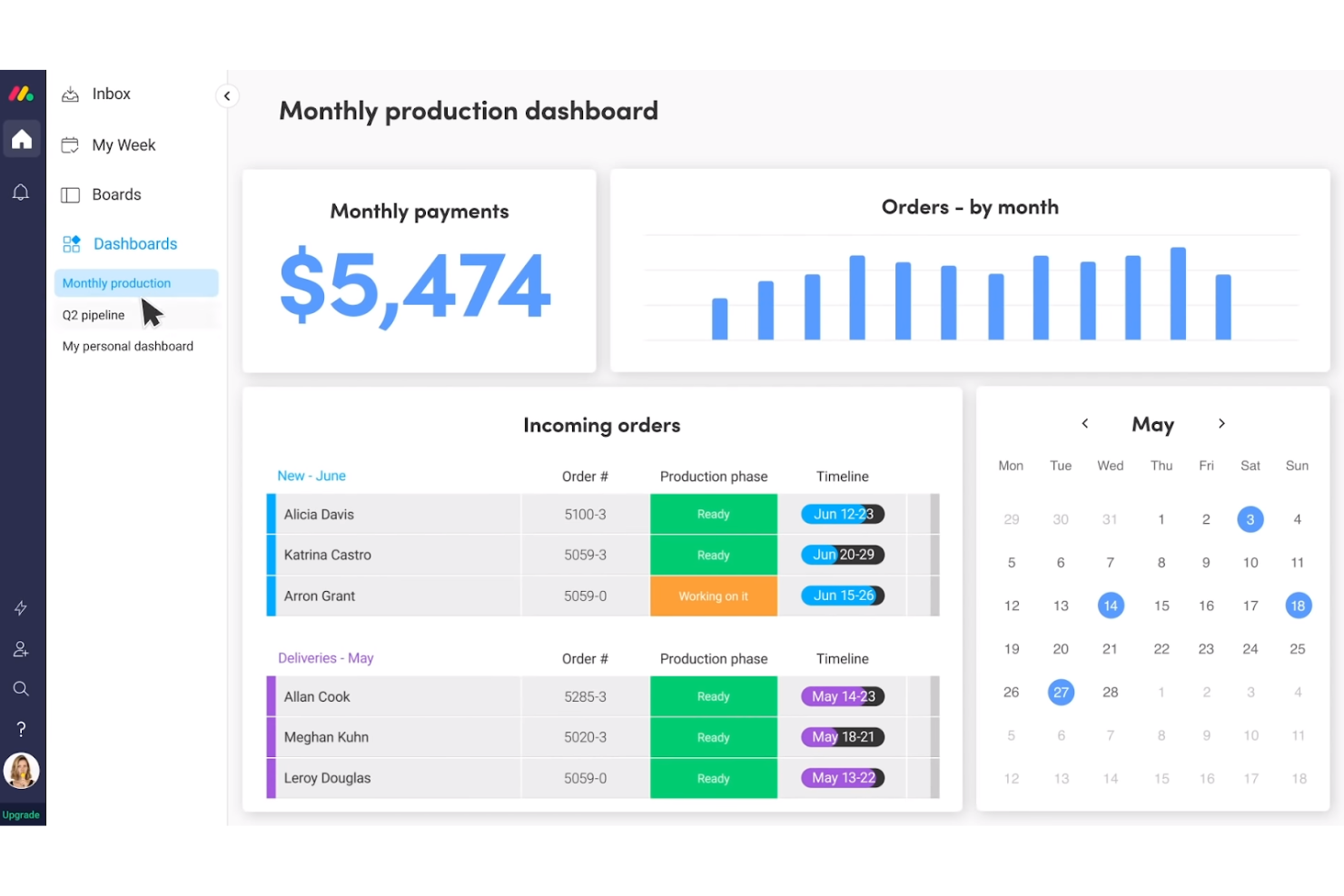
monday.com è un sistema operativo per il lavoro che permette ai team di creare flussi di lavoro personalizzati per gestire progetti e attività. È molto popolare tra i team che hanno bisogno di flessibilità nell'organizzazione del lavoro e di rafforzare la collaborazione.
Perché è una valida alternativa a LiquidPlanner: monday.com eccelle nella personalizzazione dei flussi di lavoro, offrendo funzionalità che consentono di adattare l'esperienza di gestione dei progetti. Grazie alle bacheche personalizzabili, puoi organizzare le attività nel modo più adatto alle esigenze specifiche del tuo team. Le automazioni riducono le mansioni ripetitive, liberando tempo per attività più strategiche. Le dashboard visive della piattaforma forniscono approfondimenti sull'avanzamento dei progetti, aiutandoti a rispettare le scadenze e le consegne.
Caratteristiche principali & Integrazioni
Le funzionalità includono il tracciamento del tempo, che permette al tuo team di monitorare quanto tempo viene impiegato nelle attività e ottimizzare la produttività. La piattaforma offre template che aiutano a iniziare rapidamente con flussi di lavoro preimpostati. Grazie alla condivisione dei file, puoi tenere tutti i documenti in un'unica posizione e assicurarti che tutti abbiano accesso alle versioni più aggiornate.
Le integrazioni includono Slack, Microsoft Teams, Google Calendar, Dropbox, Zoom, Jira, Salesforce, Mailchimp, HubSpot e Trello.
Pros and Cons
Pros:
- Flussi di lavoro altamente personalizzabili
- Tracciamento visivo dei progetti
- Le automazioni fanno risparmiare tempo
- Ideale per team da remoto
- Facile processo di onboarding
Cons:
- Funzionalità di report limitate
- Può risultare complesso per i nuovi utenti
- Alcune funzionalità necessitano di miglioramenti
- Richiede aggiornamenti regolari
- Accesso offline limitato
New Product Updates from monday AI Workspace
monday AI Workspace Adds Human Approval Routing
monday AI Workspace adds a human-in-the-loop approval block to AI Workflows, sending approval requests and routing workflow paths based on responses. For more information, visit monday AI Workspace's official site.

Celoxis
Ideale per la gestione di portafogli di progetti
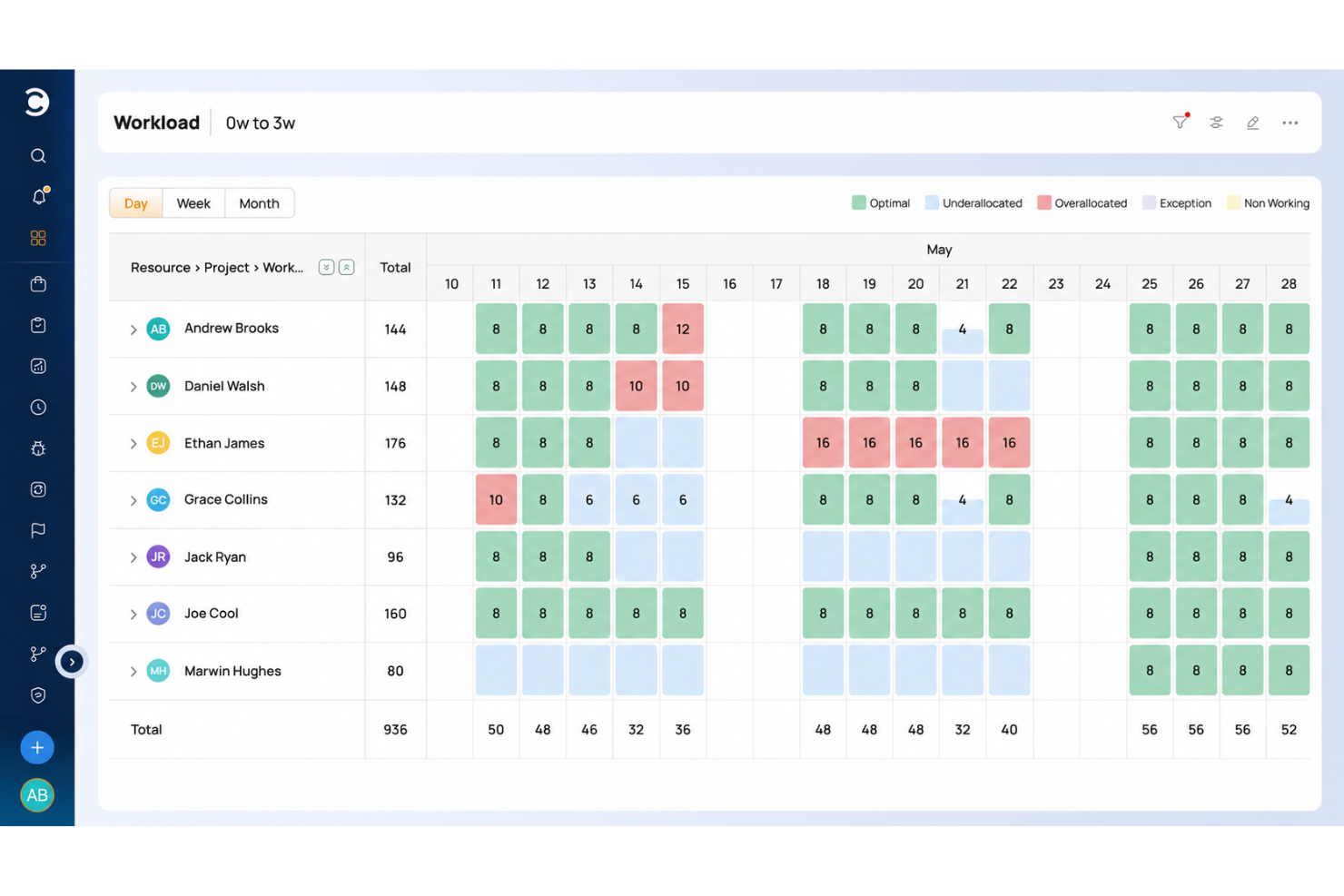
Celoxis è un software di gestione progetti pensato per le aziende che desiderano gestire efficacemente portafogli di progetti. È utilizzato da project manager e team che necessitano di monitorare le prestazioni dei progetti, allocare le risorse e gestire i rischi.
Perché è una valida alternativa a LiquidPlanner: Celoxis offre capacità di gestione del portafoglio complete, permettendoti di supervisionare più progetti in un unico luogo. Grazie alle funzionalità di allocazione delle risorse, puoi assicurarti che il tuo team lavori in modo efficiente su più progetti. Le dashboard in tempo reale della piattaforma forniscono informazioni sulla salute e le prestazioni dei progetti. Queste funzioni ti aiutano a prendere decisioni informate e a mantenere i tuoi progetti allineati agli obiettivi aziendali.
Caratteristiche distintive & Integrazioni
Le funzionalità includono modelli di progetto personalizzabili che aiutano il tuo team ad avviare progetti in modo rapido e coerente. Il monitoraggio del tempo consente di tenere traccia delle ore dedicate alle attività e gestire efficacemente i carichi di lavoro. Con gli strumenti di gestione dei rischi, puoi identificare potenziali problemi e mitigarli prima che abbiano un impatto sui progetti.
Le integrazioni includono Salesforce, QuickBooks, Microsoft Project, Google Drive, Outlook, Slack, JIRA, Excel, Trello e Zapier.
Pros and Cons
Pros:
- Ampie capacità di reportistica
- Forte gestione delle risorse
- Adatto a portafogli ampi
- Gestione efficace dei rischi
- Modelli di progetto personalizzabili
Cons:
- Processo di configurazione complesso
- Richiede formazione per i nuovi utenti
- Funzionalità limitate sull'app mobile
- Può risultare complesso per i team piccoli
- Curva di apprendimento elevata per i principianti

Wrike
Ideale per la collaborazione tra reparti

Wrike è un software di gestione progetti utilizzato da team di diversi reparti per migliorare la collaborazione e la produttività. Aiuta i team a gestire i progetti, monitorare l’avanzamento e ottimizzare i flussi di lavoro su una piattaforma centralizzata.
Perché è una valida alternativa a LiquidPlanner: Wrike eccelle nella collaborazione interdipartimentale grazie a funzionalità come i flussi di lavoro personalizzati e gli spazi di lavoro collaborativi. Il tuo team può beneficiare di aggiornamenti in tempo reale e strumenti di gestione delle attività che mantengono tutti allineati e informati. Le capacità di reportistica e analisi della piattaforma offrono approfondimenti sulle prestazioni dei progetti, aiutandoti a prendere decisioni informate. Queste caratteristiche rendono Wrike una scelta solida per i team che desiderano migliorare la collaborazione tra diversi reparti.
Funzionalità principali & Integrazioni
Le funzionalità includono il monitoraggio del tempo, che aiuta il tuo team a controllare quanto tempo richiedono le attività e a identificare le aree di miglioramento. La funzionalità dei moduli di richiesta consente di standardizzare le richieste in ingresso e di prioritizzarle in modo efficiente. Con il proofing visivo, il tuo team può collaborare su contenuti creativi e fornire feedback in un unico luogo.
Le integrazioni includono Salesforce, Microsoft Teams, Google Drive, Slack, Dropbox, Zoom, Box, Adobe Creative Cloud, OneDrive e GitHub.
Pros and Cons
Pros:
- Flussi di lavoro personalizzabili
- Ottime capacità di reportistica
- Collaborazione inter-team efficace
- Adatto a team numerosi
- Aggiornamenti di progetto in tempo reale
Cons:
- Curva di apprendimento ripida
- Richiede formazione continua
- L'interfaccia può risultare complessa
- Accesso offline limitato
- Alcune funzionalità sono componenti aggiuntivi
New Product Updates from Wrike
Wrike Adds Klaxoon MCP Integration
Wrike’s Klaxoon MCP integration is now generally available, enabling AI agents to navigate between Wrike tasks and attached whiteboards, read task context, and manage whiteboard attachments via API. For more information, visit Wrike's official site.
Altre alternative a LiquidPlanner
Ecco alcune alternative aggiuntive a LiquidPlanner che non sono entrate nella mia selezione, ma che vale comunque la pena prendere in considerazione:
- Accelo
Ideale per l'automazione delle operazioni di servizio
- Bubble PPM
Ideale per approfondimenti sul portafoglio progetti
- Acuity PPM
Ideale per la gestione strategica del portafoglio


Come valuto le alternative a LiquidPlanner
Divido la mia valutazione in due livelli: le funzionalità di base che ogni strumento deve avere, come la pianificazione predittiva e il bilanciamento delle risorse, e gli elementi distintivi più importanti per i PMO e le agenzie.
Funzionalità fondamentali (requisiti minimi per questo elenco)
Quando seleziono gli strumenti da inserire nel mio elenco, assegno a ciascuno un punteggio su una scala da 0 (non offre la funzionalità) a 5 (eccelle in quest'area) per ogni funzionalità fondamentale elencata di seguito. Quindi, calcolo il punteggio totale dello strumento sotto forma di percentuale. Ogni strumento deve raggiungere un punteggio totale minimo del 65% per essere preso in considerazione.
- Pianificazione predittiva: valuto se lo strumento è in grado di calcolare automaticamente date di completamento realistiche quando un team riassegna le priorità a metà sprint, invece di limitarsi a spostare le barre su un diagramma di Gantt.
- Gestione delle risorse e della capacità: ogni strumento dovrebbe evidenziare chi è sovraccarico e chi ha disponibilità, così i responsabili delle risorse possono riequilibrare le assegnazioni tra i progetti attivi.
- Viste del portafoglio multiprogetto: cerco un livello di portafoglio unificato in cui i responsabili PMO possano confrontare tempistiche, stato e rischi di decine di incarichi cliente simultanei.
- Monitoraggio e stima del tempo: gli strumenti ottengono valutazioni più alte quando supportano stime dell'impegno in intervalli che alimentano la pianificazione, non solo un semplice foglio presenze per registrare le ore a posteriori.
- Dipendenze e definizione delle priorità delle attività: verifico se il riordino delle priorità applica automaticamente a cascata le modifiche alle attività dipendenti, in modo simile all'approccio basato sulle priorità di LiquidPlanner.
- Analisi e dashboard di progetto: la reportistica dovrebbe andare oltre i tassi di completamento delle attività e includere il consumo del budget, l'utilizzo e lo scostamento dalla pianificazione in dashboard personalizzabili e aggiornate in tempo reale.
Una volta ottenuto un elenco di strumenti che soddisfano questi criteri, considero ciò che distingue ciascuna piattaforma.
Fattori distintivi (ciò che differenzia i fornitori)
Ecco come confronto e metto in contrapposizione i diversi fornitori:
Funzionalità di spicco
La pianificazione degli scenari è un importante elemento distintivo. Cerco strumenti che consentano di modellare uno spostamento delle priorità o una riassegnazione delle risorse senza modificare la pianificazione attiva, così un responsabile PMO può vedere l'impatto a valle prima di prendere una decisione. Anche il monitoraggio della baseline è importante, poiché il confronto tra le stime originali e i dati effettivi è il modo per individuare nel tempo le derive delle stime. Per i team di servizi professionali, valuto inoltre la reportistica sull'utilizzo fatturabile, che separa le ore fatturabili da quelle non fatturabili e collega questi dati alle previsioni dei ricavi.
Oltre le funzionalità
La profondità delle integrazioni è importante quando si sostituisce uno strumento come LiquidPlanner. Verifico se ogni piattaforma si connette nativamente agli strumenti di contabilità, sviluppo e comunicazione su cui il team fa già affidamento, poiché una sincronizzazione interrotta tra lo strumento di gestione dei progetti e Jira o QuickBooks crea più lavoro di quanto ne risolva. Anche la struttura dei prezzi è un altro fattore che valuto, soprattutto per capire se le funzionalità di gestione delle risorse e del portafoglio sono incluse o bloccate nei piani premium. Considero inoltre il supporto all'implementazione, perché migrare i dati di progetti attivi nel corso di un incarico è un'operazione delicata per qualsiasi PMO.
Funzionalità principali di LiquidPlanner
Ecco alcune delle funzionalità principali di LiquidPlanner, per aiutarti a mettere a confronto ciò che offrono le soluzioni alternative:
- Pianificazione predittiva: Prevede automaticamente le tempistiche dei progetti in base alle priorità e alle risorse, aiutando il tuo team a rispettare il programma.
- Gestione delle risorse: Assegna le risorse in modo efficiente tra i progetti per massimizzare la produttività ed evitare un'allocazione eccessiva.
- Gestione delle attività: Ti consente di creare, assegnare e monitorare le attività, così tutti sanno cosa fare e quando.
- Allineamento delle priorità: Ti aiuta a concentrarti sulle attività più importanti allineando le priorità agli obiettivi del tuo team.
- Informazioni in tempo reale: Fornisce informazioni aggiornate sullo stato dei progetti, aiutandoti a prendere rapidamente decisioni consapevoli.
- Gestione del portafoglio: Permette di supervisionare più progetti da un'unica visualizzazione, consentendoti di gestire e stabilire efficacemente le priorità del portafoglio progetti.
- Monitoraggio del tempo: Tiene traccia del tempo dedicato alle attività per aiutarti a gestire i carichi di lavoro e migliorare la gestione del tempo.
- Strumenti di collaborazione: Facilitano la comunicazione del team grazie a commenti e note integrati, mantenendo tutti aggiornati. Sembra che il tuo messaggio possa essere stato interrotto. Puoi fornire maggiori dettagli o farmi sapere come posso aiutarti?