

2026’da İncelenen En İyi BT Kaynak Yönetimi Yazılımı

En İyi IT Kaynak Yönetimi Yazılımları Kısa Listesi


Kaynak tahsisini kolaylaştırmak ve proje şeffaflığını artırmak istiyorsanız, özel ihtiyaçlarınıza uygun bir araç bulmanız önemlidir; doğru IT kaynak yönetimi yazılımını seçmek ise bunaltıcı olabilir.
Dijital proje yönetimindeki deneyimim sayesinde bu süreci kolaylaştırabilir ve kaynak yerleşimini optimize eden yazılımı seçmenize yardımcı olabilirim. İşte en iyi IT kaynak yönetimi yazılımları için öne çıkan tercihlerimden bazıları.
Why Trust Our Software Recommendations
Our team has been testing and reviewing software since 2012. As project managers ourselves, we know how difficult—and important—it is to choose the right software.
For this guide, we evaluated tools using hands-on testing and independent research, scoring tools using our selection criteria. We also draw on insights from industry thought leaders and practicing project management experts.
Our reviews reflect our human editorial judgment, not a sales pitch.
Expert reviewers:
IT Kaynak Yönetimi Yazılımları Karşılaştırma Tablosu
Aşağıdaki tabloda, en iyi IT kaynak yönetimi yazılımı seçimlerim için fiyatlandırma ayrıntıları karşılaştırılmaktadır.
Score legend (out of 5)
- Excellent 4.5–5
- Good 4–4.4
- Average 3–3.9
- Below average 2–2.9
- Poor 1–1.9
| Tool | Starting Price | Website | |||||||
|---|---|---|---|---|---|---|---|---|---|
| Best for managing projects, finances, and resources | 3.0 out of 5 | 4 | 4 | 2 | 3 | 1 | 4 | $17/user/month 14-day free trial | Book Demo |
| Best for native CRM and sales pipeline tools | — | 3 | 4 | 3 | 4 | — | 4 | $10/user/month 14-day free trial | Book Demo |
| Best for professional services automation | 3.2 out of 5 | 3 | 4 | 2 | 4 | 2 | 4 | Pricing upon request Free demo available | Book Demo |
| Best for automated service request workflows | 2.5 out of 5 | 2 | 2 | 2 | 2 | 4 | 3 | $19/user/month 14-day free trial | Book Demo |
| Best for capacity planning with real-time margins | 3.2 out of 5 | 4 | 4 | 3 | 3 | 1 | 4 | $7/scheduled user/month Free trial available | Book Demo |
| Best for visualizing team workloads | 3.2 out of 5 | 3 | 4 | 2 | 3 | 3 | 4 | $10/user/month Free plan + 14-day trial + demo available | Book Demo |
| Best for hierarchical task structuring | — | 2 | 2 | — | 1 | — | 2 | $7.65/user/month Free plan + 30-day free trial available | Website |
| Best for people-centric resourcing | — | 4 | 4 | 4 | 4 | — | 4 | Pricing upon request Not available | Website |
| Best for unified project management and collaboration | 3.5 out of 5 | 4 | 4 | 3 | 4 | 2 | 4 | £679.99 one-time purchase Not available | Website |
| Best for staffing bids before projects are won | — | 3 | 4 | 4 | 4 | — | 4 | $9.50/user/month 30-day free trial | Website |
En İyi IT Kaynak Yönetimi Yazılımı İncelemeleri
Ekibinizin iş yükünü optimize etmek ve kaynakları projeler arasında verimli bir şekilde tahsis etmek için doğru IT kaynak yönetimi yazılımını bulmak çok önemlidir. Operasyonlarınızı kolaylaştırmak ve üretkenliği artırmak üzere bilinçli bir karar vermenize yardımcı olmak için aşağıda mevcut en iyi IT kaynak yönetimi araçlarına ilişkin incelemelerimi bulabilirsiniz.

Scoro
Best for managing projects, finances, and resources
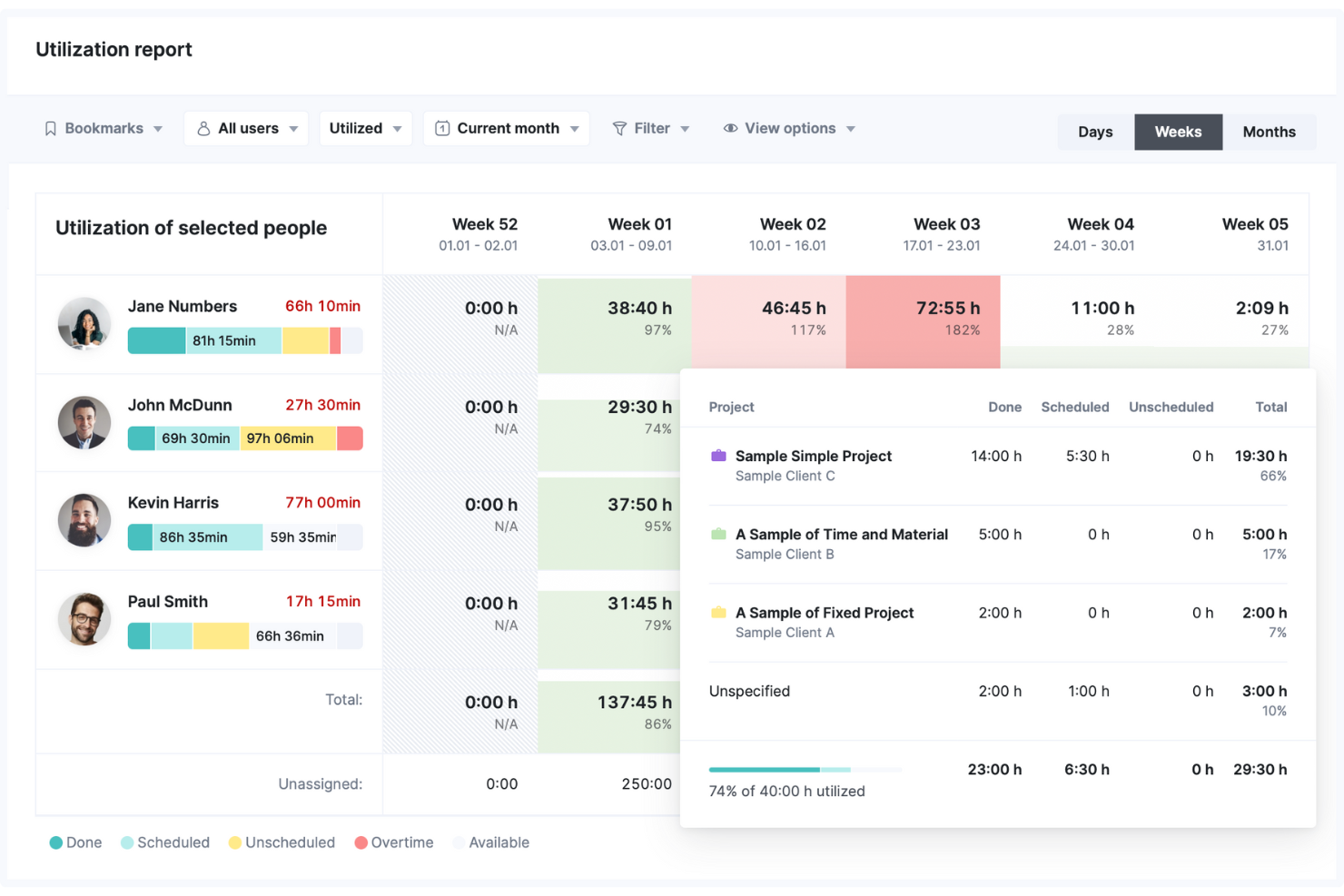
Scoro is a comprehensive business management software designed to improve workflows and enhance productivity across various business functions.
Why I picked Scoro:
Scoro is a good choice for IT teams because of its advanced resource scheduling capabilities, which offer a real-time overview of team availability and workload. This feature is crucial for IT teams that often juggle multiple projects and tasks, ensuring that resources are allocated efficiently and no team member is overburdened. Additionally, Scoro’s utilization reports provide detailed insights into how resources are being used, helping identify bottlenecks. Additionally, Scoro supports project, financial, and resource management in a unified platform, allowing users to handle project timelines, budget tracking, and resource allocation simultaneously.
Standout features & integrations:
Features include its comprehensive project management tool, which allows IT teams to plan, track, and manage projects, ensuring that they stay on schedule and within budget. The time tracking feature is another valuable tool, enabling users to log their hours accurately and gain insights into time spent on various tasks. Scoro's financial management tools also support budgeting and expense tracking.
Integrations include Jira, Memtime, HubSpot, Google Calendar, Microsoft Exchange, Xero, QuickBooks, Sage Intacct, Exact Online, Expensify, Stripe, Google Drive, BambooHR, and more. You can also connect to other apps through its Zapier integration.
Pros and Cons
Pros:
- Real-time project and resource tracking
- All-in-one business management
- Good invoice and reminder system
Cons:
- Mobile app lacks some functionality compared to the web app
- Customization can be overwhelming for new users
New Product Updates from Scoro

Scoro Adds Time Mobile App and ELI Improvements
Scoro adds the Scoro Time mobile app for iOS/Android to track time anywhere and expands ELI with attachments, smarter filtering, and trigger-based actions. For more information, visit Scoro's official site.
 .

Best for native CRM and sales pipeline tools
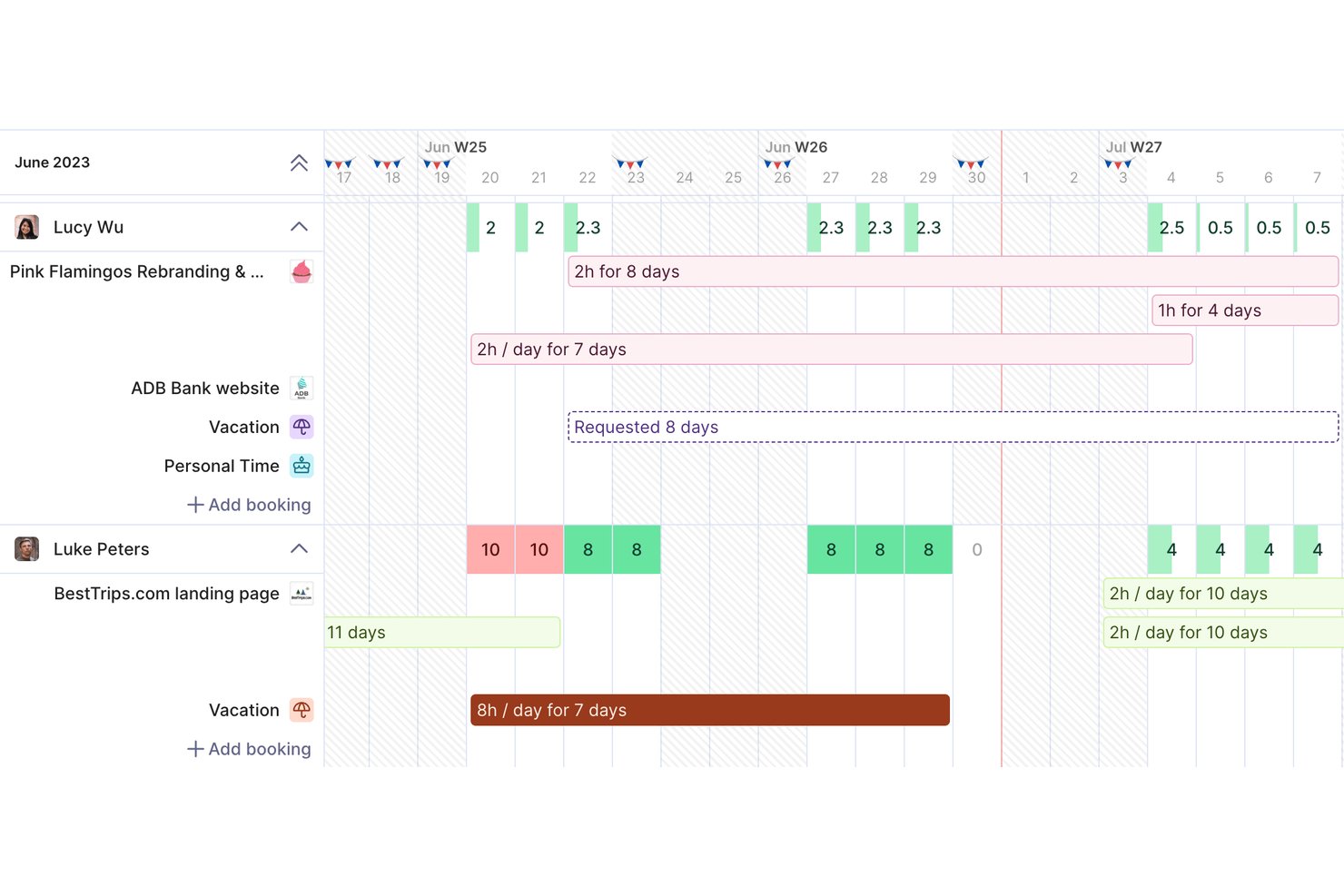
Productive is a professional services automation platform that combines resource planning, project management, time tracking, budgeting, and a native CRM into a single workspace for agencies and IT service teams.
Who Is Productive Best For?
Productive is a strong fit for IT consultancies and digital agencies that bill by the hour and need to manage client projects, team capacity, and financials in one place.
Why I Picked Productive
Productive earns its spot on my shortlist because its native CRM directly feeds into resource planning in a way most tools can't replicate. When a deal moves to "won," I can convert it into a project and immediately start booking team members against it. That pipeline-to-staffing connection means I'm forecasting capacity against real demand, not guesswork. The Scenario Builder then lets me model how upcoming opportunities will affect team availability before I've committed to anything.
Productive Key Features
- Resource planning module: Visually assign, reallocate, and track resource workload across multiple ongoing projects.
- Customized Employee Profiling: Maintain structured profiles for all team members using custom employee fields, department tags, organizational roles, active project assignments, and real-time availability data.
- Time tracking with approvals: Support for native timers, manual entries, and manager-approved timesheets.
- Financial Scenario Prototyping: Build dynamic budget and deal scenarios to prototype upcoming project services, allocate temporary resource placeholders, and calculate projected profit margins before going live.
Productive Integrations
Productive offers native integrations with GitHub, Slack, HubSpot, Notion, Amplitude, Stripe, Linear, Xero, Sage, Jira, and more. It also connects with Zapier, and has an API for custom integrations.
Pros and Cons
Pros:
- Scenario Builder models impact of pipeline deals
- Profitability tracking includes forecasted revenue and costs
- CRM pipeline connects directly to resource planning
Cons:
- Three-user minimum limits fit for small teams
- Some key features gated to higher tiers
New Product Updates from Productive
Productive Adds Email and Calendar Integrations for Agents
Productive adds Gmail, Outlook, Google Calendar, and Outlook Calendar connectors for its AI agents. These integrations let agents manage emails and create calendar events directly within Productive. For more information, visit Productive’s official site.
 .

Accelo
Best for professional services automation
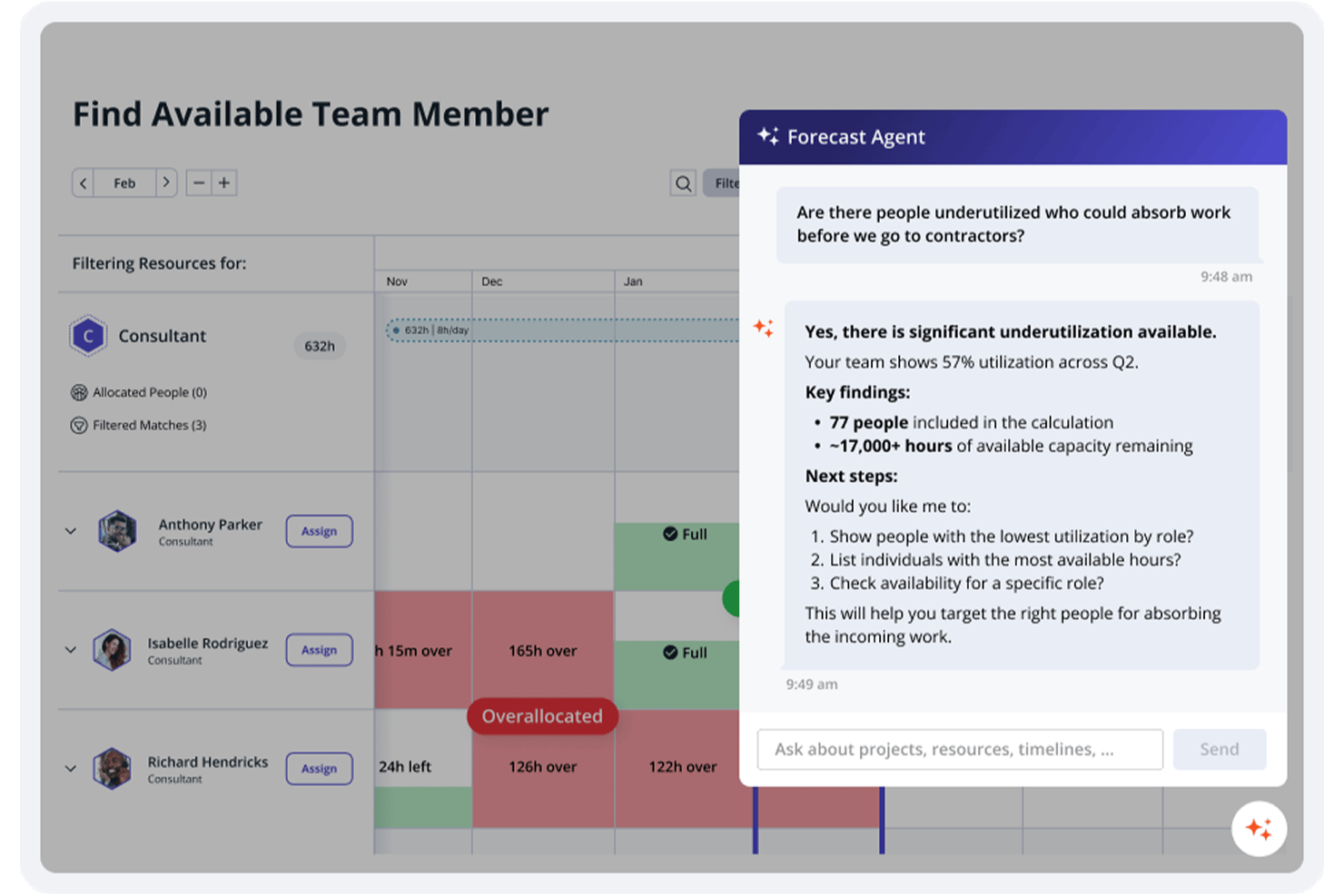
Accelo is a professional services automation platform that combines resource scheduling, capacity planning, project management, time tracking, and project financials in one connected system.
Who Is Accelo Best For?
Accelo is a strong fit for IT services firms, consultancies, and agencies managing multiple concurrent client engagements across distributed teams.
Why I Picked Accelo
Accelo is one of my top picks because it connects resource scheduling, project delivery, and financials in a single PSA platform rather than forcing teams to reconcile data across separate tools. I like how AI-assisted resourcing evaluates team members by skill, certification, and availability to match the right person to the right project. In practice, my team is able to spot capacity gaps before they become delivery risks, using soft and hard allocations alongside dynamic placeholders for work that's forecasted but not yet confirmed.
Accelo Key Features
- Utilization reports: View real-time utilization data across your team to identify who's overallocated or underused.
- Automated timesheets: Time logged during project work auto-populates timesheets without manual entry.
- Project portfolio view: Monitor all active projects in a single view with status, budget, and progress tracking.
- AI-powered risk flagging: Accelo automatically flags projects at risk of missing deadlines or exceeding budget.
Accelo Integrations
Accelo offers 30+ native integrations, including Salesforce, HubSpot, Jira, QuickBooks, Xero, Sage Intacct, Slack, Microsoft 365, Google Workspace, and Azure DevOps. It also connects with Zapier and provides a RESTful API for custom integrations.
Pros and Cons
Pros:
- Sales-to-project handoff in one platform
- Automated time capture for billable hours
- AI flags scope drift and margin risk
Cons:
- Mobile app lacks full desktop functionality
- Reporting customization options feel limited
New Product Updates from Accelo

Accelo Rebuilds Mobile App for Project and Time Management
Accelo rebuilds its mobile app with task management, new work creation, and mobile timesheets for Forecast customers. This helps teams keep project and time data current while working away from a desktop. For more information, visit Accelo’s official site.
 .

Best for automated service request workflows

Freshservice is an AI-powered IT service management platform that combines asset lifecycle tracking, incident management, workflow automation, and a CMDB to give IT teams a unified view of their resources and operations.
Who Is Freshservice Best For?
Freshservice is a strong fit for mid-size to enterprise IT teams that need a single platform to manage service requests, assets, and IT operations across complex environments.
Why I Picked Freshservice
I picked Freshservice as one of the best because its no-code Workflow Automator is one of the more capable tools I've seen for handling service request logic at scale. My team can build multi-step approval workflows that trigger automatically based on request type, requester department, or asset category, without writing a single line of code. I also like how Freshservice ties its AI-powered intelligent routing directly into these workflows, so incoming service requests get auto-assigned to the right team based on availability and load.
Freshservice Key Features
- Service catalog: A self-service portal where employees can browse and submit requests for IT resources, software, hardware, and services from a structured menu.
- CMDB: A configuration management database that maps relationships between assets, applications, and services to give IT teams a clear view of dependencies.
- SLA management: Lets you set, monitor, and escalate response and resolution time targets across different request types and priority levels.
- Asset discovery: Automatically scans and inventories hardware and software assets across on-premises, cloud, and hybrid environments without manual input.
Freshservice Integrations
Freshservice offers 1,000+ marketplace integrations through the Freshworks Marketplace, including Microsoft Teams, Slack, Jira, Azure AD, TeamViewer, Confluence, and Google Drive. It's available on Zapier and provides an API for custom integrations.
Pros and Cons
Pros:
- Offers sandbox environment for testing
- Service catalog extends to HR and facilities
- Unifies ticketing, assets, and contract management
Cons:
- Freddy AI locked behind higher-tier plans
- Custom report building options are restricted
New Product Updates from Freshservice
 Experience)
Freshservice Introduces a Reimagined IT Asset Management (ITAM) Experience
Freshservice introduces a reimagined IT Asset Management (ITAM) experience with continuous infrastructure discovery, dependency mapping, IPAM, and Software License Management. This update helps teams improve asset visibility and manage connected IT environments more effectively. For more information, visit Freshservice’s official site.
 .

Best for capacity planning with real-time margins
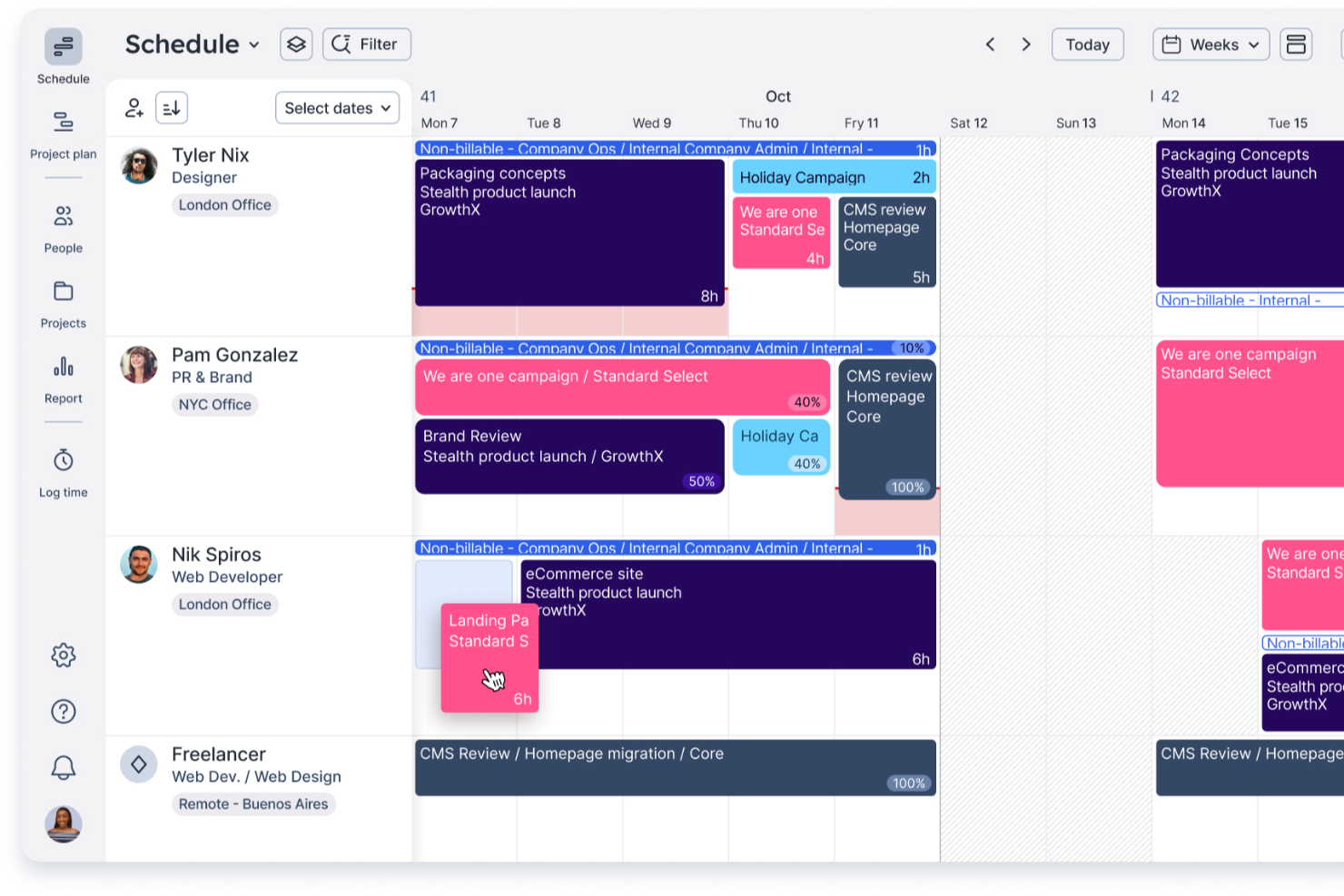
Float is a resource management platform that combines visual scheduling, capacity planning, utilization tracking, and project cost reporting across teams and projects.
Who Is Float Best For?
Float is a strong fit for resource managers and project teams who need clear visibility into who's working on what and how much capacity is left across projects.
Why I Picked Float
I picked Float as one of the best because its capacity planning visibility is genuinely hard to replicate. The People operations dashboard shows gross capacity, delivery capacity after approved time off, and scheduled demand side by side, so I can see real-time margin before committing anyone to new work. The Roles tab in the People Report goes further, flagging when role demand exceeds 100% of available supply across projects so overcommitment surfaces before it becomes a problem.
Float Key Features
- Visual schedule with live availability: View each person's assignments, remaining capacity, and over-capacity warnings on a drag-and-drop schedule that updates in real time.
- Role supply and demand reporting: Compare assigned and unassigned role demand against available capacity across projects for any selected date range.
- Project cost and margin tracking: Set hourly, fee-based, or retainer budgets and monitor costs, margins, and budget burn against allocations and logged hours.
- Smart Assign staffing recommendations: Get machine-learning suggestions for filling unassigned project roles based on role title match and availability over the project dates.
Float Integrations
Float offers a native Google Calendar integration, plus Jira, Asana, ClickUp, Basecamp, HubSpot, and Zapier connections. It also provides a REST API for custom integrations.
Pros and Cons
Pros:
- Utilization reports connect staffing to project costs
- Role-demand reports flag capacity shortfalls early
- Live schedules expose cross-project staff overload
Cons:
- No predictive skill-gap alerts or workforce scenarios
- No inventory for hardware, licenses, or infrastructure
New Product Updates from Float.com

Float Adds Rate Cards and Multi-Currency Billing
Float introduced centralized rate cards to standardize bill rates across projects and added multi-currency support to bill clients consistently across regions. For more information, visit Float's official site.
 .

Wrike
Best for visualizing team workloads

Wrike is a scalable project management tool designed to help teams plan, execute, and monitor their work efficiently. It offers a range of features that facilitate collaboration, task management, and resource allocation, making it suitable for various industries and team sizes, including small, medium, and enterprise IT teams.
Why I picked Wrike:
Wrike's resource management capabilities make it a strong choice for IT teams seeking effective resource allocation. The platform provides a comprehensive workload view, allowing you to see each team member's assignments and availability. This visibility helps prevent overloading individuals and ensures a balanced distribution of tasks. Additionally, Wrike's effort management feature enables you to estimate the amount of work required for each task. By assigning appropriate effort levels, you can better forecast project timelines and allocate resources accordingly.
Standout features & integrations:
Features include custom workflows that let you tailor processes to fit your team's specific needs, ensuring consistency and efficiency. The platform also offers real-time reporting tools, providing insights into project progress and resource utilization, which support informed decision-making.
Integrations include QuickBooks, Skyvia, Power BI, Google Sheets, Miro, Salesforce, Tableau, Microsoft Teams, MediaValet, Zoom, Adobe Creative Cloud, and Google Drive.
Pros and Cons
Pros:
- Offers diverse resource management tools
- Custom workflows, dashboards, and reports
- Scalable for growing teams
Cons:
- Learning curve due to extensive features
- No built-in chat feature
New Product Updates from Wrike

Wrike Redesigns Workspace Search With New Filters
Wrike introduces a redesigned Workspace Search interface with recent search shortcuts, item type and location filters, and parent-task context. These updates help users find relevant work items and navigate search results efficiently. For more information, visit Wrike’s official site.
 .

Quire
Best for hierarchical task structuring

Quire is a cloud-based project management tool designed to help teams break down complex projects into manageable tasks. It offers a structured environment where teams can organize their work and resources hierarchically for more clarity around every step of the project.
Why I picked Quire:
For IT teams seeking simple resourcing capabilities related to task scheduling, Quire offers hierarchical task structuring. Its nested task lists allow teams to break down large projects into smaller, actionable items, providing clarity on responsibilities and timelines. This structure supports detailed project planning and efficient task delegation, essential for optimizing workflow and ensuring that every team member understands their role in the project's success.
Standout features & integrations:
Features include real-time collaboration among team members. Users can comment on tasks, receive notifications about updates, and share files directly within the platform. Additionally, Quire's calendar view organizes team agendas, helping everyone stay on track and be prepared for upcoming deadlines.
Integrations include Google Calendar, Gmail, Slack, Outlook, Zoho Flow, GitHub, Apple Calendar Sync, Box, Dropbox, Google Drive, and Microsoft Teams.
Pros and Cons
Pros:
- Easy to collaborate with team members
- Multiple project views, including lists, boards, and timelines
- Ability to create nested tasks and subtasks, allowing for detailed project breakdowns
Cons:
- Lacks some core resourcing capabilities, like capacity and workload planning
- Potential for notification overload, especially when working with large teams
New Product Updates from Quire
Quire Adds Custom Field Locking and Comment Reaction API Support
Quire adds custom field locking and API support for reading and setting emoji reactions on comments. These updates give teams more control over field data and expand comment interaction options for developers. For more information, visit Quire’s official site.
 .

Kantata
Best for people-centric resourcing
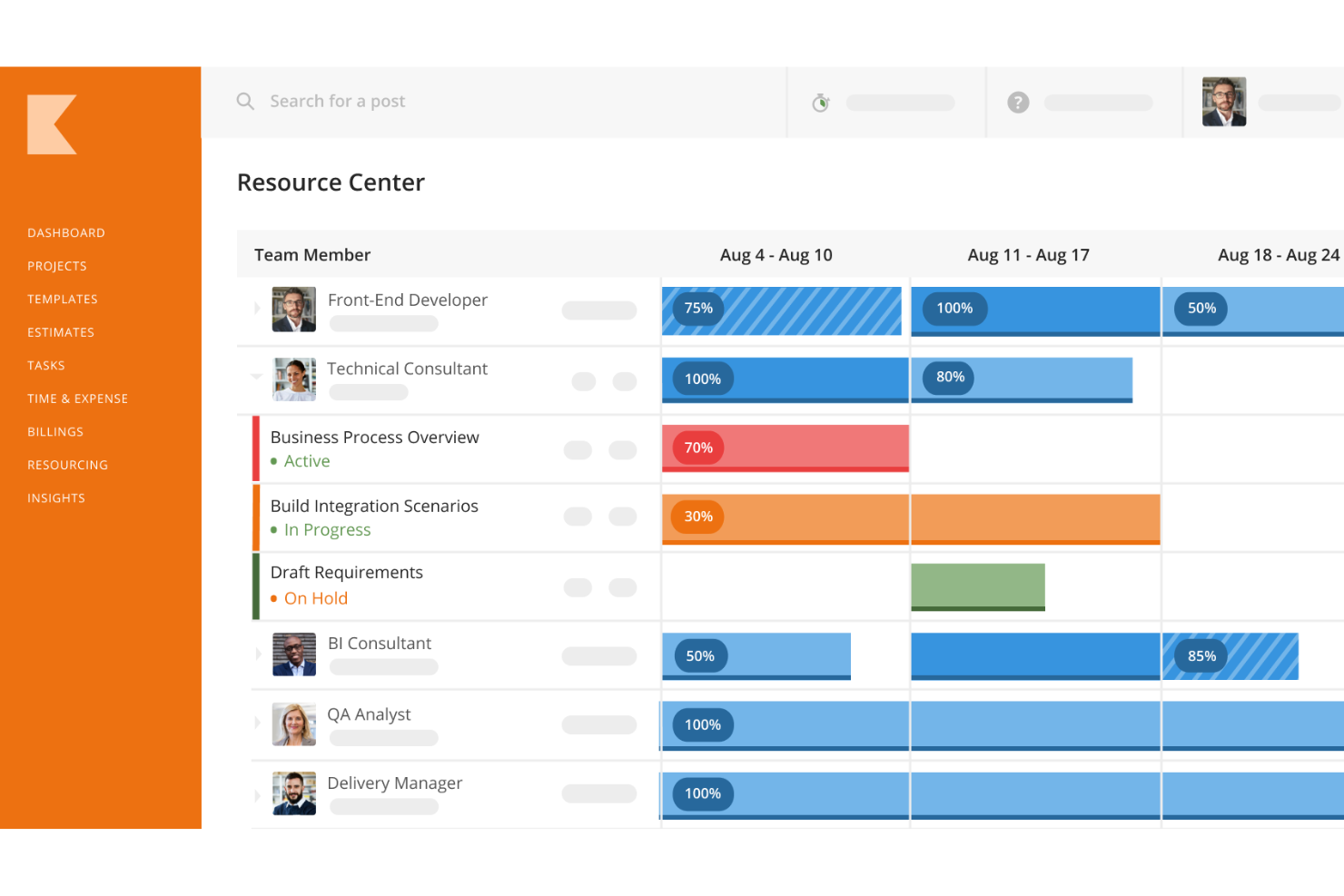
Kantata is a resource and project management software designed for a wide range of industries, including IT teams. It offers features for resource planning, financial management, and project forecasting.
Why I picked Kantata:
I like that Kantata’s people-centric approach makes it easier for IT managers to assign the right specialists to the right projects at the right time. Its advanced scheduling and capacity planning tools give real-time visibility into utilization, helping you avoid overbooking critical resources or leaving talent underused. With built-in analytics and reporting, IT leaders can make smarter, data-driven staffing decisions while keeping projects on track and profitable.
Standout features & integrations:
Features include a detailed skills inventory to align IT roles with project requirements, automated staffing suggestions based on availability, and integrated timesheets that support both billable and non-billable tracking. Kantata also offers customizable dashboards and reporting templates, so IT leaders can monitor KPIs like project health, budget adherence, and workload balance at a glance.
Integrations include Microsoft Office 365, Google Workspace, Jira, Trello, Slack, Salesforce, HubSpot, Asana, Smartsheet, QuickBooks, Xero, and many more.
Pros and Cons
Pros:
- Automated resource allocation features
- Gantt charts and boards for project visualization
- Robust, customizable reporting capabilities
Cons:
- May take time to learn the platform
- Approval workflows could be more flexible
New Product Updates from Kantata

Kantata Adds Access Group Change History
Kantata adds Access Groups History, letting account administrators track changes to group details, membership, and permissions in Recent History. The update also makes these events available through the Subscribed Events API for broader monitoring. For more information, visit Kantata’s official site.
 .
Best for unified project management and collaboration

Microsoft Project is a project and portfolio management tool from Microsoft that covers resource allocation, capacity planning, utilization tracking, and cross-project visibility across work, material, and cost resource types.
Who Is Microsoft Project Best For?
Microsoft Project is a strong fit for organizations already embedded in the Microsoft 365 ecosystem that need structured project and portfolio management across multiple workstreams.
Why I Picked Microsoft Project
Microsoft Project earns its spot on my shortlist because it handles unified project and portfolio management in a way that's hard to replicate outside the Microsoft 365 ecosystem. I especially like the resource analysis feature, which compares demand against your available supply across a portfolio and surfaces gaps before they become blockers. The enterprise resource pool also lets my team share and allocate staff across multiple concurrent projects, with availability filtering and skill-matching built into the Build Team workflow.
Microsoft Project Key Features
- Resource leveling: Automatically resolves overallocations by delaying or splitting tasks to balance workloads across your schedule.
- Portfolio cost scenario modeling: Lets you compare funding levels and project priorities side by side, then saves scenarios for further resource analysis.
- Percent allocation view: Displays each resource's percentage of available working time committed to assignments across a selected timescale.
- OData reporting service: Exposes project and resource data for extraction into Power BI, Excel, or SQL Server for custom reporting.
Microsoft Project Integrations
Microsoft Project connects with SharePoint Server and provides ProjectData OData reporting for Power BI, Excel OData, and SSIS. You can extract reporting data to SQL Server or Azure, but a public API and native ITSM integrations aren't clearly documented.
Pros and Cons
Pros:
- Automatic leveling delays or splits overloaded work
- Portfolio scenarios compare funding and resource demand
- Reviewers value assignment and availability views
Cons:
- No asset inventory or lifecycle tracking
- Generic resources are unavailable in the web version

Silverbucket
Best for staffing bids before projects are won
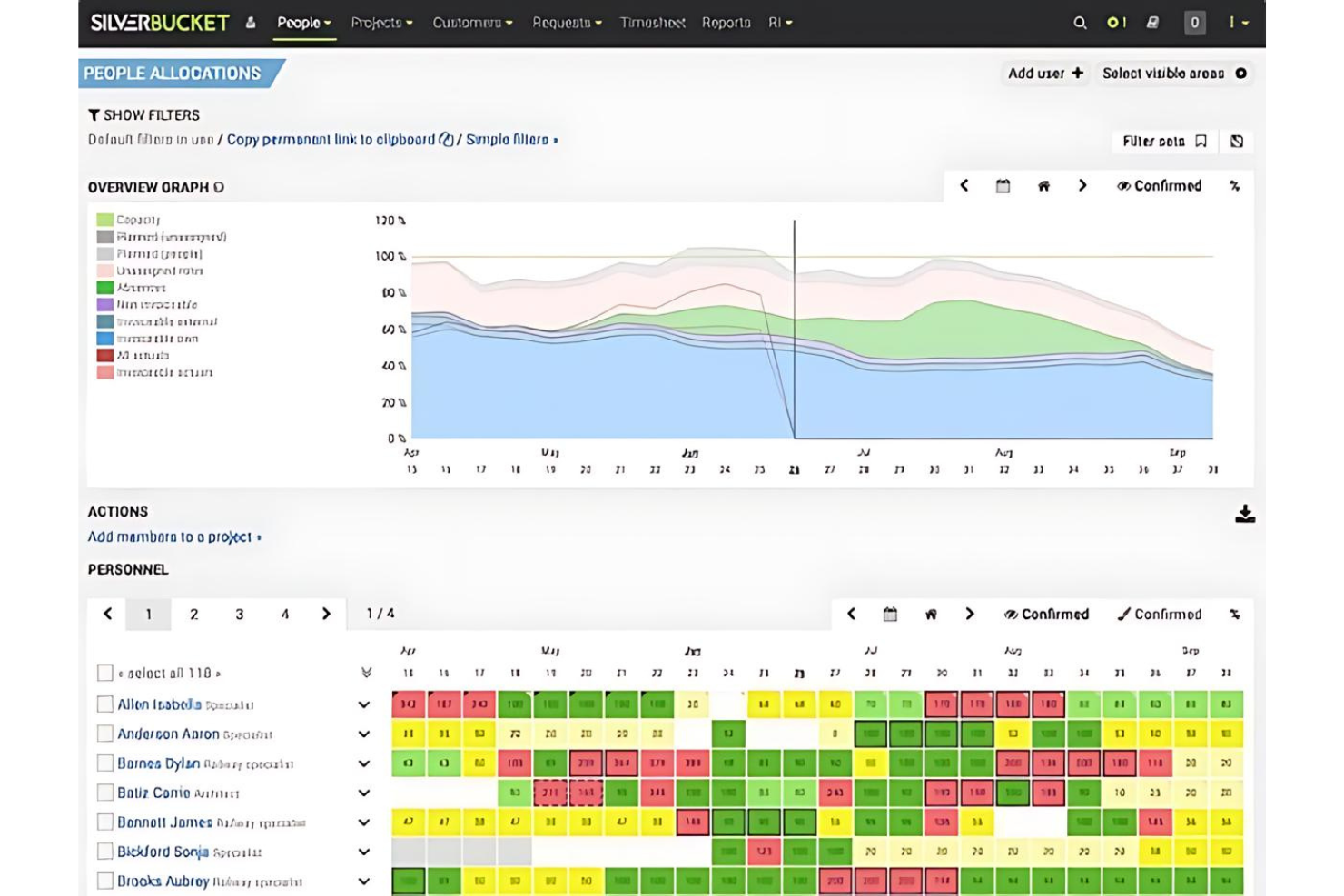
EG Silverbucket is a project resource planning tool that covers people allocation, capacity forecasting, skills and competency matching, and cross-project workload visibility.
Who Is EG Silverbucket Best For?
EG Silverbucket is a strong fit for resource managers in project-driven businesses who need to plan staffing across multiple active and pipeline projects.
Why I Picked EG Silverbucket
I've included EG Silverbucket in my top picks because of how well it handles staffing bids before a project is actually won. Its tentative allocation feature lets you model pipeline demand alongside confirmed work, so you can see capacity gaps or conflicts months ahead and make smarter hiring or bid decisions. You can attach competency requirements to unallocated placeholder roles and run scored candidate matches against availability and skill levels the moment a bid converts to a live project.
EG Silverbucket Key Features
- Competency hierarchy configuration: Set up skill categories with defined levels so employees and supervisors can log current and target proficiency for each competency.
- Color-coded workload views: See allocations across company, team, and individual levels with color-coded indicators that surface conflicts and capacity gaps at a glance.
- Actuals vs. plans reporting: Compare actual hours and costs against planned values across projects to track budget performance and improve future estimates.
- Resourcing overview with match scoring: Review candidate suitability using a 0–100 match score that weighs availability, competencies, and role specifications side by side.
EG Silverbucket Integrations
Documented integrations include Power BI and Excel for dashboards and scheduled exports. EG Silverbucket also offers a REST API, CSV and XLSX imports, and SSO configuration for connecting with existing systems.
Pros and Cons
Pros:
- Shows spare capacity across teams and projects
- Scores candidates by skills and availability
- Models tentative demand before projects are won
Cons:
- Over-capacity alerts remain unavailable
- Doesn't track hardware or other IT assets
Değerlendirilebilecek Diğer IT Kaynak Yönetimi Yazılımları
Aşağıda kısa listeye alınan ek IT kaynak yönetimi yazılımlarının bir listesi yer almaktadır. Listenin üst sıralarında yer almasalar da bu yazılımlar hâlâ değerlidir ve daha fazla araştırmaya kesinlikle değerdir.
- eResource Scheduler
For planning IT operations and projects
- Resource Guru
For asking AI about resource schedules
- Epicflow
For value-led portfolio scenario planning
- Teamwork.com
For tying staffing to client profitability
- Saviom
For scheduling people without licenses
- Runn
For skill-based staffing forecasts
- Parallax
For pricing proposals around team capacity
- Dayshape
For portfolio-wide AI staffing decisions
- Broadcom Clarity
For aligning IT capacity with investments
- Visual Planning
For coordinating staff and equipment


İlgili Yönetim Yazılımı İncelemeleri
Aradığınızı hâlâ bulamadıysanız, test edip değerlendirdiğimiz şu diğer ilgili araçlara göz atın:
- Proje Yönetimi Yazılımı
- Kaynak Yönetimi Yazılımı
- İş Akışı Otomasyonu Yazılımı
- Zaman Takibi Yazılımı
- Görev Yönetimi Yazılımı
- İş Birliği Araçları
- Envanter Kaynak Yönetimi Araçları
- Gantt Şeması Oluşturucu
- Üretkenlik Araçları
- Proje Takibi Yazılımı
- Proje Planlama Yazılımı
How I Evaluate IT Resource Management Software
I split my evaluation into three parts, giving the most weight to matching people to project demand, adjusting schedules, and forecasting capacity gaps. Then I look for features such as cross-portfolio heatmaps. Finally, I consider onboarding, support, and pricing value beyond the feature set.
Core Functionality (Table Stakes For This List)
When I'm selecting tools for my list, I score each one on a scale from 0 (does not offer the functionality) to 5 (excels in this area) for each core functionality listed below. I then convert the total into a percentage to help assess each tool's overall fit, with extra weight on any functionalities I’ve deemed essential.
- Resource Allocation & Scheduling (Essential): I look for ways to assign people and equipment to project work, then adjust schedules when an incident pulls engineers from planned tasks.
- Capacity Planning & Forecasting (Essential): I assess whether teams can compare future demand with availability and spot a staffing gap before committing to a release date.
- Utilization Tracking: I check for individual and team utilization views that help managers spot overloads or unassigned capacity across planned work.
- Skills & Competencies: I look for searchable skill profiles that help match specialists to work, such as assigning an engineer with relevant cloud experience.
- Cross-Project Visibility: I evaluate whether managers can view allocations across projects and teams to identify conflicts when priorities shift.
- IT Asset Tracking: I check whether teams can account for hardware, licenses, or infrastructure alongside people when planning project needs.
Once I have a list of tools that meet the criteria, I consider what sets each platform apart.
Differentiating Factors (What Sets Vendors Apart)
Here's how I compare and contrast different vendors:
Standout Features
I look for cross-portfolio heatmaps that show over- and under-utilization across teams in one view. When a priority shift hits mid-sprint, a heatmap lets you spot conflicts before reassigning anyone. Scenario-based what-if modeling matters just as much—I evaluate whether a tool lets me simulate adding a new project or losing a key engineer and see the capacity ripple across active work. I also check for ITSM/PPM native integration, since tools that sync with platforms like ServiceNow or Jira keep resourcing data current without manual re-entry.
Beyond Features
I check whether a tool's licensing model maps to IT budget cycles, since per-resource pricing can spike fast when you're tracking contractors alongside full-time staff. Integration depth matters just as much—I evaluate pre-built connectors to ITSM platforms like ServiceNow and Jira, because a resource plan that's disconnected from your ticketing system goes stale within days. I also look at role-based access controls, especially for teams where utilization data sits next to sensitive salary or asset information that not every stakeholder should see.
IT Kaynak Yönetimi Yazılımı Nasıl Seçilir?
Kendinize özgü yazılım seçim sürecinizi yürütürken aşağıdaki noktaları göz önünde bulundurun:
- Ölçeklenebilirlik: İşletmeniz büyüdükçe BT kaynak yönetimi ihtiyaçlarınız da artar. Performanstan ödün vermeden kullanıcı, proje ve veri sayısındaki artışı karşılayabilecek bir yazılım seçin.
- Entegrasyon Yetenekleri: BT kaynak yönetimi yazılımınız, hâlihazırda kullandığınız diğer araçlarla iyi çalışmalıdır. Veri silolarını önlemek ve sorunsuz bir iş akışı sağlamak için CRM, ERP veya muhasebe yazılımı gibi mevcut sistemlerinizle entegre olabilen yazılımları tercih edin.
- Özelleştirme: Her kuruluşun kendine özgü süreçleri ve gereksinimleri vardır. Özel iş akışlarınıza ve raporlama ihtiyaçlarınıza uyacak şekilde özelleştirilebilen bir yazılım seçin. Karmaşık bir proje onay sürecine sahip bir şirket, bu adımları karşılayacak ve gerekli belge izlerini sağlayacak şekilde uyarlanabilen bir yazılıma ihtiyaç duyacaktır.
- Kullanıcı Dostu Arayüz: Ekip üyelerinizin benimsemesini teşvik etmek için yazılımın kullanımı kolay olmalıdır. Kullanıcı dostu bir arayüz, eğitim süresini azaltabilir ve ekibinizin daha hızlı bir şekilde üretken olmasına yardımcı olabilir.
- Destek ve Eğitim: Yazılım sağlayıcısının kapsamlı destek ve eğitim seçenekleri sunduğundan emin olun. Bu, sorunları gidermek ve yazılımınızdan en iyi şekilde yararlanmak için çok önemlidir.
2025'te BT Kaynak Yönetimi Yazılımı Trendleri
BT kaynak yönetimi yazılımı hakkında, bu yazılımın gelişen yapısını ve geleceğini şekillendirdiğini gösteren bazı trendler gözlemledim. En önemli içgörüleri ortaya çıkarmak için çok sayıda ürün güncellemesini, basın duyurusunu ve sürüm günlüğünü inceledim.
- Uzaktan Çalışma Ortamlarıyla Entegrasyon: Uzaktan çalışma gereksinimleri, BT kaynak yönetimi araçlarını sanal çalışma alanlarıyla entegre olmaya yönlendiriyor. Bu trend, dağıtık ekiplerde kaynakların merkezi olarak kontrol edilmesini sağlıyor. Önceliği uzaktan çalışmaya veren bir iş ortamında üretkenliği korumak için önemlidir.
- Siber Güvenlik Özelliklerine Vurgu: Siber güvenlik, BT kaynak yönetimi yazılımının temel bir bileşeni hâline geliyor. Artan siber tehditlere karşı koruma sağlamak üzere gelişmiş güvenlik protokolleri sisteme dâhil ediliyor. Bu trend, dijital ekosistemde kurumsal varlıkları korumak açısından kritik önem taşıyor.
- Öngörücü Analiz için Yapay Zekâ ve Makine Öğrenimi: Kaynak yönetiminde öngörücü analiz için yapay zekâ ve makine öğreniminden yararlanılıyor. Bu yapay zekâ kaynak yönetimi teknolojileri, kaynak ihtiyaçlarını öngörüyor ve tahsisi optimize ediyor. Kullanımları, BT sorunlarını önceden ele alma potansiyelleri nedeniyle ilgi çekicidir.
- Daha İyi Kullanılabilirlik için Kullanıcı Odaklı Tasarım: BT kaynak yönetimi yazılımında kullanıcı odaklı tasarıma doğru bir geçiş yaşanıyor. Bu yaklaşım, sezgisel arayüzleri ve kişiselleştirilmiş kullanıcı deneyimlerini önceliklendiriyor. Benimseme oranlarını ve operasyonel verimliliği artırmak için önemlidir.
- Sürdürülebilirlik Analitiği: Sürdürülebilirlik analitiği BT kaynak yönetimi araçlarına entegre ediliyor. Bu özellik, kuruluşların karbon ayak izlerini izlemelerine ve azaltmalarına yardımcı oluyor. BT uygulamalarını çevresel sürdürülebilirlik hedefleriyle uyumlu hâle getirmesi açısından ilerici bir yaklaşımdır.
BT Kaynak Yönetimi Yazılımı Nedir?
BT kaynak yönetimi yazılımı, kuruluşların kaynaklarını verimli bir şekilde yönetmesine yardımcı olmayı amaçlayan dijital bir araçtır. Kaynak tahsisini proje gereksinimleri ve zaman çizelgeleriyle uyumlu hâle getirerek personelin, ekipmanın ve malzemelerin bütçe dâhilinde ve zamanında proje tamamlanması için gerektiğinde kullanılabilir olmasını sağlar.
Kaynak planlama, talep tahmini ve kullanım takibi gibi bileşenlere sahip BT kaynak yönetimi yazılımı, kaynakların kullanılabilirliği ve kısıtlamaları hakkında kapsamlı bir görünüm sunar. Böylece bilinçli karar almayı ve projeler genelinde proaktif kaynak yönetimini mümkün kılar.
Özellikler
Doğru BT kaynak yönetimi yazılımını seçmek, kuruluşunuzun verimliliği ve başarısı üzerinde kalıcı bir etkiye sahip olabilecek stratejik bir karardır. Her özellik, BT kaynaklarınızın yönetimini geliştirmede belirli bir rol oynar ve bu özellikler birlikte, karmaşık BT ortamlarını yönetmek için kapsamlı bir araç seti sunar.
Unutmayın, amaç yalnızca mevcut ihtiyaçlarınıza uyan değil, aynı zamanda kuruluşunuzla birlikte büyüyecek esnekliğe sahip bir yazılım bulmaktır. Aramanız gereken başlıca özellikler şunlardır:
- Kaynak Tahsisi ve Zamanlama: Bu özellik, görevlerin ve kaynakların verimli bir şekilde atanmasını sağlar. Doğru kaynakların doğru zamanda doğru görevler üzerinde çalışmasını güvence altına almak için hayati önem taşır ve bu durum proje sonuçlarını büyük ölçüde etkileyebilir.
- Zaman Takibi ve Raporlama: Belirli görevler ve projeler için ne kadar zaman harcandığına ilişkin görünürlük sağlar.
- Beceri Takibi: Kaynaklarınızın becerilerini ve yetkinliklerini bilmek, görevleri en nitelikli kişilere atamanızı sağlar. Bu özellik, iş gücünüzün etkinliğini en üst düzeye çıkarmak açısından önemlidir.
- Kapasite Yönetimi ve Planlama: Bu özellik, kaynakların kullanılabilirliğini tahmin etmeye ve gelecekteki projeleri planlamaya yardımcı olur. Aşırı tahsisi önlemek için iş yükü ile kaynak kullanılabilirliği arasında denge kurmak önemlidir.
- Finansal Yönetim: Kaynaklarla ilişkili maliyetlerin izlenmesi, bütçeleme ve finansal planlama açısından kritik öneme sahiptir. Projelerin bütçe dahilinde kalmasına yardımcı olur ve genel finansal performansı iyileştirir.
- İş Birliği Araçları: Bu araçlar, kaynaklar arasındaki iletişimi ve ekip çalışmasını kolaylaştırır. Proje başarısı için gerekli olan açık ve etkili iletişimin sürdürülmesi açısından önemlidir.
- Gerçek Zamanlı Analizler ve Gösterge Panoları: Gerçek zamanlı verilere erişim, bilinçli kararların hızlı bir şekilde alınmasına yardımcı olur. Kaynak kullanımını ve proje ilerlemesini yakından takip etmek için önemlidir.
- Entegrasyon Yetenekleri: Diğer sistemlerle entegre olabilme özelliği, kaynak yönetimi yazılımının mevcut teknoloji ekosisteminiz içinde sorunsuz çalışmasını sağlar. Veri tutarlılığını ve iş akışının sürekliliğini korumak için önemlidir.
- Özelleştirme ve Ölçeklenebilirlik: Yazılım, işletmenizin değişen ihtiyaçlarına uyum sağlamalıdır. Bu özellik, kuruluşunuz büyüyüp geliştikçe yazılımın ihtiyaçlarınızı karşılamaya devam etmesini güvence altına almak için önemlidir.
- Kullanıcı Dostu Arayüz: Basit ve sezgisel bir arayüz, ekip üyelerinin yazılımı etkili bir şekilde kullanabilmesini sağlar. Bu, yüksek benimseme oranlarını güvence altına almak ve eğitim gereksinimlerini en aza indirmek için önemlidir.
Faydalar
BT kaynak yönetimi yazılımını değerlendirirken, potansiyel alıcılar bu araçların sunduğu önemli avantajların farkında olmalıdır. Bu araçlar, kullanıcıların ve kuruluşların BT kaynaklarını etkili bir şekilde yönetmesine yardımcı olmak, projelerin verimli bir şekilde tamamlanmasını ve kaynakların tüm potansiyelleriyle kullanılmasını sağlamak üzere tasarlanmıştır.
BT kaynak yönetimi yazılımının sunduğu başlıca faydalardan bazıları şunlardır:
- Geliştirilmiş Kaynak Tahsisi: Kuruluşlar, BT kaynak yönetimi yazılımını kullanarak kaynakları daha etkili bir şekilde tahsis edebilir ve proje gereksinimlerini karşılamak üzere ihtiyaç duyulduğunda doğru personel ile varlıkların hazır bulunmasını sağlayabilir.
- Geliştirilmiş Görünürlük ve Kontrol: Bu yazılım, kullanıcılara tüm BT kaynaklarına ilişkin kapsamlı bir genel bakış sunarak kullanımı izleme, ilerlemeyi takip etme ve bilinçli kararları hızlı bir şekilde alma olanağı sağlar.
- Daha İyi Öngörü ve Planlama: Kaynak kullanım eğilimlerini analiz edebilme özelliği sayesinde BT kaynak yönetimi yazılımı, gelecekteki ihtiyaçların öngörülmesine ve buna uygun planlama yapılmasına yardımcı olarak kaynak eksikliği veya gereğinden fazla kaynak tedariki riskini azaltır.
- Artan Operasyonel Verimlilik: BT kaynaklarını yönetme sürecini kolaylaştıran yazılım, idari yükü azaltır ve ekiplerin rutin kaynak yönetimi yerine stratejik görevlere odaklanmasına olanak tanır.
- Maliyet Tasarrufu: BT kaynaklarının kullanımını optimize eden yazılım, israfın en aza indirilmesine yardımcı olur ve düşük kullanım oranına sahip varlıklar veya fazla personel ile ilişkili maliyetleri azaltır.
Maliyetler ve Fiyatlandırma
BT kaynak yönetimi yazılımını seçerken, bu yazılımların şirket kaynaklarını optimize etmedeki rolünü kabul etmek önemlidir. Bu araçlar personeli, ekipmanı, finansmanı, malzemeleri ve zamanı yönetmeye yardımcı olarak üretkenliği artırır ve proje ile kaynak kapasitesi planlaması gibi görevleri basitleştirir. Aşağıda BT kaynak yönetimi yazılımı için plan seçeneklerini ve fiyatlandırmayı özetleyen bir tablo yer almaktadır:
BT Kaynak Yönetimi Yazılımı için Plan Karşılaştırma Tablosu
| Plan Türü | Ortalama Fiyat | Yaygın Özellikler |
| Ücretsiz | $0 | Temel kaynak zamanlaması, sınırlı sayıda proje ve temel raporlama |
| Temel | $10 - $20/kullanıcı/ay | Geliştirilmiş zamanlama, zaman takibi ve temel analizler |
| Profesyonel | $20 - $40/kullanıcı/ay | Gelişmiş kaynak planlama araçları, gerçek zamanlı iş birliği ve eksiksiz proje yönetimi paketi |
| Kurumsal | Özel Fiyatlandırma | Özel entegrasyonlar, gelişmiş güvenlik özellikleri ve kişiselleştirilmiş işe alıştırma ile destek |
Her plan, ekip büyüklüğünden proje karmaşıklığına ve gereken destek düzeylerine kadar farklı kurumsal ihtiyaçlara hitap eder. Daha basit gereksinimler için temel bir planı tercih etmek uygun maliyetli olurken profesyonel hizmetler planı kapsamlı özellikler sunar.
Yazılımı değerlendirmek için her zaman ücretsiz denemeyle başlamayı düşünün. İdeal plan, kurumsal ihtiyaçlarınız ve bütçenizle uyumlu olmalı; etkili BT kaynak yönetimi için maliyet, avantajlar ve destek arasında denge sağlamalıdır.
BT Kaynak Yönetimi Yazılımı SSS
BT kaynak yönetimi yazılımı hakkında bana en sık sorulan sorulardan bazıları şunlardır:
BT kaynak yönetimi yazılımı her büyüklükteki işletme için uygun mudur?
BT kaynak yönetimi yazılımı ölçeklenebilirdir ve küçük girişimlerden büyük işletmelere kadar her büyüklükteki işletmenin ihtiyaçlarını karşılayacak şekilde uyarlanabilir. Küçük işletmeler, serbest çalışanlar ve danışmanlar temel özelliklerden yararlanabilirken daha büyük kuruluşlar karmaşık BT ortamlarını yönetmek için gelişmiş işlevlerden yararlanabilir.
BT kaynak yönetimi yazılımı ne tür raporlama ve analiz özellikleri sunar?
BT kaynak yönetimi yazılımı; kaynak kullanım raporları, tahmin raporları ve bütçe takibi gibi çeşitli raporlama ve analiz özellikleri sunar. Bu raporlar, BT kaynaklarının performansı ve verimliliği hakkında içgörüler sağlayarak yöneticilerin bilinçli kararlar almasına yardımcı olur.
BT kaynak yönetimi yazılımı proje kapsamındaki veya kaynaklardaki değişiklikleri nasıl ele alır?
BT kaynak yönetimi yazılımı genellikle proje planlarında ve kaynak tahsislerinde kolayca ayarlama yapılmasını sağlayan özellikler içerir. Bu esneklik, yöneticilerin proje kapsamındaki veya kaynakların kullanılabilirliğindeki değişikliklere hızlı bir şekilde yanıt vermesini ve projelerin planlandığı şekilde ilerlemesini sağlar.
BT kaynak yönetimi yazılımı ne kadar güvenlidir?
Güvenlik, BT kaynak yönetimi yazılımı sağlayıcıları için en önemli önceliklerden biridir. Çoğu çözüm; veri şifreleme, kullanıcı kimlik doğrulama ve erişim kontrolleri dahil olmak üzere güçlü güvenlik özellikleri sunar. Hassas bilgilerin yeterince korunduğundan emin olmak için her yazılım seçeneğinin güvenlik önlemlerini değerlendirmek önemlidir.
Özelleştirilebilir raporlar ve analizler sunuyor mu?
Evet, yazılım özelleştirilebilir raporlama ve analiz özellikleri sunarak kullanıcıların kendi ihtiyaçlarına göre ayrıntılı içgörüler oluşturmasını sağlar.
Yazılım, risk yönetimi için yerleşik araçlarla birlikte mi gelir?
Birçok BT kaynak yönetimi çözümü, kaynak tahsisiyle ilişkili risklerin belirlenmesine, analiz edilmesine ve azaltılmasına yardımcı olan risk yönetimi araçları içerir.
Yazılım uzaktan çalışan veya dağınık ekipleri nasıl destekler?
seçim kriterleriBulut tabanlı erişim ve iş birliği araçları sunan yazılım, coğrafi olarak dağınık ekipler arasında kesintisiz iletişimi ve kaynak yönetimini destekler.