

2026 İçin İncelenen En İyi 10 Verimlilik Aracı

10 En İyi Verimlilik Araçları Kısa Listesi


Verimlilik araçları görevleri daha verimli bir şekilde yönetmenize, manuel çalışmayı azaltmanıza ve önemli bilgileri düzenli tutmanıza yardımcı olur. Bu araçlar olmadan zaman kaybetmek, son teslim tarihlerini kaçırmak ve önceliklerin geri planda kalmasına izin vermek kolaydır; bu da hem bireysel çıktıyı hem de ekip performansını olumsuz etkiler.
Proje yönetimindeki 15 yılı aşkın deneyimim boyunca çok çeşitli verimlilik araçlarını test ettim ve doğru araçların verimlilik ve koordinasyonda nasıl gerçek iyileştirmeler sağlayabileceğini ilk elden gördüm. İş akışlarını gerçekten kolaylaştıran ve dikkat dağıtıcı unsurları azaltmaya yardımcı olan araçlara odaklandım.
Bu listede, kullandığım en iyi verimlilik araçlarını ele alacağım. Her biri düzenli kalmanıza, daha akıllıca çalışmanıza ve anlamlı ilerleme kaydetmenize yardımcı olmak üzere seçildi.
Why Trust Our Software Recommendations
Our team has been testing and reviewing software since 2012. As project managers ourselves, we know how difficult—and important—it is to choose the right software.
For this guide, we evaluated tools using hands-on testing and independent research, scoring tools using our selection criteria. We also draw on insights from industry thought leaders and practicing project management experts.
Our reviews reflect our human editorial judgment, not a sales pitch.
Expert reviewers:
Verimlilik Araçları Karşılaştırma Tablosu
Az önce genel bakışlarda ele aldığımız tüm araçları karşılaştırmak için kullanabileceğiniz tablo burada:
| Tool | Starting Price | Website | |
|---|---|---|---|
| Best for communication features | 4.6 out of 5 | $7.25/user/month Free plan available | Website |
| Best for visual project planning | 4.6 out of 5 | $9/user/month Free plan + 14-day trial available | Book Demo |
| Best for proofing files | 4.3 out of 5 | $10/user/month Free plan + 14-day trial + demo available | Book Demo |
| Best for time tracking and project budgeting | 4.7 out of 5 | $9/user/month Free plan available; 30-day free trial; Free demo available | Book Demo |
| Best for tracking offline employee activities | 4.5 out of 5 | $6.42/user/month Free trial available | Website |
| Best for real-time file collaboration | 4.7 out of 5 | $9.20/user/month Free plan + 14-day free trial available | Website |
| Best for automating workflows via integrations | 4.7 out of 5 | $19.99/month Free plan available; 14-day free trial | Book Demo |
| Best for personal productivity | 4.6 out of 5 | $10/user/month Free plan + free trial + free demo available | Website |
| Best for building custom productivity apps | 4.6 out of 5 | $24/user/month 30-day free trial + free demo available | Website |
| Best for aligning work with goals | 4.4 out of 5 | $10.99/user/month Free plan + trial + demo available | Website |
En İyi Verimlilik Araçları İncelemeleri
Her bir verimlilik aracının en uygun kullanım alanını, öne çıkan özelliklerini ve bazı artılarını & eksilerini gösteren kısa açıklaması burada. Kullanıcı arayüzlerinin genel görünümünü sunmak için ekran görüntülerine de yer verdim.

Slack
Best for communication features

Slack is a communication platform designed for businesses. It provides channels where team members can communicate, collaborate, share files, and more.
Why I Picked Slack
This software's comprehensive features for streamlining communication and collaboration made it an easy choice to include on my list. It serves as a central hub for team discussions, organized by various topics or departments, where information exchange takes place in real time and allows for quicker decision-making.
Slack Key Features
In addition to communication features, Slack offers a variety of other functionalities that help drive productivity.
- Workflow Builder: This lets you automate routine tasks and processes, reduce the time spent on manual activities, and help your team focus on more strategic work.
- Canvas: You and your team can create flexible documents that facilitate project management and information sharing to keep everyone on the same page.
- Enterprise Search: The AI-powered search tool helps you quickly locate information across conversations and third-party applications and makes it easy to find what you need when you need it.
- Slack Atlas: This provides organizational insights and helps manage internal directories, which makes it simpler to navigate large teams and understand team dynamics.
Slack Integrations
Integrations include Linear, Docusign, Loom, Zoom, Google Drive, Google Calendar, Microsoft Teams, and Workday.
Pros and Cons
Pros:
- Integrations let you multi-task within the app
- Files and conversations are searchable
- Separate chats by project
Cons:
- Can quickly become expensive as your operation scales
- Too many notifications enabled by default

Best for visual project planning
monday.com is a cloud-based project management platform that allows businesses to manage tasks, projects, and project work.
Its automation capabilities also help reduce manual, repetitive work so you can get more done. I recently spoke with Ken Sarmadi, an expert project management software consultant. "Automation features in...monday.com save time for teams with repetitive tasks," he says.
Why I Picked monday.com
This software is excellent for building custom workflows and task lists, and it offers a highly flexible and customizable platform for planning projects visually. The platform provides the versatility to create task lists, track progress, set deadlines, and collaborate in real time, which also helps improve communication and transparency.
I appreciate the visual and intuitive interface, which ensures that all team members are on the same page and helps improve productivity. I also find that it helps reduce time wasted in meetings and follow-ups, making multi-step processes organized and manageable. This level of organization and efficiency can have a significant, positive impact on team productivity and throughput.
monday.com Key Features
In addition to project planning, monday.com offers a suite of other features that help improve productivity and collaboration for your team.
- Dashboards: These provide a comprehensive overview of your projects and let you track progress, deadlines, and team performance in real-time.
- Automations: You can automate repetitive tasks to save time and reduce manual errors. This also help your team focus on more strategic activities.
- Mobile Access: You can manage your projects on the go and make sure you and your team stay connected and productive from anywhere.
- Time Tracking: This lets you monitor how much time is spent on tasks to better manage productivity.
monday.com Integrations
Integrations include Slack, Google Drive, Docusign, Gmail, Google Calendar, Jira, GitHub, Trello, and Dropbox.
Pros and Cons
Pros:
- Helpful visual/color-coding customization
- Long list of supported integrations
- Huge focus on collaboration
Cons:
- Gantt charts locked to mid-level plan
- Complex pricing rubric
New Product Updates from monday AI Workspace
monday AI Workspace Adds Human Approval Routing
monday AI Workspace adds a human-in-the-loop approval block to AI Workflows, sending approval requests and routing workflow paths based on responses. For more information, visit monday AI Workspace's official site.
 .

Wrike
Best for proofing files

Wrike is a cloud-based project management software that allows teams to collaborate and manage projects online.
I recently spoke with Danilo Coviello, the Founder of Espresso Translations, about his team's use of Wrike, specifically the mobile alerts feature and its helpfulness for team members in different time zones. "Now, our translator in Asia is alerted in the middle of the day, not at 3 AM," he says. This has had a huge impact on productivity. "The previous month, 23 projects were done earlier...due to the fact that team members could take new assignments on the spot," he explains.
Why I Picked Wrike
I picked Wrike because of its proofing module. It offers a centralized platform for reviewing, editing, and approving digital content such as images, documents, videos, etc., which I think is really handy. It allows team members to easily submit their work for review, while managers and other team members can provide feedback directly on the document, which reduces the need for lengthy email chains or separate feedback documents.
This feature not only saves me time but also reduces miscommunication and keeps everyone on the same page. This means faster decision-making and better overall productivity.
Wrike Key Features
In addition to proofing capabilities, Wrike offers a suite of other features that further boost team productivity.
- AI Automation: You can automate repetitive tasks to let your team concentrate on more critical projects without manual intervention.
- Customizable Project Views: This lets you use multiple views such as calendar, board, table, and Gantt to visualize and manage projects according to your team's preferences.
- Resource and Time Management: You can use workload charts to efficiently allocate resources and track time, which helps keep projects on schedule.
- Advanced Reporting and Analytics: You get custom dashboards and real-time reports to help you track performance and make informed decisions.
Wrike Integrations
Integrations include QuickBooks, Microsoft OneDrive, Microsoft SharePoint, Google Drive, Zoom, MediaValet, and Miro.
Pros and Cons
Pros:
- Many options and opportunities to customize
- Holistic, comprehensive task modeling
- Different ways to view the same data
Cons:
- No offline access
- No subtasks in the freemium plan
New Product Updates from Wrike

Wrike Redesigns Workspace Search With New Filters
Wrike introduces a redesigned Workspace Search interface with recent search shortcuts, item type and location filters, and parent-task context. These updates help users find relevant work items and navigate search results efficiently. For more information, visit Wrike’s official site.
 .

Toggl
Best for time tracking and project budgeting
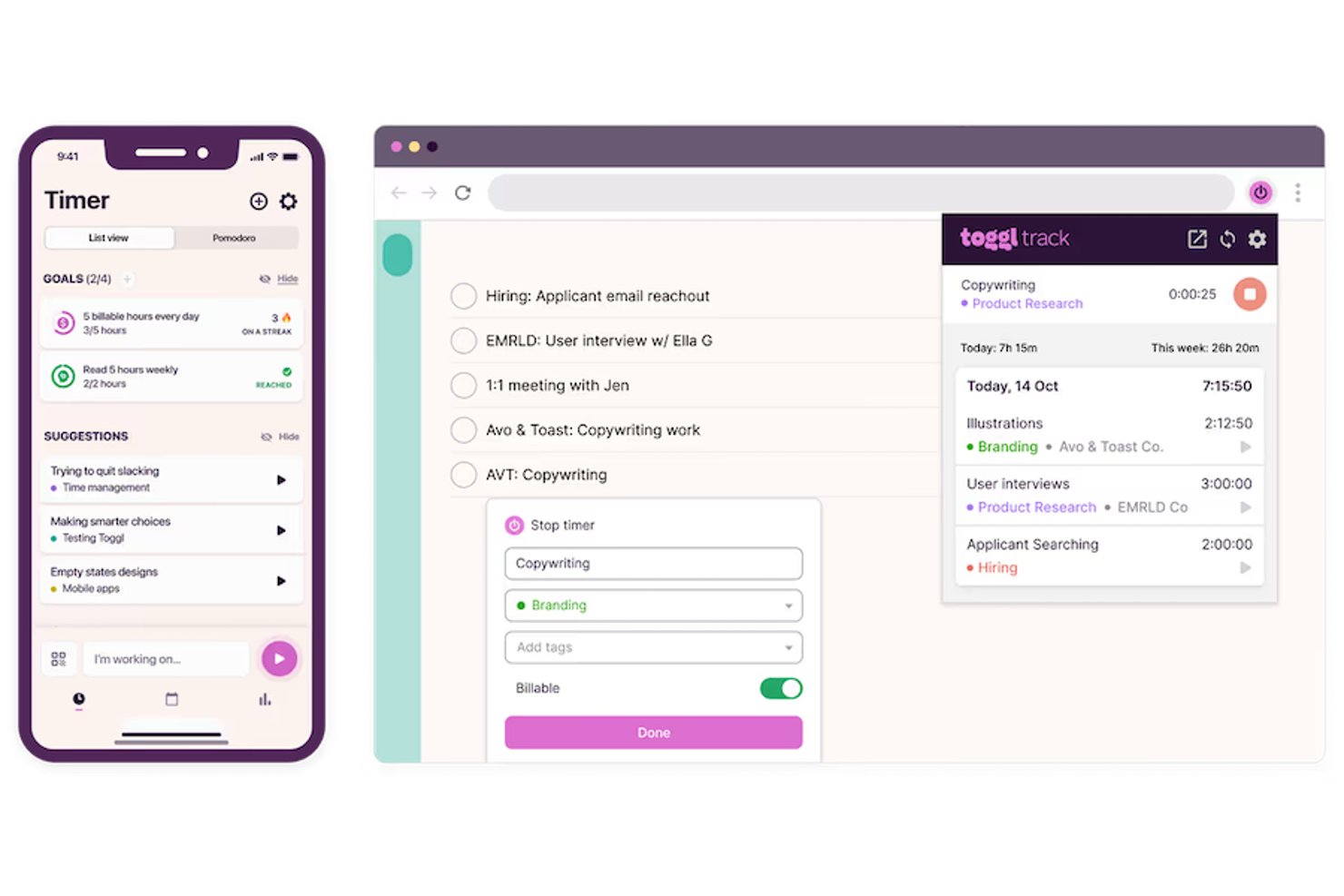
Toggl is a time tracking and project budgeting tool that combines real-time and manual timers, project planning views, team capacity management, and profitability reporting.
Who Is Toggl Best For?
Toggl is a great fit for freelancers, consultants, and project managers who need to track billable hours, monitor project budgets, and report on team capacity without switching tools.
Why I Picked Toggl
I picked Toggl as one of the best because it's the only tool on this list built specifically around turning tracked time into budget intelligence. I love how project dashboards show actuals versus estimates broken down by task and team member in real time, so I can see a project tipping over budget before it does. The smart forecasting feature takes current tracking patterns and projects a completion date automatically, which removes a lot of manual guesswork from sprint planning.
Toggl Key Features
- AI Task Creator: Converts briefs, notes, or photos of to-do lists into structured, editable tasks ready to assign and track.
- Pomodoro timer: Runs focused work sessions with built-in breaks across web, desktop, mobile, and browser extensions.
- Custom fields: Adds dropdown, text, number, date, checkbox, and member-picker fields to projects, tasks, and members for flexible filtering and grouping.
- Timesheet approvals: Lets teams submit timesheets weekly or monthly for manager review, with approved periods locked from further edits.
Toggl Integrations
Toggl offers native integrations with Asana, Google Calendar, Jira, Outlook Email & Calendar, iCal, and Slack, plus browser-extension integrations for GitHub, Google Docs, Gmail, Todoist, and Trello. It also provides a REST API, webhooks, MCP server, and CLI for custom connectivity.
Pros and Cons
Pros:
- Billable hours are easy to record
- Project reports clarify budget burn
- Free plan covers solo time tracking
Cons:
- Detailed reporting sits behind paid tiers
- Mobile syncing can lag or fail

DeskTime
Best for tracking offline employee activities

DeskTime is an automatic time tracking and workforce productivity tool that monitors app and URL usage, tracks project hours, and generates productivity reports for individuals and teams.
Who Is DeskTime Best For?
DeskTime is a good fit for managers and team leads overseeing remote or hybrid teams who need visibility into how work hours are actually spent.
Why I Picked DeskTime
I've included DeskTime in my top picks because it handles offline activity tracking in a way most time tracking tools don't. When a team member steps away from their computer, idle time gaps appear in their timeline automatically. They can then reassign those gaps as offline time with an activity description, and admins can require approval before that time counts toward the day's total. I also like the Google and Outlook Calendar sync, which fills idle time gaps with scheduled meetings automatically, so your team doesn't have to log every off-screen hour by hand.
DeskTime Key Features
- Automatic time tracking: Starts recording the moment the desktop app is open, logging active work time without any manual input.
- Document title tracking: Records the titles of open documents alongside app data so you can see exactly what someone was working on at any given time.
- Project time tracking: Lets team members assign tracked time to specific projects and tasks for accurate project cost and hour reporting.
- Screenshots: Captures screenshots at set intervals to give admins a visual record of what's on screen during active work hours.
DeskTime Integrations
DeskTime offers a small set of native integrations, including Google Calendar, Outlook Calendar, Trello, GitLab, Asana, and Jira, and it connects with Zapier. An API is also available for custom integrations.
Pros and Cons
Pros:
- Private time mode pauses all monitoring
- Customizable productive and unproductive categories
- Automatic tracking across apps and URLs
Cons:
- No built-in task management system
- Mobile app limits date range views

Best for real-time file collaboration

Google Drive is a cloud storage service that lets you upload, store, share, and organize files from any device. You can access Google Docs, Sheets, Slides, Microsoft Office files, PDFs, and many other file types directly from Drive.
Why I Picked Google Drive
I picked Google Drive because it helps teams work faster with real-time collaboration and smart file organization. You can edit files at the same time, leave comments with action items, and keep conversations focused on the file itself. Drive supports over 100 file types, including Microsoft Office files, so there’s no need to convert anything. It also uses AI to surface the most relevant files based on your recent activity and lets you track changes over time with version history, so you can always restore older versions if needed.
Google Drive Key Features
In addition to real-time collaboration, Google Drive offers a host of other features for boosting productivity.
- Offline Access: You can continue working on your documents even without an internet connection to maintain uninterrupted productivity.
- File Sharing Permissions: You have control over who can view, comment on, or edit your files, which helps maintain security and efficient collaboration.
- Advanced Search: This lets you quickly locate files using keywords and filters to save time and effort in file management.
- Advanced Security Features: You can protect your data and maintain peace of mind via encryption and two-factor authentication.
Google Drive Integrations
Integrations are available via the Google Drive API.
Pros and Cons
Pros:
- Permissions system gives granular access control
- Real‑time editing with comments boosts teamwork
- Automatic version history prevents lost edits
Cons:
- Upload/download speeds vary by connection
- Offline access still limited or tricky sometimes

Zapier
Best for automating workflows via integrations

Zapier is an automation platform that lets you connect over 8,000 apps to automate your workflows without writing any code. Whether you're looking to simplify repetitive tasks or enhance your team's productivity, Zapier offers a way to create custom automations tailored to your specific needs.
Why I Picked Zapier
I picked Zapier for its ability to automate workflows via extensive app integrations, which is really helpful for boosting productivity. You can create custom automations that eliminate repetitive tasks and let your team focus on more meaningful work.
The platform's multi-step workflows let you chain together different actions across apps and create complex automations without needing to write a single line of code. Zapier's AI tools, like AI workflows and AI agents, help you set up even more advanced automations and optimize your processes.
Zapier Key Features
Zapier also offers several key other features that can help you improve productivity for your team.
- Zapier Tables: This feature lets you create no-code databases so you can easily manage your data and integrate it into your workflows.
- AI-Powered Troubleshooting: With AI-generated instructions, you can quickly resolve errors in your automations for smoother operation and less downtime.
- Modify Test Records: This feature lets you edit and create custom test records directly to streamline the process of testing and refining workflows.
- AI Chatbot Data Sources: You can upload static text files and customize AI chatbot responses without needing to code. This helps improve customer interaction capabilities.
Zapier Integrations
Integrations include Salesforce, HubSpot, Slack, ChatGPT, Microsoft Dynamics, Microsoft Teams, Zendesk, Jira, Google Sheets, Shopify, Gmail, and Mailchimp.
Pros and Cons
Pros:
- Automate workflows between different applications
- Huge range of integration options
- Create tailored workflows
Cons:
- Learning curve to setting up integrations
- Lacks a dedicated mobile app
Notion
Best for personal productivity

Notion is a flexible workspace app that helps you organize your work (tasks, habits, goals, notes) into a system that works for you. It gives you tools to track what you want to accomplish, measure your progress, and adjust as you go.
Why I Picked Notion
I picked Notion because it gives you features that help you control your personal workflows and focus on what matters. For example, the AI meeting notes tool can transcribe your meetings, summarize them, and pull out action items so you don’t miss what you discussed.
Also, enterprise search (with research mode and AI connectors) lets you find past notes, docs, or info from other apps you use quickly, which saves you from digging through clutter. Notion’s tools for personal productivity let you build daily planners, to‑do lists, track goals, and organize tasks by priority or due date so you can stay on track at work.
Notion Key Features
Notion offers several other productivity features that can help you get more done.
- Customizable Workspaces: You can create fully personalized work environments using flexible page and block structures to tailor your workspace to your specific needs and preferences.
- Advanced Databases: Notion's databases come with filtering and relational linking capabilities, which make it easier for you to organize and retrieve information efficiently.
- Real-Time Collaboration: You and your team can collaborate seamlessly and make sure everyone stays on the same page.
- Task Management Views: Notion offers various views like to-do lists and Kanban boards to help you manage tasks and projects effectively.
Notion Integrations
Integrations include Slack, Google Drive, GitHub, Jira, Asana, Figma, Dropbox, Trello, Microsoft Teams, Google Workspace, and OneDrive.
Pros and Cons
Pros:
- Real‑time collaboration reduces miscommunication
- Locking pages prevents unintended changes
- Custom layouts help you see what matters
Cons:
- Not a quick-start solution as there are lots of settings to tweak
- Some layout features are desktop‑only, not mobile
Kintone
Best for building custom productivity apps

Kintone is a cloud-based platform that allows businesses to create custom applications for data management. It provides features for database applications, collaboration, workflow automation, and reporting.
Why I Picked Kintone
The platform was an easy choice for me because it lets non-technical users build and manage their own applications with a drag-and-drop interface, without the need for coding skills. Although it’s not a plug-and-play type of solution, I find the customization options for project-related apps can improve your team’s productivity by displaying only what is needed.
You can automate workflows, generate detailed reports, and effectively track project progress. It ensures transparency and efficient handling of tasks, which I think positions it as an ideal tool for comprehensive project management.
Kintone Key Features
Kintone also offers a range of other features that can help your team work more efficiently.
- Task Management: You can create and assign tasks, set deadlines, and track progress, as well as make sure everyone stays aligned with project goals.
- Customizable Dashboards: You can tailor dashboards to display the most relevant information and metrics and get a clear overview of your team's activities.
- Built-In Collaboration Tools: Kintone's in-record chat walls and mentions facilitate seamless communication within the context of specific tasks or projects.
- Data Management: You can organize, search, and visualize data through customizable reports and graphs, which makes information easily accessible.
Kintone Integrations
Integrations include Slack, Outlook, Dropbox, Box, Formstack, Zendesk, and Zapier.
Pros and Cons
Pros:
- Data is easy to pull and manipulate into reports
- Admin accounts have access to tons of customization tools
- Flexible pricing that includes special deals for schools and NPOs
Cons:
- Limited to 5GB storage per user on every pricing tier
- No single-user plan available (minimum 5 users)
Asana
Best for aligning work with goals

Asana is a work management tool that helps you track tasks, projects, and work goals. It gives you ways to organize what needs doing (and by whom), set dependencies so you know what must happen first, and map out your plans visually.
Why I Picked Asana
I like how clearly it links daily tasks to bigger goals, helping you stay focused on outcomes rather than just activity. You can connect work items to company objectives, plan work using timeline or board views, and define dependencies to keep tasks moving in the right order.
Tools like milestones help break up large projects, and resource management features let you track workloads and dashboards to monitor progress across projects, so your team can adapt quickly when priorities shift.
Asana Key Features
Asana also offers several other features that can help you boost productivity and organization on your projects.
- Workflow Automation: You can automate routine tasks and processes to save time and maintain consistency in project execution.
- Views: Asana provides various views for tasks, inboxes, lists, and calendars, you so can manage and prioritize work efficiently based on your preferences.
- Mobile Accessibility: Asana offers mobile apps for iOS and Android so you can manage tasks and projects on the go and maintain productivity even when away from your desk.
- Admin and Security: You can manage team settings and permissions to maintain data privacy and secure access for all users.
Asana Integrations
Integrations include Slack, Google Drive, Zapier, Jira, Microsoft Teams, Everhour, Dropbox, Mailchimp, Microsoft Office 365, Salesforce, Google Calendar, and Power BI.
Pros and Cons
Pros:
- Clear visibility over task dependencies
- Multiple views (timeline, calendar, board)
- Goal tracking that auto‑updates
Cons:
- Rules can have limits on triggers/actions count
- Numeric metrics in goals (e.g. revenue) need manual input
Diğer Verimlilik Araçları
İlk sıralarda yer almayan ancak yine de değerlendirmenize değer birkaç seçenek daha burada.
- Evernote
For note taking
- Microsoft Teams
For hybrid team collaboration
- nTask
For comprehensive analytics
- Guru
For quick information retrieval
- Trello
For visual project tracking
- Visor
For integration with Jira
- TimeJam
For improving time tracking habits
- Insightful
For employee productivity tracking
- WebWork Time Tracker
For eliminating constant follow-ups
- Smartsheet
For automating repetitive work tasks
- Hubstaff
For remote workforce
- Hive
For flexible project views
- GoodDay
For customization and task visualization
- Basecamp
For small to medium-sized teams
- ClickUp
For managing cross-team workflows
- Clockify
For budget-friendly time tracking
- Harvest
For built-in invoicing
- Jira
For agile project management


İlgili Proje Yönetimi İncelemeleri
Aradığınızı burada hâlâ bulamadıysanız, sizin için derlediğimiz diğer proje yönetimi aracı incelemelerine göz atın:
How I Evaluate Productivity Tools
I split my evaluation into two layers—the baseline every serious PM tool must meet, from task management to automations, and the differentiators that make one a better fit for your team.
Core Functionality (Table Stakes For This List)
When I'm selecting tools for my list, I rank each one on a scale from 0 (does not offer the functionality) to 5 (excels in this area) for each core functionality listed below. Then, I calculate the tool's total score into a percentage. Each tool needs to achieve a minimum total score of 75% to be considered for inclusion.
- Task & Project Management: I evaluate whether you can create tasks with subtasks, assignees, due dates, priorities, and dependencies—things like linking a design review to a dev sprint so handoffs stay clean.
- Multiple Project Views: Different workflows call for different layouts. I check for Kanban boards, Gantt charts, calendars, and timeline views, plus whether teams can save filtered views per user.
- Team Collaboration Features: I look at how a team actually communicates inside the tool—threaded comments on tasks, @mentions that trigger notifications, and file sharing that keeps feedback next to the work itself.
- Workflow Automation: Repetitive status updates and task routing eat into real project time. I evaluate each tool's automation builder for triggers, conditions, and actions like auto-assigning QA tasks when a dev marks something complete.
- Integrations & Connectivity: Most PM teams rely on Slack, Google Workspace, Microsoft 365, or GitHub daily. I check for native integrations with these tools, open API access, and connector support through platforms like Zapier or Make.
- Reporting & Dashboards: I look for customizable dashboards that surface project health, workload distribution, and milestone progress—the kind of views you'd pull up in a weekly stakeholder sync without scrambling to build a slide deck.
Once I have a list of tools that meet the criteria, I consider what sets each platform apart.
Differentiating Factors (What Sets Vendors Apart)
Here's how I compare and contrast different vendors:
Standout Features
Resource and capacity planning is a big differentiator—I look for workload views that show who's overbooked before a sprint starts, not after. AI features also matter here. Tools that can auto-summarize project updates or draft status reports cut down on the busywork PMs dread most. Built-in time tracking tied to tasks and budgets is another factor I weigh, especially for teams managing billable work or tracking effort against estimates.
Beyond Features
Pricing transparency matters a lot when you're scaling from a pilot team to a full department. I check whether automation limits, storage caps, or guest access fees inflate costs as usage grows. Security is another key factor—I evaluate whether a tool offers SSO, SCIM provisioning, and audit logs, since enterprise IT teams typically require these before approving a rollout. I also consider onboarding support, like template libraries and in-app walkthroughs, that help teams adopt the tool without a lengthy implementation cycle.
Verimlilik Araçları Nasıl Seçilir?
Çok sayıda farklı verimlilik aracı mevcut olduğundan, ihtiyaçlarınıza en uygun verimlilik aracının hangisi olacağına karar vermek zor olabilir.
Verimlilik araçlarını kısa listeye alırken, deneme sürecinden geçirirken ve seçerken şunları göz önünde bulundurun:
- Hangi sorunu çözmeye çalışıyorsunuz: Diğer tüm proje yönetimi yazılımlarında olduğu gibi, üretkenlik aracının sunması gereken özellikleri ve işlevleri netleştirmek için öncelikle gidermeye çalıştığınız özellik açığını belirleyin.
- Kimlerin kullanması gerekecek: Maliyeti ve gereksinimleri değerlendirmek için yazılımı kimlerin kullanacağını ve kaç lisansa ihtiyacınız olacağını göz önünde bulundurun. Erişimin yalnızca ekibiniz için mi yoksa tüm kuruluş için mi gerekli olacağını değerlendirmeniz gerekir. Bu netleştiğinde, herkes için kullanım kolaylığına mı yoksa aracınızın deneyimli kullanıcıları için hıza mı öncelik verdiğinizi düşünmeye değer.
- Hangi diğer araçlarla birlikte çalışması gerekiyor: Hangi araçları değiştirdiğinizi, hangi araçları kullanmaya devam edeceğinizi ve hangi araçlarla entegrasyon kurmanız gerektiğini netleştirin. Zaman takip yazılımları, muhasebe araçları, kaynak yönetimi yazılımları, CRM'ler ve İK yazılımları, yaygın olarak entegre edilen araçlar arasındadır. Araçların birbiriyle entegre edilmesi gerekip gerekmediğine veya alternatif olarak birden fazla aracı tek bir birleştirilmiş üretkenlik aracıyla değiştirip değiştiremeyeceğinize karar vermeniz gerekir.
- Hangi sonuçlar önemli: Yazılımın başarılı kabul edilebilmesi için sunması gereken sonucu göz önünde bulundurun. Hangi yetkinliği kazanmak veya neyi geliştirmek istediğinizi ve başarıyı nasıl ölçeceğinizi düşünün. Örneğin, sonuçlardan biri performans hakkında daha fazla görünürlük elde etme becerisi olabilir. Üretkenlik aracı özelliklerini gözünüz karar verinceye kadar karşılaştırabilirsiniz; ancak elde etmek istediğiniz sonuçları düşünmüyorsanız, çok değerli zamanınızı boşa harcıyor olabilirsiniz.
- Kuruluşunuz içinde nasıl çalışacağı: Yazılım seçimini iş akışlarınız ve teslimat metodolojinizle birlikte değerlendirin. Nelerin iyi çalıştığını ve ele alınması gereken sorunlara yol açan alanları değerlendirin. Her işletmenin farklı olduğunu unutmayın; bir aracın popüler olması, kuruluşunuzda da işe yarayacağı anlamına gelmez.
Üretkenlik Araçlarındaki Eğilimler
Proje çalışmalarının geleceği, son teknoloji ve kullanıcı odaklı tasarım ilkeleri tarafından şekillendirilecek. Aşağıda, üretkenlik yazılımı sektörünü şekillendiren eğilimlerin bir özeti yer alıyor.
Yapay Zekâ Entegrasyonu
- Yapay Zekâ Destekli Yardım: Beautiful.ai ve Jasper AI gibi yapay zekâ araçları, tasarımı otomatikleştirmek, bilgileri özetlemek ve içerik oluşturmak için yapay zekâdan yararlanır. Bu sayede bu görevlere harcanan zaman önemli ölçüde azalır ve ekipler daha stratejik faaliyetlere odaklanabilir. Diğer araçlarda, Gemini'den yararlanabilen ChatGPT eklentileri veya Google Workspace bağlantıları bulunabilir.
- Otomatik Görev Yönetimi: Motion gibi yapay zekâ destekli proje planlama yazılımları, görevleri planlamak ve önceliklendirmek için otomasyondan yararlanır; kullanıcıların iş yüklerini daha verimli bir şekilde yönetmelerine ve teslim tarihlerini karşılamaya odaklanmalarına yardımcı olur.
Kullanıcı Deneyimi ve Mobilite
- Kullanıcı Dostu Tasarım: Araçlar, sezgisel tasarıma ve kullanıcı deneyimine giderek daha fazla odaklanıyor; bu da ekiplerin kapsamlı bir eğitim almadan bunları benimsemesini ve kullanmasını kolaylaştırıyor. Öğrenme eğrisini düzleştirmek, birçok araç için öncelik olacak.
- Mobil Üretkenlik: Mobil uygulamaların masaüstü uygulamalarıyla entegre edilmesi, kullanıcıların çalışma istasyonlarından uzaktayken bile üretken kalabilmesini sağlıyor. Günümüzde çoğu mobil deneyimde, işe gidip gelirken çalışmayı mümkün kılacak özellikler bulunmuyor.
Üretkenlik Aracı Nedir?
Üretkenlik aracı, bireylerin veya ekiplerin daha kısa sürede daha fazla iş yapmasına yardımcı olmak için tasarlanmış yazılımdır.
Bu araçlar, bilgileri düzenleyerek, iletişimi kolaylaştırarak ve tekrarlayan görevleri otomatikleştirerek günlük iş akışlarındaki sürtüşmeleri azaltır. Ekipler bunları daha etkili iş birliği yapmak, dikkat dağıtıcı unsurları en aza indirmek ve projeler genelinde öncelikler konusunda uyumlu kalmak için kullanır.
Üretkenlik yazılımları; görev yönetimi sistemleri, zaman takip uygulamaları, iş birliği araçları, planlama yazılımları ve belge yönetim sistemleri dahil ancak bunlarla sınırlı olmamak üzere geniş bir araç yelpazesini kapsar.
Üretkenlik Araçlarının Özellikleri
Üretkenlik araçlarını seçerken aşağıdaki temel özelliklere dikkat edin:
- Görev yönetimi: Yapılacaklarınızı düzenleyebilir, önceliklendirebilir ve takip edebilirsiniz. Bu özellik, sırada ne olduğunu her zaman bilmeniz için listeler, panolar veya takvimler sunar.
- İş birliği seçenekleri: Ekip arkadaşlarınızla gerçek zamanlı çalışmanıza ve dosyaları, güncellemeleri ve yorumları paylaşmanıza olanak tanır. Uzun e-posta yazışmalarından kaçınabilir ve herkesin aynı bilgilerden haberdar olmasını sağlayabilirsiniz.
- Zaman takibi: Görevlere veya projelere ne kadar zaman harcadığınızı izleyebilir, verimlilik darboğazlarını belirleyebilir ve daha iyi verimlilik için programınızı ayarlayabilirsiniz.
- Entegrasyonlar: Verimlilik aracınızı e-posta, takvimler veya dosya depolama gibi diğer uygulamalara bağlamanıza, rutin görevleri otomatikleştirmenize, bilgileri aktarmanıza ve platformlar arasında geçiş yapmaktan kaçınmanıza olanak tanır.
- Bildirimler ve hatırlatıcılar: Son teslim tarihleri veya aksi takdirde unutabileceğiniz görevler için yararlı hatırlatmalar alarak ekstra zihinsel çaba gerektirmeden işlerinizi yolunda tutabilirsiniz.
- Belge yönetimi: Önemli dosyaları veya proje kaynaklarını depolamanıza, düzenlemenize ve paylaşmanıza olanak tanıyarak kolay erişim sağlar ve belgeleri aramak için harcanan zamanı azaltır.
- Özelleştirme: İş akışlarını, görev panolarını veya gösterge tablolarını kendinize özgü çalışma tarzınıza uyacak şekilde düzenleyebilirsiniz. Araç, sizi herkese uyan tek bir yaklaşıma zorlamak yerine sizinle birlikte gelişmelidir.
- İlerleme takibi: Bir projenin veya hedefin çizelgeler ya da ilerleme çubukları aracılığıyla nasıl ilerlediğine dair görsel güncellemeler sunarak motivasyonunuzu korumanıza ve daha fazla dikkat gerektiren alanları belirlemenize yardımcı olur.
- Mobil erişilebilirlik: Aracı hareket hâlindeyken kullanabilmeli ve masanızdan uzaktayken bile bağlantıda ve üretken kalabilmelisiniz.
- Güvenlik özellikleri: İzinler, şifreleme ve güvenli oturum açma yöntemleriyle hassas proje verilerini koruyabilir, bunların gizli ve güvende kalmasını sağlayabilirsiniz.
Verimlilik Araçlarında Aranacak Yapay Zekâ Özellikleri
Birçok yapay zekâ verimlilik aracı, zamandan tasarruf etmenize ve verimliliği artırmanıza yardımcı olacak yapay zekâ özellikleri içerir:
- Akıllı görev önerileri: Yapay zekâ, çalışma alışkanlıklarınıza veya proje geçmişinize göre görevler önerebilir ve en önemli işlere öncelik vermenize yardımcı olabilir.
- Otomatik zamanlama: Herkes için en uygun zamanları bularak ve davetleri otomatik olarak göndererek toplantı koordinasyonunu yapay zekâya bırakabilirsiniz.
- Doğal dil işleme: Sade bir dille yazarak veya konuşarak görevleri, hatırlatıcıları ya da notları hızlıca oluşturabilirsiniz.
- Tahmine dayalı analiz: Yapay zekâ proje zaman çizelgelerini öngörebilir, olası gecikmeleri öne çıkarabilir ve işleri yolunda tutmanın yollarını önerebilir.
- Otomatik özetler: Toplantıların, belgelerin veya e-posta yazışmalarının kısa özetlerini alarak ayrıntılar arasında kaybolmadan temel noktalara odaklanabilirsiniz.
- Akıllı arama: Bağlamı ve amacı anlayan yapay zekâ destekli arama sayesinde dosyaları, mesajları veya görevleri daha hızlı bulmanıza yardımcı olur.
Verimlilik Araçlarının Faydaları
Ekibinizin performansını ve kurumsal sonuçları iyileştirmenin yollarını araştırıyorsanız verimlilik araçlarının başlıca faydalarını anlamanız önemlidir. Bu araçların sunduğu dört temel avantaj şunlardır:
- Artırılmış Verimlilik: Rutin görevleri basitleştirir ve otomatikleştirir. Verimlilik araçları, tekrarlayan ve zaman alan görevleri otomatikleştirerek ekip üyelerinin daha stratejik ve yüksek değerli faaliyetlere odaklanmasını sağlar ve genel verimliliği önemli ölçüde artırır.
- Geliştirilmiş İş Birliği: Sorunsuz ekip çalışmasını ve iletişimi kolaylaştırır. Bu araçlar gerçek zamanlı iş birliği ve iletişim platformları sunarak ekipler içindeki ve ekipler arasındaki bilgi silolarını ortadan kaldırır; bu da sorunların hızlı bir şekilde çözülmesi ve proje hedeflerine ilerlenmesi için büyük önem taşır.
- Daha İyi Zaman Yönetimi: Etkili planlama ve son teslim tarihi takibi sağlar. Verimlilik araçları görev planlama, son teslim tarihi hatırlatıcıları ve zaman takibi özellikleriyle donatılmıştır; bu özellikler proje yöneticilerinin kaynakları daha etkili bir şekilde tahsis etmesine ve projelerin zamanında teslim edilmesini sağlamasına yardımcı olur.
- Artırılmış Şeffaflık: Proje ilerlemesi ve performansı hakkında görünürlük sunar. Gösterge tabloları ve raporlama işlevleri sayesinde paydaşlar çeşitli görevlerin durumu ve projenin genel ilerlemesi hakkında bilgi edinebilir; bu da bilinçli karar almayı ve zamanında müdahaleleri mümkün kılar.
Verimlilik Araçlarının Maliyetleri ve Fiyatlandırması
Yöneticiler için verimlilik araçlarını seçmenin en önemli unsurlarından biri, mevcut farklı fiyatlandırma planlarını anlamaktır. Genel olarak yazılım alıcıları, bireysel kullanımdan büyük işletmelere kadar farklı ihtiyaçları karşılamak üzere tasarlanmış çeşitli plan seçenekleri bulacaktır. Bununla birlikte, iş birliği araçlarının fiyatlandırma planları da genellikle ortak kategorilere ayrılır.
Ayrıca, bu yaygın plan seçeneklerini ve fiyatlandırmalarını anlamak, kuruluşunuzun ihtiyaçları ve bütçe kısıtlamalarıyla uyumlu, bilinçli bir karar vermek açısından önemlidir. İsteyeceğiniz son şey, kullanmayacağınız özellikler için ödeme yapmak veya yaygın özellikler için yanlışlıkla gereğinden fazla ücret ödemektir.
Yaygın plan seçeneklerinin ve özelliklerinin dökümü aşağıda verilmiştir:
Üretkenlik Araçları için Plan Karşılaştırma Tablosu
| Plan Türü | Ortalama Fiyat | Dahil Olan Yaygın Özellikler |
|---|---|---|
| Bireysel | $0 - $15 aylık | Görev yönetimi, temel proje takibi, sınırlı entegrasyon olanakları, kişisel gösterge paneli ve temel raporlama. |
| Profesyonel | Kullanıcı başına aylık $15 - $30 | Gelişmiş görev yönetimi, proje takibi, genişletilmiş entegrasyon seçenekleri, özelleştirilebilir gösterge panelleri, gelişmiş raporlama ve iş birliği araçları. |
| Ekip | Kullanıcı başına aylık $30 - $60 | Tüm Profesyonel özellikleri, ayrıca ekip iş birliği alanları, iş akışı otomasyonu, kaynak tahsisi ve gelişmiş güvenlik seçenekleri. |
| Kurumsal | Özel fiyatlandırma | Tüm Ekip özellikleri, ayrıca kurumsal düzeyde güvenlik, ölçeklenebilirlik seçenekleri, özel destek ve özel entegrasyonlar. |
| Ücretsiz Sürüm | $0 | Temel görev yönetimi, sınırlı sayıda proje, asgari düzeyde iş birliği araçları ve bazı entegrasyon olanakları. |
Genellikle plan seçenekleri, fiyat arttıkça daha gelişmiş özellikler ve destek sunacak şekilde kademeli olarak yapılandırılır ve kullanıcıların gereksinimlerine en uygun düzeyi seçmesine olanak tanır. Bu nedenle, bir plan seçerken aracın büyümenizle birlikte ölçeklenebilmesini sağlamak için kuruluşunuzun hem mevcut hem de gelecekteki olası ihtiyaçlarını göz önünde bulundurmanız önemlidir.
Ayrıca, daha büyük bir yatırıma karar vermeden önce yazılımı test etmek için ücretsiz üretkenlik araçlarından ve temel planlardan yararlanmak her zaman iyi bir fikirdir. Gerektiğinde planınızı her zaman yükseltebileceğinizi unutmayın.
Şirketinizin fiyatlandırma planını yükseltmek isteyebileceği yaygın aşamalar şunlardır:
- Ekip Genişlemesi: Şirket daha fazla çalışan işe aldığında ve daha büyük bir ekibe uyum sağlamak için ek kullanıcı lisanslarına, erişim izinlerine ve iş birliği özelliklerine ihtiyaç duyduğunda.
- Artan Proje Hacmi: Üretkenlik aracı içinde yönetilen proje veya görev sayısı önemli ölçüde arttığında ve daha gelişmiş proje yönetimi özellikleri ile depolama kapasitesi gerektiğinde.
- Gelişmiş Analiz ve Raporlama İhtiyacı: Şirketin performansı takip etmek, eğilimleri belirlemek ve verilere dayalı kararlar almak için daha gelişmiş analizlere, raporlama olanaklarına ve veri görselleştirme araçlarına ihtiyaç duyduğunda.
- Diğer Sistemlerle Entegrasyon: İşletmenin iş akışlarını kolaylaştırmak ve genel verimliliği artırmak için diğer yazılım sistemleriyle (CRM, ERP, HRMS vb.) sorunsuz entegrasyona ihtiyaç duyduğunda.
- Gelişmiş Güvenlik ve Uyumluluk: Özellikle hassas bilgilerle ilgilenen şirketler için genellikle premium planlara dahil edilen gelişmiş güvenlik özelliklerine, sektör düzenlemelerine uyumluluğa ve veri koruma önlemlerine ihtiyaç duyulduğunda.
Verimlilik Araçları SSS
Bu konu hakkında diğer insanların sorduğu yaygın soruların yanıtlarını bulun
Hangi araç özellikleri ekibimin verimliliğini artırabilir?
Görev otomasyonu, gerçek zamanlı iş birliği ve özelleştirilebilir panolar gibi özellikler ekibinizin verimliliğini önemli ölçüde artırabilir. Bu özellikler manuel işleri azaltmanıza, herkesin aynı hedef doğrultusunda ilerlemesine ve projelerdeki darboğazları hızlıca fark etmenize yardımcı olur. Ayrıca yerleşik şablonlar ve entegrasyonlar sunan verimlilik araçlarını tercih edin; böylece ek bir zahmete gerek kalmadan bunları ekibinizin günlük iş akışına uyarlayabilirsiniz.
Verimliliğimi korurken tükenmişlik yaşamaktan kaçınmama verimlilik araçları nasıl yardımcı olabilir?
Verimlilik araçları; tekrarlayan görevleri otomatikleştirmenize, iş yüklerini takip etmenize ve gerçekçi proje teslim tarihleri belirlemenize olanak tanıyarak tükenmişliği önlemenize yardımcı olabilir.
Çoğu araç görevleri atamanıza ve ekip kapasitesini izlemenize olanak tanır; bu da iş yüklerini dengelemeyi ve molaları planlamayı kolaylaştırır. Bazı platformlar izin kullanımını veya düzenli kontrolleri teşvik etmek için yerleşik hatırlatıcılar sunar. Böylece siz ve ekibiniz aşırı çalışmadan projeleri ve görevleri tamamlayabilirsiniz.
Bu araçlar verimliliği yalnızca belirli görevler veya projeler için takip edebilir mi?
Evet, çoğu verimlilik aracı ilerlemeyi tek tek görev, proje veya ekip üyesi bazında takip etmenize olanak tanır. Hangi alanların ilgilenilmesi gerektiğini görmek için özel panolar ve raporlar oluşturabilirsiniz. Bu, her projenin sonuçlarını ölçmeyi ve ekibiniz için net hedefler belirlemeyi kolaylaştırır.
Eğitim kurumları veya kâr amacı gütmeyen kuruluşlar için indirim var mı?
Evet, birçok verimlilik yazılımı sağlayıcısı eğitim kurumları ve kâr amacı gütmeyen kuruluşlar için indirim sunar. Uygunluk koşulları araca göre değişir; bu nedenle kuruluşunuzun uygun olup olmadığını öğrenmek için her aracın fiyatlandırma sayfasını kontrol edin veya satış ekibiyle iletişime geçin.
Proje yönetimi için verimlilik araçlarında hangi entegrasyonları aramalıyım?
Takvimler, e-posta hizmetleri, dosya depolama sistemleri, Slack gibi iletişim araçları ve Trello veya Asana gibi yaygın proje yönetimi platformlarıyla entegrasyonları aramalısınız. Entegrasyonlar, her şeyi senkronize tutmanıza, yinelenen veri girişlerinden kaçınmanıza ve projeleri tek bir merkezi merkezden yönetmenize yardımcı olur.
Verimlilik araçları uzaktan veya hibrit çalışan proje ekiplerine nasıl yardımcı olur?
Verimlilik araçları, paylaşılan panolar, gerçek zamanlı iletişim ve senkronize görev listeleri aracılığıyla uzaktan veya hibrit çalışan ekiplerin bağlantıda kalmasını sağlar. Belgeler üzerinde ortak çalışma, görüntülü toplantılar ve durum güncellemeleri gibi özellikler, nerede çalışırlarsa çalışsınlar herkesin yolunda ilerlemesine yardımcı olur.
Bu verimlilik araçlarını farklı iş akışları için özelleştirebilir miyim?
Evet, çoğu verimlilik platformu özel alanlar, iş akışları ve şablonlar oluşturmanıza olanak tanır. Aracı ekibinizin kendine özgü süreçlerine ve proje gereksinimlerine uyacak şekilde özelleştirebilirsiniz.
Ekibimi yeni bir verimlilik aracına alıştırmak kolay mı?
Çoğu modern verimlilik aracı, ekibinizin hızla uyum sağlamasına yardımcı olmak için adım adım işe alıştırma kaynakları, eğitimler ve müşteri desteği sunar. Kullanıcı dostu bir arayüze ve çok sayıda entegrasyona sahip araçları tercih edin; bu, geçişi kolaylaştırır.