

10 Best Free AI Task Management Software Reviewed in 2026

Best Free AI Task Management Software Shortlist


The best free AI task management software helps orgs on a budget set priorities, assign tasks, and maintain project visibility. When deadlines overlap, communication is lost in email threads, or tasks lack ownership, projects stall and important work is missed. The right platform centralizes task tracking, scheduling, and status updates so teams know exactly what’s next.
I’ve tested dozens of tools using my experience managing projects with teams of 5–20 people to identify the most effective ones. Find the right tool to help you reduce complexity, improve accountability, and keep projects moving forward with minimal friction.
Why Trust Our Software Recommendations
Our team has been testing and reviewing software since 2012. As project managers ourselves, we know how difficult—and important—it is to choose the right software.
For this guide, we evaluated tools using hands-on testing and independent research, scoring tools using our selection criteria. We also draw on insights from industry thought leaders and practicing project management experts.
Our reviews reflect our human editorial judgment, not a sales pitch.
Expert reviewers:
Free AI Task Management Software Comparison Table
This comparison table summarizes pricing details for my top free AI task management software selections:
| Tool | Best For | Trial Info | Price | ||
|---|---|---|---|---|---|
| 1 | Best with AI-powered risk identification | Free plan + 14-day free trial available | From $9/user/month (billed annually) | Website | |
| 2 | Best for intuitive interface | Free trial + free plan + free demo available | From $13/user/month (billed annually) | Website | |
| 3 | Best for team collaboration | Free plan available | From $10/user/month (billed annually) | Website | |
| 4 | Best for simple task lists | 14-day free trial | From $5/user/month (billed annually) | Website | |
| 5 | Best for bug tracking | 30-day free trial and free plan available | From $35/month | Website | |
| 6 | Best for project milestones | Free-forever plan available | From $39/month (billed annually) | Website | |
| 7 | Best for project templates | Free plan + 14-day free trial + free demo available | From $9.99/user/month (billed annually) | Website | |
| 8 | Best for calendar syncing | Free plan available | From $10/seat/month | Website | |
| 9 | Best for chat integration | Free plan available | From $0.80/user/month (billed annually) | Website | |
| 10 | Best for visual collaboration | Free plan + 14-day free trial available | From $8/user/month (billed annually) | Website |


Best Free AI Task Management Software Reviews
Read my detailed summaries of each of the best free AI task management software. I cover key features, pros & cons, integrations, and what’s free for each of the best AI task managers.

Best with AI-powered risk identification
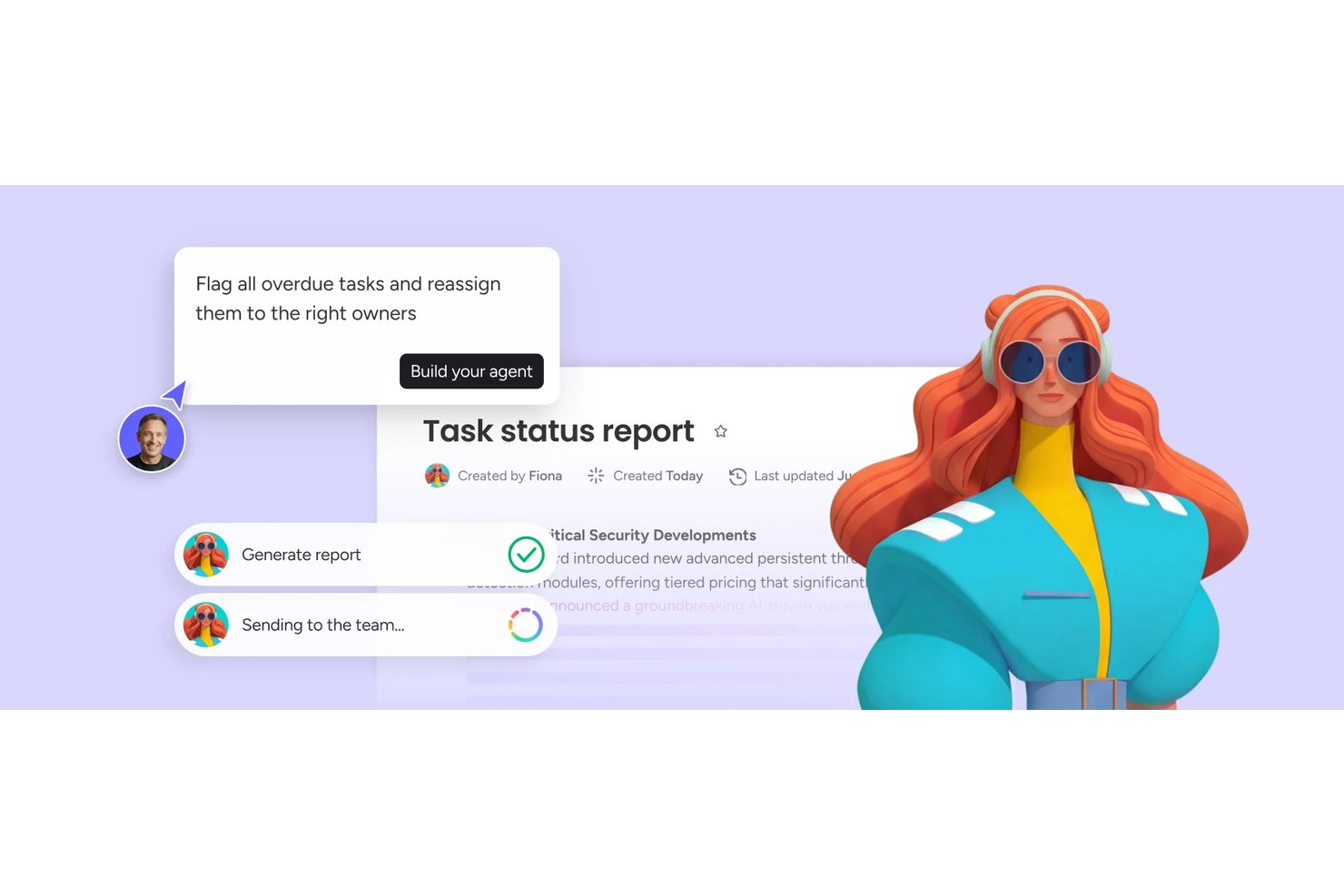
monday AI Workspace is an AI-powered work management platform that combines task automation, smart project planning, AI agents, and real-time risk identification across boards, timelines, and dashboards.
Who Is monday AI Workspace Best For?
It's a strong fit for project managers and cross-functional teams at mid-size to enterprise companies managing multiple complex workstreams simultaneously.
Why I Picked monday AI Workspace
monday AI Workspace earns its spot on my shortlist because of how its AI handles risk before it becomes a real problem. I like that it actively tracks dependencies across boards and flags conflicts, like resource over-allocation or delayed milestones, without me having to dig for them. The AI Meeting Notetaker also feeds directly into project context, so action items and risks surface automatically from standups.
monday AI Workspace Key Features
- AI workflow builder: Orchestrates multi-step workflows by connecting agents and automation rules directly within boards.
- Vibe app builder: Lets you turn process needs or requests into custom apps using simple descriptions or prompts.
- Sidekick AI assistant: Offers chat-based guidance to query project data, suggest actions, or draft updates in context.
- Multi-view project boards: Supports Kanban, Gantt, calendar, and timeline views for tracking progress across projects.
monday AI Workspace Integrations
monday AI Workspace offers hundreds of native integrations and marketplace apps, including Slack, Salesforce, HubSpot, Google Workspace, Microsoft Teams, GitHub, Zoom, Asana, Trello, and Dropbox. It supports Zapier and provides an API for custom integrations.
What's Free?
monday AI Workspace offers a 14-day free trial that gives you access to paid plan features, including AI tools, with no credit card required. After the trial ends, you'd need to upgrade to a paid plan to keep using AI features, as the free-forever plan (limited to 2 seats and 3 boards) doesn't include AI functionality.
Pros and Cons
Pros:
- Converts meeting notes into assigned tasks
- Risk alerts surface before deadlines slip
- AI agents handle end-to-end task lifecycle
Cons:
- Free plan limited to two seats
- AI features locked behind paid plans
New Product Updates from monday AI Workspace
monday AI Workspace Adds Human Approval Routing
monday AI Workspace adds a human-in-the-loop approval block to AI Workflows, sending approval requests and routing workflow paths based on responses. For more information, visit monday AI Workspace's official site.

Best for intuitive interface

MeisterTask is a task and project management tool for teams and individuals that want a visually appealing and easy-to-use platform. It's primarily used by creative professionals and teams in need of straightforward task organization and collaboration.
Why I picked MeisterTask: MeisterTask's free plan includes features like task timelines, customizable project boards, and task automation. It offers an intuitive interface that makes it easy for your team to adopt and use without a steep learning curve. MeisterAI can generate content, find information in your notes, and help with everyday writing. The free version also provides unlimited tasks and projects, which is great for teams that need flexibility.
Standout Features & Integrations:
Features include a home screen that pulls together upcoming tasks and notifications, reports that show your team’s progress, and the ability to turn emails or meeting notes into tasks.
Integrations include Slack, Microsoft Teams, Outlook, and Gmail.
What's free? MeisterTask offers a free plan with unlimited tasks and up to 3 projects.
Pros and Cons
Pros:
- Customizable project boards
- Suitable for creative teams
- Intuitive and easy-to-use interface
Cons:
- No offline access
- Basic reporting capabilities

Taskade
Best for team collaboration

Taskade is a collaborative task management tool for teams that want to boost productivity and communication. It’s great for remote teams and orgs that prioritize collaboration on tasks.
Why I picked Taskade: Taskade’s free offering includes features like to do lists, collaborative notes, and video chat. It's perfect for team collaboration and lets the team work together in real-time. AI features let you generate tasks and write content, and they also support brainstorming so your team can move faster. The free version lets you create unlimited tasks and projects.
Standout Features & Integrations:
Features include a built-in video chat feature that lets you communicate without switching apps, mind maps to visualize your projects, and task templates to help you get started quickly.
Integrations include Slack, Google Drive, Zapier, GitHub, and Microsoft Teams.
What's free? Taskade offers a free-forever plan with 3 AI apps and 1 workspace.
Pros and Cons
Pros:
- Suitable for remote teams
- Built-in video chat
- Real-time collaboration tools
Cons:
- Basic customization options
- Can be overwhelming for new users

Trello
Best for simple task lists
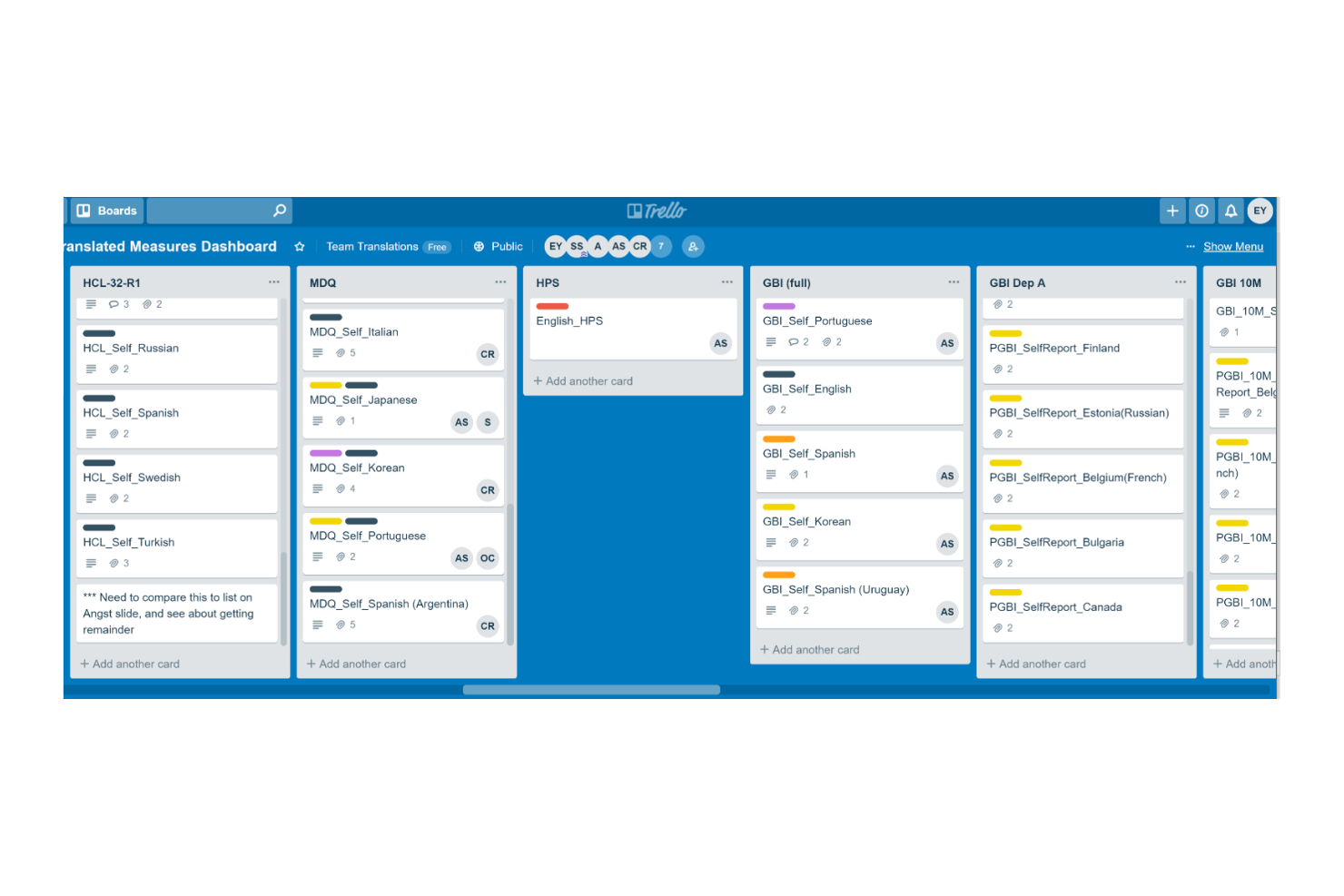
Trello is a project management tool for teams that want to organize and manage tasks efficiently. It's widely used by individuals and small teams for task tracking and collaboration.
Why I picked Trello: Trello's free offering includes features like task boards, card-based task management, and basic automation. It's ideal for creating simple task lists and lets you capture and organize tasks visually. Built-in AI features can suggest task organization, generate summaries, and help automate repetitive steps (via Butler).
Standout Features & Integrations:
Features include the ability to create tasks, assign them to the team, and set deadlines. Trello also allows you to add attachments and comments to tasks and keep information in one place.
Integrations include Slack, Microsoft Teams, Google Drive, Dropbox, Evernote, Salesforce, Jira, GitHub, and Confluence.
What's free? Trello offers a free plan with unlimited cards and 10 boards per workspace.
Pros and Cons
Pros:
- Visual task management
- Flexible task organization
- Easy to use for beginners
Cons:
- Limited customization options
- Limited features in free plan
Backlog
Best for bug tracking

Backlog is a project management and collaboration tool for developers and teams focused on software development and bug tracking. It's used by software teams to manage tasks, track bugs, and collaborate on code.
Why I picked Backlog: Backlog offers a free plan that includes features like task management, bug tracking, and version control. You can easily report and manage bugs, and the free version also supports project wikis and file sharing, which are essential for software development teams. AI-powered issue summaries also make it easier to spot and resolve bugs.
Standout Features & Integrations:
Features include built-in Gantt charts that help visualize project timelines and dependencies and subtasking capabilities that let you break down larger tasks into smaller pieces.
Integrations include Slack, Redmine, Jira, Cacoo, Jenkins, Dropbox, and Google Drive.
What's free? Backlog offers a free-forever plan with 1 project, 100MB of storage, and 10 users.
Pros and Cons
Pros:
- Supports subtasks
- Suitable for development teams
- Effective bug tracking tools
Cons:
- Basic customization options
- Learning curve for new users

Nifty
Best for project milestones

Nifty is a project management tool for teams that need to manage tasks, timelines, and communication in one place. It's best if your focus is project milestones and goal tracking.
Why I picked Nifty: Nifty’s free offering includes features like task management, milestone tracking, and team chat. It helps you set and track project milestones with ease. The free version supports unlimited team members and tasks, which is great for growing teams. AI features in Orbit AI support planning, prioritization, and execution and reduce manual effort.
Standout Features & Integrations:
Features include time tracking so you can monitor how much time your team spends on tasks and automated progress reports to keep stakeholders informed.
Integrations include Slack, Google Drive, Zoom, GitHub, Miro, and Typeform.
What's free? Nifty offers a free-forever plan with 100MB of storage and up to 2 active projects.
Pros and Cons
Pros:
- Supports document management
- Automated progress reports
- Effective milestone tracking
Cons:
- Some learning curve for new users
- Requires internet connection

Best for project templates

Teamwork.com is a project and resource management tool that helps streamline client projects and profitability. It's particularly useful for agencies, IT services, and consulting firms that require efficient project workflows and resource planning.
Why I picked Teamwork.com: Teamwork.com’s free plan offers features like project management, resource planning, and client management. You can create project templates to manage repetitive tasks. You also get access to AI tools like project wizards and smart assignments.
Standout Features & Integrations:
Features include customizable reports that help you track billable utilization and resource management. You can manage billable time and client communications effectively.
Integrations include Slack, Google Drive, Dropbox, QuickBooks, HubSpot, Salesforce, Zapier, Xero, and Harvest.
What's free? Teamwork.com’s free plan includes access to AI features and up to 5 projects.
Pros and Cons
Pros:
- Customizable reporting features
- AI-powered project wizards
- Comprehensive project templates
Cons:
- Complexity for new users
- Requires setup for optimal use

Reclaim
Best for calendar syncing
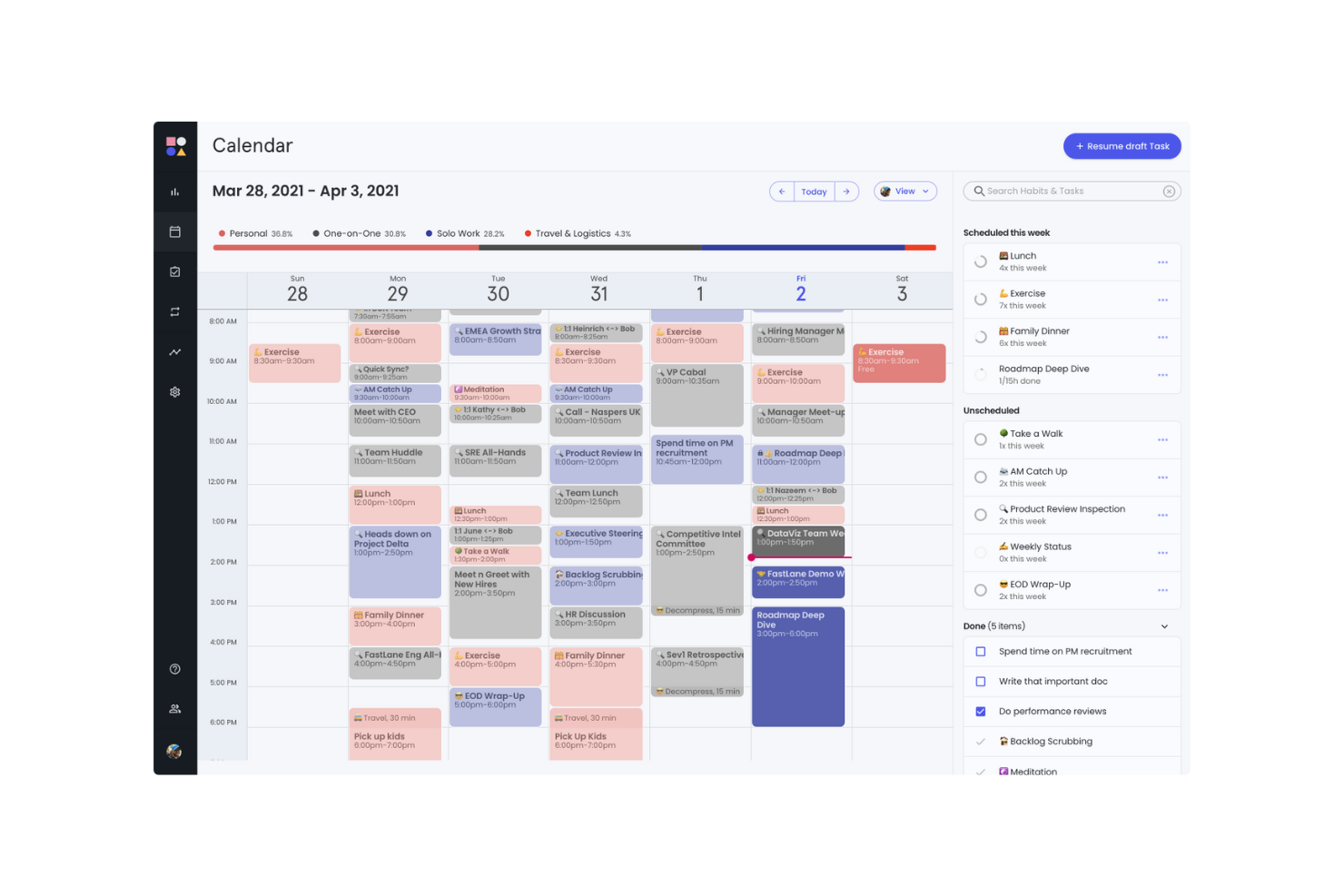
Reclaim is an AI-powered calendar app for individuals, teams, and orgs. It helps users who rely on calendar management to optimize their schedules, productivity and work-life balance.
Why I picked Reclaim: Reclaim's free offering includes features like focus time, smart meetings, and a calendar sync with Google Calendar. It's especially beneficial for syncing your calendar across different platforms. The free version lets you manage work and personal tasks effectively with features like buffer time and time tracking.
Standout Features & Integrations:
Features include AI scheduling and rescheduling for events, focus time, habits, and tasks. The planner can also build a daily schedule around your goals.
Integrations include Slack, Asana, ClickUp, Todoist, Jira, Linear, Google Tasks, and Zoom.
What's free? Reclaim offers a free version with 1 user team and a 1-week scheduling range.
Pros and Cons
Pros:
- Suitable for individual use
- Useful for managing focus time
- Effective calendar syncing
Cons:
- Not ideal for complex project management
- Learning curve for new users
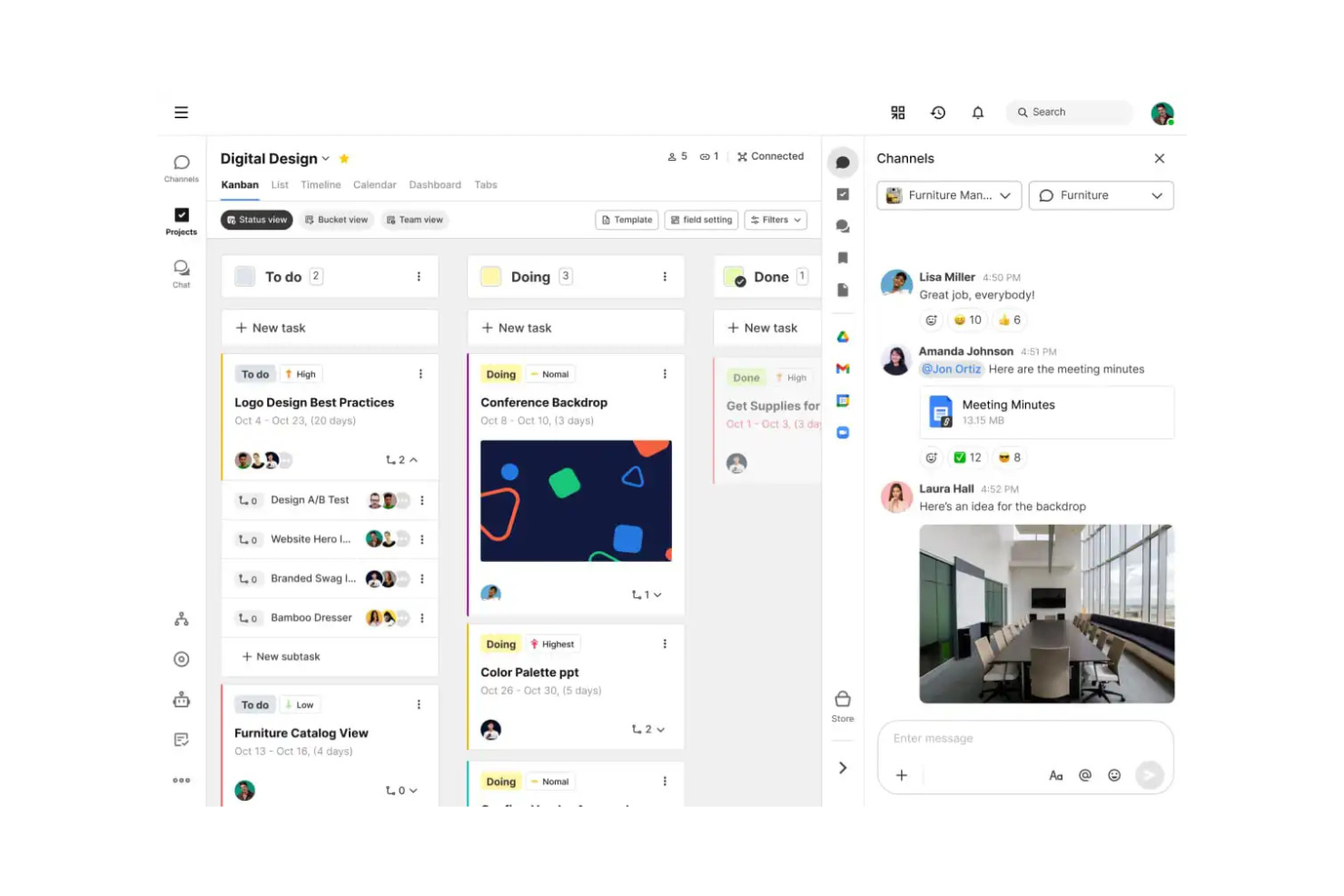
Swit is a collaborative work management tool for teams that want to combine task management with communication. It offers an integrated chat and task system to help improve teamwork and productivity.
Why I picked Swit: Swit’s free offering includes features like task boards, chat channels, and file sharing. It lets your team communicate and manage tasks in one place. The free version supports unlimited tasks and chat channels, which provides flexibility. AI features in Swit Snap support writing, summarizing, and automating routine steps.
Standout Features & Integrations:
Features include dashboards that track progress and workloads and plug-ins for setting goals and approvals. You can also manage guest permissions to bring in outside collaborators safely.
Integrations include Google Drive, Microsoft Teams, and Jira.
What's free? Swit offers a free-forever plan with unlimited users and 2 workspaces.
Pros and Cons
Pros:
- Supports remote collaboration
- Easy file sharing
- Suitable for cross-functional teams
Cons:
- Limited customization options
- Basic reporting tools

Miro
Best for visual collaboration

Miro is a collaborative whiteboard platform for teams that want to brainstorm and plan visually. It's used by creative teams, educators, and project managers for visual thinking and teamwork.
Why I picked Miro: Miro’s free plan includes features like unlimited team members, three editable boards, and pre-built templates. It's particularly effective for visual collaboration and lets your team brainstorm and create ideas in a shared space. You can also use sticky notes and drawing tools for collaboration. AI tools let you generate summaries, diagrams, and project briefs directly from your team’s input.
Standout Features & Integrations:
Features include an infinite canvas that lets you expand your boards, voting and timer features to facilitate decision-making, and templates to help you quickly start different project types.
Integrations include Slack, Microsoft Teams, Google Workspace, Jira, Asana, and Confluence.
What's free? Miro offers a free plan with unlimited team members and three editable boards.
Pros and Cons
Pros:
- Easy to use for beginners
- Facilitates visual brainstorming
- Pre-built templates available
Cons:
- Can be overwhelming for complex projects
- Some learning curve for new users
New Product Updates from Miro
Miro Adds Japan Data Residency for Enterprise Customers
Miro has introduced Japan data residency for enterprise customers, offering in-region storage for production data, backups, and metadata, plus in-region compute infrastructure. For more information, visit Miro's official site.
Other Free AI Task Management Software
Here are some additional AI task management software options that also offer free plans or trials. While these tools didn’t make it onto my shortlist, they’re still worth checking out:
- Connecteam
For mobile workforce
- GoodDay
For time-tracking without manual logs
- Asana
For task dependencies
- Wrike
For real-time activity streams
- Zoho Projects
For project time tracking
- ClickUp
For unlimited tasks and members


How I Evaluate Free AI Task Management Software
When a PM needs to turn a Slack thread into a sprint backlog for free, I split my evaluation into two layers: baseline AI task features and the differentiators that set one tool apart.
Core Functionality (Table Stakes For This List)
When I'm selecting tools for my list, I rank each one on a scale from 0 (does not offer the functionality) to 5 (excels in this area) for each core functionality listed below. Then, I calculate the tool's total score into a percentage. Each tool needs to achieve a minimum total score of 65% to be considered for inclusion.
- AI-Driven Task Automation: I look at whether the tool can auto-create, assign, or update tasks from triggers and inputs—like generating follow-up tasks after a status change.
- Usable Free Plan: The free tier needs to include actual AI features, not just basic PM. I check for meaningful AI usage limits and enough seats for a small team.
- Smart Prioritization & Scheduling: I evaluate how the AI ranks and sequences work. The best tools factor in deadlines, dependencies, and team capacity—not just due dates.
- Natural Language Task Input: Can you type "launch campaign with five subtasks by Friday" and get a structured output? I look for real NLP parsing, not simple keyword detection.
- Project Management Foundations: Every tool still needs solid PM basics. I check for task lists, board and timeline views, assignees, due dates, and progress tracking.
- Team Collaboration & Assignment: I evaluate shared workspaces, task comments, mentions, and notifications—features that keep distributed teams aligned on who owns what.
Once I have a list of tools that meet this criteria, I consider what sets each platform apart.
Differentiating Factors (What Sets Vendors Apart)
Here's how I compare and contrast different vendors:
Standout Features
Meeting-to-task AI is a major differentiator. I look for tools that pull action items from a call recap or Slack thread and convert them into assigned, due-dated tasks. Predictive risk insights also carry weight—the best tools flag timeline slippage or resource conflicts before your next standup. A conversational AI assistant rounds things out, letting PMs query sprint status or reassign work through a chat prompt instead of navigating dashboards.
Beyond Features
Free plan generosity matters a lot here. I check how many AI prompts, automations, and users a tool allows before it starts gating features behind a paywall. Data security and AI privacy also weigh heavily—I look at whether vendors clearly disclose if project data trains their AI models, since PMs often work with sensitive roadmaps. Integration depth rounds out my evaluation. A free AI task tool that connects to Slack, GitHub, or Google Calendar fits naturally into existing workflows, while one that sits in isolation creates more overhead than it saves.
How to Choose Free AI Task Management Software
Complex feature lists and pricing structures can make it hard to figure out what you’re really getting from a free AI task management tool. To help you stay focused as you work through your software selection process, here are some factors to keep in mind:
| Factor | What to Consider |
|---|---|
| Free Offer Scope | Check what features are included in the free plan. Does it meet your basic needs without hidden costs? |
| Scalability | Consider whether the software can grow with your team. Can it handle an increasing number of tasks and users as you expand? |
| Integrations | Look for compatibility with tools your team already uses, like calendars, communication apps, or file storage solutions. |
| Ease of Use | Evaluate the learning curve. Can your team quickly adapt to the interface without extensive training? |
| Customization | Determine if the software allows you to tailor workflows and dashboards to fit your team's specific processes and preferences. |
| Mobile Access | Make sure the software has a mobile app or responsive design so you can manage tasks on the go. |
| Support | Consider the level of customer support available. Is there live chat, email, or phone support to help when you encounter issues? |
| Security | Check the software's data security measures. Does it comply with industry standards to protect your team's information? |
What Is Free AI Task Management Software?
Free AI task management software is designed to help teams and individuals on a budget organize, track, and manage tasks. Tools that offer free plans or trials lets users access basic features without a financial commitment.
Task management apps track and organize tasks and let you visualize what needs to be done and by when. They provide data on progress and completion, so it’s easier to manage team workloads and improve efficiency. These apps often include features like task prioritization and integrations to help you manage workflows, improve coordination, and maintain task visibility.
Features of Free AI Task Management Software
Let’s go over the features commonly found in AI task management software, and which ones are usually included in free vs. paid plans.
Typically Free AI Task Management Software Features
- Task creation and assignment: Lets you create tasks and assign them to team members, so everyone knows their responsibilities.
- Basic collaboration tools: Allow for team communication through comments and notes on tasks, which facilitates feedback and discussion.
- Due date and deadline tracking: Helps you track task timelines and deadlines, so projects are completed on time.
- Integration with calendars: Syncs tasks with calendar apps to provide a clear view of upcoming deadlines and schedules.
- Mobile app access: Provides on-the-go task management through mobile apps, so the team can update tasks anywhere.
Typically Paid AI Task Management Software Features
- Advanced reporting and analytics: Offers insights into team performance and project progress through detailed reports and analytics.
- Customizable workflows: Lets you tailor task workflows to fit specific processes and improve efficiency and organization.
- Automation of repetitive tasks: Saves time by automating routine tasks and reducing manual effort to increase productivity.
- Priority support: Get faster response times and dedicated support for resolving issues.
- Time tracking and billing: Tracks the time spent on tasks and projects, which is useful for billing clients and managing resources efficiently.
Benefits of Free AI Task Management Software
Implementing free AI task management software provides several benefits for your team and your business. Here are a few you can look forward to:
- Cost savings: Access essential task management features without spending money, so you can allocate monetary resources elsewhere in your business.
- Enhanced organization: Keep tasks, deadlines, and priorities organized in one place to help your team stay focused and efficient.
- Improved collaboration: Facilitate communication and collaboration among team members with basic chat and comment features.
- Increased accessibility: Manage tasks on the go with mobile app access, so your team can work from anywhere.
- Better time management: Use calendar integrations and deadline tracking to maintain timely completion of tasks and projects.
- Scalability: Start with a free plan and scale up as your team grows to get flexibility without immediate financial commitment.
Costs and Pricing of Free AI Task Management Software
You might be looking for the best AI task management software options that are available for free, but since free plans only offer limited features, there's a good chance you'll need to scale your plan up in the future and get more advanced features.
The table below summarizes common plans, average prices, and typical features included in AI task management software solutions:
Plan Comparison Table for AI Task Management Software
| Plan Type | Average Price | Common Features |
|---|---|---|
| Free Plan | $0 | Basic task management, limited users, and basic integrations. |
| Personal Plan | $5-$15/user/month | Task prioritization, calendar sync, and mobile app access. |
| Business Plan | $15-$25/user/month | Advanced reporting, team collaboration tools, and automation capabilities. |
| Enterprise Plan | $25-$50/user/month | Custom workflows, dedicated support, and better security features. |
Free AI Task Management Software FAQs
Here are some answers to common questions about free AI task management software:
Can AI task management software replace my calendar or planner?
AI task management tools can suggest where and when to schedule tasks based on deadlines and availability, but they usually don’t replace a calendar for meetings, travel, or personal commitments. You’ll still want a dedicated calendar tool, but AI tools can help you slot in work around your existing schedule.
How well do free AI tools handle team collaboration?
Many free AI task tools allow basic collaboration (shared tasks, comments, lists), but advanced coordination features—like dependency tracking, permissions, workload balancing or cross-project AI insights—are often restricted to paid plans. Make sure to check the specs for the specific tools you’re interested in to see what’s offered.
Can I upgrade from free to paid without losing my data or setup?
Yes, most vendors help make sure your tasks, settings, and histories carry over; you just gain access to more features and capacity. Always back up your data before upgrading, just in case.
Can free AI task management software integrate with other tools?
Yes, many free AI task management tools offer integrations with popular apps like Slack, Google Calendar, and Dropbox. This lets you sync tasks and collaborate with your existing tools and improves your team’s productivity without additional cost.