

10 Best Time Tracking Software for Small Businesses Reviewed in 2026

Best Time Tracking Software for Small Businesses Shortlist


Managing a small business comes with its own set of challenges, especially when it comes to tracking time. Every minute counts, and keeping track of your team's time and hours can be a constant struggle. That's where time tracking software comes in, helping you manage labor costs and boost productivity.
Choosing the right tool makes all the difference, so we've tested a range of options to give you an unbiased view of the best software available.
In this article, we share our top picks for the best time tracking software for small businesses. You'll find insights into features, benefits, and what makes each one stand out. Let's dive in and find the right fit for your team.
Why Trust Our Software Recommendations
Our team has been testing and reviewing software since 2012. As project managers ourselves, we know how difficult—and important—it is to choose the right software.
For this guide, we evaluated tools using hands-on testing and independent research, scoring tools using our selection criteria. We also draw on insights from industry thought leaders and practicing project management experts.
Our reviews reflect our human editorial judgment, not a sales pitch.
Expert reviewers:
Comparison Table: Time Tracking for Small Business
This comparison table summarizes pricing details for my top time tracking solutions for small businesses.
| Tool | Best For | Trial Info | Price | ||
|---|---|---|---|---|---|
| 1 | Best for deskless teams | 14-day free trial | From $29/month (billed annually) | Website | |
| 2 | Best as an AI for business | Free demo available | From $8/user/month | Website | |
| 3 | Best for integrating calendar events | 14-day free trial + free demo available | From $6.42/user/month (billed annually) | Website | |
| 4 | Best for setting up accrual rules | 14-day free trial + free demo available | From $4.99/user/month + $19/month base fee (billed annually) | Website | |
| 5 | Best for quick task switching | Free plan + 30-day free trial + free demo available | From $9/user/month (billed annually) | Website | |
| 6 | Best for combining time and budget management | Free plan + 30-day free trial + free demo available | From $6/user/month (billed annually) | Website | |
| 7 | Best for multi-level timesheet approvals | 30-day free trial + free plan available | From $9/user/month (billed annually) | Website | |
| 8 | Best for browser extension tracking | Free plan + 7-day free trial available | From $4.99/user/month | Website | |
| 9 | Best for payroll integration | 30-day free trial | From $20/month + $10/user/month | Website | |
| 10 | Best for AI time tracking insights | Free 14-day trial + free demo available | From $9/user/month (billed annually) | Website |


Best Time Tracking Software for Small Businesses Reviews
Below are detailed summaries of the best time tracking software for small businesses that made it onto our shortlist. Each offers a detailed look at the key features, pros and cons, integrations, and ideal use cases to help you find the best tool for you.
Best for deskless teams
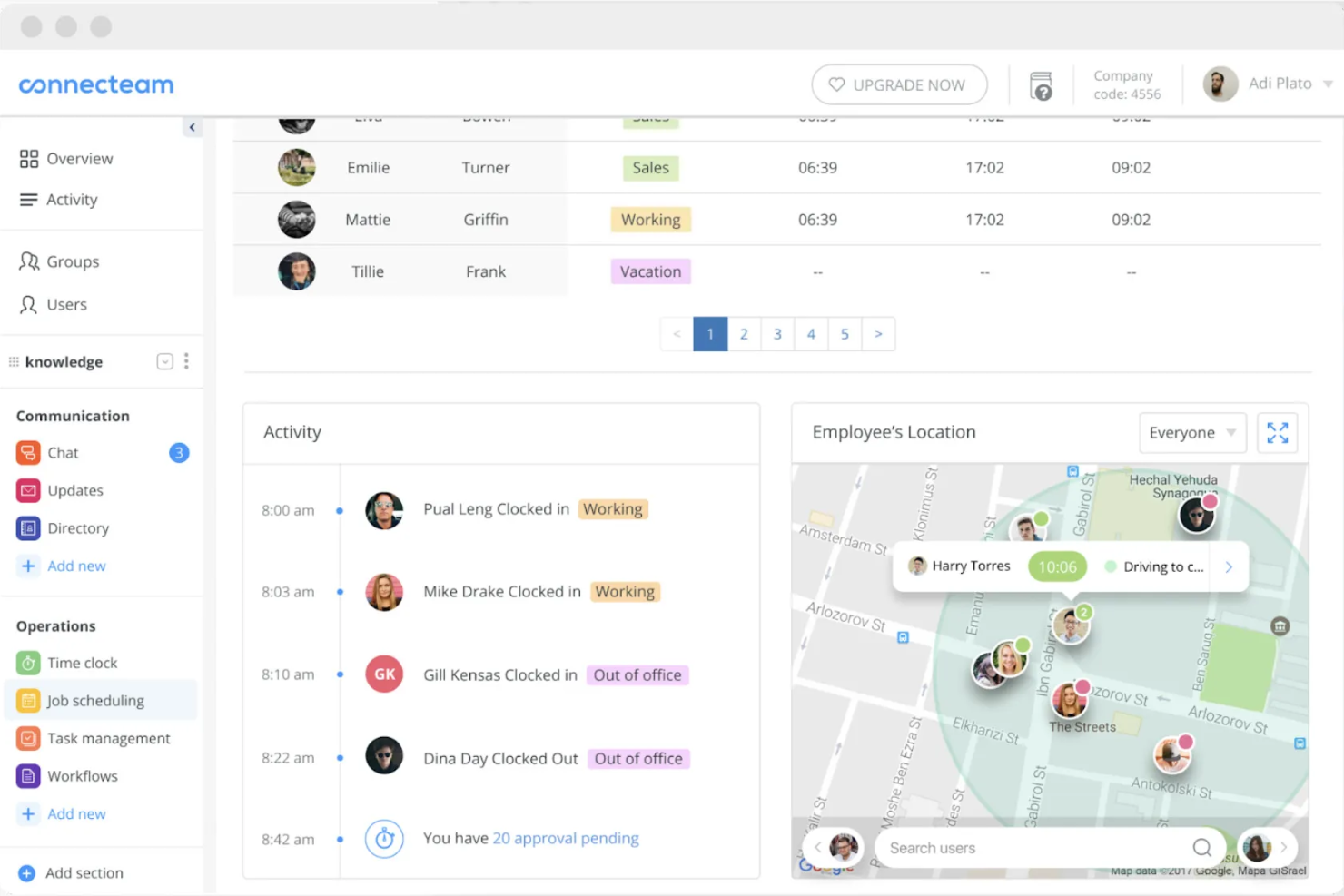
Connecteam is a time tracking and workforce management software designed for deskless teams across industries. It enables users to track time, manage schedules, and communicate efficiently.
Why I picked Connecteam: It caters specifically to deskless teams, making it easy for your team to clock in and out from any location. You can manage schedules and communicate with employees directly through the app. The tool also offers GPS tracking, providing accurate time entries.
Standout features and integrations:
Features include task management tools that help assign and prioritize tasks efficiently for better team management. You can also use the communication tools to send instant updates and messages to your team. Connecteam offers shift management, allowing you to quickly create and adjust schedules.
Integrations include QuickBooks, Xero, Zapier, Wix, Shopify, and more.
Pros and Cons
Pros:
- Free small-business plan with core tools
- All-in-one hub for deskless operations
- GPS breadcrumbs show entire shift routes
Cons:
- The feature-rich app can overwhelm new admins
- Reporting and analytics remain fairly limited
New Product Updates from Connecteam

Connecteam Expands Break and Timesheet Controls
Connecteam adds flexible break thresholds, personalized policies, auto-end options, a centralized exceptions report, and improved timesheet issue visibility to help teams manage breaks and timesheets more effectively. For more information, visit Connecteam’s official site.
 .
.
Best as an AI for business
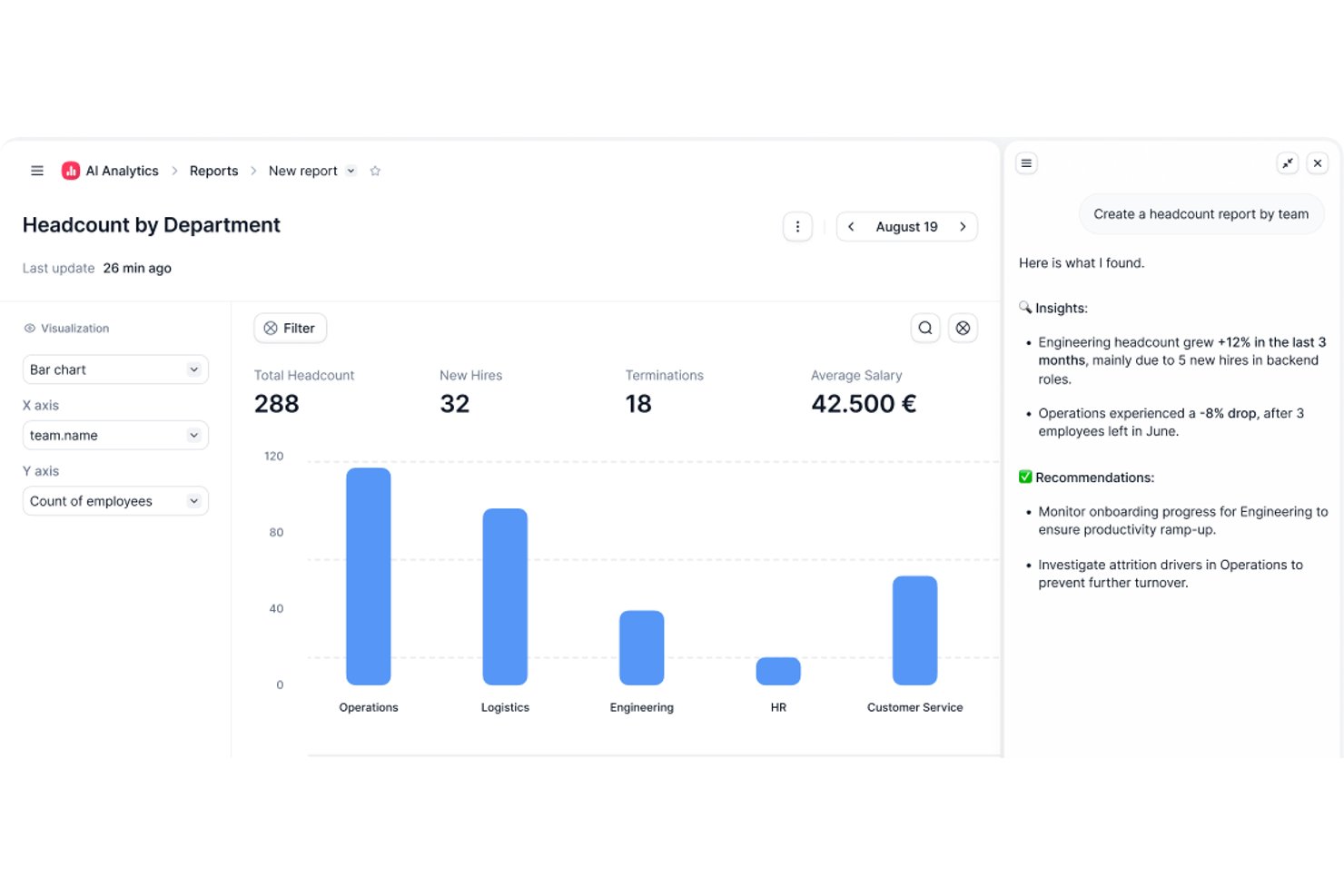
Factorial is an AI-powered HR and business operations platform that brings time tracking, project management, scheduling, and reporting together with an AI layer that handles day-to-day tasks like timetable planning and policy questions.
Who Is Factorial Best For?
Factorial is a strong fit for small businesses that want AI handling day-to-day operations—timetable planning, policy questions, and reporting—alongside time tracking.
Why I Picked Factorial
I've included Factorial in my top picks because it brings AI directly into daily business operations, handling tasks like timetable planning, report generation, and answering employee policy questions without manual effort. I especially like how its AI-powered reporting lets you query project data in plain language, and how live margin tracking by project phase keeps profitability visible in real time.
Factorial Key Features
- Smart project quoting: Build phase-level cost quotes based on team capacity and automatically convert approved quotes into active projects.
- Multi-method clock-in: Employees can clock in via QR code, GPS, geofencing, or mobile app, with entries linked directly to assigned projects.
- Phase-by-phase margin tracking: Monitor budget consumption and profitability at the individual project phase level as costs are logged in real time.
- Natural language reporting: Use the Factorial One AI assistant to query project and HR data in plain language and generate reports without manual setup.
Factorial Integrations
Factorial offers integrations with Monday.com, Microsoft Power BI, Slack, Google Workspace, Okta, Sage, and Microsoft Business Central. It also provides a public API and supports Zapier.
Pros and Cons
Pros:
- GPS and QR clock-ins suit field teams
- Phase-level margins expose project profitability
- AI answers policy questions and creates reports
Cons:
- No native client invoicing from tracked hours
- HR-first design limits dedicated timer depth

DeskTime
Best for integrating calendar events
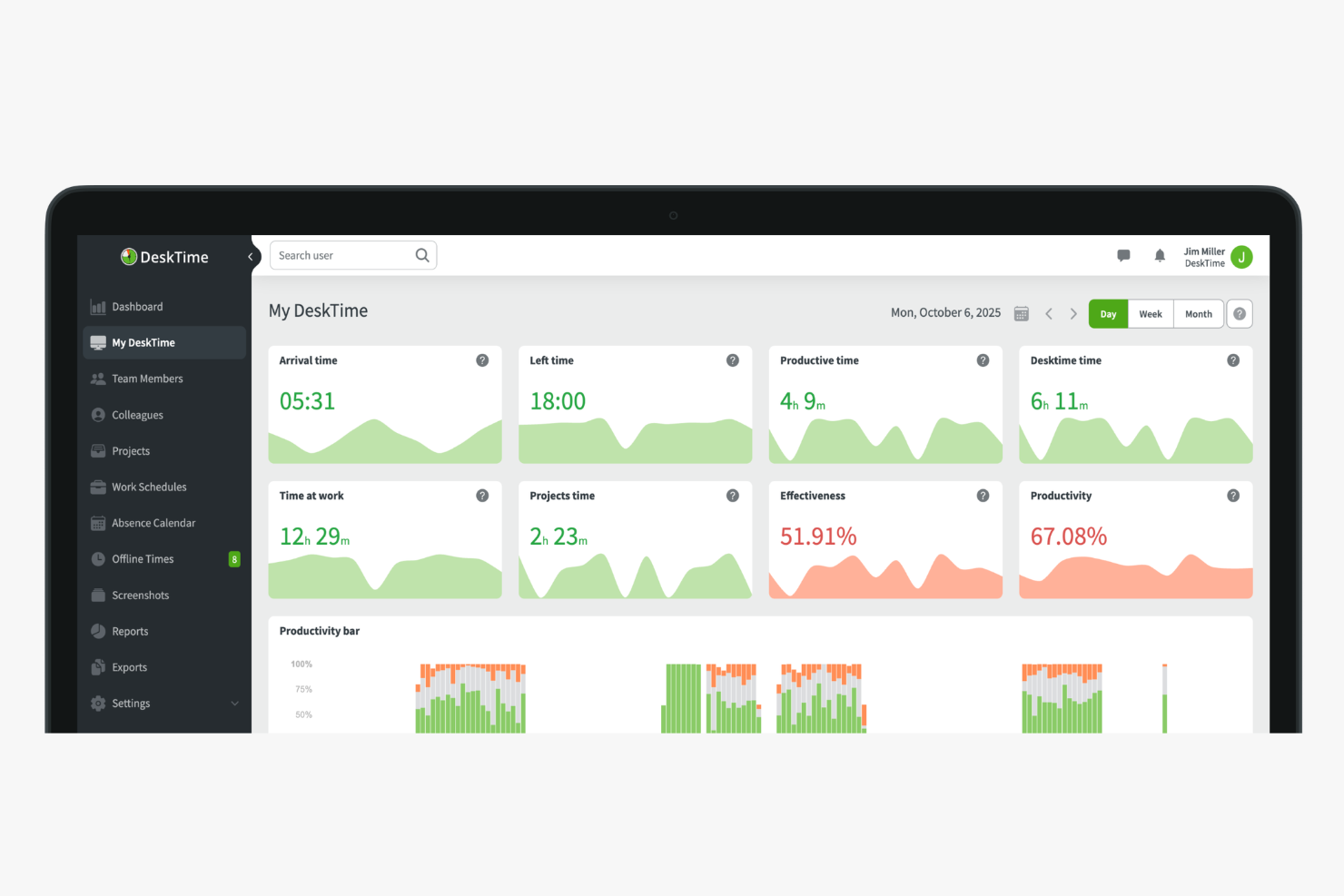
DeskTime is an automatic time tracking tool that logs app and URL usage, tracks project-level hours, calculates employee productivity, and manages attendance and absences for small teams.
Who Is DeskTime Best For?
DeskTime is a good fit for small business owners and team leads who need automatic time tracking without relying on employees to log hours manually.
Why I Picked DeskTime
I've included DeskTime in my top picks because of how it connects with Google Calendar and Outlook Calendar to fill meeting times directly into the daily timeline. Instead of manually logging time spent in a standup or a client call, DeskTime pulls those events in automatically. That means your tracked hours actually reflect how the day was spent, including time in meetings, without asking anyone to do extra data entry. I think that matters a lot for small teams where no one has time to maintain a second system.
DeskTime Key Features
- Shift scheduling: Plan and assign work shifts for team members directly within DeskTime's schedule view.
- Cost calculation: Assign hourly rates to employees or projects and have DeskTime calculate labour costs from tracked time.
- Custom reports: Filter time and productivity data by employee, project, or date range and export the results.
- Private time mode: Let employees pause tracking for personal tasks without recording any activity.
DeskTime Integrations
Integrations include Google Calendar, Outlook Calendar, Trello, Gitlab, Asana, Jira, and Zapier.
Pros and Cons
Pros:
- Supports offline and away-from-desk logging
- Classifies activity as productive or unproductive
- Tracks app and website time automatically
Cons:
- Lacks predictive web category filtering
- Mobile app has limited tracking features

Best for setting up accrual rules
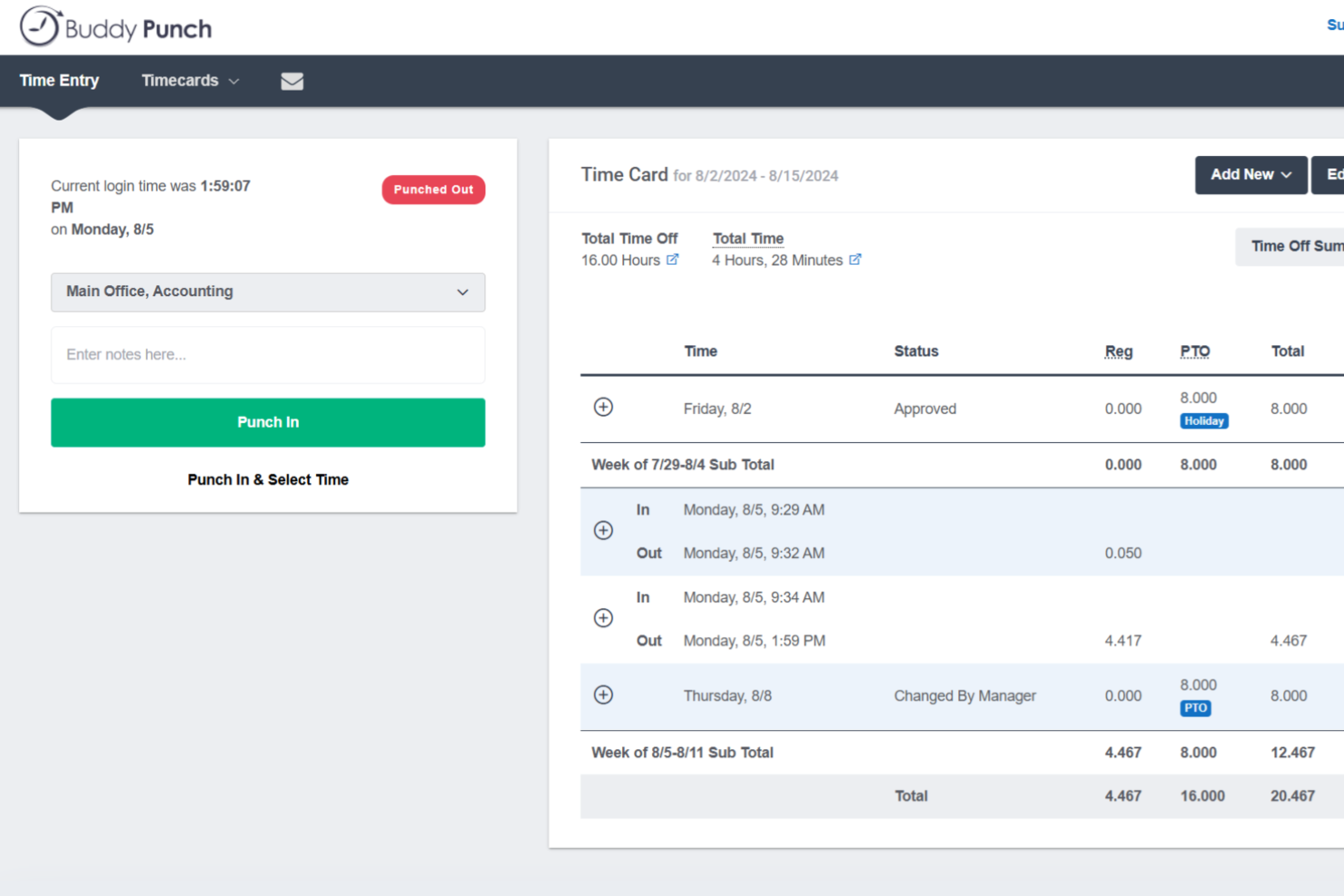
Buddy Punch is a time tracking platform built for small businesses with hourly workforces, combining employee clock-in/out, PTO management, scheduling, GPS tracking, and payroll integrations in one place.
Who Is Buddy Punch Best For?
Buddy Punch is a strong fit for small businesses that manage hourly, shift-based, or field employees across industries like retail, construction, healthcare, and hospitality.
Why I Picked Buddy Punch
I've included Buddy Punch in my top picks because its PTO management is genuinely one of the most hands-off systems I've used. You set up accrual rules once, and Buddy Punch automatically adds hours to employee balances on your schedule. Employees can check their own balances and submit time-off requests directly from the app, and when you approve a request, Buddy Punch automatically deducts the hours from their balance, adds the time to their timesheet, and flags the absence on the upcoming schedule. That's three manual steps your team no longer has to do.
Buddy Punch Key Features
- GPS tracking: Logs an employee's location at the time they punch in or out, so you always know where field or remote workers are clocking from.
- Drag-and-drop scheduling: Build and publish employee schedules visually, with shift assignments your team can view directly from the mobile app.
- Punch rounding: Automatically rounds clock-in and clock-out times to the nearest set interval, reducing manual timesheet corrections at the end of each pay period.
- Overtime alerts: Notifies managers when an employee is approaching overtime thresholds before the hours are logged.
Buddy Punch Integrations
Buddy Punch offers native integrations focused on payroll, including QuickBooks Online, QuickBooks Desktop, ADP Workforce Now, Gusto, Paychex, Paycor, Paylocity, Rippling, Workday, and SurePayroll, with 17+ payroll integrations in total. It also connects with Zapier and provides an API for custom integrations, plus single sign-on support through Google, Apple, Okta, and OneLogin.
Pros and Cons
Pros:
- Built-in PTO accruals and time-off calendar
- Geofencing blocks off-site clock-ins automatically
- Multiple clock-in methods including text-to-punch
Cons:
- Mobile app lacks some web version features
- No offline mode for areas without internet
Toggl
Best for quick task switching
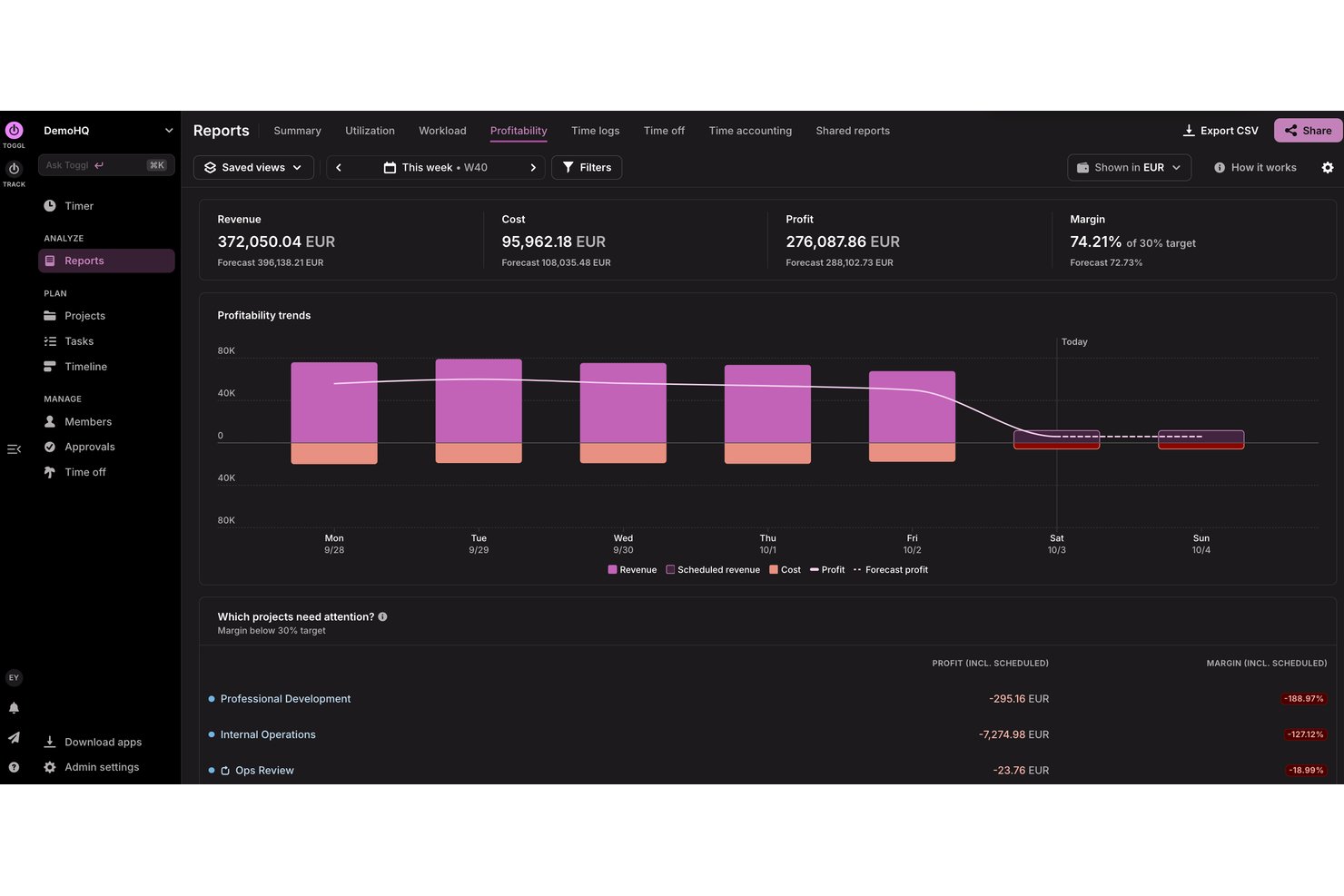
Toggl is a tool for freelancers and small to medium-sized businesses to track time, plan capacity, analyze profitability, and manage projects with ease.
Why I picked Toggl: Its simple interface lets you start tracking time without extensive training. You can quickly switch between tasks to maintain accurate time entries and access detailed reports that provide insights into time usage. Its focus on simplicity makes it a great choice for teams that value ease of use.
Standout features and integrations:
Features include a timer that allows you to track time with a single click, as well as automatic tracking on desktop. You can also use the reporting feature to gain insights into how time is spent across projects, as well as into project profitability and team capacity. The tool provides reminders and notifications to help you stay on top of your tasks. You can also use Toggl AI to get plain-language answers to questions about how time is spent, how much time a team has logged, and much more
Integrations include Google Calendar, Outlook, Jira, Asana, Todoist, GitHub, and more
Pros and Cons
Pros:
- Calendar view clarifies daily time blocks
- Intuitive interface freelancers love
- Generous free tier for small teams
Cons:
- No GPS tracking or geofencing
- Frequent feature changes confuse existing users

actiTIME
Best for combining time and budget management
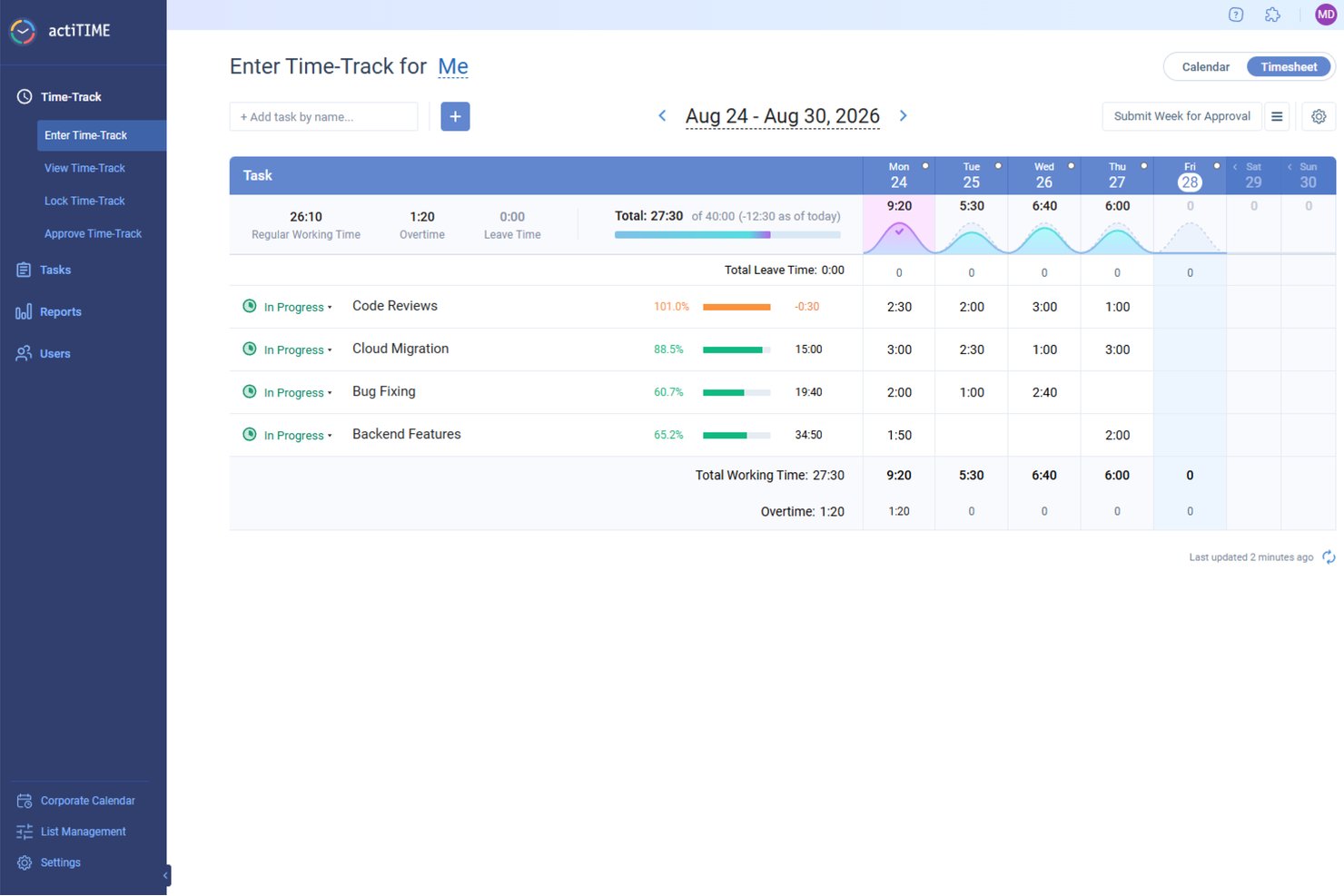
For small businesses seeking an efficient way to manage time and budget, actiTIME offers a tailored solution that addresses these needs with precision. Designed to support project tracking, budget management, and team collaboration, it appeals to a wide range of industries. By integrating easily with tools like QuickBooks, actiTIME ensures your operations are not only timely but also cost-effective, allowing you to stay focused on delivering quality work.
Why I Picked actiTIME
I picked actiTIME because its unique ability to combine time tracking with budget management makes it highly relevant for small businesses. One standout feature is its project tracking, which allows you to assign tasks, set deadlines, and monitor progress, ensuring projects are completed on time. Additionally, the budget management tools enable you to track project costs and set financial goals, helping your team stay within budget. With these features, actiTIME directly addresses the challenges of time and budget management, making it a great choice for small businesses.
actiTIME Key Features
In addition to its project tracking and budget management capabilities, I also found several other features that cater to small business needs:
- Reporting and Analytics: Generate detailed reports on time usage, project progress, and team performance to make informed decisions.
- Billing and Invoicing: Customize billing rates and generate invoices based on tracked time and expenses.
- Leave Management: Manage paid time off (PTO) and set accrual rules to ensure accurate leave tracking.
- Team Management: Assign work, manage roles, and monitor team performance to optimize productivity.
actiTIME Integrations
Integrations include QuickBooks, Zapier, and an API for custom integrations.
Pros and Cons
Pros:
- Offers customizable workflows for project management
- Allows for detailed financial and time reporting
- Includes mobile apps for both Android and iOS devices
Cons:
- Per user pricing can add up for smaller businesses
- Lacks some advanced features, like GPS and facial recognition
New Product Updates from actiTIME

actiTIME Visual Hour Indicator and Time-Track Report Redesign
actiTIME adds a wave-style hour indicator to the Timesheet and Calendar views and refreshes the Time-Track report for smoother navigation and clearer visuals. For more information, visit actiTIME's official site.
Beebole
Best for multi-level timesheet approvals
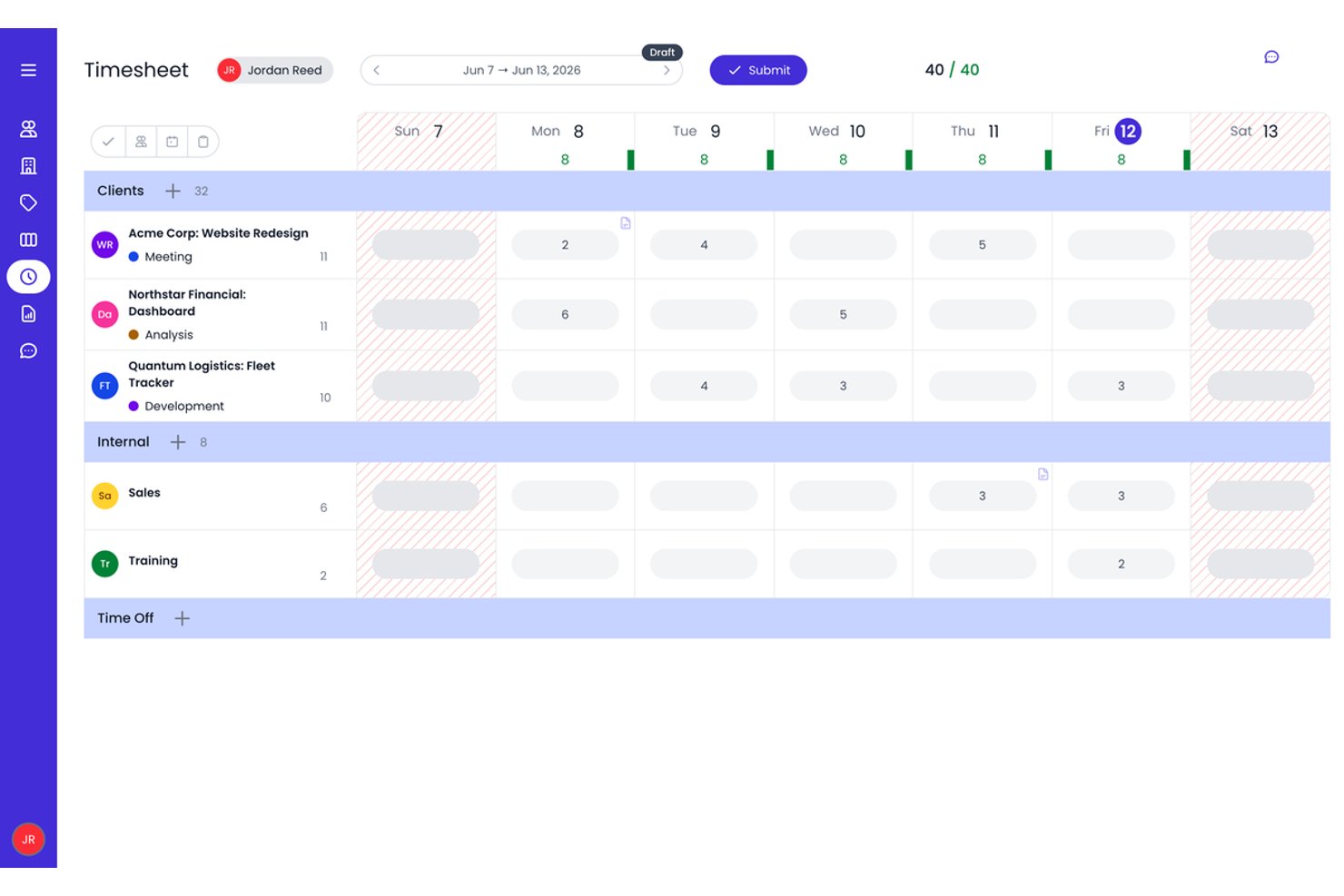
Beebole is a time tracking platform for small businesses that combines project-based time logging, multi-level timesheet approvals, resource planning, and custom reporting.
Who Is Beebole Best For?
Beebole is a strong fit for small business project managers and agency operators who need structured, multi-stage timesheet approval workflows alongside project-level billing rate controls.
Why I Picked Beebole
Beebole earns its spot on my shortlist because of how seriously it takes timesheet approvals. You can configure multi-stage approval chains, so a time entry might move from team lead to department head to finance before it's locked, which I find invaluable for client billing accuracy. I also like that planned work assigned in the resource planning view flows directly into individual timesheets, giving you a live plan-vs.-actual view without any manual reconciliation.
Beebole Key Features
- AI-suggested time entries: Beebole analyzes your desktop and browser activity to automatically suggest time entries, reducing manual logging.
- Custom report builder: Build multi-dimensional reports across 11 chart types, then schedule automated delivery or export directly to Excel or Google Sheets.
- Multi-currency billing rates: Set billable rates per user, project, client, or task in any currency, supporting teams with cross-border clients.
- Built-in resource planning: Visualize team capacity and workload across Gantt, Kanban, and Staffing views without leaving the platform.
Beebole Integrations
Beebole offers nine native integrations, including Asana, Jira, Linear, monday.com, QuickBooks Online, Xero, BambooHR, Google Calendar, and Microsoft Outlook Calendar. It also supports a GraphQL API, webhooks, and Zapier.
Pros and Cons
Pros:
- Highly customizable reporting and data exports
- AI-suggested time entries reduce manual logging
- Multi-level timesheet approval workflows built in
Cons:
- Advanced features gated to highest plan
- No native mobile app or GPS tracking

Clockify
Best for browser extension tracking

Clockify is a time tracking software for teams and individuals across various industries, including freelancers and consultants. It helps users track work hours and manage projects efficiently.
Why I picked Clockify: It offers a browser extension with real-time timers and detailed reports, making it easy to track time and productivity directly in your browser without switching between apps. This feature is perfect for those who spend most of their time online and want an easy way to log hours. Clockify also supports unlimited users, making it an ideal choice for growing teams.
Standout features and integrations:
Features include timekeeping with real-time timers, detailed time reports that provide insights into team productivity, and project management functionalities that allow you to organize tasks and deadlines effectively.
Integrations include Jira, QuickBooks, monday.com, Google Calendar, Notion, GitHub, and more.
Pros and Cons
Pros:
- Supports five users on the forever free plan
- Browser extension simplifies web-based tracking
- Detailed reports across clients and projects
Cons:
- Limited functionality when used offline
- No built-in payroll processing tools

Best for payroll integration
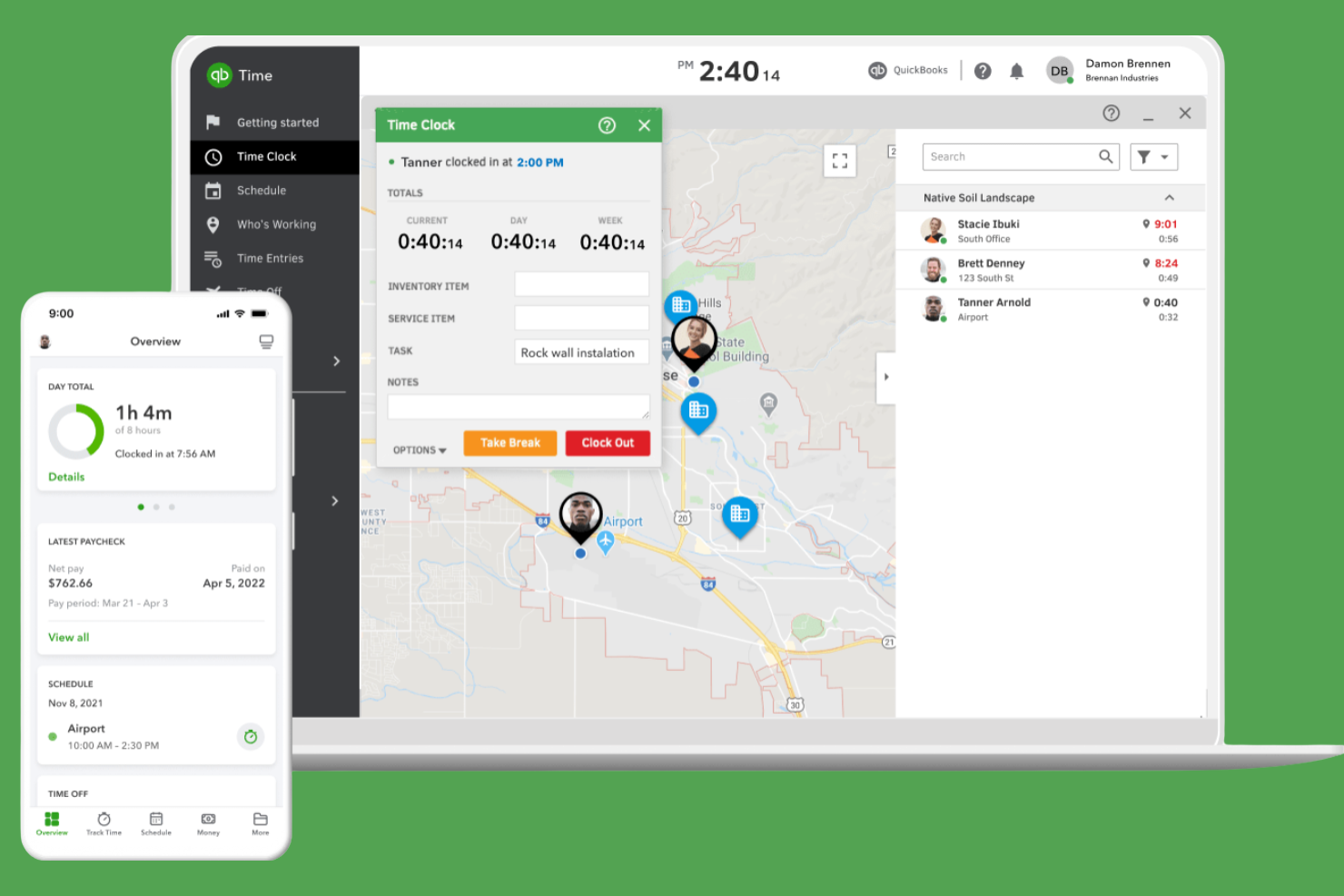
QuickBooks Time is a time tracking software for efficient payroll management. It serves small to medium-sized businesses by tracking employee hours and integrating with payroll systems.
Why I picked QuickBooks Time: It excels in payroll integration, making it easy to manage wages and tax calculations. The tool provides GPS tracking to monitor remote workers, providing accurate time entries and customized alerts for clock-ins and clock-outs.
Standout features and integrations:
Features include GPS tracking to monitor remote workers effectively. You can also set up job and shift scheduling to organize your team’s workload. The tool provides mobile time tracking, allowing your team to log hours from anywhere.
Integrations include ADP, Square, Paychex, and more.
Pros and Cons
Pros:
- Strong GPS tools for field crews
- Geofencing reduces time theft on jobs
- Deep native integration with QuickBooks payroll
Cons:
- Interface changes frustrate some long-time users
- Pricing gets expensive as headcount grows

Timely
Best for AI time tracking insights
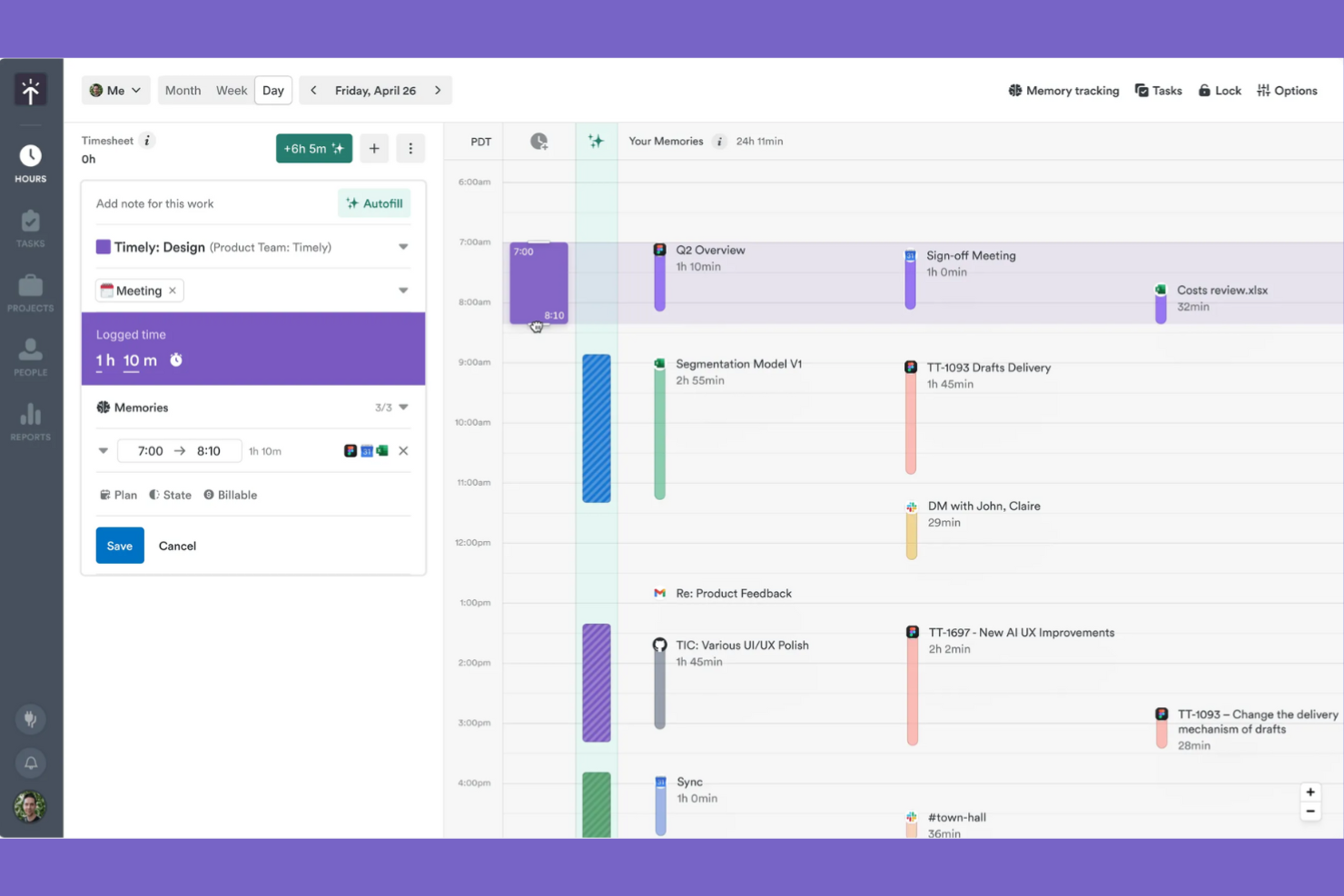
Timely is a time tracking software for small businesses, freelancers, and larger teams who want to efficiently manage projects and optimize productivity.
Why I picked Timely: It's known for its AI-driven tracking, which automatically logs your work activities without manual input. This feature suits teams managing multiple tasks that want to maintain accurate time tracking. The tool offers detailed project reports that help you understand where time is being spent.
Standout features and integrations:
Features include project budgeting to help you manage financial resources effectively. You can also use the tool's timeline view to get a visual representation of your team's workload. The reporting feature offers insights into productivity and time allocation.
Integrations include Outlook Calendar, Google Calendar, GitHub, Zoom, Jira, and more.
Pros and Cons
Pros:
- Strong project budgets and profitability views
- Frictionless UX encourages consistent time logging
- AI memory tracker auto-builds timesheets
Cons:
- AI categorizations sometimes need manual corrections
- Higher pricing than many small-business tools
Other Time Tracking Software for Small Businesses
Here are some additional time tracking software for small businesses that didn’t make it onto my shortlist, but are still worth checking out:
- My Hours
For customizable reports
- TimeCamp
For automatic time tracking
- RescueTime
For productivity insights
- Time Doctor
For remote team monitoring
- Timesheets.com
For HR integration
- Harvest
For project time invoicing
- Insightful
For real-time analytics and time mapping
- Homebase
For shift scheduling
- Paymo
For task management integration
- FreshBooks
For invoicing simplicity
- Hubstaff
For GPS location tracking


How I Evaluate Time Tracking Software for Small Business
I evaluate these tools in two layers: baseline capabilities a tool must have—like project-based timers and billable rate tracking—and differentiators that matter most to small business teams.
Core Functionality (Table Stakes For This List)
When I'm selecting tools for my list, I rank each one on a scale from 0 (does not offer the functionality) to 5 (excels in this area) for each core functionality listed below. Then, I calculate the tool's total score into a percentage. Each tool needs to achieve a minimum total score of 65% to be considered for inclusion.
- Project & Task Time Tracking: I check whether you can log hours against specific projects, tasks, and clients—using both live timers and manual entry—since that's how most small teams actually work.
- Timesheet Management: The tool should let team members submit timesheets and managers approve or reject them, ideally with reminders so you're not chasing people at the end of each pay period.
- Billable Hours & Rate Configuration: I look for the ability to set per-user, per-project, or per-client rates and flag entries as billable or non-billable, which is essential for agencies juggling multiple retainers.
- Reporting & Analytics: Good reporting means more than a basic time summary. I evaluate whether you can filter by project, team member, or date range and export data for client-facing or internal budget reviews.
- Team & User Management: Small teams still need role-based access. I look at how the tool handles permissions—for example, letting a project lead see their team's hours without exposing company-wide billing data.
- PM & Accounting Integrations: I evaluate native connections to tools like QuickBooks, Xero, Asana, and Jira, plus whether the platform supports Zapier or an open API for custom workflows your team already relies on.
Once I have a list of tools that meet this criteria, I consider what sets each platform apart.
Differentiating Factors (What Sets Vendors Apart)
Here's how I compare and contrast different vendors:
Standout Features
Budget alerts matter a lot when you're running multiple client projects on tight margins—I look for tools that notify you before a project exceeds its hour cap, not after. Built-in invoicing is another differentiator, especially for agency owners who want to go from tracked hours to a client-ready invoice without exporting to a separate billing tool. I also evaluate resource scheduling features tied to time data, since small teams juggling concurrent projects need a clear view of who's available and who's overbooked.
Beyond Features
Pricing structure is one of the first things I check. Small teams need transparent per-user pricing without enterprise minimums—and a free tier or starter plan helps when you're onboarding a team of five, not fifty. Time-to-value also matters: I look for self-serve setup with templates and in-app guidance so a non-technical project lead can get their team logging hours within a day. Cross-platform accessibility rounds it out, since distributed teams need native desktop, mobile, and browser extension options with offline sync to keep time entries accurate regardless of where they're working.
How To Choose Time Tracking Software for Small Businesses
It’s easy to get bogged down in long feature lists and complex pricing structures. To help you stay focused as you work through your unique software selection process, here’s a checklist of factors to keep in mind:
| Factor | What to Consider |
|---|---|
| Scalability | Can the tool grow with your business? Check whether it supports more users or additional features as your team grows. |
| Integrations | Does it work with your current systems? Confirm it integrates with payroll, project management, and other tools you use. |
| Customizability | Can you tailor it to fit your workflow? Look for options to customize reports, dashboards, and user roles. |
| Ease of use | Is it simple for your team to adopt? Test the interface for intuitiveness and check user reviews for feedback on usability. |
| Implementation and onboarding | How long will it take to get started? Evaluate the availability of training resources such as videos, webinars, or product tours. |
| Cost | Is the pricing transparent and within budget? Consider the total cost, including any hidden fees or discounts for annual plans. |
| Security safeguards | Does it protect your data? Look for encryption, access controls, and compliance with data protection regulations such as GDPR. |
| Support availability | Will you get help when needed? Check if support is available 24/7 and through multiple channels such as chat, email, or phone. |
What Is Time Tracking Software for Small Businesses?
Time tracking software for small businesses helps monitor and record employee work hours. These tools are commonly used by managers, HR professionals, and small business owners to maintain accurate payroll and improve productivity. Features such as time logging, reporting, and payroll system integrations support efficient management and data accuracy. Overall, these tools help businesses save time and reduce errors in tracking employee hours.
Features
When selecting time tracking software for a small business, keep an eye out for the following key features:
- Time logging: Allows employees to record their work hours accurately using web, mobile, or kiosk-based time clocks, supporting precise payroll and billing.
- Reporting: Provides detailed insights into time usage, helping managers analyze productivity and identify areas for improvement.
- Integrations: Connects with payroll and project management tools to support operations and reduce manual data entry.
- GPS tracking: Monitors remote employees' locations, providing accurate time entries for fieldwork.
- Automatic time tracking: Logs work activities without manual input to automate time capture, saving time and reducing errors.
- Shift scheduling: Helps businesses plan and manage employee shifts, keeping everyone informed and organized.
- Expense tracking: Monitors project costs and expenses, aiding in budget management and financial planning.
- Customizable dashboard: Allows users to tailor their interface to display the most relevant information for their needs.
- Mobile access: Enables employees to track time and access features from anywhere in a browser, desktop app, or on iOS and Android devices, improving flexibility and convenience.
- Security safeguards: Protects sensitive data with encryption and access controls, supporting compliance with data protection regulations.
Benefits
Implementing time tracking software for a small business provides several benefits for your team and your business. Here are a few you can look forward to:
- Accurate payroll: Provides precise calculation of employee wages by tracking work hours and integrating with payroll systems.
- Improved productivity: Identifies how time is spent, helping managers and employees optimize work habits and focus on priorities.
- Cost management: Monitors project expenses and tracks time against budgets to help control costs and improve financial planning.
- Increased accountability: Offers transparency into employee work hours, encouraging responsibility and trust within teams.
- Flexible scheduling: Facilitates easy shift planning and adjustment, keeping team members informed and schedules running smoothly.
- Data-driven insights: Provides valuable reports and analytics to support informed decision-making and strategic planning.
- Increased convenience: Allows employees to log time and access features from mobile devices, offering flexibility and ease of use.
Costs and Pricing
Selecting time tracking software for small businesses requires understanding the various pricing models and plans available. Costs vary based on features, team size, add-ons, and your billing method, such as paying monthly by credit card. The table below summarizes common plans, their average prices, and typical features included in time tracking for small business solutions:
Plan Comparison Table for Time Tracking Software for Small Businesses
| Plan Type | Average Price | Common Features |
|---|---|---|
| Free Plan | $0 | Basic time tracking, limited reporting, and mobile access. |
| Personal Plan | $5-$10/user/month | Time tracking, basic reporting, mobile access, and limited integrations. |
| Business Plan | $10-$25/user/month | Advanced reporting, project management tools, integrations with payroll, and customizable dashboards. |
| Enterprise Plan | $15+/user/month | Complete reporting, full integrations, dedicated support, and advanced security features. |
Time Tracking Software for Small Businesses FAQs
Here are some answers to common questions about time tracking software for small businesses:
How does time tracking software work?
A time tracking software records the time you and your team spend on different tasks and projects. It usually involves starting a timer when you begin a task and stopping it when you finish. Many tools also offer automatic tracking that logs time based on your computer activity. This helps maintain accurate billing and productivity analysis. You can view and analyze the tracked time through reports, helping you make informed decisions about workflow and efficiency.
Can time tracking software integrate with project management tools?
Many time tracking platforms offer direct integrations with tools such as Asana, Trello, Jira, or Monday.com. This lets you link tracked hours directly to specific tasks or projects, making it easier to analyze productivity and manage budgets.
Can time tracking software be used offline?
Some time tracking software can be used offline. These tools let you log hours offline and sync your data once you’re back online. This is especially useful for teams working in remote areas or in areas with unreliable connectivity. Check if the software you’re considering offers offline functionality, as this can vary. Offline capabilities let you continue tracking time without interruptions and maintain accurate records.
How can time tracking software help reduce project overruns?
Time tracking gives you real-time visibility into how long tasks actually take. You can spot scope creep early and adjust your team’s workload or project plan before overruns happen. It also helps you create more accurate estimates for future projects.
Is time tracking software secure?
Most time tracking software includes security features to protect your data. These may include encryption, regular backups, and access controls to restrict sensitive information to authorized users. When choosing a tool, review its security policies and compliance with data protection regulations such as GDPR. Having security measures in place is important to safeguard your business information and maintain client trust.
Do I need technical expertise to set it up?
You don’t need advanced technical expertise to set up most time tracking software. These tools feature user-friendly interfaces and often include step-by-step guides or tutorials to assist with setup. Many providers offer support via chat, email, or phone to help with any questions. With a bit of initial guidance, you can have the software up and running quickly, allowing you to focus on tracking time efficiently.
