
20 Best Teamwork Alternatives Reviewed in 2026

Best Teamwork Alternatives Shortlist
Here are my picks for the best Teamwork alternatives.


The best Teamwork alternatives provide more flexible reporting and dashboards for monitoring progress, additional metrics, options for bulk editing, and more functionality in the mobile app. With the right alternative to Teamwork, you can better track projects, manage timelines, and build a collaborative environment for your team.
I’ve used my experience in project management and 3+ years of testing software to review dozens of Teamwork alternatives so you can find the right tool to help you and your team collaborate on project work across departments, manage workloads and resources, and organize project portfolios across your organization. Below, I cover strengths and key differences, pros and cons, and ideal use cases for each tool.
What are Teamwork Alternatives?
Teamwork alternatives are project management software and collaboration tools that offer comparable features to Teamwork, but may also include more reporting and analytics features, more flexibility and customizability, and file storage features. They might also offer a more functional mobile app, or be better suited for big organizations with large project portfolios.
Alternatives to Teamwork will also typically include the standard project management and collaboration features like resource management, timeline management, and project planning.
Why Trust Our Software Reviews
We’ve been testing and reviewing project management software since 2012. As digital project managers, we know how critical and difficult it is to make the right decision when selecting software.
We invest in deep research to help our audience make better software purchasing decisions. We’ve tested more than 2,000 tools for different project management use cases and written over 1,000 comprehensive software reviews. Learn how we stay transparent & our software review methodology.
Best Teamwork Alternative Summary
| Tool | Best For | Trial Info | Price | ||
|---|---|---|---|---|---|
| 1 | Best for comprehensive agency project management | 14-day free trial available | From $10/user/month (billed annually) | Website | |
| 2 | Best for breaking down large projects | Free plan + free demo available + 15-day free trial | From $4/user/month (billed annually) | Website | |
| 3 | Best for extensive workflow and dashboard customization | Free plan + free demo + 14-day free trial available | From $10/user/month (billed annually) | Website | |
| 4 | Best for team communication and collaboration | Free plan available | From $8.75/user/month | Website | |
| 5 | Best for interactive Gantt charts | 14-day free trial + free demo available | From $7/user/month (billed annually) | Website | |
| 6 | Best for centralized client and project management | Free 7-day trial available | From $9/user/month (billed annually) | Website | |
| 7 | Best for real-time project visibility | 14-day free trial + free demo available | From $6/user/month | Website | |
| 8 | Best for uniting teams, goals, and processes | Free plan available | From $7/user/month (billed annually) | Website | |
| 9 | Best for unlimited storage | 14-day free trial | From $1.49/user/month (billed annually) + free plan available | Website | |
| 10 | Best for project management workflow templates | Free 14-day trial + free demo available | Pricing upon request | Website |


-

Insightful
Visit WebsiteThis is an aggregated rating for this tool including ratings from Crozdesk users and ratings from other sites.4.8 -
Accelo
Visit WebsiteThis is an aggregated rating for this tool including ratings from Crozdesk users and ratings from other sites.4.4 -
Forecast
Visit WebsiteThis is an aggregated rating for this tool including ratings from Crozdesk users and ratings from other sites.4.6




Best Teamwork Alternative Reviews
In this section, I will provide an in-depth analysis and overview of each of the Teamwork alternatives. I will walk through the pros and cons of each tool, their features, and their best use cases.


Productive is an end-to-end management platform specifically designed for agencies. Its features include project management, sales CRM, resource planning, and financial tracking. The platform aims to provide a real-time overview of business operations, ensuring agencies can manage their projects and resources efficiently while maintaining profitability.
Why it's a good Teamwork alternative:
While both platforms share similarities in project management, task assignments, and time tracking, Productive goes a step further with its emphasis on financial management and profitability. Key features such as real-time profitability reporting, detailed budgeting, and integrated accounting tools enable agencies to track their financial health closely and predict future revenue. Additionally, Productive's integrated sales CRM helps manage the sales pipeline, track leads, and forecast revenue, providing a more comprehensive solution for managing both projects and sales compared to Teamwork.
Standout features & integrations:
Features include resource scheduling, Gantt charts, employee cost rates, company overhead cost tracking, multiple subsidiaries and currencies support, expense tracking, time and expense approvals, project templates, task progress tracking, multiple sales pipelines, workload management, and real-time notifications.
Integrations include Jira, Slack, QuickBooks, Xero, Trello, Zapier, Google Drive, Sage, BambooHR, Gusto, and HubSpot.
Pros and Cons
Pros:
- Intuitive user interface
- Good financial management capabilities
- Robust resource planning features
Cons:
- Initial setup can take some time
- Could use more integrations
New Product Updates from Productive

Productive Introduces Resource Request Feature
Productive introduces a resource request feature that helps teams request and allocate resources more efficiently. For more information, visit Productive's official site.

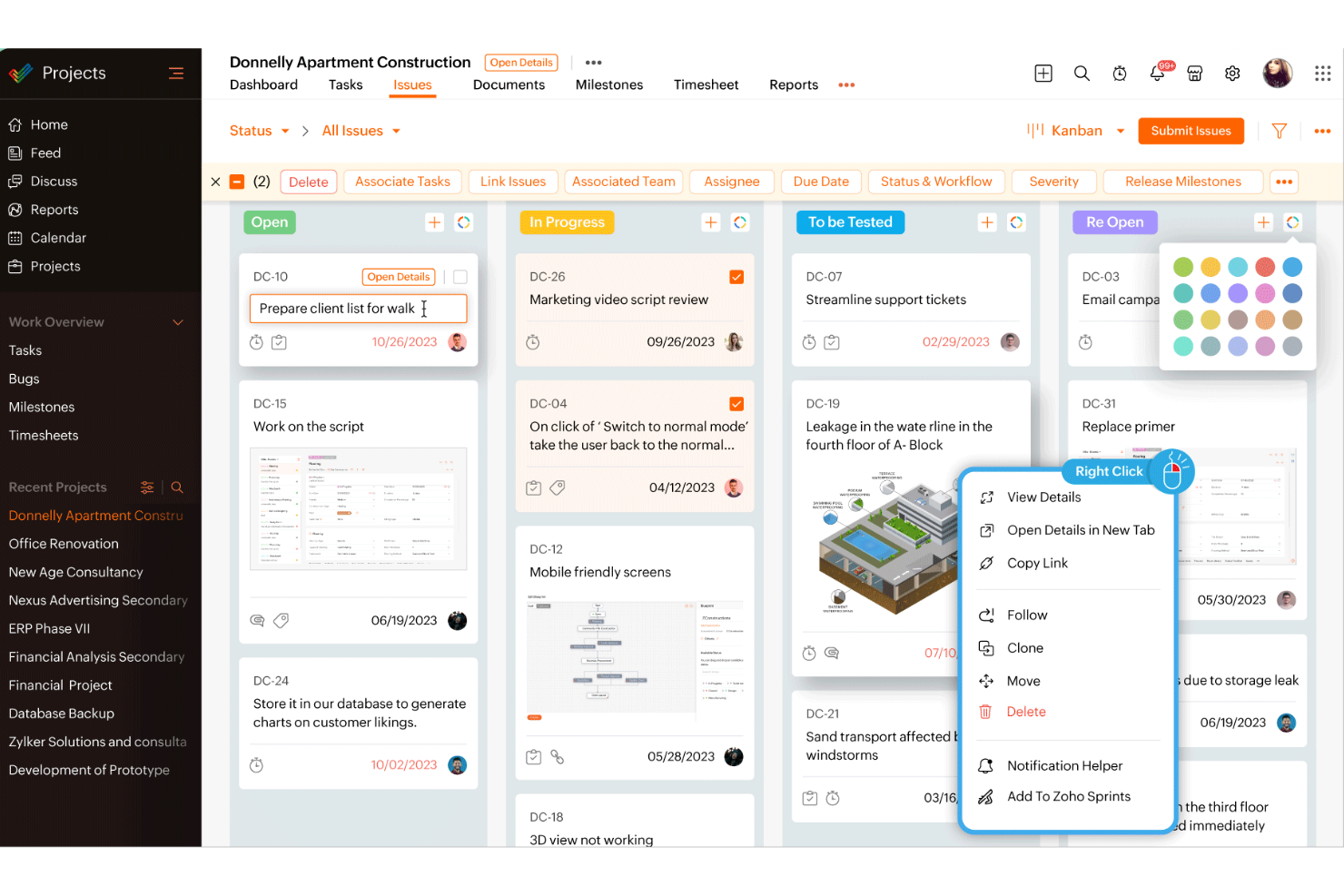
Zoho Projects is a project management tool designed to enhance teamwork and collaboration across various industries.
Why it's a good Teamwork alternative:
I picked Zoho Projects because it offers robust task management features that allow you to break down large projects into manageable tasks. This makes it easier for your team to focus on specific deliverables and track progress. The platform also includes time tracking capabilities, which help you monitor how much time your team spends on each task, leading to better project planning and resource allocation. Zoho Projects also has automation features that let you automate routine tasks using a user-friendly drag-and-drop interface.
Standout features & integrations:
Features include issue tracking, which helps you identify and resolve project-related problems quickly, ensuring your team stays on track. The platform also offers team collaboration tools, such as forums and chat, to facilitate communication and idea sharing among team members.
Integrations include Google Calendar, Microsoft Teams, Jira, Basecamp, Dropbox, GitHub, Zendesk, and a range of Zoho Apps.
Pros and Cons
Pros:
- Customizable workflows and fields to fit various business needs
- Integration with other Zoho apps enhances functionality
- Comprehensive feature set including time tracking and billing
Cons:
- Limited native third-party integrations outside the Zoho ecosystem
- Mobile app functionality is not as robust as the desktop version

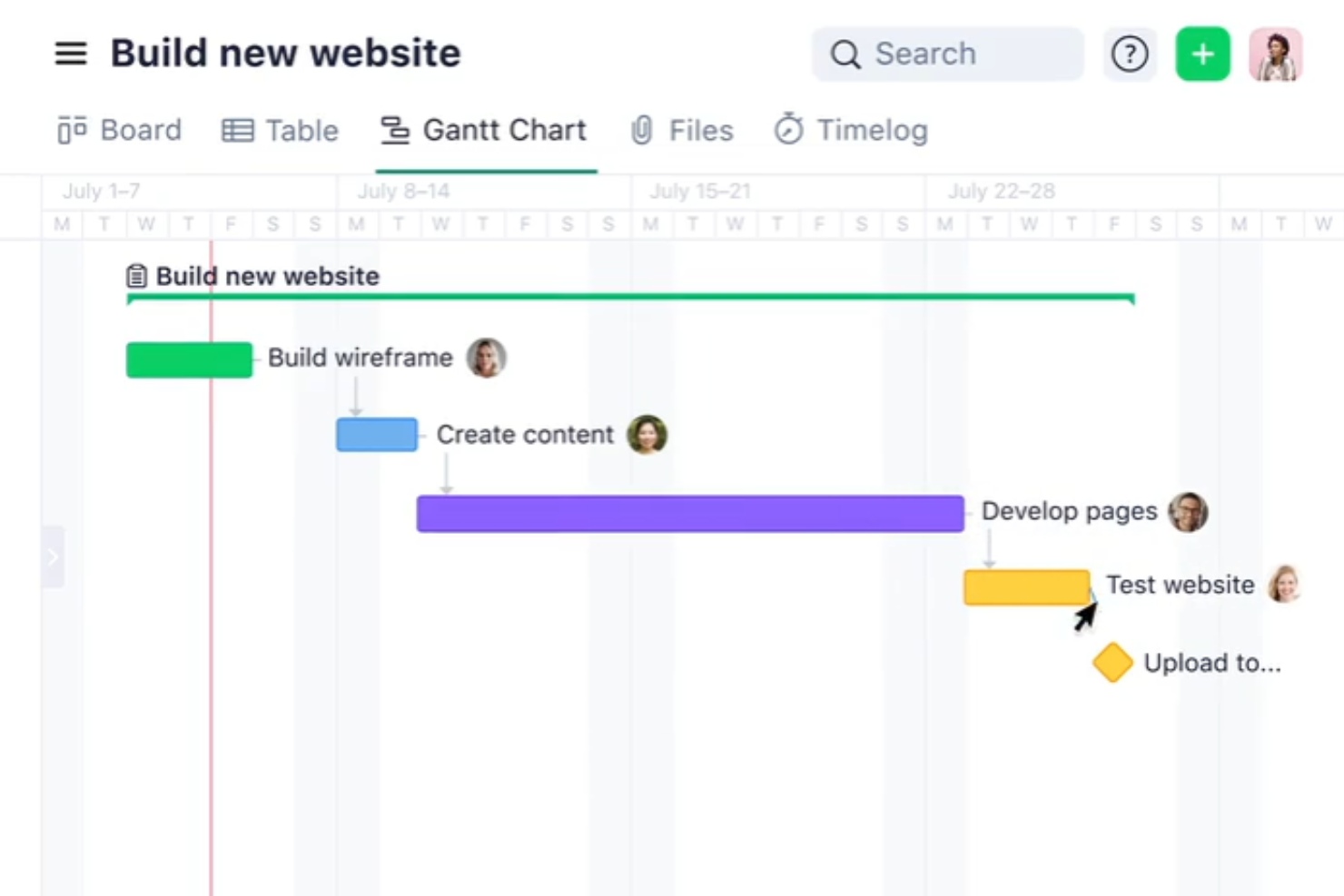
Wrike is a project management and work management platform designed to help teams collaborate and manage tasks efficiently. It allows teams to manage their projects from start to finish, including planning, execution, and reporting. Wrike's platform is designed to accommodate different team sizes and project complexities.
Why it's a good Teamwork alternative:
Wrike is a strong alternative to Teamwork because of its extensive customization and flexibility options, which cater to diverse and complex project needs. While both platforms offer robust project management and collaboration tools, Wrike stands out with its ability to tailor workflows, dashboards, and reporting features to specific project requirements. You can create custom workflows that align with your unique processes and view project plans using Gantt charts, Kanban boards, or lists. You can even design personalized dashboards to visualize key metrics and generate detailed, custom reports for in-depth analysis.
Standout features & integrations:
Features include real-time reporting, workload views, approval workflows, time tracking, task prioritization, budget tracking, customizable dashboards, automated workflows, Gantt charts, Kanban boards, resource allocation tools, project templates, and collaborative tools.
Integrations include Slack, Microsoft, Google, Adobe, Salesforce, Zoom, Tableau, MS Teams, OneDrive, GitHub, Gmail, Dropbox, Okta, OneLogin, HubSpot, Jira, and NetSuite.
Pros and Cons
Pros:
- Good reporting and analytics for projects
- Automated workflows, including approvals
- Highly customizable platform
Cons:
- Custom fields and workflows are unavailable on the free plan
- Learning curve when learning to customize the platform
New Product Updates from Wrike

Streamlining Workspaces with New Updates
Wrike announces custom space templates, AI Agents in Wrike Labs, and a new Guage widget to improve project management. For more information, visit Wrike's official site.

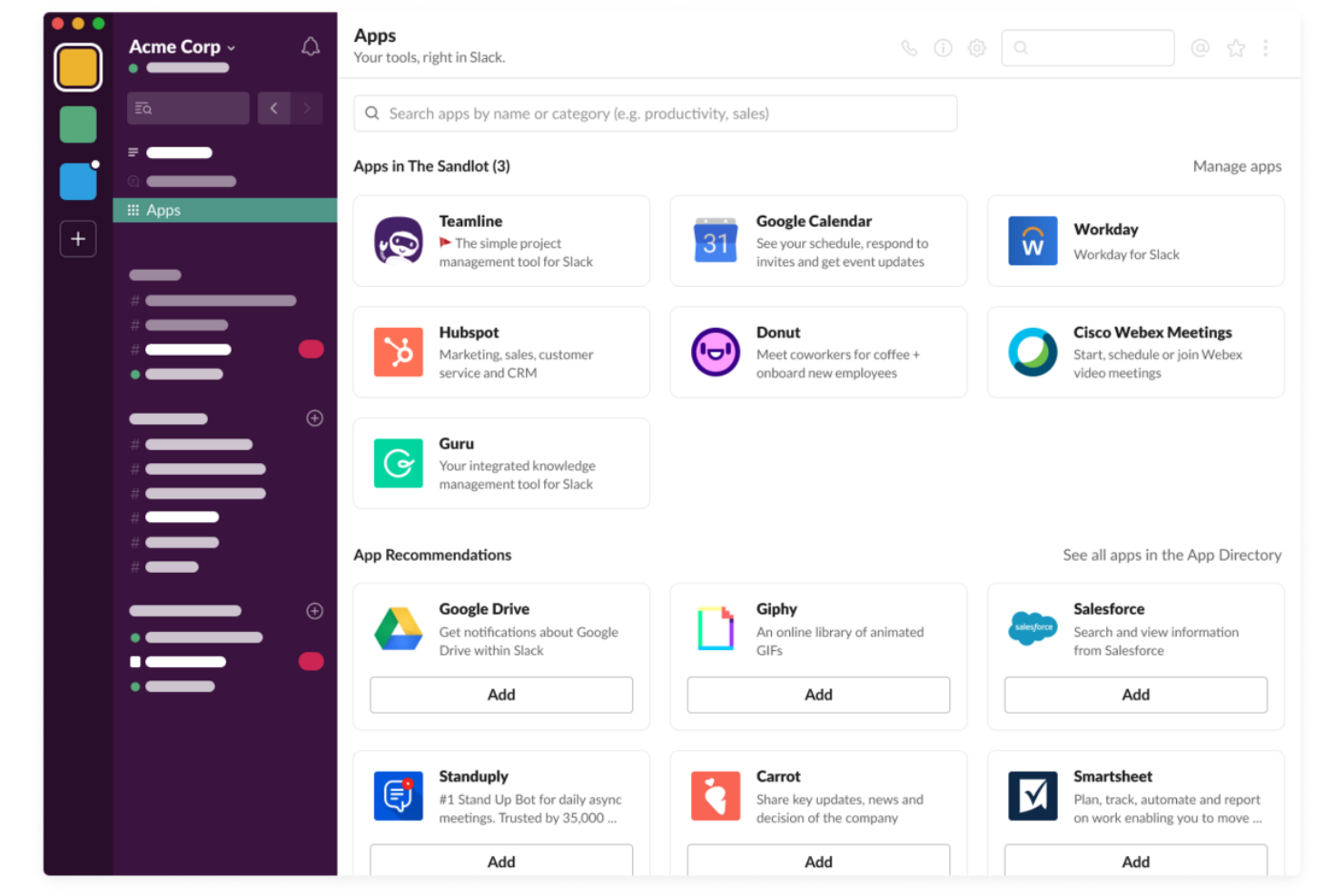
Slack is a powerful communication platform designed to facilitate team collaboration and streamline communication. It offers a centralized space for messaging, file sharing, and integrating other tools, making it essential for teams seeking efficient and organized communication channels.
Why it's a good Teamwork alternative:
Slack’s powerful communication features help to manage and improve team collaboration through channels, direct messaging, and integration with numerous productivity tools. Its real-time messaging, file sharing, and searchable history enhance team connectivity and efficiency, making it ideal for teams looking to improve their communication and project coordination.
Standout features & integrations:
Features include real-time messaging, file sharing, searchable message history, customizable channels, direct messaging, video and voice calls, notifications, workflow automation, custom emojis and reactions, pinning important messages, and advanced security features.
Integrations include Google Drive, Google Calendar, Dropbox, Trello, Asana, and Microsoft Office 365.
Pros and Cons
Pros:
- Powerful search functionality
- Extensive integration options
- Real-time messaging and notifications
Cons:
- Notification management can be challenging
- Can become cluttered with excessive channels
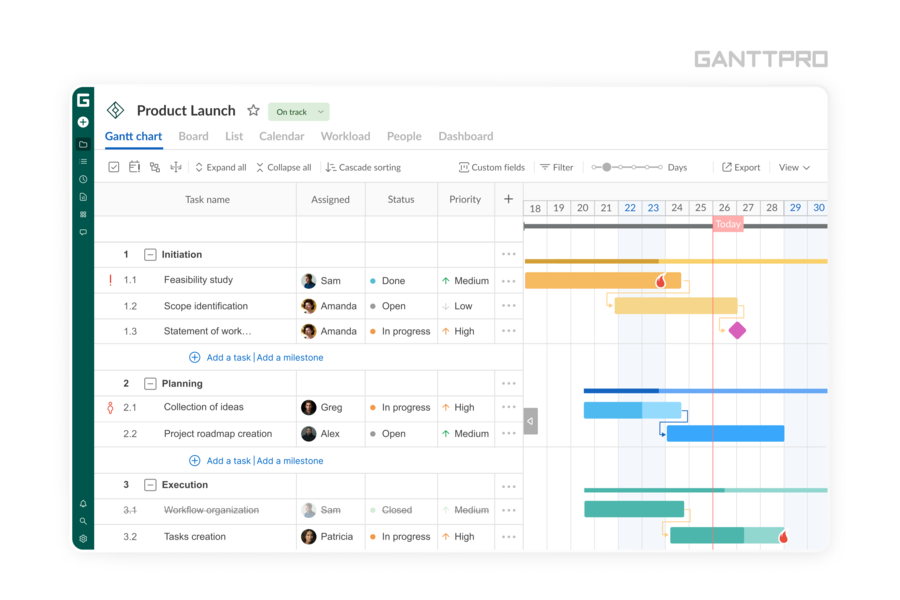
GanttPRO is an online project management tool that caters to industries like construction, IT, marketing, and consulting. It is particularly appealing to project managers and teams seeking to enhance collaboration and visibility in their projects.
Why I Picked GanttPRO
I picked GanttPRO for its exceptional use of interactive Gantt charts, which provide a clear visual representation of project timelines and dependencies. This feature is crucial for teams looking to align on project objectives without confusion. Additionally, GanttPRO's workload management allows you to allocate resources effectively, ensuring balanced workloads across your team. Task relations, another useful feature, enable you to define dependencies and sequences, making it easier to track progress and adjust plans as needed.
GanttPRO Key Features
In addition to its standout features, GanttPRO offers several other capabilities that make it a great Teamwork alternative:
- Board View: This feature allows your team to visualize tasks in a Kanban-style board, providing flexibility in task management.
- Time Logs: You can track the time spent on each task, which is valuable for monitoring productivity and managing project costs.
- Notifications: Stay informed with real-time updates and alerts, ensuring that your team is always aware of important changes or deadlines.
- Reporting Capabilities: Generate detailed reports to gain insights into project performance and make data-driven decisions.
GanttPRO Integrations
Integrations include Jira, Google Drive, Slack, and Microsoft Teams. An API is also available for custom integrations.
Pros and Cons
Pros:
- Kanban-style board view provides flexible task management.
- Task dependencies allow for clear project sequencing.
- Interactive Gantt charts enhance project visualization and planning.
Cons:
- Limited native integrations with other software tools.
- While reporting tools are present, it lacks more advanced options for complex forecasting.

Best for centralized client and project management

Bonsai is a business management platform that provides an all-in-one solution for project, client, and financial management. Its unified approach gives teams a consolidated view of different activities across all operations, facilitating better communication and visibility.
Why it's a good Teamwork alternative:
While both platforms offer similar project management features such as task management, time tracking, and collaboration tools, Bonsai stands out with its integrated billing and invoicing capabilities. These features allow businesses to create invoices from templates and collect payments directly within the platform. This streamlines the financial management process, unlike Teamwork, which requires exporting invoices to external accounting software. Additionally, Bonsai’s comprehensive client management suite, including CRM, proposals, and contracts, provides a more holistic approach to project and client management.
Standout features & integrations:
Features include time tracking, task management, project templates, client CRM, e-signatures, automated reminders, reporting and analytics, customizable templates, tax time reports, a mobile app, team collaboration tools, and unlimited file storage.
Integrations include QuickBooks, Xero, Zapier, Google Calendar, Slack, Trello, Asana, Calendly, Stripe, PayPal, and Dropbox.
Pros and Cons
Pros:
- Templates for client-facing documents
- Automated workflows and invoices
- All-in-one project and business management
Cons:
- Mobile app could be improved
- Key features like resource planning are limited to higher-tier plans


For teams looking for a dependable teamwork alternative, Workzone is a practical project management tool used across industries like marketing, healthcare, and education. It’s built for professionals juggling multiple projects and tight deadlines, with tools that support collaboration and keep work organized. By tackling issues like scattered project requests and limited visibility, Workzone brings structure to project management and helps teams work more efficiently.
Why I Picked Workzone
I picked Workzone because it offers clear, real-time visibility into project progress, which matters when teams need an accurate view of what’s happening and what’s next. Project lifecycle management and detailed reporting make it easier to track work and stay on schedule. Collaboration features like proofing and approvals support straightforward communication and help prevent misalignment. If you want a teamwork alternative that improves coordination without adding unnecessary complexity, Workzone delivers practical, usable tools.
Workzone Key Features
In addition to its standout capabilities, Workzone offers a variety of features that support teamwork alternatives:
- Pre-built Templates: These allow your team to quickly launch projects with standardized processes, saving time on setup.
- Workload Management: This feature helps you allocate resources effectively, ensuring that no team member is overwhelmed.
- Centralized Requests: It enables your team to organize project requests in one place, reducing confusion and improving efficiency.
- Comprehensive Reporting: This provides insights into metrics such as budgets and resource allocation, helping your team make informed decisions.
Workzone Integrations
Integrations include Slack, Microsoft Teams, Google Drive, Salesforce, Dropbox, Box, Outlook, SharePoint, Adobe Creative Cloud, and QuickBooks.
Pros and Cons
Pros:
- Unlimited training and live support
- Built-in document proofing approvals
- Strong real-time project visibility
Cons:
- Pricing less suitable small teams
- Limited advanced budgeting features


Nifty is a project management tool designed to streamline team collaboration by integrating project goals, tasks, and communication into a single platform. It offers features such as task management, milestone tracking, and team collaboration tools, making it the best choice for teams looking to centralize their workflows.
Why it's a good Teamwork alternative:
Nifty effectively combines various project management and collaboration tools into one cohesive app. Its ability to unite teams, align goals, and manage processes efficiently make it a strong alternative for teams needing an all-in-one solution.
Standout Features:
Features include milestone tracking, task management processes, Kanban views, collaborative documents, time tracking, and project reporting.
Integrations include Google Drive, Slack, Zoom, and GitHub.
Pros and Cons
Pros:
- Strong integration option
- Effective milestone and task tracking
- Comprehensive project management features
Cons:
- Limited customization for advanced features
- Learning curve for new users


Freedcamp is a versatile project management and collaboration tool designed to help teams organize, manage tasks, and communicate effectively.
Why it's a good Teamwork alternative:
Freedcamp provides robust project management features with the significant advantage of unlimited storage at no cost. Unlike other tools that impose storage limitations or charge extra for additional space, Freedcamp stands out for its cost-efficiency and extensive functionality. Additionally, its user-friendly interface and extensive integration options make it suitable for teams of all sizes looking for a flexible and cost-effective project management solution.
Standout features & integrations:
Features include task management, time tracking, file sharing, team communication tools, project templates, calendar view, Kanban boards, Gantt charts, milestone tracking, issue tracking, custom fields, notifications, and mobile app access.
Integrations include Google Drive, Zapier, Slack, Dropbox, and Google Calendar.
Pros and Cons
Pros:
- Integrates with popular tools like Google Drive and Dropbox
- Comprehensive feature set for project management
- Unlimited storage
Cons:
- Limited customization options for task views
- User interface can be complex for beginners

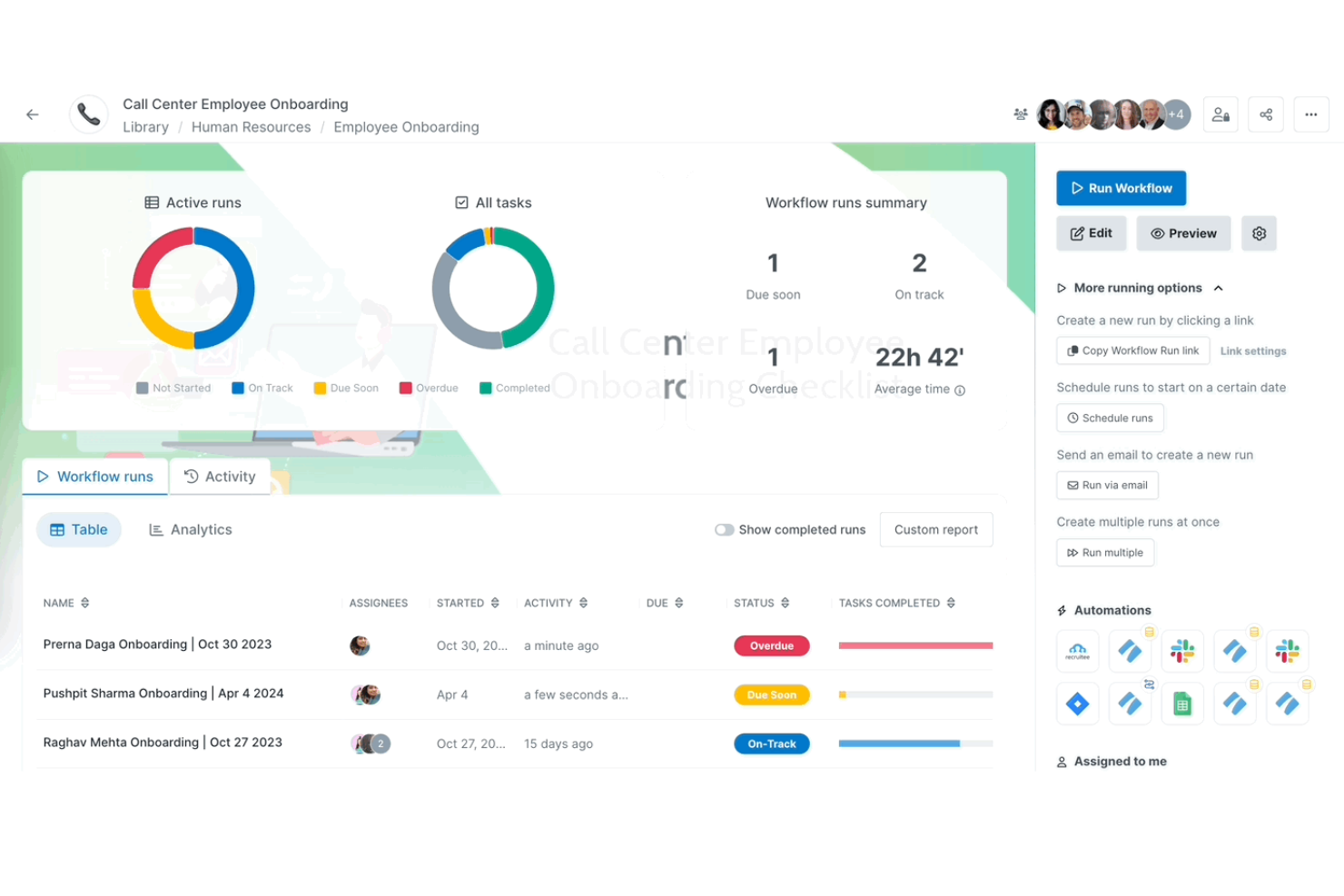
Process Street is a comprehensive AI-powered workflow automation tool that offers features such as automating and tracking business processes, organizing projects, unifying data across teams, and managing standard operating procedures.
Why it's a good Teamwork alternative:
While both tools offer task management, team collaboration, and third-party integrations, Process Street is ideal for those looking for workflow automation and process management solutions. Its project management workflow templates enable teams to standardize projects with features like conditional logic, dynamic due dates, and custom form fields. Process Street's focus on process management, coupled with its project workflow templates, helps teams with internal processes and managing projects without the complexity of the detailed project management features that Teamwork offers.
Standout features & integrations:
Features include customizable spreadsheets, database functionality, task management, Kanban boards, calendar view, gallery view, real-time collaboration, powerful filtering and sorting, rich field types, templates for various use cases, automation tools, advanced search capabilities, and detailed reporting and analytics.
Integrations include Slack, Google Drive, Salesforce, Zendesk, Asana, GitHub, Google Calendar, Dropbox, and Zapier.
Pros and Cons
Pros:
- Conditional logic aids in more complex and dynamic processes
- No-code, drag-and-drop interface
- Extensive customization of workflows
Cons:
- Advanced security and privacy features limited to enterprise plan
- Reporting features could be more robust
Other Teamwork Alternatives
Below is a list of additional Teamwork alternatives that I shortlisted. While they didn’t make the top 10, they’re still valuable and worth further research.
- Microsoft Teams
For Microsoft integrations
- Taskworld
For integrated chat and analytics
- ProofHub
For all-in-one project management
- Podio
For workflow automation
- Bitrix24
For CRM business management
- Ravetree
For flexible project methodologies
- Redmine
For open-source project management
- ClickUp
For advanced customizable project management
- Celoxis
For project portfolio management with advanced analytics
- GoodDay
For visual project planning and task tracking


Related Project Management Software Reviews
If you still haven't found what you're looking for here, check out these other related tools that we've tested and evaluated:
- Project Management Software
- Resource Management Software
- Workflow Automation Software
- Time Tracking Software
- Task Management Software
- Collaboration Tools
- Gantt Chart Maker
- Productivity Tools
- Project Tracking Software
- Project Scheduling Software
Selection Criteria for Choosing Teamwork Alternatives
When selecting a Teamwork alternative, it’s important to consider the functionality and specific use cases that are essential for project management tools. As an expert who has personally tried and researched these tools, here are the requirements I use when evaluating software:
Core Functionality - 25% of total weighting score
- Task creation and assignment
- Project timeline and milestone tracking
- Real-time team collaboration
- File sharing and document management
- Time tracking and reporting
Additional Standout Features - 25% of total weighting score
- Advanced analytics for performance tracking
- Integrated chat for seamless communication
- Customizable project templates
- Automated workflow capabilities
- AI-driven insights for project forecasting
Usability - 10% of total weighting score
- Intuitive user interface with drag-and-drop functionality
- Clear and easy navigation
- Minimal clicks required to perform tasks
- Visual appeal and design aesthetics
Onboarding - 10% of total weighting score
- Availability of training videos and documentation
- Interactive product tours and onboarding wizards
- Pre-built templates for quick setup
- Accessible customer support during onboarding
- Webinars and live training sessions
Customer Support - 10% of total weighting score
- 24/7 customer support availability
- Multiple support channels (chat, email, phone)
- Fast response times
- Availability of a comprehensive knowledge base
- Quality of support during troubleshooting
Value For Money - 10% of total weighting score
- Competitive pricing relative to features offered
- Transparent pricing structure
- Flexible pricing plans (monthly, annually)
- Free trial or demo availability
- Cost efficiency for larger teams
Customer Reviews - 10% of total weighting score
- Overall customer satisfaction ratings
- Positive feedback on ease of use and functionality
- High ratings for customer support experiences
- Reviews highlighting unique or standout features
- Consistent updates and improvements based on user feedback
Choosing the right Teamwork alternative requires careful consideration of several different factors. By focusing on these selection criteria, you can confidently select a project management solution that propels your team towards greater efficiency and success.
Why Look for a Teamwork Alternative
Teamwork is a valuable project management software with advanced features and integrations. However, it might not be the right fit for every team. Typically, you may be looking for an alternative to Teamwork if you:
- Need a lower cost option: Teamwork offers plans from $11/user/month, but if you’re a small business or need more seats, you may fare better with a cheaper solution.
- Want a more intuitive interface: Although Teamwork has a rather user-friendly interface, it may become more complicated with larger projects, leading you to find an alternative.
- Seek further customization options: Customized views and templates are more important than most realize for streamlining processes, making a solution with these features valuable.
- Need better integration: Teamwork integrates with several tools, but if it doesn’t connect well with your current stack, you may need an alternative solution.
- Desire more customer support: For those times you just can’t seem to find the answer, you want a software that provides dedicated customer support.
Ultimately, finding the right tool can enhance team productivity, streamline project execution, and contribute to overall business success. By reviewing alternatives, you can ensure that your chosen software fits your specific requirements, driving overall team efficiency and collaboration.
Ket Features of Teamwork Alternatives
Here are some key features of Teamwork that your alternative software should be able to replicate or improve upon in order to be a good fit:
- Task Management: Your chosen software must allow you to easily create, assign, and track tasks. Make sure to set deadlines, prioritize tasks, and monitor progress to keep various projects on track.
- Time Tracking: With your software, you should be able to track billable hours and generate reports to analyze how time is spent across different activities.
- Gantt Charts: With Gantt charts, you can plan and schedule tasks, adjust timelines, and manage project progress with a clear and detailed overview.
- Milestones: The right Teamwork alternative will enable you to define important points in the project dashboard and monitor their achievement to stay aligned with overall objectives.
- File Sharing: Top Teamwork alternatives help leaders ensure all team members have the necessary files and information at their fingertips.
- Team Collaboration: A good software enhances teamwork and streamlines communication to keep everyone informed and engaged.
- Project Templates: With your Teamwork alternative, you should be able to customize templates to fit your specific needs and start new projects quickly.
- Reporting: Using the right alternative software lets you easily track metrics, analyze data, and present findings to stakeholders.
- Integrations: Make sure your chosen solution can connect with other tools like Slack, Google Drive, and more to streamline workflows and enhance productivity.
- Mobile App: A valuable software alternative will help you stay connected, update recurring tasks, and collaborate with your team from anywhere, ensuring continuous project progress.
When evaluating Teamwork alternatives, it's essential to compare their key features to ensure they meet your project management needs. Whether you prioritize intuitive interfaces, advanced collaboration tools, or detailed reporting capabilities, there's a solution out there that fits your team's unique requirements.
What’s Next?
Subscribe to the DPM newsletter to get regular updates when we publish fresh how-to guides and articles on digital project management topics.