
15 Best Slite Alternatives Picked for 2026

10 Slite Alternatives Shortlist
Here's my pick of the 10 best software from the 15 tools reviewed.


A strong Slite alternative gives your team flexible knowledge management, real-time collaboration, and AI-powered search—without locking you into a single workflow. If you’re searching for Slite alternatives, you’re likely looking for tools that support fast documentation, easy sharing, and reliable integrations with your existing stack.
This list will help you compare leading options, so you can find a knowledge base platform that fits your team’s needs, adapts to change, and keeps information accessible as your projects evolve.
What Is Slite?
Slite is an AI-powered knowledge base platform designed for team documentation and information sharing. It lets teams create, organize, and search internal documentations, meeting notes, and project wikis in one place. Slite’s features include collaborative editing, version history, and integrations with popular tools.
Its AI capabilities help users find answers quickly and keep content up to date, making it a popular choice for distributed and fast-moving teams.
Slite Alternatives Summary
This comparison chart summarizes pricing details for my top Slite alternatives to help you find the best one for your budget and business needs.
| Tool | Best For | Trial Info | Price | ||
|---|---|---|---|---|---|
| 1 | Best for customizable workspace templates | Free plan available | From $10/user/month (billed annually) | Website | |
| 2 | Best for real-time collaborative editing | Free plan available | From $6/user/month (billed annually) | Website | |
| 3 | Best for multilingual content | Free plan available | From $49/author/month (billed annually) | Website | |
| 4 | Best for Slack integration support | 30-day free trial available | From $8/user/month (billed annually) | Website | |
| 5 | Best for large team collaboration features | Free plan available | From $5.42/user/month | Website | |
| 6 | Best for API documentation integration | Free plan + 14-day free trial available | From $65/site/month + $12/user/month (billed annually) | Website | |
| 7 | Best for developer-focused documentation | 14-day free trial available | From $80/month (billed annually) | Website | |
| 8 | Best for spreadsheet and document fusion | Free trial available | From $10/user/month (billed annually) | Website | |
| 9 | Best for Microsoft Teams compatibility | 14-day free trial available | From $12/user/month (billed annually) | Website | |
| 10 | Best for knowledge base analytics tools | Free demo available | Pricing upon request | Website |
Why You Can Trust Us
We’ve been testing and reviewing project management software since 2012. As project managers ourselves, we know how critical and difficult it is to make the right decision when selecting software.
We invest in deep research to help our audience make better software purchasing decisions. We’ve tested more than 2,000 tools for different project management use cases and written over 1,000 comprehensive software reviews. Learn how we stay transparent & our software review methodology.
-

Accelo
Visit WebsiteThis is an aggregated rating for this tool including ratings from Crozdesk users and ratings from other sites.4.4 -
Wrike
Visit WebsiteThis is an aggregated rating for this tool including ratings from Crozdesk users and ratings from other sites.4.2 -
Forecast
Visit WebsiteThis is an aggregated rating for this tool including ratings from Crozdesk users and ratings from other sites.4.6




Slite Alternatives Reviews
Below are my detailed summaries of the best Slite alternatives that made it onto my shortlist. My reviews offer a detailed look at the features, integrations, and best use cases of each platform to help you find the best one for you.

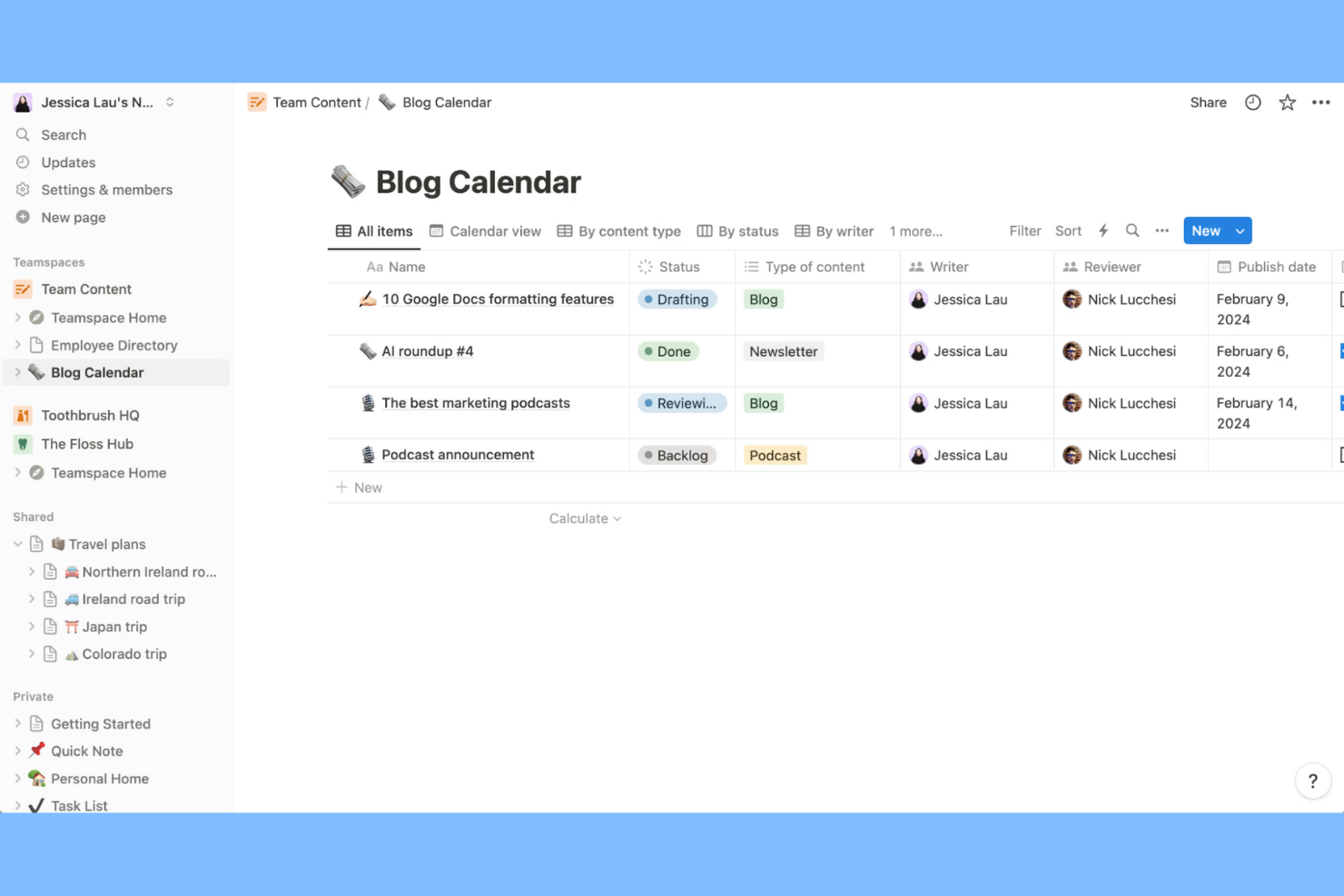
Notion gives teams a flexible way to build and organize knowledge bases with customizable workspace templates. If you need to tailor documentation layouts for different projects or departments, Notion’s modular approach stands out from more rigid platforms like Slite. It’s a strong fit for small teams that want to blend notes, internal wikis, and databases in one place.
Why Notion Is a Good Slite Alternative
Notion stands out for its highly customizable workspace templates, which let you design knowledge bases that match your team’s unique structure and workflow. I picked Notion because you can create custom page layouts, databases, and linked content blocks, making it easy to organize information the way your team actually works. Its template gallery covers everything from project wikis to meeting notes, so you can get started quickly or build from scratch. For teams that want more control over how knowledge is captured and shared, Notion offers flexibility that goes beyond what Slite provides.
Notion Key Features
Some other features in Notion make it a versatile choice for knowledge management:
- AI-powered content suggestions: Notion AI can summarize notes, generate action items, and answer questions based on your workspace content.
- Granular permissions: Set view, comment, or edit access at the page or database level for precise control over information sharing.
- Version control: Track changes and restore previous versions of any page to maintain accurate documentation.
- Embedded media support: Add images, videos, code snippets, and files directly into pages to create rich, interactive documentation.
Notion Integrations
Integrations include Slack, Jira, GitHub, Asana, Google Drive, Figma, Trello, GitLab, Webex, and Typeform.
Pros and Cons
Pros:
- Version history supports easy recovery
- Linked databases connect content across pages
- Supports AI search and summaries
Cons:
- Formatting complex tables can be unintuitive
- Offline access is limited and unreliable

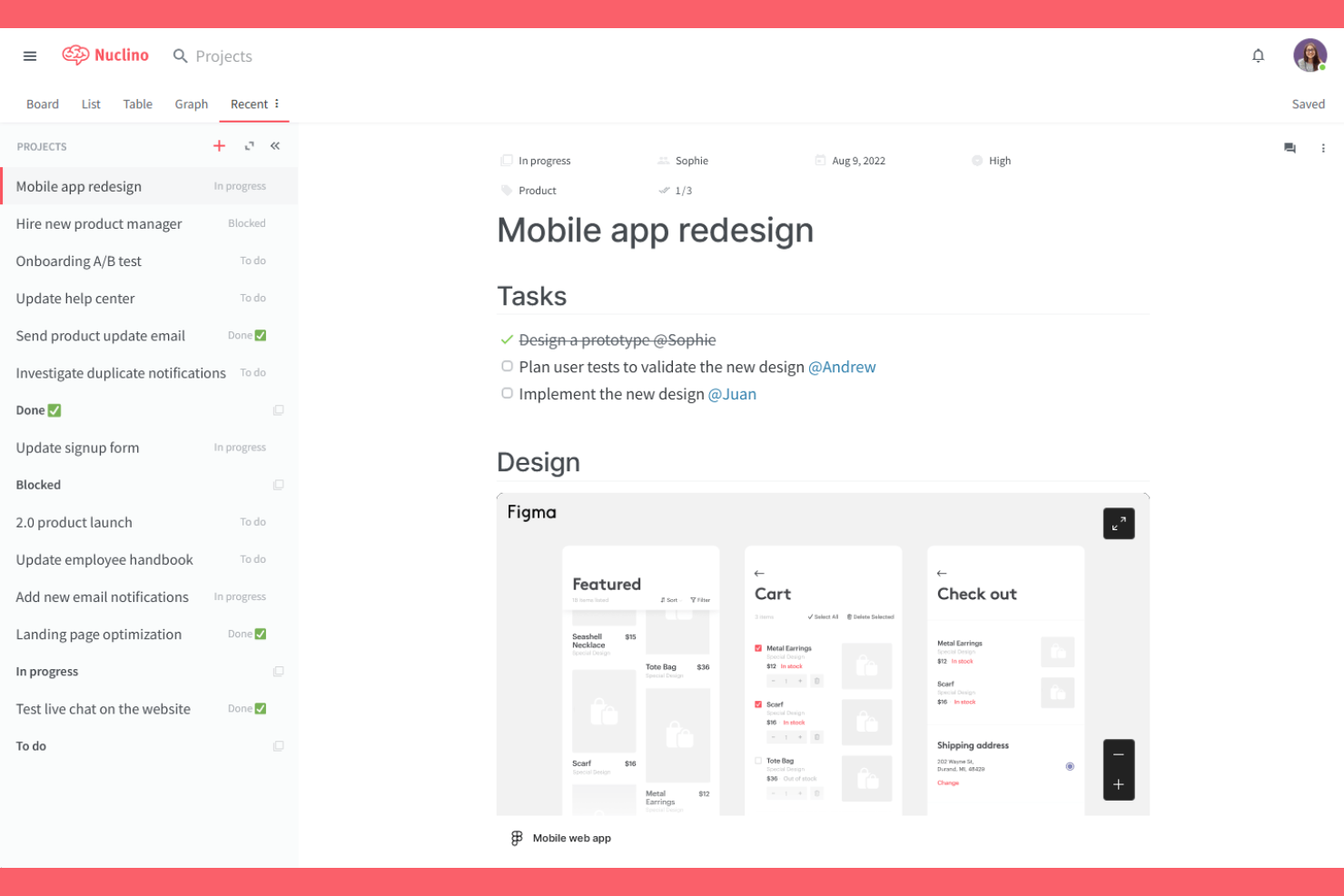
If your team needs fast, real-time collaborative editing, Nuclino is built for you. Its lightweight, unified workspace appeals to product teams, startups, and agencies that want to keep documentation, project notes, and knowledge bases instantly up to date. Unlike Slite, Nuclino’s focus on live editing and intuitive interface helps teams avoid version conflicts and keep everyone on the same page.
Why Nuclino Is a Good Slite Alternative
When real-time collaborative editing is your top priority, Nuclino stands out as a strong alternative to Slite. I picked Nuclino because its live multi-user editing and instant syncing let teams co-author documents without version conflicts or delays. The tool’s unified workspace structure keeps knowledge, tasks, and project docs organized and accessible as soon as changes are made. For teams that need to move quickly and keep everyone aligned, Nuclino’s real-time editing features make it a compelling choice.
Nuclino Key Features
In addition to its real-time editing strengths, Nuclino offers several other features worth noting:
- Graph view: Visualize the relationships between documents and topics in an interactive map.
- Markdown support: Format content quickly using built-in markdown shortcuts.
- Version history: Review and restore previous versions of any document.
- Embed integrations: Add content from tools like Figma, Miro, and YouTube directly into your pages.
Nuclino Integrations
Integrations include Slack, Microsoft Teams, Discord, Google Drive, Dropbox, Box, Jira, Figma, Typeform, and Google Calendar.
Pros and Cons
Pros:
- Clean and minimal interface
- Markdown shortcuts speed up content formatting
- Graph view maps relationships between topics
Cons:
- Offline access is not currently supported
- No granular permissions for individual pages

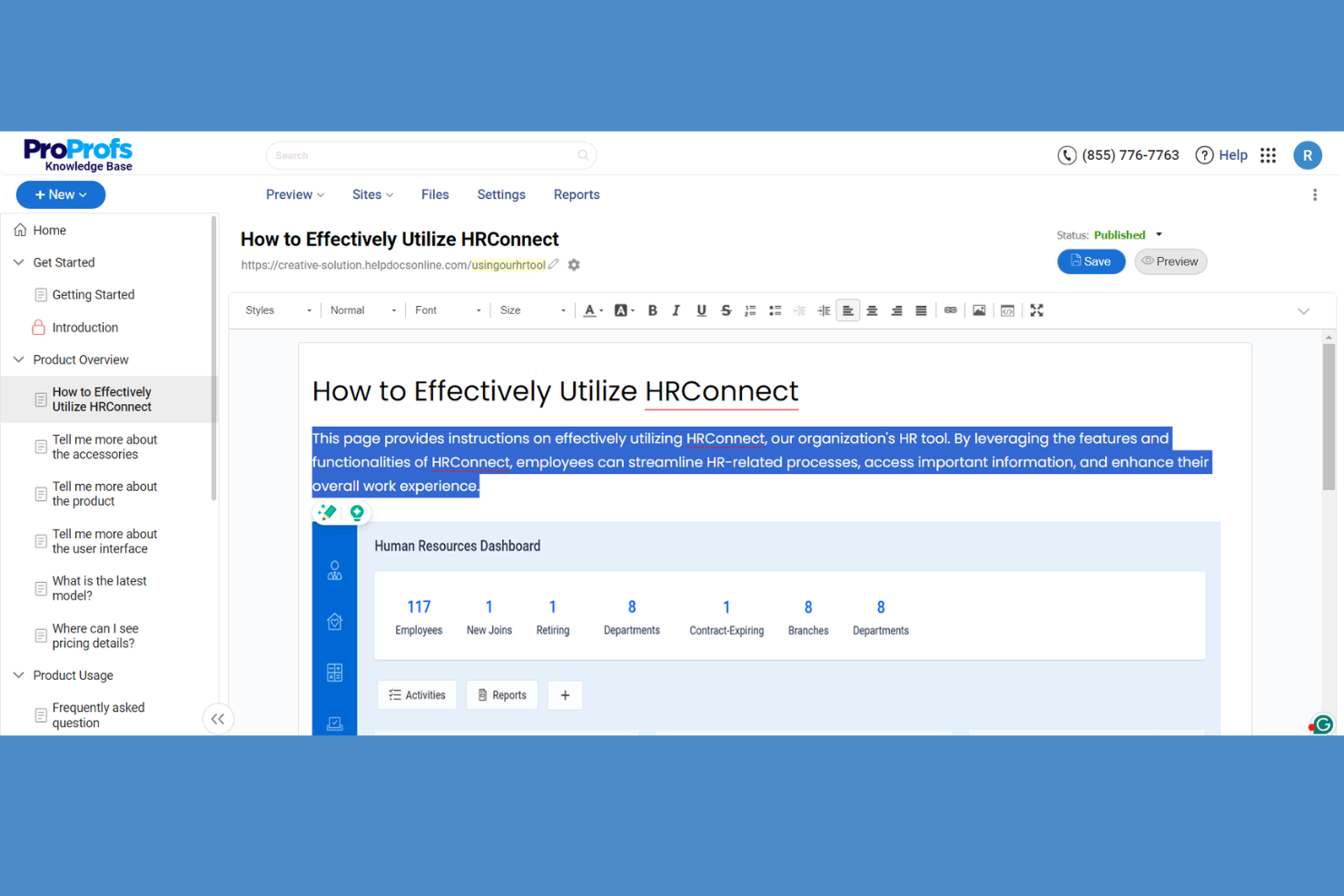
ProProfs Knowledge Base is designed for organizations that need to manage and deliver content in multiple languages. If your team supports global customers or operates across regions, you’ll appreciate how ProProfs handles translation and localization directly within its platform. Unlike Slite, ProProfs offers built-in multilingual management tools that help you create, organize, and update knowledge content for diverse audiences.
Why ProProfs Knowledge Base Is a Good Slite Alternative
When you need to manage knowledge for a multilingual audience, ProProfs Knowledge Base stands out as a strong alternative to Slite. I picked ProProfs because it lets you create, translate, and update articles in multiple languages from a single dashboard. The platform also supports language-specific workflows, so you can assign content to translators and reviewers without losing track of updates. This makes it a practical choice for teams that need to deliver accurate, localized knowledge to users around the world.
ProProfs Knowledge Base Key Features
Some other features worth noting include:
- Custom branding: Add your company logo, colors, and domain to personalize your knowledge base.
- User roles and permissions: Assign specific access levels to authors, editors, and viewers.
- Analytics and reporting: Track article performance and user engagement with built-in analytics.
- Content versioning: Maintain a history of changes and restore previous versions of articles.
ProProfs Knowledge Base Integrations
Integrations include Jira, Hotjar, Salesforce, Slack, Zendesk, Tidio Chat, LiveChat, Olark, and SnapEngage.
Pros and Cons
Pros:
- User-friendly interface suitable for beginners
- Quick and straightforward setup process
- Insightful and easy-to-understand analytics
Cons:
- Interface may feel basic for power users
- Limited advanced customization options


Teams that rely on Slack for daily communication will find Tettra especially useful as a knowledge base platform. It’s built for fast-moving companies that want to capture, organize, and share knowledge directly from Slack without switching tools. Unlike Slite, Tettra’s deep Slack integration lets you answer questions, suggest documentation, and manage content requests right inside your team’s chat workflow.
Why Tettra Is a Good Slite Alternative
For teams that want their knowledge base to live where conversations happen, Tettra’s Slack integration is a major advantage. I picked Tettra because it lets you create, search, and share knowledge directly from Slack, so your team doesn’t have to leave their chat environment to find answers. The tool also allows you to answer questions in Slack by surfacing relevant Tettra pages and manage content requests without switching apps. If your workflow is centered around Slack, Tettra’s tight integration makes it a strong alternative to Slite.
Tettra Key Features
Some other features that stand out include:
- Content verification workflows: Assign subject matter experts to review and verify knowledge base articles.
- Page suggestions: Automatically recommend relevant Tettra pages when team members ask questions.
- Templates library: Use pre-built templates to standardize documentation across your team.
- Google Workspace integration: Import and link Google Docs, Sheets, and Slides directly into Tettra pages.
Tettra Integrations
Integrations include Slack, Google Drive, GitHub, Zapier, Microsoft Teams, Trello, Asana, Jira, Dropbox, and Confluence.
Pros and Cons
Pros:
- Templates library standardizes documentation
- Content verification assigns experts to review pages
- Supports in-chat knowledge sharing in Slack
Cons:
- Search functionality misses keyword matches
- No offline access for knowledge base content

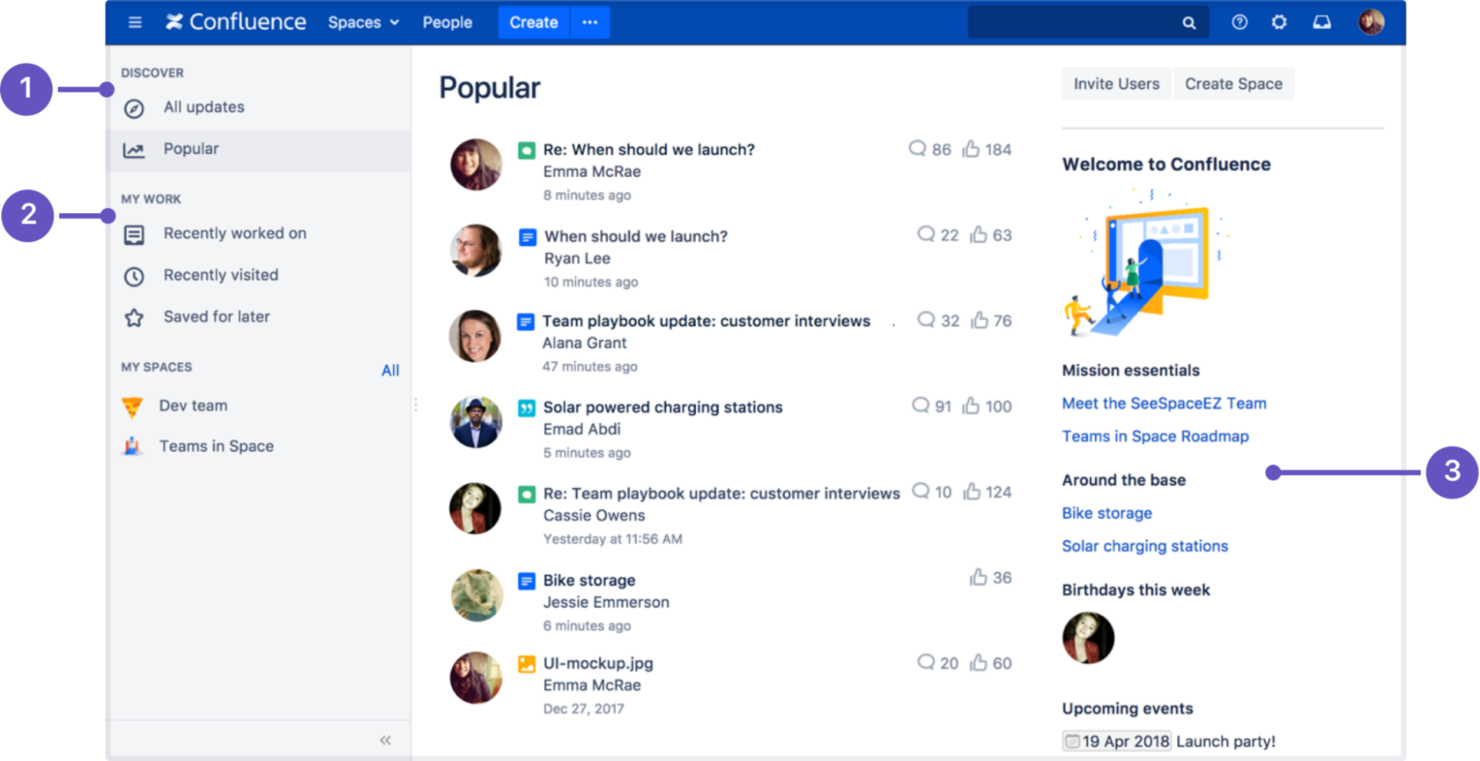
Confluence is designed for organizations that need advanced features for collaboration across large or distributed teams. If you’re managing complex projects or documentation at scale, Confluence’s structured spaces and deep integration with Atlassian tools set it apart from Slite. It’s especially useful for teams that want to centralize knowledge, manage permissions, and coordinate work across multiple departments.
Why Confluence Is a Good Slite Alternative
For teams that need to coordinate knowledge and documentation at scale, Confluence offers collaboration tools that go beyond what Slite provides. I picked Confluence because its structured spaces, advanced page permissions, and collaborative editing tools are built for large organizations with complex needs. Features like inline comments, page versioning, and detailed user roles help teams manage contributions and maintain control over sensitive information. If your team values granular collaboration and oversight, Confluence is a strong alternative to Slite.
Confluence Key Features
Some other features in Confluence make it a flexible choice for knowledge management:
- AI-powered content generation: Use Atlassian Intelligence to draft, summarize, and improve documentation directly within pages.
- Template library: Access a wide range of pre-built templates for meeting note-taking, project plans, and product requirements.
- Task tracking: Assign and track tasks within pages to keep project work visible and actionable.
- Analytics dashboard: Monitor page engagement and user activity with built-in analytics tools.
Confluence Integrations
Integrations include Jira, Slack, Microsoft Teams, Google Drive, Dropbox, Figma, Miro, GitHub, Zoom, and Loom.
Pros and Cons
Pros:
- Bulk user management for large organizations
- Offers AI-powered content suggestions
- Supports complex documentation structures
Cons:
- Steep learning curve
- Time-consuming permissions setup


If your team needs a knowledge base platform that excels at API documentation, GitBook is worth a close look. It’s designed for product and engineering teams who want to publish, maintain, and collaborate on technical docs with built-in API integration features. Unlike Slite, GitBook offers native OpenAPI support and interactive API explorer tools, making it easier to keep technical documentation and live API references in sync.
Why GitBook Is a Good Slite Alternative
When API documentation is a top priority, GitBook offers capabilities that go beyond what Slite provides. I picked GitBook because it supports native OpenAPI imports and lets you create interactive API explorers directly within your documentation. The platform also allows for real-time collaboration on technical docs, so product and engineering teams can keep API references accurate and up to date. If your knowledge base needs to double as a living API hub, GitBook’s specialized features make it a strong choice.
GitBook Key Features
Some other features that caught my attention include:
- Custom domains: Publish documentation under your own branded URL.
- Granular access controls: Set permissions for teams, groups, or individual users.
- Markdown support: Write and edit content using familiar markdown syntax.
- Version history: Track changes and restore previous versions of your docs.
GitBook Integrations
Integrations include GitHub, GitLab, Slack, Jira, Figma, Intercom, Linear, Google Docs, Loom, and Lucidchart.
Pros and Cons
Pros:
- Supports branded documentation portals
- Markdown and WYSIWYG editors available
- OpenAPI integration enables live API documentation
Cons:
- Limited automation for content review workflows
- No built-in database or table block support


Designed with technical teams in mind, Archbee offers a documentation platform tailored for developers and product engineers. Its API reference tools, code block support, and developer portal features make it a strong fit for SaaS companies and software teams managing complex technical knowledge. Unlike Slite, Archbee emphasizes structured API docs and interactive developer content, helping teams centralize and share technical information more effectively.
Why Archbee Is a Good Slite Alternative
For teams that need developer-focused documentation, Archbee brings features you won’t find in Slite. I picked Archbee because it supports interactive API reference docs and lets you embed code blocks with syntax highlighting, which is essential for technical documentation. The platform also offers a developer portal builder, making it easier to publish and organize public or private technical resources. If your team manages API docs or complex engineering knowledge, Archbee’s specialized tools make it a strong alternative.
Archbee Key Features
Some other features that stood out to me include:
- Custom branding: Apply your company’s logo, colors, and domain to documentation portals.
- Document versioning: Track changes and maintain multiple versions of your docs.
- Internal commenting: Collaborate with teammates using inline comments and feedback threads.
- Access controls: Set permissions for teams, groups, or individual users.
Archbee Integrations
Integrations include GitHub, GitLab, Bitbucket, Slack, Jira, Intercom, Zendesk, Figma, Miro, and Google Docs.
Pros and Cons
Pros:
- Inline commenting enables collaboration
- Custom branding for public and private portals
- Code block syntax highlighting for multiple languages
Cons:
- Slow search capabilities with large docs
- No built-in diagramming or whiteboarding tools

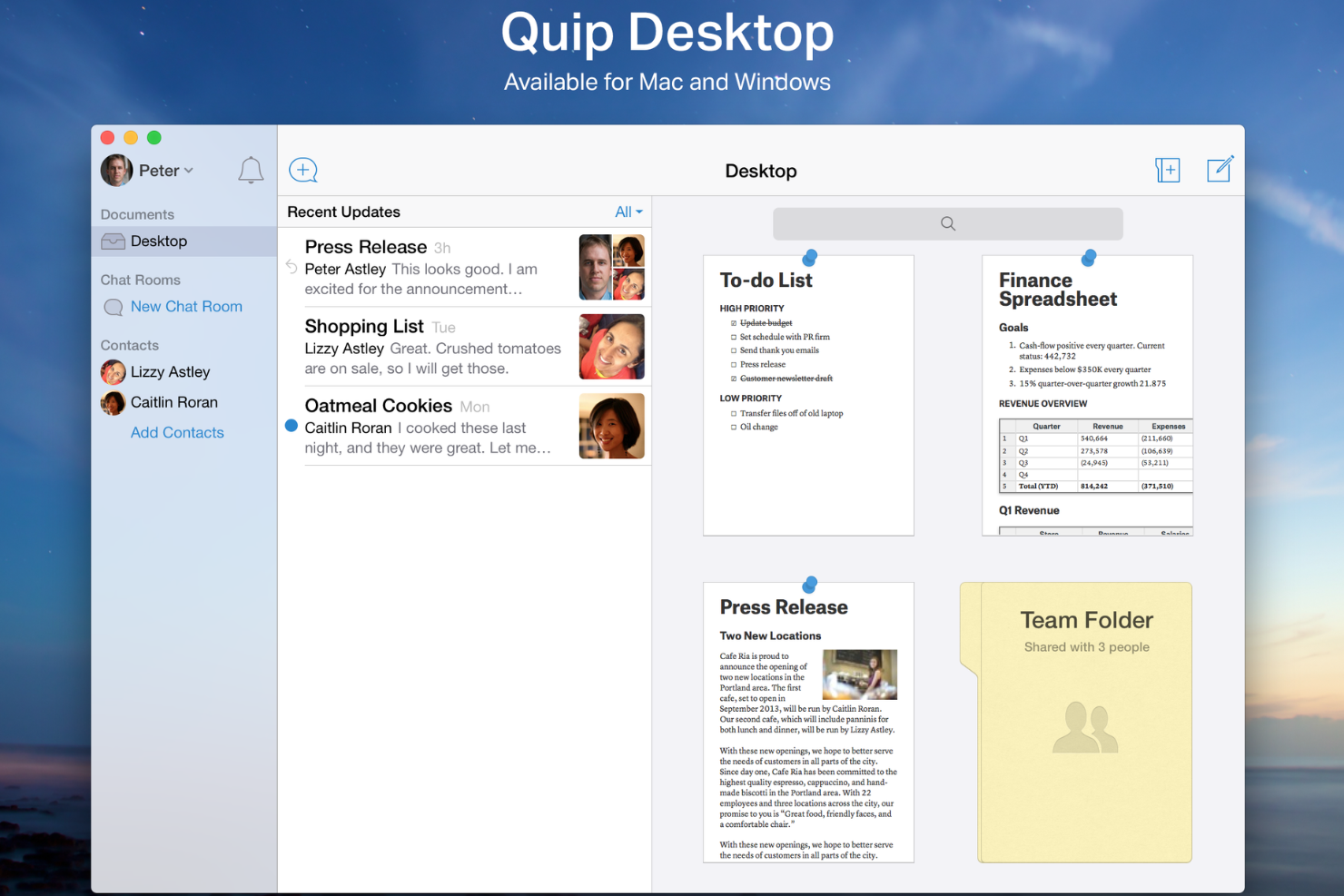
Quip brings spreadsheets and documents together in a single collaborative workspace, making it a strong fit for teams that need to blend structured data with written knowledge. Project managers and operations leads who juggle project plans, status reports, and live data will find Quip’s document-spreadsheet fusion especially useful. Unlike Slite, Quip lets you embed live spreadsheets directly into documents, so your team can update data and context in one place.
Why Quip Is a Good Slite Alternative
For teams that need to combine live data with documentation, Quip offers a unique approach that sets it apart from Slite. I picked Quip because it lets you embed fully functional spreadsheets directly inside documents, so your team can update numbers and context side by side. You can also link spreadsheet cells to text, making it easy to reference and update project metrics or task lists without switching tools. This fusion of spreadsheets and documents is especially valuable for project managers who want to keep plans, reports, and data-driven insights in one place.
Quip Key Features
Some other features worth highlighting include:
- Chat threads: Collaborate with your team directly inside documents using built-in chat threads.
- Document version history: Track changes and restore previous versions of any document.
- Mobile editing: Create and edit documents and spreadsheets from mobile devices.
- Templates library: Access a library of pre-built templates for project plans, meeting notes, and more.
Quip Integrations
Integration includes Salesforce.
Pros and Cons
Pros:
- Links documents to Salesforce CRM data
- Mobile app supports editing on the go
- Live spreadsheets update instantly
Cons:
- Limited formatting for technical documentation
- No native hierarchical wiki structure

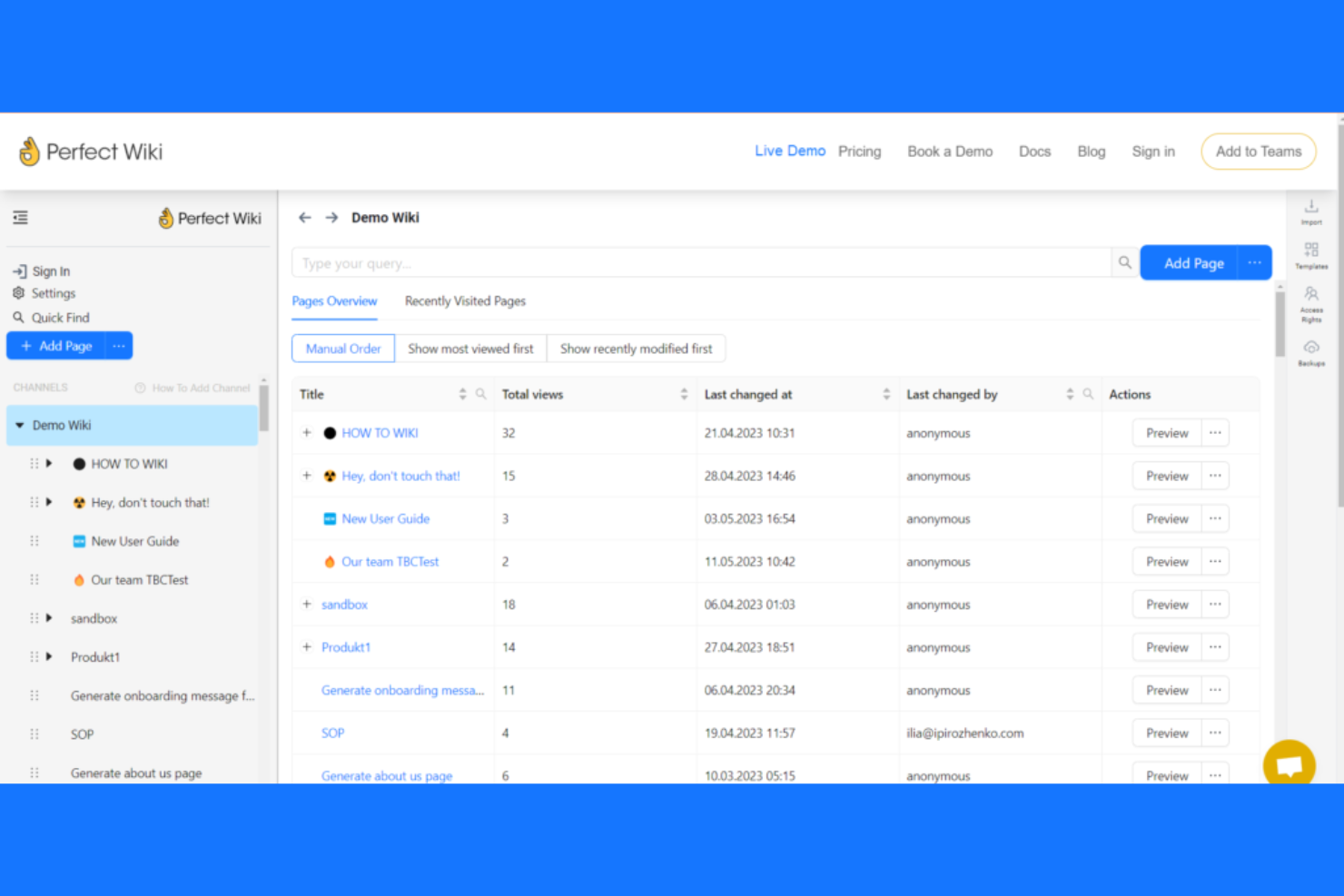
If your team relies on Microsoft Teams for collaboration, Perfect Wiki is designed to fit right into your workflow. This AI-powered knowledge base platform appeals to organizations that want to manage and share documentation without leaving the Teams environment. Unlike Slite, Perfect Wiki offers native Teams integration, making it easy to capture, organize, and access knowledge directly within your existing chat channels.
Why Perfect Wiki Is a Good Slite Alternative
Unlike many knowledge base tools, Perfect Wiki is built specifically for Microsoft Teams, making it a strong choice if your organization is already using Teams as its primary communication hub. I picked Perfect Wiki because it lets you create, edit, and search documentation directly inside Teams channels, so your team never has to switch platforms to find information. The tool also supports granular permissions and page versioning, which helps maintain control and accuracy over shared knowledge. For businesses committed to the Microsoft ecosystem, Perfect Wiki offers a level of integration and convenience that Slite doesn’t match.
Perfect Wiki Key Features
Some other features worth highlighting include:
- AI-powered content generation: Generate and summarize documentation using built-in AI tools.
- Export to PDF and Word: Export wiki pages directly to PDF or Microsoft Word formats.
- Full-text search: Search across all pages and attachments for quick information retrieval.
- Page analytics: Track page views and user engagement within your knowledge base.
Perfect Wiki Integrations
Integrations include Microsoft Teams, Slack, ChatGPT, Microsoft Edge, SharePoint, Salesforce, Power Automate, and OneDrive.
Pros and Cons
Pros:
- Page analytics track user engagement
- Export wiki pages to PDF and Word
- Native Microsoft Teams tab and chat integration
Cons:
- Search does not support advanced filters
- No public sharing outside Microsoft Teams

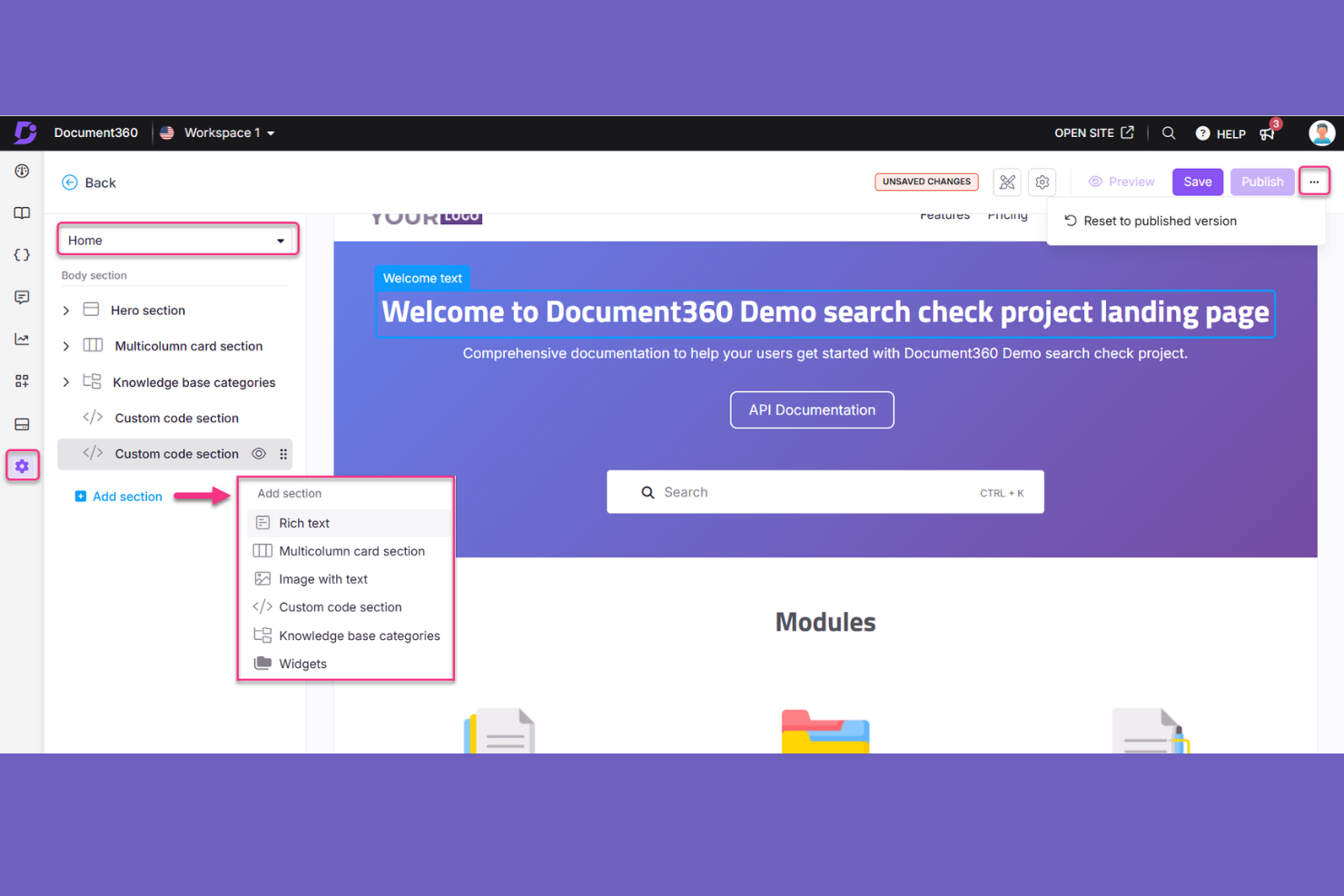
Teams that want deep insight into how their knowledge base is used should consider Document360. This platform is designed for product managers, support leads, and documentation teams who need advanced analytics to track article performance and user engagement. Unlike Slite, Document360 offers built-in analytics dashboards that help you identify content gaps and optimize your knowledge base strategy.
Why Document360 Is a Good Slite Alternative
If you need advanced analytics for your knowledge base, Document360 is a strong choice. I picked Document360 because it offers detailed dashboards that track article views, search terms, and user engagement in real time. The platform also provides heatmaps and feedback tools, so you can see exactly which content is working and where users get stuck. These analytics features help you make data-driven decisions to improve your documentation and knowledge sharing.
Document360 Key Features
In addition to its analytics capabilities, I also found these features useful:
- Markdown editor: Create and format articles using a built-in markdown editor for fast, structured documentation.
- Version management: Track, compare, and restore previous versions of articles to maintain content accuracy.
- Private and public knowledge bases: Set up separate spaces for internal knowledge sharing and external users within the same platform.
- Custom domain support: Publish your knowledge base on a branded domain for a consistent user experience.
Document360 Integrations
Integrations include Zendesk, Freshdesk, Intercom, Drift, Slack, Microsoft Teams, Salesforce, Google Analytics, Crowdin, and Disqus.
Pros and Cons
Pros:
- Private and public knowledge bases in one workspace
- Category manager organizes large content libraries
- Markdown editor supports technical documentation
Cons:
- Branding customization requires higher-tier plans
- No real-time collaborative editing for teams
New Product Updates from Document360

Document360 Improves Article Review Workflows
Document360 introduces enhancements to article review reminders, improving review governance with new interactive features. For more information, visit Document360's official site.
 .
.Other Slite Alternatives
Here are some additional Slite alternatives options that didn’t make it onto my shortlist, but are still worth checking out:


Slite Alternatives Selection Criteria
When selecting the best Slite alternatives to include in this list, I considered common buyer needs and pain points related to AI-powered knowledge base platform products, like surfacing relevant answers quickly and tracking knowledge base usage with analytics. I also used the following framework to keep my evaluation structured and fair:
Core Functionality (25% of total score)
To be considered for inclusion in this list, each solution had to fulfill these common use cases:
- Create and organize articles
- Search and retrieve information
- Manage user permissions
- Track article revisions
- Support multimedia content
Additional Standout Features (25% of total score)
To help further narrow down the competition, I also looked for unique features, such as:
- AI-powered content suggestions
- Built-in analytics dashboards
- Automated content tagging
- Multilingual content support
- Customizable workflows
Usability (10% of total score)
To get a sense of the usability of each system, I considered the following:
- Simple and intuitive navigation
- Clean and modern interface design
- Responsive performance across devices
- Minimal clicks to complete tasks
- Accessible for all user levels
Onboarding (10% of total score)
To evaluate the onboarding experience for each platform, I considered the following:
- Availability of training videos and guides
- Pre-built templates for quick setup
- Interactive product tours or walkthroughs
- In-app chatbots for onboarding support
- Access to live or recorded webinars
Customer Support (10% of total score)
To assess each software provider’s customer support services, I considered the following:
- Multiple support channels available
- Fast response times to inquiries
- Knowledgeable and helpful support staff
- Access to a searchable help center
- Community forums or user groups
Value For Money (10% of total score)
To evaluate the value for money of each platform, I considered the following:
- Transparent and flexible paid plans
- Feature set included at each pricing tier
- Free trial or free plan availability
- No hidden fees or surprise charges
- Discounts for annual billing or nonprofits
Customer Reviews (10% of total score)
To get a sense of overall customer satisfaction, I considered the following when reading customer reviews:
- Positive feedback on core features
- Reports of reliable uptime and stability
- Comments on ease of use
- Critiques of missing or weak features
- Responsiveness to customer feedback
Why Look For a Slite Alternative?
While Slite is a good choice of an AI-powered knowledge management platform, there are a number of reasons why some users seek out alternative solutions. You might be looking for a Slite alternative because…
- You need advanced analytics and reporting tools
- Your team requires real-time collaborative editing
- You want more control over branding and customization
- You need multilingual content management
- Your organization has strict data residency requirements
- You want deeper integrations with other business tools
If any of these sound like you, you’ve come to the right place. My list contains several AI-powered knowledge management tools that are better suited for teams facing these challenges with Slite and looking for alternative solutions.
Slite Key Features
Here are some of the key features of Slite, to help you contrast and compare what alternative solutions offer:
- AI-powered search for quick information retrieval
- Collaborative document editing with commenting
- Knowledge base templates for fast setup
- Document version history and rollback
- Permission controls for team and guest access
- Slack integration for notifications and sharing
- Structured folders and tagging for organization
- In-app discussion threads for team communication
- Public and private knowledge base options
- Real-time notifications for document updates