

13 Best GitBook Alternatives for 2026

GitBook Alternatives Shortlist


A strong GitBook alternative gives your team flexible documentation tools, real-time collaboration, and easy integration with your existing workflows. If you’re searching for GitBook alternatives, you’re likely facing limits with customization, collaboration, or scaling your documentation as your projects grow. The right all-in-one solution can help you manage project documentation, technical docs, knowledge bases, or API references without the friction you’ve experienced in GitBook.
In this list, you’ll find options that fit a range of team sizes, tech stacks, and specific needs, whether you want a simpler interface with a lower learning curve or more advanced documentation capabilities that match your workflow and project goals.
What Is GitBook?
GitBook is a documentation software platform that helps teams create, organize, and share knowledge in a structured, web-based format. It supports collaborative editing, version control, and integrates with tools like GitHub. Teams use GitBook to manage technical documentation, internal wikis, and product guides. Its user-friendly interface and markdown support make it accessible for both technical and non-technical users who need to maintain up-to-date, searchable documentation.
Best GitBook Alternatives Summary
This comparison chart summarizes pricing details for my top GitBook alternative selections to help you find the best one for your budget and business needs.
| Tool | Best For | Trial Info | Price | ||
|---|---|---|---|---|---|
| 1 | Best for fast, real-time team collaboration | 14-day free trial + free plan available | From $6/user/month (billed annually) | Website | |
| 2 | Best for API and developer documentation | 14-day free trial available | From $80/month | Website | |
| 3 | Best for designing and documenting APIs | Free plan + 14-day free trial available | From $44/month (billed annually) | Website | |
| 4 | Best for enterprise-scale knowledge sharing | Free trial + free plan available | From $5.42/user/month | Website | |
| 5 | Best for combining docs with project management | Free plan available | From $10/member/month (billed annually) | Website | |
| 6 | Best for open-source self-hosted documentation | Free, open-source | Free to use | Website | |
| 7 | Best for publishing technical docs from code repositories | 30-day free trial available | From $150/month | Website | |
| 8 | Best for React-based custom documentation sites | Free, open-source + free demo available | Free to use | Website | |
| 9 | Best for lightweight, file-based documentation | Free, open-source | Free to use | Website | |
| 10 | Best for automated documentation generation | Free plan + free demo available | From $250/month (billed annually) | Website |
Why You Can Trust Us
We’ve been testing and reviewing project management software since 2012. As project managers ourselves, we know how critical and difficult it is to make the right decision when selecting software.
We invest in deep research to help our audience make better software purchasing decisions. We’ve tested more than 2,000 tools for different project management use cases and written over 1,000 comprehensive software reviews. Learn how we stay transparent & our software review methodology.
-

Accelo
Visit WebsiteThis is an aggregated rating for this tool including ratings from Crozdesk users and ratings from other sites.4.4 -
Wrike
Visit WebsiteThis is an aggregated rating for this tool including ratings from Crozdesk users and ratings from other sites.4.3 -
Forecast
Visit WebsiteThis is an aggregated rating for this tool including ratings from Crozdesk users and ratings from other sites.4.6




GitBook Alternatives Reviews
Below are my detailed summaries of the GitBook alternatives that made it onto my shortlist. My reviews offer a detailed look at the features, best use cases, and integrations of each platform to help you find the best one for your team.


Nuclino is designed for teams that need to collaborate on documentation and knowledge bases in real time. It’s especially useful for fast-moving startups, product teams, and distributed groups that want instant updates and a lightweight editing experience. Unlike GitBook, Nuclino emphasizes speed and simplicity, making it easy to keep everyone on the same page without complex setup.
Why Nuclino Is a Good GitBook Alternative
For teams that need to move quickly and collaborate in real time, Nuclino offers a unique approach to documentation. I picked it as a GitBook alternative because every edit appears instantly for all users, so there’s no lag or confusion about the latest version. Its unified workspace lets you organize docs, wikis, and project notes with instant search and linking. This makes Nuclino a strong choice for groups that value speed and live collaboration above all else.
Nuclino Key Features
Some other features in Nuclino help teams manage and structure their documentation more efficiently:
- Graph View: Visualize the relationships between pages and topics in an interactive graph.
- Markdown Editing: Format content quickly using markdown syntax for consistency across docs.
- Version History: Review and restore previous versions of any document to track changes over time.
- Access Controls: Set permissions for workspaces, teams, and individual pages to manage visibility and editing rights.
Nuclino Integrations
Integrations include Slack, Google Drive, Microsoft Teams, GitHub, GitLab, Jira, Zoom, Google Calendar, Dropbox, and more.
Pros and Cons
Pros:
- Minimalist interface reduces distractions during editing
- Markdown support for fast, consistent formatting
- Real-time editing syncs instantly for all users
Cons:
- No granular page-level access permissions
- No public-facing documentation site feature
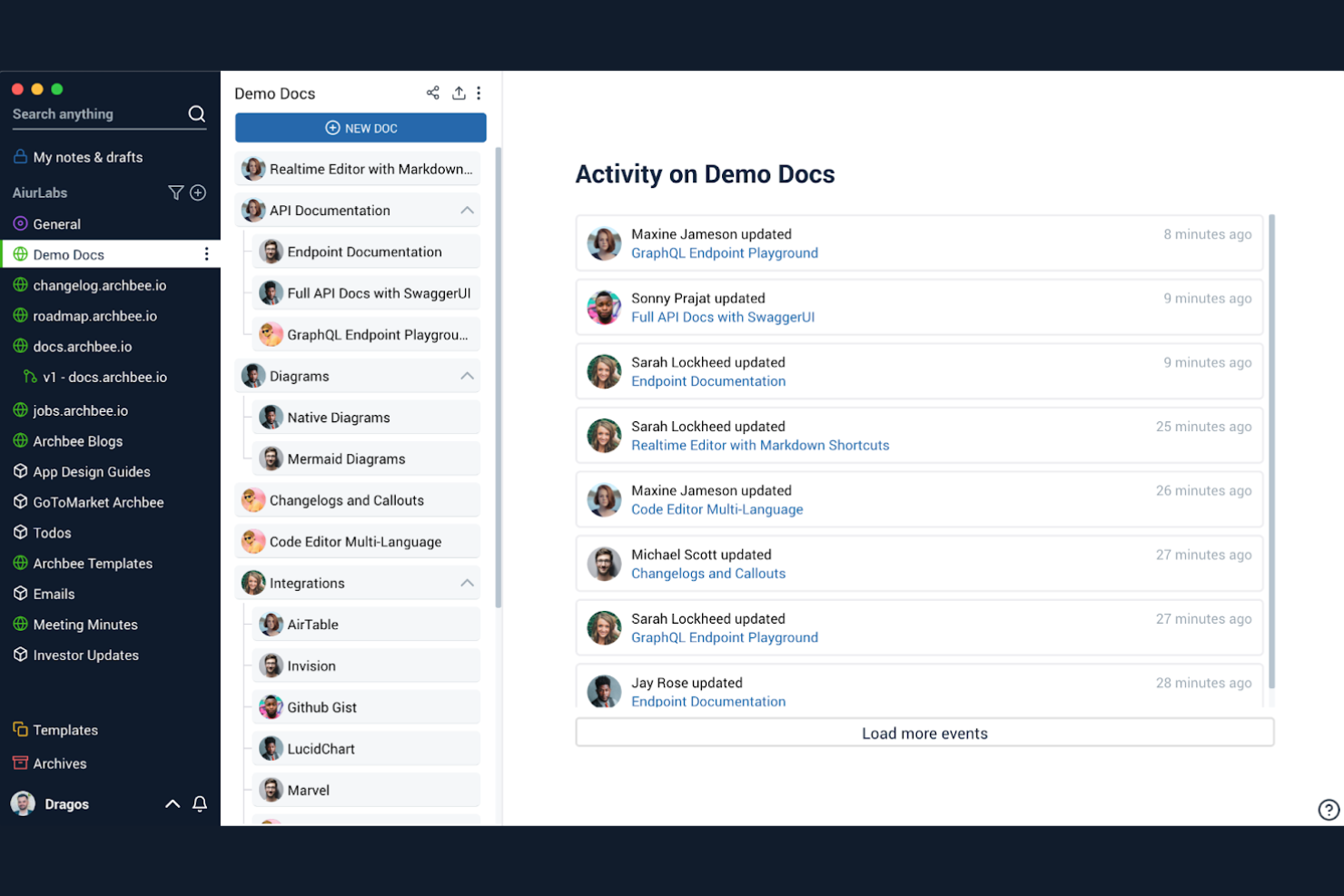
When you need a documentation platform built for technical teams, Archbee stands out with its focus on API and developer docs. It’s a strong fit for SaaS companies, engineering teams, and product managers who need to publish interactive API references and code samples alongside internal knowledge. Unlike GitBook, Archbee offers built-in API explorer tools and advanced developer-focused widgets that make technical documentation more interactive and useful.
Why Archbee Is a Good GitBook Alternative
If your team needs to document APIs or developer workflows, Archbee brings specialized tools that GitBook doesn’t offer. I picked Archbee because it lets you embed interactive API references directly into your docs, making it easier for developers to explore endpoints and test requests. The platform also supports code blocks with syntax highlighting and live code samples, which are essential for technical documentation. These features make Archbee a strong choice for teams focused on building and sharing developer-facing documentation.
Archbee Key Features
Some other features in Archbee help technical teams manage and publish documentation more effectively:
- Custom Domain Support: Publish documentation under your own branded domain for a professional appearance.
- Team Collaboration Tools: Assign roles, mention teammates, and comment directly within docs to coordinate work.
- Document Templates: Use pre-built templates to standardize new documentation and speed up content creation.
- Analytics Dashboard: Track page views and user engagement with built-in analytics for your documentation.
Archbee Integrations
Integrations include GitHub, GitLab, Bitbucket, Slack, Google Drive, Jira, Confluence, Notion, Trello, and more.
Pros and Cons
Pros:
- Pre-built templates for technical documentation types
- Document analytics for tracking reader engagement
- Interactive API explorer for live endpoint testing
Cons:
- Search function can miss nested content
- Occasional editor lag with large documents


API designers and developer teams who need to create, manage, and document APIs may find Stoplight especially useful. The platform stands out for its visual API modeling tools and deep support for the OpenAPI specification, making it easier to design and document complex APIs collaboratively. Unlike GitBook, Stoplight is purpose-built for API workflows, offering features that help teams standardize, mock, and publish API docs from a single workspace.
Why Stoplight Is a Good GitBook Alternative
For teams focused on designing and documenting APIs, Stoplight offers a specialized toolkit that goes beyond what GitBook provides. I picked Stoplight because it combines visual API modeling with instant documentation generation, making it easier to keep API docs accurate and up to date. The platform supports mocking endpoints and validating OpenAPI definitions, which helps teams test and refine APIs before launch. If your main priority is managing the full API lifecycle within your documentation workflow, Stoplight delivers features tailored specifically for that need.
Stoplight Key Features
Some other features in Stoplight help teams manage and publish API documentation more efficiently:
- Version Control Integration: Connect your API projects to Git repositories for change tracking and collaboration.
- Custom Documentation Themes: Apply custom branding and themes to published API docs.
- Role-Based Access Controls: Set permissions for editing, viewing, and publishing documentation across your team.
- Reusable API Design Components: Create and manage shared models, parameters, and responses for consistency across multiple APIs.
Stoplight Integrations
Integrations include GitHub, GitLab, Bitbucket, Azure DevOps, CircleCI, and more.
Pros and Cons
Pros:
- Reusable components for consistent API design
- Version control integration with Git repositories
- Built-in mocking for API endpoint testing
Cons:
- No built-in support for non-API docs
- Documentation export options are limited

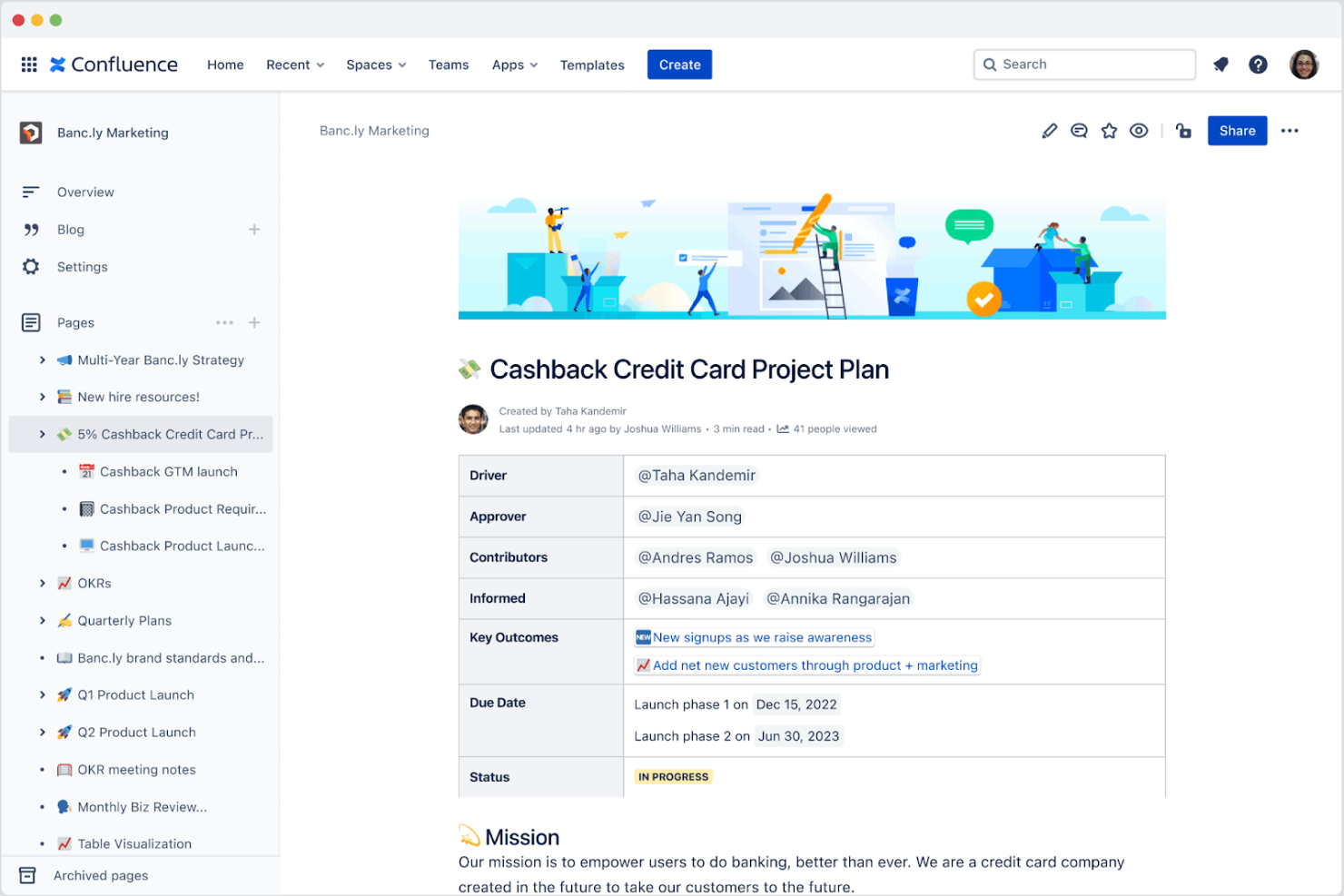
If your organization needs a documentation platform that scales across departments and teams, Confluence is built for enterprise knowledge sharing. It’s a strong fit for IT, HR, and business operations teams that need to organize, collaborate on, and secure large volumes of internal content. Unlike GitBook, Confluence offers granular permissions, advanced page hierarchies, and deep integration with Atlassian tools to support complex workflows.
Why Confluence Is a Good GitBook Alternative
For organizations that need to manage knowledge at scale, Confluence offers features designed for enterprise-wide collaboration and control. I appreciate how its granular permissions let you manage access for different teams, departments, or even individual users. The advanced page hierarchy system makes it easy to organize thousands of documents in a way that’s both logical and secure. If you’re looking for a documentation solution that can handle complex, multi-team environments, Confluence brings structure and governance that GitBook doesn’t provide.
Confluence Key Features
Some other features in Confluence help teams create, manage, and collaborate on documentation at scale:
- Templates Library: Access a wide range of pre-built templates for meeting notes, project plans, and documentation pages.
- Inline Comments: Add comments directly on pages to facilitate feedback and discussion without leaving the document.
- Page Analytics: Track page views and engagement metrics to understand how content is being used.
- Macros: Embed dynamic content like task lists, calendars, and Jira issues directly into documentation pages.
Confluence Integrations
Integrations include Jira Software, Trello, Slack, Microsoft Teams, Google Drive, Dropbox, Bitbucket, Zoom, Salesforce, GitHub, and more.
Pros and Cons
Pros:
- Page analytics provide insights into content engagement
- Inline comments support threaded team discussions
- Deep integration with Jira for project tracking
Cons:
- Limited public sharing without additional configuration
- Exporting to PDF or Word has formatting issues

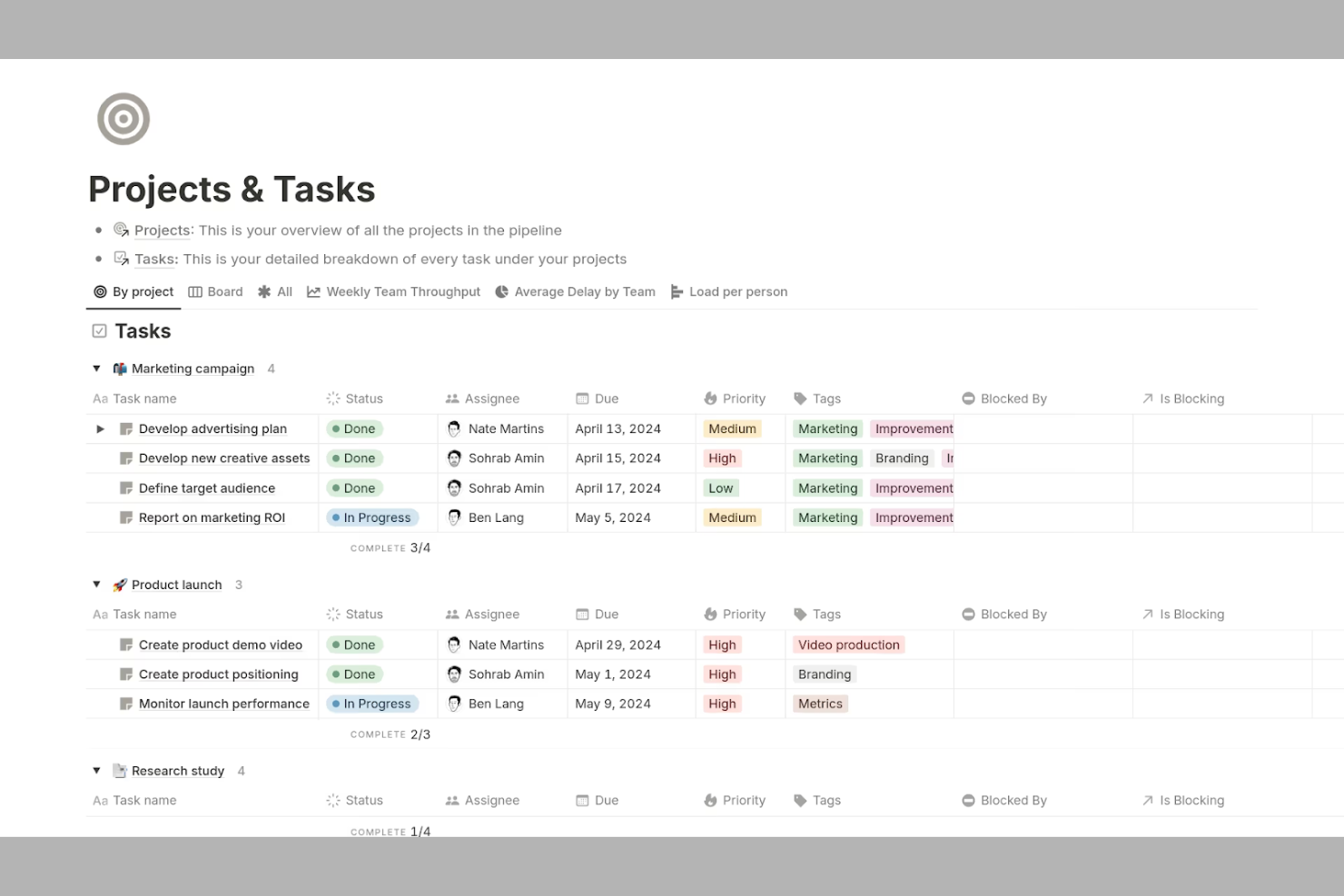
Notion brings together documentation, project management, and team collaboration in a single workspace. It’s a strong fit for tech teams, startups, and cross-functional groups that want to manage docs, tasks, and knowledge bases side by side. If you need flexible organization and real-time editing beyond what GitBook offers, Notion stands out with its customizable pages, integrated databases, and a growing ecosystem of integrations and extensions.
Why Notion Is a Good GitBook Alternative
Notion stands out for teams that want to manage documentation and project work in one place. I picked it as a GitBook alternative because you can create docs, wikis, and task boards all within the same workspace. Its database feature lets you link documentation directly to project tasks, making it easy to keep everything connected. This approach is especially useful for teams that need to track progress and reference documentation without switching tools.
Notion Key Features
Some other features in Notion make it a flexible choice for documentation and knowledge management:
- Markdown Support: You can write and format documentation using markdown syntax for quick, consistent styling.
- Page Version History: Track changes and restore previous versions of any page to maintain accurate documentation.
- Permissions and Access Control: Set granular permissions for pages and databases to control who can view or edit content.
- Template Gallery: Access a library of pre-built templates for wikis, meeting notes, and product documentation to speed up setup.
Notion Integrations
Integrations include Slack, Google Drive, Trello, Asana, GitHub, Zoom, Figma, Typeform, Intercom, Salesforce, and more.
Pros and Cons
Pros:
- Rich media embedding for images and files
- Real-time collaborative editing for teams
- Combines docs, wikis, and project boards
Cons:
- No built-in version comparison for pages
- Exporting content to other formats is basic

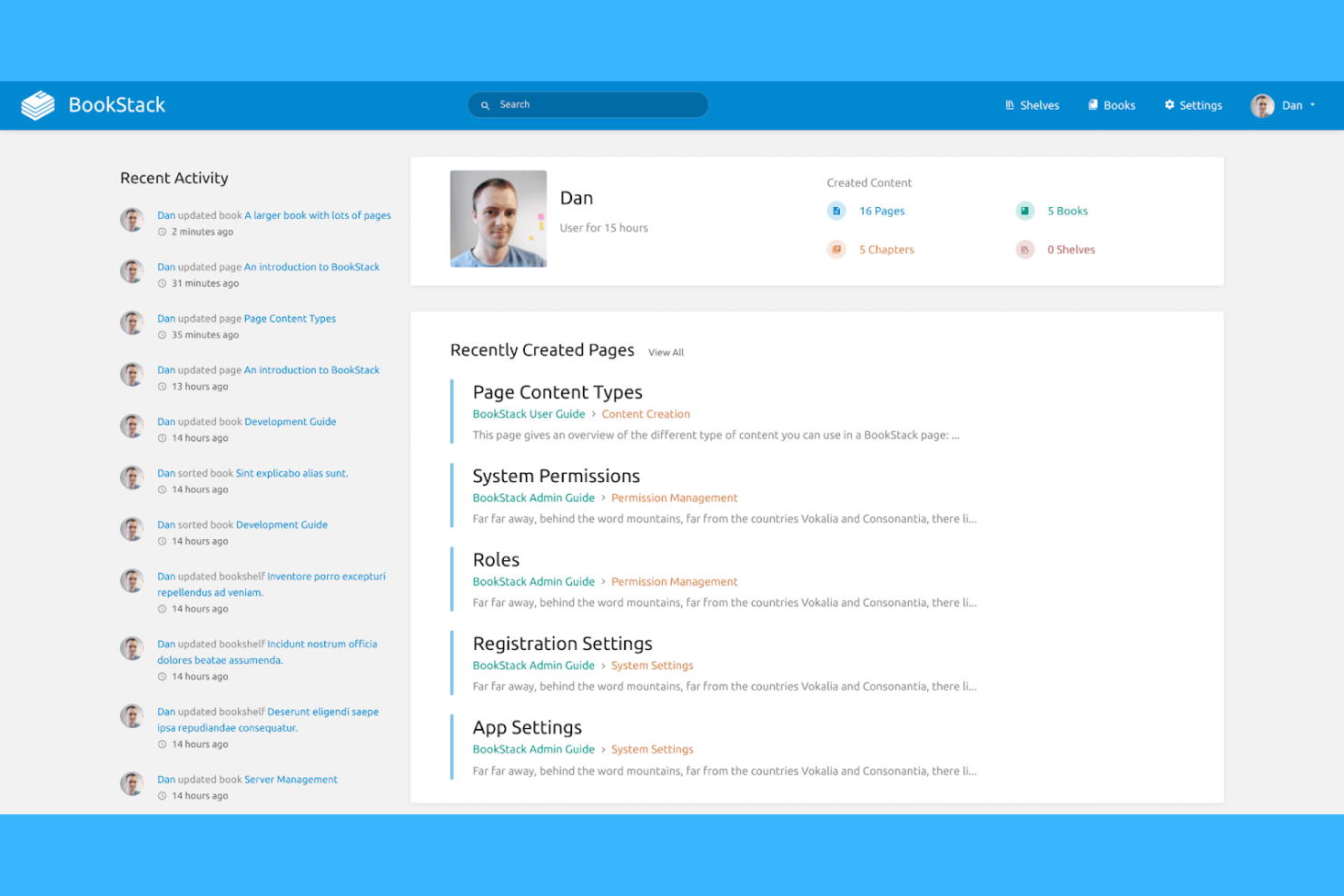
For teams that want full control over their documentation environment, BookStack offers an open-source, self-hosted platform. It’s a strong choice for IT departments, technical writers, and privacy-focused organizations that need to manage sensitive or proprietary content on their own infrastructure. Unlike GitBook, BookStack gives you direct access to your data, flexible customization options, and the ability to tailor permissions to your organization’s needs.
Why BookStack Is a Good GitBook Alternative
If you’re looking for a documentation platform you can fully control and host yourself, BookStack stands out as a strong GitBook alternative. I picked BookStack because it’s open-source and designed specifically for self-hosting, giving you direct ownership of your data and infrastructure. Its role-based permission system lets you manage access at every level, from books to individual pages. For organizations with strict security or compliance needs, BookStack’s self-hosted model and transparent codebase offer flexibility that GitBook doesn’t match.
BookStack Key Features
Some other features in BookStack help teams organize and maintain their documentation more efficiently:
- WYSIWYG Editor: Create and edit content using a visual editor that supports rich formatting.
- Content Nesting: Structure documentation with books, chapters, and pages for a clear hierarchy.
- Revision History: Track and restore previous versions of any page or chapter.
- Multi-Language Support: Offer documentation in multiple languages for global teams.
BookStack Integrations
Native integrations are not currently listed.
Pros and Cons
Pros:
- Book, chapter, and page hierarchy organization
- Self-hosting supports strict data privacy
- Fully open-source with no vendor lock-in
Cons:
- Public sharing requires additional configuration steps
- Requires manual server setup and maintenance

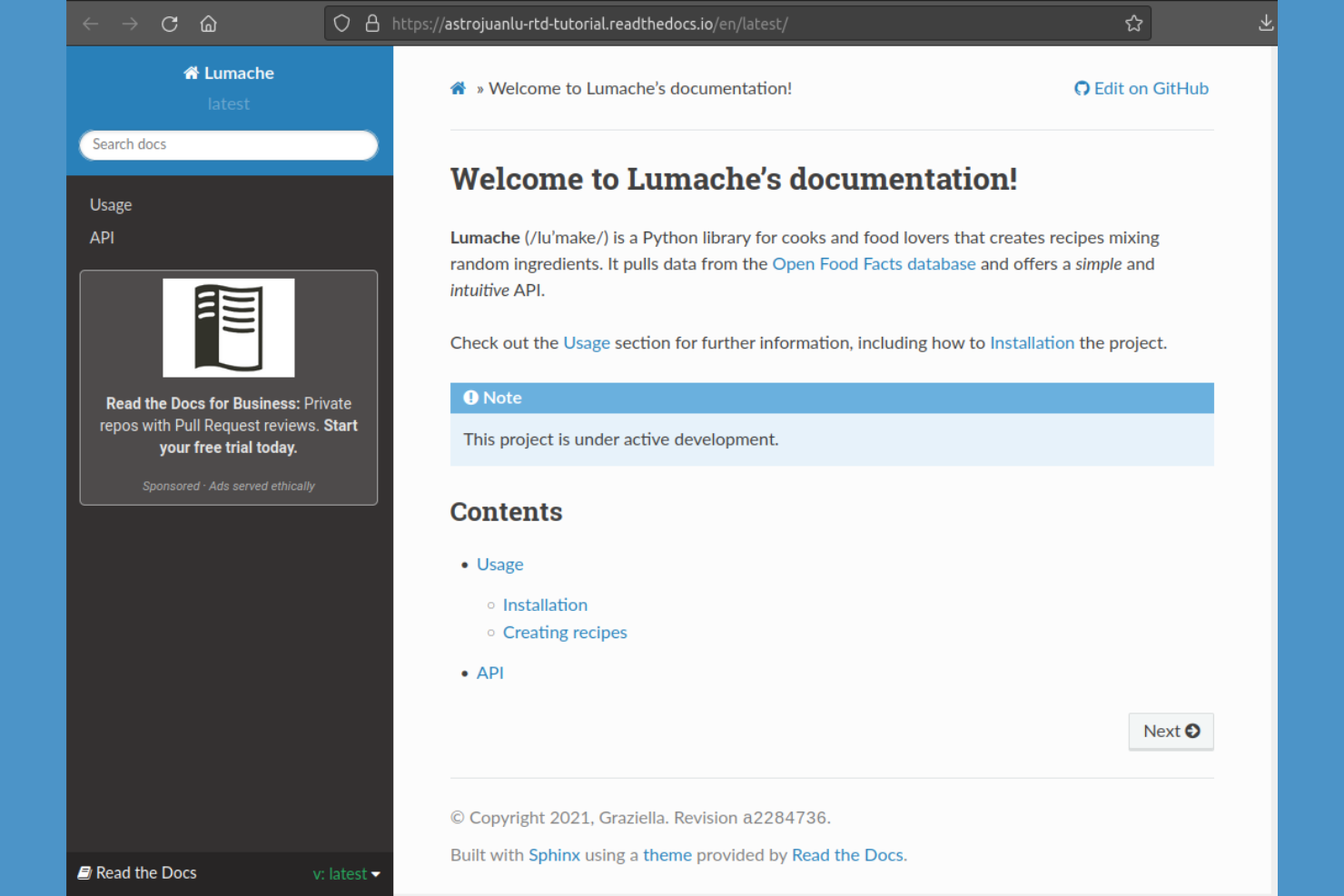
If you need to publish technical documentation directly from your code repositories, Read the Docs is purpose-built for that workflow. It’s a strong fit for software teams and open-source projects that want to automate documentation builds and updates from GitHub, GitLab, or Bitbucket. Unlike GitBook, Read the Docs handles versioned docs and integrates tightly with your CI/CD pipeline for continuous documentation delivery.
Why Read the Docs Is a Good GitBook Alternative
When your team needs to publish technical documentation straight from code repositories, Read the Docs is purpose-built for that workflow. I picked Read the Docs because it automatically builds and hosts documentation from GitHub, GitLab, or Bitbucket, keeping your docs in sync with your codebase. It also supports versioned documentation, so you can maintain separate docs for each release or branch. For teams that want to automate documentation publishing as part of their development process, Read the Docs offers a workflow that’s tightly integrated with modern source control.
Read the Docs Key Features
Some other features in Read the Docs help teams manage and deliver documentation more efficiently:
- Custom Domains: Assign your own domain name to your documentation site for consistent branding.
- Search Functionality: Enable full-text search across all your published documentation.
- Webhooks Support: Trigger documentation builds automatically from external events or services.
- PDF and ePub Export: Generate downloadable versions of your documentation in PDF and ePub formats.
Read the Docs Integrations
Integrations include GitHub, Bitbucket, GitLab, and Read the Docs API for custom integrations.
Pros and Cons
Pros:
- Sphinx and MkDocs documentation generator compatibility
- Built-in PDF and ePub export options
- Free hosting for open-source documentation projects
Cons:
- Private project hosting requires a paid plan
- Custom themes require advanced configuration skills

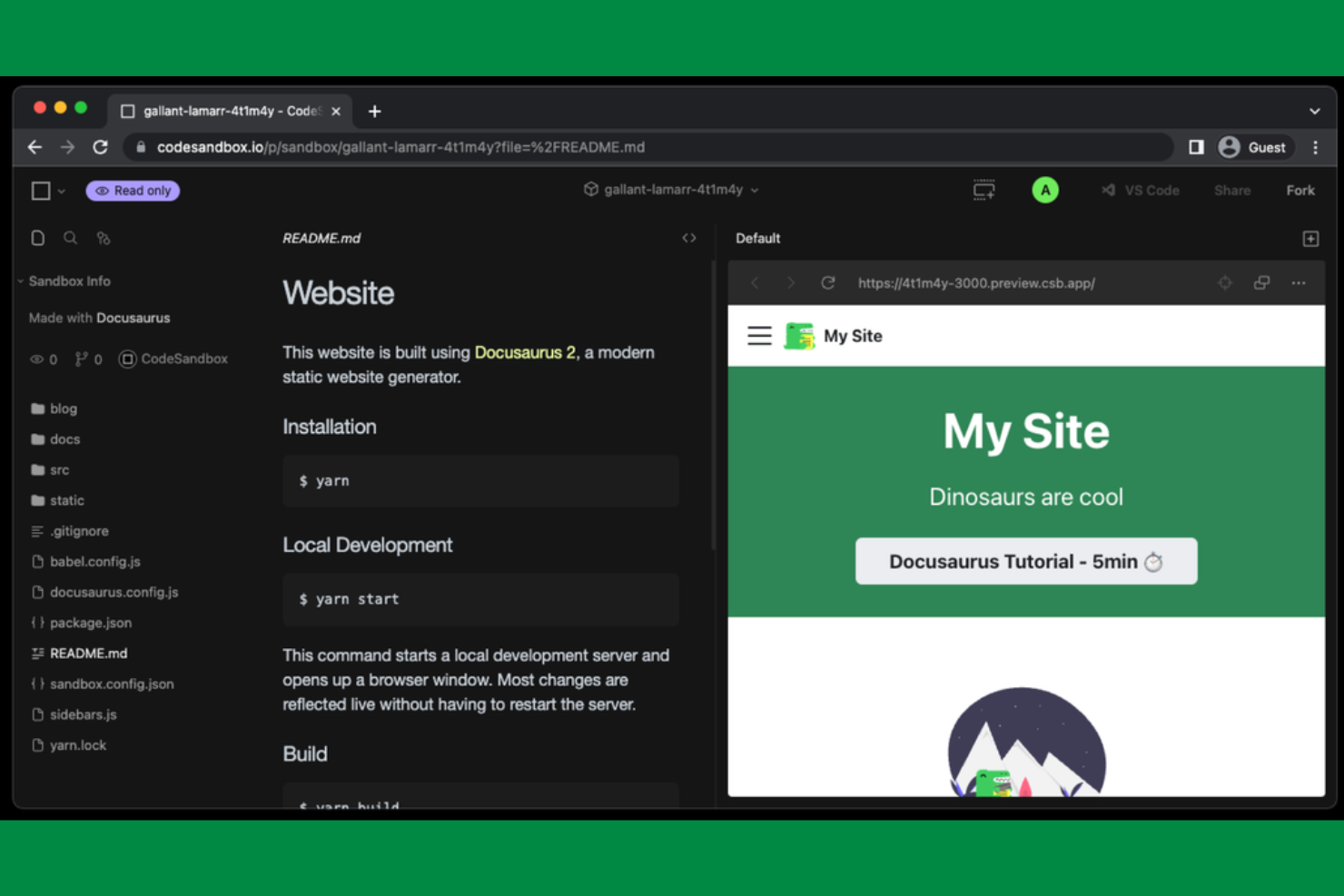
For teams that want full control over their documentation site’s look and feel, Docusaurus offers a React-based framework designed for customization. It’s especially appealing to engineering teams and technical writers who want to build branded, feature-rich documentation sites using modern web development tools. Unlike GitBook, Docusaurus lets you extend and modify every aspect of your docs site through React components and custom plugins.
Why Docusaurus Is a Good GitBook Alternative
When you need a documentation site that matches your brand and technical requirements, Docusaurus gives you full control through its React-based architecture. I like that you can build custom layouts, add interactive components, and use your own React plugins to extend functionality. The theming system lets you fine-tune every visual detail, from navigation to code blocks. For teams that want a documentation site that feels like a true extension of their product, Docusaurus offers flexibility that GitBook can’t match.
Docusaurus Key Features
Some other features in Docusaurus help teams manage and publish technical documentation more efficiently:
- Markdown Support: Write and organize documentation using Markdown files for fast editing and version control.
- Versioned Documentation: Maintain multiple versions of your docs to support different product releases.
- Built-In Search: Add a search bar to your site so users can quickly find relevant content.
- Internationalization (i18n): Create and manage documentation in multiple languages for global teams.
Docusaurus Integrations
Native integrations are not currently listed.
Pros and Cons
Pros:
- Open source with active community contributions
- Built-in static site generation for fast hosting
- Markdown-based content for fast editing
Cons:
- Limited built-in analytics or user tracking features
- Requires React and Node.js knowledge to deploy

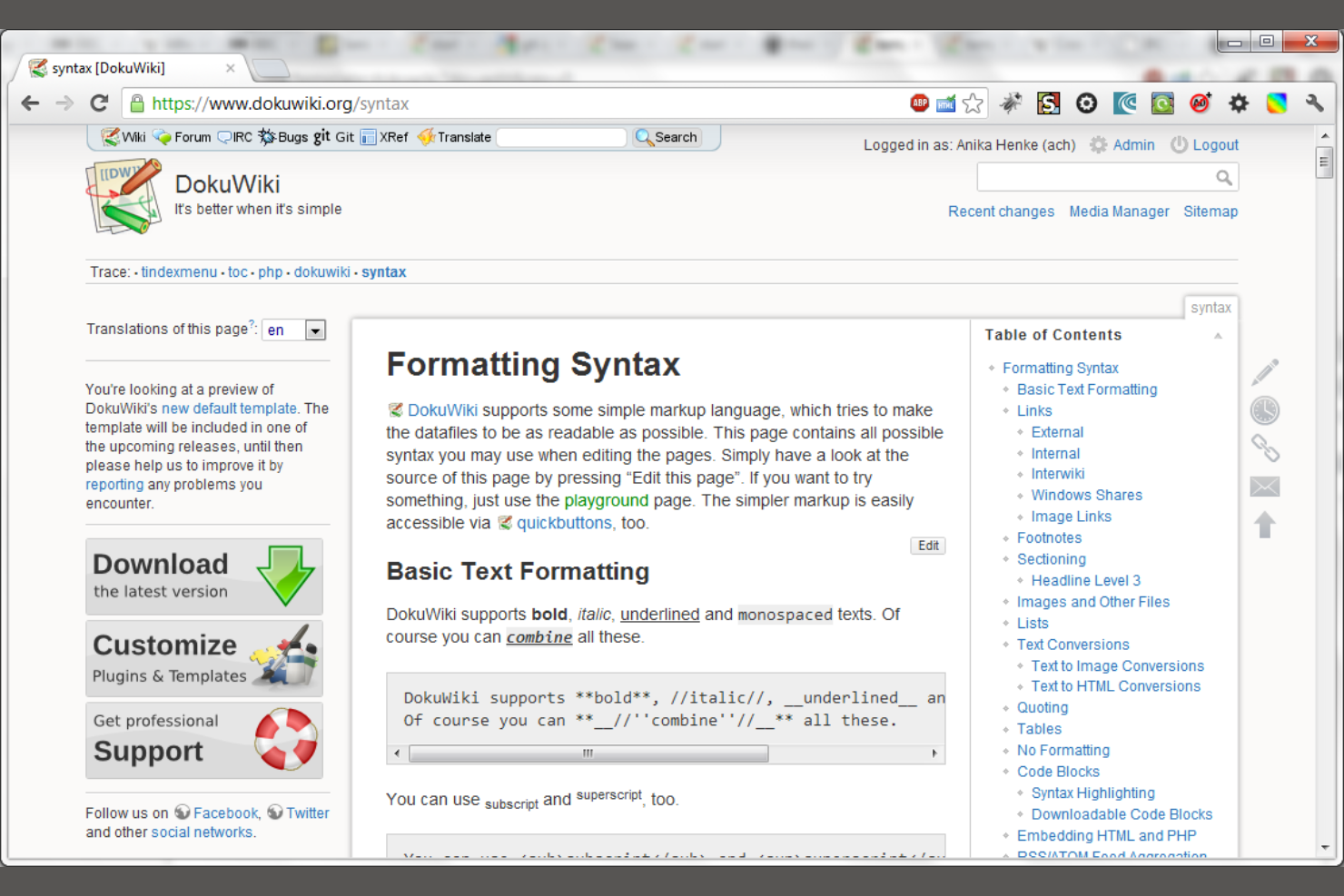
DokuWiki is a file-based documentation platform that doesn’t require a database, making it especially appealing to IT teams and small businesses seeking a lightweight, low-maintenance solution. It’s well-suited for organizations that want to keep documentation simple, portable, and easy to back up. Unlike GitBook, DokuWiki stores everything in plain text files, so you can manage and migrate your content without complex dependencies.
Why DokuWiki Is a Good GitBook Alternative
For teams that want a documentation tool without the overhead of a database, DokuWiki offers a unique approach. I picked DokuWiki because it stores all content in plain text files, making backups and migrations simple and transparent. Its minimal server requirements mean you can run it on almost any hosting environment, even shared hosting. If you value portability and want to avoid complex infrastructure, DokuWiki’s file-based design is a practical alternative to GitBook.
DokuWiki Key Features
Some other features in DokuWiki help teams manage and present their documentation more effectively:
- Access Control Lists: Set granular permissions for users and groups to control who can view or edit specific pages.
- Media Manager: Upload, organize, and embed images and files directly within your documentation.
- Plugin System: Extend core functionality with a wide range of community-developed plugins.
- Version Control: Automatically track changes and allow users to view or revert to previous page versions.
DokuWiki Integrations
Native integrations are not currently listed.
Pros and Cons
Pros:
- Fast performance even with large documentation sets
- Built-in access control for user management
- No database required for installation or use
Cons:
- Limited support for real-time collaborative editing
- Outdated default interface compared to modern tools


For teams looking to automate the creation of technical documentation, Mintlify offers a unique approach. It’s designed for engineering teams and SaaS companies that want to generate and update docs directly from their codebase with minimal manual effort. Unlike GitBook, Mintlify uses AI-powered tools to keep documentation current as your code evolves.
Why Mintlify Is a Good GitBook Alternative
If you want documentation that keeps pace with your codebase, Mintlify is built for automated documentation generation. I picked Mintlify because it uses AI to scan your code and generate up-to-date docs without manual intervention. The tool also supports auto-updating documentation as your code changes, so your docs stay accurate with every commit. For teams that want to reduce the manual workload of maintaining technical documentation, Mintlify offers a hands-off, code-driven approach that’s different from GitBook’s manual editing model.
Mintlify Key Features
Some other features in Mintlify help teams deliver and manage documentation more effectively:
- Custom Branding: Apply your company’s logo, colors, and style to your documentation site.
- Interactive API Reference: Generate interactive API docs that let users try endpoints directly from the documentation.
- Analytics Dashboard: Track documentation usage and engagement with built-in analytics.
- Collaboration Tools: Allow multiple team members to review, comment, and suggest changes within the documentation platform.
Mintlify Integrations
Native integrations are not currently listed.
Pros and Cons
Pros:
- Real-time collaboration with in-doc commenting
- Interactive API reference pages for developers
- AI generates docs directly from code comments
Cons:
- No built-in WYSIWYG editor for manual edits
- Advanced features may require engineering setup
Other GitBook Alternatives
Here are some additional GitBook alternatives that didn’t make it onto my shortlist, but are still worth checking out:
- Postman
For integrating API documentation with testing workflows
- Featurebase
For collecting and organizing user feedback
- ReadMe
For interactive developer onboarding experiences


GitBook Alternatives Selection Criteria
When selecting the best GitBook alternatives to include in this list, I considered common buyer needs and pain points related to documentation software products, like supporting collaborative editing and managing version control. I also used the following framework to keep my evaluation structured and fair:
Core Functionality (25% of total score)
To be considered for inclusion in this list, each solution had to fulfill these common use cases:
- Create and edit documentation content
- Organize documents in a structured hierarchy
- Search across all documentation
- Manage user permissions and access
- Export or publish documentation
Additional Standout Features (25% of total score)
To help further narrow down the competition, I also looked for unique features, such as:
- Visual API modeling tools
- Interactive code samples or sandboxes
- Automated documentation generation from code
- Custom branding and theming options
- Real-time collaboration features
Usability (10% of total score)
To get a sense of the usability of each system, I considered the following:
- Clean and intuitive user interface
- Minimal clicks to complete common tasks
- Logical navigation and menu structure
- Responsive design for different devices
- Clear labeling and helpful tooltips
Onboarding (10% of total score)
To evaluate the onboarding experience for each platform, I considered the following:
- Availability of training videos and tutorials
- Access to pre-built templates
- Interactive product tours or walkthroughs
- In-app chatbots or guided help
- Webinars or live onboarding sessions
Customer Support (10% of total score)
To assess each software provider’s customer support services, I considered the following:
- Multiple support channels available
- Fast response times to inquiries
- Access to a searchable help center
- Availability of community forums
- Quality of documentation for troubleshooting
Value For Money (10% of total score)
To evaluate the value for money of each platform, I considered the following:
- Transparent and flexible pricing plans
- Features included at each pricing tier
- Free plan or trial availability
- Discounts for annual billing or nonprofits
- No hidden fees or surprise charges
Customer Reviews (10% of total score)
To get a sense of overall customer satisfaction, I considered the following when reading customer reviews:
- Positive feedback on core features
- Reports of reliable platform performance
- Comments on customer support experiences
- User sentiment about pricing fairness
- Suggestions for improvement or missing features
Why Look For a GitBook Alternative?
While GitBook is a good choice of documentation software, there are a number of reasons why some users seek out alternative solutions. You might be looking for a GitBook alternative because…
- You need advanced API documentation features
- Your team requires granular access controls
- You want more customization for branding
- You need better support for large documentation sets
- Your workflow depends on integrations GitBook doesn’t offer
- You need offline editing or export options
If any of these sound like you, you’ve come to the right place. My list contains several documentation software options that are better suited for teams facing these challenges with GitBook and looking for alternative solutions.
GitBook Key Features
Here are some of the key features of GitBook, to help you contrast and compare what alternative solutions offer:
- Collaborative editing with real-time updates
- Structured document hierarchy and navigation
- Markdown-based content creation
- Version history and change tracking
- Public and private documentation spaces
- Custom domain support for published docs
- Search functionality across all documentation
- Embeddable content blocks and media
- User roles and permissions management
- Integration with GitHub for content sync