

10 Best MEGA Alternatives for Encrypted Storage in 2026

10 Mega Alternatives Shortlist


A strong Mega alternative offers secure cloud storage, flexible sharing options, and privacy controls that match or exceed what Mega provides. If you’re searching for alternatives to Mega, you’re likely weighing concerns about data privacy, collaboration features, or integration with your team’s existing tools.
This list will help you compare the top Mega alternatives for 2026, so you can find a solution that fits your workflow, security standards, and collaboration needs—whether you’re managing sensitive files or supporting a distributed team.
What Is Mega?
Mega is a cloud storage and file-sharing platform known for its end-to-end encryption and generous free storage allowance. Users can upload, store, and share files securely, with encryption keys managed by the user for added privacy. Mega supports web, desktop, and mobile access, making it a popular choice for individuals and teams who prioritize data security and easy file sharing across devices.
Mega Alternatives Comparison Table
This comparison table summarizes pricing details for my top Mega alternatives:
| Tool | Best For | Trial Info | Price | ||
|---|---|---|---|---|---|
| 1 | Best for real-time document collaboration | Free plan + 14-day free trial available | From CAD $9.20/user/month (billed annually) | Website | |
| 2 | Best for advanced workflow automation | 14-day free trial | From CAD$21/user/month (billed annually) | Website | |
| 3 | Best for Microsoft 365 file collaboration | Free plan available | From $1.99/month | Website | |
| 4 | Best for end-to-end encrypted sharing | Free plan available | From $4.99/month | Website | |
| 5 | Best for granular access permissions | Free demo available | From $16.50/user/month (billed annually) | Website | |
| 6 | Best with extensive third-party integrations | Free trial + free plan available | From $9.99/user/month (billed annually) | Website | |
| 7 | Best for self-hosted deployment flexibility | Free trial + free demo available | From €71.29/user/year | Website | |
| 8 | Best for compliance-heavy file sharing teams | Free demo + 14-day free trial available | From $14/user/month (billed annually) | Website | |
| 9 | Best for strict data residency options | 30-day free trial + free demo available | From $4/user/month | Website | |
| 10 | Best for team-based document organization | Free demo + 15-day free trial available | From CAD $3/user/month (billed annually) | Website |
Why Trust Our Software Recommendations
Our team has been testing and reviewing software since 2012. As project managers ourselves, we know how difficult—and important—it is to choose the right software.
For this guide, we evaluated tools using hands-on testing and independent research, scoring tools using our selection criteria. We also draw on insights from industry thought leaders and practicing project management experts.
Our reviews reflect our human editorial judgment, not a sales pitch.
Expert reviewers:
Mega Alternatives Reviews
Below are my detailed summaries of the best Mega alternatives that made it onto my shortlist. My reviews offer a detailed look at the features, security options, and integrations of each platform to help you find the best one for you.

Best for real-time document collaboration
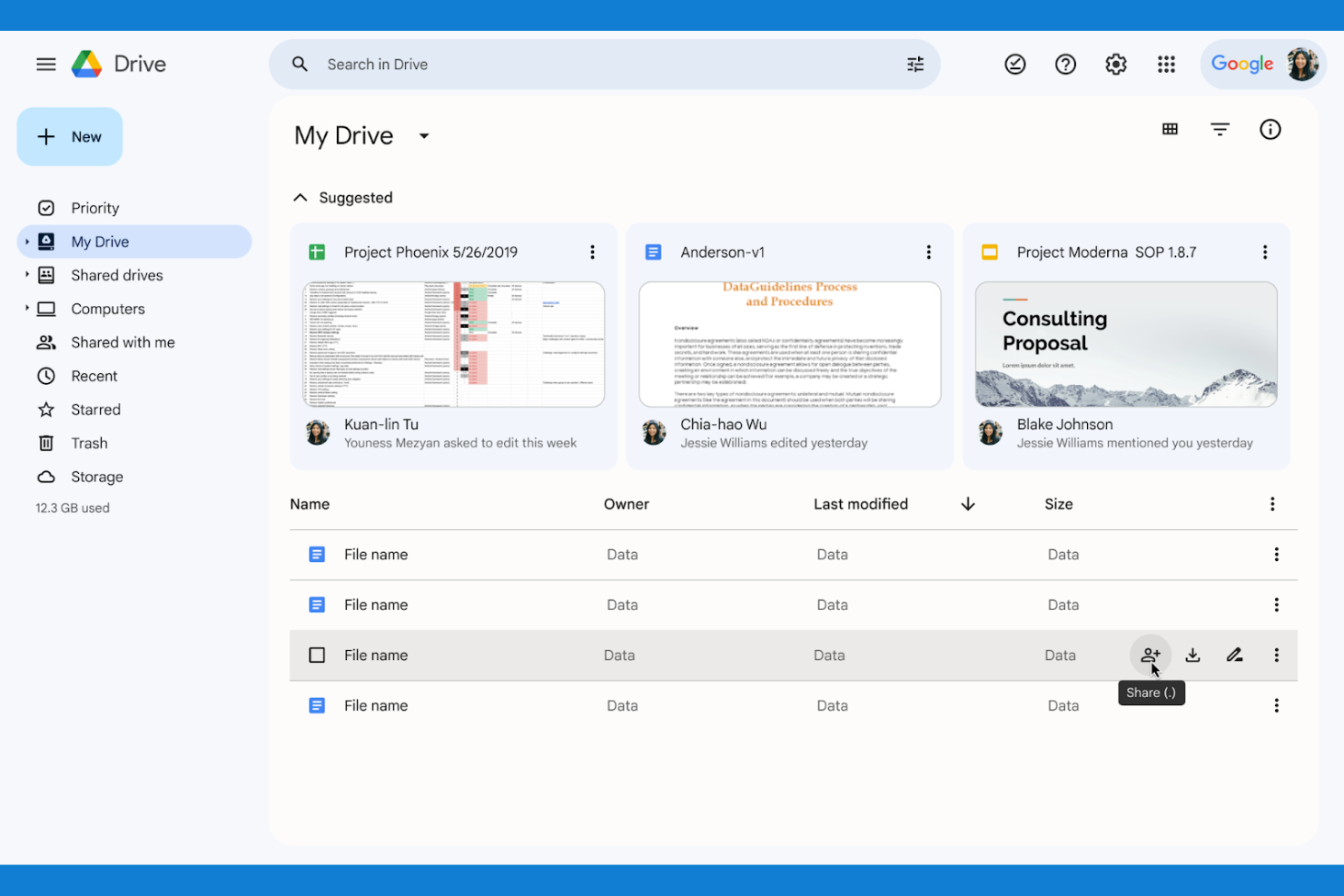
If your team needs to collaborate on documents in real time, Google Drive is a top choice. It’s built for organizations that want to create, edit, and share files simultaneously without version confusion. Unlike Mega, Google Drive’s integration with Docs, Sheets, and Slides makes live collaboration and feedback part of your everyday workflow.
Why Google Drive Is a Good Mega Alternative
Unlike Mega, Google Drive is built for teams that need to work together on documents at the same time. I picked Google Drive because its real-time editing in Docs, Sheets, and Slides lets multiple users make changes and leave comments without file conflicts. The built-in version history means you can always track edits or restore previous versions if needed. If your projects depend on fast, collaborative feedback, Google Drive’s live document tools are hard to match.
Google Drive Key Features
Some other Google Drive features that may be helpful for your team include:
- Shared Drives: Create team-based folders with centralized ownership and management.
- Advanced Search Filters: Locate files quickly using filters for type, owner, and date.
- Offline Access: View and edit files without an internet connection.
- Two-Step Verification: Add an extra layer of security to your account.
Google Drive Integrations
Integrations include Gmail, Google Meet, Google Chat, Google Calendar, Google Docs, Google Sheets, Google Slides, Salesforce, Slack, and Zoom.
Pros and Cons
Pros:
- Universally used platform
- Incredible search engine
- Flawless Google app sync
Cons:
- Privacy policies vary
- Cluttered file organization

Box
Best for advanced workflow automation

For teams that need more than just file storage, Box offers advanced workflow automation built into its cloud platform. It’s a strong fit for organizations with complex approval chains, document lifecycles, or compliance requirements. Unlike Mega, Box lets you automate multi-step processes and integrate content workflows directly with your business apps.
Why Box Is a Good Mega Alternative
Box stands out for teams that want to automate document workflows and approvals directly within their cloud storage platform. I picked Box because its workflow automation tools let you build custom, multi-step processes for tasks like contract reviews, onboarding, and compliance sign-offs. You can trigger notifications, assign tasks, and set up conditional logic without leaving the platform. For organizations that need more than basic file sharing, Box’s automation features help keep content moving through complex business processes.
Box Key Features
Some other Box features that may be valuable for your team include:
- Granular Access Controls: Set detailed permissions for users, groups, and external collaborators.
- Box Notes: Create and edit notes collaboratively within the platform.
- eSignature Integration: Collect legally binding electronic signatures directly on documents.
- Data Loss Prevention (DLP): Monitor and restrict sensitive data sharing with built-in DLP tools.
Box Integrations
Integrations include Microsoft 365, Google Workspace, Salesforce, Slack, Adobe, Okta, Zoom, Oracle NetSuite, ServiceNow, and DocuSign.
Pros and Cons
Pros:
- Built in e signature tools
- Strong admin data controls
- Great workflow automation
Cons:
- UI feels highly corporate
- Steep learning curve

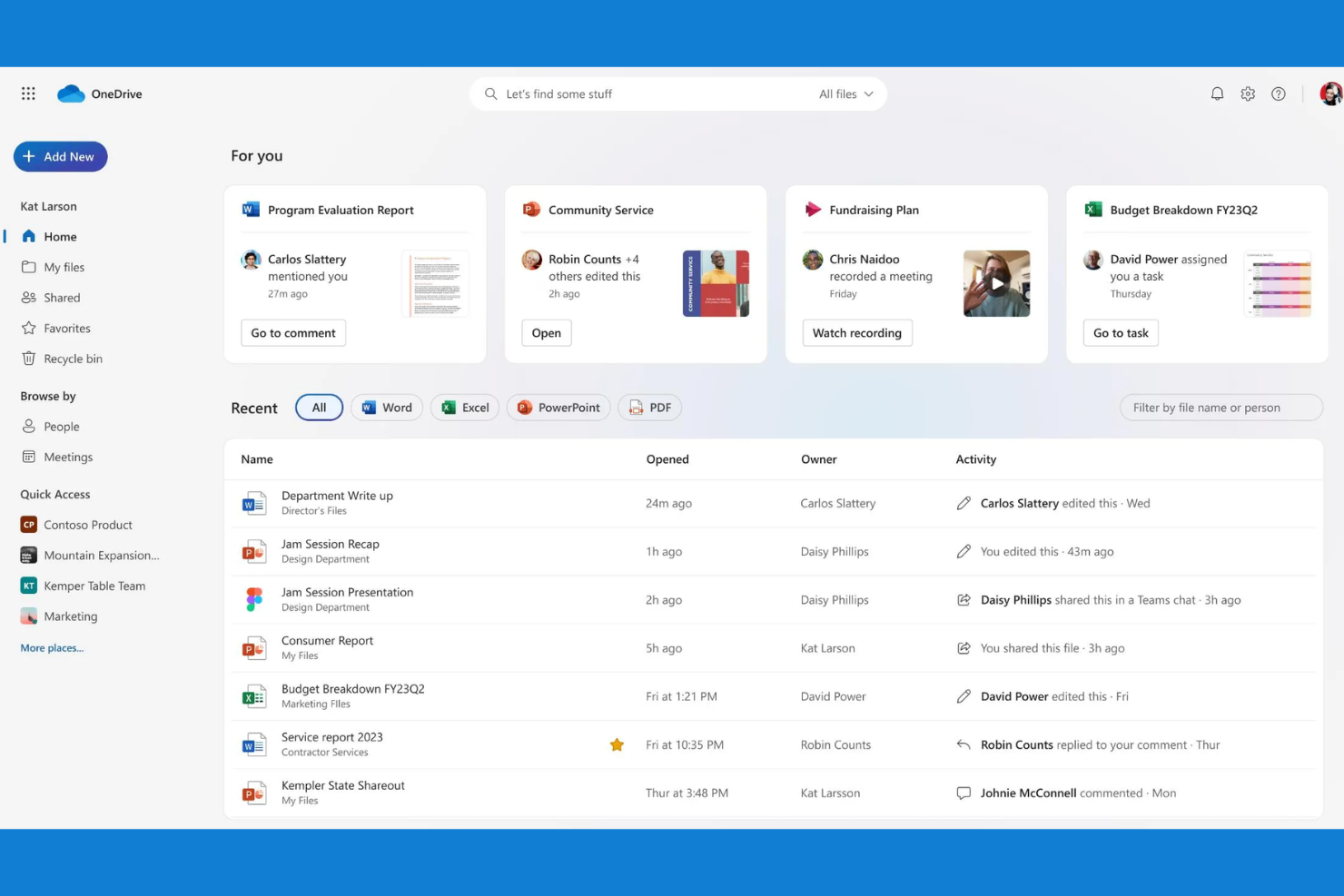
Teams that rely on Microsoft 365 apps often turn to Microsoft OneDrive for cloud storage and file sharing. It’s designed for organizations that want to keep files, emails, and collaboration tightly connected within the Microsoft ecosystem. Unlike Mega, OneDrive lets you co-author and manage documents directly from familiar tools like Word, Excel, and Teams.
Why Microsoft OneDrive Is a Good Mega Alternative
If your team already uses Microsoft 365, OneDrive is the natural choice for cloud storage and file sharing. I picked OneDrive because it lets you save, sync, and co-author files directly from Word, Excel, PowerPoint, and Teams without leaving those apps. Version history and real-time collaboration are built in, so you can track changes and work together on documents without file confusion. For organizations that want storage to feel like a seamless part of their daily workflow, OneDrive’s integration with Microsoft 365 stands out.
Microsoft OneDrive Key Features
Some other Microsoft OneDrive features that may be useful for your organization include:
- Personal Vault: Store sensitive files in a protected area with identity verification.
- File Request: Collect files from anyone directly into a specified folder.
- Ransomware Detection and Recovery: Get alerts and restore files if suspicious activity is detected.
- Block Download for Shared Files: Prevent recipients from downloading shared documents.
Microsoft OneDrive Integrations
Integrations include Microsoft Teams, Microsoft Outlook, Microsoft Word, Microsoft Excel, Microsoft PowerPoint, Microsoft SharePoint, Windows, Samsung, Azure, and Dynamics 365.
Pros and Cons
Pros:
- Files on demand feature
- Very cheap with Office plan
- Seamless Office 365 sync
Cons:
- Confusing business setups
- Scans data for policy flags

For teams and individuals who need maximum privacy, Proton Drive delivers end-to-end encrypted cloud storage and file sharing. It’s especially useful for organizations handling sensitive data, such as legal, healthcare, or research professionals. Unlike Mega, Proton Drive ensures that only you and your intended recipients can access your files—no one else, not even Proton.
Why Proton Drive Is a Good Mega Alternative
If you’re looking for airtight privacy in your file sharing, Proton Drive stands out with its end-to-end encryption on every file and folder. I picked Proton Drive because it ensures that only you and your recipients can ever access your data—no third parties, not even Proton itself. The platform also supports encrypted sharing links, so you can send files securely without exposing them to unauthorized access. For anyone who needs to guarantee confidentiality, Proton Drive’s encryption-first approach offers a level of protection that goes beyond what Mega provides.
Proton Drive Key Features
Some other features that make Proton Drive appealing include:
- Cross-Platform Access: Use Proton Drive on the web, iOS, and Android for file management anywhere.
- Version History: Restore previous versions of files to recover from unwanted changes or deletions.
- Swiss Data Hosting: Store all files in privacy-friendly Swiss data centers.
- Proton Account Integration: Access Proton Mail, Proton Calendar, and Proton VPN with a single login.
Proton Drive Integrations
Integrations include Proton Mail, Proton Calendar, Proton VPN, Proton Pass, Proton Docs, Proton Sheets, Proton Authenticator, Proton Meet, Proton Wallet, and SimpleLogin.
Pros and Cons
Pros:
- Highly secure sharing links
- Clean integration with Mail
- Open source cryptography
Cons:
- No block level syncing
- Slow large file uploads

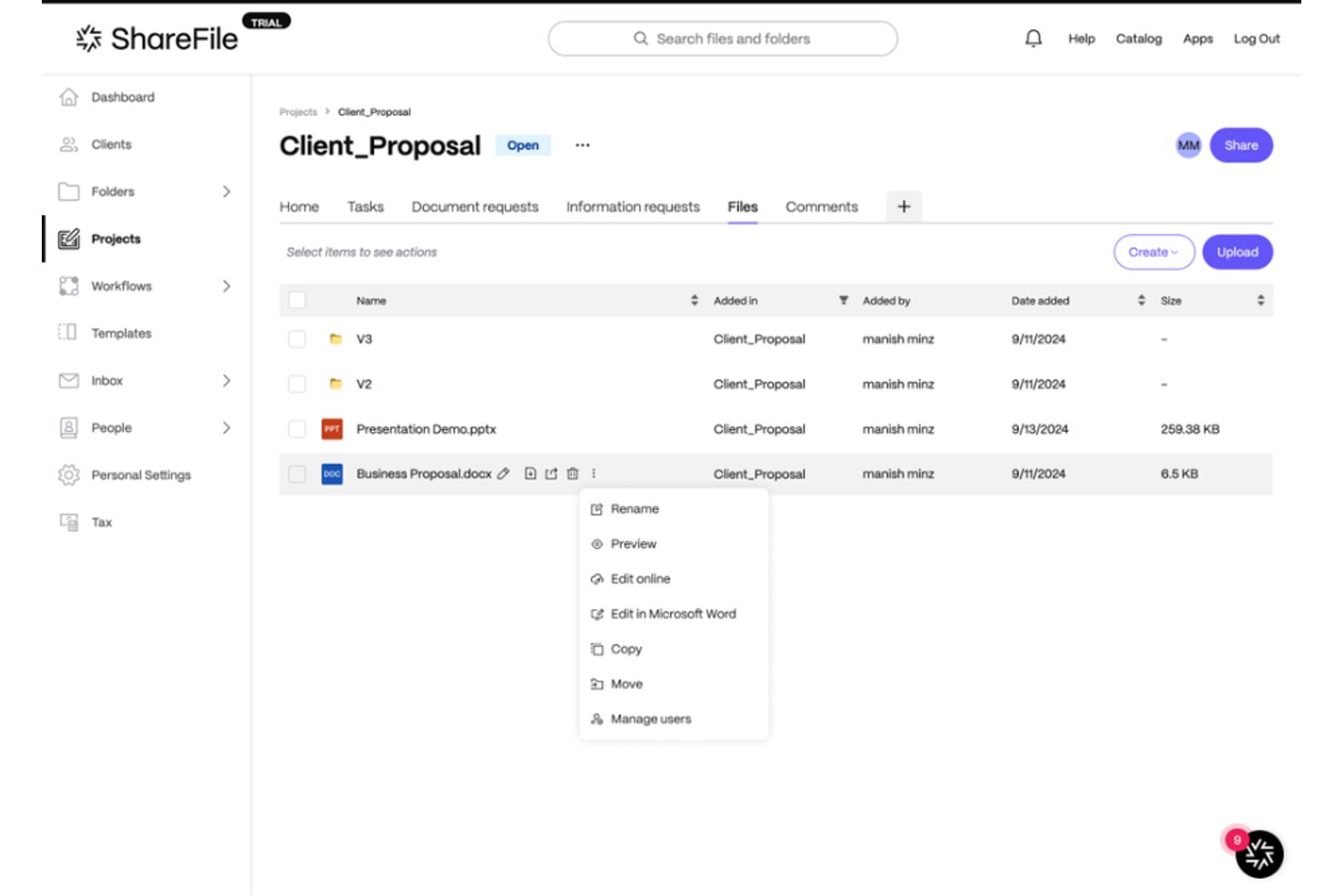
Progress ShareFile provides cloud storage and file sharing built for businesses that need strict control over user access, making it a strong fit for legal, financial, and IT teams managing confidential files.
Who Is Progress ShareFile Best For?
Progress ShareFile is a strong choice for legal, financial, and IT teams that need strict control over confidential file access and permissions.
Why Progress ShareFile Is a Good Mega Alternative
I picked Progress ShareFile because I rely on its detailed folder-level permission controls and audit tracking to manage sensitive files with confidence. In practice, my team can set custom access for each client or project, lock down confidential documents, and monitor exactly who views or downloads any item.
Progress ShareFile Key Features
- Secure file encryption: Protects files at rest and in transit with industry-standard encryption protocols.
- E-signature integration: Lets you request, track, and manage electronic signatures directly within the platform.
- Custom-branded client portals: Allows you to create professional, personalized portals for sharing and requesting files with clients.
- Automated workflow tools: Supports file request workflows and notifications to streamline document collection and approvals.
Progress ShareFile Integrations
Progress ShareFile offers native integrations with Microsoft 365, Outlook, Gmail, Salesforce, DocuSign, QuickBooks, Citrix Workspace, and RightSignature. An API is available for custom integrations.
Pros and Cons
Pros:
- Includes built-in e-signature request features
- Custom-branded client portals for external collaboration
- Granular access controls for confidential file sharing
Cons:
- External sharing requires extra configuration
- Desktop syncing can be unreliable

Dropbox
Best with extensive third-party integrations

Teams that rely on a wide range of business apps often turn to Dropbox for its unmatched integration capabilities. Dropbox is designed for organizations that need to connect cloud storage with tools like Slack, Zoom, and Microsoft 365 to keep workflows unified. Unlike Mega, Dropbox’s extensive third-party integrations make it easier to centralize files and automate processes across your existing tech stack.
Why Dropbox Is a Good Mega Alternative
For teams that depend on a connected workflow, Dropbox stands out because of its deep integration ecosystem. I picked Dropbox as a Mega alternative since it natively connects with tools like Slack, Zoom, Microsoft 365, and Google Workspace, allowing you to manage files directly within those platforms. Dropbox also supports automated file actions through integrations with tools like Zapier and Trello, which helps reduce manual work. If your business needs to keep files in sync across multiple apps, Dropbox’s integration options make it a strong choice.
Dropbox Key Features
Some other Dropbox features that may be useful for your team include:
- File Request Tool: Collect files from anyone, even if they don’t have a Dropbox account.
- Granular Folder Permissions: Assign view, edit, or comment access at the folder level.
- Document Scanning: Scan and upload physical documents directly from the mobile app.
- File Version History: Restore or review previous versions of files for up to 180 days.
Dropbox Integrations
Integrations include Google Workspace, Microsoft, Adobe, HubSpot, Autodesk, Canva, AWS, Slack, Zoom, and Trello.
Pros and Cons
Pros:
- Built in document signing
- Great team folder sharing
- Block level file transfers
Cons:
- Expensive premium plans
- Tiny 2GB free storage tier

Best for self-hosted deployment flexibility

If you need full control over your data and deployment, Nextcloud offers a self-hosted cloud storage platform that you can run on your own servers. It’s a strong choice for IT teams, privacy-focused organizations, and regulated industries that want to customize security and compliance settings. Unlike Mega, Nextcloud lets you tailor every aspect of your file-sharing environment, from infrastructure to user permissions.
Why Nextcloud Is a Good Mega Alternative
Nextcloud is a strong pick if you want to host your own cloud storage and keep full control over your data. I like that you can deploy Nextcloud on-premises or in a private cloud, giving you flexibility to meet strict security or compliance requirements. The platform supports custom user management, granular access controls, and advanced audit logging, all managed within your own infrastructure. For teams that need to tailor their file-sharing environment to unique business or regulatory needs, Nextcloud offers a level of deployment flexibility that Mega doesn’t match.
Nextcloud Key Features
Some other features that make Nextcloud appealing include:
- Integrated Office Suite: Collaborate on documents, spreadsheets, and presentations directly in your browser.
- End-to-End Encryption: Protect files with client-side encryption for added privacy.
- Mobile and Desktop Sync Apps: Access and sync files across Windows, macOS, Linux, iOS, and Android devices.
- App Marketplace: Extend functionality with add-ons for chat, calendar, mail, and more.
Nextcloud Integrations
Integrations include Microsoft Outlook, Microsoft Teams, SharePoint, Zimbra, and Rocket.Chat.
Pros and Cons
Pros:
- Massive community plugins
- No monthly storage limits
- Highly customizable UI
Cons:
- Not a plug and play tool
- Speed depends on your host

Best for compliance-heavy file sharing teams
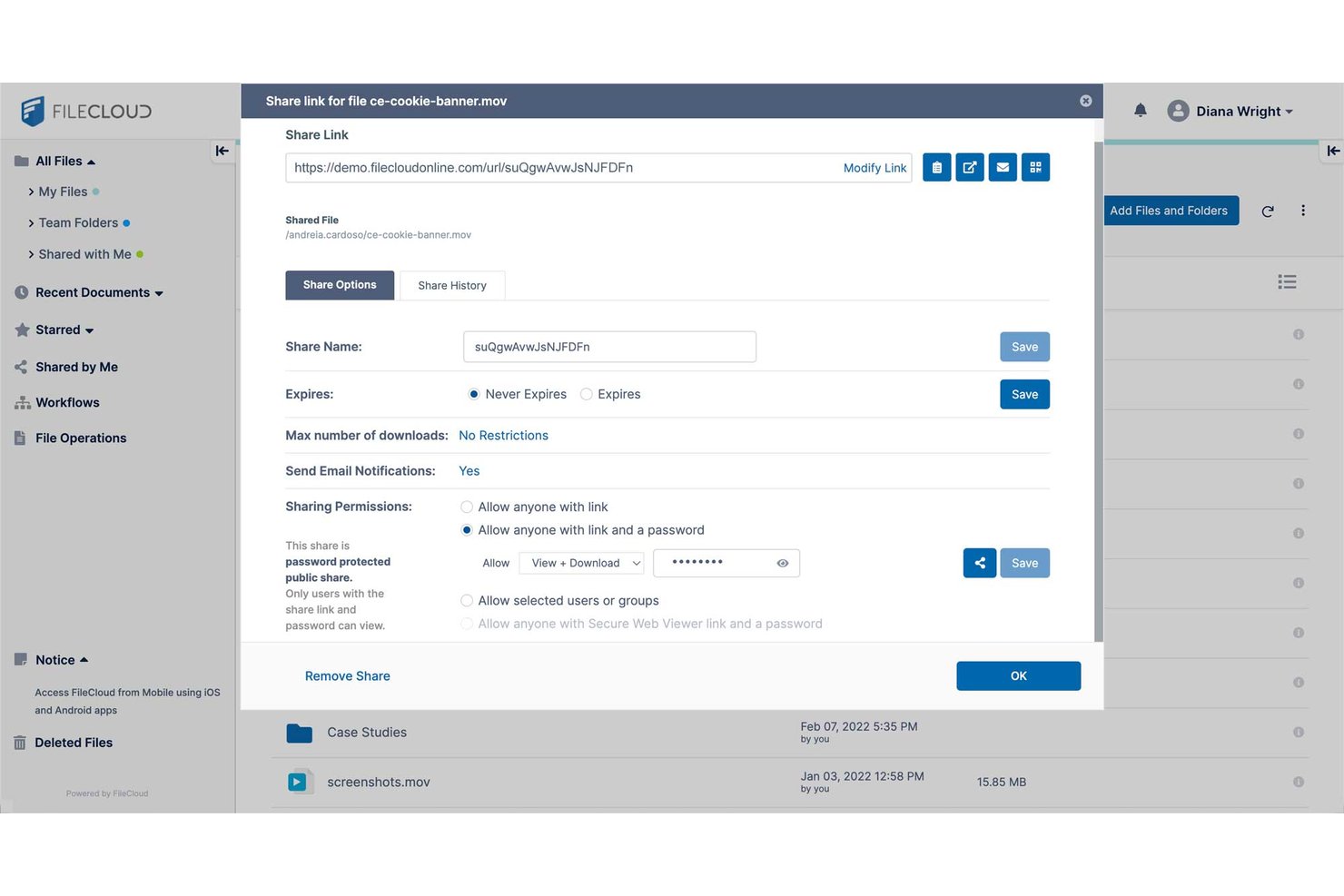
FileCloud is a cloud storage and file sharing platform designed for organizations that need strict data control, advanced privacy settings, and flexible on-premises or cloud deployment options.
Who Is FileCloud Best For?
FileCloud is a solid choice for IT teams in regulated industries that need complete control over file storage, privacy, and compliance.
Why FileCloud Is a Good Mega Alternatives
I picked FileCloud as one of the best because I trust its advanced compliance management for teams facing strict regulatory needs. I like that my team can set granular user permissions and audit user activity logs, making it easier to maintain privacy and security in file sharing projects.
FileCloud Key Features
- Endpoint backup: Protect files across desktops, laptops, and mobile devices with built-in endpoint backup features.
- Custom branding: Add your company’s logo and branding to user interfaces and sharing portals.
- Document versioning: Automatically track, store, and access previous iterations of documents.
- Selective sync: Control which files and folders sync to each device for better storage use and user control.
FileCloud Integrations
FileCloud offers native integrations with Microsoft 365, Microsoft Teams, Okta, OneLogin, Google Workspace, Microsoft Active Directory, and Duo Security. An API is available for custom integrations.
Pros and Cons
Pros:
- Supports endpoint backup across multiple devices
- Includes detailed audit logs for compliance tracking
- Offers on-premises or private cloud deployment
Cons:
- Mobile apps lack some advanced functions
- Interface can feel dated and clunky
Sync.com
Best for strict data residency options
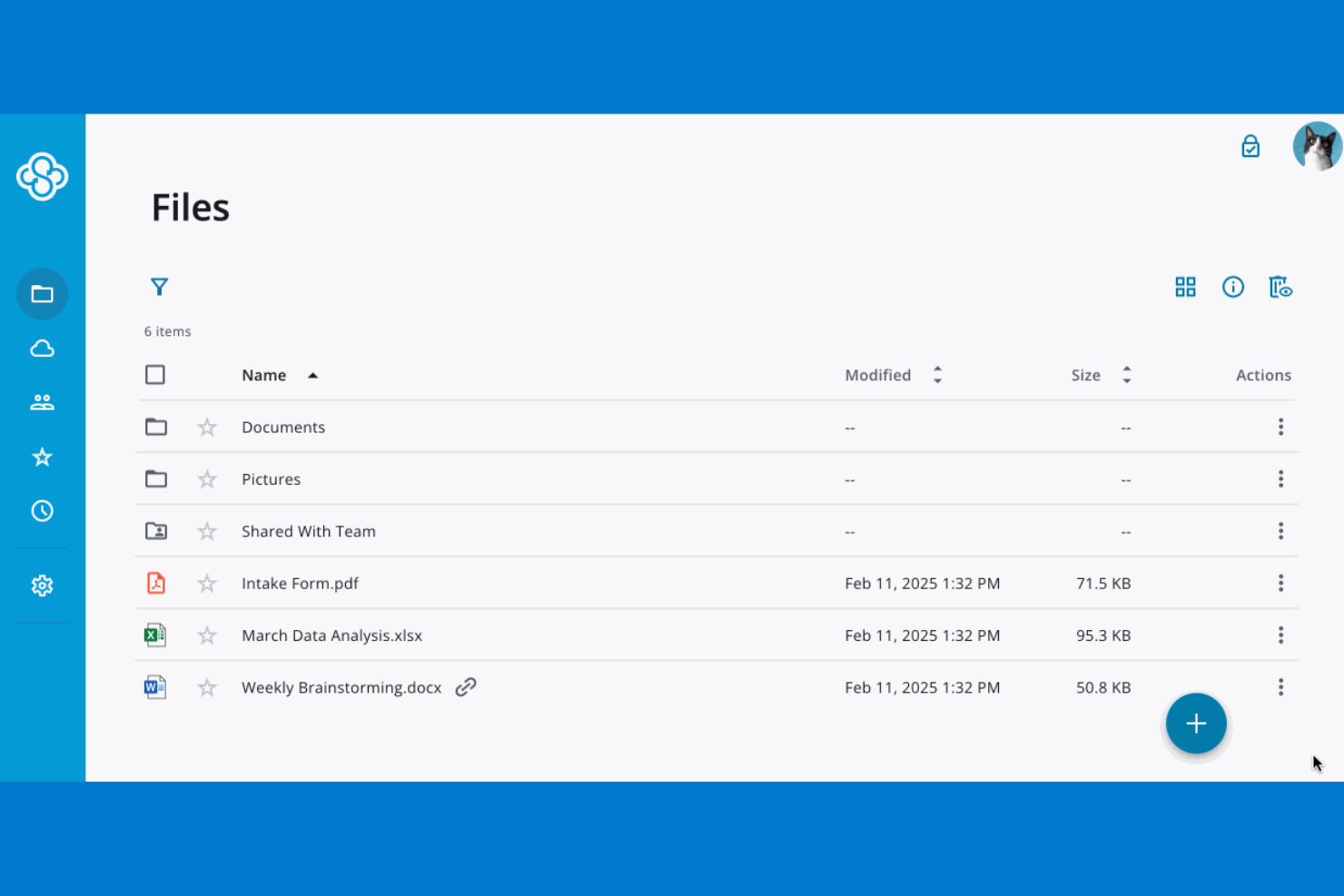
If your organization needs to control exactly where its data is stored, Sync.com offers strict data residency options that go beyond what most cloud storage providers deliver. This platform is a strong fit for businesses in regulated industries or those with compliance requirements tied to specific geographic regions. Unlike Mega, Sync.com lets you choose your data storage location, helping you meet legal and policy obligations around data sovereignty.
Why Sync.com Is a Good Mega Alternative
Unlike many cloud storage providers, Sync.com gives you the ability to select where your data is physically stored, which is essential for organizations with strict data residency or sovereignty requirements. I picked Sync.com because it offers Canadian data centers and clear controls for meeting compliance standards in regulated industries. The platform also provides end-to-end encryption, ensuring that your files remain private and protected no matter where they’re stored. If your business needs to align with regional data laws or client mandates, Sync.com offers a level of control that Mega doesn’t match.
Sync.com Key Features
Some other Sync.com features that may interest you include:
- Granular User Permissions: Set detailed access levels for files and folders across your team.
- Remote Device Wipe: Remove Sync.com data from lost or stolen devices remotely.
- File Version History: Restore previous versions of files for up to 365 days.
- Password-Protected Sharing Links: Add password protection to shared links for extra security.
Sync.com Integrations
Integrations include Microsoft 365, Slack, Windows File Explorer, and macOS Finder.
Pros and Cons
Pros:
- Affordable team pricing
- No third party tracking
- Great file versioning
Cons:
- Cannot preview many files
- Lacks third party app sync

Best for team-based document organization
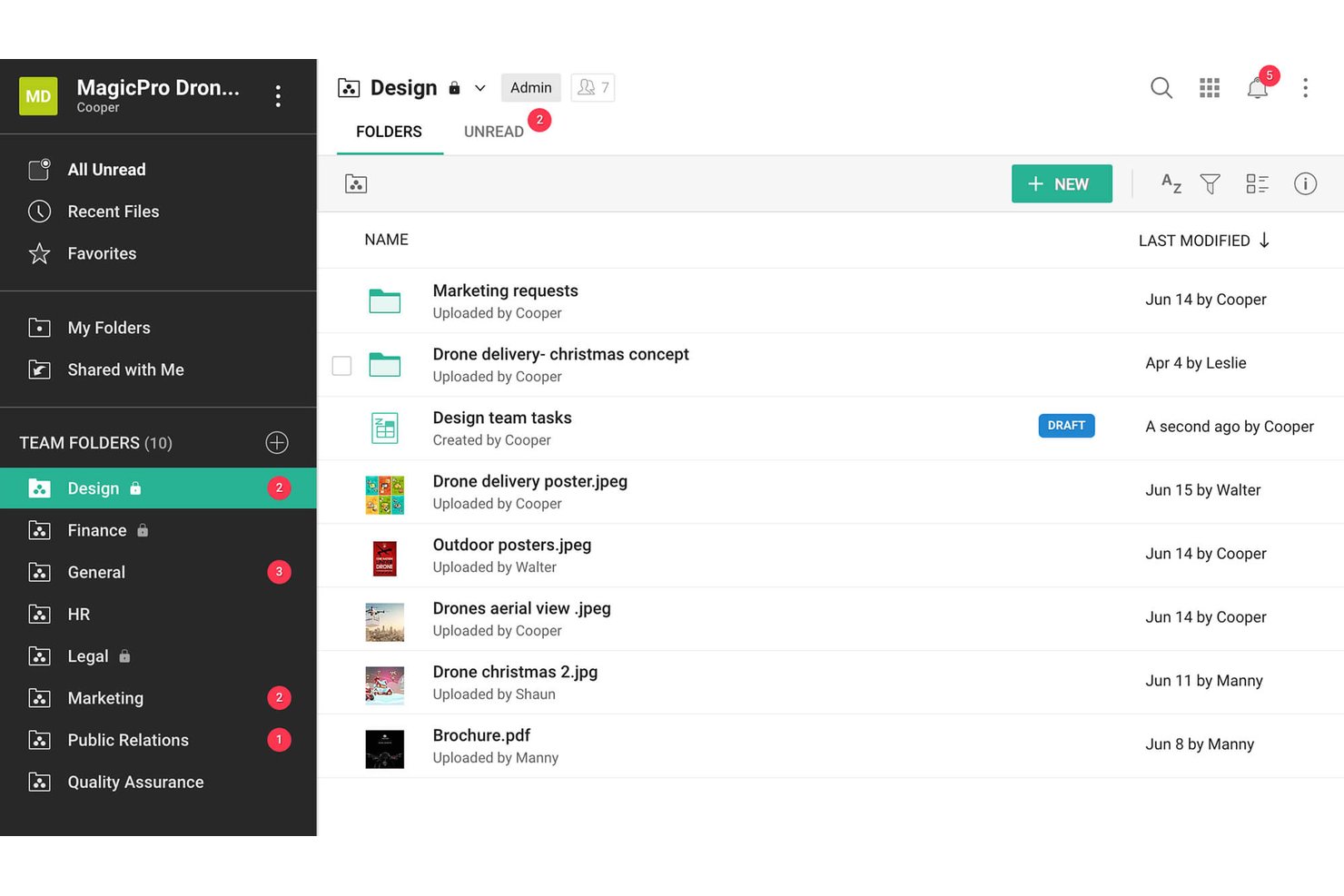
Zoho WorkDrive is a cloud storage platform designed for teams that want to organize, share, and collaborate on documents in a secure digital workspace. It’s a strong fit for project managers in dynamic environments looking to keep content and discussions in one unified place.
Who Is Zoho WorkDrive Best For?
Teams that need a secure, shared workspace to organize and collaborate on documents across fast-moving projects.
Why Zoho WorkDrive Is a Good Mega Alternative
I picked Zoho WorkDrive as a top Mega alternative because my team can create shared Team Folders, group files by project or department, and manage document access down to a granular level. I like that file requests make gathering inputs from stakeholders simple, and version control keeps content organized even as projects evolve.
Zoho WorkDrive Key Features
- Unified document management: Store, search, and organize files in one centralized digital workspace.
- Granular activity logs: Track every file action with detailed audit trails for compliance and oversight.
- Custom roles and permissions: Set user-specific access with custom roles to control file visibility and edits.
- Integrated Zoho ecosystem apps: Connect natively with Zoho projects, mail, and other tools for automatic syncing and productivity.
Zoho WorkDrive Integrations
Zoho WorkDrive offers native integrations with Zoho Projects, Zoho Mail, Zoho CRM, Zoho Sign, Microsoft 365, Google Workspace, Slack, and Zapier. An API is available for custom integrations.
Pros and Cons
Pros:
- Built-in file request feature simplifies input collection
- Custom roles allow detailed file access control
- Team Folders support project-based document organization
Cons:
- Limited offline file access for team members
- External sharing settings can be restrictive
Other Mega Alternatives
Here are some additional mega alternatives options that didn’t make it onto my shortlist, but are still worth checking out:
- kDrive
For Swiss data center hosting
- Filen
With unlimited file versioning
- Tresorit
For regulated-industry file sharing
- Egnyte
For regulated industry file governance
- pCloud
For lifetime storage plans
- IDrive
For multi-device backup management
- IceDrive
For built-in virtual drive access
- Koofr
For multi-cloud aggregation under EU hosting
- Internxt
For open-source privacy controls
- Jottacloud
For Norway-hosted large file storage


How I Evaluate Mega Alternatives
I split my evaluation into two layers: core functionality every tool must offer, and differentiating factors that separate one vendor from another.
Core Functionality (Table Stakes For This List)
When I'm selecting tools for my list, I rank each one on a scale from 0 (does not offer the functionality) to 5 (excels in this area) for each core functionality listed below. I then calculate the tool's total score into a percentage, using 75% as a benchmark to help assess its overall fit for the list.
- Cloud file storage: I check whether the platform offers flexible storage tiers and folder structures that can scale as a project grows from a handful of documents to thousands of assets.
- File sharing and links: Sharing controls matter, so I look for configurable link permissions, password protection, and expiry settings that let you safely send deliverables to external clients and contractors.
- Cross-device sync: Teams working across offices and time zones need files on every device. I evaluate whether sync clients cover desktop, mobile, and web with selective sync and offline access.
- Encryption and security: I look for AES-256 at-rest encryption at a minimum, plus 2FA and audit logs. Platforms like Tresorit and Sync.com go further with zero-knowledge, end-to-end encryption for sensitive project data.
- Collaboration controls: Shared workspaces with role-based permissions and version history keep distributed teams aligned. I check how easy it is to assign view or edit access and roll back an accidental overwrite.
- Large file transfer: Project work often involves multi-gigabyte video renders or CAD files. I evaluate upload size caps and whether the platform supports resumable transfers so a flaky connection doesn't force a restart.
Once I have a list of tools that meet the criteria, I consider what sets each platform apart.
Differentiating Factors (What Sets Vendors Apart)
Here's how I compare and contrast different vendors:
Standout Features
Zero-knowledge encryption is a big deal when your project files contain sensitive IP or client data. I check whether the provider truly holds no decryption keys, since platforms like Tresorit and Sync.com architect this differently than vendors offering standard at-rest encryption. I also evaluate public file request links, which let external stakeholders upload deliverables into a project folder without creating an account. For teams hit by accidental overwrites, rewind and version recovery depth matters too. I look at how far back the history reaches and whether restore covers ransomware scenarios.
Beyond Features
I evaluate where a vendor stores your data and which jurisdiction governs it, since that determines your exposure to government data requests and cross-border transfer rules. Pricing structure matters just as much: per-user plans can balloon costs for large project teams, while per-storage models punish creative teams sharing heavy assets with clients. I also check how easy it is for external stakeholders to open a shared link without creating an account, because forced sign-ups stall client reviews and approval cycles.
Why Look For A Mega Alternative?
While Mega is a good choice of cloud storage and file-sharing software, there are a number of reasons why some users seek out alternative solutions. You might be looking for a Mega alternative because…
- You need more advanced collaboration tools
- You want native integration with Apple or Microsoft products
- You require stronger compliance with regional data laws
- You need better support for large teams or organizations
- You want more flexible sharing options with non-users
- You prefer a provider with more transparent business practices
If any of these sound like you, you’ve come to the right place. My list contains several cloud storage and file-sharing software options that are better suited for teams facing these challenges with Mega and looking for alternative solutions.
Mega Key Features
Here are some of the key features of Mega, to help you contrast and compare what alternative solutions offer:
- End-to-end encrypted file storage
- Secure link sharing with customizable permissions
- Built-in encrypted chat and messaging
- File versioning and recovery options
- Cross-platform apps for desktop and mobile
- Large file upload and transfer support
- Two-factor authentication for account security
- Collaboration through shared folders
- Bandwidth usage tracking and controls
- Automatic camera uploads from mobile devices