

10 Best iPaaS Solutions in 2026

Best iPaaS Solutions Shortlist


iPaaS solutions are cloud-based platforms that let you connect, automate, and manage data flow between your business tools without heavy custom code. If you’re evaluating iPaaS options, you’re likely facing bottlenecks from disconnected apps, manual work, and challenges scaling integrations as your tech stack grows.
In this shortlist, I’ll help you quickly compare the best iPaaS tools, what each one does best, and how they fit real-world project management needs. Use this guide to choose a platform that tackles complexity and keeps your integrations running smoothly throughout 2026.
Why Trust Our Software Recommendations
Our team has been testing and reviewing software since 2012. As project managers ourselves, we know how difficult—and important—it is to choose the right software.
For this guide, we evaluated tools using hands-on testing and independent research, scoring tools using our selection criteria. We also draw on insights from industry thought leaders and practicing project management experts.
Our reviews reflect our human editorial judgment, not a sales pitch.
Expert reviewers:
iPaaS Solutions Comparison Table
This comparison table summarizes pricing details for my top iPaaS solutions selections:
| Tool | Best For | Trial Info | Price | ||
|---|---|---|---|---|---|
| 1 | Best for integration, API, and EDI management | 30-day free trial | Pricing upon request | Website | |
| 2 | Best for visual workflow design and debugging | Free plan + free demo available | From $9/month (billed annually) | Website | |
| 3 | Best for self-hosted and open-source deployments | Free trial available | From €20/month (billed annually) | Website | |
| 4 | Best for lifetime access with unlimited tasks | Free plan available | From $16/month | Website | |
| 5 | Best for B2B/EDI and data hub governance | 30-day free trial | From $99/month | Website | |
| 6 | Best for RPA within the Microsoft ecosystem | 30-day free trial + free plan | From $15/user/month (billed annually) | Website | |
| 7 | Best for governing AI agents | Free plan available | From $19.99/month (billed annually) | Website | |
| 8 | Best for API lifecycle management at scale | Free trial + free demo available | Pricing upon request | Website | |
| 9 | Best for building agents with embedded integrations | Free demo available | Pricing upon request | Website | |
| 10 | Best for AI-powered no-code agent creation | Free demo available | From $9,995/year (billed annually) | Website |
Best iPaaS Solutions Reviews
Below are my detailed summaries of the best iPaaS solutions that made it onto my shortlist. My reviews offer a detailed look at the features, integrations, and best use cases of each platform to help you find the best one for you.

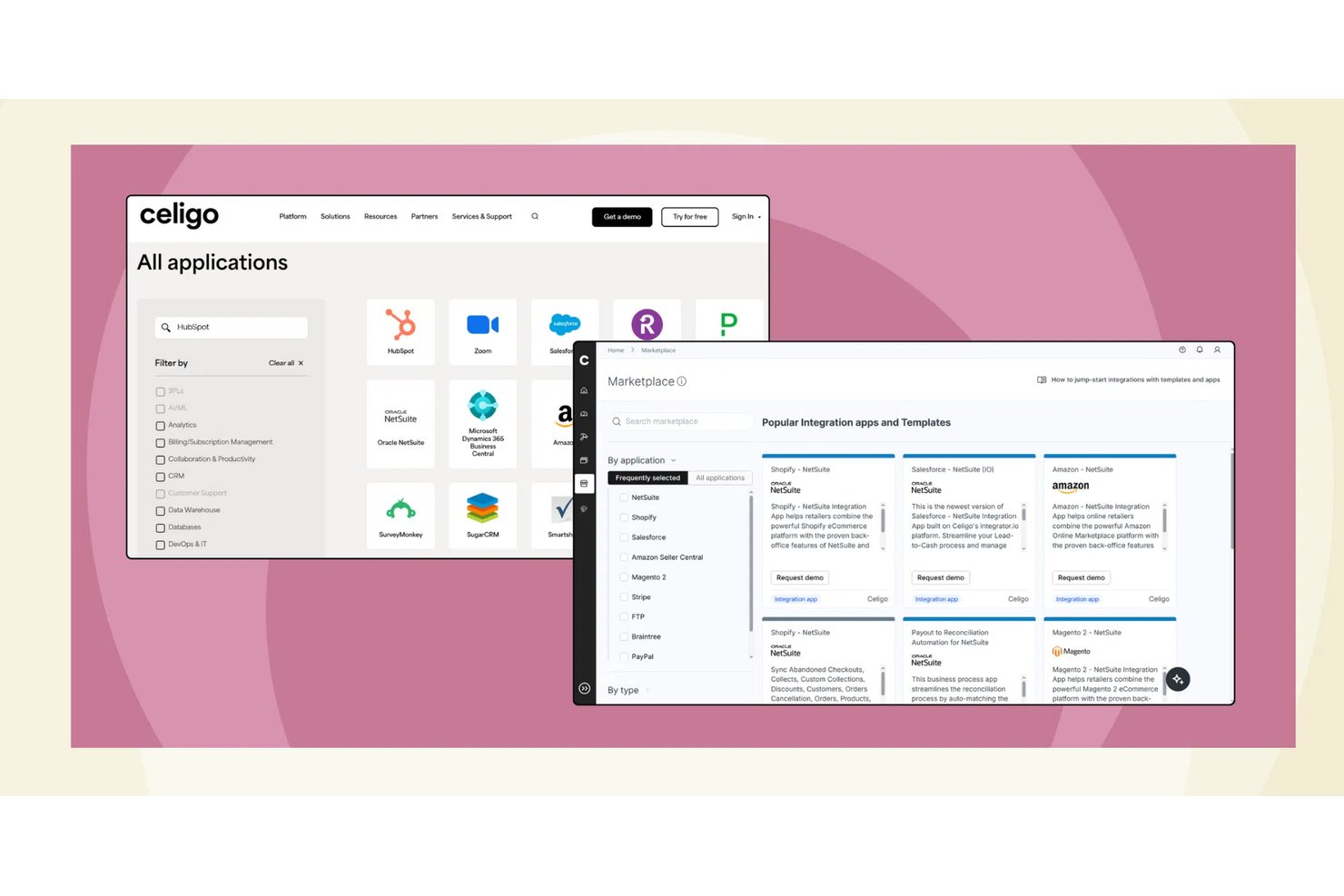
Celigo is an iPaaS that unifies application integration, API management, B2B/EDI, and AI-powered automation in a single platform, connecting cloud and on-premises systems through a library of prebuilt connectors and flow-based workflow tools.
Who Is Celigo Best For?
Celigo is a strong fit for mid-market IT and operations teams managing complex, multi-system environments built around ERP platforms like NetSuite.
Why I Picked Celigo
Celigo earns its spot on my shortlist because it's one of the few iPaaS platforms that handles application integration, API management, and EDI under one roof. I like that the B2B Manager covers the full trading partner lifecycle and EDI transaction processing without requiring a separate tool. On top of that, the API Builder lets me expose internal integrations as governed, shareable APIs, which means I'm not rebuilding point-to-point connections every time a new system enters the stack.
Celigo Key Features
- Visual flow builder: Design, schedule, and manage multi-step workflows across systems using a drag-and-drop interface.
- Celigo Ora (natural language automation): Build and manage integrations by describing automation needs in plain language.
- Integration monitoring dashboards: Track status, errors, and performance in real time with self-service alerting and SLA tracking tools.
- Reusable integration templates: Deploy preconfigured automation blueprints for popular project management, CRM, and ERP tool combinations.
Celigo Integrations
Celigo offers hundreds of native integrations, including NetSuite, Salesforce, Shopify, Jira, Asana, Monday.com, Smartsheet, Wrike, Amazon, and Microsoft 365. An API is available for custom integrations.
Pros and Cons
Pros:
- Prebuilt templates cut deployment time significantly
- AI-assisted mapping speeds up workflow configuration
- Handles API, EDI, and app integration natively
Cons:
- EDI configuration can be time-consuming to set up
- Advanced scripting requires developer involvement
New Product Updates from Celigo
Celigo Adds SuiteTax and Variant Publishing for Shopify–NetSuite
Celigo adds NetSuite SuiteTax support and variant-level sales channel publishing to its Shopify–NetSuite integration. These updates improve tax handling and give merchants more control over how product variants are published. For more information, visit Celigo’s official site.
 .
.
Make
Best for visual workflow design and debugging

Make is a visual iPaaS platform that lets you build automated workflows, multi-step integrations, and AI agents across 3,000+ pre-built app connectors—without writing code.
Who Is Make Best For?
Make is a strong fit for operations and automation teams at mid-sized companies who need to build complex, multi-step workflows without relying on engineering resources.
Why I Picked Make
Make earns its spot on my shortlist because of how well its canvas-based scenario builder handles complex branching logic visually. I can see data flowing between modules in real time, and when something breaks, Make's execution history pinpoints the exact module that failed with full input/output detail. That level of step-by-step visibility is what sets it apart for debugging multi-app workflows.
Make Key Features
- AI agent builder: Create and deploy AI agents directly inside scenarios using Make's native AI modules, including support for large language model connections.
- Custom webhooks: Set up instant triggers using incoming or outgoing webhooks to connect apps that lack native connectors.
- Data mapping tools: Transform, parse, and format data between modules using built-in functions for text, numbers, dates, and arrays.
- Scenario scheduling: Set automated run intervals down to the minute to control exactly when workflows execute.
Make Integrations
Make offers 3,000+ native integrations, including OpenAI, Google Gemini, Anthropic Claude, HubSpot, Microsoft 365, Pipedrive, Perplexity AI, Telegram, and Instagram for Business, with an API available for custom integrations.
Pros and Cons
Pros:
- Built-in error handler routes per module
- Visual canvas shows data at every step
- Operations-based pricing keeps small workflows cheap
Cons:
- No self-hosted or on-premise deployment option
- Operation counts spike with complex scenarios

n8n
Best for self-hosted and open-source deployments
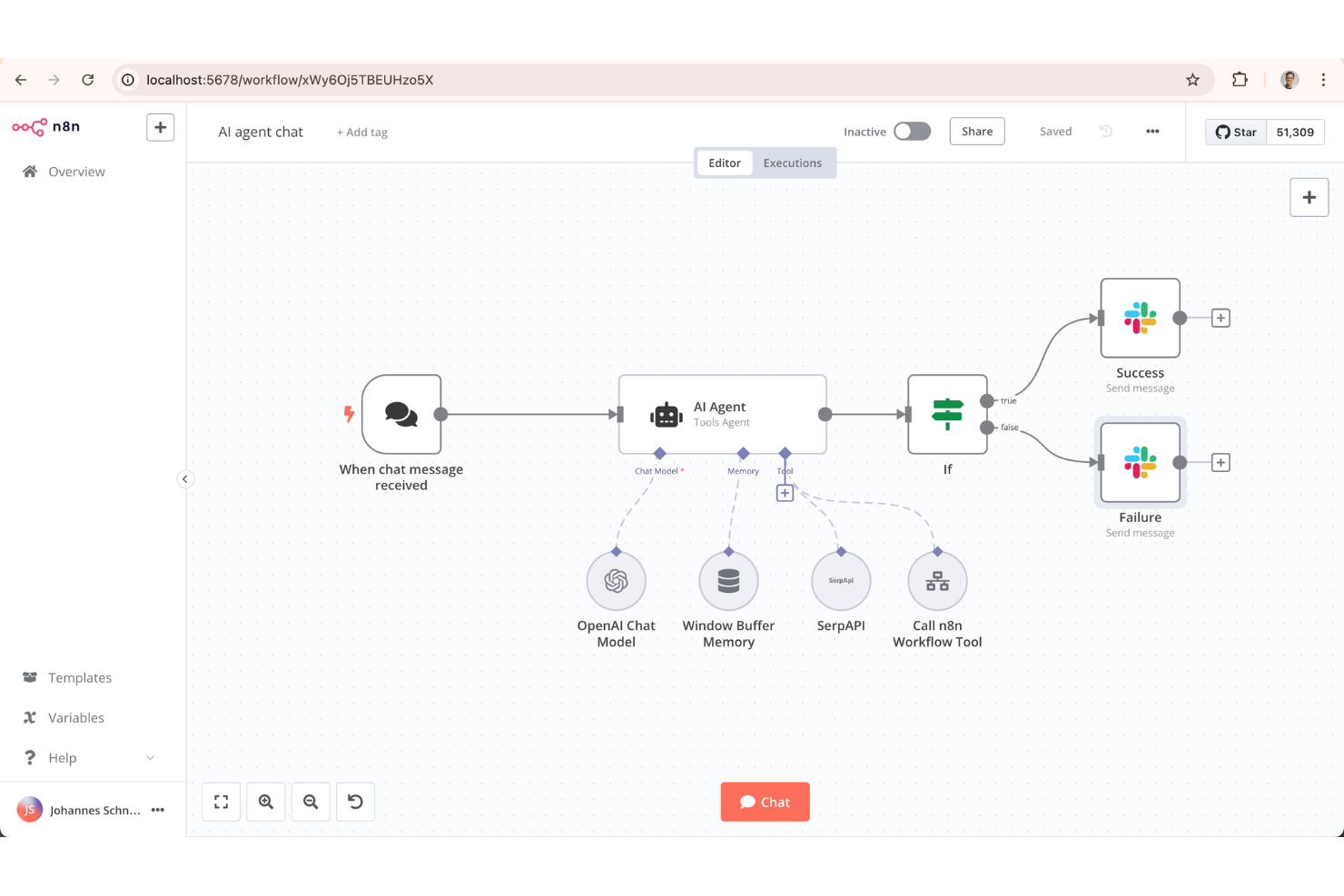
With a node-based visual builder and a fully open-source codebase, n8n is a workflow automation platform for building app integrations and multi-step automations across cloud and self-hosted environments.
Who Is n8n Best For?
n8n is a strong fit for technical teams and developers who need full control over their automation infrastructure, including data residency and custom deployment environments.
Why I Picked n8n
I've included n8n in my top picks because the self-hosted deployment option is genuinely production-ready. I run it via Docker on my own infrastructure, so workflow data never leaves my environment. The fair-code license also means my team can read, fork, and modify the source, and we've written custom nodes in TypeScript to cover connectors that don't exist natively.
n8n Key Features
- Visual workflow canvas: Build automations by connecting nodes on a drag-and-drop canvas, with real-time output previews at each step.
- AI agent nodes: Chain LLM calls using built-in agent nodes that connect to OpenAI, Anthropic, and other models.
- Execution history logs: Review a full record of past workflow runs, including input and output data at each node.
- Conditional branching: Route data through different paths based on field values, status codes, or custom JavaScript expressions.
n8n Integrations
n8n offers 350+ native integrations, including Google Sheets, Slack, Shopify, Discord, Notion, Trello, Salesforce, GitHub, MySQL, and Microsoft 365, with an API for custom integrations.
Pros and Cons
Pros:
- Limited built-in data transformation options
- Workflow version history tracks every change
- Built-in AI agent and LLM nodes
- Free community edition for unlimited workflows
Cons:
- No mobile app for monitoring workflows

Best for lifetime access with unlimited tasks
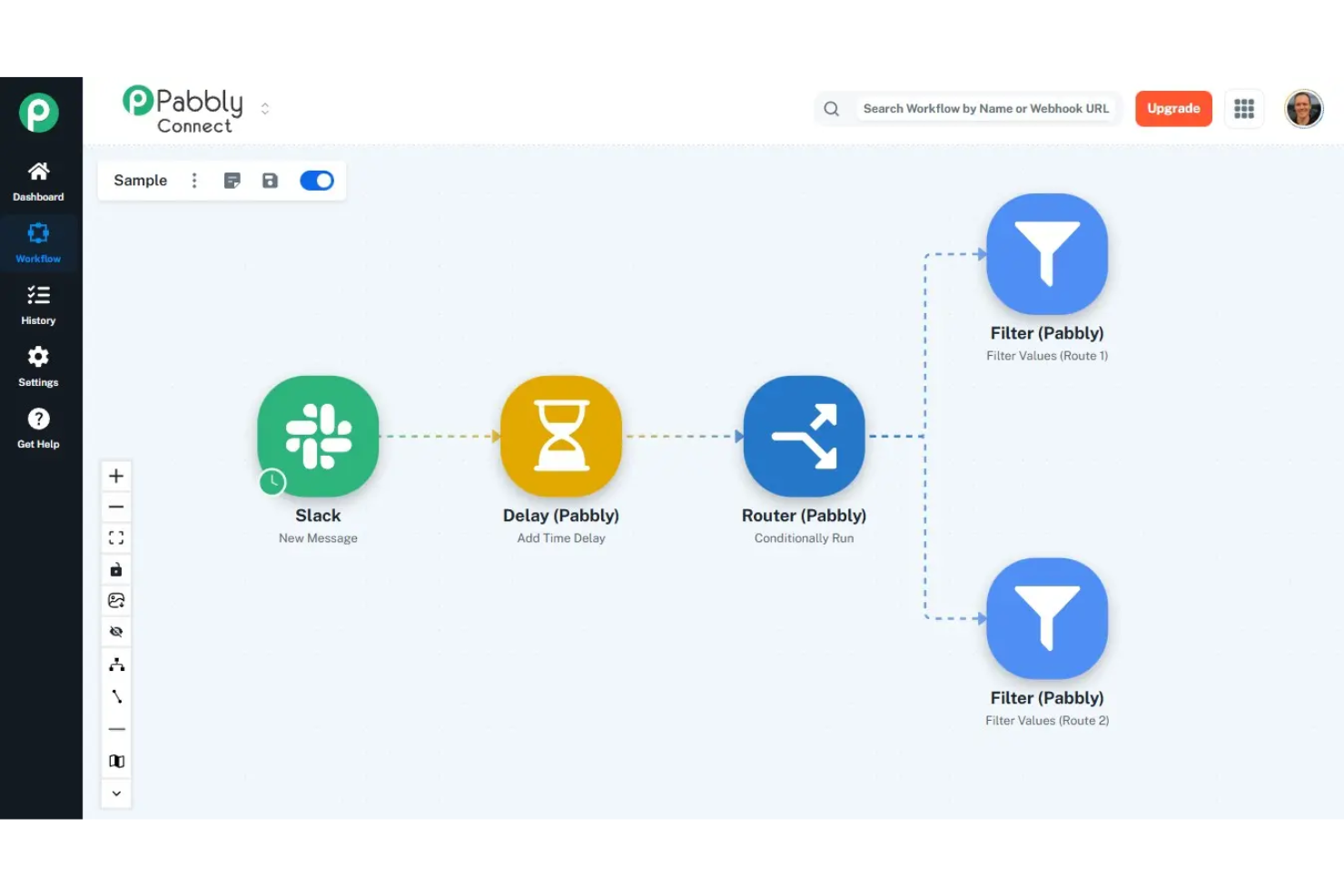
An integration and automation platform, Pabbly Connect offers a visual workflow builder with multi-step actions, conditional routing, webhook support, data formatting, and connections across 2,000+ apps.
Who Is Pabbly Connect Best For?
Pabbly Connect is a strong fit for marketing and operations teams that run high-volume automations across CRM, email, and e-commerce tools.
Why I Picked Pabbly Connect
Pabbly Connect earns its spot on my shortlist because even internal steps like formatters, iterators, and filters don't count toward your task total. I've run 8-step lead enrichment workflows across HubSpot, Slack, and Google Sheets without a single extra task logged. The iterator step lets me loop through array data mid-workflow, which would consume dozens of counted tasks in Zapier.
Pabbly Connect Key Features
- API connector: Send custom HTTP requests to any REST API endpoint within a workflow, without needing a native integration.
- Delay action: Pause a workflow for a set duration between steps before the next action fires.
- Capture webhook response: Map response data returned from an outbound webhook call into later workflow steps.
- Connection management: Reconnect or update app credentials from the connections dashboard without rebuilding workflows.
Pabbly Connect Integrations
Pabbly Connect offers 2,000+ built-in app integrations, including Google Sheets, Mailchimp, Stripe, WooCommerce, Trello, Slack, HubSpot, and Zoom. An API module is also available for connecting to any application with a REST API.
Pros and Cons
Pros:
- No per-workflow limits on any plan
- Internal steps don't count as tasks
- Lifetime pricing removes recurring costs
Cons:
- Fewer app integrations than Zapier offers
- Lower-tier plans lack multi-step workflows

Boomi
Best for B2B/EDI and data hub governance

Boomi is a cloud-native iPaaS that covers application integration, data management, B2B/EDI, managed file transfer, API management, and agentic workflow governance across hybrid and multi-cloud environments.
Who Is Boomi Best For?
Boomi is a natural fit for mid-market and enterprise teams in supply chain, retail, or manufacturing that rely on EDI-based trading partner networks.
Why I Picked Boomi
I've included Boomi in my top picks because its B2B/EDI management and Boomi Data Hub sit inside the same platform as the rest of your integrations. That means when you're connecting trading partners via EDI, you're using the same connector framework and the same hub-and-spoke architecture that governs your internal data. I particularly like how Data Hub's golden record management enforces data quality centrally—validation rules, fuzzy matching, and survivorship logic apply once at the hub, and clean records sync bi-directionally back to systems like SAP and Salesforce automatically.
Boomi Key Features
- Event Streams: A built-in event broker that lets you build real-time, event-driven integrations without standing up separate middleware.
- Boomi Flow: A low-code application builder for creating user-facing workflows and web forms that sit on top of your integrations.
- Managed file transfer: Secure, automated file transfer with audit logging, scheduling, and compliance controls built directly into the platform.
- AgentStudio: A visual environment for building, governing, and orchestrating AI agents and MCP-enabled tools across your enterprise stack.
Boomi Integrations
Boomi offers native integrations with Salesforce, NetSuite, SAP, Workday, ServiceNow, Shopify, Microsoft Dynamics 365, and QuickBooks. An API is available for custom integrations.
Pros and Cons
Pros:
- Master Data Hub with golden record matching
- Hybrid and on-premise Atom deployment
- Built-in B2B/EDI trading partner management
Cons:
- Single JVM per Atom limits auto-scaling
- Mapper failures cause full batch failures

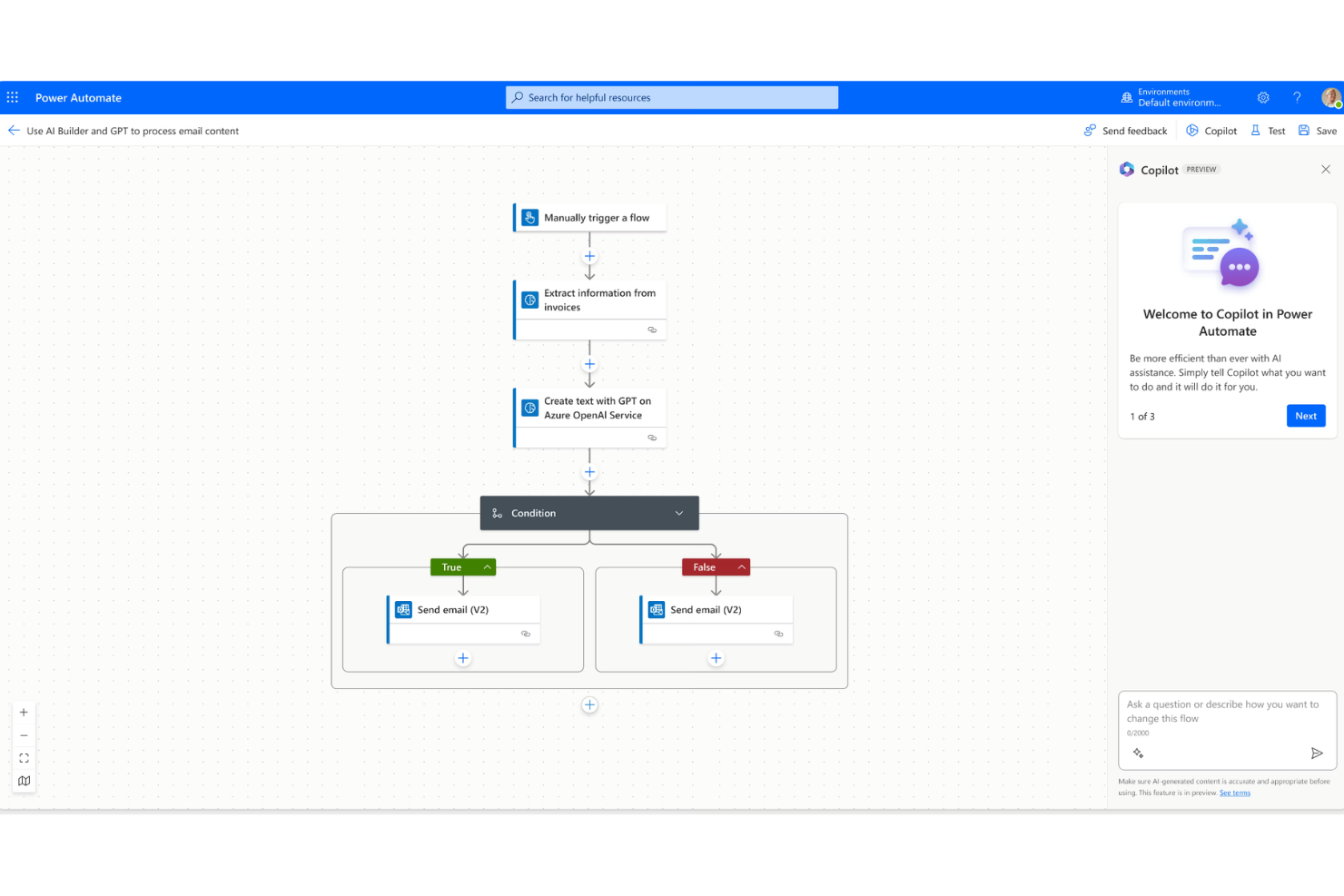
Microsoft Power Automate is a cloud and desktop automation platform that combines workflow automation, RPA, and process mining across cloud services and legacy on-premise applications.
Who Is Microsoft Power Automate Best For?
Microsoft Power Automate is a natural fit for mid-to-enterprise teams already running Microsoft 365, Azure, or Dynamics 365 who want to automate workflows without leaving that ecosystem.
Why I Picked Microsoft Power Automate
I picked Microsoft Power Automate because its desktop flows give my team genuine RPA access to legacy apps that don't have APIs, like older ERP screens or internal web portals, without writing code. What I find compelling is how attended and unattended desktop flows run within the same platform as cloud flows, so I'm not switching tools to handle both human-in-the-loop and fully autonomous automation. Copilot in Power Automate also lets me describe a flow in plain language and get a working draft to edit, which cuts build time noticeably.
Microsoft Power Automate Key Features
- Process mining: Analyzes event logs from connected systems to surface automation opportunities across existing workflows.
- AI Builder: Lets you add pre-trained AI models, like document processing or sentiment detection, directly into flows without custom ML work.
- Business process flows: Guides users through multi-step processes in a structured sequence to enforce consistent task completion.
- Pre-built flow templates: A library of ready-to-run templates for common automation scenarios across Microsoft and third-party apps.
Microsoft Power Automate Integrations
Microsoft Power Automate has native integrations across the Microsoft ecosystem, including Microsoft 365 and Azure.
Pros and Cons
Pros:
- No-code drag-and-drop flow builder
- Desktop and cloud flows in one platform
- Deep native integration with Microsoft 365 apps
Cons:
- Weak support for non-Microsoft on-premise systems
- Premium connectors locked behind paid plans


Zapier is a no-code automation platform that connects web apps through trigger-based workflows, multi-step Zaps, and AI-powered agents built across its library of app connectors.
Who Is Zapier Best For?
Zapier is a strong fit for ops and revenue teams at SMBs and mid-market companies who need to automate cross-app workflows without involving engineering.
Why I Picked Zapier
I've included Zapier on my shortlist because it's one of the only iPaaS tools I've seen that lets you govern AI agents at the policy level, not just the workflow level. IT admins can define exactly which apps and actions are available, and those rules apply uniformly across MCP clients and SDK callers. I also like the AI guardrails feature, which screens for sensitive data and unsafe inputs before anything is sent or saved across connected systems.
Zapier Key Features
- Paths: Add conditional logic to Zaps so actions branch based on specific field values or filter conditions.
- Formatter: Transform, split, and reformat data between steps without writing code using built-in text, number, and date operations.
- Zapier Tables: Store, retrieve, and update records across Zaps using a built-in database that connects directly to your workflows.
- Transfer: Run bulk data migrations between apps by moving large batches of historical records through a Zap on demand.
Zapier Integrations
Zapier offers over 6,000 native integrations, including Google Sheets, Slack, Salesforce, HubSpot, Gmail, Trello, Asana, QuickBooks, Airtable, Shopify, and Mailchimp, and provides an API for custom integrations.
Pros and Cons
Pros:
- Built-in tables store workflow data
- Multi-step Zaps with branching paths
- Largest app directory with 9,000+ connectors
Cons:
- Extra tasks charged at 1.25x rate
- Task-based pricing escalates at scale

MuleSoft is an iPaaS and API management platform that lets you connect apps, automate data flows, and manage the full API lifecycle across cloud, on-premises, and hybrid environments using both low-code tools and custom code.
Who Is MuleSoft Best For?
MuleSoft is a strong fit for large enterprises with complex integration needs, particularly those managing high volumes of APIs across distributed systems.
Why I Picked MuleSoft
MuleSoft earns its spot on my shortlist because of how deeply it integrates API design, deployment, and governance into a single environment. I picked it specifically for teams managing APIs at scale—MuleSoft's Anypoint Platform lets you design APIs, publish reusable assets to a shared marketplace, and enforce governance policies all in one place. I also like that DataWeave, its native data transformation language, handles complex format conversions without relying on third-party tools.
MuleSoft Key Features
- Anypoint Exchange: A built-in marketplace of pre-built connectors, templates, and reusable assets you can plug directly into your integration flows.
- CloudHub deployment: A fully managed cloud infrastructure that supports auto-scaling, automatic failover, and zero-downtime deployments across 12 global regions.
- Anypoint Omni Gateway: An API gateway that lets you deploy to Docker, Kubernetes, AWS, Azure, GCP, or on-premises from a single control plane.
- MuleSoft MCP: A model context protocol implementation that lets developers turn APIs and Mule apps into MCP servers in just a few clicks.
MuleSoft Integrations
MuleSoft offers native integrations across the Salesforce ecosystem, SAP, ServiceNow, Workday, and NetSuite. MuleSoft Anypoint Platform provides an API for custom integrations.
Pros and Cons
Pros:
- Granular API governance and policy enforcement
- Reusable API assets across teams
- 400+ pre-built connectors on Exchange
Cons:
- Anypoint Studio debugging can be slow
- DataWeave requires dedicated technical expertise
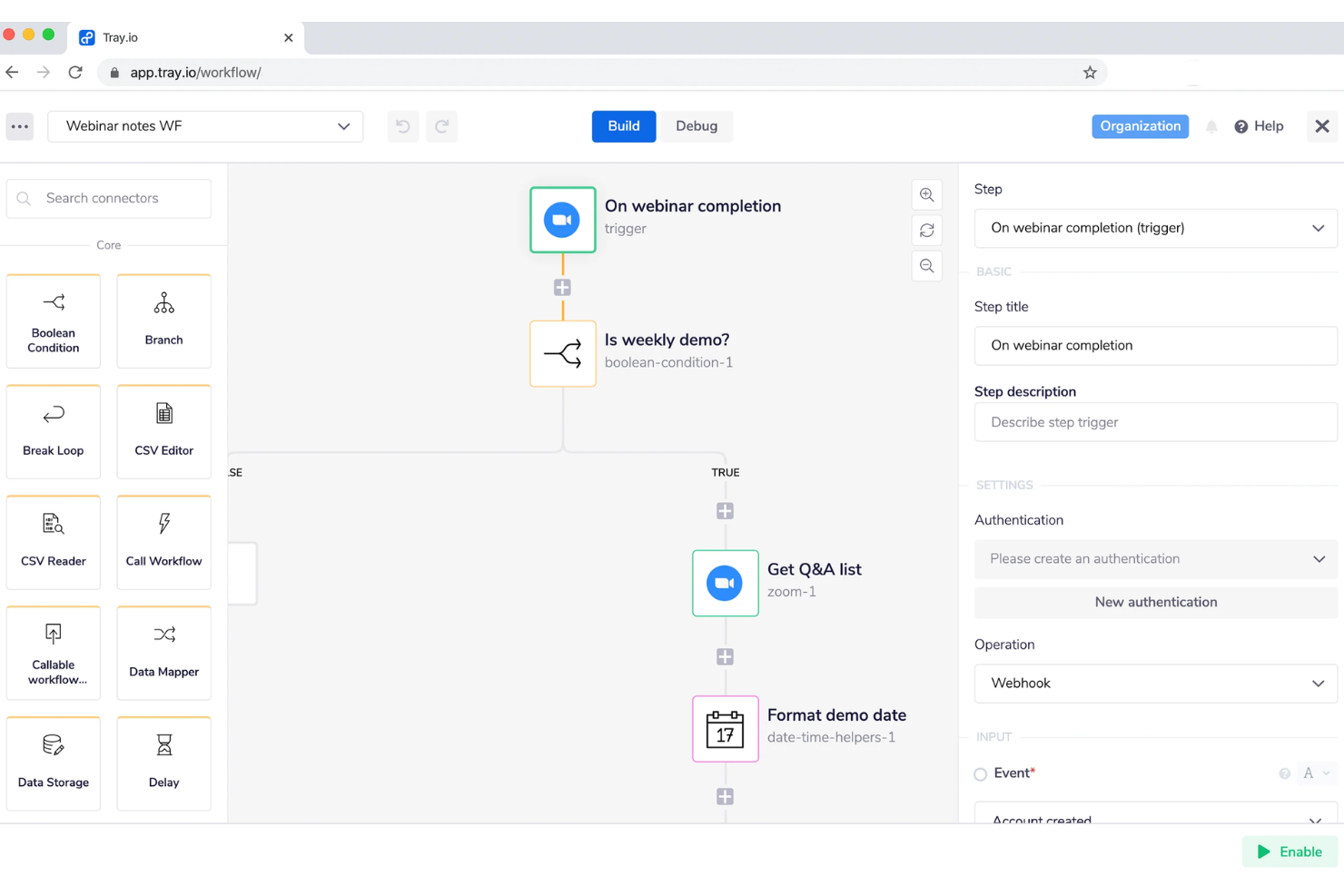
Tray.ai is an AI orchestration platform built around an intelligent iPaaS layer that connects enterprise apps, databases, and AI services through workflow automation, API management, and no-code agent development.
Who Is Tray.ai Best For?
Tray.ai is a strong fit for mid-market and enterprise product and engineering teams who need to embed integration and automation capabilities directly into their own software products.
Why I Picked Tray.ai
I've included Tray.ai in my top picks because it's one of the only iPaaS platforms where you can ship integration capabilities directly inside your own product. The embedded integrations feature lets your customers connect their own tools without ever leaving your app, which is a genuinely different positioning from standard automation tools. I also like the Merlin Agent Builder, which lets IT and business users design, test, and deploy AI agents using a no-code interface built on top of the same connector library your workflows use.
Tray.ai Key Features
- Universal connector: Connect to any API endpoint using a configurable HTTP connector, without waiting for a pre-built integration.
- Data mapping and digital transformation: Transform, filter, and reformat data between systems directly inside the workflow builder using a visual interface.
- Multi-tenant workspace management: Manage separate workflow environments for different customers or business units from a single admin console.
- Event-based triggers: Fire workflows automatically based on webhooks, schedules, or real-time data events from connected systems.
Tray.ai Integrations
Tray.ai offers native integrations, including Salesforce, HubSpot, Slack, NetSuite, Google Sheets, Zendesk, Snowflake, and Microsoft 365. An API is available for custom integrations.
Pros and Cons
Pros:
- SOC 2 Type II and HIPAA-ready compliance
- White-label embedded iPaaS on enterprise tier
- Built-in AI agent builder with guardrails
Cons:
- Debugging multi-branch workflows is difficult
- Has unpredictable costs

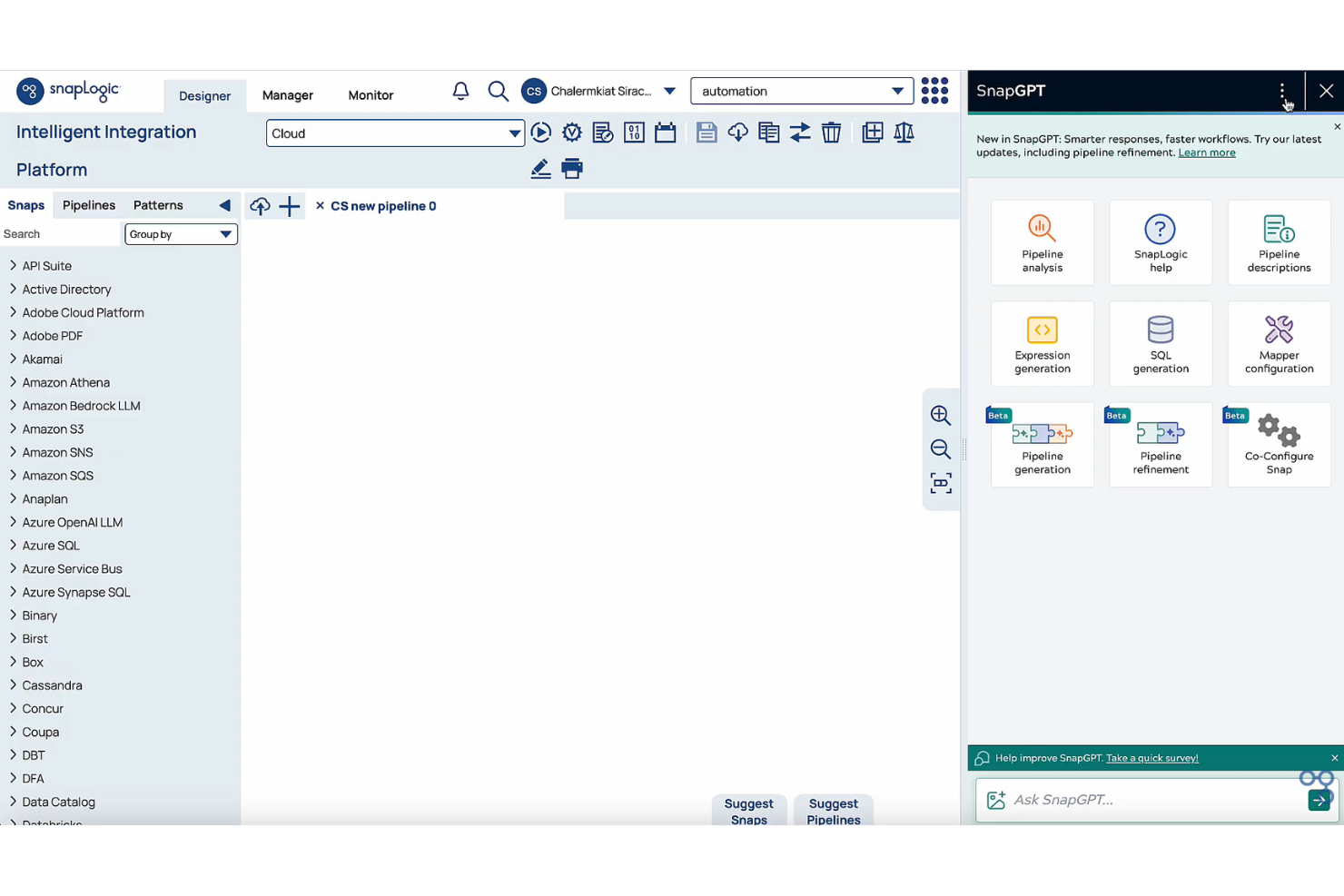
SnapLogic is a cloud-native iPaaS platform that combines application integration, data integration, API management, and AI agent creation in a single no-code/low-code environment.
Who Is SnapLogic Best For?
SnapLogic is a strong fit for enterprise data and integration teams that need to connect cloud apps, data pipelines, and AI workflows without heavy developer involvement.
Why I Picked SnapLogic
SnapLogic earns its spot on my shortlist because of AgentCreator, its no-code environment for building and deploying AI agents that can automate complex workflows across connected systems without writing any code. I also like that SnapGPT lets me describe an integration in plain language and generate a working pipeline from that prompt. Together, these two capabilities make SnapLogic genuinely different from other iPaaS platforms that bolt AI onto an existing workflow builder as an afterthought.
SnapLogic Key Features
- AutoSync: Automates data ingestion from SaaS applications directly into cloud data warehouses without manual pipeline setup.
- SLIM: Identifies and migrates integrations from legacy platforms by analyzing existing workflows and suggesting optimal migration paths.
- API management: Lets you create, manage, and secure APIs with a visual Policy Studio, a developer hub, and built-in governance controls.
- AutoPrep: Cleans, normalizes, and transforms raw data for use in pipelines or AI workflows without writing transformation code.
SnapLogic Integrations
SnapLogic offers native integrations with Salesforce, Workday, NetSuite, Snowflake, ServiceNow, SAP, Google BigQuery, Databricks, and Slack. An API is available for custom integrations.
Pros and Cons
Pros:
- Reusable pipeline templates speed up builds
- Self-hosted Groundplex for on-premise processing
- SnapGPT generates pipelines from plain language
Cons:
- Occasionally hallucinates functions in suggestions
- Version control and CI/CD gaps persist
Other iPaaS Solutions
Here are some additional iPaaS vendors that didn’t make it onto my shortlist, but are still worth checking out:
- Jitterbit
For fast enterprise implementation
- SAP Integration Suite
For connecting SAP-centric landscapes
- Informatica IDMC
For data quality and cataloging
- Workato
For enterprise MCP and agent orchestration
- Integrately
For pre-built one-click automations
- Exalate
For cross-company two-way issue syncing
- TIBCO
For real-time event-driven architectures
- Albato
For white-label embedded SaaS integrations
- APPSeCONNECT
For ERP-centric mid-market businesses
- Oracle Integration
For Oracle Cloud ERP and HCM workflows


How I Evaluate iPaaS Solutions
I split my evaluation into two layers: the baseline capabilities a tool must have to qualify—like syncing Jira to Salesforce—and the differentiators that separate strong options from the rest.
Core Functionality (Table Stakes For This List)
When I'm selecting tools for my list, I rank each one on a scale from 0 (does not offer the functionality) to 5 (excels in this area) for each core functionality listed below. Then, I calculate the tool's total score into a percentage. Each tool needs to achieve a minimum total score of 65% to be considered for inclusion.
- Pre-Built Connector Library: I check how many connectors ship out of the box and whether key PM tools like Jira, Asana, Monday, and Smartsheet are covered natively.
- Workflow Automation Engine: Multi-step, conditional workflows matter here—like auto-creating a Jira ticket when a Salesforce deal closes and notifying Slack.
- Data Mapping & Transformation: I evaluate whether the tool supports field-level mapping and format conversion, such as syncing custom fields between ClickUp and HubSpot.
- Real-Time & Batch Sync: Both event-driven triggers and scheduled batch runs should be available so teams can match sync frequency to each workflow's urgency.
- API Management Tools: I look for the ability to build, expose, and secure custom API endpoints for cases where a native connector doesn't exist yet.
- Monitoring & Error Handling: Dashboards, alerting, and automated retry logic are what I evaluate—especially for high-volume flows where a silent failure can stall a sprint.
Once I have a list of tools that meet the criteria, I consider what sets each platform apart.
Differentiating Factors (What Sets Vendors Apart)
Here's how I compare and contrast different vendors:
Standout Features
A low-code or no-code builder matters for PMO teams who want to connect Asana to their finance system without filing a dev ticket. Bi-directional sync is another feature I evaluate closely—keeping task status mirrored between tools like Jira and Monday without creating duplicates saves hours of manual cleanup. Pre-built templates for common PM scenarios, like syncing a CRM deal stage to a project kickoff workflow, can cut setup time from days to minutes.
Beyond Features
Pricing transparency is something I always check—iPaaS vendors structure costs around connectors, task volume, or data throughput, and surprises at scale can blow a PMO's budget. Security and compliance posture also gets close attention, especially SOC 2 and GDPR certifications, since project data often flows between systems that hold sensitive client or personnel information. I also evaluate onboarding support and documentation quality, because even the best platform stalls adoption if your team can't self-serve past the initial setup.
How to Choose iPaaS Solutions
It’s easy to get bogged down in long feature lists and complex pricing structures of the integration solutions. To help you stay focused as you work through your unique software selection process, here’s a checklist of factors to keep in mind:
| Factor | What to Consider |
|---|---|
| Scalability | Can the platform handle increased users, data volumes, and automation complexity as your business grows? Check for transparent limits and upgrade paths. |
| Integrations | Does the tool natively support the apps and systems your workflows rely on? Are custom API connections available if direct integration isn’t listed? |
| Customizability | Can you tailor workflows, fields, and automation logic to match your organization’s unique process? Are logic options and data mapping flexible enough? |
| Ease of use | Are workflows easy to build, modify, and monitor without deep technical skills? Request a live demo to check if your team feels comfortable with the interface. |
| Implementation and onboarding | What resources, time, and skills are needed to get your automations live? Is there hands-on support, documentation, or an onboarding specialist available? |
| Cost | How are pricing tiers structured around tasks, users, or integrations? Double-check for overage fees, per-connection costs, or limitations in trial/free plans. |
| Security safeguards | What controls exist for user permissions, data encryption, and audit trails? Ensure compliance with your policies and check for independent security certifications. |
| Support availability | What channels (email, chat, phone) and response times can you expect? Is support offered during your working hours and in your region? |
What are iPaaS solutions?
iPaaS (Integration Platform as a Service) solutions are cloud-based platforms that connect, automate, and manage data flows between different applications or systems. They let your team build and maintain integrations without custom development, making it easier to orchestrate workflows and keep data consistent across tools. Most iPaaS platforms support integrations for both on-premises and cloud-based applications, enabling smoother operations as your business grows and changes.
Features of iPaaS solutions
When selecting iPaaS solutions, keep an eye out for the following key features:
- Prebuilt connectors: Integrate with popular cloud and on-premises apps through a library of ready-made connectors, reducing setup time and coding requirements.
- Visual workflow builder: Design, map, and automate complex business workflows using an intuitive drag-and-drop interface with clear logic paths.
- Data transformation tools: Manipulate, clean, and modify data between systems to fit each application's format requirements without manual data handling.
- Real-time synchronization: Keep data up to date across applications instantly, ensuring your team always works with the latest information.
- Error monitoring and alerts: Track failures or issues in your integrations in real time, receive notifications, and quickly troubleshoot problems to minimize downtime.
- Role-based access controls: Assign permissions and manage who can view, modify, or deploy cloud integrations to keep your systems secure and ensure compliance.
- API management: Enable custom integrations and securely manage API calls, authentication, and usage limits in one central location.
- Multi-tenancy support: Allow separation of integrations and data for different teams or subsidiaries within the same platform, supporting larger organizations.
- Audit logs: Maintain detailed records of all workflow activity, changes, and user actions for compliance and troubleshooting purposes.
Common iPaaS solutions AI Features
Beyond the standard iPaaS solutions features listed above, many of these solutions are incorporating AI with features like:
- Intelligent data mapping: Uses AI to automatically detect, match, and map data fields between different systems, reducing manual configuration and speeding up integration setup.
- Automated anomaly detection: Continuously monitors data flows and workflows with AI to spot unusual patterns, quickly flagging issues that might indicate integration errors or security threats.
- Predictive workflow optimization: Analyzes workflow performance and usage patterns over time to suggest improvements, helping teams proactively refine automations for greater reliability or efficiency.
- Natural language integration builder: Lets users describe desired integrations in plain language, then uses AI to generate workflows or automation steps, simplifying setup for non-technical team members.
- Self-healing automations: Employs AI to automatically resolve common workflow errors or failed data transfers without human intervention, minimizing downtime and manual troubleshooting.
Benefits of iPaaS solutions
Implementing iPaaS solutions provides several benefits for your team and your business. Here are a few you can look forward to:
- Simplified integrations: Centralize all your data flows and system connections in one platform, reducing reliance on custom code and manual integration processes.
- Faster automation deployment: Launch and maintain workflows efficiently using visual builders and prebuilt connectors, so your team can respond quickly to changing needs.
- Real-time data consistency: Keep information synchronized across all your apps and databases, ensuring everyone works with the most accurate and up-to-date insights.
- Enhanced scalability: Adapt automation and integration capabilities as business needs evolve, without being limited by infrastructure or manual workloads.
- Greater process visibility: Use management dashboards and audit logs to track workflow status, monitor performance, and identify issues before they become business disruptions.
- Stronger security and compliance: Apply role-based controls, encryption, and user activity tracking to support IT teams, policies, and regulatory requirements.
- Improved error handling: Automatically detect, alert, and resolve integration failures, helping your team maintain uninterrupted business processes.
Costs and Pricing of iPaaS solutions
Selecting iPaaS solutions requires an understanding of the various pricing models and plans available. Costs vary based on features, team size, add-ons, and more. The table below summarizes common plans, their average prices, and typical features included in iPaaS solutions:
Plan Comparison Table for iPaaS solutions
| Plan Type | Average Price | Common Features |
|---|---|---|
| Free Plan | $0 | Limited prebuilt connectors, basic workflow automation, community support, and capped data volume. |
| Personal Plan | $20-$50/user/month | More connectors, visual workflow builder, moderate task limits, email support, and simple reporting. |
| Business Plan | $60-$150/user/month | Advanced integrations, data transformation, error handling, real-time data synchronization, API access, and role-based permissions. |
| Enterprise Plan | $200-$500+/user/month | Custom integrations, priority support, advanced security, audit logs, scalability controls, and multi-tenancy. |
iPaaS solutions FAQs
Here are some answers to common questions about iPaaS solutions:
How do iPaaS solutions handle data security?
PaaS solutions typically use encryption, access controls, and compliance certifications to protect your data during transfers and while at rest. Most platforms also offer audit logs and role-based permissions so your team can monitor activity and control who has access to sensitive information.
Can iPaaS solutions connect both cloud and on-premises systems?
Yes, most iPaaS solutions are designed to connect cloud-based software with on-premises systems. This lets your team automate workflows and share data between legacy systems and modern cloud apps without relying on manual imports or exports, reducing data silos.
What are the main differences between iPaaS and traditional integration?
iPaaS is cloud-based and features prebuilt connectors, visual builders, and simplified management, making it faster to deploy and easier to maintain than traditional custom integrations. Older approaches often require significant coding and infrastructure management, while iPaaS platforms reduce complexity and ongoing maintenance.
How do iPaaS solutions support scaling as my business grows?
iPaaS solutions offer scalable pricing tiers, customizable workflows, and the ability to add users and connectors as your needs evolve. Many platforms also provide automation for repetitive tasks and resource limits you can adjust to match increased data volume or additional integration requirements.
Do iPaaS solutions require coding skills?
No, most iPaaS solutions offer no-code or low-code interfaces so anyone on your team can set up integrations and automations. However, having technical knowledge can help when creating advanced or custom workflows, especially if you need to connect niche apps via APIs.