

10 Best Government Project Management Software Reviewed in 2026

10 Best Government Project Management Software Shortlist


Managing government projects can be a tough job between deadlines, budgets, and compliance requirements. That's where project management software comes in. It helps you keep track of everything in one place, making your life a bit easier.
I've spent time testing and reviewing the best government project management tools out there. My goal is to give you an unbiased look at what works and what doesn't. I'll share the top picks that can help you tackle your challenges.
In this article, you'll find a rundown of software that can suit your needs. Whether you're dealing with small teams or large-scale projects, there's something here for you. Let's dive into the options that can make a difference for your team.
Why Trust Our Software Recommendations
Our team has been testing and reviewing software since 2012. As project managers ourselves, we know how difficult—and important—it is to choose the right software.
For this guide, we evaluated tools using hands-on testing and independent research, scoring tools using our selection criteria. We also draw on insights from industry thought leaders and practicing project management experts.
Our reviews reflect our human editorial judgment, not a sales pitch.
Expert reviewers:
Best Government Project Management Software Summary
This comparison chart summarizes pricing details for my top government project management software selections to help you find the best one for your budget and business needs.
| Tool | Best For | Trial Info | Price | ||
|---|---|---|---|---|---|
| 1 | Best for reporting dashboards | 14-day free trial | From $10/user/month (billed annually) | Website | |
| 2 | Best for resource allocation | 30-day free trial + free demo available | From €22.5/month (billed annually) | Website | |
| 3 | Best for Office 365 users | Free trial available | From $10/user/month (billed annually) | Website | |
| 4 | Best for visual project planning | Free plan + free demo available | From $3.99/seat/month (billed annually) | Website | |
| 5 | Best for team collaboration | 14-day free trial | From $5/user/month (billed annually) | Website | |
| 6 | Best for project lifecycle management | 14-day free trial + free demo available | From $8/user/month (billed annually) | Website | |
| 7 | Best for capacity planning | 30-day free trial | From $600/month | Website | |
| 8 | Best for construction projects | Free demo available | From $10,000/year (billed annually) | Website | |
| 9 | Best for Agile teams | Free plan available | From $7.91/user/month | Website | |
| 10 | Best for strategic planning | Free demo available | Pricing upon request | Website |
Best Government Project Management Software Review
Below are my detailed summaries of the best government project management software that made it onto my shortlist. My reviews offer a detailed look at the key features, pros & cons, integrations, and ideal use cases of each tool to help you find the best one for you.

Celoxis
Best for reporting dashboards

Celoxis is a project and portfolio management platform built for complex organizations that need multi-project scheduling, RAID tracking, resource management, and configurable reporting across programs and workstreams.
Who Is Celoxis Best For?
Celoxis is a strong fit for mid-to-large government agencies and public sector organizations managing multiple concurrent projects with strict oversight and compliance requirements.
Why I Picked Celoxis
I picked Celoxis as one of the best options for government project management because of how far its reporting goes beyond standard status views. I can build drill-down charts that pull from custom fields (including formula fields), then schedule those reports for automatic email delivery to multiple stakeholders. For government teams that need to present portfolio-level progress to oversight bodies on a regular cadence, that kind of built-in, schedulable reporting removes a lot of manual prep work. I also like that dashboards are fully customizable with resizable widgets, and users can hold multiple shared dashboards at once.
Celoxis Key Features
- Interactive Gantt charts: Visualize project timelines with drag-and-drop task scheduling, dependency mapping, and critical path tracking across multiple projects.
- RAID log tracking: Log and monitor risks, actions, issues, and decisions in a centralized register tied directly to individual projects.
- Resource workload management: View team capacity across projects and reassign tasks based on availability to avoid over-allocation.
- Budget and cost tracking: Monitor planned vs. actual costs at the task, project, and portfolio level with real-time financial summaries.
Celoxis Integrations
Celoxis offers native integrations with Google Drive, Microsoft Excel, Microsoft Project, Salesforce, Jira, Zendesk, Slack, QuickBooks Online, and more. It also connects with Zapier, and an API is available for custom integrations.
Pros and Cons
Pros:
- Portfolio-level risk and issue registers
- On-premise and cloud deployment options
- Built-in EVM and financial tracking
Cons:
- Database filters use restrictive AND logic
- Mobile app limited to viewing tasks

Epicflow
Best for resource allocation
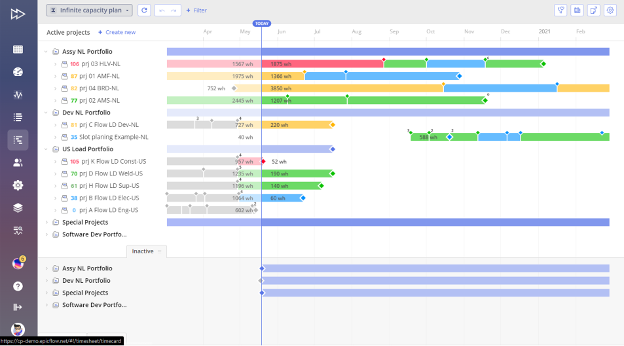
Epicflow is an AI-driven project resource management software designed to optimize resource allocation and enhance project delivery. Its main user base includes professionals from sectors like aerospace, automotive, telecommunications, pharmaceuticals, manufacturing, software development, and government.
Why I picked Epicflow: Epicflow stands out in resource allocation with its AI-driven approach. You can rely on real-time data analysis and predictive analytics to manage resources efficiently.
The software's automatic planning and scheduling features ensure that your team is always on track. Epicflow's ability to handle multi-project environments makes it a top choice for complex resource management needs.
Standout features & integrations:
Features include workload management, AI tools, predictive analytics, and automatic scheduling. You can balance workloads effectively and predict potential project threats. The software's real-time workflow control helps you maintain project efficiency.
Integrations include Jira, MS Project, Oracle Primavera, Salesforce, Asana, Smartsheet, Trello, monday.com, Basecamp, and Microsoft Dynamics.
Pros and Cons
Pros:
- Predictive threat analytics
- Effective workload balancing
- AI-driven resource management
Cons:
- Features can be overwhelming
- May require technical knowledge
Best for Office 365 users

Microsoft Planner is a task management tool designed for teams using Microsoft 365. It helps users organize tasks, collaborate on projects, and track progress, making it a suitable choice for businesses already integrated into the Microsoft ecosystem.
Why I picked Microsoft Planner: Microsoft Planner is perfect for Office 365 users due to its expansive integration with other Microsoft apps. You can create and assign tasks, set due dates, and track project progress within a familiar interface.
Its ability to share plans and collaborate in real-time enhances team productivity. Additionally, its AI features ensure that time management is optimized across many platforms. The tool's integration with Microsoft Teams and SharePoint ensures that your team stays connected and organized.
Standout features & integrations:
Features include task assignment, AI-powered insights, setting due dates, and progress tracking. You can organize tasks into boards and buckets to keep projects structured. The platform supports collaboration with real-time updates and notifications.
Integrations include Microsoft Teams, SharePoint, Outlook, OneDrive, Power Automate, Excel, Word, PowerPoint, OneNote, Copilot and To Do.
Pros and Cons
Pros:
- Supports team communication
- Task organization with boards
- Real-time collaboration features
Cons:
- Learning curve for non-Microsoft users
- Limited customization options

Plaky
Best for visual project planning

Plaky is a free project and task management software tailored for small businesses and nonprofits. It focuses on task management, team collaboration, and visual project planning, offering unlimited users and projects.
Why I picked Plaky: Plaky is ideal for visual project planning with its intuitive boards and custom fields. You can easily track progress with board views and notifications.
The platform's automation features enhance productivity by reducing repetitive tasks. Plaky's integration with Pumble supports team communication and action items, aligning with its USP for visual planning.
Standout features & integrations:
Features include task management tools like boards, custom fields, and comments. You can track progress with board views and notifications. The platform offers productivity enhancements such as automations and templates.
Integrations include Pumble.
Pros and Cons
Pros:
- Automation for repetitive tasks
- Strong team collaboration
- Unlimited users and projects
Cons:
- Requires internet connection
- Basic integration options

Trello
Best for team collaboration

Trello is a visual project management tool widely used by teams for organizing tasks and workflows. It's popular among small to medium-sized teams who need a simple way to manage projects visually.
Why I picked Trello: Trello is excellent for team collaboration with its intuitive drag-and-drop interface. You can easily move tasks across boards, making it great for dynamic teams.
Trello's card-based system lets you attach files, set due dates, and add comments, which enhances team communication. Its flexibility allows you to customize boards to fit your team's specific needs, making it a great option for team collaboration.
Standout features & integrations:
Features include customizable boards, AI-powered workflows, task automation with Butler, and card attachments for easy file sharing. You can create checklists within cards to break down tasks into manageable steps. The calendar view helps you keep track of deadlines and important dates.
Integrations include Slack, Google Drive, Dropbox, Jira, Microsoft Teams, GitHub, Evernote, Salesforce, Zapier, and Confluence.
Pros and Cons
Pros:
- Visual task tracking
- Easy task card creation
- Simple drag-and-drop interface
Cons:
- Can become cluttered with many cards
- Lacks detailed reporting tools

Workzone
Best for project lifecycle management
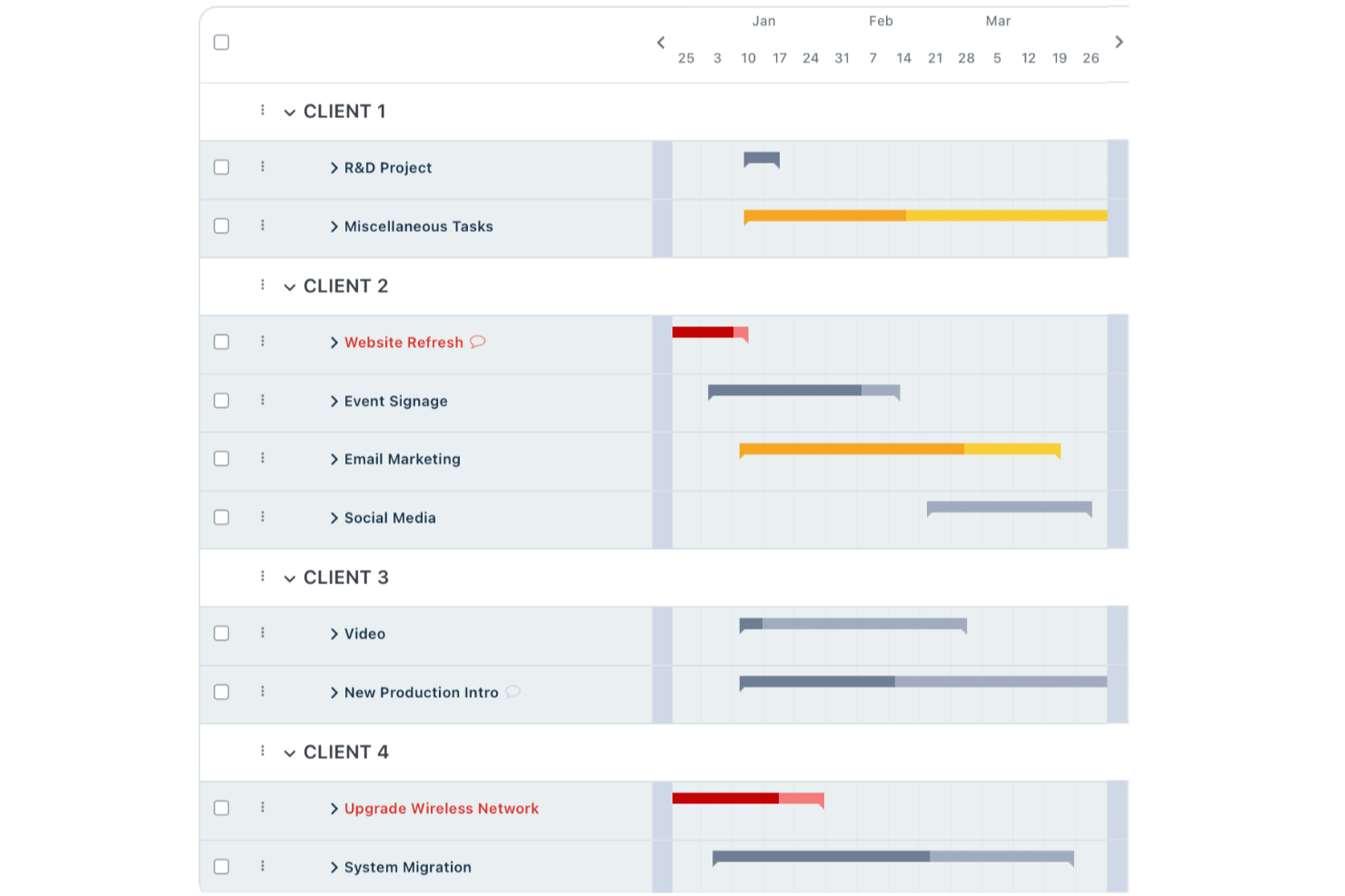
Navigating government projects takes a tool that balances structure with flexibility. Workzone fits that need by offering a project management setup designed specifically for government teams. It supports the way public sector organizations work, helping teams organize tasks, collaborate efficiently, and stay on top of regulatory requirements and deadlines.
Why I Picked Workzone
I picked Workzone because it emphasizes strong project lifecycle management, which is essential for government work. Its real-time visibility into project status helps your team stay accountable and transparent at every stage. The centralized system for handling project requests and approvals also simplifies the layered review and authorization processes that are common in government environments.
Workzone Key Features
In addition to its project lifecycle management capabilities, Workzone offers several other features that can benefit your team:
- Document Proofing: This feature allows your team to review and approve documents, reducing bottlenecks in the approval process.
- File Organization: With Workzone, you can organize files in a way that ensures easy access and retrieval, which is essential for maintaining compliance.
- Resource Allocation: The platform helps you allocate resources, ensuring that your team is not overburdened and projects stay on track.
- Time Tracking: This feature enables your team to track time spent on tasks, providing insights into productivity and helping with future project planning.
Workzone Integrations
Native integrations include Slack, Microsoft Teams, SharePoint, Box, Dropbox, Google Drive, OneDrive, and Salesforce. If you need custom integrations, Workzone also offers an API for that purpose.
Pros and Cons
Pros:
- Unlimited training and live support
- Built-in document proofing approvals
- Strong real-time project visibility
Cons:
- Pricing less suitable small teams
- Limited advanced budgeting features
New Product Updates from Workzone

Workzone Enterprise Adds Multi-Stage Approval Workflows
Workzone Enterprise now includes Approval Workflows, enabling multi-stage document approvals to standardize complex processes and reduce manual effort. For more information, visit Workzone's official site.
 .
.
Best for capacity planning

Meisterplan is a project portfolio management tool designed for businesses that need to manage resources and capacity effectively. It caters to project managers and decision-makers who require insight into resource allocation and project prioritization.
Why I picked Meisterplan: Meisterplan proves highly capable in capacity planning by offering tools that help you balance resources across multiple projects. You can visualize resource allocation and make data-driven decisions to optimize project outcomes.
Its scenario planning feature allows you to test different project plans without disrupting ongoing work. This makes it especially useful for teams needing to adjust to changing priorities and demands.
Standout features & integrations:
Features include scenario planning, resource allocation visualization, and project prioritization. You can forecast resource needs with the capacity planning tools. The platform also supports decision-making with real-time data insights.
Integrations include Jira, Smartsheet, Microsoft Project, Excel, Salesforce, Google Calendar, Slack, Trello, Asana, and Zapier.
Pros and Cons
Pros:
- Forecasts resource needs
- Supports scenario planning
- Effective resource allocation visualization
Cons:
- Not ideal for very small teams
- Initial setup can be complex

Procore
Best for construction projects

Procore is a construction management software designed for construction professionals, including project managers, contractors, and architects. It facilitates project management, financial management, and resource planning, making it a competitive solution for business operations in the construction industry.
Why I picked Procore: Procore is particularly effective in managing construction projects with its detailed project tracking and financial management features. You can manage project documents, track expenses, and schedule tasks efficiently.
Its detailed reporting tools provide insights into project progress and financial health. The software's ability to centralize communication and documentation makes it invaluable for construction teams.
Standout features & integrations:
Features include project tracking, financial management, and resource planning. You can efficiently manage documents and track project expenses. The software also offers reporting tools to help monitor project progress and financial health.
Integrations include QuickBooks, Sage 300, Microsoft Project, Dropbox, Bluebeam, DocuSign, Smartsheet, Viewpoint, Autodesk BIM 360, and PlanGrid.
Pros and Cons
Pros:
- Centralized communication
- Strong financial management
- Thorough project tracking
Cons:
- Can be costly for small teams
- Requires training for full use


Jira is a project management tool designed primarily for software development teams practicing agile methodologies. It supports Agile project management, issue tracking, and workflow customization, making it popular among tech-focused teams.
Why I picked Jira: Jira is tailored for agile teams, offering strong support for Scrum and Kanban boards. You can customize workflows to fit your team's agile practices and manage sprints efficiently.
Jira’s issue tracking capabilities help you stay on top of tasks and bugs. Its reporting features offer valuable insights into team performance, enabling continuous improvement.
Standout features & integrations:
Features include customizable workflows, AI tools, advanced reporting, and backlog prioritization. You can use Scrum and Kanban boards to manage tasks and sprints effectively. The platform also supports detailed issue tracking and release management.
Integrations include Slack, GitHub, Bitbucket, Confluence, Microsoft Teams, Dropbox, Google Drive, Google Docs, Trello, Asana, and Zendesk.
Pros and Cons
Pros:
- Effective sprint management
- Detailed issue tracking
- Strong agile support
Cons:
- Requires configuration
- Steep learning curve


Envisio is a strategic planning and performance management software designed for government agencies and public sector organizations. It helps teams align their strategic goals, track progress, and manage performance effectively.
Why I picked Envisio: Envisio is tailored for strategic planning with features that support goal alignment and performance tracking. You can set clear objectives and monitor them through detailed dashboards.
Envisio's reporting tools provide insights into performance metrics, ensuring your team stays on track. Its focus on transparency and accountability makes it ideal for public sector needs.
Standout features & integrations:
Features include goal setting, performance dashboards, and reporting tools. You can align team objectives with strategic goals and track progress effectively. The platform also offers transparency and accountability features to support public sector requirements.
Integrations include Microsoft Excel, Power BI, Esri, Tableau, Google Sheets, Microsoft Teams, Slack, Zapier, Salesforce, and SharePoint.
Pros and Cons
Pros:
- Detailed reporting features
- Strong performance tracking
- Supports goal alignment
Cons:
- Evolving platform can create a slight learning curve
- May be complex for small teams
Other Government Project Management Software
Here are some additional government project management software options that didn’t make it onto my shortlist, but are still worth checking out:
- Orangescrum
For task management
- Kahua
For customizable workflows
- Cerri Work
For compliance tracking
- Prism PPM
For portfolio management
- Smartsheet
For spreadsheet-like project planning
- Wrike
For remote team collaboration
- monday AI Workspace
With AI-powered risk identification
- ClickUp
For customizable task management
- Asana
For task tracking and deadlines


How I Evaluate Government Project Management Software
When a county IT office needs FedRAMP compliance and grant tracking in one place, I split my evaluation into baseline requirements and the differentiators that separate good tools from great ones.
Core Functionality (Table Stakes For This List)
When I'm selecting tools for my list, I rank each one on a scale from 0 (does not offer the functionality) to 5 (excels in this area) for each core functionality listed below. Then, I calculate the tool's total score into a percentage. Each tool needs to achieve a minimum total score of 65% to be considered for inclusion.
- Government Compliance & Security: I check whether each tool holds certifications like FedRAMP, StateRAMP, or FISMA and whether it supports GovCloud or equivalent hosting environments.
- Budget & Grant Tracking: Public funds come with strings attached, so I look for tools that tie budgets to specific grants, track encumbrances, and flag overruns by fund source.
- Audit Trail & Transparency: Every change to a project plan or budget line should be logged with timestamps and user attribution, exportable for oversight reviews or public records requests.
- Multi-Stakeholder Collaboration: I evaluate how well each tool handles cross-agency coordination, contractor access, and approval routing with role-based permissions for different clearance levels.
- Project Portfolio Management: Agencies juggle dozens of concurrent programs, so I look for portfolio rollups, cross-project dependency mapping, and resource allocation views.
- Custom Reporting & Dashboards: I consider whether a tool lets you build dashboards for different audiences, from a legislative budget summary to an internal sprint-level status board.
Once I have a list of tools that meet this criteria, I consider what sets each platform apart.
Differentiating Factors (What Sets Vendors Apart)
Here's how I compare and contrast different vendors:
Standout Features
Contract and procurement tracking matters a lot here. Tools that manage RFP workflows and vendor scorecards save agencies from juggling separate systems during bid cycles. I also look for built-in risk registers with escalation paths, since public projects face unique political and regulatory risks that need documented mitigation plans. Citizen engagement portals are another differentiator worth evaluating, especially for agencies that need to publish project updates for public review.
Beyond Features
Procurement vehicle availability is something I always check. A tool listed on the GSA Schedule or a state cooperative contract can cut months off an agency's buying cycle. Integration with government ERP and financial systems like SAP or Oracle PeopleSoft also matters, since disconnected project and finance data creates reconciliation headaches at fiscal year-end. I evaluate implementation support too, specifically whether the vendor offers public sector-experienced partners who understand multi-agency rollouts and change management for civil service teams.
How to Choose Government Project Management Software
It’s easy to get bogged down in long feature lists and complex pricing structures. To help you stay focused as you work through your unique software selection process, here’s a checklist of factors to keep in mind:
| Factor | What to Consider |
| Scalability | Can the software grow with your team? Look for tools that support increasing users, projects, and data without major disruptions or added costs. |
| Integrations | Does it connect with your current tools? Check for native integrations with platforms like Microsoft Office, Google Workspace, or industry-specific apps. |
| Customizability | Can you tailor the software to your needs? Assess if you can modify workflows, dashboards, and reports to fit your processes without extra help. |
| Ease of use | Is the software intuitive? Ensure that team members can navigate it without extensive training. Look for a clean interface and straightforward options. |
| Implementation and onboarding | How quickly can you get started? Consider the time and resources needed for setup and initial training. Look for providers offering onboarding support. |
| Cost | Is it within your budget? Compare pricing tiers and check for hidden fees. Consider long-term costs and potential savings from increased efficiency. |
| Security safeguards | Does it protect sensitive data? Verify the software's compliance with government regulations and standards like GDPR or FedRAMP. |
| Compliance requirements | Does it meet regulatory needs? Ensure the tool supports necessary compliance standards for your industry and location, avoiding potential legal issues. |
What Is Government Project Management Software?
Government project management software is a tool designed to help government agencies plan, execute, and track projects efficiently. These tools are typically used by project managers, department heads, and team leaders to keep projects on track and within budget.
Scheduling, resource allocation, and compliance tracking features support the unique needs of government projects. Overall, these tools offer valuable insights and control to manage complex projects effectively.
Features of Government Project Management Software
When selecting government project management software, keep an eye out for the following key features:
- Scheduling: Allows you to plan timelines and set deadlines, ensuring projects stay on track.
- Resource allocation: Helps you assign resources efficiently to prevent overallocation or resource shortages.
- Compliance tracking: Ensures your projects adhere to necessary regulations and standards, reducing legal risks.
- Budget management: Monitors financials to keep projects within budget and avoid overspending.
- Reporting and analytics: Provides insights into project performance, helping you make informed decisions.
- Document management: Organizes and stores project documents securely for easy access and collaboration.
- Task management: Allows you to assign and track tasks, ensuring every team member knows their responsibilities.
- Collaboration tools: Facilitate communication and coordination among team members, enhancing teamwork.
- Customizable workflows: Let you tailor processes to fit your specific project needs and preferences.
- Security safeguards: Protects sensitive data with encryption and compliance with security standards.
Benefits of Government Project Management Software
Implementing government project management software provides several benefits for your team and your business. Here are a few you can look forward to:
- Improved efficiency: Automates scheduling and task management, allowing your team to focus on more strategic activities.
- Enhanced compliance: Tracks regulatory requirements and standards, reducing the risk of non-compliance issues.
- Better resource management: Allocates resources effectively, ensuring optimal use and preventing overallocation.
- Increased transparency: Offers reporting and analytics that provide clear insights into project progress and performance.
- Secure document handling: Manages and stores documents safely, facilitating secure access and collaboration among team members.
- Cost control: Monitors budgets closely to keep projects financially on track, avoiding unnecessary expenses.
- Improved communication: Provides collaboration tools that enhance team coordination and information sharing.
Costs and Pricing of Government Project Management Software
Selecting government project management software requires an understanding of the various pricing models and plans available. Costs vary based on features, team size, add-ons, and more. The table below summarizes common plans, their average prices, and typical features included in government project management software solutions:
Plan Comparison Table for Government Project Management Software
| Plan Type | Average Price | Common Features |
| Free Plan | $0 | Basic task management, limited users, and minimal storage. |
| Personal Plan | $5-$25/user/month | Task management, basic reporting, and limited integrations. |
| Business Plan | $30-$60/user/month | Advanced scheduling, resource allocation, compliance tracking, and enhanced collaboration tools. |
| Enterprise Plan | $70-$120/user/month | Customizable workflows, advanced security safeguards, dedicated support, and analytics. |
Government Project Management Software FAQs
Here are some answers to common questions about government project management software:
How secure is government project management software?
Government project management software is designed with high security standards to ensure data protection. You should ensure the software complies with relevant regulations, such as GDPR, NIST AI RMF or FedRAMP. It’s essential to verify that the software provides encryption and conducts regular security audits to protect your information and limit vulnerabilities. These factors are important in order to build trust in a software while mitigating risk.
Can government project management software integrate with existing systems?
Yes, most government project management tools offer integrations with other systems. Verify that the software can integrate with your current tools, such as Microsoft Office, Google Workspace, or industry-specific applications. This ensures a smooth workflow and data consistency across platforms.
What kind of support is available for government project management software?
Support varies by provider, but many offer 24/7 assistance through multiple channels. Look for options like live chat, email, and phone support. It’s also helpful if the provider offers a help center with tutorials, FAQs, and user guides to assist you in troubleshooting issues.
How customizable is government project management software?
Customization levels differ, but many tools allow you to tailor workflows, dashboards, and reports. Determine whether you can modify the software to suit your specific processes without requiring extensive technical assistance. This flexibility can enhance the software’s fit with your team’s needs.
What training is available for new users?
Training resources are important for a smooth onboarding process and user experience. Check if the software provider offers training videos, webinars, interactive product tours or a similar knowledge base. These resources help your team get up to speed quickly and start using the tool effectively from day one.
How do I evaluate the cost-effectiveness of government project management software?
Evaluating cost-effectiveness involves comparing pricing tiers and features. Consider long-term costs, potential savings from improved efficiency, and whether the features meet your needs. It’s wise to look for any hidden fees and ensure the software offers good value for your investment when considering software retention.
What’s Next:
If you're in the process of researching government project management software, connect with a SoftwareSelect advisor for free recommendations.
You fill out a form and have a quick chat where they get into the specifics of your needs. Then you'll get a shortlist of software to review. They'll even support you through the entire buying process, including price negotiations.