
13 Best Google Workspace Alternatives Reviewed in 2026

Best Google Workspace Alternatives Shortlist
Here’s my shortlist of the best Google Workspace alternatives:


As a project manager, your daily success hinges on keeping complex teams organized and productive. While cloud-based productivity tools are often a lifeline for managing tasks and cross-platform communication, Google Workspace isn’t always the perfect fit. Whether you’re hitting the limits of Google’s native tools or need tighter integration with specialized software, finding the right Google Workspace alternative is critical to scaling your business standards.
In this guide, I’ve independently reviewed the top software solutions that fill the gaps Google Workspace leaves behind. My list focuses on high-performance project management and collaboration rather than traditional CRM, though each recommendation offers third-party integrations to keep your client data connected.
Whether you’re looking for a complete suite replacement or a specialized web app to supercharge your workflow on Microsoft or Apple devices, these Google Workspace alternatives are designed to make your work life easier and your team more efficient.
What is Google Workspace?
Google Workspace, formerly known as G Suite, is a cloud-based productivity tool that helps teams collaborate and communicate effectively across the Google ecosystem and beyond. It's commonly used by professionals across various industries, including project managers, marketers, small businesses, and educators, for its ability to boost productivity and team collaboration.
Tools such as Google Docs, Google Sheets, and Google Meet support document creation, data management, and communication. These features help you and your team stay organized and connected. Overall, Google Workspace offers a versatile platform that adapts to diverse business needs, making it a valuable asset for improving workplace efficiency.
Best Google Workspace Alternatives Summary
This comparison chart summarizes pricing details for my top Google Workspace alternative selections to help you find the best one for your budget and business needs.
| Tool | Best For | Trial Info | Price | ||
|---|---|---|---|---|---|
| 1 | Best for customizable task boards | Free plan available | From $5/user/month | Website | |
| 2 | Best for Office app integration | Free plan available | From $21/user/month (billed annually) | Website | |
| 3 | Best for knowledge management | Free trial | From $25/user/month (billed annually) | Website | |
| 4 | Best for project management features | Free 14-day trial + free plan available | From $7/user/month (billed annually) | Website | |
| 5 | Best for offline task management | Free plan available | Free to use | Website | |
| 6 | Best for secure collaboration | Free plan available | From $144/user/year (billed annually) | Website | |
| 7 | Best for team messaging integration | Free plan + free demo available | From $7.25/user/month (billed annually) | Website | |
| 8 | Best for work management | Free trial + free demo available | From $9/member/month (billed annually) | Website | |
| 9 | Best for enterprise project management | Free plan + free demo + 14-day free trial available | From $10/user/month (billed annually) | Website | |
| 10 | Best for video conferencing | Free plan + free demo available | From $13.33/user/month (billed annually) | Website |


Why You Can Trust Us
-

Accelo
Visit WebsiteThis is an aggregated rating for this tool including ratings from Crozdesk users and ratings from other sites.4.4 -
Forecast
Visit WebsiteThis is an aggregated rating for this tool including ratings from Crozdesk users and ratings from other sites.4.6 -
Wrike
Visit WebsiteThis is an aggregated rating for this tool including ratings from Crozdesk users and ratings from other sites.4.2



Best Google Workspace Alternatives Reviews
Below are my detailed summaries of the best Google Workspace alternatives that made it onto my shortlist. My reviews offer a detailed look at the key features, pros and cons, integrations, and ideal use cases of each tool to help you find the best one for you.
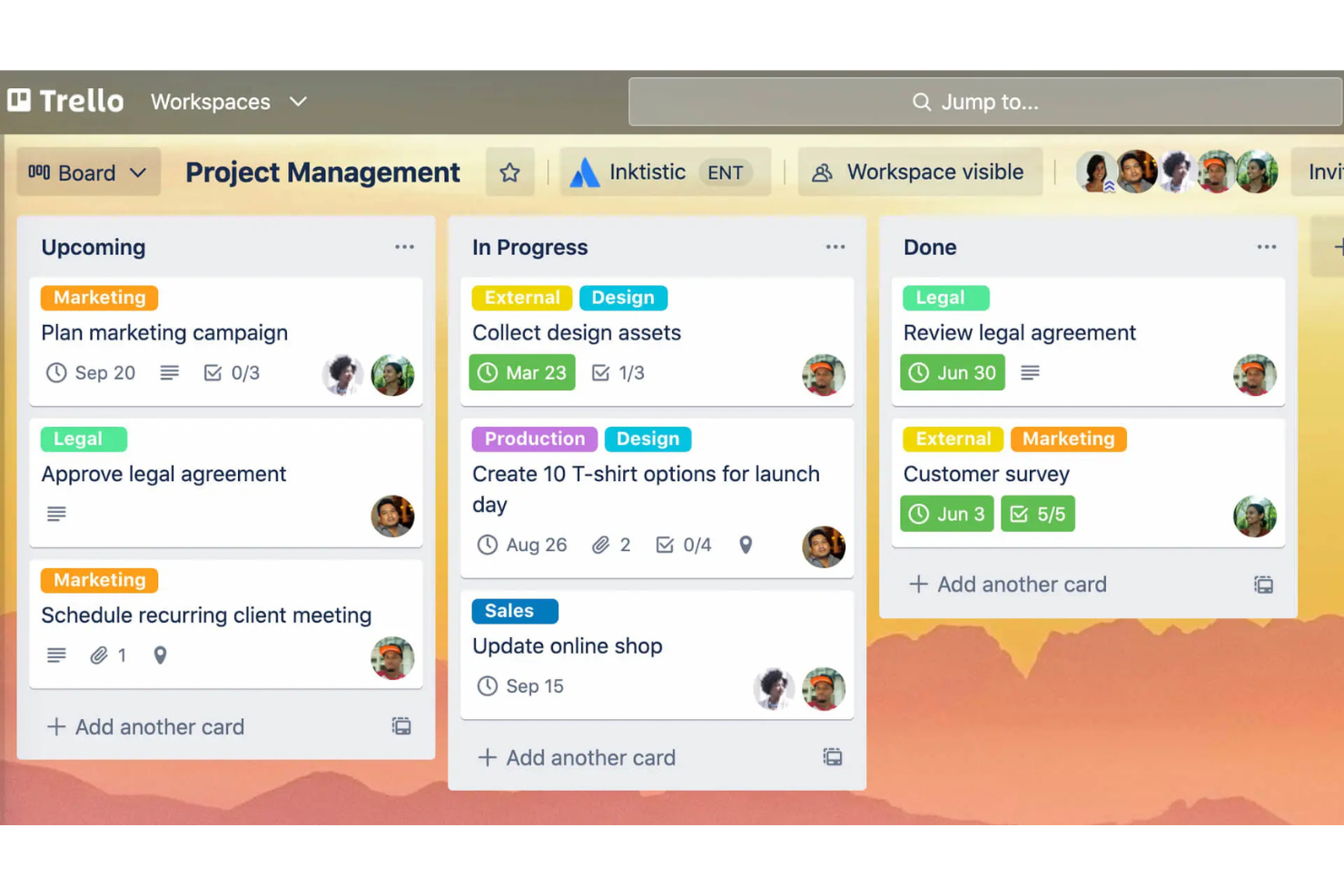
Atlassian Trello is a project management tool known for its user-friendly visual approach to organizing tasks using boards, lists, and cards. It's popular among teams of all sizes that need to manage projects and tasks effectively.
Why it's a good Google Workspace alternative: Atlassian Trello offers customizable task boards that cater to your team's specific needs, unlike Google Workspace's more standardized approach. You can create boards tailored to different projects, which allows for flexibility in how tasks are managed. The drag-and-drop feature makes it easy to move tasks across different stages. Atlassian Trello's visual interface helps you and your team see the big picture and track progress at a glance.
Standout Features and Integrations:
Features include the ability to add due dates and checklists to tasks, color-code labels for easy categorization, and the option to attach files directly to cards. You can also use Butler, Atlassian Trello's built-in automation tool, to automate repetitive tasks. Another feature is the power-ups, which strengthen the board's functionality with additional tools and integrations.
Integrations include Slack, Google Drive, Dropbox, Microsoft Teams, Evernote, Jira, GitHub, Salesforce, Mailchimp, Zendesk, and more.
Pros and Cons
Pros:
- Easy task movement
- Visual project tracking
- Customizable task boards
Cons:
- Poor for complex projects
- Lacks native time tracking

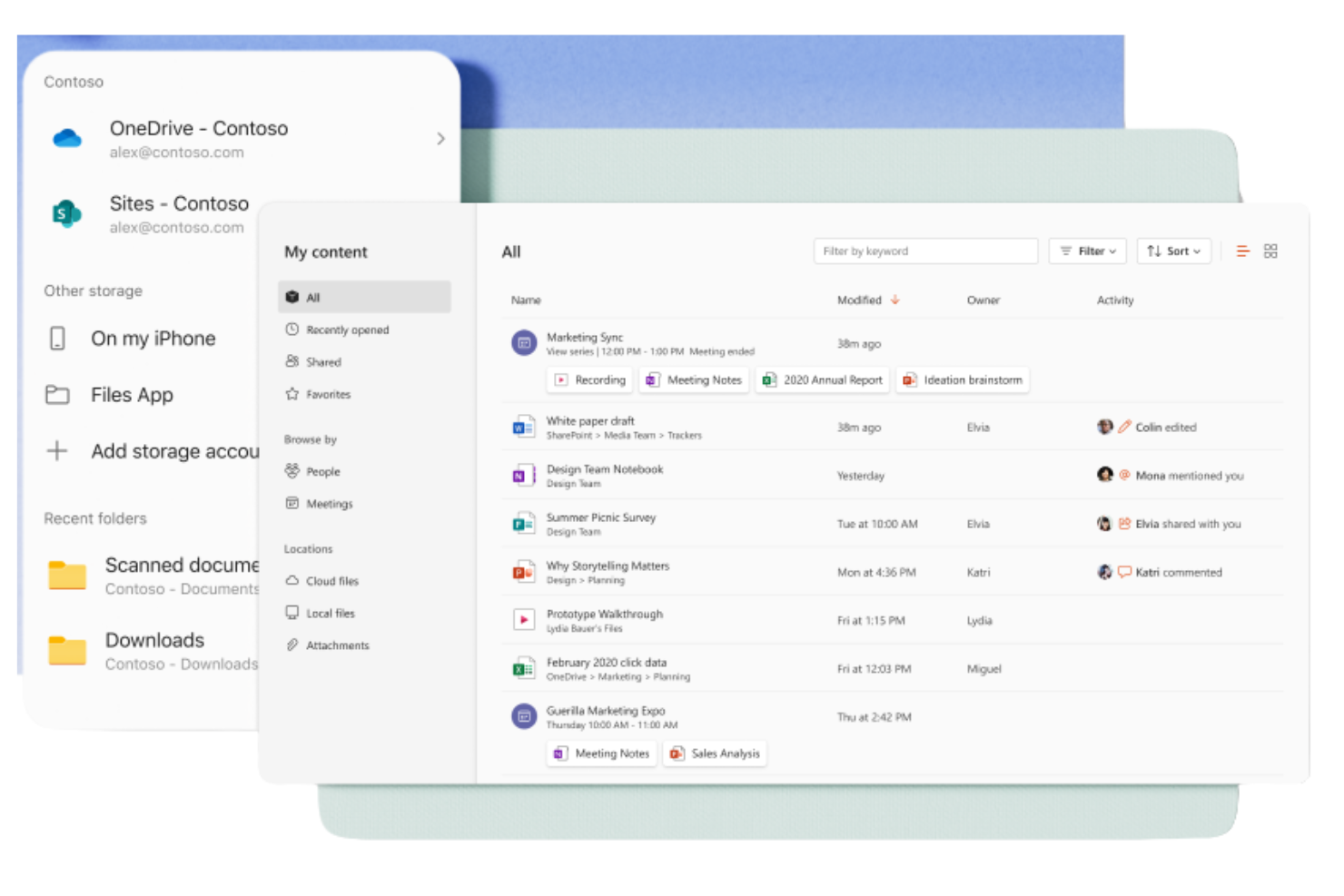
Microsoft 365 Copilot is a subscription-based suite of productivity tools designed for businesses and individuals to help them create, collaborate, and communicate. It's widely used by professionals who need access to Windows applications such as Word, Excel, and PowerPoint for everyday business functions.
Why it's a good Google Workspace alternative: Microsoft 365 Copilot provides smooth integration with Office apps, offering a familiar environment for users who rely heavily on these tools. With cloud storage through OneDrive, you can access and share documents readily. The suite also includes Microsoft Teams for communication and collaboration, making it a complete solution for business needs. Its strong security features keep your data protected at all times.
Standout Features and Integrations:
Features include advanced data analysis capabilities with Excel spreadsheets, which can help your team make informed decisions. The suite also offers customizable templates in Word and PowerPoint, allowing you to create professional documents and presentations. Additionally, Outlook provides an integrated email and calendar solution to keep you organized.
Integrations include Salesforce, Atlassian Trello, Asana, Dropbox, Zoom, Slack, Adobe Acrobat, GitHub, LinkedIn, DocuSign, and more.
Pros and Cons
Pros:
- In-depth security features
- Strong document collaboration
- Familiar interface for Microsoft Office users
Cons:
- Requires OneDrive for Excel
- Inconsistent output quality

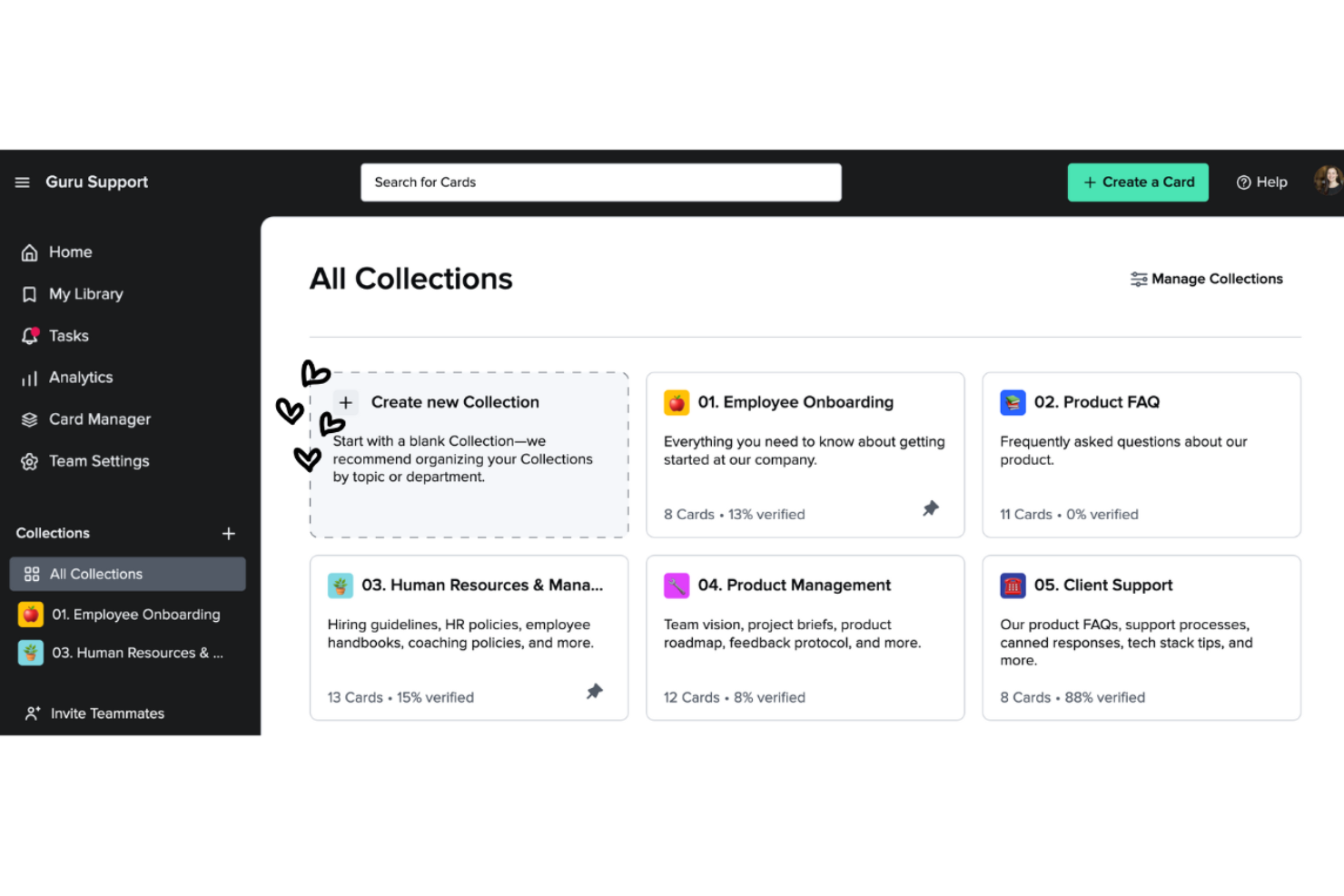
Guru is a knowledge management tool that helps teams capture, organize, and access information efficiently. It's popular among businesses that need to give their teams easy access to critical knowledge and resources.
Why it's a good Google Workspace alternative: Guru offers knowledge management capabilities that go beyond Google Workspace's document storage. Its card-based system lets you create and categorize information for quick retrieval. The verification feature keeps your team's knowledge up-to-date and accurate. Real-time updates and notifications keep everyone informed about the latest changes, fostering collaboration.
Standout Features and Integrations:
Features include a browser extension that allows you to access and capture information directly from your web browser, making it easy to gather and store knowledge. The analytics feature provides insights into how your team uses the knowledge base, which helps you identify gaps and areas for improvement. You can also benefit from the AI-powered suggestions that offer relevant information when you need it.
Integrations include Slack, Microsoft Teams, Salesforce, Zendesk, Intercom, Chrome, Outlook, Google Workspace, Zapier, and more.
Pros and Cons
Pros:
- Verification maintains accuracy
- Real-time updates
- Effective knowledge organization
Cons:
- Requires constant maintenance
- Formatting options are limited


ClickUp is a project management tool designed for teams and businesses of all sizes to help organize tasks, projects, and workflows. It offers an array of features that help optimize project management and increase productivity.
Why it's a good Google Workspace alternative: ClickUp provides extensive project management features that go beyond what Google Workspace offers. Task management lets you assign and track tasks with ease, and customizable dashboards allow you to view project progress in a way that suits you best. ClickUp's goal-setting feature lets your team align on objectives, keeping everyone on the same page.
Standout Features and Integrations:
Features include time tracking, which helps you monitor how much time is spent on tasks. The document management feature allows you to create and store documents directly within the platform. You can use the mind maps to visually organize ideas and plans, aiding in better project planning. Standard plan features include Kanban boards and 24/7 support.
Integrations include Slack, Google Drive, Dropbox, Microsoft Teams, Zoom, GitHub, Atlassian Trello, Salesforce, Zapier, and more.
Pros and Cons
Pros:
- Scalable for large teams
- Effective goal-setting features
- Detailed task management
Cons:
- Learning curve for advanced features
- Occasional performance issues


Super Productivity is an open-source task manager that integrates task management, time tracking, and note-taking, designed for developers, freelancers, and other professionals. It focuses on boosting productivity while protecting user privacy by keeping data offline.
Why it's a good Google Workspace alternative: Unlike Google Workspace, which relies heavily on cloud-based services, Super Productivity offers offline task management, protecting your privacy and giving you full control over your data. With features such as customizable boards, you can organize tasks in ways that suit your workflow. The focus mode and Pomodoro timer help you maintain concentration during work sessions. Additionally, its one-click time tracking and detailed work logging make it easy to monitor productivity. It's also compatible with Linux.
Standout Features and Integrations:
Features include customizable task management with options for subtasks and due dates, allowing you to tailor your workflow. Calendar integration provides a detailed daily overview to help you plan effectively. The plugin system lets you add functionality, making it adaptable to your needs.
Integrations include GitHub, GitLab, Jira, and more.
Pros and Cons
Pros:
- In-depth task management
- Strong privacy and offline usage
- Highly customizable workflows
Cons:
- No built-in cloud syncing
- Minimal team collaboration
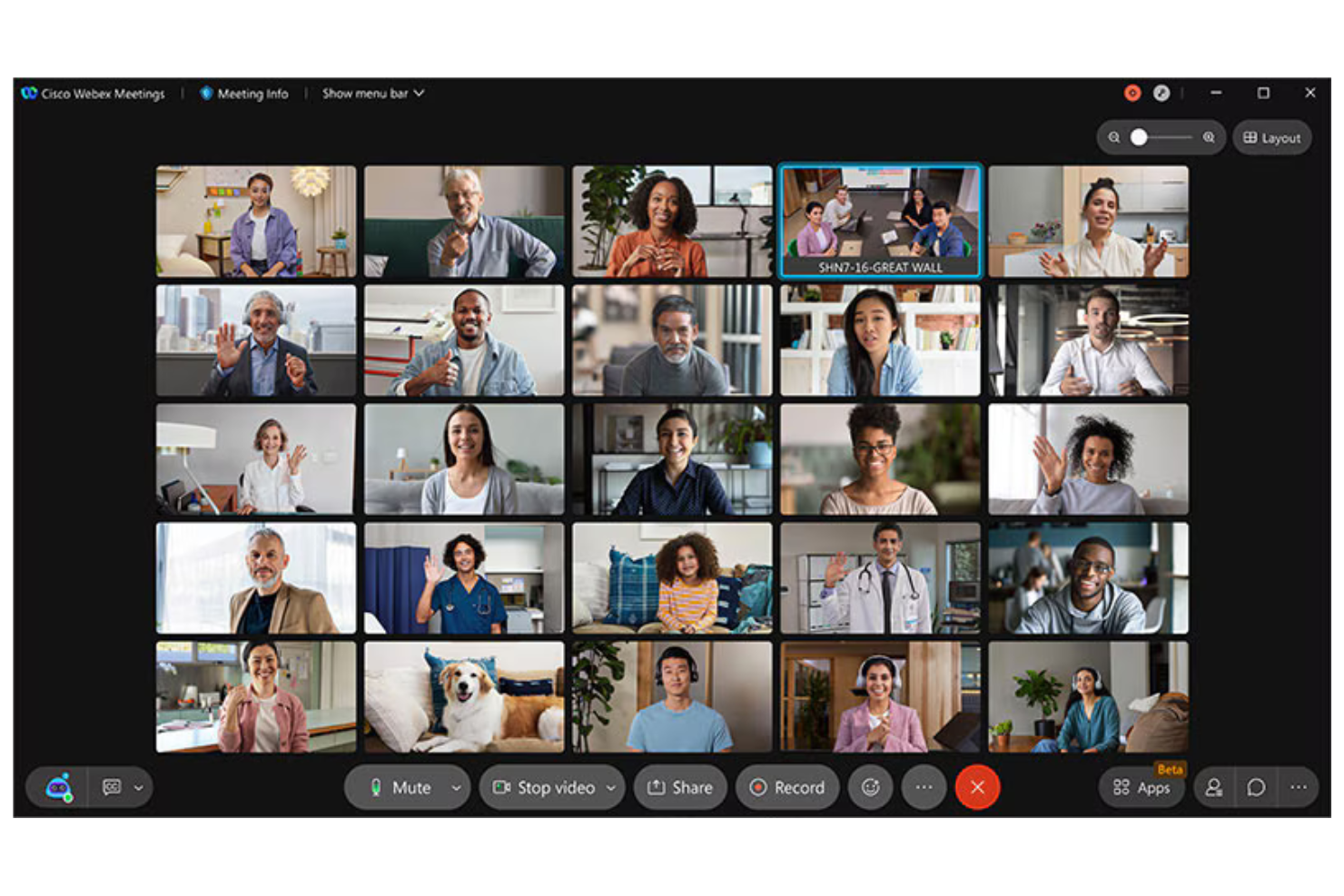
Cisco Webex is a video conferencing and collaboration platform used by businesses and educational institutions for virtual meetings, webinars, and team collaboration. It provides tools for remote communication, which makes it essential for teams that need reliable, secure connections.
Why it's a good Google Workspace alternative: Cisco Webex offers security features that keep meetings safe and private, setting it apart from Google Workspace's general tools. With end-to-end encryption, your communications remain confidential. The platform supports HD video and audio, providing clear and effective meetings. Additionally, its ability to host large-scale events makes it versatile for various business needs.
Standout Features and Integrations:
Features include customizable meeting layouts, allowing you to arrange video feeds according to your preferences. The platform also offers noise cancellation technology, which helps minimize background distractions during calls. Cisco Webex Assistant provides real-time transcription, making note-taking easier and more efficient.
Integrations include Microsoft Teams, Salesforce, Google Workspace, Slack, ServiceNow, Atlassian Trello, Dropbox, Zendesk, Asana, and more.
Pros and Cons
Pros:
- Noise cancellation technology
- High-quality video and audio
- Strong security features
Cons:
- The Interface can feel cluttered
- Requires technical knowledge for setup

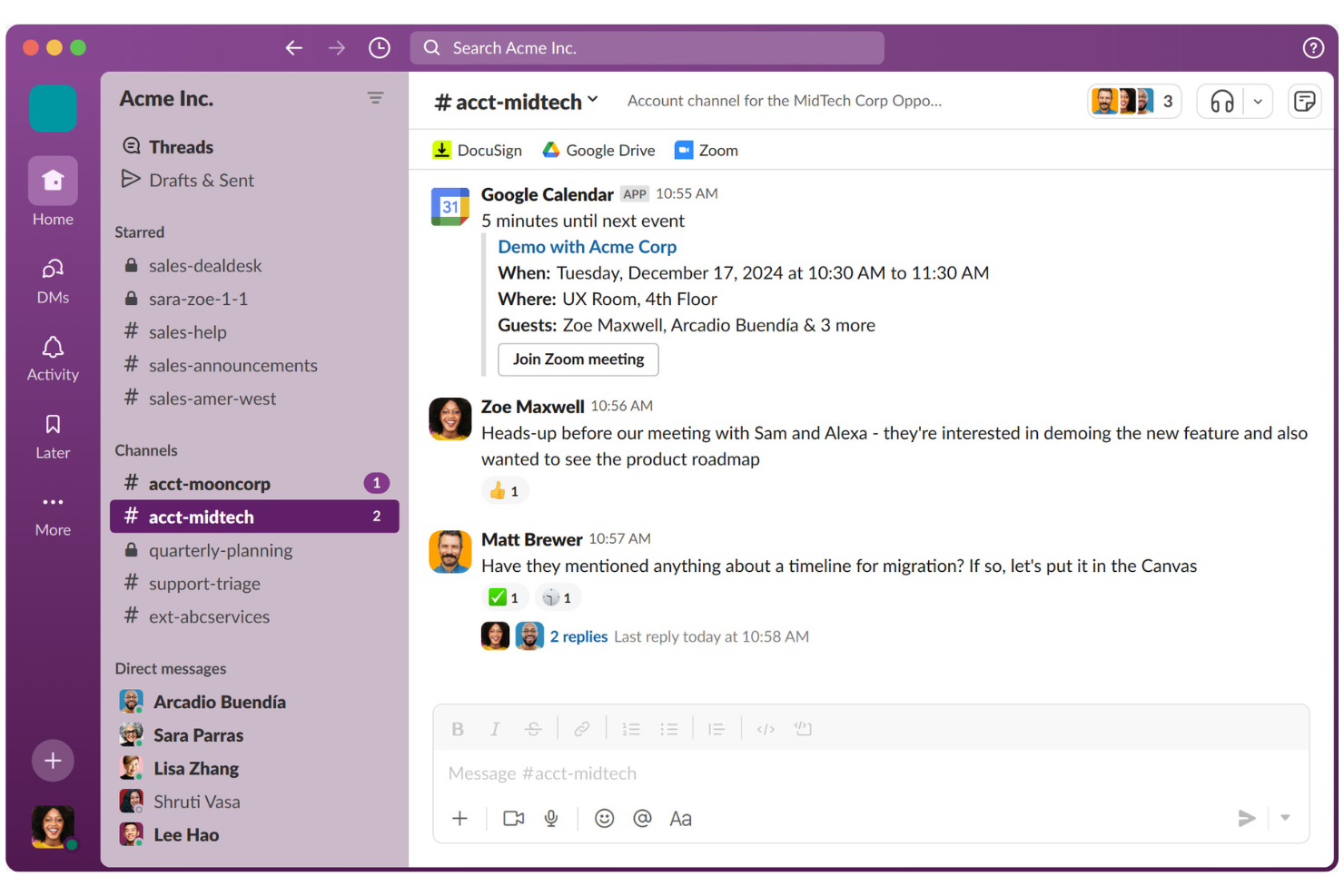
Slack is a collaboration platform designed to help teams communicate and collaborate efficiently. It's widely used by businesses of all sizes for messaging, file sharing, and organizing team communications.
Why it's a good Google Workspace alternative: Unlike Google Workspace's more document-focused approach, Slack excels in team messaging integration. Channels allow you to organize discussions by topics or projects, making communication clear and structured. Slack Connect lets you collaborate with external partners, expanding your communication network. With features such as Huddles for quick audio/video calls, your team can stay connected and responsive.
Standout Features and Integrations:
Features include the ability to create custom workflows using the Workflow Builder, which helps automate routine tasks. You can also use Slack's Canvas feature for document creation and sharing. Additionally, AI-powered tools assist in summarizing conversations and identifying key action items.
Integrations include Google Drive, Microsoft 365 Copilot, Dropbox, Salesforce, Zoom, Asana, Atlassian Trello, GitHub, Zendesk, and more.
Pros and Cons
Pros:
- Custom workflow creation
- Strong external collaboration
- Excellent messaging features
Cons:
- Notifications can be distracting
- Mobile sync can be buggy


Smartsheet is a work management and automation platform used by teams and organizations to plan, capture, manage, and report on work. It's a popular project management platform and is good for teams that need a flexible tool for tracking and managing projects.
Why it's a good Google Workspace alternative: Smartsheet offers work management capabilities that provide a more structured approach than Google Workspace. With its grid-based interface, you can organize tasks and projects efficiently. The platform's automation features help reduce manual work, allowing your team to focus on more important tasks. Smartsheet's reporting tools provide insights into project progress, helping you make data-driven decisions.
Standout Features and Integrations:
Features include the ability to create custom forms for data collection, which simplifies gathering information from your team. The platform provides Gantt chart views, making it easy to visualize project timelines and dependencies. You can also use dashboards to track key metrics and project statuses in real time.
Integrations include Microsoft Teams, Slack, Google Workspace, Salesforce, Jira, Box, Dropbox, DocuSign, ServiceNow, Tableau, and more.
Pros and Cons
Pros:
- Effective project tracking
- Strong automation feature
- Flexible work management tools
Cons:
- Pricing adds up with add-ons
- Mobile lacks Gantt views
New Product Updates from Smartsheet

Smartsheet Adds Direct Data Import to Existing Sheets
Smartsheet introduces direct data import to existing sheets in table view. This update lets you import CSV, XLS, and XLSX files directly into sheets, reducing manual work and speeding up data setup. For more information, visit Smartsheet's official site.

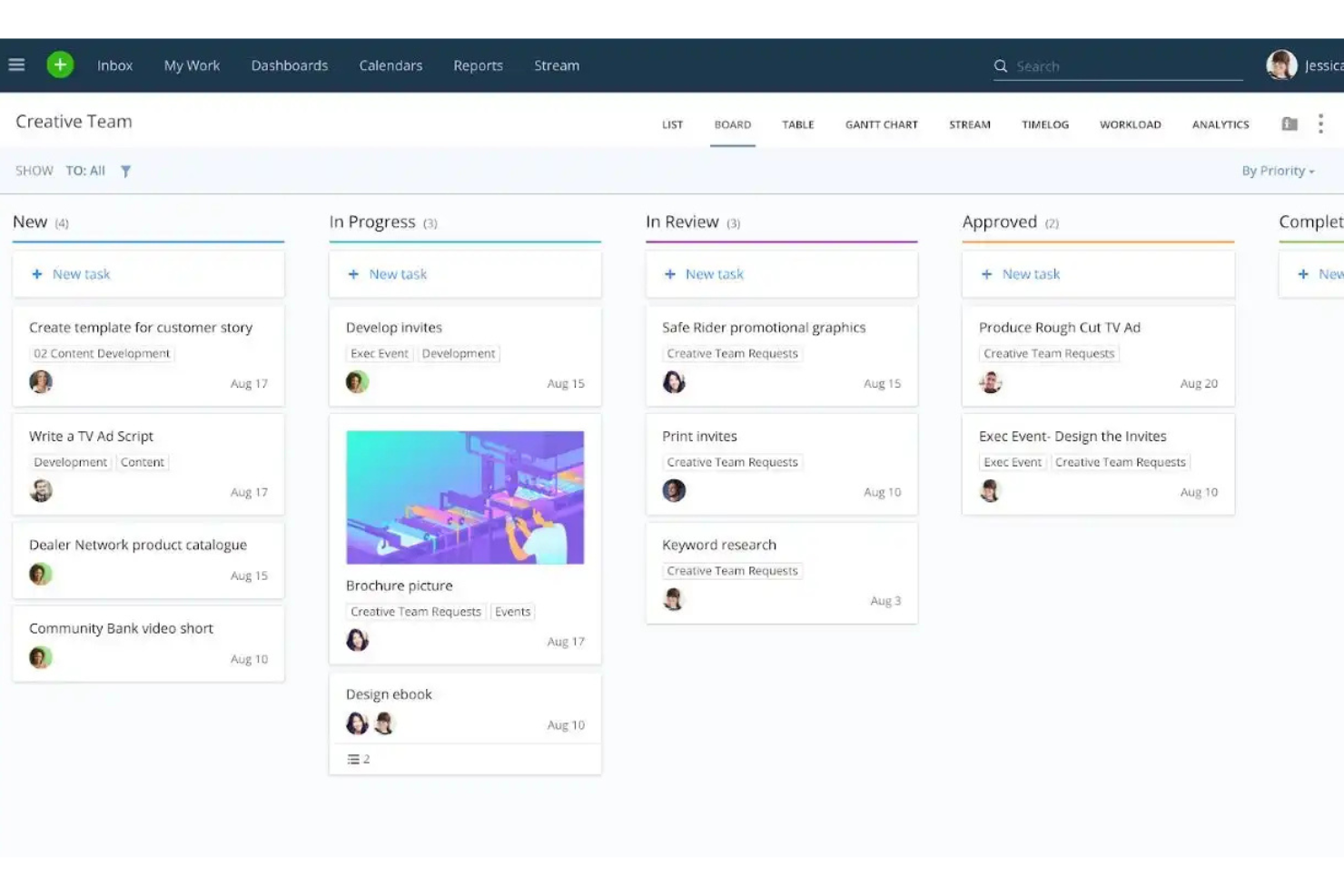
Wrike is a project management and collaboration platform designed for teams and enterprises that need to manage tasks, projects, and workflows efficiently. It's used by professionals who need a centralized tool for planning, executing, and tracking project progress.
Why it's a good Google Workspace alternative: Wrike offers enterprise project management features that provide more depth than Google Workspace's basic tools. Gantt charts help you visualize project timelines and dependencies clearly, and the platform's workload management module helps you allocate resources effectively across your team. Additionally, real-time reporting provides insights into project performance, enabling data-driven decisions. Both a free version and paid plans are available.
Standout Features and Integrations:
Features include custom request forms that simplify the intake process, helping your team capture all necessary information up front. The time-tracking feature helps monitor how long tasks take, aiding in productivity analysis. You can also create dashboards to view key metrics and project updates at a glance.
Integrations include Microsoft Teams, Salesforce, Google Drive, Slack, Dropbox, Box, Adobe Creative Cloud, Tableau, and more.
Pros and Cons
Pros:
- Real-time project tracking
- Effective resource allocation
- Extensive project management tools
Cons:
- Frequent unannounced UI shifts
- Some features are hidden in menus
New Product Updates from Wrike

Streamlining Workspaces with New Updates
Wrike announces custom space templates, AI Agents in Wrike Labs, and a new Guage widget to improve project management. For more information, visit Wrike's official site.


Zoom is a video communication platform widely used by businesses, educational institutions, and individuals for virtual meetings and webinars. It facilitates real-time collaboration and communication through video, audio, and chat functions.
Why it's a good Google Workspace alternative: Zoom offers a dedicated platform for video conferencing, which is more specialized than Google Workspace's general communication tools. With features such as HD video and audio, your team can have clear and effective meetings. Breakout rooms allow for smaller group discussions within larger meetings, improving collaboration.
Standout Features and Integrations:
Features include virtual backgrounds that let you customize your meeting environment, adding a professional touch. Host controls provide you with the ability to manage participants effectively, keeping meetings running smoothly. Zoom also offers webinars and large meetings, accommodating up to thousands of participants, making it versatile for different needs.
Integrations include Microsoft Teams, Slack, Salesforce, Google Calendar, Outlook, Dropbox, HubSpot, Calendly, Zapier, Asana, and more.
Pros and Cons
Pros:
- Effective host controls
- Versatile meeting options
- High-quality video and audio
Cons:
- Security concerns in the past
- Can consume significant bandwidth
Other Google Workspace Alternatives
Here are some additional Google Workspace alternatives that didn’t make it onto my shortlist but are still worth checking out:
- Obsidian
For personal knowledge management
- Routine
For integrated task and calendar management
- Zoho Workplace
For affordable, all-in-one suite migration


Google Workspace Alternatives Selection Criteria
When selecting the best Google Workspace alternatives to include in this list, I considered common buyer needs and pain points related to cloud-based productivity tools, such as data security and integration with existing tools. I also used the following framework to keep my evaluation structured and fair:
Core Functionality (25% of total score)
To be considered for inclusion in this list, each solution had to fulfill these common use cases:
- Document collaboration
- Task management
- File sharing
- Communication tools
- Calendar scheduling
Additional Standout Features (25% of total score)
To help further narrow down the competition, I also looked for unique features, such as:
- Advanced data encryption
- AI-powered automation
- Offline capabilities
- Customizable templates
- Real-time analytics
Usability (10% of total score)
To get a sense of the usability of each system, I considered the following:
- Intuitive interface
- Easy navigation
- Responsive design
- Minimal learning curve
- Accessibility features
Onboarding (10% of total score)
To evaluate the onboarding experience for each platform, I considered the following:
- Availability of training videos
- Interactive product tours
- Prebuilt templates
- Access to webinars
- Supportive chatbots
Customer Support (10% of total score)
To assess each software provider’s customer support services, I considered the following:
- 24/7 availability
- Multichannel support
- Knowledge base access
- Fast response times
- Personalized assistance
Value For Money (10% of total score)
To evaluate the value for money of each platform, I considered the following:
- Competitive pricing
- Feature set relative to cost
- Flexible pricing plans
- Transparency in pricing
- Discounts for long-term use
Customer Reviews (10% of total score)
To get a sense of overall customer satisfaction, I considered the following when reading customer reviews:
- User satisfaction ratings
- Commonly mentioned pain points
- Praise for specific features
- Feedback on support services
- Overall recommendation rates
Why Look for a Google Workspace Alternative?
While Google Workspace is a good choice for a cloud-based productivity tool, there are a number of reasons why some users seek out alternative solutions. You might be looking for a Google Workspace alternative because:
- You need better data privacy controls
- Your team requires more advanced features
- You face integration issues with other tools
- You want more customization options
- Your business needs local data hosting
- You seek a more cost-effective solution
If any of these sound like you, you’ve come to the right place. My list contains several cloud-based productivity tool options that are better suited for teams facing these challenges with the Google ecosystem and looking for alternative solutions.
Features
Here are some of the key features of Google Workspace to help you contrast and compare what alternative solutions offer:
- Professional Email: Provides Gmail email service and email hosting with custom domain names and business emails to boost your brand's credibility.
- File Management: Offers secure file storage and sharing options via Google Drive for your team.
- Video Meetings: Uses Google Meet for real-time collaboration and video conferencing.
- App Integration: Integrates smoothly with external applications to improve your workflows.
- Admin Management: Provides centralized control over user accounts and security settings through the admin console.
- Data Security: Retains and tracks business data for security using Google Vault and supports various authentication protocols.
- Website Creation: Allows easy website development with Google Sites without programming knowledge.
- Automation: Automates tasks to make your business processes more efficient.
- Device Compatibility: Optimizes for use across various browsers and operating systems, including Android and macOS, especially with Google Chrome.
- Real-Time Collaboration: Allows multiple users to edit documents simultaneously, improving teamwork.
What’s Next:
If you're in the process of researching cloud-based productivity tools, connect with a SoftwareSelect advisor for free recommendations.
You'll fill out a form and have a quick chat where they get into the specifics of your needs. Then you'll get a shortlist of software to review. They'll even support you through the entire buying process, including price negotiations.