

10 Best Free Time Tracking Software Reviewed in 2026

10 Best Free Time Tracking Software Shortlist


Struggling to manage your team’s time tracking on a budget? That’s where free time tracking software comes in. It helps you keep an eye on what matters, without breaking the bank.
In my experience, finding the right tool can make a world of difference in managing your team’s productivity. I’ve tested and reviewed several options to bring you an unbiased look at the best free time tracking software out there.
In this article, you’ll discover the top tools, learn what sets them apart, and find out which one fits your needs. Let’s dive in and tackle those time management challenges together.
Why Trust Our Software Recommendations
Our team has been testing and reviewing software since 2012. As project managers ourselves, we know how difficult—and important—it is to choose the right software.
For this guide, we evaluated tools using hands-on testing and independent research, scoring tools using our selection criteria. We also draw on insights from industry thought leaders and practicing project management experts.
Our reviews reflect our human editorial judgment, not a sales pitch.
Expert reviewers:
Free Time Tracking Software Comparison Table
This comparison table summarizes pricing details for my top free time tracking software selections:
| Tool | Best For | Trial Info | Price | ||
|---|---|---|---|---|---|
| 1 | Best with custom workflow configurations | Free plan + 30-day free trial + free demo available | From $6/user/month (billed annually) | Website | |
| 2 | Best with built-in hiring and onboarding tools | Free plan available | From $30/location/month + payroll add-on | Website | |
| 3 | Best for small teams | Free plan available | From $4.99/user/month | Website | |
| 4 | Best for project management | Free plan + 14-day free trial + free demo available | From $4/user/month (billed annually) | Website | |
| 5 | Best for attendance tracking | Free plan + free demo available | Pricing upon request | Website | |
| 6 | Best for automatic time tracking | 14-day free trial + free plan + free demo available | From $3.99/user/month (billed annually) | Website | |
| 7 | Best for unlimited users | Free plan + free demo + 14-day free trial available | From $3.75/user/month (billed annually) | Website | |
| 8 | Best for invoicing integration | Free plan + 30-day free trial available | From $9/seat/month (billed annually) | Website | |
| 9 | Best for simplicity | Free plan + 14-day free trial available | From $9/month (billed annually) | Website | |
| 10 | Best for freelancers | Free | Free forever plan | Website |

Best Free Time Tracking Software Review
Below are my detailed summaries of the best free time tracking software that made it onto my shortlist. My reviews offer a detailed look at the key features, pros & cons, integrations, and ideal use cases of each tool to help you find the best one for you.

actiTIME
Best with custom workflow configurations
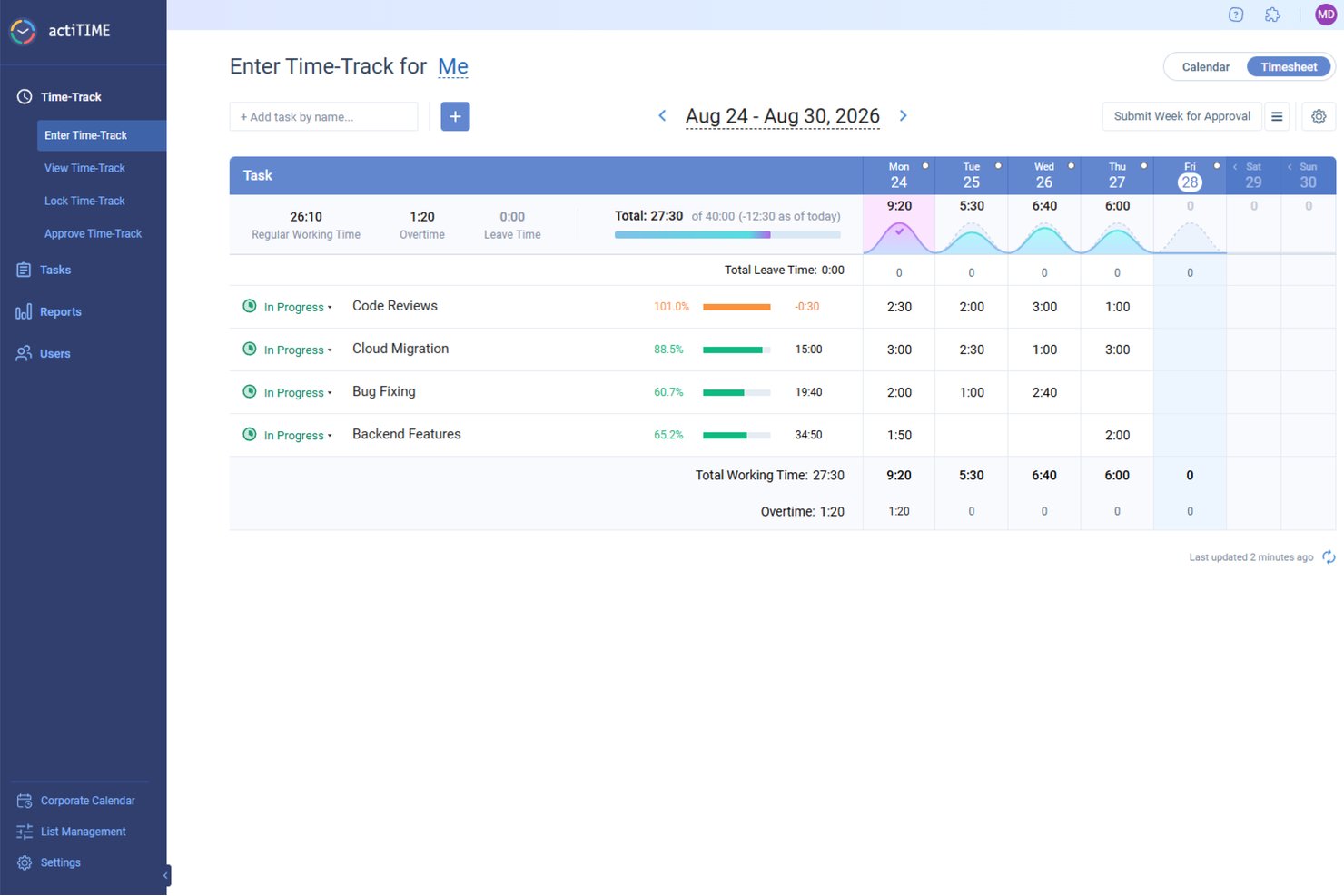
actiTIME is a free time tracking tool that pairs manual time logging and timesheet management with customizable task workflows, multi-level project tracking, and built-in budget and billing reports.
Who Is actiTIME Best For?
actiTIME suits small agencies and consulting teams that need client-level time tracking, billing visibility, and structured workflows without a software budget.
Why I Picked actiTIME
I picked actiTIME as one of the best because its custom workflow statuses let my team define exactly how tasks move through a project, going well beyond a basic to-do/done setup. I also use custom types of work to separate billable from non-billable hours at the task level, which keeps client invoicing clean without manual sorting after the fact. Both of these configurations are available on the free plan, which genuinely sets actiTIME apart from most free-tier tools.
actiTIME Key Features
- Weekly timesheet and calendar view: Log time daily or weekly and review all entries in an interactive layout.
- Multi-level project and task structure: Organize work by clients, projects, and tasks with unlimited hierarchy depth.
- Mobile app and Chrome extension: Track time from iOS, Android, or right in your browser without losing data.
- CSV and PDF report exports: Export time and billing data in common file formats to support stakeholder or client reporting.
actiTIME Integrations
actiTIME offers native integrations with QuickBooks and actiPLANS, and provides an API for custom integrations.
What's Free?
actiTIME offers a free forever plan for up to 3 users, which includes core time tracking, timesheet views, custom task statuses, and basic reporting. A 30-day free trial of the paid plan is also available if you need to test premium features before committing.
Pros and Cons
Pros:
- Built-in billing reports without upgrading
- Supports project, task, and client hierarchy
- Custom workflow statuses on the free plan
Cons:
- Free plan limited to three users
- No automatic or background time tracking
New Product Updates from actiTIME

actiTIME Visual Hour Indicator and Time-Track Report Redesign
actiTIME adds a wave-style hour indicator to the Timesheet and Calendar views and refreshes the Time-Track report for smoother navigation and clearer visuals. For more information, visit actiTIME's official site.

Homebase
Best with built-in hiring and onboarding tools
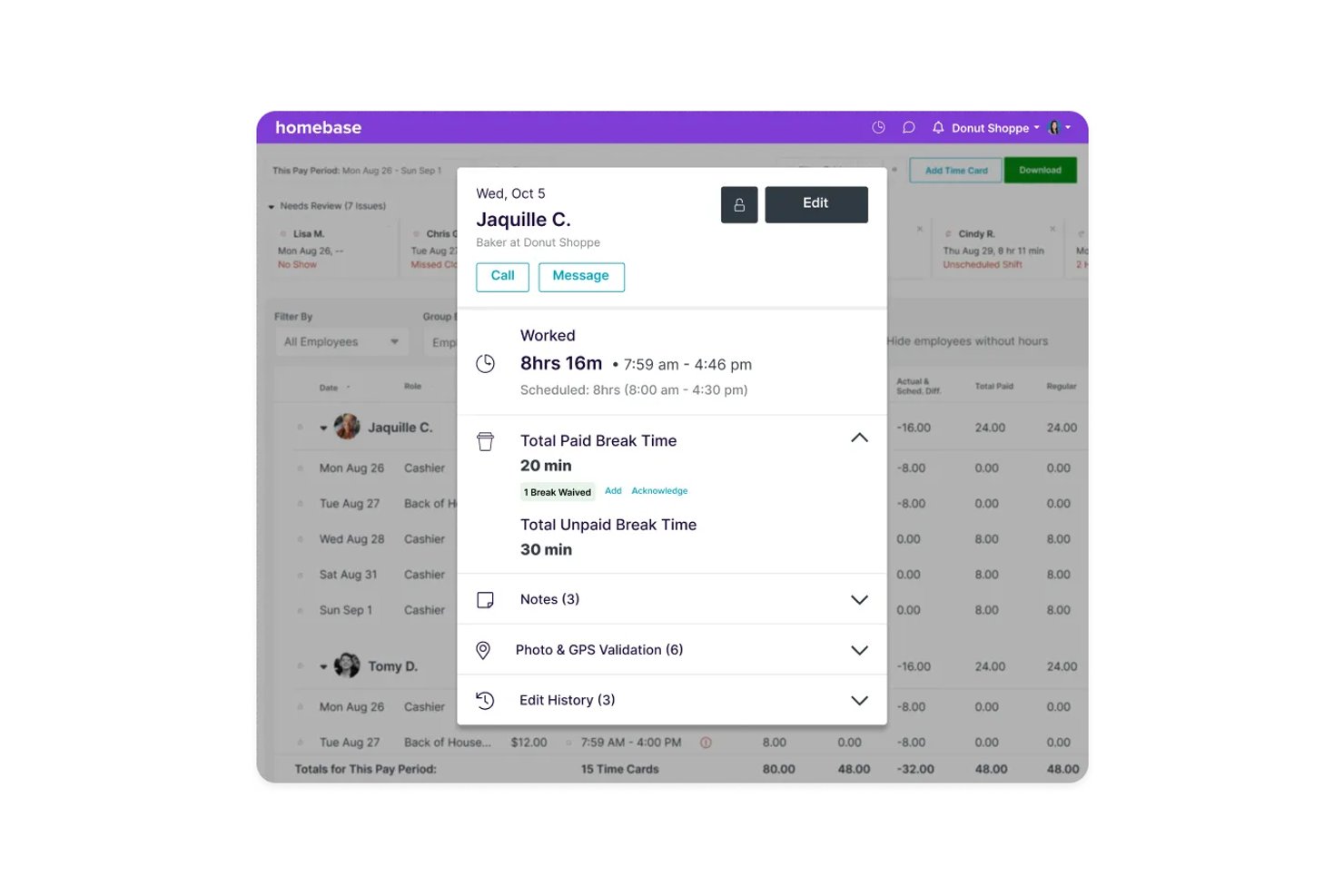
Homebase is a scheduling and time tracking platform built for hourly workforces, combining clock-in/out time logging, shift scheduling, team communication, and native hiring and onboarding tools.
Who Is Homebase Best For?
Homebase is a natural fit for small businesses in retail, food service, and hospitality that manage hourly, shift-based teams from a single location.
Why I Picked Homebase
I've included Homebase in my top picks because no other free time tracking tool also handles the full hiring-to-clock-in pipeline in one place. When I post a job through Homebase, it syncs automatically to Indeed and Google Jobs, and applicants flow into the same dashboard where I manage schedules and timesheets. Once I hire someone, I can send digital onboarding packets (W-4, I-9, direct deposit setup) without switching tools.
Homebase Key Features
- GPS-enabled time clock: Employees can clock in and out from approved locations using their mobile device with GPS verification.
- Automated overtime tracking: The system calculates overtime based on your specified rules and alerts managers automatically.
- Shift scheduling calendar: Create, assign, and manage employee shifts with a visual calendar that supports drag-and-drop edits.
- Team messaging: Managers and employees can communicate in real time directly within the Homebase platform.
Homebase Integrations
Homebase offers native integrations with Square, Clover, Toast, Shopify, Lightspeed, PAR, GoDaddy, ADP, Gusto, QuickBooks, Paychex, and SurePayroll. An API is available for custom integrations.
Pros and Cons
Pros:
- Automated scheduling and time-off management
- GPS time tracking for offsite staff
- Built-in tools for hiring hourly employees
Cons:
- Requires a separate paid add-on to run payroll
- Locks geofencing tools behind the upper tiers

Clockify
Best for small teams
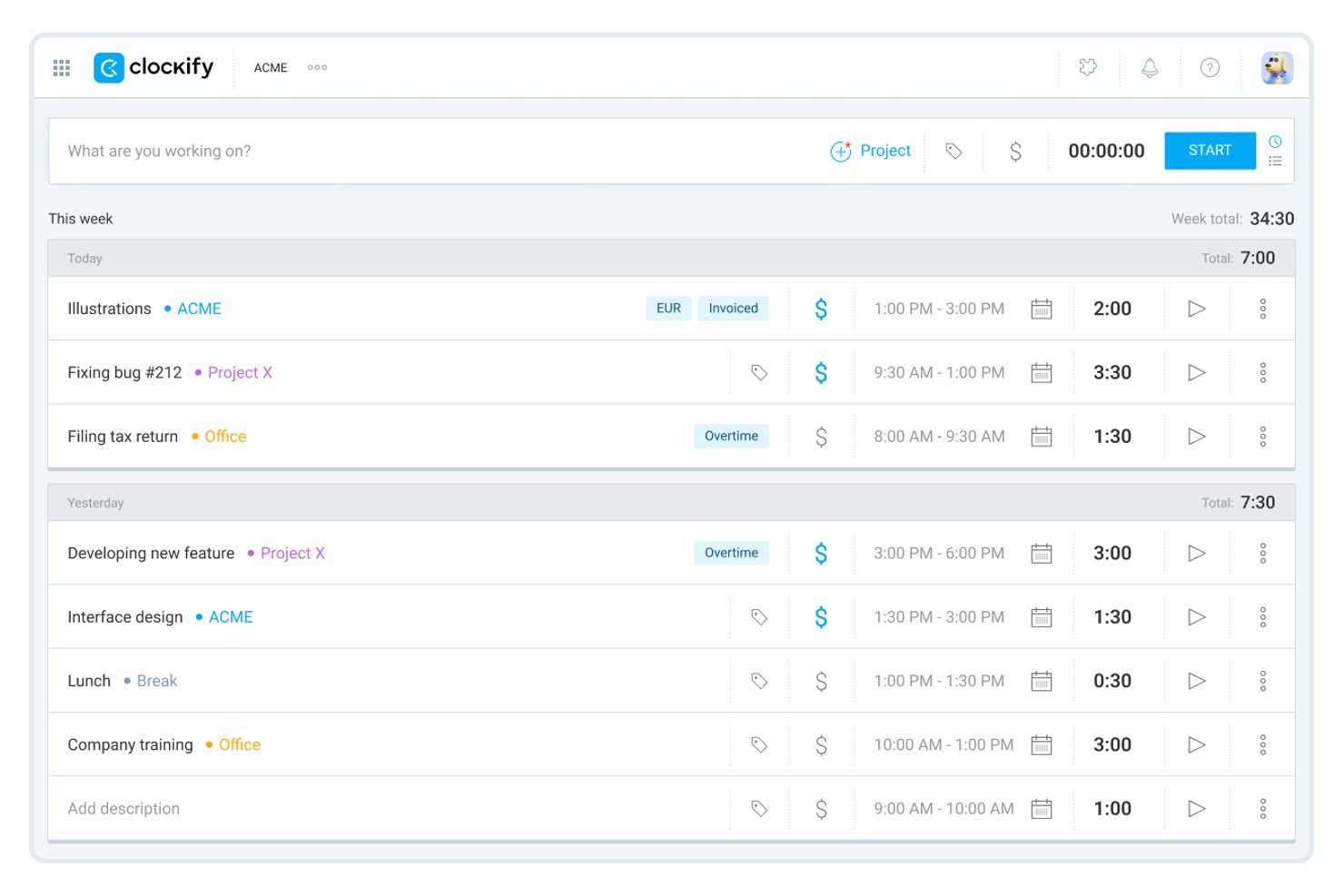
Clockify is a time tracking platform that lets individuals and small teams track work hours, manage unlimited projects and tasks, generate timesheets, and connect to 100+ third-party tools.
Who Is Clockify Best For?
Freelancers, consultants, and small teams who need unlimited time tracking and project management features on a free plan.
Why I Picked Clockify
I selected Clockify because it gives small teams an accessible way to log hours and manage basic timesheets without high upfront costs. Its core tracking features provide clear visibility into daily team output and project progress. This makes it ideal for leaders who need essential oversight and proof of work while keeping software overhead low.
Clockify Key Features
- Auto Tracker: Records app, website, and document activity in the background for more accurate time logs.
- Idle detection and reminders: Notifies you when the timer is running while inactive and lets you handle idle time.
- Team activity dashboard: Displays a real-time overview of what each team member is currently tracking.
- PDF report exports: Lets you generate and export summary, detailed, and weekly reports in PDF format from the free plan.
Clockify Integrations
Clockify offers over 100 native integrations, including Jira, Asana, Trello, ClickUp, Monday, Basecamp, Notion, GitHub, GitLab, Slack, Google Calendar, and Zapier. An API is available for custom integrations.
What's Free?
Clockify offers a free-forever plan for up to 5 users, with unlimited projects, tasks, and time tracking. The free plan includes essential features like PDF reports, the auto tracker, and 100+ integrations, but some advanced features like billable rates and time audits require a paid upgrade.
Pros and Cons
Pros:
- Cross-platform apps with offline time tracking
- Auto tracker and idle detection included
- Cost-effective time tracking for small budgets
Cons:
- PDF-only export with 31-day report limit
- Free plan capped at five users

My Hours
Best for project management

My Hours is a time tracking software tailored for teams to manage project time and improve profitability. It supports key functions like project tracking and client billing, making it ideal for project management needs.
Why I picked My Hours: This tool works in project management by offering features that allow you to track project profitability and manage billing. You can delegate tasks in real-time, so everyone knows their responsibilities. The software's ability to calculate costs for each employee helps in maintaining clear financial oversight. Its user-friendly design means your team can focus on work without getting bogged down by complex systems.
Standout Features & Integrations
Features include customizable hourly rates, which let you adjust billing as needed. The platform also provides detailed reporting capabilities, so you can easily analyze time and expenses. Additionally, its absence management feature keeps track of team availability.
Integrations include QuickBooks, Trello, Asana, Slack, Zapier, Google Calendar, Outlook, Microsoft Teams, Xero, and Basecamp.
Pros and Cons
Pros:
- Customizable hourly rates
- Real-time task delegation
- Easy project profitability tracking
Cons:
- Limited mobile features
- No offline access

Jibble
Best for attendance tracking

Jibble is a time tracking software designed for businesses that need accurate attendance records. It's ideal for industries to track employee hours and attendance.
Why I picked Jibble: This tool works in attendance tracking with features like facial recognition and GPS tracking to ensure accurate time logs. You can track employee hours in real-time and generate timesheets automatically. Jibble's mobile app lets your team clock in and out from anywhere, which is useful for remote work. Its reporting tools help you analyze attendance patterns and improve workforce management.
Standout Features & Integrations
Features include timesheet approvals, which allow managers to review and approve hours worked. You can also set up overtime rules to manage extra hours automatically. The tool provides detailed analytics, helping you make informed decisions about staffing needs.
Integrations include Slack, Microsoft Teams, QuickBooks, Xero, Asana, Trello, monday.com, Google Calendar, Zapier, and Gusto.
Pros and Cons
Pros:
- Overtime rules management
- Automatic timesheet generation
- Facial recognition for clock-ins
Cons:
- No invoicing capabilities
- Requires internet for use

TimeCamp
Best for automatic time tracking

TimeCamp is a time tracking tool designed for businesses that want to automate time management. It's useful for teams looking to accurately track time without manual input.
Why I picked TimeCamp: It offers automatic time tracking, which reduces the need for manual entries and helps in capturing time spent on tasks accurately. You can categorize time entries to better understand how time is allocated across projects. The tool's reporting features provide insights into productivity, allowing you to make informed decisions. With its interface, your team can start tracking time with minimal setup.
Standout Features & Integrations
Features include the ability to track time offline, so no hours are lost when internet access is unavailable. You can set up billable and non-billable hours to manage project budgets. TimeCamp also offers invoicing features, making it easier to bill clients directly from the platform.
Integrations include Trello, Asana, Slack, Jira, monday.com, QuickBooks, Xero, Dropbox, Google Calendar, and Evernote.
Pros and Cons
Pros:
- Categorize time entries
- Invoicing from the platform
- Offline tracking capabilities
Cons:
- Many basic features are locked behind paid tier
- Limited mobile app features

Best for unlimited users

TrackingTime is a web-based time tracking platform built for digital project managers, remote teams, and growing agencies. It enables organizations to monitor project progress, measure productivity, and generate time reports across shared workflows.
Why I picked TrackingTime: I selected TrackingTime because its free plan supports unlimited users, allowing project leads to onboard entire teams, contractors, and external clients without incurring extra seat costs. Unlike software that restricts free access to small teams, it ensures everyone on a project can log time directly into a shared workspace.
Standout Features & Integrations
Features include the ability to track time directly from your browser, making it convenient for remote teams. You can also generate detailed timesheets to review hours worked and improve project billing. The tool offers project budgeting features to help you keep track of costs and resources.
Integrations include Asana, Trello, Slack, Jira, Google Calendar, Microsoft Teams, Zapier, Basecamp, Evernote, and monday.com.
What's Free? TrackingTime offers a free-forever plan that supports unlimited users, tasks, and projects with basic real-time tracking and PDF exporting, though CSV exports and billable rate calculations require a paid tier.
Pros and Cons
Pros:
- Project budgeting features
- Real-time task tracking
- Unlimited users on free plan
Cons:
- Lacking compliance features
- Billable hour tracking requires paid tier


Harvest is a time tracking and invoicing tool designed for businesses that need to manage projects and billing. It's tailored for teams looking to track time, expenses, and generate invoices all in one place.
Why I picked Harvest: This tool integrates time tracking with invoicing, making it good for businesses that need to manage billing alongside project hours. You can track time on tasks and convert those hours into invoices with just a few clicks. Harvest's reporting tools provide insights into your projects' profitability, helping you make informed decisions.
Standout Features & Integrations
Features include expense tracking, which lets you manage project costs. You can set up automatic reminders, so your team tracks time consistently. The tool also offers detailed project reports to help you analyze time and expenses across all projects.
Integrations include Asana, Trello, Slack, QuickBooks, Xero, Google Calendar, Basecamp, Jira, Zapier, and GitHub.
Pros and Cons
Pros:
- Automatic reminders for time tracking
- Expense tracking capabilities
- Invoicing integration with time tracking
Cons:
- Requires internet for full functionality
- Limited customization for reports


Simple Time Tracker is a straightforward time tracking tool designed for individuals and small teams who value minimalism. It helps users track time spent on tasks, projects, and clients without unnecessary complexity.
Why I picked Simple Time Tracker: This tool is all about simplicity, offering a user-friendly interface for time tracking. You can track time with one click and view a structured list of tasks to prioritize your work. The app syncs across devices in real-time, so your data is up-to-date. Its lack of overcomplicated options means you spend less time figuring out the tool and more time focusing on your work.
Standout Features & Integrations
Features include real-time syncing across devices, so your data is current no matter where you track from. You can manage tasks with a simple list view, helping you prioritize. The tool also offers mobile and desktop apps, providing flexibility in how you track your time.
Integrations include Google Calendar, Trello, Asana, Slack, Jira, monday.com, Basecamp, QuickBooks, Xero, and Zapier.
Pros and Cons
Pros:
- Minimalistic design
- Mobile and desktop apps
- Real-time data sync
Cons:
- Timers require manual start/stop
- No invoicing capabilities


TopTracker is a time tracking tool specifically designed for freelancers who need to manage their work hours. It provides detailed insights into time spent on tasks, helping freelancers with their productivity.
Why I picked TopTracker: It offers features tailored for freelancers, such as activity level tracking and screenshot capturing to monitor progress. You can track time without intrusive monitoring, which respects your privacy. The tool's customizable reports help you analyze your work patterns and make informed decisions. Its simple interface ensures you can focus on your projects without getting distracted by the software itself.
Standout Features & Integrations
Features include full privacy control, allowing you to decide what data to share with clients. You can track time across multiple devices, ensuring flexibility in how and where you work. The tool also offers detailed productivity reports.
Integrations include Asana, Trello, Slack, Google Calendar, Jira, Basecamp, Evernote, Microsoft Teams, QuickBooks, and Zapier.
Pros and Cons
Pros:
- Cross-device compatibility
- Customizable reports
- Activity level tracking
Cons:
- No advanced activity tracking
- Limited to desktop or web application
Other Free Time Tracking Software
Here are some additional free time tracking software options that didn’t make it onto my shortlist, but are still worth checking out:
- TimeTrace
For minimal setup
- Toggl
For solo freelancers
- QuickBooks Time
For payroll integration
- Everhour
For budget management
- Apploye
For remote team monitoring
- Deltek Replicon Time
For compliance tracking


How I Evaluate Free Time Tracking Software
I split my evaluation into baseline criteria—like whether a free plan actually supports team tracking—and differentiators like billing rate controls and PM tool integrations.
Core Functionality (Table Stakes For This List)
When I'm selecting tools for my list, I rank each one on a scale from 0 (does not offer the functionality) to 5 (excels in this area) for each core functionality listed below. Then, I calculate the tool's total score into a percentage. Each tool needs to achieve a minimum total score of 65% to be considered for inclusion.
- Free Plan Availability: I check whether the tool offers a genuinely free tier—not a 14-day trial—that covers day-to-day time tracking for real project work.
- Time Entry & Timers: Whether you prefer clicking a start/stop timer mid-task or logging hours after the fact, I look for tools that support both input methods.
- Project & Task Association: Logging hours is only useful when entries tie to specific projects, tasks, or clients, so I evaluate how granular the tagging structure is.
- Timesheet Management: I look for daily and weekly timesheet views that let you review, edit, and organize logged time—similar to how Toggl Track and Clockify handle it.
- Reporting & Exports: Teams need to pull time data into invoices or stakeholder updates, so I evaluate report filtering options and export formats like CSV and PDF.
- Multi-User Team Support: A free plan that caps at one user doesn't help a project team. I check how many team members can track time together on the free tier.
Once I have a list of tools that meet this criteria, I consider what sets each platform apart.
Differentiating Factors (What Sets Vendors Apart)
Here's how I compare and contrast different vendors:
Standout Features
Billable rate management is a big one—if your team tracks time across client projects, assigning rates at the project or user level saves a manual step before invoicing. I also evaluate idle detection and tracking reminders, which keep timesheets accurate when someone forgets to stop a timer or steps away mid-task. For project managers juggling multiple workstreams, capacity and workload views give you a real-time picture of who's overloaded and who has bandwidth to take on more.
Beyond Features
I pay close attention to how well a tool connects with existing PM stacks—native integrations with platforms like Jira, Asana, or Trello mean your team logs time where they already work instead of context-switching. Cross-platform accessibility also matters, especially for distributed teams who need desktop, mobile, and browser extension options with offline tracking. Finally, I evaluate free plan generosity: some tools gate reporting or integrations behind paid tiers, which limits how useful the free version actually is for a growing project team.
How to Choose Free Time Tracking Software
It’s easy to get bogged down in long feature lists and complex pricing structures. To help you stay focused as you work through your unique software selection process, here’s a checklist of factors to keep in mind:
| Factor | What to Consider |
| Scalability | Will the software grow with your team? Consider if it supports unlimited users or projects, and if scaling up comes with additional costs. |
| Integrations | Does it connect with your existing tools? Check if it integrates with your project management, accounting, or communication tools to avoid disrupting workflows. |
| Customizability | Can you tailor it to fit your needs? Look for options to customize reports, dashboards, and user permissions to match your workflow. |
| Ease of use | Is the interface intuitive? Ensure that the tool is easy to navigate and doesn't require extensive training, so your team can start using it immediately. |
| Implementation and onboarding | How quickly can you get started? Evaluate the availability of training resources, such as tutorials or guides, to help your team get up to speed quickly. |
| Cost | What are the total costs? Beyond the free plan, consider the pricing structure for paid plans, any hidden fees, and discounts for annual billing. |
| Security safeguards | How secure is your data? Investigate the software's data protection measures, such as encryption and compliance with data regulations, to ensure your information is safe. |
| Support availability | When do you need help? Check if customer support is available 24/7 or during your business hours, and through what channels (e.g., chat, email, phone) to ensure you can get assistance when needed. |
What Is Free Time Tracking Software?
Free time tracking software is a tool that helps individuals and teams monitor the time spent on tasks and projects without incurring costs. Typically used by freelancers, project managers, and small businesses, these tools provide insights into productivity and help manage workloads efficiently. Features like time logging, reporting, and invoicing support users in tracking hours, analyzing data, and billing clients. Overall, these tools offer valuable insights into how time is spent, aiding in better project management and increased efficiency.
Features of Free Time Tracking Software
When selecting free time tracking software, keep an eye out for the following key features:
- Time logging: Allows users to record hours spent on tasks, providing insights into productivity.
- Reporting: Generates reports to analyze time usage and helps in making data-driven decisions.
- Invoicing: Converts tracked hours into invoices, simplifying the billing process for clients.
- Project management: Organizes tasks and projects to keep teams aligned and on track.
- Integration capabilities: Connects with other tools like accounting and project management software for workflows.
- Customizable dashboards: Offers personalized views to match individual or team needs for better focus.
- Mobile access: Enables time tracking on-the-go, ensuring flexibility and convenience.
- Expense tracking: Monitors project costs to ensure budgets are adhered to and managed effectively.
- Automatic reminders: Prompt users to log time, reducing the chances of forgetting to track hours.
- Privacy controls: Provides options to manage data visibility, ensuring user privacy is maintained.
Benefits of Free Time Tracking Software
Implementing free time tracking software provides several benefits for your team and your business. Here are a few you can look forward to:
- Improved productivity: By tracking time spent on tasks, you can identify inefficiencies and optimize workflows.
- Better project management: Organizing tasks and projects helps keep your team aligned and on track with deadlines.
- Accurate billing: Invoicing features ensure that clients are billed correctly for the hours worked, reducing discrepancies.
- Cost management: Expense tracking keeps project costs in check, helping you stay within budget.
- Enhanced flexibility: Mobile access allows your team to track time wherever they are, ensuring convenience and adaptability.
- Data-driven insights: Reporting features provide valuable insights into how time is spent, aiding in decision-making.
- Increased accountability: Automatic reminders ensure that time logging is consistent, promoting responsibility among team members.
Costs and Pricing of Free Time Tracking Software
Selecting free time tracking software requires an understanding of the various pricing models and plans available. Costs vary based on features, team size, add-ons, and more. The table below summarizes common plans, their average prices, and typical features included in free time tracking software solutions:
Plan Comparison Table for Free Time Tracking Software
| Plan Type | Average Price | Common Features |
| Free Plan | $0 | Basic time tracking, simple reporting, and limited integrations. |
| Personal Plan | $5-$15/user/month | Enhanced reporting, mobile access, project management, and basic invoicing. |
| Business Plan | $15-$30/user/month | Advanced reporting, expense tracking, multiple integrations, and customizable dashboards. |
| Enterprise Plan | $30-$50/user/month | Full feature access, priority support, advanced security options, and dedicated account management. |
Free Time Tracking Software FAQs
Here are some answers to common questions about free time tracking software:
Is free time tracking software secure?
Most free time tracking software includes essential protections designed to keep your information safe. When choosing a time tracking app, check whether it follows standards like GDPR or CCPA and whether it uses encryption and secure authentication to protect time tracking data. It also helps to review how the provider stores user information and what access controls are offered. If security is a top priority, you may want to compare free tools with paid plans that offer enhanced safeguards.
Can free time tracking software be used offline?
Some tools offer offline timekeeping, while others require an internet connection. If you work remotely or travel often, look for a web app or browser extension that can track how much time you spend on tasks and sync automatically when you reconnect. Always test the offline mode so you know it fits your workflow before relying on it for client work or internal time reporting.
Do free time tracking tools integrate with other software?
Many options connect with project management tools and accounting platforms so teams can centralize their time tracking data. Integrations with apps like Asana, Trello, QuickBooks, or other team management systems can reduce manual entry and improve accuracy. If you rely on billable rates or need to pull reports across unlimited projects, verify that the software supports the specific time tracking features you need.
Are there limitations to using free time tracking software?
Free versions often include limits on users, integrations, or reporting features. They can still work well for individuals or small teams, especially when paired with a Chrome extension or employee monitoring tools that track how much time is spent on tasks. As your workload grows, you may find that upgrading to one of the best time tracking software options is worthwhile for advanced time reporting, expanded time off management, and more detailed insights.