
20 Best Enterprise Process Automation Software For 2026

10 Best Enterprise Process Automation Software Shortlist
Here’s my shortlist of the best enterprise process automation software.


Enterprise process automation software is a valuable asset for large companies seeking to streamline their operations. With the right software, you’ll speed up and standardize key business processes to ensure things run smoothly and efficiently. But finding the right intelligent process automation tool can be a challenge, especially with so many options available.
Using my experience in project management software, I tested and compared several of the top enterprise process automation software available. From there, I compiled my results into in-depth reviews to help businesses find the best software for their unique needs. Whether you’re new to automation or well-versed in the ins and outs, I’m confident that you’ll discover the right enterprise process automation software for your business in the list below.
Why Trust Our Software Reviews
We’ve been testing and reviewing process management software since 2012. As project managers ourselves, we know how critical and difficult it is to make the right decision when selecting software.
We invest in deep research to help our audience make better software purchasing decisions. We’ve tested more than 2,000 tools for different project management use cases and written over 1,000 comprehensive software reviews. Learn how we stay transparent & our software review methodology.
Best Enterprise Process Automation Software Summary
| Tool | Best For | Trial Info | Price | ||
|---|---|---|---|---|---|
| 1 | Best for managing dynamic workloads | Free plan + free demo + 14-day free trial available | From $10/user/month (billed annually) | Website | |
| 2 | Best for SAP process automation | Free demo available | Pricing upon request | Website | |
| 3 | Best for handling complex automation tasks | Free demo available | Not available | Website | |
| 4 | Best for AI-powered document automation | Free trial available + free demo | Pricing upon request | Website | |
| 5 | Best for building no-code app integrations | Free plan available | From $19.99/month (billed annually) | Website | |
| 6 | Best for driving digital transformation | 60-day free trial | From $25/month | Website | |
| 7 | Best for robotic process automation (RPA) | Free demo available | Not available | Website | |
| 8 | Best for AI analytics and insights | Free demo available | Pricing upon request | Website | |
| 9 | Best for AI-powered decisioning | Free trial available | Pricing upon request | Website | |
| 10 | Best for building custom AI agents | Free demo available | Pricing upon request | Website |


-

Accelo
Visit WebsiteThis is an aggregated rating for this tool including ratings from Crozdesk users and ratings from other sites.4.4 -
Forecast
Visit WebsiteThis is an aggregated rating for this tool including ratings from Crozdesk users and ratings from other sites.4.6 -
Wrike
Visit WebsiteThis is an aggregated rating for this tool including ratings from Crozdesk users and ratings from other sites.4.2



Best Enterprise Process Automation Software Reviews
Here are my in-depth analyses and overviews of each enterprise process automation software. I will walk you through the pros and cons of each tool, their features, and their best use cases.


Wrike is a robust enterprise process automation platform that helps teams reduce manual work by automating recurring tasks and coordinating complex workflows across departments. It’s designed to support large organizations with dynamic workloads, giving you full visibility into projects, goals, and performance—all in one place.
Why I picked Wrike: I picked Wrike because of its AI-powered planning features. You can identify risks early and allocate resources intelligently, which helps prevent delays. I also like how it centralizes information from across departments, making it easier for you to spot dependencies and align teams without wasting time on status checks. Plus, its flexibility means you can manage creative, operational, or technical work all in the same platform.
Standout Features & Integrations:
Features include customizable request forms to collect project intake info up front, real-time dashboards to track performance metrics, and full-featured mobile apps for managing work on the go. Wrike also offers enterprise-grade security features like access controls and encrypted storage to keep your data safe.
Integrations include Salesforce, Adobe Creative Cloud, Microsoft Teams, Tableau, Power BI, Zoom, Google Drive, Microsoft SharePoint, Klaxoon, QuickBooks, Google Sheets, and more through Wrike Integrate and API access.
Pros and Cons
Pros:
- Built-in mobile and desktop access
- Smart AI risk detection
- Flexible workflows for any team
Cons:
- Advanced features take time to learn
- Complex automations require setup
New Product Updates from Wrike

Streamlining Workspaces with New Updates
Wrike announces custom space templates, AI Agents in Wrike Labs, and a new Guage widget to improve project management. For more information, visit Wrike's official site.

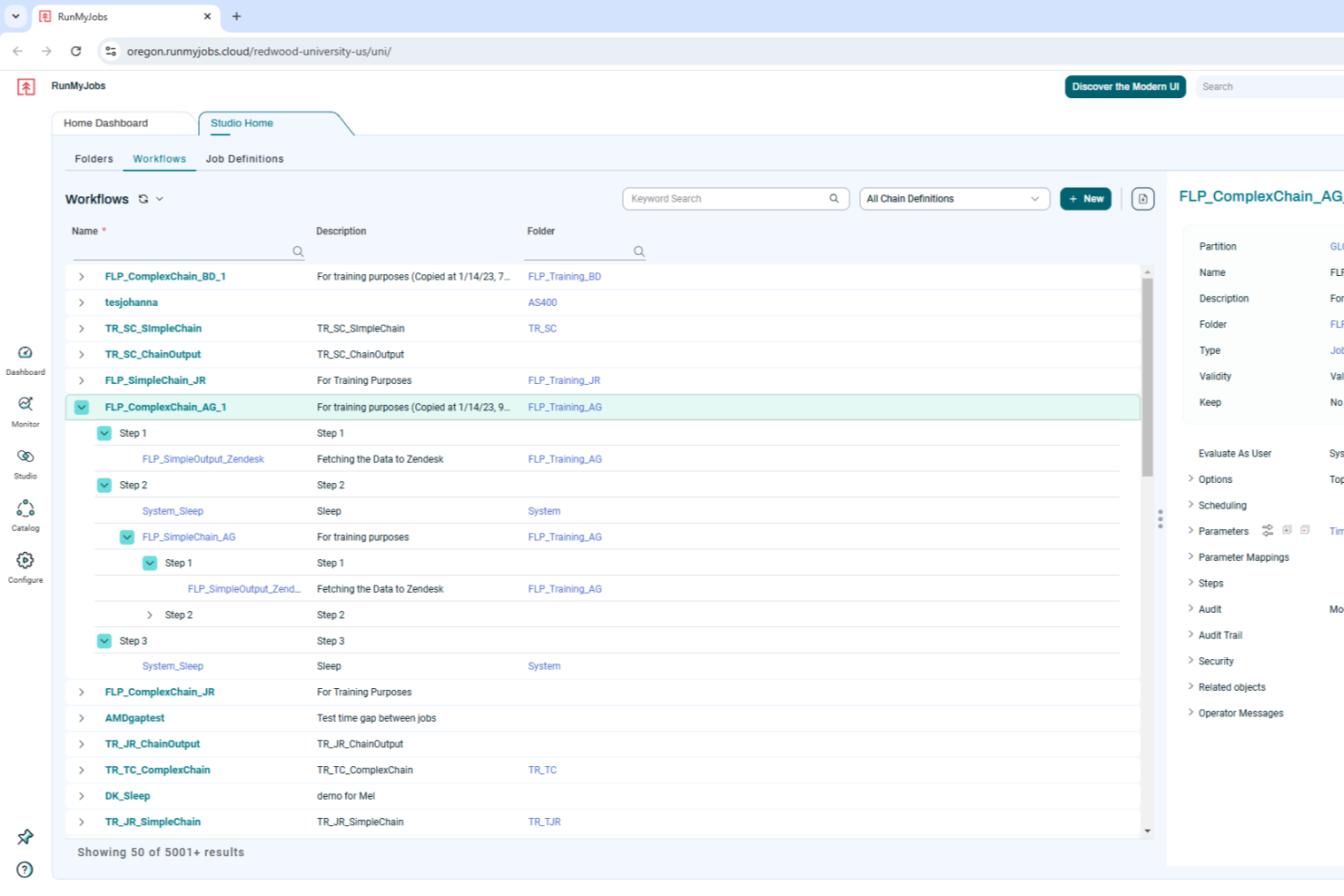
RunMyJobs by Redwood is designed for businesses seeking to optimize their operational workflows through enterprise process automation. It offers tailored solutions for industries reliant on SAP systems, addressing the complexities of integrating and automating critical business processes. By leveraging its cloud-native architecture and low-code interface, RunMyJobs can transform how your team manages workload automation, making it a compelling choice for businesses aiming to enhance efficiency and reliability in their operations.
Why I Picked RunMyJobs by Redwood
I picked RunMyJobs by Redwood for its unique ability to seamlessly integrate with SAP systems, a crucial feature for enterprises heavily reliant on these applications. Its cloud-native architecture supports hybrid environments, ensuring your team can automate processes across both on-premise and cloud systems. Additionally, the low-code interface allows users to design and implement automation workflows without extensive technical expertise, making it accessible for various team members.
RunMyJobs by Redwood Key Features
In addition to its SAP integration capabilities, I also found several other features worth highlighting:
- Job Scheduling: Automates the scheduling of complex workflows, ensuring tasks are executed at the right time without manual intervention.
- Real-Time Monitoring: Provides live insights into ongoing processes, helping your team to quickly identify and resolve issues.
- Resource Management: Efficiently allocates resources to various tasks, optimizing performance and reducing downtime.
- Task Monitoring: Keeps track of task progress and completion, offering a comprehensive view of workflow efficiency.
RunMyJobs by Redwood Integrations
Integrations include SAP ERP, Oracle, ServiceNow, AWS services, Microsoft Azure, Google Cloud, Salesforce, IBM z/OS, Kubernetes, and Apache Kafka.
Pros and Cons
Pros:
- Real-time workflow visibility
- Strong hybrid environment support
- Deep native SAP automation
Cons:
- Limited non ERP focus
- Setup can be complex
New Product Updates from RunMyJobs by Redwood
RunMyJobs Enhances User Experience Across UIs
RunMyJobs introduces updates to its Classic and Modern UIs. These improvements enhance usability and streamline the overall user experience. For more information, visit RunMyJobs' official site.
 .
.
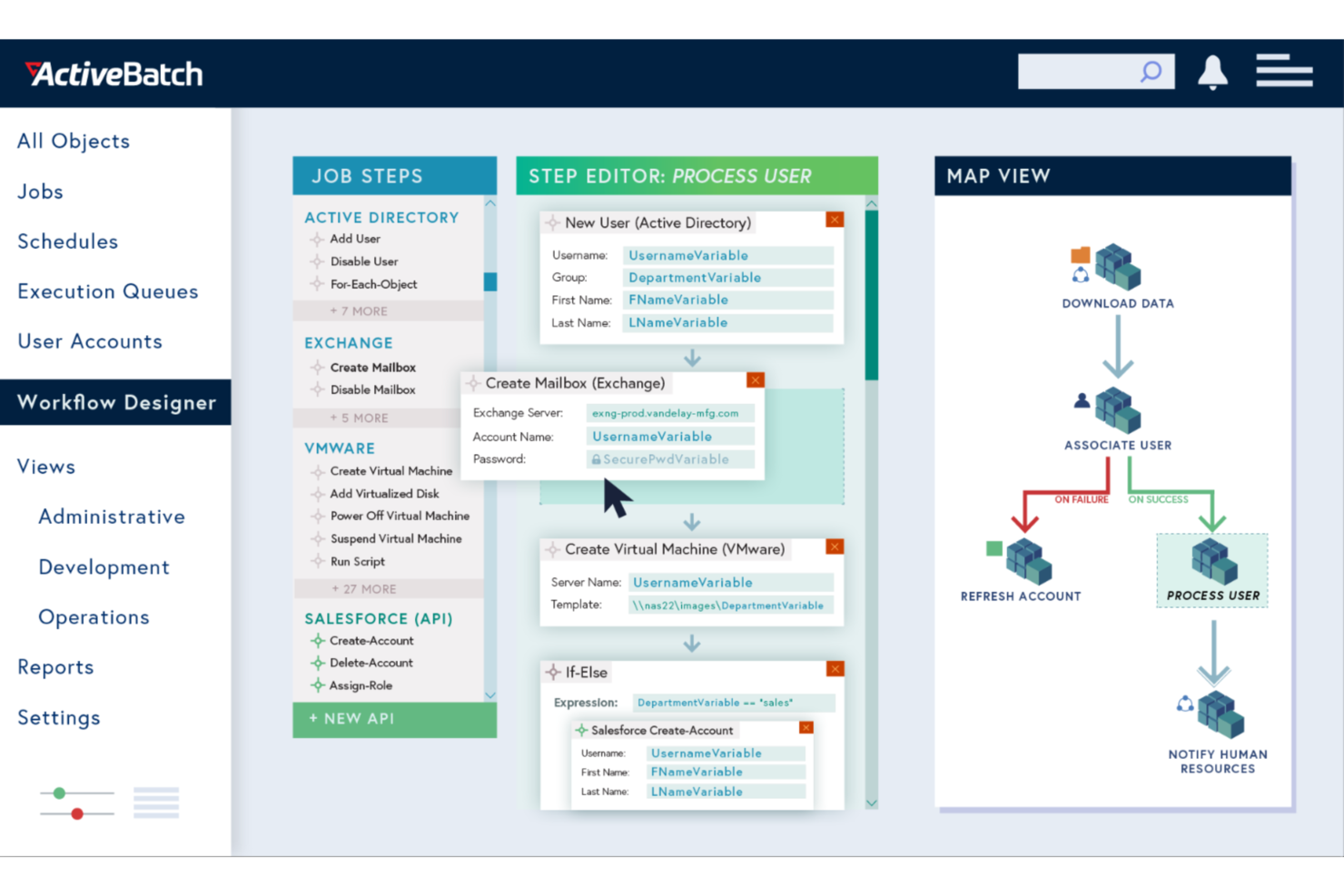
ActiveBatch empowers your business to automate and orchestrate complex IT and business processes with ease. This enterprise process automation software is ideal for industries looking to eliminate mundane tasks and improve operational efficiency. By seamlessly integrating with a wide range of platforms, ActiveBatch helps you focus on strategic initiatives rather than time-consuming manual processes.
Why I Picked ActiveBatch
I picked ActiveBatch for its exceptional ability to handle intricate process automation tasks through features like its Job Step Library and Event-Driven Scheduling. These features enable your team to automate workflows without extensive coding, which is crucial for businesses aiming to optimize operations. The platform's real-time monitoring and customizable alerts ensure that processes run smoothly, reducing the risk of errors and downtime. ActiveBatch's robust security measures further protect your data, making it a reliable choice for enterprise environments.
ActiveBatch Key Features
In addition to its automation capabilities, I also found several other features that make ActiveBatch stand out:
- User-Friendly Interfaces: Provides intuitive access through a web-based console and self-service portal for remote management.
- SLA Management: Automates monitoring and management of service level agreements to ensure optimal performance.
- Reporting and Monitoring: Features customizable alerts and comprehensive monitoring to prevent job failures.
- High Availability: Offers dynamic or manual failover to combat outages.
ActiveBatch Integrations
Integrations include Microsoft SQL Server, ServiceNow, SharePoint, Microsoft Azure, VMware, Oracle, Amazon Web Services (AWS), Google Cloud Platform (GCP), SAP, and IBM i.
Pros and Cons
Pros:
- Broad enterprise system integrations
- Event-driven scheduling flexibility
- Low-code workflow automation design
Cons:
- Complex setup for small teams
- Steep learning curve initially


Nanonets is an AI-powered platform focused on automating document processing and data extraction workflows, aiding industries like finance, healthcare, and logistics.
Why I picked Nanonets: Nanonets excels in enterprise automation through its advanced AI capabilities, enabling businesses to automate intricate workflows that involve multiple applications and data sources. By leveraging custom Language Learning Models (LLMs), the platform supports highly tailored automation that adapts to the specific requirements of various enterprise-level workflows, making it ideal for complex and dynamic operational settings. For example, it can handle process automation for data extraction, invoice processing, and document approval.
Standout Features & Integrations:
Features include AI-powered insights from unstructured data, GDPR, SOC 2, and HIPAA compliance, a no-code platform for more user accessibility, and a human-in-the-loop feature, adding a level of oversight for processes that require manual verification.
Integrations include Salesforce, SAP, Quickbooks, Google Sheets, Dropbox, and Zapier.
Pros and Cons
Pros:
- Automated data extraction features
- Compatible with multiple programming languages
- Simple API for easy integration
Cons:
- Compared to more advanced tools, Nanonets offers fewer customization options
- May not be suitable for more extensive machine learning projects with very large datasets


Zapier is a popular AI orchestration platform that helps organizations coordinate workflows across thousands of apps and AI tools. It streamlines processes by automating repetitive work and coordinating actions between systems, enabling teams to build scalable workflows without relying on custom development.
Why I picked Zapier: I chose Zapier for this list because of its ability to orchestrate workflows across a vast ecosystem of applications and AI tools without requiring coding skills. Zapier supports multi-step workflows that combine business logic, app integrations, and AI-driven actions, making it easier to manage complex processes across teams. Its no-code approach keeps automation accessible across business teams, while its scale and flexibility make it well-suited for organizations operating across large, interconnected toolsets.
Standout Features & Integrations:
Features include multi-step workflows with conditional logic, AI-assisted workflow creation with Zapier Copilot, support for AI actions, Agents, and Chatbots, and built-in tools like Zapier Tables and Forms for managing workflow data. Governance features such as permissions, audit logs, and security controls support deploying automations across teams.
Integrations include Salesforce, HubSpot, Slack, OpenAI, Microsoft Dynamics CRM, Microsoft Teams, Zendesk, Jira Software Cloud, and Mailchimp.
Pros and Cons
Pros:
- User-friendly interface with a visual canvas for mapping workflows
- Integrates with a multitude of apps and AI tools
- No-code workflows accessible to non-technical users
Cons:
- Free plan limited to two-step workflows
- No mobile app

UiPath is a leading automation platform that specializes in robotic process automation (RPA) to streamline business operations by automating repetitive tasks and enhancing productivity. It provides a comprehensive suite of tools to automate end-to-end business processes, enabling organizations to accelerate their digital transformation initiatives.
Why I picked UiPath: UiPath stands out for its robust capabilities in supporting digital transformation across enterprises by offering a scalable, AI-driven automation platform. Its AI-powered process mining and user-friendly interface empower both technical and non-technical users to automate complex workflows. This enables businesses to rapidly adapt to changing market demands and drive operational efficiency at scale.
Standout Features & Integrations:
Features include process mining, task mining, and communications mining, which help identify high-ROI opportunities for automation. The platform also offers low-code development, intelligent document processing, and real-time analytics to optimize operations.
Integrations include Amazon Web Services (AWS), Microsoft, Google Cloud, SAP, Salesforce, Oracle, ServiceNow, Workday, and Slack.
Pros and Cons
Pros:
- Real-time analytics
- Low-code development
- Comprehensive AI tools
Cons:
- Steep learning curve
- Complex setup


Nintex is a comprehensive process management and automation platform designed to streamline and optimize business operations. It offers tools for workflow automation, document generation, and robotic process automation (RPA), allowing organizations to automate repetitive tasks, improve process efficiency, and ensure compliance across various departments.
Why I picked Nintex: Nintex stands out for its powerful robotic process automation (RPA) capabilities, which enable businesses to automate complex, multi-step processes with ease. The platform’s drag-and-drop RPA design and intelligent automation tools reduce manual efforts and enhance accuracy. These functionalities make Nintex a top choice for organizations looking to drive digital transformation through process automation.
Standout Features & Integrations:
Features include process identification, workflow automation, and RPA. Nintex's platform allows users to document, map, and manage every process within their organization, automate repetitive tasks, and gain insights through analytics. The platform's cloud-based apps connect people, processes, and data, enhancing overall efficiency.
Integrations include Salesforce, Microsoft SharePoint, Office 365, Google Drive, Dropbox, Box, SAP, Oracle, ServiceNow, and Docusign.
Pros and Cons
Pros:
- Good customer support
- Strong analytics capabilities
- Comprehensive feature set
Cons:
- Limited advanced customization
- Learning curve for new users

IBM Cloud Pak for Business Automation is an integrated suite of AI-powered software designed to streamline business operations by automating workflows, managing content, and improving decision-making processes. It helps organizations automate their repetitive tasks, optimize business processes, and drive greater efficiency across their operations.
Why I picked IBM Cloud Pak for Business Automation: IBM Cloud Pak for Business Automation stands out due to its robust AI-powered analytics capabilities, which provide actionable insights and enable intelligent automation across various business functions. Its integration with IBM's AI technologies ensures that businesses can adapt to changing conditions in real-time, making it a strong contender in the enterprise process automation space.
Standout Features & Integrations:
Features include AI-driven process mining, which helps identify inefficiencies and optimize workflows with data-driven insights. The platform also offers robotic process automation (RPA) to automate repetitive tasks, improving operational efficiency.
Integrations include IBM watsonx Orchestrate, IBM Cloud Pak for Business Automation, IBM Decisions, IBM Process Mining, IBM Content Services, IBM Task Automation, IBM Workflow Orchestration, IBM Decisions Management, IBM Virtual Machine Technologies, and IBM Container Technologies.
Pros and Cons
Pros:
- Integrated BPM and case management
- Effective content management services
- Comprehensive process mining tools
Cons:
- Complex setup process
- Pricing is not transparent

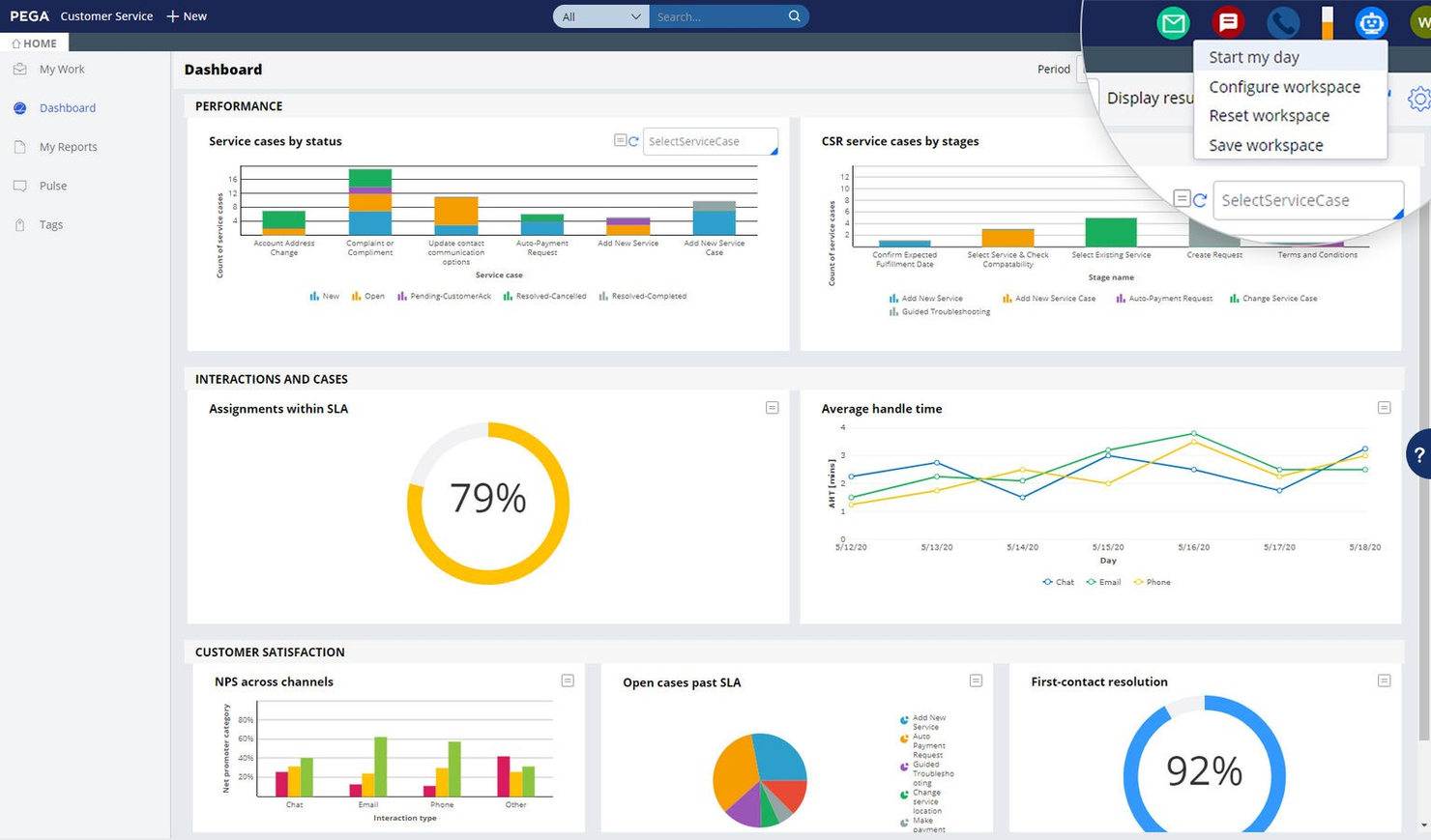
Pega is a leading enterprise process automation software that offers real-time optimization, AI decisioning, and workflow automation to help organizations streamline their processes and make data-driven decisions. Pega's platform is designed to help businesses personalize engagement, automate customer service, and streamline operations.
Why I picked Pega: The AI-powered decisioning capabilities of Pega are what truly make it unique. Pega's ability to integrate real-time AI decisioning into workflow automation makes it uniquely effective for businesses looking to enhance their decision-making processes. This feature is particularly valuable for organizations that need to make quick, data-driven decisions to stay competitive.
Standout Features & Integrations:
Features include AI-powered decisioning, real-time analytics, and workflow automation. The software also offers low-code development capabilities, making it accessible for users with varying technical skills.
Integrations include Salesforce, Microsoft Dynamics, SAP, Oracle, Google Cloud, AWS, IBM Watson, ServiceNow, MuleSoft, and Twilio.
Pros and Cons
Pros:
- Comprehensive workflow automation
- Low-code development
- Real-time AI decisioning
Cons:
- Steep learning curve for new users
- Pricing is not transparent


Automation Anywhere is a leading platform for Robotic Process Automation (RPA) that allows businesses to automate repetitive tasks and streamline operations. It enables organizations to build, deploy, and manage artificial intelligence (AI) bots that can execute business processes with higher accuracy and speed.
Why I picked Automation Anywhere: Automation Anywhere stands out for its advanced capability to create custom AI-powered automation agents, enabling businesses to tailor their automation solutions to specific needs. The platform’s AI-driven decision-making, intelligent document processing, and user-friendly bot-building interface allow organizations to build highly customized and intelligent automation workflows.
Standout Features & Integrations:
Features include AI Agent Studio for building custom AI agents, Automator AI for accelerating the automation lifecycle, and a cloud-native platform that supports scalability and security. The platform also offers process discovery tools to identify the best automation opportunities and a bot store for pre-built automation solutions.
Integrations include ChatGPT, Workday, Google Cloud, Amazon Web Services, Salesforce, Genesys, Microsoft Teams, SAP, Oracle, and ServiceNow.
Pros and Cons
Pros:
- User-friendly bot creation
- Scalable cloud-native platform
- Responsive and knowledgeable customer support
Cons:
- Requires technical expertise for advanced features
- Complex installation process
Other Enterprise Process Automation Software
Below is a list of additional enterprise process automation software that I shortlisted. While they didn’t make the top 10, they’re still valuable and worth further research.
- Process Runner
For SAP data automation
- Camunda
For end-to-end process orchestration
- Tungsten Automation
For automated invoicing
- SAP Signavio
For business process transformation
- Bizagi
For low-code process automation
- Creatio CRM
For CRM automation
- Lucidchart
For intelligent diagramming
- Creatio Studio
For highly customizable process automation
- Kissflow
For customizable app building
- Asana
For task management and team coordination


Related Project Management Software Reviews
If you still haven't found what you're looking for here, check out these other related tools that we've tested and evaluated:
- Project Management Software
- Resource Management Software
- Workflow Automation Software
- Time Tracking Software
- Task Management Software
- Collaboration Tools
- Gantt Chart Maker
- Productivity Tools
- Project Tracking Software
- Project Scheduling Software
- Project Management Software for Developers
Enterprise Process Automation Software Selection Criteria
The criteria for choosing an enterprise process automation software should directly address buyer needs and common pain points, ensuring that the software serves its intended purpose effectively. As an expert who has personally tried and researched these tools, here are the requirements I use when evaluating software:
Core Functionality (25% of total score):
- Workflow automation
- Data integration
- Reporting and analytics
- User management
- Scalability
Additional Standout Features (25% of total score):
- AI and machine learning capabilities
- Customizable dashboards
- Mobile accessibility
- Advanced security features
- Integration with emerging technologies
Usability (10% of total score):
- Intuitive interface
- Drag-and-drop functionality
- Customizable templates
- Responsive design
- Feedback mechanisms
Onboarding (10% of total score):
- Training videos
- Interactive product tours
- Templates
- Chatbots and webinars
- Onboarding assistance
Customer Support (10% of total score):
- 24/7 availability
- Multi-channel support
- Dedicated account managers
- Knowledge base
- Response time
Value For Money (10% of total score):
- Transparent pricing
- Flexible plans
- Free trials
- Bundled features
- Feature-value balance
Customer Reviews (10% of total score):
- User satisfaction
- Feature effectiveness
- Support quality
- Ease of use
- Reliability
How to Choose Enterprise Process Automation Software
As you work through your own unique software selection process, keep the following points in mind:
- Understand Your Business Needs: Before selecting an automation tool, clearly define your business goals and objectives around business process management. Identify the specific manual processes you want to automate and the outcomes you want to achieve. For example, if generating recurring contracts or client reports is part of your workflow, prioritize platforms that include or integrate with document generation software to streamline these tasks.
- Ease of Use: Consider how many people at your business will be using the platform and how accessible it will be to various users. You might seek out a no-code automation tool with a friendly drag-and-drop interface if you don’t have a team of developers who will set up and manage your business process automations.
- Integrations: Look at the native integrations available from the software and whether it will connect with your existing tech ecosystem. Many enterprise automation solutions will have several integrations with popular CRM, ERP, and communication platforms and other core tools. However, many also have an API that requires custom setup, so consider whether that will work or if you need a plug-and-play solution.
- Scalability: Any enterprise automation platform should be able to handle complex processes, high workloads, a large user base, and growing data volumes. That said, if you’re still a growing business you might be seeking a solution that will meet the needs of your team members now, and still scale with you as you grow.
- Security and Compliance: Automation often involves handling sensitive data and critical business processes. Prioritize security when selecting a solution by looking for features like data encryption, user access controls, and audit trails. Ensure the automation solution complies with industry regulations and data protection standards like HIPAA or GDPR.
Trends for Enterprise Process Automation Software
Here are some trends I’ve noticed for enterprise process automation technology, plus what they might mean for the future. I sourced countless product updates, press releases, and release logs to tease out the most important insights.
- AI-Driven Automation: AI-driven automation is gaining traction. It allows for more intelligent decision-making and predictive analytics. This trend is important because it reduces human error and increases efficiency.
- Low-Code Platforms: Low-code platforms have become more popular. They enable users to create applications with minimal coding knowledge. This democratizes software development and speeds up deployment times.
- Hyper Automation: This involves the use of multiple technologies to automate complex business processes. It integrates AI, machine learning, and robotic process automation. This trend is significant as it aims to automate every possible task within an organization.
What Is Enterprise Process Automation Software?
Enterprise process automation software automates complex business processes across an organization, streamlining operations, reducing manual effort, and improving efficiency. It is commonly used by operations managers, IT departments, and business analysts to automate repetitive tasks and integrate various business systems.
Key components include workflow automation, data integration, and analytics. Workflow automation defines and manages business processes, data integration ensures seamless data flow between systems, and analytics provide insights into process performance and areas for improvement.
Features of Enterprise Process Automation Software
When selecting an enterprise process automation software, consider several key features that can significantly impact business success, such as:
- No Code & Low Code Development: This feature allows users with limited programming skills to create and customize processes through drag-and-drop rule-based modeling. It enables non-technical staff to automate workflows without needing extensive coding knowledge.
- Workflow Management: Robust workflow management capabilities enable the creation of digital forms, comprehensive reporting and analysis, data and IT system linkage, and dynamic task assignment. This ensures that all business processes are streamlined and efficiently managed, and alleviates manual tasks.
- Document Processing: The software should allow you to link documents to your processes, automate document routing, speed approvals with electronic signatures, and provide versioning and archiving. This feature is important for maintaining organized and easily accessible documentation. Find specific intelligent document processing software here.
- End-to-End Automation & Orchestration: Comprehensive automation and orchestration of processes from start to finish, including the seamless integration of both human and system-based tasks, are essential for maximizing operational efficiency.
- API Integration: Application programming interfaces (APIs) enable seamless interaction with external applications and systems, centralizing data in one place and consolidating processes. This feature is vital for ensuring that the software can integrate with existing systems.
- Robotic Process Automation (RPA): Robotic Process Automation (RPA) is critical for efficiently automating repetitive tasks. This feature allows the software to incorporate RPA bots into the automation environment, enhancing productivity.
- Security Features: Robust security measures, including data encryption, access controls, and compliance certifications, are essential for protecting sensitive information and ensuring regulatory compliance.
- Real-Time Analytics: The ability to provide real-time analytics and reporting capabilities helps track process performance, identify bottlenecks, and make data-driven decisions. This feature is crucial for continuous improvement and strategic planning.
- Customizable Automation Workflows: The software should offer customizable automation workflows with triggers, actions, and conditional logic to automate complex business processes. This flexibility allows businesses to tailor the software to their specific needs.
- Integration with Third-Party Applications: Smooth integration with third-party applications and services, such as CRM, ERP, and other enterprise systems, is important for creating a unified and efficient workflow across the organization.
Benefits of Enterprise Process Automation Software
Here are some of the benefits you can expect from implementing an enterprise-grade process automation system:
- Increased Efficiency: Automating routine tasks reduces the time and effort required to complete them, allowing employees to focus on more strategic activities.
- Cost Savings: By minimizing manual labor and reducing errors, automation software helps organizations save on operational costs and improve their bottom line.
- Improved Accuracy: Automation ensures that tasks are performed consistently and accurately, reducing the risk of human error and enhancing data integrity.
- Enhanced Compliance: The software can be programmed to adhere to regulatory requirements, ensuring that all processes comply with industry standards and legal mandates.
- Scalability: As businesses grow, automation software can easily scale to handle increased workloads without the need for significant additional resources.
Costs & Pricing of Enterprise Process Automation Software
The table below summarizes common plans, their average prices, and typical features.
Plan Comparison Table for Enterprise Process Automation Software
| Plan Type | Average Price | Common Features |
|---|---|---|
| Free Plan | $0 | Basic automation tools, limited integrations, community support |
| Personal Plan | $25 - $50/month | Unlimited individual automation runs, prebuilt integrations, basic analytics |
| Business Plan | $100 - $500/month | Advanced automation tools, multi-user support, enhanced security, priority support |
| Enterprise Plan | $1,000+/month | Custom integrations, dedicated support, advanced analytics, enterprise-grade security |
Enterprise Process Automation Software FAQs
Here are some of the commonly asked questions about enterprise process automation:
How do I integrate enterprise process automation software with existing systems?
Integrating enterprise process automation software with existing systems typically involves using APIs (Application Programming Interfaces) to enable communication between different software applications. Most enterprise process automation tools offer robust API documentation and support to facilitate this integration. Additionally, some platforms provide pre-built connectors for popular enterprise systems like ERP, CRM, and HRM software, which can simplify the integration process.
How can I measure the ROI of enterprise process automation?
To measure the ROI of enterprise process automation, track KPIs such as time savings, cost reductions, error reductions, productivity gains, and customer satisfaction improvements. These metrics provide a clear view of the efficiency and effectiveness of the automation efforts.
What are the common challenges in implementing enterprise process automation?
Common challenges include employee resistance to changes in established workflows, the complexity of automating intricate processes, and poor data quality that can hinder automation effectiveness. Additionally, integrating with legacy systems can be difficult, and automated processes require ongoing maintenance and updates.
How do I ensure compliance with regulations when using enterprise process automation software?
To ensure compliance with regulations, stay informed about relevant requirements and implement audit trails to document automated processes. Ensure data security measures are in place, conduct regular compliance audits, and train employees on best practices.
What are the best practices for maintaining enterprise process automation software?
Ensure the software is regularly updated with the latest patches and versions, and continuously monitor automated processes for performance and issues. Maintain thorough documentation of workflows, provide ongoing employee training, and establish a feedback loop to gather user input and make necessary adjustments.
How do I handle exceptions and errors in automated processes?
Implement robust error handling mechanisms and set up alerts to notify personnel of issues, allowing for manual intervention when necessary. Conduct root cause analysis to address underlying problems and continuously improve automated processes based on feedback and error analysis.
How does enterprise process automation software handle data security?
Most enterprise process automation software solutions offer robust security features such as encryption, role-based access controls, and compliance with industry standards like GDPR and HIPAA to protect sensitive information. Additionally, they provide comprehensive audit trails and regular security updates to ensure ongoing data protection and compliance.
Does the software support real-time data processing?
Yes, many enterprise process automation tools support real-time data processing and analytics, providing up-to-date insights and reporting. These tools enable businesses to monitor workflows and performance metrics as they happen, allowing for immediate adjustments and more informed decision-making. This real-time capability ensures that organizations can respond swiftly to changes and maintain optimal efficiency in their operations.
What’s Next?
Want to connect with other digital project managers to share resources and best practices? Join our membership community and get access to 100+ templates, samples, and examples and connect with 100s of other digital project managers in Slack.