





Zapier is an AI orchestration platform that connects over 8,000 apps and lets you build sophisticated, multi-step workflows. It's ideal for teams across enterprise organizations—for example, marketing, RevOps, and IT—that need to turn fragmented tech stacks into intelligent, connected workflows with AI at the core.
In this article, you'll find an overview of Zapier's features, pros and cons, use cases, and pricing.
Zapier Evaluation Summary

- From $19.99/month (billed annually)
- 14-day free trial and free plan available
Why Trust Our Software Recommendations
Our team has been testing and reviewing software since 2012. As project managers ourselves, we know how difficult—and important—it is to choose the right software.
For this guide, we evaluated tools using hands-on testing and independent research, scoring tools using our selection criteria. We also draw on insights from industry thought leaders and practicing project management experts.
Our reviews reflect our human editorial judgment, not a sales pitch.
Expert reviewers:
Zapier Overview
Zapier stands out in building AI-powered systems—particularly because it allows you to create sophisticated, multi-step workflows without code. Zapier's built-in Copilot also makes it easy to create workflows using natural language. Its large ecosystem of app integrations, including 500+ AI apps, and no-code implementation make it a strong choice for innovators at companies of all sizes.
If you're new to automating workflows, Zapier's Free plan offers a great path to getting started. Once you're ready to build more complex workflows, Zapier's paid plans offer advanced features that let you take full advantage of Zapier's AI orchestration platform.

pros
-
Accessible to everyone across an organization, including non-technical users.
-
8,000+ app integrations, including 500+ AI apps.
-
Built-in database, forms builder, and process mapping.
cons
-
Free plan is limited to two-step workflows.
-
Dedicated email support available on paid plans only.
-
No mobile app available.
Is Zapier Right For Your Needs?
Who Would be a Good Fit for Zapier?
Zapier is a great fit if you want to cut manual work and keep your tools connected without hassle. It helps RevOps stay aligned across revenue data, supports sales teams that need faster deal cycles, and gives marketing a smoother way to run multi-channel campaigns. HR and IT teams use it to simplify onboarding, ticketing, and internal operations, while e-commerce teams rely on it to streamline orders and customer support. Even social media managers benefit from easier posting and reporting across platforms. If you want cleaner workflows and more time back in your day, Zapier is built for you.
-
RevOps Teams
Integrate CRM, billing, and analytics platforms to maintain data accuracy and visibility across revenue funnels.
-
Sales Teams
Automate lead capture, CRM updates, and follow-ups so you can accelerate deal cycles and keep your pipeline moving.
-
Marketing Departments
Unify campaign data and automate omnichannel marketing operations at scale
-
HR Departments
Streamline recruitment, onboarding, and employee engagement workflows so you can deliver a smoother employee experience.
-
IT Departments
Centralize workflows and eliminate fragmented automations to simplify compliance and app management. You can also automate ticket creation, route issues, and trigger real-time alerts for faster incident response and administrative efficiency.
-
E-Commerce Teams
Automate complex order management and customer service workflows, saving time and reducing manual errors.
Who Would be a Bad Fit for Zapier?
If your work involves heavy volumes, deep customization, two-way data integrity, strict budgets or offline needs, Zapier might feel limiting or costly rather than helpful. If you expect simple, low-volume, straightforward tasks and standard app integrations, then it might still make sense — otherwise you may want to consider more powerful or flexible automation tools.
-
Deep Custom Coders
Zapier offers Webhooks, Functions, and AI assistance, but it’s still a no-code platform at its core. If your workflows require heavy scripting, complex code execution, or engineering-level customization, you may find Zapier limiting.
-
Organizations with High Automation Volume
Even with million-task tiers, Zapier charges per task. Companies running constant, high-frequency automations may hit task ceilings fast and face escalating costs.
-
Ultra-Low-Latency Processing Needs
Zapier is fast, but triggers still run on standard polling or app-sent events. If your operations rely on split-second execution, you might want native event-driven systems instead.
-
Strict On-Premise or Offline Automation Needs
Zapier is entirely cloud-based. If your environment requires offline workflows, local servers, or internal-only systems, Zapier won’t meet your access requirements.
-
Highly-Regulated Enterprises
Although Zapier offers SOC 2, SOC 3, GDPR, SSO, SCIM, and VPC options on Enterprise, some industries still require full on-prem control or internally hosted automation. If external cloud infrastructure is prohibited, Zapier isn’t a fit. It also isn't HIPAA-compliant, so it shouldn't be used to handle protected information, like in healthcare settings.
-
Reliance on Unsupported, Niche, Legacy, or Highly Specialized Apps
Zapier connects to 8,000 apps, but if your core tools are proprietary or off-cloud, you might not get the coverage you need without custom API work.
Our Review Methodology
How We Test & Score Tools
We’ve spent years building, refining, and improving our software testing and scoring system. The rubric is designed to capture the nuances of software selection and what makes a tool effective, focusing on critical aspects of the decision-making process.
Below, you can see exactly how our testing and scoring works across seven criteria. It allows us to provide an unbiased evaluation of the software based on core functionality, standout features, ease of use, onboarding, customer support, integrations, customer reviews, and value for money.
Core Functionality (25% of final scoring)
The starting point of our evaluation is always the core functionality of the tool. Does it have the basic features and functions that a user would expect to see? Are any of those core features locked to higher-tiered pricing plans? At its core, we expect a tool to stand up against the baseline capabilities of its competitors.
Standout Features (25% of final scoring)
Next, we evaluate uncommon standout features that go above and beyond the core functionality typically found in tools of its kind. A high score reflects specialized or unique features that make the product faster, more efficient, or offer additional value to the user.
We also evaluate how easy it is to integrate with other tools typically found in the tech stack to expand the functionality and utility of the software. Tools offering plentiful native integrations, 3rd party connections, and API access to build custom integrations score best.
Ease of Use (10% of final scoring)
We consider how quick and easy it is to execute the tasks defined in the core functionality using the tool. High scoring software is well designed, intuitive to use, offers mobile apps, provides templates, and makes relatively complex tasks seem simple.
Onboarding (10% of final scoring)
We know how important rapid team adoption is for a new platform, so we evaluate how easy it is to learn and use a tool with minimal training. We evaluate how quickly a team member can get set up and start using the tool with no experience. High scoring solutions indicate little or no support is required.
Customer Support (10% of final scoring)
We review how quick and easy it is to get unstuck and find help by phone, live chat, or knowledge base. Tools and companies that provide real-time support score best, while chatbots score worst.
Customer Reviews (10% of final scoring)
Beyond our own testing and evaluation, we consider the net promoter score from current and past customers. We review their likelihood, given the option, to choose the tool again for the core functionality. A high scoring software reflects a high net promoter score from current or past customers.
Value for Money (10% of final scoring)
Lastly, in consideration of all the other criteria, we review the average price of entry level plans against the core features and consider the value of the other evaluation criteria. Software that delivers more, for less, will score higher.
Core Features
Multi-step Workflows
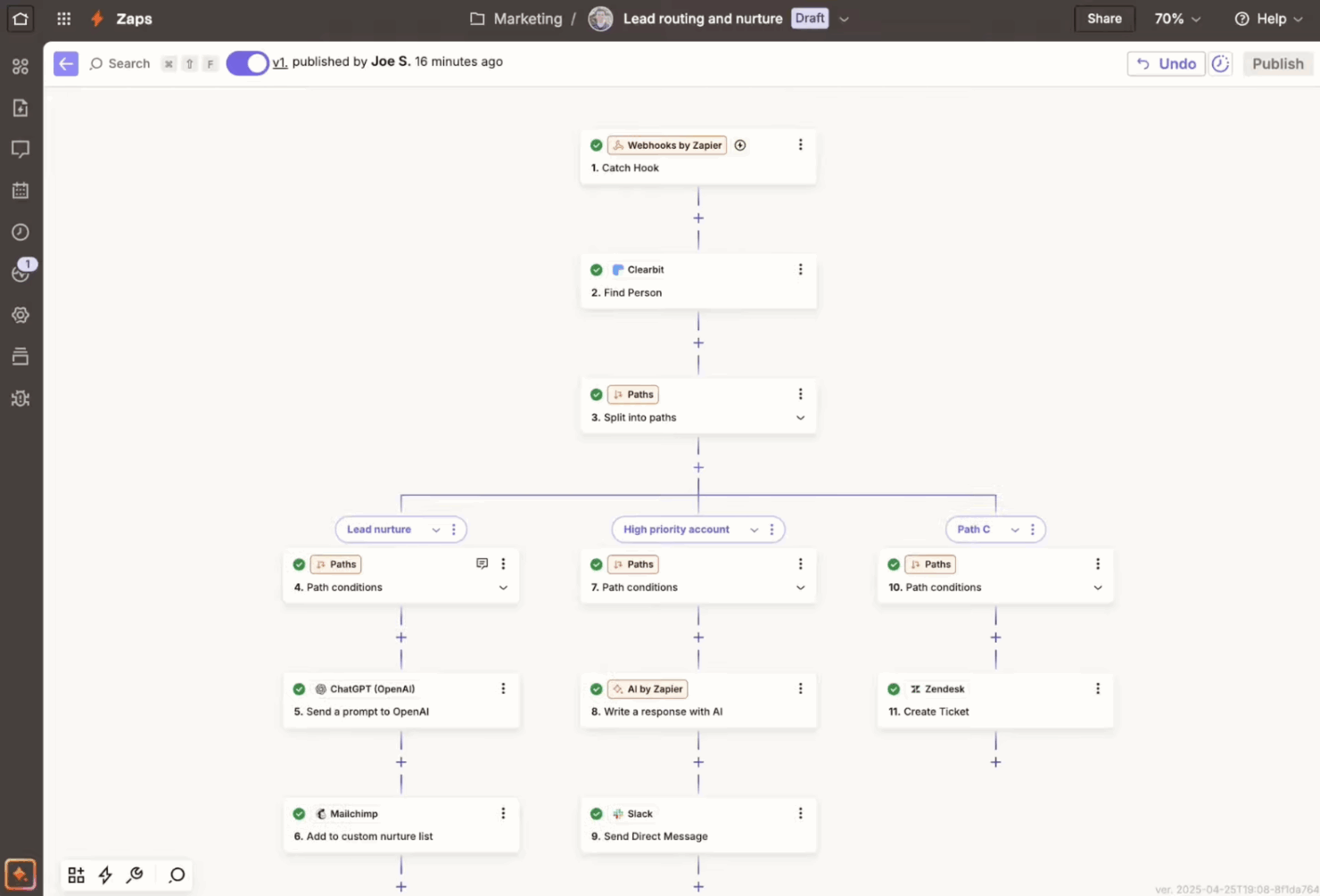
You can chain multiple actions in a single Zap (what Zapier calls their automated workflows), creating complex workflows with ease. This feature allows for streamlined processes like updating CRM entries and notifying teams simultaneously.
Customizable Templates
Start automating quickly with pre-built templates that suit common business needs. You can tweak these templates to match your specific workflow, saving setup time.
Conditional Logic
Use filters and paths to create dynamic workflows that adapt to different conditions. This lets you route tasks based on specific criteria, like sending AI-generated emails only when a sale exceeds a certain amount.
Enterprise Security, Governance, and Controls
Enterprise-level controls, including granular permissions, version control, and audit logs, let you deploy automation at scale across teams. SOC 2 (Type II), SOC 3, GDPR, and CCPA compliance, along with features like SSO, and built-in approval workflows ensure security, visibility, and governance.
Standout Features
App Integrations
Zapier is the most connected AI orchestration platform – it connects with over 8,000 apps and AI tools out-of-the-box, making it easy to build and scale production workflows across your organization.
AI Tools
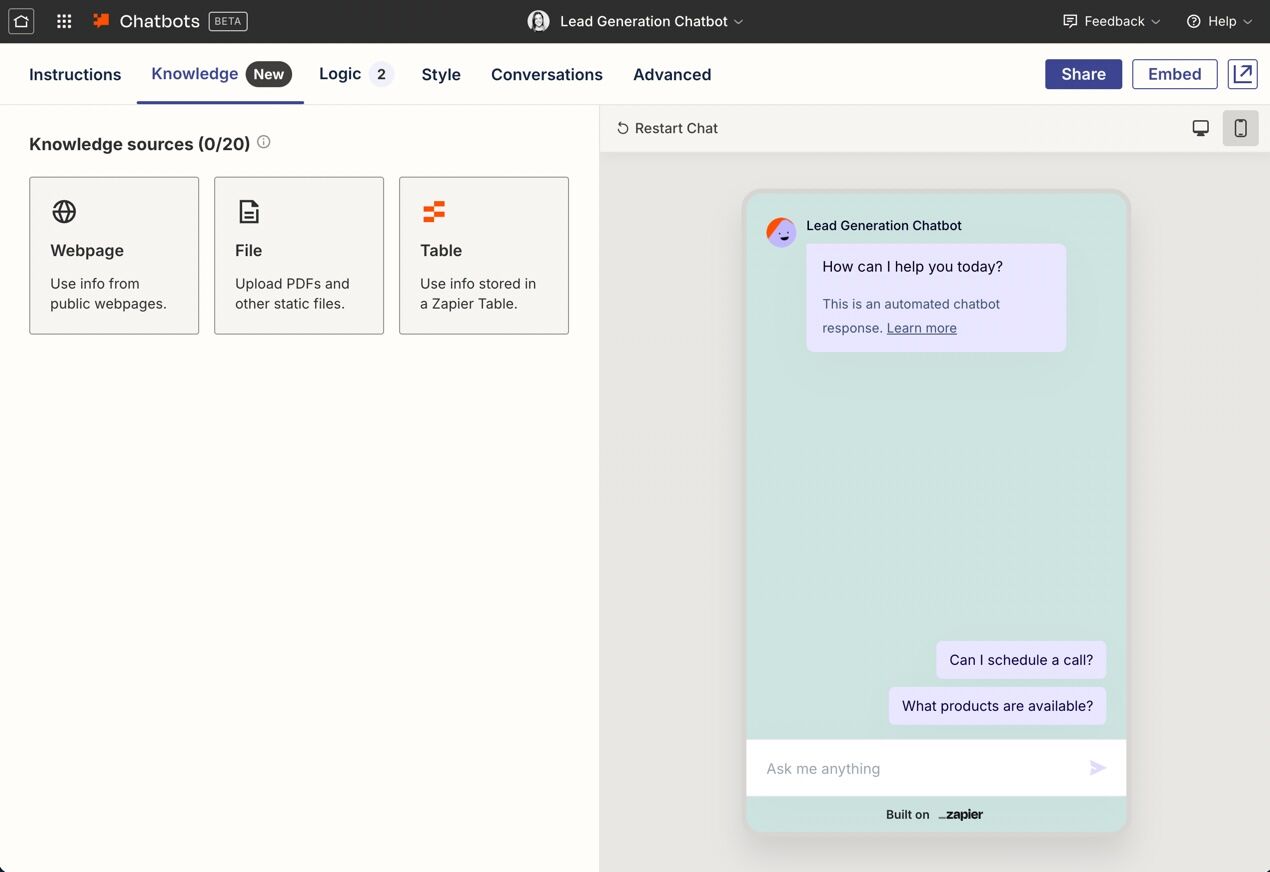
With Zapier's wide range of built-in AI tools, you can layer in AI throughout every step of your Zap. For example, you can use Zapier Copilot to build workflows using natural language, add AI steps into your deterministic workflows, trigger a Zapier Chatbot to respond to customer inquiries, or trigger a Zapier Agent to handle tasks autonomously.
Built-in Database and Form Builder
You can use Zapier Tables (a no-code database) and Zapier Forms (a flexible form and webpage builder) to build complete solutions—for example, you can create forms to capture leads and store that data in a table.
Ease of Use
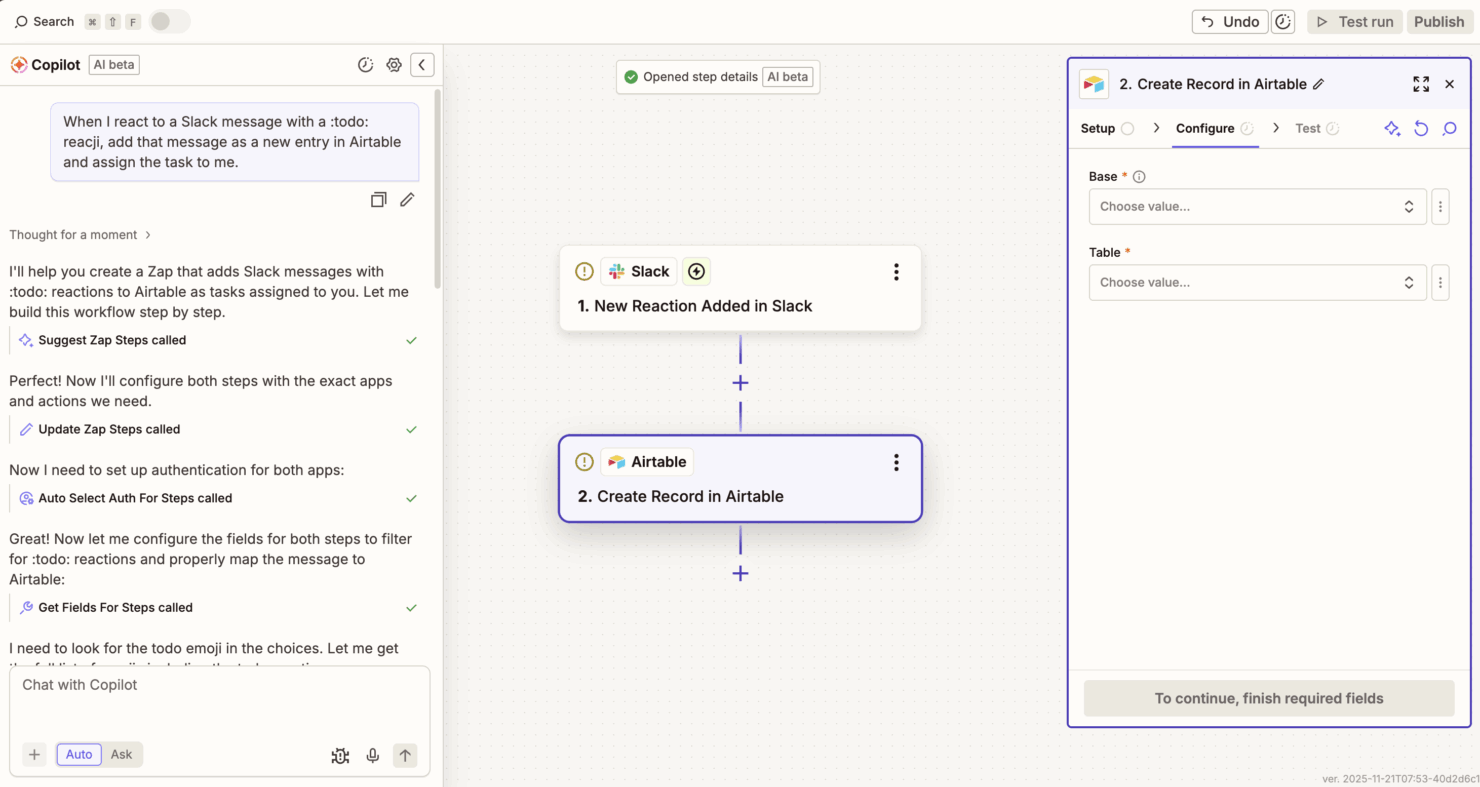
Zapier makes it easy to design, deploy, and scale powerful automations across your business without needing to call in the engineering team for support. You can use Zapier Copilot to build automated workflows using natural language—no coding required. From there, you can optimize your workflows by dragging and dropping them in Canvas (Zapier's visual diagramming tool), then turn them into automations with one click. There's also a large library of workflow templates spanning a wide range of departments and use cases to help jumpstart your build.
Onboarding
Zapier offers various forms of support, including step-by-step tutorials and guides, to help get your team up and running quickly. Zapier Copilot also acts as an AI building partner that can suggest department-specific workflows, ways to optimize existing ones, and even create them for you. And with Zapier Enterprise, you can work directly with a dedicated technical account manager for an even faster, tailored implementation.

Customer Support
Zapier provides a layered support system designed to meet the needs of different users and plan levels. The Help Center offers extensive documentation and troubleshooting guides, complemented by an active user community where people can exchange ideas and solutions.
For direct assistance, paying users can also reach Zapier’s support team through email, with faster response times and live chat available on higher-tier plans. Enterprise customers also have access to dedicated account management and priority support.
Overall, Zapier’s approach to customer support emphasizes scalable, self-serve resources backed by responsive and comprehensive human assistance as usage grows.

Integrations
Zapier connects with over 8,000 apps, including Google Sheets, Slack, Notion, Google Drive, Mailchimp, HubSpot, Stripe, Airtable, Typeform, OpenAI, Discord, Trello, and Discord.

Value for Money
Zapier pricing offers strong value for teams that want powerful automations without the development and self-hosting costs. Its tiered plans make it easy to start small and scale as your needs grow—from the Free plan, which allows teams to start building right away, to advanced tiers that unlock more complex features and higher task limits. For most teams, the time and efficiency gains more than offset the cost.
- Free: Unlimited Zaps, Tables, and Interfaces, but Zaps are limited to two-step workflows.
- Professional: Advanced features like conditional logic, multi-step Zaps, and unlimited premium app connections.
- Team: Shared Zaps and folders and access to premium support.
- Enterprise: Enterprise-grade features, including advanced admin permissions and app controls, with priority support.

Zapier Specs
- API
- Approval Workflows
- Batch Permissions & Access
- Compliance Tracking
- Contact Management
- Custom Reports
- Dashboard
- Data Export
- Data Import
- Data Visualization
- Document Management
- External Integrations
- Inventory Tracking
- Marketing Automation
- Notifications
- Process Modeling
- Process Reporting
- Project Management
- Roadmapping
- Sales Automation
- Supplier Management
- Third-Party Plugins/Add-Ons
- Workflow Management
Zapier FAQs
Is Zapier free forever?
How hard is Zapier to learn to use?
Is Zapier enterprise-ready?
Is Zapier safe and secure?
Is Zapier GDPR compliant?
Zapier Company Overview & History
Zapier is a US-based software company that builds tools to help you and your team automate workflows and connect different web apps without coding. It’s headquartered in San Francisco, California—and though it’s based there, Zapier has operated as a fully remote company since its beginning. As of recent data, Zapier has around 1,200 employees across many countries. The company remains privately held, with a valuation (as of 2021) of around US $5 billion. Zapier is known for enabling thousands of apps to work together seamlessly—and many businesses you know rely on it.
Zapier Major Milestones
- 2011: Zapier began as a side-project in Columbia, Missouri by founders Wade Foster, Bryan Helmig, and Mike Knoop.
- 2012: The company officially launched after joining the startup accelerator program Y Combinator.
- October 2012: Zapier raised its first seed funding round of US $1.2 million.
- 2014: Zapier turned profitable.
- 2021: Zapier achieved a valuation of around US $5 billion after a secondary share sale involving investors like Sequoia Capital.
- 2024: Zapier reportedly generated about US $310 million in annual revenue and has over 100,000 paying customers.
What's Next?
Want to connect with other digital project managers to share resources and best practices?
Join our membership community and get access to 100+ templates, samples, and examples and connect with 100s of other digital project managers in Slack.