
20 Best Construction Scheduling Software Reviewed in 2026


Managing construction projects is tough. You juggle deadlines, resources, and unexpected setbacks. That's where construction scheduling software comes in. It helps you keep track of tasks, allocate resources efficiently, and meet your timelines.
I test and review software independently, and I've got experience in the project management industry. I believe construction scheduling software can ease your daily challenges. My goal is to present an unbiased review of the best options available.
In this article, you'll find my top picks for construction scheduling tools. I'll cover features, pros and cons, and who they're best suited for. Whether you're managing a small team or a large project, there's something here for you. Let's dive in and find the right solution for your needs.
Why You Can Trust Us
Best Construction Scheduling Software Summary
This comparison chart summarizes pricing details for my top construction scheduling software selections to help you find the best one for your budget and business needs.
| Tool | Best For | Trial Info | Price | ||
|---|---|---|---|---|---|
| 1 | Best for Microsoft users | 30-day free trial | From $10/user/month (billed annually) | Website | |
| 2 | Best for dispatching tasks | Free demo available | Pricing upon request | Website | |
| 3 | Best for AI-supported shift scheduling | 31-day free trial + free demo available | From $5/user/month | Website | |
| 4 | Best for large projects | Free demo available | Pricing upon request | Website | |
| 5 | Best for ready-made templates | Free forever plan available | From $3.99/user/month (billed annually) | Website | |
| 6 | Best for field management | Free plan available | From $39/user/month (billed annually) | Website | |
| 7 | Best for payroll integration | 14-day free trial + free demo available | From $6/user/month (billed annually) | Website | |
| 8 | Best for resource allocation | 14-day free trial + free demo available | Pricing upon request | Website | |
| 9 | Best for analytics and automated reporting | 60-day free trial + free demo available | From $10,000/year | Website | |
| 10 | Best for project forecasting | Free demo available | Pricing upon request | Website |
-

Accelo
Visit WebsiteThis is an aggregated rating for this tool including ratings from Crozdesk users and ratings from other sites.4.4 -
Forecast
Visit WebsiteThis is an aggregated rating for this tool including ratings from Crozdesk users and ratings from other sites.4.6 -
Wrike
Visit WebsiteThis is an aggregated rating for this tool including ratings from Crozdesk users and ratings from other sites.4.2





Best Construction Scheduling Software Reviews
Below are my detailed summaries of the best construction scheduling software that made it onto my shortlist. My reviews offer a detailed look at the key features, pros and cons, integrations, and ideal use cases of each tool to help you find the best one for you.

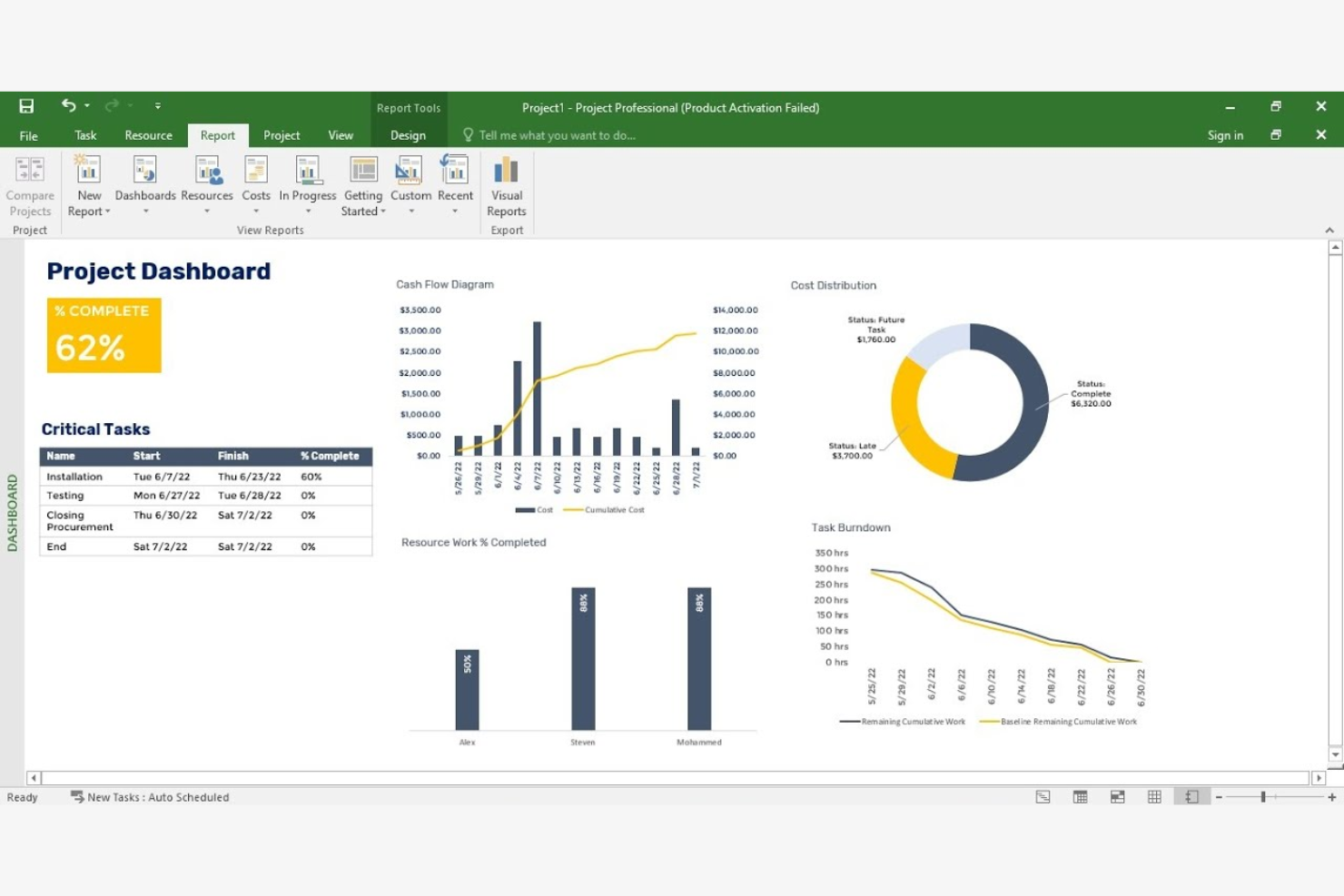
Microsoft Project is a project management software ideal for users familiar with Microsoft products. It helps teams plan, execute, and track projects efficiently, providing tools for scheduling, task management, and resource allocation.
Why I picked Microsoft Project: Microsoft Project is tailored for users who are already comfortable with the Microsoft ecosystem. It offers a familiar interface that integrates well with other Microsoft applications, making it easy for your team to adapt. The software provides detailed scheduling tools, allowing you to plan and manage complex projects. Its resource management features ensure you can allocate and track resources effectively.
Standout Features and Integrations:
Features include Gantt chart capabilities, which help you visualize project timelines and dependencies. The software also offers budget tracking, so you can keep an eye on project expenses. Additionally, Microsoft Project supports multiple project views, giving you flexibility in how you display project data.
Integrations include Microsoft Dynamics 365, Atlassian Jira, and more.
Pros and Cons
Pros:
- Budget tracking capabilities
- Supports multiple project views
- Familiar interface for Microsoft users
Cons:
- Requires Microsoft ecosystem familiarity
- Desktop access only


FieldPulse is a scheduling and dispatching software tailored for small to medium-sized service businesses. It helps coordinate field operations, manage team schedules, and align job assignments.
Why I picked FieldPulse: FieldPulse is designed to dispatch tasks, making it ideal for teams that need quick job assignments. You can assign jobs with a few clicks, ensuring your team knows what to do and when. The cloud-based software provides a centralized dashboard to monitor job progress, which helps maintain oversight. Its focus on task dispatching makes it a valuable tool for businesses needing fast and effective job coordination.
Standout Features and Integrations:
Features include customer management tools that keep your client information organized and accessible. FieldPulse also offers invoicing capabilities, allowing you to create and send invoices directly from the app. Additionally, you can access detailed job history, helping you track past work and improve future performance.
Integrations include QuickBooks, Angi, Payrix, and more.
Pros and Cons
Pros:
- Detailed job history tracking
- Centralized job monitoring
- Direct invoicing from the app
Cons:
- Limited mileage tracking
- Lacks auto-route optimization

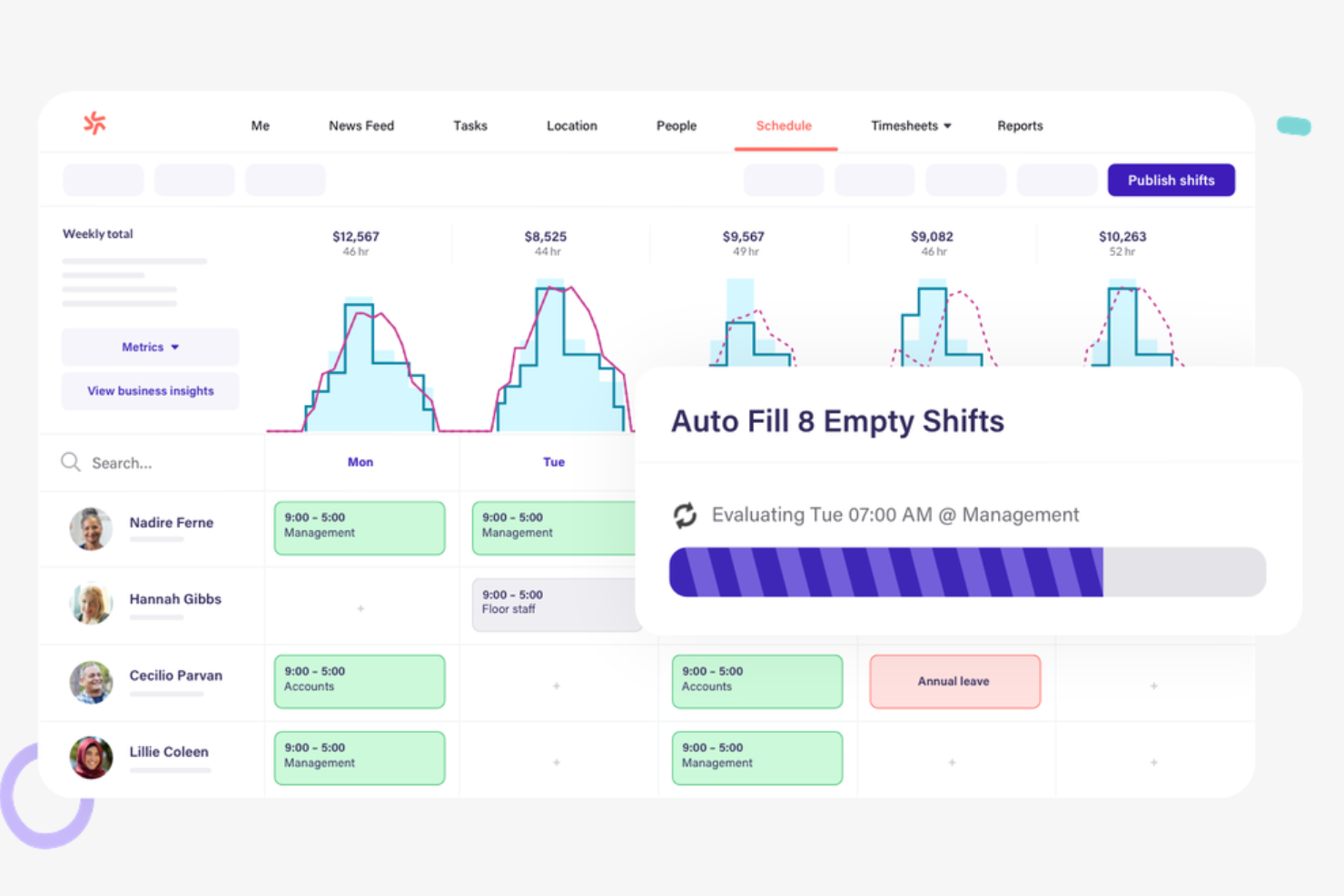
Deputy is a shift scheduling software designed for construction companies needing efficient workforce management. It helps managers organize employee shifts and track time and attendance.
Why I picked Deputy: Deputy excels in shift scheduling, making it a great choice for teams that require organized and efficient shift management. You can create and publish construction project schedules quickly, so your team is always informed. The software provides time tracking, helping you manage attendance accurately. Its focus on shift scheduling makes it ideal for businesses with variable shifts and hours.
Standout Features and Integrations:
Features include a communication platform that allows you to send messages and updates directly to your team. Deputy also offers task assignment tools, enabling you to allocate tasks alongside shifts. Additionally, the software supports compliance management, helping you adhere to labor laws.
Integrations include Xero, QuickBooks, ADP, Gusto, Square, Vend, NetSuite, and more.
Pros and Cons
Pros:
- Add-ons available to tailor the platform
- Mobile time and attendance tracking
- Supports shift swapping
Cons:
- Poor subcontractor schedule management
- Manual shift template configuration required

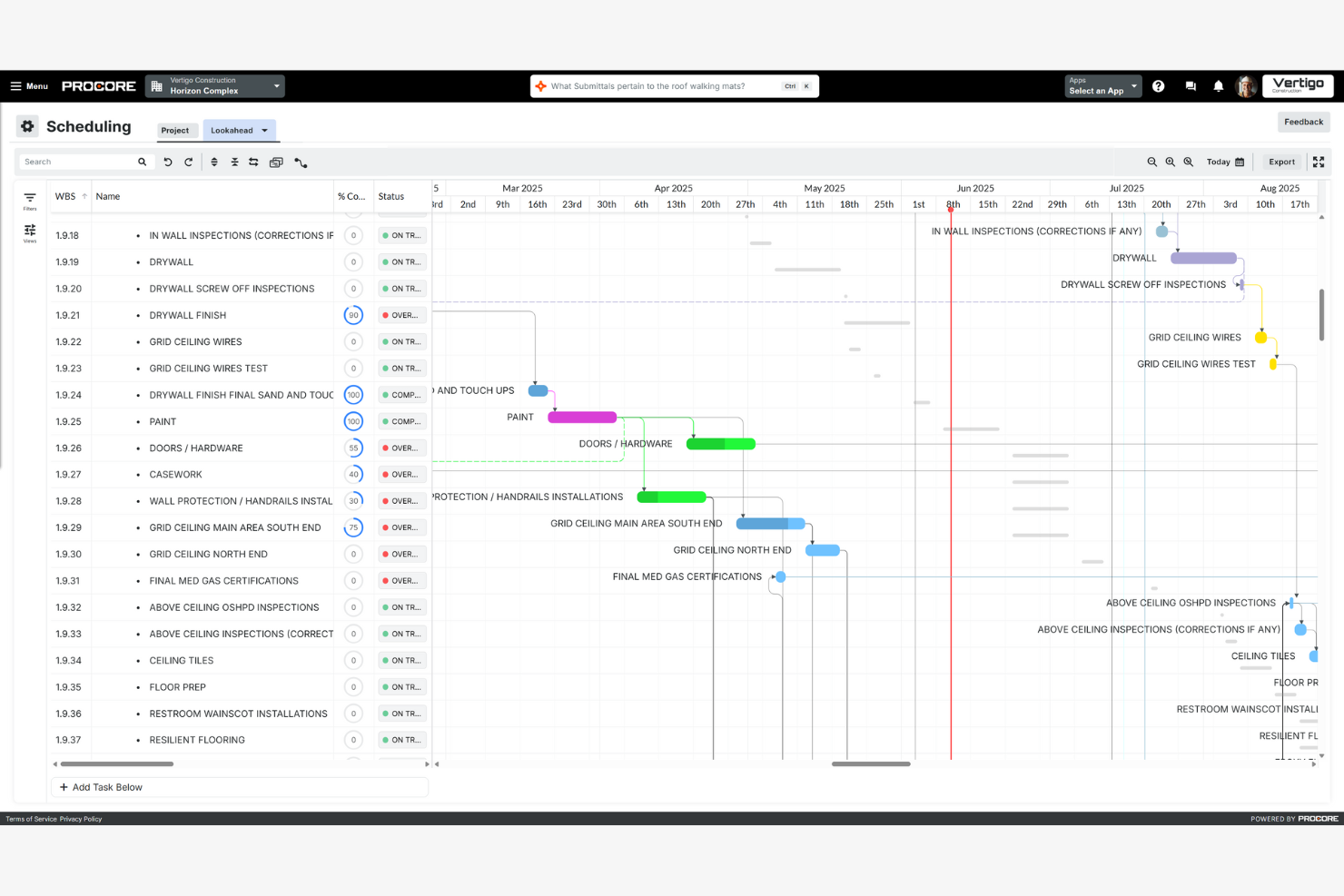
Procore is a construction management platform aimed at large-scale projects. It helps teams manage schedules, documents, and communication across complex projects.
Why I picked Procore: Procore is ideal for large projects, offering features that accommodate extensive project management needs and critical path methods. You can manage schedules with precision, helping your team stay on track. The platform provides tools for document management, making it easy to keep all project information organized. Its ability to handle complex projects makes it a valuable tool for large teams needing detailed oversight.
Standout Features and Integrations:
Features include advanced reporting tools that give you insights into project performance and profitability. You can also use the platform's bidding tools to manage and track bids efficiently. Additionally, Procore offers a daily log feature, helping you document daily activities and issues.
Integrations include Microsoft 365, Bluebeam, Docusign, and more.
Pros and Cons
Pros:
- Detailed document management
- Unlimited users and data storage
- Handles complex project needs
Cons:
- Limited flexibility with dashboards
- Cost based on annual construction volume


Plaky is a construction scheduling software geared toward teams that benefit from structured templates. It serves project managers looking to simplify scheduling and task management with predefined templates.
Why I picked Plaky: Plaky excels in offering a variety of ready-made templates that you can use to save time in setup. These templates cover different construction project needs, providing a structured approach to scheduling. Its intuitive design helps you quickly adapt and implement schedules. The tool's focus on schedule templates makes it ideal for those who want a straightforward solution.
Standout Features and Integrations:
Features include a drag-and-drop interface that simplifies task adjustments, making it easy to update schedules. It also offers customizable templates, allowing you to tweak them to fit your specific project needs. Additionally, real-time team collaboration tools help everyone stay coordinated and informed.
Integrations include Pumble and more.
Pros and Cons
Pros:
- Visual board grouping and filtering
- Collaboration tools with real-time updates
- Template customization
Cons:
- Limited advanced task management
- Narrow third-party integrations

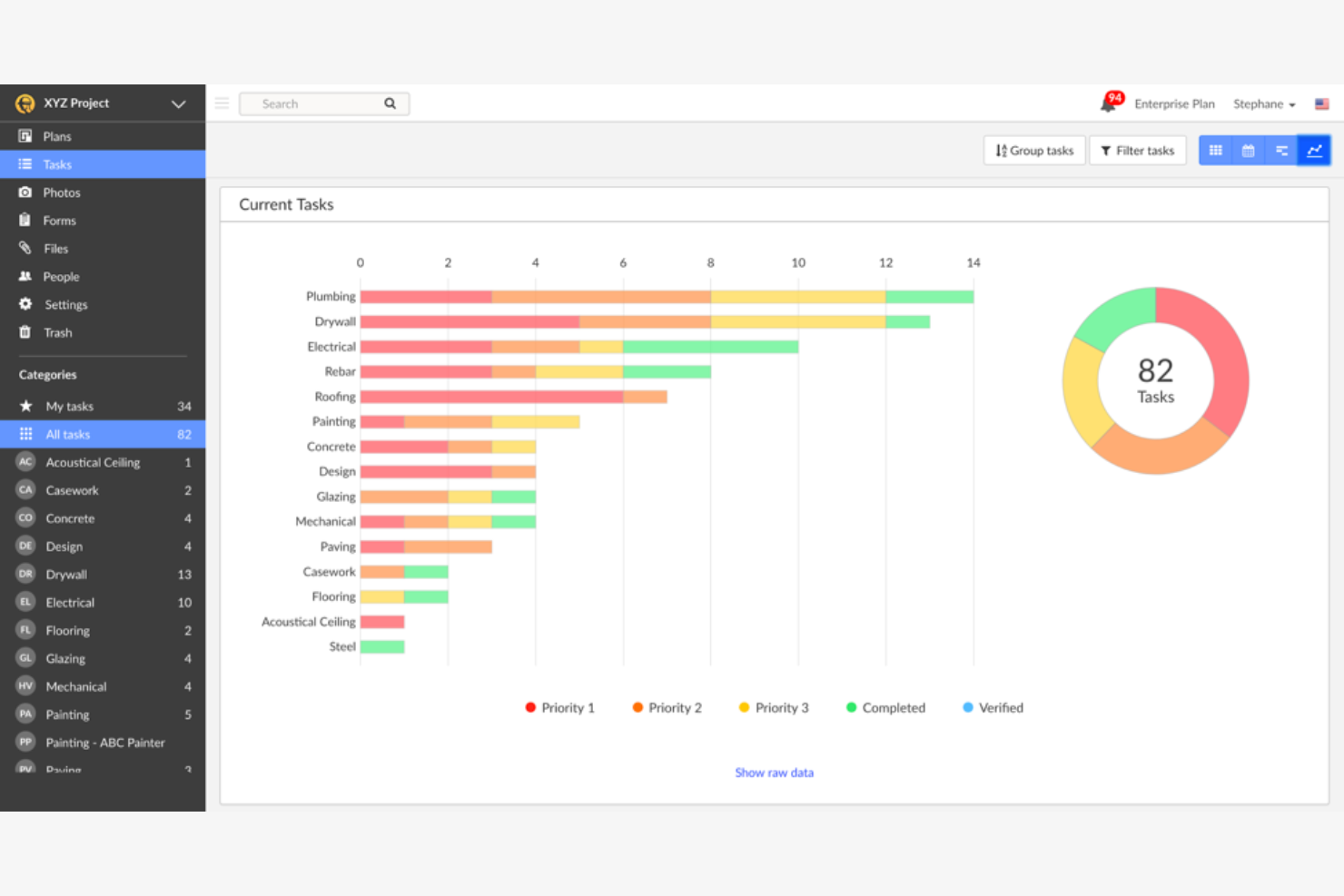
Fieldwire is a construction scheduling tool aimed at teams needing effective field management. It provides solutions for task coordination and site inspections, focusing on real-time collaboration.
Why I picked Fieldwire: Fieldwire excels in managing tasks directly on the field, making it a great choice for teams that require on-the-ground coordination. You can assign tasks and track progress in real time, keeping your team aligned. The software's blueprint markup feature allows you to annotate plans directly on-site, which helps with communication. Its emphasis on field management makes it a suitable option for teams working across multiple sites.
Standout Features and Integrations:
Features include punch list management, which helps you track and resolve issues promptly. It also offers document storage, ensuring your team has access to important files anytime. Additionally, Fieldwire supports daily reports, providing insights into day-to-day activities.
Integrations include Box, Dropbox, and more.
Pros and Cons
Pros:
- Supports multiple site coordination
- Effective punch list management
- Blueprint markup tool
Cons:
- Minimal design flexibility
- Limited cost management features

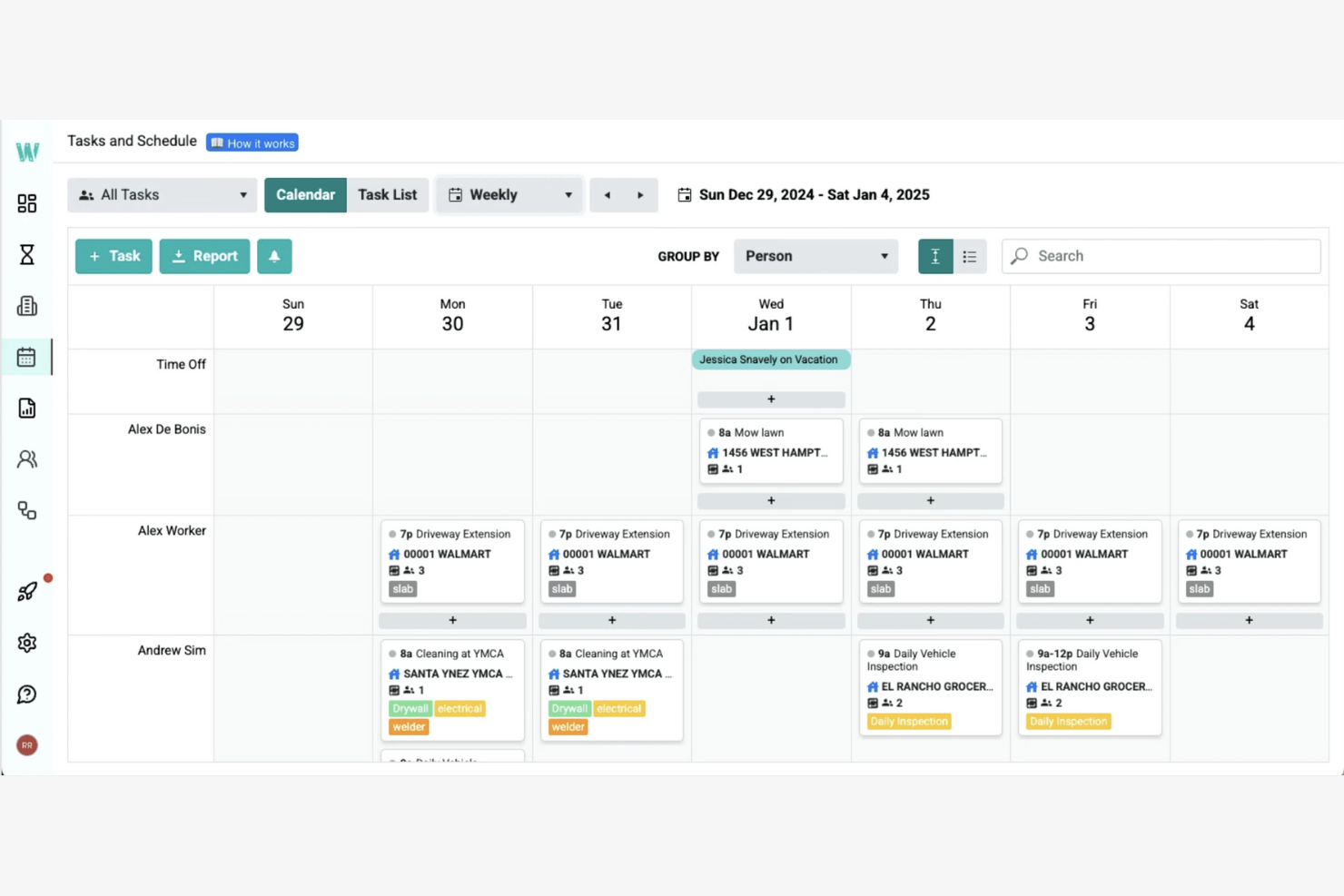
Workyard is a contractor scheduling software designed for construction teams needing efficient payroll integration. It helps manage work schedules, track time, and support payroll processes.
Why I picked Workyard: Workyard excels in integrating payroll with job schedules for accurate time tracking. You can sync time logs with payroll, reducing manual entry errors. The app provides GPS tracking, which adds an extra layer of accuracy to time reports. Its focus on payroll integration makes it ideal for teams looking to simplify payment processes.
Standout Features and Integrations:
Features include detailed reporting tools that help you analyze workforce productivity. Workyard also offers customizable scheduling, allowing you to tailor shifts to your team's needs. The app supports photo verification, helping to show that work is completed as planned.
Integrations include QuickBooks, Gusto, ADP, and more.
Pros and Cons
Pros:
- Detailed productivity reports
- Photo verification feature
- Automated travel time and mileage
Cons:
- Basic mobile app design
- Limited customer support hours

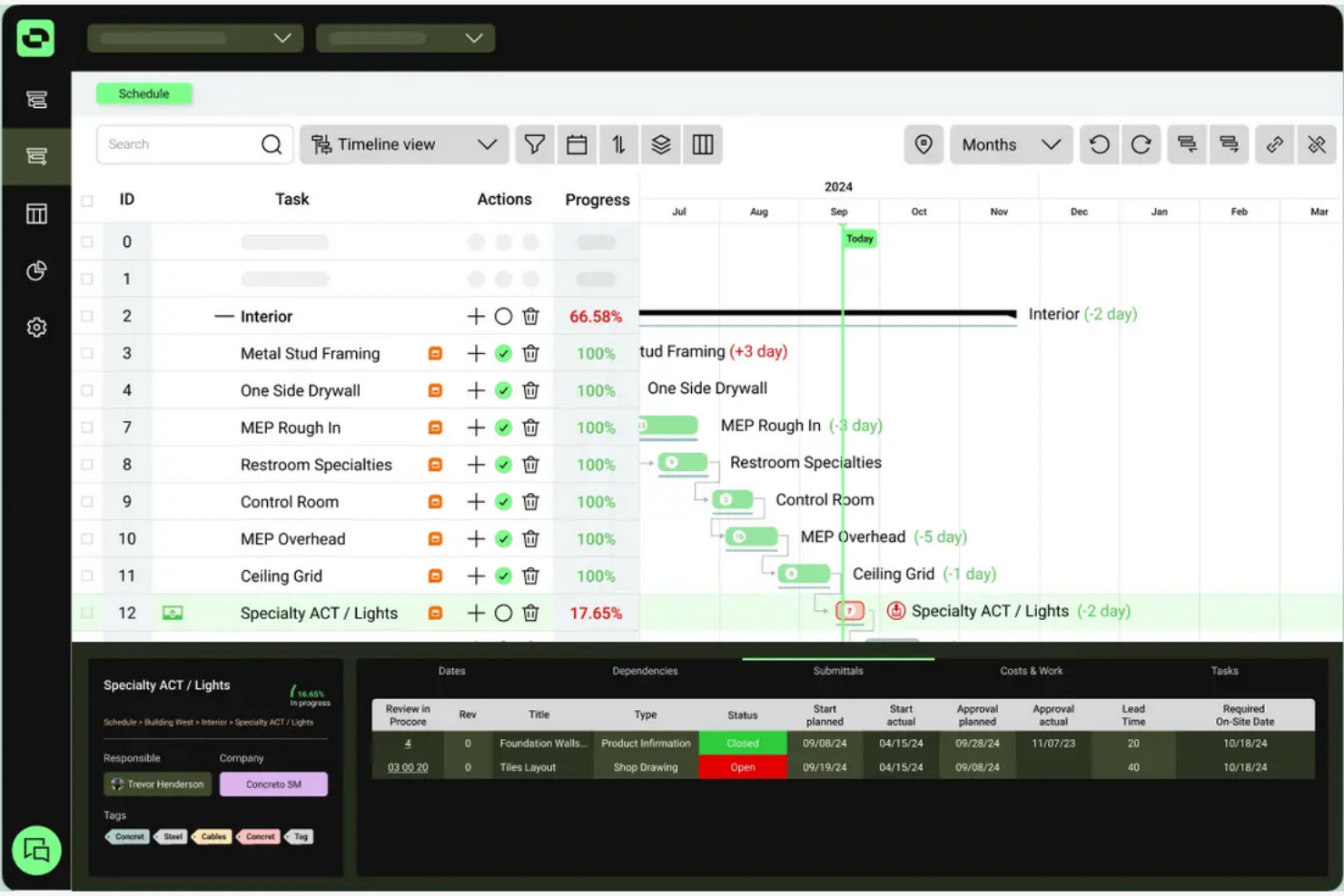
Outbuild is a construction scheduling and planning software designed for teams that need to manage resources efficiently. It supports project managers in coordinating tasks and analyzing performance with its extensive project management tools.
Why I picked Outbuild: Outbuild focuses on resource allocation, providing modules that help you manage project resources effectively. The master schedule allows for quick updates, ensuring everyone is aligned. Risk management tools help you identify potential issues early on. Its integration with Procore and Autodesk supports communication among your team.
Standout Features and Integrations:
Features include a company dashboard that offers portfolio-level insights, helping you track project progress. The software supports field coordination with lookahead planning and weekly work plans. Analytics tools provide performance insights, helping you make informed decisions.
Integrations include Procore, Autodesk, and more.
Pros and Cons
Pros:
- Supports field coordination
- Effective risk management tools
- Focus on resource allocation
Cons:
- Limitations on output formats
- Some functions rely on integrations

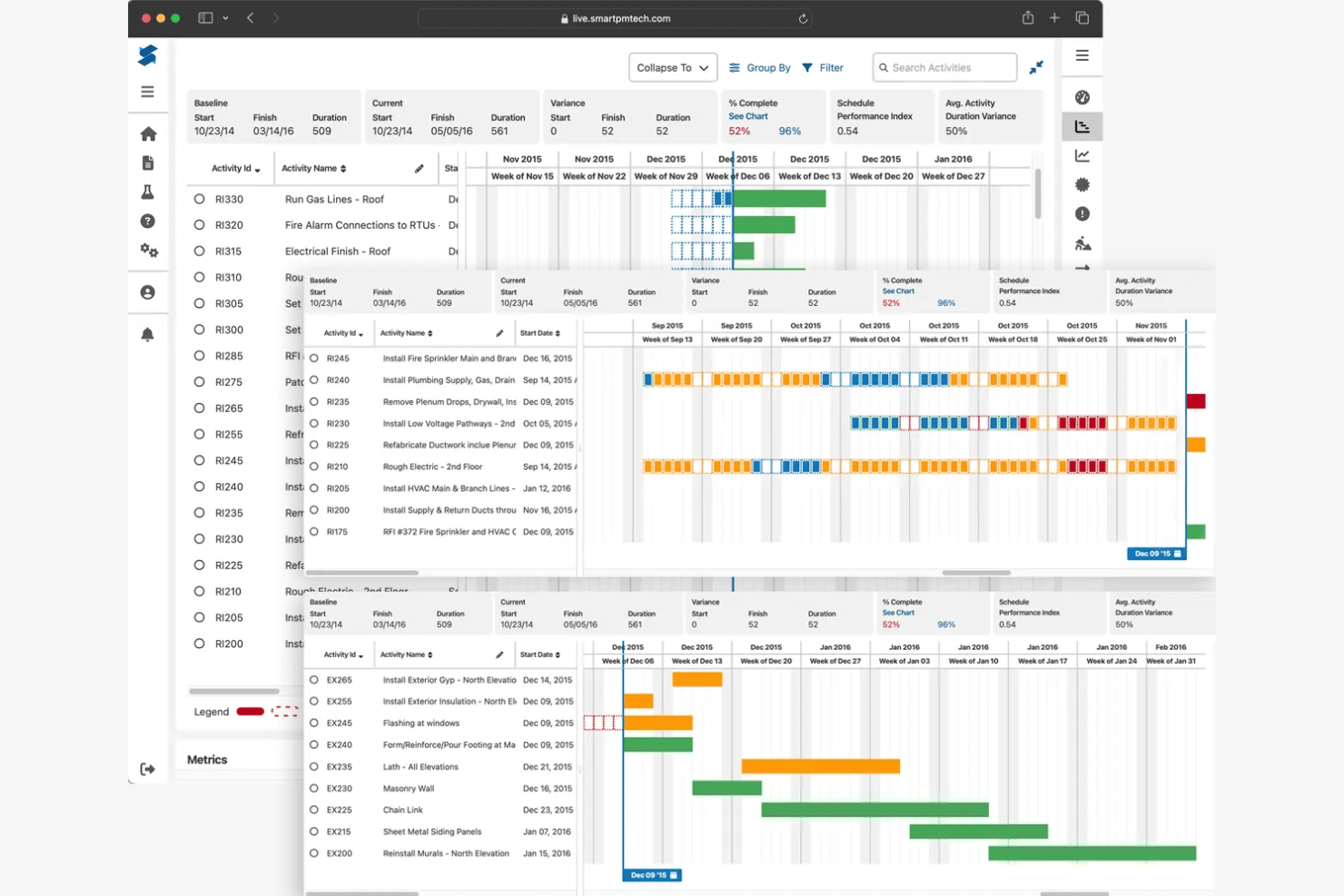
SmartPM is a construction project analytics software aimed at project managers who need detailed insights into project performance. It helps analyze schedules, identify risks, and optimize project outcomes.
Why I picked SmartPM: SmartPM excels in analytics, offering construction project management features that provide deep insights into project performance. You can track project timelines and identify potential risks early with its analytics tools. The software includes schedule quality assessments and analytics, making it ideal for teams that want to optimize project delivery and decision-making.
Standout Features and Integrations:
Features include delay analysis, which helps you understand and mitigate project delays. The software also offers forensic scheduling, allowing you to analyze past project data for better future planning. Additionally, SmartPM provides earned value management, giving you a clear picture of project performance against budgets and timelines.
Integrations include Oracle P6, Microsoft Project, Domo, and more.
Pros and Cons
Pros:
- Supports risk identification
- Forensic scheduling capabilities
- Delay analysis tools
Cons:
- Limitations on some workflows
- Lacks back-button navigation control

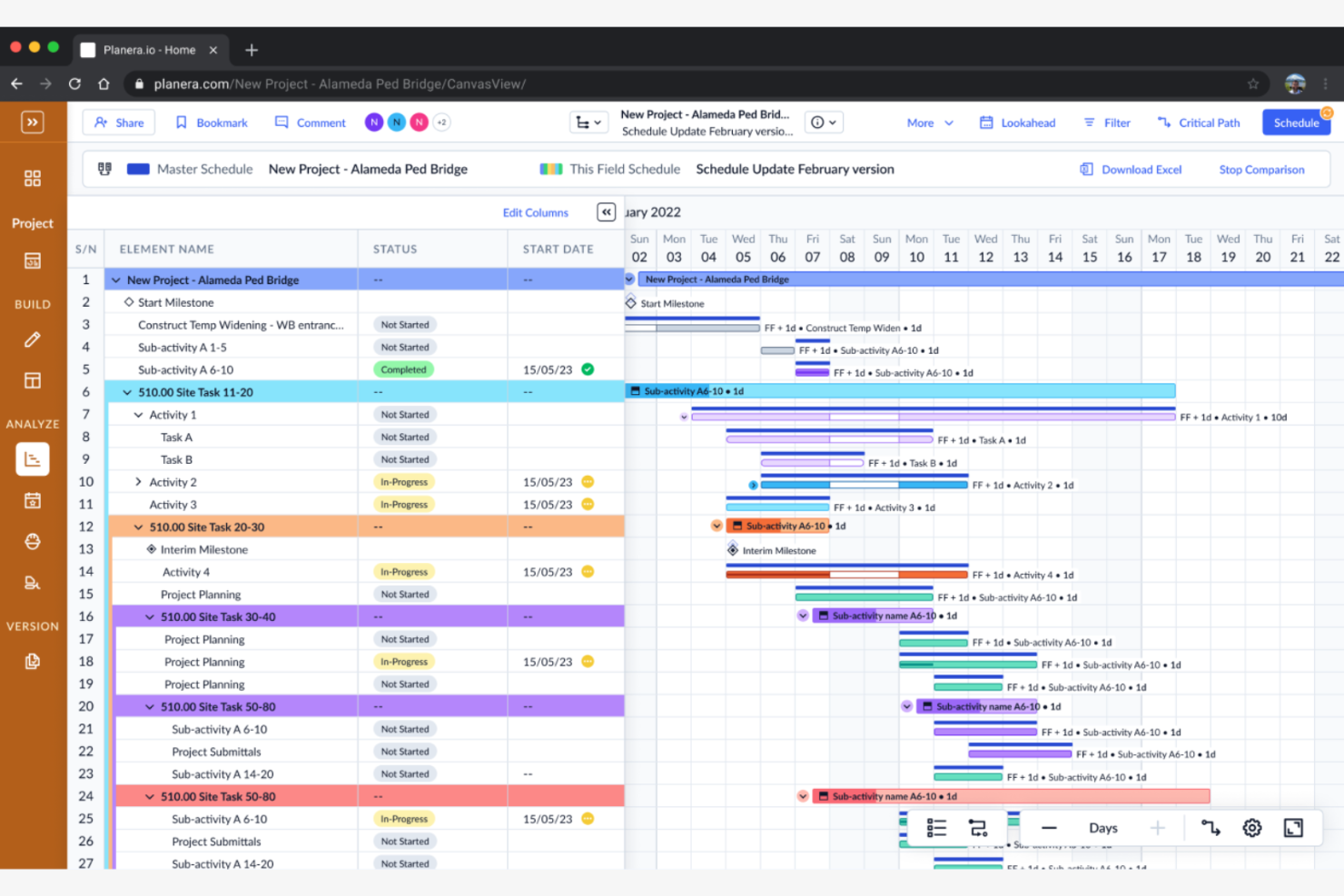
Planera is a construction scheduling software designed for project managers who need accurate forecasting and planning tools. It assists in effectively managing timelines, resources, and project outcomes.
Why I picked Planera: Planera offers strong forecasting capabilities, allowing you to predict project timelines and outcomes with accuracy. You can use its planning tools to adjust sub-resources and schedules proactively. The software provides visual project timelines, so you can see the bigger picture. Its emphasis on forecasting helps your team stay ahead of potential project challenges.
Standout Features and Integrations:
Features include a visual timeline that helps you track project progress at a glance. The software also offers resource allocation tools, helping you use your team's time efficiently. Additionally, Planera supports scenario planning, allowing you to explore different project outcomes and adjust accordingly.
Integrations include Procore, Autodesk, and more.
Pros and Cons
Pros:
- Helps identify project challenges early
- Supports scenario planning
- Visual timeline for tracking
Cons:
- Pricing information not transparent
- Lacks field-driven updates
Other Construction Scheduling Software
Here are some additional construction scheduling software options that didn’t make it onto my shortlist, but are still worth checking out:
- Buildxact
For residential builders
- Connecteam
For AI-driven scheduling for mobile teams
- GanttPRO
For Gantt chart focus
- Autodesk Construction Cloud
For integration capabilities
- Houzz Pro
For residential projects
- Buildertrend
For client communication
- JobTread
For budget management
- Kahua
For enterprise solutions
- Touchplan
For collaborative planning
- Phoenix Project Manager
For critical path analysis


Construction Scheduling Software Selection Criteria
When selecting the best construction scheduling software to include in this list, I considered common buyer needs and pain points such as managing complex timelines and ensuring resource availability. I also used the following framework to keep my evaluation structured and fair:
Core Functionality (25% of total score)
To be considered for inclusion in this list, each solution had to fulfill these common use cases:
- Task scheduling
- Resource allocation
- Timeline management
- Progress tracking
- Collaboration tools
Additional Standout Features (25% of total score)
To help further narrow down the competition, I also looked for unique features, such as:
- Real-time analytics
- Mobile access
- Customizable templates
- Integration with other tools
- Advanced reporting capabilities
Usability (10% of total score)
To get a sense of the usability of each system, I considered the following:
- Intuitive interface
- Easy navigation
- Minimal learning curve
- Aesthetic design
- Customization options
Onboarding (10% of total score)
To evaluate the onboarding experience for each platform, I considered the following:
- Availability of training videos
- Interactive product tours
- Access to webinars
- Use of templates
- Responsive chatbots
Customer Support (10% of total score)
To assess each software provider's customer support services, I considered the following:
- 24/7 availability
- Response time
- Access to live chat
- Quality of support documentation
- Availability of a dedicated account manager
Value for Money (10% of total score)
To evaluate the value for money of each platform, I considered the following:
- Competitive pricing
- Features offered at each price tier
- Free trial availability
- Discounts for annual plans
- Cost transparency
Customer Reviews (10% of total score)
To get a sense of overall customer satisfaction, I considered the following when reading customer reviews:
- Overall satisfaction rating
- Feedback on core functionality
- Comments on ease of use
- Reports of bugs or issues
- User testimonials
How To Choose Construction Scheduling Software
It's easy to get bogged down in long feature lists and complex pricing structures. To help you stay focused as you work through your unique software selection process, here's a checklist of factors to keep in mind:
| Factor | What To Consider |
|---|---|
| Scalability | Can the software grow with your business? Consider if it supports increasing project sizes and additional users without major cost increases. |
| Integrations | Does it integrate with your current tools? Look for smooth data flow between your scheduling software and existing systems you rely on. |
| Customizability | Can you tailor the software to your workflows? Evaluate if it allows modifications to suit your team's unique processes and project needs. |
| Ease of use | Is the interface intuitive for your team? Ensure that new users can learn quickly without extensive training. |
| Implementation and onboarding | How long does it take to get started? Consider the time and resources needed for setup and whether the vendor provides adequate support. |
| Cost | Does the pricing fit your budget? Compare costs across vendors, including hidden fees or tiered plans that could affect your long-term expenses. |
| Security safeguards | Is your data secure? Look for encryption, regular updates, and compliance with industry standards to protect sensitive information. |
What Is Construction Scheduling Software?
Construction scheduling software is a tool designed to help manage and plan construction projects by organizing tasks and timelines. These tools are commonly used by project managers, contractors, and engineers to improve efficiency and coordination on job sites.
Task scheduling, resource allocation, and timeline management features help teams stay on track and meet deadlines. Overall, these tools assist with project control and collaboration, leading to more successful project outcomes.
Features
When selecting construction scheduling software, keep an eye out for the following key features:
- Task scheduling: Allows you to organize and assign tasks to team members, ensuring everyone knows their responsibilities and deadlines.
- Resource allocation: Helps manage the distribution of resources such as labor and materials, optimizing their use throughout the project.
- Timeline management: Provides a visual timeline to track project progress and adjust schedules as needed to meet deadlines.
- Collaboration tools: Enable team communication and document sharing, fostering better coordination and teamwork on projects.
- Real-time analytics: Offer insights into project performance, helping you make informed decisions and identify areas for improvement.
- Mobile access: Allows team members to access project information and updates on-the-go, ensuring they're always informed.
- Customizable templates: Provide pre-built templates that you can modify to fit your specific project needs, saving setup time.
- Integration capabilities: Connect with other tools and software, facilitating data flow and improved workflow efficiency.
- Risk management: Identifies potential project risks early on, allowing you to mitigate issues before they impact the project.
- Budget tracking: Monitors project expenses in real-time, helping you stay within budget and avoid financial surprises.
Benefits
Implementing construction scheduling software provides several benefits for your team and your business. Here are a few you can look forward to:
- Improved efficiency: Automating task scheduling and resource allocation helps your team work more efficiently and reduces manual errors.
- Increased collaboration: Collaboration tools and mobile access keep everyone connected and informed, improving teamwork and communication.
- Better decision-making: Real-time analytics and risk management features provide insights that help you make informed decisions and address potential issues early.
- Time savings: Customizable templates and timeline management support project planning, saving time on setup and adjustments.
- Cost control: Budget tracking allows you to monitor expenses closely, helping you stay within budget and avoid unexpected costs.
- Increased transparency: Integration capabilities help data flow smoothly between tools, giving you a clear view of project progress and performance.
- Proactive problem-solving: Features such as risk management and real-time updates allow you to anticipate and resolve issues before they impact the project.
Costs and Pricing
Selecting construction scheduling software requires an understanding of the various pricing models and plans available. Costs vary based on features, team size, add-ons, and more. The table below summarizes common plans, their average prices, and typical features included in construction scheduling software solutions:
Plan Comparison Table for Construction Scheduling Software
| Plan Type | Average Price | Common Features |
|---|---|---|
| Free Plan | $0 | Basic task scheduling, limited users, and minimal support. |
| Personal Plan | $4-$39/user/month | Task scheduling, resource allocation, timeline management, and basic analytics. |
| Business Plan | $40-$370/user/month | Advanced scheduling, collaboration tools, mobile access, and integration options. |
| Enterprise Plan | $509-$2,000/user/month | Customizable features, premium support, security safeguards, and advanced reporting. |
Construction Scheduling Software FAQs
Here are some answers to common questions about construction scheduling software:
What is the primary purpose of construction scheduling software?
The primary purpose of construction scheduling software is to help manage and organize construction project timelines, including during the preconstruction phase. It allows you to assign tasks, allocate resources, and track progress, ensuring your projects stay on schedule. This software helps reduce delays by providing a clear overview of project stages and deadlines, making it easier to coordinate with your team and subcontractors.
How do digital project managers use construction scheduling software to collaborate with teams?
Digital project managers use construction management software to assign tasks, set deadlines, and track completion. Built-in communication features allow updates on the fly, and shared dashboards give everyone a live view of project timelines. This reduces miscommunication and helps you manage resources more efficiently
Can construction scheduling software integrate with other tools?
Yes, most construction scheduling software can integrate with other tools. Integration capabilities allow you to connect the software with project management, accounting, and other construction business tools you already use. This supports a smooth flow of information and reduces the need for duplicate data entry. Check with vendors for specific integration options to check compatibility with your existing systems.
How can construction scheduling software help minimize project delays?
Construction scheduling software helps minimize delays by tracking progress, highlighting dependencies, and alerting you to conflicts or missed milestones. You can adjust schedules quickly and communicate changes instantly to stakeholders, specialty contractors, and subcontractors. This helps keep everyone accountable and schedules transparent.
Is training required to use construction scheduling software?
Yes, some training is often required to use construction scheduling software effectively. Many vendors in the construction industry offer training resources such as webinars, video tutorials, and user guides to help you and your team get started. Taking advantage of these resources can speed up the onboarding process and help your team to maximize the software’s capabilities.
What are the common challenges when adopting construction scheduling software?
Common challenges include resistance to change, spreadsheet data migration issues, and training needs. Budget for onboarding and provide hands-on training for your team. Start with a pilot project to test features and address pain points before rolling out the software across your organization.
What's Next:
If you're in the process of researching construction scheduling software, connect with a SoftwareSelect advisor for free recommendations.
You fill out a form and have a quick chat where they get into the specifics of your needs. Then you'll get a shortlist of software to review. They'll even support you through the entire buying process, including price negotiations.