

10 Best AI Time Tracking Software Reviewed in 2026

Best AI Time Tracking Software Shortlist


The best AI time tracking software lets you automate time logs, track billable hours with accuracy, and get real-time insights into team productivity. Without it, you’re stuck reconciling manual timesheets, chasing missing entries, and dealing with inaccurate reporting, all of which delay projects and inflate costs.
I’ve personally tested and reviewed multiple AI time tracking tools and evaluated how they can positively impact deadlines, team accountability, and resource allocation. Here are my picks for the best AI workflow automation software to help you improve time management and deliver projects on schedule with fewer errors.
Why Trust Our Software Recommendations
Our team has been testing and reviewing software since 2012. As project managers ourselves, we know how difficult—and important—it is to choose the right software.
For this guide, we evaluated tools using hands-on testing and independent research, scoring tools using our selection criteria. We also draw on insights from industry thought leaders and practicing project management experts.
Our reviews reflect our human editorial judgment, not a sales pitch.
Expert reviewers:
AI Time Tracking Software Comparison Table
This comparison table summarizes pricing details for my top AI time tracking tools selections:
| Tool | Best For | Trial Info | Price | ||
|---|---|---|---|---|---|
| 1 | Best for automating timesheet workflows | Free plan available | From $9/user/month (billed annually) | Website | |
| 2 | Best for integrated break tracking | 14-day free trial + free demo available | From $6.42/user/month (billed annually) | Website | |
| 3 | Best for lightweight team tracking | Free 21-day trial + free plan for up to 3 users | From $7/seat/month | Website | |
| 4 | Best for automatic time tracking | Free 14-day trial + free demo available | From $9/user/month (billed annually) | Website | |
| 5 | Best for attendance and payroll integration | Free plan + free demo available | Pricing upon request | Website | |
| 6 | Best for offline time tracking | 14-day free trial | From $14/month (billed annually) | Website | |
| 7 | Best for freelancers and agencies | Free trial available | From $8/user/month (billed annually) | Website | |
| 8 | Best for legal industry compliance | Free demo available | Pricing upon request | Website | |
| 9 | Best for real-time project updates | 14-day free trial available | From $6/month (billed annually) | Website | |
| 10 | Best for personal productivity insights | Free plan available | From $12.99/month (billed annually) | Website |

Best AI Time Tracking Software Review
Read my detailed summaries of each of my picks for the best AI time tracking software. I cover key features, pros & cons, integrations, and use cases so you can find the best one for you.

Best for automating timesheet workflows
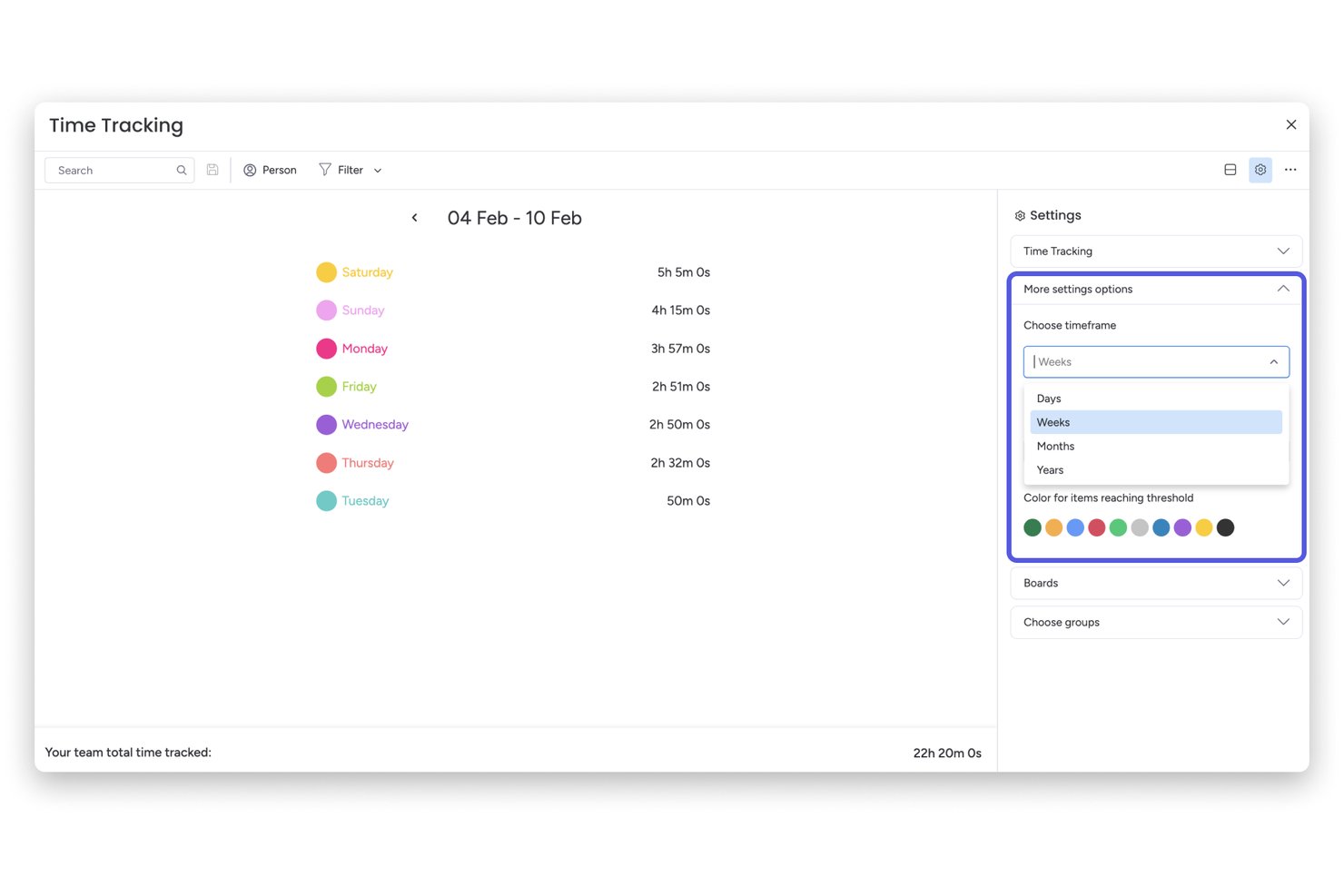
monday AI Workspace is a work management platform that combines project tracking, AI-powered automation, and native time tracking to help teams log hours, manage workloads, and route timesheet approvals across projects.
Who Is monday AI Workspace Best For?
It's a strong fit for project managers and PMO teams who already run their work inside monday.com and want to automate timesheet approvals without switching tools.
Why I Picked monday AI Workspace
I picked monday AI Workspace because its automation engine covers the full timesheet cycle, not just the time entry itself. I like that you can trigger timer starts from a task status change, route completed timesheets through an approval chain, and have the system automatically remind anyone who hasn't submitted. My team uses it specifically to eliminate the back-and-forth that usually comes with weekly timesheet collection.
monday AI Workspace Key Features
- AI-powered dashboards: Gain access to dashboards that surface project timelines, workload, and resource allocation insights using AI.
- Advanced project automation: Build complex workflow automations for task assignments, project dependencies, and notifications without coding.
- Native project management boards: Manage tasks, priorities, and milestones using customizable, visual board layouts.
- Multi-platform integrations: Connect with leading tools like Jira, Slack, Zoom, and Google Drive to centralize data and automate information flow.
monday AI Workspace Integrations
monday AI Workspace offers hundreds of native integrations through its built-in integrations and marketplace, including Slack, Jira, Google Drive, Zoom, Outlook, Typeform, and Salesforce. It also supports Zapier and provides an API for custom integrations.
Pros and Cons
Pros:
- AI-powered dashboards for resource forecasting
- Automations trigger timers from board status
- Direct timesheet approvals built into workflows
Cons:
- Lacks AI-driven time entry categorization
- No passive activity-based time tracking
New Product Updates from monday AI Workspace
monday AI Workspace Adds Human Approval Routing
monday AI Workspace adds a human-in-the-loop approval block to AI Workflows, sending approval requests and routing workflow paths based on responses. For more information, visit monday AI Workspace's official site.

DeskTime
Best for integrated break tracking
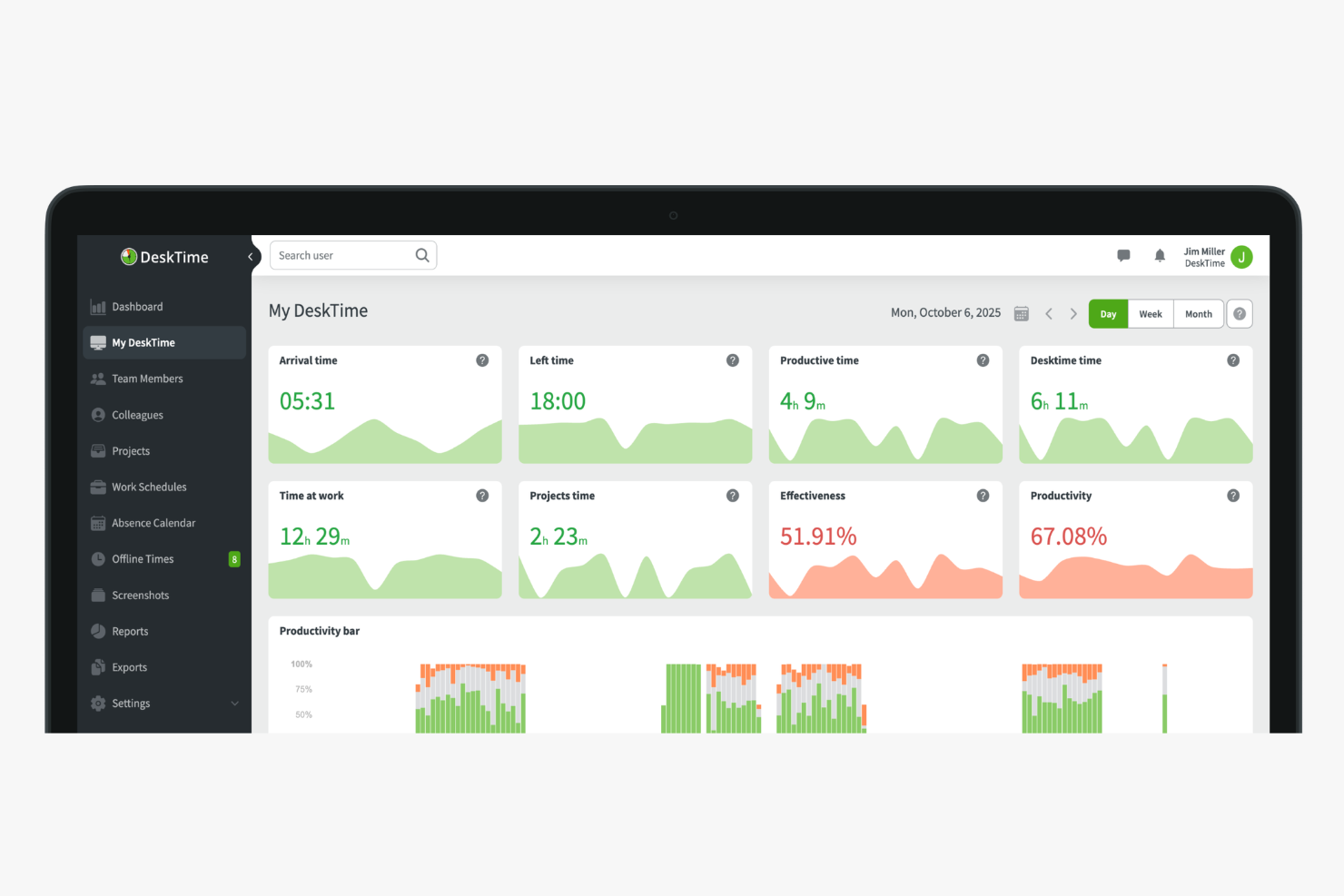
DeskTime is an automatic time tracking and productivity monitoring tool that logs app and URL usage, generates AI-powered work summaries, and tracks shift schedules across teams.
Who Is DeskTime Best For?
DeskTime is a good fit for managers of remote or hybrid teams who need visibility into how work hours are spent across distributed workforces.
Why I Picked DeskTime
DeskTime earns its spot on my shortlist for integrated break tracking because it's one of the few time trackers that treats breaks as a first-class part of the workday, not an afterthought. The break time reminder feature sends automatic nudges to employees throughout the day, prompting them to step away at regular intervals without any manual setup on my end. I also like the private time feature, which lets team members pause all tracking when they need a personal moment, so that lunch break browsing or a quick personal errand doesn't show up alongside their productive work hours. That combination means I get accurate time data and my team gets the autonomy to take real breaks.
DeskTime Key Features
- Screenshot monitoring: Captures random screenshots at set intervals to give managers a visual record of on-screen activity during work hours.
- GPS location tracking: Logs employee location via the mobile app, useful for tracking field workers or distributed teams on the go.
- Late arrival alerts: Notifies managers automatically when an employee clocks in after their scheduled start time.
- Daily productivity timeline: Displays a colour-coded breakdown of each employee's active, idle, and away time across the full workday.
DeskTime Integrations
Integrations include Google Calendar, Outlook Calendar, Trello, Gitlab, Asana, Jira, and Zapier.
Pros and Cons
Pros:
- Built-in Pomodoro timer for focus sessions
- Categorizes activity as productive or unproductive
- Tracks time automatically without manual input
Cons:
- Project switching requires manual input
- Lacks predictive web category filtering

Traqq
Best for lightweight team tracking

Traqq makes my list for teams that want lightweight but reliable time tracking, especially when they don't need a complicated setup. I think it's a fit for remote or hybrid teams who just want automated activity recording, optional screenshots, and clear reports—without a lot of manual input.
What I appreciate most is how it quietly tracks work in the background and keeps things simple, so you get the visibility you need with minimal interruptions.
Traqq’s Best For
- Remote and hybrid teams needing simple activity tracking
- Managers who want oversight without detailed manual timesheets
Traqq’s Not Great For
- Teams requiring advanced project management or budgeting tools
- Organizations needing deep integrations with HR or payroll systems
What sets Traqq apart
Traqq approaches time tracking by running in the background and removing manual data entry from the picture. Unlike tools like Toggl, which expect users to start and stop timers for each task, Traqq quietly tracks activity so teams can focus on their work. I notice this works best when you want a lightweight record of hours and activity without building complicated workflows or creating new habits.
Tradeoffs with Traqq
Traqq optimizes for simplicity and automated tracking, but you lose out on granular task breakdowns and detailed project planning. This means it won't suit teams that need forecasting, budgeting, or complex workflow management.
Pros and Cons
Pros:
- Includes PTO and leave management
- Non-intrusive activity tracking
- Intuitive user interface
Cons:
- Basic reporting capabilities
- Limited advanced features

Timely
Best for automatic time tracking

Timely makes this list because it brings real, fully automatic time tracking into the workflow—no manual timers or tracking required. I like how it builds a private timeline of every app, meeting, and website I work with throughout the day, then lets me confirm what belongs on my timesheet.
Teams that struggle to track project hours accurately without adding admin work are going to appreciate how Timely actually captures all that time by itself. This comes in handy once you’ve realized that fragmented, manual entry just doesn’t cut it when you need dependable project reporting.
Timely’s Best For
- Teams that want fully automatic time tracking
- Agencies and consultancies billing time across many projects
Timely’s Not Great For
- Organizations needing detailed task-level breakdowns
- Teams that require built-in payroll or invoicing features
What sets Timely apart
Timely focuses on making time tracking invisible. Instead of manual start-stop buttons like Toggl or Harvest, it quietly captures activity in the background and builds a private daily timeline. I notice this helps when you want to focus on your work, not the process of tracking time. Timely expects you to review and approve entries, not record them as you go.
Tradeoffs with Timely
By optimizing for automatic capture and privacy, Timely sacrifices task-level tracking detail. If your workflow demands granular breakdowns or time-on-task analysis, results start feeling less precise.
Pros and Cons
Pros:
- Helpful productivity insights
- Simplifies project management
- Accurate AI-generated timesheets
Cons:
- Limited customization options
- Setup can be time-consuming

Jibble
Best for attendance and payroll integration

Jibble is on my list because it's rare to see AI-powered time tracking so tightly linked with attendance, scheduling, and payroll processing. I recommend it when you need automated timesheets to flow directly into payroll calculations, especially for organizations dealing with hourly workforces or shift rosters.
What I like is how Jibble ties facial recognition clock-ins to pay rules, so you can cut out time theft and keep reporting accurate.
Jibble’s Best For
- Companies managing hourly staff and shifts across locations
- Organizations that need payroll and attendance tightly integrated
Jibble’s Not Great For
- Teams with salaried or project-based time tracking needs
- Businesses needing advanced project analytics or costing
What sets Jibble apart
Jibble is designed for organizations that need clock-ins to drive both attendance tracking and payroll, instead of relying on task-based or manual entry tools like Toggl or ClickUp. It builds work around biometric and geolocation check-ins, expecting teams to treat clock-in data as the primary source of truth. In practice, I see it working best when you want no ambiguity between recorded time and what gets sent to payroll.
Tradeoffs with Jibble
Jibble optimizes for compliance and payroll-linked attendance. You give up deeper project time analysis, so if you need granular task costing, you hit limits fast.
Pros and Cons
Pros:
- Facial Automated reminders for clock-ins
- GPS tracking for remote teams
- Facial recognition capability
Cons:
- Not ideal for complex projects
- Limited offline functionality

Memtime
Best for offline time tracking

Memtime earns a spot on my shortlist because it’s one of the best tools for capturing work time offline—even when you’re completely disconnected. When I tested this, Memtime tracked my activities locally, letting me review and allocate time accurately once I got back online. I like that you can reconstruct a precise timeline from local data, which helps teams who can’t always be connected or need to track sensitive offline work.
Memtime’s Best For
- Individuals or teams needing accurate offline time tracking
- Professionals working with sensitive or non-networked data
Memtime’s Not Great For
- Teams that require real-time collaboration features
- Businesses wanting built-in advanced AI time suggestions
What sets Memtime apart
Memtime stands out because it records everything you do locally, even when you’re offline. This isn’t like RescueTime or Timely, where you depend on cloud syncing to produce a timeline of your activities. I find this works best for people who move between offices without reliable internet or need to track sensitive work on air-gapped machines.
Tradeoffs with Memtime
Memtime optimizes for reliable offline tracking, but you lose out on features tied to cloud-based AI and real-time sync. That means you don’t get live collaboration or remote management functions.
Pros and Cons
Pros:
- Ideal for remote workers
- Detailed productivity reports
- Automatic activity tracking
Cons:
- Limited collaboration tools
- Basic customization options

Clockk
Best for freelancers and agencies
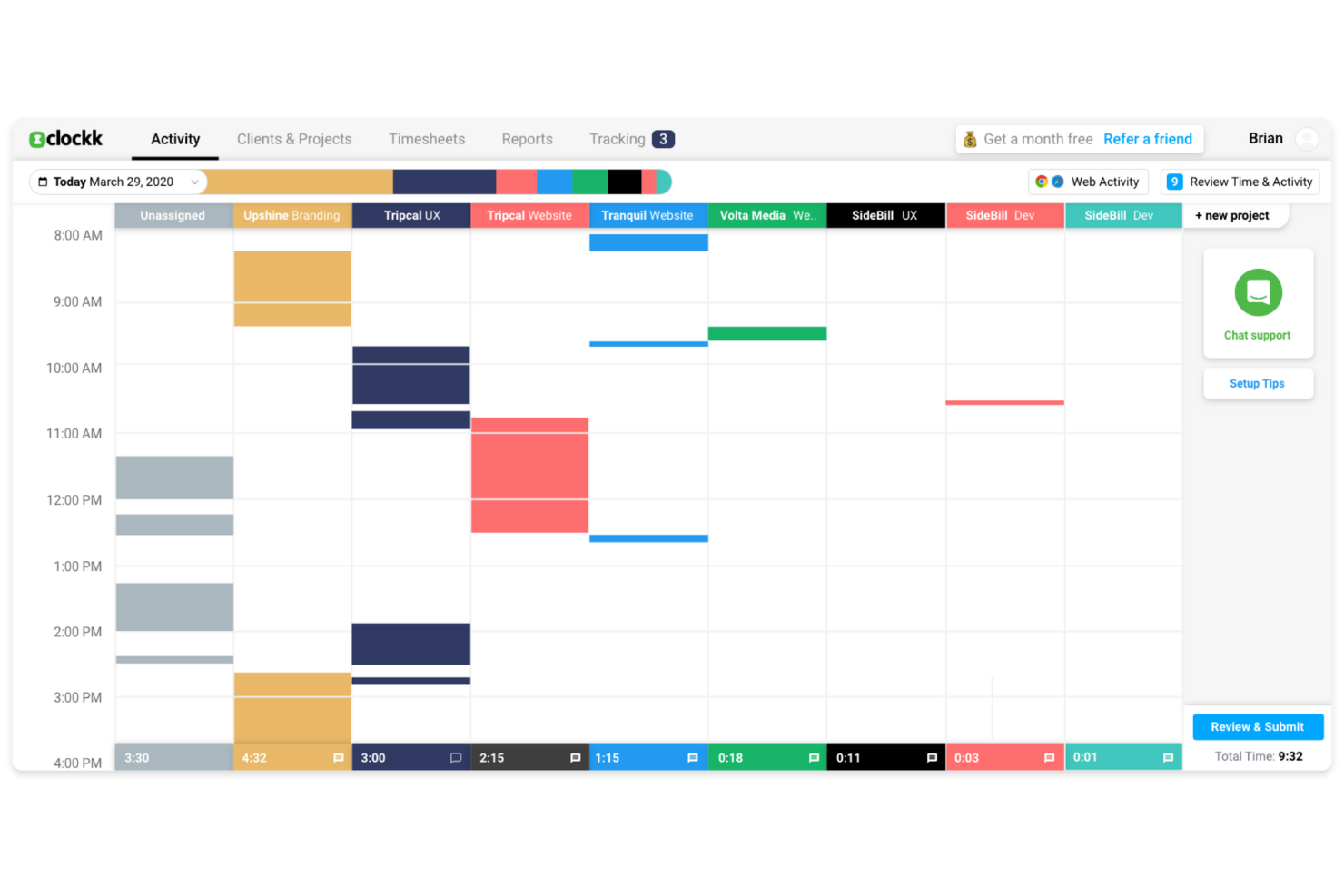
Clockk makes my list because it’s one of the few AI time tracking tools that actually learns from your work patterns, which is perfect when you’re juggling different projects for several clients. I especially appreciate how I can let Clockk automatically track which apps and websites I use throughout the day, then see time attributed to specific projects with almost no manual effort.
Freelancers and agencies who switch between tasks all day usually spend too much time reconstructing their hours; with Clockk’s automatic project tagging and AI-driven time allocation, that friction basically disappears.
Clockk’s Best For
- Freelancers or agencies managing multiple client projects
- People who need automatic, AI-driven time allocation
Clockk’s Not Great For
- Teams that need strict, real-time timesheet approvals
- Manual time entry or specialized task-level billing
What Sets Clockk Apart
Clockk focuses on automating time tracking by watching what you do in the background and assigning work to projects for you. Unlike manual tools like Toggl where you punch in every task, Clockk expects people to work naturally, switching between clients throughout the day without interruption. In practice, this feels different from ClickUp or monday.com, which make you log activities or categorize them in the moment.
Tradeoffs with Clockk
Clockk optimizes for hands-off, automatic time capture, so you lose the precision of manual time entries. If you need to track exactly what was done on each task, the automated approach can make your records feel less exact.
Pros and Cons
Pros:
- Automatic time categorization
- Visual timeline feature
- Ideal for freelancers
Cons:
- Not suitable for large teams
- Requires internet connection

Best for legal industry compliance

Intapp Time makes this list because it covers the compliance and audit challenges legal teams deal with daily. What sticks out to me is the way it automatically captures activities, applies firm-specific compliance rules, and flags risky billing entries before submission. When I’m working with firms that need airtight compliance and billing accuracy, this is the tool I recommend.
I appreciate how you get AI-powered activity capture that’s purpose-built for the legal industry, not just generic tracking.
Intapp Time’s Best For
- Legal teams needing automated, compliant time tracking
- Firms facing strict billing or regulatory requirements
Intapp Time’s Not Great For
- Companies outside legal or professional services
- Teams wanting basic, lightweight time tracking only
What sets Intapp Time apart
Intapp Time is meant for legal professionals who need automatic, audit-ready time capture baked into everyday workflows. Unlike basic time tracking tools, it expects you to work inside systems where billing, compliance, and detailed client matter management are non-negotiable. In my experience, this works best for firms that structure billable work around regulations, not just project hours.
Tradeoffs with Intapp Time
Intapp Time optimizes for regulatory detail and compliance, which makes it less practical for teams wanting a fast, simple timer or casual time logging.
Pros and Cons
Pros:
- Ideal for legal professionals
- Automated time capture
- Compliance-focused features
Cons:
- May require setup assistance
- Learning curve for new users

ZeroTime is on my shortlist for how it supplies real-time project updates without disrupting focus. When I evaluated it, I noticed that project time gets tracked instantly as users work, with AI auto-capturing every activity and creating a timeline. I like that busy teams can rely on ZeroTime for highly accurate, always up-to-date project data, instead of chasing manual entries.
ZeroTime’s Best For
- Tech or consulting teams needing real-time, passive time tracking
- Project leads who must see up-to-date team activity
ZeroTime’s Not Great For
- Teams requiring manual time entry with detailed notes
- Companies with strict offline or non-digital workflows
What sets ZeroTime apart
ZeroTime takes a passive approach to time tracking, using AI to automatically log activities and create a live timeline. Unlike apps like Toggl that need manual time entry, ZeroTime expects you to stay focused on your work and not spend time switching between timers. I find this works well when teams want to track work across multiple apps and projects without breaking their flow.
Tradeoffs with ZeroTime
ZeroTime optimizes for hands-off, automatic tracking, but you lose granular manual control over entries and activity notes, which can frustrate teams that need in-depth, annotated time records.
Pros and Cons
Pros:
- Real-time project visibility
- Detailed resource allocation insights
- Automatic time capture
Cons:
- May require training for new users
- Limited offline capabilities

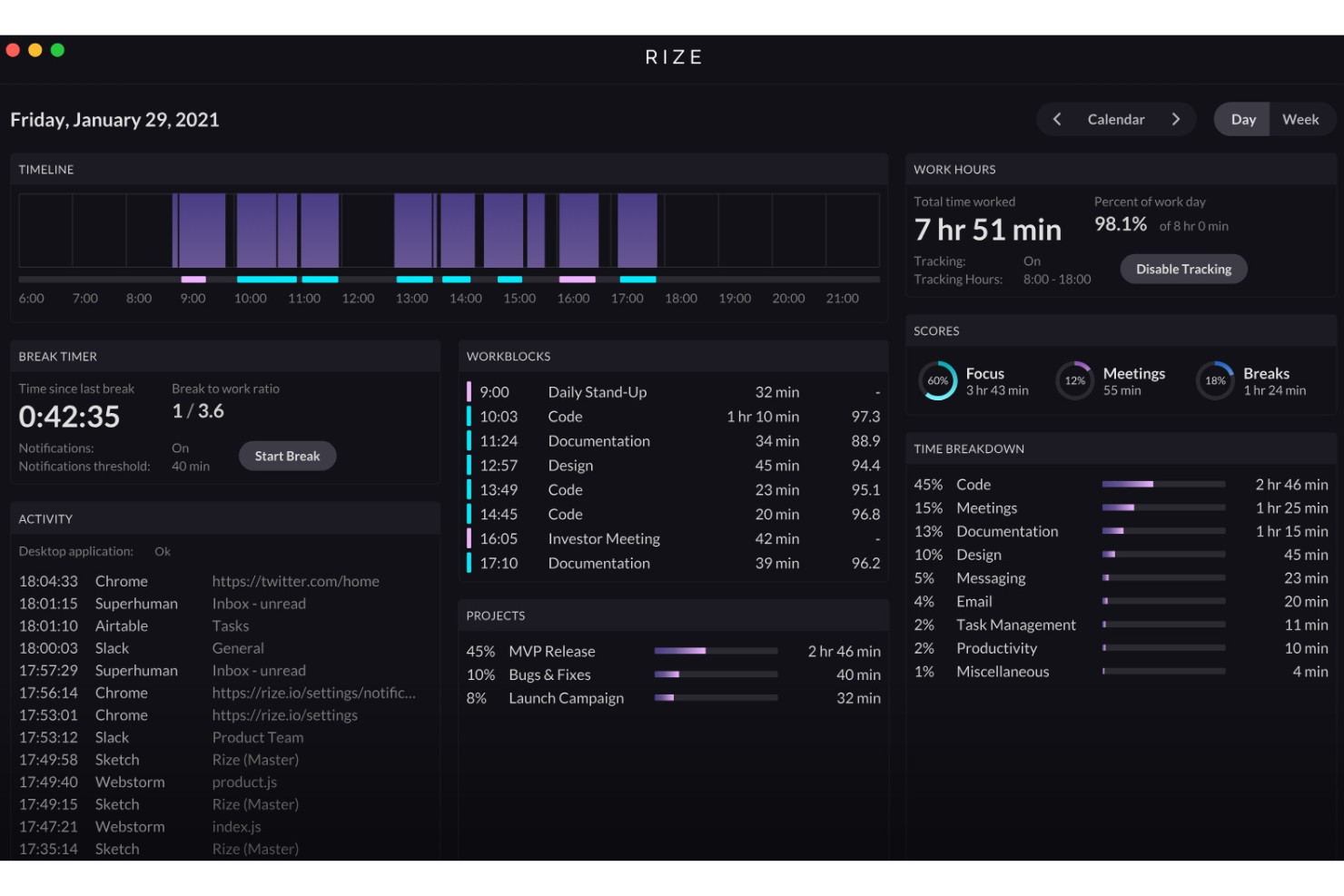
Rize earns a spot on my list because its AI-driven insights go well beyond simple time tracking. I’ve seen it break down work habits, deep focus periods, and daily context shifts with uncanny accuracy. When I tested Rize, the automatic tagging of activity was spot on and I got real, actionable feedback about how I spend my time.
What stands out most is how it helps you see your productivity patterns in a way that actually helps you change them.
Rize’s Best For
- Individuals who want detailed insights on work habits
- Users seeking automatic, AI-driven activity categorization
Rize’s Not Great For
- Teams needing centralized, manager-level time tracking and oversight
- Companies that depend on manual project time logging
What sets Rize apart
Rize takes a personal, analytics-driven approach to time tracking. Instead of relying on manual timers or traditional timesheets, it monitors activity in the background and generates focused, individualized productivity reports. Unlike Clockify or Toggl, which center on client projects and billable hours, Rize is built for people who want to understand and shape their own work habits.
This works best when you need to surface patterns and trends about how you actually spend your time.
Tradeoffs with Rize
Rize optimizes for individual insight and habit analysis, which means you lose centralized controls for managing time across teams or projects. If you need organization-level compliance or reporting, it isn’t built for that.
Pros and Cons
Pros:
- Helpful daily summaries
- Easy to integrate into routines
- Detailed productivity reports
Cons:
- Not ideal for large teams
- Limited team collaboration features
Other AI Time Tracking Software
Here are some additional AI time tracking software options that didn’t make it onto my shortlist, but which are still worth checking out:
- Laurel
For privacy-focused tracking
- MonitUp
For remote team management
- Connecteam
For mobile-first teams
- BigTime
For professional service firms
- GoodDay
For agile workflow support
- TimeCamp
For budget management tools
- Deputy
For shift scheduling
- Intelogos
For real-time work analytics
- ClickUp
For task management integration
- EARLY
For deadline reminders


How I Evaluate AI Time Tracking Software
Any tool can slap an AI label on a basic timer, so I look for platforms where the AI actually reduces manual work and improves accuracy in ways you'd notice on day one. I split my evaluation into core functionality every tool needs to make the list and differentiating factors that separate good fits from great ones.
Core Functionality (Table Stakes For This List)
When I'm selecting tools for my list, I rank each one on a scale from 0 (does not offer the functionality) to 5 (excels in this area) for each core functionality listed below. Then, I calculate the tool's total score into a percentage. Each tool needs to achieve a minimum total score of 65% to be considered for inclusion.
- Automated Time Capture: I check whether the tool passively tracks activity across desktop apps, browsers, and calendars so team members aren't stopping mid-task to start a timer.
- AI Time Entry Categorization: Smart tagging matters here—I look for AI that maps captured time to the right project, client, or billing code based on context and learned patterns.
- Project Management Integration: The tool should sync with platforms like Jira, Asana, or monday.com so tracked time flows directly to the correct task or sprint.
- AI-Powered Timesheet Generation: I evaluate whether the tool auto-drafts timesheets from tracked activity, giving users something to review and approve rather than build from scratch.
- Predictive Insights & Forecasting: Tools that surface budget burn rates, flag time entry anomalies, or project workload capacity using historical data score higher in my evaluation.
- Billable Hours & Reporting: I look for clear billable vs. non-billable separation with project- or client-level reports that are ready for invoicing or profitability reviews.
Once I have a list of tools that meet this criteria, I consider what sets each platform apart.
Differentiating Factors (What Sets Vendors Apart)
Here's how I compare and contrast different vendors:
Standout Features
Meeting and calendar intelligence is a big differentiator—I look for tools that pull time from video calls and calendar events and map it to the right project automatically. For PMs who spend half their day in cross-functional syncs, this alone can recapture hours of lost billable time. Privacy controls also matter for team adoption; passive tracking stalls when employees can't control what's visible to managers. A conversational reporting assistant adds real value too, letting you query time data naturally instead of building custom reports from scratch.
Beyond Features
AI model transparency is something I evaluate closely—I want to know how the tool categorizes time and whether you can audit and correct its suggestions over time. Data privacy also weighs heavily, especially for teams handling client work under strict compliance requirements like GDPR or SOC 2. Pricing structure matters for agencies and consultancies with fluctuating headcount, where you need a model that scales without locking you into annual commitments for short-term contractors.
How to Choose AI Time Tracking Software
It’s easy to get bogged down in long feature lists and complex pricing structures. To help you stay focused as you choose the right software tool, here’s a checklist of factors to keep in mind:
| Factor | What to Consider |
|---|---|
| Scalability | Will the software grow with your business? Consider user limits and the ease of scaling up. Make sure the pricing model won’t become prohibitively expensive as your team expands. |
| Integrations | Does the tool integrate with your current systems? Check for compatibility with your project management, accounting, and communication tools to maintain smooth workflow integration. |
| Customizability | Can you tailor the software to fit your specific needs? Look for the ability to customize dashboards, reports, and settings to match your workflows and business processes. |
| Ease of use | Is the interface intuitive for your team? A steep learning curve might slow down adoption. Look for software with a clean layout and straightforward navigation. |
| Implementation and onboarding | How long will it take to get up and running? Consider the availability of resources like training videos, product tours, and customer support to facilitate a smooth transition. |
| Cost | Does the pricing fit your budget? Evaluate the total cost, including hidden fees and additional charges for extra features or users. Look for flexible pricing models that suit your budget. |
| Security safeguards | How does the software protect your data? Look for encryption, data backup, and compliance with security standards. Make sure your sensitive information remains secure. |
| Support availability | What support options are available? Consider the availability of 24/7 support, live chat, and response times to make sure you can get help when needed. |
What Is AI Time Tracking Software?
AI time tracking software is a tool that automatically records and analyzes how time is spent on tasks. It's commonly used by freelancers, project managers, and remote teams to improve productivity and manage time efficiently.
Automated tracking, reporting, and integration capabilities help with accurate billing, workload management, and productivity insights. Overall, these tools save time and can provide valuable insights into the team’s work patterns.
Features of AI Time Tracking Software
When selecting AI time tracking software, keep an eye out for the following key features:
- Automated time capture: Automatically records time spent on tasks, which reduces manual entry errors and saves time.
- Real-time tracking: Provides up-to-the-minute data on work activities to help you stay informed and make timely decisions.
- Customizable reports: Lets you tailor reports to your specific needs and provides insights into productivity and time usage.
- Integration capabilities: Connects with other tools you use, like project management or accounting software, to maintain smooth workflow integration.
- Privacy controls: Offers features like blurred screenshots to protect sensitive data and maintain employee privacy.
- Compliance alerts: Provides real-time notifications to adhere to industry standards and regulations.
- Mobile access: Allows for tracking and reporting on the go, which means flexibility for remote or traveling team members.
- User-friendly interface: Features an intuitive design that makes it easy for your team to adopt and use effectively.
- Budget management tools: Helps track costs, manage project budgets, and maintain financial oversight and efficiency.
- Task management integration: Connects time tracking with task management to allow for a cohesive workflow.
Benefits of AI Time Tracking Software
Implementing AI time tracking software provides several benefits for your team and your business. Here are a few you can look forward to:
- Improved productivity: Automated tracking and real-time data help identify inefficiencies, so your team can focus on high-priority tasks.
- Accurate billing: Automated time capture records every billable hour and reduces discrepancies in invoices.
- Stronger compliance: Real-time alerts and compliance features help your team adhere to industry standards without extra effort.
- Better resource management: Customizable reports and integration capabilities provide insights into time usage, so you can allocate resources efficiently.
- Increased flexibility: Mobile access and integration with task management tools let your team work efficiently from anywhere.
- Privacy protection: Features like blurred screenshots protect sensitive data and maintain trust and security.
- Cost savings: By automating time tracking and reducing manual errors, you can save on administrative costs and improve financial oversight.
Costs and Pricing of AI Time Tracking Software
Costs for AI time tracking software vary based on features, team size, add-ons, and more. The table below summarizes common plans, average prices, and typical features included in AI time tracking software solutions:
Plan Comparison Table for AI Time Tracking Software
| Plan Type | Average Price | Common Features |
|---|---|---|
| Free Plan | $0/user/month | Basic time tracking, limited reporting, and integration with select tools. |
| Personal Plan | $5-$15/user/month | Automated tracking, mobile access, and customizable reports. |
| Business Plan | $20-$40/user/month | Advanced reporting, team collaboration tools, and budget management features. |
| Enterprise Plan | $50-$100/user/month | Full customization, dedicated support, and compliance management capabilities. |
AI Time Tracking Software FAQs
Here are some answers to common questions about AI time tracking software:
How accurate is AI time tracking for billing?
AI can capture time usage by monitoring app activity, mouse/keyboard inputs, and document changes. It often flags idle time and corrects for inactivity, which helps you reduce misbilling. However, it’s not perfect. Make sure to review and adjust entries before invoicing.
Are AI time tracking tools secure?
Most AI time tracking tools offer encryption and other data protection measures. When choosing a tool, make sure it complies with common security standards and privacy policies so your data remains safe.
Can AI time tracking software integrate with other tools?
Yes, most AI time tracking software can integrate with other tools like project management, accounting, and communication platforms. This integration helps improve your workflows and keeps all your tools working together smoothly.
What are the benefits of using AI for time tracking?
AI time tracking automates the process, reduces manual errors, and saves time. It provides real-time insights into productivity and helps optimize resource allocation. This leads to better efficiency and more accurate billing.
How does AI time tracking handle multitasking or context switching?
AI time tracking systems typically segment work by detecting window changes, app focus shifts, or file changes. They group related tasks and let you merge or reassign segments. You’ll sometimes need to clean up overlaps or mis-classifications.