

10 Best AI Document Control Software Reviewed in 2026

10 Best AI Document Control Software Shortlist


Managing documents can be a nightmare, especially when you're juggling multiple projects. You need a solution that organizes, secures, and makes your documents accessible to your team. That’s where AI document control software comes in.
Traditional document management tools help you store and share files—but AI takes it further. These tools use machine learning to automate version control, detect duplicates, extract key information, and even predict what documents your team will need next. In short, AI turns document management from a manual chore into an intelligent system that learns from how you work.
In this guide, we’ll explore the best AI document control software available today—looking closely at their features, usability, and standout benefits. You’ll learn how AI-driven tools differ from standard options, and which one fits your team’s workflow best.
Why Trust Our Software Recommendations
Our team has been testing and reviewing software since 2012. As project managers ourselves, we know how difficult—and important—it is to choose the right software.
For this guide, we evaluated tools using hands-on testing and independent research, scoring tools using our selection criteria. We also draw on insights from industry thought leaders and practicing project management experts.
Our reviews reflect our human editorial judgment, not a sales pitch.
AI Document Control Software Comparison Table
This comparison table summarizes pricing details for my top AI document control software selections:
| Tool | Best For | Trial Info | Price | ||
|---|---|---|---|---|---|
| 1 | Best for multilingual document search | Free demo available | Pricing upon request | Website | |
| 2 | Best for contract management | Free demo available | Pricing upon request | Website | |
| 3 | Best for secure document storage | Free demo available | From $73/user/month (billed annually) | Website | |
| 4 | Best for small to medium businesses | Free demo available | Pricing upon request | Website | |
| 5 | Best for compliance with data regulations | Free demo available | From $65/user/month | Website | |
| 6 | Best for legal industry professionals | Free demo available | Pricing upon request | Website | |
| 7 | Best for team collaboration | Free plan + free demo + 15-day free trial available | From CAD $3/user/month (billed annually) | Website | |
| 8 | Best for scalability in enterprises | Free demo available | From $25/user/month | Website | |
| 9 | Best for IT documentation | Free trial + free demo available | Pricing upon request | Website | |
| 10 | Best for life sciences compliance | Free demo available | Pricing upon request | Website |
Best AI Document Control Software Reviews
Below are my detailed summaries of the best AI document control software that made it onto my shortlist. My reviews offer a detailed look at the key features, pros & cons, integrations, and ideal use cases of each tool to help you find the best one for you.
Doxis
Best for multilingual document search
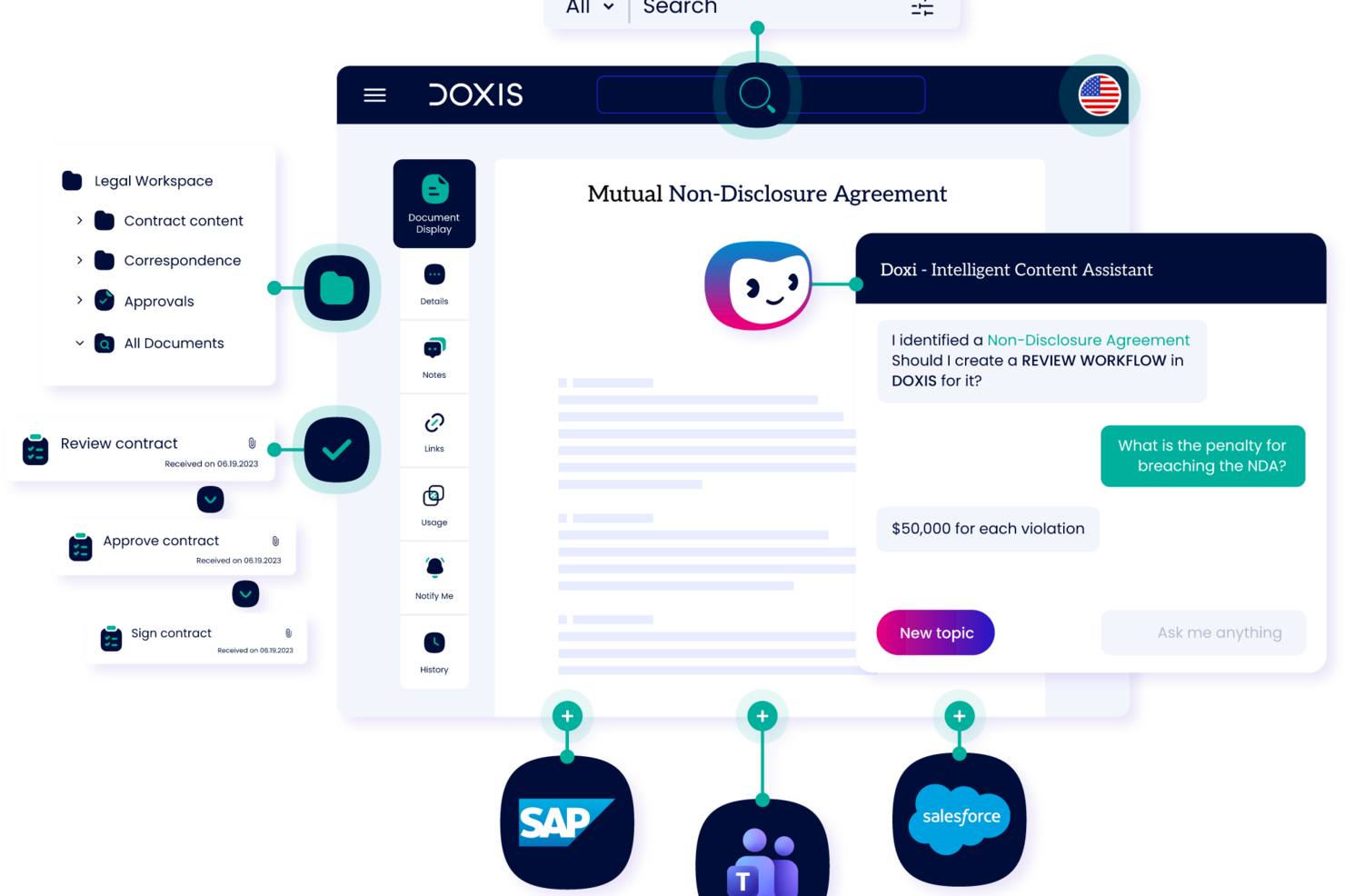
Doxis is an AI-powered enterprise content management platform that handles document capture, automated classification, metadata extraction, version control, workflow routing, and compliance-driven archiving for large organizations.
Who is Doxis Best For?
Doxis suits large enterprises in regulated industries that need centralized document control across multiple departments and systems.
Why I Picked Doxis
I picked Doxis as one of the best for multilingual document search because of how it handles cross-language retrieval at enterprise scale. The search filter lets you narrow results by language alongside document type, author, and processor, which is genuinely useful when your document library spans multiple regions and languages. On top of that, the content federation feature pulls in metadata from external sources automatically, so documents stored across different systems get surfaced in the right context, regardless of the language they're written in.
Doxis Key Features
- AI-powered document classification: Doxis AI.dp identifies and categorizes incoming documents by type, reducing manual sorting across large document volumes.
- Audit-proof archiving: Documents are stored with tamper-proof audit trails and configurable retention periods to support regulatory compliance requirements.
- Version management: Doxis tracks every document revision with a full version history, so you always know what changed, when, and by whom.
- No-code workflow configuration: Doxis Business Studio lets you build and modify document workflows and content apps without writing code.
Doxis Integrations
Doxis offers native integrations with SAP, Salesforce, and various Microsoft services, including Microsoft 365, Microsoft Teams, Microsoft Outlook, Microsoft SharePoint, and Microsoft Dynamics 365. It uses vendor-specific connectors like Doxis SmartBridge for Salesforce and certified SAP interfaces to provide deep, bidirectional integration within those environments. A REST API is also available for custom integrations. Zapier support is not documented.
Pros and Cons
Pros:
- Processes documents in multiple languages natively
- Tamper-proof archiving with retention controls
- AI classifies and routes documents automatically
Cons:
- Cloud hosting outages reported by users
- Geared toward large enterprise deployments

Juro
Best for contract management

Juro is a contract management platform tailored for legal teams and businesses looking to streamline their contract workflows. Its main users are legal professionals and operations teams who need to create, manage, and store contracts efficiently.
Why I picked Juro: It offers an intuitive interface that simplifies contract creation and management for legal teams. The platform includes features like automated contract templates and real-time collaboration, which facilitate smoother contract workflows.
Juro's in-browser editing allows your team to make quick changes without leaving the platform. Its focus on contract management makes it a go-to solution for legal departments looking to optimize their processes.
Standout features & integrations:
Features include automated contract templates that save time in document creation, in-browser editing for quick updates, and real-time collaboration to enhance teamwork on contract management.
Integrations include Salesforce, Slack, Google Drive, Microsoft 365, HubSpot, Box, Dropbox, Docusign, Zapier, and Greenhouse.
Pros and Cons
Pros:
- Real-time collaboration
- Automated contract templates
- Intuitive contract management
Cons:
- Occasional performance lags
- Limited customization options

Best for secure document storage

Laserfiche is a document management and automation platform designed for organizations that require secure storage and management of large volumes of documents. Its main users include government agencies, educational institutions, and financial services firms looking for secure and efficient document handling.
Why I picked Laserfiche: Laserfiche offers advanced security features, including encryption and access controls, which are essential for secure document storage. It also offers document automation workflows that enhance productivity by reducing manual processes.
With its comprehensive audit trail capabilities, your team can track document access and modifications. Laserfiche's focus on security makes it a reliable choice for organizations with strict data protection needs.
Standout features & integrations:
Features include a built-in audit trail system to track document changes, workflow automation to streamline repetitive tasks, and advanced search options to quickly locate documents.
Integrations include Microsoft 365, Salesforce, Docusign, SAP, SharePoint, QuickBooks, Dropbox, Google Workspace, Adobe Sign, and Box.
Pros and Cons
Pros:
- Efficient document retrieval
- Strong support for compliance
- Flexible workflow automation
Cons:
- Occasional performance issues
- Complex setup process

DocuWare
Best for small to medium businesses

DocuWare is a document management and workflow automation tool designed for small to medium-sized businesses that need efficient document handling. Its main users include administrative teams and departments that require organized document storage and retrieval.
Why I picked DocuWare: DocuWare offers streamlined document workflows that help small businesses manage their documents effectively. The platform features include electronic signatures and cloud storage, facilitating secure document management.
With its user-friendly interface, your team can quickly adapt to the system. DocuWare's focus on small to medium businesses makes it a practical choice for teams with limited resources.
Standout features & integrations:
Features include electronic signatures to streamline document approvals, cloud storage for secure and accessible document management, and workflow automation to reduce manual tasks.
Integrations include Microsoft 365, Salesforce, SAP, QuickBooks, Sage, Google Workspace, Oracle, Outlook, Dropbox, and Box.
Pros and Cons
Pros:
- Effective workflow automation
- Strong cloud storage options
- Electronic signature capabilities
Cons:
- Occasional performance lags
- Requires training for new users

M-Files
Best for compliance with data regulations

M-Files is a Document Management System (DMS) designed for businesses needing to manage compliance and secure document handling. It's particularly suited for industries like accounting, engineering, and scientific research.
Why I picked M-Files: M-Files offers AI-driven document automation and metadata-driven architecture, allowing efficient document retrieval and management. It excels in compliance with data regulations by providing robust security features and audit trails.
The platform also integrates with major platforms like Microsoft 365 and Google Workspace, ensuring your team can work within familiar environments. Its focus on compliance makes it a reliable choice for industries with strict regulatory requirements.
Standout features & integrations:
Features include automated workflows that streamline document approval processes, metadata-driven organization for easy document retrieval, and advanced security measures to protect sensitive information.
Integrations include Microsoft 365, Google Workspace, Salesforce, SAP, SharePoint, Docusign, Adobe Sign, QuickBooks, HubSpot, and Slack.
Pros and Cons
Pros:
- Metadata-driven organization
- Strong compliance support
- AI-driven document management
Cons:
- Customization can be challenging
- Requires ongoing maintenance

iManage
Best for legal industry professionals

iManage is a document and email management system designed for legal professionals who seek efficient management of documents and communications. Its main users include law firms and corporate legal departments that need secure and organized document handling.
Why I picked iManage: iManage offers specialized features for legal professionals, including document version control and email management. It offers advanced security measures, ensuring your sensitive legal documents are protected.
With its intuitive search capabilities, your team can quickly locate critical documents and emails. iManage's focus on the legal industry makes it an ideal choice for firms needing tailored document management solutions.
Standout features & integrations:
Features include document versioning to track changes, email management for organizing communications, and advanced search options to quickly locate necessary documents and emails.
Integrations include Microsoft Office, Microsoft 365, Salesforce, Adobe Acrobat, Docusign, NetDocuments, Workshare, Microsoft Teams, Outlook, and SharePoint.
Pros and Cons
Pros:
- Intuitive search capabilities
- Secure email management
- Tailored for legal professionals
Cons:
- Frequent updates needed
- Steep learning curve

Best for team collaboration

Zoho WorkDrive is a cloud-based document management system designed for businesses that need efficient document collaboration. Its primary users include small to medium-sized teams looking for a shared workspace to manage their documents.
Why I picked Zoho WorkDrive: Zoho WorkDrive offers real-time collaboration features that enhance teamwork by allowing multiple users to work on documents simultaneously. It provides a shared workspace where your team can organize, store, and access documents securely.
The tool’s advanced search functionalities make it easy to find documents quickly. With its focus on collaboration, Zoho WorkDrive is ideal for teams that need to work together efficiently and effectively.
Standout features & integrations:
Features include team folders that allow you to organize documents and control access, real-time notifications to keep your team updated, and version history to track changes and restore previous versions.
Integrations include Zoho CRM, Zoho Projects, Slack, Microsoft Teams, Zapier, Microsoft 365, Google Workspace, Trello, Dropbox, and Asana.
Pros and Cons
Pros:
- Version history tracking
- Real-time editing
- Easy document sharing
Cons:
- Basic reporting tools
- Occasional sync issues

Best for scalability in enterprises

AmpleLogic EDMS is an electronic document management system designed for large enterprises that require scalable solutions for managing extensive document workflows. It caters to industries like pharmaceuticals, manufacturing, and healthcare, providing a centralized platform for document storage and compliance management.
Why I picked AmpleLogic EDMS: AmpleLogic EDMS offers extensive scalability features that support the growing needs of large enterprises. It includes workflow automation to streamline document processes and ensure compliance with industry standards.
The software’s customizable dashboards allow your team to tailor the interface according to specific business needs. With its scalable architecture, AmpleLogic EDMS easily adapts to your expanding document management requirements.
Standout features & integrations:
Features include customizable dashboards that let you tailor the user interface, workflow automation to improve document processes, and compliance management tools to meet industry standards.
Integrations include Microsoft Office, SharePoint, SAP, Oracle, Salesforce, Google Drive, Dropbox, Box, IBM FileNet, and Docusign.
Pros and Cons
Pros:
- Efficient workflow automation
- Customizable user interface
- Highly scalable architecture
Cons:
- Customization requires IT support
- Limited mobile access

NinjaOne
Best for IT documentation
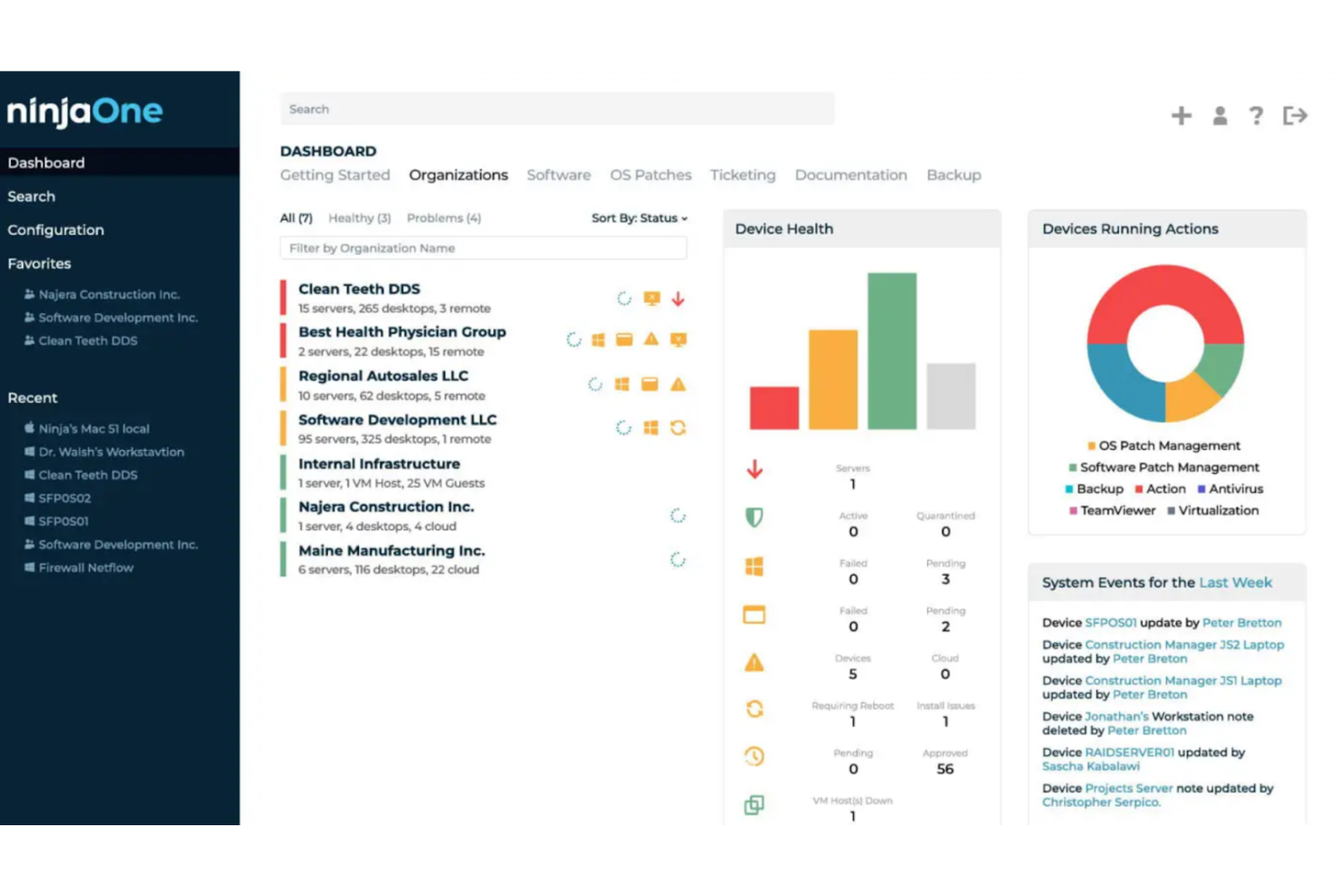
NinjaOne is an IT documentation and management platform designed for IT teams that need efficient management of their documentation and assets. Its main users include IT professionals and managed service providers who require organized documentation and streamlined IT operations.
Why I picked NinjaOne: NinjaOne offers specialized features for IT documentation, including automated asset tracking and ticketing. It includes centralized documentation storage, ensuring your team can access critical information quickly.
With its intuitive interface, your team can manage IT documentation without hassle. NinjaOne's focus on IT needs makes it a practical solution for IT departments seeking to increase efficiency.
Standout features & integrations:
Features include automated asset tracking that keeps your inventory up-to-date, centralized documentation storage for easy access, and ticketing systems to manage IT requests efficiently.
Integrations include Microsoft 365, Google Workspace, Slack, Salesforce, Zendesk, QuickBooks, Dropbox, Box, Docusign, and Adobe Sign.
Pros and Cons
Pros:
- Intuitive user interface
- Efficient ticketing system
- Automated asset tracking
Cons:
- Limited mobile access
- Learning curve for advanced features

MasterControl is a quality and document management software designed for life sciences companies needing to comply with strict regulatory standards. Its primary users include pharmaceutical, biotech, and medical device companies that require efficient document control and quality management.
Why I picked MasterControl: MasterControl provides features that help life sciences companies meet compliance requirements like FDA regulations. It includes document version control and audit trails, ensuring your team can maintain compliance.
The platform offers training management capabilities to keep your staff updated on compliance protocols. MasterControl's focus on life sciences compliance helps it stand out as a solid option for companies in regulated industries.
Standout features & integrations:
Features include document control that tracks changes and maintains compliance, audit trails that provide a clear record of document history, and training management to ensure your team is up-to-date with industry standards.
Integrations include SAP, Oracle, Salesforce, Microsoft Dynamics, Docusign, Adobe Sign, QuickBooks, SharePoint, Box, and Dropbox.
Pros and Cons
Pros:
- Requires extensive training
- Includes training management
- Strong compliance focus
Cons:
- Performance issues with large datasets
- Tailored for regulated industries
Other AI Document Control Software
Here are some additional AI document control software options that didn’t make it onto my shortlist, but are still worth checking out:
- eShare.ai
For AI-driven document insights
- Document360
For knowledge base creation
- Bynder
For digital asset management
- Box
For secure file storage
- Dropbox
For easy file sharing
- ComplianceQuest
For quality management compliance
- Google Workspace
For team collaboration tools
- OneDrive
For integration with Windows


How I Evaluate AI Document Control Software
Every tool on this list needs to deliver AI that actually saves time—whether that's auto-classifying submittals or surfacing the right revision in seconds, not just slapping a chatbot on a file browser. I split my evaluation into two layers: core functionality a tool must have to qualify, and differentiating factors that separate the best fit from the rest.
Core Functionality (Table Stakes For This List)
When I'm selecting tools for my list, I rank each one on a scale from 0 (does not offer the functionality) to 5 (excels in this area) for each core functionality listed below. Then, I calculate the tool's total score into a percentage. Each tool needs to achieve a minimum total score of 65% to be considered for inclusion.
- AI-Powered Document Classification: I evaluate how well the AI auto-tags and categorizes uploads—like sorting RFIs from submittals or matching drawings to project phases without manual input.
- Version Control & Audit Trail: Every revision, rollback, and stakeholder action should be logged in a traceable history that holds up during audits or dispute resolution.
- Intelligent Search & Retrieval: I check whether the search goes beyond keywords, letting users find a buried spec sheet by describing its content in plain language or scanning OCR'd files.
- Automated Approval Workflows: The tool should route documents to the right reviewers based on project stage and role, so a design package reaches the lead engineer before the client.
- Access Control & Permissions: I look at how granular the permissions model is—whether you can restrict a subcontractor to one drawing set while giving internal PMs full portfolio visibility.
- Compliance & Retention Management: Tools should enforce retention schedules, capture e-signatures, and generate export-ready compliance reports aligned with standards like ISO or SOC 2.
Once I have a list of tools that meet the criteria, I consider what sets each platform apart.
Differentiating Factors (What Sets Vendors Apart)
Here's how I compare and contrast different vendors:
Standout Features
A generative AI assistant adds real value when it can summarize a 200-page spec or answer questions about contract clauses without opening the file. I also look for predictive risk flagging—tools that alert you to missing submittals or stalled approvals before they delay a milestone. For AEC-heavy teams, drawing and BIM integration with AI-driven sheet comparison can save hours of manual redline review across revision sets.
Beyond Features
Integrations matter a lot here. I evaluate whether a tool connects natively with the PM platforms your team already uses—Procore, Primavera, Jira, or SharePoint—so documents stay linked to the right tasks and milestones. Security and compliance posture is another key factor, especially for teams handling regulated deliverables; I check for SOC 2, ISO 27001, and data residency options. I also consider how well a vendor supports implementation, since migrating thousands of legacy files demands hands-on guidance.
How to Choose AI Document Control Software
It’s easy to get bogged down in long feature lists and complex pricing structures. To help you stay focused as you work through your unique software selection process, here’s a checklist of factors to keep in mind:
| Factor | What to Consider |
|---|---|
| Scalability | Can the software grow with your team? Consider the number of users it supports and how easily you can add more. Avoid tools that limit expansion. |
| Integrations | Does it connect to tools you already use? Check for compatibility with your existing systems, like CRM, ERP, or collaboration platforms. |
| Customizability | Can you tailor the software to fit your workflows? Look for options to adjust dashboards, fields, and permissions to suit your processes. |
| Ease of use | How quickly can your team start using it? Choose intuitive interfaces that require minimal training. Avoid overly complex tools. |
| Implementation and onboarding | How long will it take to set up? Ensure the vendor provides support, training, and resources to get you started smoothly. |
| Cost | Is it within your budget? Compare pricing plans, hidden fees, and value for money. Consider long-term costs, not just initial fees. |
| Security safeguards | How does it protect your data? Look for encryption, access controls, and compliance with data protection regulations. |
| Compliance requirements | Does it meet industry standards? Verify the software aligns with any regulatory requirements specific to your field, like GDPR or HIPAA. |
What Is AI Document Control Software?
AI document control software is a tool that helps manage, store, and track documents using artificial intelligence. Professionals like project managers, legal teams, and IT departments use these tools to organize documents efficiently and ensure compliance. Automated workflows, smart search, and access controls help with organization, retrieval, and security. These tools save time and reduce errors by improving document management processes.
Features of AI Document Control Software
When selecting AI document control software, keep an eye out for the following key features:
- Document storage: Offers secure and organized storage for easy retrieval and management of documents.
- Version control: Tracks document changes and maintains a history of edits to prevent errors and confusion.
- Access controls: Provide permissions settings to control who can view or edit documents, enhancing security.
- Automated workflows: Streamline processes by automating repetitive tasks, saving time and reducing manual errors.
- Smart search: Uses AI to quickly locate documents using keywords or metadata, improving efficiency.
- Audit trails: Keep a detailed log of document access and changes for compliance and accountability.
- Compliance management: Ensures that documents meet industry regulations, such as GDPR or HIPAA, thereby reducing legal risks.
- Collaboration tools: Allow multiple users to work on documents simultaneously, enhancing team productivity.
- Customizable dashboards: Let users personalize their interface for a more intuitive and efficient workflow.
- Training management: Offers resources to keep teams updated on compliance and best practices.
Benefits of AI Document Control Software
Implementing AI document control software provides several benefits for your team and your business. Here are a few you can look forward to:
- Improved efficiency: Automated workflows and smart search features speed up document handling, reducing manual tasks and creating efficient business processes.
- Enhanced security: Access controls and audit trails protect sensitive information and ensure compliance with regulations.
- Better collaboration: Real-time editing and shared access support teamwork, allowing multiple users to work together smoothly.
- Error reduction: Version control prevents mistakes by keeping track of document changes and maintaining accuracy.
- Cost savings: Automated processes and reduced manual errors can lead to lower operational costs.
- Compliance assurance: Compliance management tools help meet industry standards, reducing the risk of legal issues.
- Increased productivity: Easy document retrieval and management free up time for more important tasks, boosting overall productivity.
Costs and Pricing of AI Document Control Software
Selecting AI document control software requires an understanding of the various pricing models and plans available. Costs vary based on features, team size, add-ons, and more. For example, one-time setup and implementation fees can quickly add up ($7,000 to $35,000), so be sure to ask vendors about any potential added fees. The table below summarizes common plans, their average prices, and typical features included in AI document control software solutions:
Plan Comparison Table for AI Document Control Software
| Plan Type | Average Price | Common Features |
|---|---|---|
| Free Plan | $0 | Basic storage, limited users, and basic collaboration tools. |
| Personal Plan | $5-$60/user/month | Enhanced storage, single-user access, and basic security features. |
| Business Plan | $30-$80/user/month | Advanced collaboration, version control, and compliance tools. |
| Enterprise Plan | $60-$250/user/month | Custom integrations, advanced security, and dedicated support. |
AI Document Control Software FAQs
Here are some answers to common questions about AI document control software:
How is AI used in document management?
AI in document management analyzes text within documents. Through data extraction, it captures and categorizes relationships across various fields to generate structured data. This process creates more efficient content management for your team by automating data entry and reducing manual tasks.
What types of documents can AI document software process?
Most document control software can handle structured data, such as spreadsheets, as well as unstructured data, including emails and contracts, and semi-structured documents, like forms and invoices. This versatility allows your team to manage a wide range of specific documents, improving overall efficiency.
How accurate is document control software?
AI document reading is typically 90–99% accurate, depending on the document type and the quality of the data. Structured documents, such as invoices, achieve near-human accuracy, whereas unstructured or handwritten text may be less reliable. It’s important to consider these factors when evaluating AI solutions.
How does AI enhance document security?
AI enhances document security by providing advanced access controls and monitoring capabilities. It can detect unusual patterns and alert your team to potential security breaches. Be sure to check with software vendors whether their tools meet industry and regulatory compliance requirements, of course. Overall, AI tools can help protect sensitive information and ensure compliance with data protection regulations.
Can AI document control software integrate with existing systems?
Yes, many AI-powered document management solutions can integrate with existing systems like CRM, ERP, and collaboration platforms. This integration helps your team maintain a fluid workflow and ensures that valuable data is shared across tools, improving overall efficiency.