

10 iManage Alternatives for Document Management in 2026

iManage Alternatives Shortlist


The best iManage alternatives give you secure document control, flexible collaboration, and easy search—without the complexity or cost that can come with iManage. If you’re searching for document control software that fits your team’s workflow, you know how important it is to balance compliance, usability, and integration with your existing tools.
In this guide, you’ll find my top picks for iManage alternatives, each with a clear focus on document management, version control, and team productivity. Use this list to compare your options and find the right fit for your business.
What is iManage?
iManage is a document control software platform designed for secure document management, collaboration, and compliance. It helps teams organize, store, and track documents while maintaining strict access controls and audit trails. Legal, financial, and professional services firms often use iManage to centralize sensitive files and streamline workflows. Strong search, version control, and integration features make it a popular choice for organizations that need to manage large volumes of confidential documents.
Best iManage Optimizely Alternatives Summary
This comparison chart summarizes pricing details for my top iManage alternative selections to help you find the best one for your budget and business needs.
| Tool | Best For | Trial Info | Price | ||
|---|---|---|---|---|---|
| 1 | Best for simple file sharing and team storage | Free trial + free plan available | From $9.99/user/month (billed annually) | Website | |
| 2 | Best for all-in-one notes and knowledge management | Free plan + free demo available | From $10/user/month (billed annually) | Website | |
| 3 | Best for searchable knowledge sharing and Q&A | Free demo available | Pricing upon request | Website | |
| 4 | Best for customer support knowledge base tools | Free demo + 14-day free trial available | From $29/user/month (billed annually) | Website | |
| 5 | Best for automated cloud document workflows | Free demo available | Pricing upon request | Website | |
| 6 | Best for metadata-driven document organization | Free demo available | From $65/user/month | Website | |
| 7 | Best for Microsoft 365 document collaboration | 30-day free trial available | From $5.40/user/month (billed annually) | Website | |
| 8 | Best for team knowledge and documentation hubs | Free trial + free plan available | From $5.42/user/month | Website | |
| 9 | Best for document automation and e-signatures | Free plan available + 14-day free trial available | From $19/user/month (billed annually) | Website | |
| 10 | Best for AI meeting insights and knowledge capture | Free plan available | From $15/user/month (billed annually) | Website |
Why Trust Our Software Recommendations
Our team has been testing and reviewing software since 2012. As project managers ourselves, we know how difficult—and important—it is to choose the right software.
For this guide, we evaluated tools using hands-on testing and independent research, scoring tools using our selection criteria. We also draw on insights from industry thought leaders and practicing project management experts.
Our reviews reflect our human editorial judgment, not a sales pitch.
Expert reviewers:
iManage Alternatives Reviews
Below are my detailed summaries of the best iManage alternatives that made it onto my shortlist. My reviews offer a detailed look at the features, integrations, and best use cases of each software to help you find the best one for you.

Dropbox
Best for simple file sharing and team storage
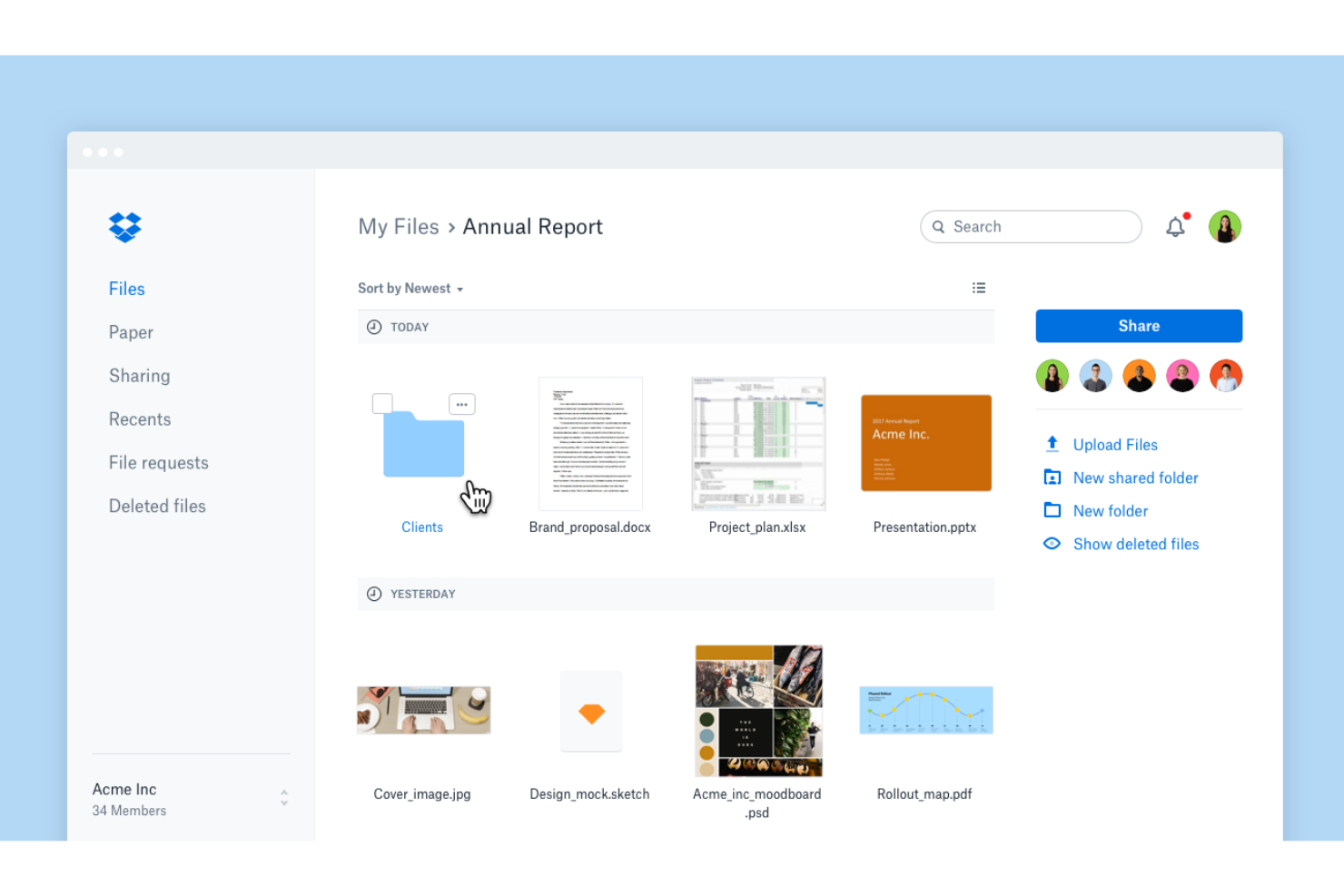
Dropbox is a cloud-based file storage and sharing platform built for teams that need simple, secure document access from anywhere. It appeals to businesses looking for easy collaboration, file recovery, and centralized control without the complexity of traditional document management systems.
Who Is Dropbox Best For?
Dropbox is a strong fit for small to mid-size teams that need straightforward, cloud-based document storage and sharing.
Why Dropbox Is a Good iManage Alternative
I picked Dropbox because it removes the friction that comes with managing files across distributed teams. I rely on its shared folder structure and real-time sync to keep everyone working from the same version of a document, with automatic activity notifications that tell me exactly when a file has been changed or moved. I also appreciate Dropbox's file sharing controls, where I can set view-only or edit permissions, add password protection, and apply expiration dates to shared links. For teams that don't need a full-scale legal document management system, Dropbox delivers secure, organized file access without the overhead.
Dropbox Key Features
- File recovery and version history: Restore deleted files or earlier versions of any document from up to 30 days of history.
- Dropbox Paper: Create and edit collaborative documents with timelines, to-dos, and tables directly inside Dropbox.
- Admin console: Monitor team activity, manage member access, and support compliance from a centralized admin dashboard.
- Computer backup: Automatically back up key folders like your desktop so changes sync across your entire Dropbox account.
Dropbox Integrations
Dropbox offers native integrations with Google Workspace, Microsoft 365, Slack, Zoom, Trello, Docusign, Adobe Creative Cloud, Salesforce, Canva, and Okta. An API is available for custom integrations.
Pros and Cons
Pros:
- File recovery helps restore deleted or previous versions
- Simple sharing controls support secure external collaboration
- Real-time file syncing keeps teams aligned across devices
Cons:
- Limited metadata capabilities for advanced organization
- Lacks built-in workflow automation for document processes

Notion
Best for all-in-one notes and knowledge management
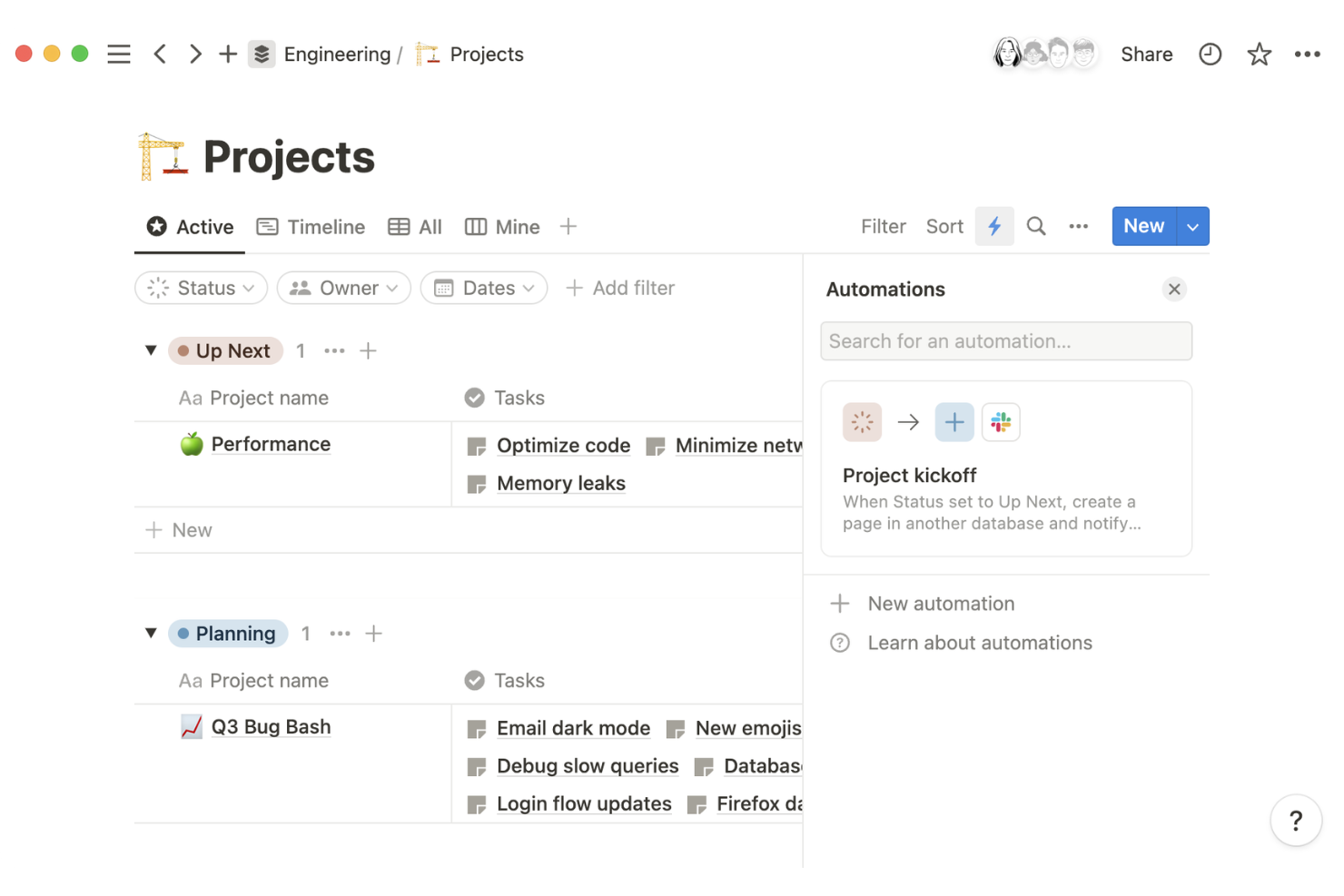
Notion is a flexible workspace platform that lets teams create, organize, and manage documents, wikis, and project knowledge in one place. I think fast-growing startups and cross-functional teams will appreciate how it combines structured databases with collaborative editing for dynamic document control.
Who Is Notion Best For?
Notion is a strong fit for startups and distributed teams that need a customizable workspace for managing documents, wikis, and projects.
I picked Notion because it replaces the rigid folder structures of iManage with a flexible, block-based workspace where teams can build wikis, docs, and databases that actually reflect how they work. I like the Synced Blocks feature in particular—edit a piece of content once, and it updates everywhere it appears across the workspace, which is a real advantage for teams maintaining shared policies or process docs.
The Verification feature also lets admins mark pages as confirmed and current, so contributors always know whether a document is authoritative or outdated. For cross-functional teams managing living documentation across product, engineering, and design, that combination of flexibility and content governance is hard to match.
Notion Key Features
- Page analytics: Track how employees engage with content at the page level, so admins can identify which docs are being read and which are going stale.
- Advanced permissions: Set granular access controls that specify exactly who can view, edit, or create content within any part of the workspace.
- SCIM user provisioning: Automatically create, update, or remove users and groups to keep workspace access in sync with your directory.
- Database views: Display the same content as a table, board, calendar, or gallery, letting teams structure knowledge in the format that fits their workflow.
Notion Integrations
Notion offers native integrations with Google Drive, Slack, GitHub, Jira, Asana, Figma, Zoom, and Trello. It also connects with Zapier and provides an API for custom integrations.
Pros and Cons
Pros:
- Synced content blocks maintain consistency across pages
- Database views support structured document organization
- Flexible workspace adapts to varied team workflows
Cons:
- No advanced document version control system
- Limited compliance features for regulated industries

Best for searchable knowledge sharing and Q&A

Bloomfire is a knowledge management platform designed for teams that need fast, searchable access to company information and documents. I think operations, support, and compliance teams will appreciate its focus on content discoverability and secure knowledge sharing.
Who Is Bloomfire Best For?
Bloomfire is a strong fit for customer support and operations teams in midsize to large organizations that need centralized, searchable knowledge sharing.
Why Bloomfire Is a Good iManage Alternative
I picked Bloomfire because its AI-powered search goes well beyond keyword matching—it deep indexes content across formats, including slides, audio, and video, so teams can find answers inside documents they'd never be able to locate in iManage's folder-based structure. I also appreciate the self-healing knowledge base, which uses AI to automatically flag outdated or redundant content and prompt authors to update or archive it.
In practice, that means my team isn't running manual content audits to keep the knowledge base accurate. For organizations where stale documentation is a real liability, that combination of intelligent search and automated content governance is where Bloomfire genuinely stands apart.
Bloomfire Key Features
- Moderation tools: Set up approval workflows, flag content for review, and restore previous versions across any community contribution.
- Q&A collective knowledge engine: Ask questions in plain language and capture expert answers that are stored as searchable, structured knowledge.
- Learn and confirm: Embed knowledge validation tools directly in the platform to confirm that critical information has been reviewed and retained.
- Analytics suite: Track search behavior, content engagement, and knowledge gaps through real-time reports that are downloadable for broader company reporting.
Bloomfire Integrations
Bloomfire offers native integrations with Salesforce, Slack, Microsoft Teams, Zendesk, and Google Drive, and it provides an API for custom integrations.
Pros and Cons
Pros:
- Analytics reveal knowledge gaps and usage trends
- Built-in Q&A captures and scales internal expertise
- AI search indexes multiple content formats effectively
Cons:
- Limited capabilities for document editing within the platform
- No dedicated document version control features

Intercom
Best for customer support knowledge base tools

Intercom offers an AI-powered knowledge base and support platform designed for customer-facing teams who need to manage and deliver up-to-date information at scale. I think it’s a strong fit for businesses that want to centralize help content, automate responses, and improve customer self-service.
Who Is Intercom Best For?
Intercom is a good fit for customer support and success teams at SaaS companies who need to manage and deliver knowledge at scale.
I picked Intercom because it approaches knowledge management from the customer-facing side, which iManage doesn't address at all. What I find most useful is the Knowledge Hub, which centralizes support content into a single, searchable system. I also appreciate that you can target specific articles to specific customer segments, so the right content reaches the right audience without manual routing. For teams managing large volumes of support documentation, the bulk action tools let you update Fin availability, folder location, and audience settings across multiple articles at once.
Intercom Key Features
- Content gap detection: Reviews past support conversations to identify topics your knowledge base doesn't cover and flags them for new article creation.
- Fin AI agent: An AI agent that pulls answers directly from your knowledge base to resolve customer queries without human intervention.
- No-code automation builder: Lets you build conversation routing rules, SLA triggers, and escalation workflows without engineering support.
- Omnichannel inbox: Consolidates conversations from email, chat, WhatsApp, and social apps into a single shared inbox.
Intercom Integrations
Intercom offers native integrations with Salesforce, HubSpot, Zendesk, Jira, Slack, Google Analytics, Shopify, Stripe, Mailchimp, and Facebook, and provides an API for custom integrations.
Pros and Cons
Pros:
- Omnichannel inbox centralizes customer communication
- Content targeting delivers relevant information to users
- AI-driven knowledge base improves support efficiency
Cons:
- Limited document governance and compliance features
- Not suited for internal document lifecycle management

DocuWare
Best for automated cloud document workflows
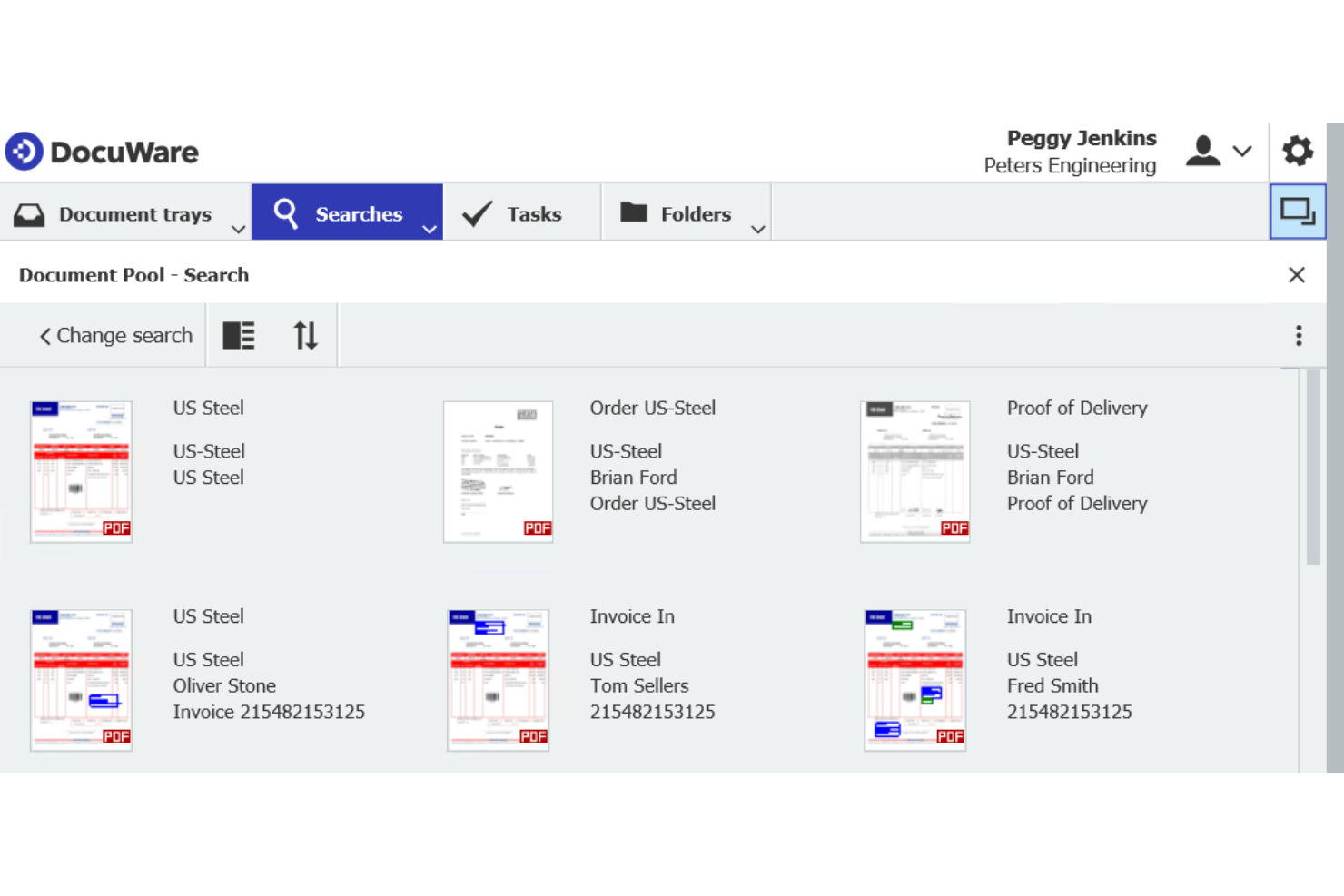
DocuWare is a cloud-based document management platform designed for distributed teams that need secure, centralized control over business documents. It appeals to organizations looking to automate workflows, digitize paper-heavy processes, and maintain compliance across locations.
Who Is DocuWare Best For?
DocuWare is a strong choice for distributed teams in industries like finance, healthcare, and manufacturing that need secure, cloud-based document management and workflow automation.
I picked DocuWare because its drag-and-drop workflow designer lets me build multi-step approval processes without writing a single line of code. For distributed teams, that matters a lot. I also appreciate its preconfigured workflow templates for common processes like invoice approval and employee onboarding, which cut setup time significantly. DocuWare's Intelligent Document Processing uses AI to automatically classify, extract, and index incoming documents, so my team spends less time on manual data entry and more time on actual work.
DocuWare Key Features
- Electronic forms: Build and share customizable web forms to capture structured data and route it directly into document workflows.
- Versioning: Automatically save edited documents as new versions, keeping a full document history without manual tracking.
- Granular permissions control: Define exactly what each user or group can store, retrieve, edit, export, or delete across file cabinets.
- Control dashboard: Monitor the real-time progress of active workflows from a centralized view, giving you visibility into where documents are in any process.
DocuWare Integrations
DocuWare offers native integrations with Microsoft 365, Microsoft Teams, Outlook, SAP, QuickBooks, and Docusign, and provides an API for custom integrations.
Pros and Cons
Pros:
- Granular permissions enhance document security control
- AI-based document processing reduces manual data entry
- No-code workflow builder simplifies process automation
Cons:
- Configuration can take time for complex workflows
- Mobile app capabilities are less advanced

M-Files
Best for metadata-driven document organization

If you need document control that adapts to complex workflows, M-Files is worth a look. It’s built for teams in regulated industries who want to organize, secure, and track documents using metadata instead of traditional folders.
Who Is M-Files Best For?
M-Files is a good fit for midsize to large organizations in regulated industries that need advanced document control and compliance.
Why M-Files Is a Good iManage Alternative
I picked M-Files because its metadata-driven approach to document organization makes finding files fast, even across large repositories. Instead of hunting through folder hierarchies, I can tag documents with properties like project, client, or status, and retrieve them instantly. I also appreciate M-Files' automated workflows, which route documents for review and approval without manual handoffs. For teams managing compliance-heavy documentation, the built-in audit trails and version control give you a clear record of every change.
M-Files Key Features
- AI-powered search (Aino): M-Files' built-in AI assistant lets you query your document repository using natural language to surface accurate, permission-aware results.
- Content collaboration: Co-author documents with internal and external stakeholders directly within M-Files, with all edits tied to a centralized, governed content source.
- Retention policy automation: Apply and enforce data retention rules automatically across the document lifecycle, reducing manual compliance overhead.
- Role-based contextual views: Give each team member a tailored workspace that surfaces only the documents, tasks, and data relevant to their role.
M-Files Integrations
M-Files offers native integrations with Salesforce, Docusign, Microsoft 365, Microsoft Teams, SharePoint, Google Workspace, Adobe Acrobat Sign, and supports custom integrations through its API.
Pros and Cons
Pros:
- Strong audit trails for compliance tracking
- Automated workflows support complex approval chains
- Metadata tagging makes document retrieval fast
Cons:
- Limited offline document access options
- Initial setup requires significant configuration time

Best for Microsoft 365 document collaboration
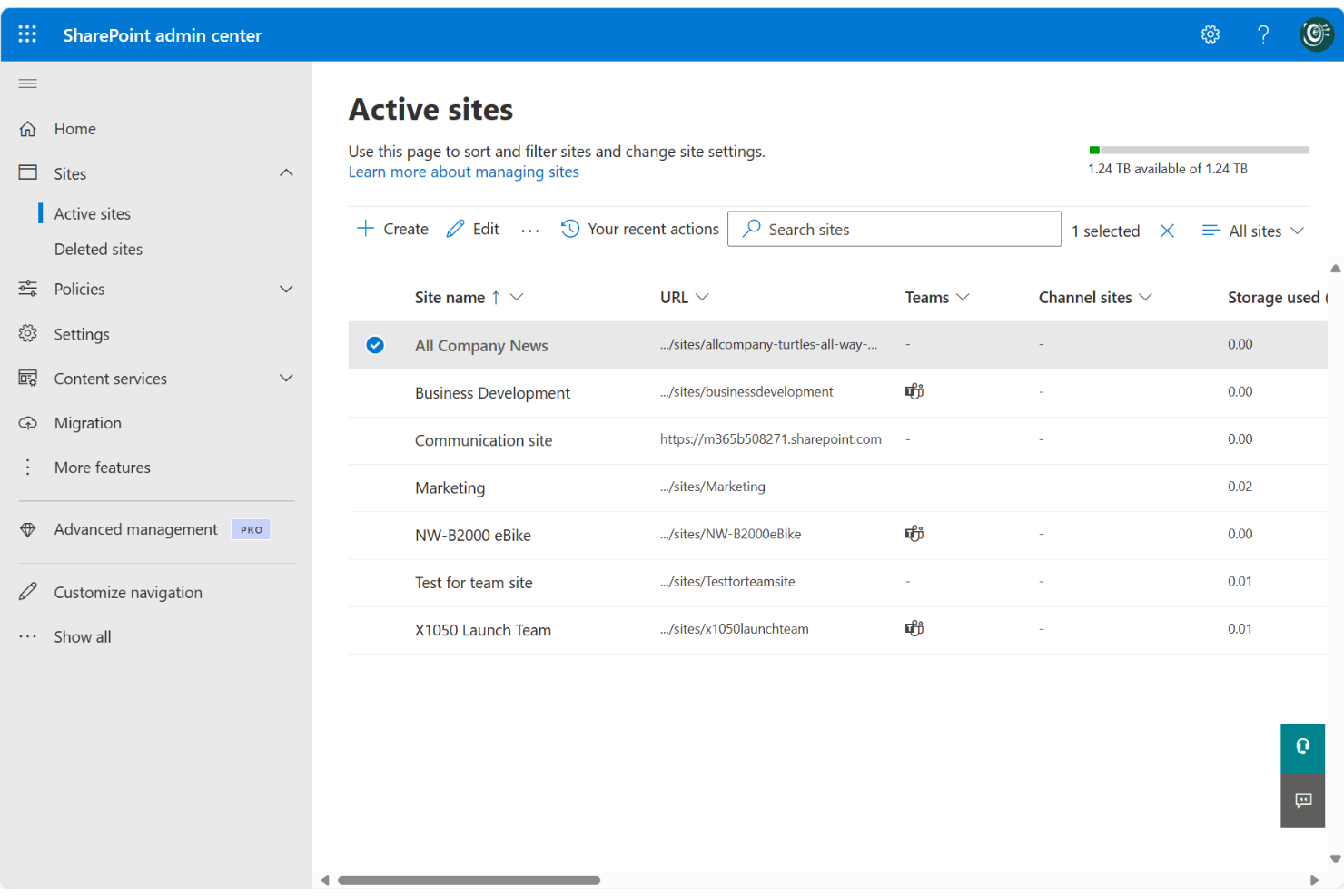
Microsoft SharePoint is a document management and collaboration platform built for organizations that already rely on Microsoft 365. It appeals to teams who need secure file sharing, version control, and centralized access to documents across departments or locations.
Who Is Microsoft SharePoint Best For?
Microsoft SharePoint is a strong fit for mid-size and enterprise organizations that need centralized document management within the Microsoft 365 ecosystem.
Why Microsoft SharePoint Is a Good iManage Alternative
I picked SharePoint because it fits naturally into teams already working inside Microsoft 365. I appreciate how SharePoint's document libraries support co-authoring in real time, so my team can edit Word, Excel, or PowerPoint files simultaneously without version conflicts. I also rely on its metadata-based tagging and content types to organize documents at scale, which makes finding the right file fast, even across large repositories. For teams managing sensitive content, SharePoint's permission inheritance and site-level access controls give me precise control over who sees what.
Microsoft SharePoint Key Features
- Document library versioning: Track every change to a file with automatic version history, so you can restore any previous version without manual backups.
- Site-level permission controls: Set granular access rules at the site, list, or item level to manage exactly who can view or edit specific content.
- Power Automate workflow builder: Build automated document approval and routing workflows using Power Automate directly within SharePoint.
- Intranet site builder: Create branded internal sites with drag-and-drop tools, templates, and web parts to centralize team knowledge and resources.
Microsoft SharePoint Integrations
Microsoft SharePoint has native integrations across the Microsoft ecosystem, including Microsoft 365 and Azure, and provides an API for custom integrations.
Pros and Cons
Pros:
- Granular permissions enable precise access management
- Advanced version control supports document history tracking
- Deep alignment with Microsoft 365 collaboration tools
Cons:
- Metadata structure can be difficult to manage at scale
- Setup and configuration can be complex for new users

Best for team knowledge and documentation hubs

Confluence is a collaborative workspace designed for teams that need to organize, share, and manage documents in a central hub. It’s a strong fit for tech companies and project-driven organizations looking to streamline knowledge sharing and documentation.
Who Is Confluence Best For?
Confluence is a strong choice for cross-functional teams in tech, product, and project management roles who need a collaborative workspace for knowledge and document management.
Why Confluence Is a Good iManage Alternative
I picked Confluence because it gives teams a structured, searchable home for all their documentation. I rely on its Spaces feature to organize content by team, project, or topic, which makes it easy to find the right document without digging through folders. I also appreciate page versioning, which lets me track every change made to a document and revert to earlier versions when needed. For teams already using Jira, the native connection between the two tools means I can link project documentation directly to tasks and issues, keeping context in one place.
Confluence Key Features
- Page templates: Choose from a library of pre-built templates for project plans, product requirements, meeting notes, and more to standardize documentation.
- Inline commenting: Leave comments directly on specific sections of a page to give precise, contextual feedback without separate threads.
- Content permissions: Set access controls at the page or space level for individual users, groups, or anonymous visitors.
- Automation: Build rule-based workflows to handle repetitive tasks like page updates and notifications using no-code custom rules.
Confluence Integrations
Confluence offers native integrations with Jira, Trello, Loom, Slack, Microsoft 365, Google Drive, Dropbox, and Zoom. Thousands of additional integrations are available through the Atlassian Marketplace, and an API is available for custom integrations.
Pros and Cons
Pros:
- Extensive templates standardize documentation workflows
- Real-time editing supports collaborative documentation
- Structured spaces organize team knowledge effectively
Cons:
- Search performance can decline with large datasets
- No native document approval workflows
PandaDoc
Best for document automation and e-signatures
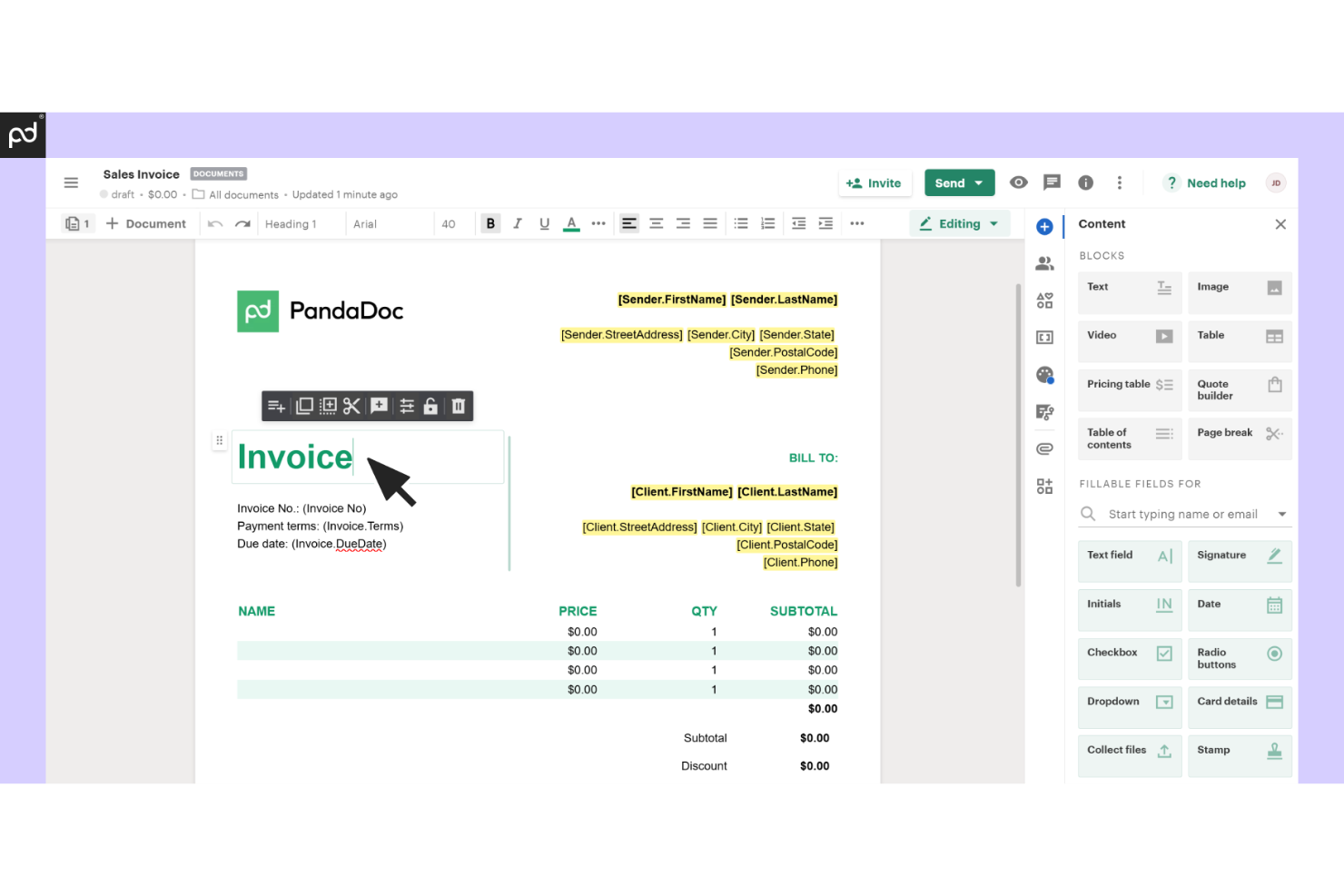
PandaDoc is a document automation platform built for sales, legal, and operations teams that need to create, send, and track digital documents. It stands out for its eSignature capabilities and workflow tools that help businesses manage contracts and proposals in one place.
Who Is PandaDoc Best For?
PandaDoc is a strong fit for sales teams and growing businesses that need fast, automated document workflows and eSignature capabilities.
Why PandaDoc Is a Good iManage Alternative
I picked PandaDoc because it covers the full document lifecycle, from creation to signature, in a single place. I especially like the Smart Content feature, which adapts document content based on the recipient, so I'm not manually editing proposals for every deal. The built-in redlining tool lets my team collaborate on contract edits directly inside the document, without bouncing between email threads and separate files. For sales teams that need documents signed and returned fast, PandaDoc's signing order controls and real-time document tracking make that process much more visible and manageable.
PandaDoc Key Features
- Content locking: Restrict editing on specific sections of a document to prevent unauthorized changes to sensitive or legally binding content.
- Bulk send: Send personalized documents to multiple recipients at once using templates, built-in variables, and CSV file uploads.
- Audit trail and history: Track every document interaction, including who opened, viewed, and signed, with a timestamped activity log.
- Content library: Store reusable layouts, branded assets, and pre-approved content blocks for faster document creation.
PandaDoc Integrations
PandaDoc offers 30+ native integrations, including Salesforce, HubSpot, Pipedrive, Greenhouse, Stripe, PayPal, monday.com, Zoho, QuickBooks, Microsoft OneDrive, and Slack. It also connects with Zapier and provides an API for custom integrations.
Pros and Cons
Pros:
- Content library accelerates document creation workflows
- Real-time tracking improves visibility into document status
- End-to-end document lifecycle management in one platform
Cons:
- Fewer compliance-focused features for regulated industries
- Limited support for advanced document retention policies

ReadAI
Best for AI meeting insights and knowledge capture
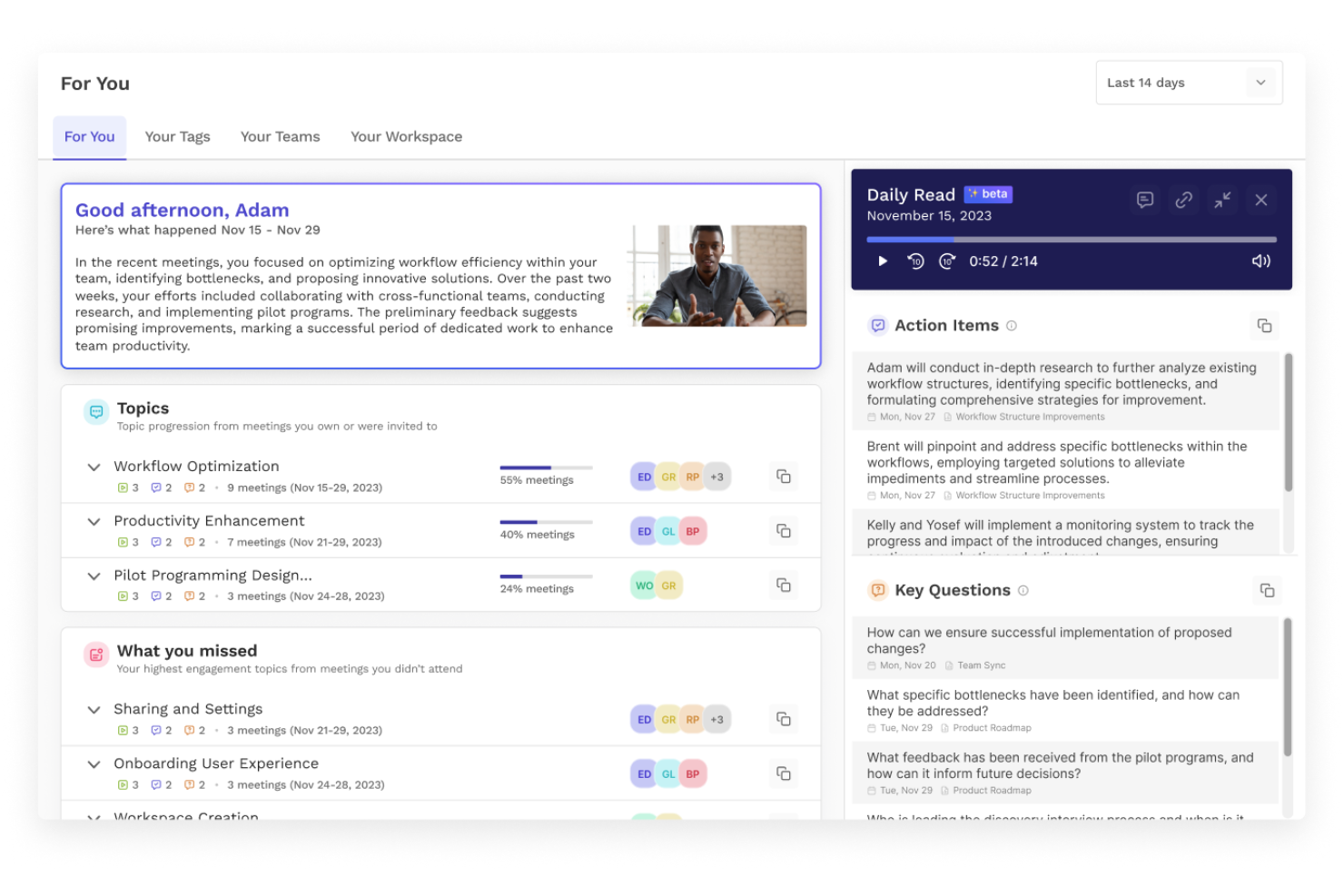
ReadAI is an AI-driven meeting intelligence platform for teams that need to capture, analyze, and share meeting insights automatically. I think project managers and legal teams looking for searchable, structured records of discussions and decisions will find it especially useful as an iManage alternative.
Who Is ReadAI Best For?
ReadAI is a strong fit for distributed teams and project managers who need automated meeting documentation and analytics.
Why ReadAI Is a Good iManage Alternative
I picked ReadAI because it solves a problem iManage doesn't touch: capturing what was actually said, decided, and assigned in meetings. ReadAI automatically generates summaries, transcripts, and action items from meetings across Zoom, Google Meet, and Microsoft Teams, turning conversations into structured, searchable records.
I also appreciate the Search Copilot feature, which lets you query across meetings, emails, and chats in plain language and get cited answers that point back to the exact moment something was discussed. For project managers who need a clear audit trail of decisions made in meetings, that combination of automated documentation and cross-conversation search is genuinely useful in ways iManage's document-centric model can't replicate.
ReadAI Key Features
- Smart scheduler: Analyzes meeting metrics and participant availability to suggest optimal meeting times directly from your calendar.
- Speaker coach: Tracks talk time, sentiment, and engagement during meetings to give individual speakers feedback on their participation patterns.
- File upload and playback: Upload existing audio or video recordings to generate transcripts, summaries, and action items from meetings that weren't captured live.
- For You page: Surfaces recurring topics and themes across all your meetings, tags, and workspaces in a single personalized feed.
ReadAI Integrations
ReadAI offers native integrations with Zoom, Microsoft Teams, Google Meet, Slack, and Google Calendar, and provides an API for custom integrations.
Pros and Cons
Pros:
- Action item extraction supports task follow-up
- Search across meeting data improves knowledge recall
- Automated meeting summaries capture key discussions
Cons:
- Limited access control for sensitive documentation
- Not designed for structured document management
Other iManage Alternatives
Here are some additional iManage alternatives options that didn’t make it onto my shortlist, but are still worth checking out:
- Conga
For Salesforce-based contract management
- Glean
For AI-powered unified knowledge search
- Clio
For combined integrated case management for legal workflows
- OpenText
For enterprise-grade and large-scale document governance
- NetDocuments
For cloud-native document management built for law firms
- Guru
For AI-powered knowledge and workflow automation
- Dozuki
For manufacturing knowledge and process control
- LegalTech
For evolving legal technology solutions and insights
- OCR
For turning scanned documents into searchable and editable content


How I Evaluate iManage Alternatives
I split my evaluation into baseline criteria—like email filing and matter organization—and differentiators that distinguish one platform from another for legal and knowledge teams.
Core Functionality (Table Stakes For This List)
When I'm selecting tools for my list, I rank each one on a scale from 0 (does not offer the functionality) to 5 (excels in this area) for each core functionality listed below. Then, I calculate the tool's total score into a percentage. Each tool needs to achieve a minimum total score of 65% to be considered for inclusion.
- Document Management: I evaluate how a platform handles versioning, check-in/check-out, and lifecycle controls—especially when multiple team members edit the same contract or brief simultaneously.
- Matter-Centric Organization: Each tool should let you group documents, emails, and notes under a single matter or project workspace rather than scattering files across generic folders.
- Email Management: I look for native Outlook integration that lets you file emails and attachments directly into matter workspaces, including thread-level deduplication and metadata tagging.
- Security & Access Controls: Granular permissions, ethical walls, and audit trails matter here—particularly for teams handling privileged or confidential client documents across practice groups.
- Search & Metadata: A good alternative should offer full-text search combined with metadata filtering, so you can locate a specific clause or filing across thousands of documents in seconds.
- Microsoft 365 Integration: I check whether the platform supports inline editing in Word, co-authoring in Teams, and bidirectional sync so users can work within the apps they already rely on daily.
Once I have a list of tools that meet this criteria, I consider what sets each platform apart.
Differentiating Factors (What Sets Vendors Apart)
Here's how I compare and contrast different vendors:
Standout Features
I look for AI-powered document insights—like predictive filing suggestions or clause extraction—that save teams hours of manual categorization per matter. Knowledge management capabilities also carry weight, especially when a firm needs to surface reusable precedents across practice groups without rebuilding searches from scratch. Workflow automation is another area I evaluate, since tools that handle document routing and approval chains keep matter intake moving without constant follow-up.
Beyond Features
Deployment model matters—some firms need cloud-native platforms, while others require on-premise or hybrid options to satisfy data residency policies. I also evaluate the integration ecosystem, checking for prebuilt connectors to practice management and billing systems like Clio or Elite 3E. Pricing and licensing structure is worth examining too, since modular plans that let you add AI or analytics separately give smaller teams room to scale without overpaying for features they don't need yet.
Why Look For an iManage Alternative?
While iManage is a good choice of document control software, there are a number of reasons why some users seek out alternative solutions. You might be looking for iManage work alternatives because…
- You need more flexible integration options
- You want a simpler user interface for non-legal teams
- You require lower-cost plans for smaller organizations
- You need better support for remote or hybrid teams
- You want more advanced collaboration features
- You require global data residency or compliance options
If any of these sound like you, you’ve come to the right place. My list contains several document control software options that are better suited for teams facing these challenges with iManage and looking for alternative solutions.
iManage Key Features
- Document and email management: Centralizes internet documents and email manager functionality to store, organize, and retrieve files securely within a unified system.
- Enterprise content management: Supports structured document storage with version control, metadata tagging, and access permissions for secure ECM environments.
- Case management support: Works alongside practice management software to connect documents with legal matters, improving organization and traceability.
- Electronic signatures: Enables digital signing workflows to support faster document approvals and reduce manual handling.
- On-premise and cloud deployment: Offers flexibility for firms needing on-premise document management software or cloud-based access, depending on compliance requirements.
- User-friendly interface: Designed to improve ease of use for legal professionals managing high volumes of sensitive documents.