

10 Best AI Client Onboarding Software Reviewed in 2026

Best AI Client Onboarding Software Shortlist


Managing client onboarding can be overwhelming, especially when juggling multiple tasks and deadlines. You need a solution that helps your team handle these challenges efficiently. AI client onboarding software can be your ally, automating repetitive tasks and ensuring a smooth transition for your clients.
In my experience, independent testing and reviewing of software reveal the true capabilities of these tools. I've carefully selected the top AI client onboarding solutions that can meet your needs. This listicle will guide you through the features, pros, and cons of each option, helping you make an informed decision.
Your team's success is important, and choosing the right software can make a difference. Let's explore these options together and find the best fit for your team.
Why Trust Our Software Recommendations
Our team has been testing and reviewing software since 2012. As project managers ourselves, we know how difficult—and important—it is to choose the right software.
For this guide, we evaluated tools using hands-on testing and independent research, scoring tools using our selection criteria. We also draw on insights from industry thought leaders and practicing project management experts.
Our reviews reflect our human editorial judgment, not a sales pitch.
Expert reviewers:
AI Client Onboarding Software Comparison Table
This comparison table summarizes pricing details for my top AI client onboarding software selections:
| Tool | Best For | Trial Info | Price | ||
|---|---|---|---|---|---|
| 1 | Best for AI-built onboarding plans from SOPs | 14-day free trial | From €59/user/month | Website | |
| 2 | Best for automated enrolments | 14-day free trial | Pricing upon request | Website | |
| 3 | Best for mobile collaboration | Free plan available | From $99/month | Website | |
| 4 | Best for multilingual client onboarding | 10-day free trial + free demo available | From $40/month (billed annually) | Website | |
| 5 | Best for project transparency | 14-day free trial + free demo available | From $19/user/month (billed annually) | Website | |
| 6 | Best for reducing churn | Free demo available | Pricing upon request | Website | |
| 7 | Best for in-app guidance | Free trial available | Pricing upon request | Website | |
| 8 | Best for project visibility | Free demo available | Pricing upon request | Website | |
| 9 | Best for customer messaging | 14-day free trial and free demo available | From $19/user/month (billed annually) | Website | |
| 10 | Best for decentralized identity verification | Free plan + free demo available | From $350/month | Website |

Best AI Client Onboarding Software Review
Below are my detailed summaries of the best AI client onboarding software that made it onto my shortlist. My reviews offer a detailed look at the key features, pros & cons, integrations, and ideal use cases of each tool to help you find the best one for you.

Best for AI-built onboarding plans from SOPs
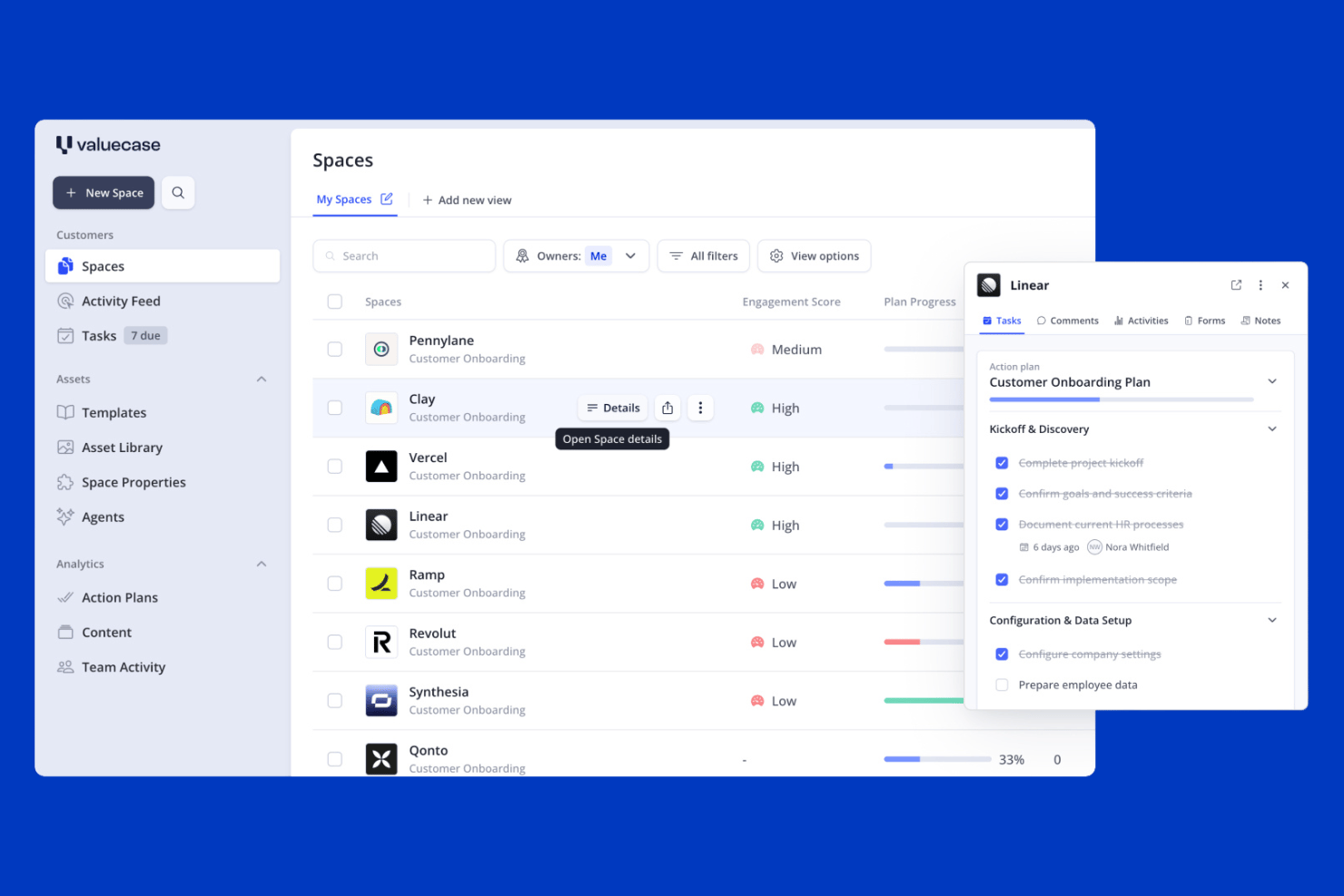
Valuecase is an AI client onboarding platform that combines branded client portals, mutual action plans, automated workflows, and AI-generated onboarding plans built from uploaded SOPs, transcripts, and CRM data.
Who Is Valuecase Best For?
Valuecase is a strong fit for B2B SaaS and professional services teams that want to turn their existing SOPs and process documents into client-ready onboarding plans without building everything from scratch.
Why I Picked Valuecase
I picked Valuecase as one of the best because it's the only tool I've seen that takes your existing SOPs, slide decks, and process documents and turns them into a fully structured client onboarding plan. Upload a transcript from a discovery call, and the AI populates milestones, tasks, and content pages tailored to that specific client. I also like that template-inherited automations mean every new client Space launches with reminders, conditional logic, and follow-up sequences already built in.
Valuecase Key Features
- Branded client portal: Each client gets a dedicated, white-labeled Space accessible via shared link—no client login required.
- Conditional logic forms: Auto-saving intake forms show or hide fields based on prior responses to capture the right data from each client.
- IFTTT workflow automation: Triggers fire on form submissions, task completions, or client inactivity to send emails, unlock content, or update task statuses.
- Real-time activity insights: Tracks client page views, video watch time, and form submissions so your team can spot stalled accounts before they go dark.
Valuecase Integrations
Valuecase offers native integrations with HubSpot, Salesforce, Slack, Microsoft Teams, Gmail, and Google Calendar, plus MCP connections for Claude and ChatGPT. It also supports an API for custom integrations and Zapier.
Pros and Cons
Pros:
- At-risk clients flagged with real-time activity insights
- No-login required for client portal access
- AI turns SOPs into onboarding plans instantly
Cons:
- No native AI chatbot for client self-service
- No built-in e-signature integration available
SkyPrep
Best for automated enrolments
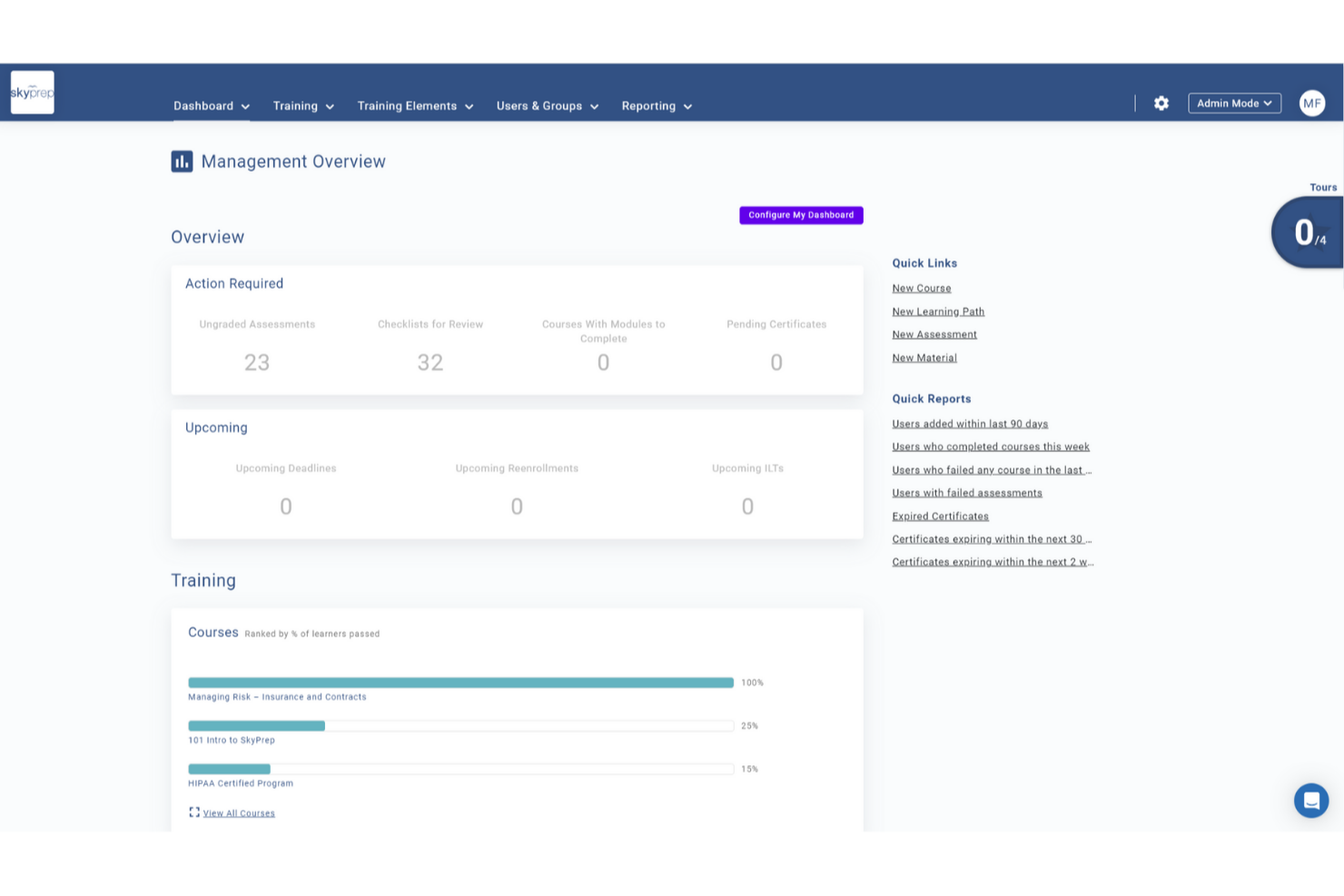
If you want to improve your client onboarding with AI, SkyPrep is a practical option for businesses in a wide range of industries. The platform focuses on making onboarding more consistent and efficient through structured learning paths, automated enrollments, and interactive content that can be adapted to each client’s needs. By centralizing training materials and integrating with existing HR systems, SkyPrep helps reduce onboarding gaps and supports better client satisfaction and retention.
Why I Picked SkyPrep
I chose SkyPrep because it automates and personalizes onboarding in a way that fits AI-driven client onboarding workflows. Automated enrolments assign new clients to the right courses based on their roles, reducing manual administration and ensuring relevant training from the start. The platform also supports flexible content creation, letting you build onboarding courses with multiple formats or AI-generated interactive elements to keep training engaging and up to date. In addition, digital sign-offs make it easy to securely capture client acknowledgments, supporting compliance and confirming that key policies have been reviewed and understood.
SkyPrep Key Features
In addition to its standout features, SkyPrep offers several other functionalities that enhance the onboarding experience:
- Learning Paths: Structured training journeys with prerequisites guide employees through the necessary steps, ensuring they gain the skills needed for their roles.
- Support for Company Culture: Engaging content helps new hires connect with your company's mission and values from day one.
- Introduction to Tools & Systems: Interactive resources familiarize new hires with essential software and platforms, aiding their transition.
- Compliance Training: Provides clear training on policies and regulations to reduce risk and ensure understanding across your team.
SkyPrep Integrations
Integrations include ADP, Zoom, BambooHR, Paycor, Google Workspace, Microsoft Teams, Salesforce, Slack, and Asana. An API is also available for custom integrations.
Pros and Cons
Pros:
- AI-driven scenarios improve real-world decision-making skills
- Hotspots support deeper understanding of complex concepts
- Org charts clarify team structure and dynamics
Cons:
- Mobile app lacks offline access and gamification
- Basic built-in authoring tools with few advanced features

Moxo
Best for mobile collaboration

Moxo is a client interaction hub designed for businesses to manage client communications and workflows effectively. It caters to industries like banking and real estate, offering AI capabilities to enhance collaboration and facilitate smoother interactions.
Why I picked Moxo: Its focus on business collaboration makes it perfect for teams needing fluid communication with clients. AI features like automated task management and intelligent notifications ensure efficient workflow management. These tools help your team stay organized and responsive to client needs. Moxo's capabilities ensure fluid collaboration across various business functions.
Standout features & integrations:
Features include secure client portals, task automation, and document collaboration. These features help your team manage client interactions efficiently. You can also use video conferencing to facilitate real-time communication.
Integrations include Salesforce, Microsoft 365, Google Workspace, Slack, Zoom, Dropbox, Docusign, QuickBooks, Box, and Stripe.
Pros and Cons
Pros:
- Supports real-time communication with video conferencing
- Automates tasks for efficient workflow management
- Enhances collaboration with secure client portals
Cons:
- Limited customization options for specific industries
- May require time to set up client portals

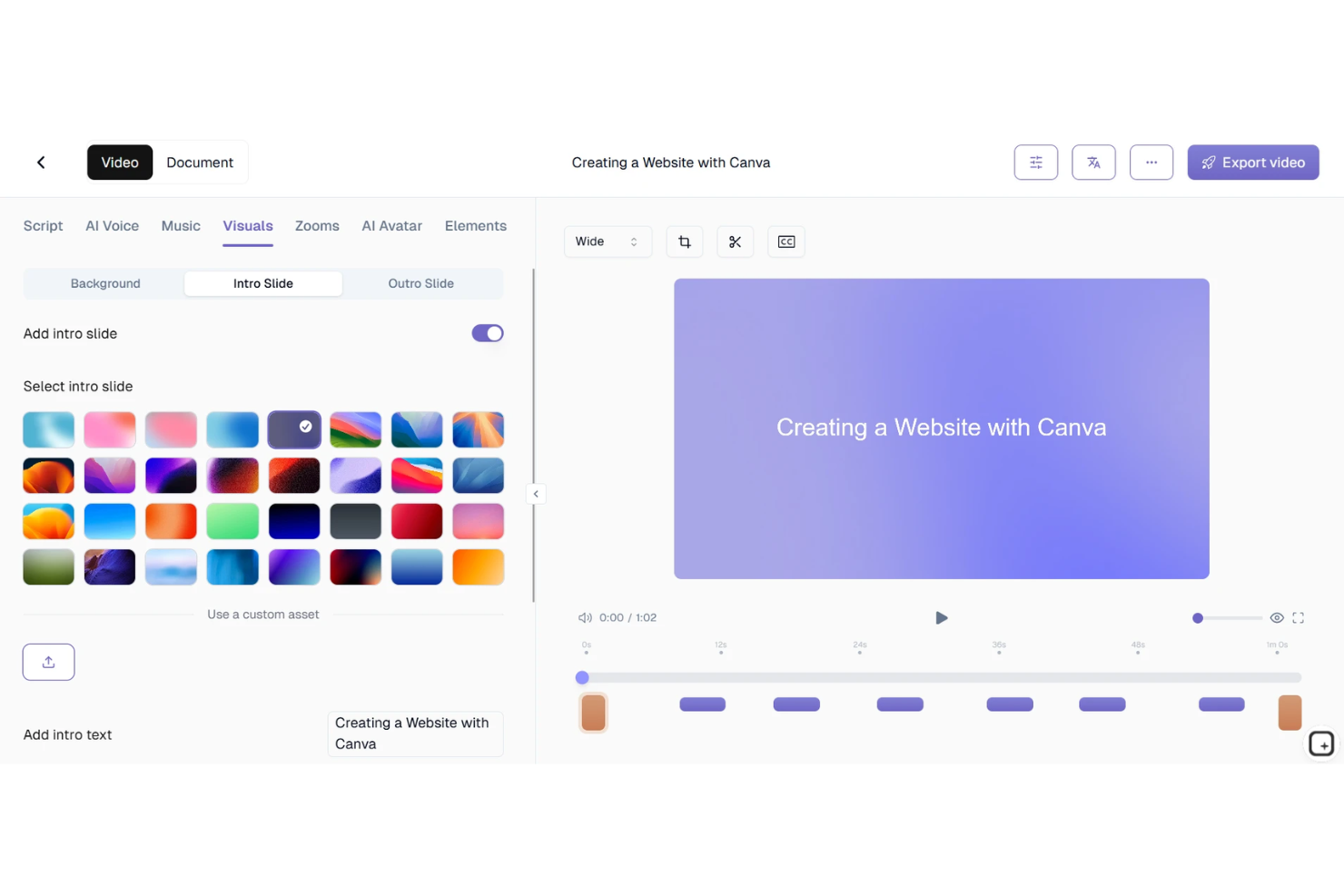
For businesses seeking AI client onboarding solutions, TruPeer offers a tool that transforms how teams create and deliver onboarding content. Designed for industries ranging from SaaS startups to professional services, TruPeer addresses the need for effective onboarding by offering tools that turn screen recordings into professional videos and documentation. This software caters to customer success teams, agencies, and enterprises, aiming to reduce onboarding time, improve client satisfaction, and minimize churn.
Why I Picked TruPeer
I picked TruPeer for its ability to swiftly convert screen recordings into polished onboarding videos, utilizing AI voiceovers and multilingual support. Its instant video generation feature allows your team to create professional content without extensive editing skills, making it accessible and practical. Additionally, the platform's customizable branding ensures that your onboarding materials align with your company's identity, providing a cohesive experience for new clients.
TruPeer Key Features
In addition to its standout video creation capabilities, TruPeer offers other valuable features:
- Automated Playbooks: Create reusable onboarding templates for different client segments, streamlining your onboarding process.
- Task Management: Assign tasks, set deadlines, and track progress all in one centralized location.
- Embedded Resources: Attach guides and training materials directly to onboarding steps, ensuring clients have the resources they need.
- Collaboration Tools: Enhance communication and updates among team members and clients, facilitating a smoother onboarding journey.
TruPeer Integrations
Native integrations are not currently listed by TruPeer.
Pros and Cons
Pros:
- Includes enterprise-grade SSO security
- Supports over 65 languages
- AI-generated documentation from screen recordings
Cons:
- AI output may require editing
- Limited free plan functionality

Best for project transparency

Rocketlane is a project management and client onboarding platform designed for customer success and implementation teams to ensure smooth project delivery. It provides AI-driven insights and collaboration tools to improve project transparency and client communication
Why I picked Rocketlane: It focuses on project transparency, making it ideal for teams needing clear communication with clients. AI features like predictive analytics and automated status updates keep everyone informed. These tools help your team anticipate project hurdles and maintain clear timelines. Rocketlane's emphasis on visibility ensures both your team and clients are aligned.
Standout features & integrations:
Features include timeline tracking that helps monitor project progress, milestone management to ensure key objectives are met, and collaboration tools that facilitate team communication and coordination.
Integrations include Salesforce, Slack, HubSpot, Jira, Trello, Asana, Microsoft Teams, Google Calendar, monday.com, and Freshdesk.
Pros and Cons
Pros:
- Effective milestone tracking
- Ready-to-use templates
- Consistent project execution
Cons:
- Some features need integration setup
- Requires regular updates
New Product Updates from Rocketlane

Rocketlane Introduces Governance and Workforce Agents
Rocketlane introduces Governance Agents and Workforce Agents to automate delivery processes and recurring tasks. These updates help teams enforce rules and streamline project execution. For more information, visit Rocketlane’s official site.
 .
.
Best for reducing churn

ChurnZero is a customer success platform designed for SaaS companies to reduce churn and increase customer engagement. It leverages AI to provide insights into customer health and automate engagement strategies.
Why I picked ChurnZero: Its focus on customer retention makes it essential for teams aiming to reduce churn rates. AI features like customer health scoring and automated playbooks help you proactively manage customer relationships. These tools enable your team to identify at-risk customers and tailor engagement efforts. ChurnZero's emphasis on data-driven insights supports effective customer success strategies.
Standout features & integrations:
Features include in-app messaging that allows direct communication with users, customer health dashboards to monitor client status, and automated playbooks that guide your team in managing customer interactions effectively.
Integrations include Salesforce, HubSpot, Zendesk, Slack, Microsoft Dynamics 365, Gainsight, Freshdesk, Pipedrive, Intercom, and Mailchimp.
Pros and Cons
Pros:
- Customizable engagement strategies
- Provides real-time customer insights
- Strong focus on reducing churn rates
Cons:
- May require dedicated onboarding support
- Learning curve for new users

Appcues
Best for in-app guidance

Appcues is a user onboarding platform designed for product teams to enhance user experience and engagement. It uses AI to create personalized onboarding flows and in-app guidance, helping users navigate products effectively.
Why I picked Appcues: Appcues excels in offering in-app guidance with its interactive walkthroughs and tooltips, helping users understand and adopt new features quickly. It provides customizable user flows that can be tailored to specific user segments. AI features like behavior-driven triggers and personalized user paths offer tailored experiences. These tools help your team engage users right from the start.
Standout features & integrations:
Features include interactive walkthroughs that guide users through new features, customizable user flows to tailor experiences, and analytics that provide insights into user engagement and behavior.
Integrations include Segment, Mixpanel, HubSpot, Salesforce, Slack, Marketo, Google Analytics, Amplitude, Intercom, and Zendesk.
Pros and Cons
Pros:
- Easy to implement without coding
- Provides analytics for tracking user engagement
- Tailors user experiences with personalized paths
Cons:
- Limited advanced customization options
- May require time to optimize onboarding flows

GUIDEcx
Best for project visibility

GUIDEcx is a client onboarding platform designed for project managers and client success teams to enhance collaboration and transparency during the onboarding process. It uses AI to automate task assignments and send reminders, ensuring projects stay on track.
Why I picked GUIDEcx: Its collaborative onboarding approach is ideal for teams that need to work closely with clients. AI features like task automation and intelligent reminders keep everyone aligned and informed. These tools help your team manage projects efficiently while keeping clients in the loop. GUIDEcx's focus on collaboration ensures that both your team and clients have visibility into project progress.
Standout features & integrations:
Features include customizable dashboards that provide a detailed view of project progress, automated notifications to keep everyone informed, and task dependency tracking to help manage workflows efficiently.
Integrations include Salesforce, HubSpot, Slack, Jira, Asana, Trello, Microsoft Teams, Google Calendar, QuickBooks, and monday.com.
Pros and Cons
Pros:
- Strong client collaboration features
- Customizable project templates
- Automated reminders keep tasks on track
Cons:
- Limited advanced reporting options
- May require time to learn all features

Intercom
Best for customer messaging

Intercom is a customer communication platform used by sales, marketing, and support teams to engage with customers through messaging. It offers AI-driven chatbots and automated workflows to enhance customer interactions and support overall onboarding processes.
Why I picked Intercom: Its focus on customer messaging makes it ideal for teams looking to improve communication. Features like AI-driven chatbots and automated message routing directly support customer engagement. These capabilities help your team deliver timely responses and personalized experiences. Intercom's automation tools also reduce manual workload, allowing your team to focus on more complex tasks.
Standout features & integrations:
Features include customizable chat widgets, in-app messaging, and targeted email campaigns. These tools help you engage customers at the right moment. The platform also offers real-time customer insights to guide your interactions.
Integrations include Slack, Salesforce, HubSpot, Shopify, Marketo, Zendesk, Mailchimp, Stripe, Google Analytics, and WordPress.
Pros and Cons
Pros:
- Customizable messaging options
- Automates message routing for efficiency
- AI chatbots enhance customer engagement
Cons:
- Limited functionality for non-messaging tasks
- May require training for advanced features

Dock
Best for decentralized identity verification

Dock is a decentralized identity management platform designed for businesses to issue, verify, and monetize digital ID credentials. It caters to industries requiring secure identity verification, offering AI-driven solutions for enhanced security and compliance.
Why I picked Dock: Its focus on decentralized identity makes it ideal for businesses needing secure credential management. AI features like reusable KYB checks and biometric data binding enhance security and efficiency. These capabilities help your team manage identity workflows without disrupting existing processes. Dock's decentralized approach ensures flexible and secure identity management across industries.
Standout features & integrations:
Features include customizable templates that help standardize onboarding processes, task tracking to keep everyone on schedule, and real-time collaboration tools that facilitate direct interaction with clients.
Integrations include Salesforce, HubSpot, Slack, Google Drive, Trello, Asana, Dropbox, Microsoft Teams, Jira, and monday.com.
Pros and Cons
Pros:
- Customizable engagement strategies
- Provides real-time customer insights
- Strong focus on reducing churn rates
Cons:
- May require dedicated onboarding support
- Learning curve for new users
Other AI Client Onboarding Software
Here are some additional AI client onboarding software options that didn’t make it onto my shortlist, but are still worth checking out:
- ShareFile
For secure file sharing
- Fenergo
For financial compliance
- Motion.io
For task automation
- Product Fruits
For user onboarding
- iSpring LMS
For e-learning courses
- Guideless
For zero-code onboarding setup
- ClickUp
For customizable workflows
- Planhat
For customer success metrics
- Userpilot
For onboarding experiments
- Pendo
For user analytics
- Chameleon
For product tours


How I Evaluate AI Client Onboarding Software
Every tool on this list needs to do more with AI than slap a chatbot on a form—I look for platforms where AI actually cuts onboarding time by auto-generating tasks, parsing intake data, or drafting client follow-ups. I split my evaluation into core functionality a tool must have to qualify and the differentiating factors that separate a good fit from a great one.
Core Functionality (Table Stakes For This List)
When I'm selecting tools for my list, I rank each one on a scale from 0 (does not offer the functionality) to 5 (excels in this area) for each core functionality listed below. Then, I calculate the tool's total score into a percentage. Each tool needs to achieve a minimum total score of 65% to be considered for inclusion.
- AI Intake Automation: I evaluate how well the tool parses client forms, documents, and emails into structured project data—like pulling scope details from a signed SOW.
- Automated Onboarding Workflows: Each tool should offer templated workflows with triggers and sequencing, so a new client signing a contract kicks off the right tasks automatically.
- Client-Facing Portal: I look for a branded space where clients can upload files, track milestones, and complete approvals without toggling between email threads and shared drives.
- AI Task & Project Generation: I check whether AI can turn real inputs—like a discovery call transcript or intake form—into a full onboarding plan with tasks, owners, and deadlines.
- Integrations & Data Sync: The tool needs to connect with the systems teams already use, from CRMs like Salesforce and HubSpot to PM tools like Asana and Jira.
- AI Communication Assistance: I evaluate whether AI helps draft client updates, summarize meetings, or trigger follow-ups—things that otherwise eat hours each week during onboarding.
Once I have a list of tools that meet the criteria, I consider what sets each platform apart.
Differentiating Factors (What Sets Vendors Apart)
Here's how I compare and contrast different vendors:
Standout Features
Predictive risk alerts are a big differentiator—I look for tools that flag stalled onboarding projects before a client disengages, based on patterns like missed milestones or declining portal activity. Conditional client journeys also matter because a startup onboarding shouldn't follow the same path as an enterprise rollout. I check whether the tool adapts steps, content, and timelines by client segment. AI meeting intelligence rounds this out by turning kickoff call recordings into tasks and notes automatically.
Beyond Features
Data security matters here because onboarding involves sensitive client contracts, financial details, and personal data. I check for SOC 2 Type II compliance and clear AI data-handling policies—especially whether the vendor trains models on customer data. Pricing structure is another factor I evaluate closely, since per-client models can get expensive fast for agencies onboarding dozens of accounts each quarter. I also consider time-to-value: how quickly a team can launch its first onboarding workflow using prebuilt templates rather than building everything from scratch.
How to Choose AI Client Onboarding Software
It’s easy to get bogged down in long feature lists and complex pricing structures. To help you stay focused as you work through your unique software selection process, here’s a checklist of factors to keep in mind:
| Factor | What to Consider |
|---|---|
| Scalability | Will the software grow with your business? Consider your projected growth and whether the tool can handle increased users and data without a hitch. |
| Integrations | Does it play well with your existing tools? Check for native integrations with your current software stack to avoid manual workarounds. |
| Customizability | Can you tailor it to your workflows? Look for flexibility in adapting the software to your specific processes and branding needs. |
| Ease of use | Is it intuitive for your team? Evaluate the learning curve and whether your team can quickly adapt without extensive training. |
| Implementation and onboarding | How long will the setup take? Consider the time and resources required to get up and running, including data migration and training. |
| Cost | Is it within your budget? Compare pricing plans and watch for hidden fees. Consider whether the cost matches the value and ROI you expect to achieve. |
| Security safeguards | Does it protect sensitive data? Ensure the software complies with industry standards for data protection and offers features like encryption and access controls. |
| Compliance requirements | Does it meet regulatory needs? Verify if the software supports compliance with relevant regulations, especially if you're in a highly regulated industry like finance or healthcare. |
What Is AI Client Onboarding Software?
AI-powered client onboarding software is designed to automate and enhance the process of bringing new clients into a business. Project managers, customer success teams, and onboarding specialists typically use these tools to improve efficiency and client satisfaction throughout the onboarding journey.
Automated workflows, real-time analytics, and customizable templates help with managing tasks, tracking progress, and personalizing the onboarding experience. Overall, these tools save time and reduce errors, making the onboarding process smoother for both businesses and clients.
Features
When selecting AI customer onboarding software, keep an eye out for the following key features:
- Automated workflows: Offloads tasks by automating repetitive processes, saving time and reducing errors.
- Customizable templates: Allow you to tailor onboarding processes to fit your specific needs and branding.
- Real-time analytics: Provides insights into client interactions and progress along the customer journey, enabling data-driven decisions.
- Secure messaging: Ensures private and reliable communication between your team and clients.
- Task management: Helps organize and track tasks, ensuring nothing falls through the cracks during onboarding.
- Interactive product tours: Guides users through new features, enhancing understanding and adoption.
- Integration capabilities: Connects seamlessly with other tools in your tech stack to create a unified workflow.
- Mobile accessibility: Offers the flexibility to manage onboarding processes on the go, anytime, anywhere.
- Client portals: Provide clients with a centralized hub for all onboarding activities, improving transparency and engagement.
- Compliance support: Ensures adherence to industry regulations, especially important for regulated industries.
Benefits
Implementing an AI onboarding tool provides several benefits for your team and your business. Here are a few you can look forward to:
- Increased efficiency: Many teams use AI to automate manual processes, workflows and onboarding tasks.
- Enhanced client satisfaction: Customizable templates and interactive product tours personalize the onboarding experience.
- Better decision-making: Real-time analytics provide insights that help you make informed decisions when it comes to time-to-value.
- Improved communication: Secure messaging ensures reliable and private interactions with clients and team members.
- Greater flexibility: Mobile accessibility allows you to manage onboarding processes from anywhere.
- Stronger compliance: Compliance support helps your business adhere to industry regulations and build trust with clients.
- Higher engagement: Client portals and integration capabilities keep clients involved and connected throughout the onboarding process.
Costs and Pricing
Selecting AI client onboarding software requires an understanding of the various pricing models and plans available. Costs vary based on features, team size, add-ons, and more. The table below summarizes common plans, their average prices, and typical features included in AI client onboarding software solutions:
Plan Comparison Table for AI Client Onboarding Software
| Plan Type | Average Price | Common Features |
|---|---|---|
| Free Plan | $0 | Basic task management, limited analytics, and community support. |
| Personal Plan | $5-$25/user/month | Customizable templates, basic integrations, and secure messaging. |
| Business Plan | $30-$75/user/month | Advanced analytics, interactive product tours, and mobile access. |
| Enterprise Plan | $100-$200/user/month | Full integration capabilities, dedicated support, and compliance tools. |
AI Client Onboarding Software FAQs
Here are some answers to common questions about AI client onboarding software:
How does AI client onboarding software improve efficiency?
AI client onboarding software automates routine tasks, freeing up your team to focus on strategic interactions with clients. By handling busywork, AI reduces errors and speeds up the onboarding process. This allows your team to engage more meaningfully with clients and improve overall satisfaction.
Can AI client onboarding software personalize the onboarding experience?
Yes, AI tools can tailor onboarding materials and experiences to meet specific client needs. By analyzing user data, AI can adapt onboarding content in real-time, ensuring new customers eceive the most relevant information and support. This personalization means tailored onboarding workflows and a unique client experience from day one.
What role does AI play in data analysis for onboarding?
AI analyzes customer data to provide actionable insights, helping your team prioritize accounts needing attention. These insights enable more informed decision-making and strategy formulation, ensuring a more effective onboarding process tailored to individual client needs.
How does AI support customer success managers during onboarding?
AI assists customer success managers by automating administrative tasks, creating personalized content, and analyzing data. This support allows managers to focus on building stronger client relationships and addressing strategic needs, ultimately enhancing the onboarding experience.
Are there specific AI tools recommended for onboarding?
Yes, several AI tools are designed to enhance onboarding, such as meeting assistants that capture and summarize calls, personalized onboarding platforms that adapt to user behavior, and data enrichment tools that provide insights into stakeholder dynamics.
What should I consider when integrating AI into my onboarding process?
When integrating AI, consider starting with a phased approach, beginning with internal tools before expanding to customer-facing applications. Ensure the AI solutions align with your team’s goals and workflows, and maintain a balance between automation and essential human interactions.