

10 Best AI Brainstorming Tools Reviewed in 2026

Best AI Brainstorming Tools Shortlist


Managing projects calls for fresh thinking and smooth coordination, two areas where AI brainstorming tools can make a real difference. These platforms go beyond basic idea capture, offering smart features like automated concept generation, intelligent prioritization, and built-in team collaboration spaces.
In my experience, the right AI tool can transform the way teams tackle challenges, turning scattered ideas into organized, actionable plans with impressive efficiency.
In this guide, I’ll walk you through the standout options I've evaluated based on how well they support project workflows, speed up decision-making, and inspire creative thinking.
Why Trust Our Software Recommendations
Our team has been testing and reviewing software since 2012. As project managers ourselves, we know how difficult—and important—it is to choose the right software.
For this guide, we evaluated tools using hands-on testing and independent research, scoring tools using our selection criteria. We also draw on insights from industry thought leaders and practicing project management experts.
Our reviews reflect our human editorial judgment, not a sales pitch.
Expert reviewers:
AI Brainstorming Tools Comparison Table
This comparison table summarizes pricing details for my top AI brainstorming tool selections.
| Tool | Best For | Trial Info | Price | ||
|---|---|---|---|---|---|
| 1 | Best with workflow customization at scale | Free plan available | From $9/user/month (billed annually) | Website | |
| 2 | Best for dynamic request forms | 14-day free trial | From $10/user/month (billed annually) | Website | |
| 3 | Best for visual brainstorming | Free plan + free demo available | From $6.50/user/month | Website | |
| 4 | Best for AI-driven insights | Free plan available | From $20/user/month | Website | |
| 5 | Best for free mind mapping | Free plan available | From $4.08/month (billed annually) | Website | |
| 6 | Best for AI task assignment | Free plan available | From $4.92/month | Website | |
| 7 | Best for simple mind maps | Free plan available | From $8.30/month (billed annually) | Website | |
| 8 | Best for AI content generation | Free plan available | From $16/month (billed annually) | Website | |
| 9 | Best for interactive maps | Free plan available | From $9.99/month | Website | |
| 10 | Best for marketing teams | Free plan available | From $20/user/month (billed annually) | Website |


Best AI Brainstorming Tool Reviews
Below are my detailed summaries of the best AI brainstorming tools that made it onto my shortlist. My reviews offer a detailed look at the key features, pros & cons, integrations, and ideal use cases of each tool to help you find the best one for you.

Best with workflow customization at scale
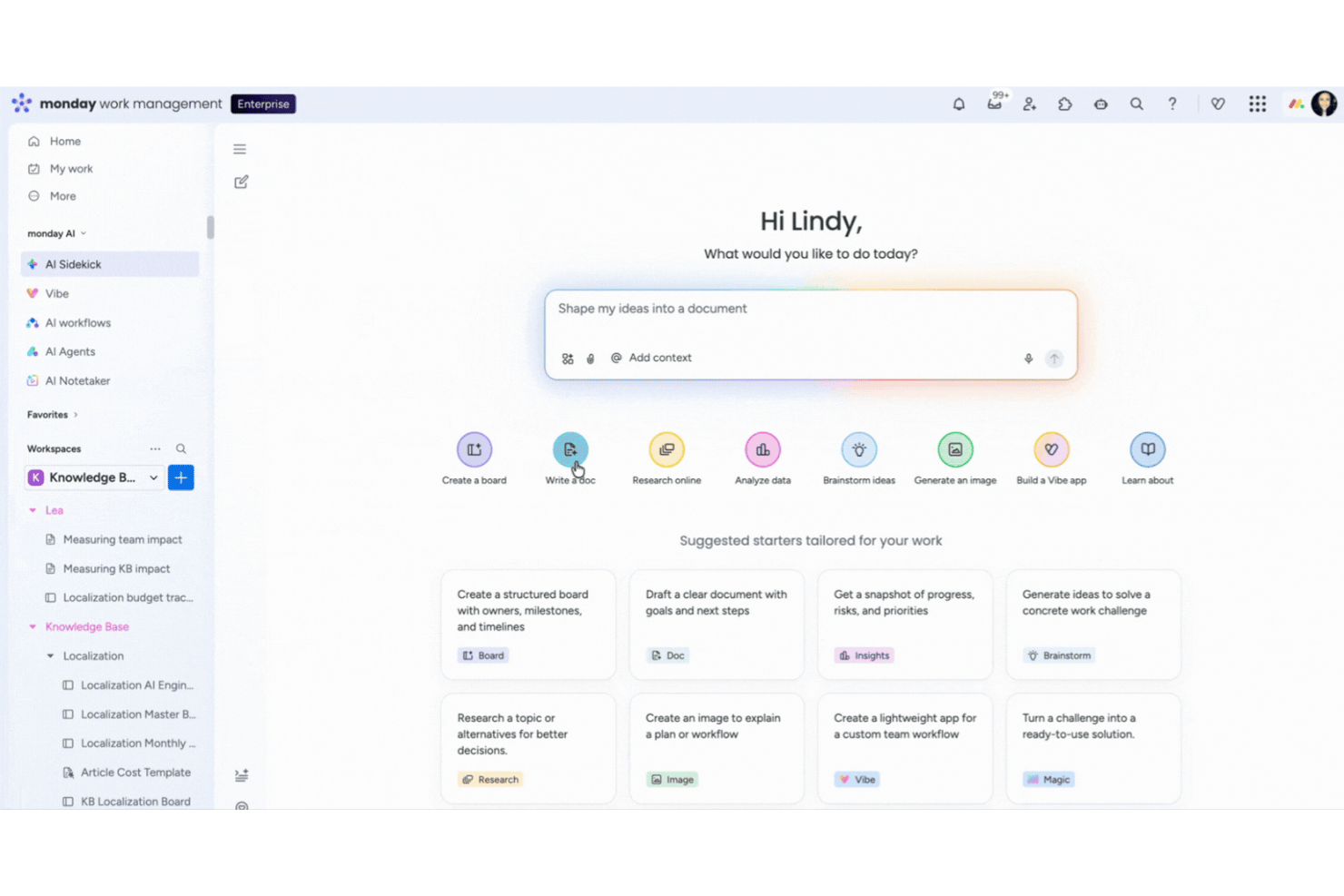
monday AI Workspace is an AI-powered work management platform that turns plain-language prompts into structured workflows, automates task generation, and connects brainstorming outputs directly to execution across cross-functional teams.
Who Is monday AI Workspace Best For?
It's a strong fit for mid-size to enterprise teams that need brainstorming outputs to flow directly into scalable, cross-departmental project workflows.
Why I Picked monday AI Workspace
monday AI Workspace earns its spot on my shortlist because no other tool I've tested converts brainstorm output into fully built, executable workflows as fast. I use monday magic to describe a project goal in one sentence and get back a complete board with tasks, dependencies, and statuses already structured. The AI Categorize block then automatically sorts incoming ideas by priority based on keywords, which keeps large brainstorms from collapsing into noise.
monday AI Workspace Key Features
- AI meeting notetaker: Summarizes team meetings and automatically turns discussion points into actionable insights.
- AI columns: Embeds AI-powered task automation and suggestions directly into boards for ongoing brainstorming.
- Risk management power-up: Monitors project timelines and dependencies, flagging at-risk tasks for quick team action.
- 200+ project templates: Offers a large library of ready-to-use templates for project brainstorming, retrospectives, and risk analysis.
monday AI Workspace Integrations
monday AI Workspace offers hundreds of native integrations through its built-in integrations and marketplace, including Slack, Jira, GitHub, Salesforce, HubSpot, Google Workspace, Microsoft Teams, Trello, Dropbox, and Zoom. It also supports Zapier and provides an API for custom integrations.
Pros and Cons
Pros:
- Automated meeting summaries convert into actionable tasks
- Built-in risk tracking and task dependency mapping
- AI generates entire project boards from prompts
Cons:
- Advanced AI features require higher plan
- No visual whiteboard or mind map canvas
New Product Updates from monday AI Workspace
monday AI Workspace Adds Human Approval Routing
monday AI Workspace adds a human-in-the-loop approval block to AI Workflows, sending approval requests and routing workflow paths based on responses. For more information, visit monday AI Workspace's official site.

Wrike
Best for dynamic request forms
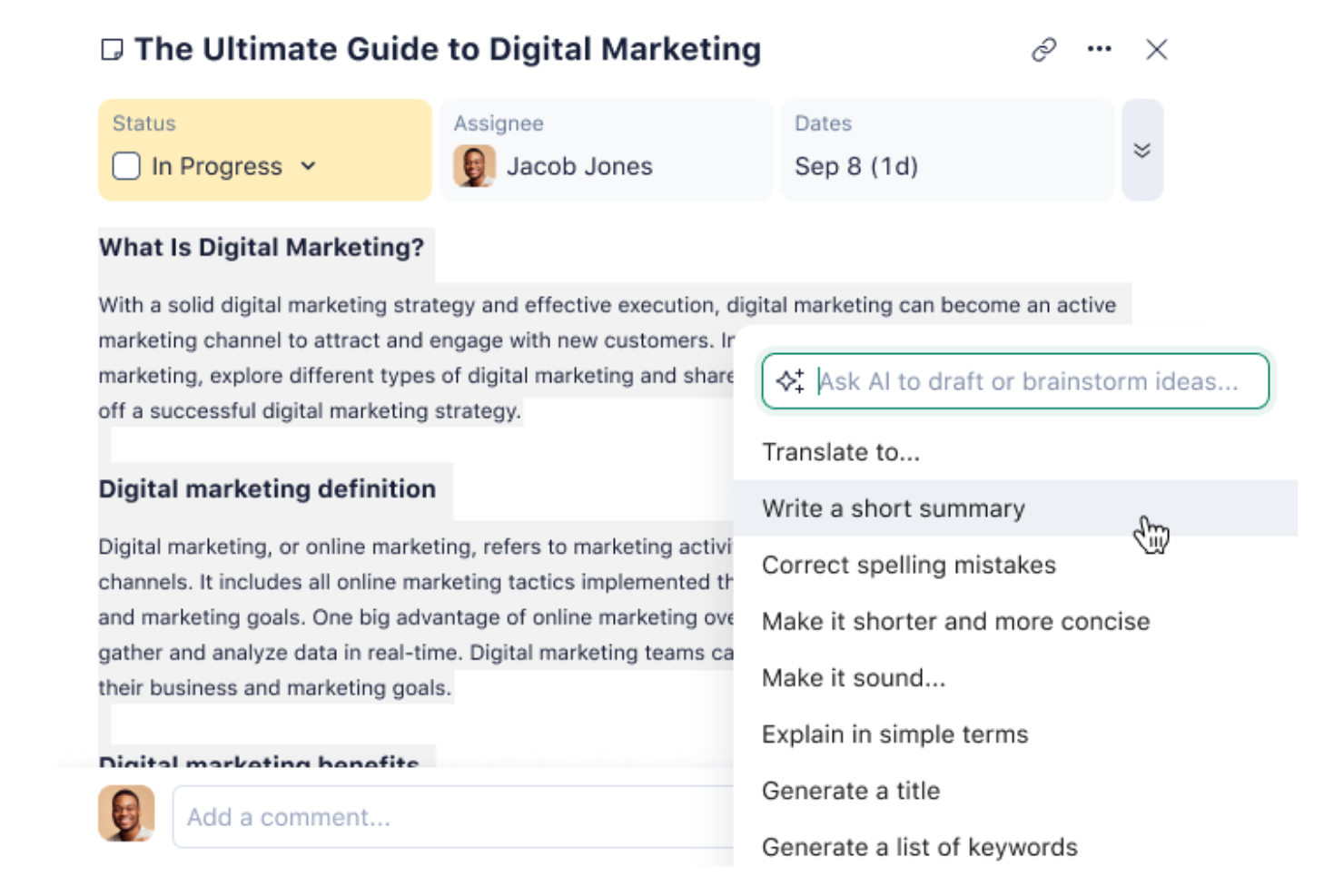
For teams seeking an AI brainstorming tool, Wrike serves as an ideal platform to transform your collaborative efforts. This project management software is particularly appealing to creative teams and project managers who need to integrate AI-driven solutions into their workflow. Wrike's advanced AI features help eliminate the chaos of scattered ideas and streamline your creative process, making it easier to generate actionable insights and foster innovation within your team.
Why I Picked Wrike
I picked Wrike for its unique AI capabilities that cater specifically to brainstorming needs. Wrike Whiteboard transforms free-form ideas into structured tasks, providing a visual space for teams to collaborate effectively. Additionally, the Agent Builder allows you to create custom AI agents, which can automate routine tasks and let your team focus on creative thinking. These features directly address the need for efficient idea management and task automation, making Wrike a standout choice for teams looking to enhance their brainstorming sessions.
Wrike Key Features
In addition to the innovative AI tools mentioned, I also found these features particularly useful:
- Dynamic Request Forms: Capture and organize incoming requests in a structured manner, making it easier to prioritize and address them.
- Customizable Dashboards: Tailor your workspace to display the most relevant information, helping your team stay focused and informed.
- Gantt Charts: Visualize project timelines and dependencies to better manage resources and deadlines.
- Kanban Boards: Streamline workflows by allowing teams to move tasks through different stages visually.
Wrike Integrations
Integrations include Microsoft Teams, Slack, Google Workspace, Salesforce, Dropbox, GitHub, Jira, Adobe Creative Cloud, Box, and HubSpot. An API is available for custom integrations.
Pros and Cons
Pros:
- Supports multiple project views like Gantt charts and Kanban boards
- Provides strong task management with comments and attachments
- Offers customizable request forms for diverse project needs
Cons:
- Mobile app lacks some features available on desktop
- Limited customization for workflow stages and statuses
New Product Updates from Wrike

Wrike Adds Quick Search to Table View
Wrike adds Quick Search to Table View with full-table search across titles, descriptions, and fields, plus highlighted matches. This helps users find tasks faster in large tables. For more information, visit Wrike’s official site.

Best for visual brainstorming

MindMeister is a cloud-based mind mapping tool that caters to teams and individuals looking to visualize ideas and collaborate in real time. It's popular among educators, project managers, and creative professionals who need to organize thoughts and plan projects by using AI-enhanced features.
Why I picked MindMeister: It supports visual brainstorming and lets your team create and share mind maps. The AI tools suggest ideas to help you expand your thoughts. Real-time collaboration keeps everyone moving together. Its simple layout makes it easy for beginners to start right away.
Standout Features & Integrations:
Features include drag-and-drop functionality that simplifies map creation. The presentation mode allows you to turn mind maps into dynamic slideshows. You can also export maps in various formats, making it easy to share with others.
Integrations include Google Drive, Dropbox, Microsoft Teams, Evernote, Confluence, Microsoft Word, Microsoft PowerPoint, Trello, Asana, and Slack.
Pros and Cons
Pros:
- Smart AI suggestions for idea expansion
- Intuitive design for easy learning
- Real-time collaboration enhances team creativity
Cons:
- Advanced features require higher-tier plans
- Limited offline access

Claude
Best for AI-driven insights

Claude is an AI platform designed for businesses across various industries, offering solutions for AI agents and coding tasks. It serves industries like customer support, education, and financial services, providing tools that aid productivity and innovation through AI-driven insights.
Why I picked Claude: It delivers AI insights for advanced data analysis and decision support. You can use it with tools like Slack and Excel to fit different workflows. Features like Claude Code help with coding and updating old code. This range of uses gives your team more ways to improve how they work.
Standout Features & Integrations:
Features include AI models like Opus, Sonnet, and Haiku that support various business applications. The platform's ability to modernize code helps support development processes. You can also utilize AI agents for enhanced customer support operations.
Integrations include Slack, Excel, Google Workspace, Microsoft Office 365, Salesforce, Zendesk, Trello, Asana, HubSpot, and Jira.
Pros and Cons
Pros:
- Supports advanced AI-driven insights
- Strong integration capabilities
- Versatile across multiple industries
Cons:
- Requires technical expertise for optimal use
- Pricing may be a consideration

GitMind
Best for free mind mapping

GitMind is a free, web-based mind mapping tool designed for students, educators, and professionals who need to organize and visualize ideas efficiently. It offers a range of templates and AI-driven features to streamline brainstorming, planning, and collaboration.
Why I picked GitMind: It’s free to use, which works well for individuals or small teams without a budget. The AI suggests ideas to help you build out your thoughts during brainstorming. You can pick from many templates to get started faster. The clean interface keeps the focus on creativity, not technical setup.
Standout Features & Integrations:
Features include a range of templates that cater to different mapping needs. The drag-and-drop interface simplifies map creation and editing. You can also collaborate in real-time with your team, enhancing productivity.
Integrations include Google Drive, Dropbox, OneDrive, Evernote, Trello, Asana, Slack, Microsoft Teams, Jira, and Confluence.
Pros and Cons
Pros:
- Real-time collaboration enhances teamwork
- Variety of templates available
- Free access plan for all users
Cons:
- May not support large-scale projects
- Limited features in the free version


Xmind is a mind mapping tool widely used by professionals for project planning and organization. It serves a diverse user base, including teams and individuals, by providing intuitive mind mapping and task management capabilities.
Why I picked Xmind: It’s strong in building visual mind maps that break down complex information clearly. The AI tools help sort and structure your ideas, which is useful for planning. You can use built-in Gantt charts and task assignments to manage timelines and work. It’s also available via web, desktop, and mobile, so you can work wherever you need.
Standout Features & Integrations:
Features include Gantt charts that help you visualize project timelines. The task assignment functionality enables easy delegation within your team. Collaborative tools support team workflow and aid team productivity.
Integrations include Google Drive, Dropbox, Evernote, OneDrive, Box, Microsoft Teams, Slack, Jira, Trello, and Asana.
Pros and Cons
Pros:
- Supports cross-platform access
- User-friendly interface for easy navigation
- Effective for complex project visualization
Cons:
- Limited number of map creations for the free and basic plans
- Limited advanced features for large enterprises


Monica is an AI-driven mind map maker aimed at individuals and small teams who need to organize and visualize their thoughts. It helps with structuring your ideas, planning projects, and aiding productivity through its AI capabilities.
Why I picked Monica: It’s made for creating simple mind maps, which is helpful if you want a no-fuss option. The AI helps you generate and sort ideas fast. You can adjust each map to match your project needs. The easy interface means your team can start using it right away without much training.
Standout Features & Integrations:
Features include the ability to customize mind maps with various themes and styles. The drag-and-drop functionality allows you to organize ideas quickly. You can also export maps in multiple formats, which makes sharing easy.
Integrations include Google Drive, Dropbox, Evernote, OneDrive, Slack, Microsoft Teams, Trello, Asana, Notion, and Confluence.
Pros and Cons
Pros:
- Efficient for quick idea organization
- Customizable themes and styles
- Simple interface for easy use
Cons:
- Limited trial for image and video generation with free plan
- Limited advanced features for complex projects


HyperWrite is an AI-driven idea generator designed for creators and teams seeking solutions and ideas for content generation. It leverages advanced AI models like GPT-4 and ChatGPT to help entrepreneurs, marketers, and writers overcome creative blocks and generate fresh ideas.
Why I picked HyperWrite: It’s built for AI-generated content, which helps a lot during brainstorming. The AI reviews your input and produces creative ideas for your content. It tailors results to your style the more you use it. The Chrome extension lets you bring these features to different sites, giving your team more flexibility.
Standout Features & Integrations:
Features include an AI-powered idea generator that helps you brainstorm creative solutions. The tool personalizes to your preferences, making it more useful with continued use. You can also access HyperWrite's capabilities directly through a Chrome extension.
Integrations include Google Chrome, Google Docs, and Gmail.
Pros and Cons
Pros:
- Accessible via Chrome extension
- Personalizes content to fit your needs
- AI models generate diverse creative ideas
Cons:
- Limited to web-based access
- Free plan doesn't offer the same breadth as paid version


Mapify is an AI-powered platform designed for users who need to convert various content formats like PDFs, videos, and audio recordings into structured mind maps. It serves students and professionals by aiding productivity and information organization through its AI capabilities.
Why I picked Mapify: It helps you turn different types of content into interactive maps. The AI summarization quickly breaks down complex information, which supports study and memory by creating more digestible pieces of information. You can edit and customize each mind map to suit your needs. The simple interface and time-saving tools make it easier to manage information efficiently.
Standout Features & Integrations:
Features include presentation mode, which allows you to showcase your mind maps, as well as an image generator to create visual content for your maps. You can also use ready-made templates to jumpstart your brainstorming sessions.
Integrations include Google Drive, Dropbox, Evernote, OneDrive, Slack, Microsoft Teams, Trello, Asana, Notion, and Confluence.
Pros and Cons
Pros:
- User-friendly interface
- Customizable and editable mind maps
- Efficient organization of complex information
Cons:
- Limited advanced features for large-scale projects
- May require internet for full functionality


Team GPT is an AI-driven platform designed for marketing teams, focusing on enhancing collaboration and productivity. It offers tools for content creation, SEO optimization, and campaign management, catering to marketing teams, agencies, and enterprises.
Why I picked Team GPT: It combines different AI models, like GPT-5 and Claude, to handle varied marketing tasks. You can build custom AI assistants using your company data for more relevant outputs. It also offers reusable context snippets to manage campaigns without repeating work. This setup supports efficient team collaboration.
Standout Features & Integrations:
Features include an AI-native text editor that helps with content creation. The context library allows your team to store and reuse snippets for consistency. AI assistants are customizable to fit your specific business needs.
Integrations include Google Drive, Notion, SharePoint, Trello, Slack, Asana, Jira, monday.com, Dropbox, and Microsoft Teams.
Pros and Cons
Pros:
- High adoption rate among marketing teams
- Supports multiple AI models for versatility
- Custom AI assistants tailored to business needs
Cons:
- May require time to train AI features
- The free plan is capped at five users
Other AI Brainstorming Tools
Here are some additional AI brainstorming tools options that didn’t make it onto my shortlist, but are still worth checking out:


How I Evaluate AI Brainstorming Tools
I look for tools where AI does more than autocomplete sticky notes—it should generate ideas, cluster themes, and help teams move from scattered brainstorming into actionable plans. I split my evaluation into core functionality every tool needs to qualify and the differentiating factors that separate good options from great ones.
Core Functionality (Table Stakes For This List)
When I'm selecting tools for my list, I rank each one on a scale from 0 (does not offer the functionality) to 5 (excels in this area) for each core functionality listed below. Then, I calculate the tool's total score into a percentage. Each tool needs to achieve a minimum total score of 65% to be considered for inclusion.
- AI-Powered Idea Generation: I evaluate whether the AI produces genuinely useful ideas from a prompt—like surfacing risk factors for a product launch—or just echoes what you typed.
- Visual Brainstorming Canvas: A good canvas lets you arrange ideas as mind maps, sticky notes, or freeform boards, so I look at how flexibly teams can organize and explore concepts.
- AI Clustering & Summarization: I check whether the tool can take a 40-item brainstorm dump and automatically group it into clear themes with a usable summary your stakeholders can act on.
- Real-Time Collaboration: Teams running sprint planning or retrospectives need live co-editing, so I look at how well each tool handles multiple participants working on the same board.
- Project Management Integration: The best brainstorming outcomes feed directly into your delivery workflow, so I evaluate native connections with tools like Jira, Asana, and Monday.
- Templates & Prompt Customization: Pre-built frameworks for common PM activities—like SWOT analyses, retrospectives, or risk identification—save real time, and custom prompts make them reusable.
Once I have a list of tools that meet this criteria, I consider what sets each platform apart.
Differentiating Factors (What Sets Vendors Apart)
Here's how I compare and contrast different vendors:
Standout Features
I look for tools with an AI facilitator mode that can guide a team through a structured retrospective or risk workshop without someone manually running the agenda. Auto-generated action plans are a big differentiator too—turning brainstorm output directly into sprint backlogs or risk registers saves hours of post-session cleanup. I also evaluate whether the AI retains context from past projects, so suggestions get sharper as your team uses the tool over time.
Beyond Features
Enterprise security matters here because brainstorming sessions often surface sensitive strategy and product roadmap details. I check for SOC 2 compliance and clear AI data policies—especially whether customer data is used to train models. Scalability is another factor I evaluate, since a tool that works for a five-person squad also needs to handle a 50-person planning workshop without lag. I also consider onboarding support, particularly PM-specific playbooks that help teams adopt the tool without a steep learning curve.
How to Choose an AI Brainstorming Tool
It’s easy to get bogged down in long feature lists and complex pricing structures. To help you stay focused as you work through your unique software selection process, here’s a checklist of factors to keep in mind:
| Factor | What to Consider |
|---|---|
| Scalability | Will the tool grow with your team? Consider if it supports a growing number of users or projects without a hitch. Think about future needs and potential expansion. |
| Integrations | Does it connect with tools you already use? Check for compatibility with platforms like Slack, Google Workspace, or Trello to maintain a smooth workflow. |
| Customizability | Can you tailor it to fit your specific processes? Look for options to adjust templates or features to match your team's unique needs. |
| Ease of Use | Is it user-friendly for everyone on your team? Ensure the interface is intuitive and requires minimal training, so you don’t lose time getting everyone up to speed. |
| Implementation and Onboarding | How quickly can you get started? Evaluate the availability of training materials, support during the setup phase, and how long it takes to see real value. |
| Cost | Does the pricing align with your budget? Consider both upfront costs and long-term expenses, including subscription fees and potential add-ons. |
| Security Safeguards | How secure is your data? Look for encryption standards, compliance with data protection regulations, and robust user authentication methods. |
| Support Availability | What help can you expect if something goes wrong? Check for 24/7 support, availability of live chat, and quality of customer service to ensure you’re never left stranded. |
What Are AI Brainstorming Tools?
AI brainstorming tools are digital platforms that use artificial intelligence to help users generate, organize, and develop ideas. These tools are commonly used by professionals like project managers, marketers, and creatives who need to enhance creativity and collaboration.
Features like AI-driven idea generation, real-time collaboration, and customizable templates help teams think outside the box and organize their thoughts efficiently. Overall, these tools boost productivity and innovation by providing intelligent support during brainstorming sessions.
Features
When selecting AI brainstorming tools, keep an eye out for the following key features:
- AI-driven idea generation: Generates creative ideas by analyzing input and suggesting new concepts to explore.
- Real-time collaboration: Allows multiple users to work together simultaneously, enhancing team creativity and productivity.
- Customizable templates: Provide pre-designed layouts that can be tailored to fit specific project needs, saving time during setup.
- Interactive mind maps: Help visualize and organize complex thoughts through dynamic and engaging visual structures.
- Integration capabilities: Connects with other productivity tools like Slack or Trello to maintain workflow continuity.
- AI-powered data analysis: Offers insights and suggestions based on data patterns to support informed decision-making.
- Task management features: Enable tracking and assigning tasks within the platform to streamline project workflows.
- Visual content creation: Supports the inclusion of images and graphics to enrich presentations and enhance understanding.
- User-friendly interface: Ensures ease of use with intuitive navigation and a minimal learning curve for new users.
- Security safeguards: Protects user data with encryption and compliance with data protection regulations.
Benefits
Implementing AI brainstorming tools provides several benefits for your team and your business. Here are a few you can look forward to:
- Enhanced creativity: AI-driven idea generation sparks new concepts and perspectives, boosting your team's creative output.
- Improved collaboration: Real-time collaboration features let your team work together effectively, no matter where they are.
- Time savings: Customizable templates and task management features help you set up projects quickly and efficiently.
- Better organization: Interactive mind maps allow you to organize and visualize complex ideas, making them easier to understand.
- Informed decision-making: AI-powered data analysis provides insights and suggestions, helping you make smart business decisions.
- Increased productivity: By automating repetitive tasks, these tools free up time for your team to focus on more important work.
- Data security: Security safeguards protect your sensitive information, ensuring compliance with data protection regulations.
Costs and Pricing
Selecting AI brainstorming tools requires an understanding of the various pricing models and plans available. Costs vary based on features, team size, add-ons, and more. The table below summarizes common plans, their average prices, and typical features included in AI brainstorming tools solutions:
Plan Comparison Table for AI Brainstorming Tools
| Plan Type | Average Price | Common Features |
|---|---|---|
| Free Plan | $0 | Basic templates, limited collaboration, and basic support. |
| Personal Plan | $5-$25/user/month | Customizable templates, real-time collaboration, and AI-generated ideas. |
| Business Plan | $30-$60/user/month | Advanced integrations, enhanced security features, and priority support. |
| Enterprise Plan | $70-$120/user/month | Custom solutions, dedicated account management, and comprehensive analytics. |
AI Brainstorming Tools FAQs
Here are some answers to common questions about AI brainstorming tools:
Can AI brainstorming tools integrate with my existing software?
Yes, most AI brainstorming tools connect easily with apps your team already uses, such as Slack, Trello, and Google Workspace. Some even integrate with note-taking and project management tools to keep your ideas organized. Before choosing one, review the integration list to ensure it supports your preferred platforms and helps automate your brainstorming process.
Do AI brainstorming tools support remote collaboration?
Absolutely. These tools are built for remote teamwork, allowing everyone to brainstorm ideas and develop creative concepts in real time. With features like shared whiteboards, chat, and video integrations, AI-powered platforms make ideation sessions feel collaborative, no matter where your team is based.
How do AI brainstorming tools enhance creativity?
AI brainstorming tools enhance creativity through generative AI and dynamic brainstorming templates. They analyze your input and suggest new directions, helping you expand your ideas for projects like marketing campaigns, product development, or creative content planning. Many platforms use OpenAI or similar models to help spark great ideas and encourage deeper ideation.
Are AI brainstorming tools secure for sensitive data?
Yes, leading AI brainstorming tools protect sensitive information with encryption and data-protection compliance. When evaluating a tool, check for user authentication, regular updates, and transparent privacy policies to make sure your brainstorming sessions and documents remain secure.