

Os 10 melhores softwares Kanban para reduzir os prazos de entrega em 2026

10 Lista restrita do melhor software Kanban


Gerir o trabalho de forma eficiente pode parecer um verdadeiro malabarismo, sobretudo quando é necessário equilibrar várias tarefas, equipas e prazos. É aqui que entra o software Kanban — uma abordagem visual à gestão de tarefas e fluxos de trabalho que mantém os seus projetos no bom caminho e a sua equipa alinhada. No entanto, com inúmeras soluções Kanban disponíveis no mercado, escolher a opção certa pode ser uma tarefa avassaladora.
Com base na minha experiência em gestão de projetos e nos anos que passei a testar ferramentas, reuni as melhores opções disponíveis. Quer esteja a gerir uma equipa ou a trabalhar por conta própria, esta lista selecionada tem algo adequado às suas necessidades.
Why Trust Our Software Recommendations
Our team has been testing and reviewing software since 2012. As project managers ourselves, we know how difficult—and important—it is to choose the right software.
For this guide, we evaluated tools using hands-on testing and independent research, scoring tools using our selection criteria. We also draw on insights from industry thought leaders and practicing project management experts.
Our reviews reflect our human editorial judgment, not a sales pitch.
Expert reviewers:
Tabela comparativa de software Kanban
Eis uma tabela onde pode comparar rapidamente as ferramentas que acabámos de abordar nas sínteses.
| Tool | Best For | Trial Info | Price | ||
|---|---|---|---|---|---|
| 1 | Best with risk detection in Kanban boards | Free plan + 14-day free trial + free demo available | From $9/user/month (billed annually) | Website | |
| 2 | Best project template selection | Free plan + 14-day trial + demo available | From $10/user/month (billed annually) | Website | |
| 3 | Best for Google Workspace integration | 14-day free trial | From $3/user/month (billed annually) | Website | |
| 4 | Best for real-time collaboration | Free plan available | From $1/user/month (billed annually) | Website | |
| 5 | Best for building no-code custom apps and workflows | 30-day free trial | From $35/user/month (billed annually) | Website | |
| 6 | Best Kanban software for visualizing project phases | Free plan + 15-day trial + demo available | From $4/user/month (billed annually) | Website | |
| 7 | Best for drag-and-drop functionality | Free plan + 30-day free trial available | From $7.65/user/month (billed annually) | Website | |
| 8 | Best Kanban software for team communication | Free plan + 14-day free trial + free demo available | From $8/user/month (billed annually) | Website | |
| 9 | Best for brainstorming, ideation, and task management in one | Free plan + 14-day free trial available | From €17.50/user/month | Website | |
| 10 | Best cross-portfolio Kanban board | 30 days free trial | From $10/user/month | Website |


Síntese dos 10 melhores softwares Kanban
Eis uma breve descrição de cada software de gestão de projetos Kanban da minha lista, indicando os seus pontos fortes e incluindo capturas de ecrã para mostrar algumas das funcionalidades.

Best with risk detection in Kanban boards
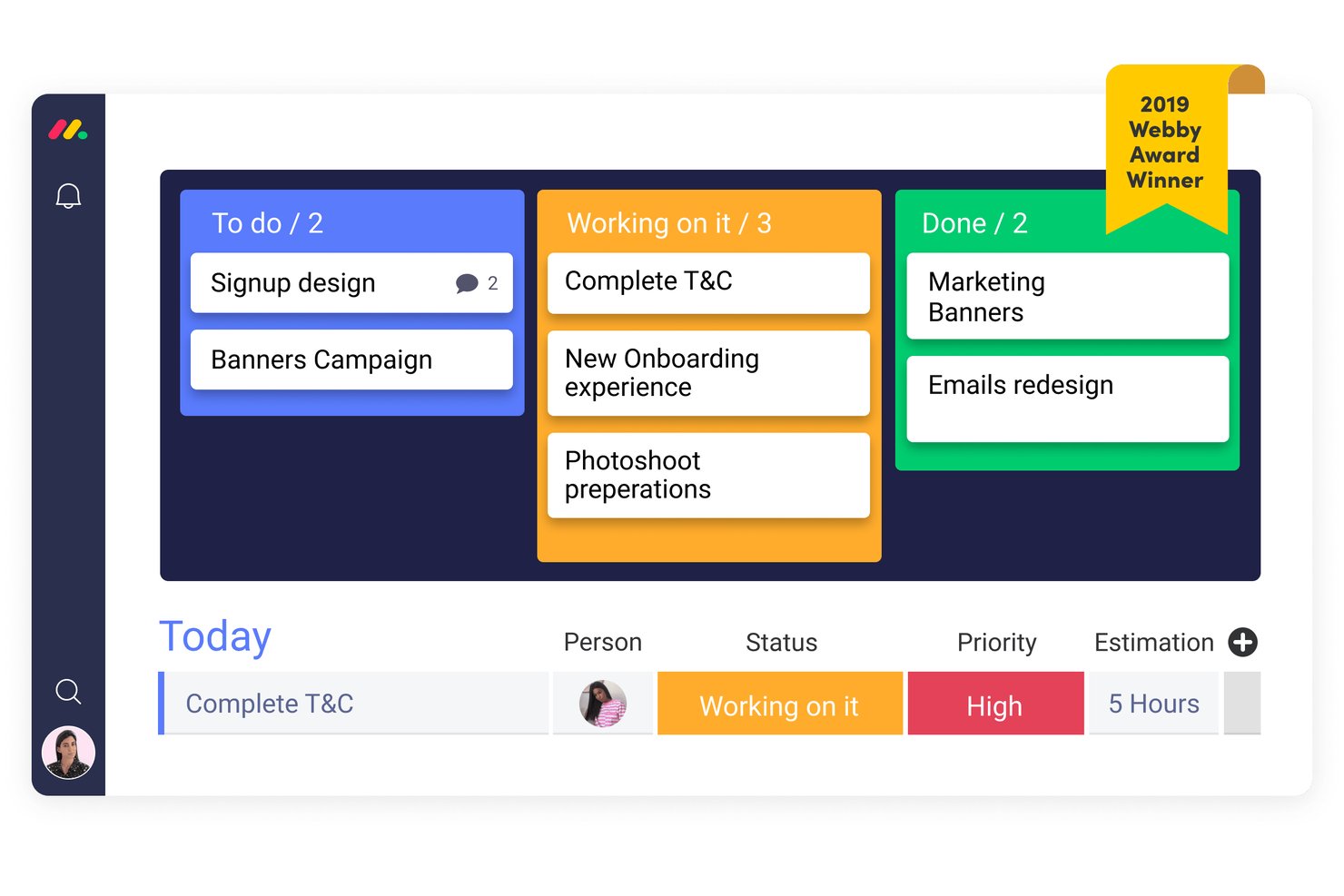
monday AI Workspace is an AI-powered work management platform that combines Kanban boards, sprint planning, workflow automation, and cross-team collaboration tools across project, dev, CRM, and service use cases.
Who Is monday AI Workspace Best For?
It's a strong fit for agile teams and cross-functional operations teams that need Kanban boards alongside sprint planning, automation, and AI-assisted risk tracking in one platform.
Why I Picked monday AI Workspace
monday AI Workspace earns its spot as one of the best on my shortlist because of how its AI risk detection works directly inside the Kanban board. The Sidekick AI assistant flags dependency issues and at-risk timelines before they show up in a status meeting. I also like the AI sprint summary, which automatically surfaces blockers across active boards so my team can act before tasks go off-track.
monday AI Workspace Key Features
- Multiple board views: Switch between Kanban, Gantt, timeline, calendar, and chart views for flexible progress tracking.
- Workflow automation rules: Set triggers and actions to move cards, assign owners, or notify team members without manual updates.
- Dependency management: Link related cards and visualize task dependencies to prevent blockers and workflow stalls.
- Custom card templates: Create reusable templates with pre-filled fields and checklists for common recurring work types.
monday AI Workspace Integrations
monday AI Workspace offers hundreds of native integrations, including Slack, Google Workspace, Microsoft 365, Salesforce, Jira, GitHub, Zoom, Dropbox, HubSpot, and Zendesk. It also supports Zapier and provides an API for custom integrations.
Pros and Cons
Pros:
- Offers portfolio-level multi-board views
- Supports advanced automation on board actions
- AI detects at-risk items in Kanban boards
Cons:
- Limited offline board editing support
- Mobile app sometimes lags with large boards
New Product Updates from monday AI Workspace
monday AI Workspace Adds Human Approval Routing
monday AI Workspace adds a human-in-the-loop approval block to AI Workflows, sending approval requests and routing workflow paths based on responses. For more information, visit monday AI Workspace's official site.

Wrike
Best project template selection

Wrike’s versatile and easy-to-use web-based platform adapts to however your team organizes their work—it doesn’t just have Kanban stuff, but you’ll find standard Kanban boards along with other project management features. The built-in proofing and approvals help to accelerate your activity stream and multiple reporting views keep you abreast of developments as they happen. Wrike offers many different types of project templates, including Kanban project templates to get you started quickly.
On higher level plans, you can use Wrike to build schedule tags for full time, part time, contract, and/or weekend workers. Then, you can assign a schedule to each team member and Wrike will consider their unique availability when plotting out timelines for Kanban projects.
Wrike offers 400+ pre-built native integrations, including integrations with the most popular file management software from Microsoft, Google, and Dropbox, along with sales and marketing software from Salesforce and Marketo.
New Product Updates from Wrike
Wrike Expands Gantt Planning, Approvals, and AI Work Intake
Wrike adds cross-project Gantt dependencies, flexible approval routing, and AI work intake through Wrike MCP. These updates give teams more control over planning, decision-making, and incoming work. For more information, visit Wrike’s official site.

GQueues
Best for Google Workspace integration
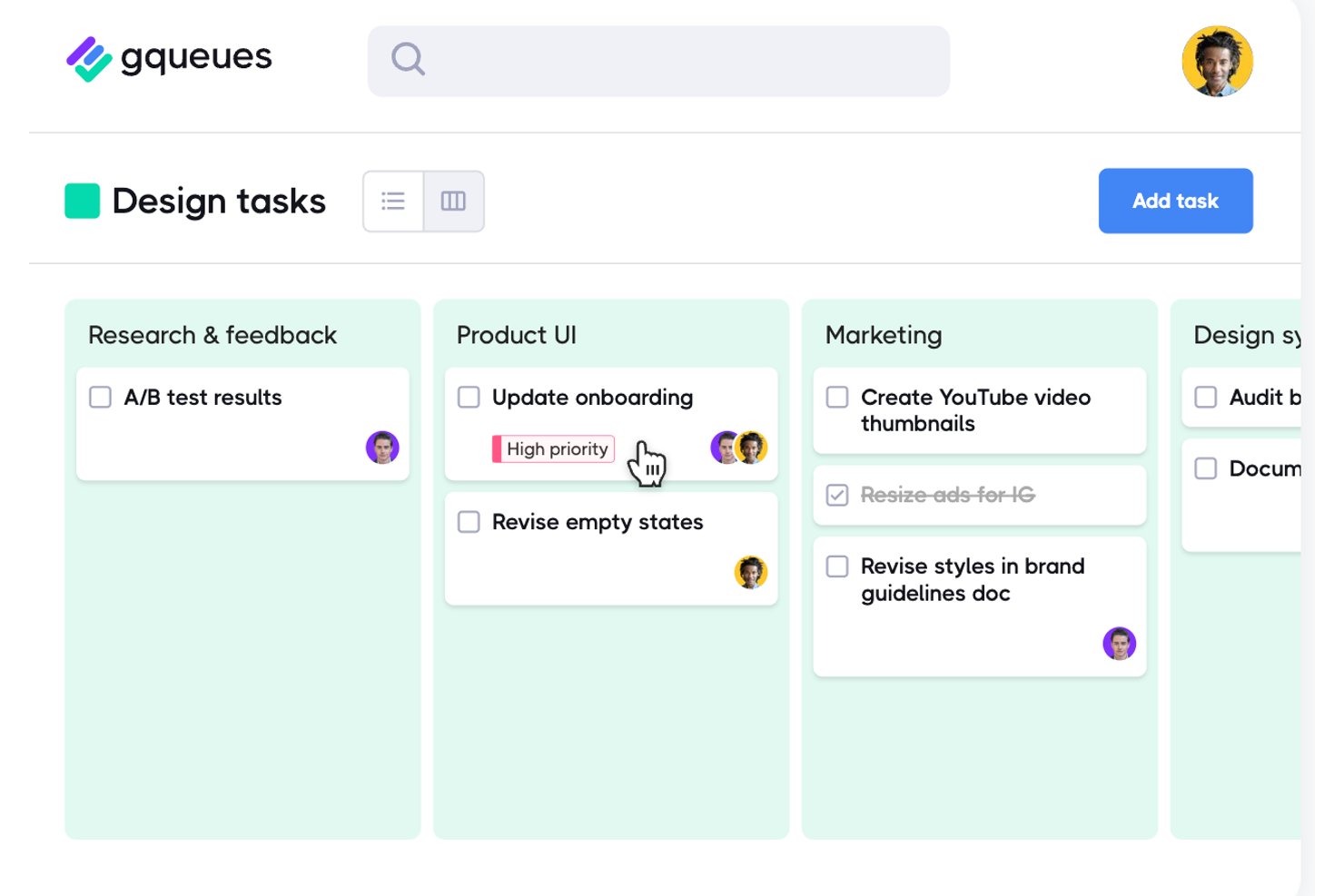
GQueues is a task manager built for Google Workspace teams that layers kanban board views, list management, and Google Calendar sync into a single, Google-native workflow tool.
Who Is GQueues Best For?
GQueues is a natural fit for small to mid-sized teams that run entirely on Google Workspace and need structured task management without adopting a separate platform.
Why I Picked GQueues
I picked GQueues as one of the best because it's the only kanban tool I've seen built entirely around Google Workspace rather than bolted onto it. Its Board view lets my team organize tasks by assignee, priority, or status using drag-and-drop columns, and two-way Google Calendar sync means card due dates actually show up where we already plan our work. Smart Queues let me save filtered views across projects, so I'm never hunting for what's blocked.
GQueues Key Features
- Smart Queues: Save custom filters as Smart Queues for quick access to priority tasks across multiple projects.
- Gmail Add-on: Turn emails into actionable tasks directly from your inbox with the native Gmail add-on.
- Two-way Google Calendar sync: Automatically update task due dates and completion status within your connected Google Calendar.
- Unlimited nested subtasks: Break work down into as many sub-levels as your team needs for detailed tracking.
GQueues Integrations
GQueues offers native integration with Google Workspace, including Google Calendar, Gmail, Google Drive, and Google Contacts. Zapier can be used with its email-to-queue functionality to connect other apps.
Pros and Cons
Pros:
- Unlimited subtask nesting hierarchy levels
- Instant list-to-board view switching
- Board columns organize tasks by assignee, status, or priority
Cons:
- No cycle time or flow analytics reporting
- No WIP limits to control column capacity

Best for real-time collaboration

Zoho Sprints is an agile project management software designed to support dynamic teams in planning, tracking, and collaborating on projects. It stands out for its comprehensive suite of features tailored for agile methodologies, particularly for frameworks like Scrum and Kanban.
Teams can manage their sprints, conduct daily stand-ups, set sprint goals, and engage in retrospective meetings using the platform. The software also supports collaboration through features like feeds, comments, and notifications, allowing team members to stay updated and communicate effectively.
As a Kanban software, Zoho Sprints offers intuitive visual Kanban boards, support for crucial features like work-in-progress (WIP) limits, and customizable workflows that cater to specific team processes. Its real-time collaboration features and comprehensive analytics enhance team productivity and decision-making, while its integration capabilities ensure seamless operation within diverse tech ecosystems.
Zoho Sprints integrates with Microsoft Teams, Google Workspace, Zendesk, Jenkins, GitHub, BitBucket, AWS Code Commit, Zapier, and more. It also integrates with a host of Zoho apps.
New Product Updates from Zoho Sprints
Zoho Sprints Expands Forms With Location Tracking and Custom Modules
Zoho Sprints adds location tracking to creation forms and extends public forms to custom modules. These updates give teams more ways to capture context and create records through forms. For more information, visit Zoho Sprints’ official site.
 .

Best for building no-code custom apps and workflows

QuickBase is a cloud-based application development platform that enables businesses to create custom solutions for their unique operational challenges. Known for its versatility and ease of use, QuickBase allows users with little to no coding experience to develop custom applications that streamline processes, manage data, and improve collaboration.
As a Kanban software, QuickBase excels in offering a highly customizable and flexible platform for workflow and project management. Its strength lies in enabling users to create tailored Kanban boards that align perfectly with their specific project needs and processes. QuickBase allows for easy visualization of tasks and workflows, facilitating efficient tracking of progress and bottlenecks in real-time. The platform supports a dynamic approach to project management, where tasks can be quickly and intuitively moved across different stages of the workflow, promoting agility and responsiveness.
Integrations include Salesforce, Microsoft Teams, Google Calendar, Tableau, QuickBase Pipelines, Slack and Zapier.
Pricing for QuickBase starts from $35/user/month (billed annually). A 30-day free trial is also available.

Best Kanban software for visualizing project phases

Zoho Projects is a web-based project management software that offers various features for project planning, execution, monitoring, and collaboration, making it a well-rounded tool for managing projects effectively. Kanban is a project management methodology that emphasizes visualizing work, limiting work-in-progress, and optimizing the workflow. Zoho Projects allow teams to track their work visually, providing a clear overview of the status of each task and the progress of the project as a whole.
Zoho Projects’ Kanban boards are fully customizable, enabling teams to create them based on their workflow and preferences. Teams can create multiple boards for different projects or stages of the same project. Each panel consists of columns representing different stages of the workflow, such as "To Do," "In Progress," and "Done." Teams can also create custom columns to represent specific stages of their workflow.
Using Zoho Projects you can add tasks, assign them to team members, set due dates, and add descriptions and attachments. Each task on the board is represented by a card containing all the relevant job information. Teams can also add labels to tasks to classify them based on their priority, status, or any other category pertinent to their workflow.
You can move tasks between columns by simply dragging and dropping them. This feature enables users to update the status of jobs and track their progress quickly. You can use the filter and search functionality to find specific tasks, making it easy to focus on what matters most.
Zoho Projects provides several features to help teams collaborate effectively. Teams can add comments to tasks, mention other team members, and discuss specific tasks. They can also use the @mention feature to tag team members and notify them of updates or changes to the task.
Zoho Projects integrates with other Zoho apps, commonly used apps by Google (Google Calendar, Drive, Spreadsheets, etc.), and Microsoft (Calendar, Excel, Office 365, OneDrive, Teams, and SharePoint), and other third-party apps such as Basecamp, Jira, Slack, Zendesk, and Zapier.
Zoho Projects costs from $5/user/month for tracking unlimited projects. A freemium plan with limited features, as well as a 10-day free trial, are also available.
New Product Updates from Zoho Projects
Zoho Projects Adds CodeX Scripts for Custom Modules
Zoho Projects now supports CodeX Scripts for custom modules, enabling conditional logic and rules for creating, updating, and deleting records. For more information, visit Zoho Projects' official site.
 .

Quire
Best for drag-and-drop functionality

Quire is a cloud-based project management tool that helps teams organize tasks, collaborate, and track progress. It combines nested task lists with visual boards to support both planning and execution. Whether you're managing a small project or coordinating a larger initiative, Quire offers flexible views to match your workflow.
The platform lets you switch between a traditional task list and a Kanban board within the same project. This dual-view approach allows you to plan your work hierarchically and then execute it visually. The Kanban board also supports drag-and-drop functionality, making it easy to move tasks across different stages and keep everyone aligned on progress.
Another feature that makes Quire stand out is its support for nested Kanban boards through the Task Bundle feature. This allows you to maintain the parent-child relationship of tasks even in the board view, providing context and clarity. You can also customize your board by grouping tasks based on assignee, priority, or tags, which helps in managing workload and focusing on what's important.
Some integrations include Google Calendar, Gmail, Slack, Outlook, Zoho Flow, GitHub, Apple Calendar Sync, Box, Dropbox, Google Drive, and Microsoft Teams.
New Product Updates from Quire
Quire Adds Custom Field Locking and Comment Reaction API Support
Quire adds custom field locking and API support for reading and setting emoji reactions on comments. These updates give teams more control over field data and expand comment interaction options for developers. For more information, visit Quire’s official site.
 .

Miro
Best Kanban software for team communication

Miro is a collaborative online whiteboard with over 1,000 templates including mind maps, Kanban boards, Gantt charts, product wireframes, research boards, and flowcharts. Miro is widely adopted by leading companies and is recognized for fostering team communication and supporting hybrid work environments effectively.
The platform supports a wide range of creative and organizational tasks with features like an intuitive Kanban template, real-time editing, and video calling. Miro also accommodates various forms of idea expression, including images and videos, and provides tools for quick diagramming and an infinite canvas to meet the expansive needs of project management.
Miro additionally includes collaboration tools such as voting and sticky notes, allowing teams to integrate feedback efficiently. Furthermore, Miro offers seamless integrations with essential project documentation tools like Notion and Asana, facilitating smoother workflows.
Miro has integrations with a whole suite of tools, including Zoom, Figma, Asana, Microsoft Teams, Jira, Slack, Google Drive, Box, Confluence, Monday.com, Airtable, Notion, Azure, and Webex. Some integrations are limited to paid plans only.
Miro is free to use for unlimited members with up to 3 editable boards. Paid plans start at $8/user/month (billed annually).
Pros and Cons
Pros:
- Built-in communication features for streamlined collaboration
- Intuitive and easy setup
- Free forever plan available
Cons:
- Free version does not allow high-quality export to pdf
- Zooming can be jumpy on larger projects
- Visitor/guest accounts locked to paid plans only
New Product Updates from Miro
Miro Adds Japan Data Residency for Enterprise Customers
Miro has introduced Japan data residency for enterprise customers, offering in-region storage for production data, backups, and metadata, plus in-region compute infrastructure. For more information, visit Miro's official site.
Best for brainstorming, ideation, and task management in one

MeisterTask stands out in the realm of Kanban software by offering a highly visual and intuitive platform for managing tasks and workflows using the Kanban methodology. It allows users to create customizable Kanban boards where tasks are represented as cards that can be moved across different columns or stages, reflecting their current status in the workflow. This visual approach not only makes it easier for teams to understand the progress of individual tasks and projects at a glance but also facilitates smoother transitions between different phases of work.
Beyond its core Kanban functionality, MeisterTask enriches the project management experience with a suite of features designed to boost productivity and collaboration. It integrates seamlessly with MindMeister, an online mind mapping tool, allowing for a unique and efficient flow from brainstorming and ideation directly into actionable tasks. This integration bridges the gap between initial planning and task execution, a feature particularly appealing to teams that value creativity and innovation in their workflows. Additionally, MeisterTask supports task automation, due date reminders, time tracking, and comprehensive collaboration tools, including file attachments and comments.
Integrations include Slack, Dropbox, Github, Google Drive, Microsoft Teams, Outlook, Trello, Asana, MindMeister, and hundreds more through a paid plan with Zapier.
MeisterTask costs from $14.50/month (billed annually) and offers a fre trial.

Kanban Zone
Best cross-portfolio Kanban board

Kanban Zone is designed to allow teams to visualize their entire agency and organization by connecting teams and processes. The tool offers a highly flexible Kanban board editor that does not constrain users to perfect grids and instead allows them to truly map their ideal flow of work.
The tool also includes a timeline view for increased planning capabilities, as well as templates and a Portfolio Kanban for traceability across projects. Also available are project and Kanban metrics, collaboration features such as comments and notifications, and workflow management capabilities.
Kanban Zone has a simple interface that helps teams focus on the work at hand, and a team of support experts to help with onboarding and ongoing questions. They have plenty of learning resources on their site for those who want to learn more about kanban methodology.
Kanban Zone can integrate with other project management tools using a (paid) plan through Zapier.
Kanban Zone pricing starts at $5 per month for a personal plan and $8 per month for professional plans. A free 30 day trial is also available.
Outras opções Kanban
Eis mais algumas opções que não incluí na lista principal, mas que continuam a ser excelentes ferramentas que vale a pena conhecer:
- Shortcut
For automating workflows with triggers
- Teamwork.com
Stakeholder/client access controls
- Bonsai Agency Software
For agencies
- ProjectManager
For project portfolio management (PPM)
- Businessmap
Kanban software for software development teams
- Stackfield
For encrypted boards hosted in Germany
- SwiftKanban
Enterprise kanban software
- Height
Kanban for cross-functional resource allocation
- ClickUp
For customizing your own set of features
- Teamhood
Kanban software with flow metrics


How I Evaluate Kanban Software
I split every evaluation into two layers: the baseline kanban functionality a tool must have—real boards, WIP limits, flow metrics—and the differentiators that separate a good fit from a great one.
Core Functionality (Table Stakes For This List)
When I'm selecting tools for my list, I rank each one on a scale from 0 (does not offer the functionality) to 5 (excels in this area) for each core functionality listed below. Then, I calculate the tool's total score into a percentage. Each tool needs to achieve a minimum total score of 75% to be considered for inclusion.
- Customizable Kanban Boards: I check whether you can configure columns to match a real workflow—like separating "code review" from "QA" instead of being stuck with generic "to do" and "done" stages.
- Drag-and-Drop Card Management: Moving cards across columns should update status in real time, and I look for support for bulk moves when you need to reprioritize an entire sprint's worth of tasks.
- Work-in-Progress Limits: Teams that practice flow-based delivery need column-level WIP caps. I evaluate whether limits trigger visual alerts or actually block new cards from entering a full column.
- Swimlanes & Card Categorization: I look for horizontal swimlanes, labels, and custom fields that let you segment a board by team, priority, or class of service—useful when one board serves both bug fixes and feature work.
- Flow Analytics & Reporting: Cumulative flow diagrams, cycle time charts, and throughput trends are what separate a kanban tool from a basic task board. I evaluate the depth and clarity of these metrics.
- Card-Level Collaboration: Each card should support assignees, due dates, checklists, comments, and file attachments so the board doubles as the single source of truth—not just a visual layer on top of another tool.
Once I have a list of tools that meet the criteria, I consider what sets each platform apart.
Differentiating Factors (What Sets Vendors Apart)
Here's how I compare and contrast different vendors:
Standout Features
Workflow automation is a big differentiator. I look for tools that auto-assign cards, trigger notifications, or move tasks between columns based on rules—saving time on repetitive handoffs like passing a card from "design" to "dev." Dependency management matters just as much when multiple teams share a board. The ability to link and block cards prevents downstream surprises during cross-functional sprints. For program-level visibility, I evaluate whether a tool offers portfolio rollups that aggregate data across multiple team boards into a single view.
Beyond Features
Integration depth is one of the first things I check. A kanban board that connects natively to GitHub, Slack, and your CI/CD pipeline becomes the team's central hub instead of another tab to manage. Pricing structure also shapes who a tool actually serves—I evaluate whether free tiers gate key features like WIP limits or analytics behind paid plans, since that directly affects small-team adoption. For enterprise buyers, I look at SSO, role-based access, and compliance certifications like SOC 2 to make sure the tool fits within existing security requirements.
Como escolher software Kanban
É fácil ficar perdido em listas extensas de funcionalidades e estruturas de preços complexas. Para o ajudar a manter-se focado enquanto percorre o seu processo único de seleção de software, eis uma lista de verificação com os fatores a ter em conta:
| Fator | O que deve considerar |
|---|---|
| Escalabilidade | Considere se o software consegue acompanhar o crescimento da sua equipa. Procure opções que suportem um aumento de tarefas e utilizadores sem sacrificar o desempenho ou a facilidade de utilização. |
| Integrações | Certifique-se de que se liga às suas ferramentas atuais, como o Slack ou o Google Workspace, para simplificar os fluxos de trabalho e manter a produtividade. |
| Personalização | Verifique se pode adaptar os quadros e os fluxos de trabalho aos processos específicos da sua equipa, algo fundamental para a eficiência e a satisfação. |
| Facilidade de utilização | Escolha uma interface intuitiva que minimize o tempo de formação e ajude a sua equipa a começar rapidamente a gerir tarefas. |
| Orçamento | Avalie o custo tendo em conta o seu orçamento. Procure preços transparentes, quadros Kanban gratuitos e períodos de avaliação gratuitos para avaliar o valor sem qualquer compromisso. |
| Medidas de segurança | Dê prioridade a software com funcionalidades de segurança robustas, como encriptação e permissões baseadas em funções, para proteger os dados sensíveis dos seus projetos. |
| Acesso móvel | Se a sua equipa estiver frequentemente em movimento, certifique-se de que o software disponibiliza uma aplicação móvel fiável para gerir tarefas em qualquer lugar. |
| Suporte | Opte por um fornecedor que ofereça um bom suporte ao cliente, incluindo tutoriais e assistência em direto, para resolver problemas rapidamente. |
Sinceramente, é muita informação para assimilar — e existe muita pressão para acertar, por isso sugiro que utilize o nosso serviço de aconselhamento sobre software de gestão de projetos para o ajudar a selecionar as ferramentas de gestão de projetos mais adequadas às necessidades específicas da sua organização.
O que é o software Kanban?
O software Kanban é uma ferramenta de gestão de projetos baseada na metodologia Kanban, na qual os utilizadores podem mover cartões ao longo de um quadro para indicar o progresso e visualizar o fluxo de trabalho. O software Kanban inclui frequentemente funcionalidades como atribuição de tarefas, definição de prioridades, colaboração em tempo real, comentários nos cartões e análise de dados, para melhorar a visibilidade e o controlo do progresso do projeto.
Esta representação visual promove a transparência, facilitando a identificação de estrangulamentos, o acompanhamento do progresso e a otimização da eficiência do fluxo de trabalho.
Funcionalidades do software Kanban
Ao selecionar um software Kanban, procure as seguintes funcionalidades essenciais:
- Colaboração: Facilita o trabalho em equipa, permitindo aos utilizadores partilhar tarefas, comunicar através de comentários e integrar ferramentas como o Slack ou o e-mail.
- Gestão de tarefas: Permite aos utilizadores criar, atribuir e acompanhar tarefas, garantindo que todos os membros da equipa têm conhecimento das suas responsabilidades.
- Planeamento de roteiros: Ajuda a planear lançamentos de produtos e a gerir listas de pendências, permitindo às equipas definir prioridades de forma eficaz para tarefas e funcionalidades.
- Mapeamento de ideias: Permite estruturar ideias em tarefas, histórias e épicos, o que pode ser essencial para o desenvolvimento de produtos e a gestão de projetos.
- Registo de tempo: Embora nem sempre esteja integrado, algumas ferramentas Kanban podem integrar extensões para registar o tempo despendido nas tarefas, contribuindo para a análise da produtividade.
- Fluxos de trabalho personalizáveis: Permite às equipas adaptar os processos às suas necessidades específicas, através de elementos como raias, filtros e aninhamento de itens, para uma melhor visualização.
- Capacidades de integração: Oferece uma integração perfeita com outras ferramentas de software, melhorando a funcionalidade geral e a conectividade do fluxo de trabalho.
- Gestão do feedback dos utilizadores: Recolhe e atribui prioridades ao feedback dos utilizadores, garantindo que o desenvolvimento do produto está alinhado com as necessidades e expectativas dos clientes.
Boas práticas ao utilizar software Kanban
Utilizar software Kanban é fácil. No entanto, utilizá-lo corretamente é o que distingue um bom gestor de projetos de um excelente gestor de projetos! Eis 5 formas de utilizar os quadros Kanban corretamente:
1. Defina e limite o trabalho em curso (WIP)
Defina limites de WIP para cada coluna, de modo a garantir que a equipa se concentra em concluir as tarefas antes de iniciar novas tarefas. Por exemplo, se a coluna "Em curso" tiver um limite de WIP de 3, só podem ser trabalhadas 3 tarefas em simultâneo.
2. Utilize etiquetas claras e consistentes
Utilize códigos de cores, etiquetas ou categorias para identificar prioridades, tipos de tarefas ou responsáveis. Por exemplo, utilize o vermelho para tarefas de alta prioridade ou o verde para tarefas de baixa prioridade.
3. Reveja e atualize regularmente o quadro
Faça revisões diárias ou semanais para garantir que as tarefas estão atualizadas, que as tarefas concluídas são arquivadas e que os bloqueios são resolvidos. Isto pode fazer parte de uma reunião diária ou de uma retrospetiva.
4. Divida as tarefas em partes geríveis
Divida as tarefas maiores em subtarefas mais pequenas e acionáveis, que possam avançar mais rapidamente no quadro. Por exemplo, uma fase de um projeto pode ter subtarefas como "Pesquisa", "Elaboração" e "Revisão".
5. Otimize continuamente o fluxo de trabalho
Utilize métricas como o tempo de execução (tempo desde a criação até à conclusão da tarefa) e o tempo de ciclo (tempo desde o início até ao fim) para identificar ineficiências. Ajuste os limites de WIP, redistribua recursos ou aperfeiçoe os fluxos de trabalho conforme necessário.
Software Kanban - Perguntas frequentes
É novo na metodologia Kanban? Precisa apenas de saber mais sobre as suas novas ferramentas? Seja qual for a sua necessidade, aqui encontrará algumas respostas às perguntas frequentes (FAQs) sobre software Kanban.