10 Melhores Ferramentas de Comunicação Online para Equipas em 2026

10 Seleção das melhores ferramentas de comunicação


Existem muitas ferramentas de comunicação online diferentes para equipas, pelo que pode ser difícil fazer uma seleção das melhores. Quer facilitar a comunicação e a colaboração da sua equipa, independentemente do local onde os seus membros se encontram — e precisa da ferramenta certa. Eu posso ajudar! Nesta publicação, partilho a minha experiência pessoal no reforço da comunicação em grandes equipas remotas e apresento as minhas escolhas das melhores ferramentas de comunicação online para equipas.
Why Trust Our Software Recommendations
Our team has been testing and reviewing software since 2012. As project managers ourselves, we know how difficult—and important—it is to choose the right software.
For this guide, we evaluated tools using hands-on testing and independent research, scoring tools using our selection criteria. We also draw on insights from industry thought leaders and practicing project management experts.
Our reviews reflect our human editorial judgment, not a sales pitch.
Expert reviewers:
Tabela comparativa de ferramentas de comunicação
Esta tabela comparativa resume os detalhes de preços das minhas principais escolhas de ferramentas de comunicação:
| Tool | Best For | Trial Info | Price | ||
|---|---|---|---|---|---|
| 1 | Best for updates, team chats, and employee surveys | Free plan available | From $29/month (billed annually) | Website | |
| 2 | Best for project management communication | Free plan + 14-day free trial + free demo available | From $9/user/month (billed annually) | Website | |
| 3 | Best for team collaboration | Free plan available | From $7.25/user/month (billed annually) | Website | |
| 4 | Best for growing teams and SMEs | Free demo available | Pricing upon request | Website | |
| 5 | Best collaborative whiteboard for hybrid teams | Free plan + 14-day free trial + free demo available | From $8/user/month (billed annually) | Website | |
| 6 | Best range of communication options | Free demo available | Pricing upon request | Website | |
| 7 | Best for unlimited search history | 30-day free trial + free demo available | From $2.50/user/month | Website | |
| 8 | Best for deskless employees | Free trial + free demo available | From $3.75/user/month (billed annually) | Website | |
| 9 | Best for unlimited users and message history | 7-day free trial + free plan + free demo available | From $2.49/seat/month (billed annually) | Website | |
| 10 | Best for organizing communication using channels | 30-day free trial + free plan available | From $4.50/user/month (billed annually) | Website |


Visão geral das melhores ferramentas de comunicação
Vejamos os detalhes de cada plataforma de comunicação e o que faz dela uma candidata digna a integrar esta lista das 10 melhores.
Best for updates, team chats, and employee surveys

Connecteam offers a communications platform for businesses as well as an operations platform and an HR and training platform. The communication software facilitates company updates and announcements and live chat and messaging. It also stores a company directory and knowledge base for your workers.
You can set up team chats, individual chats, and broadcast channels in the app to keep communications segmented however makes sense for your company. People can share images and videos, files, and even locations through the system, making it a helpful tool for remote and hybrid teams.
The knowledge base is another cool feature for ensuring all staff have access to things like company policies and procedures. You can also add training material, forms, and other files people may need to access. Employee surveys can also be sent out through the platform, so you can gather feedback on important topics to your organization.
Integrations include Paychex, Xero, Gusto, QuickBooks Payroll (online + desktop), Google Calendar and others.
New Product Updates from Connecteam

Connecteam Adds Automatic Paid Break Actions and Manual Break Windows
Connecteam adds automatic paid break actions and configurable start windows for manual breaks. These updates help teams manage break schedules and maintain accurate timesheets. For more information, visit Connecteam’s official site.
 .

Best for project management communication
monday AI Workspace is a work management platform that embeds team communication directly into project workflows through task-level updates, AI-assisted meeting notes, real-time document co-editing, and integrations with tools like Slack and Microsoft Teams.
Who Is monday AI Workspace Best For?
Project managers and cross-functional teams at mid-size to enterprise organizations who need communication and project tracking in a single workspace.
Why I Picked monday AI Workspace
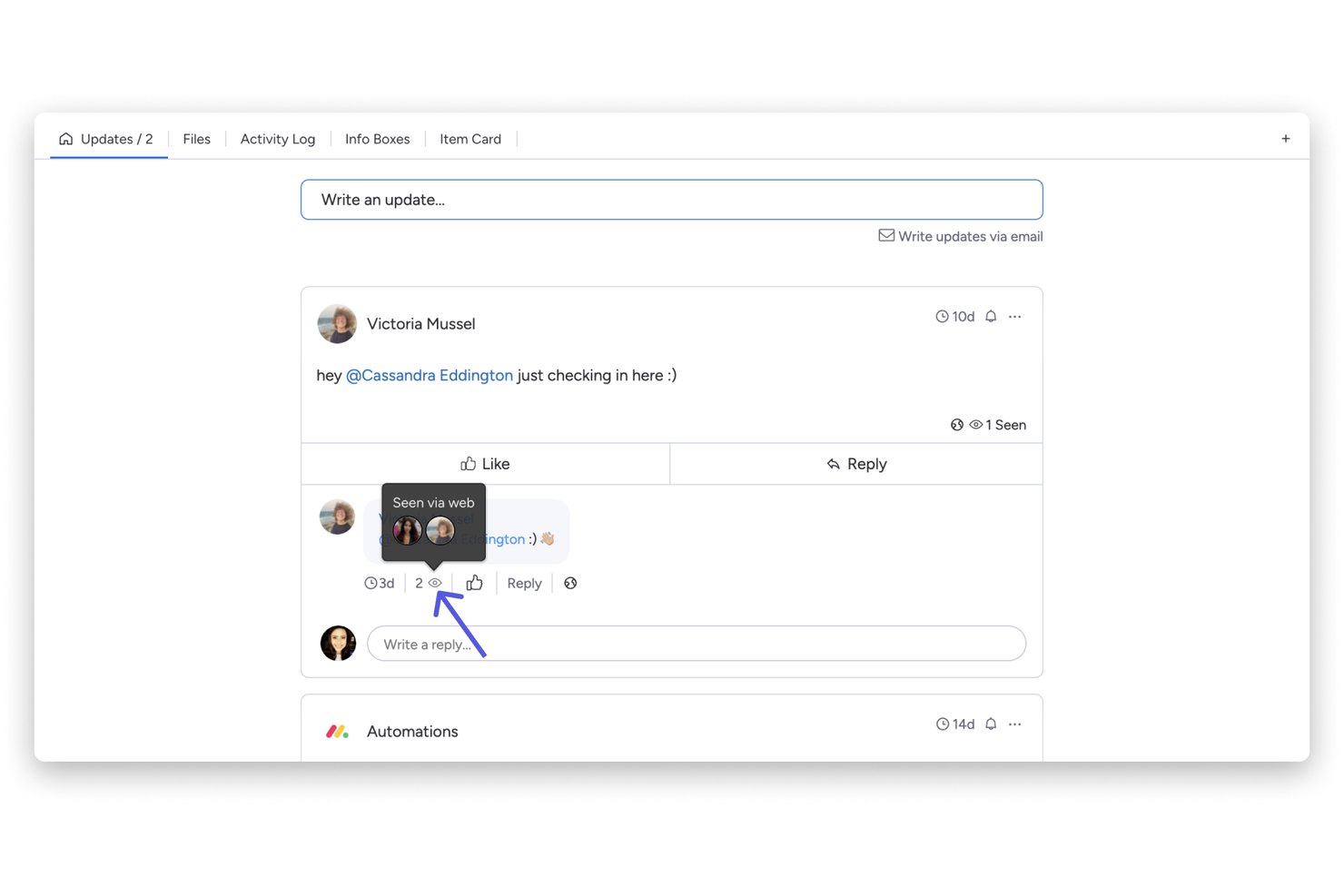
I picked monday AI Workspace because it ties communication directly to the work itself, not to a separate inbox or channel. When my team discusses a task, the update thread lives on that item, so context never gets lost in a side conversation. I also rely on the AI Notetaker, which captures meeting discussions and turns them into tasks automatically, cutting out the manual handoff between meeting notes and the project board.
monday AI Workspace Key Features
- Real-time document co-editing: Multiple users can simultaneously edit monday Docs and embed boards within documents.
- Automation builder: Set up custom workflows using triggers and actions for tasks, notifications, and reminders.
- Board view options: Choose from Gantt, calendar, timeline, Kanban, and table views to visualize project information.
- Extensive integrations: Connect with 200+ external apps like Zoom, Slack, GitHub, Google Workspace, and Jira.
monday AI Workspace Integrations
monday AI Workspace offers hundreds of native integrations through its built-in integrations and marketplace, including Slack, Microsoft Teams, Google Workspace, Zoom, Jira, Salesforce, HubSpot, GitHub, Dropbox, and OneDrive. It also supports Zapier and provides an API for custom integrations.
Pros and Cons
Pros:
- Async updates reduce unnecessary team meetings
- AI meeting notes auto-generate action items
- Communication lives inside project tasks
Cons:
- Notification overload on busy project boards
- Chat functionality less mature than Slack
New Product Updates from monday AI Workspace
monday AI Workspace Adds Human Approval Routing
monday AI Workspace adds a human-in-the-loop approval block to AI Workflows, sending approval requests and routing workflow paths based on responses. For more information, visit monday AI Workspace's official site.

Slack
Best for team collaboration

Slack is a communication platform designed to centralize team interactions, offering real-time messaging, file sharing, and integration with various tools and services. It aims to improve team collaboration and productivity by providing organized spaces for conversations, known as channels, and features for audio and video meetings.
Slack offers various features, including channels for organizing teams and work, Slack Connect for working with external partners, messaging for chatting with team members, huddles for audio and video meetings, and clips for recording and sharing updates. Additionally, Slack's knowledge management features include a search function for shared knowledge, Canvas for creating rich, flexible documents, and file sharing capabilities to integrate files into the workflow.
The platform also includes automation tools like Workflow Builder to automate everyday tasks and integrations to bring external tools into Slack. Overall, Slack's features are aimed at improving communication and productivity within organizations, and it includes enterprise-level features such as AI, security, and knowledge management.
Slack natively integrates with several tools, including Luchidchart, Asana, monday.com, Zoom, Google Calendar, Microsoft Teams, Google Drive, Hubspot, and Qualtrics.

Hub
Best for growing teams and SMEs

Hub is an intranet-style tool designed to enhance internal communications for growing teams and SMEs. It offers a centralized platform where your team can access company news and resources and collaborate effectively. With features like news feeds, people directories, and polls, Hub aims to keep everyone connected and informed.
One standout feature of Hub is its news module, which allows you to share company updates and announcements effortlessly. You can organize news into channels, ensuring that relevant information reaches the right team members. This targeted communication helps keep your team informed without overwhelming them with unnecessary details.
Another valuable aspect is the forms with smart workflows. This feature lets you create online forms to gather information, manage submissions, and assign tasks based on responses. It simplifies processes like feedback collection and approval workflows, reducing the need for manual paperwork and enhancing efficiency.
Integrations include Microsoft Entra ID, Google, OKTA, OneLogin, Office 365, SharePoint, OneDrive, GDrive, BOX, Slack, MS Teams, and Active Directory.
Miro
Best collaborative whiteboard for hybrid teams
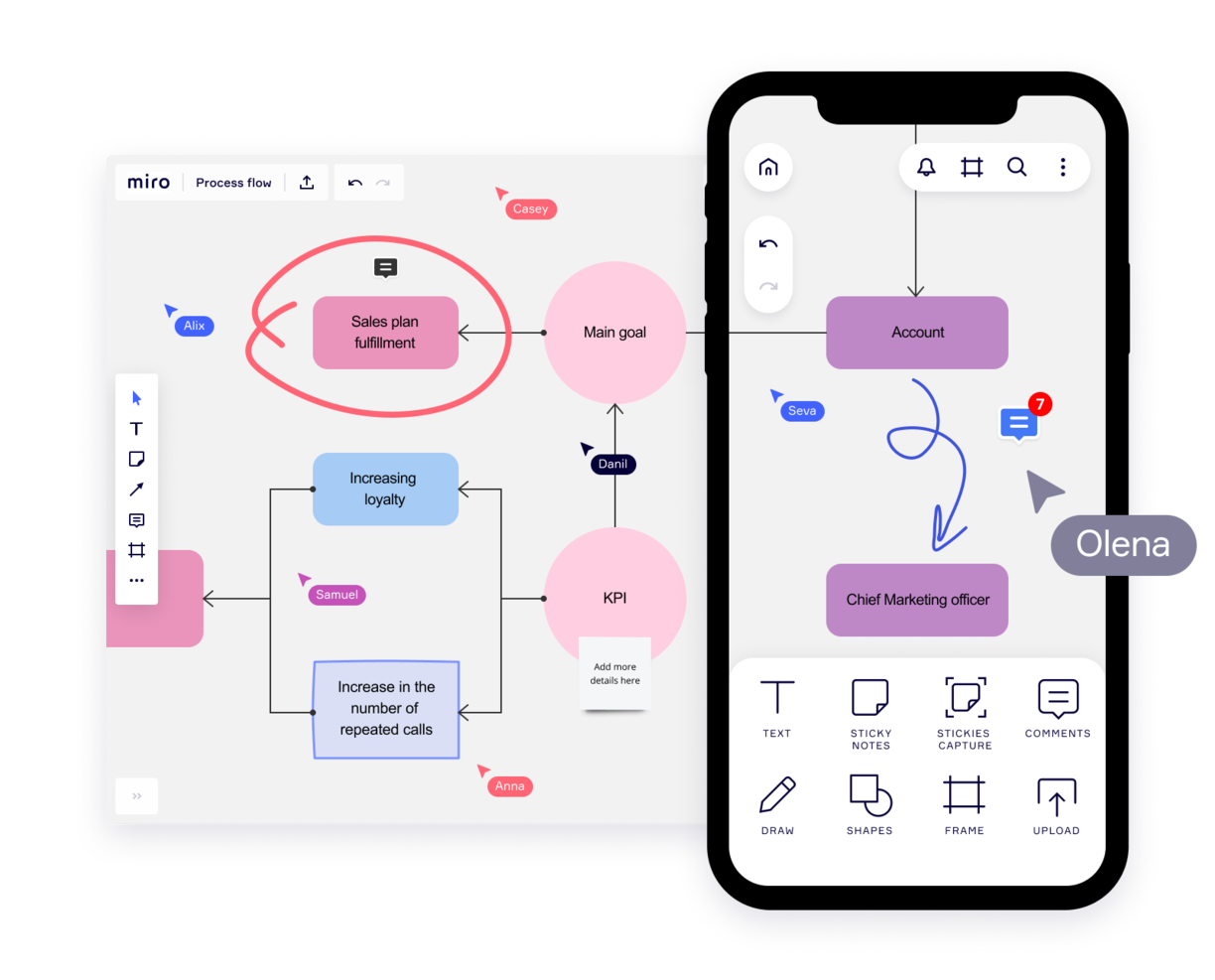
Miro is a collaborative whiteboard designed for hybrid teams, offering over 1,000 templates for diverse planning and brainstorming needs. Valued by top Fortune 100 companies, it supports teams at organizations like TransUnion and Cisco with a platform that suits the hybrid work model.
Key features of Miro include an infinite canvas for limitless project mapping and the flexibility to express ideas through various media. Its asynchronous collaboration tools, such as comments and reactions, enable productive teamwork across time zones. The TalkTrack feature also allows team members to record and share video explanations of process maps, fostering clearer communication.
With integrations including project management tools like Jira and Asana, Miro connects different project facets in one platform, making it a comprehensive tool for today's varied team dynamics.
Miro also integrates with a whole suite of tools, including Zoom, Figma, Monday.com Microsoft Teams, Slack, Google Drive, Box, Airtable, Notion, Azure, and Webex. Some integrations are limited to paid plans only.
Miro is free to use for unlimited members with up to 3 editable boards. Paid plans start at $8/user/month (billed annually).
Pros and Cons
Pros:
- Built-in communication features for streamlined collaboration
- Intuitive and easy setup
- Free forever plan available
Cons:
- Free version does not allow high-quality export to pdf
- Zooming can be jumpy on larger projects
- Visitor/guest accounts locked to paid plans only
New Product Updates from Miro
Miro Adds Japan Data Residency for Enterprise Customers
Miro has introduced Japan data residency for enterprise customers, offering in-region storage for production data, backups, and metadata, plus in-region compute infrastructure. For more information, visit Miro's official site.

Workvivo
Best range of communication options

Workvivo is an online employee communication platform that allows teams to communicate and collaborate in real time. It provides a single location for each team’s projects, tasks, and conversations—enabling them to stay in sync no matter where they are located.
The platform offers features like chat groups, team calendars, task boards, and social media integration, making it easy for your teams to stay connected and up-to-date on their projects so they can move forward quickly and efficiently. Workvivo helps everyone stay connected by providing a central hub for all communications. Instead of having multiple conversations via emails or text messages, everything is kept organized within the platform so that all members can see what’s going on with their team’s work.
Workvivo’s group chats allow teams to converse without switching between different applications or platforms. Team members can easily join group chats and share their thoughts quickly and efficiently. This helps ensure that everyone is on the same page when it comes to project deadlines and goals. Notifications provide users with updates relevant to them, giving them a single point of reference for the most current information about work progress.
Additionally, its project management tools allow users to create tasks, assign them to team members, set deadlines, track progress, and monitor task completion in one place. This makes project management easier for everyone involved by providing visibility into tasks and progress across all levels of the organization. Workvivo allows you to easily track employee performance by monitoring activity logs within the platform or running advanced analytics reports that provide insights into how well employees are completing tasks or meeting deadlines.
Finally, integrations with software like Slack, Zoom, and MS Teams and live video functions allow your team to communicate through a wide range of channels. These include streaming, video, text, podcast, and news updates.
Best for unlimited search history

Troop Messenger is far more than a simple chat interface. It was designed to improve the communication of internal teams of all sizes, from small teams to large corporations, and it delivers a robust feature set for doing so.
Overall this tool does a standout job with its feature offering and hits all of the criteria I look for in a communication tool, plus more. The main features include instant messaging, voice-video calling, video conferencing, file sharing, and desktop sharing.
But something I find especially useful in this tool are its more advanced messaging features. I like both the "respond later" option as well as the "burnout" option which lets you set a message to send at a later time. The self-messaging feature is also unique—a simple but useful feature that lets you send reminders and notes to yourself. Finally, there's a way to send bulk text messages and files to multiple users at once, using the "forkout" feature. And the advanced search in this tool is really good, too.
Troop Messenger supports many native and third-party integration such as employee monitoring and tracking apps, attendance management systems, Google Drive, Dropbox, and LDAP. It's available across Windows, Linux, Mac, Android, and iOS.
Troop Messenger costs from $2.50/user/month. It's worth noting that although it’s a SaaS model, it offers the delivery models of self-hosting, API, and custom application.
Blink
Best for deskless employees

Blink is a communication tool for the unique needs of deskless workers, who, until now, didn’t have the same quality technology as their colleagues in HQ. In just one app, it includes workplace messaging, a social media style company Feed for top-down communications, directory, cloud storage, workplace analytics, polls, and more.
Blink is built around the concept of workplace messaging as the central functionality so peer-to-peer direct messaging, group Chats, and top-down communications via the company Feed, all play an important role. Moderators and admins who post in the company Feed also have the option of turning on and off push notification for each post depending on importance. Blink also features polls, powerful integrations, and digital forms for reporting.
Analytics for admins features prominently through the app: post by post analytics, Org-wide and Team analytics within the Admin Portal, and Hub analytics that measures interactions and adoption within the document storage and reporting section of the app.
Blink is a straight-out-of-the box Saas communication software; no technical knowledge is necessary to get started and to invite colleagues to the platform. Its user-friendly, brandable interface is designed with familiar social media style features (think emojis and like buttons) that encourages engagement from employees—even less tech-savvy ones.
You can use existing integrations with 3rd party systems such as Jira, Trello, Office 365 and G-suite or build new integrations to your existing systems using Blink’s public APIs. Blink supports Android, iOS, Windows, and Mac, and you can access Blink via your browser.
Blink costs from $3.40 user/month. They offer a free 14-day trial and you can book a demo through the homepage.
Pumble
Best for unlimited users and message history
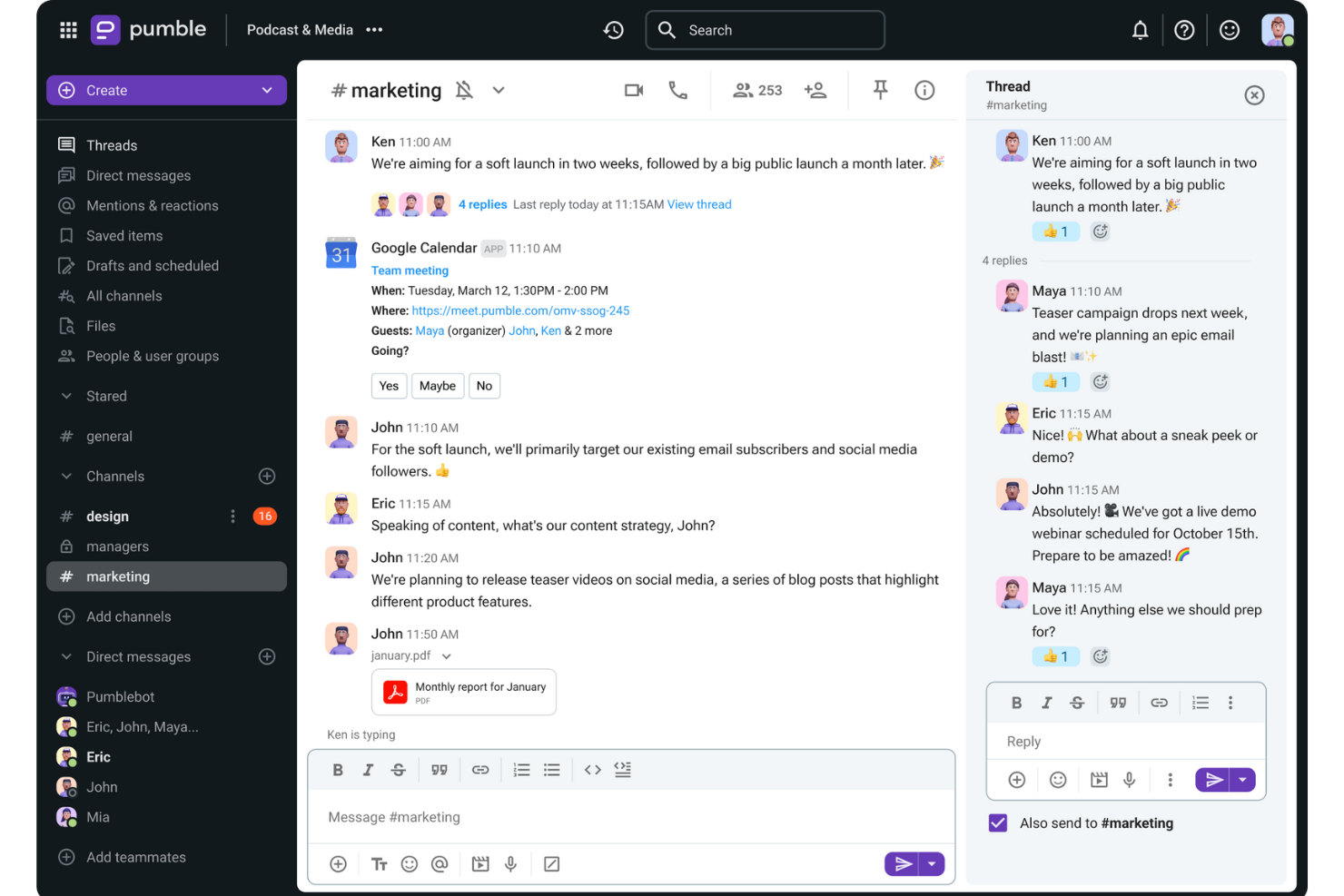
Pumble is a collaboration and communication tool designed to facilitate team interactions across desktop, mobile, and web platforms. The versatile platform is ideal for a wide range of teams, including sales, marketing, HR, product planning, and fully remote teams.
This tool provides channels for organized discussions, direct messaging for individual conversations, and threads for specific topics within a channel. The platform also includes video and voice calls, screen sharing, and file sharing to support comprehensive communication needs.
Furthermore, Pumble enables collaboration with external guests by inviting them to a Pumble meeting, even if they do not have an account. The platform even offers a free plan with unlimited users and message history, ensuring that important information is always retrievable and well-organized while supporting businesses and teams as they scale.
Integrations include Clockify for time tracking, Plaky for project management, and Zapier for connecting to over 3000 apps. Other important integrations include Google Drive, OneDrive, Outlook, Trello, and Zoom, as well as the ability to create custom integrations using the Pumble API.

Flock
Best for organizing communication using channels

Flock is one of the most robust communication apps, going far beyond a simple messaging system. This communication app stands out with its chat module which is designed to streamline and centralize communication from different groups and across different teams. Going a step beyond “back and forth” communication, Flock enables you to turn messages into useful resources with bookmarks, and convert discussions into tasks.
Flock’s features include video and audio calls, group and individual chats, and an intuitive screen sharing module. It also includes many nice-to-have communication tools, like the ability to create an anonymous poll, share it with your team, and download the results. You can also use tags in conversations to indicate high priority info. Another useful feature is the ability to automatically generate email lists of members in a particular discussion board, allowing you to quickly send out group emails to the right people.
Flock integrations include Trello, Airtable, Paperform, Slack, Asana,GitHub, Facebook Lead Ads, Twitter, Reddit, Evernote, Dropbox, Google Doc and Google Calendar, Office 365, and many more.
Flock costs from $6/user/month and offers a 30-day free trial. They also have a free plan with limited features to get started as well.
Outro software de comunicação que poderá ser útil
Existem muitas ferramentas de comunicação para gestão de projetos disponíveis — eis algumas boas opções que não incluímos nesta análise. Dê-lhes uma vista de olhos!
- Livestorm
For hosting online events
- TalkRoute
For unified communications on any device
- Zoho Cliq
For small enterprises
- Teamwork.com
Marketing communication tool
- FLEEP
User interface and UX
- Microsoft Teams
For live communication on Microsoft
- MyHub
For mobile intranet access
- Nutcache
For internal team communications
- Rocket.Chat
Free communication software
- Workmates
With native engagement functionality


How I Evaluate Communication Tools
I split my evaluation into two layers: baseline capabilities like threaded channels and PM integrations, and the differentiators that make one tool a better fit for your team than another.
Core Functionality (Table Stakes For This List)
When I'm selecting tools for my list, I rank each one on a scale from 0 (does not offer the functionality) to 5 (excels in this area) for each core functionality listed below. Then, I calculate the tool's total score into a percentage. Each tool needs to achieve a minimum total score of 65% to be considered for inclusion.
- Real-Time Messaging: I check for reliable group and 1:1 chat with presence indicators, mentions, and reactions—the basics your team needs for quick decisions between standups.
- Channels & Threads: Organized, topic-based channels with threaded replies keep sprint discussions separate from general chatter, so I evaluate how each tool structures conversations.
- File Sharing & Collaboration: Teams constantly pass around specs, mockups, and docs, so I look for inline previews, version history, and cloud storage integrations like Google Drive or OneDrive.
- Video & Voice Conferencing: I evaluate built-in or deeply integrated video meetings with screen sharing and recording—features that replace the need for a separate tool during sprint reviews.
- PM Tool Integrations: Native connections with tools like Jira, Asana, and Monday matter here. I look for in-channel notifications, task creation, and bi-directional status syncing.
- Searchable Message History: When you need to trace a scope decision from three months ago, search has to deliver. I evaluate filter options, archive depth, and history limits across plan tiers.
Once I have a list of tools that meet this criteria, I consider what sets each platform apart.
Differentiating Factors (What Sets Vendors Apart)
Here's how I compare and contrast different vendors:
Standout Features
AI-powered channel summaries and meeting recaps are a big deal for PMs juggling multiple workstreams—I look for tools that extract action items and key decisions automatically. Workflow automation is another differentiator; the ability to trigger reminders, approvals, or status updates from project events saves real time. I also evaluate guest access options, since most projects involve external stakeholders who need visibility without requiring a full license.
Beyond Features
Integration depth matters here. I check whether a tool connects natively with the PM platforms your team already runs on and whether its API supports custom automations. Security and compliance weigh heavily too—I evaluate SSO support, encryption standards, and certifications like SOC 2 Type II, especially for teams handling sensitive project data. Pricing structure also plays a role; I look at how guest seat costs and message history limits scale as your team grows.
O que são ferramentas de comunicação online?
As ferramentas de comunicação online na gestão de projetos são softwares que ajudam as pessoas a interagir, partilhar informações e colaborar de forma eficaz, independentemente da sua localização. Estas ferramentas incluem frequentemente mensagens instantâneas, videoconferência, partilha de ficheiros e colaboração em tempo real em documentos.
O software de comunicação online melhora a colaboração e a comunicação entre os membros da equipa, o que é crucial para a eficiência e o sucesso dos locais de trabalho modernos. Estas ferramentas ajudam a eliminar as barreiras geográficas, permitindo que equipas remotas e distribuídas trabalhem em conjunto como se estivessem na mesma sala. Isto não só aumenta a produtividade, como também apoia modalidades de trabalho flexíveis.
Perguntas frequentes sobre ferramentas de comunicação
Encontre algumas das perguntas mais comuns que outras pessoas fazem sobre este tema.
O que são ferramentas de comunicação?
As ferramentas de comunicação são aplicações que funcionam como salas de reunião virtuais e online para os membros da equipa, permitindo a colaboração entre equipas remotas. Ajudam a sua equipa a conversar, trocar dados essenciais dos projetos, informar os outros sobre o progresso e partilhar ficheiros, tornando o trabalho remoto uma opção para praticamente qualquer empresa.
As ferramentas de comunicação incluem qualquer ferramenta (offline ou online) que o ajude a compreender os outros e a ser compreendido. As ferramentas de comunicação de equipas ou entre escritórios incluem ferramentas familiares como correio, e-mail e telefones, bem como aplicações e software para videoconferência (Skype), \u003ca href=\u0022https://thedigitalprojectmanager.com/tools/best-screen-sharing-software/\u0022\u003epartilha de ecrã\u003c/a\u003e, partilha de ficheiros, mensagens de grupo e gestão colaborativa do trabalho.
Que tipos de ferramentas de comunicação são normalmente utilizados nas empresas?
As ferramentas empresariais comuns para comunicação incluem: ferramentas de colaboração em documentos, ferramentas de partilha de ficheiros, ferramentas de conversação e mensagens, ferramentas de bases de conhecimento, ferramentas de voz e \u003ca href=\u0022https://thedigitalprojectmanager.com/tools/video-conferencing-software/\u0022\u003evideoconferência\u003c/a\u003e e \u003ca href=\u0022https://thedigitalprojectmanager.com/tools/best-project-management-software/\u0022\u003esoftware de gestão de projetos\u003c/a\u003e.
Quais são as melhores ferramentas de comunicação para equipas pequenas?
Escolhemos estas como as melhores ferramentas de comunicação para equipas pequenas porque oferecem um plano gratuito.
\u003cul\u003e
\t\u003cli\u003e\u003ca href=\u0022https://www.zoho.com/cliq/?r=cmt\u0022 rel=\u0022noreferrer noopener\u0022 target=\u0022_blank\u0022\u003eZoho Cliq\u003c/a\u003e\u003c/li\u003e
\t\u003cli\u003e\u003ca href=\u0022https://gmelius.com/?utm_source=thedigitalprojectmanager\u0026utm_medium=paid\u0026utm_campaign=directories\u0026utm_term=communication_tools\u0022 rel=\u0022noreferrer noopener\u0022 target=\u0022_blank\u0022\u003eGmelius\u003c/a\u003e\u003c/li\u003e
\t\u003cli\u003e\u003ca href=\u0022https://slenke.com/?r=cmt\u0022 rel=\u0022noreferrer noopener\u0022 target=\u0022_blank\u0022\u003eSlenke\u003c/a\u003e\u003c/li\u003e
\t\u003cli\u003e\u003ca href=\u0022https://flock.com/?r=cmt\u0022 rel=\u0022noreferrer noopener\u0022 target=\u0022_blank\u0022\u003eFlock\u003c/a\u003e\u003c/li\u003e
\t\u003cli\u003e\u003ca href=\u0022https://rocket.chat/?r=cmt\u0022 rel=\u0022noreferrer noopener\u0022 target=\u0022_blank\u0022\u003eRocket Chat\u003c/a\u003e\u003c/li\u003e
\t\u003cli\u003e\u003ca href=\u0022https://www.teamwork.com/?partner=pz7aj1mr84\u0022 rel=\u0022noreferrer noopener\u0022 target=\u0022_blank\u0022\u003eTeamwork\u003c/a\u003e\u003c/li\u003e
\u003c/ul\u003e
Quais são as melhores ferramentas de comunicação para agências?
Estas são algumas das melhores ferramentas de comunicação para agências porque oferecem funcionalidades úteis de partilha e gestão de ficheiros, bem como controlo das permissões dos utilizadores, juntamente com funcionalidades de mensagens padrão: \u003ca href=\u0022https://monday.com/lp/mb/dpm/communication/?utm_source=mb\u0026utm_campaign=dpm\u0026utm_medium=communication\u0022 rel=\u0022nofollow noopener\u0022 target=\u0022_blank\u0022\u003emonday.com\u003c/a\u003e, \u003ca href=\u0022https://ryver.com/?r=cmt\u0022 rel=\u0022nofollow noopener\u0022 target=\u0022_blank\u0022\u003eRyver\u003c/a\u003e, \u003ca href=\u0022https://fleep.io/?r=cmt\u0022 rel=\u0022nofollow noopener\u0022 target=\u0022_blank\u0022\u003eFleep\u003c/a\u003e, \u003ca href=\u0022https://slenke.com/?r=cmt\u0022 rel=\u0022nofollow noopener\u0022 target=\u0022_blank\u0022\u003eSlenke\u003c/a\u003e, \u003ca href=\u0022https://flock.com/?r=cmt\u0022 rel=\u0022nofollow noopener\u0022 target=\u0022_blank\u0022\u003eFlock\u003c/a\u003e e \u003ca href=\u0022https://teamwork.grsm.io/communication-tools\u0022 rel=\u0022nofollow noopener\u0022 target=\u0022_blank\u0022\u003eTeamwork\u003c/a\u003e.
O que é comunicação empresarial?
A comunicação empresarial é um termo abrangente que pode incluir comunicação interativa, como mensagens, e-mails, chamadas e reuniões, bem como aspetos da comunicação interdepartamental, comunicação com clientes e até gestão de clientes, marketing e relações públicas.
Porque é importante a comunicação nas empresas?
A comunicação é importante nas empresas porque as relações saudáveis são a força vital de uma empresa — e as relações são construídas e mantidas através da comunicação. A importância de uma excelente comunicação nas empresas não pode ser subestimada!
\u0026nbsp;
Comece a melhorar a sua comunicação com estas \u003ca href=\u0022https://thedigitalprojectmanager.com/projects/communication/communication-strategies-project-management/\u0022\u003eestratégias de comunicação\u003c/a\u003e.
Quais são os 7 benefícios das ferramentas de comunicação?
Os benefícios das ferramentas de comunicação online incluem:
\u003col\u003e
\t\u003cli\u003eOrganizam as conversas\u003c/li\u003e
\t\u003cli\u003eFornecem contexto para as discussões\u003c/li\u003e
\t\u003cli\u003ePermitem a comunicação assíncrona e o trabalho remoto\u003c/li\u003e
\t\u003cli\u003eMantêm-no a trabalhar em tempo real\u003c/li\u003e
\t\u003cli\u003eMinimizam erros dispendiosos\u003c/li\u003e
\t\u003cli\u003ePermitem uma melhor gestão\u003c/li\u003e
\t\u003cli\u003eAumentam a responsabilização\u003c/li\u003e
\u003c/ol\u003e
Pode saber mais sobre estes benefícios do software de comunicação abaixo.
Se trabalha na gestão de projetos, mesmo que apenas por um dia, sabe o papel importante que uma boa comunicação desempenha numa equipa. Algumas das ferramentas de gestão de projetos mais completas já incluem funcionalidades de comunicação entre equipas, mas aqui exploramos as ferramentas de excelência que se especializam em comunicação. Atualmente, estar online e ligado a todos os membros da equipa não é um luxo, mas sim um padrão — e um bom padrão.
No local de trabalho moderno, muitas aplicações de comunicação são económicas (ou gratuitas) — uma escolha óbvia para agências, estúdios e empresas emergentes que precisam de coordenar esforços em projetos acelerados realizados por equipas distribuídas. Na verdade, muitas empresas jovens dependem fortemente de aplicações de comunicação por mensagens instantâneas até estarem prontas para crescer e atualizar para algo mais abrangente.
Guia do comprador de ferramentas de comunicação
Como escolhe as melhores ferramentas de comunicação para a sua equipa? Vejamos o que deve considerar ao escolher entre ferramentas de comunicação.
Para que precisa de software de comunicação?
Está a atualizar um sistema de comunicação antigo e precisa de importar dados existentes ou está a começar do zero? Além disso, quais são as necessidades da sua equipa? Considere se procura ferramentas de comunicação interna para projetos ou se precisa de software direcionado para clientes. Se comunica através de vídeo, considere o Slack ou alternativas populares ao Slack, como o Flock ou o Ryver.
Qual é o tamanho da sua equipa?
Conseguir que todos utilizem a mesma aplicação pode ser difícil, especialmente quando a sua equipa é grande e diversificada em termos de conhecimentos técnicos, localização, projeto, entre outros. Ferramentas robustas com diferentes níveis de permissões de utilizador e acesso de convidados, como o Microsoft Teams, são adequadas para equipas grandes e distribuídas.
Como se integraria no seu fluxo de trabalho?
Esta é frequentemente uma questão de integração. Faça uma lista das ferramentas que utiliza para concluir os projetos. Se já dispõe de um conjunto de aplicações de controlo de tempo, aplicações de faturação e outras, considere o Fleep ou o Zoho Cliq, que possuem uma grande biblioteca de integrações pré-configuradas. Por outro lado, se o seu conjunto de ferramentas é atualmente mínimo, mas prevê que as suas operações cresçam, experimente uma solução como o Slenke, que disponibiliza funcionalidades de gestão de projetos e de tarefas para o ajudar à medida que cresce. Faça uma lista dos seus requisitos de integração e verifique-a duas vezes — e não custa perguntar aos membros da sua equipa que software adicional utilizam e quais as suas preferências.
Quanto tempo demora a configurá-lo?
A maioria das ferramentas de comunicação é intuitiva de utilizar e configurar como aplicação online. No entanto, se preferir alojá-la nos seus próprios servidores, isso demora um pouco mais. O Rocket Chat tem uma equipa profissional para o ajudar, e o Slack é uma opção popular com um bom apoio. De qualquer forma, tudo depende da sensibilidade dos dados e do volume de tráfego de dados esperado pela sua equipa.
Qual é a curva de aprendizagem?
Quer esteja a adquirir um novo sistema de comunicação, quer esteja a atualizar um sistema antigo, todas as pessoas envolvidas precisam de se adaptar às mudanças. A gestão da mudança é frequentemente facilitada por interfaces simples de utilizar.
O Teamwork Chat é um exemplo de uma ferramenta visualmente simples e fácil de aprender. Tenha em mente que a sua equipa não é a única a utilizá-la — poderá ter clientes ou pessoas que não fazem parte dos seus processos diários e que precisam de acesso a videoconferências; se for esse o caso, certifique-se de que existe um portal do cliente intuitivo.
Qual é o custo?
Qual é o seu orçamento para uma ferramenta de comunicação? Investir em software de comunicação para a gestão de projetos é uma boa ideia, mas lembre-se de que menos é muitas vezes mais — a boa notícia é que muitas ferramentas de comunicação têm uma versão “gratuita para sempre” com funcionalidades limitadas. A versão gratuita das ferramentas de comunicação pode servir perfeitamente as necessidades da sua equipa, disponibilizando todos os elementos “essenciais” sem ser excessivamente complicada com funcionalidades “úteis, mas não essenciais”.