



Wrike vs. Miro: Comparison & Expert Reviews For 2026



Wrike and Miro are often paired up in conversations about team collaboration. However, they are very different platforms, and in this review, you’ll see why. Wrike offers an all-in-one, robust platform for managing complex projects and enhancing team productivity. Miro provides a versatile digital whiteboard experience for collaborative brainstorming, diagramming, and creative project planning. While Wrike and Miro both facilitate teamwork, they cater to different needs; Wrike excels in structured project management, whereas Miro shines in creative collaboration.
In this article, you'll discover a comprehensive comparison of these tools, exploring their features, pros and cons, and pricing to help your team choose the right project management software.
Wrike vs. Miro: An Overview
Wrike
Miro

Why Trust Our Software Recommendations
Our team has been testing and reviewing software since 2012. As project managers ourselves, we know how difficult—and important—it is to choose the right software.
For this guide, we evaluated tools using hands-on testing and independent research, scoring tools using our selection criteria. We also draw on insights from industry thought leaders and practicing project management experts.
Our reviews reflect our human editorial judgment, not a sales pitch.
Expert reviewers:
Wrike vs. Miro Pricing Comparison
| Wrike | Miro | |
|---|---|---|
| Free Trial | Free plan available; 14-day free trial | Free plan + 14-day free trial available |
| Pricing | From $10/user/month (billed annually) | From $8/user/month (billed annually) |
Wrike vs. Miro Pricing & Hidden Costs
Wrike's pricing model offers tiered plans that accommodate various team sizes and needs, but users should be aware of potential extra costs for added features or integrations, which may not be included in the base packages. Miro's pricing structure provides flexible options, from free plans to premium offerings, with potential hidden costs arising from advanced features or extra collaborators beyond the allocated limit.
To choose the tool with the right pricing for your needs, evaluate the specific features your team requires and consider any hidden costs that might impact your budget. Analyze your team's workflow and project requirements, then match them against the features included in each pricing tier. This approach will help ensure you select the vendor that delivers the best value for your investment.
Wrike vs. Miro Feature Comparison
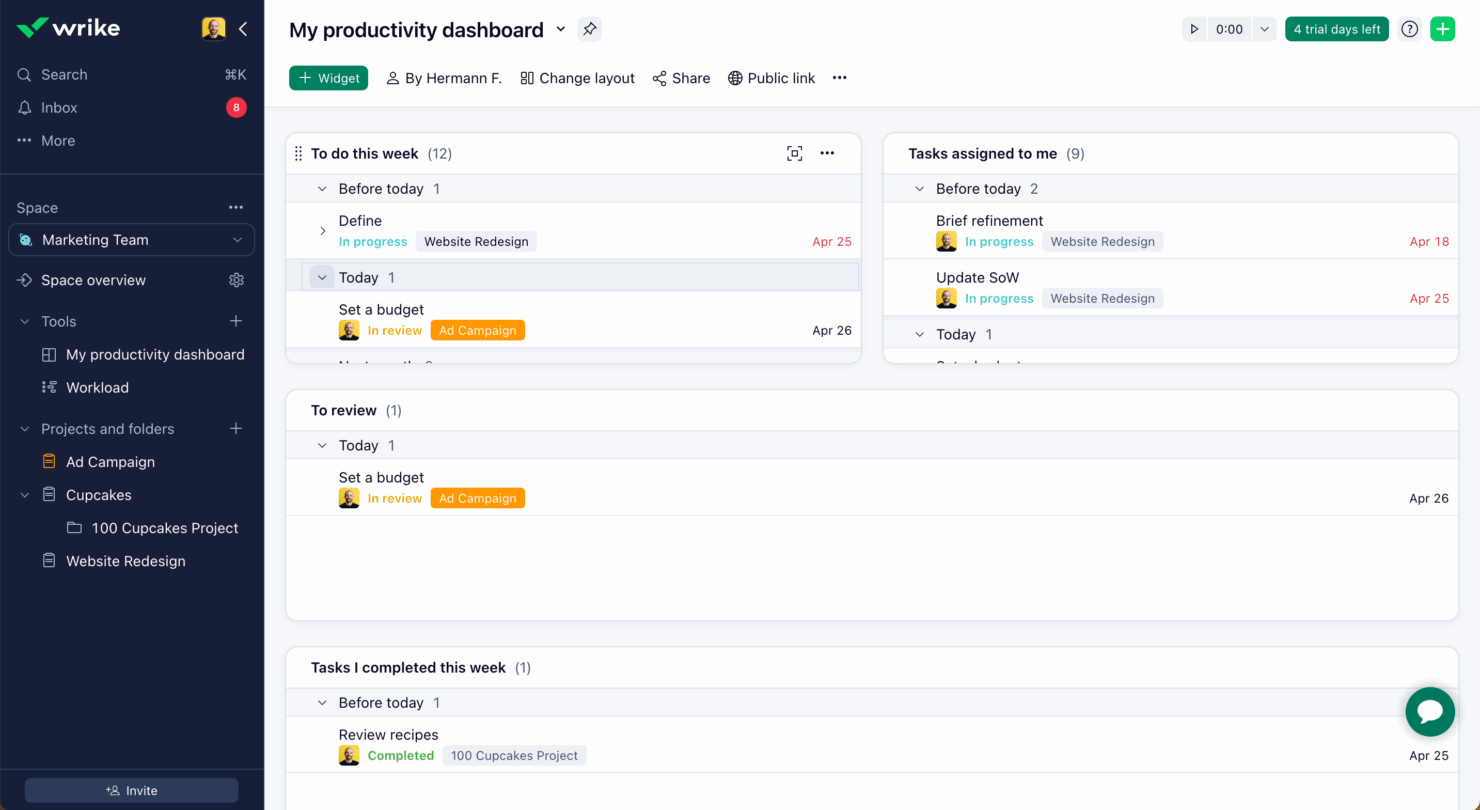
With Wrike’s customizable dashboards, you can manage complex project timelines and resources, making it invaluable for project managers handling multiple tasks across different teams. Miro’s infinite canvas and real-time collaboration features are great for creative brainstorming sessions and visual project management, like Gantt charts and Kanban boards. This supports teams that thrive on interactive and dynamic environments. While Wrike’s structured approach suits detailed project tracking, Miro excels in facilitating creativity and spontaneity in team collaborations.
| Wrike | Miro | |
|---|---|---|
| API | ||
| Collaboration Support | ||
| Data Export | ||
| Data Import | ||
| External Integrations | ||
| Multi-User | ||
| Notifications | ||
| Project Management | ||
| Workflow Management |
Wrike vs. Miro Integrations
| Integration | Wrike | Miro |
|---|---|---|
| Zoom | ✅ | ✅ |
| Microsoft Teams | ✅ | ✅ |
| Google Suite | ✅ | ✅ |
| Slack | ✅ | ✅ |
| Jira | ✅ | ✅ |
| Trello | ✅ | ✅ |
| Asana | ✅ | ✅ |
| Salesforce | ✅ | ❌ |
| HubSpot | ✅ | ❌ |
| Confluence | ❌ | ✅ |
| API | ✅ | ✅ |
| Zapier | ✅ | ✅ |
With Wrike's integration with Salesforce, you can streamline your sales and project management processes, making it ideal for team members that need to align sales workflows with project execution. Miro's integration with Confluence is great for teams that need to visualize and collaborate on documentation within their existing knowledge management system. While Wrike supports complex task automation, Miro enhances collaborative creativity through integration.
Wrike vs. Miro Security, Compliance & Reliability
| Factor | Wrike | Miro |
|---|---|---|
| Data Encryption | Wrike encrypts data both at rest and in transit using AES-256 encryption. | Miro secures data with AES-256 encryption, ensuring privacy during transfer. |
| Regulatory Compliance | Wrike complies with GDPR and offers customizable access controls. | Miro adheres to GDPR standards and provides role-based access management. |
| Uptime Reliability | Wrike guarantees 99.9% uptime, ensuring consistent access to your projects. | Miro maintains high availability with a 99.9% uptime SLA. |
Wrike and Miro both prioritize security and compliance, but Wrike's customizable access controls offer more flexibility for managing team permissions. To evaluate security features, focus on encryption standards, compliance certifications, and access control options to ensure the tool meets your team's specific requirements.
Wrike vs. Miro Ease of Use
| Factor | Wrike | Miro |
|---|---|---|
| User Interface | Wrike's intuitive UI with drag-and-drop functionality simplifies project navigation and task management. | Miro's clean interface with a focus on white space makes visual collaboration straightforward and user-friendly. |
| Onboarding Experience | Wrike's onboarding checklist and labeled UI elements help new users get started quickly. | Miro offers a low barrier to entry with community support and a robust Learning Centre. |
| Setup | Wrike provides a structured setup process with customizable dashboards for tailored workflows. | Miro's setup is straightforward, emphasizing ease of access to templates and collaboration tools. |
| Support | Wrike includes in-app guidance and responsive customer support for troubleshooting. | Miro offers extensive community resources and an interactive help center for user assistance. |
Wrike's ease of use lies in its workspace-based, structured approach and labeling, making it great for those who appreciate organized workflows, but some might find its extensive features overwhelming initially. Miro, on the other hand, has a relatively flat learning curve, excels in visual simplicity and collaboration but might be challenging for users who need straightforward task management without the visual elements.
Wrike vs Miro: Pros & Cons
Wrike
- Wrike's proofing feature allows you to compare file versions dynamically.
- The user-friendly interface ensures easy navigation for your team.
- Wrike's AI features are available in all plans at no extra cost.
- It can be unclear where form responses are stored within the tool.
- Some integrations require an additional cost, regardless of the plan.
- Two-factor authentication is only available with the enterprise plan.
Miro
- You’ll love Miro's intuitive and visually engaging interface.
- Your team can collaborate in real-time with ease.
- Miro's flexible templates save you time on project setup.
- You might find the learning curve steep for advanced features.
- Your team could experience occasional performance lags with large boards.
- Miro may require frequent updates, which can interrupt your workflow.
Best Use Cases for Wrike and Miro
Wrike
- Marketing Teams Wrike’s proofing feature helps you streamline creative approval processes with ease.
- Creative Agencies Wrike’s dynamic file version comparison keeps your creative projects on track.
- IT Departments Wrike’s user-friendly interface simplifies complex project coordination for your team.
- Product Development Wrike’s AI features boost your team’s productivity without extra costs.
- Event Management Wrike’s task scheduling ensures your events are planned and executed flawlessly.
- Construction Projects Wrike’s robust project tracking keeps your construction timelines and budgets in check.
Miro
- Creative agencies Miro supports brainstorming sessions with its visual tools and helps your team innovate and execute creative ideas efficiently.
- Marketing teams It allows you to map out marketing campaigns visually and keeps your projects organized and aligned with your goals.
- Design departments Miro’s flexible templates and drawing tools let your team create and iterate on design concepts with ease.
- Product management Visual roadmaps and collaboration features make it easy for your team to track product development and align on tasks.
- Remote teams Miro allows for seamless remote collaboration, so your team stays connected and productive, no matter where they’re located.
- Education sector Engage your students and make learning more dynamic with interactive lessons using Miro’s visual aids and collaborative features.
Who Should Use Wrike, and Who Should Use Miro?
In my opinion, Wrike is best suited for teams that need structured project management with detailed task tracking and resource management, especially in industries like construction or marketing where complex project timelines are common. I believe Miro is ideal for creative teams that thrive on visual collaboration and brainstorming, such as design or product development teams. If your team values detailed planning and comprehensive reporting, Wrike might be the right fit. But if your focus is on fostering creativity and interactive collaboration, Miro should be your go-to choice.
Differences Between Wrike and Miro
| Wrike | Miro | |
|---|---|---|
| Automation | Wrike provides automation for task management and workflow efficiency. | Miro lacks extensive automation, focusing more on manual collaboration tools. |
| Collaboration | Wrike facilitates structured, task-oriented teamwork. | Miro excels in dynamic, visual team collaboration and ideation. |
| Pricing | Wrike uses tiered pricing with potential extra costs for added features. | Miro offers flexible pricing, including free plans for basic use. |
| Project Management | Wrike offers detailed task tracking and resource management for complex projects. | Miro focuses on visual collaboration and brainstorming for creative projects. |
| User Interface | Wrike's UI is intuitive with drag-and-drop functionality for easy navigation. | Miro's UI is clean and emphasizes visual collaboration with an infinite canvas. |
| Visit WrikeOpens new window | Visit MiroOpens new window |
Similarities Between Wrike and Miro
| Collaboration | Both platforms support real-time collaboration; Wrike through task updates and Miro with visual brainstorming sessions. |
|---|---|
| Customization | Wrike and Miro allow for tailoring experiences; Wrike with customizable dashboards, Miro with adaptable templates. |
| Integrations | Both Wrike and Miro offer extensive integrations with tools like Slack, Google Suite, and Microsoft Teams, enhancing collaboration and workflow. |
| Security | Both prioritize security with AES-256 encryption and GDPR compliance, ensuring your data's safety. |
| Support | Wrike and Miro provide robust support through tutorials and community forums to help your team maximize their use. |
| Visit WrikeOpens new window Visit MiroOpens new window | |