

What is Resource Optimization? Key Techniques & Tools


Resource optimization involves making the best use of your team, budget, and tools to deliver projects on time and within budget, even when resources are tight.
In this article, I’ll show you practical methods for optimizing resources, introduce helpful resource management software, and share proven tips to help you plan and allocate resources efficiently, so you can stay in full control of project success.
What Is Resource Optimization?
Resource optimization is the process of matching people, budget, and equipment to project work so you hit your goals without wasting capacity. Project managers use it to prevent burnout, idle time, and missed deadlines.

For example, during a construction project, you as the project manager will review the budget and scope to schedule the right amount of workers and make sure the right equipment is available to properly execute the project.
Resource Optimization Template
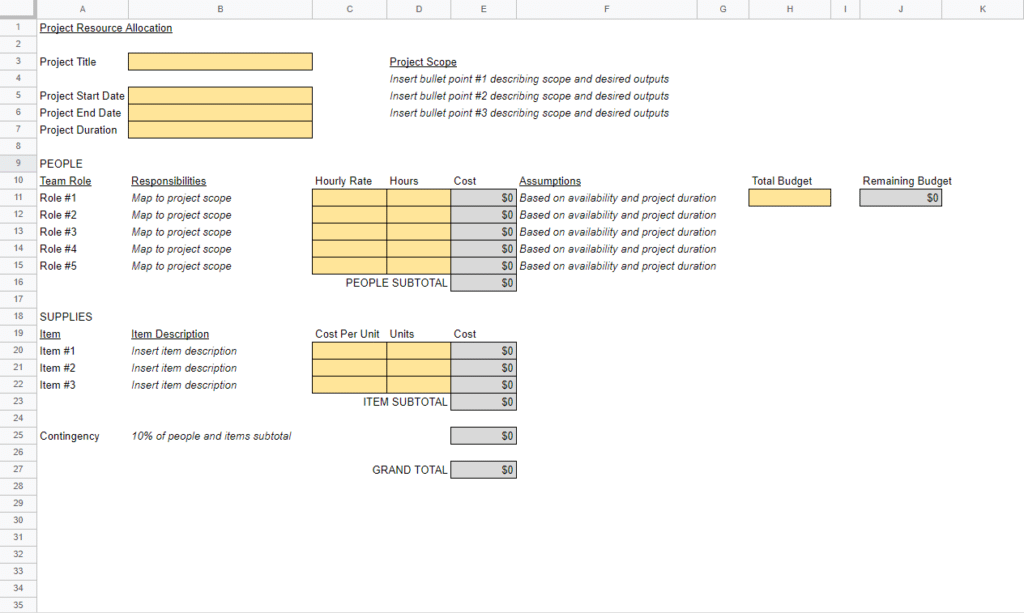
Download our free resource optimization template to save time and create an optimal resource plan. One of our many resource planning templates, it lets you distribute project work to the right resources at the right time, so you can complete your project on time and on budget.
Quick tips:
- Make a copy before downloading the template.
- Formatting: cells shaded in yellow require input and cells shaded in gray will automatically calculate based on your input.
- Adding team resources: Insert additional rows above the subtotal rows.
- The assumptions column: Track whether human resources are full-time.
- Contingency is set at 10%: You can adjust the formula to use a different percentage.
- Use the "Remaining Budget" counter to track project budget.

Benefits of Resource Optimization
The benefits of resource management optimization include efficiency, cost savings, productivity, and improved project prognosis.
- Increased efficiency: Optimizing resources using project management tools lets you allocate resources in a way that best optimizes your project workflow. You’ll reduce waste and save time and effort.
- Cost reduction: A cost-effective project is a natural outcome of effective and efficient resource management. Create a resource planning strategy (as part of your project plan) to mitigate unnecessary expenditures and provide flexibility.
- Better productivity: You’ll be able to better manage resource utilization and team workloads. Your team will have the right amount of work on their plates (not too much or too little) and a clear list of priorities. This keeps the team motivated and engaged.
- Improved project outcomes: With effective resource optimization, the team will complete project work more smoothly and you’ll have more visibility into how you’re tracking against budget and deadlines, ultimately leading to more successful project outcomes.
Resource Optimization Techniques
There are a variety of resource optimization techniques you can use to help you balance resource usage, make optimal resource decisions, and prioritize critical tasks.
- Resource leveling: When there’s an imbalance in the supply and demand for resources, you can level resources by adjusting completion dates. This helps make sure that no resource is overworked or underutilized.
- Resource smoothing: This resource optimization technique involves adjusting activities within the slack or float of the project to avoid overallocation without changing the project duration or affecting the critical path.
- Reverse resource allocation: This technique involves working backward from the project deadline to allocate resources. Critical tasks are prioritized with the necessary resources.
Resource Optimization Example
Say your agency is building a new ecommerce site for a retail client, with launch eight weeks out. Your lead front-end developer is booked on page templates, checkout integration, and accessibility fixes in the same two weeks. Meanwhile, your second developer has almost nothing to do until week five.
Nobody planned it this way. Tasks got assigned as they came up, and now one person is a bottleneck for the whole team. If nothing changes, the launch slips or your lead developer burns out trying to hold it together.
Here's how I'd optimize resources on this project:
- Start with reverse resource allocation: Work backward from the launch date to find what has to finish first. Checkout integration is blocking launch testing, so it must get your lead developer's time before anything else.
- Use resource smoothing on tasks with float: Accessibility fixes won't hold up launch until final QA. Move them into a later week where your lead developer has slack. The launch date can stay put.
- Level resources where the overload remains: Page templates still compete with checkout work. Hand some templates to your second developer, or shift their due dates so nobody is overbooked.
- Review allocations every week: Check workloads in your resource scheduling tool at the start of each week. If the client adds pages or changes scope, you'll catch the overload before it builds up again.
Challenges With Resource Optimization
The biggest obstacles to resource optimization are limited availability, unclear priorities, tight budgets, shifting project scope, shared team members, and unreliable estimates. Here’s how I’d handle each one.
| Challenge | Solutions and Considerations |
|---|---|
| Resource availability: Sick days, vacations, and parental leave can pull a key person off your project in the middle of a sprint. | Add planned time off to your resource calendar as soon as it’s booked. For each key role, name a backup who knows the work and can step in for a week or two. |
| Lack of prioritization: When every project is “urgent,” people get pulled between tasks and the work that matters most sits waiting. | Rank active projects with your stakeholders using a simple scoring model, like business value against effort. Share the ranked list so the team knows which project wins when two collide. |
| Budget constraints: A fixed budget can rule out contractors or extra hires, even when the workload calls for them. | Cut or delay low-value scope before you cut people. If you need extra hands, price out a contractor for the peak weeks only, not the whole project. |
| Changing project scope: A new feature request or an extra round of revisions can overload a team that’s already fully booked. | Run every scope change through a change request that spells out the resource impact. Update allocations before you agree to a new timeline, not after. |
| Shared resources across projects: Designers, developers, and QA testers often split time across several projects, and each project manager assumes they have them. | Plan shared people in one company-wide resource view instead of separate plans. Agree on time splits with other project managers (e.g. 60% on one project and 40% on another). |
| Inaccurate estimates: Plans built on gut-feel estimates leave some people overbooked and others idle once the real work starts. | Track actual hours against estimates in your time tracking tool. After two or three projects, you’ll have real data to estimate similar tasks with confidence. |
Tools For Optimizing Resources
Several tools simplify resource optimization by providing features for managing resources effectively and resource forecasting, planning, and tracking.
Clicks on the links below may earn a commission, which supports our independent testing and review of software and services. Learn more about how we stay transparent.


Resource Optimization Best Practices
Best practices for resource optimization include planning below full capacity, tracking data, mapping team skills, reviewing allocations weekly, planning in short cycles, and setting up employee resourcing tools properly. Here’s what these look like in practice.
- Plan to 80% capacity, not 100%: Nobody spends a full 40 hours on project work. Meetings, admin, and support requests eat into every week. I’d book people to about 80% of their hours so a small surprise doesn’t turn into a missed deadline.
- Track actuals against estimates: Ask your team to log time against tasks, then compare it to what you planned. After a few projects, you’ll know which tasks always run long and can estimate them with real numbers instead of gut feel.
- Build a skills matrix: List every team member and rate their skills, tools, and experience levels in a simple grid. You’ll spot single points of failure (e.g. only one person knows the payment integration), and know who to cross-train first.
- Hold a weekly resourcing meeting: Spend 30 minutes each week with other project managers and team leads to look two to four weeks ahead. Add tentative bookings for likely new work so a signed deal doesn’t catch you without people.
- Plan in short cycles: Agile gives you a natural checkpoint every sprint. Use sprint planning to move people based on the current backlog, not a plan you made three months ago.
- Set up your resource management tool properly: A tool is only as good as the data in it. Make sure everyone’s time off, working hours, and role are up to date, then learn the views that matter, like capacity heatmaps and utilization reports.
Key Metrics to Measure Resource Optimization
I track resource utilization, overallocation, estimate accuracy, and schedule variance. These show whether people are booked well and whether the work lands on time.
- Resource utilization rate: Divide the hours each person spends on project work by their available hours. I'd aim for 70% to 85%. Anything higher leaves no room for surprises, and anything lower usually means idle time you're paying for.
- Overallocation rate: Count how many people are booked above 100% of their capacity in a given week. Your goal is zero. If the same names show up week after week, that's a sign you need to level resources or cross-train.
- Estimate accuracy: Compare planned hours to actual hours for each task or phase. If tasks keep running 20% or more over, your plans are built on bad numbers and every allocation downstream will be off.
- Schedule variance: Compare the work you planned to finish by now with the work that's actually done. A growing gap tells you resources aren't keeping pace with the plan, even if everyone looks busy.
Put Your Resource Plan to Work
Resource optimization gets easier when you don't have to build every plan from scratch. Sign up for our free newsletter and membership to get tools, templates, and weekly insights from other delivery leaders.


