

Timeboxing: Complete Guide & Tools for 2026

For most project managers, constant distractions, change requests, and overburdened resources are daily challenges. To address these and other obstacles, many look to “timeboxing” as a way to carve out dedicated breaks and downtime while creating a sense of urgency. Timeboxing helps you tackle even the most complex projects by minimizing distractions and creating a healthier work-life balance.
In this article, I’ll discuss why timeboxing is essential for so many productive people, its benefits and drawbacks, how to get started, and the best time blocking tools to make it work.
What Is Timeboxing?
Timeboxing is a time management technique that allows you to allocate fixed, predetermined time slots to tasks, activities, and even breaks from work. By dividing your day into manageable chunks, you can prioritize tasks and avoid the temptation to procrastinate. Its simplicity helps you focus on one task at a time, increasing productivity and efficiency.

Why Is Timeboxing Important?
This structured approach can be particularly beneficial for individuals with busy, distraction-heavy workflows, as it encourages a disciplined and focused mindset. Timeboxing can help you stay organized and productive in these ways.
Forces the prioritization of tasks
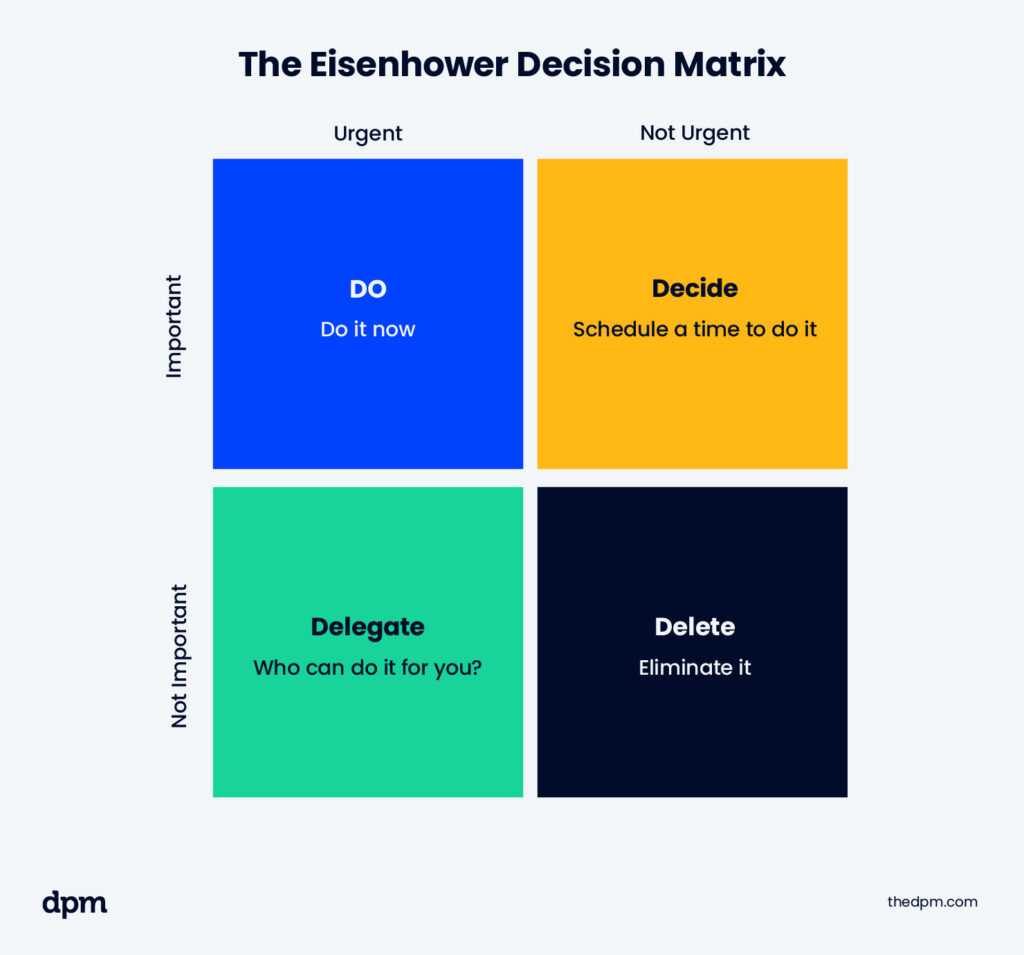
Using a prioritization matrix to identify the most important tasks and allocating specific time slots to each activity helps you determine the urgency of your tasks, allowing you to focus on what truly matters and address high-priority items first. This helps you avoid getting bogged down by less important tasks.
Check out this prioritization matrix example:
Creates clear boundaries to prevent overwork
Timeboxing prevents overwork and improves workflow efficiency by setting fixed durations and boundaries for tasks, avoiding burnout. This approach promotes a healthier work-life balance by incorporating regular breaks and allocating time for rest and relaxation, leading to enhanced well-being and sustained productivity.

Reduces context-switching by focusing on one thing at a time
By dedicating specific time slots to individual tasks, you can minimize distractions and maintain a higher level of concentration. This focused approach can lead to better quality work and faster task completion.
Builds discipline around scheduling and commitments
Timeboxing can help you develop better time management habits and increase your overall productivity. By consistently sticking to your timeboxed plan, you can build a more substantial commitment to your goals and responsibilities.
Some Background on the Concept of Timeboxing
Timeboxing was initially designed to improve efficiency and predictability and is rooted in project management for software development, particularly within Agile and Scrum methodologies.
It has since evolved into a versatile productivity tool applicable to various fields and gained traction, especially with a growing trend towards time tracking for remote teamwork and the need for self-discipline in managing work-from-home schedules.
Applications like Motion, Notion, and Sunsama have made it easier than ever to implement timeboxing into daily schedules, thanks to their intuitive interfaces and automated features, which help you plan and allocate time for tasks efficiently.
Timeboxing Examples
To better understand how timeboxing can be applied in real-world scenarios, consider these two examples.
Example 1: Using Google Calendar to Box Out Tasks
One of the most common ways to implement timeboxing is by using Google Calendar. By visually blocking out time for specific tasks, you can create a clear and organized schedule. For instance, you might allocate one hour in the morning to check emails, followed by two hours for focused work on a project. After a lunch break, you might schedule another hour for meetings and then dedicate the afternoon to administrative tasks.
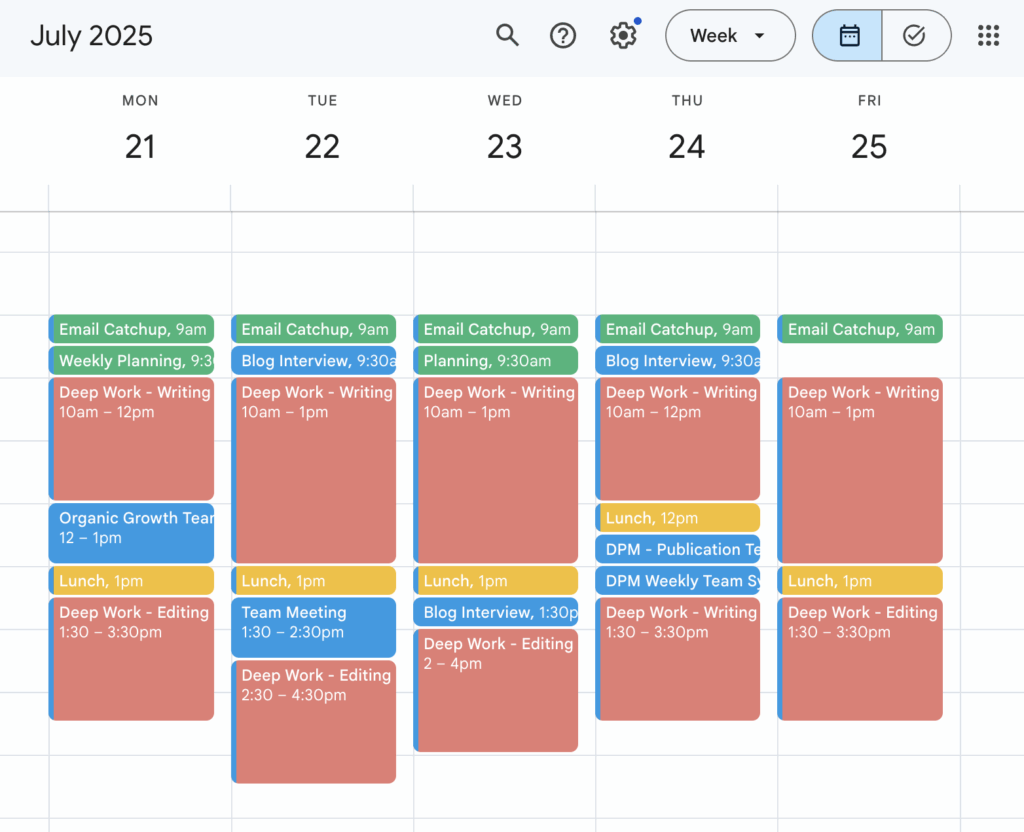
The advantage of using Google Calendar is visual clarity. Seeing your entire day laid out in color-coded blocks can help you better estimate how much time you have available and ensure that you’re not overcommitting.
Example 2: Sunsama or Motion Automating Timeboxing
Modern productivity tools, such as Sunsama and Motion, take timeboxing to the next level by automating the process (this is one of many benefits of productivity tools). These applications guide your daily planning using artificial intelligence (AI) scheduling features that help you allocate time for tasks effortlessly.
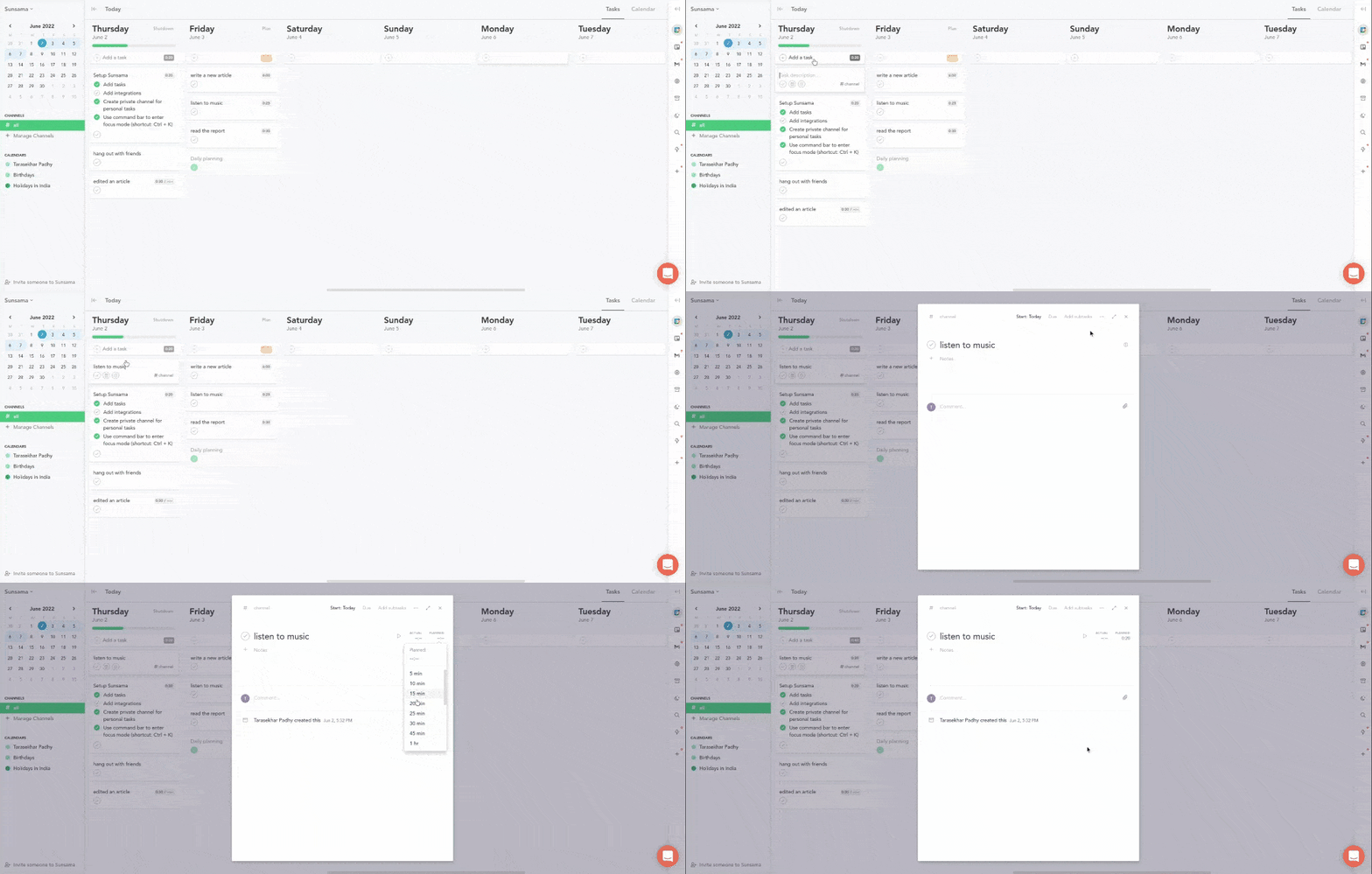
- Sunsama allows you to drag and drop tasks into your calendar, automatically adjusting the schedule based on your priorities and deadlines.
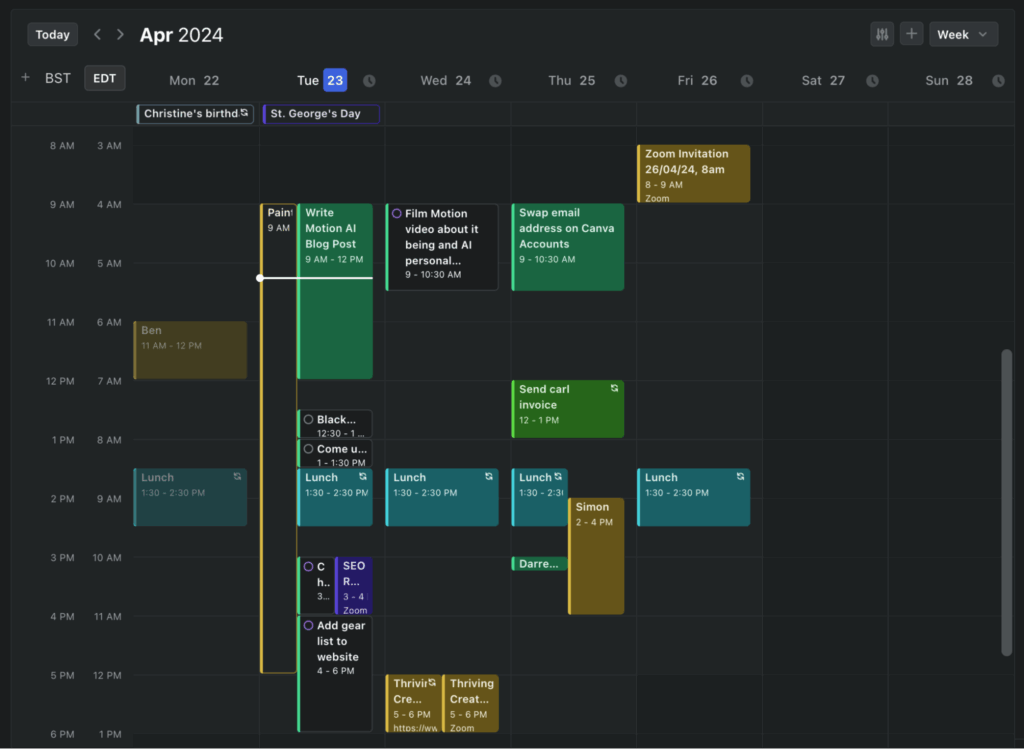
- Motion uses AI to create an optimal timeboxed schedule for you. By analyzing your tasks and available time, Motion generates a plan that maximizes productivity and minimizes downtime.
Benefits Of Timeboxing
Timeboxing offers these and other benefits that can significantly improve your team’s productivity and overall well-being.
- Better cognitive performance and increased productivity: By dedicating specific time slots to individual tasks, you can minimize distractions and maintain a higher level of concentration. This focused approach allows you to complete tasks more efficiently and produce higher quality work. These uninterrupted, focused work periods lead to better cognitive performance and increased productivity.
- Goal attainment with lower stress levels: Timeboxing also promotes better time management by forcing you to prioritize tasks and allocate your time effectively. This helps you and your team avoid procrastination, ensuring everyone makes progress on essential tasks. When people use time management techniques like timeboxing, they’re more likely to achieve goals and experience lower levels of stress.
- Increased control and accountability: Sticking to your timeboxed schedule can help you develop better time management habits and increase your overall productivity over the long run by building a stronger sense of control and accountability and greater ownership of your tasks and responsibilities.
Drawbacks Of Timeboxing
While timeboxing’s structured approach can help you and your team meet deadlines, there are also drawbacks, such as these.
Can be too rigid for unpredictable schedules
While effective in many structured environments, timeboxing can be a significant challenge for those with unpredictable schedules. This rigidity can be particularly problematic in dynamic fields, where individuals such as customer service representatives, sales professionals, or emergency responders may encounter sudden shifts that demand immediate attention. In these scenarios, sticking to pre-determined time slots can be impractical and lead to missed opportunities or delayed responses.
May create pressure or anxiety for some people
For anyone who has a constant awareness of time passing and the potential for missed deadlines, it can bring on stress, especially for those who are prone to anxiety. The fear of not completing tasks within the allotted time slots can lead to a heightened sense of urgency, which may not be conducive to effective work.
Doesn’t account for tasks that take longer than expected
Not all tasks can be accurately estimated in terms of the time required for completion. Complex projects, research, and creative tasks might involve unforeseen challenges that require more time than initially planned. When these tasks are confined to strict time slots, there is a risk of either rushing through them or leaving them incomplete.
Requires discipline to stick to the scheduled time slots
Discipline can be challenging if you’re an individual who struggles with managing your time. The success of timeboxing largely depends on your ability to stick to the set schedule without getting distracted from the plan. If this sounds like you, or if your work is better suited to a spontaneous working style, this can be a significant hurdle.
Needs regular review to stay effective
Schedules and priorities are not static; they evolve over time as new tasks emerge and existing ones change in scope. To align timeboxing with its purpose, you and your team need to frequently review schedules, assess the effectiveness of time allocation, and make necessary adjustments. This ongoing process can be time-consuming and requires a proactive approach.
How To Get Started With Timeboxing
Getting started with timeboxing is relatively simple, but it requires some planning and commitment. Here are some practical steps to help you reach your optimal project productivity.
1. Pick your task list for the day: Plan ahead and make a daily list of tasks you need to complete. Depending on the type of project, your list may include work related activities, such as reading and responding to emails, setting up or attending meetings, returning calls, or completing administrative or project tasks. Make sure you keep other stakeholders informed to help everyone plan time more effectively.
2. Estimate how long each task should take: Estimate the amount of time each task will require by breaking down tasks. Be realistic and consider any potential interruptions or complexities that might arise. It's better to overestimate the time needed than to underestimate and risk falling behind.
3. Block time on your calendar: Use a tool like Google Calendar or a timeboxing app to allocate specific time slots for each task. Include buffer time between tasks to account for any unexpected delays, administrative work, or travel time to meetings. Color code your calendar tasks to visually differentiate between different types of tasks.
4. Set a timer and follow through: Set a timer to notify you ahead of the allocated time slot. This will help you stay focused and create a sense of urgency. Stick to the schedule as closely as possible, but remain flexible and adjust it as needed.
5. Reflect and adjust your estimates: At the end of each day, review your timeboxed schedule and reassess how well you met it. Reflect on any discrepancies between your estimates and the actual time spent on tasks. Use feedback from others to refine your estimates and improve your timeboxing strategy.
If you’re new to time management or timeboxing, you may encounter common challenges, such as underestimating the time required for tasks or not leaving sufficient buffer time between tasks. Collaborate with other project or scheduling professionals and ask about productivity tips; learn from their experiences and continuously refine your approach.
Timeboxing Tools
Combine the timeboxing technique with tools like these to help you implement timeboxing effectively and maximize your productivity.
1. Google Calendar – Manual Scheduling: Google Calendar is a popular and versatile tool that allows you to manually schedule tasks and allocate time slots. Its user-friendly interface and integration with other Google services make it a convenient option. You can set reminders, color code tasks, and easily adjust your schedule as needed.
2. Sunsama – Guided Daily Planning: Sunsama is a productivity app that can help you plan your day using a timeboxed approach. It offers a drag and drop interface that makes it easy to allocate time for your tasks and create a balanced schedule. Sunsama also provides insights and analytics to help you track your progress and improve your time management.
3. Motion – AI-powered automatic timeboxing: Motion uses AI to create an optimal timeboxed schedule. By analyzing your tasks and available time, it generates a plan that maximizes productivity and minimizes downtime. This tool is ideal for knowledge workers who want to save time on project and workflow planning and focus more on execution.
4. Notion – Customizable Timeboxing Templates: Notion is a customizable productivity tool that can be adapted for timeboxing. You can create templates and databases to organize your tasks and allocate time slots. Its flexibility allows you to tailor your timeboxing strategy to suit your unique needs and preferences.
5. Forest app or Pomofocus – Support timed work sessions: The Forest app and Pomofocus are tools that support timed work sessions, making them compatible with timeboxing. The Forest app gamifies the process by allowing you to grow a virtual forest as you complete tasks, while Pomofocus follows the Pomodoro technique, breaking work into intervals. Both apps help you stay focused and maintain a disciplined work routine.
You can also check out our full list of time tracking software.
Best Practices for Timeboxing
To make the most of timeboxing, consider incorporating some best practices into your routine:
- Leave buffer time between boxes: Including buffer time between time slots is essential for accommodating unexpected interruptions and transitions. This extra time can help you stay on track and avoid feeling rushed or stressed if tasks take longer than anticipated.
- Timebox planning or admin tasks, not just deep work: Timeboxing isn’t just for focused, deep project work. Allocate time slots for planning, administrative tasks, and other routine activities to make sure all aspects of your work are managed efficiently and nothing is overlooked.
- Use color coding to differentiate types of tasks: Color code tasks in your calendar to provide visual clarity and help you quickly identify different types of tasks. For example, you might use one color for work-related tasks, another for personal errands, and a third for breaks. This visual organization can simplify managing your schedule at a glance and maintain a balanced workload.
- Review and adjust boxes at the end of the day: Regularly review and adjust your timeboxed schedule for continuous improvement. At the end of each day, reflect on how well you adhered to your plan and identify any areas for adjustment. This ongoing evaluation will help you refine your timeboxing strategy and become more accurate in your time estimates.
- Combine with the Pomodoro method for added focus: The Pomodoro technique involves working in short, focused intervals (typically 25 minutes) followed by a brief break. Combine this method with timeboxing to improve your focus and productivity. By breaking tasks into smaller, manageable chunks, you can maintain a high level of concentration and prevent burnout.
The deep work technique of timeboxing can help you take control of your schedule and maximize your time and productivity. Following our steps to get started, adopting best practices, utilizing the right tools, and accessing these resources, as well as other hacks for boosting productivity, can help you stay focused, create a sense of urgency, and maintain a healthier work-life balance.
More Resources
Boost Your Productivity with Weekly Tips
Want to connect with other digital project managers to share resources and best practices? Join our membership community and get access to 100+ templates, samples, and examples and connect with 100s of other digital project managers in Slack.


