

10 beste TeamGantt-alternativer for planlegging i 2026

Kortliste over de beste alternativene til TeamGantt


TeamGantt er et prosjektstyringsverktøy som gir en visuell tidslinje for planlegging og sporing av oppgaver, noe som hjelper team med å planlegge prosjekter effektivt og opprettholde tydelig kommunikasjon. Noen brukere kan imidlertid være på utkikk etter alternativer på grunn av ønsker om andre funksjoner, priser eller brukergrensesnitt.
Med min omfattende erfaring innen prosjektstyring og digital programvare har jeg funnet frem til og testet ulike alternativer til TeamGantt. Enten du driver en liten bedrift eller en stor virksomhet, er jeg trygg på at mine detaljerte vurderinger vil hjelpe deg med å finne den ideelle løsningen for deg og teamet ditt.
Hva er TeamGantt?
TeamGantt er en prosjektstyringsprogramvare utviklet for å hjelpe team med å planlegge og gjennomføre prosjekter ved hjelp av et intuitivt Gantt-diagramgrensesnitt. Den brukes ofte til å samordne teammedlemmer om prosjektets tidslinjer og leveranser, slik at prosjekter blir ferdigstilt i tide og innenfor avgrensningen.
Why Trust Our Software Recommendations
Our team has been testing and reviewing software since 2012. As project managers ourselves, we know how difficult—and important—it is to choose the right software.
For this guide, we evaluated tools using hands-on testing and independent research, scoring tools using our selection criteria. We also draw on insights from industry thought leaders and practicing project management experts.
Our reviews reflect our human editorial judgment, not a sales pitch.
Expert reviewers:
Sammenligningstabell over alternativer til TeamGantt
| Tool | Best For | Trial Info | Price | ||
|---|---|---|---|---|---|
| 1 | Best for enterprise-grade features | 30-day free trial | From $10/user/month (billed annually) | Website | |
| 2 | Best for Kanban purists | Free plan available | From $6/user/month | Website | |
| 3 | Best for milestone-driven planning | Free plan + 14-day free trial + free demo available | From $79/user/month (billed annually) | Website | |
| 4 | Best for unified project control | 14-day free trial + free demo available | From $45/month (billed annually) | Website | |
| 5 | Best for client-focused teams | Free plan + 14-day free trial available | From $9.99/user/month (billed annually) | Website | |
| 6 | Best for workflow customization | 30-day free trial + free plan + free demo available | From $11.20/user/month (billed annually) | Website | |
| 7 | Best for live progress tracking | 30-day free trial | From $15/user/month (billed annually) | Website | |
| 8 | Best for CRM integration | 15-day trial + free plan + free demo available | From $49/organization/month (billed annually) | Website | |
| 9 | Best for dynamic scheduling | Free trial available | Pricing upon request | Website | |
| 10 | Best for open source project management | Free plan available | Free forever plan | Website |
Vurderinger av de beste alternativene til TeamGantt
Nedenfor vil jeg gi deg en detaljert analyse og oversikt over hvert alternativ til TeamGantt. Jeg vil se nærmere på fordeler og ulemper, utforske funksjonene deres og diskutere situasjonene der de utmerker seg mest.
Best for enterprise-grade features

Microsoft Project is an advanced project management tool designed to serve the needs of businesses of all sizes. It’s particularly well-suited for organizations looking for enterprise-grade project management capabilities.
Why it's a good TeamGantt alternative: Microsoft Project offers a large suite of tools that can handle the complexities of large-scale project management. Its enterprise-grade features make it a strong alternative to TeamGantt, especially for organizations that require advanced project planning and resource management capabilities.
Standout features & integrations:
Features include project scheduling, resource management, budget management, reporting, analytics, integration with Microsoft 365 Suite, customizable templates, project timelines, portfolio management, risk analysis, and collaboration tools.
Integrations include Microsoft Teams, Microsoft Power BI, Microsoft Planner, SharePoint, OneDrive for Business, Microsoft Dynamics 365, Azure DevOps, Microsoft Excel, Microsoft Power Automate, and Microsoft Power Apps.
Pros and Cons
Pros:
- Strong integration with other Microsoft products
- Advanced resource management tools
- Progressive project management features
Cons:
- Higher learning curve due to extensive features
- May be complex for small projects

Best for Kanban purists
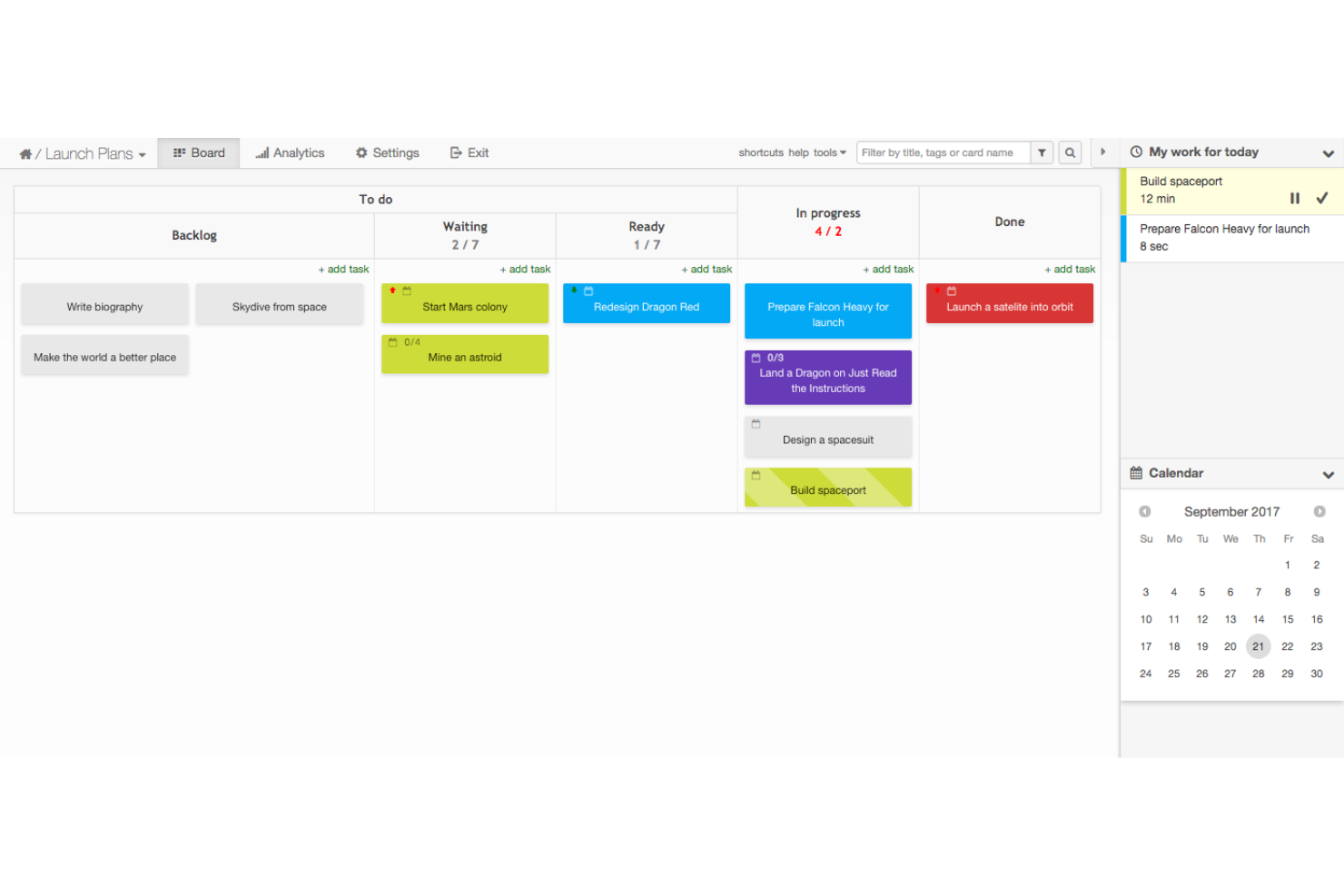
Kanban Tool is an online visual management software that simplifies workflow visualization. It's best for Kanban purists due to its focus on the core principles of Kanban, offering a pure and uncomplicated Kanban experience.
Why it's a good TeamGantt alternative: Kanban Tool provides a dedicated Kanban-centric approach to project management, which is ideal for teams looking for a straightforward and focused Kanban experience. Its simplicity and adherence to Kanban principles make it a strong alternative to TeamGantt.
Standout features & integrations:
Features include real-time team collaboration on Kanban boards, customizable layouts with swimlanes, task assignments, due date reminders, work-in-progress limits, process automation, time tracking, reporting, and data import/export features.
Integrations include Android App, iOS App, API/SDK for programming, Zapier, Google Drive, OneDrive, Box, Dropbox, Chromecast, Outlook, ActiveCampaign, Apiant, Chrome extensions, Bitium, and truDigital Signage.
Pros and Cons
Pros:
- Free plan available
- Over 100 features and integrations
- Dedicated Kanban-centric interface
Cons:
- The on-site version requires a minimum of 10 users
- Limited to Kanban methodology
Nifty
Best for milestone-driven planning

Nifty is a project management platform that centralizes project communication, planning, and tracking in one collaborative workspace. It’s best for milestone-driven planning because it automates progress as tasks are completed, aligning team efforts with project milestones.
Why it's a good TeamGantt alternative: Nifty provides a balanced mix of task management, milestone tracking, and collaboration tools, making it a strong alternative to TeamGantt. Its focus on maintaining project timelines while facilitating team communication sets it apart.
Standout features & integrations:
Features include project management, task automation, milestone tracking, document collaboration, time management, Gantt charts, Kanban boards, calendar integration, reporting tools, and team chat.
Integrations include Google Drive, Slack, Zoom, Dropbox, Trello, Asana, Basecamp, GitHub, GitLab, and Bitbucket.
Pros and Cons
Pros:
- Supports real-time collaboration and communication within the platform
- Provides a visual timeline for goal setting and progress tracking
- Offers a free plan with essential features
Cons:
- Initial complex setup process
- Mobile app limitations and functionality
ProofHub
Best for unified project control
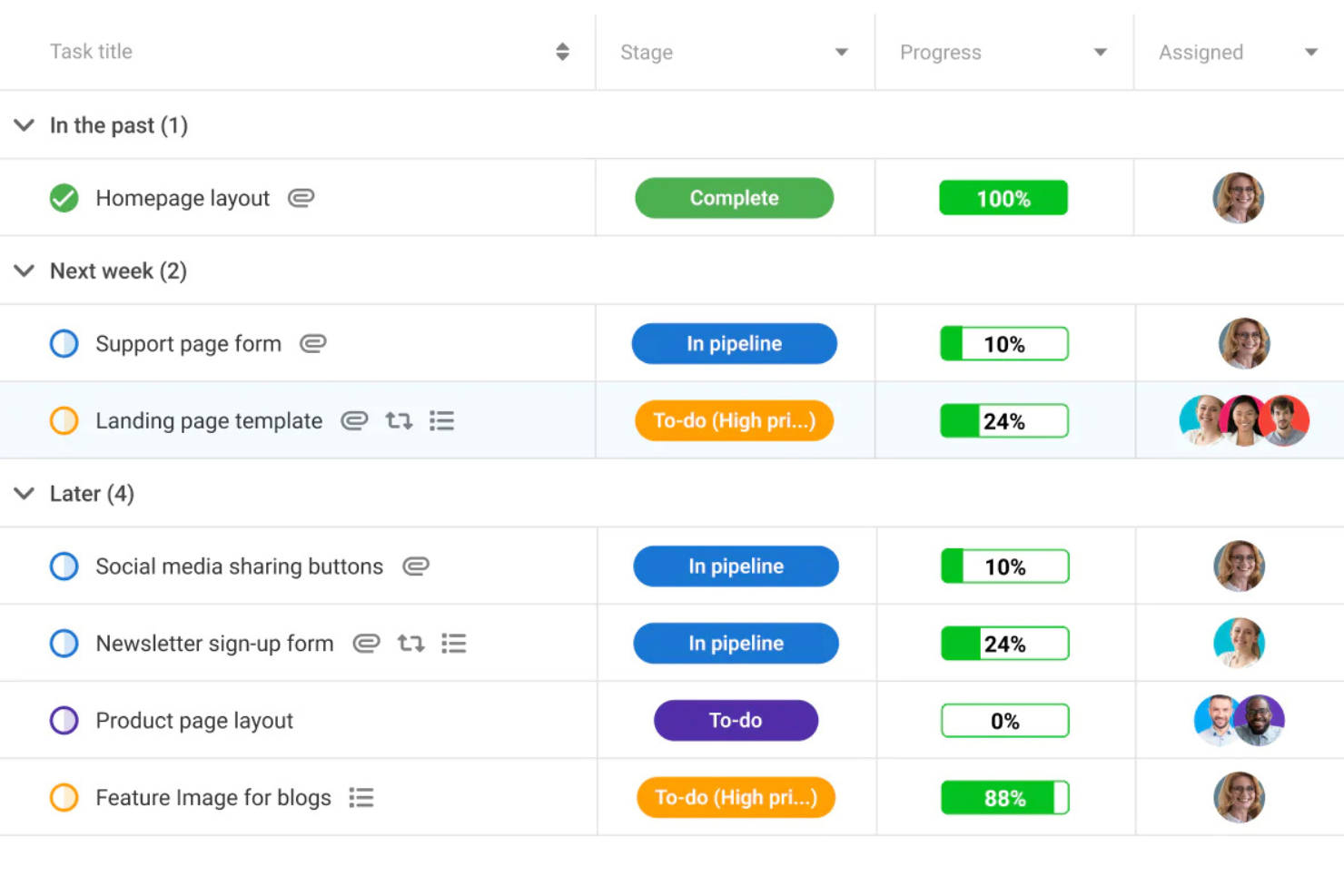
ProofHub is a project management and team collaboration tool. It’s best for unified project control because it offers a large suite of features that allow teams to plan, collaborate, track, and deliver projects efficiently.
Why it's a good TeamGantt alternative: ProofHub provides a flat-rate pricing model with no per-user fee, which can be particularly cost-effective for teams of any size. Its advanced feature set and ability to handle unlimited users make it a standout alternative to TeamGantt, especially for businesses looking for a unified solution to manage their projects.
Standout features & integrations:
Features include task management, custom workflows, time tracking, file sharing, real-time collaboration, Gantt charts, Kanban boards, calendar, note-taking, discussion boards, custom reports, and project templates.
Integrations include Slack, Box, Dropbox, Google Calendar, Google Drive, One Drive, FreshBooks, and QuickBooks.
Pros and Cons
Pros:
- Offers a 14-day free trial
- Comprehensive feature set for project management and collaboration
- Flat-rate pricing with no per-user fee
Cons:
- No native time-tracking
- Limited customization

Best for client-focused teams
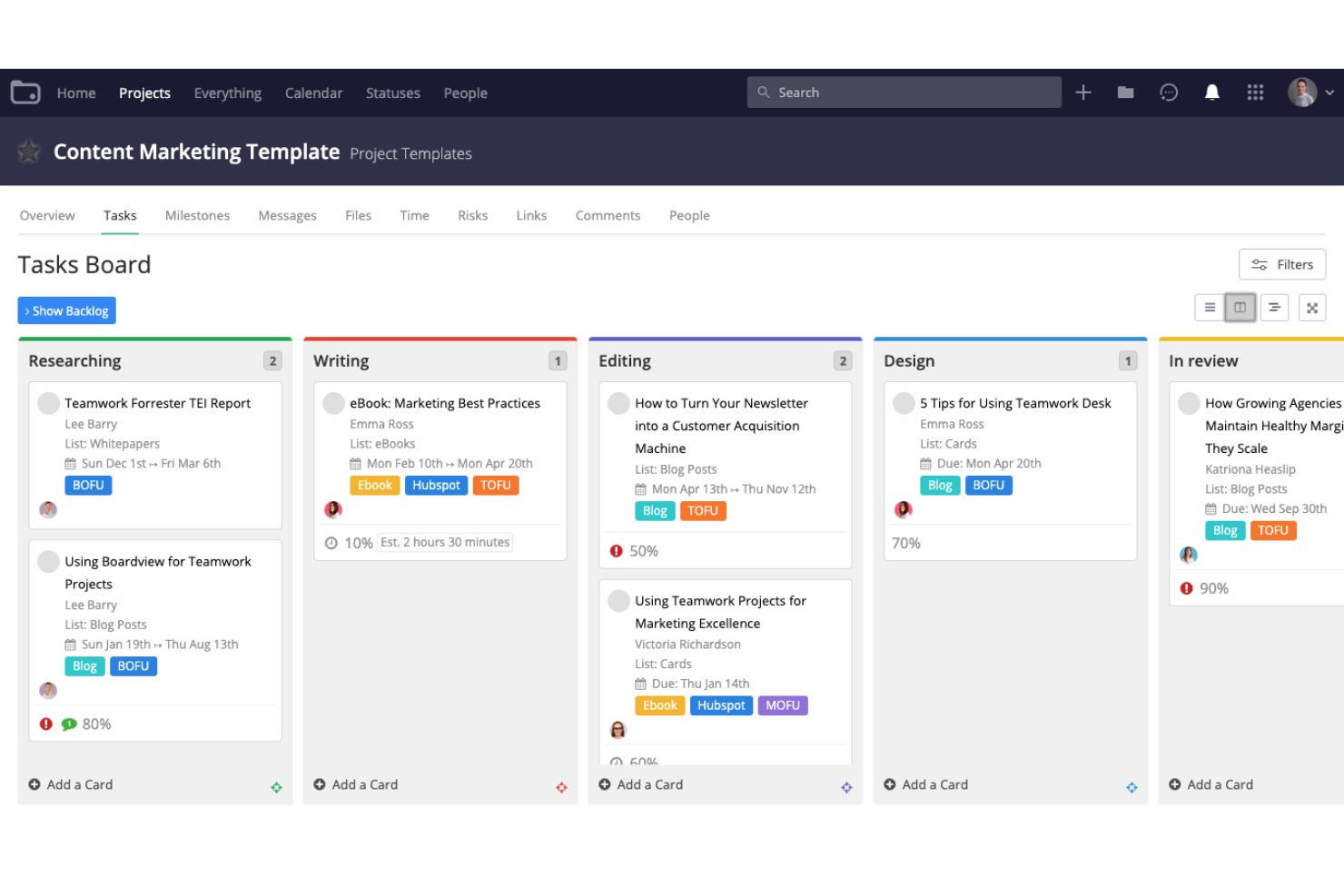
Teamwork is a project management platform designed to help teams manage their projects with ease. It’s best for client-focused teams because it offers a suite of features tailored to the needs of agencies, consulting services, IT services, and other client services businesses.
Why it's a good TeamGantt alternative: Teamwork offers extensive task and time tracking capabilities, making it ideal for teams needing precise control over project progress and deadlines. This focus on detailed tracking makes it a strong alternative to TeamGantt, particularly for teams that prioritize accountability and detailed project oversight.
Standout features & integrations:
Features include drag-and-drop Gantt charts, task and milestone tracking, resource management, real-time collaboration, multiple project views such as calendar, list, Kanban board, and portfolio views, as well as project templates for easy setup.
Integrations include Slack, Zapier, Microsoft Teams, Google Drive, Microsoft Office, QuickBooks, HubSpot, Dropbox, Box, and OneDrive Personal.
Pros and Cons
Pros:
- Integrates with popular tools for seamless workflow
- Offers a free plan with essential features
- Tailored for client services businesses
Cons:
- Some integrations require additional setup
- Can be overwhelming for new users
Podio
Best for workflow customization

Podio is a cloud-based platform for streamlining teamwork and communication. It’s best for workflow customization because it allows teams to tailor their processes to fit unique needs and stages, ensuring efficiency and effectiveness in one place.
Why it's a good TeamGantt alternative: Podio provides users with a high degree of customization for workflows, which is essential for teams that have specific processes and need a tool that can adapt to their way of working. This flexibility makes it a strong alternative to TeamGantt, especially for teams looking for a more tailored project management solution.
Standout features & integrations:
Features include customizable workspaces, task automation, integrated chat, workflow automation, file sharing, project timelines, project tracking, API access, and mobile access.
Integrations include Google Drive, Google Calendar, Dropbox, Evernote, Zendesk, GoToMeeting, FreshBooks, Microsoft Exchange, Box, OneDrive, and ShareFile.
Pros and Cons
Pros:
- Free plan available for small teams
- Advanced reporting capabilities
- Highly customizable workflows
Cons:
- Limited offline functionality
- Steeper learning curve for new users

Best for live progress tracking

ProjectManager is a project and work management software. It's best for live progress tracking due to its real-time dashboards and reporting features that provide instant visibility into the status of all tasks and projects.
Why it's a good TeamGantt alternative: ProjectManager is an excellent alternative to TeamGantt due to its broader range of features, including real-time dashboards that provide instant updates on project status and team performance, which can enhance decision-making. Additionally, the tool's ability to integrate seamlessly with various other platforms means that updates are synchronized across all systems, ensuring that the latest information is always at hand.
Standout features & integrations:
Features include task management, Gantt charts, Kanban boards, time tracking, live dashboards, project scheduling, automatic updates, resource management, portfolio management, and collaboration tools.
Integrations include Jira, Slack, Google Drive, Microsoft Teams, Trello, Asana, Dropbox, Salesforce, HubSpot, and Zapier.
Pros and Cons
Pros:
- Integrates with over 1,000 business and project management apps
- A wide range of features including Gantt charts, Kanban boards, and workflow automation
- Real-time dashboards and reporting for live progress tracking
Cons:
- Interface can be complex for beginners
- Limited offline capabilities
Bitrix24
Best for CRM integration

Bitrix24 is an advanced business tool suite. It offers a strong CRM system with sales management, a contact center, and marketing automation.
Why it's a good TeamGantt alternative: Bitrix24 combines project management with CRM and communication tools, offering a more extensive feature set compared to TeamGantt. This makes it a suitable alternative for teams needing an all-in-one platform for diverse business operations.
Standout features & integrations:
Features include CRM, sales management, task and project management, collaboration tools, website building, social selling, online marketing, HR management, and AI automation.
Integrations include Gmail, Google Calendar, Google Drive, Microsoft Office, Office 365, Microsoft Outlook, Microsoft OneDrive, Microsoft Exchange, Dropbox, and Box.
Pros and Cons
Pros:
- An extensive list of native integrations with popular services
- Wide range of project management tools
- Advanced CRM system with sales management and marketing automation
Cons:
- Some users may find certain features redundant or overly complex
- The platform can have a steep learning curve due to its extensive features
Best for dynamic scheduling
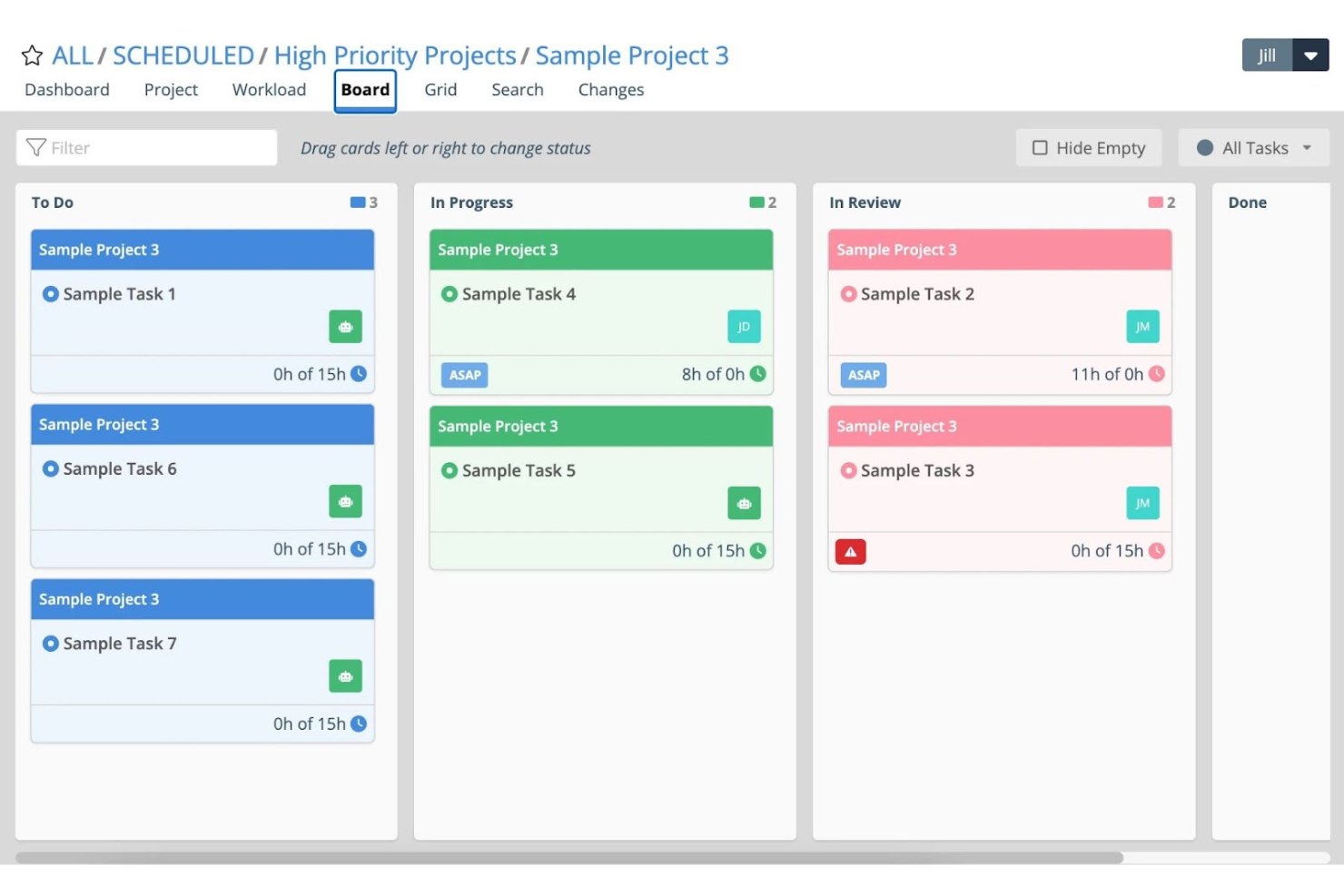
Tempo Portfolio Manager is a project management tool that adapts to change and manages uncertainty. It's best for dynamic scheduling because it offers predictive scheduling for multiple projects, which helps teams plan, predict, and perform with confidence.
Why it's a good TeamGantt alternative: Tempo Portfolio Manager supplies users with a unique approach to project management that focuses on adaptability and prediction. Its dynamic scheduling engine sets it apart as a good TeamGantt alternative, as it can automatically adjust to changes in project conditions, ensuring that teams can stay on track even when the unexpected occurs.
Standout features & integrations:
Features include predictive scheduling, real-time resource allocation, task prioritization, project tracking, Gantt charts, time tracking, customizable dashboards, portfolio management, risk assessment, and team collaboration tools.
Integrations include Slack, Google Drive, Dropbox, Jira, Microsoft Teams, Salesforce, Trello, Zapier, GitHub, and Asana.
Pros and Cons
Pros:
- Priority-based planning aligns team focus
- Automatic resource leveling across projects
- Predictive scheduling adapts to project changes
Cons:
- Performance can be slow with large datasets
- Limited customization options for reports
Redmine
Best for open source project management

Redmine is a flexible project management web application that is open source and released under the GNU General Public License v2 (GPL). It’s best for organizations looking for a customizable and scalable project management solution without the cost associated with commercial software.
Why it's a good TeamGantt alternative: Redmine offers support for multiple projects, flexible role-based access control, and a strong issue-tracking system. Its open-source nature allows for extensive customization, which makes it a good alternative to TeamGantt for teams with specific workflow requirements.
Standout features & integrations:
Features include issue tracking, project management, time tracking, calendar view and Gantt charts for visual project representations, customizable workflows, multiple project support, role-based access control, a flexible issue tracking system, forums, news, document management, and email notifications.
Integrations include SVN, CVS, Git, Mercurial, and Bazaar.
Pros and Cons
Pros:
- Open-source software with a large community of users and developers
- Supports multiple projects with unique roles and permissions
- Flexible and customizable project management tool
Cons:
- The interface may not be as modern or intuitive as some proprietary alternatives
- Limited customer support options compared to commercial tools
Andre alternativer til TeamGantt
Nedenfor finner du en liste over flere alternativer til TeamGantt som jeg valgte ut. Selv om de ikke kom med blant de 10 beste, er de fortsatt verdifulle og verdt å undersøke nærmere.
- Ravetree
For built-in resourcing
- GanttPRO
For Gantt chart enthusiasts
- Celoxis
For cost-value balance
- GoodDay
For customizable workspaces
- Smartsheet
For spreadsheet-based projects
- Asana
For team collaboration
- Adobe Workfront
For enterprise work management
- Zoho Projects
For scalability and integration
- Notion
For integrated workspace
- Scoro
For end-to-end business management


Relaterte vurderinger av prosjektstyringsprogramvare
Hvis du fortsatt ikke har funnet det du leter etter her, kan du se nærmere på disse andre relaterte verktøyene som vi har testet og vurdert:
- Prosjektstyringsprogramvare
- Ressursstyringsprogramvare
- Programvare for arbeidsflytautomatisering
- Programvare for tidsregistrering
- Programvare for oppgavestyring
- Samarbeidsverktøy
- Verktøy for å lage Gantt-diagrammer
- Produktivitetsverktøy
- Programvare for prosjektsporing
- Programvare for prosjektplanlegging
- Alternativer til Office Timeline
How I Evaluate TeamGantt Alternatives
I split my evaluation into two layers: the core Gantt scheduling and dependency features a project manager or agency producer relies on daily, and the differentiators that justify a switch.
Core Functionality (Table Stakes For This List)
When I'm selecting tools for my list, I rank each one on a scale from 0 (does not offer the functionality) to 5 (excels in this area) for each core functionality listed below. Then, I calculate the tool's total score into a percentage. Each tool needs to achieve a minimum total score of 65% to be considered for inclusion.
- Gantt Chart Visualization: I check whether the Gantt view supports drag-and-drop editing, zoom levels, and color-coded bars—things you'd rely on when presenting a launch timeline to stakeholders.
- Task Dependencies & Scheduling: Each tool should handle dependency types like finish-to-start and start-to-start, plus auto-reschedule downstream tasks when a delay hits your critical path.
- Milestones & Baselines: I look for the ability to set baselines and compare planned vs. actual timelines, which is how teams catch scope creep before a sprint review or client check-in.
- Resource & Workload Management: The tool should show who's overloaded and who has capacity, especially when you're juggling multiple projects with shared designers or engineers.
- Collaboration & Sharing: I evaluate comment threads, file attachments, and guest access so external clients or contractors can review timelines without needing a full paid seat.
- Multiple Project Views: Beyond Gantt, I look for Kanban, calendar, and list views so your team can switch contexts—like moving from a high-level portfolio view to a daily task board.
Once I have a list of tools that meet this criteria, I consider what sets each platform apart.
Differentiating Factors (What Sets Vendors Apart)
Here's how I compare and contrast different vendors:
Standout Features
Portfolio management matters when you're overseeing multiple projects at once—I look for rollup views that let PMO leads spot resource conflicts across a program without clicking into each project. Time tracking is another differentiator, especially for agencies billing clients by the hour. Built-in timesheets that log hours against tasks save you from toggling between your PM tool and a separate tracker. I also evaluate automation and templates, since reusable project plans and triggered status updates cut setup time on recurring deliverables.
Beyond Features
Pricing structure is a big factor when switching from TeamGantt. I check whether guest seats are free or paid, since that determines total cost when you're sharing timelines with clients or contractors. Integration depth also matters—your Gantt tool needs to connect with Slack, Jira, or Google Drive without workarounds. I evaluate how easily a team can import existing project files during onboarding, because migrating hundreds of tasks from one platform to another can stall adoption if the tool lacks CSV or MS Project import.
Hvorfor se etter et alternativ til TeamGantt?
TeamGantt er et verdifullt verktøy og er vanligvis mest nyttig for team med omfattende prosjekter. Det passer imidlertid ikke nødvendigvis best for alle team. Det kan være flere grunner til at du ser etter et alternativ til TeamGantt, blant annet:
- Kostnadsbekymringer: Prisingsmodellen til TeamGantt kan være uoverkommelig, spesielt for mindre team eller oppstartsbedrifter med et stramt budsjett. Hvis du synes det er vanskelig å rettferdiggjøre kostnaden, kan det være fordelaktig å utforske alternativer med mer fleksible prisstrukturer.
- Funksjonssett: Selv om TeamGantt tilbyr en rekke funksjoner, er det ikke sikkert at de passer perfekt med de unike kravene i prosjektene dine eller teamets spesifikke arbeidsflyter. Dette kan føre til at du ser etter alternativer som tilbyr funksjoner som er bedre tilpasset prosjektstyringsbehovene dine.
- Brukeropplevelse: Et lite intuitivt grensesnitt kan påvirke produktiviteten og føre til frustrasjon blant teammedlemmene. Hvis TeamGantts brukergrensesnitt ikke samsvarer med teamets preferanser eller arbeidsflyt, kan det være verdt å vurdere andre verktøy med mer brukervennlig utforming.
- Integrasjonsbehov: TeamGantt støtter kanskje ikke integrasjoner med andre viktige verktøy og programmer teamet ditt bruker, noe som kan begrense effektiviteten i et helhetlig teknologisk økosystem. Ved å finne et alternativ som integreres sømløst med de eksisterende verktøyene dine, kan du øke effektiviteten og effektivisere prosjektstyringsprosessene.
- Skalerbarhet: Etter hvert som organisasjoner vokser, blir prosjektstyringsbehovene deres mer komplekse, og de kan potensielt overgå TeamGantts funksjonalitet. I slike tilfeller kan det å se etter en løsning som er utviklet for større eller mer komplekse prosjekter, sikre at prosjektstyringsverktøyet skalerer i takt med organisasjonens vekst.
Ved å utforske alternativer til TeamGantt kan du håndtere spesifikke utfordringer knyttet til kostnader, funksjonsbehov, brukeropplevelse, integrasjonsmuligheter og skalerbarhet som TeamGantt kanskje ikke dekker fullt ut. Ved å vurdere andre alternativer kan du finne et prosjektstyringsverktøy som ikke bare passer budsjettet ditt, men som også forbedrer teamets effektivitet og passer perfekt til de operative behovene dine.
Viktige funksjoner i alternativer til TeamGantt
Her er noen viktige funksjoner i TeamGantt som den alternative programvaren din bør kunne gjenskape eller forbedre for å passe godt:
- Enkel dra & slipp: Dra-og-slipp-funksjonen gjør det mulig å foreta raske justeringer i prosjektets tidslinje, slik at det blir enkelt å endre tidspunkt for oppgaver og flytte tidsfrister med minimal innsats. Denne enkelheten er avgjørende for å opprettholde fleksibilitet i prosjektet og tilpasse seg endringer uten å komplisere planleggingsprosessen.
- Flere prosjektvisninger: Muligheten til å vise alle prosjekter samtidig på én skjerm gjør det mulig for ledere å ha effektiv oversikt over flere initiativer, noe som bidrar til å oppdage ressurskonflikter og samordne tidsplaner på tvers av prosjekter. Denne synligheten er avgjørende for effektiv ressursstyring og strategisk planlegging.
- Arbeidsbelastning og teamtilgjengelighet: Denne funksjonen gjør det mulig for ledere å balansere arbeidsbelastningen mellom teammedlemmene, slik at ingen blir overbelastet, samtidig som den samlede produktiviteten optimaliseres. Effektiv fordeling av oppgaver bidrar til å opprettholde høy arbeidsmoral og forebygge utbrenthet, noe som er avgjørende for å opprettholde teamets prestasjoner.
- Samarbeidsverktøy: Integrerte samarbeidsverktøy legger til rette for sømløs kommunikasjon mellom teammedlemmer og interessenter, og gjør det mulig å dele dokumenter og oppdateringer direkte i plattformen. Denne tilkoblingen styrker teamarbeidet og sikrer at alle parter er informert og involvert gjennom hele prosjektets livssyklus.
- Porteføljevisninger og rapporter: Porteføljevisninger gir en overordnet oversikt over alle pågående prosjekter, slik at du raskt kan vurdere den samlede fremdriften og identifisere prosjekter som ligger etter. Denne innsikten er viktig for proaktiv styring og rettidige beslutninger for å holde prosjektene på rett spor.
- Kalender-, liste- og tavlevisninger: Ved å tilby flere visninger, for eksempel kalendere, lister og kanban-tavler, kan teamene håndtere oppgaver i det formatet som passer best med arbeidsflytpreferansene deres. Denne allsidigheten bidrar til å optimalisere organiseringen og øke produktiviteten, samtidig som den tar hensyn til ulike arbeidsstiler og prosjekttyper.
- Planlagt kontra faktisk tidslinje: Ved å sammenligne planlagte tidslinjer med den faktiske fremdriften blir det enklere å identifisere avvik og finne områder som krever oppmerksomhet. Denne funksjonen er avgjørende for å vurdere prosjektets resultater og iverksette korrigerende tiltak for å overholde tidsfristene.
- Mobilapp: En mobilapp gjør det mulig for prosjektledere og teammedlemmer å holde kontakten med prosjektene sine hvor som helst, og sikrer kontinuerlig tilgang til verktøy og informasjon. Denne mobiliteten er viktig for å opprettholde fremdrift og samarbeid utenfor tradisjonelle kontormiljøer.
- Maler for prosjektplaner: Gjenbrukbare prosjektmaler sparer tid ved å tilby et standardisert rammeverk for nye prosjekter. Dette gjør den innledende oppsettprosessen raskere og sikrer konsistens på tvers av prosjekter. Denne effektiviteten er fordelaktig for team som håndterer flere lignende prosjekter eller raskt må starte nye prosjekter.