

10 beste programvarer for ressursstyring for konsulenter 2026

Beste programvare for ressursstyring for konsulenter – kortliste


Å velge riktig programvare for ressursstyring kan hjelpe konsulenter med å følge opp og fordele teamets tid og ekspertise, gi bedre oversikt over arbeidsmengde og tilgjengelighet, håndtere planleggingskompleksitet på tvers av prosjekter og forbedre beslutningstaking og planlegging. Det kan være både tidkrevende og frustrerende å finne et verktøy som utfører alle disse funksjonene på en måte som fungerer for deg. Som erfaren digital prosjektleder kan jeg veilede deg gjennom utvelgelsesprosessen, gi ekspertanbefalinger om verktøy og hjelpe deg med å finne programvaren for ressursstyring som passer best til behovene dine.
Hvorfor du kan stole på våre programvareanbefalinger
Teamet vårt har testet og anmeldt programvare siden 2012. Vi er selv prosjektledere, så vi vet hvor vanskelig og hvor viktig det er å velge riktig programvare.
I denne guiden har vi vurdert verktøyene gjennom praktisk testing og uavhengig research og gitt dem poeng ut fra våre utvelgelseskriterier. Vi bygger også på innsikt fra ledende eksperter i bransjen og erfarne prosjektledere.
Anmeldelsene våre bygger på vår egen redaksjonelle vurdering. De er ikke et salgsargument.
Ekspertanmeldere:
Sammenligningstabell for programvare for ressursstyring for konsulenter
| Tool | Best For | Trial Info | Price | ||
|---|---|---|---|---|---|
| 1 | Best for agency profitability tracking | 14-day free trial | From $10/user/month (billed annually) | Website | |
| 2 | Best for skills-based resource matching | Free demo available | Pricing upon request | Website | |
| 3 | Best for comprehensive utilization reports | 14-day free trial | From $17/user/month | Website | |
| 4 | Best for real-time resource visibility | 14-day free trial | Pricing upon request | Website | |
| 5 | Best for planning tentative project demand | 30-day free trial | From $4.16/user/month (billed annually) | Website | |
| 6 | Best for people-centric resourcing | Not available | Pricing upon request | Website | |
| 7 | Best for pursuit-to-margin staffing plans | Free demo available | Pricing upon request | Website | |
| 8 | Best for Salesforce-based consulting firms | Free demo available | Pricing upon request | Website | |
| 9 | Best for staffing checks before committing | 14-day free trial + free demo available | From $9/user/month (billed annually) | Website | |
| 10 | Best for multi-market, mixed-team resourcing | Free demo available | Pricing upon request | Website |


Anmeldelser av den beste programvaren for ressursstyring for konsulenter
Her har jeg samlet oversikter over mine 10 beste programvarer for ressursstyring for konsulenter, slik at du kan oppdage styrkene og begrensningene ved hvert verktøy. Hver oversikt gir innsikt i verktøyets viktigste funksjoner, egenskaper og ideelle bruksscenarier, slik at du kan finne det perfekte verktøyet for teamet ditt.

Best for agency profitability tracking

Productive is a resource management platform for consultants that brings together project planning, resource scheduling, time tracking, budgeting, and invoicing in one system.
Who Is Productive Best For?
Productive is a good fit for consulting agencies and professional services firms that need to manage resources, track billable time, and monitor project profitability in one place.
Why I Picked Productive
Productive earns its spot on my shortlist because of how tightly it connects resource allocation to financial outcomes. I love that when my team logs time against a project, those hours feed directly into the budget view—so I can see profit margins in real time rather than waiting for end-of-month reports. The budgeting module lets you set up custom alerts before a project burns through its budget, which helps catch overruns before they become a problem. The AI-powered reporting generates profitability-per-project breakdowns on demand, so I'm not spending hours pulling numbers from spreadsheets.
Productive Key Features
- Workload view: See each team member's task load at a glance and reassign work directly from the same view.
- Revenue forecasting: Project upcoming revenue based on active sales deals and current resource plans, with utilization breakdowns by person or team.
- Scenario builder: Model different financial outcomes by adjusting pricing, expenses, and resource allocation before committing to a plan.
- Time approval workflow: Review submitted time entries, mark hours as billable or non-billable, and request changes from team members before entries are finalized.
Productive Integrations
Productive offers native integrations with Jira, HubSpot, Xero, Google Calendar, Sage, Gmail, Microsoft Outlook, Slack, BugHerd, and QuickBooks. It also connects with Zapier and provides an open API for custom integrations.
Pros and Cons
Pros:
- Client portal accessibility
- Customizable dashboards
- User-friendly interface
Cons:
- Archiving limitations
- Complex reporting interface
New Product Updates from Productive
Productive Adds Voice Dictation, Slack Connector, Proposals, and Overtime
Productive adds voice dictation, a Slack Connector, proposal controls, and overtime tracking. These updates support faster AI interactions, client proposals, and time management. For more information, visit Productive’s official site.

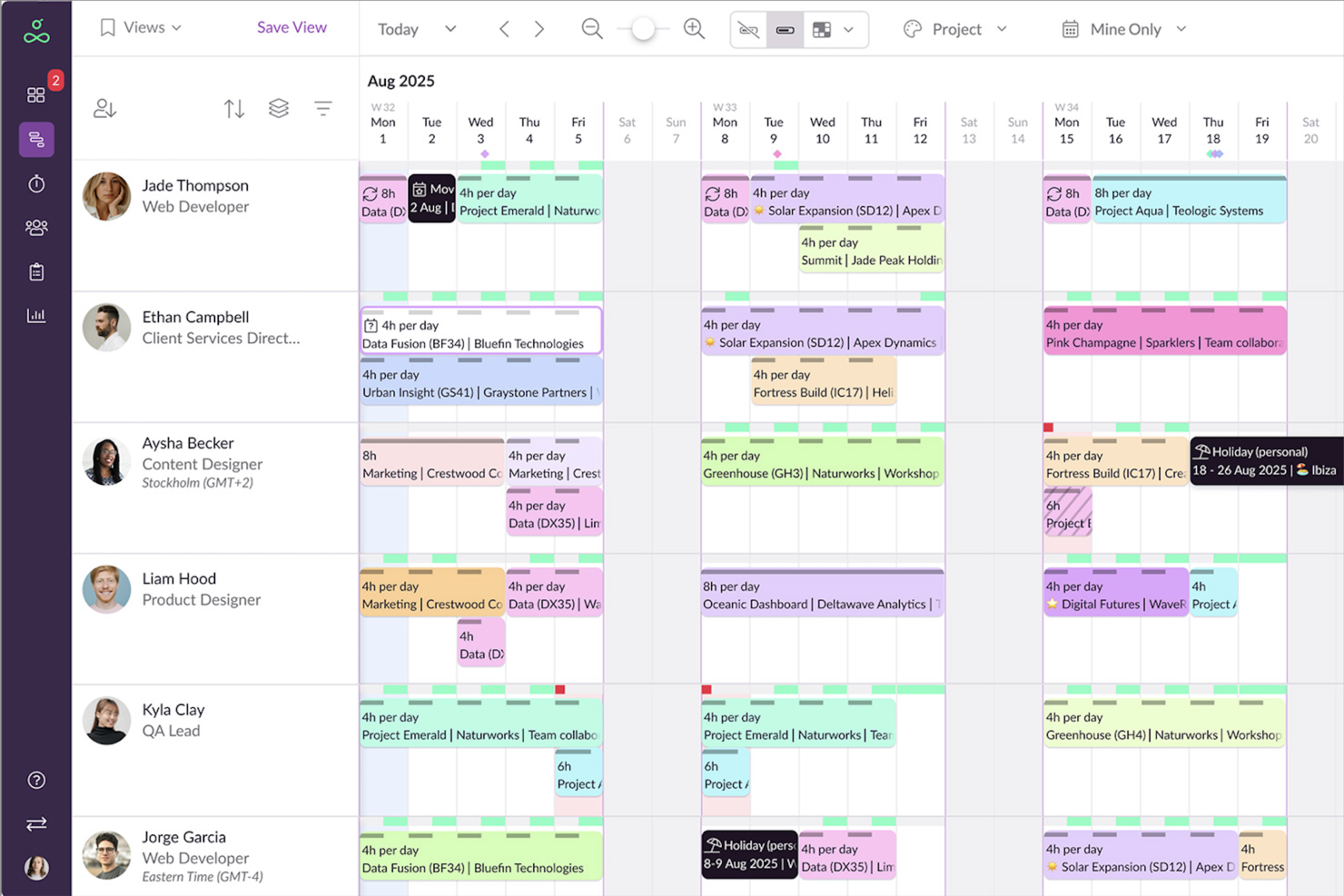
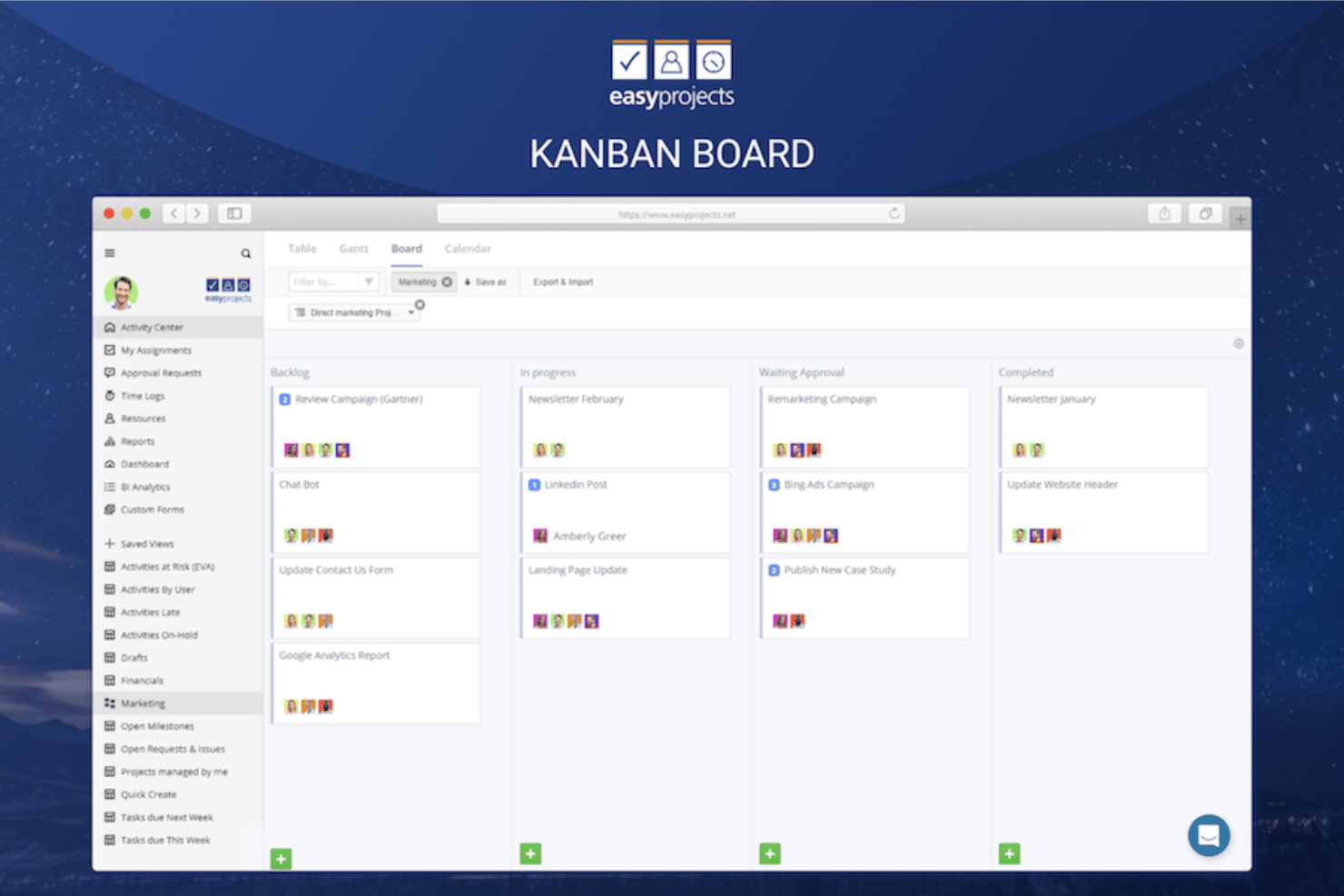
Retain is a resource planning platform built for professional services firms that combines skills-based staffing, capacity planning, utilisation tracking, and multi-location scheduling in a single interface.
Who Is Retain Best For?
Retain is a strong fit for mid-size to large professional services firms in consulting, accounting, or technology that manage complex staffing across multiple teams.
Why I Picked Retain
I picked Retain as one of the best because its Skills+ module gives consulting teams a genuinely structured way to match people to projects. It connects to a Lightcast-powered library of 30,000+ industry skills, so I'm not manually building a taxonomy from scratch. The AI suitability matching then surfaces the best-fit consultant based on those skills, with explainable results I can actually trust when staffing a client engagement.
Retain Key Features
- Availability heatmap: View each consultant's capacity over time with color-coded indicators for overallocated, fully booked, and available resources.
- Utilisation dashboards: Track billable and non-billable hours across your team to monitor utilisation goals and spot capacity gaps.
- Built-in timesheets: Log and approve time directly within the platform, keeping actuals tied to resource plans.
- Revenue forecasting: Connect resource allocations to projected revenue and delivery costs across active engagements.
Retain Integrations
Retain offers technology-agnostic integrations that connect resource planning data across HR, CRM, and finance systems, with native integrations including BambooHR, Salesforce, SAP, Oracle, Oracle NetSuite OpenAir, Workday, Microsoft Dynamics 365, and SugarCRM. It also supports workflow orchestration through platforms like Microsoft Logic Apps, and an open API is available for custom integrations.
Pros and Cons
Pros:
- Color-coded booking types aid scheduling clarity
- Skills search for matching consultants to engagements
- Multi-office visibility across the workforce
Cons:
- Session timeouts interrupt active planning work
- Built-in reporting needs manual data manipulation

Scoro
Best for comprehensive utilization reports

Scoro is a resource management platform for consultants that brings together project planning, time tracking, resource scheduling, and financial management in one system.
Who Is Scoro Best For?
Scoro is a good fit for consulting firms and professional services teams that need to manage projects, track billable time, and monitor resource utilization in one place.
Why I Picked Scoro
Scoro earns its spot on my shortlist because of how far its utilization reporting goes beyond a simple percentage on a dashboard. The utilization report shows a heatmap of each team member's hours—color-coded so you can immediately see who's overbooked in red and who has capacity in green. I can hover over any individual's summary to get a granular breakdown of exactly what they're working on, which makes it easy to spot overservicing on a specific client before it eats into margins. Scoro also ties utilization directly to revenue forecasting, so I can see how current bookings and upcoming projects will affect both capacity and profitability at the same time.
Scoro Key Features
- Gantt chart scheduling: Visualize project timelines and task dependencies with drag-and-drop Gantt charts that update in real time.
- Quoted vs. actual budget tracking: Compare planned budgets against live labor costs and expenses as projects progress.
- Retainer management: Track recurring client work, monitor retainer budgets, and log time against monthly allocations.
- Customizable dashboards: Build role-specific dashboards that surface the project health metrics most relevant to each team member.
Scoro Integrations
Scoro offers native integrations with Google Workspace, Microsoft 365, Xero, QuickBooks, Sage, and Exact, and provides an API for custom integrations. Additional integrations are available through the Scoro Marketplace.
Pros and Cons
Pros:
- Good financial management capabilities
- Integrated CRM function
- Real-time project and resource tracking
Cons:
- May take time to learn how to customize the platform
- Mobile app is less robust than web version
New Product Updates from Scoro

Scoro Adds Time Mobile App and ELI Improvements
Scoro adds the Scoro Time mobile app for iOS/Android to track time anywhere and expands ELI with attachments, smarter filtering, and trigger-based actions. For more information, visit Scoro's official site.

Wrike
Best for real-time resource visibility

Wrike is a project and resource management platform for consultants that combines project planning, workload tracking, time logging, and team collaboration in one workspace.
Who Is Wrike Best For?
Wrike is a good fit for mid-size to large consulting teams managing multiple concurrent client projects who need centralized visibility into workloads and timelines.
Why I Picked Wrike
I've included Wrike in my top picks because of how well its resource bookings and workload views work together to give consulting teams a live picture of who's doing what across every active project. When I'm looking at a team running five client engagements at once, I can use resource bookings to reserve hours from a specific team member or job role, check their availability against estimated effort, and spot conflicts before they become delivery problems. The effort management feature lets me set expected hours at the task level, which makes it much easier to forecast when a project will wrap and whether the assigned consultant actually has the bandwidth. That combination of booking, effort tracking, and real-time dashboards is what makes Wrike genuinely useful for resource visibility—not just project tracking.
Wrike Key Features
- Custom project views: Toggle between Gantt, Board, Table, Calendar, and Chart views to visualize project timelines and task status across client engagements.
- Scrum boards: Manage Agile workflows with backlog prioritization, sprint planning, and real-time progress tracking on shared Scrum boards.
- User activity reports: Generate on-demand audit reports that log each user's actions, so you can track task ownership and accountability across your team.
- AI agents: Deploy no-code AI agents to handle tasks like auto-resource assignment and status update summaries across active projects.
Wrike Integrations
Wrike offers hundreds of integrations through its built-in integrations and marketplace, including tools like Google Workspace, Microsoft 365, Salesforce, and Slack. It also supports Zapier and provides an API for custom integrations.
Pros and Cons
Pros:
- Many integrations available
- Highly customizable dashboards
- Robust task management capabilities
Cons:
- Advanced resource planning features limited to higher tier plans
- Can be tricky to learn how to customize the platform
New Product Updates from Wrike

Wrike Redesigns AI Agent Builder
Wrike redesigns its AI Agent Builder with a side-by-side setup, Scopes, sentence-style triggers and actions, and clearer filters. These changes make it easier to configure, test, and manage agent behavior. For more information, visit Wrike’s official site.

Best for planning tentative project demand
Resource Guru is a resource scheduling and capacity planning tool that lets you book people, manage availability, track utilization, and plan project pipelines across your team.
Who Is Resource Guru Best For?
Resource Guru is a strong fit for project and operations teams that need clear visibility into who's available, what's tentatively booked, and where capacity gaps are forming across active and upcoming engagements.
Why I Picked Resource Guru
I picked Resource Guru as one of the best because it handles tentative project demand better than almost any other scheduling tool I've used. When a potential engagement is still being scoped, I can create placeholder bookings with skills and role attributes attached, then toggle those tentative bookings in or out of capacity reports to see best- and worst-case staffing scenarios side by side. That means my team can spot gaps before a project is even confirmed, not scramble to fill them after the contract is signed.
Resource Guru Key Features
- Drag-and-drop scheduling: Create, move, and reassign bookings across people and projects directly on a shared calendar.
- Billable vs. non-billable reporting: The Capacity & Utilization report separates used capacity into billable and non-billable time for each person or team.
- Skills-based resource filtering: Tag people and placeholders with skills and custom fields, then filter the schedule to find the right resource for a project.
- Weekly timesheets: Log project time against scheduled work and compare actual hours to forecasted bookings by person, project, or client.
Resource Guru Integrations
Resource Guru offers native integrations with Jira, Asana, monday.com, ClickUp, Google Calendar, Outlook Calendar, Salesforce, Workday, QuickBooks, and Slack. It also provides a REST-style API with webhooks and OAuth2, plus Zapier connectivity.
Pros and Cons
Pros:
- Tentative bookings help forecast upcoming demand
- Clash warnings help prevent double-booking
- Visual scheduling clarifies consultant availability
Cons:
- Busy schedules can become hard to scan
- Reporting offers limited deeper utilization analysis
New Product Updates from Resource Guru

Resource Guru Adds More Control Over Calendar Sync
Resource Guru adds more control over Google and Outlook Calendar sync, including source calendar selection and destination calendar options. These updates help users manage external events and Resource Guru bookings with less clutter. For more information, visit Resource Guru’s official site.
 .

Kantata
Best for people-centric resourcing

Kantata is a resource management platform for consultants that brings together project planning, resource allocation, forecasting, and time tracking in one system.
Who Is Kantata Best For?
Kantata is a good fit for mid-to-large professional services firms that need to manage complex resource planning across multiple projects and teams.
Why I Picked Kantata
Kantata earns its spot as one of the best on my shortlist because it's one of the few PSA platforms built around the idea that your people are the product. What I like most is the skill-based resource matching—you can search your talent network by specific skills, certifications, or past project experience to find the right person for a role, rather than just filling a seat based on availability. Pair that with real-time capacity visibility across your entire team, and you can see exactly who's overloaded, who has bandwidth, and where demand is outpacing supply before it becomes a problem. The AI Expertise Engine learns from past engagements to surface smarter staffing recommendations over time, which is particularly useful when managing a large bench of consultants across multiple concurrent projects.
Kantata Key Features
- Project financial management: Track project costs, margins, and invoicing in one connected view alongside your delivery data.
- Kantata Pulse: Collect real-time client and employee sentiment data directly within the platform to monitor project health.
- Generative AI project assistant: Automatically draft status reports, executive updates, and project case studies from live project data.
- Estimating and scoping tools: Build accurate project estimates and connect scoping data to resourcing and financials before a project kicks off.
Kantata Integrations
Kantata offers native integrations with Avalara, NetSuite, Slack, Sage, Microsoft 365, Xero, HubSpot, Expensify, Jira, Bamboo HR, and Concur.
Pros and Cons
Pros:
- Automated resource planning and scheduling
- Capacity management features
- Customizable reports and metrics
Cons:
- Potential learning curve for advanced features
- Setup process may require assistance
New Product Updates from Kantata

Kantata Adds Access Group Change History
Kantata adds Access Groups History, letting account administrators track changes to group details, membership, and permissions in Recent History. The update also makes these events available through the Subscribed Events API for broader monitoring. For more information, visit Kantata’s official site.
 .
Best for pursuit-to-margin staffing plans
Deltek Vantagepoint is an ERP platform built for consulting and professional services firms that connects resource planning, project management, pipeline tracking, and financial management in a single system.
Who Is Deltek Vantagepoint Best For?
Deltek Vantagepoint is a strong fit for consulting firms that need to connect CRM pipeline data with resource planning and project financials in one system.
Why I Picked Deltek Vantagepoint
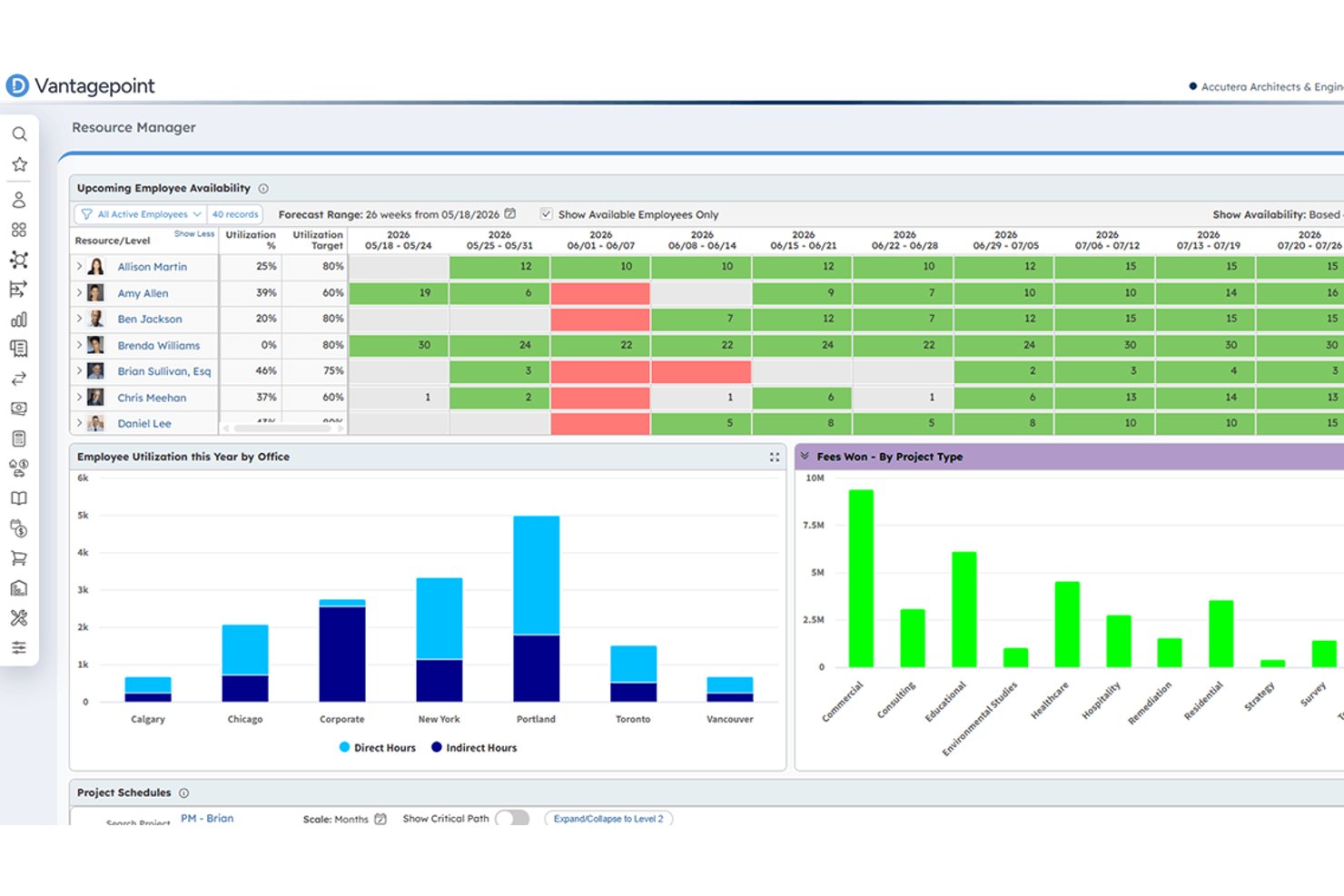
Deltek Vantagepoint earns its spot on my shortlist because it's one of the few tools that connects CRM pipeline data directly to resource planning, so you can soft-book staff against in-pursuit projects and harden those assignments as deals close. I particularly like how the Labor Resource Forecast report ties forecast hours, costs, and billing amounts together by project plan and employee, giving you a clear read on margin before work even begins. The scenario planning tools let you model scope, team, and schedule changes against a live plan without disrupting it, which is exactly what you need when a pursuit shifts mid-proposal.
Deltek Vantagepoint Key Features
- Skills search: Lets you find available staff by skill, title, labor category, or supervisor to match people to specific project needs.
- Workload balancing: Surfaces over- and underutilized staff through color-coded views and supports quick reassignment across projects.
- Resource Planning API: Provides programmatic access to employee and generic-resource assignments, planned hours, and project hierarchy data.
- Mobile time and expense tracking: Lets consultants view, enter, and submit timesheets and expense reports from their mobile device.
Deltek Vantagepoint Integrations
Deltek Vantagepoint has documented native integrations with GovWin IQ, Deltek PIM, Deltek ArchiSnapper, Microsoft Outlook, and Gmail, plus an integration with UKG. It also connects through Deltek Marketplace and offers a REST API for custom integrations.
Pros and Cons
Pros:
- Models staffing scenarios against live project plans
- Tracks utilization alongside billable project work
- Connects pursuit staffing with project margins
Cons:
- Some teams find forecasting and staffing rough
- Reports can require extra steps and Excel

Certinia
Best for Salesforce-based consulting firms
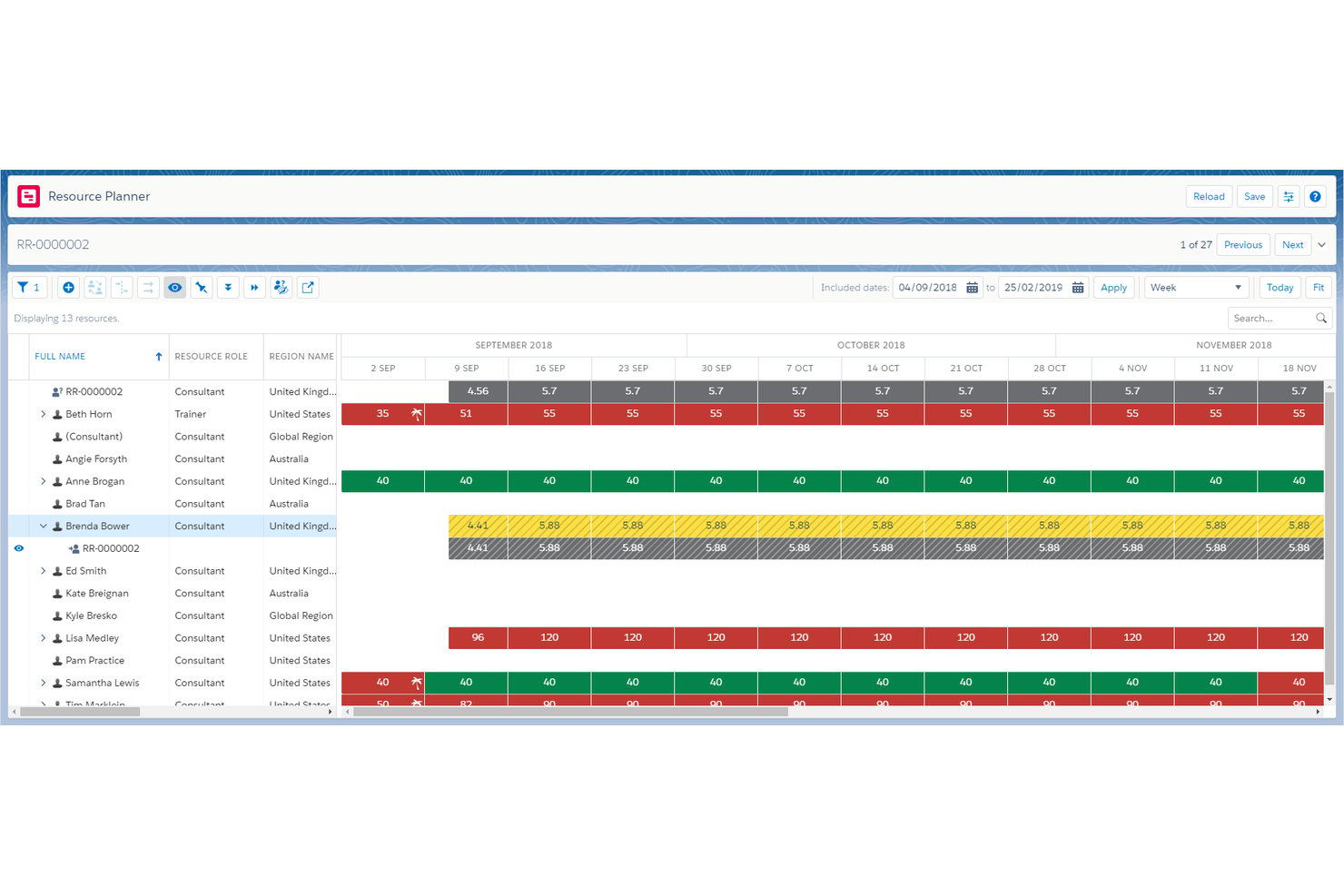
Certinia Professional Services Cloud is a Salesforce-native PSA platform that covers resource scheduling, skills-based matching, utilization tracking, capacity planning, project financials, and services billing in a single connected system.
Who Is Certinia Best For?
Certinia Professional Services Cloud is a strong fit for consulting firms already running on Salesforce that want resource scheduling, utilization tracking, and project financials in one connected system.
Why I Picked Certinia
Certinia earns its spot on my shortlist because it's built natively on Salesforce, meaning your resource scheduling, project financials, and client pipeline data all live in one connected system without any stitching together. I especially like its skills-based matching engine, which ranks candidates by essential and desirable skills, certifications, and availability in a single request workflow. The utilization dashboards let me compare targets, scheduled hours, and actual hours across regions, practices, or individual resources in real time.
Certinia Key Features
- Sales-to-project handoff: Converts Salesforce opportunities directly into projects, linking pipeline data to resource forecasts and revenue tracking from the start.
- Multi-model services billing: Handles time-and-materials, fixed-fee, subscription, and product-sales billing within a single connected billing workflow.
- Mobile resource management workspace: Gives managers access to alert cards, weekly summaries, time entry, and expense submission from any device.
- PSA Timecard API: Sends approved timecard data to third-party payroll or HCM systems in batches, with options to filter by resource, date range, or earnings code.
Certinia Integrations
Certinia lists integrations including Concur, Expensify, XCD, Avalara, Plaid, and Storecove. Its RESTful and SOAP APIs support custom connections, including approved timecard transfers to payroll or HCM systems.
Pros and Cons
Pros:
- Compares utilization across practices and teams
- Ranks consultants by skills and availability
- Connects Salesforce pipeline with staffing
Cons:
- Work Planner caps views at 2,000 resources
- Services forecasting remains in beta

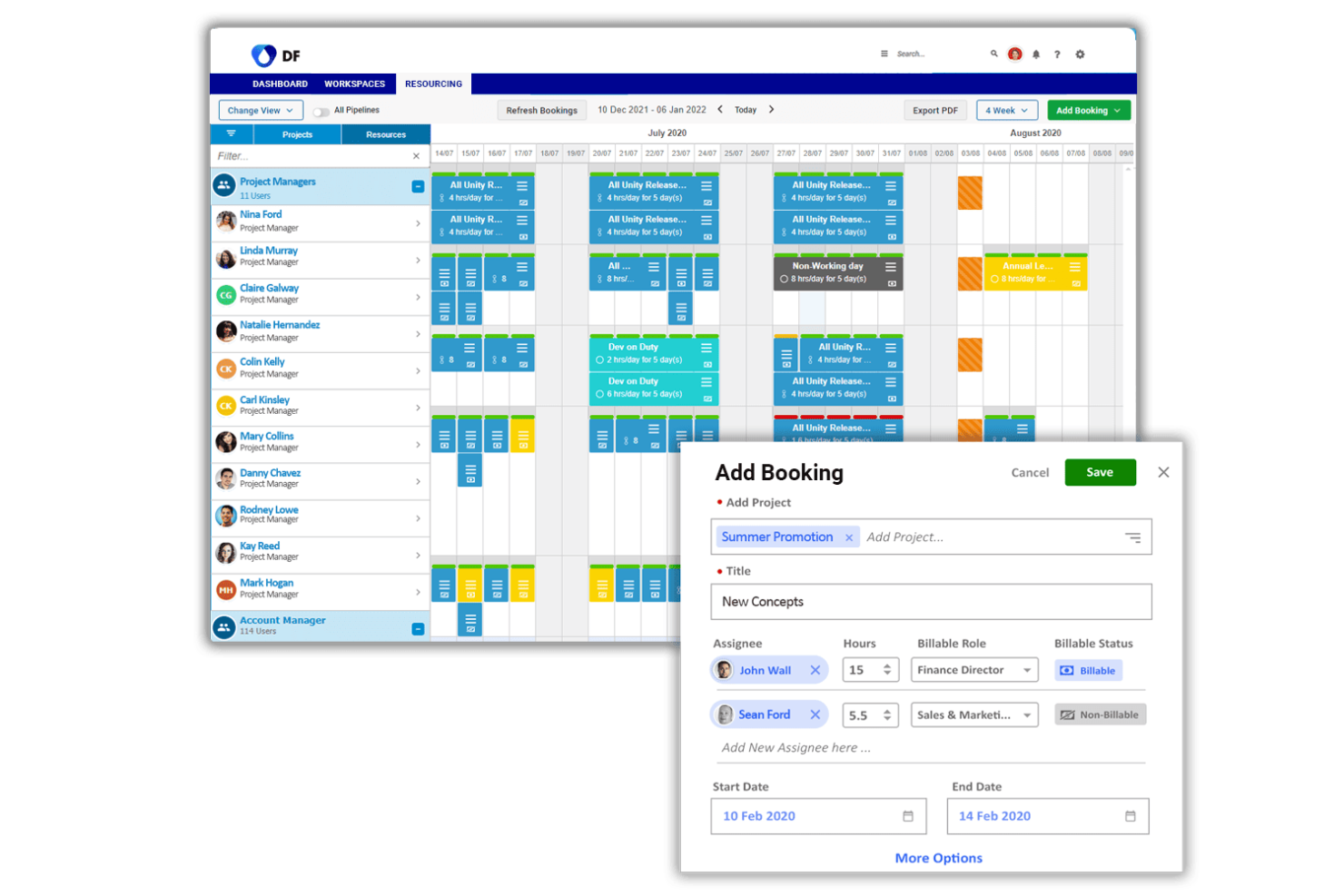
Birdview PSA is a professional services automation platform that connects resource planning, capacity management, project delivery, time tracking, and billing into a single AI-assisted workflow for services firms.
Who Is Birdview PSA Best For?
Birdview PSA is a strong fit for growing professional services firms that need to check staffing feasibility before committing to new client engagements.
Why I Picked Birdview PSA
Birdview PSA earns its spot on my shortlist because of how well it handles staffing feasibility before a single commitment is made. I particularly like the Simulation screen, which matches a proposed project's skill requirements and timeline against actual team availability, returning the earliest viable start date and a list of qualifying people. Soft allocations let me tentatively reserve consultants without locking their capacity, so I can explore staffing options across multiple pipeline opportunities simultaneously.
Birdview PSA Key Features
- Capacity-aware quoting: Check how a proposed engagement affects team availability, workload, resource demand, and delivery timelines before you commit to a quote.
- Demand forecasting: View pipeline opportunities, planned projects, and active delivery together to assess future resource demand and spot gaps.
- Client portal: Share project progress, timelines, deliverables, and approvals directly with clients through a controlled access view.
- Power BI dashboards: Analyze utilization, margin, budget burn, and portfolio performance using prebuilt dashboards connected to live project data.
Birdview PSA Integrations
Birdview PSA offers native integrations with Jira, ServiceNow, QuickBooks, Microsoft Project, SharePoint, Microsoft Excel, and TimeControl, plus Salesforce and HubSpot connections. It supports REST API, MCP access, Zapier, and Workato.
Pros and Cons
Pros:
- Soft bookings preserve options across pipeline work
- Utilization views expose consultant overload early
- Visual timelines clarify overlapping client engagements
Cons:
- Finding assigned activities can slow logging
- Time entry takes extra steps

Screendragon
Best for multi-market, mixed-team resourcing
Screendragon is an AI-powered work management platform that combines resource scheduling, capacity planning, skills-based allocation, and workflow automation for agencies and multi-market teams.
Who Is Screendragon Best For?
Screendragon suits resourcing and operations managers at agencies or multi-market teams who need to coordinate mixed permanent and freelance workforces across multiple clients and regions.
Why I Picked Screendragon
I've included Screendragon in my top picks because it handles the specific chaos of running mixed permanent and freelance workforces across multiple clients and markets better than most tools in this category. Its AI Resourcing Agent matches people to jobs using skills, previous experience, and live availability, so you're not manually cross-referencing spreadsheets when a new engagement lands. I also like that you can track forward capacity against your pipeline, meaning you can see resourcing gaps before a project is even confirmed, not after it's already on fire.
Screendragon Key Features
- AI Resourcing Agent: Recommends team assignments by matching people to work based on skills, previous experience, roles, and live availability.
- Client and project profitability views: Tracks live cost against budget using timesheets, purchase costs, and resource bookings, with margins visible by client, project, retainer, and service line.
- Configurable workflow governance: Lets you set approval logic, stages, permissions, and process terminology to match your team's operating model.
- Custom reporting and Power BI integration: Builds scheduled dashboards and custom reports from your own data sets, with export to Excel, PDF, or Power BI.
Screendragon Integrations
Screendragon offers documented integrations with Microsoft Power BI, NetSuite, PeopleSoft, Salesforce, Microsoft Dynamics 365, and SAP. Its Universal API Connector supports custom connections to standard open API endpoints.
Pros and Cons
Pros:
- Mixed permanent and freelance teams fit
- Project budgets stay visible during delivery
- Pipeline availability is easy to assess
Cons:
- Complex approvals can slow project work
- Long tasks average hours across dates
New Product Updates from Screendragon
Screendragon Unveils New AI Hub
Screendragon introduced AI Hub, a new capability that lets teams build and manage AI agents directly within workflows. The update helps marketing teams automate tasks, maintain governance controls, and scale AI-driven operations more efficiently. For more information, visit Screendragon's official site.
Annen programvare for ressursstyring for konsulenter
Nedenfor finner du en liste over annen programvare for ressursstyring for konsulenter som ikke kom med på topplisten, men som likevel absolutt er verdt å undersøke.
- Saviom
For staffing unconfirmed projects
- Runn
For modeling tentative project pipelines
- Smartsheet
For resourcing in Smartsheet projects
- Celoxis
For on-premise consultant staffing
- Teamwork.com
For staffing unconfirmed client work
- Float.com
For capacity management with margin view
- Mosaic
For planning alongside consulting ERPs
- Parallax
For auto-generated resource plans
- Tempus Resource
For sales-pipeline staffing forecasts
- Bridgit
For construction bid staffing forecasts


Relatert programvare for prosjektstyring
Hvis du fortsatt ikke har funnet det du leter etter her, kan du se nærmere på disse andre relaterte verktøyene som vi har testet og evaluert:
- Programvare for prosjektstyring
- Programvare for ressursstyring
- Programvare for arbeidsflytautomatisering
- Programvare for oppgavestyring
- Verktøy for å lage Gantt-diagrammer
- Programvare for prosjektplanlegging
- Alternativer til Resource Guru
How I Evaluate Resource Management Software
I split my evaluation into three parts, with core functionality carrying the most weight: schedule people across projects, see available capacity, and balance workloads. Next, I consider differentiators such as scenario planning and skills-based matching. Finally, I look beyond features at onboarding, support, and pricing fit.
Core Functionality (Table Stakes For This List)
When I'm selecting tools for my list, I score each one on a scale from 0 (does not offer the functionality) to 5 (excels in this area) for each core functionality listed below. I then convert the total into a percentage to help assess each tool's overall fit, with extra weight on any functionalities I’ve deemed essential.
- Resource Scheduling (Essential): I look for a visual schedule that assigns people to projects over time and reveals clashes when two plans need the same specialist.
- Capacity Visibility (Essential): The view should compare each person’s available capacity with committed work, so I can spot a team-wide shortfall before a project starts.
- Workload Management: I check whether managers can rebalance assignments when a launch slips or one designer carries several urgent deliverables.
- Utilization Tracking: I assess whether reports compare planned with actual time and separate billable from non-billable work across projects.
- Demand Forecasting: I look for forecasts that use project plans or pipeline data to flag staffing gaps before likely work enters delivery.
- Skills Matching: I consider whether filters connect skills and roles to availability, such as finding an available engineer with the right platform experience.
Once I have a list of tools that meet the criteria, I consider what sets each platform apart.
Differentiating Factors (What Sets Vendors Apart)
Here's how I compare and contrast different vendors:
Standout Features
Scenario modeling is the first thing I check. When a client project slips or a new deal closes early, I need to compare two or three staffing plans side by side before moving anyone. I also look at how well a tool surfaces bench time alongside financial reporting—knowing who's underutilized only helps if I can see the margin impact of reassigning them to a billable project.
Beyond Features
I check whether a tool connects to the PM, HRIS, and financial systems a team already runs on. If resource data lives in a silo, planners end up re-keying rates and availability into spreadsheets—exactly what the software should replace. I also evaluate how well each platform scales. A ten-person studio and a multi-department consultancy need different permission models and licensing structures, so I look at role-based access controls and whether pricing grows predictably as headcount rises.
Slik velger du programvare for ressursstyring for konsulenter
Mens du går gjennom din egen unike prosess for valg av programvare, bør du ha følgende punkter i mente:
- Forstå spesifikke behov: Før du velger programvare for ressursstyring, må du identifisere de spesifikke behovene dine. Dette innebærer å forstå størrelsen på teamet ditt, kompleksiteten i prosjektene dine og hvilke typer ressurser du trenger å administrere. En konsulent som administrerer flere team på tvers av ulike steder, vil for eksempel trenge programvare med omfattende funksjoner for planlegging og fordeling.
- Integrasjonsmuligheter: Se etter programvare som enkelt kan kobles til verktøyene du allerede bruker, for eksempel CRM-systemer, regnskapsprogramvare eller kommunikasjonsplattformer. Dette er spesielt relevant for konsulenter som er avhengige av en rekke verktøy og må sikre datakonsistens på tvers av dem.
- Skalerbarhet: Etter hvert som konsulentvirksomheten din vokser, bør programvaren kunne holde tritt. Det er viktig å velge en løsning som kan skaleres sammen med virksomheten din og håndtere flere ressurser, prosjekter og brukere uten redusert ytelse. Et lite konsulentselskap som planlegger å utvide i løpet av de neste årene, vil for eksempel ha nytte av programvare som kan håndtere en økende arbeidsmengde.
- Brukeropplevelse: Programvaren bør være brukervennlig, slik at alle teammedlemmer kan bruke den effektivt. Konsulenter arbeider ofte med ulike team, så programvare med et intuitivt grensesnitt vil bidra til rask innføring og minimere opplæringstiden. Motsatt kan et komplisert system føre til en bratt læringskurve og motstand i teamet.
- Kundestøtte og opplæring: God kundestøtte og omfattende opplæringsmateriell kan ha stor betydning for en vellykket implementering og bruk av programvaren. Vurder nivået på støtten som leveres av programvareleverandøren, inkludert tilgjengelighet og responstid. Dette er spesielt viktig for konsulenter som kan trenge umiddelbar hjelp for å møte kundebehov eller overholde prosjektfrister.
Trender innen programvare for ressursstyring for konsulenter
Ettersom konsulentbransjen fortsetter å utvikle seg, blir programvare for ressursstyring stadig viktigere for å legge til rette for effektivt arbeid. Flere viktige trender former teknologien for ressursstyring og gir konsulenter innovative løsninger for å administrere ressursene sine mer effektivt.
- Integrasjon med AI for prediktiv analyse: Programvare for ressursstyring integrerer i økende grad AI for å tilby prediktiv analyse. Dette er ett eksempel på hvordan AI-verktøy for konsulenter kan hjelpe konsulenter med å forutse prosjektbehov og fordele ressurser mer effektivt.
- Større vekt på samarbeid i sanntid: Mye programvare legger nå vekt på funksjoner som støtter samarbeid i sanntid mellom team. Denne trenden drives av behovet for at konsulenter skal kunne arbeide synkront, uavhengig av hvor de befinner seg.
- Forbedret tilpasning og fleksibilitet: Det har også vært en utvikling mot mer tilpassbare og fleksible løsninger for ressursstyring, noe som betyr at konsulenter kan tilpasse programvaren til spesifikke prosjektkrav og arbeidsflyter.
- Mobil tilgjengelighet og skyintegrasjon: Verktøy for ressursstyring fokuserer i økende grad på mobil tilgjengelighet og skyintegrasjon. Dette gjør det mulig for konsulenter å administrere ressurser når som helst og hvor som helst.
- Bærekraft og ressursoptimalisering: I tillegg tilbyr programvare nå funksjoner for bærekraft og ressursoptimalisering, med fokus på å hjelpe konsulenter med å minimere sløsing og forbedre effektiviteten.
Hva er programvare for ressursstyring for konsulenter?
Programvare for ressursstyring for konsulenter er utviklet for å hjelpe brukere med å administrere og fordele ressursene sine effektivt. Konsulentselskaper og uavhengige konsulenter bruker den vanligvis til å planlegge, følge opp og administrere menneskelige og materielle ressurser på tvers av flere prosjekter. Viktige funksjoner omfatter prognoser for ressursbehov, bemanning av prosjekter, oversikt over ressurstilgjengelighet og -utnyttelse samt analyse av resultatdata for å optimalisere fremtidig ressursplanlegging. Denne programvaren kan være avgjørende for konsulenter som må balansere flere kundebehov og sikre effektiv ressursbruk.
Funksjoner i programvare for ressursstyring for konsulenter
Når du skal velge riktig programvare for ressursstyring for konsulenter, er det viktig å velge et verktøy som sikrer effektiv prosjektoppfølging og ressursfordeling, samtidig som det ivaretar konsulentvirksomhetens spesifikke behov. Nedenfor finner du noen viktige funksjoner for ressursstyring du bør se etter:
- Synlighet i sanntid: Denne funksjonen kan gi deg umiddelbar innsikt i tilgjengelige ressurser. Denne funksjonen er avgjørende for å ta informerte beslutninger og reagere raskt på endringer i prosjektbehovene.
- Ferdighetssporing: Denne funksjonen kan hjelpe deg med å forstå kompetansen i teamet ditt. Når du kjenner ferdighetene du har til rådighet, blir det mulig å koble prosjektkravene effektivt sammen med de riktige personene.
- Prognoser: Denne funksjonen kan hjelpe deg med å forutse ressursbehovene for fremtidige prosjekter. Nøyaktige prognoser bidrar til å forhindre flaskehalser og over- eller underutnyttelse av medarbeidere, slik at arbeidsbelastningen blir balansert.
- Kapasitetsplanlegging: Denne funksjonen hjelper deg med å håndtere arbeidsbelastningen i teamet ditt. Dette sikrer at dere ikke blir overbelastet, noe som kan føre til utbrenthet og redusert produktivitet.
- Integrasjon med prosjektstyring: Denne funksjonen hjelper deg med å koble ressursplanlegging til prosjektets tidslinjer. Denne integrasjonen er avgjørende for å samordne ressursfordelingen med prosjektmilepæler og tidsfrister.
- Tidsregistrering: Verktøy for tidsregistrering, for eksempel timelister, kan hjelpe deg med å overvåke tiden som brukes på ulike oppgaver og prosjekter. Tidsregistrering er avgjørende for nøyaktig fakturering, sporing av både fakturerbare og ikke-fakturerbare timer samt forståelse av prosjektets lønnsomhet.
- Rapportering og analyse: Denne funksjonen kan hjelpe deg med å få tilgang til detaljerte rapporter og ytelsesanalyser. Denne innsikten er nødvendig for å vurdere effektiviteten av ressursutnyttelsen og ta datadrevne beslutninger.
- Samarbeidsverktøy: Denne funksjonen kan hjelpe deg med å legge til rette for kommunikasjon og samarbeid mellom konsulenter. Effektivt samarbeid er avgjørende for at ethvert prosjekt skal lykkes, og sikrer at alle teammedlemmene er samkjørte.
- Mobil tilgjengelighet: Denne funksjonen kan hjelpe deg med å administrere ressurser mens du er på farten. Mobil tilgang gjør det også mulig for konsulenter å oppdatere og kontrollere ressursstatusen sin fra hvor som helst, noe som er spesielt nyttig for dem som reiser ofte.
- Tilpasning: Denne funksjonen kan hjelpe deg med å tilpasse programvaren til virksomhetens spesifikke behov. Tilpasning sikrer at programvaren passer til de unike prosessene og arbeidsflytene i konsulentvirksomheten din.
Fordeler med ressursstyringsprogramvare for konsulenter
Ressursstyringsprogramvare gir en samlet plattform for ressursoptimalisering og prosjektplanlegging, noe som kan hjelpe konsulenter med å forbedre driftseffektiviteten. Her er flere viktige fordeler ved å bruke ressursstyringsprogramvare for konsulenter:
- Effektiv planlegging av ressurser: Programvaren kan gi innsyn i sanntid i medarbeidernes arbeidsbelastning og tilgjengelighet, noe som fører til effektiv fordeling av oppgaver og forhindrer både overbooking og underutnyttelse av konsulenter.
- Nøyaktige prognoser og kapasitetsplanlegging: Konsulenter kan forutse fremtidige ressursbehov og identifisere potensielle hindringer i prosjekter, slik at organisasjoner kan justere arbeidsstyrken som svar på markedssvingninger og opprettholde fremdriften i prosjektene.
- Forbedret ressursfordeling: En kompetansematrise i sanntid i programvaren sikrer at konsulenter tildeles prosjekter basert på ferdighetene deres, noe som forbedrer prosjektkvaliteten og øker sannsynligheten for vellykkede resultater.
- Verdifull forretningsinnsikt: Med sine omfattende data og måltall gir ressursstyringsprogramvare innsikt som gjør ledere i stand til å oppdage uregelmessigheter og håndtere prosjektkostnader proaktivt. Dette fremmer strategiske beslutninger og styrker prosjektstyringen.
- Integrasjon med andre systemer og arbeidsflyter: Muligheten til å integrere med andre systemer forenkler det administrative arbeidet ved å sentralisere datainnsamling og -analyse, og effektiviserer dermed lønns- og faktureringsprosessene samtidig som administrative forsinkelser reduseres.
Ved å investere i ressursstyringsprogramvare med omfattende funksjoner kan konsulenter forbedre ressursutnyttelsen, den strategiske planleggingen og den samlede prosjektgjennomføringen.
Kostnader og priser for ressursstyringsprogramvare for konsulenter
Det er avgjørende for konsulenter som ønsker å maksimere avkastningen på investeringen, å forstå kostnadene og prisene for ressursstyringsprogramvare. Med et så bredt utvalg av prismodeller på markedet er det viktig å vurdere hva hvert alternativ tilbyr når det gjelder funksjoner og skalerbarhet. Her gir jeg en kort oversikt over de ulike prisplanene og kostnadshensynene for ressursstyringsprogramvare, slik at du kan velge den riktige løsningen for budsjettet og behovene dine.
Her er en oversikt over typiske prisplaner for ressursstyringsprogramvare for konsulenter.
Sammenligningstabell for prisplaner for ressursstyringsprogramvare for konsulenter
| Plantype | Gjennomsnittspris | Vanlige funksjoner |
| Gratis | $0 | Grunnleggende ressursplanlegging, Begrenset antall prosjekter, Grunnleggende rapportering |
| Grunnleggende | $10 - $20/bruker/måned | Forbedret planlegging, Tidsregistrering, Grunnleggende analyse |
| Profesjonell | $20 - $40/bruker/måned | Avansert ressursplanlegging, Samarbeid i sanntid, Komplett prosjektstyringspakke |
| Bedrift | Tilpasset pris | Tilpassede integrasjoner, Avanserte sikkerhetsfunksjoner, Personlig tilpasset oppstart og brukerstøtte |
Når du velger en plan, er det viktig å ta hensyn til de spesifikke behovene i konsulentvirksomheten din, for eksempel antall brukere, prosjektkompleksitet og ønsket nivå på brukerstøtten. Det er ofte lurt å se etter en gratis prøveperiode for å evaluere den valgte programvaren før du binder deg helt. Deretter kan du begynne med en grunnleggende plan for å spare kostnader eller velge en profesjonell plan for mer omfattende funksjoner, avhengig av behovene dine.
Vanlige spørsmål om ressursstyringsprogramvare for konsulenter
Her er noen vanlige spørsmål jeg får om ressursstyringsprogramvare for konsulenter.
Passer ressursstyringsprogramvare for konsulentfirmaer av alle størrelser?
Ressursstyringsprogramvare passer for konsulentfirmaer av alle størrelser. Små firmaer kan dra nytte av bedre organisering og effektivitet, mens større firmaer kan håndtere komplekse prosjekter og flere team mer effektivt. Det viktigste er å velge en programvareløsning som samsvarer med firmaets størrelse, kompleksitet og spesifikke forretningsbehov.
Hvordan håndterer ressursstyringsprogramvare endringer i prosjektomfang eller ressurser?
Ressursstyringsprogramvare inneholder vanligvis funksjoner som gjør det enkelt å justere prosjektplaner og ressursfordelinger. Brukere kan oppdatere tidsplaner, tilordne oppgaver på nytt og omfordele ressurser etter behov for å håndtere endringer i prosjektomfang eller tilgjengelighet. Denne fleksibiliteten hjelper konsulenter med å beholde kontrollen over prosjektene sine og reagere raskt på endringer.
Finnes det gratis alternativer for ressursstyringsprogramvare for konsulenter?
Det finnes flere gratis alternativer for ressursstyringsprogramvare som tilbyr grunnleggende funksjoner egnet for enkeltkonsulenter eller små team. Disse gratisversjonene kan imidlertid ha begrensninger når det gjelder antall prosjekter, brukere eller nivået på brukerstøtten som tilbys. Konsulenter bør vurdere om gratisalternativene dekker behovene deres, eller om det vil være mer fordelaktig å investere i en betalt løsning på lang sikt.
Kan ressursstyringsprogramvare forbedre kundetilfredsheten?
Absolutt! Ved å optimalisere ressursfordelingen og forbedre prosjektplanene med ressursstyringsprogramvare utviklet for profesjonelle tjenester kan du levere bedre resultater raskere og dermed øke kundetilfredsheten betydelig. Denne strømlinjeformede tilnærmingen sikrer at du bruker ressursene dine så effektivt som mulig, samtidig som nedetid og forsinkelser reduseres.
Hvordan kan ressursstyringsprogramvare bidra til å håndtere prosjektoverskridelser?
Ressursstyringsprogramvare kan hjelpe deg med å følge prosjektfremdrift og ressursfordeling i sanntid, slik at du kan identifisere og håndtere potensielle overskridelser før de blir kostbare. Ved å gi en helhetlig oversikt over ressursbruk og prosjektmilepæler gjør ressursstyringsprogramvare det mulig for konsulenter å justere tidsplaner, omfordele ressurser og iverksette korrigerende tiltak raskt. Denne proaktive styringen bidrar til å holde prosjektbudsjetter og tidsplaner under kontroll og hindrer at små problemer utvikler seg til store tilbakeslag.
Kan jeg tilpasse ressursstyringsprogramvaren etter mine spesifikke behov?
Mange programvarealternativer kan tilpasses slik at funksjonene dekker de spesifikke behovene i konsulentvirksomheten din, noe som forbedrer brukervennlighet og effektivitet. Denne tilpasningen kan omfatte alt fra å endre brukergrensesnitt til å integrere bestemte arbeidsflyter og prosesser som samsvarer med konsulentpraksisen din. Du kan dessuten ofte legge til eller endre datafelt, opprette tilpassede rapporter og justere tillatelser og tilgangskontroller slik at de passer teamets unike struktur.