

10 beste Asana-alternativer vurdert for 2026

10 Kortliste over de beste Asana-alternativene


Hvis Asana ikke dekker behovene dine, kan det være på tide med en endring. Kanskje prisen ikke passer budsjettet ditt, grensesnittet føles for komplisert, eller du trenger funksjoner som er bedre tilpasset arbeidsflyten din. Uansett årsak bør det riktige prosjektstyringsverktøyet støtte måten teamet ditt arbeider på, ikke tvinge deg til å tilpasse deg.
Jeg har testet og vurdert programvare for prosjektstyring fra hele bransjen. I denne artikkelen trekker jeg frem de beste alternativene til Asana, inkludert deres viktigste funksjoner, styrker og hvem de passer best for. Enten du trenger mer fleksibilitet, bedre samarbeid eller en annen brukeropplevelse, finnes det et alternativ her som dekker behovene dine.
Hva er Asana?
Asana er en programvare for prosjektstyring som hjelper team med å organisere, følge opp og administrere arbeidet sitt. Den brukes av prosjektledere, markedsførere, produktteam og andre fagpersoner som trenger å koordinere oppgaver, sette tidsfrister og holde prosjekter i rute.
Plattformens funksjoner for oppgavetildeling, oppfølging av tidsfrister og automatisering av arbeidsflyter hjelper team med å holde orden, styrke ansvarligheten og redusere manuelt arbeid. Alt i alt gjør Asana det enklere å administrere prosjekter, samarbeide med teamet ditt og holde alt på rett spor.
Sammenligningstabell for Asana-alternativer
Denne sammenligningstabellen oppsummerer prisdetaljene for mine beste utvalgte Asana-alternativer:
| Tool | Best For | Trial Info | Price | ||
|---|---|---|---|---|---|
| 1 | Best for cross-team project visibility | 14-day free trial | Pricing upon request | Website | |
| 2 | Best for building flexible workflows | Free plan available | From $9/user/month (billed annually) | Website | |
| 3 | Best for AI-powered marketing workflow management | Free demo available | Pricing upon request | Website | |
| 4 | Best for portfolio project tracking | 14-day free trial + free demo available | From $10/user/month (billed annually) | Website | |
| 5 | Best for drag-and-drop interface | Free plan + 15-day free trial + free demo available | From $4/user/month (billed annually) | Website | |
| 6 | Best for infinite nested task hierarchies | Free plan + 30-day free trial available | From $7.65/user/month (billed annually) | Website | |
| 7 | Best for AI-driven analytics | Free plan + 14-day free trial + free demo available | From $5/user/month (billed annually) | Website | |
| 8 | Best for structured weekly marketing workflows | 14-day free trial | From $29/month | Website | |
| 9 | Best for platform customizability | Free plan available | From $9/user/month (billed annually) | Website | |
| 10 | Best for enterprise resource and capacity planning | Free demo available | Pricing upon request | Website |


Why Trust Our Software Recommendations
Our team has been testing and reviewing software since 2012. As project managers ourselves, we know how difficult—and important—it is to choose the right software.
For this guide, we evaluated tools using hands-on testing and independent research, scoring tools using our selection criteria. We also draw on insights from industry thought leaders and practicing project management experts.
Our reviews reflect our human editorial judgment, not a sales pitch.
Expert reviewers:
Anmeldelser av de beste Asana-alternativene
Nedenfor finner du mine detaljerte sammendrag av de beste Asana-alternativene som kom med på kortlisten. Anmeldelsene mine gir en detaljert gjennomgang av de viktigste funksjonene, fordelene og ulempene, integrasjonene og ideelle bruksområdene for hvert verktøy, slik at du kan finne det beste alternativet for deg.

Wrike
Best for cross-team project visibility
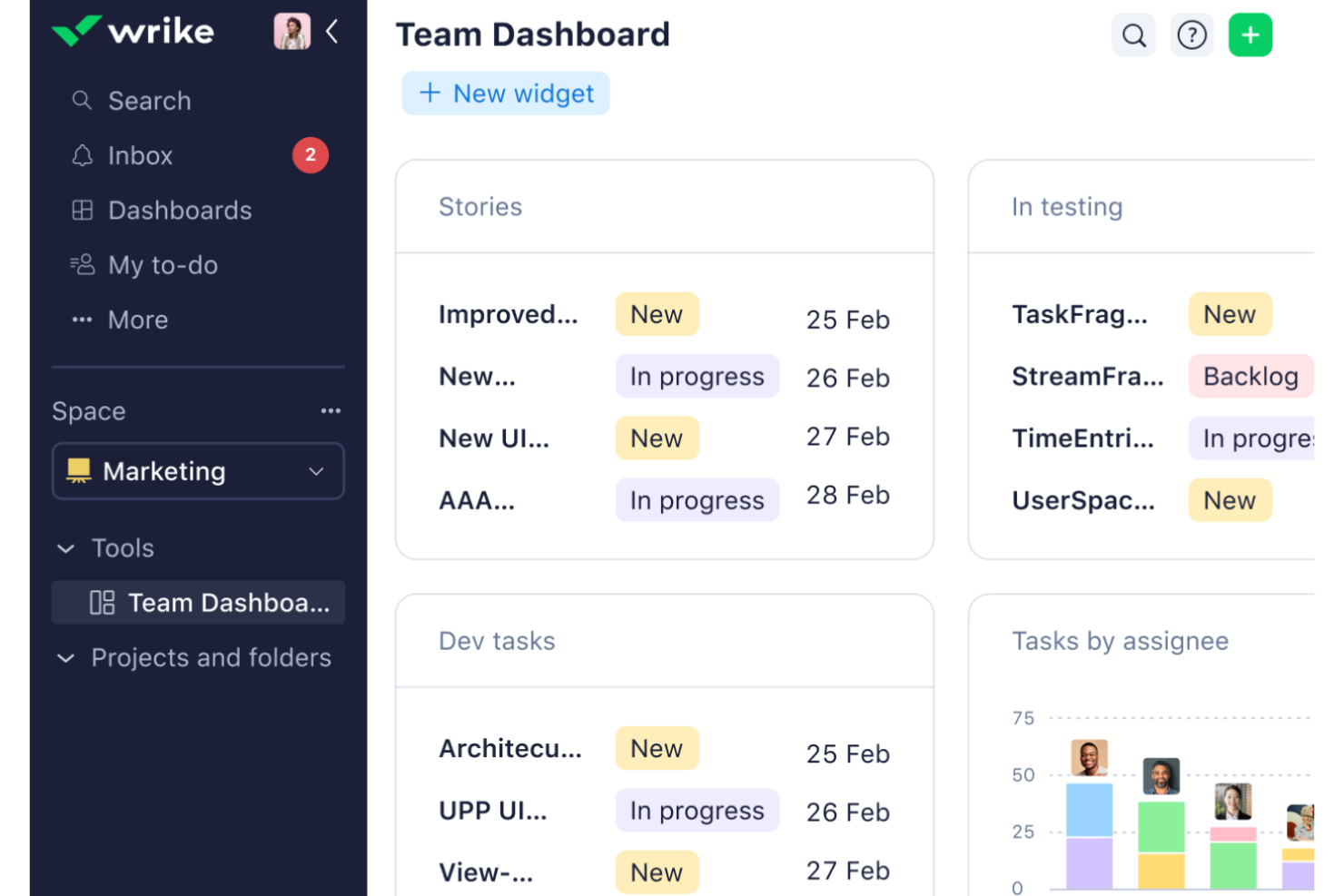
Wrike is a project management platform built for complex, cross-team work, offering Gantt charts, workload tracking, Kanban boards, request forms, and workflow automation across a hierarchy of folders, projects, and tasks.
Who Is Wrike Best For?
Wrike is a strong fit for mid-size to enterprise teams managing complex, cross-functional projects that span multiple departments.
Why I Picked Wrike
I've included Wrike in my top picks because cross-team visibility is where it genuinely earns its place. Workload charts let me see allocated effort by person or project across active work, so I can spot who's overloaded before a deadline slips. Custom dashboards pull data from multiple projects and spaces simultaneously, giving department heads and PMs a single view of what's moving and what's stalled.
Wrike Key Features
- Dynamic request forms: Collect and route incoming work requests from internal or external requesters directly into tasks, projects, or blueprints.
- Blueprints: Save recurring tasks, projects, or folders as reusable templates to standardize how new work gets set up.
- Gantt chart dependencies: Link tasks with finish-to-start, start-to-start, finish-to-finish, and start-to-finish relationships, with automatic rescheduling of dependent active tasks.
- Automation rules: Build rule-based automations with up to 10 actions per trigger to handle recurring handoffs and workflow steps across paid plans.
Wrike Integrations
Wrike supports 400+ integrations, including Jira, GitHub, Slack, Salesforce, HubSpot, Google Drive, Dropbox, and Zoom. Its RESTful API supports custom integrations, with access governed by user permissions and plan entitlements.
Pros and Cons
Pros:
- Dependencies and reusable blueprints support complex projects
- Workload charts expose capacity conflicts early
- Cross-project dashboards clarify status and ownership
Cons:
- Dense menus can complicate navigation across projects
- Initial configuration and training take time
New Product Updates from Wrike
Wrike Adds Klaxoon MCP Integration
Wrike’s Klaxoon MCP integration is now generally available, enabling AI agents to navigate between Wrike tasks and attached whiteboards, read task context, and manage whiteboard attachments via API. For more information, visit Wrike's official site.

Best for building flexible workflows
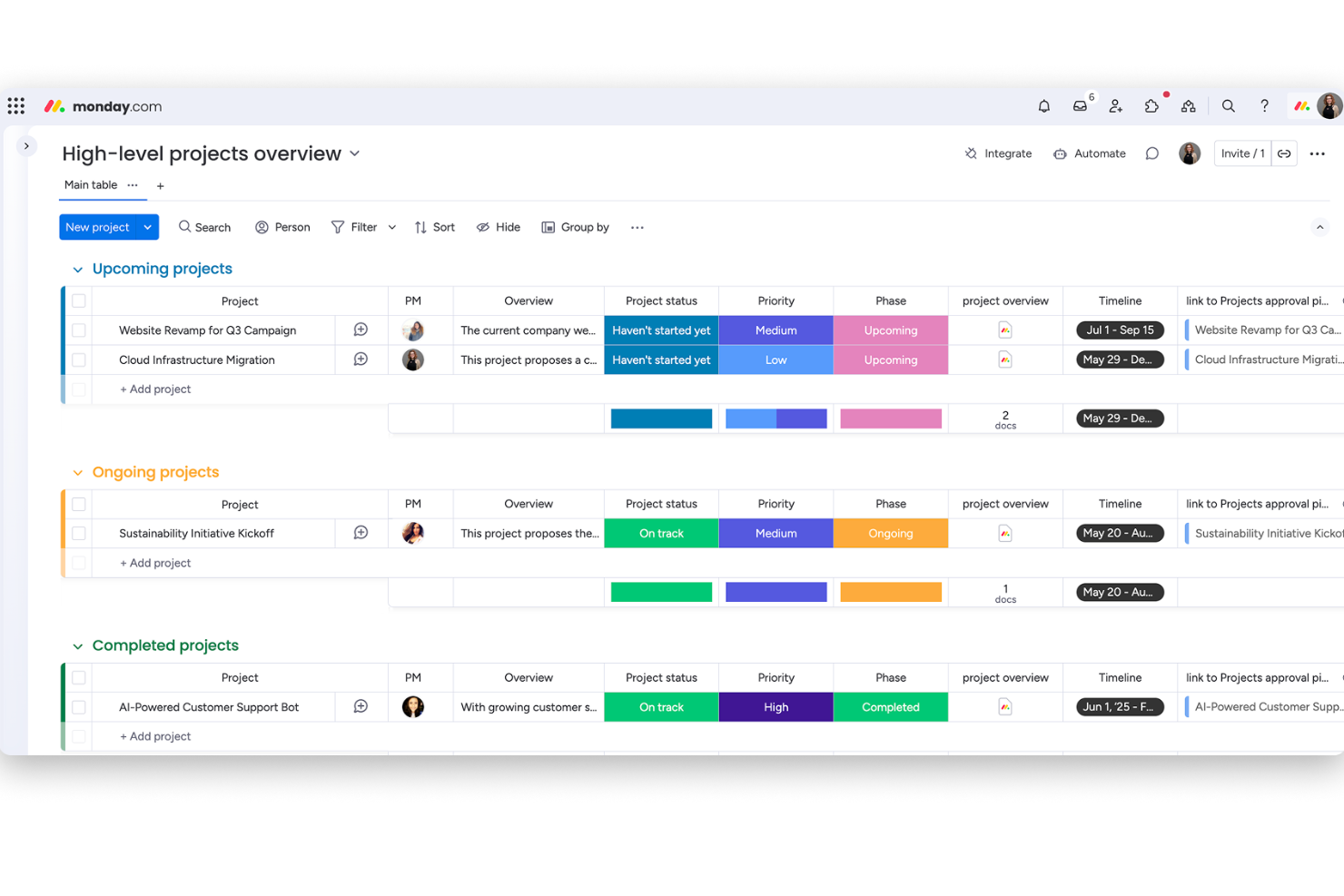
monday work management is a flexible work management platform that combines boards, multiple project views, workflow automation, and AI-powered tools to plan, track, and coordinate projects and tasks across teams.
Who Is monday work management Best For?
monday work management is a strong fit for cross-functional teams that need to manage multiple projects simultaneously without locking into a rigid workflow structure.
Why I Picked monday AI Workspace
I've included monday work management in my top picks because it gives cross-functional teams the flexibility to build workflows that actually match how they work, not the other way around. I love that you can run the same project data through Kanban, Gantt, Timeline, and Calendar views simultaneously, so your engineers and stakeholders are never looking at conflicting information. The multi-step automation builder also means repetitive status updates and task assignments handle themselves, freeing up your attention for actual project decisions.
monday AI Workspace Key Features
- Multi-level subitems: Break work into up to four levels of nested subitems beneath any top-level item, with rollups for status, date, and number columns.
- Workload view: See each team member's assigned work against their capacity and reassign tasks directly from the view across multiple boards.
- Workdocs: Create and edit documents collaboratively in real time, with comments, mentions, file attachments, and version history tied to your workspace.
- OKR tracking board: Build a customizable board to manage objectives and key results, grade progress with formulas, and report across boards via dashboard widgets.
monday AI Workspace Integrations
monday AI Workspace offers 850+ integrations and apps, including Slack, Microsoft Teams, Google Calendar, Gmail, GitHub, GitLab, Salesforce, HubSpot, and QuickBooks. It also provides a GraphQL API and SDK for custom integrations.
Pros and Cons
Pros:
- Task discussions and documents stay in context
- Synced views clarify timelines and task status
- Boards adapt to cross-functional project workflows
Cons:
- Complex boards can take time to configure
- Asana imports preserve only selected fields
New Product Updates from monday AI Workspace
monday AI Workspace Adds Human Approval Routing
monday AI Workspace adds a human-in-the-loop approval block to AI Workflows, sending approval requests and routing workflow paths based on responses. For more information, visit monday AI Workspace's official site.

Best for AI-powered marketing workflow management
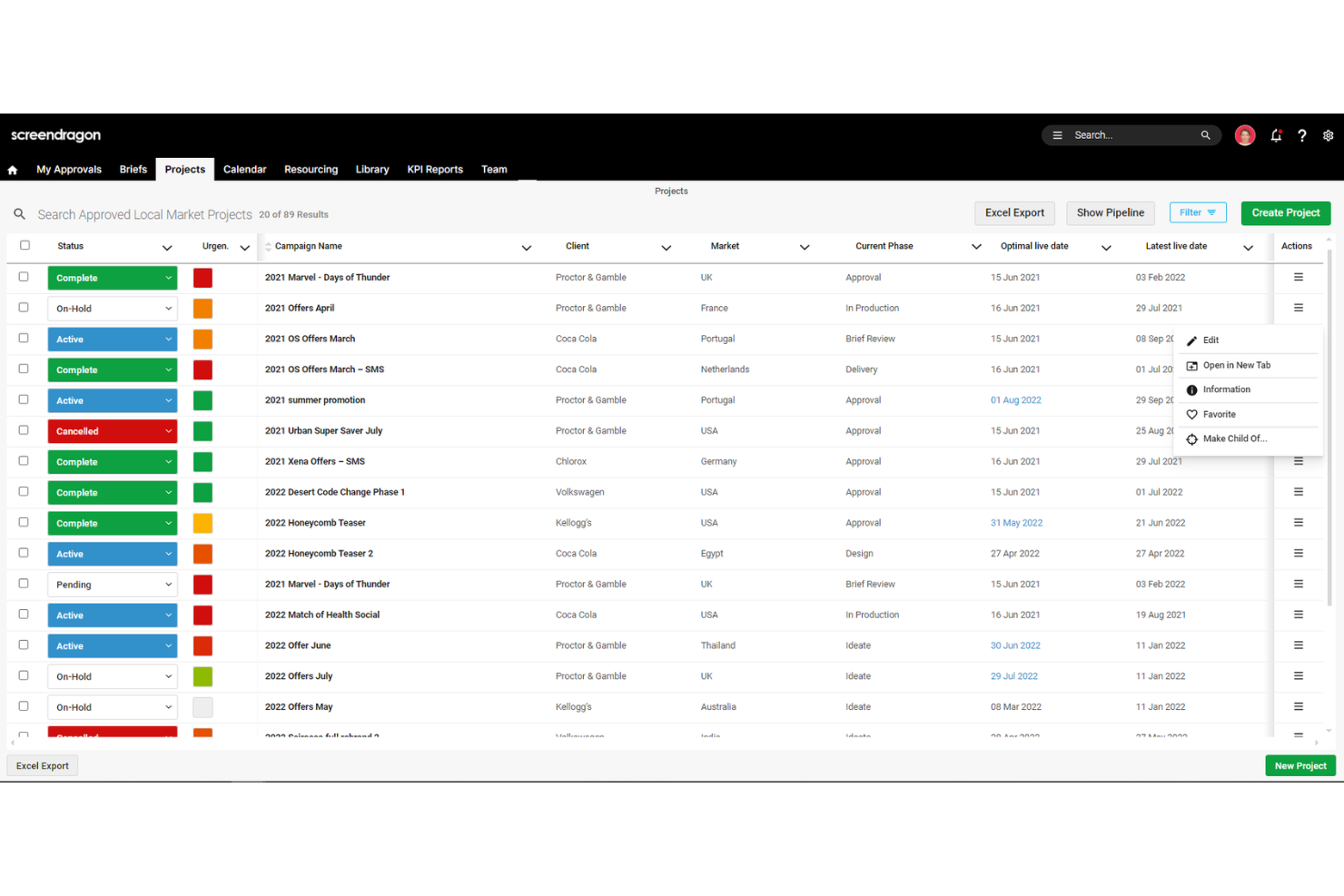
Screendragon is a work management platform built for enterprise marketing, creative, and agency teams, combining AI-powered workflow automation, creative review and approval, resource management, and reporting.
Who Is Screendragon Best For?
Screendragon is a strong fit for enterprise marketing and creative teams that need to manage complex, multi-stakeholder approval workflows across global markets.
Why I Picked Screendragon
I picked Screendragon as one of the best because its AI-powered workflow engine goes well beyond what Asana offers for marketing and creative teams managing complex, multi-stakeholder approvals. I love that you can build no-code conditional routing workflows where the Briefing Agent generates strategic briefs and the Proofing Agent automates review and approval, all within a single audit-tracked process. For global teams running campaigns across multiple markets, that kind of structured, AI-assisted routing is genuinely difficult to replicate in a general-purpose tool like Asana.
Screendragon Key Features
- Online proofing and markup: Review and annotate documents, artwork, and video directly in the platform, with side-by-side version comparison and an approval audit trail.
- Custom automated reporting: Build tailored reports and real-time dashboards to track project status, milestones, and budgets across campaigns.
- Resource management with real-time availability: Assign work based on live team capacity, with skill-based matching and utilization tracking through the Resourcing Agent.
- Field-level permissions: Configure role-based access down to individual form fields, supporting market-specific and client-specific workflow controls.
Screendragon Integrations
Screendragon documents 11 native integrations, including Smartsheet, HubSpot, Microsoft Power BI, Amazon S3, Google Cloud Platform Storage, Workato, and Sitecore. It also offers a REST API and webhooks with OAuth 2.0 for custom integrations, and claims more than 1,000 integrations overall.
Pros and Cons
Pros:
- Dashboards connect campaign status and budgets
- Creative proofing keeps feedback auditable
- Flexible conditional approval workflows
Cons:
- Dense menus can slow new-user adoption
- No traditional drag-and-drop task cards
New Product Updates from Screendragon
Screendragon Unveils New AI Hub
Screendragon introduced AI Hub, a new capability that lets teams build and manage AI agents directly within workflows. The update helps marketing teams automate tasks, maintain governance controls, and scale AI-driven operations more efficiently. For more information, visit Screendragon's official site.

Celoxis
Best for portfolio project tracking
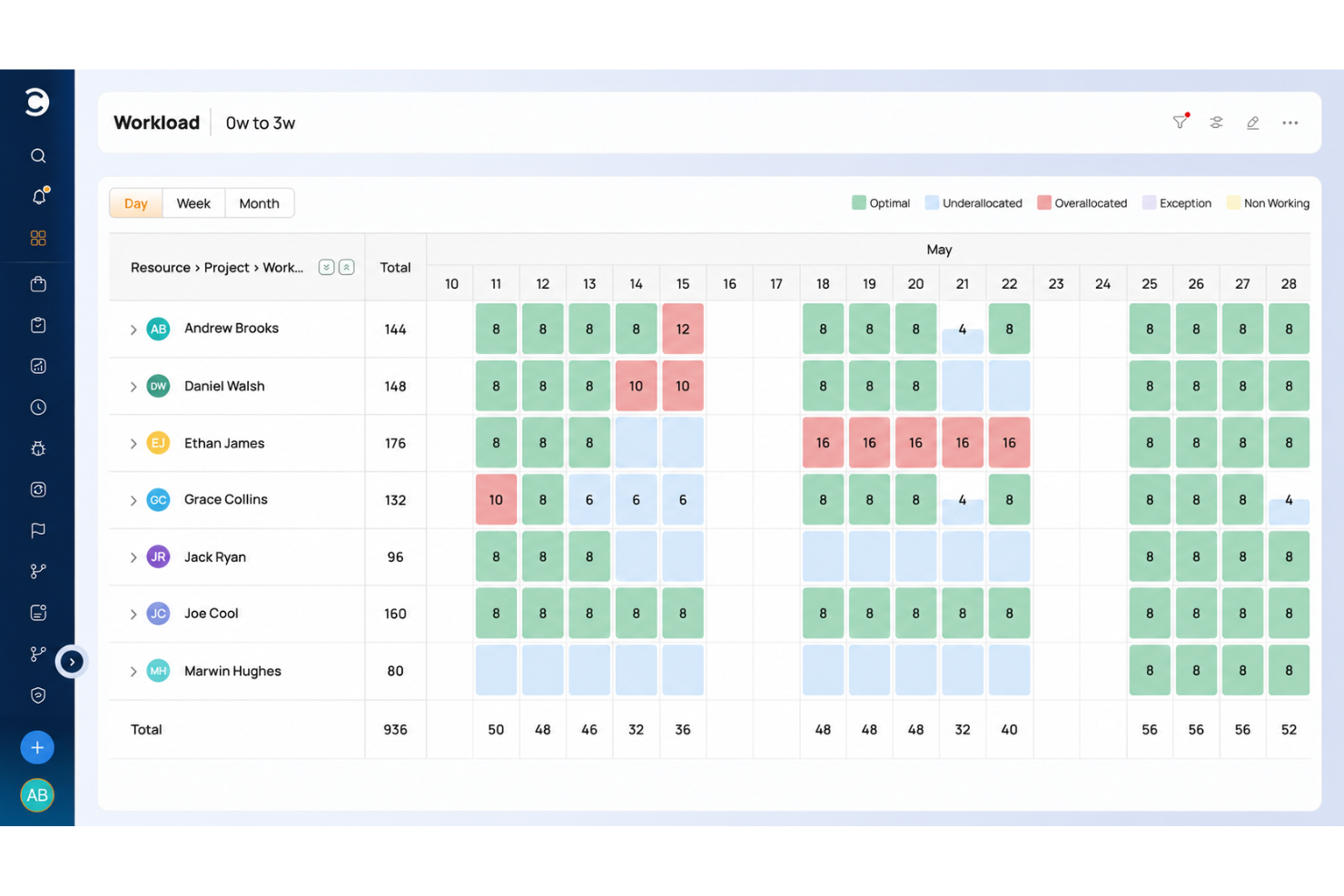
Celoxis is a project and portfolio management platform that combines Gantt scheduling, resource capacity planning, financial tracking, and portfolio-level reporting in one tool.
Who Is Celoxis Best For?
Celoxis is a strong fit for project managers and PMO teams running multiple concurrent projects who need portfolio visibility, resource capacity planning, and financial tracking in one place.
Why I Picked Celoxis
Celoxis earns its spot on my shortlist because of how well it handles portfolio project tracking across multiple concurrent projects. I love that you can see RAG health, earned value, and plan-versus-actual financials all in one portfolio dashboard, which means I'm not chasing status updates before a leadership review. The resource capacity planning view, which shows workload by role or skill across every active project, is especially useful when you're juggling competing priorities and need to reallocate without blowing your schedule.
Celoxis Key Features
- Project request intake: Collect, rank, and score project requests using configurable business KPIs and what-if analysis before they enter the queue.
- Timesheet submission with built-in timers: Log time through a weekly grid or live timer, with automatic reminders for missing entries.
- Client portal: Give clients a branded, customizable workspace to view and collaborate on permitted projects and tasks.
- Two-way Jira and Azure DevOps sync: Reflect development progress, sprints, and work items directly in your project and portfolio views.
Celoxis Integrations
Celoxis lists 400+ connected apps, including 21 integrations configured inside Celoxis and 386 through Zapier and its REST API. Native integrations include Jira, Azure DevOps, Slack, Google Drive, Salesforce, QuickBooks Online, Microsoft Project, and Google Sheets; Zapier is also supported.
Pros and Cons
Pros:
- Gantt dependencies coordinate complex concurrent delivery
- Capacity views expose overloaded roles across projects
- Portfolio dashboards consolidate status and budget updates
Cons:
- Dense interface adds steps to routine updates
- Initial configuration takes sustained project-lead attention

Best for drag-and-drop interface
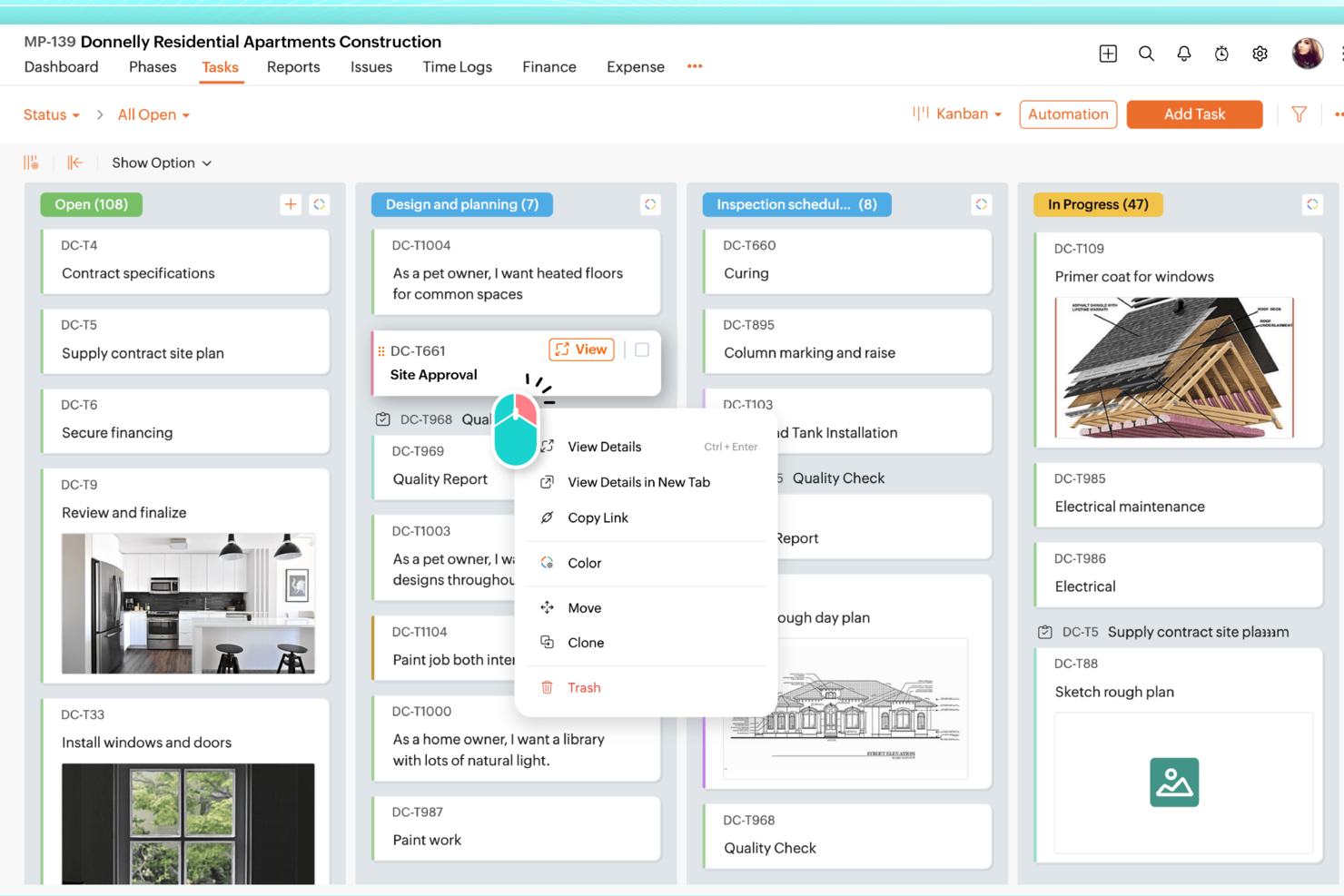
Zoho Projects is a project management platform with task hierarchies, Kanban and Gantt views, workflow automation, time tracking, and workload reporting built into a single portal.
Who Is Zoho Projects Best For?
Zoho Projects is a strong fit for project managers who want a full-featured platform at a lower per-user cost, especially those already working within the Zoho ecosystem.
Why I Picked Zoho Projects
Zoho Projects earns its spot on my shortlist because of how well its drag-and-drop Gantt chart handles real scheduling work, like adjusting dependent tasks across a sprint when a deadline shifts. I like that you can drag tasks directly on the Gantt to reschedule them, and dependencies update automatically. The Kanban board works the same way, letting you move cards across status columns to trigger blueprint automations without touching a single settings menu.
Zoho Projects Key Features
- Blueprint automation: Blueprints guide tasks through defined status transitions, automatically assigning team members and updating fields at each stage.
- Workload report: Color-coded heatmap and timeline charts show each user's allocation so you can spot overloaded team members and reassign tasks directly from the report.
- Earned value management: Compares planned schedule, cost, and time against actual values to measure project performance and forecast delivery on Premium and above.
- Project templates: Save existing projects as reusable templates, including task dependencies and structure, to spin up new projects without rebuilding from scratch.
Zoho Projects Integrations
Zoho Projects offers 50+ marketplace integrations, including Slack, Microsoft Teams, Google Drive, Google Calendar, GitHub, GitLab, Dropbox, and Zapier. It also provides a REST API and native integrations across the Zoho ecosystem.
Pros and Cons
Pros:
- Workload heatmaps help balance team assignments
- Blueprints automate status changes and assignments
- Drag-and-drop scheduling updates task dependencies
Cons:
- Large-project charts can lag
- Crowded navigation complicates task setup
New Product Updates from Zoho Projects
Zoho Projects Adds CodeX Scripts for Custom Modules
Zoho Projects now supports CodeX Scripts for custom modules, enabling conditional logic and rules for creating, updating, and deleting records. For more information, visit Zoho Projects' official site.
 .
.
Quire
Best for infinite nested task hierarchies
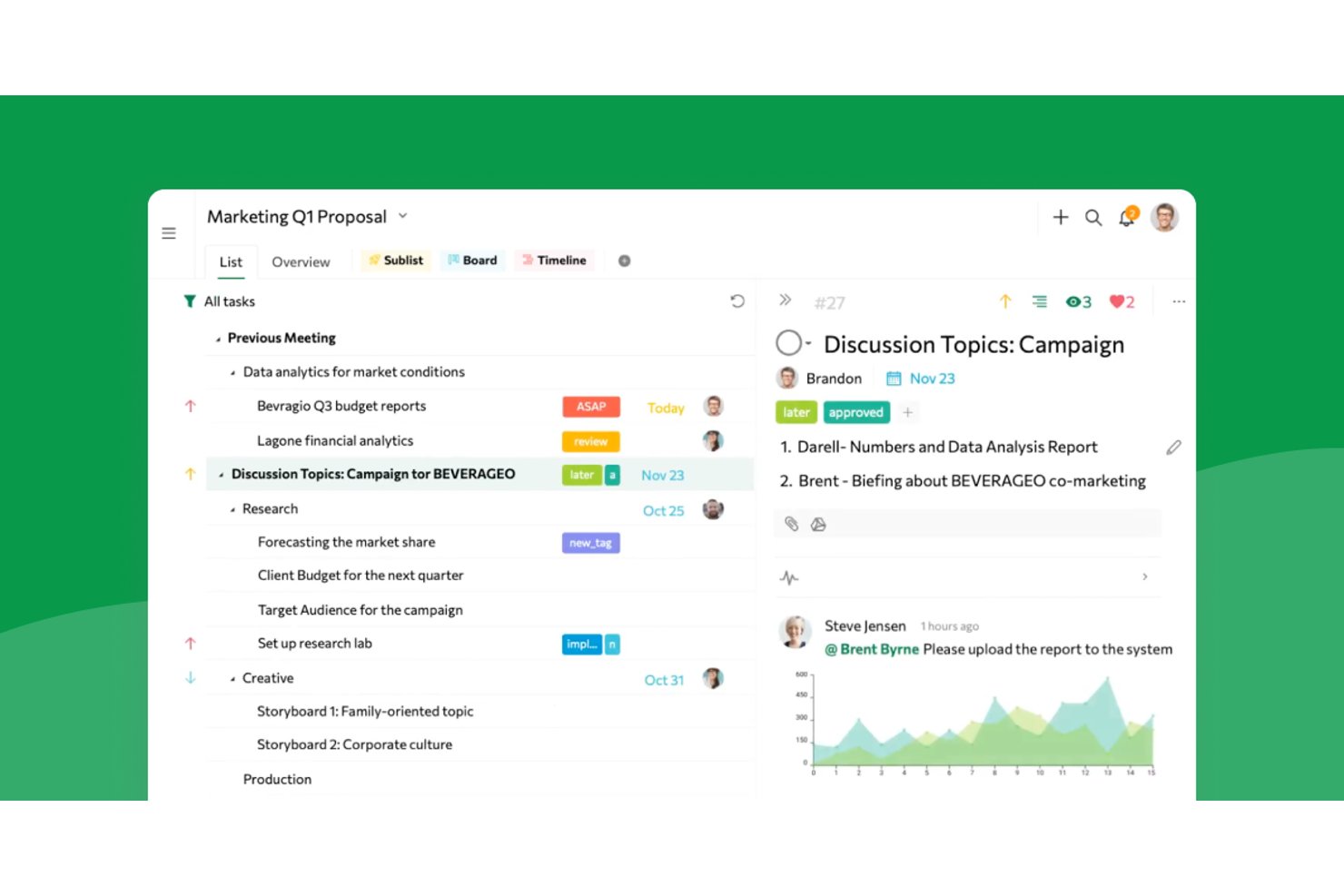
Quire is a project and task management tool built around unlimited nested task hierarchies, offering multiple project views, time tracking, team collaboration, and cross-project reporting.
Who Is Quire Best For?
Quire suits project managers and team leads who need to break complex work into deeply nested subtasks without hitting a hierarchy ceiling.
Why I Picked Quire
Quire earns its spot on my shortlist because no other tool I've tested handles deeply nested task hierarchies as naturally. When I'm breaking down a product launch into workstreams, epics, tasks, and sub-tasks, Quire's unlimited subtask levels let me go as deep as the work actually demands, without hitting an artificial ceiling. I also rely on the Panorama view to track tasks across multiple projects at once, which keeps cross-team dependencies visible when I'm running parallel workstreams.
Quire Key Features
- Asana JSON import: Import Asana project exports directly into Quire, preserving tasks, subtasks, assignees, due dates, and comments.
- Task dependencies: Link tasks to show how one task's completion status affects another, available on Professional plans and above.
- Dashboard widgets: Track team progress with 14 widget types including Member Workload, Portfolio Health, and tasks created versus completed.
- Time tracking: Log time spent on individual tasks and review it across projects through built-in time reports and timesheets.
Quire Integrations
Quire offers integrations with Google Calendar, Google Drive, Microsoft Teams, Slack, Dropbox, Box, GitHub, Power BI, and n8n. It also supports REST API integrations with OAuth 2.0 and webhooks, plus Zapier.
Pros and Cons
Pros:
- List, board, timeline, and calendar views
- Asana imports retain tasks and comments
- Unlimited nested subtasks preserve project detail
Cons:
- No native conditional automation rule-builder
- Reporting offers limited trend analysis
New Product Updates from Quire
Quire Adds Custom Field Locking and Comment Reaction API Support
Quire adds custom field locking and API support for reading and setting emoji reactions on comments. These updates give teams more control over field data and expand comment interaction options for developers. For more information, visit Quire’s official site.
 .
.
Hive
Best for AI-driven analytics
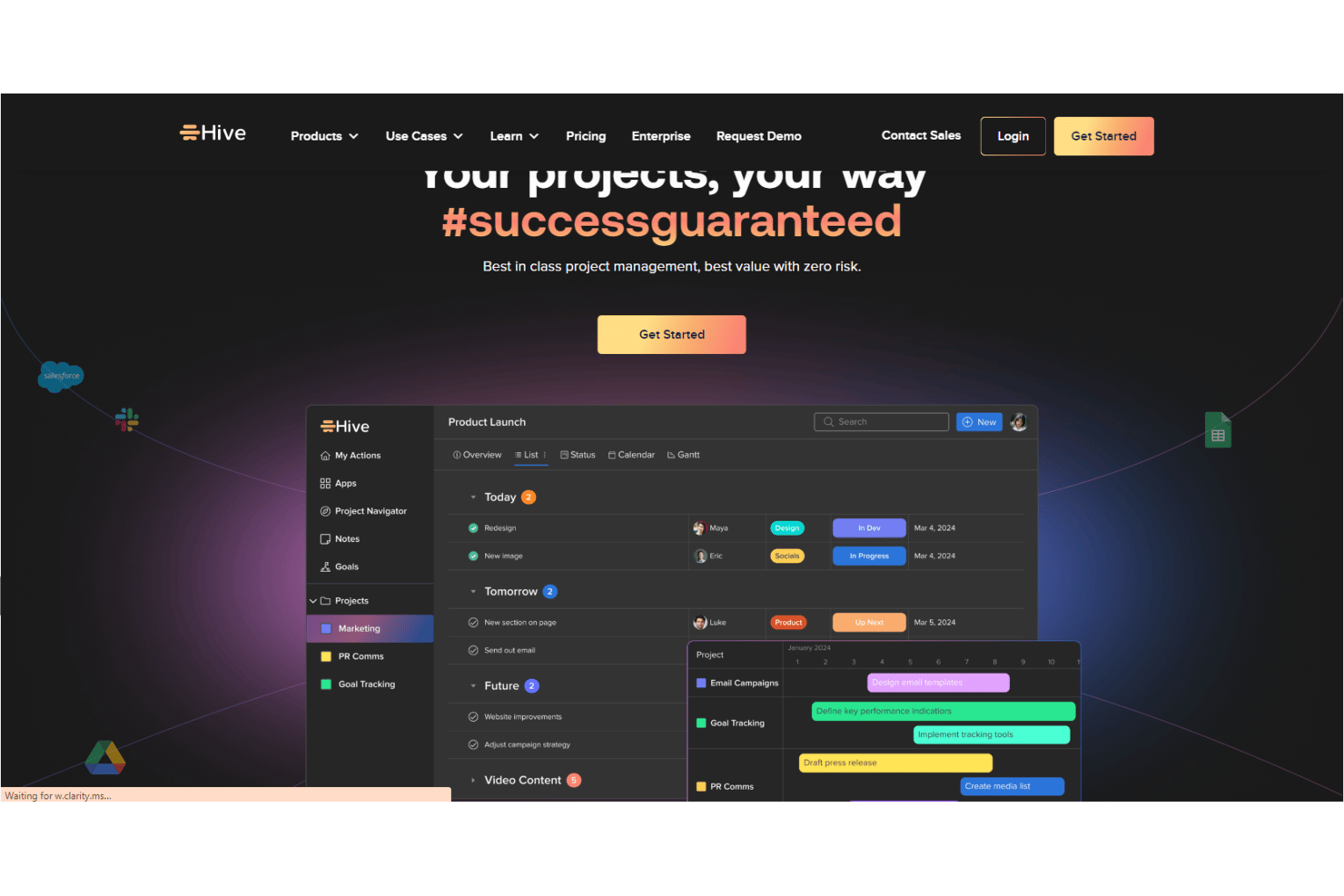
Hive is an AI-enabled project management platform that brings together task tracking, multiple project views, workflow automation, dashboards, and team collaboration in a single workspace.
Who Is Hive Best For?
Hive is a strong fit for cross-functional teams that need AI-driven reporting and workspace visibility alongside their day-to-day project tracking.
Why I Picked Hive
Hive earns its spot on my shortlist because of how deeply its AI, Buzz, is woven into workspace reporting. I can ask Buzz a direct question like "what's blocked across all active projects?" and get an answer pulled from live workspace data, without building a single report. Buzz also generates dashboard widgets on demand and flags risks by project, giving cross-functional teams the kind of at-a-glance status visibility that Asana typically requires manual dashboard setup to achieve.
Hive Key Features
- Hive Notes: Collaboratively write meeting notes and project context directly in the workspace, then turn talking points into assigned action cards with deadlines.
- Portfolio view: See multiple projects together in one place, with status, owners, milestones, and custom fields visible across the full project portfolio.
- No-code workflow builder: Build multi-step automations using a drag-and-drop interface, or describe a process in plain English and let Buzz generate the workflow.
- Time tracking: Log time directly on action cards and roll tracked hours into timesheets for team-level or org-level review and approval.
Hive Integrations
Hive claims 1,000+ integrations, including native connections with Jira, GitHub, Slack, Microsoft Teams, Google Drive, Google Calendar, Zoom, and Dropbox. It also offers a REST API and Zapier integration.
Pros and Cons
Pros:
- Forms route requests into assigned work
- Gantt, calendar, and Kanban views
- Tasks, files, and conversations stay together
Cons:
- Mobile app trails desktop functionality
- Project and workflow setup can take time

Enji
Best for structured weekly marketing workflows
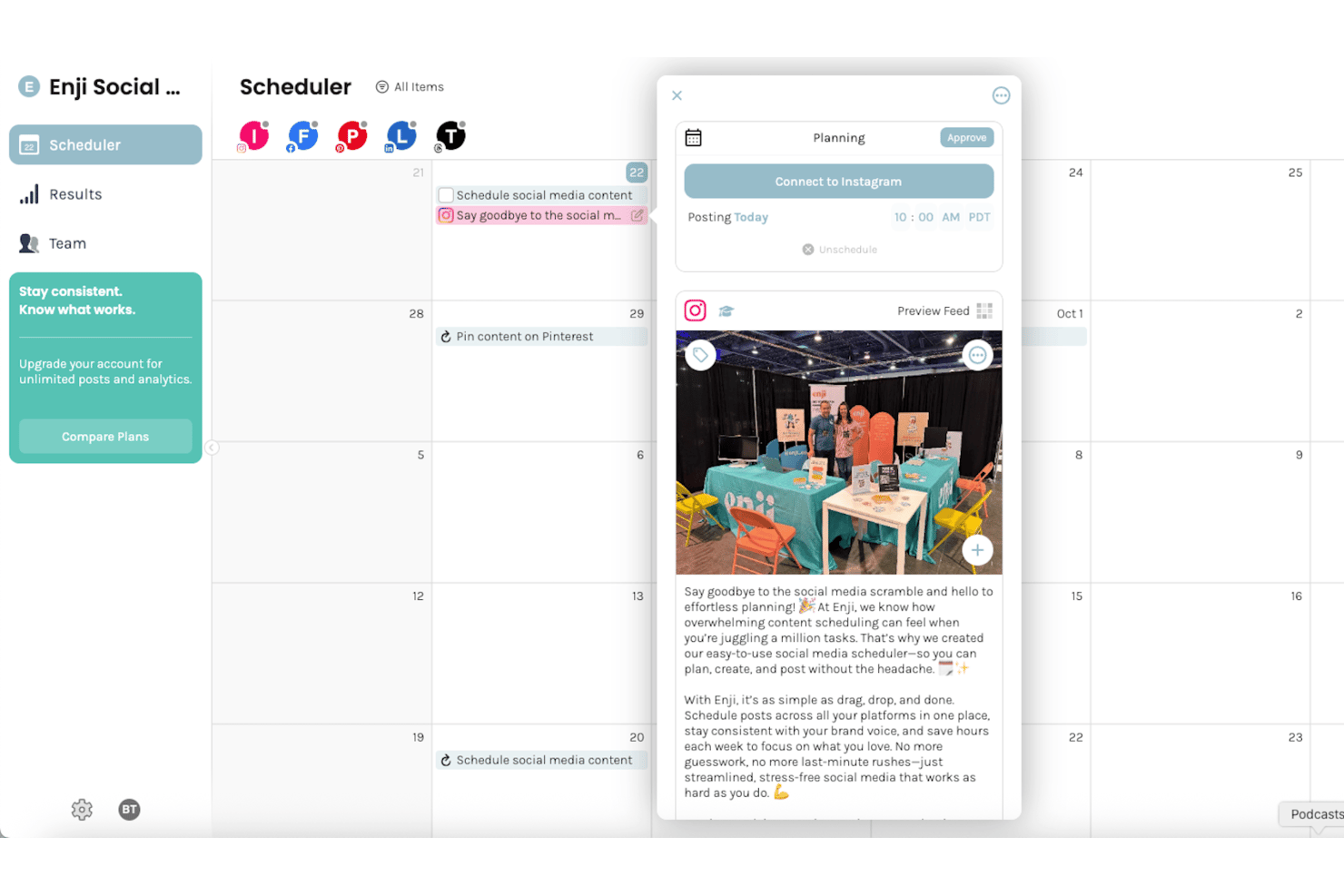
Enji is a marketing platform for small businesses that combines a marketing calendar, AI copywriting, social media scheduling, campaign templates, and a KPI dashboard in one place.
Who Is Enji Best For?
Enji is a good fit for small-business owners who want a single place to plan, create, and schedule their marketing each week.
Why I Picked Enji
I picked Enji as one of the best because it structures your entire marketing week around a unified calendar that ties tasks, campaign templates, and scheduled social posts together in one view. I love how its 16-plus campaign templates come pre-loaded with recommended tasks and metrics, so you're not building a marketing workflow from scratch every time you launch something new. Its AI copywriter drafts captions, blog posts, and newsletters using your brand voice, feeding content directly into that same calendar for review and scheduling.
Enji Key Features
- KPI dashboard: Tracks sales and marketing KPIs in one place, with some metrics pulling in automatically from connected platforms like Google Analytics and Meta.
- Team access controls: Invite team members with View Only, Standard, or Admin permissions to manage who can edit tasks and materials.
- Task comments and mentions: Leave comments on tasks, tag teammates with @mentions, and attach files directly within each task.
- Google Calendar and iCal sync: Connects Enji tasks to external calendars so scheduled tasks appear as events on their due dates.
Enji Integrations
Enji offers native integrations with Google Calendar, iCal, Canva, Facebook, Instagram, LinkedIn, Pinterest, TikTok, YouTube Shorts, and Threads. Its MCP server connects AI clients such as ChatGPT and Claude to marketing context, calendar tasks, content drafts, and scheduled posts.
Pros and Cons
Pros:
- Task comments support small-team coordination
- KPI dashboard centralizes marketing performance
- Campaign templates turn goals into tasks
Cons:
- Marketing focus misses general project workflows
- Calendar-only views limit project visualization

ClickUp
Best for platform customizability
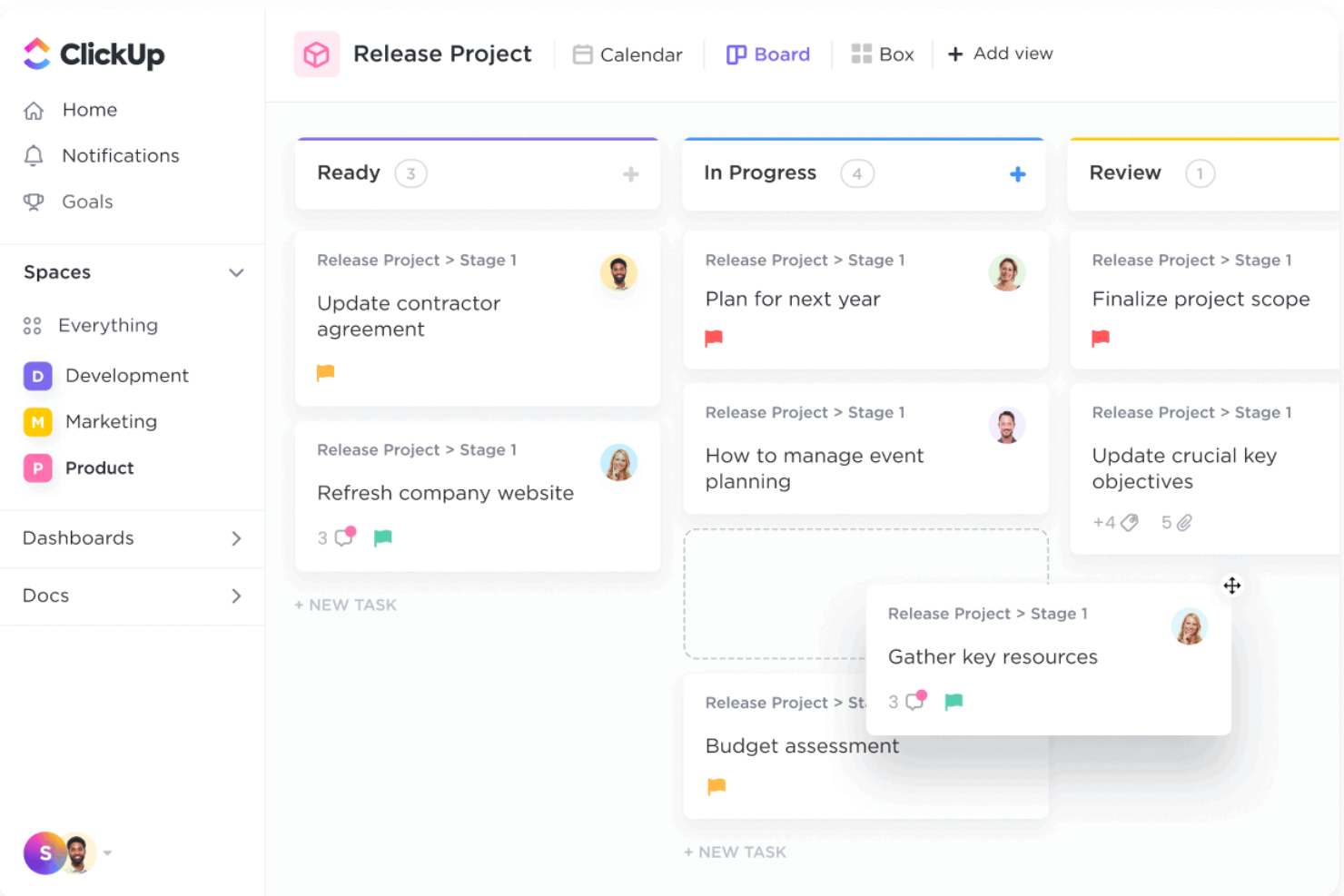
ClickUp is a project management platform that brings tasks, docs, chat, whiteboards, automations, and dashboards into a single configurable workspace.
Who Is ClickUp Best For?
ClickUp suits teams that need to shape their project workspace around how they actually work, rather than adapt to a fixed structure.
Why I Picked ClickUp
ClickUp earns its spot on my shortlist because no other tool in this category lets you shape your workspace as precisely around your team's actual workflow. I love that you can define custom statuses at the Space level and have every folder and list below it inherit them automatically, which means a product team and a marketing team can operate inside the same workspace without stepping on each other's structures. Custom fields let you attach things like budget figures, region tags, or priority scores directly to tasks, so the data your team tracks day-to-day lives right where the work happens.
ClickUp Key Features
- Workflow automation builder: Set up trigger-based rules to automatically update statuses, reassign tasks, or send notifications when conditions are met.
- Asana import tool: Migrate projects directly from Asana, mapping sections to Custom Fields, Lists, or statuses and choosing whether to include completed tasks and attachments.
- Workload view: Visualize each team member's assigned work over a selected time period and set individual capacity limits to manage team bandwidth.
- Sprint management: Plan and track sprints with sprint points, burndown charts, and reporting built into the platform.
ClickUp Integrations
ClickUp offers 50+ native integrations, including Slack, Microsoft Teams, Google Drive, Google Calendar, GitHub, GitLab, HubSpot, and Zoom. It also supports a Public API, Webhooks, OAuth, MCP Server, and Zapier.
Pros and Cons
Pros:
- Synchronized views clarify cross-team progress
- Direct import transfers core project structure
- Custom statuses adapt across departments
Cons:
- Some imported project details need manual cleanup
- Initial setup can overwhelm new teams
New Product Updates from ClickUp
ClickUp Adds Meetings Hub, Super Agent Templates, and ZoomInfo Integration
ClickUp adds a searchable Meetings Hub, new ways to clone and template Super Agents, and a ZoomInfo integration through the App Center. These updates improve meeting retrieval, agent reuse, and access to sales intelligence. For more information, visit ClickUp’s official site.

Best for enterprise resource and capacity planning
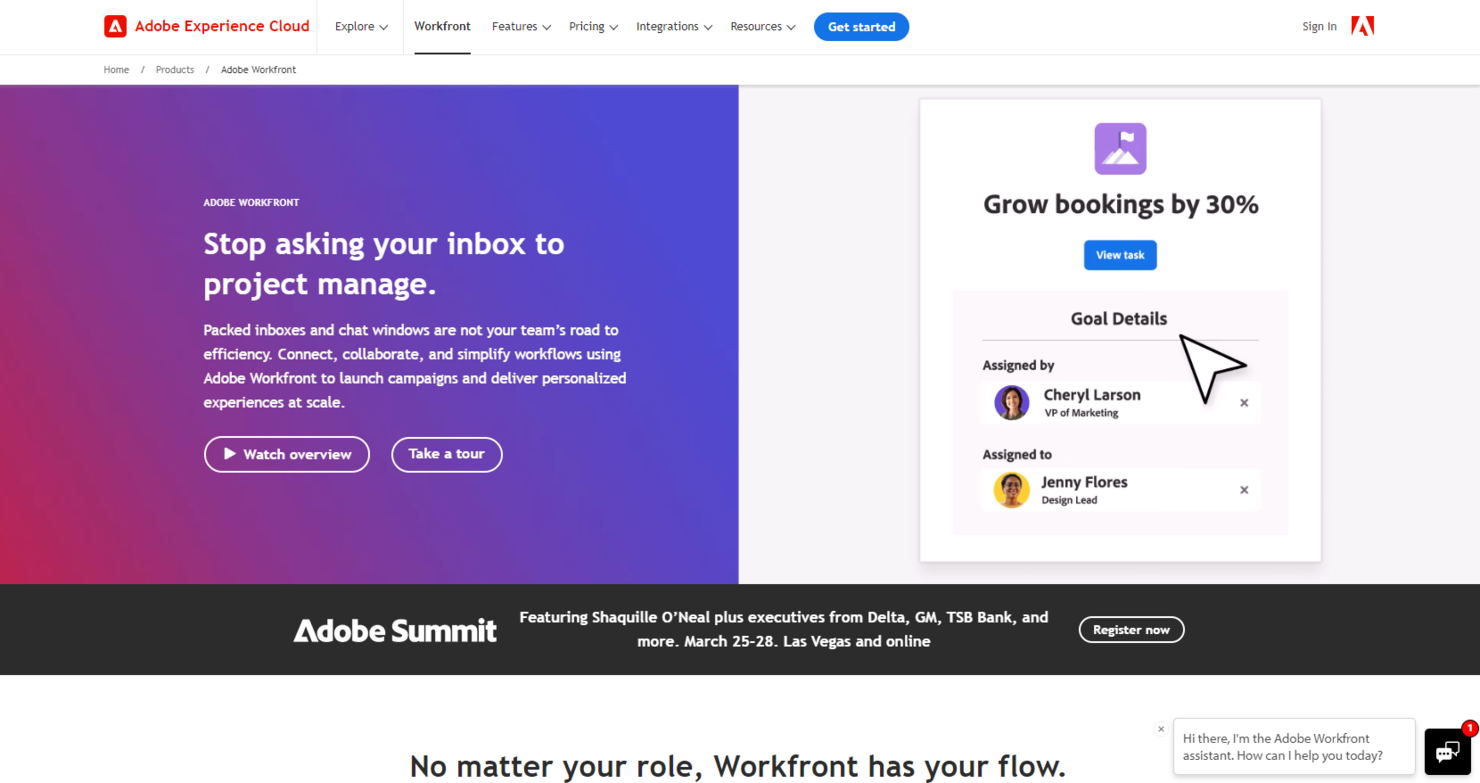
Workfront offers a comprehensive enterprise work management platform, designed to support complex workflows, resource management, and collaboration at scale. Its robust feature set and flexibility make it an ideal solution for large organizations seeking to streamline operations, enhance productivity, and maintain visibility across extensive project portfolio management.
Why it's a good Asana alternative: I picked Workfront for its extensive capabilities in managing the multifaceted needs of large enterprises, which often involve intricate projects and numerous stakeholders. Its enterprise-grade features provide a level of depth and scalability that stands out from Asana, making it best suited for organizations with complex workflows and high demands for customization and integration.
Standout features & integrations:
Features include advanced project and resource management, customizable dashboards, and real-time reporting.
Integrations include Adobe Creative Cloud, G Suite, Outlook, Microsoft Teams, Slack, Salesforce, and JIRA.
Pros and Cons
Pros:
- Comprehensive reporting and analytics for informed decision-making
- High customization and integration capabilities
- Scalable for large enterprises with complex needs
Cons:
- Setup and onboarding can be time-consuming
- May be more complex than needed for smaller teams
- Pricing transparency could be improved
Andre Asana-alternativer
Her er noen flere Asana-alternativer som ikke kom med på kortlisten min, men som likevel er verdt å sjekke ut:
- Jira
For agile team and dev project tracking
- Smartsheet
For spreadsheet-style cross-project reporting
- Teamwork.com
For client work and billable time tracking
- Zenkit
For six-view data visualization
- Ravetree
For integrated CRM features
- Airtable
For database-driven project workflows
- Process Street
For workflow automation
- Notion
For docs and tasks in one database
- Workzone
For comprehensive project visibility
- GoodDay
For deep flexibility


How I Evaluate Asana Alternatives
I split my evaluation into two layers: the baseline capabilities every Asana alternative must have—like task hierarchy, multiple views, and automation—and the differentiators that signal the best fit.
Core Functionality (Table Stakes For This List)
When I'm selecting tools for my list, I rank each one on a scale from 0 (does not offer the functionality) to 5 (excels in this area) for each core functionality listed below. Then, I calculate the tool's total score into a percentage. Each tool needs to achieve a minimum total score of 75% to be considered for inclusion.
- Task & Project Management: I look for full task hierarchy—projects, tasks, subtasks, dependencies, milestones—so teams can map out a product launch or sprint backlog with clear ownership.
- Multiple Project Views: Each tool should offer at least list, board, calendar, and timeline/Gantt views so PMs can switch between sprint boards and roadmap timelines.
- Team Collaboration Tools: Comments, @mentions, file attachments, and activity feeds all matter here, especially for distributed teams coordinating handoffs between design and engineering.
- Workflow Automation: I evaluate whether a tool lets you build custom rules—like auto-assigning QA reviews when a task moves to "Ready for Testing"—without writing code.
- Reporting & Dashboards: Customizable dashboards that surface project health, workload distribution, and progress across a portfolio help PMs report status to leadership fast.
- Integrations & API: The tool needs to connect with the broader stack—Slack, GitHub, Google Workspace, Figma—plus offer an API and connectors like Zapier or Make.
Once I have a list of tools that meet this criteria, I consider what sets each platform apart.
Differentiating Factors (What Sets Vendors Apart)
Here's how I compare and contrast different vendors:
Standout Features
Resource and workload management is a big one—I check whether a tool lets you visualize team capacity so you can rebalance assignments before someone gets buried mid-sprint. Goal and OKR tracking matters when you need to tie daily tasks back to quarterly objectives and show leadership that work is moving the needle. I also look for native time tracking, especially for teams billing clients or measuring effort across multiple projects.
Beyond Features
Pricing structure matters a lot when comparing Asana alternatives—I evaluate whether a tool offers a usable free tier for small teams and how costs scale as headcount grows. Scalability ties directly into this; I check for enterprise controls like SSO and SCIM provisioning that growing organizations will need down the road. Security and compliance certifications like SOC 2 Type II and GDPR readiness also weigh in, especially for teams handling sensitive client data or working in regulated industries.
Hvorfor se etter et Asana-alternativ?
Selv om Asana er et godt valg innen prosjektstyring, finnes det flere grunner til at noen brukere ser etter alternative løsninger. Det kan hende du ser etter et Asana-alternativ fordi …
- Du trenger et mer budsjettvennlig alternativ for teamet ditt
- Grensesnittet føles for komplekst eller uoversiktlig for arbeidsflyten din
- Du ønsker bedre funksjoner for tidsregistrering integrert i plattformen
- Teamet ditt trenger avanserte verktøy for rapportering og analyse
- Du trenger en frakoblet modus for å administrere oppgaver uten internettilgang
- Du trenger et prosjektstyringsverktøy som fungerer bedre for samarbeid med kunder
Hvis noe av dette høres kjent ut, har du kommet til rett sted. Listen min inneholder flere programvarealternativer for prosjektstyring som passer bedre for team som møter disse utfordringene med Asana og ser etter alternative løsninger.
De viktigste funksjonene i Asana
Her er noen av de viktigste funksjonene i Asana som kan hjelpe deg med å sammenligne og se forskjeller mot det alternative løsninger tilbyr:
- Oppgavehåndtering: Opprett, tildel og sett tidsfrister for oppgaver for å hjelpe teamet med å holde seg organisert og i rute.
- Flere prosjektvisninger: Velg mellom liste-, tavle- (Kanban), kalender- eller tidslinjevisninger (Gantt-diagram) for å visualisere arbeidet på den måten som passer teamets arbeidsflyt best.
- Automatisering av arbeidsflyt: Automatiser rutineoppgaver med tilpassbare regler for å redusere manuelt arbeid og minimere feil.
- Tilpassede felt: Legg til spesifikke datafelt i oppgaver for å registrere all nødvendig informasjon, slik at Asana kan tilpasses teamets unike behov.
- Integrasjoner: Koble Asana sammen med verktøy som Slack, Gmail og Zoom for å samle arbeidet på ett sted og styrke samarbeidet.
- Rapportering og analyse: Bruk oversikter og rapporteringsverktøy til å følge med på prosjektfremdrift og teamets resultater, slik at du kan ta datadrevne beslutninger.
- Mobil tilgang: Få tilgang til oppgavene og prosjektene dine når du er på farten, med Asanas mobilapper for iOS og Android, slik at teamet holder kontakten når som helst og hvor som helst.
- Sikkerhetsfunksjoner: Bruk tofaktorautentisering, støtte for enkel pålogging og tilpassbare brukertillatelser for å holde dataene dine sikre.
- KI-funksjoner: Dra nytte av KI-verktøy som AI Studio for å utforme arbeidsflyter med KI-agenter og dermed øke produktiviteten og effektiviteten.
- Målsporing: Knytt teamets arbeid til virksomhetens mål ved å sette og følge opp mål i Asana, slik at alle holder fokus på det som betyr mest.