

10 alternative verktøy til ProcessMaker for automatisering i 2026

Beste alternativer til ProcessMaker – kortliste


ProcessMaker er en nettbasert plattform for prosessadministrasjon med lite kode, som gjør det mulig for forretningsbrukere å utforme og implementere løsninger for å håndtere komplekse prosess- og arbeidsflytproblemer. Brukere kan imidlertid se etter alternativer på grunn av problemer som ustabile mobilapper, dårlig kundeservice og høye lisensavgifter.
Med utgangspunkt i min erfaring med prosjektstyringsprogramvare testet og sammenlignet jeg flere av de beste alternativene til ProcessMaker på markedet. Deretter samlet jeg innsikten min i grundige anmeldelser for å hjelpe team med å finne den ideelle løsningen.
Enten du driver en liten bedrift eller et større selskap, er jeg sikker på at du vil finne ditt neste alternativ til ProcessMaker, slik at du kan effektivisere driften.
Hva er ProcessMaker?
ProcessMaker er et alt-i-ett-system for automatisering av arbeidsflyter og forretningsprosessadministrasjon, utviklet for å automatisere og optimalisere forretningsprosesser. Organisasjoner bruker det til å utforme, automatisere og implementere forretningsprosesser med ulik kompleksitet.
Vanlige brukere omfatter ofte forretningsanalytikere, IT-fagfolk og ledere som trenger å effektivisere driften, forbedre effektiviteten og sikre samsvar med organisasjonens retningslinjer.
Hvorfor du kan stole på våre programvareanbefalinger
Teamet vårt har testet og anmeldt programvare siden 2012. Vi er selv prosjektledere, så vi vet hvor vanskelig og hvor viktig det er å velge riktig programvare.
I denne guiden har vi vurdert verktøyene gjennom praktisk testing og uavhengig research og gitt dem poeng ut fra våre utvelgelseskriterier. Vi bygger også på innsikt fra ledende eksperter i bransjen og erfarne prosjektledere.
Anmeldelsene våre bygger på vår egen redaksjonelle vurdering. De er ikke et salgsargument.
Ekspertanmeldere:
Sammenligningstabell for alternativer til ProcessMaker
Denne sammenligningstabellen oppsummerer prisdetaljene for mine utvalgte toppalternativer til ProcessMaker:
| Tool | Best For | Trial Info | Price | ||
|---|---|---|---|---|---|
| 1 | Best for AI-powered workflow creation | Free plan available | Pricing upon request | Website | |
| 2 | Best for checklist and SOP management | 14-day free trial; free demo available | Pricing upon request | Website | |
| 3 | Best for end-to-end process generation | Free plan + demo available | Pricing upon request | Website | |
| 4 | Best for comprehensive process management | 30-day free trial + free demo available | From $15,000/year (billed annually) | Website | |
| 5 | Best for company decision-making | Free trial + demo available | Pricing upon request | Website | |
| 6 | Best for process ownership and accountability | 30-day free trial + free demo available | From €2/user/month (billed annually) | Website | |
| 7 | Best for affordable process mapping | Free demo available | From $1,200/month | Website | |
| 8 | Best for AI-powered process mining | 30-day free trial available | Pricing upon request | Website | |
| 9 | Best for enterprise-grade BPM solutions | Not available | Pricing upon request | Website | |
| 10 | Best for scalable process orchestration | Free plan + 30-day trial available | Pricing upon request | Website |
Beste alternativer til ProcessMaker
I denne analysen gir jeg en grundig gjennomgang av hvert av alternativene til ProcessMaker. Jeg går gjennom fordeler og ulemper ved hvert verktøy, funksjonene deres og de beste bruksområdene.

Pipefy
Best for AI-powered workflow creation
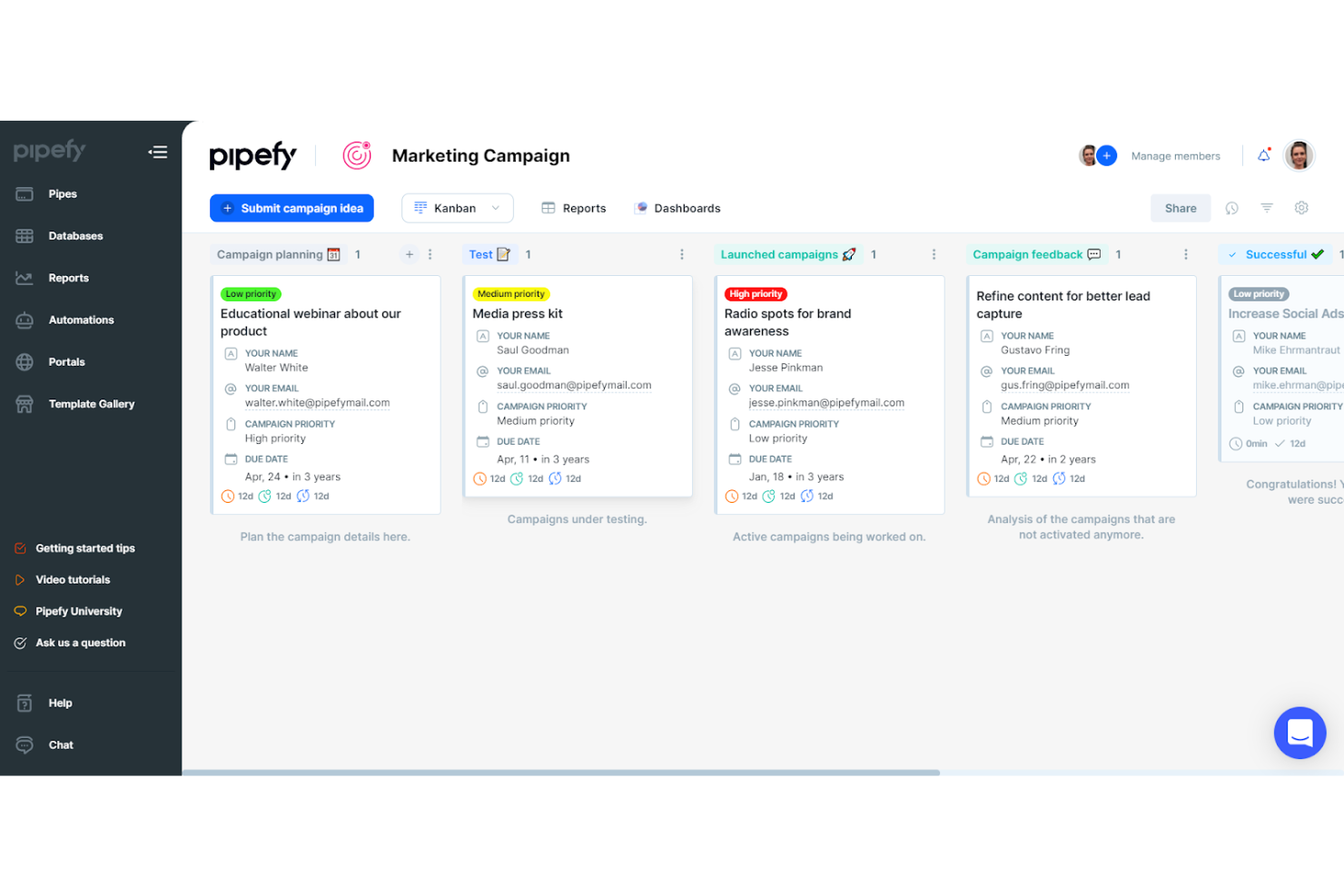
Pipefy is a no-code business process automation platform that combines AI-powered workflow creation, visual process building, multi-step automation, and cross-system integrations to replace manual, email-driven, and spreadsheet-based operations.
Who Is Pipefy Best For?
Pipefy is a strong fit for operations teams that want to build and automate workflows without relying on IT or writing code.
Why I Picked Pipefy
I've included Pipefy in my top picks because its AI Copilot can generate a fully structured workflow from a plain-language description, complete with phases, form fields, and conditional logic, which is something I rarely see done this cleanly. In practice, that means my team can spin up a procurement approval process or an onboarding pipe in minutes rather than mapping it manually from scratch. Pipefy's AI Analytics also flags real bottlenecks in live processes and suggests structural fixes like adding phases or fields.
Pipefy Key Features
- No-code visual workflow builder: A drag-and-drop interface lets you build, customize, and modify process workflows without writing any code.
- Role-based access control: Assign company roles—super admins, admins, members, and guests—with pipe- and database-level permissions to control who sees and edits what.
- Cross-pipe company reports: Filter, view, and export data across multiple workflows in a single report, with options to share via Excel or email.
- Digital service portals: Build external-facing portals that give customers, employees, and vendors controlled access to forms, documents, and process requests.
Pipefy Integrations
Pipefy lists more than 170 integrations, including Salesforce, Google Drive, Slack, DocuSign, HubSpot, and Jira. Its GraphQL API, webhooks, and HTTP connectors support custom integrations.
Pros and Cons
Pros:
- Dashboards expose phase times and bottlenecks
- Reviewers praise automation for approvals and onboarding
- AI drafts pipes from plain-language prompts
Cons:
- No native document versioning or lifecycle management
- Automation jobs are capped by plan

Best for checklist and SOP management
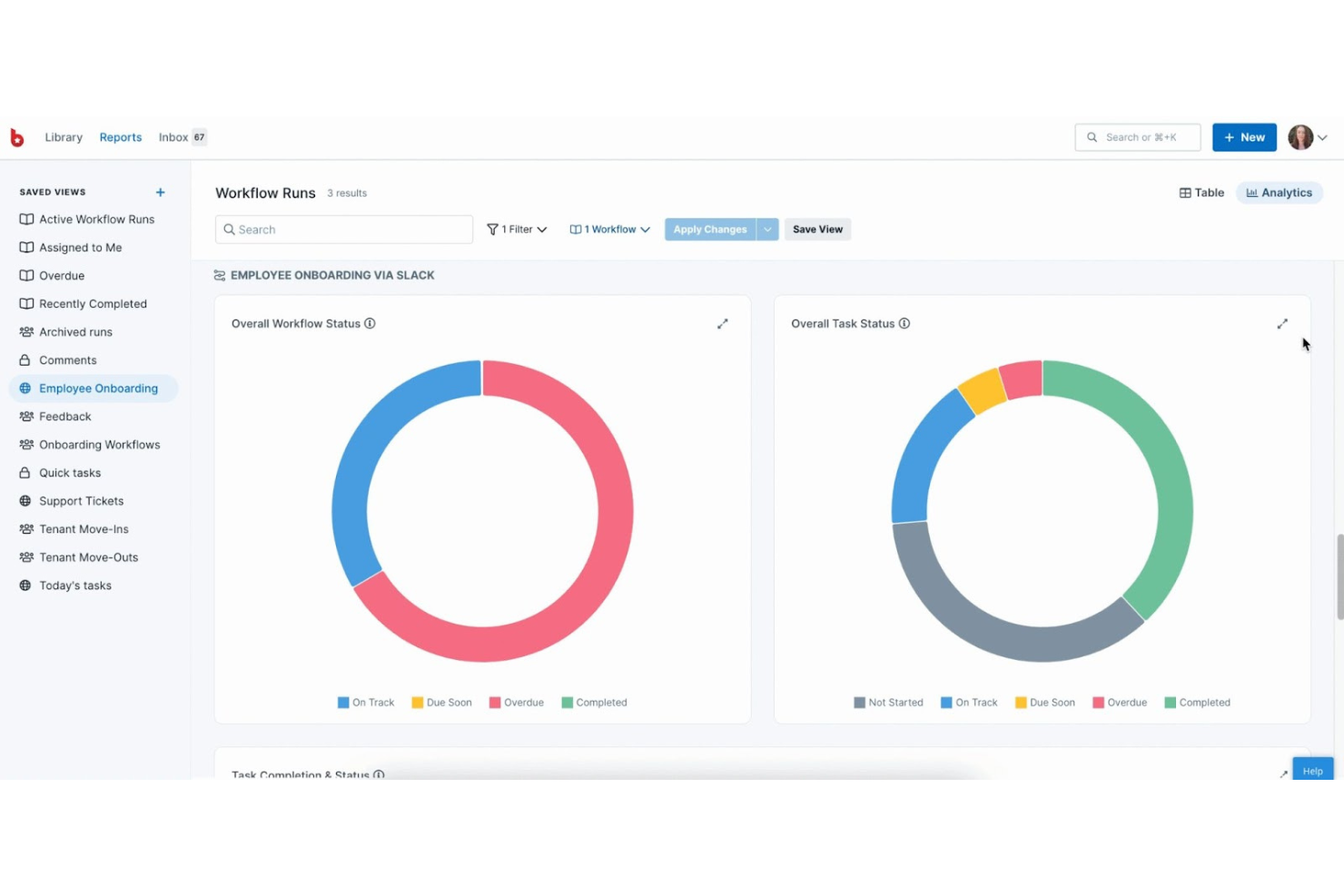
Process Street is a workflow execution and SOP management platform that lets teams build recurring processes with structured tasks, conditional logic, approvals, forms, and automated routing.
Who Is Process Street Best For?
Process Street is a strong fit for operations teams that need to standardize and enforce recurring procedures—like onboarding, compliance checks, or approval workflows—without relying on developers.
Why I Picked Process Street
Process Street earns its spot on my shortlist because of how well it handles checklist and SOP management for recurring operational work. I've built onboarding and compliance workflows in it, and the combination of conditional logic, role-based task assignments, and structured approval routing keeps every run consistent without any developer involvement. Cora, its AI layer, actively monitors execution and flags skipped steps or SLA breaches, which is something I haven't seen as cleanly implemented in other SOP-focused tools.
Process Street Key Features
- Cora execution monitoring: Cora tracks live workflow runs, flags skipped steps, and alerts you to SLA breaches before they become compliance issues.
- Data Sets: Structured data tables that populate form dropdowns and sync across workflows, keeping process data consistent without manual re-entry.
- Scheduled workflow runs: Automatically trigger recurring workflows on a set cadence, so routine processes start without anyone manually kicking them off.
- Role-based task assignments: Assign tasks to specific users, the workflow runner, or an external guest via an email field, controlling exactly who handles each step.
Process Street Integrations
Process Street offers native integrations with Google Sheets, Slack, DocuSign, Salesforce, and Jira. It also supports REST API, webhooks, Make, Microsoft Power Automate, and Zapier for custom and cross-system connectivity.
Pros and Cons
Pros:
- Mobile approvals keep routine work moving
- Audit trails document ownership and completed steps
- Conditional checklists standardize recurring compliance work
Cons:
- Reporting offers limited sorting and grouping
- No BPMN modeling or process simulation

Appian
Best for end-to-end process generation
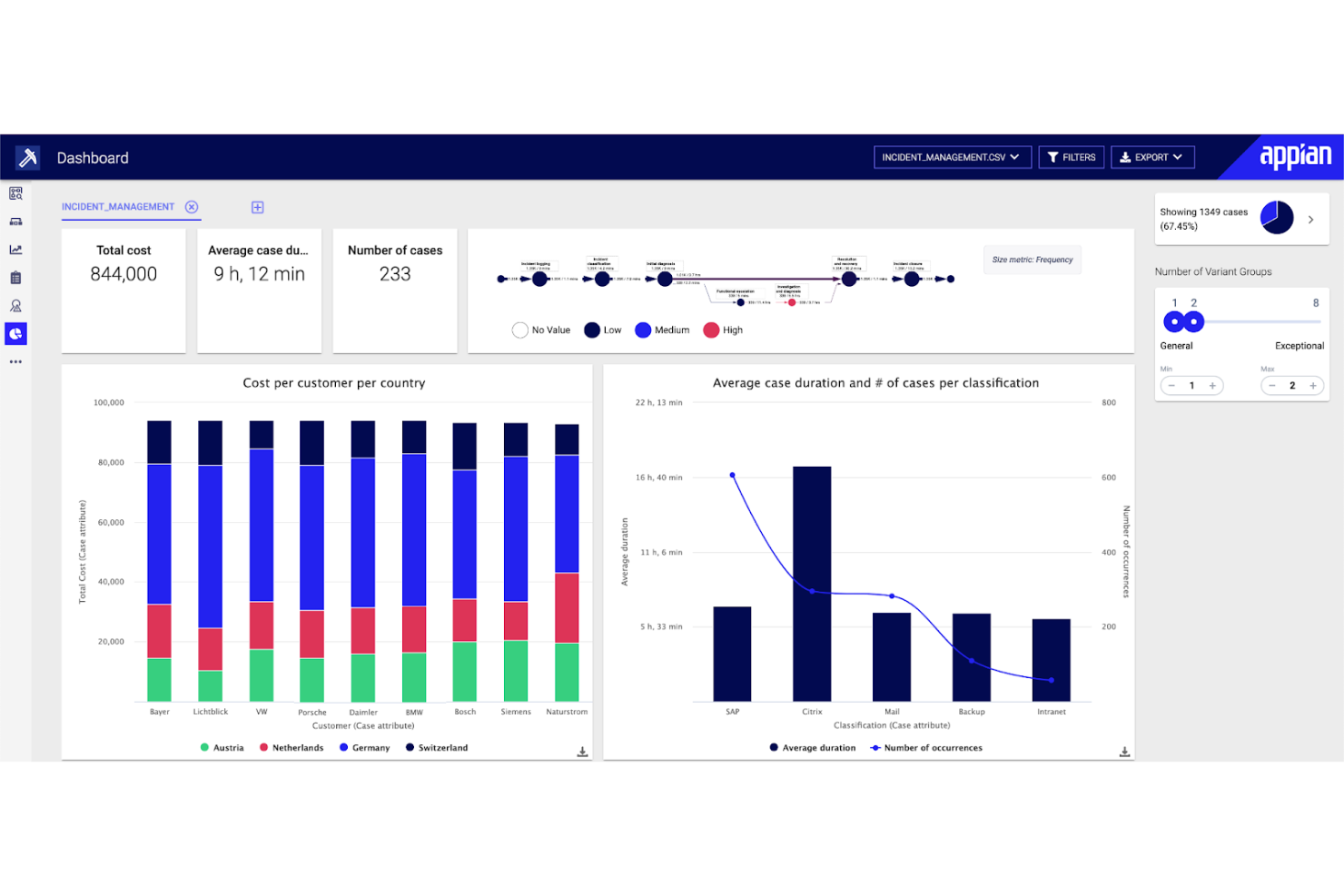
Appian is a low-code AI process automation platform that unifies workflow design, robotic process automation, data integration, document processing, and process analytics into a single end-to-end environment.
Who Is Appian Best For?
Appian is a strong fit for enterprise IT and operations teams that need to automate complex, multi-step processes across multiple departments and business systems.
Why I Picked Appian
Appian earns its spot on my shortlist because it treats process automation as a single, connected system rather than a collection of loosely linked tools. I particularly like how its Process Modeler supports full BPMN-style design with gateways, subprocesses, and multi-level escalation rules, so I can map genuinely complex approval chains without patching together workarounds. Its Process HQ layer then surfaces bottlenecks and KPI dashboards directly from live process data, which means I can optimize workflows after deployment, not just at build time.
Appian Key Features
- Data Fabric integration: Connects data across disparate systems without requiring data migration, letting apps and AI agents read, write, and update source records directly.
- DocCenter document processing: Classifies incoming documents and extracts data automatically, routing it into downstream workflow steps.
- Offline mobile task support: Lets users complete assigned forms and tasks without a network connection, then syncs submissions when the device reconnects.
- Role-based object security: Applies group-based permissions, security inheritance, and field-level access controls across every application object from a centralized Security Summary.
Appian Integrations
Appian offers hundreds of prebuilt connectors, including native integrations with Salesforce, Google, Microsoft SharePoint, DocuSign, and AWS, plus marketplace integrations for SAP, Oracle, Workday, and NetSuite. It supports REST, SOAP, JDBC, OpenAPI, Web APIs, and an Integration SDK for custom integrations.
Pros and Cons
Pros:
- Offline tasks sync after reconnection
- Process HQ surfaces bottlenecks and variations
- BPMN-style branching and escalation design
Cons:
- Pixel-perfect interface styling proves difficult
- Complex workflows demand technical expertise

Nintex
Best for comprehensive process management
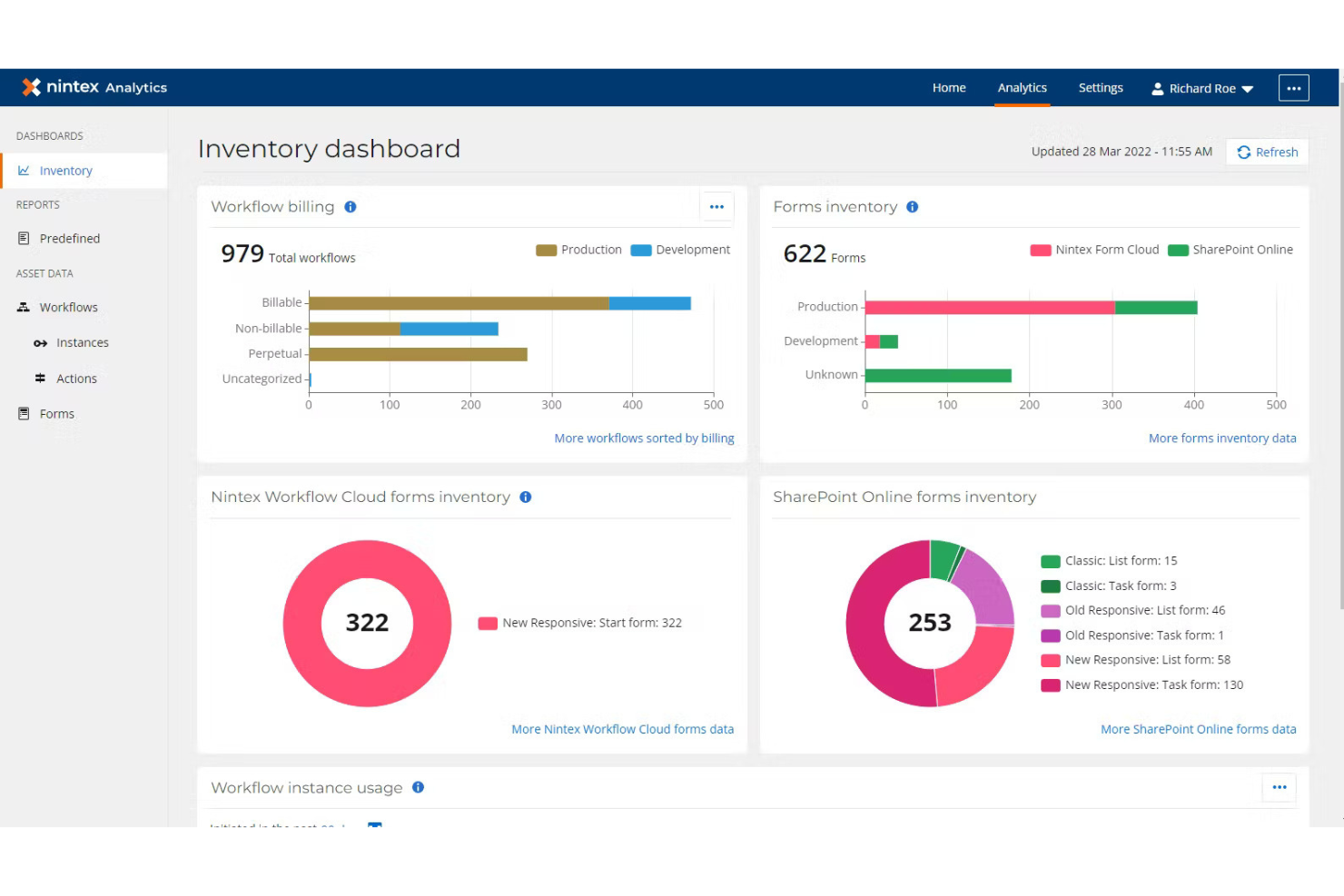
Nintex is a cloud-based process automation platform that combines drag-and-drop workflow design, dynamic forms, document generation, RPA, and AI-powered process mapping to connect people, systems, and data.
Who Is Nintex Best For?
Nintex is a strong fit for mid-to-large organizations that need to manage, automate, and document complex cross-functional processes without relying heavily on developer resources.
Why I Picked Nintex
Nintex earns its spot on my shortlist because it goes beyond workflow automation to give teams a full process management layer, including AI-powered process capture and mapping through Process Manager. I especially like how it ties document generation directly into workflows, letting teams auto-populate Word, PowerPoint, or Excel templates with live workflow variables and route completed documents for e-signature without leaving the platform. The drag-and-drop workflow designer also handles state machines and complex branching logic, which I've found essential when automating multi-step approvals across departments.
Nintex Key Features
- Process capture and mapping: AI-powered tools in Process Manager let teams capture, map, and maintain processes in a shared, centralized workspace.
- Embedded e-signature routing: Workflows can add signers, trigger signing, track progress, and advance to the next step once documents are completed.
- Attended RPA bots: Users can activate attended bots on demand to handle routine, repetitive tasks without waiting on a scheduled automation run.
- Workflow export and import: Teams can move workflow definitions across tenants, with automatic mapping of table-based actions to matching table names in the destination environment.
Nintex Integrations
Nintex offers integrations with Microsoft and SAP, supporting no-code Microsoft workflows and SAP processes such as order approvals and vendor onboarding. Its workflow definitions can be imported and exported through an API, but general API availability for custom integrations isn’t documented.
Pros and Cons
Pros:
- Visual designer helps nontechnical teams build
- Workflow variables generate signable documents
- Approval routing handles complex branches
Cons:
- Some workflow errors take effort to diagnose
- Process analytics offer limited performance insight

Pega
Best for company decision-making
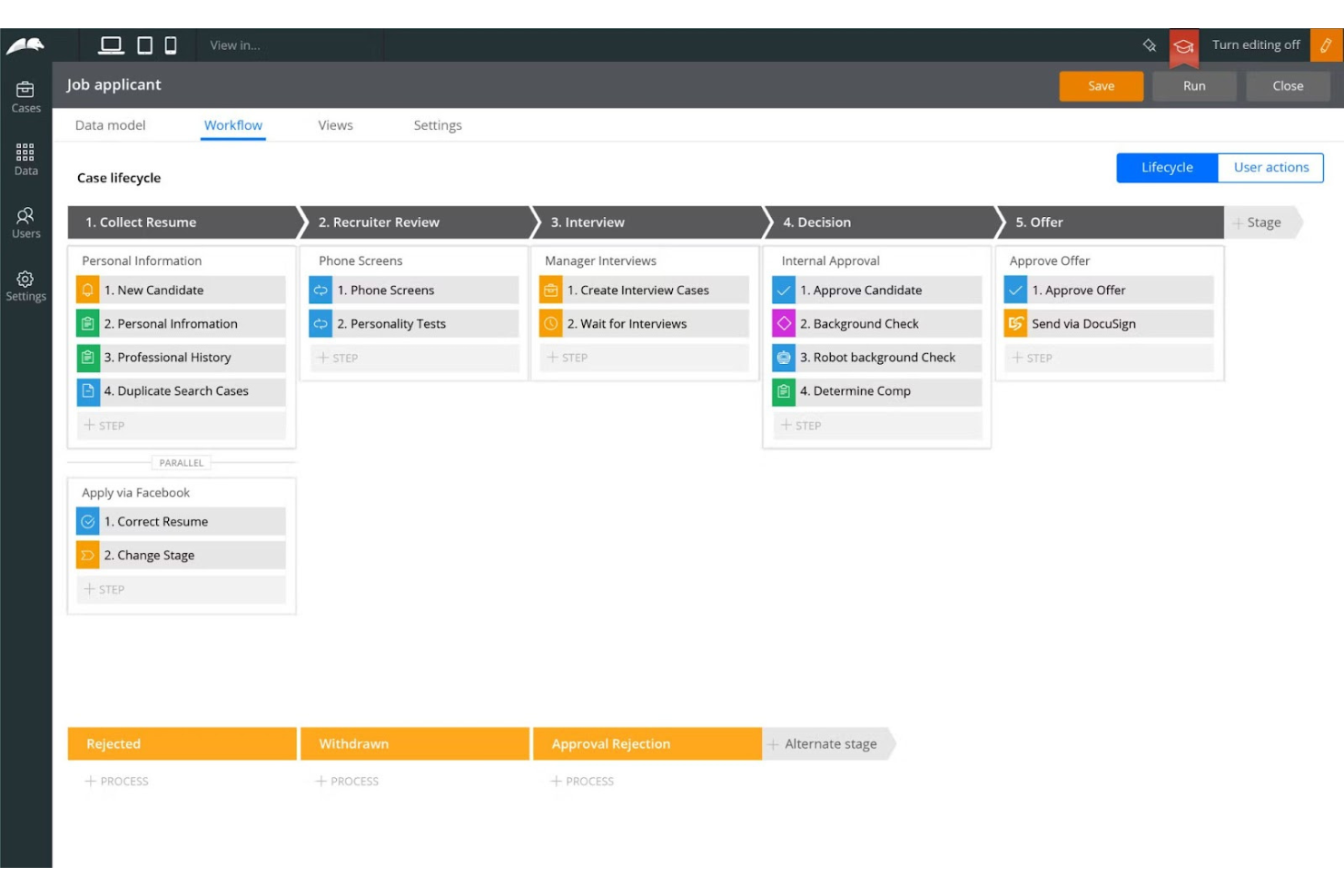
Pega Platform is an enterprise BPM and workflow orchestration platform that combines AI-driven process automation, case management, process mining, and low-code app development to coordinate work across people, systems, and AI agents.
Who Is Pega Best For?
Pega Platform is a strong fit for large enterprises that need to orchestrate complex workflows across AI agents, people, and systems with end-to-end governance and auditability.
Why I Picked Pega
Pega earns its spot on my shortlist because of how well it handles company-wide decision-making across complex, multi-layered workflows. I particularly like its AI Decision Hub, which applies consistent rules across AI agents, people, and systems so every case follows the same logic regardless of who or what is handling it. Its Process Mining layer goes further by mapping live bottlenecks and comparing actual process behavior against benchmarks, so you can see exactly where decisions are breaking down.
Pega Key Features
- Blueprint AI workflow generation: Analyzes legacy systems and best practices to generate workflows in a shared business-and-IT workspace.
- Parallel process execution: Supports multiple simultaneous processes within a single stage, so tasks without a required order can run concurrently.
- Role-based access control: Restricts access to UI elements and limits the actions each user can perform based on their assigned role.
- DocuSign e-signature integration: Connects Pega cases to DocuSign, enabling signing requests and attaching completed documents back to the originating case.
Pega Integrations
Pega documents integrations with SAP, IBM MQ, and DocuSign, plus REST and SOAP connectivity. REST/JSON APIs and OpenAPI support custom integrations.
Pros and Cons
Pros:
- Process mining exposes bottlenecks and rework
- Parallel stage processes support concurrent work
- Reviewers praise complex case automation
Cons:
- Reviewers describe the interface as dated
- Advanced applications can require coding

Gluu
Best for process ownership and accountability
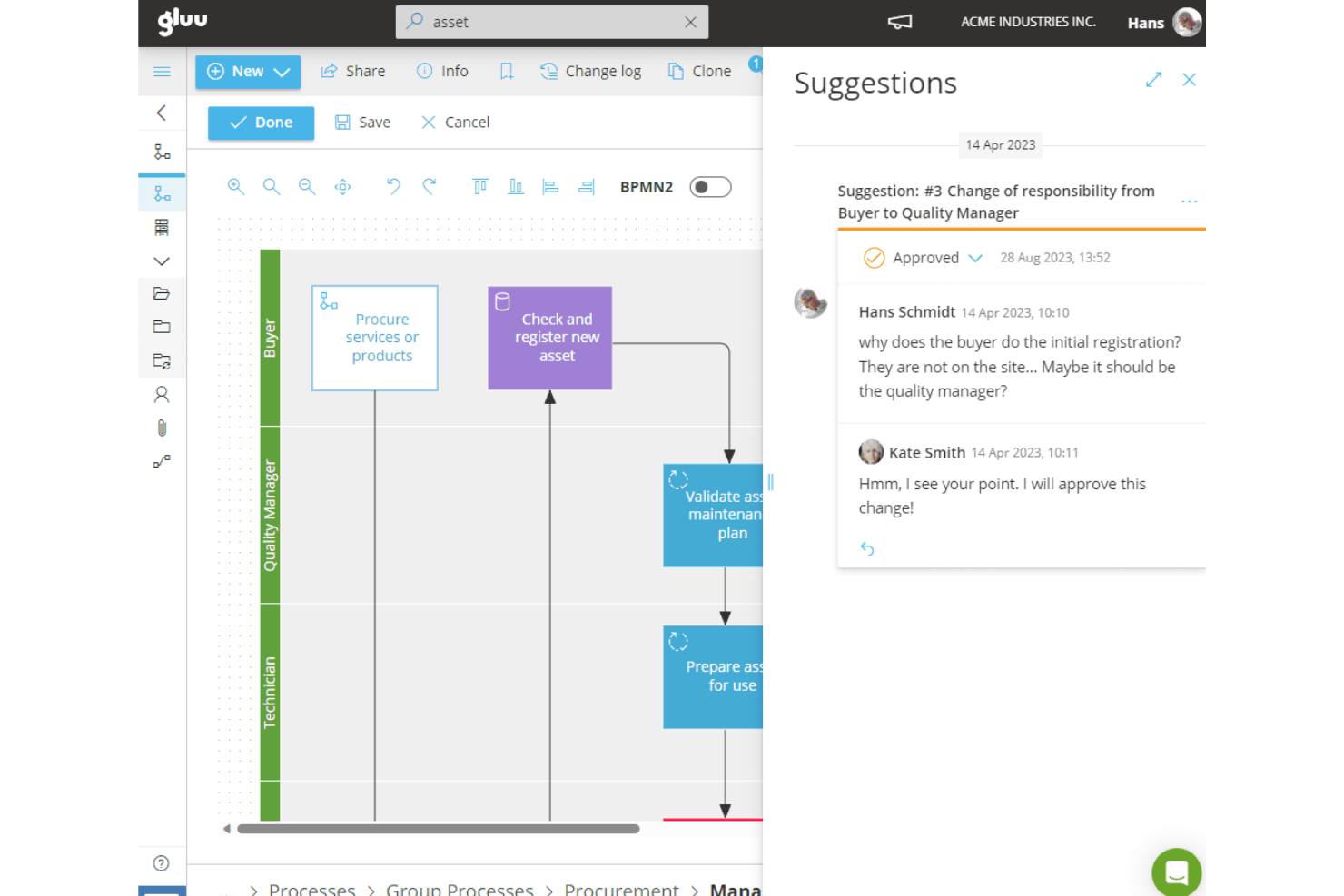
Gluu is a business process management platform that combines process mapping, BPMN 2.0 workflow design, role assignment, work instructions, and task and case execution.
Who Is Gluu Best For?
Gluu is a good fit for operations teams that need to clarify who owns each process and ensure people follow documented procedures consistently.
Why I Picked Gluu
I've included Gluu in my top picks because it treats process ownership as a first-class feature, not an afterthought. You can assign specific roles to every activity in a process map, attach SOPs and work instructions directly to those activities, and use BPMN 2.0 notation to make responsibilities unambiguous across teams. When a process changes, Gluu routes communications to everyone tied to the affected roles automatically.
Gluu Key Features
- BPMN 2.0 process mapping: Build process maps using simple notation or full BPMN 2.0 with more than 55 shapes, with support for Visio imports and SVG exports.
- Case and task management: Run repeatable workflows using case templates with ordered activities, role-based task assignment, and progress tracking.
- Improvement suggestion collection: Gather employee feedback on processes and route suggestions into a structured improvement flow.
- Microsoft ecosystem integrations: Connect Gluu to Teams, SharePoint, Power BI, Power Automate, and Power Apps through native integrations.
Gluu Integrations
Gluu offers native integrations with Microsoft Teams, SharePoint, OneDrive, Power BI, Power Automate, Power Apps, Azure Active Directory, and Google Drive, plus a Salesforce form integration. Its token-based REST API and webhooks support custom integrations but require the API & Connectors add-on.
Pros and Cons
Pros:
- Reviewers praise responsive onboarding and support
- Case flows turn documented processes into tasks
- Process maps clarify role ownership and procedures
Cons:
- Reviewers report difficulty aligning diagram elements
- Automation depends on human-driven case execution

Best for affordable process mapping
Flowingly is an AI-powered process mapping tool that lets teams create, govern, and improve visual process maps using a drag-and-drop canvas, AI-assisted map generation from recordings, video, text, and images, and a centralized process library with version control and ownership management.
Who Is Flowingly Best For?
Flowingly suits operations and process teams that need to document, govern, and improve processes visually before layering in automation.
Why I Picked Flowingly
I picked Flowingly as one of the best because it genuinely undercuts the complexity and cost that typically comes with process documentation tools. Its AI Map Builder can generate a structured, editable process map from a screen recording, a video walkthrough, or even a photo of a whiteboard, so your team isn't starting from a blank canvas every time. Pair that with centralized ownership management and version control across your process library, and you get a governance layer that keeps documentation accurate without requiring a dedicated administrator.
Flowingly Key Features
- Process library governance: Manage ownership, permissions, and approval workflows across your entire process library from a single location.
- Multi-format map generation: Generate editable process maps from screen recordings, video walkthroughs, text files, images, and CSV files.
- Version history management: Track and manage process version history with distributed ownership and centralized control.
- Power BI integration: Connect Flowingly process-map data to pre-built Power BI reports for usage and governance reporting.
Flowingly Integrations
Flowingly has two documented native integrations: Power Automate and Power BI. It also describes connections to SharePoint, Outlook Calendar, Google Sheets, Trello, Dynamics, and Xero; no public API is documented.
Pros and Cons
Pros:
- Versioned ownership supports process governance
- AI-generated drafts reduce mapping prep
- Reviewers praise quick process-map creation
Cons:
- Reviewers report crossing arrows obscure maps
- No workflow routing or task approvals

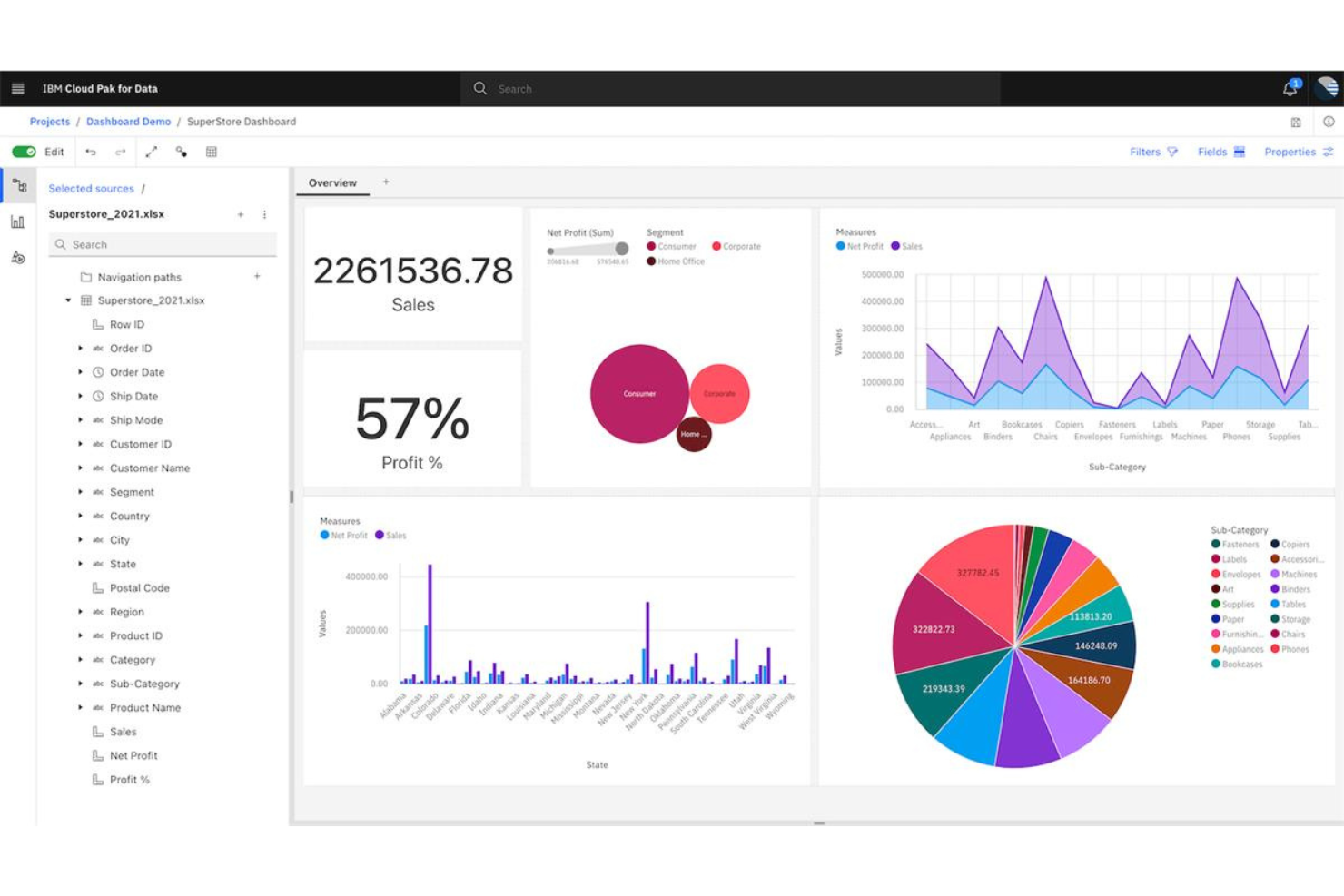
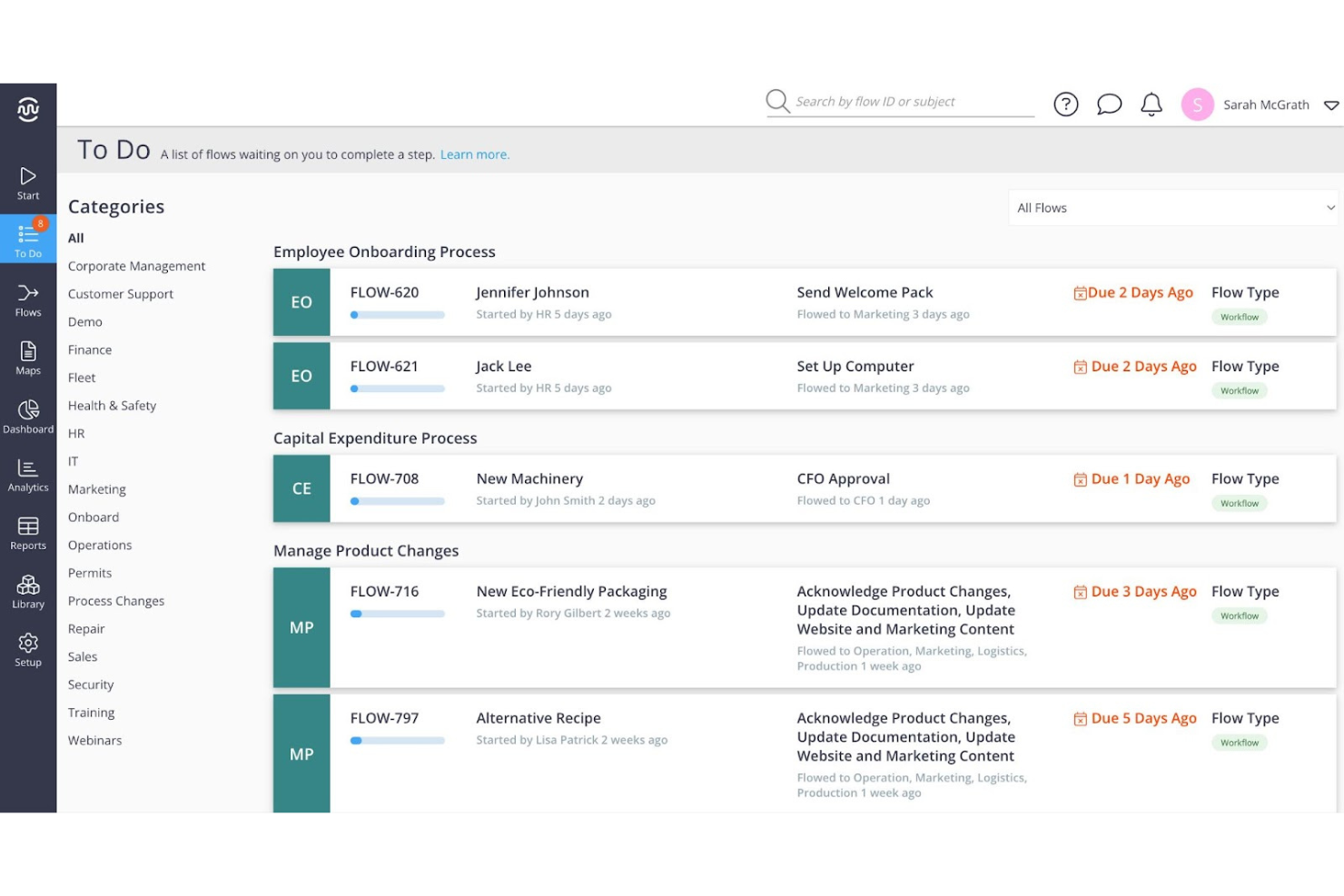
IBM Business Automation Workflow is an enterprise business process management platform that combines structured process automation, case management, and AI-powered operational analytics to digitize and coordinate human and automated work across complex workflows.
Who Is IBM Business Automation Workflow Best For?
IBM Business Automation Workflow is a strong fit for large enterprises with dedicated IT and automation teams managing complex, high-volume processes across multiple departments.
Why I Picked IBM Workflow Automation
IBM Business Automation Workflow earns its spot on my shortlist because of how deeply it connects process execution with operational intelligence through Business Automation Insights, which gives you real-time visibility into workflow performance, task durations, and risk states across running instances. I also like that it now connects to AI agents via the Model Context Protocol, letting tools like watsonx Orchestrate or Claude interact directly with live workflows using natural language. That combination of process-level analytics and agentic AI integration is what makes it stand out for AI-powered process mining.
IBM Business Automation Workflow Key Features
- Team-based task assignment: Distributes work across teams and lanes using load-balance or round-robin expressions, with custom assignment logic for more complex routing rules.
- Structured and case-based workflow models: Supports both structured process automation and unstructured case management within the same platform, letting you choose the right model per process.
- ECM document and folder management: Integrates with IBM FileNet Content Manager and external ECM systems via CMIS to manage process-related documents and folders at the instance level.
- Role-based access control: Secures resources at the operation level, restricting what individual users or groups can view and interact with across workflow applications.
IBM Business Automation Workflow Integrations
IBM Business Automation Workflow integrates with watsonx Orchestrate, Claude, and Copilot through MCP, plus REST, SQL, CMIS, and IBM FileNet Content Manager. It also provides APIs for custom integrations, but IBM doesn’t publish a total integration count.
Pros and Cons
Pros:
- Supports high-volume enterprise workflow operations
- Provides useful process tracking and reports
- Handles complex approvals and case workflows
Cons:
- Dated development tools can slow workflow changes
- Implementation benefits from skilled staff

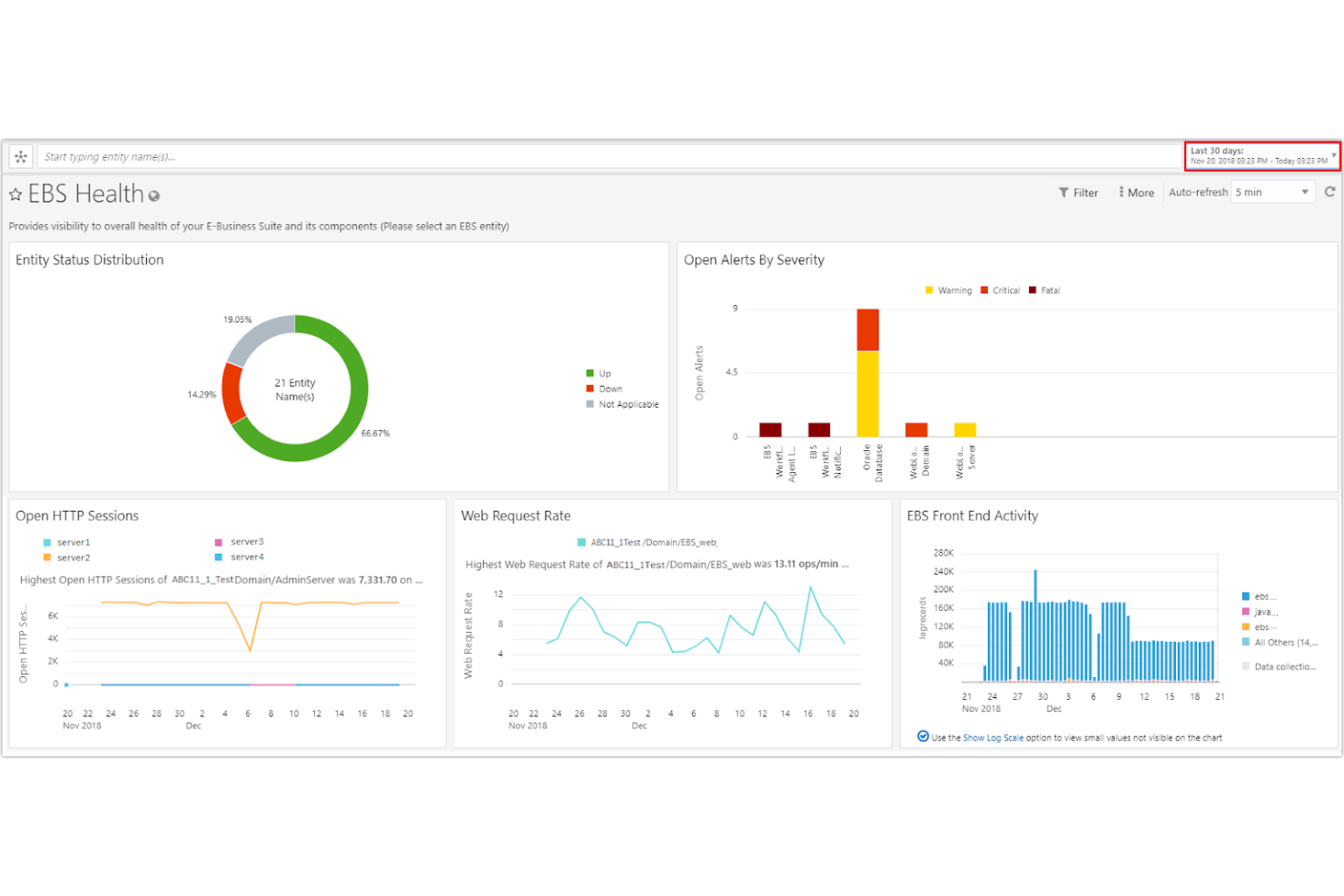
Oracle Business Process Management is an enterprise BPM suite that covers process modeling with BPMN 2.0, human-task automation, dynamic forms creation, and process performance monitoring across complex, multi-stage workflows.
Who Is Oracle Business Process Management Best For?
Oracle Business Process Management is a strong fit for large enterprises that already run Oracle infrastructure and need a mature, deeply integrated BPM suite to manage complex, multi-stage approval workflows at scale.
Why I Picked Oracle Business Process Management
Oracle Business Process Management earns its spot on my shortlist because it's one of the few platforms built to handle genuinely complex, enterprise-scale approval workflows without compromise. I'm particularly impressed by its BPMN 2.0 process editor, which supports parallel and sequential multi-stage approvals with rules-based assignment across users, groups, and organizational hierarchies. Its process-monitor dashboards surface bottlenecks, faulted instances, and workload metrics in a way that gives operations teams real visibility into where approvals stall.
Oracle Business Process Management Key Features
- Process simulation: Test and validate BPMN 2.0 process models before deployment to identify design issues and estimate performance outcomes.
- Process Asset Manager: Share BPM projects between developers and analysts with built-in version control, change history, and conflict resolution.
- Worklist reports: Generate task-level reports covering cycle time, productivity, priority, and time distribution, displayed as tables and bar charts.
- Mobile and SMS notifications: Send task alerts to team members via mobile and SMS channels configured through your organization's identity store.
Oracle Business Process Management Integrations
Oracle BPM documents integrations with Oracle Social and Oracle WebCenter Content, plus HTTP services and WSDL-based service data objects. It also provides a Java API for custom integrations.
Pros and Cons
Pros:
- Dashboards surface bottlenecks and task-cycle metrics
- Approval routing supports parallel and sequential stages
- BPMN 2.0 modeling includes process simulation
Cons:
- Reviewers report complex setup and administration
- Custom workflows can require JavaScript or JDeveloper

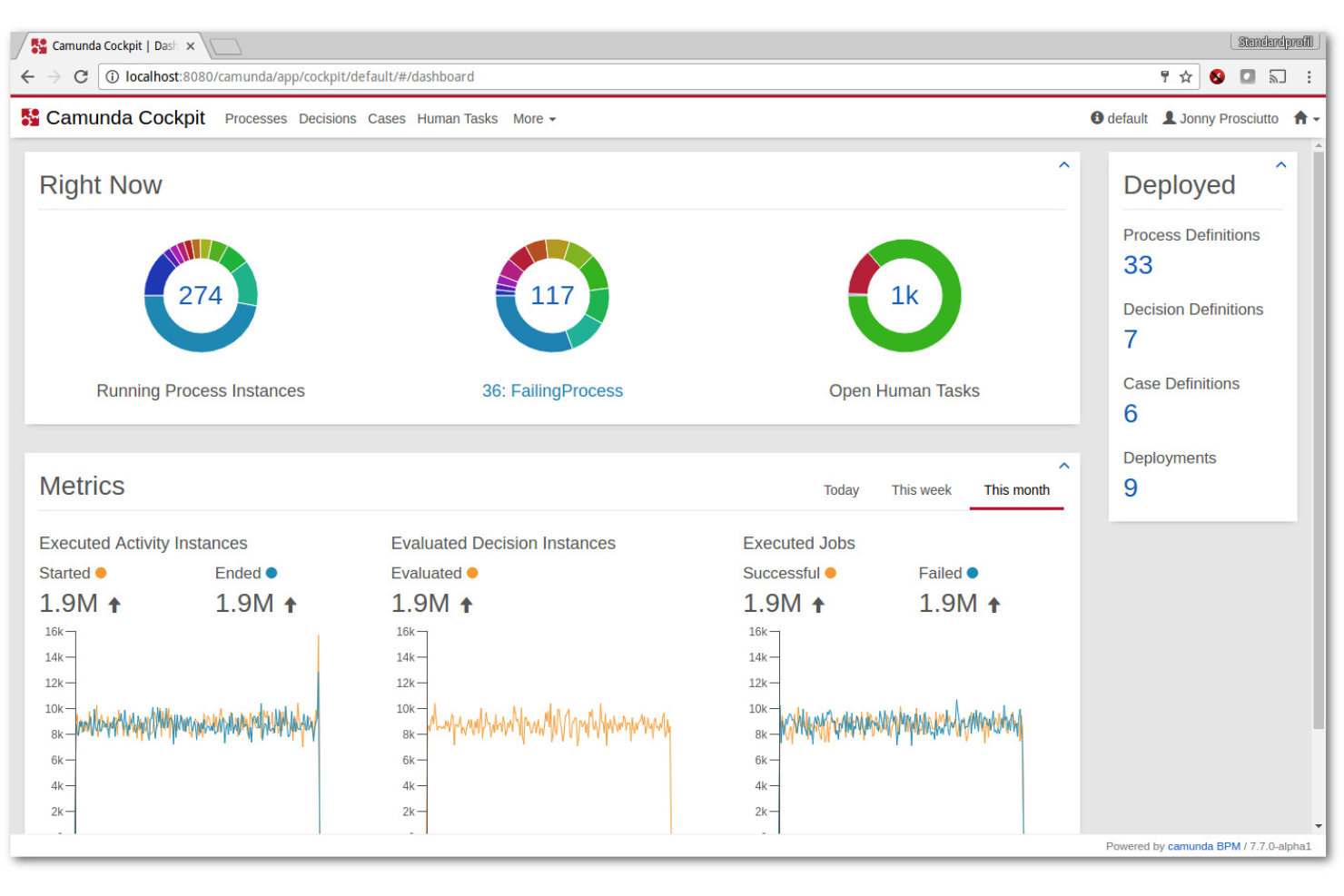
Camunda is a BPMN-based process orchestration platform that combines visual workflow modeling, an enterprise-grade automation engine, human task management, connector integrations, and process analytics.
Who Is Camunda Best For?
Camunda suits engineering-led teams and operations organizations that need to orchestrate complex, high-volume processes across multiple systems, people, and AI agents at enterprise scale.
Why I Picked Camunda
Camunda earns its spot on my shortlist because its Zeebe engine handles the kind of high-volume, multi-system process orchestration that most BPM tools struggle with at scale. I'm particularly impressed by how it coordinates parallel approvals, time-based escalations, and live process-version migrations without stopping running instances. Camunda's Optimize layer adds real process intelligence on top, with heatmaps and KPI alerts that show exactly where work stalls across hundreds of concurrent workflows.
Camunda Key Features
- BPMN/DMN visual modeler: A canvas-based tool for designing process models and decision tables, with version history, Git Sync, and collaborative stakeholder review built in.
- Tasklist unified task queue: A single workspace that aggregates human tasks across processes, with SLA visibility, assignment rules, and contextual forms populated with process data.
- Camunda Optimize dashboards: A reporting layer that surfaces process heatmaps, custom reports, and KPI-based alerts to help teams pinpoint where work slows down.
- Connector marketplace: Hundreds of pre-built connectors for enterprise systems—including SAP, Salesforce, and ServiceNow—plus a connector SDK for building custom integrations.
Camunda Integrations
Camunda offers hundreds of pre-built connectors and Marketplace integrations, including SAP, Salesforce, ServiceNow, SharePoint, Slack, and Microsoft 365. It also supports REST, SOAP, GraphQL, MCP, and A2A APIs, plus a connector SDK for custom integrations.
Pros and Cons
Pros:
- Process heatmaps expose workflow bottlenecks
- Migrates live cases without stopping instances
- Orchestrates parallel, long-running processes at scale
Cons:
- Cloud deployment demands substantial DevOps expertise
- Complex modeling often needs developer involvement
Andre alternativer til ProcessMaker
Nedenfor finner du en liste over flere alternativer til ProcessMaker som jeg satte på kortlisten. Selv om de ikke kom med blant de 10 beste, er de fortsatt verdifulle og verdt å undersøke nærmere.
- Bizagi
For low-code process automation
- Bonitasoft
For open-source BPM solutions
- GoodDay
For customizable workflows
- Kissflow
For low-code and no-code development
- LogicMonitor
For IT infrastructure monitoring
- Retool
For building internal tools quickly
- Workato
For enterprise automation and integrations
- Boomi
For cloud-based integration solutions
- Tines
For security automation and orchestration


Relaterte anmeldelser av prosjektstyringsprogramvare
Hvis du fortsatt ikke har funnet det du leter etter her, kan du se nærmere på disse andre relaterte verktøyene som vi har testet og vurdert:
- Prosjektstyringsprogramvare
- Ressursstyringsprogramvare
- Programvare for arbeidsflytautomatisering
- Programvare for tidsregistrering
- Programvare for oppgaveadministrasjon
- Samarbeidsverktøy
- Verktøy for å lage Gantt-diagrammer
- Produktivitetsverktøy
- Programvare for prosjektsporing
- Programvare for prosjektplanlegging
How I Evaluate ProcessMaker Alternatives
I split my evaluation into baseline criteria—BPMN modeling, task routing, and no-code builders—and differentiators like AI automation, deployment options, and integration depth.
Core Functionality (Table Stakes For This List)
When I'm selecting tools for my list, I rank each one on a scale from 0 (does not offer the functionality) to 5 (excels in this area) for each core functionality listed below. Then, I calculate the tool's total score into a percentage. Each tool needs to achieve a minimum total score of 65% to be considered for inclusion.
- Workflow Automation: I evaluate whether a tool can handle multi-step processes with branching logic, like routing a purchase order through finance, legal, and procurement.
- Visual Process Designer: Each tool should offer a drag-and-drop modeler, and I check for BPMN 2.0 support since many teams need standard notation for compliance audits.
- Low-Code/No-Code Builder: I look at how easily a non-developer can spin up forms and workflows—tools like Kissflow and Appian approach this differently.
- Task & Approval Management: Approval chains with escalation rules and SLA tracking matter here, especially for teams managing vendor onboarding or change requests.
- Integration Capabilities: I check for API access and prebuilt connectors to systems like Salesforce, SAP, and Jira that process-heavy teams typically depend on.
- Process Analytics & Reporting: Dashboards that surface bottlenecks and cycle times are what I look for, not just basic activity logs that tell you something happened.
Once I have a list of tools that meet this criteria, I consider what sets each platform apart.
Differentiating Factors (What Sets Vendors Apart)
Here's how I compare and contrast different vendors:
Standout Features
AI-powered automation is a big differentiator—I look at whether a tool can intelligently route tasks or classify documents without manual rule configuration. Process mining is another area I evaluate, since teams migrating from ProcessMaker often lack visibility into where their existing workflows break down. I also consider citizen developer enablement, specifically governance controls and sandbox environments that let business users build workflows safely without IT bottlenecks.
Beyond Features
Deployment flexibility matters a lot here. Teams in regulated industries often need on-premise or private cloud hosting, and not every alternative supports that. I also evaluate pricing structures—some vendors charge per user while others price per process or execution, which changes the math depending on whether you have a small team running high-volume workflows. Compliance certifications like SOC 2 and ISO 27001 are worth checking early, especially if your organization operates in healthcare or finance.
Hvorfor se etter et alternativ til ProcessMaker?
Selv om ProcessMaker er et verdifullt verktøy, er det flere grunner til at brukere kan være på utkikk etter et alternativ. Det kan hende du ser etter et alternativ til ProcessMaker på grunn av:
- Kompleksitet i avanserte prosesser: ProcessMaker inkluderer mange verktøy for smart prosessautomatisering som kan være kompliserte for avanserte prosesser, spesielt for brukere uten teknisk ekspertise.
- Begrensede tilpasningsmuligheter: Noen brukere opplever at ProcessMaker mangler fleksibiliteten som kreves for svært tilpassede arbeidsflyter eller for å generere komplekse dokumenter dynamisk uten ekstra programvare for dokumentgenerering.
- Problemer med brukergrensesnittet: Brukergrensesnittet er kanskje ikke like intuitivt eller brukervennlig som på andre plattformer, noe som gjør det vanskeligere for ikke-tekniske brukere å finne frem.
- Kostnadsbekymringer: ProcessMaker kan være dyrere sammenlignet med andre alternativer som tilbyr tilsvarende eller bedre funksjoner.
- Integrasjonsutfordringer: Integrering av ProcessMaker med andre programvaresystemer kan være tungvint og tidkrevende.
Ved å utforske alternativer til ProcessMaker kan du finne en løsning som passer bedre med dine spesifikke krav til arbeidsflyt, tilbyr mer fleksibel prising eller har funksjoner som er tilpasset bransjen din. Ved å vurdere ulike alternativer kan du sørge for at virksomheten din har de riktige verktøyene for å effektivisere prosesser og øke produktiviteten på en effektiv måte.
Viktige funksjoner i alternativer til ProcessMaker
Her er noen viktige funksjoner i ProcessMaker som den alternative programvaren bør kunne gjenskape eller forbedre for å passe godt.
- Arbeidsflytstyring: Funksjoner for digital prosessautomatisering gjør det mulig for team å bygge arbeidsflyter som automatiserer forretningsprosesser for å forbedre effektiviteten.
- Intelligent dokumentbehandling (IDP): Bruker avansert OCR til å omdanne ustrukturerte data til handlingsrettet innsikt. Finn spesifikk programvare for intelligent dokumentbehandling her.
- Automatisering av forretningsprosesser (BPA): Automatiserer repetitive oppgaver og virksomhetskritiske arbeidsflyter.
- Modellering av forretningsprosesser: Gir en visuell måte å utforme, kartlegge og optimalisere arbeidsflyter på, slik at ineffektivitet kan oppdages før implementering.
- Apputvikling med lite kode: Gjør det mulig for brukere å bygge og distribuere applikasjoner med minimal koding.
- API-integrasjon: Integreres sømløst med annen programvare og andre systemer.
- Rapporteringsverktøy: Gir detaljerte rapporter og analyser for bedre innsyn i prosessene.
- Mobil tilgang: Tilbyr mobilklienter for administrasjon av arbeidsflyter på farten.
- Tilpassbare skjemaer: Har en fleksibel skjemabygger for opprettelse av egendefinerte skjemaer.
- Prosessintelligens: Gir full oversikt og åpenhet for alle prosesser.
- Omfattende integrasjoner: Integreres med ulike verktøy som Docusign, Adobe Sign og Slack.
Når du vurderer alternativer til ProcessMaker, er det viktig å fokusere på viktige funksjoner som brukervennlighet, tilpasningsmuligheter, integrasjonsmuligheter og skalerbarhet. Ved å prioritere disse aspektene kan du velge en plattform som ikke bare oppfyller dagens behov, men som også støtter virksomhetens langsiktige vekst.