I 10 migliori strumenti agili online per la gestione dei progetti nel 2026

10 Elenco dei migliori strumenti Agile


I migliori strumenti Agile ti aiutano a pianificare, programmare ed eseguire gli sprint senza intoppi, mantenendo il tuo team concentrato e produttivo con meno difficoltà. Senza lo strumento giusto, avrai difficoltà a monitorare la velocità del team, individuare potenziali colli di bottiglia e comunicare con le parti interessate.
Ho utilizzato i miei 15 anni di esperienza nella gestione dei progetti per valutare oltre 35 strumenti Agile. Leggi qui sotto la mia analisi di ogni strumento, delle funzionalità principali e dei casi d'uso. Ti aiuterò a trovare lo strumento giusto che ti permetta di rimuovere facilmente gli ostacoli per il tuo team, migliorare la visibilità e la collaborazione nei tuoi progetti di sviluppo software e monitorare i carichi di lavoro del team.
Perché fidarsi dei nostri consigli sui software
Il nostro team testa e recensisce software dal 2012. In quanto project manager noi stessi, sappiamo quanto sia difficile — e importante — scegliere il software giusto.
Per questa guida, abbiamo valutato gli strumenti attraverso test pratici e ricerche indipendenti, assegnando un punteggio agli strumenti in base ai nostri criteri di selezione. Ci basiamo inoltre sulle competenze di leader di pensiero del settore e di professionisti attivi nella gestione dei progetti.
Le nostre recensioni riflettono il nostro giudizio editoriale umano, non un discorso di vendita.
Revisori esperti:
Tabella comparativa degli strumenti Agile
Questa tabella comparativa riassume i dettagli dei prezzi delle mie migliori selezioni di strumenti Agile:
| Tool | Best For | Trial Info | Price | ||
|---|---|---|---|---|---|
| 1 | Ideale per flussi di lavoro IA personalizzabili | Prova gratuita di 14 giorni | Da $6/utente/mese | Website | |
| 2 | Ideale per una gestione avanzata delle risorse | Prova gratuita + demo gratuita disponibili | Da $10/utente/mese (fatturato annualmente) | Website | |
| 3 | Ideale per organizzazioni in crescita | 14 giorni di prova gratuita | Da $9.80/utente/mese | Website | |
| 4 | Ideale per la prioritizzazione dei backlog e la gestione dei rilasci | Prova gratuita di 15 giorni | A partire da $6 al mese per un massimo di 100 utenti. | Website | |
| 5 | Il migliore strumento agile con bacheche Kanban | Piano gratuito con funzionalità limitate | A partire da $8.25/utente/mese | Website | |
| 6 | Ideale per la pianificazione visiva degli sprint | Piano gratuito disponibile | A partire da $5/utente/mese | Website | |
| 7 | Ideale per creare workflow agili personalizzati | 30 giorni di prova gratuita (senza carta di credito) | Da $24 /mese/utente con minimo 5 utenti | Website | |
| 8 | Ideale per elenchi di attività basati su schede | Piano gratuito disponibile | Da $9.99/utente/mese (versione aggiornata) | Website | |
| 9 | Ideale per l'organizzazione di storie, epic e milestone | Piano gratuito + 14 giorni di prova gratuita + demo gratuita disponibile | A partire da $8.50/utente/mese (fatturato annualmente) | Website | |
| 10 | Ideale per lo sviluppo software nei team agili | Prova gratuita di 7 giorni | Da $9.99/utente/mese | Website |


Panoramica dei migliori strumenti Agile
Sebbene esistano decine di ottimi strumenti Agile per la gestione dei progetti, ecco una recensione dettagliata di ogni strumento di gestione dei progetti Agile incluso nel mio elenco:

Ideale per flussi di lavoro IA personalizzabili
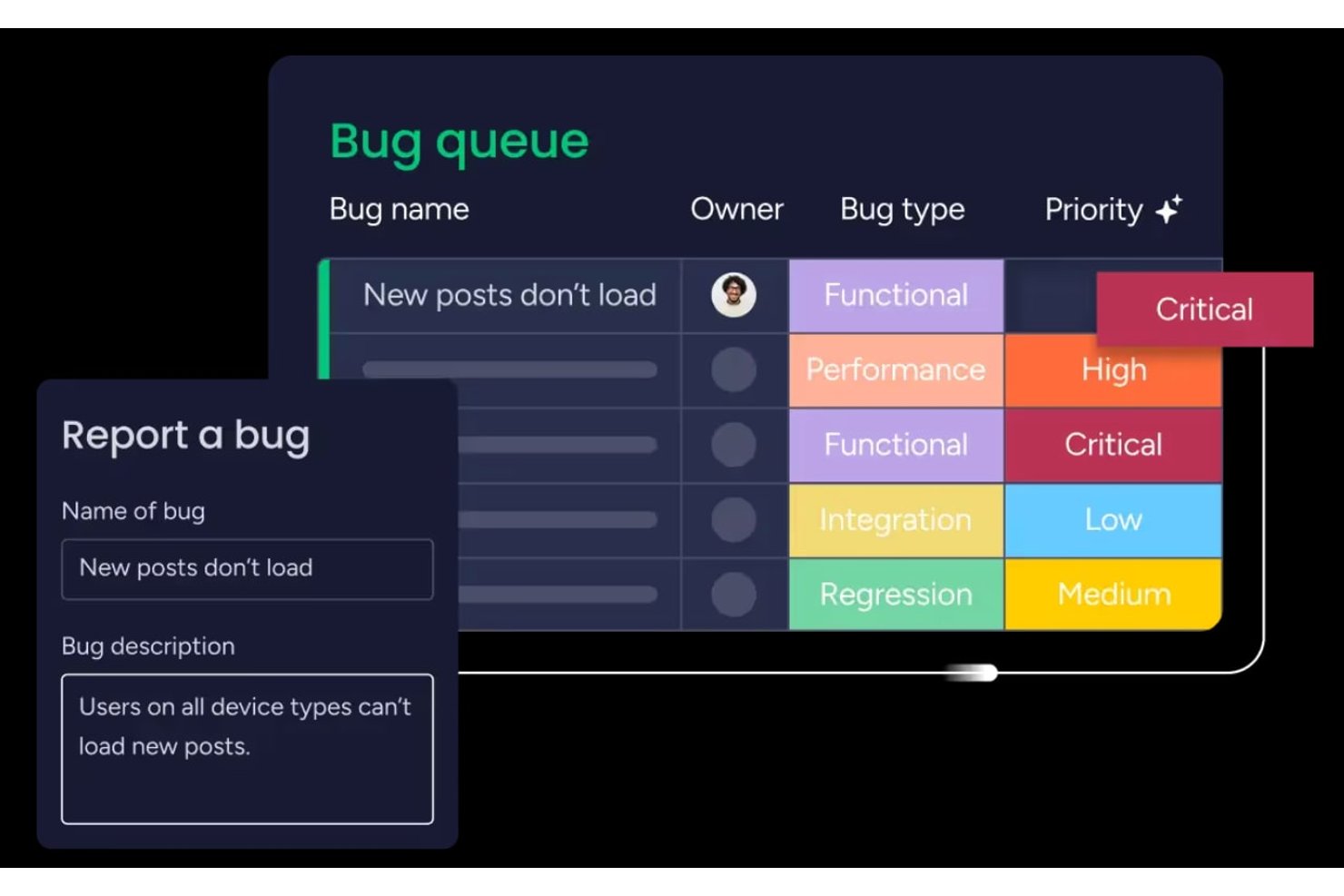
monday AI Workspace è una piattaforma di gestione del lavoro altamente configurabile che combina board agili, pianificazione degli sprint, gestione del backlog e automazione dei flussi di lavoro potenziata dall'IA per team di sviluppo e interfunzionali.
Per chi è consigliato monday AI Workspace?
È particolarmente indicato per team di prodotto e sviluppo di medie e grandi dimensioni che necessitano di una gestione agile dei progetti insieme a una visibilità interfunzionale in un'unica piattaforma.
Perché ho scelto monday AI Workspace
monday AI Workspace merita il suo posto nella mia shortlist perché il costruttore di flussi di lavoro basato su IA cambia realmente il modo in cui vengono gestiti i cicli degli sprint. Lo utilizzo per attivare automazioni basate sui cambiamenti dello stato delle attività, evitando che gli aggiornamenti delle board ricadano sui singoli membri del team. Il riepilogo sprint generato dall'IA è un'altra funzione su cui faccio affidamento: genera automaticamente riassunti direttamente dall'attività dello sprint, così le retrospettive partono da dati reali invece che da note manuali.
Funzionalità principali di monday AI Workspace
- Board di gestione degli sprint: I team possono eseguire sprint iterativi, monitorare gli impegni e impostare obiettivi di sprint utilizzando flussi di lavoro configurabili.
- Supporto alla gerarchia per epic e story: Organizza il lavoro con epic nidificati, user story, attività e sotto-attività, collegando le dipendenze dove necessario.
- Dashboard delle performance agili: Visualizza grafici burndown, metriche di velocità e diagrammi di flusso cumulativi in tempo reale.
- Visualizzazioni portfolio e roadmap: Pianifica i rilasci, gestisci più team e visualizza le tempistiche dei progetti nei vari portfoli.
Integrazioni di monday AI Workspace
monday AI Workspace offre oltre 200 integrazioni native, tra cui Jira, GitHub, Slack, Google Workspace, Microsoft Teams, Salesforce, Zendesk, GitLab, Bitbucket e Gmail. È disponibile un'API per integrazioni personalizzate.
Pros and Cons
Pros:
- Board sprint automatizzate con raccomandazioni IA
- Gerarchia multilevel per epic e story
- Dashboard agili integrate con grafici burndown
Cons:
- Mancano moduli avanzati SAFe o LeSS
- Limitazione sulle visualizzazioni board personalizzate per utente
New Product Updates from monday AI Workspace
monday AI Workspace Adds Human Approval Routing
monday AI Workspace adds a human-in-the-loop approval block to AI Workflows, sending approval requests and routing workflow paths based on responses. For more information, visit monday AI Workspace's official site.

Celoxis
Ideale per una gestione avanzata delle risorse

Celoxis è una piattaforma di gestione del portafoglio progetti (PPM) per le aziende che supporta la consegna agile e ibrida dei progetti con pianificazione degli sprint, bacheche Kanban, pianificazione Gantt, pianificazione della capacità delle risorse, monitoraggio dei rischi e dashboard in tempo reale.
Celoxis è particolarmente adatto a team di medie e grandi dimensioni che gestiscono più progetti tra reparti diversi e che necessitano di visibilità sul portafoglio insieme a una consegna agile.
Perché ho scelto Celoxis
Ho scelto Celoxis come uno dei migliori strumenti agili perché la sua gestione delle risorse va ben oltre la semplice assegnazione. Il diagramma interattivo dei carichi di lavoro consente al mio team di vedere l'allocazione su ogni progetto attivo contemporaneamente, così possiamo individuare sovraccarichi prima che compromettano uno sprint. Trovo particolarmente utile l'allocazione basata sulle competenze combinata con la pianificazione della capacità che confronta lo sforzo pianificato e quello reale in tempo reale. Celoxis tiene inoltre conto automaticamente delle eccezioni come ferie e orari part-time, il che significa che la pianificazione delle risorse dello sprint rimane precisa senza bisogno di ricalcoli manuali ad ogni ciclo.
Funzionalità chiave di Celoxis
- Bacheche Kanban: Visualizza e gestisci le attività degli sprint tramite colonne personalizzabili con movimento delle schede tramite drag-and-drop.
- Diagramma di Gantt interattivo: Regola le tempistiche delle attività e le dipendenze in tempo reale, con aggiornamenti automatici della pianificazione quando vengono apportate modifiche.
- Monitoraggio delle dipendenze tra progetti: Collega le attività di progetti diversi e aggiorna automaticamente i programmi quando le tempistiche cambiano.
- Rilevamento del tempo integrato: Registra le ore direttamente sulle attività e sugli sprint utilizzando i timesheet integrati con flussi di approvazione.
Integrazioni Celoxis
Celoxis offre integrazioni native con Jira, Salesforce, Trello, Zendesk, Okta, Microsoft Project, Slack, Outlook, Google Drive e altre ancora, con un'API disponibile per integrazioni personalizzate.
Pros and Cons
Pros:
- Analisi incorporata degli scenari what-if e delle tendenze
- Offre sia opzioni cloud che on-premise
- Supporta flussi di lavoro waterfall, ibridi e agili
Cons:
- L'app mobile non è pienamente allineata con le funzionalità della versione desktop
- Curva di apprendimento ripida per i team

Wrike
Ideale per organizzazioni in crescita
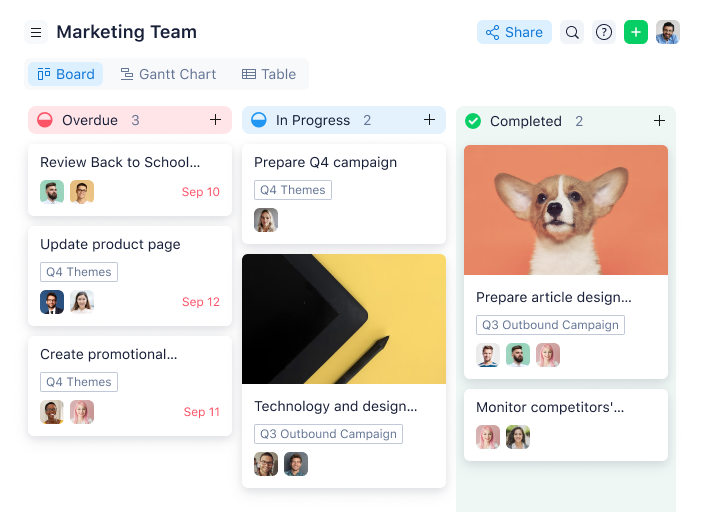
Wrike è una raccolta pluripremiata di strumenti agili per la gestione dei progetti, adatta a team di cinque o più persone. Questo software di gestione agile dei progetti altamente configurabile consente agli utenti di personalizzare flussi di lavoro, dashboard e report.
L'interfaccia semplice di Wrike permette agli utenti di passare tra board Kanban, diagrammi di Gantt interattivi con funzione drag-and-drop e viste del carico di lavoro per visualizzare le priorità. Wrike offre numerosi modelli agili di facile utilizzo, funzionalità per la gestione del backlog, spazi per la collaborazione e il feedback, oltre a strumenti di reporting e analisi agili. Altre funzionalità includono un'organizzazione agile delle cartelle e una gestione automatizzata delle attività.
Le funzionalità di Wrike possono essere configurate in base alle esigenze di ciascun team, e lo strumento offre anche una varietà di soluzioni differenti ma specifiche a seconda del tipo di team o organizzazione, incluse soluzioni per team di marketing e team di servizi professionali.
Il software offre più di 400 integrazioni native predefinite, tra cui i più diffusi software di gestione file di Microsoft, Google e Dropbox, insieme ai software di vendita e marketing di Salesforce e Marketo.
Pros and Cons
Pros:
- Votazione della community per le funzionalità nella roadmap
- Numerose funzionalità configurabili
- Modellazione dei task olistica e completa
Cons:
- Il sistema di commenti potrebbe essere migliore
- Non adatto per organizzazioni di piccole dimensioni
New Product Updates from Wrike

Wrike Adds Quick Search to Table View
Wrike adds Quick Search to Table View with full-table search across titles, descriptions, and fields, plus highlighted matches. This helps users find tasks faster in large tables. For more information, visit Wrike’s official site.

Ideale per la prioritizzazione dei backlog e la gestione dei rilasci

L'incertezza è una delle poche certezze nel business. Zoho ha riconosciuto la necessità di uno strumento che aiuti i team ad abbracciare il cambiamento. Zoho Sprints è uno strumento di gestione dei prodotti che permette ai team agili di pianificare, monitorare e consegnare ai clienti i migliori prodotti. Che tu sia un praticante agile esperto o stia solo iniziando, Zoho Sprints si adatta alle tue esigenze.
Zoho Sprints aiuta i team di prodotto a mantenere organizzato il backlog di prodotto e semplifica la pianificazione degli sprint. L'interfaccia drag and drop per la pianificazione permette ai team scrum di spostare facilmente i work item dal backlog di prodotto al backlog dello sprint. In linea con lo spirito pionieristico dell'agile, la loro Scrum Board è altamente personalizzabile.
Con Zoho Sprints, i team sono sempre pronti al rilascio. Dalla pianificazione al deployment, lo strumento aiuta a gestire le interdipendenze nei cicli di rilascio. I product manager possono monitorare l'avanzamento di epiche, sprint e rilasci tramite report e dashboard personalizzabili. Approfondimenti attuabili da velocity chart, burnup e burndown report e cumulative flow diagram aiutano i team a iterare la pianificazione degli sprint.
Comunicazione e collaborazione sono fondamentali in ogni ambito, ma lo sono ancora di più quando si lavora con team cross-funzionali. Con Zoho Sprints, i team di prodotto possono collaborare nel contesto del loro lavoro tramite funzionalità come chat integrata, riunioni virtuali e un feed di progetto interattivo.
Zoho Sprints si integra facilmente con i principali strumenti di gestione dei repository di codice come GitHub, GitLab, Bitbucket. I team DevOps possono anche automatizzare le pipeline CI/CD integrando strumenti di sviluppo come Jenkins e Azure DevOps. I team possono sfruttare webhook e API per costruire integrazioni personalizzate o consultare una libreria crescente di app sul marketplace di Zoho.
I prezzi per Zoho Sprints partono da $6 per utente (fatturazione mensile). È disponibile anche una prova gratuita e un piano gratuito per sempre fino a 3 utenti.
Pros and Cons
Pros:
- Trasforma facilmente i messaggi del feed in work item
- Programma facilmente le riunioni per le revisioni dello sprint e i daily stand-up
- Opzioni di personalizzazione robuste
Cons:
- Impostazioni WIP solo nel piano Premier
- L'integrazione con altre app Zoho non è ottimale
- Nessun timesheet cumulativo per progetto per un utente
New Product Updates from Zoho Sprints
Zoho Sprints Adds Dashboard View for Custom Modules
Zoho Sprints adds a Dashboard view for custom modules with charts and tables for visualizing module records. This gives teams a clearer way to review custom data. For more information, visit Zoho Sprints’ official site.
 .
.
Il migliore strumento agile con bacheche Kanban

MeisterTask è uno strumento Kanban dal design accattivante e incredibilmente intuitivo. Le sue bacheche Kanban sono personalizzabili per adattarsi a qualsiasi flusso di lavoro, dagli sprint di sviluppo software ai funnel di vendita, dai calendari editoriali al processo di onboarding della tua azienda. I team possono collaborare su un'unica piattaforma semplice, dove è possibile comunicare, lavorare insieme sui compiti e monitorare facilmente il tempo dedicato ad essi.
Con MeisterTask puoi non solo visualizzare i processi, ma anche automatizzarli in vari modi. Creare attività ricorrenti, aggiungere checklist predefinite, notificare gli stakeholder al completamento di un'attività o assicurarti che le attività vengano assegnate e contrassegnate correttamente quando vengono spostate in una specifica sezione — tutto questo può essere eseguito automaticamente. I team più grandi troveranno particolarmente utili la sofisticata gestione dei ruoli e delle autorizzazioni di MeisterTask, nonché le informazioni ricavate da statistiche e report dettagliati.
MeisterTask offre un ampio centro assistenza online, webinar gratuiti per i nuovi utenti e un supporto email rapido nel caso in cui sia necessario parlare con una persona reale. Tuttavia, grazie all'attenzione alla semplicità di MeisterTask, anche le aziende che sono appena agli inizi nel loro percorso di organizzazione digitale riescono solitamente a diventare produttive in pochi minuti dopo l'iscrizione.
MeisterTask si integra con l'app di mind mapping MindMeister, dove puoi fare brainstorming e pianificare con una mappa mentale per poi esportarla in una bacheca Kanban. MeisterTask è già integrato con strumenti popolari come Slack, Microsoft Teams, GitHub, Zendesk, Harvest e varie app per email. Oltre a queste integrazioni native, puoi usare Zapier o IFTTT per collegare i tuoi progetti a centinaia di altri strumenti.
MeisterTask costa a partire da $8.25/utente/mese. È previsto anche un piano gratuito con funzionalità limitate.
Pros and Cons
Pros:
- Semplice creare e assegnare attività
- Dashboard utile e facile da usare
- Ottima app mobile
Cons:
- Non si interfaccia con Gmail
- Mancanza di un calendario interno

ClickUp
Ideale per la pianificazione visiva degli sprint
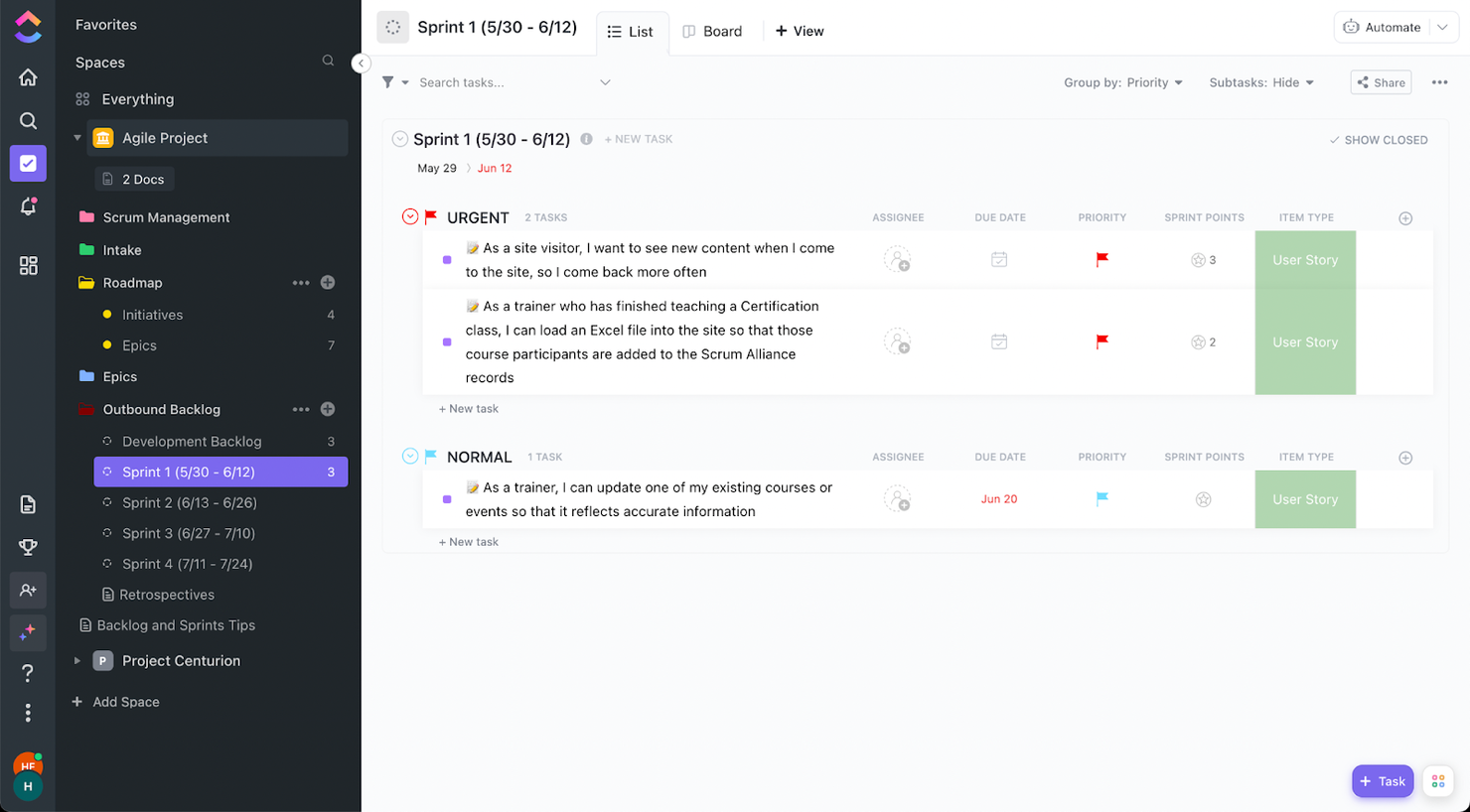
ClickUp è uno strumento di gestione dei progetti che può essere personalizzato per adattarsi a una miriade di casi d'uso e necessità. La gestione agile dei progetti non fa eccezione.
Tra le funzionalità che apprezzerai per i progetti agili ci sono l'automazione dell'assegnazione delle attività e i dashboard agili. Se un'attività non viene completata durante uno sprint, puoi configurare il flusso di lavoro in modo che l'attività venga spostata automaticamente allo sprint successivo.
Inoltre, ClickUp offre numerose funzionalità visive personalizzabili, tra cui una struttura di cartelle con codici colore, la possibilità di aggiungere emoji in qualsiasi campo di testo e campi con colori personalizzati. Queste funzionalità ti consentiranno di navigare facilmente nel progetto, vedere quali elementi richiedono la tua attenzione e tenere traccia dei progressi dello sprint.
ClickUp offre integrazioni native con Slack, G Suite, Dropbox e molti altri strumenti, oltre a più di 1.000 integrazioni tramite Zapier.
Nota: ricordati di abilitare gli sprint dal modulo delle impostazioni di ClickApps per poter creare elenchi separati per gli sprint.
ClickUp è gratuito con spazio di archiviazione limitato per un numero illimitato di utenti. I piani a pagamento partono da $5/utente/mese e offrono una prova gratuita.
Pros and Cons
Pros:
- Automazione del flusso di lavoro degli sprint
- Struttura delle cartelle organizzata
- Colori personalizzati per qualsiasi campo
Cons:
- Personalizzazione dispendiosa in termini di tempo
New Product Updates from ClickUp
ClickUp Adds Meetings Hub, Super Agent Templates, and ZoomInfo Integration
ClickUp adds a searchable Meetings Hub, new ways to clone and template Super Agents, and a ZoomInfo integration through the App Center. These updates improve meeting retrieval, agent reuse, and access to sales intelligence. For more information, visit ClickUp’s official site.
Kintone
Ideale per creare workflow agili personalizzati
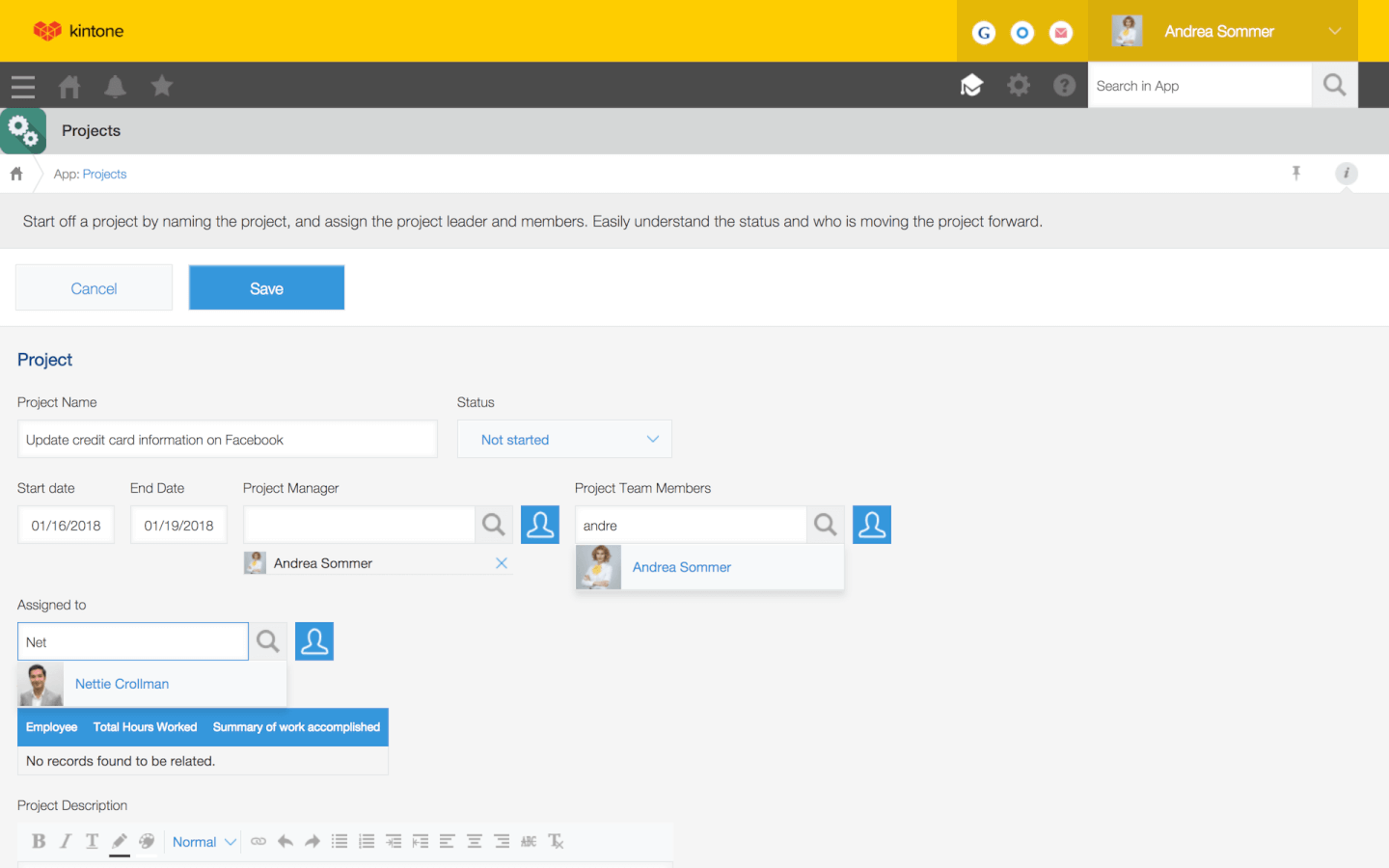
Kintone è uno strumento agile di gestione dei progetti utilizzato da team di Volvo, Japan Airlines, Shiseido, LiveWell Colorado e oltre 23.000 organizzazioni in tutto il mondo. Il loro approccio unico alla gestione di progetti e attività consente di creare una vasta gamma di 'app' personalizzabili utilizzando un'interfaccia flessibile drag-and-drop che permette di apportare facilmente modifiche e miglioramenti alle proprie app man mano che si procede.
Le app possono essere create da zero, utilizzando modelli predefiniti o importando fogli di calcolo esistenti per la gestione dei dati, dei processi aziendali e dei flussi di lavoro. Le app Kintone possono essere personalizzate per la gestione dei progetti, CRM di vendita, database clienti, report di spese, liste di cose da fare condivise, gestione delle attrezzature, feedback dei prodotti e molto altro.
Kintone consente di creare app per la gestione agile dei progetti trascinando e rilasciando gli elementi desiderati sulla pagina: campi di testo formattato, campi data, menu a discesa, campi numerici con calcoli integrati, spazi per gli allegati, menu di selezione di utenti o gruppi, dati correlati provenienti da altre app, tabelle e altro ancora. La soluzione di gestione agile dei progetti può avere l'aspetto e le funzionalità che preferisci.
Ciò che rende Kintone particolarmente adatto alla gestione agile dei progetti è la possibilità offerta ai project manager di tracciare tutti gli aspetti del proprio progetto, dai singoli compiti e dati ai flussi di lavoro e comunicazioni—per poi utilizzare le informazioni raccolte per migliorare rapidamente i processi in corso d'opera. Poiché gli utenti finali sono anche i designer delle app, i feedback sono istantanei, continui e subito applicabili.
Kintone consente di espandere le sue funzionalità sia con plugin nativi gratuiti sviluppati dal team Kintone sia tramite integrazioni con altri strumenti come Slack, Gmail, Google Calendar, Outlook, Tableau, Dropbox, Salesforce, HubSpot, Eventbrite, WordPress, QuickBooks, MailChimp e molti altri tramite un piano a pagamento con Zapier o tramite integrazioni API.
Kintone costa $24/utente/mese con un requisito minimo di 5 utenti. È disponibile una prova gratuita di 30 giorni (senza necessità di carta di credito) e prezzi scontati per organizzazioni non profit ed enti educativi. Il team di Kintone offre inoltre la creazione gratuita di un'app personalizzata durante la fase di prova gratuita.
Pros and Cons
Pros:
- I dati sono facilmente esportabili e manipolabili in report dall'aspetto professionale
- Gli account admin hanno accesso a moltissimi strumenti di personalizzazione
- Prezzi flessibili che includono offerte speciali per scuole e ONP
Cons:
- Nessun template nativo per i più comuni tipi di progetto o documento
- Spazio di archiviazione limitato a 5GB/utente in ogni fascia di prezzo
- Nessun piano per singolo utente disponibile (minimo 5 utenti)

Trello
Ideale per elenchi di attività basati su schede
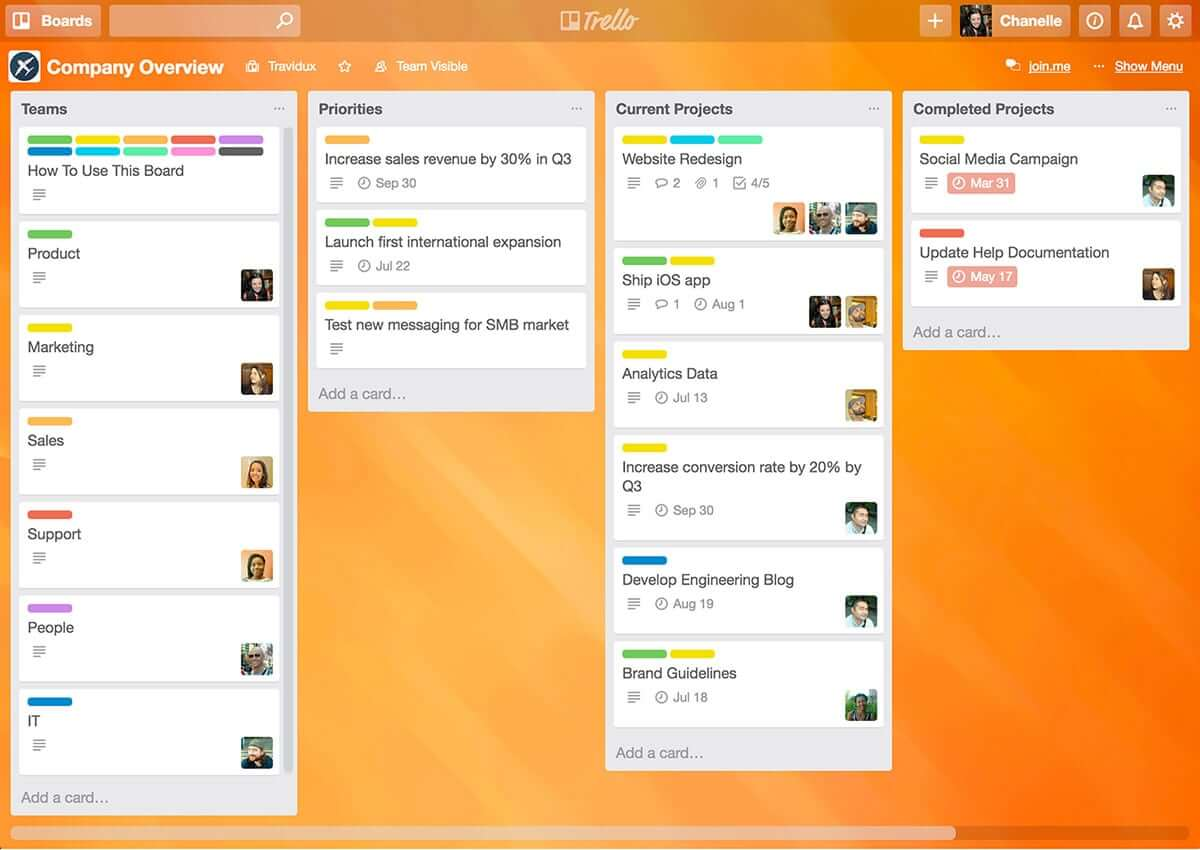
Trello è uno strumento Kanban agile semplice ma potente. Se stai cercando un modo facile per entrare nel mondo degli strumenti agili, Trello è un'ottima opzione perché è uno degli strumenti agili più facili da imparare ed è gratuito (o perlomeno freemium!) e va considerato uno dei migliori strumenti agili gratuiti grazie alla sua intuitività e semplicità d’uso.
La semplicità comporta però anche delle limitazioni nelle funzionalità e caratteristiche. Di base, con la versione gratuita, Trello offre gestione delle attività e collaborazione di team, ma tutto in modo piuttosto limitato.
Per funzionalità più avanzate occorre iniziare a pagare – La versione Business class offre integrazioni con app o “Power-Ups' che permettono di aggiungere funzionalità aggiuntive come l’integrazione con Github, SalesForce, Slack, diagrammi di Gantt, timesheet, reportistica e analisi.
Trello è uno strumento agile gratuito ma le versioni a pagamento costano $9.99/utente/mese.
Pros and Cons
Pros:
- Codifica a colori delle schede in base alla priorità
- Ampia possibilità di personalizzare ogni scheda
- Eccellente monitoraggio della comunicazione e della collaborazione
Cons:
- Nessun supporto nativo per integrazioni con il calendario
- Non adatto a progetti grandi o eccessivamente complessi
- La personalizzazione della gestione delle bacheche potrebbe essere migliorata

Shortcut
Ideale per l'organizzazione di storie, epic e milestone
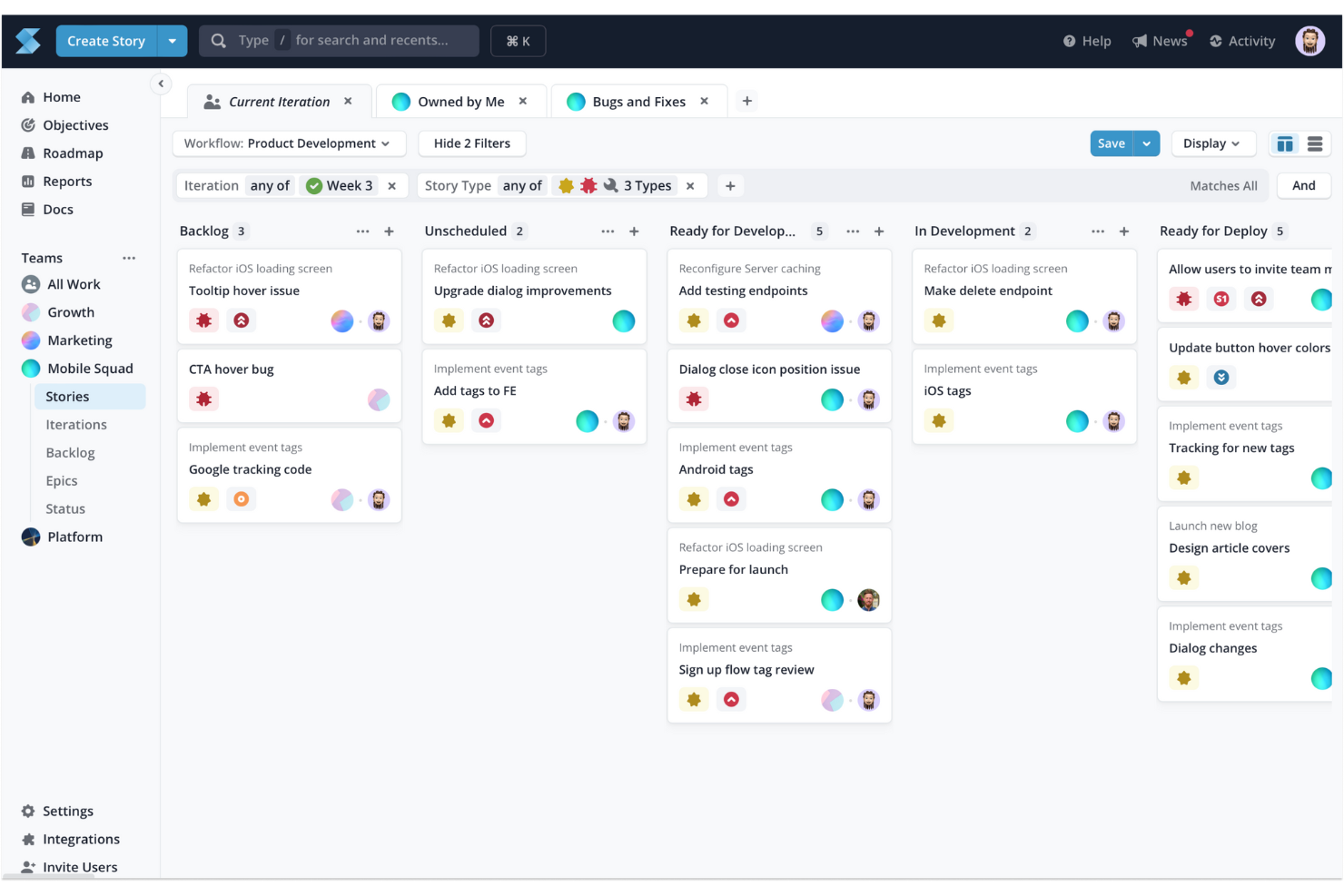
Shortcut è uno strumento di gestione progetti online progettato pensando ai team di sviluppo software. Ti aiuta a gestire le attività, monitorare i progressi e collaborare in modo più efficace. Nato dall'esperienza delle metodologie agili, Shortcut punta su flessibilità ed efficienza, facilitando la gestione di progetti, sprint e release da parte del tuo team.
Una delle funzionalità principali di Shortcut è il supporto ai flussi di lavoro agili tramite le funzioni di storie, epic e milestone. Le storie permettono al tuo team di suddividere i compiti in parti gestibili, mentre gli epic aiutano a raggruppare storie correlate per raggiungere obiettivi più grandi. I milestone offrono un modo semplice per seguire le fasi del progetto e le principali scadenze. Questa struttura garantisce al tuo team una chiara visibilità sui progressi e sulle priorità a ogni livello del progetto.
Shortcut fornisce anche grafici burndown e strumenti di pianificazione dell'iterazione, elementi fondamentali per i team che lavorano tramite sprint. Con i grafici burndown puoi monitorare quanto lavoro resta nel tuo sprint e apportare le modifiche necessarie. Gli strumenti di pianificazione delle iterazioni consentono di organizzare e regolare il lavoro in tempo reale, assicurando che il team sia sempre pronto per lo sprint successivo.
Le integrazioni includono Slack, GitHub, GitLab, Figma, Codestream, Bitbucket, Notion, Loom, Dailybot, Plecto, LinearB, Lambda Test, Testlodge, Google Calendar, Sentry, FireHydrant e Vanta.
Pros and Cons
Pros:
- Supporta la collaborazione in tempo reale
- Fornisce una chiara visualizzazione dell'avanzamento del progetto
- Automatizza e gestisce i flussi di lavoro
Cons:
- Potrebbe essere troppo ricco di funzioni per progetti meno complessi
- Meno opzioni per i team che non utilizzano metodologie Agile, Scrum o Kanban

Jira
Ideale per lo sviluppo software nei team agili

Jira è un nome noto, e senza dubbio il gigante nel mondo degli strumenti agili. Nato come sistema di tracciamento di bug e problemi, ora offre funzionalità che rendono Jira uno strumento agile completo con gestione avanzata delle attività tramite bacheche agili, collaborazione tra team e reportistica.
Con Jira puoi gestire diversi tipi di progetti (ad esempio Scrum, Kanban, gestione tradizionale dei progetti per iniziative non di sviluppo) e Jira è così flessibile nella configurazione da permettere flussi di lavoro e processi personalizzati: puoi utilizzare un workflow predefinito oppure crearne uno su misura in base alle esigenze del tuo team.
La forza di Jira risiede nella sua flessibilità e nelle integrazioni. Grazie alla suite di altri strumenti Atlassian, tra cui Confluence e HipChat, puoi collegare Jira a Bitbucket o GitHub e offrire al tuo team tracciabilità end-to-end, dal backlog al deployment. Con oltre 2.000 componenti aggiuntivi disponibili nell'Atlassian Marketplace, puoi trovare quasi ogni tipo di personalizzazione ed estensione per Jira adatta praticamente a qualsiasi esigenza.
Pros and Cons
Pros:
- Raccoglie tutto lo storico del lavoro per consultazioni future
- Può creare task, sotto-attività, spike ed epiche
- Vista unica per tutte le user story
Cons:
- Nessuna modifica di massa e scripting (rinominare un intero set di etichette, ecc.)
- Migliorare la creazione di collegamenti tra storie e task
- Funzionalità di collaborazione limitate
Altri strumenti Agile
Ecco alcuni altri strumenti che non sono entrati tra i migliori, ma che vale comunque la pena prendere in considerazione.
- Nutcache
Ideale per la flessibilità tra diverse metodologie agili
- Taiga.io
Migliore strumento agile per esperienza utente e interfaccia
- Planview AdaptiveWork
Ideale per metodologie ibride
- Easy8
Ideale per funzionalità di gestione finanziaria integrate
- ProjectManager
Miglior strumento per reportistica agile
- Favro
Ideale per la collaborazione di team
- Businessmap
Ideale per software di portfolio progetti
- Ravetree
Ideale per le aziende
- SAM9000
Ideale per funzionalità agili alimentate dall'IA
- Miro
Ideale per una piattaforma di whiteboard altamente flessibile
- Smartsheet
Ideale per la gestione di flussi di lavoro agili
- Hubstaff
Ideale per il monitoraggio dei progetti
- Hive
Ideale per visualizzazioni flessibili
- Lucidspark
Ideale per la pianificazione agile su una tela infinita
- airfocus
Ideale per la prioritizzazione di progetti agili
- GoodDay
Ideale per fondere flessibilità e struttura


Come valuto gli strumenti Agile
Valuto ogni strumento agile in due passaggi: prima verifico se può effettivamente gestire uno sprint—backlog, board, burndown—poi analizzo ciò che lo distingue per team su larga scala o flussi di lavoro fortemente ingegneristici.
Funzionalità di base (Requisiti minimi per questa lista)
Quando seleziono gli strumenti per questa lista, valuto ciascuno su una scala da 0 (non offre la funzionalità) a 5 (eccelle in quest'area) per ognuna delle funzionalità di base elencate di seguito. Poi calcolo il punteggio totale in percentuale. Ogni strumento deve raggiungere un punteggio minimo totale del 65% per essere considerato per l'inclusione.
- Gestione del Backlog: Valuto come ogni strumento gestisce la creazione, classificazione e perfezionamento del backlog—ad esempio trascinando le storie in ordine di priorità prima della pianificazione degli sprint o modificando in blocco i punti storia su un epic.
- Pianificazione ed esecuzione degli Sprint: Ogni strumento dovrebbe permettere ai team di definire obiettivi dello sprint, impostare la capacità e impegnarsi su un ambito di lavoro, simile a come Jira e Azure DevOps strutturano i flussi di lavoro degli sprint.
- Board Agile (Scrum/Kanban): Cerco board configurabili con colonne personalizzate, limiti WIP e swimlane—il tipo di configurazione di cui un team ha bisogno per gestire Kanban per il lavoro operativo e Scrum per la consegna prodotto contemporaneamente.
- Reportistica e metriche Agile: Lo strumento dovrebbe offrire grafici burndown, tracciamento della velocità e diagrammi di flusso cumulativo per consentire a uno Scrum Master di rilevare scope creep a metà sprint o a un direttore PMO di confrontare la velocità tra squadre.
- Gerarchia di User Story & Epic: Verifico se gli elementi di lavoro supportano strutture multilivello—epic contenenti feature che contengono storie—with collegamenti di dipendenza che fanno emergere blocchi tra team.
- Pianificazione delle release e roadmap: I team devono poter collegare gli sprint alle release e visualizzare le tempistiche di consegna, quindi cerco la gestione delle versioni e viste roadmap che colleghino il lavoro quotidiano degli sprint agli obiettivi trimestrali.
Una volta individuati gli strumenti che soddisfano questi criteri, valuto ciò che distingue ciascuna piattaforma.
Fattori di differenziazione (Cosa distingue i fornitori)
Ecco come confronto i diversi fornitori:
Funzionalità distintive
Le integrazioni con strumenti di sviluppo sono molto importanti. Una sincronizzazione bidirezionale tra la board e GitHub o GitLab significa che commit e pull request aggiornano automaticamente lo stato delle storie—senza cambiare scheda manualmente. L'automazione dei flussi di lavoro è un'altra area che valuto attentamente, dato che le regole che assegnano automaticamente le storie o spostano le schede al merge fanno risparmiare agli Scrum Master ore di lavoro ogni sprint. Per le organizzazioni più grandi, verifico anche se lo strumento supporta nativamente framework scalabili come SAFe, dove i team necessitano di backlog condivisi e pianificazione degli incrementi di programma tra più squadre.
Oltre le funzionalità
La scalabilità è uno dei primi aspetti che valuto. Uno strumento che funziona per un singolo team Scrum di otto persone può risultare inadeguato quando bisogna coordinare 20 squadre su un intero portafoglio. La struttura di prezzo è altrettanto importante—alcuni fornitori riservano reportistica sugli sprint o board avanzate solo alle versioni enterprise, il che cambia l'equilibrio per i team di medie dimensioni. Valuto anche l'approccio a sicurezza e compliance, soprattutto il supporto SSO, i permessi basati sui ruoli e il logging di audit, dato che i direttori PMO in settori regolamentati richiedono questi controlli prima ancora di considerare una fase pilota.
Come scegliere gli strumenti Agile
È facile perdersi in lunghi elenchi di funzionalità e strutture tariffarie complesse. Per aiutarti a rimanere concentrato mentre affronti il tuo processo di selezione del software, ecco un elenco di fattori da tenere a mente:
| Fattore | Cosa considerare |
|---|---|
| Scalabilità | Assicurati che lo strumento cresca insieme alle esigenze del tuo team. Cerca funzionalità come la capacità dei progetti, la reportistica avanzata e il supporto per team numerosi man mano che i tuoi flussi di lavoro si espandono. |
| Integrazioni | Verifica che lo strumento si connetta perfettamente alle piattaforme che già utilizzi, come Jira, Slack o Trello, per semplificare il flusso di lavoro. |
| Personalizzazione | Scegli strumenti che ti consentano di adattare flussi di lavoro, dashboard e report per allinearli ai processi e agli obiettivi specifici del tuo team. |
| Facilità d'uso | L'interfaccia dovrebbe essere intuitiva, così il tuo team può adottare rapidamente lo strumento senza lunghe curve di apprendimento o formazione approfondita. |
| Budget | Cerca prezzi trasparenti che rientrino nei tuoi vincoli finanziari, che si tratti di una tariffa fissa, di un costo per utente o di piani a livelli scalabili. |
| Misure di sicurezza | Dai priorità agli strumenti con funzionalità come la crittografia dei dati, l'accesso basato sui ruoli e la conformità a standard come ISO o GDPR per proteggere le informazioni sensibili. |
| Funzionalità di collaborazione | Assicurati che lo strumento offra funzionalità di collaborazione in tempo reale, come bacheche del team, visualizzazioni condivise delle attività e commenti, per mantenere tutti allineati. |
| Funzionalità di reportistica | Cerca analisi o report integrati per monitorare in modo efficace le prestazioni del team, l'avanzamento delle attività e le scadenze. |
Tendenze negli strumenti Agile
Nella mia ricerca, ho raccolto innumerevoli aggiornamenti sui prodotti, comunicati stampa e registri delle versioni di diversi fornitori di strumenti agili. Ecco alcune delle tendenze emergenti che sto tenendo d’occhio:
- Analisi basate sull’intelligenza artificiale: gli strumenti utilizzano l’intelligenza artificiale per analizzare le prestazioni dei team, prevedere i colli di bottiglia e offrire suggerimenti per migliorare i flussi di lavoro. Ad esempio, alcune piattaforme forniscono consigli sulla pianificazione degli sprint basati sui dati storici.
- Retrospettive degli sprint avanzate: gli strumenti per le retrospettive stanno diventando più interattivi e offrono analisi e informazioni visive per aiutare i team a identificare gli schemi ricorrenti e migliorare gli sprint futuri. I fornitori stanno aggiungendo modelli, sondaggi e monitoraggio del sentiment per rendere le retrospettive più efficaci.
- Attenzione ai flussi di lavoro ibridi: gli strumenti si rivolgono sia ai team agili sia a quelli non agili, supportando flussi di lavoro ibridi. Ad esempio, oggi le piattaforme consentono agli utenti di passare dalle viste Kanban a quelle Gantt e a elenco, per adattarsi alle diverse esigenze dei progetti.
- Funzionalità di collaborazione in tempo reale: gli strumenti di collaborazione agile puntano sempre di più sulla collaborazione in tempo reale, con funzionalità come lavagne integrate nell’app, modifica delle attività in tempo reale e commenti dal vivo, per mantenere i team allineati senza dover cambiare strumento.
- Monitoraggio della sostenibilità: alcuni fornitori stanno integrando funzionalità per monitorare le metriche di sostenibilità all’interno dei progetti, come il consumo energetico, i rifiuti o il consumo di risorse, allineando le pratiche agili agli obiettivi di sostenibilità dell’organizzazione.
Cosa sono gli strumenti agili?
Gli strumenti agili sono un tipo di software di gestione dei progetti che aiuta i team a gestire i progetti utilizzando metodi agili come Scrum o Kanban. Questi strumenti offrono funzionalità come schede delle attività, monitoraggio del backlog, pianificazione degli sprint e aggiornamenti sull’avanzamento. I project manager, gli sviluppatori e i team di prodotto utilizzano gli strumenti agili (o specifici strumenti Scrum) per mantenere il lavoro organizzato, adattarsi rapidamente ai cambiamenti e comunicare meglio.
Se hai bisogno di mantenere i progetti in movimento senza intoppi e di reagire rapidamente quando le cose cambiano, il software di gestione agile dei progetti rende tutto molto più semplice.
Funzionalità degli strumenti agili
Quando selezioni gli strumenti agili, presta attenzione alle seguenti funzionalità chiave:
- Pianificazione degli sprint: consente ai team di pianificare, stabilire le priorità e assegnare le attività per ogni sprint, così da garantire che gli obiettivi siano chiari e raggiungibili.
- Lavagne Kanban: visualizzano i flussi di lavoro e l’avanzamento delle attività, aiutando i team a gestire il lavoro in corso e a identificare i colli di bottiglia. Scopri altri software Kanban e le alternative a Trello qui.
- Grafici burndown: monitorano il lavoro rimanente rispetto al tempo disponibile, aiutando i team a misurare l’avanzamento e a prevedere il completamento dello sprint.
- Gestione del backlog: organizza e stabilisce le priorità di attività, storie utente e problemi, per mantenere il progetto allineato agli obiettivi.
- Monitoraggio della velocità: analizza le prestazioni del team durante gli sprint, aiutando a pianificare i carichi di lavoro e a definire aspettative realistiche. Utilizza gli strumenti di monitoraggio agile per calcolare e monitorare la velocità.
- Collaborazione in tempo reale: consente ai membri del team di lavorare insieme attraverso aggiornamenti in tempo reale, modifiche alle attività e commenti.
- Flussi di lavoro personalizzati: consente ai team di adattare le fasi delle attività e i processi alle esigenze specifiche del progetto.
- Mappatura delle dipendenze: mette in evidenza le relazioni tra le attività per garantire che le dipendenze critiche siano gestite in modo efficace.
- Strumenti per le retrospettive: forniscono modalità strutturate per valutare gli sprint completati e identificare le aree di miglioramento.
- Allocazione delle risorse: aiuta ad assegnare i membri del team alle attività, bilanciando i carichi di lavoro ed evitando un impegno eccessivo.
Vantaggi degli strumenti agili
L’implementazione di strumenti agili offre diversi vantaggi al tuo team e alla tua azienda. Ecco alcuni dei vantaggi che puoi aspettarti:
- Migliore collaborazione del team: consente la comunicazione in tempo reale e la condivisione delle attività, così che tutti rimangano allineati sugli obiettivi del progetto.
- Consegna più rapida dei progetti: aiuta i team a suddividere il lavoro in sprint e a monitorare i progressi per rispettare le scadenze in modo efficiente.
- Migliore definizione delle priorità delle attività: funzionalità come la gestione dell'arretrato consentono ai team di concentrarsi sulle attività ad alto valore e di ridurre gli sforzi sprecati.
- Maggiore visibilità: strumenti come le bacheche Kanban e i grafici dell'andamento del lavoro residuo forniscono informazioni chiare sui progressi delle attività e sui colli di bottiglia.
- Maggiore flessibilità: i flussi di lavoro personalizzabili consentono ai team di adeguare i processi ai requisiti e ai cambiamenti del progetto.
- Decisioni basate sui dati: le funzionalità di analisi e reportistica aiutano i team a monitorare le prestazioni e a identificare le aree di miglioramento.
- Carichi di lavoro equilibrati: gli strumenti di allocazione delle risorse garantiscono che i membri del team non siano sovraccaricati, migliorando produttività e motivazione.
Costi e prezzi degli strumenti agili
La scelta degli strumenti agili richiede una comprensione dei vari modelli di prezzo e dei piani disponibili. I costi variano in base alle funzionalità, alle dimensioni del team, ai componenti aggiuntivi e ad altri fattori. La tabella seguente riepiloga i piani più comuni, i relativi prezzi medi e le funzionalità generalmente incluse nelle soluzioni per strumenti agili:
Tabella comparativa dei piani per gli strumenti agili
| Tipo di piano | Prezzo medio | Funzionalità comuni |
|---|---|---|
| Piano gratuito | $0/user/month | Monitoraggio di base delle attività, bacheche Kanban, integrazioni limitate e strumenti per la collaborazione del team |
| Piano personale | $5-$15/user/month | Gestione delle attività, flussi di lavoro personalizzati, organizzazione dell'arretrato, reportistica limitata e assistenza prioritaria |
| Piano aziendale | $15-$35/user/month | Pianificazione degli sprint, reportistica avanzata, allocazione delle risorse, mappatura delle dipendenze e integrazioni con strumenti di terze parti |
| Piano Enterprise | $35+/user/month | Funzionalità di sicurezza avanzate, autorizzazioni basate sui ruoli, scalabilità per team di grandi dimensioni, analisi personalizzabili e assistenza dedicata |
Domande frequenti sugli strumenti agili
Trova le risposte alle domande più comuni che altre persone pongono su questo argomento.
L'agile è migliore del modello a cascata?
Non saresti la prima persona a porre questa domanda, poiché si tratta di uno dei grandi dibattiti nella comunità della gestione dei progetti. E invece di dire se uno sia migliore dell’altro, entrambi hanno tipologie di progetti per cui sono più adatti.
Una metodologia a cascata richiede di definire i requisiti all’inizio del progetto e quindi di eseguirlo dall’inizio alla fine. Una metodologia agile si concentra maggiormente su porzioni di lavoro più piccole e su iterazioni alimentate costantemente dal feedback del cliente.
Pertanto, devi analizzare il tipo di progetto che stai gestendo e decidere quale metodologia sia più adatta. Se gestisci un progetto di sviluppo, probabilmente propenderai per l’agile. Una campagna di marketing sui social media probabilmente trarrà vantaggio da un approccio a cascata.
Che cos'è una metodologia agile?
Agile non è in realtà una metodologia, ma un insieme di principi per lo sviluppo del software. I principi dell’agile sono:
- Individui e interazioni più che processi e strumenti
- Software funzionante più che documentazione esaustiva
- Collaborazione con il cliente più che negoziazione dei contratti
- Rispondere al cambiamento più che seguire un piano
Esempi di metodologie agili sono Scrum, Kanban, Scrumban e lean. Sebbene seguano tutti questi principi, offrono ciascuno un approccio particolare al lavoro.
Che cos'è la metodologia Scrum?
Gli strumenti agili sono un tipo di software per la gestione dei progetti che aiuta i team a gestire i progetti utilizzando metodi agili come Scrum o Kanban. Scrum è una metodologia con un insieme di principi e un processo per migliorare la distribuzione. Nello sviluppo software, Scrum è uno dei framework più diffusi che applicano i principi dell’agile. Include un insieme di cerimonie e ruoli di Scrum per supportare il processo. L’obiettivo è migliorare la comunicazione, il lavoro di squadra e la velocità di sviluppo. Gli sprint, gli Scrum (o riunioni in piedi), le retrospettive, i backlog e i grafici burndown sono tutti elementi di Scrum.
Che cos'è il framework SAFe?
Introdotto ufficialmente nel 2007, lo Scaled Agile Framework (SAFe) è un sistema per implementare pratiche agili, lean e DevOps su larga scala. Può essere utilizzato dalle organizzazioni che adottano framework agili come Scrum o lean, oppure dalle organizzazioni che cercano un modo per ampliare i propri processi DevOps a supporto dell’organizzazione.
Quali sono gli strumenti utilizzati nelle metodologie agili?
Gli strumenti per le metodologie agili possono essere utilizzati in vari modi, a seconda di come applichi il tuo approccio orientato all’agile. I tuoi strumenti potrebbero includere:
- Backlog: Dai priorità e assegna nuovamente la priorità alle storie utente e ai bug con schede backlog trascinabili.
- Schede Kanban o Scrum: Visualizza tutte le storie utente con schede che mostrano attività, assegnatari e stati all’interno di uno sprint.
- Corsie o colonne delle attività: Separa epic, assegnatari, progetti e altro spostando le schede trascinabili tra le corsie.
- Flussi di lavoro: Crea flussi di lavoro personalizzati che aggiornano automaticamente i problemi in base a eventi specifici. Consulta il software per diagrammi dei flussi di lavoro.
- Sprint: Utilizza il backlog per stimare le storie e definire attività e priorità degli sprint.
- Scrum giornalieri o riunioni in piedi: Utilizza il pannello di controllo per ottenere una panoramica dei progressi e prepararti agli Scrum o alle riunioni in piedi.
- Grafico burndown: Gestisci l’avanzamento del progetto monitorando il lavoro totale rimanente nello sprint o nell’epic.
- Grafico della velocità: Monitora la velocità del team e fai previsioni accurate monitorando la quantità di lavoro completata in ogni sprint.
- Strumenti agili per lo sviluppo software: Piattaforme di sviluppo come Jira, GitHub e Linx.
Jira è il miglior strumento agile?
No. Ritengo che Jira (parte di dropdown#toggle” data-dropdown-placement-param=”top” data-term-id=”287933594″>Atlassian) sia il più popolare, ma non il migliore. Principalmente perché lo strumento non è stato progettato per l’agile. In origine era pensato come strumento di monitoraggio dei problemi per gli sviluppatori software, per poi diventare uno strumento di gestione dei progetti.
Purtroppo, non esiste una risposta definitiva a questa domanda, poiché le esigenze di ognuno sono diverse. Pertanto, il miglior strumento agile sarà quello che offre le funzionalità di cui hai bisogno.