I 10 migliori software gratuiti per la gestione dei progetti recensiti per il 2026

Il software gratuito per la gestione dei progetti offre ai team l'accesso a strumenti essenziali per la pianificazione, il monitoraggio e la collaborazione, senza costi iniziali. Che tu stia gestendo attività per una piccola azienda, una startup, un'organizzazione non profit o un team interno, questi strumenti possono aiutarti a mantenerti organizzato, rispettare le scadenze e migliorare la comunicazione del team senza sforare il budget.
Per aiutarti a trovare la soluzione più adatta, ho testato e recensito decine di piattaforme gratuite per la gestione dei progetti, valutandone usabilità, limitazioni delle funzionalità, scalabilità e integrazioni. Questa guida illustra i migliori software gratuiti per la gestione dei progetti disponibili nel 2026, così puoi trovare uno strumento che supporti il tuo flusso di lavoro e cresca insieme al tuo team.
Perché fidarsi dei nostri consigli sui software
Il nostro team testa e recensisce software dal 2012. In quanto project manager noi stessi, sappiamo quanto sia difficile — e importante — scegliere il software giusto.
Per questa guida, abbiamo valutato gli strumenti attraverso test pratici e ricerche indipendenti, assegnando un punteggio agli strumenti in base ai nostri criteri di selezione. Ci basiamo inoltre sulle competenze di leader di pensiero del settore e di professionisti attivi nella gestione dei progetti.
Le nostre recensioni riflettono il nostro giudizio editoriale umano, non un discorso di vendita.
Revisori esperti:
Tabella comparativa dei software gratuiti per la gestione dei progetti
Questa tabella comparativa riassume i dettagli sui prezzi delle mie migliori selezioni di software gratuiti per la gestione dei progetti:
| Tool | Best For | Trial Info | Price | ||
|---|---|---|---|---|---|
|
1
|
Ideale per workflow personalizzabili |
Piano gratuito disponibile |
Da $9/utente/mese (fatturato annualmente) | Website | |
|
2
|
Migliore gestione gratuita dei progetti per visualizzazioni personalizzabili |
14 giorni di prova gratuita, versione freemium per utenti illimitati |
A partire da $9.80/utente/mese | Website | |
|
3
|
Ideale per flussi di lavoro personalizzati |
Prova gratuita di 30 giorni |
Da $35/utente/mese (fatturato annualmente) | Website | |
|
4
|
Ideale per utenti illimitati |
Prova gratuita di 14 giorni + piano gratuito disponibile |
Da $9.80/utente/mese | Website | |
|
5
|
Ideale per team in crescita |
Piano gratuito + demo gratuita disponibile |
Gratis per sempre con piani a pagamento a partire da $5/mese | Website | |
|
6
|
Ideale per progetti gratuiti illimitati |
14 giorni di prova gratuita per i piani a pagamento |
Da $1.49/mese/utente | Website | |
|
7
|
Ideale per i liberi professionisti che monitorano il tempo e fatturano i clienti |
Prova gratuita di 14 giorni + piano gratuito + demo gratuita disponibile |
A partire da $39.97/mese (con fatturazione annuale) | Website | |
|
8
|
Ideale per la gestione progetti in modalità agile |
Prova gratuita di 7 giorni |
Da $7.91/utente/mese | Website | |
|
9
|
Il migliore per combinare gli strumenti essenziali |
Prova gratuita di 30 giorni + demo gratuita disponibile |
A partire da $25/mese (fatturato annualmente) | Website | |
|
10
|
Ideale per le capacità di gestione delle attività |
Prova gratuita di 30 giorni + piano gratuito + demo gratuita disponibile |
A partire da $7.20/mese | Website |


Recensioni dei migliori software gratuiti per la gestione dei progetti
Di seguito trovi i nostri confronti tra i software per la gestione dei progetti, insieme a schermate che mostrano l’aspetto di ciascuno strumento. Scorri più in basso per trovare altre opzioni e le domande frequenti.

Ideale per workflow personalizzabili
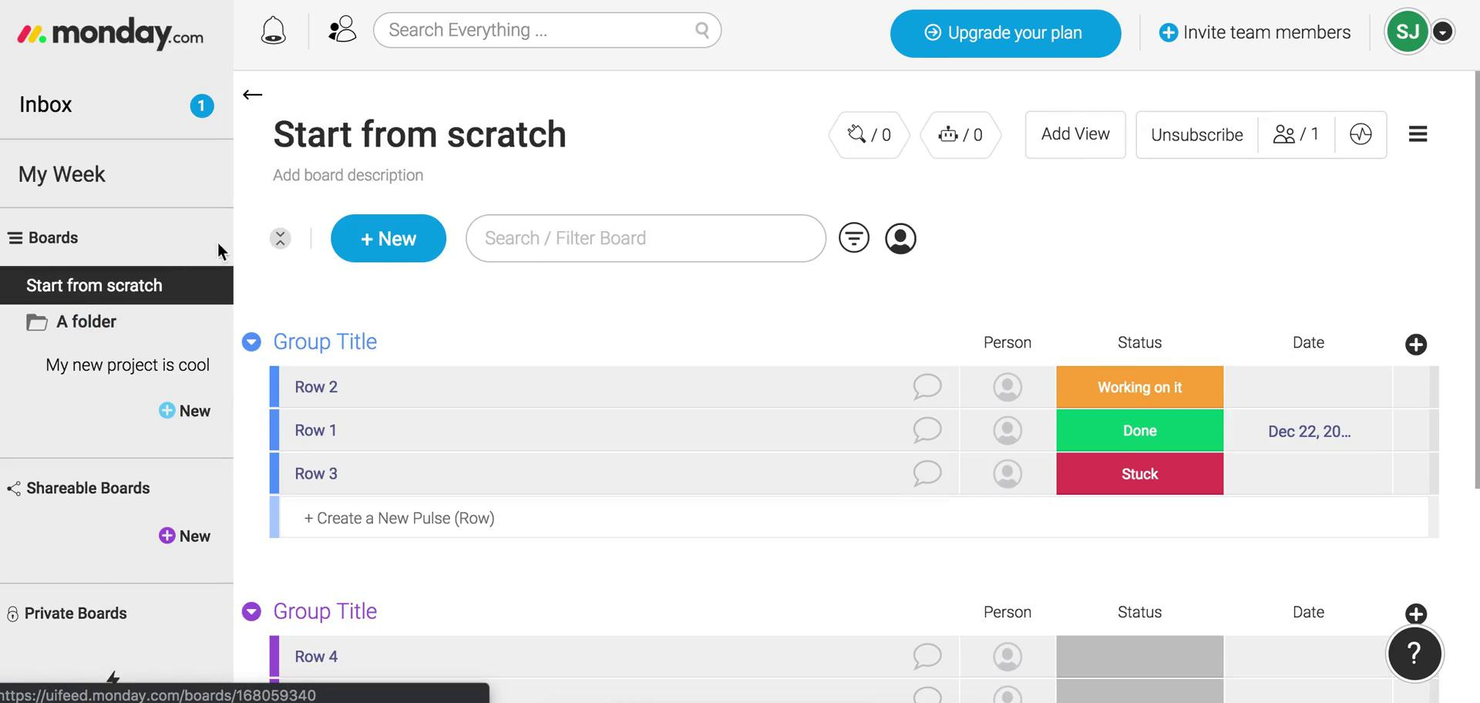
monday.com offre ai team in ambito tecnologico, marketing e operativo una piattaforma flessibile per organizzare progetti, gestire attività e collaborare in tempo reale, permettendo ai flussi di lavoro di adattarsi man mano che le esigenze cambiano.
Per chi è più indicato monday.com?
monday.com è particolarmente adatto a team piccoli e medi che necessitano di un modo visuale e adattabile per gestire i progetti senza configurazioni complesse o barriere tecniche.
Perché ho scelto monday.com
monday.com si guadagna il suo posto nella mia shortlist grazie all’ampia gamma di personalizzazioni disponibili per i flussi di lavoro. Mi piace che sia possibile costruire delle board da zero oppure iniziare da uno dei centinaia di modelli disponibili e poi aggiungere colonne personalizzate, etichette di stato e logiche condizionali per rispecchiare esattamente il metodo di lavoro del proprio team. Il generatore di automazioni senza codice è il punto forte: puoi impostare regole come 'quando lo stato cambia in In Revisione, notifica l’assegnatario e sposta l’elemento nella board QA' senza scrivere una sola riga di codice. Utilizzo anche le diverse opzioni di visualizzazione (Gantt, Kanban, calendario, timeline) per cambiare contesto a seconda se sto pianificando uno sprint o effettuando un report agli stakeholder.
Caratteristiche principali di monday.com
- Vista carico di lavoro: Visualizza i compiti assegnati e la capacità di ogni membro del team in un’unica dashboard per individuare subito eventuali sovraccarichi.
- Dipendenze tra attività: Collega le attività correlate: se un elemento subisce un ritardo, quelle dipendenti si aggiornano automaticamente in base alla nuova tempistica.
- Accesso per ospiti: Invita collaboratori esterni, come clienti o fornitori, a board specifiche senza dare accesso all’intero spazio di lavoro.
- Reportistica tramite dashboard: Aggrega i dati da più board in un’unica dashboard ad alto livello per monitorare l’avanzamento di diversi progetti contemporaneamente.
Integrazioni di monday.com
Le integrazioni includono Slack, Gmail, Google Calendar, Outlook, Microsoft Teams, Salesforce, QuickBooks, HubSpot, Zendesk e GitHub.
Cosa è gratuito?
monday.com offre un piano gratuito per sempre fino a 2 utenti. Questo piano include 3 board, 1.000 elementi e accesso limitato a integrazioni e automazioni.
Pros and Cons
Pros:
- Supporto a più viste per diversi tipi di gestione
- Workflow personalizzabili con numerose colonne
- Le integrazioni includono Slack Google Drive
Cons:
- Le funzionalità avanzate sono riservate ai piani superiori
- Il piano gratuito limita utenti e funzioni
New Product Updates from monday AI Workspace
monday AI Workspace Adds Human Approval Routing
monday AI Workspace adds a human-in-the-loop approval block to AI Workflows, sending approval requests and routing workflow paths based on responses. For more information, visit monday AI Workspace's official site.
Wrike
Migliore gestione gratuita dei progetti per visualizzazioni personalizzabili
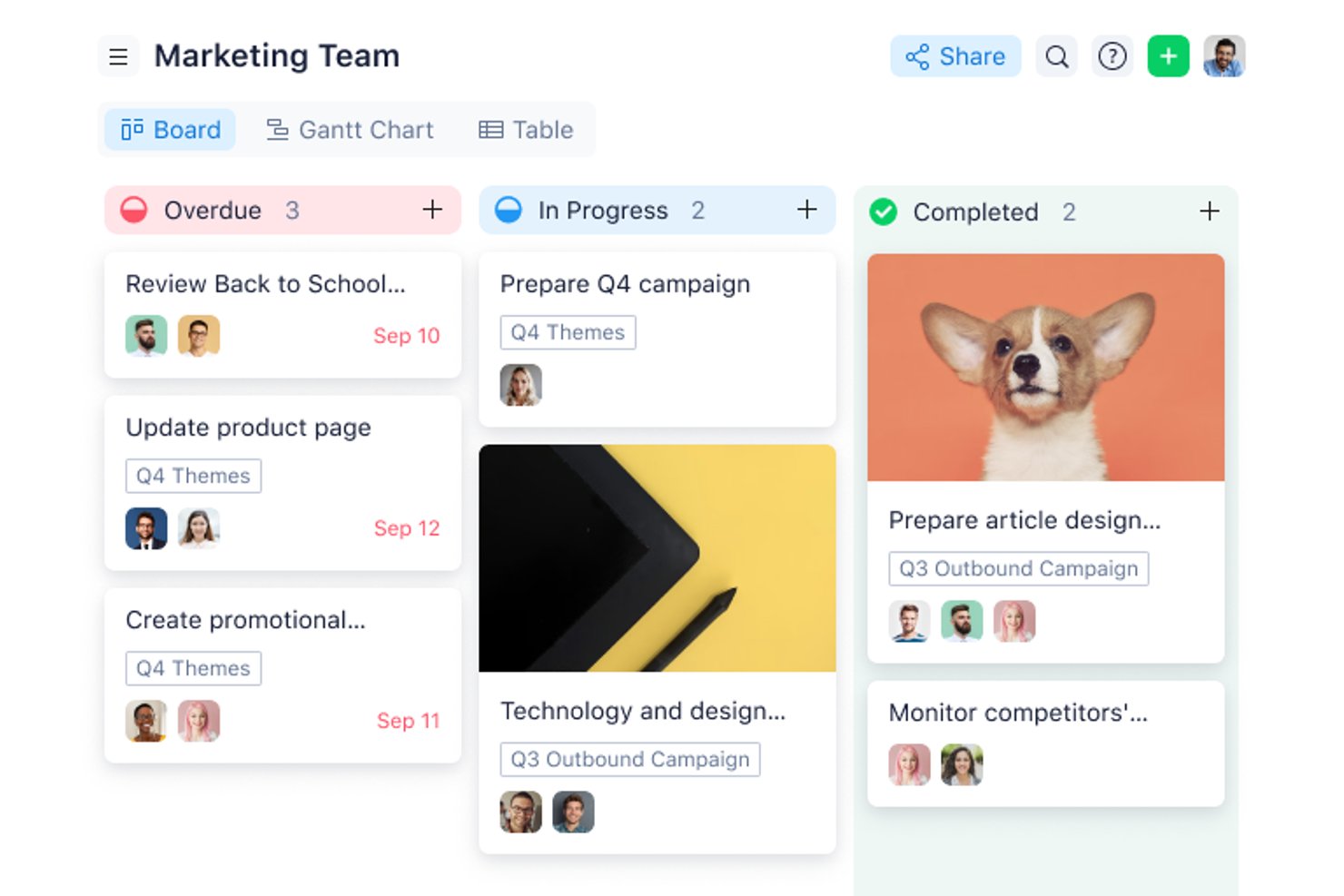
Wrike offre a project manager e team del settore tecnologico, del marketing e dei servizi professionali uno spazio di lavoro flessibile per organizzare le attività, gestire le scadenze e collaborare ai progetti, il tutto senza costi iniziali.
Per chi è più adatto Wrike?
Wrike è adatto a team in crescita e organizzazioni di medie dimensioni alla ricerca di uno strumento di gestione dei progetti strutturato ma adattabile, utilizzabile nei settori del marketing, dei prodotti e dell'IT.
Perché ho scelto Wrike
Ho scelto Wrike per la flessibilità delle visualizzazioni, disponibile immediatamente anche nel piano gratuito. È possibile passare dalla visualizzazione elenco a quella bacheca (Kanban) o tabella, a seconda del modo in cui il team concepisce il lavoro, così uno sviluppatore che tiene traccia delle attività dello sprint e un professionista del marketing che gestisce il calendario di una campagna non sono costretti a utilizzare lo stesso layout. La visualizzazione del diagramma di Gantt è disponibile nei piani a pagamento e offre ai team un percorso di upgrade chiaro con la crescita delle loro esigenze. La funzione di applicazione di più tag è particolarmente utile: è possibile aggiungere una singola attività a più cartelle o progetti, in modo che appaia nella visualizzazione corretta per ogni team senza duplicarla.
Scott Crosby, responsabile tecnico dei progetti, ha sottolineato come Wrike funzioni negli scenari reali: “Il punto di forza di Wrike consiste nelle tempistiche visive dei progetti e nel monitoraggio delle dipendenze. Quando stavamo implementando il sistema del portale per i clienti, Wrike ha reso semplice vedere in che modo i ritardi nello sviluppo del lato server avrebbero influito sulle fasi di test dell'interfaccia. I diagrammi di Gantt erano abbastanza intuitivi da consentire anche ai membri non tecnici del nostro team di comprendere i colli di bottiglia del progetto.”
Funzionalità principali di Wrike
- Visualizzazioni di lavoro personalizzate: Passa dalle visualizzazioni Elenco, Bacheca (Kanban) e Tabella per organizzare il lavoro in modi diversi.
- Gestione di attività e sottoattività: Crea attività, suddividile in sottoattività e applica tag incrociati tra più cartelle o progetti senza duplicare le voci.
- Modelli di progetto per casi d'uso: Avvia i progetti utilizzando strutture predefinite invece di creare ogni flusso di lavoro da zero.
- Elementi essenziali dell'IA: Utilizza gli strumenti di IA per la stesura e la modifica dei contenuti, i riepiloghi dei commenti e l'assistenza durante l'inserimento iniziale.
Integrazioni di Wrike
Il piano gratuito include integrazioni con i servizi di archiviazione cloud e l'accesso all'API REST aperta di Wrike. Ulteriori integrazioni native sono disponibili nei livelli a pagamento, tra cui le app di produttività nel piano Team, Salesforce e Adobe Creative Cloud nel piano Business, e QuickBooks, Power BI e Tableau nel piano Pinnacle. Wrike Integrate è disponibile come componente aggiuntivo per collegare sistemi privi di un connettore nativo, come NetSuite.
Cosa è gratuito?
Wrike offre un piano gratuito senza scadenza con utenti illimitati e 2 GB di spazio di archiviazione per account. Include la gestione di attività e sottoattività, la gerarchia delle cartelle, visualizzazioni di lavoro personalizzate come Tabella e Kanban, integrazioni con i servizi di archiviazione cloud e accesso all'API aperta. I diagrammi di Gantt, i cruscotti, i campi personalizzati e i moduli di richiesta richiedono un piano a pagamento.
Pros and Cons
Pros:
- Efficace per la creazione di contenuti e la collaborazione tra team remoti
- L'app mobile consente una gestione rapida delle attività e aggiornamenti in tempo reale
- L'integrazione delle attività di Wrike migliora la visibilità e l'organizzazione
Cons:
- I diagrammi di Gantt richiedono un piano a pagamento
- Gli utenti potrebbero dover affrontare una curva di apprendimento
New Product Updates from Wrike
Wrike Adds Klaxoon MCP Integration
Wrike’s Klaxoon MCP integration is now generally available, enabling AI agents to navigate between Wrike tasks and attached whiteboards, read task context, and manage whiteboard attachments via API. For more information, visit Wrike's official site.

Ideale per flussi di lavoro personalizzati
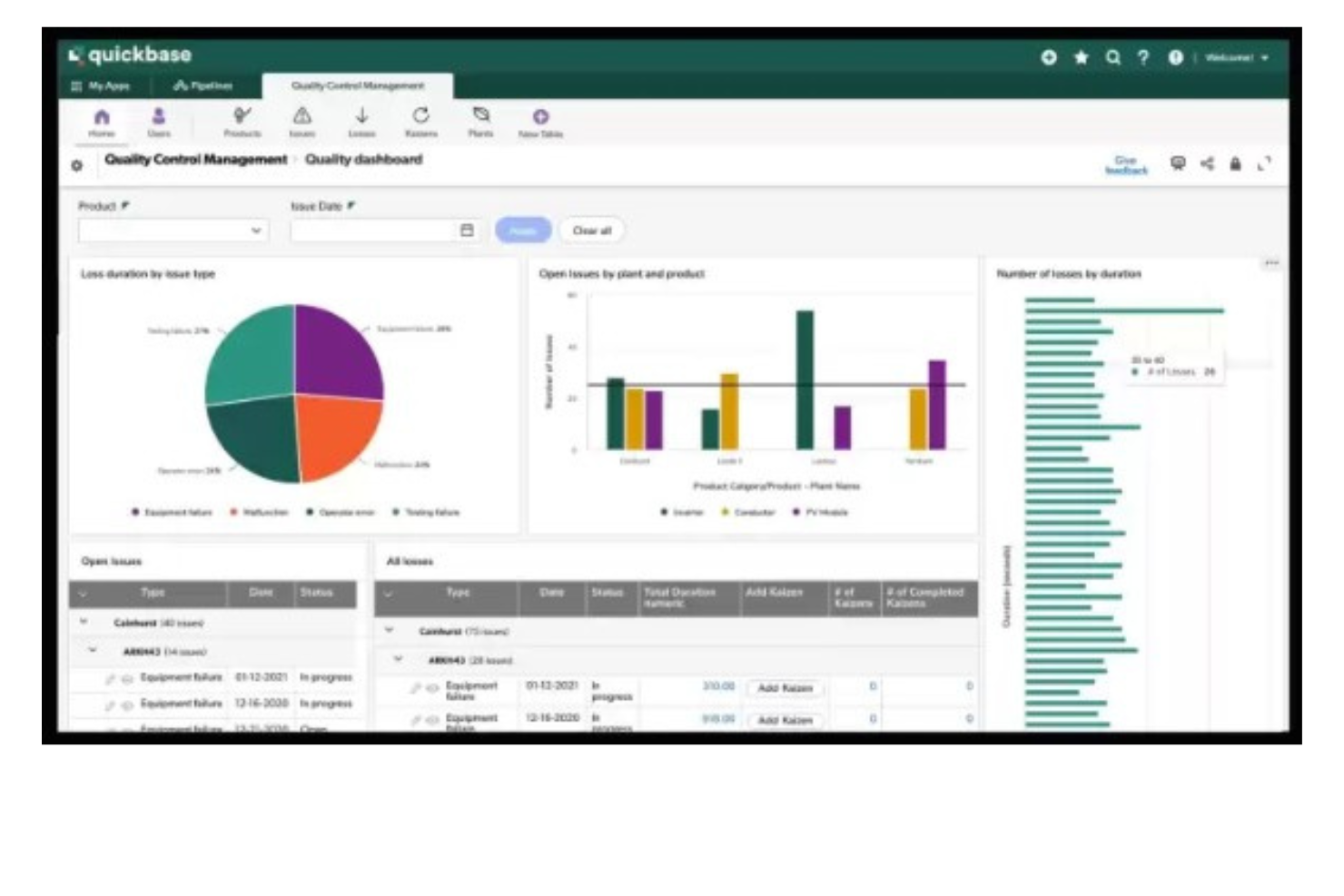
Quickbase offre ai team di settori come edilizia, produzione e IT un modo per creare app di gestione progetti personalizzate che si adattano ai loro flussi di lavoro specifici, aiutandoli a organizzare le attività, automatizzare i processi e collaborare senza dover ricorrere a strumenti rigidi e standardizzati.
Per chi è più adatto Quickbase?
Quickbase è particolarmente indicato per team di medie e grandi dimensioni che operano in settori dove le operazioni sono centrali, come edilizia, produzione e logistica, e che necessitano di strumenti di gestione progetti cuciti su misura per i loro processi specifici.
Perché ho scelto Quickbase
Ho incluso Quickbase tra le mie scelte migliori perché il suo builder di app no-code permette ai team di progettare da zero i flussi di lavoro di gestione progetti, invece di doversi adattare a una struttura predefinita. Apprezzo il fatto che si possano configurare fasi di validazione e percorsi di approvazione personalizzati direttamente nel costruttore dei flussi di lavoro—così, quando un team di costruzione necessita di una firma per un permesso prima di passare alla fase successiva, questa logica è integrata direttamente nell’app. La funzione Pipelines di Quickbase consente inoltre di automatizzare il passaggio delle attività tra i team tramite una logica drag-and-drop, evitando alla mia squadra di dover rincorrere aggiornamenti di stato tra diversi dipartimenti. La funzione di monitoraggio budget vs. costi effettivi, con avvisi in tempo reale, è un’altra caratteristica che trovo davvero utile per evitare che progetti articolati su più fasi sforino il budget senza accorgersene.
Sergio Oliveira, Direttore dello Sviluppo presso DesignRush, ha condiviso la sua esperienza: “Quickbase ci ha consentito di consolidare rapidamente i nostri dati di progetto, anche con il piano gratuito. Ci permette di tracciare le attività, redigere report e garantire la responsabilità senza preoccuparci di gestire diversi fogli di calcolo.”
Funzionalità chiave di Quickbase
- Report e dashboard dinamici: Crea report in tempo reale con filtri, raggruppamenti e grafici per monitorare lo stato dei progetti su più app.
- Permessi basati sui ruoli: Controlla chi può visualizzare, modificare o gestire dati a livello di campo, tabella o app.
- Accesso tramite app mobile: Accedi e aggiorna i dati dei progetti da dispositivi iOS e Android mentre lavori sul campo.
- Visualizzazione a diagramma di Gantt: Visualizza le tempistiche, le dipendenze e le milestone dei progetti in un’interfaccia Gantt drag-and-drop.
Integrazioni di Quickbase
Le integrazioni includono Salesforce, SAP, Oracle, Microsoft Teams, SharePoint, Google Drive, ed è disponibile un'API per integrazioni personalizzate.
Cosa è gratuito?
Quickbase offre una prova gratuita, ma non esiste un piano gratuito per sempre. La prova ti permette di testare le funzionalità della piattaforma ma con limiti al numero di utenti e all’accesso alle integrazioni durante il periodo di prova.
Pros and Cons
Pros:
- Flussi di lavoro personalizzabili in low-code
- Si integra con una gamma di strumenti esterni
- Altamente scalabile sia per piccoli che per grandi team
Cons:
- Non ideale per chi cerca una soluzione pronta all’uso
- Template pronti limitati

Ideale per utenti illimitati
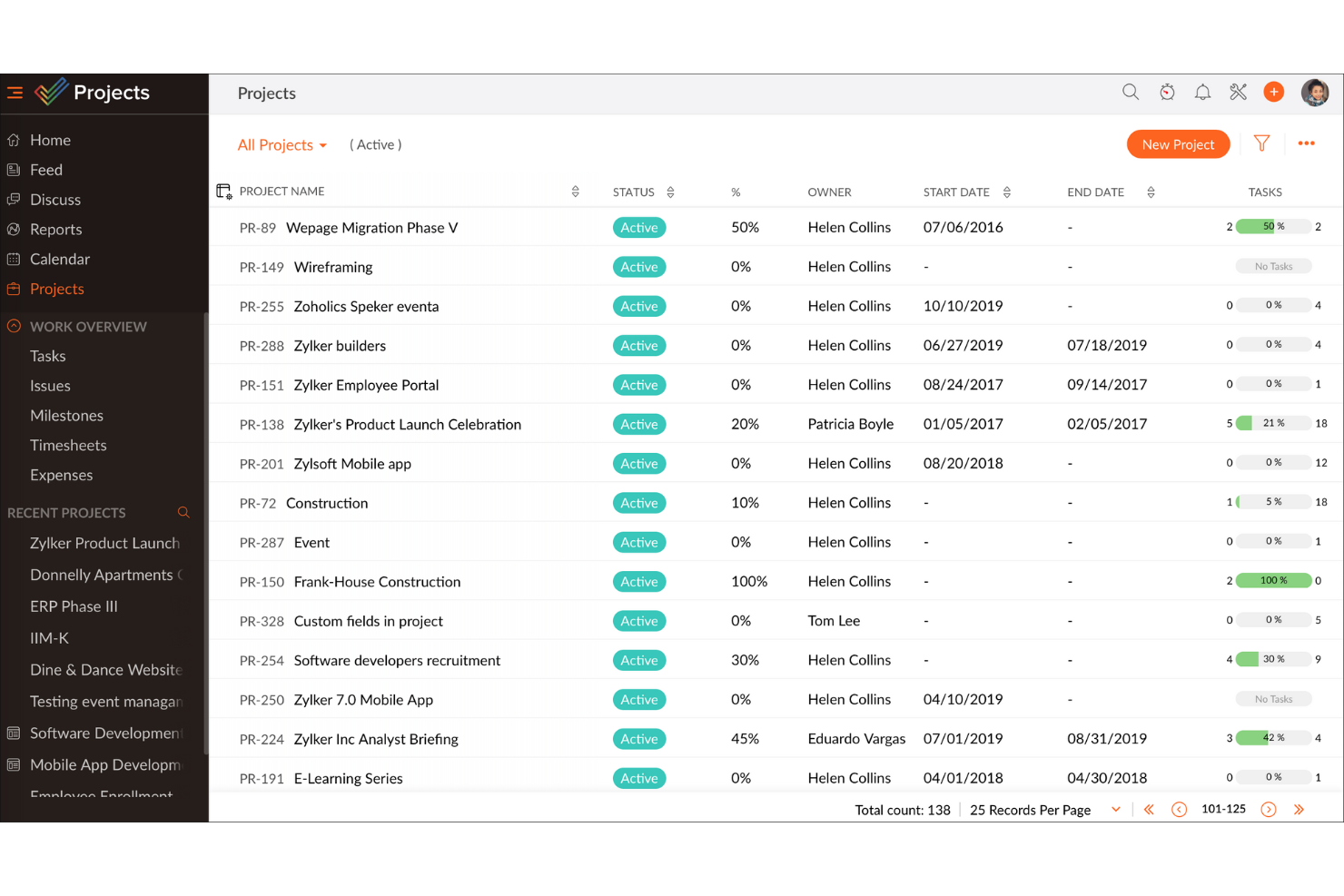
Wrike è un software di gestione progetti ricco di funzionalità che ti aiuta a creare flussi di lavoro.
Perché ho scelto Wrike: Al centro della creazione dei flussi di lavoro c'è la potente gestione di attività e sottoattività. Utilizzale per costruire flussi di lavoro di progetto e poi assegnali al tuo team. Puoi quindi visualizzare le attività su bacheche Kanban o in una vista a foglio di calcolo.
Una funzione estremamente utile è l'intelligenza lavorativa AI. Questa offre raccomandazioni personalizzate che puoi usare durante la creazione dei flussi di lavoro. Ad esempio, suggerisce persone pertinenti quando provi ad assegnare un'attività.
Caratteristiche e integrazioni principali di Wrike
Le funzionalità includono dashboard dove puoi vedere informazioni su attività e processi, strumenti di automazione dei flussi di lavoro, gestione delle risorse, revisione, flussi di lavoro di approvazione e moduli dinamici per le richieste.
Le integrazioni comprendono oltre 400 app popolari, tra cui Pipedrive, QuickBooks, Salesforce, Workday, Slack, Zendesk, Dropbox, DocuSign e Airtable.
Una cosa da considerare è che la versione gratuita non include l'accesso ai diagrammi di Gantt e c'è una limitazione al numero di attività attive che puoi avere contemporaneamente.
New Product Updates from Zoho Projects
Zoho Projects Adds CodeX Scripts for Custom Modules
Zoho Projects now supports CodeX Scripts for custom modules, enabling conditional logic and rules for creating, updating, and deleting records. For more information, visit Zoho Projects' official site.
 .
.
ClickUp
Ideale per team in crescita
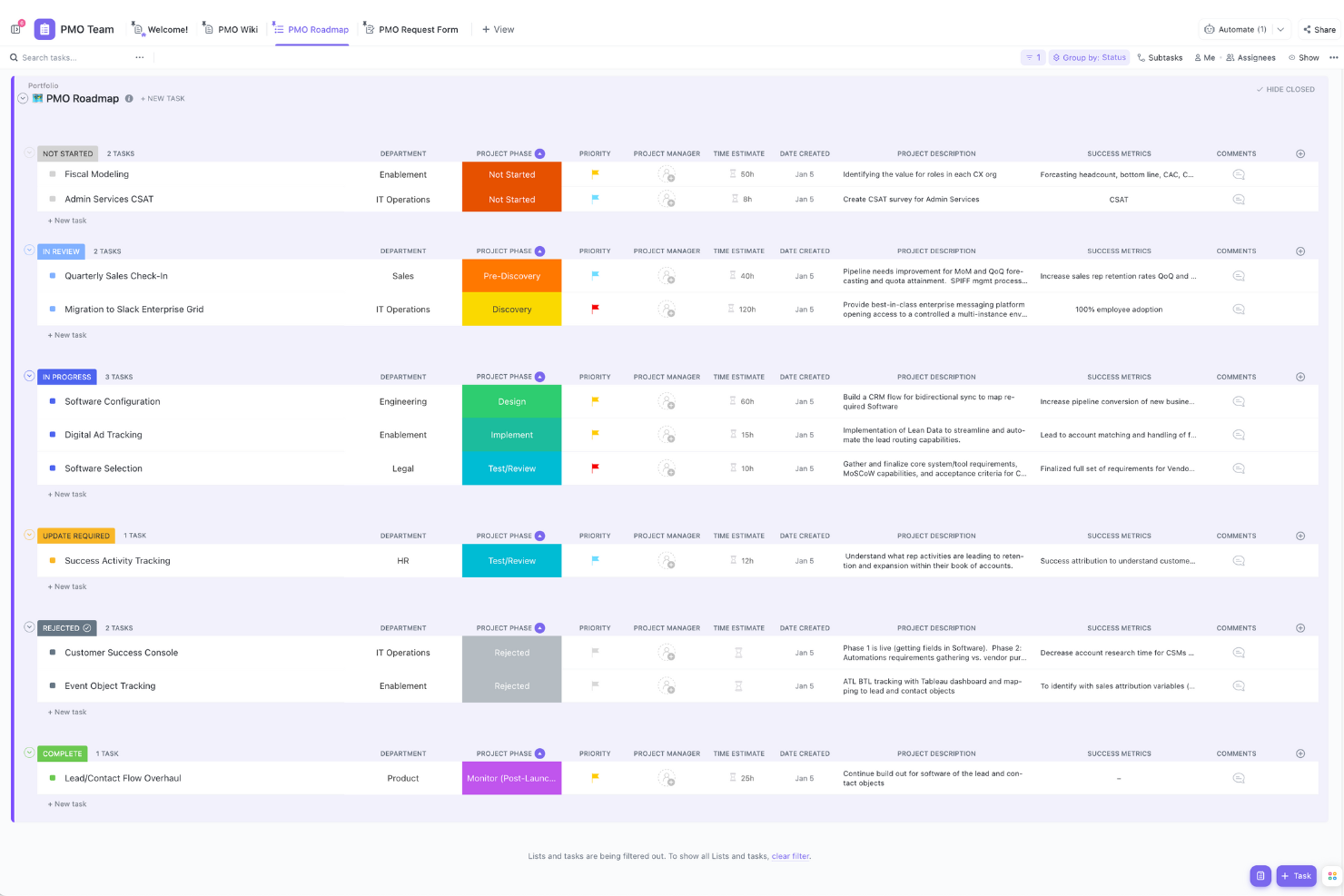
ClickUp è una piattaforma che integra la gestione dei progetti, la documentazione e la comunicazione in modo fluido, ed è la scelta ideale per chi lavora in marketing, sviluppo software, risorse umane o dipartimenti simili. La sua versione gratuita ti permette di gestire facilmente le attività, visualizzare i progetti con diagrammi di Gantt personalizzabili e collaborare con il tuo team. ClickUp risolve le sfide legate ai flussi di lavoro, garantendo la consegna puntuale dei progetti; per questo motivo è un’ottima soluzione per i team che vogliono aumentare la produttività.
Perché ho scelto ClickUp
Ho scelto ClickUp perché offre una combinazione impareggiabile di funzionalità all’interno del suo piano gratuito, perfette per le più diverse esigenze di project management. La capacità di gestire task e membri del team illimitati, senza costi iniziali o richiesta di carta di credito, lo rende ideale per startup e piccoli team. L’inclusione di chat integrata e creazione di documenti permette una collaborazione senza ostacoli, mentre oltre 1.000 integrazioni assicurano che i tuoi strumenti esistenti funzionino in modo armonioso. La versatilità e la completezza delle sue funzionalità ti danno tutto ciò che serve per tenere i progetti sotto controllo senza vincoli finanziari.
Funzionalità principali di ClickUp
Oltre alla capacità di gestire task e membri del team illimitati, ClickUp offre una serie di funzionalità pensate per migliorare la tua esperienza nella gestione dei progetti.
- Task personalizzabili: Puoi adattare le attività alle esigenze specifiche del progetto utilizzando oltre 35 ClickApp, per una gestione delle attività flessibile e su misura.
- Strumenti visivi per la collaborazione: Utilizza lavagne digitali e modifiche in tempo reale per incoraggiare la creatività e garantire che tutto il team sia allineato sugli obiettivi del progetto.
- Dashboard in tempo reale: Monitora gli indicatori di progetto e visualizza i progressi tramite dashboard personalizzabili che offrono insight sulle prestazioni del tuo team.
- Strumenti di gestione del tempo: Gestisci il tempo del tuo team in modo efficace grazie al monitoraggio integrato e alle funzionalità di reportistica, aiutandoti a rispettare le scadenze di progetto.
Integrazioni di ClickUp
Le integrazioni includono Slack, Google Calendar, Microsoft Teams, Zoom, Salesforce, Trello, Asana, HubSpot, GitHub e Figma.
Pros and Cons
Pros:
- Centralizza la gestione progetti e la comunicazione, riducendo la dipendenza da altri strumenti.
- Offre ampie funzionalità di automazione per ottimizzare le attività di routine.
- La configurazione personalizzabile permette ai team di adattare la piattaforma alle proprie esigenze.
Cons:
- Le funzionalità dell’app mobile potrebbero essere migliorate per un uso più efficace.
- Gli utenti hanno segnalato occasionali bug e notifiche eccessive.
New Product Updates from ClickUp
ClickUp Adds Meetings Hub, Super Agent Templates, and ZoomInfo Integration
ClickUp adds a searchable Meetings Hub, new ways to clone and template Super Agents, and a ZoomInfo integration through the App Center. These updates improve meeting retrieval, agent reuse, and access to sales intelligence. For more information, visit ClickUp’s official site.

Ideale per progetti gratuiti illimitati
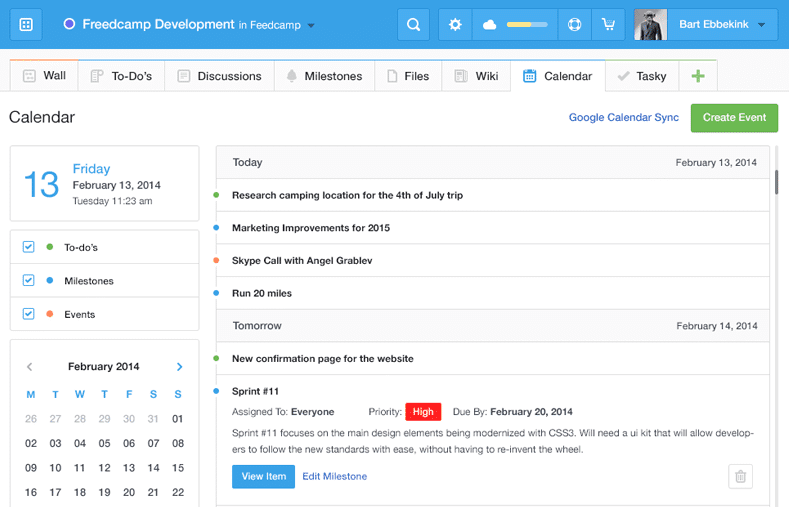
Freedcamp offre a startup, agenzie e piccole imprese una piattaforma di gestione progetti flessibile con liste di attività, board kanban e strumenti di collaborazione che aiutano i team a organizzare il lavoro e gestire più progetti senza limiti di utilizzo.
Per chi è ideale Freedcamp?
Freedcamp è una soluzione ideale per piccoli team e freelance che devono gestire più progetti contemporaneamente senza dover pagare per un piano premium.
Perché ho scelto Freedcamp
Freedcamp si guadagna un posto nella mia shortlist perché è uno dei pochi strumenti che realmente non limita il numero di progetti o utenti nel suo piano gratuito. Mi piace che il mio team possa gestire tutti i progetti necessari in parallelo senza ritrovarsi davanti a un paywall, cosa che la maggior parte dei piani gratuiti limita silenziosamente. La Task Board è una funzione che uso regolarmente: riunisce le attività di tutti i progetti attivi in un'unica vista, rendendo facile individuare i colli di bottiglia nei flussi di lavoro senza dover cambiare progetto. Faccio anche affidamento alla funzione milestones per raggruppare attività correlate sotto una data obiettivo, evitando che le iniziative più grandi perdano il focus.
Caratteristiche principali di Freedcamp
- Rilevamento del tempo: Registra le ore direttamente sulle attività e sui progetti all'interno della piattaforma.
- Archiviazione file: Allega e organizza file a livello di attività o progetto, rendendo facile trovare i materiali.
- Bacheche di discussione: Crea conversazioni strutturate collegate a specifici progetti per mantenere ordinata la comunicazione del team.
- Gestore di password: Conserva e condividi in sicurezza le credenziali di accesso relative ai progetti tra i membri del team.
Integrazioni Freedcamp
Le integrazioni includono Google Calendar, Google Drive, Dropbox e altro ancora.
Cosa è gratuito?
Freedcamp offre un piano gratuito per sempre con progetti, attività, spazio di archiviazione e utenti illimitati. L'unica limitazione principale è una dimensione massima di upload di 10MB per file.
Pros and Cons
Pros:
- Il piano gratuito esteso supporta progetti e utenti illimitati.
- Offre strumenti di collaborazione come discussioni e calendari.
- Prezzi accessibili per funzionalità e utenti aggiuntivi.
Cons:
- L'app mobile è meno raffinata rispetto alla versione desktop.
- Potrebbe non soddisfare le esigenze di aziende che richiedono un'elevata personalizzazione.

Ideale per i liberi professionisti che monitorano il tempo e fatturano i clienti
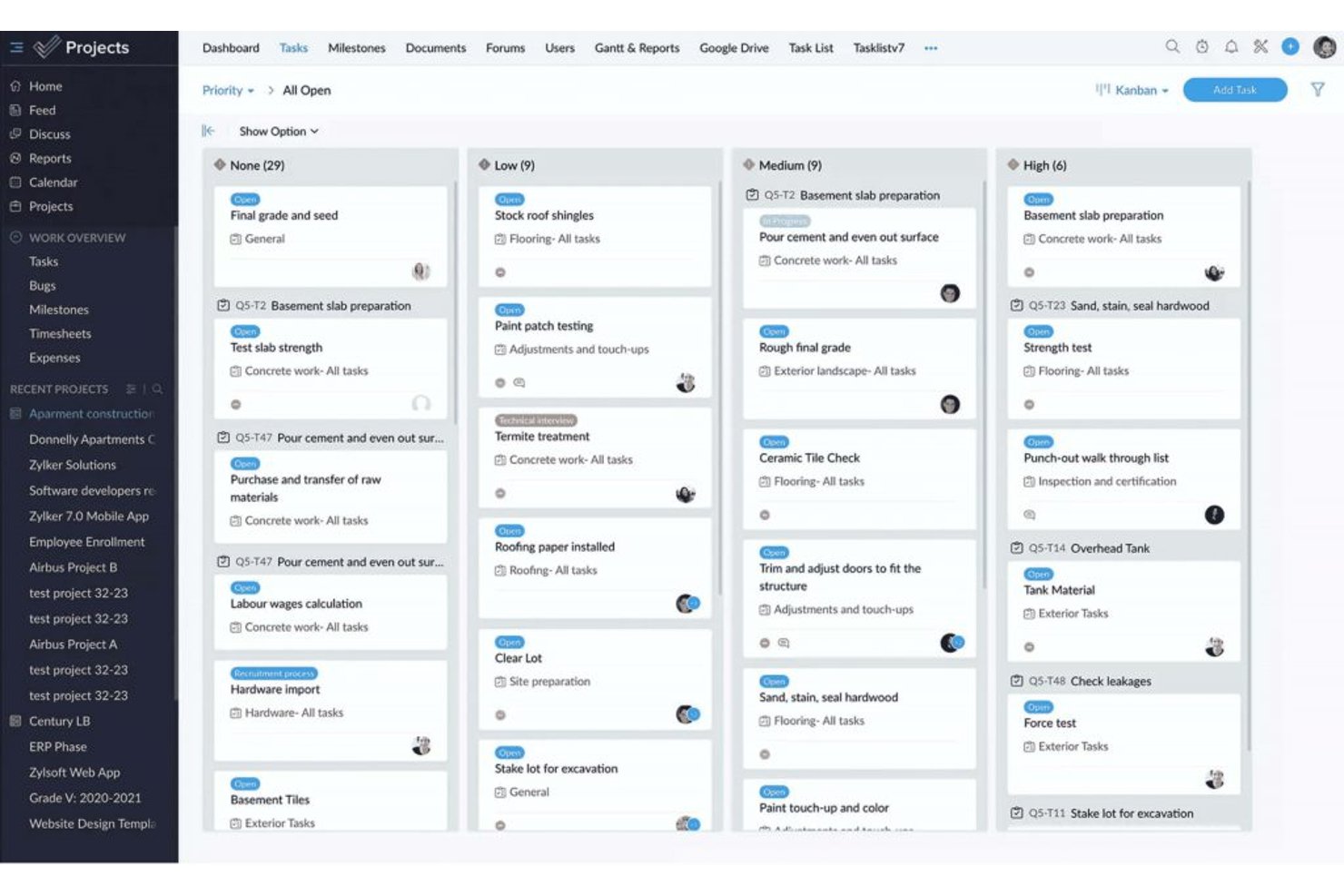
ProProfs Project è un software di gestione dei progetti con monitoraggio delle attività e viste Elenco, Kanban, Gantt e Calendario, collaborazione, automazioni, monitoraggio del tempo, fatturazione e report basati sull'intelligenza artificiale disponibili nel piano gratuito.
Per chi è più adatto ProProfs Project?
ProProfs Project è ideale per i liberi professionisti che monitorano il tempo e fatturano i clienti, soprattutto per chi gestisce un numero ridotto di progetti per i clienti.
Perché ho scelto ProProfs Project
Ho scelto ProProfs Project, 'Ideale per i liberi professionisti che monitorano il tempo e fatturano i clienti', per i timer integrati, i fogli presenze, i preventivi e la fatturazione inclusi nel piano gratuito. Posso registrare le ore fatturabili relative al lavoro per i clienti e trasformarle in fatture senza utilizzare un software di fatturazione separato. Il piano gratuito include anche le viste Elenco, Kanban, Gantt e Calendario, con un massimo di tre utenti.
Funzionalità principali di ProProfs Project
- Dipendenze e baseline delle attività: Imposta le relazioni tra le attività e confronta le pianificazioni con una baseline.
- Personalizzazione dei flussi di lavoro: Crea fasi, campi, stati e priorità personalizzati.
- Automazioni: Imposta regole per l'assegnazione delle attività, le modifiche di stato e le notifiche.
- Report basati sull'intelligenza artificiale: Genera report con informazioni sull'avanzamento e sui rischi del progetto.
Integrazioni di ProProfs Project
Le integrazioni native includono Google Drive, Dropbox, Box e altro. È supportato anche Zapier.
Cosa è gratuito?
ProProfs Project offre un piano gratuito per un massimo di tre utenti, oltre a una prova gratuita di 14 giorni. Il piano gratuito non include l'accesso API né i webhook.
Pros and Cons
Pros:
- I timer integrati semplificano il monitoraggio delle ore fatturabili
- I fogli presenze e le fatture mantengono la fatturazione in un unico posto
- Il piano gratuito include le viste Gantt e Calendario
Cons:
- I tre posti limitano la collaborazione con i clienti
- Il limite per le attività aperte rimane poco chiaro

Jira
Ideale per la gestione progetti in modalità agile
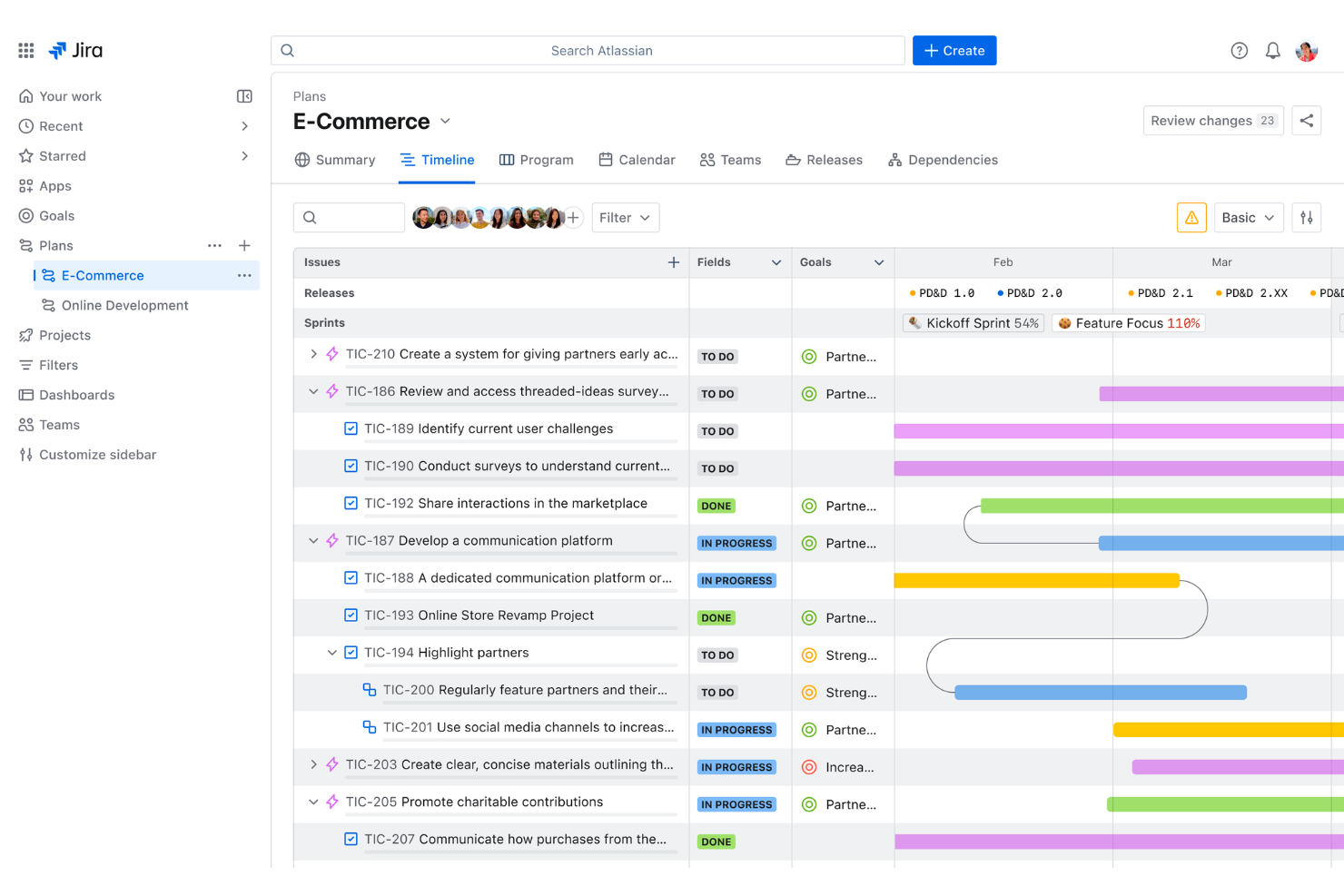
Jira offre ai team di sviluppo software e ai project manager digitali una piattaforma flessibile per organizzare le attività, monitorare i progressi e gestire flussi di lavoro complessi, rendendolo una scelta popolare per i team che cercano una soluzione gratuita di gestione progetti con funzionalità agile.
Per Chi è Più Indicato Jira?
Jira è particolarmente adatto a team di sviluppo software e di prodotto che lavorano in ambienti agile o scrum e necessitano di una tracciabilità strutturata delle problematiche insieme alla pianificazione degli sprint.
Perché Ho Scelto Jira
Jira si guadagna un posto tra i migliori nella mia lista perché è uno dei pochi strumenti di project management gratuiti pensati specificamente per la delivery agile. Utilizzo le scrum board e la pianificazione degli sprint per suddividere il lavoro in cicli mirati di due settimane, mantenendo il team produttivo senza perdere di vista il backlog. Mi affido anche al mapping delle dipendenze di Jira per coordinare i rilasci tra prodotto, ingegneria e design—specialmente quando il lavoro di un team blocca quello di un altro. I diagrammi burndown e i report sui tempi di ciclo mi forniscono dati reali sulle performance del team, non solo semplici aggiornamenti di stato.
Funzionalità Principali di Jira
- Workflow personalizzabili: Crea e modifica i flussi di lavoro delle problematiche per rispecchiare come il tuo team porta avanti i compiti dall'inizio alla fine.
- Roadmap: Visualizza il lavoro su più sprint e team su una timeline per monitorare i progressi rispetto agli obiettivi di delivery.
- Regole di automazione: Imposta automazioni basate su trigger per gestire attività ripetitive come l'assegnazione di problematiche o l'aggiornamento degli stati.
- Dashboard di reportistica: Accedi a report incorporati tra cui grafici di velocità e diagrammi di flusso cumulativo per monitorare i risultati del team.
Integrazioni Jira
Le integrazioni includono Confluence, Trello, Bitbucket, Slack, Microsoft Teams, Google Workspace, Zoom, Tempo Timesheets, Zephyr e Loom.
Cosa è Gratuito?
Jira offre un piano gratuito per sempre fino a 10 utenti. Il piano gratuito include funzioni base di project management ma limita lo spazio di archiviazione a 2 GB e non comprende controlli amministrativi avanzati o supporto premium.
Pros and Cons
Pros:
- Altamente personalizzabile e scalabile per adattarsi a diverse necessità di progetto e dimensioni di team.
- Supporta metodologie Agile, ideale per i team di sviluppo software.
- Ottime funzionalità di gestione delle problematiche per il monitoraggio dei bug e la risoluzione dei problemi.
Cons:
- Potrebbe essere troppo ricco di funzionalità per i team che gestiscono progetti semplici
- Prestazioni a volte lente con progetti di grandi dimensioni

Basecamp
Il migliore per combinare gli strumenti essenziali
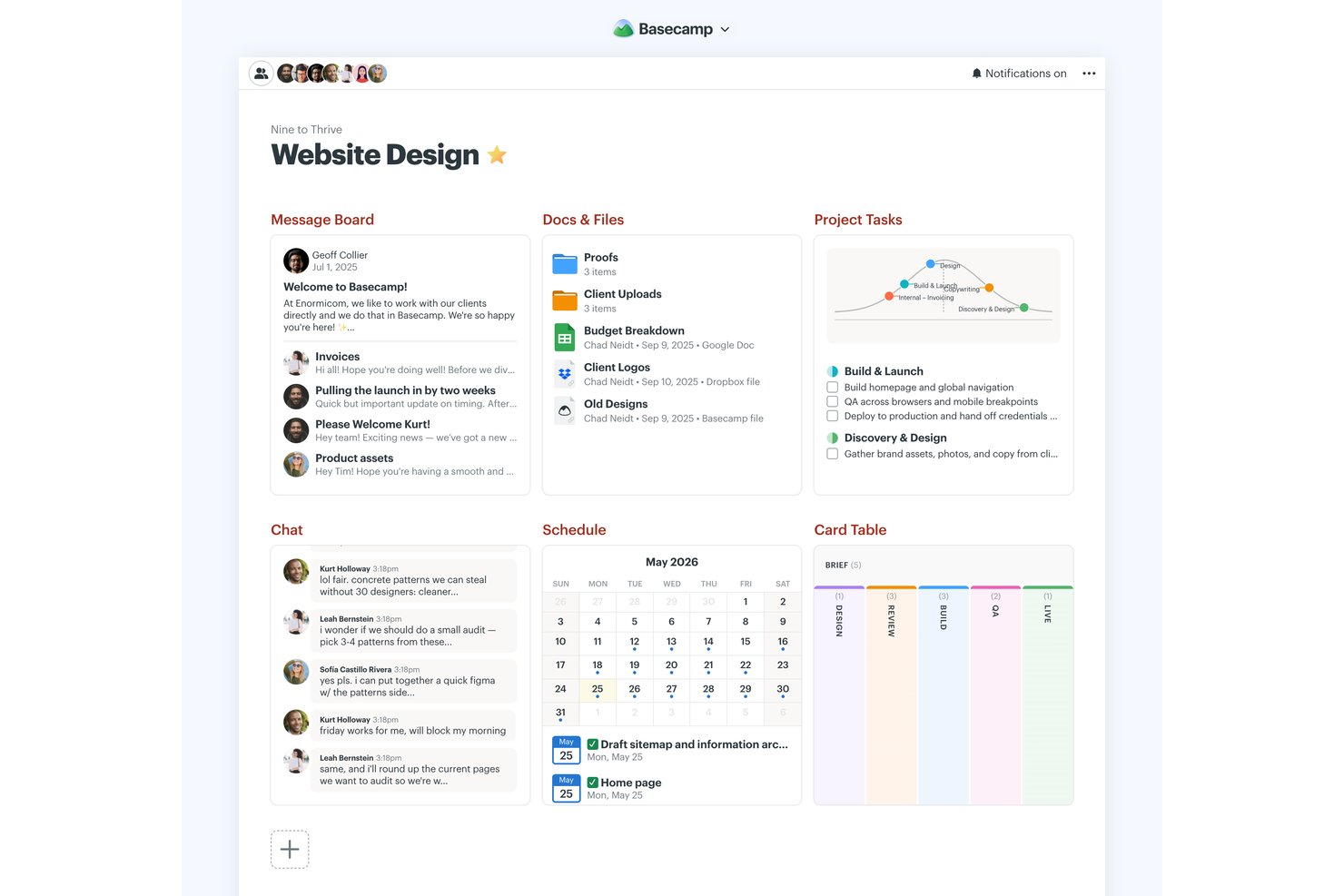
Basecamp è una piattaforma di gestione dei progetti con un piano gratuito permanente per un progetto e cinque utenti, che combina elenchi di cose da fare, tabelle Kanban, messaggistica, pianificazione, archiviazione dei file, rapporti e grafici a collina.
Per chi è più adatto Basecamp?
Basecamp è adatto ai titolari di piccole imprese e ai responsabili dei team che coordinano progetti semplici e necessitano di una visibilità condivisa senza diagrammi di Gantt o pianificazione delle dipendenze.
Perché ho scelto Basecamp
Ho scelto Basecamp come “Il migliore per combinare gli strumenti essenziali” perché il suo progetto gratuito riunisce attività da svolgere, tabelle a schede, la chat Campfire e la pianificazione. Uso i grafici a collina per mostrare se le attività di lancio sono ancora in fase di definizione o sono passate all'esecuzione, poi controllo i rapporti per verificare le assegnazioni scadute. Il piano gratuito permanente è limitato a un progetto attivo, cinque utenti e 1 GB di spazio di archiviazione.
Funzionalità principali di Basecamp
- Bacheche dei messaggi: Pubblica aggiornamenti sul progetto e mantieni le risposte associate a ogni discussione.
- Messaggi diretti: Invia messaggi diretti ai membri del team.
- Le mie assegnazioni: Visualizza le tue attività ordinate per data di scadenza, inclusi gli elementi scaduti.
- Documenti e file: Organizza documenti e caricamenti con cartelle, anteprime e tracciamento delle versioni.
Integrazioni di Basecamp
Basecamp dispone di connessioni integrate per Google Docs, Figma, Dropbox, Google, Outlook, Apple e i calendari HEY, oltre a collegamenti per riunioni Zoom e Microsoft Teams. Offre inoltre un'API e connettori per ChatGPT e Claude ed è disponibile su Zapier.
Cosa è gratuito?
Il piano gratuito di Basecamp è gratuito per sempre e include un progetto, fino a cinque utenti e 1 GB di spazio di archiviazione. Combina gli strumenti essenziali per i progetti, ma i limiti relativi a progetti e utenti possono ostacolare i team più grandi.
Pros and Cons
Pros:
- Il piano gratuito permanente include gli strumenti essenziali per la collaborazione
- I grafici a collina mostrano la differenza tra fase di scoperta ed esecuzione
- I controlli automatici riducono il tempo dedicato alle riunioni sullo stato dei progetti
Cons:
- Cinque utenti e un progetto limitano la scalabilità
- Nessuna dipendenza o diagramma di Gantt

Podio
Ideale per le capacità di gestione delle attività
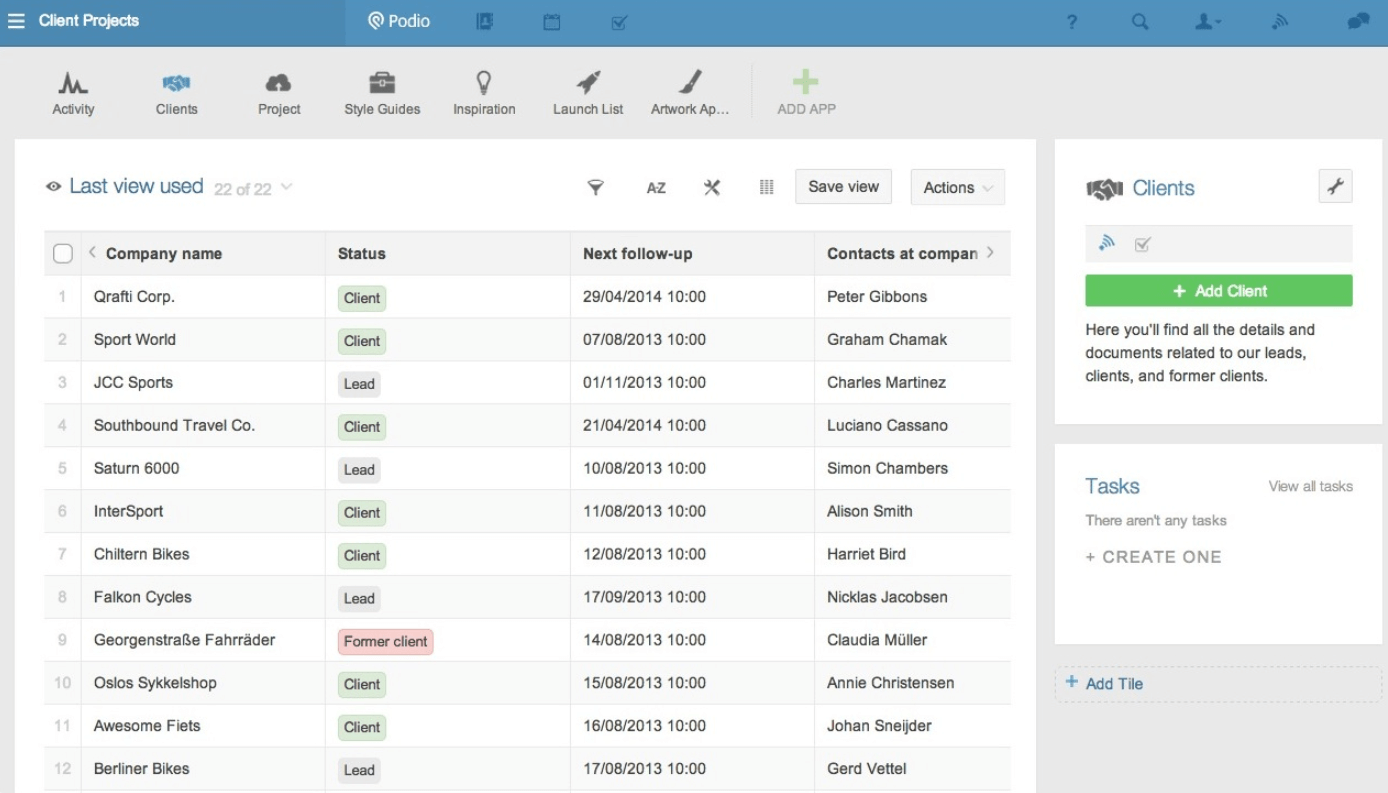
Podio è una piattaforma di project management personalizzabile progettata per team e piccole imprese che desiderano organizzare progetti, gestire attività e collaborare in un unico luogo senza costi iniziali.
Per chi è ideale Podio?
Podio è particolarmente indicato per team di piccole e medie dimensioni che necessitano di una gestione flessibile ed economica di progetti e flussi di lavoro tra diversi reparti.
Perché ho scelto Podio
Podio si guadagna un posto nella mia lista perché la sua gestione delle attività va ben oltre le semplici liste di cose da fare. Mi piace il fatto che le attività in Podio siano collegate direttamente alle app e ai flussi di lavoro che hai creato: così, quando un elemento di progetto cambia stato, le attività correlate possono essere attivate automaticamente tramite auto-tasks. Puoi impostare promemoria, creare attività ricorrenti e allegare file e commenti direttamente a ciascuna attività, mantenendo così conversazioni e contesto in un unico posto anziché dispersi tra le email. Il piano gratuito include queste funzionalità di gestione delle attività, rendendolo un ottimo punto di partenza per i piccoli team.
Funzionalità principali di Podio
- Spazi di lavoro personalizzabili: Crea spazi di lavoro per i progetti con campi, categorie e layout su misura per il flusso di lavoro del tuo team.
- Chat in-app: Invia messaggi diretti o chat di gruppo all'interno di Podio senza uscire dalla piattaforma.
- Condivisione file: Allega e condividi file direttamente su elementi, attività e spazi di lavoro per mantenere le risorse di progetto organizzate.
- Marketplace di app: Accedi ad app di flussi di lavoro preconfigurate create dalla community di Podio per estendere il tuo spazio di lavoro senza dover partire da zero.
Integrazioni di Podio
Le integrazioni includono Google Drive, Dropbox, Box, Microsoft Exchange, Evernote, Zendesk, FreshBooks, ShareFile, GoToMeeting e Microsoft OneDrive.
Cosa offre gratis?
Podio offre un piano gratuito per sempre fino a cinque utenti. Il piano gratuito include funzionalità di base per la gestione delle attività e degli spazi di lavoro, ma non supporta la gestione degli utenti o l'automazione avanzata dei flussi di lavoro.
Pros and Cons
Pros:
- Consente la creazione di spazi di lavoro su misura per diversi team
- Supporta l'automazione dei flussi di lavoro
- Offre una varietà di app per estendere le funzionalità
Cons:
- La maggior parte delle funzionalità di flusso di lavoro è riservata ai piani superiori
- Funzionalità di reportistica avanzata limitate
Altri software gratuiti per la gestione dei progetti
Ecco alcuni strumenti aggiuntivi che non sono entrati nel mio elenco finale, ma che sono comunque valide opzioni da prendere in considerazione se non hai trovato una soluzione adatta tra quelle precedenti.
-
Hive
Ideale per strumenti nativi di tracciamento del tempo
-
GoodDay
Ideale per la visualizzazione delle attività
-
Teamwork.com
Ideale per le bacheche Kanban
-
Airtable
Ideale per il suo piano gratuito con basi illimitate
-
Miro
Ideale per i modelli predefiniti
-
Bitrix24
Ideale per i team che vogliono sostituire più strumenti con uno solo
-
Notion
Ideale per documenti, wiki e attività in un unico spazio di lavoro
-
Project.co
Ideale per la comunicazione nei progetti a contatto con i clienti
-
FigJam
Ideale per la pianificazione visiva libera e il brainstorming
-
Plaky
Ideale per i team che hanno bisogno di utenti gratuiti illimitati


Recensioni correlate dei software per la gestione dei progetti
Se non hai ancora trovato ciò che cerchi, dai un'occhiata a questi altri strumenti correlati che abbiamo testato e valutato:
- Software per la gestione dei progetti
- Software gratuiti per il monitoraggio dei clienti
- Software per la gestione dei progetti di pubbliche relazioni
- Software per la gestione delle risorse
- Software per l'automazione dei flussi di lavoro
- Software per il monitoraggio del tempo
- Software per la gestione delle attività
- Strumenti di collaborazione
- Software per la gestione dei progetti per Windows
- Alternative a Paymo
- Alternative a Redmine
Come Valuto il Software di Gestione Progetti Gratuito
Suddivido la mia valutazione in due livelli: uno standard di base che ogni strumento deve soddisfare—penso a vero monitoraggio delle attività e accesso gratuito al team—e fattori differenzianti che separano le opzioni migliori dal resto.
Funzionalità di Base (Requisiti Minimi per Questa Lista)
Quando seleziono gli strumenti da inserire nell’elenco, assegno a ciascuno un punteggio da 0 (non offre la funzionalità) a 5 (eccelle in quest’area) per ogni funzionalità principale elencata di seguito. Calcolo quindi il punteggio totale dello strumento in percentuale. Ogni strumento deve raggiungere un punteggio totale minimo del 65% per essere preso in considerazione.
- Gestione delle Attività: Cerco assegnatari, scadenze, priorità e stati come minimo—sono importanti anche sottattività e dipendenze per gestire, ad esempio, il lancio di un prodotto a più fasi.
- Piano Veramente Gratuito: Lo strumento deve offrire un livello gratuito permanente, non solo una prova. Verifico se il piano gratuito supporta un numero sufficiente di utenti e progetti per un vero piccolo team.
- Più Visualizzazioni di Progetto: Valuto se il livello gratuito include almeno due viste come lavagne Kanban e liste, dato che la bacheca sprint di una startup richiede una disposizione diversa rispetto al calendario eventi di un’organizzazione no profit.
- Collaborazione di Team: Assegnare le attività è il requisito minimo. Cerco commenti, @menzioni e spazi di lavoro condivisi così i team distribuiti possono discutere direttamente i blocchi sull’attività stessa.
- Condivisione File & Allegati: I team devono poter allegare brief, mockup o specifiche alle attività. Verifico se il piano gratuito supporta upload nativi o solo link a spazi di archiviazione esterni.
- Monitoraggio & Reportistica di Progetto: Dashboard o indicatori di avanzamento aiutano a rispondere alla domanda “siamo nei tempi?” senza dover costruire manualmente un foglio di calcolo. Valuto cosa è disponibile prima di incontrare un paywall.
Una volta ottenuto un elenco di strumenti che soddisfano questi criteri, considero ciò che distingue ogni piattaforma.
Fattori Differenzianti (Cosa Distingue i Fornitori)
Ecco come confronto e metto a confronto i diversi fornitori:
Caratteristiche Distintive
Il monitoraggio del tempo integrato è un grande elemento distintivo per i freelance che registrano ore fatturabili direttamente sulle attività. Valuto anche le automazioni senza codice—come l’assegnazione automatica di un revisore QA quando un’attività passa a “pronta per la revisione”—perché fanno risparmiare davvero tempo amministrativo ai team snelli. Sono importanti anche i modelli predefiniti: una startup che lancia il primo sprint non dovrebbe costruire una bacheca da zero quando strumenti come Asana, monday.com e ClickUp offrono strutture già pronte nei piani gratuiti.
Oltre le Caratteristiche
I limiti dei piani gratuiti variano molto, quindi controllo il numero massimo di utenti, di progetti e quali funzioni sono bloccate dietro un paywall. Una squadra non profit di cinque persone ha esigenze molto diverse da quelle di un freelance solitario, e lo strumento più adatto dipende da dove ricadono questi limiti. Considero anche i percorsi di aggiornamento—quando il team supera la fascia gratuita, un salto di prezzo troppo alto può costringere a una migrazione indesiderata. Le integrazioni sono altrettanto importanti: uno strumento gratuito che si collega con Slack, Google Workspace o GitHub si integra nel flusso di lavoro esistente invece di creare un altro silo.
Come scegliere un software gratuito per la gestione dei progetti
Quando crei un elenco preliminare, provi e selezioni un software gratuito per la gestione dei progetti, considera quanto segue:
- Quale problema stai cercando di risolvere? Inizia identificando la lacuna nelle funzionalità di gestione dei progetti che stai cercando di colmare, per chiarire quali caratteristiche e funzionalità il software gratuito di gestione dei progetti deve offrire.
- Chi dovrà utilizzarlo? Considera chi utilizzerà il software e quante licenze ti serviranno. Valuta se sarà sufficiente che lo utilizzino solo i tuoi project manager o se sarà necessario consentire l'accesso all'intera organizzazione. Una volta chiarito questo aspetto, vale la pena valutare se dare priorità alla facilità d'uso per tutti o alla velocità per gli utenti esperti.
- Con quali altri strumenti deve funzionare? Chiarisci quali strumenti stai sostituendo, quali rimarranno e con quali strumenti dovrai integrarti, come software di contabilità, CRM o per le risorse umane. Verifica se puoi sostituire più strumenti con un unico strumento gratuito consolidato per la gestione dei progetti.
- Quali risultati sono importanti? Considera il risultato che il software deve produrre per essere considerato un successo, quale capacità vuoi acquisire, cosa vuoi migliorare e come misurerai il successo. Ad esempio, un risultato potrebbe essere la possibilità di ottenere una maggiore visibilità sulle prestazioni.
- Come funzionerebbe all'interno della tua organizzazione? Considera la scelta del software insieme ai tuoi flussi di lavoro e alla tua metodologia di erogazione. Valuta cosa funziona bene e quali aree stanno causando problemi. Ogni azienda è diversa: non dare per scontato che uno strumento funzionerà nella tua organizzazione solo perché è popolare. Cerca un software gratuito che offra un ottimo insieme di funzionalità e che possa crescere in termini di funzionalità man mano che aumentano le tue esigenze.
Tendenze nel software gratuito di gestione dei progetti
Ecco alcune tendenze chiave che continueranno a plasmare gli strumenti gratuiti di gestione dei progetti.
- Funzionalità di intelligenza artificiale e apprendimento automatico: alcune delle migliori app gratuite per la gestione dei progetti hanno iniziato a integrare analisi basate sull'intelligenza artificiale, gestione predittiva delle attività e valutazione automatizzata dei rischi. Queste funzionalità avanzate offrono informazioni e automazione che in precedenza erano disponibili solo negli strumenti premium.
- Realtà virtuale (VR) e realtà aumentata (AR) per la visualizzazione dei progetti: alcuni strumenti gratuiti pionieristici per la pianificazione dei progetti stanno sperimentando VR e AR per offrire esperienze immersive di pianificazione e visualizzazione dei progetti. Questo uso innovativo della tecnologia consente ai membri del team di interagire con i piani e i progetti in modo più interattivo e intuitivo.
- Adozione diffusa delle piattaforme basate sul cloud: si sta verificando un importante spostamento verso soluzioni di gestione dei progetti basate sul cloud (ovvero software gratuito di gestione dei progetti online), che garantiscono una migliore accessibilità, scalabilità e collaborazione. Questa tendenza risponde alla crescente necessità di supportare il lavoro da remoto, poiché i membri del team possono accedere allo strumento di gestione dei progetti e ai dati del progetto da qualsiasi luogo e in qualsiasi momento.
- Misure di sicurezza rafforzate: poiché gli strumenti gratuiti di gestione dei progetti sono sempre più integrati nelle attività quotidiane delle aziende, è aumentata l'attenzione alla sicurezza e alla protezione dei dati. Funzionalità come la crittografia end-to-end, l'autenticazione a due fattori e i controlli avanzati degli accessi stanno diventando standard per affrontare le preoccupazioni relative alle violazioni dei dati e agli accessi non autorizzati.
Che cos'è il software gratuito di gestione dei progetti?
Il software gratuito di gestione dei progetti è uno strumento senza costi che aiuta singoli individui e team a pianificare, monitorare e gestire attività, scadenze e collaborazione.
Spesso disponibili come app web, desktop o mobile, questi strumenti includono funzionalità come l'assegnazione delle attività, la pianificazione e il monitoraggio dei progressi. Sono ideali per startup, liberi professionisti o piccoli team che hanno bisogno di rimanere organizzati e rispettare le scadenze, senza il costo degli strumenti premium. Il software gratuito di gestione dei progetti è spesso open source oppure è uno strumento a pagamento che segue un modello freemium.
Funzionalità del software gratuito di gestione dei progetti
Quando selezioni un software gratuito di gestione dei progetti, presta attenzione alle seguenti funzionalità chiave:
- Suggerimenti automatici per le attività: l'intelligenza artificiale può analizzare il tuo flusso di lavoro e suggerire nuove attività, scadenze o priorità in base alla cronologia del progetto e alle abitudini del team.
- Pianificazione intelligente: gli strumenti di intelligenza artificiale possono consigliare tempistiche ottimali, assegnare risorse e modificare automaticamente i programmi quando si verificano conflitti o ritardi.
- Analisi predittiva: ottieni informazioni sui potenziali rischi, sui ritardi dei progetti o sugli sforamenti di budget prima che si verifichino, così puoi intervenire tempestivamente.
- Elaborazione del linguaggio naturale: crea rapidamente attività, imposta promemoria o cerca informazioni utilizzando un linguaggio semplice: basta digitare o pronunciare la tua richiesta.
- Reportistica basata sull'intelligenza artificiale: genera automaticamente rapporti sui progressi, riepiloghi delle prestazioni o aggiornamenti sui progetti, risparmiando tempo sul monitoraggio manuale.
- Notifiche intelligenti: ricevi avvisi personalizzati sulle attività che richiedono la tua attenzione, sulle scadenze imminenti o sulle modifiche che influiscono sul tuo lavoro.
- Gestione intelligente dei documenti: l'intelligenza artificiale può aiutarti a categorizzare, etichettare e trovare più rapidamente i documenti, così il tuo team dedica meno tempo alle ricerche e più tempo al lavoro.
- Note automatiche delle riunioni: alcuni strumenti utilizzano l'intelligenza artificiale per trascrivere le riunioni, riassumere i punti chiave e assegnare le azioni da intraprendere, facilitando il coordinamento di tutti.
Funzionalità di intelligenza artificiale nei software gratuiti per la gestione dei progetti
Molte soluzioni software gratuite per la gestione dei progetti stanno iniziando a includere funzionalità basate sull'intelligenza artificiale per aiutare i team a lavorare in modo più intelligente ed efficiente. Ecco alcune funzionalità di intelligenza artificiale da prendere in considerazione:
- Suggerimenti automatici per le attività: l'intelligenza artificiale può analizzare il flusso di lavoro e suggerire nuove attività, scadenze o priorità in base alla cronologia dei progetti e alle abitudini del team.
- Pianificazione intelligente: gli strumenti di intelligenza artificiale possono consigliare tempistiche ottimali, assegnare risorse e modificare automaticamente i programmi quando si verificano conflitti o ritardi.
- Analisi predittiva: ottieni informazioni su potenziali rischi, ritardi dei progetti o sforamenti del budget prima che si verifichino, così da poter intervenire tempestivamente.
- Elaborazione del linguaggio naturale: crea rapidamente attività, imposta promemoria o cerca informazioni utilizzando un linguaggio semplice: ti basta digitare o pronunciare la tua richiesta.
- Reportistica basata sull'intelligenza artificiale: genera automaticamente rapporti sullo stato di avanzamento, riepiloghi delle prestazioni o aggiornamenti sui progetti, risparmiando tempo sul monitoraggio manuale.
- Notifiche intelligenti: ricevi avvisi personalizzati sulle attività che richiedono la tua attenzione, sulle scadenze imminenti o sulle modifiche che influiscono sul tuo lavoro.
- Gestione intelligente dei documenti: l'intelligenza artificiale può aiutarti a classificare, contrassegnare e trovare più rapidamente i documenti, così il tuo team trascorre meno tempo a cercare e più tempo a lavorare.
- Note automatiche delle riunioni: alcuni strumenti utilizzano l'intelligenza artificiale per trascrivere le riunioni, riepilogare i punti principali e assegnare le attività da svolgere, facilitando il coordinamento di tutti.
Vantaggi dei software gratuiti per la gestione dei progetti
Ecco cinque vantaggi principali che i software gratuiti per la gestione dei progetti offrono agli utenti e alle organizzazioni:
- Efficienza dei costi: riduce drasticamente i costi operativi. Eliminando la necessità di un investimento finanziario nel software, le aziende possono destinare i propri budget ad altre aree in cui sono più urgentemente necessari, migliorando così la gestione complessiva delle risorse e la flessibilità finanziaria.
- Migliore collaborazione: favorisce un lavoro di squadra e una comunicazione migliori. I software gratuiti per la gestione dei progetti offrono una piattaforma in cui i membri del team possono collaborare in tempo reale, condividere documenti e aggiornarsi reciprocamente sui progressi, migliorando così i flussi di lavoro e la produttività.
- Organizzazione ottimizzata: mantiene attività e scadenze chiaramente strutturate. Gli utenti possono usufruire di funzionalità come elenchi di attività, calendari e bacheche Kanban, che aiutano a organizzare i progetti in modo più efficace e a garantire che tutti i membri del team siano consapevoli delle proprie responsabilità e delle tempistiche.
- Accessibilità: offre flessibilità e praticità. La maggior parte degli strumenti gratuiti per la gestione dei progetti è online e basata sul cloud, quindi i membri del team possono accedere alle informazioni del progetto da qualsiasi luogo e in qualsiasi momento, utilizzando qualsiasi dispositivo con una connessione a Internet. Questo facilita il lavoro da remoto o in mobilità.
- Mitigazione dei rischi: aiuta a identificare e affrontare tempestivamente i potenziali rischi del progetto. La possibilità di monitorare i progressi e generare rapporti consente di individuare colli di bottiglia o ritardi prima che diventino problemi critici, permettendo di apportare modifiche e prendere decisioni tempestive per mantenere i progetti in linea con i piani.
Costi e prezzi dei software per la gestione dei progetti
Sebbene i piani gratuiti siano un ottimo punto di partenza, soprattutto per piccoli team, startup e organizzazioni non profit, è comunque una buona idea conoscere i piani a pagamento e le relative funzionalità disponibili sul mercato.
Di seguito è riportata una panoramica delle opzioni di piano più comuni, dei prezzi medi e delle funzionalità generalmente incluse in ciascun piano, per aiutarti nel processo decisionale.
Tabella comparativa dei piani per i software di gestione dei progetti
| Tipo di piano | Prezzo medio | Funzionalità comuni |
|---|---|---|
| Gratuito | $0 | Gestione di attività e progetti, strumenti di collaborazione di base, spazio di archiviazione limitato |
| Base | $5-10 per utente/mese | Gestione avanzata delle attività, monitoraggio del tempo, spazio di archiviazione aggiuntivo, reportistica di base |
| Standard | $10-25 per utente/mese | Pianificazione e programmazione complete dei progetti, funzionalità avanzate di collaborazione, integrazioni con altri strumenti, opzioni di sicurezza avanzate |
| Premium | $25-50 per utente/mese | Gestione delle risorse, reportistica e analisi avanzate, cruscotti personalizzabili, assistenza prioritaria |
| Enterprise | Prezzo personalizzato | Progetti e utenti illimitati, assistenza e formazione dedicate, sicurezza e conformità avanzate, funzionalità e integrazioni personalizzabili |
Puoi trovare qui altri software per la gestione dei progetti destinati alle organizzazioni non profit.
Domande frequenti sul software gratuito per la gestione dei progetti
Trova le risposte alle domande più comuni che altre persone pongono su questo argomento.
Quali funzionalità sono generalmente limitate nei software gratuiti per la gestione dei progetti?
La maggior parte dei software gratuiti per la gestione dei progetti limita le funzionalità avanzate per incoraggiare gli upgrade. In genere troverai restrizioni per funzioni come i diagrammi di Gantt, il monitoraggio del tempo, i report avanzati o la gestione del budget integrata. I limiti al numero di utenti sono comuni, quindi solo pochi membri del team possono collaborare gratuitamente. Potresti inoltre avere meno spazio di archiviazione per i file, un numero inferiore di modelli di progetto e opzioni di integrazione di base invece di app premium. Controlla sempre i dettagli del piano gratuito prima di configurare il tuo team.
Gli strumenti gratuiti per la gestione dei progetti sono sicuri per i dati dei clienti o sensibili?
La maggior parte degli strumenti gratuiti per la gestione dei progetti offre un livello di sicurezza di base, come la crittografia SSL, la protezione tramite password e aggiornamenti software regolari. Tuttavia, potrebbero non offrire funzionalità avanzate come l’autenticazione a due fattori, i registri di controllo o certificazioni di conformità. Per dati riservati o soggetti a normative, verifica sempre l’informativa sulla privacy e le pratiche di sicurezza dello strumento.
Esiste un software gratuito Microsoft per la gestione dei progetti?
Sì, Microsoft Planner consente di organizzare le attività, creare semplici bacheche e collaborare con piccoli team. Microsoft To Do è disponibile per il monitoraggio delle attività individuali. Per funzionalità più potenti come le visualizzazioni della sequenza temporale, i report avanzati o la gestione delle risorse, è necessario Microsoft Project, che richiede un abbonamento a pagamento.
Google offre un software gratuito per la gestione dei progetti?
Google non offre uno strumento dedicato alla gestione dei progetti come Trello o Monday.com, ma puoi creare sistemi di base utilizzando Google Sheets, Google Docs, Calendar e Drive. Questo approccio richiede una configurazione maggiore, ma funziona bene se desideri un’opzione gratuita e flessibile.
Quali sono alcune opzioni gratuite e open source per la gestione dei progetti?
Esistono diversi strumenti open source affidabili, tra cui Taiga, OpenProject e ProjectLibre. Con il software open source puoi personalizzare il codice e, se lo ospiti sul tuo server, mantenere il pieno controllo sui tuoi dati. Tuttavia, dovrai dedicare più tempo alla configurazione, alla manutenzione e alla risoluzione dei problemi.
Dovrei usare un software gratuito e agile per la gestione dei progetti?
Sì, se stai iniziando o gestisci progetti agili di dimensioni ridotte, strumenti gratuiti come Jira, Taiga o ClickUp possono gestire sprint, backlog, storie utente e bacheche Kanban. Quando i progetti diventano più complessi, potresti incontrare limiti sul numero di utenti, sulle analisi o sulle integrazioni.
Come posso migrare da un software gratuito a uno a pagamento per la gestione dei progetti?
Passare da un piano gratuito a uno a pagamento è generalmente semplice. Prima dell’upgrade, esporta una copia di backup dei dati importanti, verifica quali nuove funzionalità otterrai e controlla eventuali modifiche ai ruoli degli utenti o ai cicli di fatturazione. Se cambi piattaforma, cerca strumenti che supportino l’importazione e l’esportazione dei dati.