

I 10 migliori software di gestione dei progetti integrati con Slack 2026

Migliori software di gestione dei progetti che si integrano con Slack: selezione


Mantenere il team allineato non dovrebbe significare passare continuamente da un'app all'altra solo per tenere sotto controllo i progetti. Se Slack è già l'hub di comunicazione del tuo team, perché non portare direttamente al suo interno gli aggiornamenti sui progetti, la gestione delle attività e la collaborazione? Il software di gestione dei progetti giusto può trasformare Slack in qualcosa di più di un semplice strumento di messaggistica: può renderlo un vero centro di comando in tempo reale per i tuoi progetti. Ma con così tante opzioni disponibili, come puoi trovare quella che ti semplifica davvero la vita?
Ho testato una serie di strumenti di gestione dei progetti che si integrano facilmente con Slack, così puoi assegnare attività, monitorare i progressi e ricevere aggiornamenti importanti, senza essere sommerso dalle notifiche o perdere la concentrazione.
Perché fidarsi dei nostri consigli sui software
Il nostro team testa e recensisce software dal 2012. In quanto project manager noi stessi, sappiamo quanto sia difficile — e importante — scegliere il software giusto.
Per questa guida, abbiamo valutato gli strumenti attraverso test pratici e ricerche indipendenti, assegnando un punteggio agli strumenti in base ai nostri criteri di selezione. Ci basiamo inoltre sulle competenze di leader di pensiero del settore e di professionisti attivi nella gestione dei progetti.
Le nostre recensioni riflettono il nostro giudizio editoriale umano, non un discorso di vendita.
Revisori esperti:
Tabella comparativa dei software di gestione dei progetti che si integrano con Slack
| Tool | Best For | Trial Info | Price | ||
|---|---|---|---|---|---|
| 1 | Ideale per la gestione dei progetti in agenzia | Prova gratuita di 14 giorni + demo gratuita disponibile | Da $10/mese (fatturazione annuale) | Website | |
| 2 | Ideale per viste di progetto personalizzabili | Prova gratuita di 14 giorni + piano gratuito disponibile | A partire da $10/utente/mese (fatturazione annuale) | Website | |
| 3 | Ideale per automazione avanzata dei flussi di lavoro | Prova gratuita di 15 giorni + piano gratuito + demo gratuita disponibile | Da $4/utente/mese (fatturazione annuale) | Website | |
| 4 | Ideale per integrazioni aziendali basate su API | Dimostrazione gratuita disponibile | Prezzo su richiesta | Website | |
| 5 | Ideale per la gestione visiva dei progetti | Piano gratuito disponibile | Da $8/membro/mese (fatturato annualmente) | Website | |
| 6 | Ideale per flussi di lavoro personalizzabili | Piano gratuito + demo gratuita disponibile | Da $7/utente/mese (fatturazione annuale) | Website | |
| 7 | Ideale per aggiornamenti di progetto in tempo reale | Prova gratuita di 14 giorni + demo gratuita disponibile | Da $8/utente/mese (fatturazione annuale) | Website | |
| 8 | Ideale per le agenzie | Prova gratuita di 7 giorni disponibile | Da $9/utente/mese (fatturato annualmente) | Website | |
| 9 | Ideale per il coordinamento del lavoro aziendale | Demo gratuita disponibile | Prezzo su richiesta | Website | |
| 10 | Ideale per la gestione dinamica dei progetti | Prova gratuita disponibile | Prezzo su richiesta | Website |


Recensioni dei migliori software di gestione dei progetti che si integrano con Slack
Ecco la mia recensione completa degli strumenti di gestione dei progetti che si integrano perfettamente con Slack. In questa recensione ti guiderò attraverso i vantaggi e gli svantaggi, le funzionalità e i casi d’uso ideali di ciascun software, aiutandoti a scegliere quello più adatto alle esigenze del tuo team.

Ideale per la gestione dei progetti in agenzia
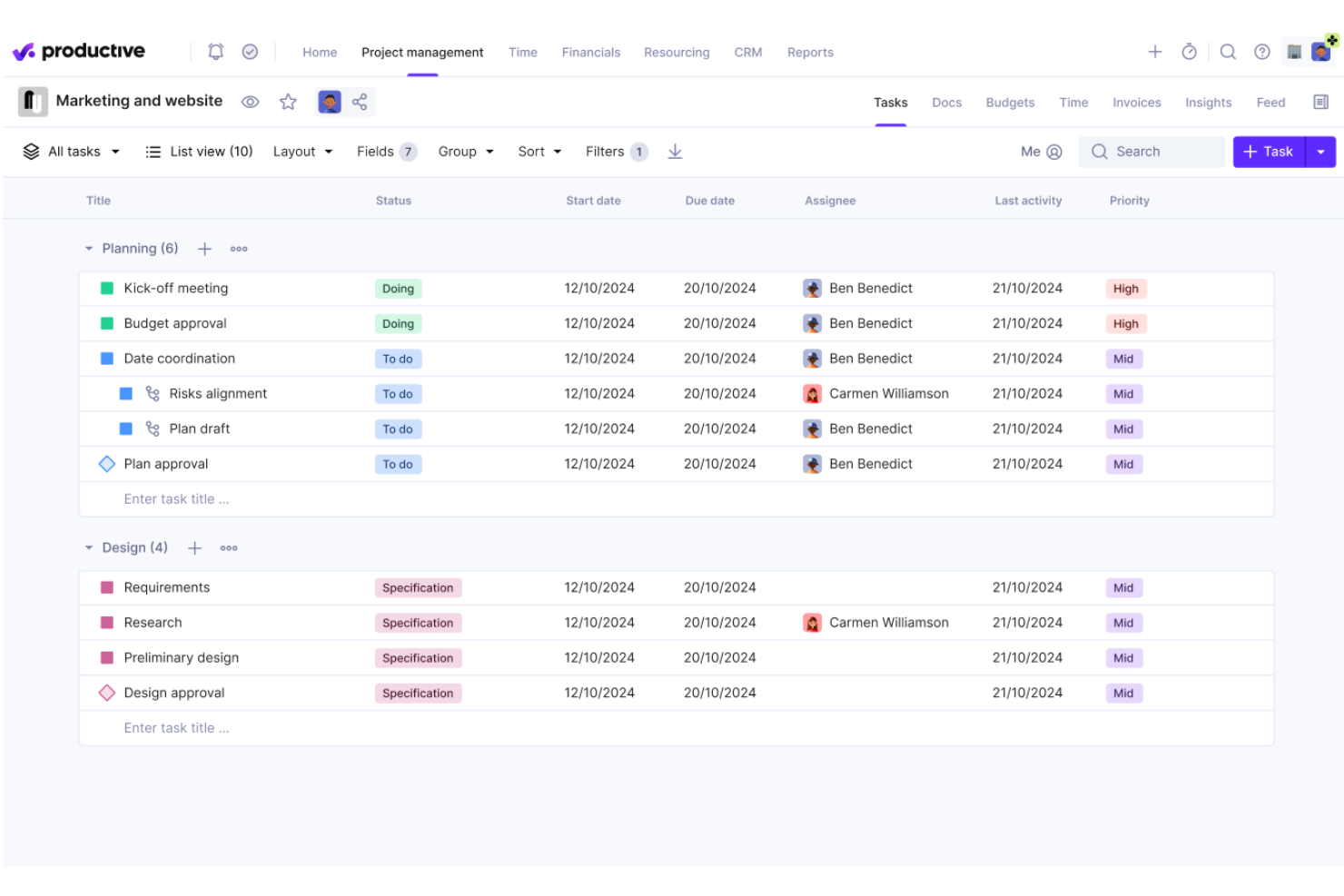
Productive è una piattaforma di gestione dei progetti progettata per agenzie che unisce monitoraggio di progetti e attività, pianificazione delle risorse, rilevamento delle ore, gestione del budget e fatturazione, con un'integrazione nativa di Slack per notifiche e gestione attività.
Per chi è ideale Productive?
Productive è particolarmente indicato per agenzie digitali e società di servizi professionali che hanno bisogno di gestire progetti, risorse e redditività in un'unica soluzione.
Perché ho scelto Productive
Ho incluso Productive tra le mie migliori scelte perché è uno dei pochi strumenti di project management sviluppati appositamente per il modo di operare delle agenzie. Mi piace che la gestione del budget sia collegata direttamente ai progetti, così il mio team può vedere in tempo reale se un ingaggio con un cliente è redditizio, senza dover passare da uno strumento all'altro. La visualizzazione della pianificazione delle risorse mi permette inoltre di confrontare la capacità del team con i progetti attivi, fondamentale quando si gestiscono più commesse contemporaneamente.
Funzionalità chiave di Productive
- Integrazione Slack: Crea attività direttamente dai messaggi di Slack e ricevi notifiche di progetto nei canali Slack designati.
- Rilevamento delle ore: Registra ore fatturabili e non fatturabili su attività, progetti o clienti direttamente dalla piattaforma.
- Fatturazione: Genera fatture per i clienti in base alle ore registrate e ai budget dei progetti senza uscire dallo strumento.
- Automazioni: Imposta regole per assegnare automaticamente attività, innescare cambi di stato o inviare aggiornamenti in base alle attività di progetto.
Pros and Cons
Pros:
- Funzionalità personalizzabili adattabili alle esigenze specifiche dell'agenzia
- Potenti capacità di pianificazione e monitoraggio delle risorse
- Funzionalità complete per la gestione finanziaria e la rendicontazione
Cons:
- Le integrazioni disponibili potrebbero essere più numerose
- La configurazione iniziale può richiedere tempo
New Product Updates from Productive
Productive Adds Voice Dictation, Slack Connector, Proposals, and Overtime
Productive adds voice dictation, a Slack Connector, proposal controls, and overtime tracking. These updates support faster AI interactions, client proposals, and time management. For more information, visit Productive’s official site.

Wrike
Ideale per viste di progetto personalizzabili
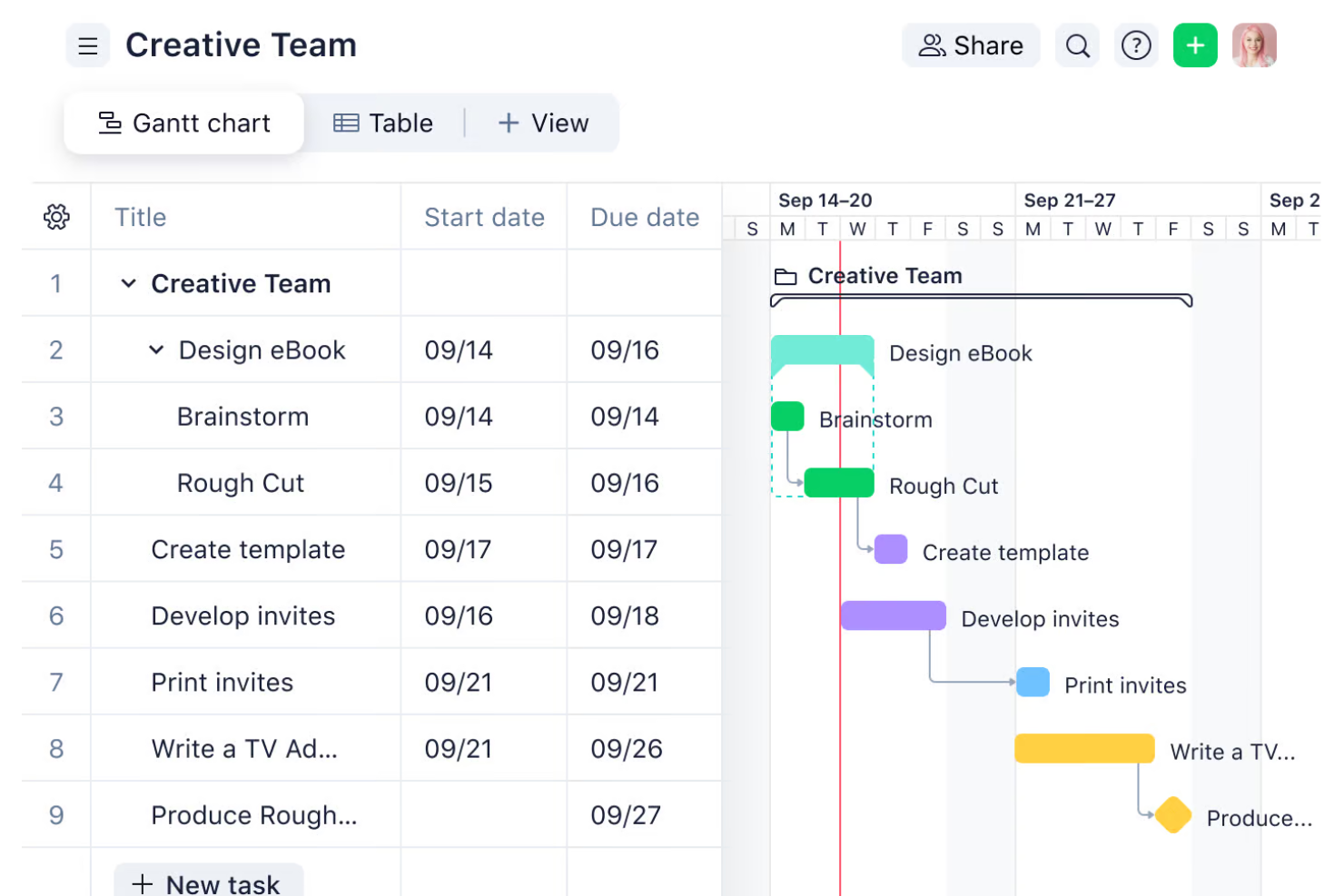
Wrike è una piattaforma di gestione progetti che combina il monitoraggio delle attività, l'automazione dei flussi di lavoro, la gestione delle risorse e la reportistica in tempo reale su modelli di consegna Agile, Waterfall e ibridi.
Per chi è Wrike?
Wrike è particolarmente indicato per team di medie e grandi dimensioni che necessitano di una piattaforma di gestione progetti scalabile, con flussi di lavoro flessibili tra più dipartimenti.
Perché ho scelto Wrike
Ho incluso Wrike tra le mie scelte principali perché nessun altro strumento offre questo livello di controllo su come il tuo team visualizza e gestisce i dati di progetto. Wrike offre viste Tabella, Board, Diagramma di Gantt, File, Grafico, Calendario, Risorse, Registro orario e Stream—e puoi salvare le configurazioni per ciascuna. Le viste possono essere personalizzate, filtrate e salvate; puoi condividerle con il team, impostarle come private o pubbliche, oppure designarne una come predefinita per un progetto. I filtri dinamici ti permettono di visualizzare attività, progetti e risorse in base a stato, data di scadenza, priorità e campi personalizzati, consentendo a ogni membro del team di lavorare partendo da una vista che riflette le proprie priorità.
Caratteristiche principali di Wrike
- Integrazione con Slack: Crea attività Wrike direttamente dai messaggi di Slack e ricevi notifiche sulle attività in qualsiasi canale Slack.
- Automazione dei flussi di lavoro senza codice: Crea regole automatizzate che attivano azioni come cambi di stato, assegnazioni e notifiche sulla base dell'attività nelle task.
- Moduli di richiesta personalizzati: Progetta moduli di accettazione che generano automaticamente task o progetti con campi precompilati al momento dell'invio.
- Dashboard in tempo reale: Costruisci dashboard personalizzate con widget che segnalano lo stato delle attività, i carichi di lavoro e l'andamento dei progetti.
Pros and Cons
Pros:
- Funzionalità di gestione progetti complete e altamente personalizzabili
- Gestione efficace del tempo e dei carichi di lavoro
- Capacità avanzate di reportistica e analisi
Cons:
- Curva di apprendimento per i nuovi utenti
- L'app mobile non offre tutte le funzionalità della versione desktop
New Product Updates from Wrike

Wrike Adds Quick Search to Table View
Wrike adds Quick Search to Table View with full-table search across titles, descriptions, and fields, plus highlighted matches. This helps users find tasks faster in large tables. For more information, visit Wrike’s official site.

Ideale per automazione avanzata dei flussi di lavoro
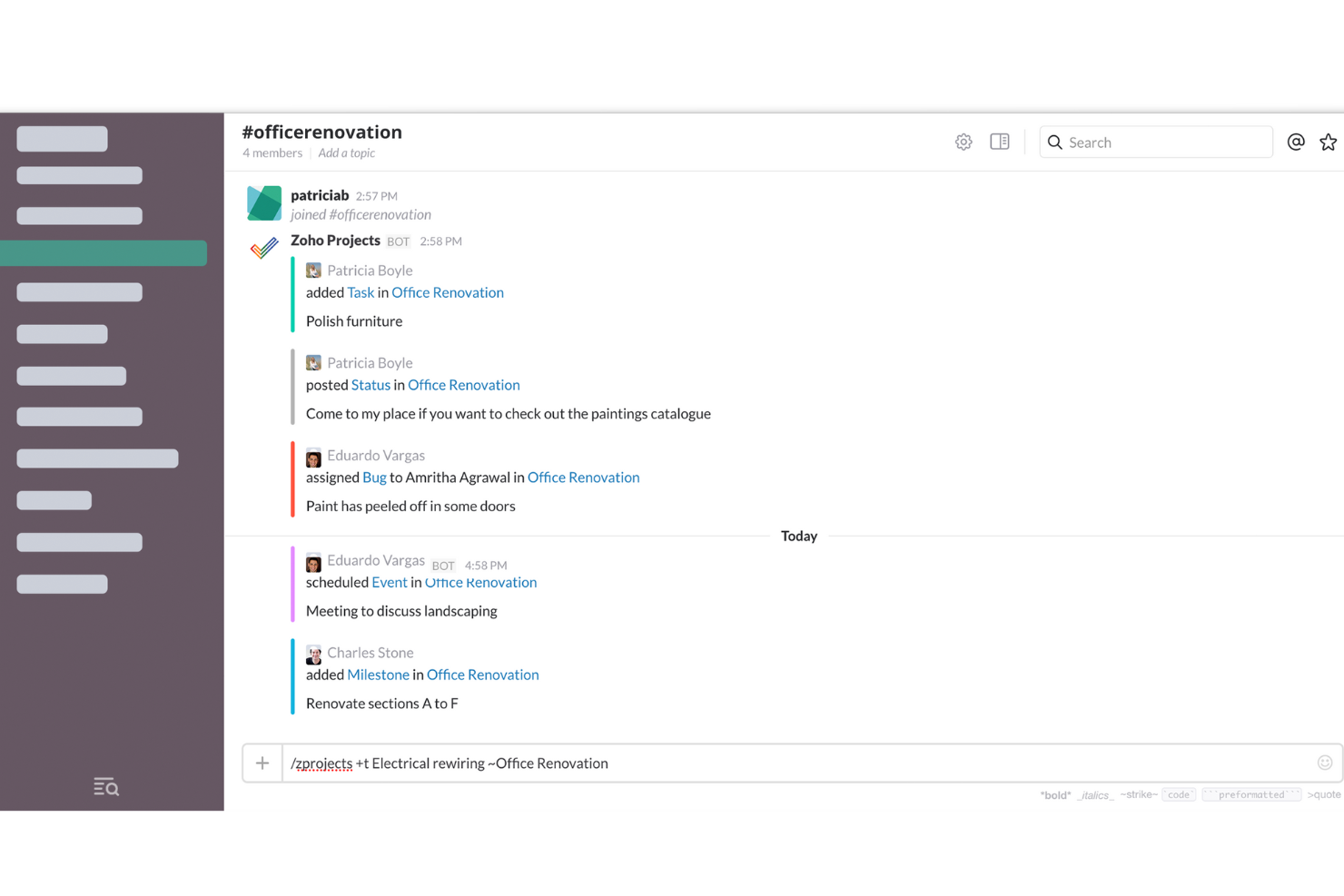
Zoho Projects è una piattaforma di gestione dei progetti che combina il monitoraggio delle attività, i diagrammi di Gantt, il rilevamento dei tempi, la gestione dei problemi e l'automazione dei flussi di lavoro con un'integrazione nativa con Slack per notifiche di progetto in tempo reale e creazione di task.
Per chi è ideale Zoho Projects?
Zoho Projects è particolarmente indicato per team di piccole e medie dimensioni che utilizzano già l'ecosistema Zoho e necessitano di una gestione strutturata dei progetti con automazione integrata.
Perché ho scelto Zoho Projects
Zoho Projects si guadagna un posto nella mia shortlist perché l'automazione dei flussi di lavoro va oltre i semplici trigger di base. Blueprint, il suo designer visuale di workflow, ti consente di mappare ogni fase di un processo di attività, assegnare responsabili delle transizioni, imporre aggiornamenti obbligatori dei campi prima che uno stato possa progredire e inviare automaticamente notifiche email ad ogni passaggio. Affiancato a regole aziendali e funzioni personalizzate, puoi automatizzare la maggior parte della logica di progetto del tuo team.
Funzionalità principali di Zoho Projects
- Diagrammi di Gantt: Visualizza le tempistiche di progetto, imposta le dipendenze tra le attività e regola i programmi con la riprogrammazione tramite drag-and-drop.
- Monitoraggio del tempo e fogli presenze: Registra ore fatturabili e non fatturabili direttamente sulle attività, con flussi di approvazione dei fogli presenze integrati.
- Tracker dei problemi: Crea, assegna e prioritizza bug o problematiche con livelli di gravità personalizzati, flussi di stato e date di scadenza.
- Notifiche Slack: Ricevi avvisi in tempo reale su Slack per assegnazioni di attività, commenti e completamento di milestone, mappati su canali specifici.
Pros and Cons
Pros:
- Workflow e campi personalizzabili per adattarsi a diverse esigenze aziendali
- L'integrazione con altre app Zoho aumenta la funzionalità
- Set di funzionalità completo inclusi monitoraggio del tempo e fatturazione
Cons:
- Integrazioni native limitate con terze parti al di fuori dell'ecosistema Zoho
- Le funzionalità dell'app mobile non sono robuste come la versione desktop
New Product Updates from Zoho Projects
Zoho Projects Adds CodeX Scripts for Custom Modules
Zoho Projects now supports CodeX Scripts for custom modules, enabling conditional logic and rules for creating, updating, and deleting records. For more information, visit Zoho Projects' official site.
 .
.
Ideale per integrazioni aziendali basate su API
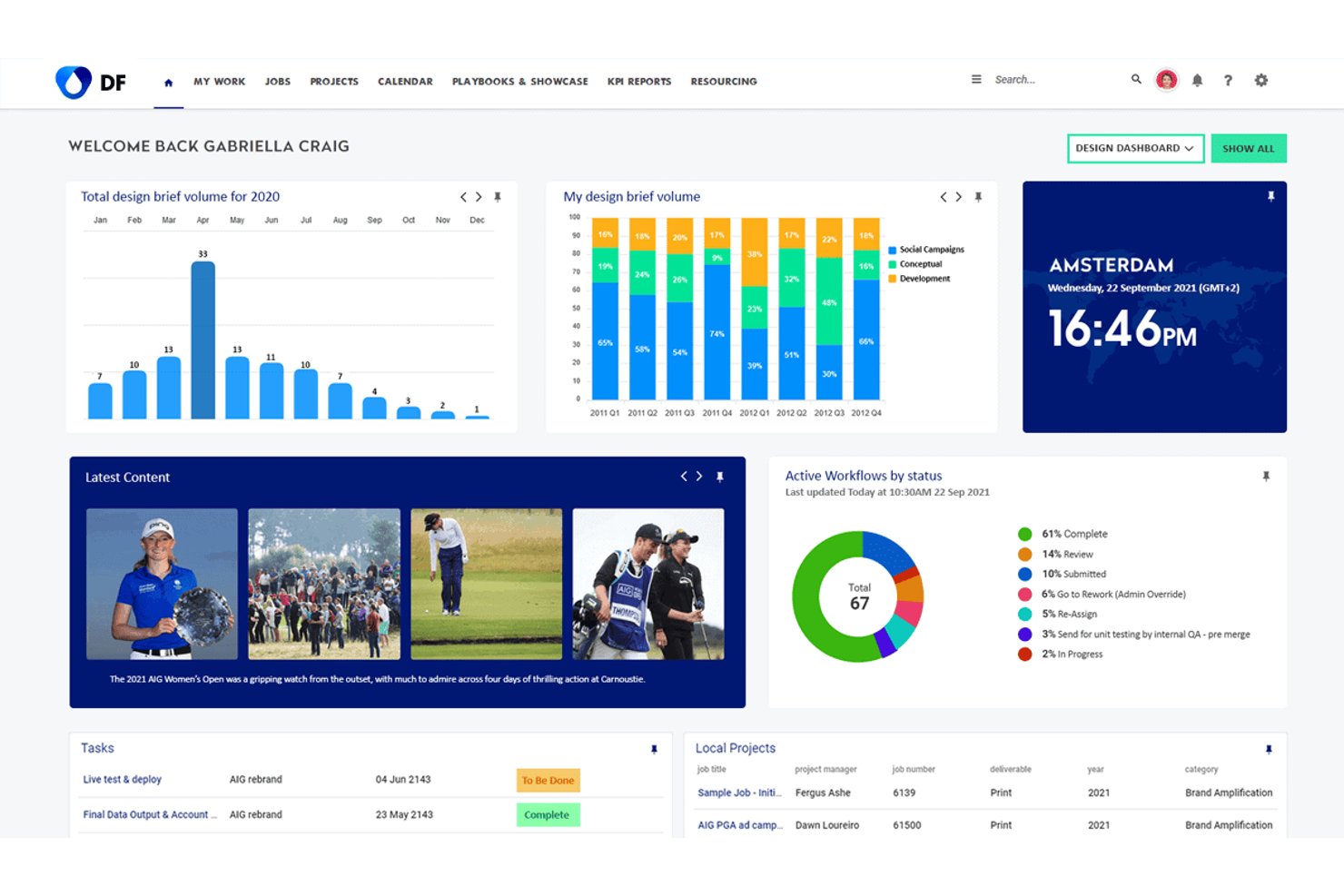
Screendragon è una piattaforma aziendale per la gestione dei flussi di lavoro e dei progetti, sviluppata per i team di marketing e creativi, che combina pianificazione dei progetti, gestione delle risorse, flussi di lavoro per le approvazioni e revisione visiva con un ampio livello di integrazione.
Per chi è più adatto Screendragon?
Screendragon è particolarmente adatto ai team di marketing e operazioni creative di aziende di medie e grandi dimensioni che gestiscono flussi di lavoro ad alto volume e con molteplici stakeholder all'interno di organizzazioni globali.
Perché ho scelto Screendragon
Ho scelto Screendragon perché il suo Gestore delle connessioni interno lo distingue realmente dai comuni strumenti di gestione dei progetti. Gestisce l'instradamento dinamico, la logica di ripetizione dei tentativi e di commutazione automatica in caso di errore e la trasformazione dei dati tra sistemi aziendali come SAP, Salesforce e Microsoft Dynamics 365. Il suo Connettore API universale consente al mio team di collegarsi a qualsiasi punto di accesso API disponibile, mentre l'integrazione nativa tramite webhook di Slack invia direttamente ai canali selezionati eventi configurabili relativi a progetti e flussi di lavoro.
Funzionalità principali di Screendragon
- Generatore di flussi di lavoro senza codice: Progetta e avvia flussi di lavoro personalizzati per i progetti utilizzando un editor visivo e modelli riutilizzabili.
- Motore per moduli dinamici: Raccogli dati iniziali sui progetti, indicazioni e richieste tramite moduli configurabili collegati alle fasi del flusso di lavoro.
- Revisione e approvazioni centralizzate: Esamina, annota e approva i file, incluso il confronto affiancato tra versioni, all'interno di un'interfaccia unificata.
- Pannelli di controllo per resoconti in tempo reale: Crea pannelli di controllo personalizzati e resoconti automatizzati su misura per monitorare le tappe fondamentali dei progetti e le risorse.
Integrazioni di Screendragon
Screendragon offre integrazioni native con Slack, SAP, Salesforce, Microsoft 365 e Adobe Creative Cloud. Sono inoltre disponibili un'API e un'integrazione con Zapier per flussi di lavoro personalizzati e ulteriori possibilità di connessione.
Pros and Cons
Pros:
- Notifiche webhook di Slack configurabili per progetto
- Instradamento delle approvazioni collegato direttamente alle fasi del flusso di lavoro
- Revisione visiva e annotazioni integrate nella piattaforma
Cons:
- La configurazione richiede un coinvolgimento significativo del reparto IT e degli amministratori
- Creazione di attività in Slack limitata rispetto ai concorrenti
New Product Updates from Screendragon
Screendragon Unveils New AI Hub
Screendragon introduced AI Hub, a new capability that lets teams build and manage AI agents directly within workflows. The update helps marketing teams automate tasks, maintain governance controls, and scale AI-driven operations more efficiently. For more information, visit Screendragon's official site.

Miro
Ideale per la gestione visiva dei progetti

Miro è una piattaforma di collaborazione visiva e gestione progetti che combina una canvas infinita con bacheche Kanban, diagrammi di Gantt, timeline e strumenti di collaborazione in tempo reale per il team.
Per chi è ideale Miro?
Miro è particolarmente adatto a team trasversali di prodotto, design e ingegneria che fanno affidamento sul pensiero visivo per pianificare e gestire progetti.
Perché ho scelto Miro
Miro si è guadagnato un posto nella mia lista perché il suo approccio a canvas infinito per la gestione dei progetti è davvero unico rispetto a qualsiasi altro strumento che abbia usato. Posso mappare il lancio completo di un prodotto—note adesive, diagrammi di flusso, bacheca Kanban e timeline—tutto in un unico spazio condiviso, il che consente al mio team di rimanere allineato senza cambiare tool. Apprezzo anche l’integrazione con Slack che mi permette di condividere link alle board in tempo reale e ricevere notifiche quando i colleghi commentano o aggiornano i task, così la canvas rimane attiva anche tra una riunione e l’altra.
Funzionalità principali di Miro
- Miro AI: Genera diagrammi, riassume i contenuti della board e costruisce mappe mentali direttamente da un prompt testuale.
- Libreria di template: Oltre 7.000 modelli preimpostati che coprono cerimonie Agile, retrospettive, pianificazione di progetti e sessioni di brainstorming.
- Strumenti di voto e stima: Funzionalità integrate di dot voting e planning poker per gestire sessioni di prioritizzazione e pianificazione sprint.
- Mappatura delle dipendenze: Permette di tracciare visivamente le linee di dipendenza tra task e milestone direttamente sulla board del progetto.
Pros and Cons
Pros:
- Offre funzionalità di collaborazione in tempo reale per team remoti
- Eccellente per brainstorming e ideazione
- Fornisce template personalizzabili
Cons:
- Mancano funzionalità avanzate di project management
- Curva di apprendimento ripida per alcuni utenti
New Product Updates from Miro
Miro Adds Japan Data Residency for Enterprise Customers
Miro has introduced Japan data residency for enterprise customers, offering in-region storage for production data, backups, and metadata, plus in-region compute infrastructure. For more information, visit Miro's official site.

ClickUp
Ideale per flussi di lavoro personalizzabili

ClickUp è una piattaforma di project management che riunisce attività, documenti, lavagne, sprint, dashboard, automazioni e intelligenza artificiale integrata in un unico workspace—con un'integrazione nativa con Slack che collega direttamente le attività di progetto ai canali Slack del tuo team.
Per chi è ideale ClickUp?
ClickUp è particolarmente adatto a team tecnologici e di prodotto di medie e grandi dimensioni che gestiscono progetti complessi con flussi di lavoro multipli e hanno bisogno di una piattaforma unica per sostituire diversi strumenti.
Perché ho scelto ClickUp
ClickUp è una delle mie scelte preferite perché adoro il livello di personalizzazione dei flussi di lavoro che offre. A differenza della maggior parte degli strumenti di project management che forniscono una serie fissa di stati e visualizzazioni, ClickUp ti permette di definire stati personalizzati per ogni Space o List in modo indipendente—così una lista ingegneristica basata su sprint e un calendario editoriale possono avere logiche di workflow differenti. Mi affido alle Automations per attivare notifiche Slack su cambi di stato o aggiornamenti degli assegnatari, mantenendo sempre informate le persone giuste senza la necessità di follow-up manuali.
Caratteristiche principali di ClickUp
- Visualizzazioni multiple: Passa da elenco, bacheca, Gantt, calendario e timeline all’interno dello stesso progetto senza duplicare il lavoro.
- Campi personalizzati: Aggiungi menu a tendina, numeri, date o formule a qualsiasi attività per registrare esattamente i dati che il tuo team monitora.
- ClickUp Docs: Crea e collega la documentazione del progetto direttamente alle attività, così il contesto rimane vicino al lavoro.
- Creazione attività da Slack: Trasforma qualsiasi messaggio Slack in un’attività ClickUp senza lasciare la conversazione.
Pros and Cons
Pros:
- Dashboard, etichette e stati personalizzabili
- Funzionalità collaborative all’interno della piattaforma
- Visualizzazioni multiple dei dati di progetto
Cons:
- L’ampia possibilità di personalizzazione può comportare una curva di apprendimento
- L’impostazione e la configurazione iniziali possono richiedere tempo
New Product Updates from ClickUp
ClickUp Adds Meetings Hub, Super Agent Templates, and ZoomInfo Integration
ClickUp adds a searchable Meetings Hub, new ways to clone and template Super Agents, and a ZoomInfo integration through the App Center. These updates improve meeting retrieval, agent reuse, and access to sales intelligence. For more information, visit ClickUp’s official site.

Workzone
Ideale per aggiornamenti di progetto in tempo reale
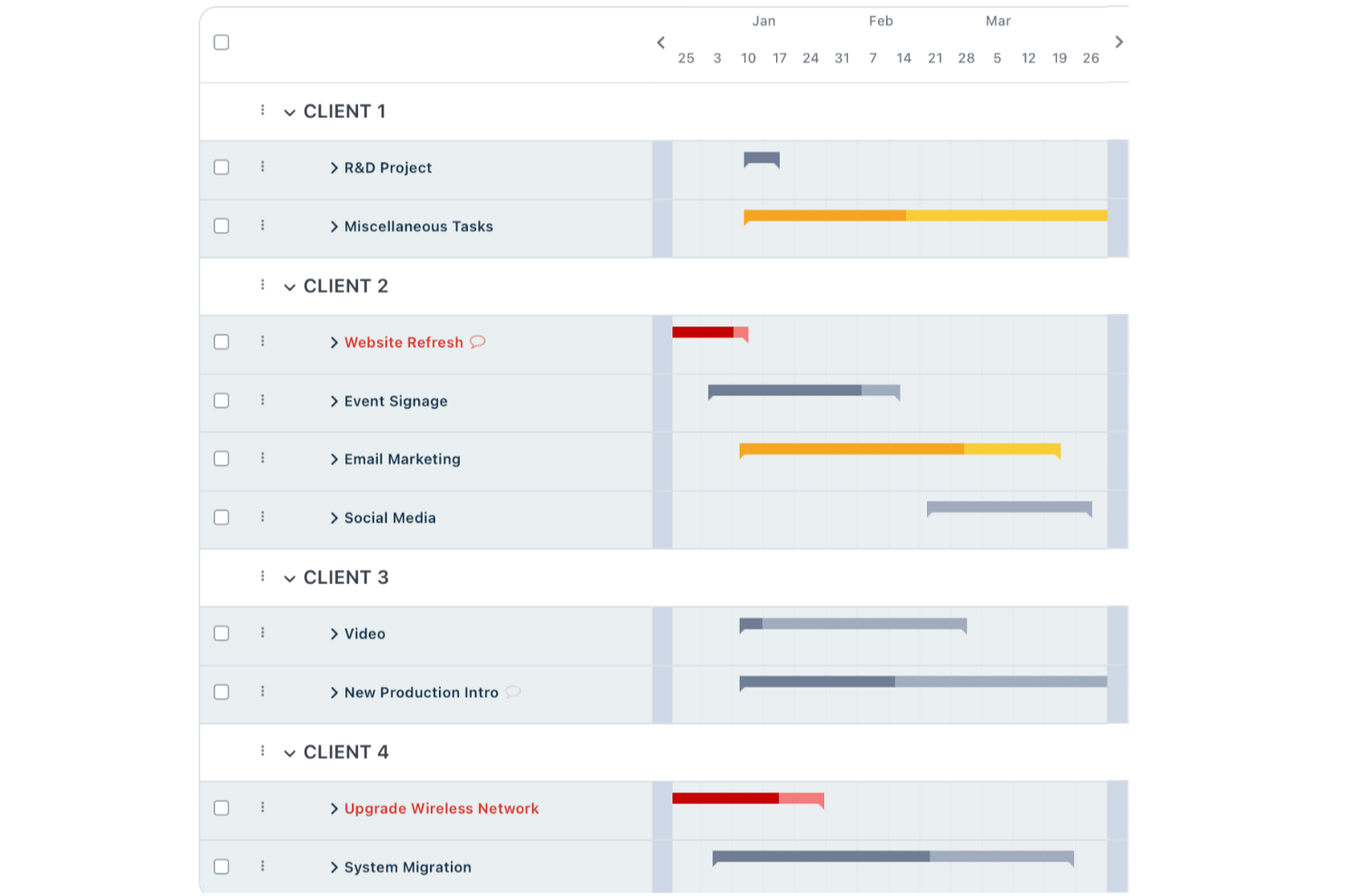
Workzone è una piattaforma di gestione dei progetti che copre il monitoraggio dal livello di portafoglio fino al singolo task, gestione del carico di lavoro, revisione creativa, raccolta delle richieste e collaborazione tra stakeholder—tutto in un unico posto.
Per chi è più indicato Workzone?
Workzone è particolarmente adatto a team di marketing, creativi e agenzie di medie dimensioni che gestiscono più progetti contemporaneamente coinvolgendo stakeholder trasversali.
Perché ho scelto Workzone
Workzone è una delle mie scelte preferite perché adoro il modo in cui i dashboard in tempo reale danno al mio team una visibilità immediata su ogni progetto attivo—non solo a livello di sintesi, ma fino allo stato del singolo task. Mi affido alla vista della gestione del carico di lavoro per individuare i gap di capacità prima che diventino ostacoli. I report dal livello portfolio a quello dei task mi permettono di ottenere un'istantanea in tempo reale della salute dei progetti in qualsiasi momento, senza dover aspettare che qualcuno aggiorni un foglio di calcolo.
Funzionalità principali di Workzone
- Revisione online: Annotazione di immagini, PDF e file creativi direttamente in Workzone con commenti contestuali collegati a specifici elementi di design.
- Moduli di raccolta richieste: Acquisisci e indirizza le richieste di progetto in arrivo tramite moduli personalizzabili che si integrano direttamente nella tua coda progetti.
- Dipendenze tra task: Collega i task in modo che il lavoro a valle si aggiorni automaticamente quando una scadenza a monte viene modificata.
- Template di progetto: Salva e riutilizza strutture di progetto per campagne ricorrenti o workflow, standardizzando la consegna.
Pros and Cons
Pros:
- Eccellente visibilità sui progetti in tempo reale
- Approvazione integrata dei documenti revisione
- Formazione illimitata e supporto dal vivo
Cons:
- Funzionalità avanzate di budgeting limitate
- Prezzo meno adatto a team di piccole dimensioni
New Product Updates from Workzone

Workzone Enterprise Adds Multi-Stage Approval Workflows
Workzone Enterprise now includes Approval Workflows, enabling multi-stage document approvals to standardize complex processes and reduce manual effort. For more information, visit Workzone's official site.
 .
.
Ideale per le agenzie
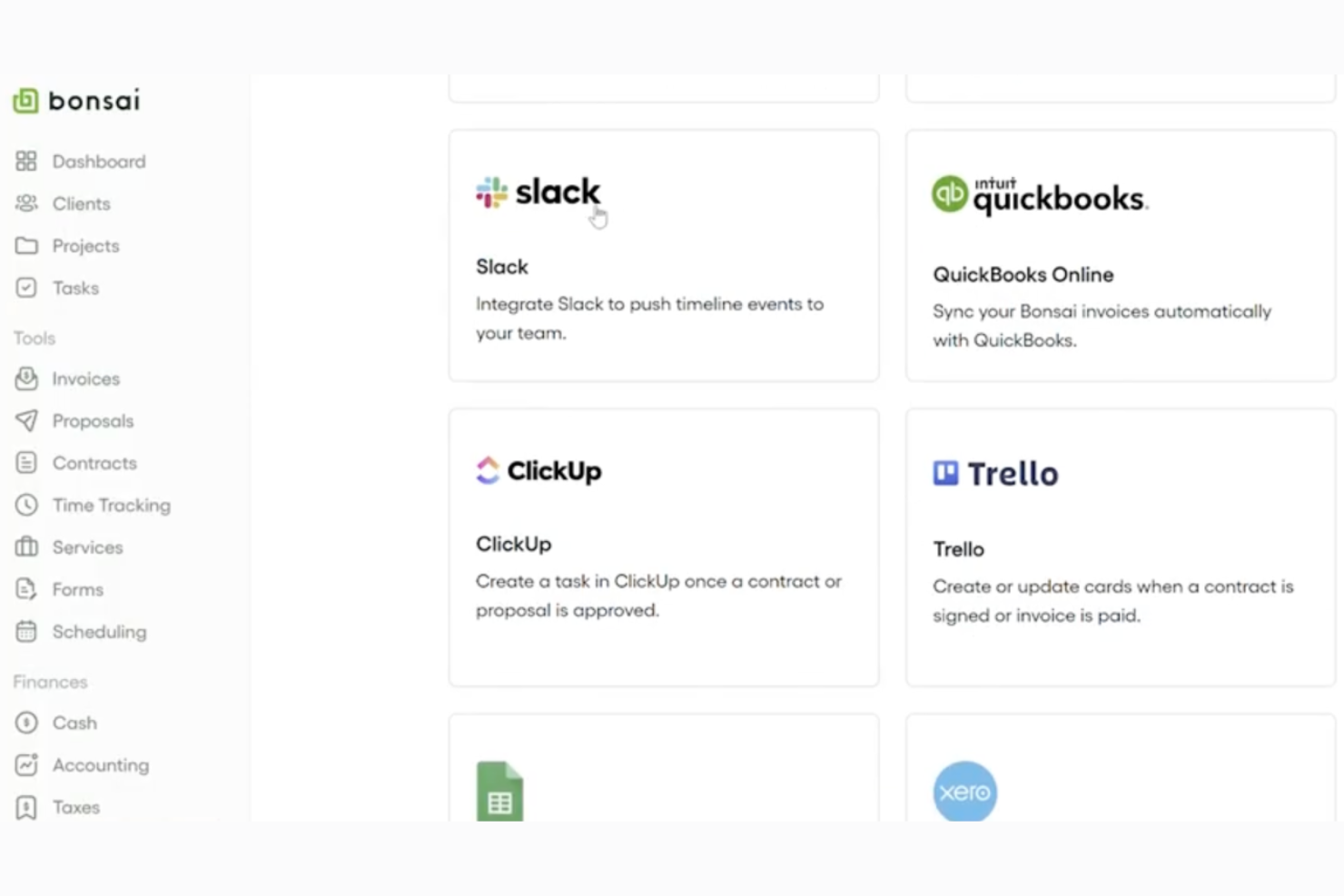
Bonsai Agency Software è una piattaforma di project management creata appositamente per le agenzie, che combina pianificazione delle risorse, monitoraggio delle attività, registrazione delle ore, controllo dei budget e gestione dei clienti in un unico luogo.
Per chi è ideale Bonsai Agency Software?
Bonsai Agency Software è adatto a piccole e medie agenzie creative e digitali che necessitano di gestire progetti, monitorare la capacità del team e controllare i budget dei clienti con un solo strumento.
Perché Bonsai Agency Software si distingue
Bonsai è uno dei pochi strumenti di project management sviluppati da zero per il reale funzionamento delle agenzie. Apprezzo particolarmente la visualizzazione in tempo reale della pianificazione della capacità, che tiene conto degli orari part-time e delle festività nell'assegnazione dei lavori al team. Anche il monitoraggio in tempo reale di budget e margini è davvero utile: posso vedere immediatamente la redditività di un progetto senza dover estrarre dati da un altro strumento.
Funzionalità principali di Bonsai Agency Software
- Più viste delle attività: Passa da board Kanban, diagrammi di Gantt e visualizzazioni calendario a seconda delle preferenze operative del team.
- Timer attività integrato: Registra le ore direttamente dalle attività e raccogli le voci in timesheet per la fatturazione ai clienti o la reportistica interna.
- Gestione delle assenze: Invia e approva richieste di ferie e giorni di malattia direttamente dalla piattaforma, mantenendo la pianificazione accurata.
- Timeline di progetto con drag-and-drop: Pianifica e modifica le prenotazioni dei progetti visivamente trascinando le attività sulla timeline.
Pros and Cons
Pros:
- Progettato specificamente per le agenzie
- Automazioni per semplificare le attività ripetitive
- Portali per i clienti disponibili
Cons:
- Non tutte le integrazioni sono incluse nel piano base
- Potrebbe non essere scalabile per tutti gli utilizzi

Ideale per il coordinamento del lavoro aziendale
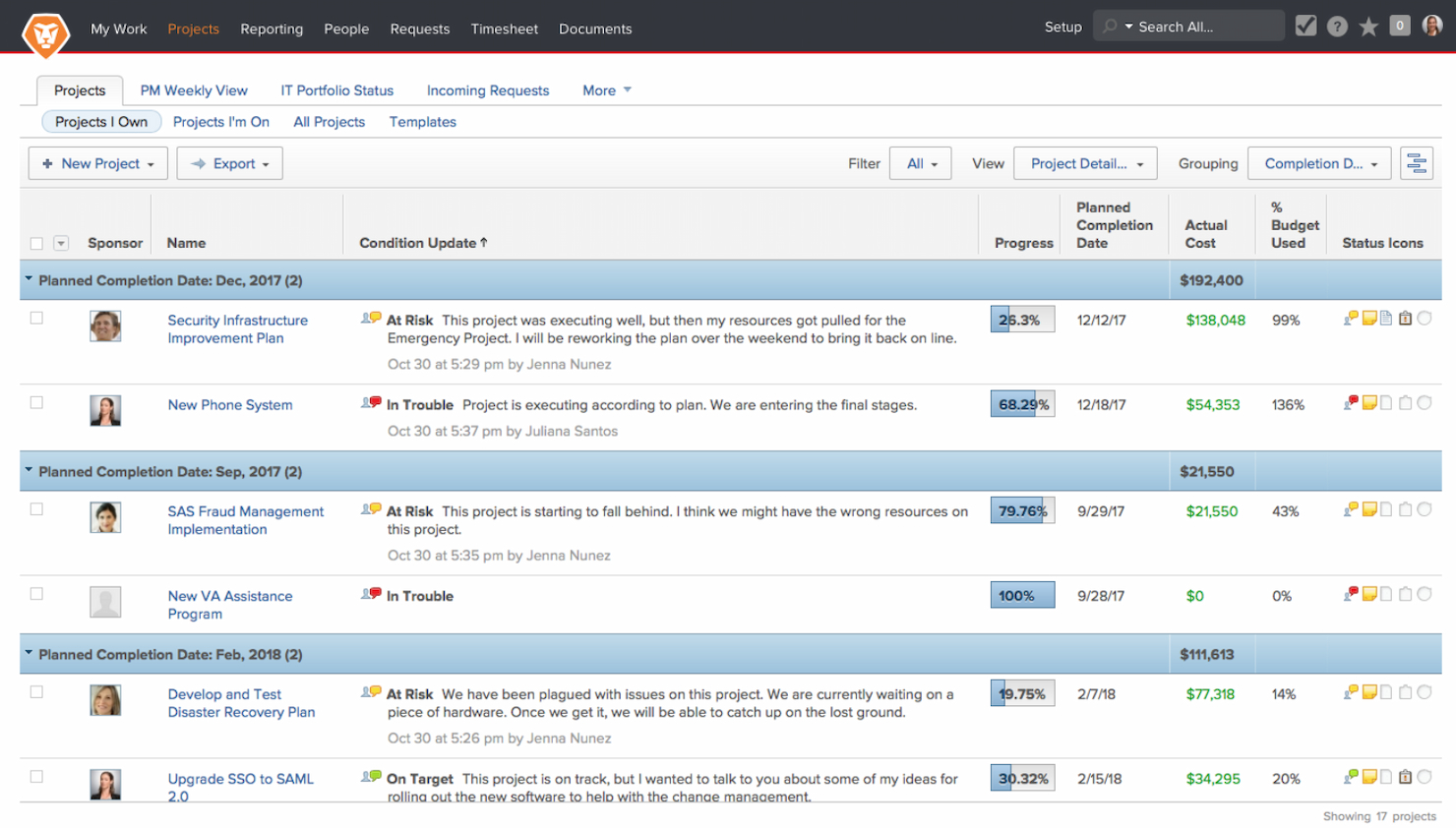
Adobe Workfront è una piattaforma per la gestione del lavoro aziendale che consente di aumentare l'efficienza e la produttività dell'organizzazione. È riconosciuta come la migliore per il coordinamento del lavoro a livello enterprise grazie alle sue funzionalità complete pensate per operazioni su larga scala.
Perché ho scelto Adobe Workfront: Adobe Workfront ha una straordinaria capacità di facilitare il coordinamento del lavoro aziendale. La sua suite di strumenti completa la distingue dagli altri software di project management, soprattutto in ambienti complessi e di grandi dimensioni. Offre inoltre tutte le funzionalità necessarie per gestire progetti e team estesi, garantendo l'allineamento con gli obiettivi strategici.
Funzionalità principali e integrazioni:
Le funzionalità includono gestione dei progetti, gestione delle risorse, gestione dei portafogli, rilevamento del tempo, automazione dei flussi di lavoro, reportistica e analisi in tempo reale, gestione della domanda, gestione dei documenti, scenario planning, revisione digitale, strumenti di collaborazione, integrazione con Adobe Creative Cloud e altri sistemi aziendali, oltre a dashboard personalizzabili.
Le integrazioni includono Slack, Adobe Creative Cloud, Microsoft Teams, Jira, Salesforce, ServiceNow, Workday, Google Workspace, Microsoft Office 365 e Zoom.
Pros and Cons
Pros:
- Capacità complete di gestione di progetti e risorse
- Personalizzabile per adattarsi a diversi flussi di lavoro aziendali
- Ampie opzioni di integrazione con altri strumenti aziendali
Cons:
- Soglia di costo elevata, soprattutto per i team più piccoli
- Può avere una curva di apprendimento ripida per i nuovi utenti
Ideale per la gestione dinamica dei progetti
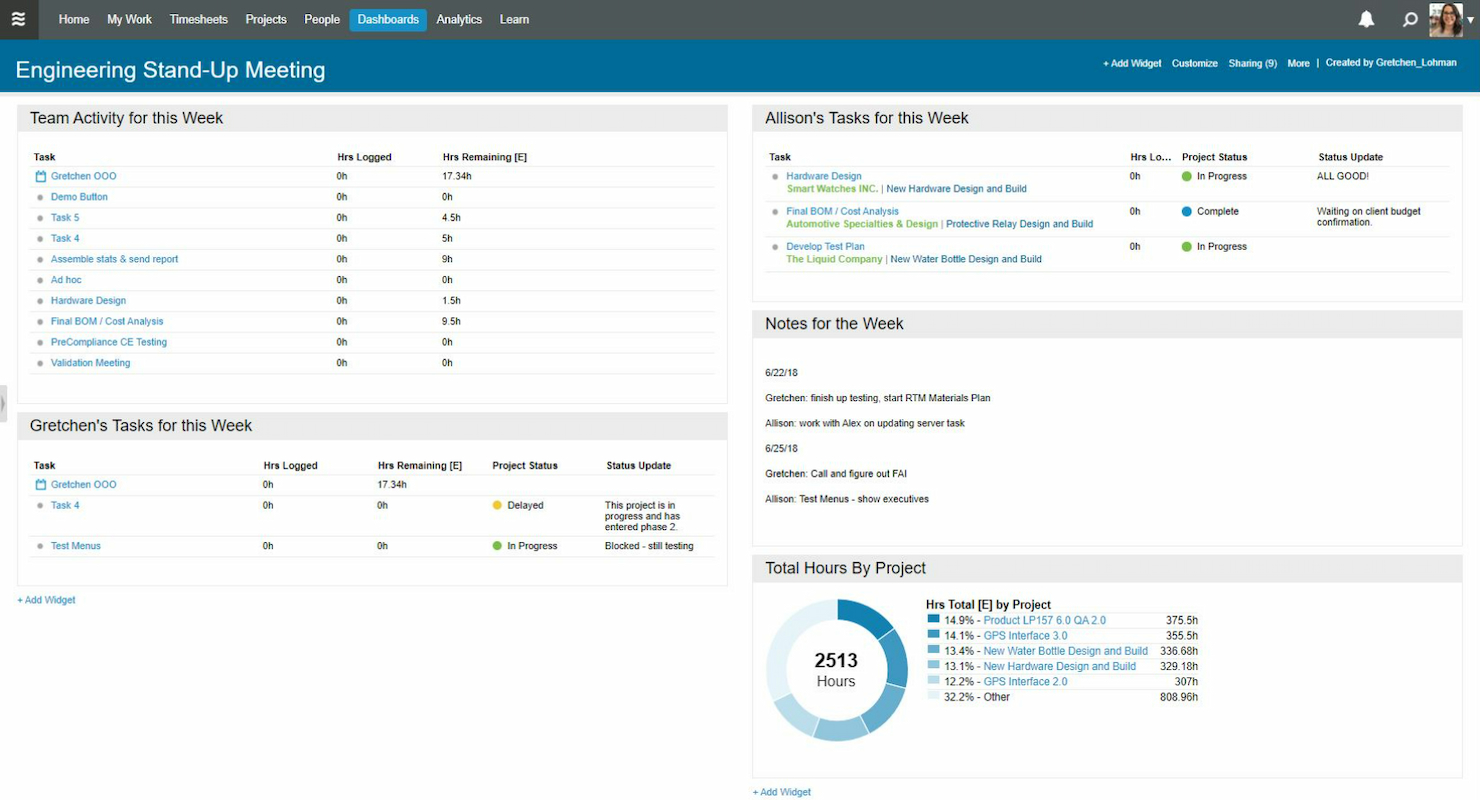
Tempo Portfolio Manager è una piattaforma di gestione progetti basata sulla pianificazione predittiva, che utilizza simulazioni Monte Carlo per prevedere le tempistiche dei progetti e bilanciare automaticamente i carichi di lavoro dei team su portafogli complessi e multi-progetto.
Per chi è più indicato Tempo Portfolio Manager?
È una soluzione particolarmente adatta per team tecnologici di medie e grandi dimensioni che gestiscono più progetti contemporaneamente, dove la concorrenza sulle risorse e le priorità mutevoli rendono la pianificazione accurata una sfida costante.
Perché ho scelto Tempo Portfolio Manager
Tempo Portfolio Manager si guadagna un posto tra i migliori nella mia selezione perché il suo motore di pianificazione predittiva non si limita a stimare le scadenze—modella l’incertezza. Utilizzando simulazioni Monte Carlo, calcola una gamma di possibili date di completamento in base alla reale capacità del team. Quando le priorità cambiano, la programmazione si riallinea automaticamente su ogni progetto attivo. Trovo la riprioritizzazione automatica particolarmente utile quando un ritardo rischia di propagarsi su più flussi di lavoro.
Funzionalità principali di Tempo Portfolio Manager
- Integrazione con Slack: Ricevi notifiche istantanee di aggiornamento delle attività direttamente nei canali Slack, così il tuo team può agire senza cambiare strumento.
- Visione dei carichi di lavoro: Visualizza la capacità del team su intervalli di 30, 60, 90 e 180 giorni per individuare colli di bottiglia prima che influenzino le consegne.
- Rilevamento ore integrato: Registra le ore direttamente sulle attività e sui progetti per confrontare lo sforzo stimato con il tempo effettivamente impiegato.
- Dashboard del portafoglio: Visualizza tutti i progetti attivi in un’unica dashboard, inclusi stato, priorità e intervalli di completamento previsti.
Pros and Cons
Pros:
- Avanzate capacità di pianificazione predittiva
- Regolazione flessibile e dinamica dei progetti
- Integrazione efficace con Slack per la comunicazione
Cons:
- Curva di apprendimento più ripida a causa delle funzionalità complesse
- Potrebbe essere eccessivo per piccoli progetti o team con ambiti di progetto stabili
Altri software di gestione dei progetti che si integrano con Slack
Di seguito trovi un elenco di altri software di gestione dei progetti che sono stati selezionati, ma che restano validi e meritano ulteriori approfondimenti.
- Trello
Ideale per la gestione visiva delle attività
- Notion
Ideale per un workspace tutto-in-uno
- Accelo
Ideale per la gestione delle aziende di servizi
- Workstreams
Ideale per l’integrazione col metodo Kanban
- Teamline
Ideale per la gestione delle attività su Slack
- Scrum Mate
Ideale per la collaborazione tra team agili
- GoodDay
Ideale per le visualizzazioni con diagrammi di Gantt
- Hub Planner by Milient
Ideale per la pianificazione delle risorse
- TaskRay
Ideale per team Salesforce che collaborano in Slack


Recensioni correlate di software di gestione dei progetti che si integrano con Slack
Se non hai ancora trovato quello che cerchi, dai un'occhiata a questi altri strumenti correlati che abbiamo testato e valutato:
- Software di gestione dei progetti
- Software di gestione delle risorse
- Software di automazione dei flussi di lavoro
- Software per il monitoraggio del tempo
- Software di gestione delle attività
- Strumenti di collaborazione
- Strumento per creare diagrammi di Gantt
- Strumenti per la produttività
- Software per il monitoraggio dei progetti
- Software per la pianificazione dei progetti
Come valuto il software di project management che si integra con Slack
Valuto questi strumenti su due livelli: l'integrazione Slack di base e le capacità di project management necessarie per entrare tra i candidati, e i fattori differenzianti che rendono uno strumento più raccomandabile di un altro.
Funzionalità di base (requisiti fondamentali per questa lista)
Quando seleziono gli strumenti per la mia lista, valuto ciascuno su una scala da 0 (non offre la funzionalità) a 5 (eccelle in quest'area) per ogni funzionalità di base elencata di seguito. Poi calcolo il punteggio totale dello strumento in percentuale. Ogni strumento deve raggiungere un punteggio totale minimo del 65% per essere considerato per l'inclusione.
- Integrazione nativa con Slack: Verifico se lo strumento dispone di un'app Slack ufficiale—non solo una soluzione tramite Zapier—e se supporta connessioni multi-workspace.
- Creazione di task da Slack: Cerco la possibilità di trasformare un messaggio Slack in un'attività assegnata con una data di scadenza, usando comandi slash o scorciatoie sui messaggi.
- Notifiche bidirezionali: La sincronizzazione in tempo reale e a due vie è fondamentale: le risposte in un thread Slack dovrebbero aggiornare la scheda attività, e i cambiamenti di stato dovrebbero essere pubblicati nel canale.
- Pianificazione e monitoraggio dei progetti: Valuto la profondità delle visualizzazioni PM disponibili, dai Kanban board e elenchi di attività alle timeline con dipendenze e monitoraggio delle milestone.
- Funzionalità di collaborazione del team: Workspace condivisi, commenti nei thread, allegati di file e menzioni @ che corrispondono alle identità Slack fanno tutti parte della valutazione di quest'area.
- Automazione dei workflow: Esamino se le regole di automazione possono utilizzare eventi Slack come trigger—ad esempio, la creazione automatica di un'attività quando un messaggio riceve una specifica reazione emoji.
Dopo aver creato una lista di strumenti che soddisfano questi criteri, considero cosa distingue ciascuna piattaforma.
Fattori differenzianti (cosa distingue i fornitori)
Ecco come confronto e metto a paragone i diversi fornitori:
Funzionalità di spicco
I workflow personalizzati di Slack sono un importante fattore distintivo: cerco strumenti che permettono ai team di attivare azioni di progetto tramite il Workflow Builder di Slack, come l'invio di un modulo di segnalazione bug che crea automaticamente un'attività tracciata. Anche le anteprime interattive dei link sono importanti. Quando qualcuno incolla un link a un'attività in un canale, le migliori integrazioni permettono di aggiornare lo stato o riassegnare direttamente dalla scheda di anteprima. Controllo inoltre la presenza di bot integrati per standup e approvazioni, che raccolgono aggiornamenti asincroni e gestiscono le approvazioni all'interno dei thread Slack.
Oltre le funzionalità
La scalabilità è una delle prime cose che valuto: una startup di cinque persone e un'organizzazione di 500 dipendenti su Slack Enterprise Grid hanno esigenze molto diverse per quanto riguarda il supporto multi-workspace e la reportistica di portafoglio. Considero anche quanto bene ogni strumento si integra con l'intero stack tecnologico, in particolare GitHub, Figma e Google Workspace, poiché i team che lavorano principalmente su Slack raramente utilizzano solo due strumenti. Anche la struttura dei prezzi è importante, in particolare il modo in cui i fornitori gestiscono gli account guest e i collaboratori per stakeholder esterni che necessitano visibilità sui progetti.
Come scegliere un software di gestione dei progetti che si integri con Slack
Mentre definisci il tuo processo personalizzato di selezione del software, tieni presenti i seguenti aspetti:
- Compatibilità con le integrazioni: Il software di gestione dei progetti dovrebbe offrire un'integrazione profonda con Slack, consentendo di centralizzare le comunicazioni e trasformare i messaggi di Slack in attività operative.
- Efficienza delle notifiche: Cerca un software che fornisca notifiche all'interno di Slack in modo da favorire un'azione tempestiva e ridurre al minimo il rischio di perdere aggiornamenti critici.
- Semplicità nel coordinamento: L'integrazione dovrebbe semplificare, non complicare, le operazioni del tuo team. Dovrebbe facilitare il coordinamento delle attività, l'impostazione delle scadenze e la comunicazione del team direttamente all'interno di Slack.
- Funzionalità di condivisione dei file: Il software di gestione dei progetti dovrebbe sfruttare le funzionalità di condivisione dei file di Slack, consentendo ai membri del team di condividere e accedere ai file direttamente all'interno della piattaforma di chat. Questo è particolarmente importante per i team che utilizzano diversi sistemi di gestione dei file e hanno bisogno di un modo unificato per condividere i documenti.
- Reportistica e supervisione: Scegli un software che migliori i processi di reportistica attraverso l'integrazione con Slack. Ciò potrebbe significare consentire ai membri del team di pubblicare aggiornamenti in un canale Slack, migliorando la supervisione e riducendo la necessità di lunghe conversazioni via e-mail.
Concentrandosi su queste aree chiave, gli acquirenti di software possono trovare una soluzione di gestione dei progetti che non solo si integri con Slack, ma che soddisfi anche le loro esigenze specifiche e migliori l'efficienza complessiva del team.
Tendenze nei software di gestione dei progetti che si integrano con Slack
Ecco alcune tendenze che ho notato nei software di gestione dei progetti, oltre a ciò che potrebbero significare per il futuro del settore del marketing:
- Maggiore attenzione agli strumenti di collaborazione in tempo reale: I software di gestione dei progetti integrano sempre più funzionalità di collaborazione in tempo reale. L'evoluzione verso strumenti di comunicazione più interattivi e integrati aiuta i team di progetto a rimanere allineati e a reagire rapidamente ai cambiamenti, migliorando la produttività complessiva.
- Diffusione dell'IA e dell'automazione: L'integrazione dell'intelligenza artificiale (AI) negli strumenti di gestione dei progetti si sta evolvendo rapidamente. Queste funzionalità non solo fanno risparmiare tempo, ma aumentano anche la precisione e consentono di prevedere i potenziali colli di bottiglia di un progetto prima che si verifichino.
- Analisi dei dati e reportistica avanzate: I responsabili di progetto si affidano sempre più a potenti strumenti di visualizzazione dei dati e di reportistica per monitorare le prestazioni, allocare le risorse in modo efficiente e prendere decisioni informate. Le versioni più recenti dei software sono dotate di pannelli di controllo che forniscono informazioni complete sullo stato del progetto, sulle prestazioni del team e sul rispetto del budget, aspetti fondamentali per gestire efficacemente progetti su larga scala.
- Attenzione all'esperienza utente e alla personalizzazione: Con la crescente diversità degli utenti dei software di gestione dei progetti, aumenta la domanda di interfacce altamente personalizzabili e facili da usare. Questa flessibilità consente ai team di configurare il proprio ambiente di gestione dei progetti esattamente secondo le proprie esigenze, migliorando i tassi di adozione e la soddisfazione complessiva.
- Declino degli approcci rigidi e lineari alla gestione dei progetti: Le metodologie tradizionali e lineari di gestione dei progetti stanno diventando meno popolari, a favore di metodologie più flessibili e agili. Questo cambiamento si riflette nello sviluppo di funzionalità che supportano i processi iterativi, come le bacheche Kanban e gli sprint Scrum, integrate direttamente negli strumenti di gestione dei progetti.
Queste tendenze evidenziano un movimento più ampio verso soluzioni di gestione dei progetti maggiormente integrate, intelligenti e incentrate sull'utente. Con l'evoluzione di questi strumenti, continuano a risolvere le complesse sfide affrontate dai responsabili di progetto, in particolare da quelli che gestiscono team distribuiti e più progetti simultanei.
Che cos'è un software di gestione dei progetti che si integra con Slack?
Il software di gestione dei progetti che si integra con Slack combina la capacità organizzativa del software di gestione dei progetti con i diversi strumenti di comunicazione di Slack. Investendo in un software di gestione dei progetti che si integra con Slack, il tuo team può ricevere aggiornamenti istantanei sulle attività e sull'avanzamento dei progetti in tempo reale.
Funzionalità dei software di gestione dei progetti che si integrano con Slack
La scelta del software migliore implica riconoscere in che modo determinate funzionalità contribuiscano alla corretta esecuzione dei progetti. Qui individuo le funzionalità più importanti da cercare quando si è alla ricerca di un software di gestione dei progetti che risponda alle proprie esigenze specifiche:
- Notifiche in tempo reale: questa funzionalità garantisce che i membri del team siano informati direttamente in Slack sulle modifiche, sulle attività e sulle scadenze più recenti, promuovendo una cultura della reattività tempestiva.
- Gestione delle attività: gestendo le attività tramite Slack, i membri del team possono assegnarle, monitorarle e aggiornarne rapidamente lo stato, assicurandosi che nulla venga trascurato.
- Condivisione dei file e collaborazione: ciò consente di accedere facilmente ai file dei progetti all'interno di Slack, permettendo ai membri del team di collaborare sui documenti senza dover passare da un'applicazione all'altra.
- Monitoraggio del tempo: integrare il monitoraggio del tempo in Slack contribuisce a mantenere trasparenza e responsabilità, consentendo una gestione più efficace del tempo dedicato ai progetti.
- Sincronizzazione dei calendari: la possibilità di sincronizzare i calendari con Slack garantisce che tutti i membri del team siano consapevoli delle date importanti e delle scadenze, favorendo una pianificazione efficace.
- Flussi di lavoro personalizzabili: i flussi di lavoro personalizzabili all'interno di Slack consentono ai team di creare un sistema che risponda al meglio ai requisiti specifici del proprio progetto.
- Strumenti di reportistica: con gli strumenti di reportistica integrati in Slack, i team possono generare e condividere rapidamente report per valutare i progressi e prendere decisioni basate sui dati.
- Integrazione con altri strumenti: questa funzionalità consente di creare un ecosistema tecnologico più coeso, riducendo la necessità di utilizzare più piattaforme e semplificando la gestione dei progetti.
- Promemoria automatici: i promemoria automatici inviati tramite Slack aiutano a mantenere i membri del team concentrati sulle proprie responsabilità.
- Autorizzazioni degli utenti e sicurezza: gestendo le autorizzazioni degli utenti all'interno di Slack, i responsabili dei progetti possono garantire che le informazioni sensibili siano protette e accessibili solo al personale autorizzato.
Queste funzionalità creano una potente sinergia tra le piattaforme di gestione dei progetti e quelle di comunicazione, portando a un'esecuzione più efficiente dei progetti.
Vantaggi dei software di gestione dei progetti integrati con Slack
L'integrazione dei software di gestione dei progetti con Slack offre una potente sinergia in grado di aumentare la produttività e l'efficienza di qualsiasi team. Per le organizzazioni che stanno valutando una soluzione di questo tipo, comprendere i vantaggi specifici può aiutare a prendere una decisione informata. Ecco alcuni dei principali vantaggi da considerare:
- Comunicazione centralizzata: questa integrazione centralizza la comunicazione, rendendo più facile per i membri del team rimanere connessi e informati. Disponendo delle discussioni e degli aggiornamenti sui progetti in Slack, i team possono evitare la frammentazione spesso causata dall'uso di più piattaforme di comunicazione.
- Notifiche in tempo reale: il sistema di notifiche in tempo reale di Slack garantisce che tutti siano informati sulle modifiche più recenti e possano reagire rapidamente alle nuove attività o informazioni.
- Maggiore produttività: la combinazione degli strumenti di gestione dei progetti con le funzionalità di comunicazione di Slack può portare a un aumento significativo della produttività. Semplifica i flussi di lavoro consentendo ai membri del team di comunicare e gestire le attività senza dover passare da un'applicazione all'altra.
- Organizzazione delle attività: l'integrazione con Slack contribuisce a garantire che tutte le attività siano registrate e che i membri del team comprendano chiaramente le proprie responsabilità e scadenze.
- Condivisione semplificata dei file: Slack facilita l'accesso ai file e alle informazioni sui progetti. L'integrazione consente agli utenti di condividere, consultare e modificare collaborativamente i file archiviati in vari servizi cloud senza uscire dall'ambiente Slack.
Di conseguenza, i software di gestione dei progetti integrati con Slack favoriscono una migliore collaborazione e offrono un approccio strutturato alla gestione dei progetti. In definitiva, ciò può rappresentare una svolta per le aziende che puntano a migliorare l'efficienza operativa e le dinamiche del team.
Costi e prezzi dei software di gestione dei progetti integrati con Slack
I prezzi e le opzioni dei piani per i software di gestione dei progetti variano notevolmente, a seconda delle funzionalità e della scalabilità richieste. Comprendere queste opzioni ti aiuterà a prendere una decisione informata, in linea con le esigenze del tuo team e i vincoli di budget.
Di seguito è riportata una panoramica delle strutture tariffarie più comuni e di ciò che generalmente includono.
Tabella comparativa dei piani per i software di gestione dei progetti integrati con Slack
| Tipo di piano | Prezzo medio | Funzionalità comuni |
| Gratuito | $0 | Gestione di base delle attività, integrazioni limitate e limiti minimi per gli utenti |
| Base | $5 - $10/utente/mese | Gestione avanzata delle attività, integrazioni aggiuntive e alcune funzioni di automazione |
| Standard | $10 - $25/utente/mese | Strumenti completi per la pianificazione dei progetti, integrazioni avanzate, automazione più completa e funzionalità di reportistica |
| Premium | $25 - $50/utente/mese | Tutte le funzionalità del piano Standard, oltre alla gestione delle risorse, analisi avanzate e assistenza prioritaria |
| Enterprise | Prezzo personalizzato | Tutte le funzionalità del piano Premium, oltre a integrazioni personalizzate, utenti illimitati e sicurezza e assistenza di livello aziendale |
Quando scegli un piano, considera sia le esigenze attuali sia quelle previste, per assicurarti che il software possa crescere insieme alla tua attività. Assicurati di cercare piani che bilancino funzionalità e convenienza economica, così da massimizzare il valore del tuo investimento.
Domande frequenti sui software di gestione dei progetti che si integrano con Slack
È possibile creare problemi Jira da Slack?
Grazie all’integrazione di Jira con Slack, gli utenti possono effettivamente creare nuovi problemi Jira direttamente dai messaggi Slack. Inoltre, gli utenti possono modificare lo stato dei problemi, aggiungere commenti e ricevere notifiche sugli aggiornamenti dei problemi in Slack. Questa integrazione contribuisce a mantenere un flusso di lavoro fluido tra il monitoraggio dei problemi e la comunicazione del team.
monday.com offre integrazioni specifiche con Slack?
L’integrazione di monday.com con Slack consente agli utenti di ricevere aggiornamenti, creare nuovi elementi, modificare gli stati e condividere bacheche all’interno di Slack. Questa integrazione aiuta i team a collaborare in modo più efficace, portando gli aggiornamenti in tempo reale da monday.com nell’area di lavoro Slack e garantendo che tutti siano aggiornati.
Come si può utilizzare ClickUp all'interno di Slack?
ClickUp si integra con Slack per consentire agli utenti di creare attività, allegare messaggi Slack alle attività e ricevere notifiche personalizzabili. L’integrazione permette inoltre agli utenti di modificare gli stati e le priorità delle attività direttamente da Slack, semplificando la gestione dei flussi di lavoro dei progetti senza dover uscire dall’interfaccia della chat.
Quali funzionalità offre l'integrazione di Wrike con Slack?
L’integrazione di Wrike con Slack consente agli utenti di creare attività Wrike dai messaggi Slack, ricevere notifiche sugli aggiornamenti delle attività e importare le conversazioni Slack in Wrike come commenti sulle attività. Questa integrazione è progettata per facilitare un’esperienza più coerente di gestione del lavoro, collegando le piattaforme di comunicazione e gestione delle attività.
È possibile collegare Smartsheet a Slack per la gestione dei progetti?
Sì, Smartsheet può essere collegato a Slack, consentendo agli utenti di ricevere notifiche sulle modifiche ai fogli, richiedere aggiornamenti e condividere fogli all’interno di Slack. Questa integrazione aiuta i team a rimanere informati sull’avanzamento dei progetti e a collaborare sui documenti Smartsheet senza dover passare da un’applicazione all’altra.
Come scegliere un software di gestione dei progetti che si integri con Slack
Mentre affronti il tuo esclusivo processo di selezione del software, tieni presenti i seguenti punti:
-
- Compatibilità dell’integrazione: il software di gestione dei progetti dovrebbe offrire un’integrazione approfondita con Slack, consentendo di centralizzare le comunicazioni e di trasformare i messaggi Slack in elementi operativi.
-
- Efficienza delle notifiche: cerca un software che invii notifiche all’interno di Slack in modo da favorire un’azione tempestiva e ridurre al minimo il rischio di perdere aggiornamenti fondamentali.
-
- Semplicità nel coordinamento: l’integrazione dovrebbe semplificare, non complicare, le attività del tuo team. Dovrebbe facilitare il coordinamento delle attività, l’impostazione delle scadenze e la comunicazione del team direttamente all’interno di Slack.
-
- Funzionalità di condivisione dei file: il software di gestione dei progetti dovrebbe sfruttare le funzionalità di condivisione dei file di Slack, consentendo ai membri del team di condividere e accedere ai file direttamente all’interno della piattaforma di chat. Questo è particolarmente importante per i team che utilizzano diversi sistemi di gestione dei file e hanno bisogno di un modo coerente per condividere i documenti.
-
- Report e supervisione: scegli un software che migliori i processi di reportistica attraverso l’integrazione con Slack. Ciò potrebbe significare consentire ai membri del team di pubblicare aggiornamenti in un canale Slack, migliorando la supervisione e riducendo la necessità di lunghe conversazioni via e-mail.
Concentrandosi su queste aree chiave, gli acquirenti di software possono trovare una soluzione di gestione dei progetti che non solo si integri con Slack, ma soddisfi anche le loro esigenze specifiche e migliori l’efficienza complessiva del team.