10 migliori software di gestione dei progetti per startup nel 2026

10 Elenco dei migliori software di gestione dei progetti per startup


Il miglior software di gestione dei progetti per startup aiuta i fondatori e i piccoli team a gestire scadenze, budget, risultati e collaborazione, mantenendo la concentrazione sulla costruzione e sulla crescita dell'azienda. Senza lo strumento giusto, dovrai affrontare l'ampliamento incontrollato dell'ambito, le scadenze non rispettate e le interruzioni della comunicazione causate da fogli di calcolo sparsi, lunghe conversazioni email disordinate e strumenti non integrati.
Il software giusto ti aiuta a stabilire le priorità delle attività, allocare le risorse, gestire i clienti e semplificare la raccolta dei feedback, anche con una capacità del team limitata. Ho utilizzato i miei oltre 20 anni di esperienza come project manager e fondatore di startup per testare direttamente questi strumenti e raccogliere i migliori software di gestione dei progetti per startup, così puoi trovare la soluzione più adatta per mantenere la tua azienda, il tuo team e i tuoi progetti sulla buona strada.
Perché fidarsi dei nostri consigli sui software
Il nostro team testa e recensisce software dal 2012. In quanto project manager noi stessi, sappiamo quanto sia difficile — e importante — scegliere il software giusto.
Per questa guida, abbiamo valutato gli strumenti attraverso test pratici e ricerche indipendenti, assegnando un punteggio agli strumenti in base ai nostri criteri di selezione. Ci basiamo inoltre sulle competenze di leader di pensiero del settore e di professionisti attivi nella gestione dei progetti.
Le nostre recensioni riflettono il nostro giudizio editoriale umano, non un discorso di vendita.
Revisori esperti:
Tabella comparativa dei software di gestione dei progetti per startup
Questa tabella comparativa riassume i dettagli dei prezzi per le mie migliori selezioni di software di gestione dei progetti per startup:
| Tool | Best For | Trial Info | Price | ||
|---|---|---|---|---|---|
| 1 | Ideale per team creativi e collaborativi | 14 giorni di prova gratuita | Da $6/utente/mese | Website | |
| 2 | Ideale per la scalabilità | Prova gratuita di 10 giorni | Da $4/utente/mese con fatturazione annuale. Disponibile anche una versione gratuita fino a 3 utenti per 2 progetti | Website | |
| 3 | Ideale per la suddivisione infinita delle attività nidificate | Prova gratuita di 30 giorni + piano gratuito disponibile | A partire da $7.65/utente/mese (fatturato annualmente) | Website | |
| 4 | Ideale per lavagne collaborative e visualizzazioni | Piano gratuito disponibile | Da $8/utente/mese | Website | |
| 5 | Ideale per una soluzione flessibile e personalizzabile | Piano gratuito disponibile | A partire da $3/editor/mese (fatturazione annuale) | Website | |
| 6 | Ideale per brainstorming, ideazione e gestione delle attività in un'unica soluzione | Prova gratuita + piano gratuito + demo gratuita disponibili | Da $13/utente/mese (fatturato annualmente) | Website | |
| 7 | Ideale per team che desiderano uno strumento completo a basso costo | ClickUp è gratuito con spazio di archiviazione limitato per un numero illimitato di utenti | Da $7/utente/mese (fatturato annualmente) | Website | |
| 8 | Migliore app mobile | Periodo di prova gratuita di 14 giorni | Da 1.49/mese/utente | Website | |
| 9 | Ideale per modelli di flusso di lavoro versatili | Piano gratuito + demo gratuita disponibile | Da $3.99/postazione/mese (fatturazione annuale) | Website | |
| 10 | Ideale per le bacheche Kanban | Prova gratuita di 14 giorni | Da $5/utente/mese | Website |


Panoramica dei migliori software di gestione dei progetti per startup
Ecco una breve descrizione di ciascuna delle mie scelte tra i migliori strumenti di gestione dei progetti per aziende startup, con schermate, principali casi d’uso e funzionalità chiave.

Ideale per team creativi e collaborativi
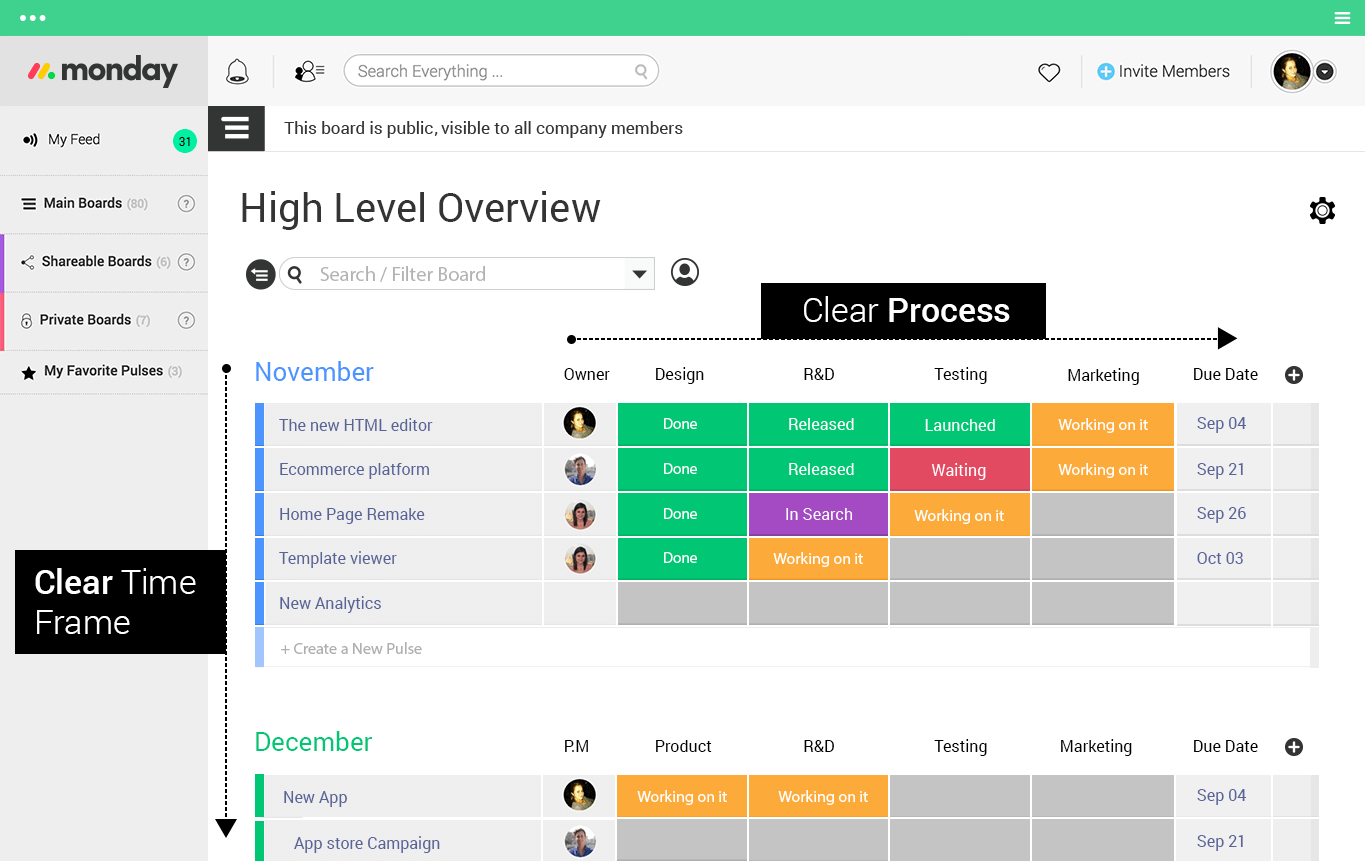
monday.com può sembrare il software di project management più popolare utilizzato oggi dai grandi del settore. Anche se questo è in gran parte vero, monday.com è anche uno degli strumenti più utili che i team di startup dovrebbero considerare di implementare fin da subito per poter un giorno raggiungere i grandi player. In più, monday.com è facile da configurare e sappiamo quanto sia importante restare in pista su tutti i progetti durante la crescita.
monday.com sa quanto sia fondamentale la collaborazione per i team creativi, quindi permette di connettersi in diversi modi senza mai lasciare la piattaforma: commentare, allegare file, menzionare tramite @, mettere 'mi piace' ai post e assegnare compiti con facilità tramite un semplice click. Puoi anche creare dashboard e lavagne progetto specifiche per il team, così che tutti possano vedere facilmente su cosa si sta lavorando.
monday.com si integra con gli strumenti che già conosci e ami, rendendo il passaggio per il tuo team startup senza problemi. Le integrazioni includono app di project management come Slack, Google Drive, Gmail, Google Calendar, Jira, GitHub, Trello, Dropbox, Typeform e molte altre, accessibili tramite un piano a pagamento con Zapier.
Pros and Cons
Pros:
- Può essere personalizzato per qualsiasi flusso di lavoro
- Modelli versatili per diversi progetti
- Ottime funzionalità di collaborazione
Cons:
- L’esperienza su app mobile può risultare meno intuitiva
- Ogni piano limita il numero di automazioni
New Product Updates from monday AI Workspace
monday AI Workspace Adds Human Approval Routing
monday AI Workspace adds a human-in-the-loop approval block to AI Workflows, sending approval requests and routing workflow paths based on responses. For more information, visit monday AI Workspace's official site.

Ideale per la scalabilità

Zoho Projects è uno strumento di gestione dei progetti online che permette ai team di pianificare, monitorare e collaborare sulle attività di progetto. Lo strumento è scalabile per startup e piccole imprese.
Zoho Projects consente agli utenti di configurare piani di progetto, oltre a creare e assegnare attività ad hoc tra i membri del team. Lo strumento include anche funzionalità come orari di lavoro flessibili, linee di base e percorsi critici nei diagrammi di Gantt, assegnazione del lavoro basata sul team e promemoria delle attività. Le funzionalità di monitoraggio del tempo e analisi dell’utilizzo delle risorse aiutano i manager a garantire che i dipendenti non siano sovraccarichi o sottoutilizzati.
Gli utenti possono automatizzare transizioni e flussi di lavoro delle attività, monitorare attività e progresso grazie a report avanzati, e gestire i budget con le funzionalità per la gestione delle spese. Gli strumenti di collaborazione includono gestione delle discussioni a livello di team e individuale, una scheda riunioni per facilitare gli incontri virtuali, un feed sociale per interagire e tenere traccia di tutte le attività di progetto, un forum per discutere idee e soluzioni e un modulo centrale di gestione documentale per organizzare tutte le informazioni. Sono disponibili anche applicazioni mobili.
Zoho Projects offre diverse integrazioni con app Zoho come Zoho CRM, Zoho Cliq, Zoho Meeting, oltre che con altre app di terze parti come Microsoft Office 365, Microsoft Teams, Google Drive, Zapier, Zendesk e ServiceNow.
Pros and Cons
Pros:
- Automazioni dei flussi di lavoro semplici
- Integrazione senza soluzione di continuità con altre app Zoho
- Strumenti completi per il monitoraggio dei progetti
Cons:
- Mancano alcune funzionalità di reportistica
- Non si integra con Quickbooks
New Product Updates from Zoho Projects
Zoho Projects Adds CodeX Scripts for Custom Modules
Zoho Projects now supports CodeX Scripts for custom modules, enabling conditional logic and rules for creating, updating, and deleting records. For more information, visit Zoho Projects' official site.
 .
.
Quire
Ideale per la suddivisione infinita delle attività nidificate
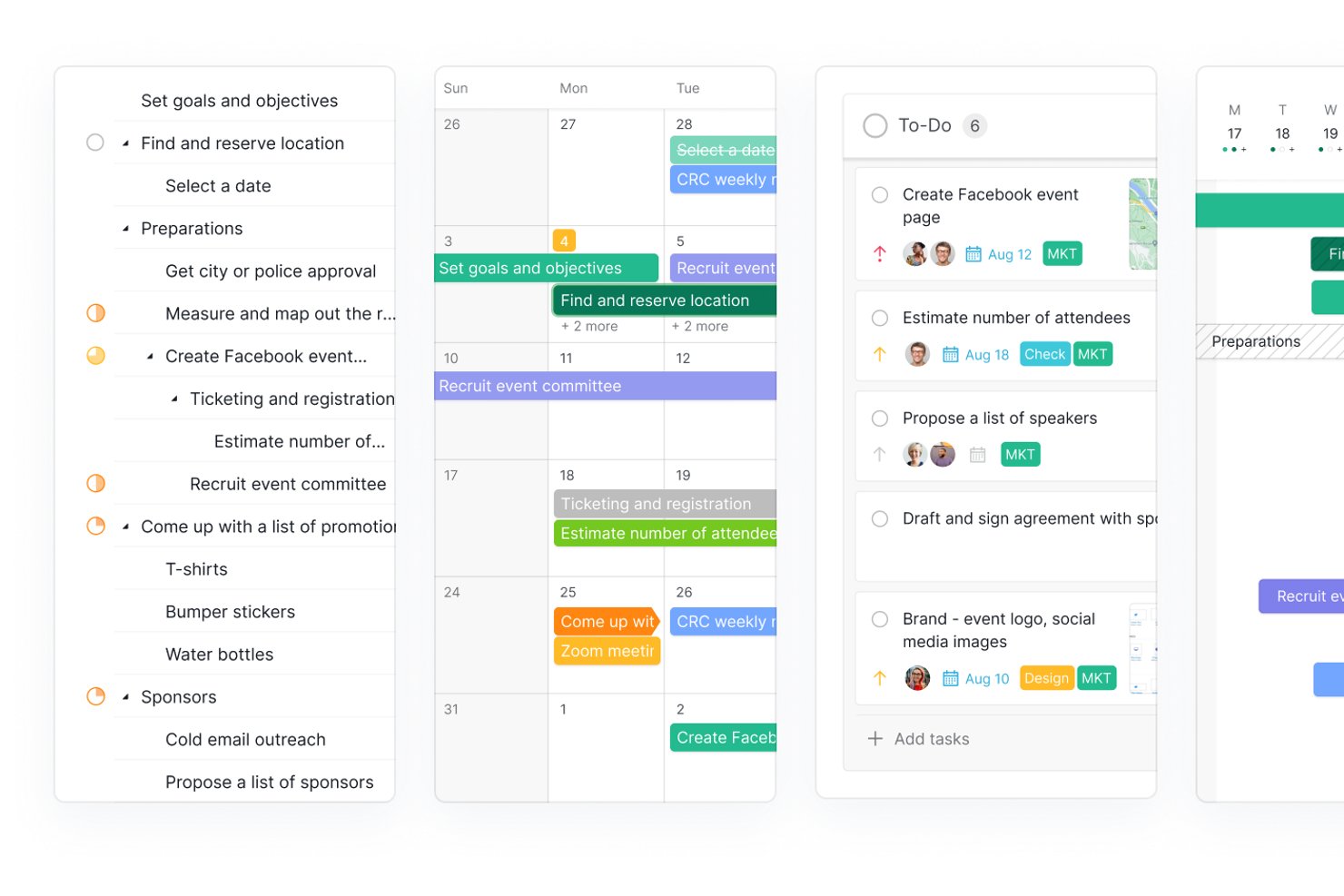
Quire è uno strumento di gestione dei progetti basato su una gerarchia infinita di attività nidificate, con diverse viste dei progetti, gestione degli sprint tramite sottoliste, documenti collaborativi integrati e pannelli di controllo a livello di portafoglio.
Per chi è più adatto Quire?
Quire è ideale per i team di startup nelle fasi iniziali che hanno bisogno di suddividere ambiti di prodotto complessi e in evoluzione in elementi d'azione granulari senza superare troppo rapidamente i limiti dello strumento.
Perché ho scelto Quire
Quire si è guadagnato un posto nella mia lista ristretta grazie al modo in cui gestisce la suddivisione infinita delle attività nidificate, una funzione davvero utile quando l'ambito del prodotto della tua startup continua a cambiare. Mi piace il fatto che sia possibile aprire qualsiasi obiettivo di alto livello per suddividerlo in sottoattività, sotto-sottoattività e oltre, quindi utilizzare le Sottoliste per estrarre dalla gerarchia gli elementi pronti per lo sprint senza perdere il contesto generale. La funzione Peekaboo consente di nascondere le attività che non sono ancora attuabili, mantenendo il team concentrato su ciò che deve effettivamente avanzare durante questo sprint.
Funzionalità principali di Quire
- Documenti collaborativi: I documenti integrati consentono al team di creare e archiviare note di riunione, specifiche di prodotto e procedure operative standard direttamente accanto alle attività.
- Cartelle intelligenti: Aggregano le attività di più progetti in un'unica vista a livello di portafoglio per una supervisione interfunzionale.
- Integrazione MCP: Collega client di intelligenza artificiale come Claude e ChatGPT direttamente ai dati di Quire per gestire le attività in linguaggio naturale.
- Accesso per team esterni: Invita collaboratori esterni o clienti ad attività specifiche con autorizzazioni limitate, senza richiedere un account Quire.
Integrazioni di Quire
Quire offre integrazioni native con Slack, GitHub, Google Calendar, Google Drive, Dropbox, Microsoft Teams, Power BI e Microsoft Copilot. Supporta inoltre MCP, un'API REST, webhook, Quire CLI, n8n e Zapier.
Pros and Cons
Pros:
- Le attività nidificate all'infinito sono adatte ad ambiti di prodotto complessi
- I documenti integrati riducono il numero di strumenti utilizzati
- Gestione delle attività e dei documenti basata sull'intelligenza artificiale
Cons:
- Nessun generatore integrato di regole di automazione
- Manca un modulo dedicato agli OKR o agli obiettivi
New Product Updates from Quire

Quire Adds Task and Standalone Reminders
Quire adds task reminders and standalone reminders with shared notifications, recurring schedules, and automatic date tracking. These updates help teams stay ahead of deadlines and manage reminders that do not need a task. For more information, visit Quire’s official site.
 .
.
Miro
Ideale per lavagne collaborative e visualizzazioni
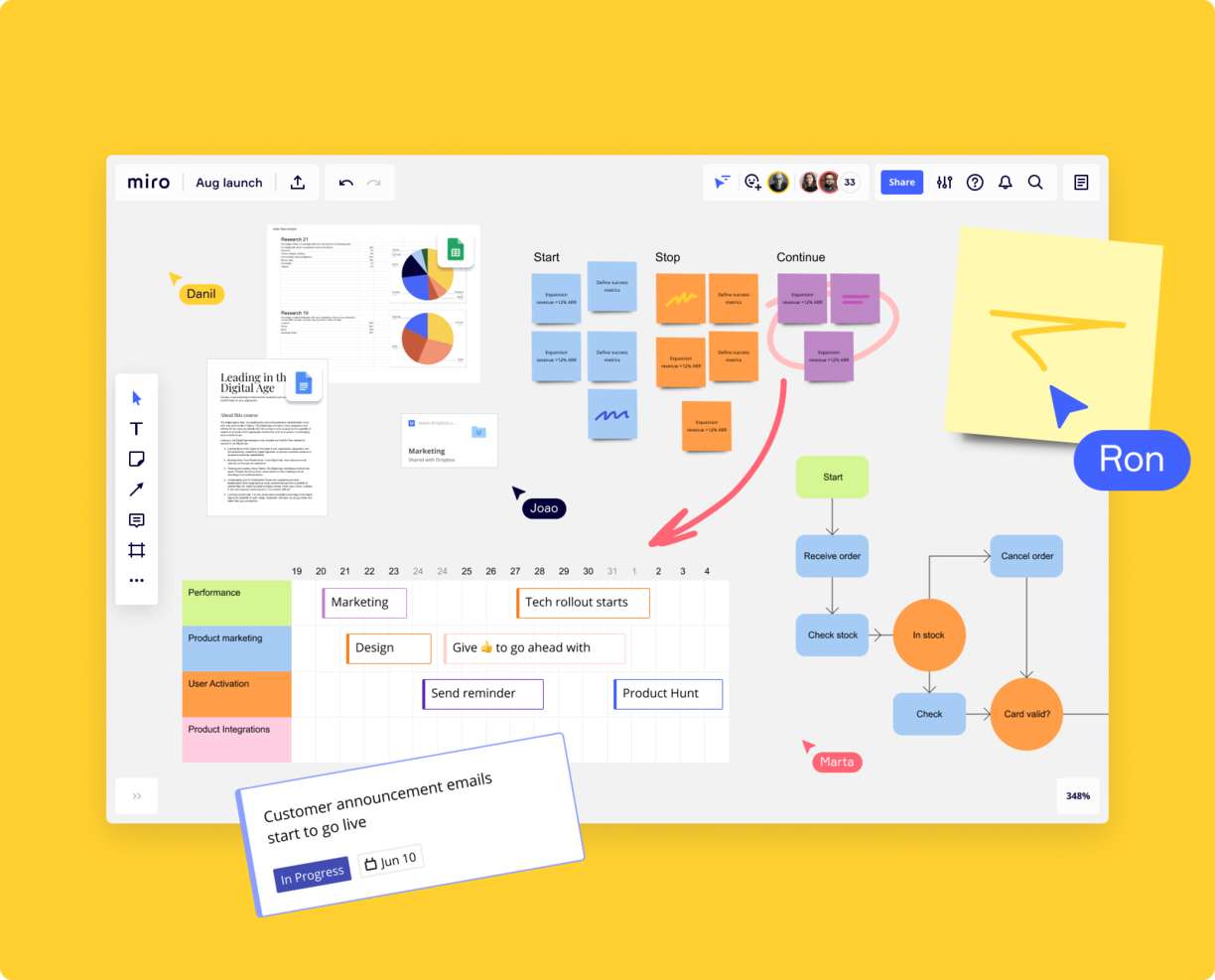
Miro è una piattaforma di lavagna online collaborativa ampiamente utilizzata dalle startup per la gestione dei progetti. Offre una vasta gamma di template come mappe mentali e bacheche Kanban e consente di importare e sviluppare ulteriormente schemi già esistenti da strumenti come Visio.
I team possono esprimere idee utilizzando diversi formati, tra cui dati numerici, immagini e video. L'integrazione di Miro con strumenti di gestione dei progetti come Jira e Asana permette di aggiungere un complemento visivo al tracciamento delle attività. Incorporando le lavagne Miro all'interno delle attività, i membri del team possono visualizzare l'avanzamento del progetto e le dipendenze in modo visivo, supportando una comprensione più chiara delle dinamiche progettuali. Questa funzionalità rende Miro una scelta pratica per le startup che cercano una soluzione di gestione dei progetti visiva e interattiva.
Altre caratteristiche degne di nota includono videoconferenze integrate, flussi di lavoro Agile, modelli per brainstorming e strumenti per la creazione di wireframe.
Miro offre integrazioni con un'ampia suite di strumenti, inclusi Confluence, monday.com, Zoom, Figma, Asana, Microsoft Teams, Jira, Slack, Google Drive, Box, Airtable, Notion, Azure e Webex. Alcune integrazioni sono disponibili solo per i piani a pagamento.
Pros and Cons
Pros:
- Funzionalità di comunicazione integrate per una collaborazione efficiente
- Configurazione intuitiva e semplice
- Piano gratuito disponibile per sempre
Cons:
- Lo zoom può risultare scattoso nei progetti di dimensioni maggiori
- Account visitatore/ospite disponibili solo nei piani a pagamento
New Product Updates from Miro
Miro Adds Japan Data Residency for Enterprise Customers
Miro has introduced Japan data residency for enterprise customers, offering in-region storage for production data, backups, and metadata, plus in-region compute infrastructure. For more information, visit Miro's official site.

FigJam
Ideale per una soluzione flessibile e personalizzabile
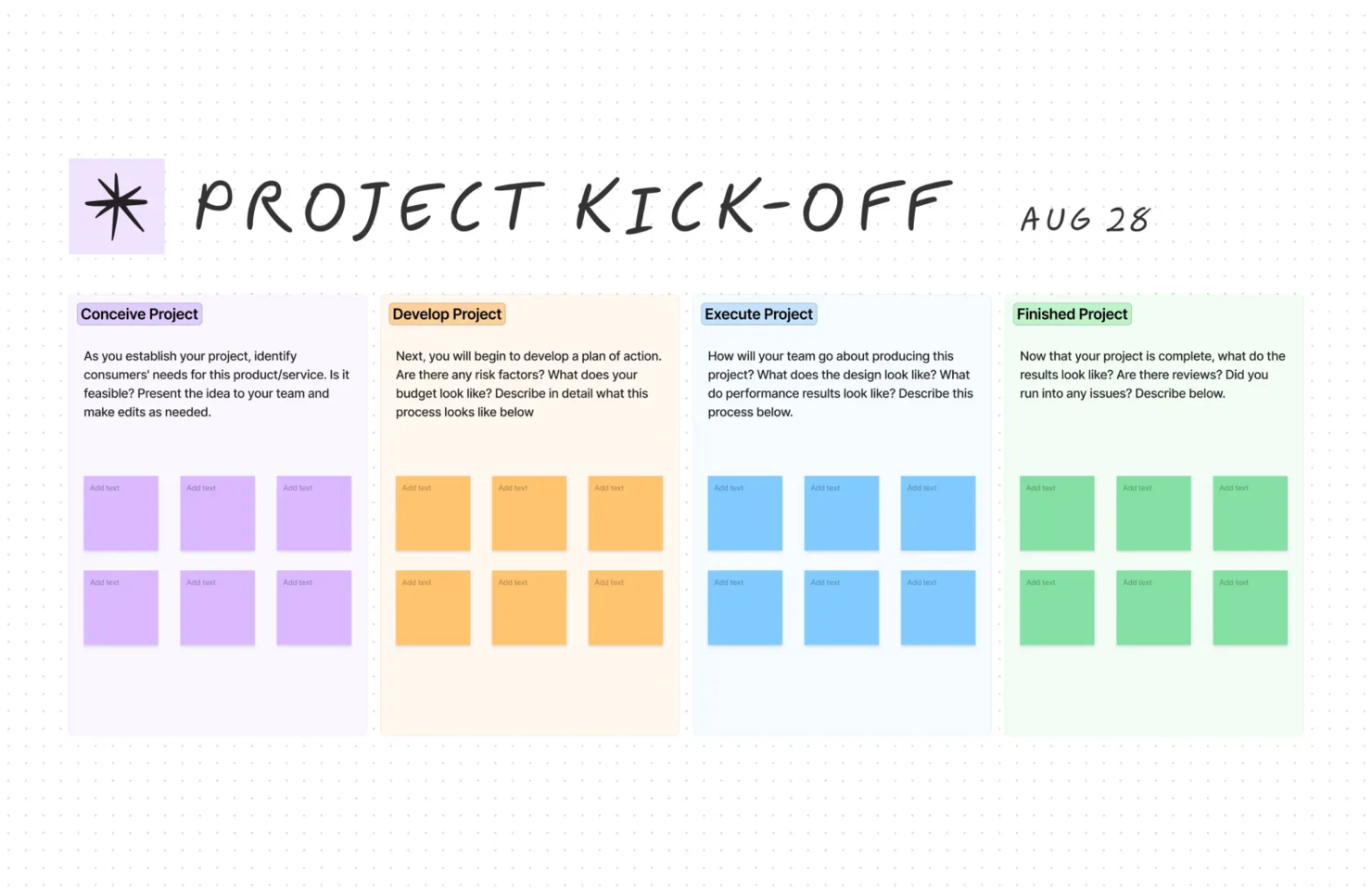
FigJam è una lavagna collaborativa che integra funzionalità di gestione dei progetti. Può essere utilizzata per diverse attività, come il brainstorming virtuale, la progettazione di flussi di lavoro, la strategia e pianificazione, e la collaborazione tra team. Diversamente dai classici strumenti di project management, questo software offre una piattaforma visiva flessibile che puoi personalizzare secondo le tue esigenze.
Le lavagne del software sono infinite, il che significa che puoi ingrandire o rimpicciolire quanto ti serve. Questo è utile per creare roadmap di prodotto complete e suddividerle in viste di livello superiore o inferiore. Puoi utilizzare audio e live chat, reazioni con timbri ed emoji e perfino avatar bitmoji per collaborare virtualmente con i membri del tuo team. Puoi anche invitare collaboratori esterni a lavorare sulle tue bacheche.
Per quanto riguarda la gestione dei progetti, i modelli predefiniti della piattaforma sono davvero utili. Sono disponibili layout di lavagne per i brainstorming di avvio progetto, roadmap, cronologie, diagrammi di flusso e workflow. Sono inclusi anche modelli per altri usi, come le riunioni di aggiornamento settimanali e giornaliere. Il software offre inoltre widget calendario e timeline per supportare la pianificazione ed esecuzione dei progetti.
Le integrazioni includono Figma, Microsoft Teams, Asana, Jira, Mixpanel e Github.
Pros and Cons
Pros:
- Ideale per schizzi e diagrammi veloci
- Offre modelli della community per vari utilizzi
- Funzionalità collaborative come post-it ed emoji
Cons:
- Accesso di condivisione limitato per chi non usa Figma
- Non ideale per la gestione progetti non visuale

Ideale per brainstorming, ideazione e gestione delle attività in un'unica soluzione
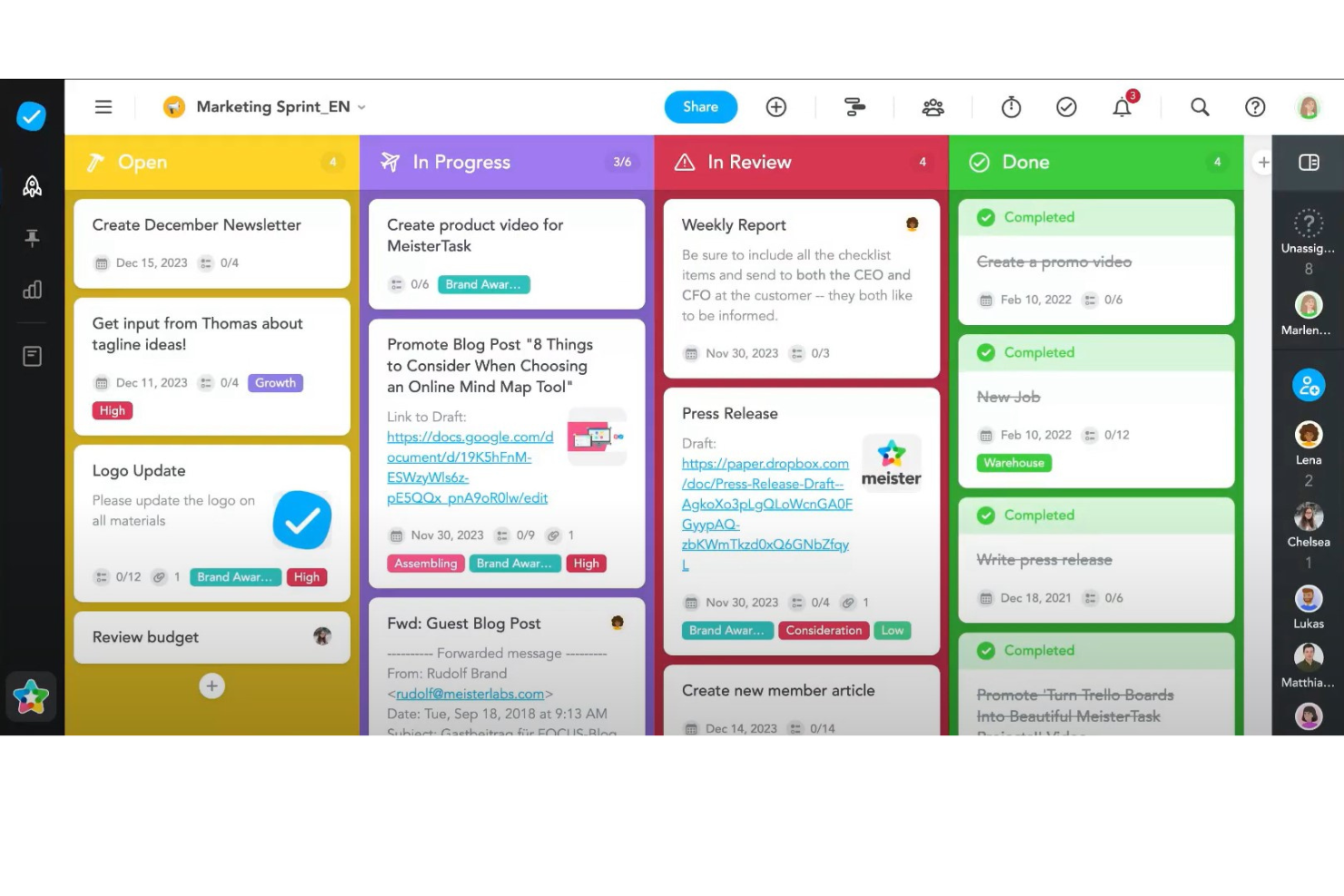
MeisterTask è uno strumento versatile per la gestione dei progetti, progettato per soddisfare le esigenze dei team alla ricerca di un modo efficiente per organizzare le attività e i flussi di lavoro. Si distingue per la sua interfaccia visivamente accattivante e intuitiva, che utilizza bacheche Kanban per la gestione delle attività e consente agli utenti di visualizzare facilmente a colpo d'occhio l'avanzamento dei progetti. La piattaforma è altamente personalizzabile e permette ai team di adattare le bacheche dei progetti alle proprie esigenze specifiche di flusso di lavoro. Questa flessibilità, combinata con funzionalità come l'automazione delle attività, i promemoria delle scadenze e il monitoraggio del tempo, rende MeisterTask una soluzione efficace per la gestione di un'ampia gamma di progetti.
Uno degli aspetti distintivi di MeisterTask è la sua perfetta integrazione con MindMeister, uno strumento online per la creazione di mappe mentali. Questa integrazione consente agli utenti di fare brainstorming, pianificare i progetti e poi convertire direttamente queste idee in attività operative all'interno di MeisterTask, facilitando una transizione fluida dall'ideazione all'esecuzione. Inoltre, la piattaforma supporta la collaborazione attraverso funzionalità come allegati di file, commenti e assegnazione delle attività, assicurando che i membri del team possano condividere facilmente le informazioni e rimanere allineati sui propri obiettivi. Grazie all'attenzione alla semplicità, alla collaborazione e all'integrazione, MeisterTask offre una soluzione completa per la gestione dei progetti che aiuta i team ad aumentare la produttività e a raggiungere i propri obiettivi in modo più efficiente.
Le integrazioni includono Slack, Dropbox, Github, Google Drive, Microsoft Teams, Outlook, Trello, Asana, MindMeister e centinaia di altre tramite un piano a pagamento con Zapier.
Pros and Cons
Pros:
- Offre un'app mobile per l'accesso in mobilità
- Bacheche dei progetti personalizzabili
- Include funzionalità di monitoraggio e reportistica del tempo
Cons:
- Opzioni limitate per impostare promemoria
- Non è ideale per progetti ampi e complessi

ClickUp
Ideale per team che desiderano uno strumento completo a basso costo
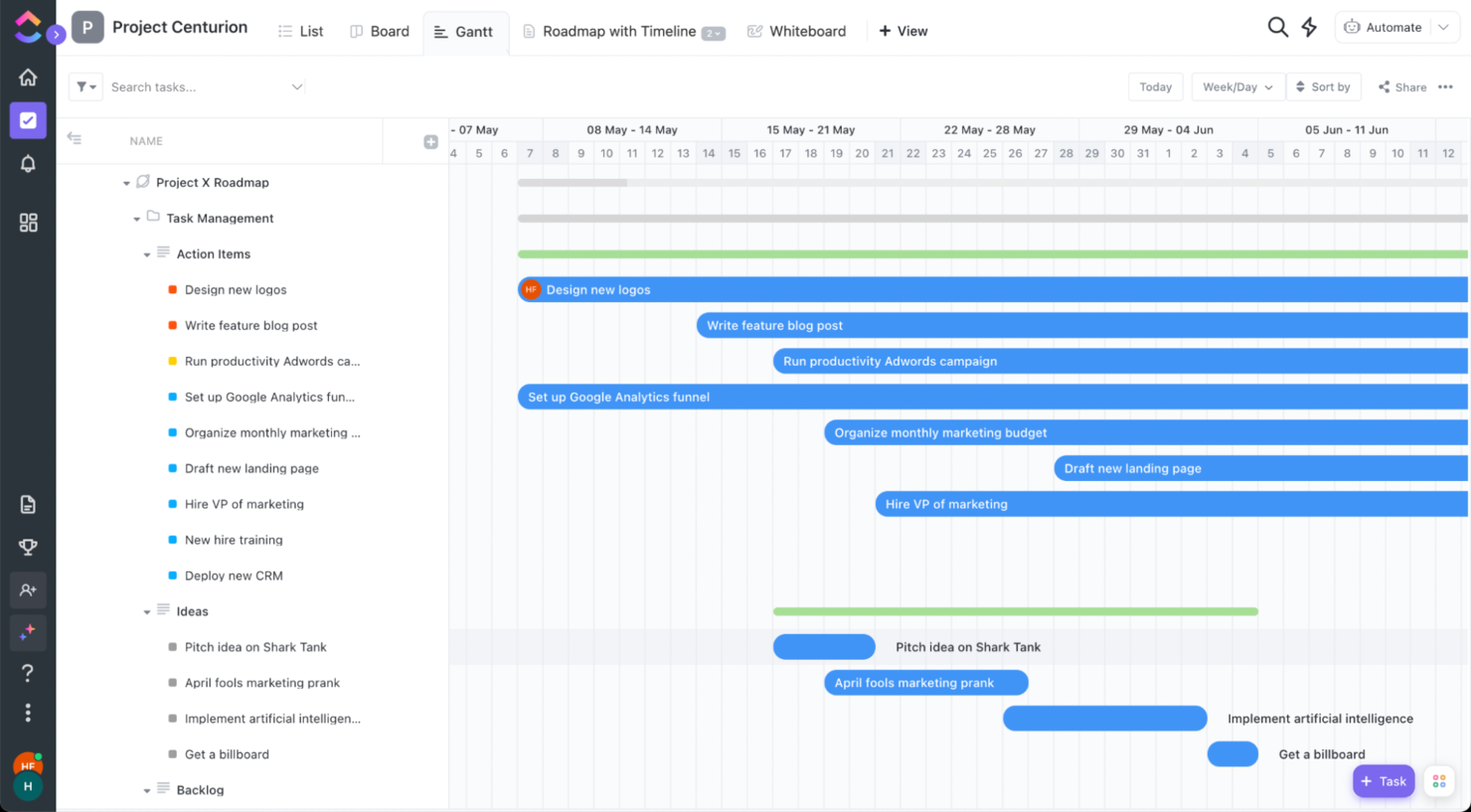
ClickUp è un software di gestione dei progetti che occupa i primi posti in molte classifiche. Ricco di funzionalità e con una versione gratuita incredibile, questo strumento offre tutto ciò di cui una startup ha bisogno: grande funzionalità a un prezzo basso o inesistente.
I documenti collaborativi ti aiuteranno a creare il tuo one pager, i documenti per gli investitori e gli accordi con i partner. Le lavagne virtuali possono aiutarti a fare brainstorming su un nuovo prodotto. La chat integrata nell'app manterrà le tue comunicazioni aggiornate senza il bisogno di acquistare altri software o affidarti a piattaforme di messaggistica istantanea.
Bonus: se hai bisogno di più dei 100MB di spazio di archiviazione della versione gratuita, puoi ottenere il piano per piccoli team e persino negoziare il prezzo comunicando quanto sei disposto a pagare per utente.
ClickUp offre integrazioni native con Slack, G Suite, Dropbox e molti altri strumenti, oltre a più di 1.000 integrazioni tramite Zapier.
Pros and Cons
Pros:
- Flussi di lavoro, dashboard e stati delle attività adattabili
- Piano gratuito robusto
- Si collega con numerose app di terze parti
Cons:
- La ricchezza di funzionalità può disorientare i nuovi utenti
- Alcuni utenti segnalano occasionali rallentamenti
New Product Updates from ClickUp
ClickUp Adds Meetings Hub, Super Agent Templates, and ZoomInfo Integration
ClickUp adds a searchable Meetings Hub, new ways to clone and template Super Agents, and a ZoomInfo integration through the App Center. These updates improve meeting retrieval, agent reuse, and access to sales intelligence. For more information, visit ClickUp’s official site.

Migliore app mobile
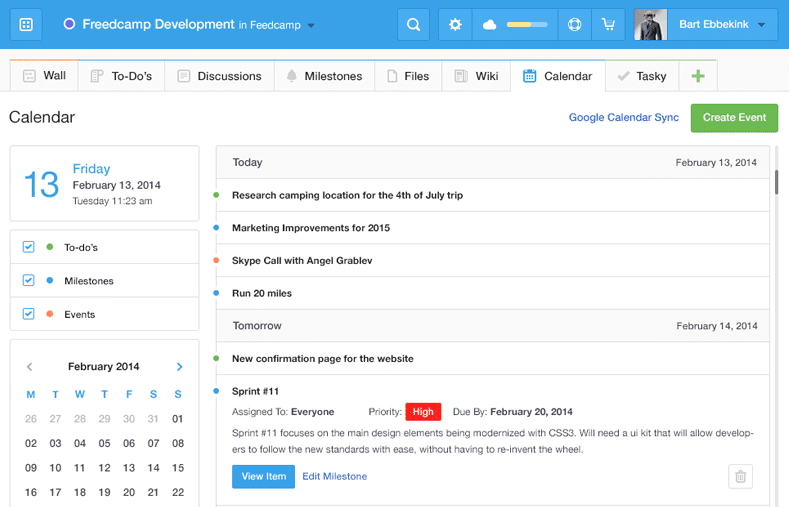
Freedcamp è un software di gestione progetti che offre una caratteristica ormai considerata standard per la maggior parte delle startup: una solida app mobile disponibile su iOS e Android. Questo significa che le startup senza una sede fisica o con computer limitati possono accedere ai dati di gestione progetti tramite il proprio smartphone o tablet personale.
Freedcamp permette agli utenti di salvare password, creare fatture, fare il backup e modificare file—tutto questo oltre ai modelli di progetto, alle funzionalità CRM e alla possibilità di personalizzazione del marchio che ci si aspetta da un solido strumento di project management. Freedcamp include anche calendari, forum di discussione, traguardi, un builder wiki per team/processi, monitoraggio dei problemi e un tracker del tempo.
Freedcamp si integra con migliaia di soluzioni tramite Zapier (che richiede un piano a pagamento separato).
Pros and Cons
Pros:
- Offre un piano gratuito robusto
- Supporta diverse visualizzazioni dei progetti
- Permessi utente personalizzabili
Cons:
- Integrazioni native limitate con terze parti
- Mancano strumenti di reportistica avanzata

Plaky
Ideale per modelli di flusso di lavoro versatili
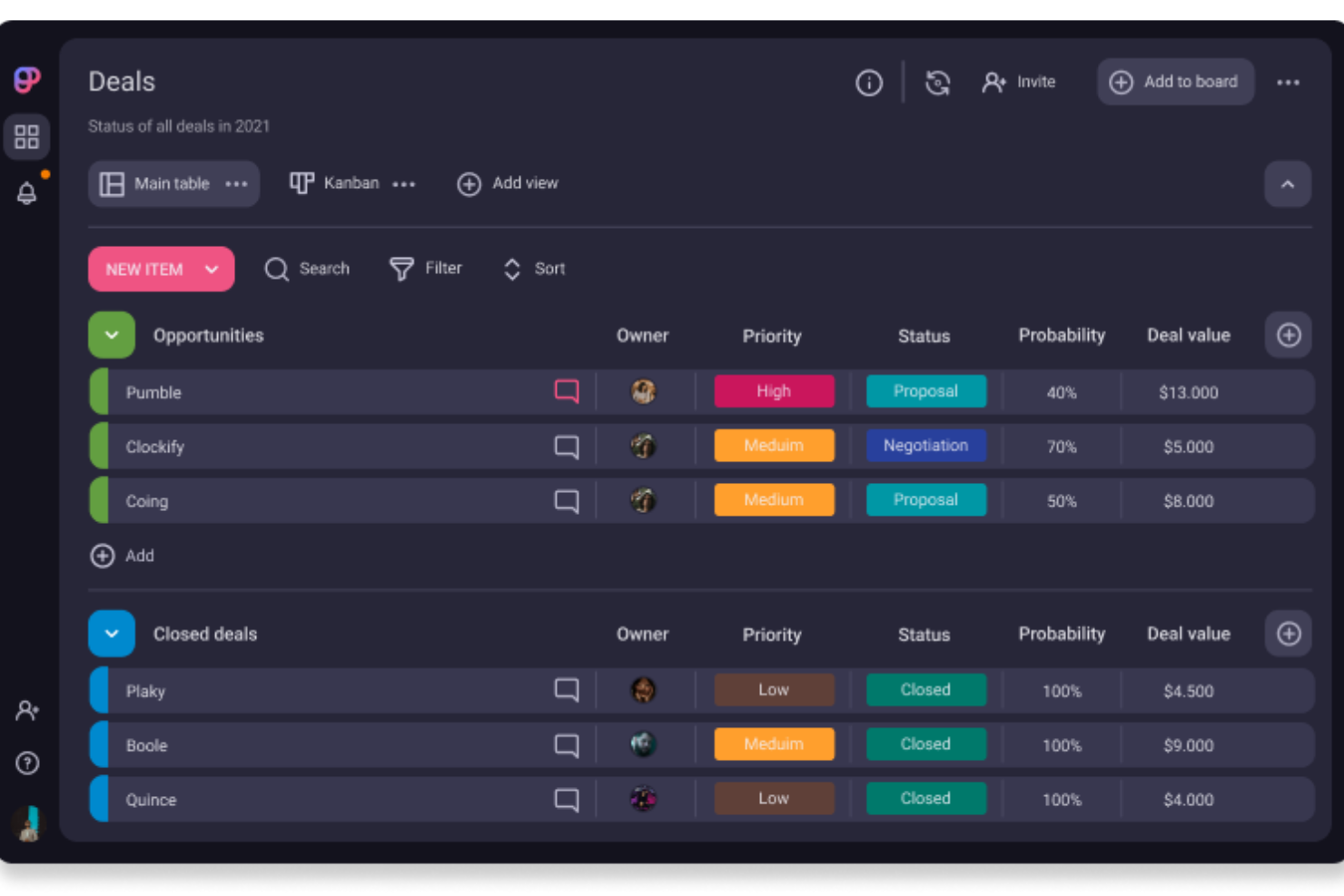
Plaky è un software di gestione progetti che offre modelli di flusso di lavoro versatili e funzionalità di pianificazione per una vasta gamma di funzioni aziendali dedicate alle startup.
Che tu abbia bisogno di una bacheca unificata per i progetti di marketing, di uno spazio per pianificare iniziative di vendita o di un modo intuitivo per monitorare i bug nello sviluppo software, Plaky offre una suite di modelli pronti all'uso che puoi personalizzare in base alle esigenze della tua azienda. Puoi anche creare bacheche di gestione progetti da zero per flussi di lavoro ancora più su misura.
Gli utenti possono pianificare le attività, creare campi personalizzati, impostare scadenze e assegnare i membri del team, tutto all'interno di uno stesso ambiente. Questo approccio centralizzato garantisce la piena visibilità sui progetti. I membri del team possono inoltre collaborare tramite le funzioni di commento e la condivisione file, assicurando che tutte le comunicazioni siano facilmente accessibili. Puoi anche visualizzare registri attività in tempo reale per monitorare qualsiasi modifica apportata a progetti o processi.
Plaky si integra con Clockify per il monitoraggio del tempo e Pumble per la comunicazione in tempo reale.
Pros and Cons
Pros:
- Piano gratuito con limiti generosi
- Flussi di lavoro personalizzabili e adattabili a varie esigenze
- Supporta la comunicazione di squadra e la condivisione dei file
Cons:
- Integrazioni limitate con terze parti
- Mancano funzionalità avanzate di analisi

Trello
Ideale per le bacheche Kanban
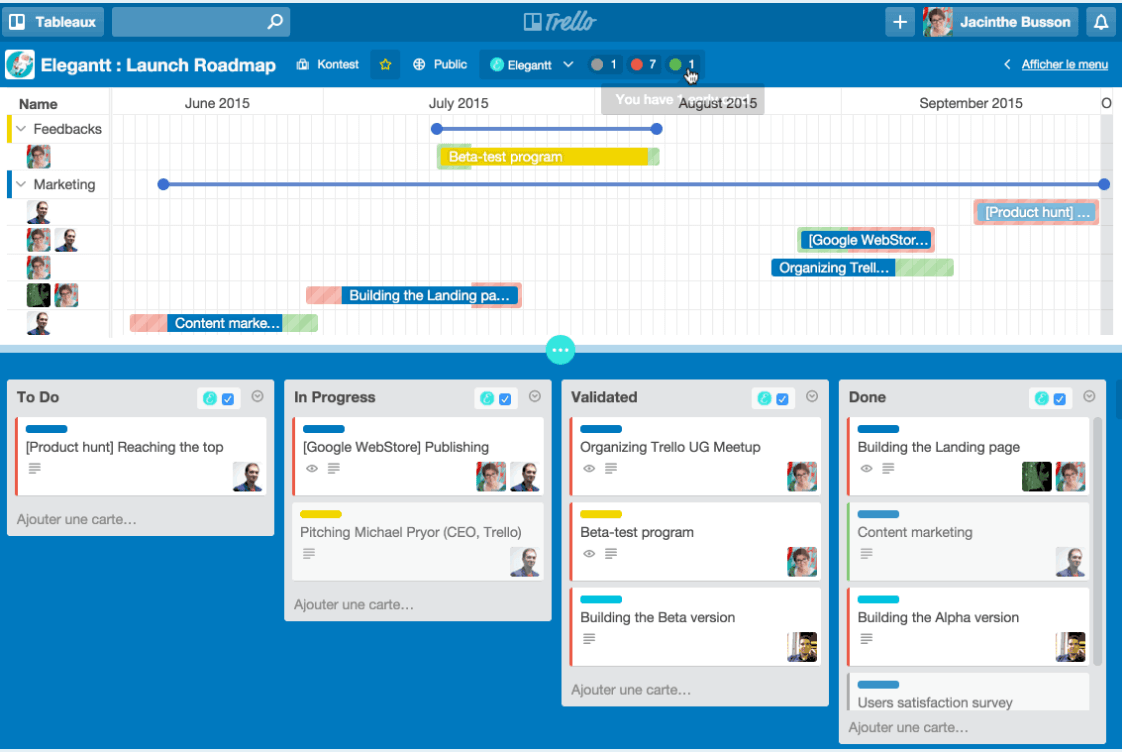
Trello è una soluzione per la gestione dei progetti nota soprattutto per le sue bacheche Kanban. Offre ai team startup uno strumento completo che può essere rapidamente configurato e compreso grazie all’intuitiva interfaccia drag-and-drop per personalizzare le bacheche e a un builder di automazioni dei flussi di lavoro senza codice. Il piano gratuito consente di eseguire 250 automazioni al mese, una caratteristica degna di nota poiché molti strumenti di Project Management limitano le automazioni ai soli piani a pagamento. Startup, prendetene nota!
Trello è ideale per i team startup grazie a un piano gratuito ricco di funzionalità che in particolare gli appassionati delle Kanban board sapranno apprezzare. Si ottengono carte illimitate, membri illimitati, fino a 10 bacheche per area di lavoro, una lista di integrazioni gratuite con altri strumenti di Project Management (Google Drive, Slack, ecc.), registri di attività illimitati, accesso tramite app mobile e autenticazione a 2 fattori per l’accesso.
Trello si integra con Confluence, Slack, Dropbox, Google Drive, Evernote e altre app di terze parti tipiche degli strumenti tecnologici moderni.
Pros and Cons
Pros:
- Bacheche in stile Kanban semplici e intuitive
- Ampia gamma di integrazioni
- Facile da configurare e inserire nuovi membri nel team
Cons:
- Può diventare caotico con molte carte
- Non ideale per progetti complessi
Altri strumenti
Ecco alcuni altri strumenti che non sono entrati nel mio elenco principale, ma che meritano di essere presi in considerazione se non hai trovato sopra il software di gestione dei progetti giusto per la tua startup.
- Google Workspace
Migliore integrazione di comunicazione e collaborazione
- Shortcut
Ideale per allineare i team di prodotto e ingegneria
- Teamwork.com
Ideale per team di gestione prodotto
- Lucen
Meglio per la creazione di sequenze temporali in PowerPoint
- Bonsai Agency Software
Ideale per la gestione integrata di progetti, clienti e finanze
- Height
Ideale per il suo piano gratuito con membri, ospiti e attività illimitati
- ESPMI
Il miglior software di gestione progetti per startup che fanno parte di un portafoglio
- Celoxis
Ideale per la gestione di un portafoglio progetti
- Scoro
Ideale per la supervisione completa dei progetti
- Hubstaff
Migliore gestione gratuita dei progetti per startup
- Wrike
Ideale per collaboratori esterni
- ProWorkflow
Ideale per la gestione di progetti multipli
- GoodDay
Ideale per spazi di lavoro personalizzabili
- Kissflow
Ideale per la creazione di moduli personalizzabili
- PathPro
Ideale per collegare il feedback dei clienti allo sviluppo del prodotto e alla gestione delle attività


Come valuto il software di project management per startup
Scompongo la mia valutazione in criteri di base—come il monitoraggio degli sprint, le visualizzazioni agili e i prezzi adatti alle startup—e fattori differenzianti che separano gli strumenti davvero consigliabili dagli altri.
Funzionalità di base (Requisiti minimi per questa lista)
Quando seleziono gli strumenti per la mia lista, valuto ciascuno su una scala da 0 (non offre la funzionalità) a 5 (eccelle in questo ambito) per ogni funzionalità di base elencata di seguito. Poi, calcolo il punteggio totale dello strumento in percentuale. Ogni strumento deve raggiungere un punteggio totale minimo del 65% per essere preso in considerazione.
- Monitoraggio di attività e progetti: Cerco gerarchie strutturate di attività con assegnatari, scadenze, priorità, dipendenze e campi personalizzati—abbastanza per gestire il lancio di un prodotto dal kickoff alla consegna.
- Visualizzazioni multiple dei progetti: I team lavorano in modo diverso, quindi verifico che uno strumento offra almeno visualizzazioni Kanban, elenco e calendario, con punti bonus per opzioni come Gantt/timeline.
- Strumenti di collaborazione per il team: Commenti, @menzioni e allegati devono essere direttamente sulle attività, così un team distribuito può discutere il lavoro nel contesto invece di passare tra discussioni su Slack.
- Supporto Agile & Sprint: Valuto se una piattaforma può gestire la pianificazione degli sprint, i backlog e gli story point—le basi di cui un piccolo team di ingegneri ha bisogno per sviluppare iterativamente.
- Prezzi scalabili & piano gratuito: Le startup prestano attenzione alle spese, quindi cerco un piano gratuito utilizzabile o un programma per startup e confermo che i costi per utente restino ragionevoli con la crescita del team.
- Integrazioni & automazioni: Controllo la disponibilità di connessioni native con strumenti a cui le startup già affidano il lavoro—GitHub, Slack, Google Workspace, Figma—oltre a builder di automazioni che riducono aggiornamenti e passaggi di stato ripetitivi.
Una volta che ho una lista di strumenti che soddisfano questi criteri, considero cosa distingue ogni piattaforma.
Fattori differenzianti (Cosa distingue i fornitori)
Ecco come metto a confronto i diversi fornitori:
Funzionalità distintive
Il monitoraggio di obiettivi e OKR è un grande fattore distintivo—cerco strumenti che permettano ai fondatori di collegare le attività quotidiane agli obiettivi aziendali, fondamentale quando gli investitori richiedono dimostrazioni sull’esecuzione rispetto alle milestone. Anche la presenza di documenti e wiki integrati è preziosa, perché riduce la proliferazione degli strumenti; un team di cinque persone non dovrebbe aver bisogno di una knowledge base separata per le specifiche di prodotto. Valuto anche le visualizzazioni roadmap, dato che i project manager devono poter comunicare chiaramente la direzione del prodotto sia agli sviluppatori sia agli stakeholder esterni senza dover costruire presentazioni.
Oltre le funzionalità
Il tempo per ottenere valore conta molto per le startup—verifico se una piattaforma offre template predefiniti per sprint e lanci, così che anche un fondatore non tecnico possa configurare l’ambiente di lavoro in poche ore, non settimane. La scalabilità è altrettanto importante; uno strumento deve supportare un team di cinque persone oggi e cento domani senza richiedere migrazioni complicate. Valuto anche la postura di sicurezza, in particolare la conformità a SOC 2 e GDPR, perché clienti aziendali e investitori lo chiedono sempre più spesso durante le due diligence.
Come scegliere il software di gestione dei progetti per startup
È facile perdersi in lunghi elenchi di funzionalità e strutture tariffarie complesse. Per aiutarti a mantenere la concentrazione mentre affronti il tuo processo di selezione del software, unico nel suo genere, ecco un elenco di fattori da tenere a mente:
| Fattore | Cosa considerare |
|---|---|
| Scalabilità | Assicurati che il software possa crescere insieme alla tua startup. Cerca prezzi flessibili, limiti per gli utenti e funzionalità avanzate che non richiedano di cambiare piattaforma con l'espansione del team. |
| Integrazioni | Scegli uno strumento che si connetta perfettamente alle app che già utilizzi—Slack, Google Drive, CRM o strumenti di sviluppo—per evitare interruzioni del flusso di lavoro e silos di dati (potresti anche prendere in considerazione un software di gestione dei progetti con funzionalità CRM) |
| Personalizzazione | I processi della tua startup sono unici. Scegli un software che ti permetta di personalizzare flussi di lavoro, dashboard e autorizzazioni in base al modo in cui lavora il tuo team. |
| Facilità d'uso | Una curva di apprendimento ripida rallenta la produttività. Scegli una soluzione con un'interfaccia intuitiva, una navigazione semplice e requisiti minimi di formazione. |
| Budget | Le startup hanno bisogno di soluzioni convenienti. Confronta i piani gratuiti, i periodi di prova e i prezzi per utente per assicurarti di ottenere un'opzione accessibile senza sacrificare le funzionalità essenziali. |
| Misure di sicurezza | Proteggi i dati aziendali sensibili. Cerca funzionalità come l'accesso basato sui ruoli, la crittografia e la conformità a standard come SOC 2 o GDPR. |
| Strumenti di collaborazione | Le startup si muovono rapidamente, quindi la comunicazione in tempo reale, i commenti sulle attività, la condivisione dei file e le dashboard del team dovrebbero essere integrati. |
| Accessibilità da dispositivi mobili | Il tuo team ha bisogno di accedere al lavoro anche in mobilità. Assicurati che il software disponga di un'app mobile ben progettata e con tutte le funzionalità. |
Cos'è il software di gestione dei progetti per startup?
Il software di gestione dei progetti per startup è uno strumento che ti aiuta a organizzare attività, tempistiche e risorse per i progetti della tua startup. Fondatori, responsabili di progetto e membri del team lo utilizzano per mantenere tutti aggiornati, collaborare in modo efficace e consegnare i progetti nei tempi previsti.
Le funzionalità includono il monitoraggio delle attività e delle tappe fondamentali, gli strumenti di collaborazione, la condivisione dei documenti e la gestione delle risorse. Il software di gestione dei progetti per startup è particolarmente utile quando il team cresce e i progetti diventano più complessi, perché permette di organizzare i progetti in modo da aumentare la produttività e crescere in modo efficace.
Funzionalità del software di gestione dei progetti per startup
Ecco alcune delle funzionalità che cerco quando valuto i sistemi di gestione dei progetti per piccoli team, startup e piccole imprese.
- Gestione del lavoro semplificata: la maggior parte delle startup non dispone di molte risorse da dedicare alla formazione e all'inserimento dei nuovi membri, quindi lo strumento deve offrire una pianificazione dei progetti semplificata e immediata, con una curva di apprendimento gestibile.
- Condivisione dei file: la comunicazione e la distribuzione di risorse limitate (ma in espansione) sono fondamentali per avviare qualsiasi startup.
- Aggiornamenti in tempo reale: le cose si muovono rapidamente e cambiano spesso, quindi è fondamentale che i diversi membri del team ricevano le informazioni più aggiornate il prima possibile.
- Pianificazione strategica: il tuo team startup avrà bisogno non solo di una roadmap estremamente chiara per definire la direzione, ma anche di un modo per avvisare i responsabili del team se un progetto o un'attività richiede un follow-up o una correzione di rotta.
- Collaborazione tra progetti: le startup gestiscono molti progetti contemporaneamente, dalla gestione dei social media allo sviluppo dei prodotti fino alle assunzioni; avrai bisogno di un'app che unifichi la collaborazione di tutti i reparti in un'unica posizione centrale.
- Bacheche Scrum per la visibilità del backlog: aiutano i team impegnati a visualizzare ciò che deve essere fatto per ogni sprint e a mettere da parte gli elementi meno prioritari. Inoltre, aiutano a tenere traccia delle ottime idee per la roadmap del prodotto e per la visione futura.
- Report: ottieni informazioni sull'avanzamento dei progetti, sulle prestazioni del team e sulle scadenze grazie a dashboard in tempo reale e report personalizzabili.
- Automazione: riduci il lavoro manuale automatizzando l'assegnazione delle attività, gli aggiornamenti di stato e le notifiche per mantenere i progetti in movimento in modo efficiente.
- Gestione dei documenti: archivia, organizza e condividi i file in una posizione centralizzata per assicurarti che il tuo team abbia facile accesso ai documenti di progetto più recenti.
- Gestione delle risorse: assegna in modo efficace membri del team, budget e strumenti per evitare un'allocazione eccessiva e mantenere i progetti sulla buona strada.
Se la tua piccola impresa è più precisamente un'organizzazione non profit, consulta questo elenco di software di gestione dei progetti per organizzazioni non profit; se sei un team composto da una sola persona, consulta questo elenco di software di gestione dei progetti per singoli utenti.
Domande frequenti sul software di gestione dei progetti per startup
Come si implementa la gestione dei progetti in una startup?
Ti renderai rapidamente conto della necessità di avere un responsabile di progetto nel tuo organico. Tuttavia, ti renderai anche conto che potresti non avere il budget necessario. Pertanto, il tuo primo compito consiste nello scegliere quale sia la posizione migliore all’interno del team attuale per gestire queste responsabilità.
Dopo aver scelto una persona, cerca strumenti gratuiti di gestione dei progetti da poter testare. Dopo averli provati, dovrai selezionare lo strumento più adatto alla tua situazione. Ad esempio, di solito è meglio scegliere software eseguibile su un MacBook o su un altro computer portatile, così non dovrai investire in nuovi sistemi. Una volta scelto lo strumento giusto per te, potrai iniziare a divertirti.
Anche con il software di gestione dei progetti più semplice, l’adozione dello strumento richiede comunque tempo e dovrai investire in incontri individuali per spiegare alle diverse persone come utilizzare lo strumento nel loro ruolo all’interno dei progetti. Sarà dispendioso in termini di tempo, ma rappresenta anche il modo migliore per garantire una transizione più fluida dal sistema attuale a questo strumento.
Infine, la ripetizione sarà la tua migliore alleata. Ripeti, ripeti, ripeti. Perfeziona il tuo processo e fornisci al team un riscontro sul suo utilizzo dello strumento, così continuerà a muoversi nella direzione desiderata.